

El software de gestión minorista agiliza todo, desde el seguimiento del inventario mediante códigos de barras hasta las transacciones móviles en el punto de venta, la precisión de las órdenes de compra y los informes de todos los canales, lo que te ayuda a gestionar tu tienda de forma más inteligente y aumentar los beneficios.
La plataforma adecuada elimina las ralentizaciones del sistema, para que puedas mantener los estantes abastecidos y a los clientes satisfechos en tiempo real.
Después de años trabajando en envíos internacionales, operaciones de almacén y comercio electrónico, he puesto a prueba los mejores programas de gestión minorista.
Aquí te mostraré qué herramientas ofrecen resultados y cómo elegir la mejor para tu negocio.
Por qué confiar en nuestras recomendaciones de software
6,700+
Reviews
20
Industry experts
16+
Evaluation factors
14
Years
Nuestro equipo lleva probando y evaluando software desde 2012. Como líderes del sector retail, sabemos lo difícil —y lo importante— que es elegir el software adecuado.
Para esta guía, evaluamos las herramientas mediante pruebas prácticas e investigación independiente, puntuando las herramientas según nuestros criterios de selección.
Nuestras reseñas reflejan nuestro criterio independiente, no un discurso de ventas.
Tabla comparativa de software de gestión minorista
\u003cp data-start=\u0022223\u0022 data-end=\u0022491\u0022\u003eLa tabla siguiente resume cada opción de software de gestión minorista en una línea sobre para quién es más adecuada, los detalles de la prueba y el precio inicial:\u003c/p\u003e
| Tool | Best For | Trial Info | Price | ||
|---|---|---|---|---|---|
| 1 | Mejor para tiendas independientes de suministros | Demostración gratuita disponible | Precio a consultar | Website | |
| 2 | Mejor para minoristas empresariales | Demostración gratuita disponible | Precio bajo solicitud | Website | |
| 3 | Ideal para notificaciones de inventario en tiempo real | Prueba gratuita + demo gratis disponible | Desde $59/mes | Website | |
| 4 | Mejor para la gestión minorista de extremo a extremo | Demo gratuita disponible | Precio a consultar | Website | |
| 5 | Ideal para flujos de trabajo entre módulos | Demo gratuita disponible | Precios bajo solicitud | Website | |
| 6 | Mejor para gestión de almacenes | Prueba gratuita de 14 días + plan gratis + demo gratuita disponible | Desde $29/mes (facturado anualmente) | Website | |
| 7 | Ideal para la gestión de equipos de campo | Demo gratis disponible | Precio a consultar | Website | |
| 8 | Mejor para restaurantes con servicio en mesa | Demostración gratuita disponible | Desde $99/mes | Website | |
| 9 | Ideal para la gestión de flujo de caja minorista | Plan gratuito disponible | Desde $199/mes | Website | |
| 10 | Ideal para pequeñas empresas | Plan gratuito disponible | Desde $29/mes | Website |


El mejor software de gestión minorista, analizado
Las reseñas siguientes detallan cómo gestiona cada plataforma los flujos de trabajo del mundo real: precisión de los códigos de barras, disponibilidad del punto de venta móvil, gestión de pedidos e informes de todos los canales. He mantenido intactas las descripciones breves de las herramientas, pero he añadido contexto sobre sus funciones, particularidades de precios y quién debería (o no debería) incluirlas en su conjunto tecnológico.
 Mejor para tiendas independientes de suministros
- Demostración gratuita disponible
- Precio a consultar
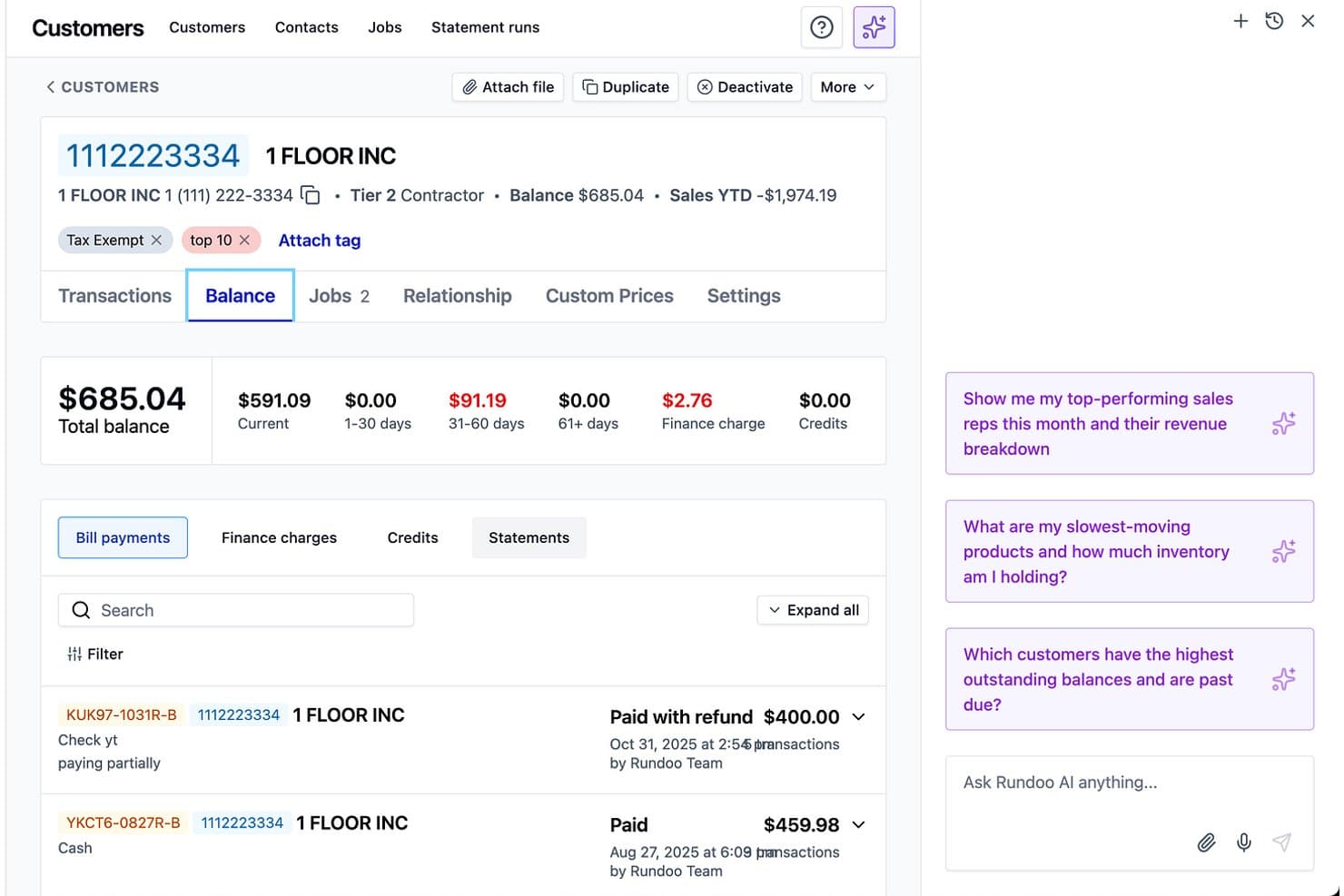
Rundoo ofrece una pantalla detallada de saldo de clientes e información empresarial impulsada por IA para la gestión de facturación de la tienda. Rundoo es una plataforma ERP y punto de venta basada en la nube diseñada para minoristas independientes de suministros, que abarca punto de venta, gestión de inventario, compras, cuentas por cobrar a contratistas e informes impulsados por IA en un solo sistema.
¿Para quién es mejor Rundoo?
Rundoo es una excelente opción para propietarios de ferreterías, tiendas de pintura, madera, suministros agrícolas, alimentación animal y centros de jardinería que buscan migrar de sistemas POS heredados como Epicor Eagle o Paladin.
Por qué elegí Rundoo
Rundoo merece su lugar en mi lista porque está desarrollado específicamente según la manera en la que realmente venden estas tiendas independientes de suministros. Me encanta que Dooey, el asistente de IA de Rundoo, genere órdenes de compra automáticamente al analizar la velocidad real de tus ventas, señales de bajo inventario y patrones estacionales. Además, las cuentas por cobrar a contratistas con precios personalizados por cliente y pago automático están integradas directamente en el POS, algo que la mayoría de plataformas minoristas generales no gestionan de forma nativa.
Características clave de Rundoo
- Integración con sistemas de entintado de pintura: Rundoo se sincroniza directamente con los principales catálogos de colores de pintura y máquinas de entintado, permitiendo la gestión de ventas e inventario en un solo flujo de trabajo.
- Seguimiento de inventario en varias ubicaciones: Administra inventario, transferencias y variantes entre múltiples tiendas, incluyendo requisitos verticales como inventario a granel y por dimensiones.
- Integraciones con catálogos de proveedores: Se conecta con los principales distribuidores y grupos de compra del sector, automatizando la creación de artículos y actualizaciones de precios desde los feeds de los proveedores.
- Gestión de cuentas de contratistas: Ofrece herramientas para gestionar cuentas por cobrar, precios personalizados por cliente, estados de cuenta y pagos automáticos para clientes comerciales.
Integraciones de Rundoo
Rundoo ofrece integraciones nativas con Stripe, QuickBooks, Benjamin Moore COLORx, Orgill, Do It Best, True Value, Sherwin-Williams, PPG y más. Está disponible una API para integraciones personalizadas.
Pros and Cons
Pros:
- Diseñado específicamente para el sector de tiendas de suministros
- Órdenes de compra generadas por IA a partir de datos reales de ventas
- Cuentas por cobrar a contratistas integradas en el POS
Cons:
- Sin soporte para ventas en línea o omnicanal
- No incluye programación de empleados ni seguimiento de personal
Learn more about Rundoo: Mejor para minoristas empresariales
- Demostración gratuita disponible
- Precio bajo solicitud
Visit WebsiteCustomer Rating:5/5
La función de comercialización de Oracle Retail ayuda a gestionar y optimizar las operaciones minoristas mediante la gestión eficiente de inventario, previsión de demanda y planificación de surtido. Oracle Retail está diseñado para minoristas empresariales que necesitan un control preciso y omnicanal sobre la gestión de mercancías, precios e inventario.
Obtienes una plataforma unificada para planificar, comprar, asignar y rastrear existencias a lo largo de enormes redes de tiendas. Es ideal para equipos que gestionan jerarquías de productos complejas y grandes surtidos de temporada.
¿Para quién es mejor Oracle Retail?
Directivos de operaciones minoristas y ejecutivos de comercialización en grandes empresas a nivel global que gestionan operaciones minoristas complejas y flujos de trabajo a escala empresarial.
Por qué elegí Oracle Retail
Elegí Oracle Retail porque te proporciona un único sistema para la configuración de artículos, compras y gestión de inventario, algo crítico cuando gestionas miles de SKUs en cientos de tiendas.
Tu equipo se beneficia de herramientas de previsión de demanda y planificación que recomiendan compras y asignaciones basadas en patrones reales de ventas, no en intuiciones.
También me gusta que los módulos de precios y promociones vinculan los objetivos de margen directamente con las estrategias regulares, promocionales y de liquidación.
Finalmente, las herramientas de operaciones en tienda de Oracle ayudan a los colaboradores a recibir, contar y completar pedidos con datos de existencias más precisos.
Funciones clave de Oracle Retail
Además de las herramientas principales de comercialización, Oracle Retail incluye varios módulos que puedes utilizar para reforzar la planificación diaria y la ejecución en tienda.
- Optimización de precios a lo largo del ciclo de vida: Modela los precios regulares, promocionales y de liquidación según objetivos de margen y rotación.
- Planificación de surtido: Ayuda a los planificadores a localizar los surtidos con conteos de opciones impulsados por la previsión y perspectivas estacionales.
- Suite de gestión de pedidos: Dirige y completa pedidos a través de canales según la disponibilidad real.
- Operaciones de inventario en tienda: Permite la recepción, el conteo y los ajustes de inventario desde dispositivos móviles.
Integraciones de Oracle Retail
Las integraciones incluyen Salesforce, SAP, Shopify, Snowflake, ServiceNow y Workday.
Pros and Cons
Pros:
- Amplias herramientas de planificación y fijación de precios respaldan estructuras minoristas complejas.
- Los flujos de trabajo unificados de comercialización mejoran la precisión financiera y de inventario.
- Las herramientas OMS y de tienda ayudan a los equipos a completar pedidos con menos errores de inventario.
Cons:
- Implementaciones largas y de gran demanda de recursos.
- El precio está más alineado con grandes empresas minoristas que con cadenas pequeñas.
Learn more about Oracle Retail: Ideal para notificaciones de inventario en tiempo real
- Prueba gratuita + demo gratis disponible
- Desde $59/mes
Visit WebsiteCustomer Rating:4.8/5
KORONA POS te permite rastrear y gestionar el inventario de forma remota con su sistema basado en la nube. KORONA POS ofrece a los minoristas en crecimiento una forma de mantener los estantes abastecidos, las tiendas en cumplimiento y los márgenes intactos en una o varias ubicaciones.
Es especialmente útil si manejas inventarios complejos—licores, vapeadores, alimentos especiales o tiendas de regalos—y necesitas visibilidad en tiempo real en lugar de adivinar a partir de los informes de ayer.
¿Para quién es mejor KORONA POS?
Gerentes de tiendas y supervisores de inventario en pequeñas y medianas empresas minoristas de Norteamérica y Europa que requieren notificaciones de stock en tiempo real.
Por qué elegí KORONA POS
Elegí KORONA POS porque te brinda notificaciones de inventario en tiempo real y pedidos automáticos, para que puedas establecer niveles mínimos y dejar que el sistema señale problemas antes de que se produzcan faltantes o excesos de inventario en tu balance.
También puedes gestionar proveedores directamente desde la plataforma, lo que significa que tu equipo puede comparar el rendimiento de los proveedores y optimizar las compras en lugar de perseguir hojas de cálculo.
Me gusta que la misma lógica de inventario funciona tanto si gestionas una tienda como una cadena en expansión, por lo que tu equipo puede utilizar un solo manual a medida que añades ubicaciones.
Para minoristas con alta carga normativa, KORONA POS incluye verificación de edad y alertas de productos que ayudan a los cajeros a identificar artículos restringidos en el punto de venta, reduciendo el riesgo mientras mantienen la fluidez en las filas.
En cuanto a pagos, es agnóstico respecto al procesador, por lo que puedes buscar mejores tarifas en vez de quedar atado a un solo proveedor.
Funciones principales de KORONA POS
Más allá de esas herramientas de inventario y cumplimiento, algunas funciones extra hacen que KORONA POS se sienta como un verdadero centro de gestión minorista, no solo una caja registradora.
- Panel de KORONA Studio: Oficina administrativa en la nube donde ajustas precios, promociones y reglas de pedidos desde cualquier lugar.
- Reportes avanzados y KPIs: Reportes preconstruidos de ventas, categorías, ubicaciones y rendimiento del personal para que puedas detectar tendencias más rápido.
- Programas de fidelización de clientes: Motor de fidelización y promociones integrado que te permite premiar a los clientes recurrentes sin añadir otra aplicación.
- Herramientas de entradas y membresías: Soporte para entradas, pases y membresías para sectores como museos, bodegas y atracciones.
Integraciones de KORONA POS
Las integraciones incluyen WooCommerce, Adobe Commerce, QuickBooks Online, Bookkeep, bLoyal, Bottlecapps, TimeForge, Octopus Bridge, Card Market y CMS Max.
Pros and Cons
Pros:
- Las alertas de inventario en tiempo real previenen faltantes y excesos en todas las ubicaciones.
- Las herramientas para franquicias gestionan regalías y reportes de múltiples tiendas en un solo backend compartido.
- La verificación de edad y seguimiento de vida útil apoyan a minoristas de licor, vapeadores y alimentos especiales.
Cons:
- Funcionalidad offline limitada; algunas funciones requieren conectividad constante a Internet.
- El rendimiento en algunas tabletas puede ser lento durante las horas pico del comercio minorista.
Learn more about KORONA POS: Mejor para la gestión minorista de extremo a extremo
- Demo gratuita disponible
- Precio a consultar
Visit WebsiteCustomer Rating:4.4/5
Brightpearl es un software de gestión minorista que ayuda a las empresas a administrar sus operaciones en varios canales de venta. Brightpearl ofrece a minoristas y mayoristas en crecimiento, que venden en múltiples canales, un único lugar para gestionar inventario, pedidos, compras, almacenes, CRM y contabilidad.
Es ideal si ya superaste la fase de herramientas básicas y necesitas un control más estricto de las operaciones posteriores a la compra en comercio electrónico, marketplaces y tiendas físicas.
¿Para quién es mejor Brightpearl?
Responsables de tiendas y líderes de operaciones en minoristas omnicanal pequeños y medianos a nivel global que gestionan operaciones minoristas de principio a fin.
Por qué elegí Brightpearl
Elegí Brightpearl para minoristas que buscan una única “fuente de la verdad” para sus operaciones, en lugar de fusionar herramientas separadas de inventario, pedidos y contabilidad.
Cuando actualizas stock, envías un pedido o recibes una orden de compra, esos cambios se propagan en el mismo sistema para que tu equipo no tenga que conciliar hojas de cálculo al final del mes.
Puedes configurar reglas para que Brightpearl asigne stock automáticamente, priorice ciertos canales o envíe pedidos al almacén correcto, lo que permite que tu equipo dedique más tiempo a resolver excepciones y menos a registrar actualizaciones repetitivas.
Para marcas multicanal, permite gestionar un mayor volumen de pedidos—en línea, en marketplaces y en tienda física—a la vez que proporciona datos precisos de disponibilidad para la venta y márgenes considerando el coste final de cada producto.
Como la información de contabilidad, inventario y pedidos vive junta, obtienes reportes de desempeño más limpios por producto, canal y ubicación, lo que facilita decidir dónde invertir en inventario y marketing.
Características clave de Brightpearl
Estas son algunas funciones que los minoristas realmente usan en el día a día con Brightpearl.
- Planificación de inventario en múltiples ubicaciones: Coordina stock, transferencias y niveles de seguridad en todos los almacenes para que los planificadores puedan proteger la disponibilidad sin sobrecompras.
- Gestión de pedidos pendientes y preventa: Captura demanda cuando los artículos no están en el estante y asigna automáticamente el stock entrante para que ventas, compras y servicio estén siempre alineados.
- Flujos de trabajo para devoluciones y RMA: Haz seguimiento de las devoluciones desde la autorización hasta la reposición o baja, para que los reembolsos, niveles de stock y márgenes sean precisos.
- Paneles analíticos para retail: Supervisa el rendimiento por canal, SKU y ubicación en vistas configurables para que los líderes puedan identificar rápidamente cuellos de botella y líneas con bajo desempeño.
Integraciones de Brightpearl
Las integraciones incluyen Shopify, BigCommerce, Magento, Amazon, eBay, Walmart, Xero, QuickBooks Online, Sage Intacct y Mailchimp.
Pros and Cons
Pros:
- Plataforma unificada de operaciones para inventario, pedidos, compras, CRM y contabilidad.
- Las reglas de automatización reducen el trabajo manual en la asignación, compras y envío de pedidos.
- La sincronización de stock multicanal ayuda a evitar la sobreventa en ecommerce, marketplaces y tiendas físicas.
Cons:
- La implementación y configuración inicial puede ser exigente para equipos internos más pequeños.
- La cotización personalizada y la ausencia de planes públicos dificultan la comparación de costos iniciales.
Learn more about Brightpearl: Ideal para flujos de trabajo entre módulos
- Demo gratuita disponible
- Precios bajo solicitud
Visit WebsiteCustomer Rating:4.4/5
Acumatica Cloud ERP ofrece funciones para la gestión minorista todo en una sola plataforma. Acumatica Cloud ERP está diseñado para minoristas que buscan controlar inventario, pedidos y clientes en tiendas, almacenes y comercio electrónico sin depender de hojas de cálculo.
Es ideal para minoristas medianos con operaciones multilocalización u omnicanal que desean gestionar existencias, finanzas, TPV y comercio desde un solo lugar, en lugar de tener que unir múltiples soluciones puntuales.
¿Para quién es mejor Acumatica Cloud ERP?
Equipos de finanzas y operaciones en empresas medianas y grandes de Norteamérica y Europa que coordinan flujos de trabajo entre diversos módulos de negocio.
Por qué elegí Acumatica Cloud ERP
Elegí Acumatica Cloud ERP porque te da un solo sistema para inventario, pedidos, clientes y finanzas, evitando que tu equipo tenga que conciliar datos incongruentes cada semana.
Obtienes visibilidad en tiempo real del stock en almacenes, tiendas y ecommerce, ayudando a reducir sobreventas mientras se mantiene el inventario ajustado.
Su TPV se conecta directamente con datos de pedidos e inventario, permitiendo soportar modalidades como BOPIS y devoluciones sin volver a ingresar datos manualmente.
También destaco los conectores nativos de comercio, que mantienen sincronizados datos de productos y pedidos en Shopify, BigCommerce y Amazon.
Características clave de Acumatica Cloud ERP
Aquí tienes algunas capacidades específicas para retail que son cruciales cuando se pasa de lo básico y se busca un control real sobre las operaciones.
- Portal de autoservicio para clientes: Permite a los clientes rastrear pedidos, ver facturas y registrar casos en línea, reduciendo solicitudes de soporte y manteniendo el historial de cuentas ligado a tu CRM.
- Sistema de gestión de almacenes: Utiliza códigos de barras para la recepción, preparación y embalaje, sincronizando el trabajo en almacén con las ventas y reduciendo errores en la preparación y envío.
- Paneles de control por rol: Proporciona a gerentes, compradores y finanzas indicadores en vivo de ventas, margen, rotación de stock y devoluciones, en lugar de informes estáticos obsoletos a medio día del lunes.
- Gestión de precios y promociones para retail: Centraliza las reglas de catálogo, precios y descuentos para ejecutar promociones coherentes en tiendas y canales sin ajustes manuales en el TPV y la configuración de ecommerce.
Integraciones de Acumatica Cloud ERP
Las integraciones incluyen Shopify, BigCommerce, Magento, Amazon, ShipStation, SPS Commerce, 3G Pacejet Shipping y Avalara.
Pros and Cons
Pros:
- El inventario en tiempo real a través de tiendas y canales reduce el riesgo de sobreventa.
- Los conectores nativos de comercio electrónico mantienen sincronizados pedidos online y stock.
- Los paneles por rol ofrecen a responsables de tienda y operaciones rápida información de márgenes.
Cons:
- La implementación y configuración suele requerir un partner con experiencia en retail.
- La configuración avanzada puede ser excesiva para minoristas pequeños de una sola ubicación.
Learn more about Acumatica: Mejor para gestión de almacenes
- Prueba gratuita de 14 días + plan gratis + demo gratuita disponible
- Desde $29/mes (facturado anualmente)
Visit WebsiteCustomer Rating:4.3/5
La función de inventario de Zoho Inventory permite a las empresas gestionar y rastrear eficazmente sus niveles de stock, pedidos y procesos de cumplimiento en un sistema centralizado. Zoho Inventory está diseñado para minoristas y mayoristas que gestionan inventario en múltiples almacenes, canales y regiones.
Obtienes un control detallado sobre lotes, números de serie y ubicaciones, para que puedas ver exactamente qué hay en cada lugar—y qué está en riesgo de caducar o agotarse—sin necesidad de pasar a un ERP más complejo.
Es una excelente opción si tu equipo necesita visibilidad a nivel de almacén, y no solo una cifra de stock disponible en tu punto de venta.
¿Para quién es mejor Zoho Inventory?
Responsables de almacén y equipos de operaciones en organizaciones pequeñas y medianas de todo el mundo que supervisan el seguimiento del inventario y el control de existencias.
Por qué elegí Zoho Inventory
Elegí Zoho Inventory porque te brinda verdadera visibilidad multi-almacén—cada ubicación tiene su propio stock, ubicaciones y órdenes de transferencia, para que puedas gestionar el cumplimiento de pedidos con confianza.
También obtienes seguimiento por lotes y números de serie para productos que requieren trazabilidad, permitiendo que tu equipo gestione retiros, garantías o artículos sensibles a la caducidad sin hojas de cálculo.
El escaneo de códigos de barras agiliza la recogida y el empaquetado al capturar SKUs, lotes o números de serie directamente en los pedidos.
Además, las alertas integradas de reposición te mantienen prevenido ante problemas de bajo stock al vincular el reabastecimiento con la actividad real del almacén.
Funciones clave de Zoho Inventory
Más allá de los controles centrales de almacén, Zoho Inventory añade características operativas que tu equipo realmente usará a diario.
- Planificación de reabastecimiento: Utiliza niveles de reposición y vistas de reabastecimiento para destacar los artículos con poco stock, permitiéndote emitir órdenes de compra antes de que se agoten las existencias.
- Flujos de trabajo de recoger, empaquetar y enviar: Ofrece listas de recogida, paquetes y envíos desde un solo lugar, para que tu equipo mueva pedidos de la estantería al camión sin cambiar de herramientas.
- Gestión de tarifas y etiquetas de envío: Se conecta con transportistas para obtener tarifas en tiempo real, generar etiquetas y rastrear envíos directamente en Zoho Inventory.
- Informes de inventario y ventas: Muestra el movimiento de stock, pedidos pendientes y el rendimiento a nivel de almacén, para que puedas ajustar distribuciones, cantidades de compra y reglas de cumplimiento con datos reales.
Integraciones de Zoho Inventory
Las integraciones incluyen Shopify, Amazon, eBay, Etsy, Zoho Commerce, Zoho Books, Zoho CRM, USPS, UPS y AfterShip.
Pros and Cons
Pros:
- El seguimiento multi-almacén con órdenes de transferencia mantiene el stock equilibrado entre ubicaciones.
- El seguimiento por lotes y seriales más el escaneo de códigos de barras facilita una recogida precisa.
- Las alertas de reabastecimiento y vistas de reposición reducen el riesgo de agotamiento de stock.
Cons:
- Las funciones avanzadas de seguimiento sólo están disponibles en planes de suscripción más altos.
- Sin previsión de demanda integrada para patrones de inventario complejos y multiestacionales.
Learn more about Zoho Inventory: Ideal para la gestión de equipos de campo
- Demo gratis disponible
- Precio a consultar
Visit WebsiteCustomer Rating:4.4/5
Repsly ofrece análisis en tiempo real con paneles de insights para el seguimiento de métricas de desempeño. Repsly ayuda a las marcas de bienes de consumo y a los proveedores de servicios minoristas a mantener bajo control a los representantes de campo, los merchandisers y las condiciones de las tiendas a lo largo de una amplia red de puntos de venta.
Obtienes una aplicación móvil orientada a las visitas en campo más paneles de control en la oficina central que convierten la actividad a nivel de tienda, fotos y encuestas en decisiones sobre promociones, exhibiciones y disponibilidad.
¿Para quién es mejor Repsly?
Gerentes de ventas de campo y supervisores de equipos en empresas de bienes de consumo y minoristas de tamaño mediano de Norteamérica y Europa que gestionan equipos móviles.
Por qué elegí Repsly
Elegí Repsly porque brinda a los equipos de campo agendas de visitas claras, herramientas fotográficas y formularios móviles, para que cada parada en la tienda genere datos útiles y no suposiciones.
Su reconocimiento de imágenes con IA convierte las fotos de estantes en insights a nivel de SKU, ayudando a detectar quiebres de stock y problemas de exhibición mediante modelos entrenados enlazados con tu catálogo de productos.
Los gerentes obtienen paneles que comparan la ejecución por minorista, marca o representante, dándote acciones de seguimiento concretas en vez de anécdotas.
Características clave de Repsly
Además del seguimiento básico de visitas, Repsly te ofrece herramientas enfocadas en la calidad y cobertura de la ejecución en tienda.
- Gestión de territorios y programación: Define territorios, establece frecuencias de visita y asigna rutas para que los representantes lleguen a las cuentas prioritarias en la cadencia correcta.
- Captura de pedidos en tienda: Permite que los representantes envíen pedidos, devoluciones y solicitudes de reposición desde el pasillo, vinculados al historial de cada cuenta.
- Formularios móviles y encuestas: Crea plantillas de auditoría de tienda, listas de verificación de cumplimiento promocional y formularios de encuesta que los representantes completan en sus teléfonos.
- Paneles de insights e indicadores clave: Haz seguimiento a métricas de ejecución, condiciones de los estantes y desempeño de promociones casi en tiempo real, por regiones y equipos.
Integraciones de Repsly
Las integraciones incluyen Salesforce, HubSpot, Zoho CRM, QuickBooks, Xero, Mailchimp, Google Sheets y Microsoft 365.
Pros and Cons
Pros:
- El reconocimiento de estantes con IA ayuda a detectar quiebres de stock y problemas de exhibición rápidamente.
- Las herramientas de planificación de territorios y visitas apoyan grandes redes minoristas distribuidas.
- Los formularios móviles y encuestas capturan datos consistentes en cada visita a la tienda.
Cons:
- El generador de formularios puede tomar tiempo en configurarse para flujos de trabajo complejos.
- Las presentaciones de visitas son difíciles de corregir cuando los representantes hacen check-in en ubicaciones incorrectas.
Learn more about Repsly: Mejor para restaurantes con servicio en mesa
- Demostración gratuita disponible
- Desde $99/mes
Visit WebsiteCustomer Rating:3.8/5
Usa la interfaz POS de Revel para gestionar fácilmente los pedidos en restaurantes con servicio en mesa. Revel Systems está diseñado para restaurantes con servicio en mesa y minoristas con múltiples sucursales que no pueden permitirse el caos en los pedidos ni la incertidumbre en el inventario.
Obtienes un punto de venta (POS) basado en iPad que integra la gestión de mesas, inventario a nivel de ingredientes y reportes centralizados, para que puedas mantener los pedidos en movimiento mientras realmente confías en tus números.
¿Para quién es mejor Revel Systems?
Gerentes y propietarios de restaurantes con servicio en mesa en toda Norteamérica que necesitan una gestión integrada de POS y flujos de trabajo.
Por qué elegí Revel Systems
Elegí Revel Systems porque ofrece a los restaurantes con servicio en mesa y a las cadenas control real tanto sobre el comedor como sobre la administración.
Puedes gestionar mesas, dividir cuentas, enviar pedidos a las estaciones de cocina correctas y vigilar los tiempos de atención desde una sola pantalla de POS, para que el servicio no se detenga los viernes por la noche.
Para operaciones más orientadas al retail, la gestión de inventario por ingrediente y artículo te permite monitorear el stock en diversas ubicaciones y generar órdenes de compra según el uso real y no por intuición.
También me gusta el modo “Siempre Activo”, que te permite seguir tomando pedidos y pagos cuando falla el internet, y luego sincroniza todo una vez restablecida la conexión, para que tu historial de ventas y el conteo de inventario sigan siendo precisos.
Por último, la consola centralizada de Revel te permite cambiar menús, precios y promociones una sola vez y aplicar los cambios a todas las sucursales, ahorrando a tu equipo el tener que ingresar en varios sistemas con el riesgo de olvidar alguno.
Características clave de Revel Systems
Más allá de las herramientas para mesas y tickets, Revel cuenta con extras importantes para operaciones serias de retail y restauración.
- Sistemas de pantalla en cocina: Envía tickets digitales a las pantallas de cocina, prioriza platos y controla los tiempos para mantener la línea en movimiento.
- Programación y control horario de empleados: Crea horarios, controla registros de entrada y salida y asocia reportes de mano de obra con ventas para detectar turnos con exceso de personal.
- Gestión centralizada de menús y catálogos: Actualiza artículos, precios y modificadores una sola vez en la oficina central y distribuye cambios a todas las sucursales.
- Perfiles de clientes y fidelización: Registra datos de invitados, historial de visitas y gestiona programas de fidelidad integrados para premiar a clientes frecuentes.
Integraciones de Revel Systems
Las integraciones incluyen QuickBooks Online, Como Loyalty, Punchh, Twilio, DoorDash Marketplace, Uber Eats, Apple Pay y Revel Advantage (Adyen).
Pros and Cons
Pros:
- El modo offline 'Siempre Activo' mantiene pedidos y pagos funcionando durante caídas de conexión.
- Las herramientas de inventario a nivel de ingredientes ayudan a evitar faltantes o exceso de stock en todas las ubicaciones.
- La consola centralizada permite aplicar cambios de menú, precios y promociones a todas las sucursales.
Cons:
- La configuración y el despliegue pueden ser complejos para equipos sin personal de TI dedicado.
- Algunos usuarios reportan fallos ocasionales de sincronización que requieren tiempo de reconciliación.
Learn more about Revel Systems: Ideal para la gestión de flujo de caja minorista
- Plan gratuito disponible
- Desde $199/mes
Visit WebsiteCustomer Rating:5/5
El panel de Settle ofrece visibilidad sobre diversos indicadores, como flujo de caja y pagos. Settle ofrece a los minoristas con inventario un solo lugar para gestionar el efectivo que sale de la empresa, conectando órdenes de compra, facturas de proveedores y pagos para que no pierdas de vista lo que está inmovilizado en existencias.
Es especialmente útil para marcas CPG y omnicanal que constantemente manejan nuevos pedidos, largos plazos de entrega y márgenes ajustados.
¿Para quién es mejor Settle?
Responsables de finanzas y operaciones minoristas en pequeñas y medianas empresas de Norteamérica que buscan optimizar el flujo de caja y el procesamiento de pagos.
Por qué elegí Settle
Elegí Settle para la gestión minorista porque une el pago de facturas, inventario y compras, así que puedes ver exactamente cómo cada orden de compra afecta el flujo de caja y los niveles de stock.
No solo pagas facturas de forma aislada, sino que las vinculas con órdenes de compra y recibos, lo que ayuda a detectar cobros excesivos y discrepancias de cantidades antes de que el dinero salga de tu cuenta.
Para las marcas con mucho inventario, me gusta que Settle calcule costos aterrizados a nivel SKU usando facturas reales, fletes y aranceles para que tu equipo obtenga márgenes reales y no solo estimaciones. Las herramientas de capital de trabajo permiten financiar órdenes de compra directamente en la misma plataforma que utilizas para gestionar cuentas por pagar, ayudando a cubrir grandes compras sin descuidar el resto del negocio.
Si usas Shopify y vendes a través de marketplaces, Settle también importa datos de pedidos y productos, lo cual facilita priorizar reposiciones y decisiones de financiación según lo que realmente se está vendiendo, no solo lo que figura en una hoja de cálculo.
Características clave de Settle
Además de la automatización de cuentas por pagar y el seguimiento de costos aterrizados, aquí tienes otras capacidades en las que los equipos de retail realmente confiarán a diario.
- Pago de facturas consciente del inventario: Vincula facturas a órdenes de compra y recibos específicos para que cada pago de proveedor esté relacionado con movimientos de inventario reales.
- Automatización de órdenes de compra: Genera, aprueba y actualiza órdenes de compra desde un solo lugar, manteniendo alineados a compradores y finanzas sobre cantidades, tiempos y términos con proveedores.
- Programas de capital de trabajo: Accede a financiamiento de órdenes de compra e inventario dentro del mismo flujo de trabajo que usas para cuentas por pagar, con cronogramas de pago claros alineados a tu flujo de caja.
- Visibilidad de inventario multicanal: Extrae datos de productos y ventas de plataformas de comercio electrónico y marketplaces para identificar productos de alta rotación y ajustar reposiciones antes de que se agoten las existencias.
Integraciones de Settle
Las integraciones incluyen QuickBooks Online, NetSuite, Shopify, Amazon, Walmart, Faire, TikTok Shop, A2X, Finaloop y varios sistemas de gestión de almacenes.
Pros and Cons
Pros:
- Los flujos de cuentas por pagar conscientes del inventario conectan órdenes de compra, facturas y pagos de proveedores.
- El seguimiento de costos aterrizados a nivel SKU proporciona márgenes precisos para marcas guiadas por inventario.
- El capital de trabajo integrado te permite financiar compras de inventario sin herramientas separadas.
Cons:
- Diseñado principalmente para marcas CPG y negocios con mucho inventario, no para empresas de servicios.
- El valor total depende de conectar integraciones de contabilidad, canales de ventas y WMS.
Learn more about Settle:

La aplicación PDV de Square for Retail permite a los negocios procesar ventas, gestionar inventario y registrar datos de clientes en el punto de venta. Square for Retail está diseñado para pequeños minoristas que desean una forma sencilla de gestionar ventas, inventario y datos de clientes en un solo lugar.
Es especialmente útil para propietarios de tiendas y gerentes de boutiques que necesitan procesamiento de pagos integrado y escaneo de códigos de barras sin hardware adicional. La plataforma te ayuda a llevar el control del inventario, procesar devoluciones y gestionar al personal desde un único panel fácil de usar.
¿Para quién es mejor Square for Retail?
Propietarios de pequeñas empresas y gerentes de tiendas minoristas en Norteamérica y Europa que buscan soluciones sencillas de punto de venta.
Por qué elegí Square for Retail
Para pequeñas empresas, Square for Retail destaca porque combina funciones esenciales de venta minorista en una sola plataforma accesible.
Lo elegí por su procesamiento de pagos integrado, que te permite aceptar pagos con tarjeta y sin contacto sin hardware adicional ni configuraciones complicadas.
Las herramientas de gestión de inventario son sencillas y te permiten controlar niveles de stock, configurar alertas y gestionar variantes de productos fácilmente.
Estas características hacen que Square for Retail sea una opción práctica para los dueños de tiendas que quieren mantener sus operaciones simples y eficientes.
Características clave de Square for Retail
Otras funciones que hacen útil Square for Retail para los pequeños empresarios incluyen:
- Directorio de clientes: Almacena y organiza perfiles de clientes, historial de compras e información de contacto en un solo lugar.
- Impresión de etiquetas de código de barras: Imprime etiquetas de código de barras directamente desde el sistema para facilitar el escaneo y seguimiento de productos.
- Permisos para empleados: Configura niveles de acceso personalizados para el personal, controlando quién puede ver informes, procesar reembolsos o gestionar inventario.
- Gestión de múltiples ubicaciones: Administra inventario, ventas y personal en varias sucursales desde un solo panel.
Integraciones de Square for Retail
Las integraciones incluyen QuickBooks, Xero, WooCommerce, BigCommerce, Wix, Mailchimp, Tidio, Afterpay y QuickBooks Online.
Pros and Cons
Pros:
- Compatible con dispositivos iOS.
- Precios competitivos.
- Incluye un plan gratuito.
Cons:
- Dependencia del software de procesamiento de pagos de Square.
- Funciones de inventario limitadas.
Learn more about Square for Retail:
Otros programas de gestión minorista
Aquí tienes una lista de algunos sistemas de gestión minorista más que puedes consultar:
- 11Microsoft Dynamics 365 for RetailEl mejor software de gestión minorista todo en uno
- 12SAP RetailIdeal para gestión de mercancías
- 13NetSuite SuiteCommerceIdeal para integración directa con NetSuite ERP
- 14Lightspeed RetailMejor para la gestión de inventario
- 15ZebraMejor para soluciones de código de barras en el sector minorista
- 16Epicor Retail Management SuiteMejor para negocios minoristas especializados
- 17Payline DataIdeal para potenciar la lealtad del cliente
- 18Retail ProIdeal para informes detallados
- 19DualEntryIdeal para ventas multicanal
- 20FishbowlMejor para compras automatizadas
- 21SimplyDepoMejor para ejecución minorista de CPG
Reseñas relacionadas de software de comercio electrónico
Si todavía no has encontrado aquí lo que buscas, consulta estas herramientas de comercio electrónico relacionadas que hemos probado y evaluado.
- Plataformas de comercio electrónico
- Software de gestión de inventario
- Software de procesamiento de pagos
- Soluciones de carrito de compra
- Sistemas de gestión de pedidos
- Software de gestión de almacenes
Cómo Evalúo el Software de Gestión de Retail
Divido mi evaluación en requisitos básicos—como TPV, inventario y sincronización omnicanal—y los diferenciadores que separan una buena plataforma de la adecuada para tu operación.
Funcionalidad Esencial (Condiciones Básicas para Esta Lista)
Cuando selecciono herramientas para mi lista, califico cada una en una escala de 0 (no ofrece la funcionalidad) a 5 (sobresale en esta área) por cada funcionalidad esencial mencionada a continuación. Después, calculo el puntaje total de la herramienta en porcentaje. Cada herramienta debe alcanzar una puntuación mínima total del 75% para ser considerada.
- Sistema de Punto de Venta: Verifico si el TPV gestiona pagos divididos, devoluciones, cambios y escaneo de códigos de barras, mientras sincroniza cada transacción con el inventario.
- Gestión de Inventario: Evalúo el seguimiento de stock en múltiples ubicaciones, gestión de variantes para tallas y colores, y activadores automáticos de reabastecimiento.
- Integración de Ventas Omnicanal: Reviso cómo una plataforma unifica su catálogo de productos a través de canales físicos, comercio electrónico y marketplaces como Amazon o Etsy.
- Gestión de Compras y Proveedores: Una herramienta debe permitir crear órdenes de compra, rastrear los plazos de entrega de los proveedores y recibir inventario según los pedidos sin tener que usar un sistema aparte.
- Informes y Análisis de Retail: Evalúo si los informes desglosan ventas por tienda, producto y periodo de tiempo para detectar rápidamente problemas de margen o identificar los productos más exitosos.
- Gestión de Clientes y Lealtad: Valoro la captura del historial de compras y la ejecución de un programa de lealtad por puntos o por niveles desde la misma plataforma.
Una vez tengo una lista de herramientas que cumplen estos criterios, considero qué distingue a cada plataforma.
Factores Diferenciadores (Qué Distingue a los Proveedores)
Así es como comparo y contrasto a los diferentes proveedores:
Funciones Destacadas
Las herramientas móviles de TPV y clienteling son importantes para tiendas donde los empleados necesitan consultar stock o cerrar ventas en cualquier punto del local. También evalúo si una plataforma ofrece pronóstico de demanda—los comercios estacionales se benefician cuando las sugerencias de reposición consideran tendencias históricas y velocidad de ventas. Un API abierto y un marketplace de aplicaciones son otros factores que valoro, ya que la mayoría de equipos de retail necesitan conectar su plataforma de gestión con herramientas de contabilidad, envíos o marketing que ya usan.
Más Allá de las Funcionalidades
La escalabilidad es clave—reviso si una plataforma puede crecer desde una sola tienda hasta decenas de sucursales sin requerir migrar a otro nivel de producto. El ecosistema de integraciones también importa porque la mayoría de los minoristas dependen de herramientas como QuickBooks o Xero para la contabilidad y necesitan que los datos de ventas fluyan allí automáticamente. También evalúo el cumplimiento normativo y la seguridad en los pagos, especialmente la adhesión a PCI-DSS y la gestión tributaria adecuada en cada región para empresas que venden en múltiples jurisdicciones.
Cómo elegir un software de gestión minorista
La demostración más llamativa no sirve de nada si la plataforma falla en tu zona de ventas. Antes de pasar una tarjeta de crédito, analiza la realidad de tu negocio —SKU, personal, canales y flujo de caja— y exige a cada proveedor que demuestre que puede adaptarse a ella.
La tabla siguiente te guía por un proceso de evaluación directo que utilizo cuando un director ejecutivo me dice: «Elige algo que no vaya a colapsar el día del lanzamiento». Sigue estos pasos y el ganador se revelará rápidamente.
| Paso | Acción | Por qué es importante |
|---|---|---|
| Paso1. Diagnostica el cuello de botella | AcciónEnumera los tres principales puntos problemáticos (proceso de pago lento, inventario fantasma, datos online y offline descoordinados). | Por qué es importanteEvita que compres una navaja suiza cuando en realidad necesitas un bisturí. |
| Paso2. Mapea los flujos de trabajo críticos | AcciónEsquematiza cómo circulan actualmente los pedidos, el inventario y los datos de clientes, y dónde se interrumpen. | Por qué es importanteTe permite exigir demostraciones en directo sobre tu flujo de trabajo, no una presentación genérica. |
| Paso3. Pon a prueba las integraciones | AcciónEntrega al proveedor la lista de tu pila tecnológica y solicita un entorno de pruebas funcional o un cliente de referencia. | Por qué es importanteEvita costes inesperados de middleware y que, después de la puesta en marcha, todos se culpen entre sí. |
| Paso4. Ejecuta un piloto de «Un día en la vida» | AcciónIncluye al personal de primera línea en la prueba: recibir un envío, procesar devoluciones y generar un informe de ventas. | Por qué es importanteSaca a la luz fallos de usabilidad que el equipo de TI nunca detecta. |
| Paso5. Calcula el coste real de propiedad | AcciónAñade el hardware, el procesamiento de pagos, los módulos adicionales y las tarifas de implementación al precio anunciado. | Por qué es importanteEvita que el presupuesto se dispare seis meses después. |
| Paso6. Define pronto las métricas de éxito | AcciónDefine dos KPI imprescindibles (por ejemplo, merma <1 %, precisión del inventario del 98 %). Vincúlalos a las cláusulas de renovación. | Por qué es importanteTe da capacidad de negociación si el proveedor no cumple y basa el proyecto en resultados, no en exageraciones. |
¿Qué es el software de gestión minorista?
El software de gestión minorista es un centro de control basado en la nube que reúne tu TPV, CRM, inventario e informes en un único panel.
Los propietarios de tiendas, los operadores de comercio electrónico y las cadenas con múltiples establecimientos lo utilizan para abandonar las hojas de cálculo, reducir las roturas de stock y sincronizar los datos de ventas en tienda y online con los mejores sistemas TPV para minoristas.
Si tienes que saltar entre aplicaciones independientes para consultar SKU, pedidos de compra de proveedores y programas de fidelización, un sistema de gestión minorista reúne esos flujos de trabajo en una única vista en tiempo real, para que puedas actuar en lugar de adivinar.
Características de un excelente software de gestión minorista
Olvídate de las interminables tablas de características. Si una solución de gestión minorista domina los ocho aspectos siguientes, estarás preparado para gestionar las tiendas sin problemas y crecer sin estrés.
- TPV y CRM unificados. Un único panel basado en la nube vincula los datos de ventas en tiempo real con los perfiles de clientes, los programas de fidelización y las promociones segmentadas, para que dejes de adivinar y empieces a personalizar.
- Control del inventario en piloto automático. El escaneo de códigos de barras, los pedidos de reposición automatizados y las vistas del stock de múltiples ubicaciones mantienen los SKU actualizados en almacenes, tiendas temporales y tu tienda de comercio electrónico.
- Enrutamiento omnicanal de pedidos. El envío desde tienda, la compra online con recogida en tienda y la sincronización con los marketplaces funcionan de forma nativa, sin módulos improvisados ni archivos por lotes nocturnos.
- Análisis prácticos. Los datos de ventas, los mapas de calor de márgenes y las previsiones de demanda aparecen dentro de la aplicación; no es necesario exportarlos a hojas de cálculo, salvo que sientas nostalgia.
- Flujos de trabajo pensados para móviles. TPV completo, recepción de mercancía y recuentos cíclicos en dispositivos iOS y Android, para que el personal de tienda pueda completar las tareas sin tener que ir al despacho.
- Integraciones abiertas. Conectores listos para usar con Shopify, NetSuite, QuickBooks y la mayoría de los procesadores de pagos; API REST para todo lo demás.
- Automatización y alertas. Los mensajes de stock bajo, las reglas de cambio de precio y las alertas de fraude se activan automáticamente, reduciendo las comprobaciones manuales y las mermas inesperadas.
- Nube escalable y segura. Alojamiento conforme a SOC, almacenes cifrados de tarjetas de crédito y actualizaciones sin versiones, para que puedas centrarte en la interacción con los clientes y no en la gestión de parches.
Beneficios del software de gestión minorista
Una lista de características está bien; los beneficios son aún mejores. Esto es lo que ofrece el mejor software de gestión minorista una vez que está operativo.
- Crecimiento sin fricciones. Las herramientas para gestionar múltiples tiendas, divisas y almacenes te permiten añadir ubicaciones o canales sin reconstruir tu pila tecnológica.
- Mayor margen. Un inventario preciso y los precios dinámicos evitan los descuentos por exceso de stock y las ventas perdidas.
- Clientes más satisfechos. Un proceso de pago rápido, puntos de fidelización unificados y visibilidad del stock en tiempo real mejoran la satisfacción de los clientes y las visitas repetidas.
- Menos noches hasta tarde. Los pedidos de compra, la facturación y la planificación de horarios de empleados automatizados reducen el trabajo administrativo rutinario.
- Decisiones más inteligentes. La inteligencia empresarial integrada muestra tendencias por canal, ubicación y SKU sin necesidad de un equipo de inteligencia empresarial.
Coste y precios del software de gestión minorista
Los precios anunciados varían enormemente, desde planes gratuitos para siempre hasta contratos de ERP de cinco cifras, por lo que necesitas una referencia clara antes de que los proveedores te deslumbren con presentaciones brillantes.
He recopilado los precios actuales de 2026 directamente de los sitios web de los proveedores y de informes de analistas para ofrecerte una visión realista.
| Tipo de plan | Rango de precios habitual (USD / mes) | Funciones habituales | Ideal para |
|---|---|---|---|
| Tipo de planGratuito | Rango de precios habitual (USD / mes)$0 | Funciones habitualesPOS básico, inventario limitado, una sola tienda, asistencia de la comunidad | Ideal paraNegocios secundarios, pilotos de prueba de concepto |
| Tipo de planBásico | Rango de precios habitual (USD / mes)$29 – $89 | Funciones habitualesPOS principal, códigos de barras y recuentos de existencias, una ubicación, informes iniciales | Ideal paraTiendas temporales, primer establecimiento minorista |
| Tipo de planProfesional | Rango de precios habitual (USD / mes)$79 – $249 | Funciones habitualesGestión avanzada del inventario, CRM/fidelización, sincronización entre tiendas, paneles de análisis | Ideal paraMinoristas omnicanal en crecimiento |
| Tipo de planEmpresarial | Rango de precios habitual (USD / mes)$999 – $4,000+ | Funciones habitualesIntegración integral con ERP, módulos personalizados, SKU ilimitados, asistencia exclusiva | Ideal paraCadenas complejas con varias ubicaciones y marcas globales |
Consideraciones adicionales sobre los costes
- Hardware y periféricos. Los lectores de tarjetas cuestan $0–$49; las cajas registradoras táctiles completas superan los $1,200 por unidad. Reserva presupuesto para escáneres, impresoras de etiquetas y cajones de efectivo de repuesto.
- Comisiones de procesamiento de pagos. Calcula un 2.3 %–2.6 % + $0.10 por cada pago con tarjeta en tienda; negocia o verás desaparecer el margen.
- Complementos por ubicación o por caja registradora. Muchos proveedores de POS añaden $14.95–$39 por cada caja registradora o ubicación adicional: una partida pequeña que se dispara a medida que creces.
- Implementación y formación. Las suites empresariales suelen incluir una incorporación obligatoria; calcula entre 1×–3× las tarifas de licencia del primer año para la migración de datos, las pruebas en entornos aislados y la formación del personal.
- Módulos futuros. El marketing por correo electrónico, la gestión de almacenes o los portales B2B pueden ser extras contratables por separado, así que prepara una hoja de ruta de tres años antes de firmar.
- Duración del contrato y cláusulas de salida. Algunos proveedores te vinculan a contratos de 36 meses con elevadas penalizaciones por rescisión anticipada. Solicita una modalidad mensual si el flujo de caja es prioritario.
En resumen: calcula el coste total de propiedad—software, hardware, integraciones y comisiones de tarjeta—frente a los factores de ROI importantes (mermas, tasa de venta y horas de trabajo). Así mantendrás los presupuestos ajustados y tus operaciones de planificación minorista funcionando a pleno rendimiento.