

Revel Systems Review 2026: Pros, Cons, Features, and Pricing
Revel System by Shift4 stands out for its robust, scalable POS features ideal for growing businesses but may be complex for smaller operations seeking simplicity.

We review tools independently, and commissions help fund our testing. See our transparency policy, our methodology, or suggest a tool.
Revel Systems is an iPad-based POS system built for restaurants, quick-service operations, and multi-location retail businesses that need centralized inventory management, detailed reporting, and high-volume transaction handling. I'd consider it if you're managing more than one location and Square is starting to feel too limited—Revel gives you the operational depth of an enterprise platform without locking you into legacy hardware or rigid deployment models.
Revel Systems Evaluation Summary
3.8/5
- From $99/month
- Free demo available
Why Trust Our Software Recommendations
6,700+
Reviews
20
Industry experts
16+
Evaluation factors
14
Years
Our team has been testing and reviewing software since 2012. As retail leaders ourselves, we know how difficult—and important—it is to choose the right software.
For this guide, we evaluated tools using hands-on testing and independent research, scoring tools using our selection criteria.
Our reviews reflect our independent judgment—not a sales pitch.
Revel Systems Overview
If you’re judging Revel Systems as a POS Systems, I think it’s a strong pick for multi-location retailers who want advanced inventory, menu, and employee management in one place. The interface is modern and customizable, and the integrations cover most retail needs. Pricing is competitive for larger operations, though onboarding can take time if you have complex workflows. Support is responsive, but smaller shops may find the system more than they need.
If you’re selecting a POS that can scale and handle both retail and food service, Revel Systems deserves a close look.
Pros
- Responsive customer support with dedicated onboarding assistance
- Customizable interface and hardware options for different environments
- Advanced inventory and reporting features for retail and restaurants
Cons
- Occasional system reboots and credit card processing issues reported
- Higher cost for single-location or small businesses
- Requires a long-term contract with auto-renewal clauses
Is Revel Systems Right For Your Needs?
Who Would be a Good Fit for Revel Systems?
Revel Systems is a strong choice for businesses that need advanced inventory, menu, and employee management, especially those operating across multiple locations or with complex workflows. Its customizable interface, robust reporting, and dedicated onboarding support make it ideal for teams that want to centralize operations and scale. If your business relies on detailed analytics, flexible hardware, and integrated loyalty programs, Revel Systems can help you manage growth and deliver consistent customer experiences.
- Enterprise OperationsAdvanced analytics and integrations support large-scale, complex businesses.
- Hospitality GroupsCustomizable POS and payment options fit diverse hospitality needs.
- Grocery StoresBarcode scanning and scale integration streamline checkout and inventory.
- FranchisesFranchise management tools help standardize operations and reporting.
- Quick-Service RestaurantsMenu management and kitchen display features support fast-paced environments.
- Multi-Location RetailCentralized inventory and reporting tools make managing multiple stores easier.
Who Would be a Bad Fit for Revel Systems?
Revel Systems may not be the best choice for small, budget-conscious businesses or those with simple POS needs. Its contract requirements, higher costs, and advanced features can be more than what’s necessary for single-location shops or pop-ups. If you need a lightweight, low-maintenance POS or want to avoid long-term commitments, you’ll likely find Revel Systems less appealing.
- Low-Volume CafésBasic POS systems offer better value for low-transaction environments.
- NonprofitsBudget constraints and limited POS needs make simpler systems preferable.
- Solo EntrepreneursComplex setup and reporting are overkill for single-person businesses.
- Seasonal Pop-UpsLong-term contracts don’t suit short-term or temporary operations.
- Food TrucksMobile-first POS options are more flexible and affordable elsewhere.
- Small BoutiquesHigh costs and advanced features are unnecessary for simple retail needs.
Our Review Methodology
How We Test & Score Tools
We’ve spent years building, refining, and improving our software testing and scoring system. The rubric is designed to capture the nuances of software selection and what makes a tool effective, focusing on critical aspects of the decision-making process.
Below, you can see exactly how our testing and scoring works across seven criteria. It allows us to provide an unbiased evaluation of the software based on core functionality, standout features, ease of use, onboarding, customer support, integrations, customer reviews, and value for money.
Core Functionality (25% of final scoring)
The starting point of our evaluation is always the core functionality of the tool. Does it have the basic features and functions that a user would expect to see? Are any of those core features locked to higher-tiered pricing plans? At its core, we expect a tool to stand up against the baseline capabilities of its competitors.
Standout Features (25% of final scoring)
Next, we evaluate uncommon standout features that go above and beyond the core functionality typically found in tools of its kind. A high score reflects specialized or unique features that make the product faster, more efficient, or offer additional value to the user.
We also evaluate how easy it is to integrate with other tools typically found in the tech stack to expand the functionality and utility of the software. Tools offering plentiful native integrations, 3rd party connections, and API access to build custom integrations score best.
Ease of Use (10% of final scoring)
We consider how quick and easy it is to execute the tasks defined in the core functionality using the tool. High scoring software is well designed, intuitive to use, offers mobile apps, provides templates, and makes relatively complex tasks seem simple.
Onboarding (10% of final scoring)
We know how important rapid team adoption is for a new platform, so we evaluate how easy it is to learn and use a tool with minimal training. We evaluate how quickly a team member can get set up and start using the tool with no experience. High scoring solutions indicate little or no support is required.
Customer Support (10% of final scoring)
We review how quick and easy it is to get unstuck and find help by phone, live chat, or knowledge base. Tools and companies that provide real-time support score best, while chatbots score worst.
Customer Reviews (10% of final scoring)
Beyond our own testing and evaluation, we consider the net promoter score from current and past customers. We review their likelihood, given the option, to choose the tool again for the core functionality. A high scoring software reflects a high net promoter score from current or past customers.
Value for Money (10% of final scoring)
Lastly, in consideration of all the other criteria, we review the average price of entry level plans against the core features and consider the value of the other evaluation criteria. Software that delivers more, for less, will score higher.
Core Features
Order and Payment Processing
Handle in-person, online, and mobile transactions with support for multiple payment types. Fast checkout and split-bill options help reduce wait times.
Inventory Management
Track inventory in real time, set automatic reorder points, and manage stock across locations. Detailed reporting helps prevent stockouts and overstocking.
Employee Management
Schedule shifts, track hours, and monitor employee performance from a single dashboard. Built-in permissions let you control access for different roles.
Customer Relationship Management (CRM)
Store customer profiles, track purchase history, and launch targeted loyalty programs. Use built-in tools to personalize offers and communications.
Reporting and Analytics
Access sales, labor, and inventory reports with customizable dashboards. Real-time data helps you spot trends and make informed decisions.
Menu and Product Management
Easily update menus, pricing, and product details across all terminals. Group items, manage modifiers, and set up combos for quick ordering.

Ease of Use
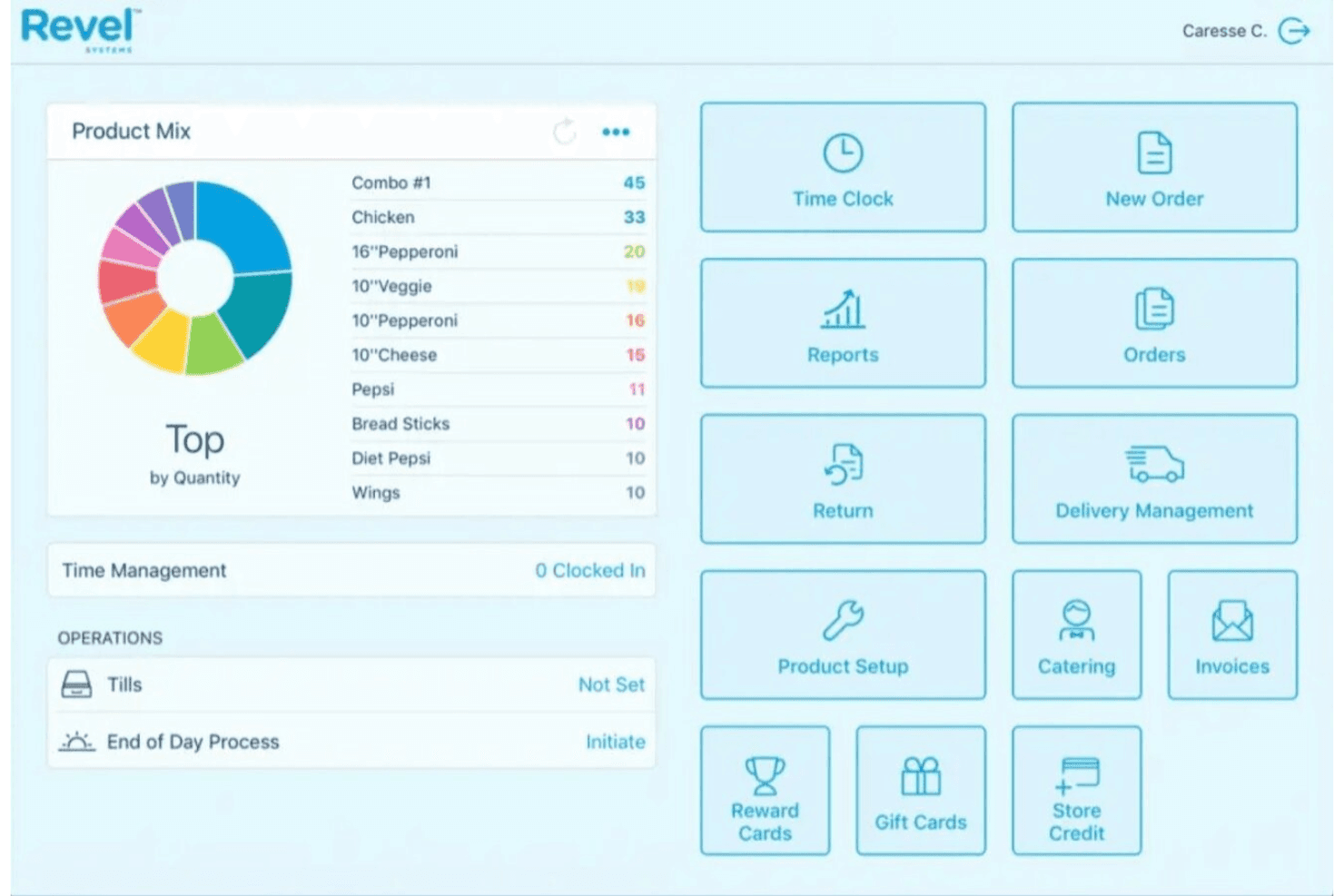
Revel Systems offers a modern, intuitive interface that most users find easy to navigate after initial setup. The customizable dashboard and guided onboarding help teams get started, but the system’s depth can feel overwhelming for smaller businesses or those new to POS technology.
Users appreciate the clear layout and responsive touchscreen, though some mention that advanced features require extra training. Overall, it’s user-friendly for teams willing to invest time in learning its full capabilities.

Integrations
Revel Systems integrates with QuickBooks, Xero, Deputy, Como, Punchh, Synergy Loyalty, DoorDash, Uber Eats, Twilio, and BigCommerce, among others.
Revel Systems also offers an open API and supports connections with third-party integration tools.

Revel Systems Specs
- 2-Factor Authentication: Yes
- API: Yes
- Barcode Scanning: Yes
- BitCoin: No
- Budgeting: No
- Contact Management: Yes
- Custom Reports: Yes
- Customer Management: Yes
- Customer Rewards: Yes
- Dashboard: Yes
- Data Export: Yes
- Data Import: Yes
- Data Visualization: Yes
- External Integrations: Yes
- Forecasting: Yes
- Fraud Detection: Yes
- Inventory Tracking: Yes
- Multi-Currency: Yes
- Multi-User: Yes
- Notifications: Yes
- Offline Access: Yes
- Order Management: Yes
- Payment Processor: Yes
- PayPal: No
- Stripe: No
- Supplier Management: Yes
- Tax Management: Yes
- Third-Party Plugins/Add-Ons: No
- Workflow Management: Yes


