
37 Best B2B Ecommerce Platforms For 2026

The Best B2B Ecommerce Platforms You Should Use
Before we dive in deep, here’s our shortlist of the absolute best B2B ecommerce solutions so you can sell to other businesses to your heart’s content.


B2B ecommerce platforms are built for the real world of online B2B retail—where bulk orders, custom pricing, multi-level approval chains, and legacy ERP integrations are just another Monday.
If you’re sick of bending DTC tools to your B2B will, you already know why you need the right B2B platform: complexity here isn’t optional, it’s survival.
With over a decade in ecommerce trenches—helping brands untangle spaghetti systems and launch online stores their buyers actually want to use—I know exactly what separates a decent platform from a “please make this stop” nightmare.
The best B2B ecommerce platforms handle account-based pricing, multi-user roles, negotiated terms, and integrate with the back-office chaos you’re already running.
The market’s crowded, and not every “enterprise” platform deserves your money (or your headaches). Below, you’ll find the B2B ecommerce platforms that actually deliver: vetted, tested, and ranked by someone who’s lived every pain point on this page.
Ready to pick your next revenue machine? Let’s get you sorted.
Why Trust Our Software Reviews
We’ve been testing and reviewing retail and ecommerce software and services since 2021.
As retail experts ourselves, we know how critical and difficult it is to make the right decision when selecting software. We invest in deep research to help our audience make better software purchasing decisions.
We’ve tested more than 2,000 tools for different finance and accounting use cases and written over 1,000 comprehensive software reviews. Learn how we stay transparent and our review methodology.
Comparing the Best B2B Ecommerce Platforms
As it’s always easier to compare things in table format, let’s first compare the prices, trial details, and best for use cases of these B2B commerce solutions.
| Tool | Best For | Trial Info | Price | ||
|---|---|---|---|---|---|
| 1 | Best for gated catalogs and member pricing | Free plan available | From $17/month | Website | |
| 2 | Best for distributor sales operations | Free 60-day trial available | Pricing upon request | Website | |
| 3 | Best headless platform for complex B2B orchestration | Free demo available | Pricing upon request | Website | |
| 4 | Best all-purpose ecommerce with strong app ecosystem | 3-day free trial available | From $29/month (billed annually) | Website | |
| 5 | Best for B2B self-service portals on a DXP | Free trial available + free demo | Pricing upon request | Website | |
| 6 | Best for built-in B2B and headless flexibility | Free demo available | Pricing upon request | Website | |
| 7 | Best ecommerce platform for personalization features | Free demo | Pricing upon request | Website | |
| 8 | Best open-source B2B suite for wholesalers | Free demo | Pricing upon request | Website | |
| 9 | Best for CRM-native B2B commerce | Free demo | Pricing upon request | Website | |
| 10 | Best for fast wholesale portal rollout | 14-day free trial | From $350/month | Website | |
| 11 | Best for ERP integration | Free demo available | Pricing upon request | Website | |
| 12 | Best for mobile order taking | Free demo available | From $500/month | Website | |
| 13 | Best for modular architecture | Free demo available | Pricing upon request | Website | |
| 14 | Best for customer-specific pricing | Free demo | From $180/month | Website | |
| 15 | Best for advanced product modeling | Free plan available | From $0/month | Website | |
| 16 | Best wholesale marketplace for finding trendy products | Not available | Website | ||
| 17 | Best for Magento B2B builds and integrations | Not available | Pricing upon request | Website | |
| 18 | Best for custom ecommerce builds and modernization | Not available | Pricing upon request | Website | |
| 19 | Best ecommerce data aggregation for ad, marketing, and social efforts | 14-day free trial | From $299/month | Website | |
| 20 | Best for B2B platform for global multi-carrier shipping | Free plan available | From $75/month | Website |
The Best B2B Ecommerce Platforms, Reviewed
We’ve worked with hundreds of brands navigating this exact landscape—helping them untangle legacy systems, sync backend tools, and deliver digital buying experiences their customers actually want.
This is the part where we show you brief reviews of each top B2B ecommerce platform, including why we chose them, what they’re great at, top features, pros and cons, and screenshots of the interface.

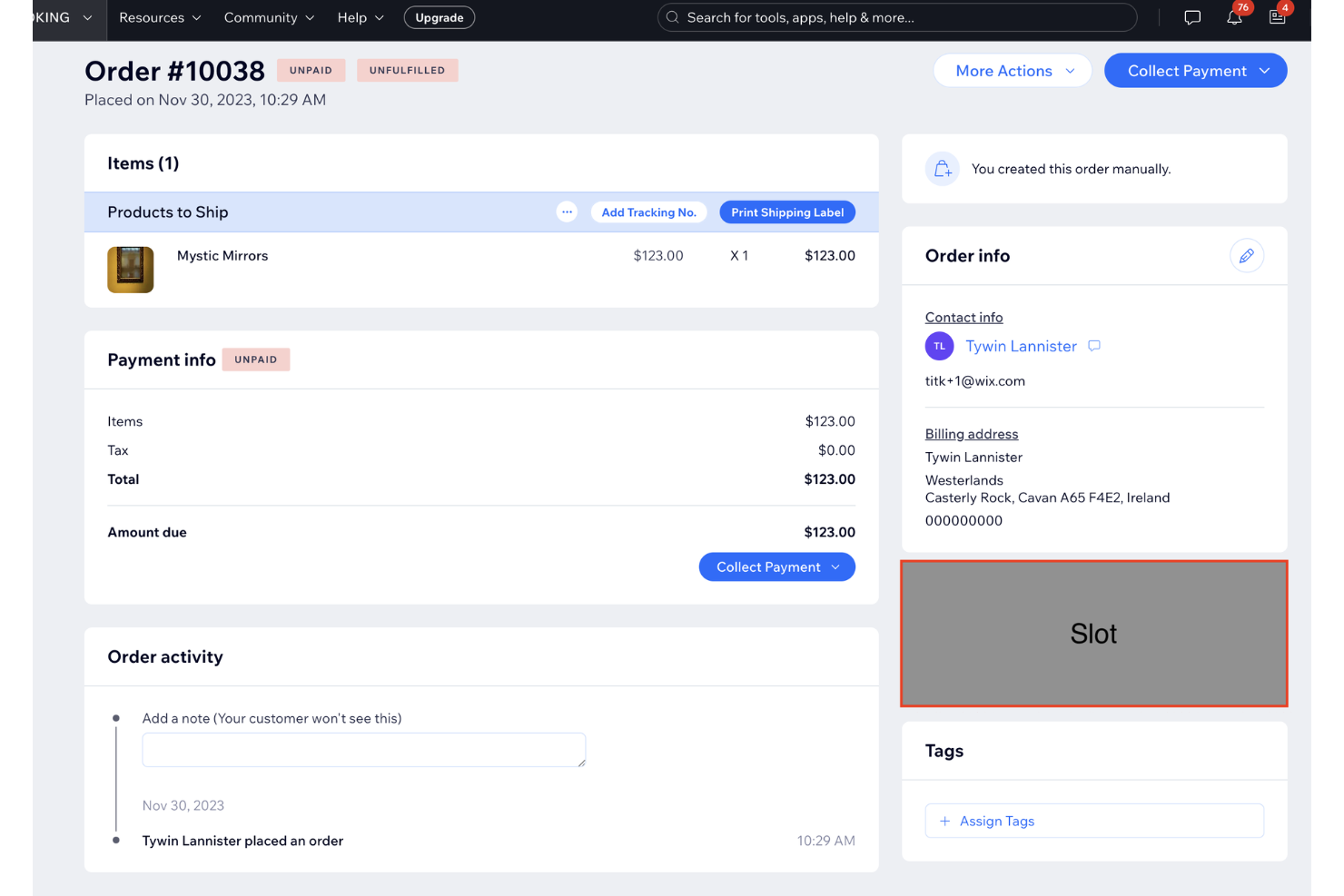
For small and midsize wholesalers who want to launch fast, Wix gives you gated catalogs, member pricing, and multichannel selling without begging IT for time.
You can hide wholesale price lists behind logins, sync products to Amazon/eBay/Facebook/Pinterest, and track conversions with GA4 and Meta Pixel—solid for teams spinning up a first B2B portal.
Why I Picked Wix
I picked Wix because you can gate pricing for approved buyers using Members Area and pricing plan permissions—so only logged-in customers see wholesale rates.
You also get real multichannel reach by syncing products to Amazon, eBay, Facebook, and Pinterest directly from your dashboard. Attribution isn’t guesswork, since GA4 and Meta Pixel+CAPI plug in for purchase and add-to-cart events.
Accounting handoff is covered via the QuickBooks Online connector, pushing orders, taxes, and customers into your books. If you outgrow the basics, B2B add-ons like SparkLayer layer in quick order lists and customer-specific price grids.
Wix Key Features
Here’s what complements those B2B essentials day-to-day.
- Automated Sales Tax: Calculate and apply taxes at checkout across supported regions.
- Custom Shipping Rules: Set carrier methods, rate tables, and location-based restrictions for wholesale orders.
- Abandoned Cart Recovery: Capture lost revenue with automatic follow-ups and coupons for signed-in buyers.
- Manual Orders & Quotes: Create orders from the back office for phone or rep-assisted sales.
Wix Integrations
Integrations include Google Analytics 4, Meta Pixel & Conversions API, Google Ads, Pinterest, Amazon, eBay, Mailchimp, HubSpot, QuickBooks Online, and YouTube Shopping.
Pros and Cons
Pros:
- GA4 and Meta Pixel+CAPI give reliable purchase attribution.
- Multichannel sync covers Amazon, eBay, Facebook, and Pinterest.
- Members-only gating enables customer-specific wholesale pricing and access.
Cons:
- Marketplace connections often rely on paid third-party apps.
- Advanced B2B workflows need SparkLayer or other add-ons.
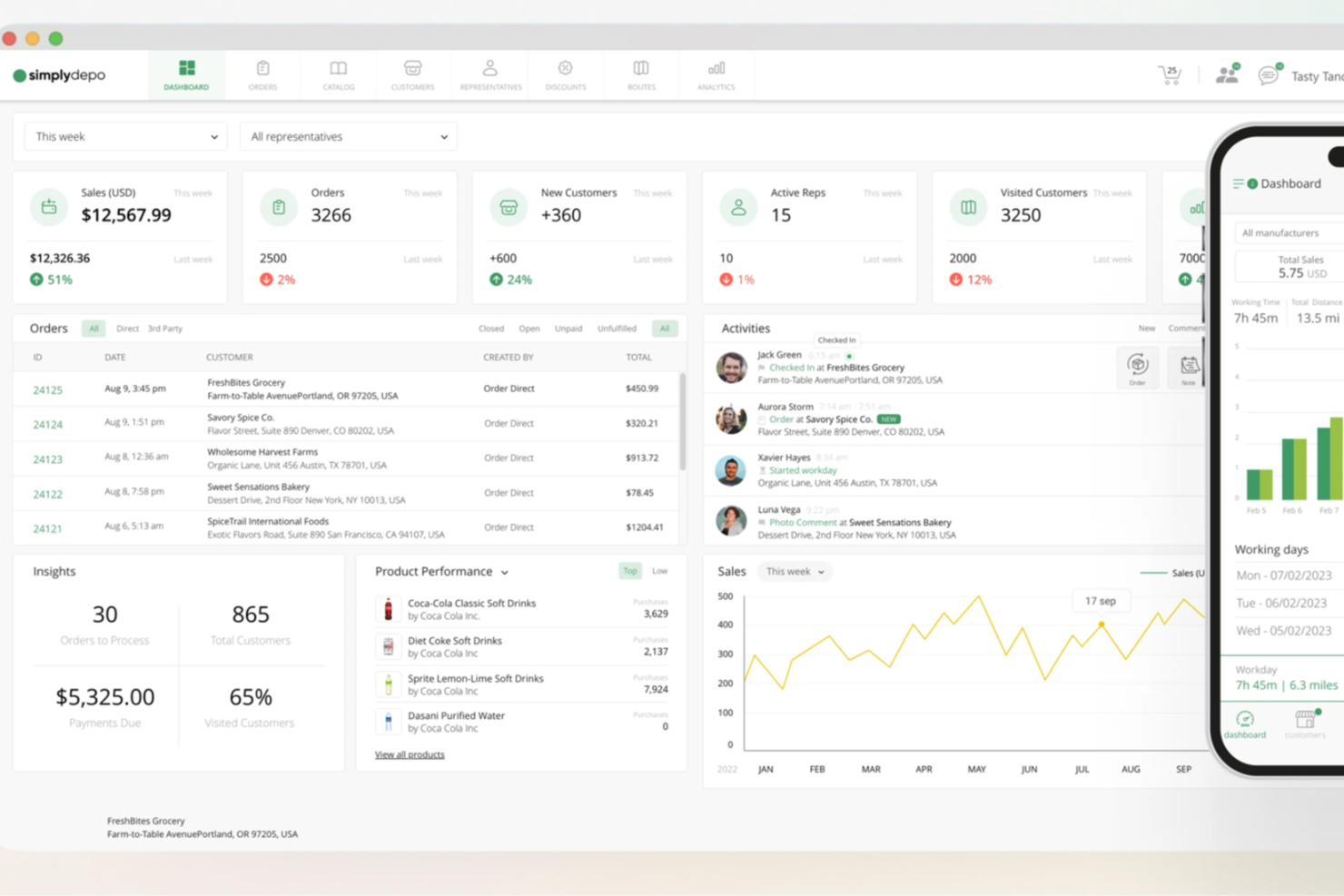
If you're looking for a B2B eCommerce platform that can streamline your distribution and retail execution, SimplyDepo offers tailored solutions that may align perfectly with your needs. It's particularly beneficial for startups and growing businesses aiming to scale their operations, providing comprehensive tools for sales management, CRM, and order processing. Whether you're a brand, distributor, or merchandiser, SimplyDepo is designed to help you enhance efficiency and improve customer relationships.
Why I Picked SimplyDepo
I picked SimplyDepo for its ability to seamlessly integrate sales management and CRM functionalities within a single platform, making it a strong candidate for B2B eCommerce solutions. The platform's B2B order management feature allows you to manage orders efficiently, reducing processing times and improving operational efficiency. Additionally, its route planning tool is crucial for optimizing delivery schedules, which can significantly enhance customer satisfaction. By focusing on these specific features, SimplyDepo addresses the core needs of businesses looking to streamline their sales processes.
SimplyDepo Key Features
In addition to its standout sales management and CRM capabilities, I also found these features noteworthy:
- Field Sales: This feature allows your sales team to capture orders directly from the field, ensuring real-time updates and reducing manual entry errors.
- Distribution Management: It helps you oversee and streamline the entire distribution process, from inventory management to delivery.
- Retail Execution: This tool ensures that your products are effectively displayed and promoted in retail environments, optimizing shelf placement and promotions.
- Customer Success Stories: SimplyDepo provides access to real-world testimonials that highlight the platform's impact on efficiency and revenue growth.
SimplyDepo Integrations
Native integrations are not currently listed by SimplyDepo.
Pros and Cons
Pros:
- Route planning improves delivery efficiency
- Strong field sales mobile tools
- All-in-one sales and distribution
Cons:
- Pricing not publicly available
- No listed native integrations

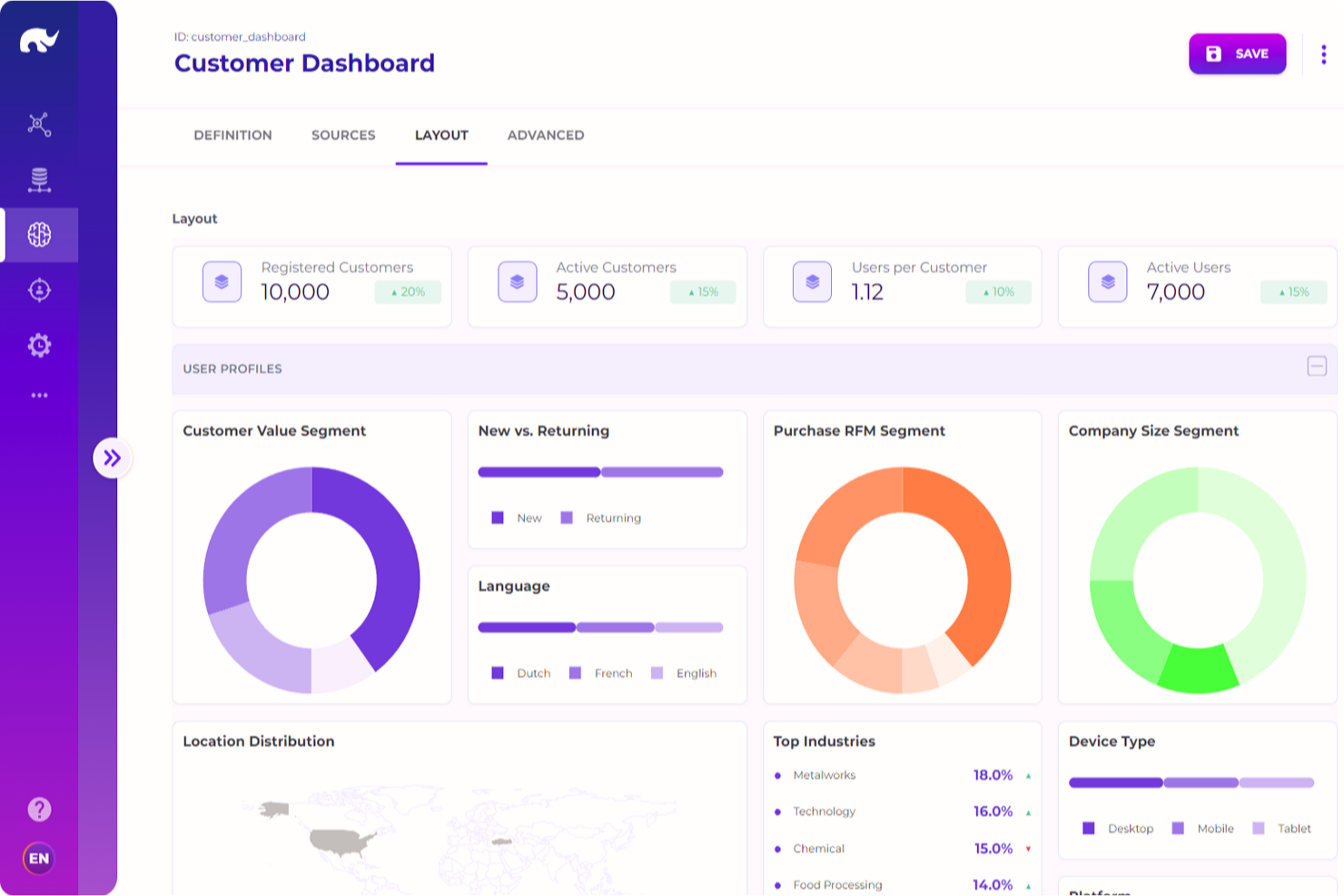
Rierino helps manufacturers and distributors tame B2B complexity—contract pricing, quotes, approvals—without giving up speed.
It’s built for teams managing messy catalogs and account hierarchies who need low-code control over data, pricing, and checkout orchestration across portals and channels.
Why I Picked Rierino
I picked Rierino because you can handle contract terms and customer-specific pricing through negotiated catalogs and multi-level RBAC, so buyers see the right price every time.
You accelerate change requests—like a new approval rule or pricing exception—through no/low-code saga flows instead of full rebuilds. Your team reduces quoting back-and-forth with built-in quote-to-order workflows and printable proposals tied to real pricing data.
You keep data consistent across channels using a central PIM and API mapping, which cuts duplicate work when specs or packs change.
And you keep governance tight with audit logging and environment isolation, so experiments don’t spill into production.
Rierino Key Features
In addition to the orchestration and pricing tools above, these are practical features B2B teams actually use.
- Co-Browsing and Impersonation: Guide buyers live or place orders on their behalf with proper permissions.
- Audit Logging & Deployment Controls: Track every change and promote safely across dev, stage, and prod.
- Bulk Reorder & Returns Management: Support contract buyers with quick reordering and ERP-aware returns.
- OpenAPI Auto-Docs: Generate live API documentation from your configured flows to speed integrations.
Rierino Integrations
Integrations include SAP ERP, Stripe, Trustpilot, Redis, Elasticsearch, MongoDB, Kafka, PostgreSQL, OpenAI, and Amazon Bedrock.
Pros and Cons
Pros:
- Multi-basket, role-based checkout fits complex account hierarchies.
- Negotiated catalogs and contract pricing reflect real-world B2B terms.
- Low-code saga flows speed updates to rules and processes.
Cons:
- Successful rollout requires upfront data modeling and governance.
- Smaller published app ecosystem than legacy enterprise suites.
New Product Updates from Rierino
Rierino Adds Dynamic Instructions and AI Agent Guidance
Rierino introduces dynamic AI agent instructions and customizable agent guidance features that improve personalization and help users better understand and interact with AI agents. For more information, visit Rierino’s official site.
 .
.
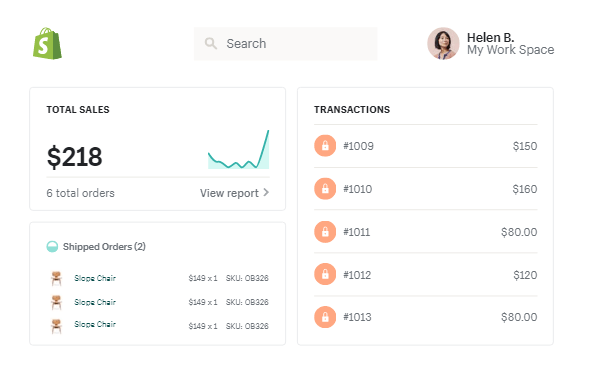
Shopify Plus gives midsize and enterprise wholesalers a single place to run DTC and B2B—without duct-taping plugins for core wholesale needs.
You can create company-specific catalogs and pricing, offer net terms at checkout, and restrict access for reps or buyers, which is ideal if you manage negotiated contracts or dealer networks.
Why I Picked Shopify Plus
I picked Shopify Plus because you can unify B2B and DTC in one admin, so your ops team stops double-maintaining products—B2B on Shopify lets you publish company-specific catalogs and price lists from the same backend.
You get fewer manual invoices because buyers can check out on net terms using native payment terms at checkout. Merchants with complex account structures benefit from company profiles and buyer roles, which let you assign permissions, PO numbers, and default payment/shipping rules per location.
Your merchandising team can handle big orders efficiently with quick order lists and quantity rules, reducing back-and-forth for reorders.
And when finance needs clean records, requisition lists and draft orders capture approvals before payment hits your ledger.
Shopify Plus Key Features
These additions round out the wholesale toolkit without third-party workarounds.
- Company Profiles and Roles: Model accounts with locations, buyer permissions, PO numbers, and default terms.
- Payment Terms at Checkout: Offer net terms, due dates, and pay-later flows directly in online checkout.
- Company-Specific Catalogs: Publish tailored product/price lists per company or location for contract pricing.
- Quick Order Lists: Let buyers add frequent SKUs in bulk, speeding up large reorders from one screen.
Shopify Plus Integrations
Integrations include Shopify POS, Shop Pay, Shopify Flow, Shopify Markets, Shopify Functions, Shopify Tax, Shopify Audiences, Shopify Subscriptions, ShopifyQL Notebooks, and Shopify Launchpad.
Pros and Cons
Pros:
- Quick order lists accelerate repeat and bulk purchasing flows.
- Buyer roles and location rules reduce approval and ordering errors.
- Native B2B on Plus—catalogs, pricing, and terms in one admin.
Cons:
- Transaction fees apply if not using Shopify Payments in supported regions.
- Advanced ERP syncs and EDI usually require third-party apps.

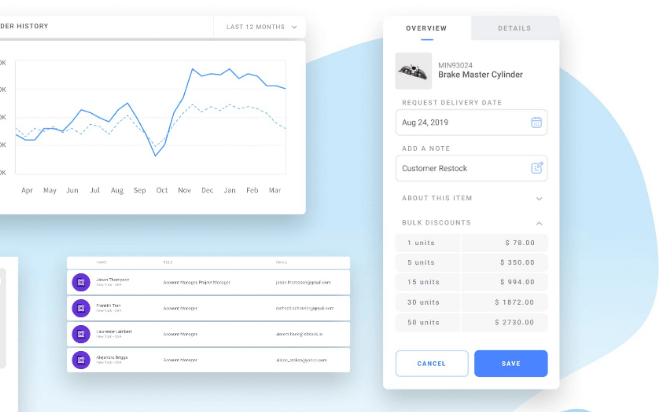
Liferay helps you build B2B self-service portals where customers can log in, see their own catalogs and pricing, place orders, and pull documentation—without pinging your team.
It’s best for industrial and enterprise orgs that need multi-level account hierarchies, content + commerce in one place, and strict governance across regions.
Why I Picked Liferay
I picked Liferay because it pairs real B2B control with a DXP—your customers can shop, open tickets, and access docs from a single portal through integrated content and commerce.
You get customer-specific pricing through rules-driven catalogs and contracts, so each account sees the right items and terms.
Your admins can mirror complex org charts with nested accounts and delegated roles, giving buyers approvals and spending limits that match how they actually work.
Localization and workflow tooling keep global catalogs, translations, and releases consistent, so regional teams don’t go rogue. If you already run enterprise systems, Liferay’s out-of-the-box connectors and identity options make it fit into the stack you’ve got.
Liferay Key Features
Beyond the portal fundamentals, here are practical B2B tools your team will actually use.
- Delegated Account Administration: Let customers manage users, roles, and spending limits inside their own company structure.
- Contract And Price Lists: Attach contract terms, quantity breaks, and account-specific price lists to control what each buyer sees.
- Order Templates And Reorder Lists: Save frequent baskets and replenish fast for repeat, contract-driven purchasing.
- Role-Based Permissions: Lock down catalogs, content, and workflows by role, site, or region to meet compliance needs.
Liferay Integrations
Integrations include Salesforce, SAP, LDAP/Active Directory, SAML SSO, OpenID Connect, Elasticsearch.
Pros and Cons
Pros:
- Supports complex org hierarchies, contract catalogs, and approvals.
- Combines content, service, and commerce in one customer portal.
- Strong localization, workflow, and governance for multi-region teams.
Cons:
- Implementation can be complex for teams new to DXPs.
- Smaller third-party app ecosystem than mainstream commerce clouds.

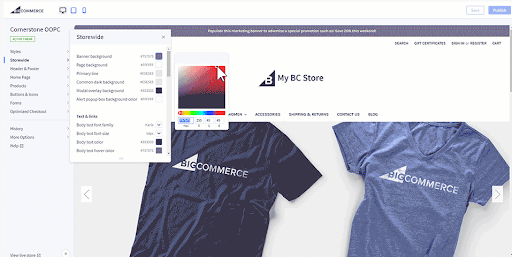
For mid-market teams selling into complex accounts, BigCommerce gives you native B2B controls—company logins, quotes, invoice payments, and customer-specific pricing—without duct-taping plugins together.
It’s best for wholesalers and manufacturers who want B2B depth today and the option to go headless or multi-storefront later.
Why I Picked BigCommerce
I picked BigCommerce because you can run true B2B self-service—your buyers manage users, reorders, and invoices—through Company accounts and a Buyer Portal.
Your contract pricing is enforceable across sites using Price lists tied to customer groups and storefronts, so reps don’t babysit spreadsheets. Sales can reduce back-and-forth by issuing quotes with negotiated rates and approvals, then converting to orders in one click.
If you operate multiple brands or regions, Multi-Storefront lets you centralize catalog and operations while enabling B2B features per storefront.
And if your team wants more control later, headless APIs let you keep the B2B plumbing while swapping the frontend.
BigCommerce Key Features
In addition to those B2B controls, here are a few practical features your team will actually use.
- Invoice Portal & Purchase Orders: Let approved buyers pay invoices and place PO-based orders with preconfigured terms.
- Shared Shopping Lists & Quick Order: Buyers build lists, paste SKUs, and reorder from history to speed replenishment.
- Real-Time Carrier Rates: Show live UPS, USPS, and FedEx quotes at checkout for accurate landed costs.
- Digital Wallets & Accelerated Checkout: Offer Apple Pay, Amazon Pay, and Link/Fastlane options to cut checkout friction.
BigCommerce Integrations
Integrations include Avalara, Stripe, PayPal, Authorize.Net, Amazon Pay, Apple Pay, Google Pay, UPS, USPS, and FedEx.
Pros and Cons
Pros:
- Multi-storefront lets you run segmented B2B sites centrally.
- Variant-level price lists tied to storefronts and customer groups.
- Built-in company accounts, quotes, and invoice payments for B2B.
Cons:
- B2B Edition adds cost for very small teams.
- Theme/design flexibility trails site-builder competitors.

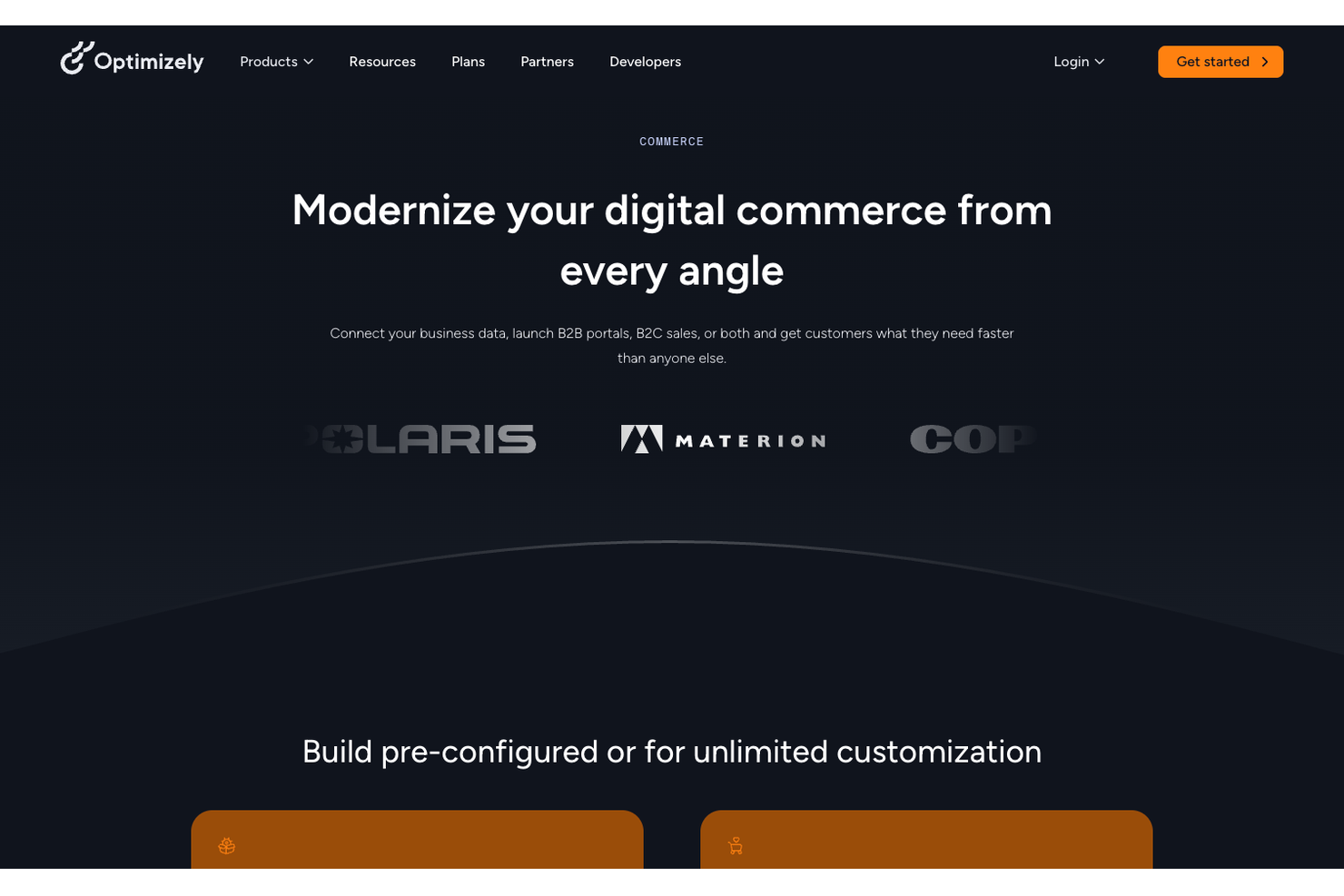
Optimizely (formerly Episerver) is built for manufacturers and distributors that live and die by contract pricing, customer-specific catalogs, and approvals.
You get experimentation baked into commerce and CMS, so your team can test search, promos, and layouts on real B2B buyers—not guesses.
Why I Picked Optimizely
I picked Optimizely because you can personalize and test the full buying journey—your team runs A/B tests on product pages and navigation, then ties winners to rules-driven pricing and content targeting.
For complex accounts, you can serve negotiated catalogs and branch-level inventory using built-in account hierarchies and customer segments. Sales ops gets quoting and order-on-behalf tools, so reps can move orders without jumping into the ERP.
Procurement teams aren’t left out either—you can support PunchOut, approvals, and payment terms inside the checkout.
The kicker is the connector ecosystem, which reduces custom plumbing when you sync customers, pricing, tax, and orders with your back office.
Optimizely Key Features
In addition to testing and account-specific pricing, here are a few B2B-ready tools you’ll actually use.
- Quoting and Approvals: Generate quotes, capture approvals, and convert to orders without leaving the storefront.
- Sales Rep Tools: Masquerade as customers, place orders on behalf, and manage account lists for key buyers.
- Branch Inventory Visibility: Show availability by warehouse or location to route orders accurately.
- PunchOut Support: Connect buyer procurement systems via cXML to keep enterprise purchasing compliant.
Optimizely Integrations
Integrations include Microsoft Dynamics 365, Acumatica, Infor CSD, Infor SX.e, Epicor Prophet 21, IFS Aurena (Cloud), Avalara, Vertex, CyberSource, and cXML PunchOut.
Pros and Cons
Pros:
- Account hierarchies support catalogs, terms, and branch-level inventory.
- Native ERP connectors speed up customer, price, and order sync.
- A/B tests connect to pricing and content rules, proving revenue impact.
Cons:
- Implementation needs strong dev resources and clear data governance.
- Pricing is custom—total cost can be higher for lighter needs.


For wholesalers and distributors with complex pricing and approval flows, OroCommerce lets you handle RFQs, quotes, and multi-list pricing without duct-taped plugins.
It’s best for mid-market and enterprise teams that need account-based buying, negotiated terms, and tight ERP/CRM connections—plus the option to self-host.
Why I Picked OroCommerce
I picked OroCommerce because your team can run true B2B motions—RFQ→quote→order—directly in the storefront, backed by role-based approvals and account hierarchies.
You can model customer-specific terms through combined price lists, shopping lists, and contract pricing, so negotiated deals actually reflect in checkout. The built-in CRM gives sales and service one view of buyers, which pays off during long sales cycles and reorders.
Shipping and payment methods plug into quotes and orders, so you can price, fulfill, and take payment in one place. If you have an ERP, pre-built connectors and data sync options help you keep inventory, prices, and customers in lockstep.
OroCommerce Key Features
In addition to the B2B quoting and pricing depth, here are useful tools for day-to-day operations.
- Corporate Accounts & Permissions: Set org hierarchies, buyers, and approvers with granular roles.
- Combined Price Lists: Build customer-, group-, or website-specific price logic with scheduling and overrides.
- Multiple Shopping Lists: Let buyers assemble, save, and submit lists for quoting or quick reorders.
- Workflow Engine: Configure approvals and order states to match your procurement and sales processes.
OroCommerce Integrations
Integrations include PayPal, UPS, FedEx, Zendesk, Mailchimp, SAP ERP, Microsoft Dynamics 365 Business Central, Oracle JD Edwards, Epicor Prophet 21, and Sage.
Pros and Cons
Pros:
- Combined price lists handle complex, customer-specific terms.
- Native CRM unifies sales, service, and commerce data.
- Strong fit for wholesalers/distributors managing complex terms.
Cons:
- Admin configuration can be complex for price lists and roles.
- Smaller ready-made theme library; expect custom storefront work.

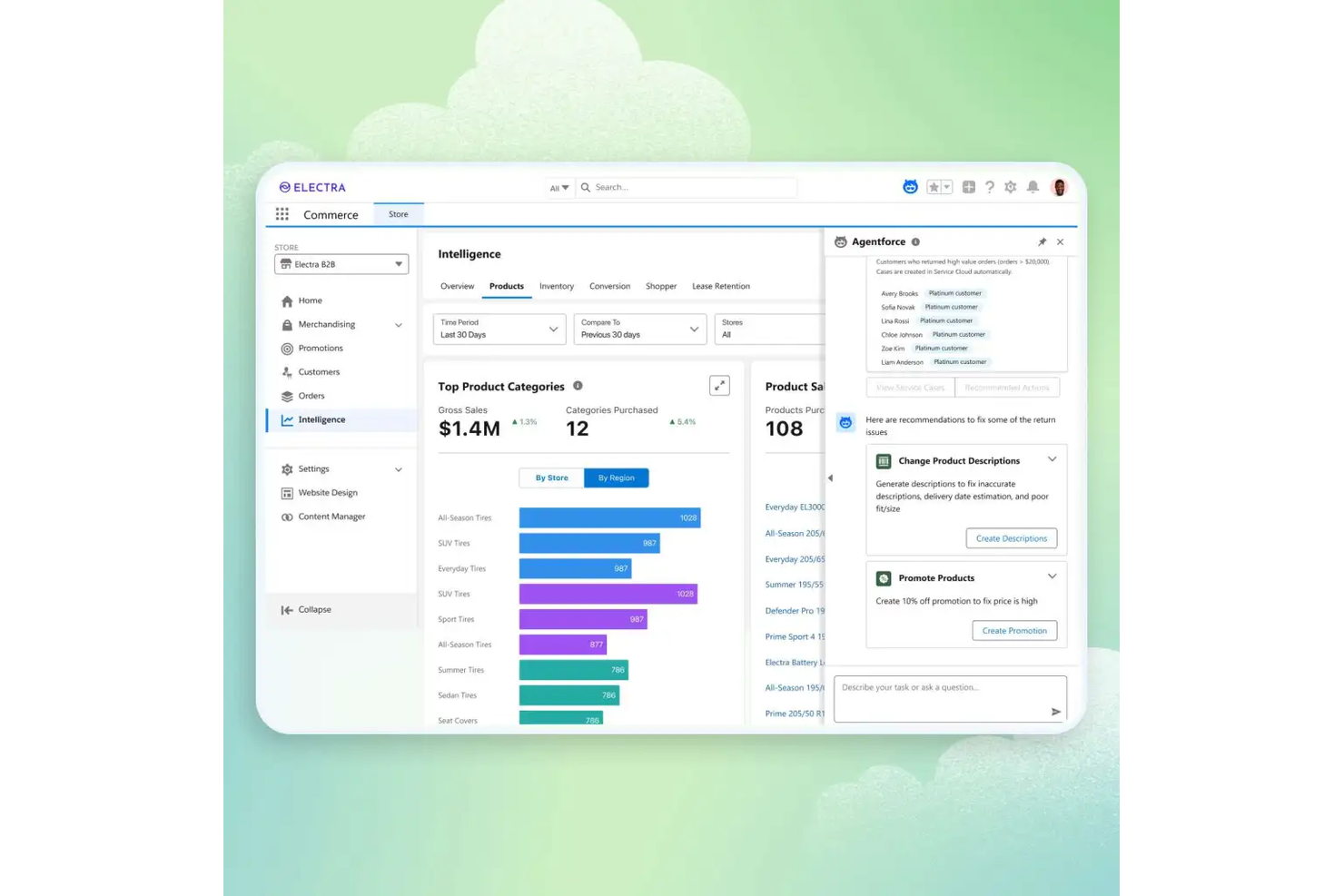
For manufacturers, distributors, and wholesalers with negotiated terms and complex account structures, Salesforce B2B Commerce gives your buyers a self-service portal that actually mirrors how you sell.
You get CRM-native catalogs, pricing, and order flows that handle large carts, approvals, and repeat purchases without breaking your data model.
Why I Picked Salesforce B2B Commerce
I picked Salesforce B2B Commerce because you can run ecommerce on the same records your sales and service teams use—accounts, contacts, price books, and contracts—so nothing gets lost in translation.
Your buyers place big, repeat orders through quick-order grids and reorder templates, while your terms hold up thanks to entitlements and contract pricing. Multi-address shipping and flexible payments fit common B2B workflows, especially when orders split across sites or ship-to locations.
Order activity syncs into Sales Cloud and Service Cloud, giving you pipeline-to-cash visibility and fewer swivel-chair handoffs.
Salesforce B2B Commerce Key Features
Here are practical capabilities that support real B2B buying behavior.
- Account Hierarchies & Approvals: set roles, budgets, and order approvals that reflect your customer org chart.
- Requisition Lists & Saved Carts: let buyers build lists and convert them to orders in a click.
- Multi-Site & Localization: run multiple storefronts with the right currencies, languages, and tax rules.
- AI Product Recommendations: surface relevant add-ons and substitutes using Salesforce Einstein.
Salesforce B2B Commerce Integrations
Integrations include Salesforce Sales Cloud, Service Cloud, CPQ, Order Management, Marketing Cloud, MuleSoft, Stripe, PayPal, Adyen, and Avalara.
Pros and Cons
Pros:
- Reorder templates and quick-order simplify repeat B2B purchasing.
- Contract price books and entitlements enforce negotiated terms accurately.
- Tight CRM, CPQ, and service data reduce manual rekeying.
Cons:
- Higher licensing and implementation costs than mid-market B2B carts.
- Requires Salesforce administration skills; most teams need a partner.

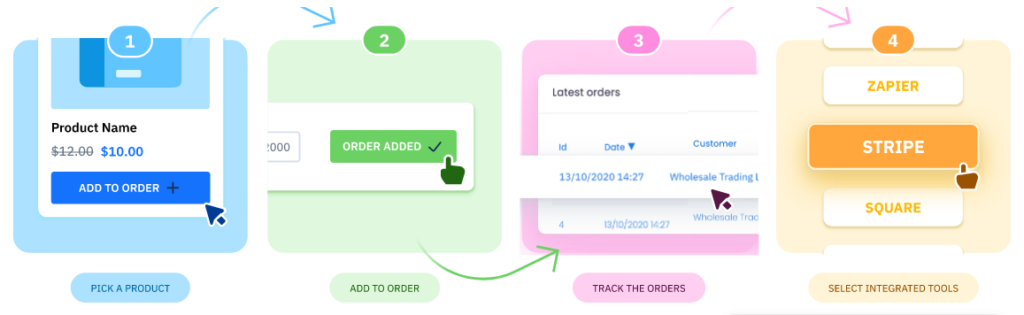
For wholesalers and manufacturers who need a customer portal up fast, B2B Wave gives you the essentials—customer-specific catalogs and pricing, easy reorders, and built-in quotes—without hiring a dev team.
It’s best for small to midsize teams that want predictable admin work, unlimited orders, and accounting handoff out of the box.
Why I Picked B2B Wave
I picked B2B Wave because you can launch quickly and keep control—import products and customers with templates, then invite buyers to self-serve in minutes.
You get precise customer pricing through price lists and product visibility rules, so negotiated rates and assortments show up correctly for each account. Order accuracy improves with inventory statuses and optional backorders, and buyers can one-click reorder from order history.
Your team saves reconciliation time with native QuickBooks Online and Xero sync, and you can take payments online via Stripe or PayPal. If you already run DTC on Shopify, the connector helps keep catalogs aligned while separating your wholesale flow.
B2B Wave Key Features
In addition to the launch speed and pricing controls, here are a few practical tools your team will actually use.
- PDF Catalogs: Generate brandable PDFs—general or customer-specific—for buyers who still need a printable line sheet.
- Quote Management: Let buyers request quotes, send PDF quotes back, and convert to orders when approved.
- Sales Rep App: Give reps a mobile app for on-the-go order entry, reorders, and account lookup.
- Supplier Portal: Allow suppliers to upload products for approval, track activity, and manage stock where you need it.
B2B Wave Integrations
Integrations include QuickBooks Online, Xero, Shopify, Stripe, PayPal, Authorize.Net, Mailchimp, ShipStation, Avalara, and Zoho CRM.
Pros and Cons
Pros:
- QuickBooks/Xero sync reduces manual accounting work.
- Customer-specific price lists and product visibility rules.
- Unlimited customers, orders, and quotes on standard plans.
Cons:
- Theme and page design options are basic versus full CMS platforms.
- Standard plan limits (e.g., SKUs, users) may require paid add-ons.

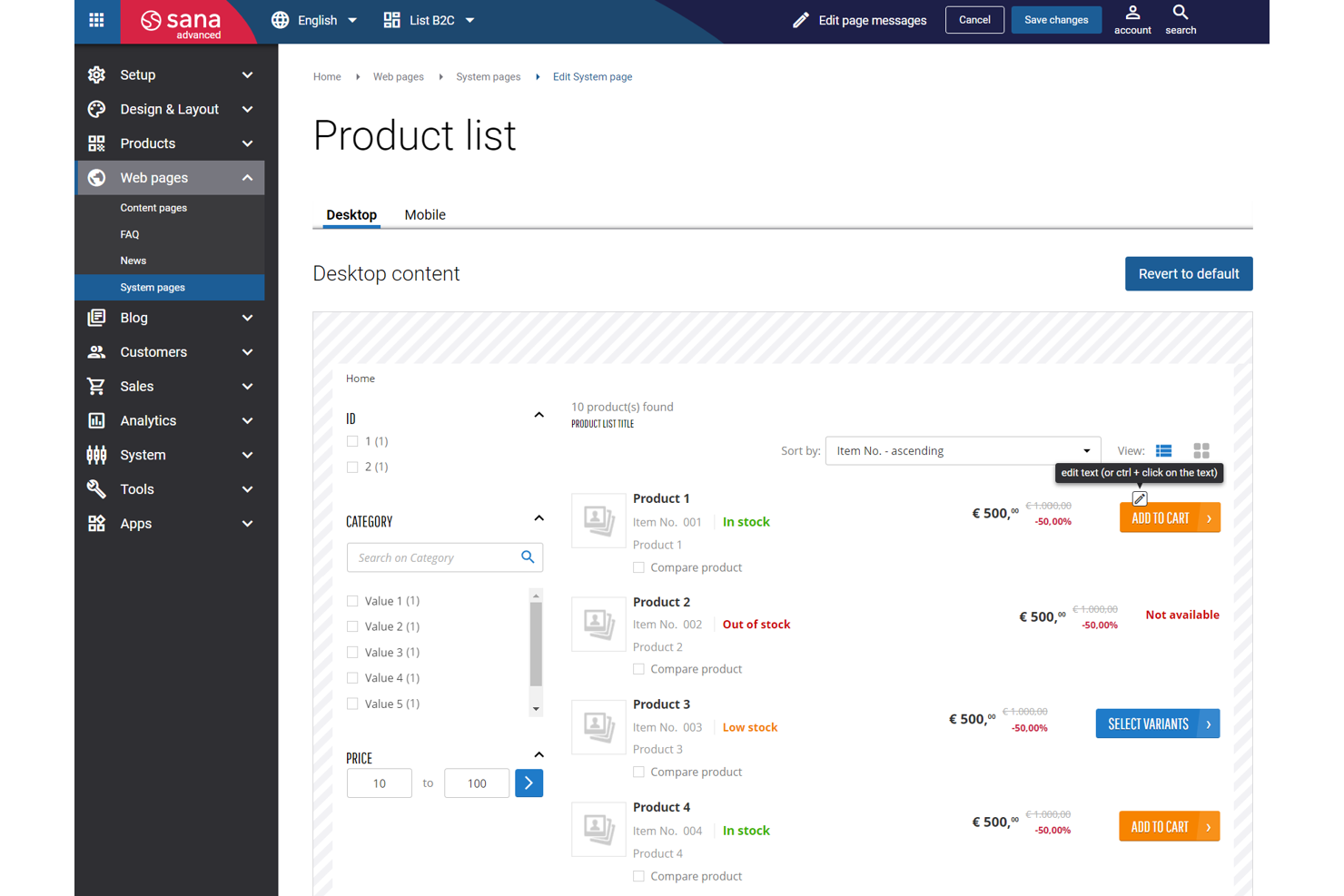
Sana Commerce connects your webstore directly to Microsoft Dynamics or SAP so buyers see their negotiated pricing, real-time stock, and order history—no nightly syncs, fewer “whoops” orders.
It’s best for manufacturers and distributors that need ERP-driven accuracy with B2B buying flows like quotes, PunchOut, and variant handling.
Why I Picked Sana Commerce
I picked Sana Commerce because you get ERP-native data in the storefront—your customers see accurate pricing and availability pulled live from Dynamics or SAP, which cuts order errors and manual reconciliation.
Your team can support complex B2B buying with quotes, PunchOut, and configurable products—features that reduce back-and-forth for large or repeat orders.
An in-site editor lets you update content and assortments quickly, so merchandising changes don’t wait for dev sprints.
Customer-specific catalogs and pricing help account managers enforce terms at checkout, not in spreadsheets. Implementation and support are generally smooth, which matters when your ERP team and ecommerce team both have skin in the game.
Sana Commerce Key Features
Here are a few extras I like that complement the ERP-first approach.
- Sana Pay: Built-in payments for faster checkout and simpler reconciliation.
- 3D Product Configurator: Let buyers configure complex items accurately before ordering.
- Workflow And Approvals: Automate quotes, budgets, and order approvals to match policies.
- Quick Order Tools: B2B filters, variants, and quick add-to-cart for repeat buys.
Sana Commerce Integrations
Integrations include Microsoft Dynamics 365, Microsoft Dynamics AX/NAV, SAP ERP (including S/4HANA and ECC), Google Shopping, Facebook, Amazon, eBay, ChannelEngine, Tweakwise, and Usercentrics.
Pros and Cons
Pros:
- Real-time ERP pricing/availability reduces order errors and backorders.
- Strong quotes, PunchOut, and customer-specific catalogs for B2B.
- In-site editor speeds merchandising updates without developer tickets.
Cons:
- Frontend SEO flexibility and analytics are comparatively limited.
- Higher total cost; customizations add ongoing maintenance effort.


For brands and wholesale distributors with field teams, Pepperi solves the messy middle—customer-specific pricing, mobile order capture, and ERP-grade data consistency.
It’s built for complex B2B catalogs and bulk orders, so your reps, customers, and ops team all work from the same source of truth.
Why I Picked Pepperi
I picked Pepperi because you can give customers and reps accurate, account-specific pricing through native catalog rules tied to your ERP—no manual lists or one-off spreadsheets.
Your team captures large, line-item orders quickly with a mobile app that supports offline mode and barcode scanning, so sales don’t stall when the warehouse Wi-Fi does.
Trade promotion tools let you run discounts, bundles, and quantity breaks that actually respect contract terms, reducing credit memos later. Retail execution features—audits, surveys, and photo capture—feed activity data into dashboards, so you can coach reps with facts, not vibes.
And because it pushes orders and inventory back to your ERP, finance isn’t chasing down mismatched SKUs or pricing errors.
Pepperi Key Features
Beyond the mobile ordering and ERP-aware pricing, here are a few capabilities B2B teams actually lean on.
- Account-Specific Catalog Rules: Show the right products, price lists, and payment terms per customer automatically.
- Order Workflows & Approvals: Enforce credit limits, minimums, and manager sign-off before orders hit the ERP.
- Promotion & Pricing Engines: Run tiered pricing, bundles, and volume breaks that honor contract constraints.
- Retail Execution Toolkit: Capture store audits, surveys, and shelf photos to track compliance and guide coaching.
Pepperi Integrations
Integrations include SAP, Microsoft Dynamics 365, NetSuite, Salesforce, Oracle, Sage, Priority, QuickBooks, Xero, and Epicor.
Pros and Cons
Pros:
- Contract-aware promotions support bundles, tiered pricing, and volume breaks.
- Offline mobile app with barcode scanning accelerates onsite ordering.
- ERP-synced pricing and inventory reduce order errors and rework.
Cons:
- Admin configuration needed to realize value across complex catalogs.
- Pricing starts higher; add-ons can increase total cost.

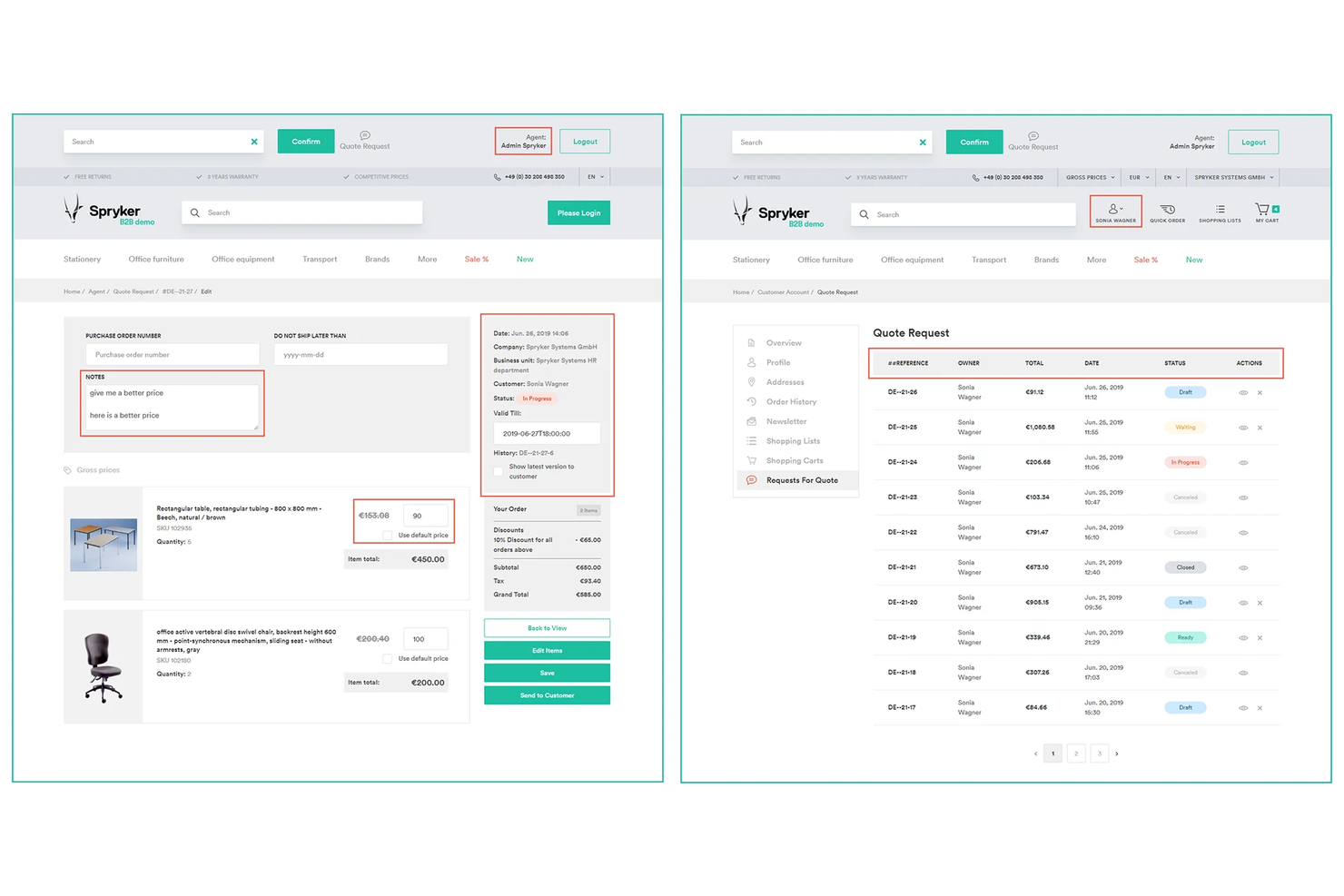
For enterprise retailers and distributors with complex catalogs and buyer approvals, Spryker gives you B2B essentials without boxing you in—RFQ collaboration, company accounts with granular roles, and a true post-purchase order amendment flow.
It’s best for multi-brand and marketplace roadmaps where your commerce, PIM, ERP, and storefront teams need to ship independently without replatforming every two years.
Why I Picked Spryker
I picked Spryker because you get real B2B control where it matters most: your team can enforce purchasing governance through company accounts and role-based permissions, so approvals don’t fall through the cracks.
Your sales org can close negotiated deals faster with RFQ tools that let reps edit quotes, adjust prices, and respond inside the workflow.
When buyers change their minds after checkout, the order amendment feature lets them modify quantities, delivery details, or payments—cutting support tickets while keeping revenue.
If your account teams need to step in, Agent Assist lets reps act on a customer’s behalf to fix carts or place orders without back-and-forth. And because the platform is modular and API-first, parallel squads—commerce, ERP, PIM, and front end—can release on their own cadence.
Spryker Key Features
Beyond quoting and governance, here are practical capabilities B2B teams actually use day to day.
- B2B Contracts & Contract Requests: Manage buyer–merchant agreements and contract pricing for named accounts.
- Merchant Portal: Onboard sellers, publish offers, and track marketplace orders in one workspace.
- Self-Service Portal: Centralize assets, inquiries, and post-purchase tasks—including buyer-initiated order changes.
- App Composition Platform (ACP): Add prebuilt apps from the Back Office to enable payments, tax, and search faster.
Spryker Integrations
Integrations include Adyen, Stripe, Klarna, Algolia, Akeneo, Avalara, and Vertex.
Pros and Cons
Pros:
- Order amendment capability reduces cancellations and manual corrections.
- Company accounts with granular roles enforce purchasing governance.
- RFQ and quote editing supports negotiated, high-volume purchasing.
Cons:
- Higher initial cost than templatized suites for simple catalogs.
- Implementation requires strong engineering ownership and project management.


For distributors and manufacturers living in QuickBooks, Now Commerce gives your buyers and reps a clean B2B portal with customer-specific pricing and accurate stock—without hiring a dev team.
Orders land in QuickBooks Desktop or Online automatically, so you cut duplicate entry and stop chasing pricing errors. Best for US wholesalers that want a portal, not a full ecommerce site.
Why I Picked Now Commerce
I picked Now Commerce because you get real, day-to-day wins tied to QuickBooks—orders your buyers place online post straight into your item, customer, and pricing data.
Your team avoids rekeying because the portal respects customer-specific catalogs and pricing pulled from QuickBooks. Reps can place orders from any device for only their assigned accounts, which protects territories and reduces mistakes.
You also see live availability and account history at checkout, so buyers don’t call to confirm stock. Month-to-month plans mean you can pilot the customer portal and add the rep portal later if it earns its keep.
Now Commerce Key Features
Here are a few extras that pair nicely with the core QuickBooks sync.
- Customer Order Guides: Prebuilt, buyer-specific order forms speed repeat wholesale purchases.
- Sales Rep Permissions: Limit reps to assigned accounts to keep territories clean and auditable.
- Account History Visibility: Show prior orders and pricing so buyers can reorder the right SKUs fast.
- Shipments Manager: Send orders to your warehouse system and pull back status and tracking.
Now Commerce Integrations
Integrations include QuickBooks Online, QuickBooks Desktop.
Pros and Cons
Pros:
- Orders post to QuickBooks automatically—no duplicate entry.
- Customer-specific pricing with live stock reduces order corrections.
- Reps place mobile orders limited to their assigned accounts.
Cons:
- Native integrations are QuickBooks-only—limited broader ERP/app options.
- Not a full ecommerce storefront; B2B portals only.

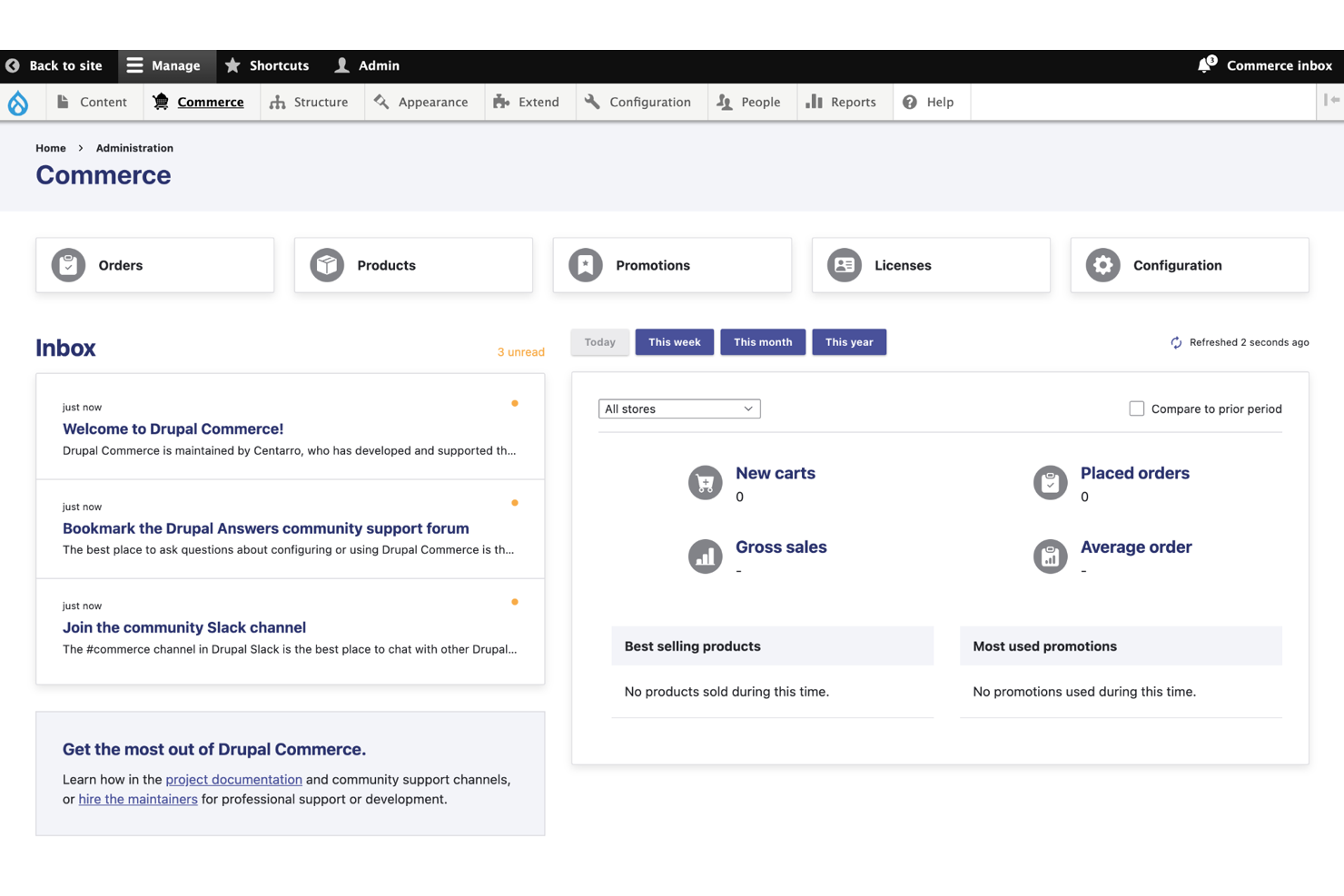
For complex catalogs, contract pricing, and multi-site rollouts, Drupal Commerce gives your team deep control without vendor lock-in.
It’s best for B2B operators who need precise pricing rules, quotes/POs, and multilingual stores tied tightly to their content and ERP/CRM stack.
Why I Picked Drupal Commerce
I picked Drupal Commerce for B2B because you can model real-world pricing—your team can assign customer-specific price lists and quantity breaks using dedicated pricing modules.
You can support negotiated buying—quotes and purchase orders convert to orders using Commerce add-ons built for that flow. You’ll launch regional sites faster—multi-site, multi-language, and multi-currency features let you reuse components while localizing content and prices.
You can keep your stack future-ready—headless APIs let you run custom storefronts or a DXP front end without rewriting commerce logic.
And you get admin order creation, so sales reps can place orders on behalf of accounts directly from the back office.
Drupal Commerce Key Features
In addition to the pricing and buying flows above, here are practical tools your B2B team will actually use.
- Order On Behalf Of: Create and manage customer orders from the admin for phone or rep-assisted sales.
- Custom Workflows: Define approval and fulfillment steps with role-based permissions across teams.
- Recurring Billing: Support subscriptions or scheduled reorders with Commerce Recurring.
- Shipping Methods: Add carrier quoting and rules (e.g., UPS) for negotiated freight and parcels.
Drupal Commerce Integrations
Integrations include PayPal, Stripe, Braintree, Authorize.Net, Avalara, Salesforce, QuickBooks Online, Mailchimp, Lingotek, and Google Analytics.
Pros and Cons
Pros:
- Admin order entry enables sales-assisted and phone orders.
- Multi-site and multilingual fit regional B2B catalogs and teams.
- Granular pricing supports customer groups, tiers, and quantity breaks.
Cons:
- Setup time increases with heavy integrations and custom front ends.
- Requires developer expertise for complex catalogs and workflows.

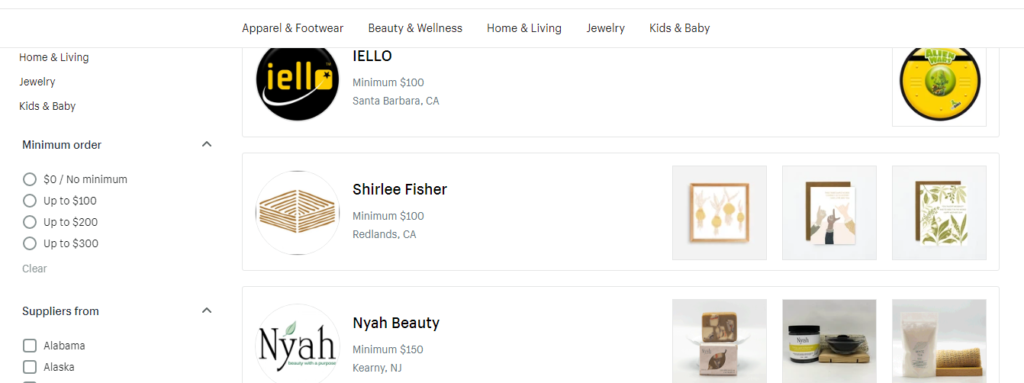
Handshake is a Shopify-run wholesale marketplace that connects brands and retailers for commission-free wholesale. It covers product discovery, ordering, and basic integrations, helping retailers source curated goods quickly.
Why I picked Handshake:
For retailers wanting curated, fee-free wholesale sourcing tied to Shopify, Handshake is a low-friction path. It’s straightforward and US-focused, with selection vetted by Shopify.
Know that availability and geographic scope are limited compared with larger marketplaces.
Standout features and integrations:
Features include curated product marketplace and retailer onboarding tied to Shopify.
Integrations include Shopify admin connections and Zapier paths to back-office tools.
Pros and Cons
Pros:
- Simple, fast onboarding for US market participants.
- Curated selection reduces product-vetting time.
- Commission-free wholesale sourcing for Shopify brands/retailers.
Cons:
- Smaller catalog than established marketplaces.
- US-centric availability limits global reach.

For B2B brands running complex catalogs and ERP-heavy operations, Williams Commerce builds Adobe Commerce (Magento) sites that handle real-world edge cases—customer-specific pricing, multi-warehouse inventory, and multi-site.
You get an implementation partner that lives in integrations and reliability, with 24/7 support and SLAs for when traffic spikes at 2AM.
Why I Picked Williams Commerce
I picked Williams Commerce because they’re strongest where B2B gets messy—deep ERP and PIM work backed by proven Magento builds.
Your team benefits from customer-specific pricing and account tools implemented through Adobe Commerce’s B2B suite, not just promises. They also connect the plumbing you actually use—Microsoft Dynamics 365, NetSuite, SAP—so orders, inventory, and pricing stay in sync.
If you’re multichannel, they’ll pair ecommerce with Akeneo to keep product data clean as you add SKUs and markets. I like that they operate a 24/7 commerce ops model with agreed SLAs, so fixes, patches, and small improvements don’t wait for office hours.
Williams Commerce Key Features
In addition to the B2B build and integration focus, here are practical capabilities teams lean on.
- Multi-Storefront & Internationalization: Launch country or brand stores with localized catalogs, currency, and tax rules.
- Marketplace enablement: Add seller onboarding, commission logic, and order routing for marketplace models.
- Migration Programs: Move from legacy platforms to Adobe Commerce or Shopify Plus with data mapping and cutover plans.
- Performance & Hosting Management: Ongoing monitoring, capacity planning, and incident response to keep sites fast under load.
Williams Commerce Integrations
Integrations include Adobe Commerce (Magento), BigCommerce, Shopify Plus, Microsoft Dynamics 365, NetSuite, SAP, Akeneo, Klaviyo, Adyen, and PayPal.
Pros and Cons
Pros:
- 24/7 support with SLAs for incidents and releases.
- Proven ERP/PIM projects across Dynamics, NetSuite, SAP, Akeneo.
- Strong Magento B2B builds with account, pricing, and quotes.
Cons:
- Typical timelines and pricing suit mid-market and enterprise.
- Services-only—requires separate platform and tool licenses.


MeGaDev helps midsize retailers and B2B distributors modernize rigid ecommerce stacks—especially SAP Commerce (Hybris)—without throwing away what already works.
You get custom headless storefronts and integrations that handle contract pricing, approvals, and complex order flows your SaaS platform can’t touch.
It’s best for teams that want an engineering partner to replatform, tune performance, and wire up enterprise systems the right way.
Why I Picked MeGaDev
I picked MeGaDev because they actually ship the unglamorous B2B plumbing you need—approval chains, account-level pricing, and ERP-driven inventory—through hands-on Hybris customization.
You get faster search and merchandising through a Solr-based setup, backed by data modeling that supports big catalogs and variant logic. Your team keeps momentum during replatforms because they manage migration steps—data loads, component rewrites, and regression testing—in tight sprints.
For performance, they profile bottlenecks and refactor back-end services, so large carts and quote requests don’t crawl under load. If you live in SAP world, their Hybris-to-Hybris upgrade path reduces risk while adding headless front ends where it makes sense.
MeGaDev Key Features
Here are practical capabilities that matter once you move beyond out-of-the-box B2B.
- Headless storefront development: Build decoupled front ends while preserving SAP Commerce logic and data models.
- Hybris migration & upgrades: Move versions (e.g., 5.x→6.x) with structured data migration, component rewrites, and rollback plans.
- Search & merchandising setup: Implement Solr indexing, facets, and relevance tuning for large B2B catalogs.
- QA and automation: Use scripted integration and acceptance tests to protect complex pricing and approval workflows.
MeGaDev Integrations
Integrations include SAP Commerce (Hybris), Apache Solr, Spring Framework, MySQL, jQuery, and Bootstrap.
Pros and Cons
Pros:
- Structured migration playbooks reduce risk during Hybris upgrades.
- Solr-backed search handles large B2B catalogs with fast facetting.
- Builds contract pricing and multi-step approvals via Hybris customization.
Cons:
- Few public retail B2B case studies and templates to reference.
- Time-to-value is longer than SaaS due to custom engineering.

Adriel
Best ecommerce data aggregation for ad, marketing, and social efforts
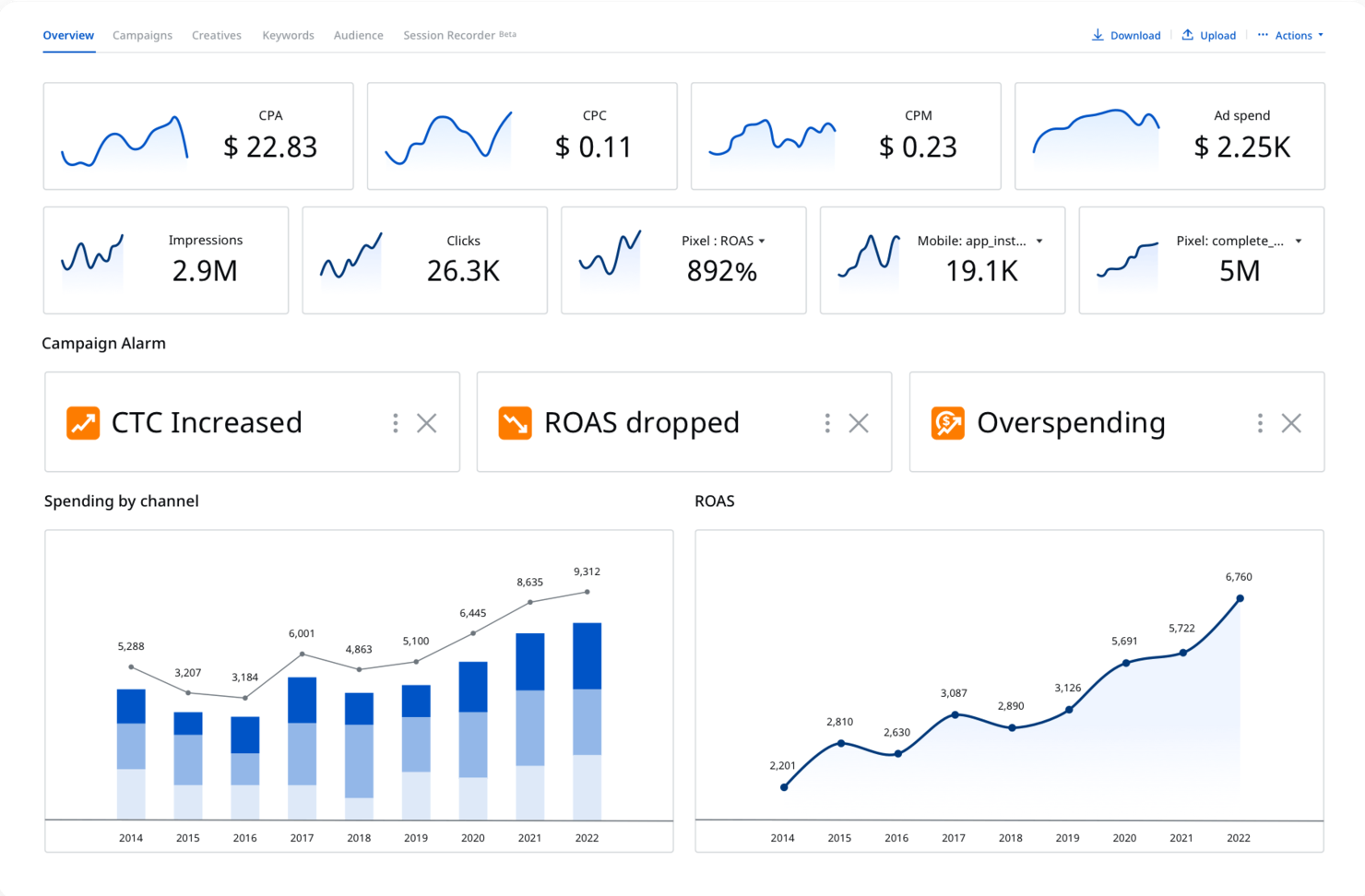
For B2B teams that live in ad dashboards, Adriel centralizes your marketing and ecommerce performance so you stop exporting CSVs and start acting on insights.
It’s ideal for brands and agencies that need cross-channel reporting, KPI alerts, and campaign controls without building a data stack from scratch.
Why I Picked Adriel
I picked Adriel because you get real-time KPI monitoring through configurable alerts—so you catch overspend or conversion drops via email the moment thresholds are crossed.
You also manage campaigns directly from the dashboard, editing budgets and toggling ads without hopping between platforms. For ecommerce, you can connect ad channels and storefront data to see ROAS and revenue side by side, thanks to native connectors.
Your team gets role-based dashboards and permissions, so finance, marketing, and leadership each see the metrics that matter.
I like that you can build custom metrics and breakdowns, which turns blended data into decisions your team can actually execute.
Adriel Key Features
Here are a few capabilities that complement the alerts and campaign controls above.
- Pivot Tables: Build granular, client-ready reports with drag-and-drop dimensions and metrics.
- Data Blending: Combine non-API or ecommerce revenue data with ad performance for true ROAS.
- Multi-Currency Reporting: Track spend and revenue in local currencies with unified rollups.
- Shareable, White-Label Dashboards: Give stakeholders live access without exposing editor controls.
Adriel Integrations
Integrations include Google Ads, Meta Ads, TikTok Ads, LinkedIn Ads, Google Analytics 4, Google Search Console, Shopify, BigCommerce, WooCommerce, and Klaviyo.
Pros and Cons
Pros:
- Blends storefront revenue with ad data for accurate ecommerce ROAS.
- Edit budgets and toggle campaigns across channels from one dashboard.
- KPI alerts flag overspend or performance drops in near real time.
Cons:
- Entry pricing starts at $299/month, which may stretch small teams.
- Custom connectors are enterprise-only, with potential setup fees.
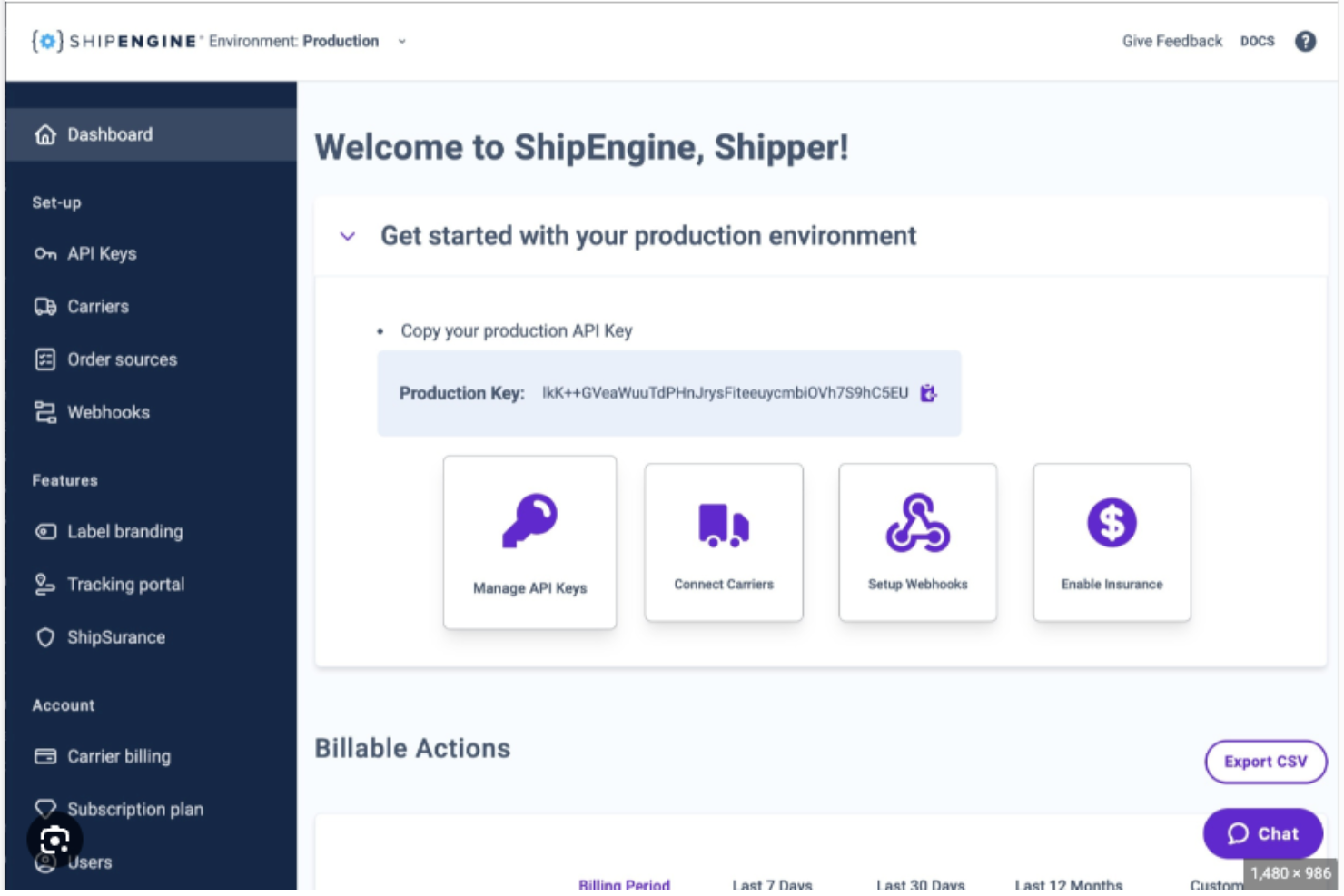
For B2B ecommerce platforms that want shipping baked into the product—not tacked on—ShipEngine gives you multi-carrier labels, checkout rates, and global address verification through one API.
It’s ideal for platforms, 3PLs, and brands that need discounted carrier access, real-time tracking, and embeddable components to ship fast at scale.
Why I Picked ShipEngine
I picked ShipEngine because you can add shipping UX directly into your app through Elements—address validation, rate shopping, and label purchase are ready to drop in.
You get a single integration to dozens of domestic and international carriers, so your team stops juggling separate carrier SDKs. Checkout stays honest using the rates estimate endpoint, which returns live options you can show to buyers before they pay.
Global address validation cuts failed deliveries by catching typos and bad formats at the source. Tracking webhooks let you build proactive notifications instead of refreshing carrier pages all afternoon.
ShipEngine Key Features
Beyond the embedded flows, here are practical capabilities your product team can actually ship this quarter.
- International Documentation: Auto-generate customs data and forms (including paperless trade) from order fields.
- LTL Rating And Services: Quote LTL with accessorials and service levels through the same API.
- Account Hierarchy & Sub-Accounts: Create scoped credentials to segment shippers by store, client, or brand.
- Order Consolidation: Merge multi-source orders to one shipment to reduce labels and pick cycles.
ShipEngine Integrations
Integrations include Shopify, WooCommerce, Magento, Amazon, QuickBooks, Shopware, SellerActive, and SkuVault.
Pros and Cons
Pros:
- Webhooks support proactive tracking updates and fewer “where’s my order?” pings.
- Single API unlocks discounted labels across many global carriers.
- Embeddable Elements slash build time for rates, labels, onboarding.
Cons:
- Some advanced features and validations require higher-tier plans.
- API-first approach requires engineering time to implement and maintain.
Other B2B Ecommerce Platform Options
Here are a few more that didn’t make the top list.
- ewiz commerce
Ecommerce software for small businesses to leverage AI-based personalization
- Yotpo
Ecommerce platform for built-in marketing features like SMS marketing and referral programs
- OrderCircle
Customized ecommerce solution for wholesale ecommerce
- K-eCommerce
ERP-integrated ecommerce solution for wholesalers
- Bluepark
Ecommerce solution for UK companies
- Perenso
Ecommerce sales execution platform for distributors and enterprise wholesalers selling to retail business owners
- SellerChamp
Ecommerce software for faster bulk listings and list management
- B2B.store
B2B order processing platform for wholesalers
- YoRent
Rental Marketplace Software to Build Online Rental Website
- E-point
B2B ecommerce software building agency for building customized ecommerce features.
- Envoy B2B
B2b ecommerce platform for support-related features
- Equipt by Gen Alpha
B2B ecommerce platform for bill of material structures
- SelfServe by OmPrompt
B2B ecommerce platform to optimize customer experience and usability
- Aphix Digital Ordering Platform
Platform for ERP-integrated ecommerce
- Purchase Commerce
Headless commerce platform for small businesses
- Znode
Enterprise ecommerce platform for API integrations
- inRiver PIM
Ecommerce platform for omnichannel ecommerce business


Our Selection Criteria for B2B Ecommerce Platforms
B2B ecommerce comes with challenges and requirements that B2C platforms just don’t face. Choosing the right platform means looking beyond surface-level features and diving into how well it meets the unique needs of business buyers.
Based on rigorous research, testing, and feedback, these are the criteria we use to help you make the best decision.
Core functionality (25% of total weighting score)
These are the non-negotiables—features that any solid B2B ecommerce platform must offer:
- Advanced pricing options. Includes support for volume discounts, customer-specific pricing, and tiered pricing structures.
- Robust order management. Handles bulk orders, repeat purchases, and complex transactions with ease.
- Customizable catalogs. Allows segmentation and creation of tailored product catalogs for individual customers or groups.
- Customer account management. Offers tools to manage customer profiles, purchase histories, and account-specific preferences.
- Integration capabilities. Seamless integration with ERP, CRM, and warehouse management systems.
Additional standout features (25% of total weighting score)
The extras that help a platform stand out from the competition:
- Advanced analytics. Offers detailed reporting and insights into sales trends and customer behavior to guide better decision-making.
- AI-driven personalization. Uses machine learning to deliver tailored experiences, such as custom product recommendations and dynamic pricing.
- Extensive B2B payment options. Supports flexible payment methods like credit terms, ACH, and purchase orders to accommodate complex transactions.
- Mobile support. Provides fully functional mobile apps or responsive interfaces for on-the-go order management and operations.
Usability (10% of total weighting score)
How intuitive and easy is the platform to use for businesses and their teams?
- User interface (UI). Offers a clean, intuitive design that eliminates confusion and makes navigation simple.
- Ease of use. Prioritizes simplicity with clear layouts, user-friendly workflows, and minimal jargon.
- Mobile usability. Ensures responsive design and mobile-friendly features to manage key tasks on smartphones and tablets.
Onboarding (10% of total weighting score)
How quickly and effectively can businesses implement and start using the platform?
- Training and support. Provides detailed onboarding materials, from interactive tutorials to easy-to-follow documentation.
- Implementation support. Includes tools like setup templates and best practices to minimize setup time and headaches.
Customer support (10% of total weighting score)
Reliable support can make or break a platform when issues arise.
- Availability. Ensures responsive support through live chat, phone, and email to resolve issues promptly.
- Proactive assistance. Offers community forums, regular product updates, and proactive outreach through webinars or workshops.
Value for money (10% of total weighting score)
Is the platform a smart investment for your business?
- Pricing models. Offers competitive, flexible plans that align with business growth and varying budgets.
- Transparency. Clearly communicates costs upfront, avoiding hidden fees or surprises later.
Customer reviews (10% of total weighting score)
What are actual users saying, and does the platform live up to its promises?
- User satisfaction. High ratings from businesses of all sizes reflect reliability and value.
- Positive feedback. Consistent praise for features like ease of use, robust customer support, and measurable improvements in business efficiency.
By using these criteria, you’ll find a B2B ecommerce platform that not only meets your current needs but also helps your business scale and thrive long-term.
What is a B2B Ecommerce Platform?
A B2B ecommerce platform is a digital system that lets businesses sell to other businesses online, with tools for custom pricing, bulk orders, account-level permissions, and secure, self-service buying.
No more wrangling spreadsheets or phone orders—buyers get a personalized portal to access negotiated catalogs, request quotes, and manage complex orders in a few clicks.
The best B2B ecommerce platforms handle multi-user accounts, ERP integrations, workflow approvals, and all the messy realities of business-to-business sales.
If you're a manufacturer, wholesaler, or distributor, this is your digital sales backbone—built to streamline reorders, automate ops, and keep every buyer (and your CFO) happy with industry-specific platforms.
How to Choose a B2B Ecommerce Platform
Choosing the right B2B ecommerce platform is less about bells and whistles—and more about building the backbone of your business. Here’s how to get it right:
| Step | What to do | Why it matters |
|---|---|---|
| Start with security | Choose platforms with enterprise-grade encryption, two-factor auth, and PCI/GDPR compliance. | B2B deals involve large transactions and sensitive data—weak security = high risk. |
| Test for ERP integration | Ensure the platform integrates with your ERP (like NetSuite, SAP, or Microsoft Dynamics). Bonus points for pre-built connectors. | Syncing data across finance, inventory, and ops reduces silos and order errors. |
| Demand self-service functionality | Look for customer portals, reordering tools, and account-level access settings. | Your buyers want to manage their own orders—give them the keys. |
| Validate pricing flexibility | Check for support for tiered pricing, customer-specific discounts, and bulk order logic. | Pricing is never one-size-fits-all in B2B. Your platform needs to reflect that. |
| Audit the buying experience | Demo the front-end as if you're a buyer. Can you log in, find the right SKU, and check out easily? | A clunky UX turns buyers away faster than a broken cart. |
| Check mobile readiness | Confirm the platform works well on phones and tablets—for both admins and buyers. | Your customers aren't always at a desk. Neither is your sales team. |
| Assess support and uptime | Look for 24/7 support, onboarding help, and an SLA-backed uptime guarantee. | Downtime = lost revenue. You want proactive support, not just a chatbot. |
| Plan for scale | Choose a platform that can grow with you—more users, SKUs, channels, and regions. | You don’t want to rebuild in 18 months. Future-you will thank you. |
Key Features of B2B Ecommerce Platforms
These are the capabilities your platform needs to serve business buyers, streamline operations, and scale without chaos.
- Scalability and uptime. Your platform should grow with you and stay online under pressure—no downtime during crunch time.
- Self-service portals. Let buyers log in, reorder, request quotes, and track shipments without needing to call sales every time.
- Advanced pricing customization. Support tiered pricing, volume discounts, negotiated rates, and customer-specific pricing logic.
- Secure checkout and data protection. Ensure PCI-DSS compliance, SSL encryption, fraud detection, and two-factor authentication are baked in.
- ERP integration. Connect with platforms like NetSuite, SAP, or Dynamics to sync product, pricing, and inventory data in real time.
- Custom catalogs and access controls. Show different product assortments and pricing to different buyers based on their account settings.
- Multi-user and role-based access. Allow purchasing teams to operate under one account with approval workflows and role-specific permissions.
- Flexible payment options. Offer terms like purchase orders, ACH, credit limits, and invoicing alongside modern digital payment tools.
- Bulk order and quote management. Handle high-volume orders, custom quotes, and negotiated deals with approval flows built for complexity.
- Mobile-ready UX. Make sure both buyers and admins can manage orders from phones and tablets with zero friction.
- Open APIs and integration flexibility. Extend your tech stack with CRM, PIM, WMS, and shipping integrations—powered by reliable APIs.
Benefits of B2B Ecommerce Platforms
A good B2B ecommerce platform isn’t just about selling—it’s about scaling smarter, serving better, and saving time. Here’s what you get when you invest in the right one.
- Streamlined operations. Integrate with your ERP to centralize order, customer, and inventory data—no more siloed systems or double entry.
- Improved efficiency. Automate invoicing, order routing, and inventory syncing to reduce manual work and avoid costly errors.
- Enhanced customer experience. Deliver intuitive, friction-free buying journeys with self-service portals, personalized catalogs, and 24/7 access.
- Greater reach. Sell to new markets with multi-currency support, local tax settings, and international shipping integrations.
- Scalability. Easily handle more traffic, product SKUs, and complex workflows as your business grows—without switching platforms.
- Data-driven insights. Use built-in analytics to understand buyer behavior, forecast demand, and optimize product offerings.
- Cost savings. Cut costs by streamlining operations, reducing order errors, and eliminating redundant tools.
- Stronger customer relationships. Manage accounts better with CRM integration, custom pricing, and proactive communication tools.
- Increased sales. Encourage repeat orders, upsells, and larger purchases with personalized recommendations and flexible payment terms.
- 24/7 availability. Capture sales any time, anywhere—no more relying on office hours or human reps to close deals.
Trends for B2B Ecommerce Platforms
The B2B ecommerce space is shifting fast—these are the trends that matter most if you want to stay competitive and avoid expensive platform regrets.
- Sustainability is entering procurement checklists. Buyers are asking for ESG metrics. Platforms that support carbon tracking or integrate with sustainable logistics tools are helping sellers win more deals.
- Self-service is the new sales team. Buyers want control, not a callback. Platforms that prioritize self-service portals—like reordering, order tracking, and account management—are shortening sales cycles and increasing customer stickiness.
- Security is no longer just IT’s problem. Data protection is now part of the sales pitch. Platforms that surface security certifications, MFA, and fraud prevention tools directly in their onboarding are winning enterprise trust.
- ERP integration is a dealbreaker, not a bonus. Seamless ERP sync is now expected. Buyers don’t care about your frontend if their invoice is wrong—clean ERP connections reduce churn and save your ops team hours.
- AI needs a use case, not a buzzword. The best platforms use AI for actual business wins—like smarter replenishment, personalized catalogs, and buyer segmentation. Skip the ones that shout “AI” with no clear impact.
- UX is becoming a competitive moat. B2B buyers expect a B2C-level experience. Clean interfaces, mobile optimization, and intuitive workflows aren’t extras anymore—they’re table stakes.
- Composable beats all-in-one. Flexible, headless platforms that integrate easily with best-in-class tools are replacing monoliths. You don’t need everything in one tool—you need everything working together.
- Real personalization goes beyond first names. Platforms are getting smarter about surfacing relevant products, pricing, and workflows based on buyer behavior—not just identity fields.
Cost & Pricing of B2B Ecommerce Platforms
B2B ecommerce platforms come in various price points, designed to fit businesses of different sizes and needs.
Here's a quick guide to help you understand what influences pricing and what you might expect to pay.
Factors affecting B2B platform pricing
- Customization options: Tailoring features and design to your needs can increase costs.
- Number of products: Larger catalogs might mean higher fees.
- Marketing tools: Advanced tools for email campaigns, SEO, and customer segmentation add to the price.
- Hosting included: Some platforms bundle hosting, while others charge separately.
- Security features: Enhanced security measures, like SSL certificates and fraud detection, can be costlier.
- International capabilities: Multi-currency and multi-language support often come at a premium.
- Scalability: Platforms that grow with your business may cost more.
- Support options: Higher levels of support can influence overall costs.
- Transaction fees: Some platforms charge per transaction, adding up over time.
Plan comparison table for B2B commerce platforms
| Plan type | Average price | Common features included | Best for |
|---|---|---|---|
| Free | $0 | Limited product listings, basic templates, basic SEO tools, transaction fees on sales. | Hobbyists, solopreneurs |
| Basic | $20 - $50/month | Website hosting, basic templates, product listings, basic SEO tools, simple analytics. | Small businesses, startups |
| Professional | $50 - $150/month | All Basic features, additional templates, marketing tools, improved SEO, advanced analytics. | Growing businesses, SMEs |
| Advanced | $150 - $300/month | All Professional features, advanced analytics, customer segmentation, abandoned cart recovery, priority support. | Medium to large businesses |
| Enterprise | $500+/month | All Advanced features, custom integrations, full customization, dedicated support, training, enterprise-grade security. | Large enterprises |
When choosing a B2B ecommerce platform, balance your current needs with future growth plans. The right platform should align with your business goals, budget, and required level of customization. Working with experienced ecommerce website developers can help ensure your platform is built to scale effectively.
By understanding these pricing structures and options, you can find a platform that best fits your business’s unique needs.
B2B Ecommerce Platforms FAQ
Let’s look at some questions we guessed you might have. Even if you don’t, you might after reading them. So, let’s do that.
What are some examples of B2B ecommerce?
B2B ecommerce happens every time one business sells products or services to another business online. Think: a manufacturer selling auto parts to repair shops, a wholesaler supplying retailers, or a SaaS company offering enterprise tools to marketing teams.
Amazon Business and Alibaba are two of the biggest names in the space—but many niche players dominate in verticals like industrial goods, healthcare, and tech.
How is B2B ecommerce different from B2C ecommerce?
B2B is less about impulse buys and more about long-term, high-stakes relationships. Buyers expect things like custom pricing, quote approvals, payment terms, and reordering workflows.
The sales cycle is longer, there are usually more decision-makers, and transactions can hit six figures. Your platform needs to reflect that complexity—not just look pretty.
Do B2B ecommerce platforms support self-service portals?
Yes—and they should. Buyers don’t want to email a rep every time they need to reorder or check pricing. Modern platforms offer self-service dashboards where customers can log in, view their account-specific catalogs, manage orders, and download invoices. It’s faster, cheaper, and exactly what your buyers expect now.
Why is security so important in B2B ecommerce?
Because the stakes are higher. You’re dealing with sensitive customer data, large transactions, and often regulated industries. Breaches can cost you deals—and reputational damage. The best platforms are PCI-DSS compliant, offer SSO and two-factor authentication, and provide audit logs and encryption by default. Don’t treat it as optional.
Can B2B ecommerce platforms integrate with my existing systems?
They’d better. The best platforms integrate directly with your ERP (like NetSuite, SAP), CRM (like Salesforce, HubSpot), WMS, and accounting tools. Look for open APIs, native connectors, and real-time syncing to avoid manual data entry or order mismatches. If integration isn’t seamless, your backend becomes a bottleneck.
What features should I prioritize when evaluating platforms?
Start with the must-haves: custom pricing, ERP integration, user permissions, secure checkout, and self-service tools. Then look at how the platform handles scalability, mobile UX, and third-party integrations. Avoid being dazzled by flashy UI and focus on whether the platform makes your team’s life easier and your buyer’s journey smoother.
Other Ecommerce Platform Reviews
Here are some similar ecommerce platform reviews I've put together in case you still haven't found what you're looking for.
You can start with the overall best best ecommerce platforms, which contain a little bit of everything ranked in an ultimate list.
Ecommerce Platforms by Business Type
- SaaS Ecommerce Platforms
- B2B Ecommerce Platforms
- Ecommerce Marketplace Platforms
- Subscription Ecommerce Platforms
- Ecommerce Platforms For Small Businesses
Ecommerce Platforms by Need
- Headless Ecommerce Platforms
- Easiest Ecommerce Platforms
- Omnichannel Commerce Platforms
- Free Ecommerce Platforms
- Open Source Ecommerce Platforms
- Social Commerce Platforms
- Cheap Ecommerce Platforms
- Hosted Ecommerce Platforms
- International Ecommerce Platforms
- Ecommerce Platforms In Canada
Choose the Right B2B for Better ROI
As we've belabored throughout this post, selling between businesses is a much more complex operation than between a business and regular folks. The volume may be less, but the sales are much bigger.
You need special pricing capabilities, online portals, robust reordering functionality, and so much more. The right B2B platform is going to get you there.
These B2B commerce platforms are the very best there are, so now you just gotta choose between a few.
Building an ecommerce store is so much easier when the platform you choose caters to your designated audience.
Know a B2B ecommerce company in your network that could use this valuable list? Please share it with them!
Retail never stands still—and neither should you. Subscribe to our newsletter for the latest insights, strategies, and career resources from top retail leaders shaping the industry.