

10 Best Ecommerce ERP Software In 2026

10 Best Ecommerce ERP Software Shortlist


There are so many different ecommerce ERP software that making a shortlist of the best can be tricky. You want to streamline various functions such as inventory management, order processing, customer relationship management, finance, and supply chain operations—and now need the right tool for your online commerce operation. I've got you covered! In this post, I share from my personal experience managing online stores of all sizes, using many different ERP platforms with large teams, and share my picks of the best ecommerce ERP software overall.
What is Ecommerce ERP Software?
Ecommerce ERP (Enterprise Resource Planning) software is an integrated system designed for online businesses to manage and automate core business processes. It combines various functions such as inventory management, order processing, customer relationship management, finance, and supply chain operations into a single, cohesive platform. The purpose is to provide real-time visibility into business operations, enabling more efficient resource management, streamlined processes, and improved decision-making.
Why Trust Our Software Recommendations
Our team has been testing and reviewing software since 2012. As retail leaders ourselves, we know how difficult—and important—it is to choose the right software.
For this guide, we evaluated tools using hands-on testing and independent research, scoring tools using our selection criteria.
Our reviews reflect our independent judgment—not a sales pitch.
Ecommerce ERP Software Comparison Table
| Tool | Best For | Trial Info | Price | ||
|---|---|---|---|---|---|
| 1 | Best ecommerce ERP for project & task planning | 14-day free trial | From $10/user/month (billed annually) | Website | |
| 2 | Best for small manufacturers | 30-day free trial | From $49/user/month | Website | |
| 3 | Best with 1,000+ prebuilt app connectors | 30-day free trial | Pricing upon request | Website | |
| 4 | Best for product license bundles | 30-day free trial | From $65/user/month (billed annually) | Website | |
| 5 | Best for stores with multichannel sales strategies | Free demo available | Pricing upon request | Website | |
| 6 | Best for workflow automation | Free demo available | Pricing upon request | Website | |
| 7 | Best for ecommerce intelligence | Free demo available | Pricing upon request | Website | |
| 8 | Best for storefront management | Free demo available | Pricing upon request | Website | |
| 9 | Best for distribution businesses | Free demo available | Pricing upon request | Website | |
| 10 | Best all-in-one ERP system | Free demo available | Pricing upon request | Website |

Overviews Of The 20 Best Ecommerce ERP Software
Here’s a brief description of each ecommerce ERP software to showcase each one’s best use case, some noteworthy features, and screenshots to give a snapshot of the user interface.

Wrike
Best ecommerce ERP for project & task planning

Wrike is a cloud-based work management platform that combines project planning, task tracking, workflow automation, and cross-team collaboration tools for managing ecommerce operations and campaigns.
Who Is Wrike Best For?
Wrike is a strong fit for mid-size to enterprise ecommerce teams that manage complex, cross-functional projects spanning marketing, operations, and product development.
Why I Picked Wrike
I've included Wrike in my top picks because its project and task planning features support the multi-team coordination ecommerce operations require. I like how Gantt charts and Kanban boards sit alongside custom request forms that auto-generate tasks and workflows on submission. Wrike Copilot scans active projects for risk, highlights priority actions, and generates briefs—reducing the manual overhead of managing product launches or campaign rollouts across departments.
Wrike Key Features
- Workload view: See each team member's task load across all active projects in a single calendar-style view to manage capacity.
- Time tracking: Log time directly on tasks and generate timesheets to monitor hours spent across ecommerce projects and campaigns.
- Automation rules: Set trigger-and-action rules to auto-assign tasks, change statuses, or notify teammates based on specific conditions.
- Custom dashboards: Build real-time dashboards that surface task progress, project status, and team activity across departments.
New Product Updates from Wrike

Wrike Adds Quick Search to Table View
Wrike adds Quick Search to Table View with full-table search across titles, descriptions, and fields, plus highlighted matches. This helps users find tasks faster in large tables. For more information, visit Wrike’s official site.

MRPeasy
Best for small manufacturers

MRPeasy is a cloud-based manufacturing ERP built for small manufacturers, covering production planning, inventory, sales, procurement, workforce management, and financials in a single system.
Who Is MRPeasy Best For?
MRPeasy is a strong fit for small manufacturers and make-to-order businesses that sell through ecommerce channels and need production and inventory tools without enterprise-level complexity.
Why I Picked MRPeasy
I've included MRPeasy in my top picks because it's purpose-built for small manufacturers in a way that most ERPs aren't. I like that its MRP engine automatically calculates material and capacity requirements from actual sales orders, so production stays aligned with real demand rather than rough estimates. I also find its built-in shop floor reporting genuinely useful—workers can log time and material usage directly against work orders, giving you accurate job costing without manual data entry.
MRPeasy Key Features
- Multi-warehouse inventory management: Track stock levels, transfers, and availability across multiple warehouse locations in real time.
- B2B customer portal: Give wholesale customers a self-service portal to place orders, check stock availability, and track order status.
- Purchase order management: Create and send POs to suppliers, track delivery statuses, and manage vendor lead times directly in the system.
- Lot and serial number tracking: Assign and trace lot or serial numbers from raw materials through finished goods for full traceability.
Pros and Cons
Pros:
- Flexible functionalities to cater to unique business needs
- Affordable option for SMBs
- Automated production planning features
Cons:
- The tool is simple, so lacks some more specific features
- Customer support is not accessible by phone
New Product Updates from MRPeasy
MRPeasy Expands REST API v2 With New Data Endpoints
MRPeasy expands REST API v2 with new endpoints for reports, dashboard data, production resources, stock, and settings. This gives users broader programmatic access to operational data. For more information, visit MRPeasy’s official site.
 .
.
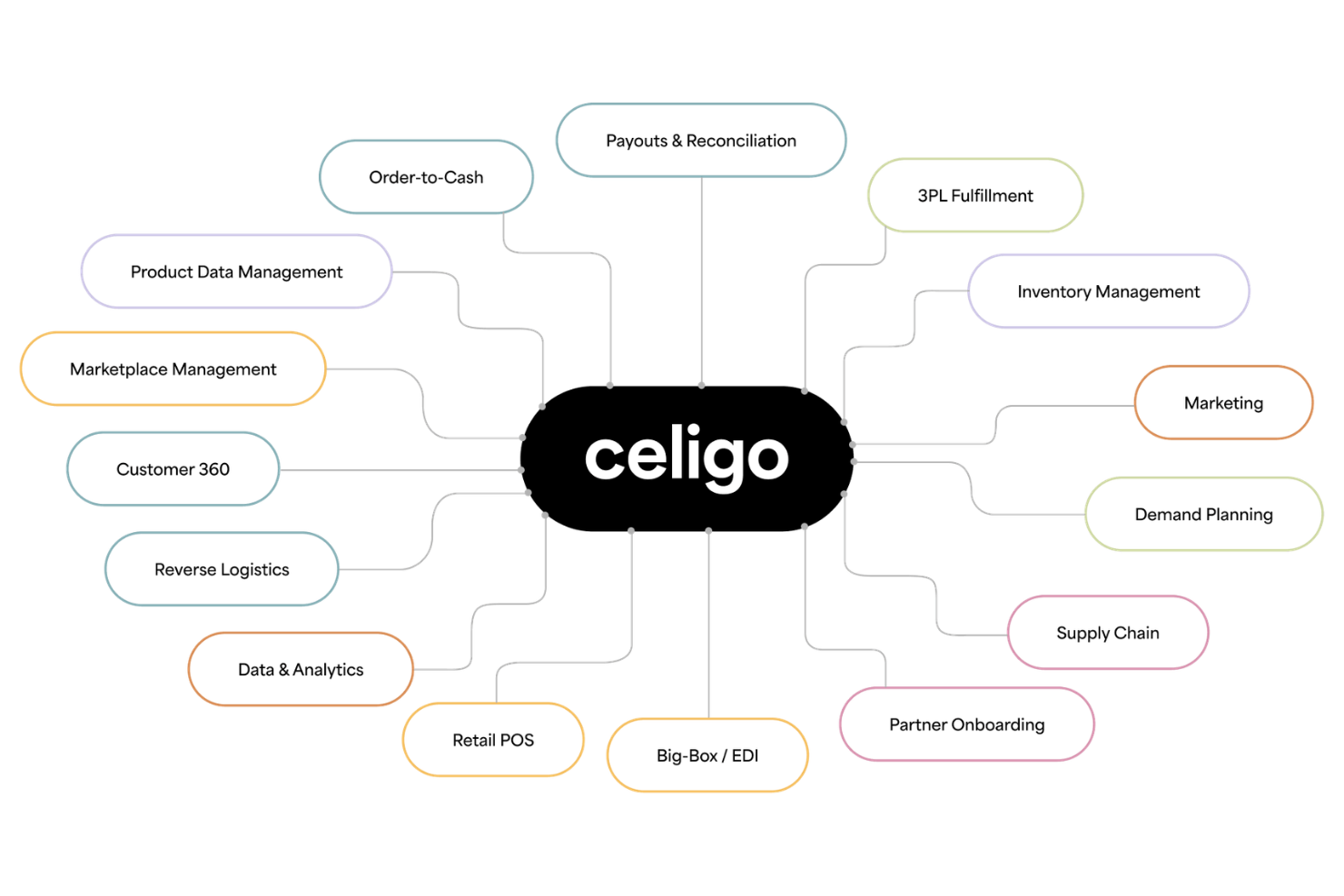
Celigo is an intelligent integration and automation platform that connects ERP, ecommerce, CRM, and HR systems through application integration, API management, EDI, data integration, and AI-driven workflow automation.
Who Is Celigo Best For?
Celigo is a strong fit for mid-market and enterprise ecommerce businesses that run multiple disconnected systems and need a dedicated integration layer to keep data flowing across them.
Why I Picked Celigo
Celigo earns its spot as one of the best on my shortlist because of the sheer breadth of its prebuilt connector library. With 1,000+ prebuilt connectors and templates, I can wire up NetSuite, Shopify, Amazon, and a 3PL in a single project without building flows from scratch. I also like the AI exception management, which resolves 95% of integration errors automatically—so order-to-cash flows keep running even when something goes wrong upstream.
Celigo Key Features
- EDI management: Connect and manage trading partner EDI transactions, including purchase orders and advance ship notices, directly within integration flows.
- AI-powered data mapping: Automatically map fields between source and destination apps using AI, reducing manual configuration when building new integrations.
- API management: Publish, secure, and monitor APIs so internal and external systems can exchange data on demand.
- Real-time inventory sync: Push inventory updates across ecommerce storefronts, ERP, and 3PL systems as changes occur.
Pros and Cons
Pros:
- Provides detailed audit logs for compliance
- Offers protocol compatibility for legacy systems
- Handles complex multi-step ERP workflows
Cons:
- Limited offline or on-premise deployment options
- Advanced features require higher-tier plans
New Product Updates from Celigo
Celigo Adds API Group Assignment During API Setup
Celigo adds API group assignment during create, clone, and move actions. This reduces extra setup steps by letting teams organize APIs before the relative URI is defined. For more information, visit Celigo’s official site.
 .
.
Best for product license bundles

Microsoft Dynamics 365 is a modular ERP and CRM platform that covers finance, supply chain, inventory, order management, and omnichannel commerce across both B2B and B2C retail environments.
Who Is Microsoft Dynamics 365 Best For?
Microsoft Dynamics 365 is a strong fit for mid-market to enterprise retailers and distributors that need a unified system spanning finance, operations, and commerce.
Why I Picked Microsoft Dynamics 365
I've included Microsoft Dynamics 365 in my top picks because its base-plus-attach licensing model is one of the most flexible I've seen for scaling an ERP across a retail or ecommerce operation. You start with a base license for a core app like Finance or Supply Chain Management, then attach Commerce or other modules at a reduced per-user cost. I also like the product bundle feature in Supply Chain Management, which lets you group multiple SKUs under a parent item, price them together on a sales order, and then ship components individually while allocating revenue proportionally to each item.
Microsoft Dynamics 365 Key Features
- Distributed order management: Route, split, and fulfill orders across multiple warehouses, stores, or third-party locations from a single order management layer.
- Headless commerce API: Build custom storefronts or connect third-party channels using Dynamics 365 Commerce's API-first architecture.
- AI-driven demand forecasting: Generate inventory replenishment forecasts using historical sales data and machine learning models built into Supply Chain Management.
- Warehouse management system: Configure directed putaway, wave processing, and pick-and-pack workflows across your fulfillment network.
Pros and Cons
Pros:
- It easily integrates with other systems and tools.
- The dashboard provides a clear view of key performance indicators.
- It offers extended capabilities and features.
Cons:
- The interface can be daunting for new users.
- The price can add up to be too much for smaller businesses.

Best for stores with multichannel sales strategies

Brightpearl is a retail operating system that combines order management, multi-location inventory planning, automated fulfillment, retail accounting, and multichannel sales integrations in one platform.
Who Is Brightpearl Best For?
Brightpearl is a strong fit for mid-market retail and ecommerce businesses that sell across multiple online and physical channels.
Why I Picked Brightpearl
I've included Brightpearl in my top picks because it's purpose-built for retailers selling across multiple channels simultaneously. I really like how its automation engine routes orders from Shopify, Amazon, eBay, and brick-and-mortar locations into a single workflow, eliminating manual reconciliation between channels. I also use the demand forecasting tool to plan inventory replenishment across channels based on real sales velocity, which keeps stock levels accurate even during peak seasons.
Brightpearl Key Features
- Automated returns management: Processes returns across all sales channels with real-time inventory restocking and asset value updates.
- Retail accounting: Tracks costs, margins, and profitability across channels with financial reporting built directly into the platform.
- Workflow automation: Builds rule-based automations for PO creation, invoicing, inventory allocation, and fulfillment triggers.
- Business intelligence dashboards: Surfaces sales performance data by channel, product, supplier, and customer in a single reporting view.
Pros and Cons
Pros:
- Any team member can identify customer inquiries and pick them up from there.
- It’s constantly improving to benefit users.
- The platform has every function to help you track your business.
Cons:
- There are not many customization capabilities for the dashboard.
- It can be expensive for some users.
Best for workflow automation

Acumatica is a cloud-based ERP platform built for retail and distribution businesses, covering financial management, omnichannel commerce, inventory, order management, warehouse management, and CRM in a single system.
Who Is Acumatica Best For?
Acumatica is a strong fit for mid-market retailers and distributors that need a unified ERP to manage both online and physical sales channels.
Why I Picked Acumatica
I've included Acumatica in my top picks because its AI-driven workflow automation goes deeper than most ERP platforms. What I really like is that automation is built directly into existing workflows rather than bolted on as a separate module. For retail and ecommerce teams, that means AI-powered AP automation, GL anomaly detection, and code-free workflow customization run inside the same system where orders, inventory, and fulfillment data live. I find the code-free customization especially practical—your team can configure automated workflows across sales orders or financial processes without needing developer support.
Acumatica Key Features
- Omnichannel order management: Manage and fulfill orders across your website, marketplace, and in-store channels from a single order hub.
- Warehouse management system: Run pick, pack, and ship workflows with barcode scanning and bin location tracking inside the same ERP instance.
- Commerce connectors: Sync product, order, and inventory data natively with Shopify, BigCommerce, and Amazon.
- Multi-entity financial management: Consolidate financials across multiple business entities or store locations in one ledger.

SAP
Best for ecommerce intelligence

SAP S/4HANA Cloud is a cloud ERP that combines finance, supply chain, HR, and sales process management with embedded AI—and pairs with SAP Commerce Cloud to handle B2B, B2C, and B2B2C ecommerce from product catalog to order fulfillment.
Who Is SAP Best For?
SAP is a strong fit for large enterprises and mid-market companies that need a unified ERP and ecommerce platform to manage complex, multi-channel operations at scale.
Why I Picked SAP
SAP's Commerce AI layer is built into the platform rather than bolted on. AI agents handle product catalog enrichment automatically, so your team isn't manually cleaning data across thousands of SKUs. Its natural language-driven search and discovery connects shoppers to relevant products faster and lifts conversion without merchandising intervention. That intelligence runs on live ERP data, so pricing, inventory, and recommendations all reflect what's actually happening in your supply chain.
SAP Key Features
- Composable storefront: Build and modify your store front end using modular, interchangeable components without replatforming.
- Omnichannel order management: Manage orders across B2B, B2C, and B2B2C channels from a single platform.
- Pricing and promotions engine: Configure rules-based pricing, discount structures, and cross-sell or up-sell offers at the product or segment level.
- Embedded financial management: Run real-time financial close, reporting, and accounts processing directly within the ERP alongside your commerce data.
Pros and Cons
Pros:
- Users can access data from anywhere.
- Easy to use.
- It provides comprehensive training materials.
Cons:
- The support team can take a long time to resolve an issue.
- Users have reported some bugs with the software.

Epicor
Best for storefront management

Epicor Kinetic is a cloud ERP built for manufacturers and distributors that combines financials, supply chain management, production management, and omnichannel sales with an integrated digital commerce layer.
Who Is Epicor Best For?
Epicor Kinetic is a strong fit for mid-market to enterprise manufacturers, distributors, and wholesalers who need ERP and ecommerce capabilities in a single platform.
Why I Picked Epicor
I picked Epicor as one of the best ecommerce ERP solutions because of how tightly its storefront management tools connect to the ERP itself. Epicor Commerce, built on the Adobe Magento platform, lets your team build and manage multi-storefront experiences with configurable themes, drag-and-drop page building, and a "Mega Menu" builder—all without needing a developer for every update. Product catalog data, pricing, and inventory pull directly from Kinetic, so your storefront always reflects what's available and what each buyer is charged.
Epicor Key Features
- Customer self-service portal: Lets buyers log in to view order history, check invoice status, and place reorders without contacting your sales team.
- Configure, price, quote (CPQ): Guides sales reps and customers through complex product configurations with rules-based pricing built directly into the quoting workflow.
- Demand forecasting: Uses historical sales data to generate inventory replenishment recommendations and reduce stockouts across your distribution network.
- Business activity queries: Lets you build and run custom real-time data queries across financials, orders, and inventory without needing IT support.
Pros and Cons
Pros:
- It’s easy for users to gather the information they need.
- It offers a lot of flexibility that you can quickly implement.
- It’s a robust platform with many customization options.
Cons:
- Some features are difficult to find.
- It’s easy for users to gather the information they need.

Infor
Best for distribution businesses

Infor is a cloud-based, industry-specific ERP platform that covers finance, supply chain, inventory, order management, warehouse operations, and ecommerce through its integrated Infor Rhythm for Commerce module.
Who Is Infor Best For?
Infor is a strong fit for mid-market to enterprise companies in manufacturing, distribution, and retail that need industry-specific ERP capabilities out of the box.
Why I Picked Infor
I've included Infor in my top picks because its CloudSuite Distribution suite is built specifically for distributors—not adapted from a generic ERP. What I like most is the high-volume order processing and complex pricing management, which handles supplier rebates, contract pricing, and customer-specific price tiers directly within the ERP. The built-in warehouse management also lets distribution teams track inventory movement, manage lot traceability, and optimize fulfillment without bolting on a separate WMS.
Infor Key Features
- Infor Rhythm for Commerce: A built-in ecommerce module that connects your online storefront directly to ERP data for real-time product availability and pricing.
- Demand planning: Forecasting tools that analyze historical sales data to generate replenishment recommendations and purchasing plans.
- Multi-entity financial management: Manage accounting, budgeting, and reporting across multiple legal entities, currencies, and countries from a single platform.
- Sales configurator (CPQ): A configure-price-quote tool that lets sales teams build and price complex product configurations directly within the order process.
Pros and Cons
Pros:
- It provides easy access to customer profiles and previous histories.
- Very easy to use after implementing all the required information.
- Extremely user-friendly.
Cons:
- Technical support can take time to resolve issues.
- Users must pay for the training.

Best all-in-one ERP system
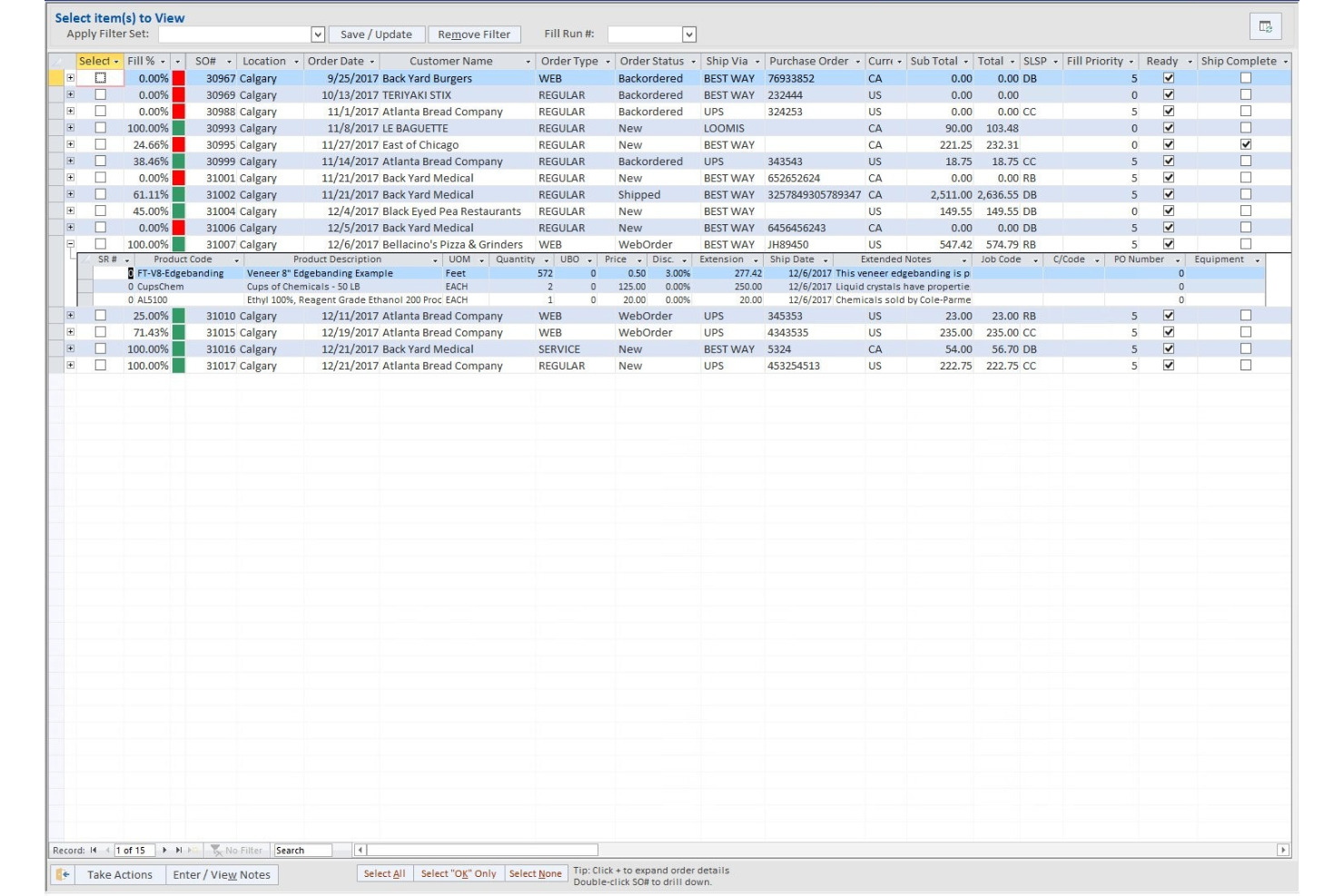
Blue Link ERP is a cloud-based ERP built for small and mid-size wholesalers and distributors, combining inventory management, accounting, order management, warehouse management, ecommerce integration, and CRM in one system.
Who Is Blue Link ERP Best For?
Blue Link ERP is a strong fit for small to mid-size wholesale and distribution businesses that sell across both ecommerce and retail channels.
Why I Picked Blue Link ERP
Blue Link ERP earns its spot as one of the best on my shortlist because it's one of the few ERP systems that genuinely covers the full back-office stack without requiring third-party add-ons. I like that inventory, accounting, and ecommerce sync in a single database, so stock levels, landed costs, and customer pricing update across channels in real time. The built-in B2B ordering portal is especially useful, letting wholesale buyers place orders with live inventory and pricing visibility.
Blue Link ERP Key Features
- Warehouse management: Manage bin locations, mobile barcode scanning, and cross-docking from a built-in WMS Lite module without a separate system.
- Lot and serial number tracking: Track inventory by lot, batch, or serial number for full traceability across the supply chain.
- Drop-ship order processing: Route orders directly from suppliers to customers with automated purchase order creation and shipment tracking.
- Point of sale: Run in-store retail transactions with real-time inventory updates that sync back to the central ERP database.
Pros and Cons
Pros:
- The dashboard provides an excellent perspective on daily sales and operations.
- It can create very professional reports.
- The inventory customization fields are user-friendly.
Cons:
- Users must pay for additional support.
- The platform can be slow when performing specific operations.
Other Options
Here are a few more options that didn’t make the top list.
- Fulfil
For diverse fulfillment strategies
- Settle
For CPG businesses
- Oracle Cloud ERP
For automating processes with AI and machine learning
- Acumatica Cloud ERP
Adaptable ERP software
- Aptean
For automating processes
- Intact ERP
For enabling entire businesses to work at their best
- DDI System
For leveraging physical store sophistication
- DualEntry
For automated inventory tracking
- Method
For customer relationship management.
- Scoro
For end-to-end work management.


How I Selected the Best Ecommerce ERP Software
Perhaps you're wondering how I selected the best ecommerce ERP software for this list? To build this top 10 list, I evaluated and compared a wide range of ecommerce ERP software with positive user ratings.
After determining my long list of top choices, I further honed my list by using the selection criteria below to see how each platform stacked up against the next one. I also drew on my years of ecommerce SaaS experience to pinpoint the features that add a lot of value.
If you have general questions about ecommerce ERP software or how to pick the best ecommerce ERP software for your organization, take a look at our frequently asked questions section below. Or, you can skip directly to my detailed software summaries, if that's what you need the most.
How I Evaluate Ecommerce ERP Software
I split my evaluation into baseline requirements—like real-time inventory sync and order automation—and differentiators that separate strong multichannel retail platforms from the rest.
Core Functionality (Table Stakes For This List)
When I'm selecting tools for my list, I rank each one on a scale from 0 (does not offer the functionality) to 5 (excels in this area) for each core functionality listed below. Then, I calculate the tool's total score into a percentage. Each tool needs to achieve a minimum total score of 65% to be considered for inclusion.
- Real-Time Inventory Sync: I check whether stock levels update across all connected storefronts, marketplaces, and warehouses fast enough to prevent overselling during flash sales or peak traffic.
- Ecommerce Platform Integrations: Native connectors to platforms like Shopify, BigCommerce, and Amazon matter here—I evaluate how many channels each tool supports out of the box.
- Order Management Automation: I look for end-to-end order lifecycle handling, from capture through fulfillment and returns, including split shipments and rules-based routing across warehouses.
- Product & Catalog Management: Centralized SKU, variant, and pricing control is key—I evaluate whether catalog updates push to multiple channels without manual re-entry per storefront.
- Financial & Accounting Management: The ERP should tie ecommerce transactions directly to core accounting functions like GL, AR/AP, multi-currency, and tax calculations in one system.
- Warehouse & Fulfillment Management: Multi-warehouse pick, pack, and ship workflows connected to ecommerce orders are what I look for, along with support for 3PL and carrier integrations.
Once I have a list of tools that meet this criteria, I consider what sets each platform apart.
Differentiating Factors (What Sets Vendors Apart)
Here's how I compare and contrast different vendors:
Standout Features
Integrated POS is a big differentiator—I look for platforms that unify in-store and online transactions so retailers can offer BOPIS or ship-from-store without bolting on a separate system. Demand forecasting also separates strong options from the pack, especially when it factors in seasonality and channel-specific trends to automate reorder points. For brands selling both D2C and wholesale, I evaluate whether the ERP handles B2B portals, tiered pricing, and quote workflows natively.
Beyond Features
Pricing transparency matters a lot in this space. I evaluate whether vendors bundle core modules like WMS, POS, and CRM into the base subscription or charge for each add-on, since that shapes the total cost of ownership fast. Implementation timelines vary widely too—some platforms offer pre-configured retail templates that cut go-live to weeks, while others require months of custom development. I also check the integration ecosystem, particularly certified connectors to shipping carriers, payment gateways, and tax engines that multichannel retailers depend on daily.