

Por qué confiar en nuestras recomendaciones de software
6,700+
Reviews
20
Industry experts
16+
Evaluation factors
14
Years
Nuestro equipo lleva probando y evaluando software desde 2012. Como líderes del sector retail, sabemos lo difícil —y lo importante— que es elegir el software adecuado.
Para esta guía, evaluamos las herramientas mediante pruebas prácticas e investigación independiente, puntuando las herramientas según nuestros criterios de selección.
Nuestras reseñas reflejan nuestro criterio independiente, no un discurso de ventas.
El software de TPV online es un sistema de punto de venta basado en la nube que permite a tu equipo procesar ventas, gestionar el inventario y realizar un seguimiento de los datos de los clientes desde cualquier dispositivo con acceso a internet. Si estás buscando el mejor software de TPV online, probablemente quieras agilizar el proceso de pago, mantener el inventario actualizado y conectar las ventas de tus canales físicos y digitales. Esta guía te ayudará a comparar las principales opciones para 2026, para que encuentres una solución que se adapte a tu modelo de negocio, favorezca tu crecimiento y mantenga tus operaciones funcionando sin problemas.
Tabla comparativa de software de TPV online
Esta tabla comparativa resume los detalles de precios de mis principales selecciones de software de TPV online:
| Tool | Best For | Trial Info | Price | ||
|---|---|---|---|---|---|
| 1 | La mejor opción para la gestión de pedidos de restaurantes | Demostración gratuita disponible | Desde $69/mes | Website | |
| 2 | La mejor opción para análisis minoristas avanzados | Prueba gratuita de 14 días | Desde $89/mes (facturado anualmente) | Website | |
| 3 | Ideal por la disponibilidad de un plan inicial gratuito | Plan gratuito + demostración gratuita disponible | Desde $10/mes (facturado anualmente) | Website | |
| 4 | La mejor opción para herramientas de formación rápida del personal | Demostración gratuita disponible | Desde £299/mes | Website | |
| 5 | La mejor opción para funciones de pedidos en mesa | Demostración gratuita disponible | Desde $69/mes | Website | |
| 6 | Ideal para una configuración y una incorporación sencillas | Prueba gratuita de 30 días | Desde $45/mes | Website | |
| 7 | Ideal para el seguimiento del inventario en varias ubicaciones | Prueba gratuita de 30 días | Desde $4/usuario/mes | Website | |
| 8 | Ideal para supervisar las ventas en tiempo real | No disponible | Desde $668 (pago único, incluye una licencia de 3 años) | Website | |
| 9 | Ideal para tiendas de conveniencia independientes | Prueba gratuita de 30 días | Desde 19,95 $/mes | Website | |
| 10 | Ideal para integrarse con tiendas en línea | Prueba gratuita de 3 días | Desde $19/mes (facturado anualmente) | Website |


Análisis de los mejores programas de TPV online
A continuación encontrarás mis resúmenes detallados de los mejores programas de TPV online que se incluyeron en mi lista. Mis análisis ofrecen una visión detallada de las funciones, los casos de uso más adecuados y las integraciones de cada plataforma para ayudarte a encontrar la mejor opción para ti.
 La mejor opción para la gestión de pedidos de restaurantes
- Demostración gratuita disponible
- Desde $69/mes
Visit WebsiteCustomer Rating:4.2/5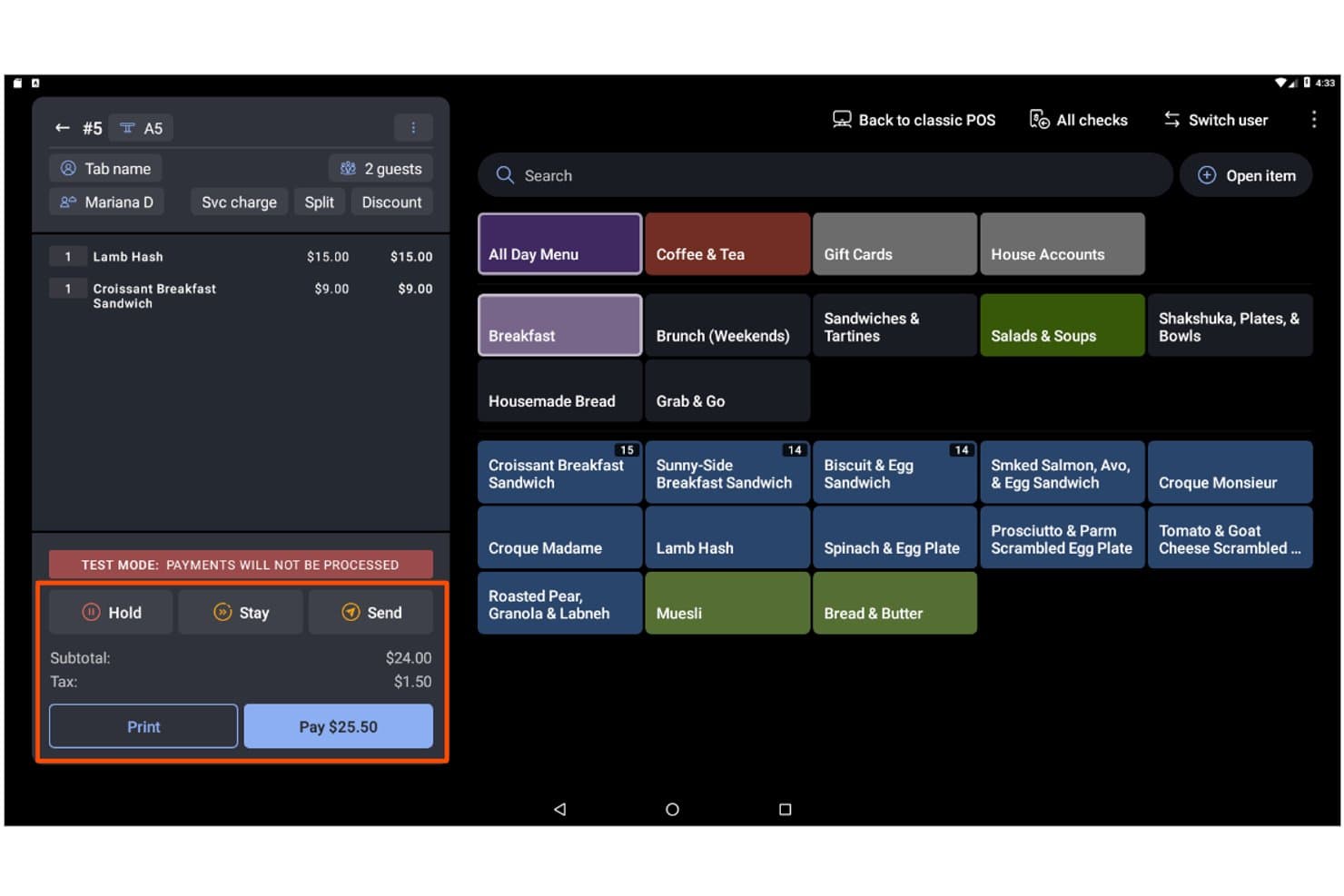
Toast permite a los usuarios gestionar pedidos, artículos y pagos desde una sola pantalla. Toast es una plataforma de punto de venta basada en la nube diseñada para restaurantes y negocios relacionados con la alimentación, que combina la gestión de pedidos presenciales y en línea, el procesamiento de pagos, el seguimiento del inventario, los programas de fidelización y los informes para múltiples establecimientos en un solo sistema.
¿Para quién es mejor Toast?
Toast es la opción preferida de los operadores de restaurantes y negocios de servicios de alimentación que necesitan un sistema de punto de venta creado en torno a las necesidades específicas de los flujos de trabajo de alimentos y bebidas.
Por qué elegí Toast
Toast ocupa un lugar en mi lista de opciones principales porque ninguna otra plataforma de punto de venta centraliza la gestión de pedidos de restaurantes de una manera comparable. Me encanta que los pedidos de DoorDash, Uber Eats y Grubhub lleguen directamente al sistema de punto de venta y al sistema de pantallas de cocina sin necesidad de una tableta independiente ni de volver a introducir los datos manualmente. Toast IQ, el asistente de IA integrado, muestra de forma proactiva tendencias y señala anomalías en todos tus canales de pedidos para que puedas actuar con rapidez.
Características principales de Toast
- Modo sin conexión: Toast sigue procesando los pedidos incluso cuando se interrumpe la conexión a internet y, después, sincroniza automáticamente los datos una vez restablecida la conexión.
- Dispositivo portátil Toast Go® 3: Un terminal móvil diseñado específicamente que permite al personal tomar pedidos y aceptar pagos en la mesa.
- Gestión de inventario de xtraCHEF: Realiza un seguimiento del inventario a nivel de ingrediente en tiempo real, automatiza las órdenes de compra y genera informes de costos de recetas y de costos de bienes vendidos (COGS).
- Toast Loyalty: Un programa de fidelización digital integrado con recompensas personalizables, campañas segmentadas y activadores automatizados, como ofertas de cumpleaños y campañas de reactivación de clientes inactivos.
Integraciones de Toast
Toast ofrece más de 300 integraciones del mercado, incluidas DoorDash, Uber Eats, Grubhub, Shopify, QuickBooks Online y reservas de Google. Su API abierta permite crear integraciones personalizadas.
Pros and Cons
Pros:
- Los menús, los precios y los informes se actualizan al instante
- El modo sin conexión permite procesar pedidos sin interrupciones
- La IA señala anomalías y tendencias automáticamente
Cons:
- Solo se puede utilizar el procesamiento de pagos de Toast
- No ofrece sincronización bidireccional con plataformas de comercio electrónico
Learn more about Toast: La mejor opción para análisis minoristas avanzados
- Prueba gratuita de 14 días
- Desde $89/mes (facturado anualmente)
Visit WebsiteCustomer Rating:4.1/5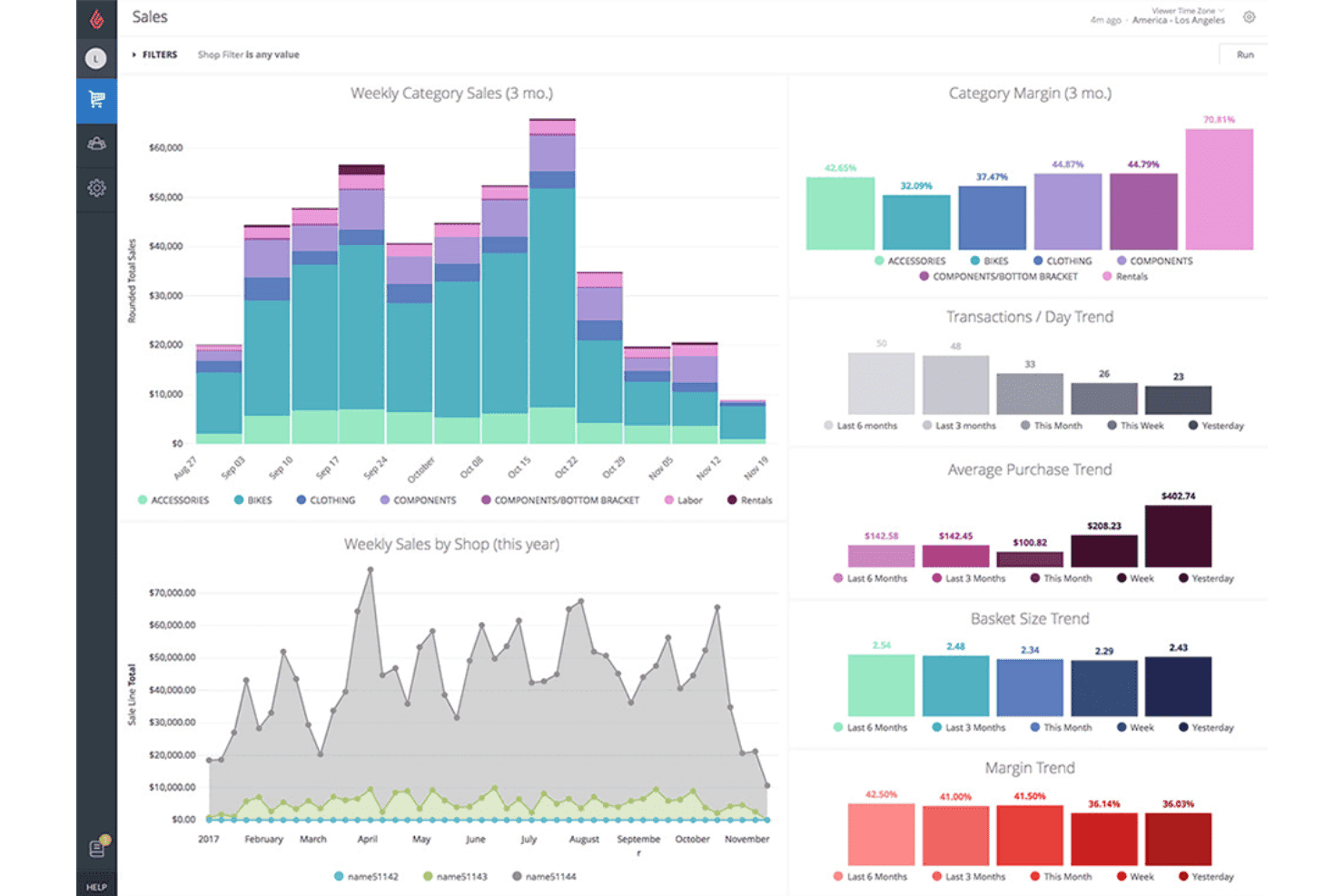
Lightspeed realiza un seguimiento de las tendencias de ventas, los márgenes y el tamaño de la cesta en todas las categorías. Lightspeed es una plataforma de punto de venta minorista basada en la nube que combina el procesamiento de transacciones en tienda y en línea, la gestión de inventario para múltiples ubicaciones, la venta omnicanal y la generación de informes analíticos avanzados.
¿Para quién es más adecuado Lightspeed?
Lightspeed es una excelente opción para minoristas con múltiples ubicaciones que necesitan una visibilidad detallada del inventario y análisis en cada tienda y canal de ventas.
Por qué elegí Lightspeed
Elegí Lightspeed como una de las mejores opciones porque su módulo Insights va mucho más allá de los informes estándar de los sistemas de punto de venta. Ofrece previsiones de demanda, comparaciones de indicadores clave de rendimiento entre ubicaciones y envío programado de informes que permiten identificar qué está impulsando o perjudicando realmente el rendimiento en cada tienda. Me encanta que pueda generar automáticamente borradores de órdenes de compra basados en patrones de ventas reales, para que no tengas que revisar manualmente los puntos de reposición cuando el inventario disminuye en varias ubicaciones.
Características principales de Lightspeed
- Sincronización omnicanal del inventario: La sincronización bidireccional en tiempo real mantiene alineados los datos de los productos, los precios y los niveles de inventario entre tu sistema de punto de venta, Lightspeed eCom y plataformas de terceros como Shopify y WooCommerce de forma simultánea.
- Programa de fidelización integrado: La fidelización por niveles permite que los clientes acumulen y canjeen puntos en compras en tienda y en línea mediante cuentas de clientes omnicanal unificadas.
- Lightspeed Payments: Un procesador de pagos integrado que acepta pagos sin contacto, Apple Pay, Google Pay, pagos divididos y transacciones con tarjeta no presente a una tarifa fija del 1.5% para pagos con tarjeta presente.
- Aplicación de punto de venta con escáner móvil: Convierte dispositivos iOS y Android en terminales portátiles para realizar conteos de inventario, gestionar el cumplimiento de pedidos y procesar pagos en la tienda o en eventos temporales.
Integraciones de Lightspeed
Lightspeed admite integraciones con Shopify, WooCommerce, BigCommerce, QuickBooks, Xero, Klaviyo, Mailchimp, NuORDER, Amazon y eBay. Una API REST abierta incluida en el plan Plus permite crear integraciones y flujos de trabajo personalizados.
Pros and Cons
Pros:
- Previsión avanzada de la demanda y análisis de ventas
- Gestión del inventario y los informes para múltiples ubicaciones
- Venta omnicanal y programas de fidelización unificados
Cons:
- Capacidades nativas limitadas para transacciones sin conexión
- Cargos adicionales por utilizar procesadores de pagos externos
Learn more about Lightspeed: Ideal por la disponibilidad de un plan inicial gratuito
- Plan gratuito + demostración gratuita disponible
- Desde $10/mes (facturado anualmente)
Visit WebsiteCustomer Rating:4.3/5
eHopper permite a los usuarios gestionar pedidos y explorar los elementos del menú por categoría. eHopper es una plataforma de punto de venta basada en la nube que combina el procesamiento de transacciones en tienda, una tienda de comercio electrónico alojada y propia, la gestión de inventario, CRM y herramientas de marketing integradas, todo dentro de un único sistema diseñado para pequeños minoristas independientes.
¿Para quién es más adecuado eHopper?
eHopper es ideal para minoristas independientes y propietarios de pequeñas empresas que desean un sistema de punto de venta y una tienda en línea todo en uno sin pagar una cuota mensual para comenzar.
Por qué elegí eHopper
eHopper ocupa un lugar en mi lista porque es una de las únicas plataformas de punto de venta en línea con un plan gratuito permanente, lo que la hace realmente accesible para minoristas independientes que aún no están preparados para comprometerse con cuotas mensuales. Me impresiona especialmente la tienda alojada integrada en el plan OmniChannel, que sincroniza los catálogos de productos y el inventario con el sistema de punto de venta en tienda en tiempo real, por lo que nunca tendrás que conciliar manualmente el inventario entre canales. El programa de descuentos por pago en efectivo es otro aspecto destacado: los comercios que cumplen los requisitos pueden utilizar toda la plataforma por $0/mes al trasladar las comisiones de las tarjetas a los clientes.
Características principales de eHopper
- Compatibilidad con múltiples procesadores de pagos: eHopper permite conectar el procesador de pagos externo que prefieras, incluidos Stripe, PayPal y Authorize.Net, en lugar de obligarte a utilizar un único proveedor.
- CRM integrado con perfiles de clientes: El sistema almacena el historial de compras individual de cada cliente y permite segmentarlo para realizar campañas de marketing dirigidas por correo electrónico y SMS.
- Registro de horas y permisos de empleados: El personal puede registrar su entrada y salida directamente desde el terminal de punto de venta, mientras que los controles de acceso basados en roles limitan lo que cada empleado puede consultar o editar.
- Gestión de órdenes de compra: Puedes crear y supervisar órdenes de compra de proveedores vinculadas a los niveles de inventario en tiempo real, lo que agiliza el proceso de reposición desde la propia plataforma.
Integraciones de eHopper
eHopper ofrece integraciones nativas con QuickBooks Online, Authorize.Net, PayPal, Stripe, Poynt y terminales PAX, además de múltiples procesadores de pagos. También proporciona acceso a la API para integraciones personalizadas.
Pros and Cons
Pros:
- Plan inicial gratuito sin límite de tiempo
- El sitio de comercio electrónico integrado sincroniza el inventario
- Acepta múltiples procesadores y métodos de pago
Cons:
- No ofrece sincronización nativa con Shopify o WooCommerce
- No admite dispositivos iOS ni iPads
Learn more about eHopper: La mejor opción para herramientas de formación rápida del personal
- Demostración gratuita disponible
- Desde £299/mes
Visit WebsiteCustomer Rating:3.8/5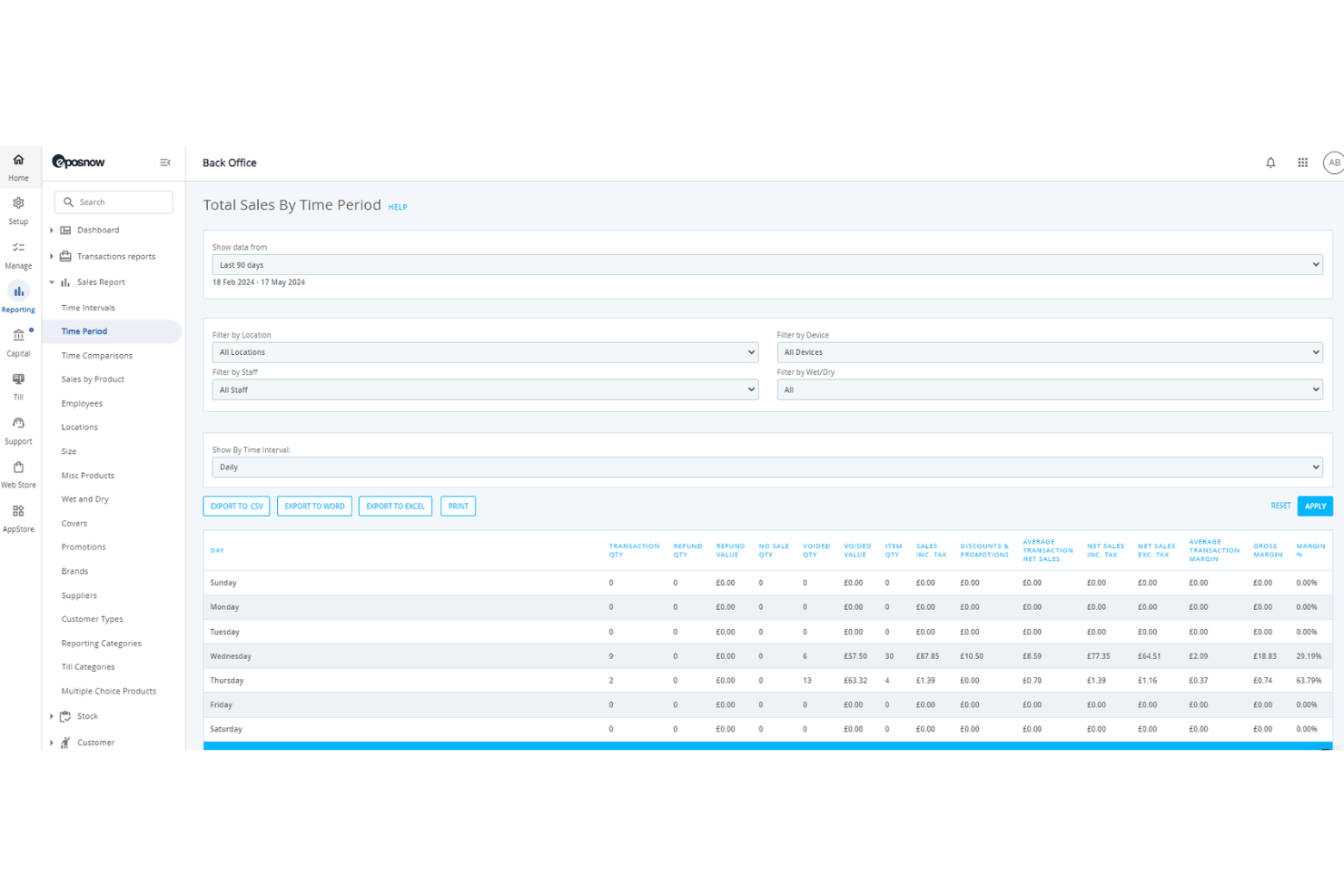
Epos Now desglosa el rendimiento de las ventas por día de la semana. Epos Now es una plataforma de punto de venta basada en la nube que combina el procesamiento de transacciones en tienda, la gestión de inventario en tiempo real, la sincronización del comercio electrónico omnicanal y herramientas integradas de CRM y gestión de personal.
¿Para quién es más adecuado Epos Now?
Epos Now es una opción excelente para minoristas y operadores con varias ubicaciones que necesitan que el personal nuevo pueda empezar a trabajar rápidamente en la caja, sin procesos de incorporación prolongados.
Por qué elegí Epos Now
Epos Now ocupa un lugar en mi lista de favoritos por la importancia que concede a la incorporación del personal como una función esencial, no como algo secundario. La plataforma está diseñada para que los nuevos empleados puedan recibir formación en la caja en unos 15 minutos, con permisos basados en roles y métodos de inicio de sesión únicos configurados con la misma rapidez. También me gusta que el registro de horas y el seguimiento de turnos estén integrados directamente en el mismo sistema, por lo que no hay ninguna herramienta independiente que gestionar.
Funciones principales de Epos Now
- Sincronización de inventario en tiempo real: La sincronización bidireccional entre Shopify, WooCommerce y BigCommerce mantiene automáticamente actualizados los niveles de existencias en todos los canales.
- CRM integrado: Los perfiles de clientes almacenan el historial completo de compras, lo que permite realizar promociones específicas y hacer un seguimiento de los puntos de fidelidad directamente desde el sistema de punto de venta.
- Gestor de varias ubicaciones: Un único panel permite controlar los precios, las reglas fiscales y la asignación de inventario en varias ubicaciones de tiendas.
- Información de ventas basada en IA: El asistente Sidekick analiza los márgenes de los productos y señala oportunidades de precios utilizando los datos de ventas en directo.
Integraciones de Epos Now
Epos Now ofrece más de 100 integraciones con plataformas de comercio electrónico y mercados, incluidas Shopify, WooCommerce, BigCommerce, QuickBooks Online, Xero, Salesforce, Mailchimp, Deputy y Zapier. Su API abierta permite crear integraciones personalizadas para flujos de trabajo empresariales.
Pros and Cons
Pros:
- La formación del personal se completa en unos 15 minutos
- Sincronización del inventario de varias ubicaciones con actualizaciones en tiempo real
- Los pagos con tarjeta sin conexión continúan durante las interrupciones del servicio
Cons:
- La cancelación del contrato es compleja y restrictiva
- El soporte prémium tiene un coste mensual adicional
Learn more about Epos Now: La mejor opción para funciones de pedidos en mesa
- Demostración gratuita disponible
- Desde $69/mes
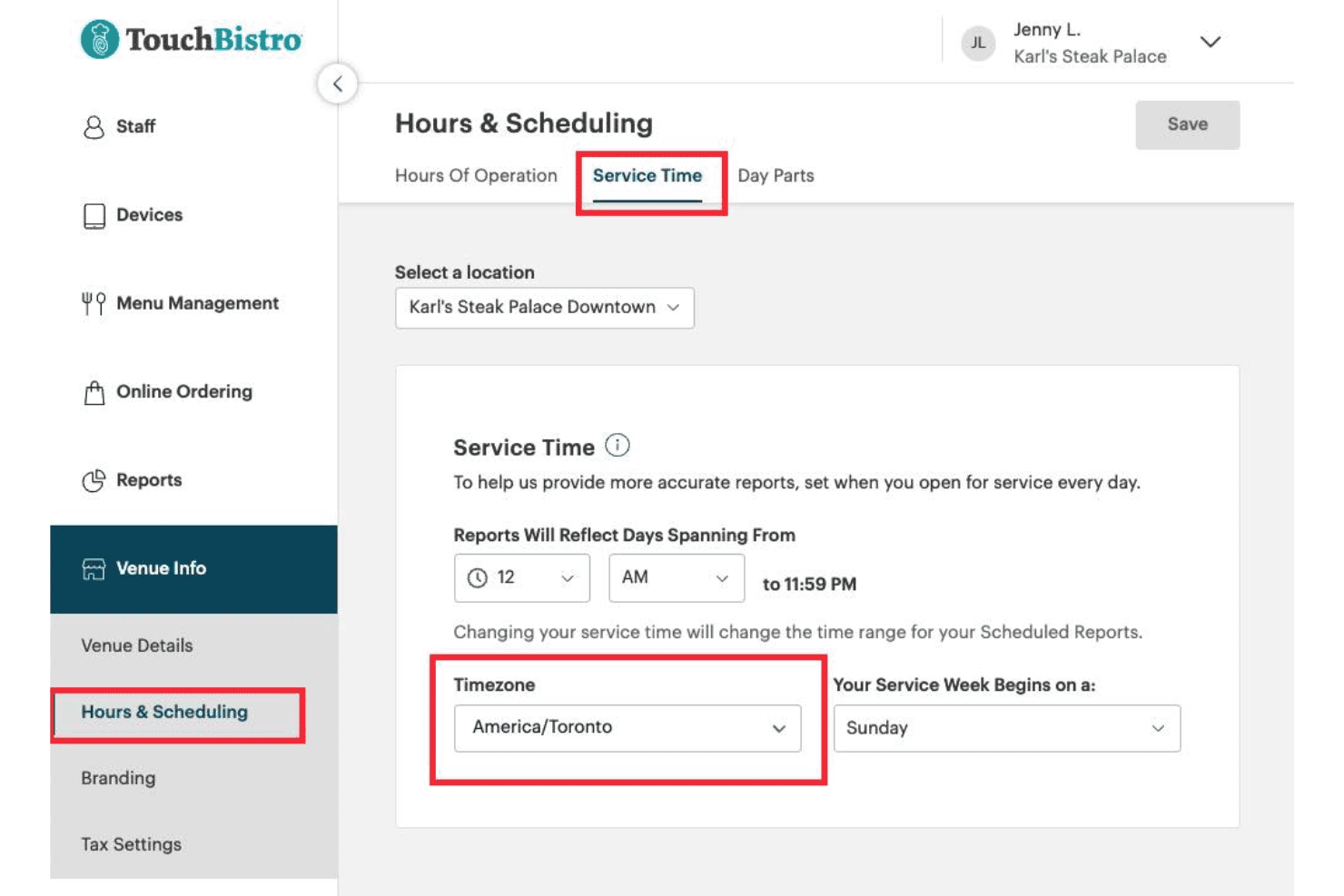
TouchBistro permite a los usuarios establecer el horario de servicio y la zona horaria de cada ubicación. TouchBistro es un sistema POS enfocado en restaurantes que combina pedidos en mesa, gestión del plano de mesas, pedidos en línea, fidelización y herramientas para las operaciones internas, como la gestión de inventario y personal, en una sola plataforma.
¿Para quién es más adecuado TouchBistro?
TouchBistro es una opción excelente para restaurantes de servicio completo y servicio rápido que buscan pedidos en mesa, fidelización y herramientas para las operaciones internas en un solo sistema nativo para iPad.
Por qué elegí TouchBistro
TouchBistro ocupa un lugar en mi lista porque su configuración de pedidos en mesa es realmente una de las mejores que he visto en un POS para restaurantes. El personal puede tomar pedidos, enviarlos a la cocina y procesar pagos directamente desde un iPad en la mesa mediante TouchBistro One, lo que reduce los errores causados por volver a introducir los pedidos en un terminal. La gestión del plano de mesas está directamente vinculada al flujo de pedidos, por lo que los camareros siempre conocen el estado de las mesas en tiempo real.
Características principales de TouchBistro
- Pedidos en línea sin comisiones: Los clientes pueden hacer pedidos para recoger y recibir a través de tu sitio web, ficha de Google y canales sociales sin que las comisiones por pedido reduzcan tus márgenes.
- Más de 50 informes basados en la nube: Los informes de ventas, personal, inventario y fidelización están disponibles desde cualquier dispositivo conectado a Internet, no solo desde los terminales de tu establecimiento.
- CRM de fidelización integrado: TouchBistro Loyalty registra la frecuencia de las visitas, el historial de gasto y los datos de pedidos de cada cliente, lo que te permite segmentar y dirigirte a los clientes mediante campañas por correo electrónico y en la aplicación.
- Continuidad de las transacciones sin conexión: El sistema procesa los pedidos y pagos localmente entre dispositivos durante las interrupciones de Internet, por lo que una pérdida de conexión no detiene el servicio.
Integraciones de TouchBistro
TouchBistro documenta integraciones con Restaurant365, MarginEdge, Deliverect, UrbanPiper, Worldpay, Chase Payment Solutions y Moneris. No ofrece conectores nativos para Shopify, WooCommerce, BigCommerce ni Magento, lo que limita su adecuación para el comercio minorista omnicanal.
Pros and Cons
Pros:
- Pedidos en mesa desde un iPad o dispositivo portátil
- Pedidos en línea sin comisiones para restaurantes
- Fidelización y marketing integrados en el POS
Cons:
- No es adecuado para el comercio minorista ni el comercio electrónico
- Muchas funciones esenciales tienen un coste adicional
Learn more about TouchBistro: Ideal para una configuración y una incorporación sencillas
- Prueba gratuita de 30 días
- Desde $45/mes
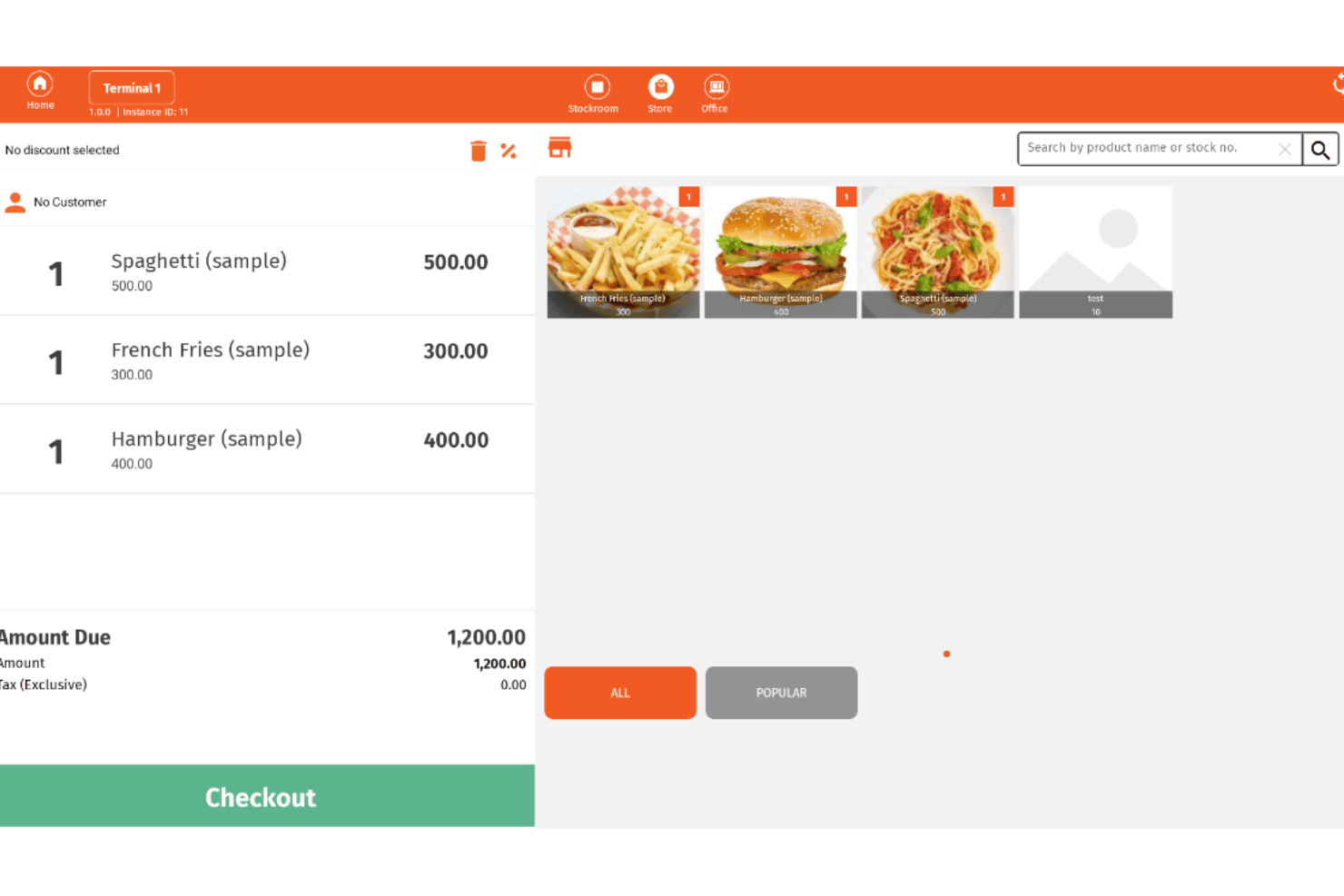
Imonggo permite a los usuarios gestionar pedidos y pagos desde una interfaz POS. Imonggo es un sistema POS basado en navegador que gestiona transacciones de ventas, seguimiento del inventario, gestión de clientes e informes básicos en operaciones minoristas de una o varias sucursales.
¿Para quién es más adecuado Imonggo?
Imonggo es una excelente opción para minoristas independientes y propietarios de pequeñas tiendas que quieren empezar a vender rápidamente sin configuraciones técnicas ni costes iniciales.
Por qué elegí Imonggo
Imonggo ocupa un lugar en mi lista de favoritos porque es el único POS basado en navegador de esta selección que te permite empezar a vender sin instalar nada. Me encanta que puedas abrir un navegador, crear una cuenta y realizar una transacción real en cuestión de minutos. Su modo sin conexión procesa las ventas localmente y sincroniza automáticamente los datos cuando vuelve la conexión, por lo que una señal inestable no interrumpirá el proceso de pago.
Características principales de Imonggo
- Programa de fidelización y puntos de recompensa: Los clientes obtienen puntos por sus compras que pueden canjearse por descuentos instantáneos al pagar.
- Precios específicos por sucursal: Cada ubicación minorista puede tener sus propios precios de productos, independientes de los de otras sucursales de la misma cuenta.
- Importación y exportación de datos CSV: Carga en bloque tu catálogo de productos mediante CSV y exporta los datos de las facturas de venta para utilizarlos en herramientas contables externas.
- Configuración de impuestos personalizable: Establece tipos impositivos incluidos o no incluidos a nivel de artículo, sucursal o global para adaptarte a distintos requisitos fiscales regionales.
Integraciones de Imonggo
Imonggo cuenta con integraciones documentadas con Shopify, Xero, Authorize.net, Stripe, Dymo Label y Cyclr. También ofrece una API REST para integraciones personalizadas.
Pros and Cons
Pros:
- La configuración solo requiere un navegador y una cuenta
- Los puntos de fidelización se canjean al instante al pagar
- Admite completamente precios de productos específicos por sucursal
Cons:
- No admite pagos sin contacto ni monederos móviles
- Shopify es la única sincronización nativa con comercio electrónico
Learn more about Imonggo: Ideal para el seguimiento del inventario en varias ubicaciones
- Prueba gratuita de 30 días
- Desde $4/usuario/mes
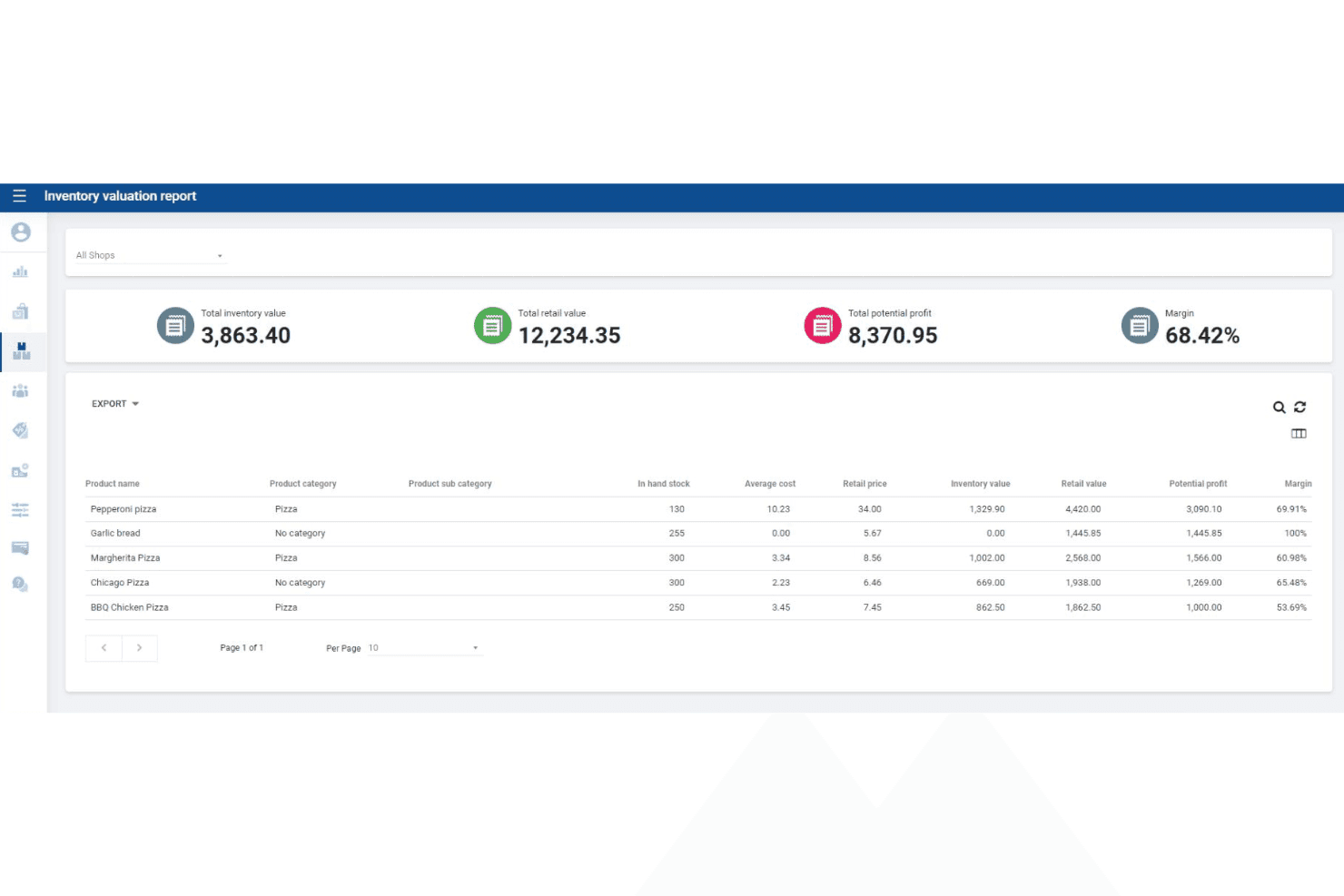
SalesPlay POS realiza un seguimiento del valor del inventario, el valor minorista y los márgenes de beneficio. SalesPlay POS es un sistema de punto de venta basado en la nube que cubre la facturación en tienda, el seguimiento del inventario en varias ubicaciones, el CRM, los programas de fidelización y los informes de ventas en dispositivos Android y una interfaz de navegador web.
¿Para quién es más adecuado SalesPlay POS?
SalesPlay POS es una opción sólida para pequeños minoristas y minoristas en crecimiento que gestionan existencias en varias ubicaciones desde un único sistema centralizado.
Por qué elegí SalesPlay POS
SalesPlay POS se ha ganado un lugar en mi lista de opciones porque el seguimiento de existencias en tiempo real en varias ubicaciones está disponible incluso en el plan gratuito. Me impresiona especialmente la Oficina administrativa centralizada, que permite consultar los niveles de inventario, transferir existencias entre tiendas y generar informes por tienda desde un único panel. El complemento Inventario avanzado va más allá con flujos de trabajo completos para órdenes de compra y notas de recepción de mercancías, por lo que puedes gestionar todo el ciclo de vida de las existencias en un solo lugar.
Características principales de SalesPlay POS
- Modo sin conexión: Registra las transacciones sin conexión a Internet y sincroniza automáticamente los datos una vez restablecida la conexión.
- Programa de fidelización basado en puntos: Asigna y realiza el seguimiento de puntos de recompensa por cliente en todas las ubicaciones, con ajustes manuales disponibles desde la Oficina administrativa.
- Integración con Xero y QuickBooks: Se conecta directamente con ambas plataformas de contabilidad mediante la configuración de la Oficina administrativa para sincronizar los datos de ventas destinados a la contabilidad.
- Aplicación de quiosco de autoservicio: Proporciona una interfaz de pedidos orientada al cliente que se sincroniza con el TPV en tiempo real.
Integraciones de SalesPlay POS
SalesPlay POS ofrece integraciones documentadas con Shopify, WooCommerce, Xero y QuickBooks. También proporciona una API abierta para integraciones personalizadas que abarcan pedidos, inventario, pagos y contabilidad.
Pros and Cons
Pros:
- Seguimiento de existencias en varias ubicaciones en el plan gratuito
- La Oficina administrativa centralizada gestiona todas las tiendas
- CRM integrado con fidelización y perfiles de clientes
Cons:
- No ofrece compatibilidad nativa con aplicaciones para iOS
- No se ha confirmado la sincronización completa del inventario con el comercio electrónico
Learn more about SalesPlay POS: Ideal para supervisar las ventas en tiempo real
- No disponible
- Desde $668 (pago único, incluye una licencia de 3 años)

El punto de venta en la nube ofrece información en tiempo real sobre ventas, pedidos y datos de pago. El punto de venta en la nube es un mercado de componentes físicos y programas para puntos de venta que agrupa terminales PAX con una licencia de programa de caja registradora almacenada localmente, junto con plataformas basadas en la nube revendidas como ePOS Now y Shopify POS.
¿Para quién es más adecuado el punto de venta en la nube?
El punto de venta en la nube es adecuado para pequeños minoristas independientes que quieren un paquete de componentes físicos y programas sin cuota mensual y prefieren trabajar con un socio de implementación de servicio completo en lugar de gestionar por sí mismos una configuración de punto de venta en la nube.
Por qué elegí el punto de venta en la nube
Elegí el punto de venta en la nube como una de las mejores opciones por la forma en que muestra datos de ventas en tiempo real mediante el panel de informes en directo de ePOS Now, lo que permite detectar las tendencias de ingresos cuando ocurren en lugar de hacerlo después. Me gusta que sus informes de fin de día calculen automáticamente los totales de cierre de caja y registren los datos históricos, de modo que no tengas que reunir las cifras manualmente al cerrar. Su configuración independiente del procesador también significa que puedes conectar tu procesador de pagos actual sin cambiar de componentes físicos.
Características principales del punto de venta en la nube
- Compatibilidad de pagos independiente del procesador: El punto de venta en la nube se conecta con los principales procesadores, incluidos First Data, TSYS, Heartland y Worldpay, sin obligarte a utilizar un único proveedor.
- Compatibilidad con terminales PAX: Los paquetes incluyen terminales PAX basados en Android que aceptan tarjetas con chip EMV, NFC/sin contacto, banda magnética e introducción manual de los datos de la tarjeta.
- Integración con la aplicación de fidelización de ePOS Now: Una aplicación de fidelización adicional permite gestionar programas de recompensas para clientes directamente a través de la plataforma ePOS Now.
- Integración con sitios web de comercio electrónico: El punto de venta en la nube puede añadir un catálogo de productos con opción de pago a tu sitio web actual, con acceso administrativo a los datos de ventas y clientes.
Integraciones del punto de venta en la nube
El punto de venta en la nube admite integraciones con Shopify POS, ePOS Now y más de 100 sistemas de punto de venta mediante la API de pagos eConduit (Payroc), incluidos Lightspeed, Vend y Heartland Retail. También admite conexiones de pago con procesadores como First Data, TSYS, Heartland y Worldpay.
Pros and Cons
Pros:
- Opción de paquete de componentes físicos y programas sin cuota mensual
- Funciona con muchos de los principales procesadores de pagos
- Implementación y puesta en marcha del punto de venta con servicio completo
Cons:
- No ofrece programas nativos de punto de venta en la nube
- Las funciones avanzadas requieren complementos de terceros
Learn more about Cloud POS:

NRS permite a los cajeros procesar ventas en distintos departamentos con múltiples opciones de pago. NRS es un sistema POS diseñado específicamente para tiendas de conveniencia independientes, bodegas y licorerías, que ofrece ventas en tienda, aceptación de pagos EBT/eWIC, seguimiento del inventario en tiempo real y una tienda de comercio electrónico propia con integración de entregas locales.
¿Para quién es más adecuado NRS?
NRS es una excelente opción para propietarios de tiendas de conveniencia independientes, bodegas y licorerías que necesitan compatibilidad integrada con EBT/eWIC, una base de datos de productos precargada e integración de entregas locales desde el primer momento.
Por qué elegí NRS
NRS ocupa un lugar en mi lista final porque ningún otro sistema POS que haya evaluado iguala la profundidad de su asistencia para operadores de tiendas de conveniencia independientes. Me encanta que la aceptación de EBT y eWIC esté integrada directamente en NRS Pay, de modo que los propietarios de bodegas y tiendas de conveniencia puedan atender a clientes de SNAP sin añadir una solución independiente. El catálogo de precios con más de 100.000 códigos UPC precargados también significa que los nuevos propietarios de tiendas no tienen que introducir manualmente miles de productos desde el primer día.
Características principales de NRS
- Aceptación de pagos con NRS Pay: NRS Pay admite pagos con tarjetas de crédito, débito, EBT, eWIC, Apple Pay, Google Pay y pagos sin contacto directamente a través del sistema POS.
- Integraciones con plataformas de entrega de alimentos: Los pedidos de DoorDash, Grubhub y Uber Eats pueden gestionarse desde el sistema POS de NRS por una tarifa mensual adicional por plataforma.
- Programa de recompensas con cupones BOSS Club: Todos los planes incluyen gratuitamente un programa integrado de recompensas para clientes, que permite a los clientes inscribirse mediante su número de teléfono en la caja.
- Alertas antirrobo: Las notificaciones push en tiempo real señalan actividades sospechosas en el sistema POS a la aplicación móvil del comerciante; esta función está disponible como complemento o incluida en los planes Avanzado y Élite.
Integraciones de NRS
NRS cuenta con integraciones documentadas con DoorDash, Grubhub, Uber Eats, Stripe, QuickBooks Online y la aplicación BOSS Local Shopping. Ofrece un conjunto de conexiones más limitado, sin integraciones documentadas con Shopify, WooCommerce, BigCommerce ni API abierta.
Pros and Cons
Pros:
- Pagos EBT y eWIC aceptados de forma nativa
- Programa de fidelización incluido en todos los planes
- Sincronización del inventario en tiempo real entre canales
Cons:
- Sin modo sin conexión durante interrupciones de Internet
- Integraciones de comercio electrónico limitadas fuera del sistema propio
Learn more about NRS: Ideal para integrarse con tiendas en línea
- Prueba gratuita de 3 días
- Desde $19/mes (facturado anualmente)
Visit WebsiteCustomer Rating:4.4/5
Shopify POS conecta varios canales de venta desde un único panel de control. Shopify POS es un sistema de punto de venta nativo de la nube que unifica las transacciones en tienda, el inventario de múltiples ubicaciones, la gestión omnicanal de pedidos y el procesamiento de pagos en los canales físicos y digitales del comercio minorista.
¿Para quién es más adecuado Shopify POS?
Shopify POS es una opción natural para los minoristas que ya gestionan —o planean gestionar— una tienda en línea y quieren administrar sus operaciones en tienda y digitales desde un único panel administrativo.
Por qué elegí Shopify POS
Shopify POS merece un lugar en mi lista de opciones porque ningún otro sistema de punto de venta cierra la brecha entre el comercio minorista físico y digital como lo hace este. Si ya vendes en Shopify, el inventario, los pedidos y los perfiles de clientes de tu tienda física y en línea comparten un único panel administrativo sin necesidad de software intermedio. Me gustan especialmente las capacidades de BOPIS y envío desde la tienda, que permiten al personal cumplir los pedidos en línea directamente con el inventario disponible en el establecimiento sin tener que cambiar de sistema.
Funciones principales de Shopify POS
- Pago con un toque en iPhone y Android: Acepta pagos sin contacto utilizando tu dispositivo iPhone o Android actual, sin necesidad de un lector de tarjetas.
- Roles y permisos del personal: Asigna niveles de acceso personalizados al POS e inicios de sesión con PIN únicos a cada miembro del personal, con aprobación del gerente necesaria para descuentos o reembolsos.
- Transferencias de inventario entre varias ubicaciones: Mueve existencias entre las ubicaciones de las tiendas directamente desde la aplicación de POS, con recuentos de inventario actualizados en tiempo real en todas las ubicaciones.
- Más de 200 informes en tiempo real: Accede a informes específicos del comercio minorista sobre ventas, flujo de caja y rendimiento de productos desde cualquier dispositivo con el plan Grow o superior.
Integraciones de Shopify POS
Shopify POS se integra de forma nativa con la plataforma de comercio electrónico de Shopify. Su mercado de aplicaciones ofrece más de 100 aplicaciones específicas para POS, incluidas QuickBooks, Xero, Klaviyo, Smile.io y Better Reports, mientras que su API abierta admite integraciones personalizadas.
Pros and Cons
Pros:
- Sincronización en tiempo real de las ventas en línea y en tienda
- Pago con un toque en iPhone y Android
- Compra en línea, devuelve o recoge en la tienda
Cons:
- No incluye un programa de fidelización integrado
- Las herramientas avanzadas de inventario requieren el complemento Pro
Learn more about Shopify POS:
Otros programas de TPV online
Estas son algunas opciones adicionales de software de TPV online que no se incluyeron en mi lista, pero que merece la pena consultar:
- 11CloverLa mejor opción para disponer de hardware personalizable
- 12SquareLa mejor opción por su flexibilidad para los pagos móviles
- 13PayPal POSIdeal para aceptar pagos de PayPal en tiendas físicas
- 14Hike POSLa mejor opción para la programación integrada del personal
- 15LoyverseIdeal para gestionar programas de fidelización de clientes
- 16Stripe TerminalIdeal para unificar pagos en línea y presenciales
- 17Toshiba CommerceLa mejor opción para compatibilidad de hardware de nivel empresarial
- 18QuickBooks POSIdeal para sincronizar con software de contabilidad
- 19Salesforce Retail Cloud POSIdeal para obtener información de ventas impulsada por CRM
Cómo evalúo el software POS en línea
Evalúo las herramientas POS en línea en dos capas: los aspectos imprescindibles (cobro en la nube, inventario en tiempo real, sincronización omnicanal) y los diferenciadores que determinan la mejor opción para tus tiendas.
Funcionalidad principal (Condiciones básicas para esta lista)
Al seleccionar herramientas para mi lista, califico cada una en una escala de 0 (no ofrece la funcionalidad) a 5 (sobresale en esta área) para cada funcionalidad principal listada a continuación. Luego, calculo la puntuación total de la herramienta en porcentaje. Cada herramienta debe lograr una puntuación total mínima del 65% para ser considerada para su inclusión.
- Procesamiento de transacciones en la nube: Verifico si el POS funciona completamente en un navegador o una app alojada en la nube, para que puedas registrar ventas desde una tableta en la tienda o una laptop en una tienda temporal.
- Procesamiento de pagos: Cada herramienta debe admitir tarjetas, pagos sin contacto y billeteras móviles, además de integrarse con procesadores como Square, Stripe o pasarelas propietarias.
- Seguimiento de inventario en tiempo real: Busco actualizaciones automáticas de existencias en el momento en que ocurre una venta, en cada caja y ubicación, con alertas por bajo inventario para evitar sobreventas.
- Sincronización de ventas omnicanal: Los catálogos de productos, precios y niveles de inventario deben mantenerse alineados entre cajas presenciales y tiendas en línea, ya sea Shopify, WooCommerce o una tienda web incorporada.
- Informes y análisis de ventas: Aquí los paneles útiles son importantes: tendencias de ventas por hora, productos más vendidos y desglose de márgenes que te ayudan a tomar decisiones sobre reabastecimiento y personal.
- Gestión de clientes: Evalúo si la plataforma captura perfiles de compradores, realiza seguimiento del historial de compras y admite programas de lealtad o recompensas para fomentar la recompra.
Una vez que tengo una lista de herramientas que cumplen con estos criterios, considero qué distingue a cada plataforma.
Factores diferenciadores (Lo que distingue a los proveedores)
Así es como comparo y contrasto diferentes proveedores:
Características destacadas
El modo sin conexión es fundamental: si tu internet se cae a mitad de una transacción, el sistema debe seguir procesando ventas y sincronizar todo una vez restablecida la conexión. También reviso las funciones de gestión de empleados, como permisos basados en roles y seguimiento de turnos, que son importantes cuando gestionas un equipo en varias cajas. Vale la pena evaluar el soporte para hardware POS móvil, especialmente si participas en eventos temporales o necesitas que el personal pueda cobrar desde cualquier lugar de la tienda con un dispositivo portátil.
Más allá de las funcionalidades
Las integraciones importan mucho aquí. Verifico si una plataforma se conecta de forma nativa con tu software de contabilidad, tienda en línea y herramientas de marketing para que no tengas que exportar archivos CSV manualmente cada semana. La transparencia en los precios es otro factor que evalúo de cerca, especialmente cómo se suman las tarifas por caja y por ubicación a medida que creces. La escalabilidad también influye: un sistema que funcione para una tienda debería permitirte gestionar cinco ubicaciones desde un solo panel sin que tengas que cambiar totalmente de plataforma.
Cómo elegir un software de TPV online
Es fácil perderse entre largas listas de funciones y estructuras de precios complejas. Para ayudarte a mantener la atención mientras completas tu proceso particular de selección de software, aquí tienes una lista de factores que debes tener en cuenta:
| Factor | Qué debes tener en cuenta |
| Escalabilidad | ¿Admitirá el sistema tu crecimiento, como añadir nuevas ubicaciones, cajas o usuarios, sin necesidad de actualizaciones importantes ni costes adicionales? |
| Integraciones | ¿Se conecta el TPV de forma nativa con tus herramientas de contabilidad, comercio electrónico o gestión de inventario, o necesitarás soluciones alternativas o API personalizadas? |
| Personalización | ¿Puedes adaptar los flujos de trabajo, los recibos y los permisos de usuario para que se ajusten a tus procesos empresariales y a los requisitos de tu marca? |
| Facilidad de uso | ¿Podrá tu personal aprender a utilizar el sistema rápidamente, incluso con una alta rotación o contrataciones estacionales? |
| Implementación e incorporación | ¿Cuánto tiempo se tardará en ponerlo en funcionamiento y qué recursos (formación, migración y configuración del hardware) tendrás que asignar? |
| Coste | ¿Son claras todas las tarifas —incluidos el hardware, el procesamiento de pagos y la asistencia— o existen cargos ocultos que podrían afectar a tus márgenes? |
| Medidas de seguridad | ¿Ofrece el TPV cifrado de extremo a extremo, cumplimiento de la normativa PCI y controles de acceso de usuarios para proteger los datos de los clientes y de la empresa? |
| Disponibilidad de asistencia | ¿Puedes contactar con el servicio de asistencia durante tu horario comercial y existen varios canales (chat, teléfono y correo electrónico) para resolver problemas urgentes? |
¿Qué es el software de TPV online?
El software de TPV online es un sistema basado en la nube que permite a las empresas procesar transacciones de venta, gestionar el inventario y realizar un seguimiento de la actividad de los clientes mediante dispositivos conectados a internet. Muchas plataformas funcionan a través de una aplicación de TPV que puede ejecutarse en dispositivos móviles, como tabletas o iPhones, o en cajas registradoras tradicionales conectadas a hardware de TPV.
Estos sistemas permiten a tiendas minoristas, restaurantes y otros tipos de empresas supervisar la actividad de ventas en los canales físicos y digitales desde una única plataforma central. Como el software funciona en la nube, los equipos pueden consultar datos en tiempo real, gestionar las operaciones a distancia y automatizar tareas administrativas clave.
Funciones
Estas son las características principales que debería tener cualquier buen software de TPV en línea:
- Procesamiento de transacciones de venta: Gestiona las ventas presenciales y en línea, calcula los totales, aplica descuentos y procesa varios tipos de pago en el momento de la compra.
- Gestión del inventario: Realiza un seguimiento de los niveles de existencias en tiempo real, actualiza las cantidades después de cada venta y te avisa cuando los artículos están a punto de agotarse o se han agotado.
- Compatibilidad con varias ubicaciones: Te permite gestionar las ventas, el inventario y el personal de varias tiendas o cajas desde un único panel.
- Gestión de clientes: Almacena perfiles de clientes, historial de compras y datos de contacto para facilitar los programas de fidelización y un servicio personalizado.
- Informes y análisis: Genera informes detallados sobre ventas, inventario y rendimiento del personal para ayudarte a tomar decisiones empresariales fundamentadas.
- Controles de acceso basados en roles: Te permiten asignar permisos y restringir el acceso a datos confidenciales según los roles y las responsabilidades del personal.
- Personalización de recibos: Te permite diseñar e imprimir recibos con la imagen de marca, mensajes personalizados, logotipos y la información legal obligatoria.
- Capacidad para realizar transacciones sin conexión: Te permite seguir procesando ventas aunque se interrumpa la conexión a Internet y sincroniza los datos cuando vuelves a estar en línea.
- Procesamiento de pagos integrado: Admite diversos métodos de pago, como tarjetas de crédito, monederos móviles y pagos sin contacto, todo dentro del mismo sistema.
Ventajas
La implementación de un software de TPV en línea ofrece varias ventajas para tu equipo y tu empresa. Estas son algunas de las que puedes esperar:
- Gestión centralizada de las ventas: Accede a toda la actividad de ventas y gestiónala desde distintas ubicaciones y canales a través de un único panel basado en la nube.
- Visibilidad del inventario en tiempo real: Supervisa al instante los niveles de existencias y reduce el riesgo de vender más unidades de las disponibles o quedarse sin existencias mediante el seguimiento automatizado del inventario.
- Aceptación flexible de pagos: Ofrece a los clientes diversas opciones de pago, incluidas tarjetas y monederos móviles, mediante un procesamiento de pagos integrado.
- Mayor seguridad de los datos: Protege la información confidencial de la empresa y de los clientes mediante cifrado integrado, cumplimiento de la normativa PCI y controles de acceso basados en roles.
- Incorporación y formación más rápidas: Ayuda al personal nuevo a ponerse al día rápidamente con interfaces intuitivas, recorridos guiados por el producto y recursos de formación accesibles.
- Información empresarial práctica: Utiliza las herramientas integradas de informes y análisis para identificar tendencias, realizar un seguimiento del rendimiento y tomar decisiones fundamentadas.
- Continuidad empresarial: Sigue procesando ventas incluso durante las interrupciones de Internet gracias a las funciones de transacción sin conexión, que sincronizan los datos cuando se restablece la conexión.
Costes y precios
Para seleccionar un software de TPV en línea es necesario comprender los distintos modelos de precios y planes disponibles. Los costes varían en función de las características, el tamaño del equipo, los complementos y otros factores. La siguiente tabla resume los planes habituales, sus precios medios y las funciones que suelen incluir las soluciones de software de TPV en línea:
Tabla comparativa de planes de software de TPV en línea
| Tipo de plan | Precio medio | Características habituales |
| Plan gratuito | $0 | Procesamiento básico de ventas, seguimiento limitado del inventario, acceso para un solo usuario e informes estándar. |
| Plan personal | $10-$30/usuario/mes | Compatibilidad con varios usuarios, gestión ampliada del inventario, perfiles básicos de clientes y asistencia por correo electrónico. |
| Plan empresarial | $40-$80/usuario/mes | Gestión de varias ubicaciones, informes avanzados, procesamiento de pagos integrado y acceso basado en roles. |
| Plan para empresas | $100-$200+/ usuario/mes | Integraciones personalizadas, gestión específica de cuentas, asistencia prioritaria, seguridad avanzada y acceso a la API. |
Preguntas frecuentes
Aquí tienes algunas respuestas a preguntas frecuentes sobre el software TPV en línea:
¿Puede funcionar el software TPV en línea sin conexión a Internet?
Sí, muchas soluciones de software TPV en línea ofrecen funciones para realizar transacciones sin conexión. Esto significa que puedes seguir procesando ventas durante las interrupciones de Internet y que el sistema sincronizará los datos automáticamente una vez restablecida la conexión.
¿Qué nivel de seguridad ofrece el software TPV en línea para gestionar pagos y datos de clientes?
El software TPV en línea suele utilizar cifrado, cumplimiento de la normativa PCI y controles de acceso basados en roles para proteger la información confidencial. Confirma siempre que el proveedor que elijas cumple las normas de seguridad del sector y ofrece actualizaciones periódicas para hacer frente a nuevas amenazas.
¿Qué hardware se necesita para utilizar el software TPV en línea?
La mayoría del software TPV en línea funciona en ordenadores, tabletas o smartphones estándar. También puedes necesitar impresoras de recibos, lectores de códigos de barras y terminales de pago compatibles, según la configuración de tu negocio y los dispositivos compatibles con el software.
¿Puedo integrar el software TPV en línea con mis herramientas de comercio electrónico o contabilidad actuales?
Sí, muchas plataformas de software TPV en línea ofrecen integraciones con sistemas populares de comercio electrónico, contabilidad y gestión de inventario. Comprueba si existen integraciones nativas o API disponibles para garantizar un flujo de datos fluido entre tus herramientas.
¿Cuánto se tarda en configurar el software TPV en línea?
El tiempo de configuración varía según el proveedor y la complejidad del negocio. Muchas soluciones ofrecen incorporación guiada, recursos de formación y demostraciones del producto para ayudarte a empezar rápidamente, a menudo en unas horas o unos días en el caso de la mayoría de las pequeñas y medianas empresas.