

Un terminal POS es la columna vertebral de cualquier comercio presencial: es la herramienta con la que procesas los pagos, registras las ventas, gestionas el inventario y mantienes el buen funcionamiento de tu negocio.
Si tu sistema actual se bloquea en las horas punta, no admite pagos sin contacto o te obliga a adivinar qué productos se están agotando, ha llegado el momento de actualizarlo.
Tras más de una década trabajando en operaciones minoristas, he comprobado cómo un sistema POS inadecuado puede ralentizar el proceso de pago, confundir al personal y generar quebraderos de cabeza contables a final de mes.
Esta guía deja de lado el ruido del marketing para mostrarte exactamente qué terminales POS ofrecen transacciones rápidas y fiables, admiten todos los métodos de pago que esperan tus clientes (desde tarjetas con chip hasta monederos digitales) y hacen posible gestionar el inventario en tiempo real, sin una curva de aprendizaje pronunciada ni tarifas ocultas.
Todas las recomendaciones que encontrarás aquí se basan en conocimientos operativos reales, por lo que puedes confiar en que recibirás consejos fundamentados en años de experiencia en el comercio minorista, no solo en afirmaciones de marketing.
Por qué confiar en nuestras recomendaciones de software
6,700+
Reviews
20
Industry experts
16+
Evaluation factors
14
Years
Nuestro equipo lleva probando y evaluando software desde 2012. Como líderes del sector retail, sabemos lo difícil —y lo importante— que es elegir el software adecuado.
Para esta guía, evaluamos las herramientas mediante pruebas prácticas e investigación independiente, puntuando las herramientas según nuestros criterios de selección.
Nuestras reseñas reflejan nuestro criterio independiente, no un discurso de ventas.
Tabla comparativa: terminales POS
Ahora comparemos rápidamente estos principales terminales según su precio, la información sobre las pruebas y aquello para lo que son más adecuados.
| Tool | Best For | Trial Info | Price | ||
|---|---|---|---|---|---|
| 1 | Ideal por su IA integrada para tiendas independientes | Demostración gratuita disponible | Precio a consultar | Website | |
| 2 | Mejor terminal POS integral | Demo gratuita disponible | Desde $399 o $34/mes con financiamiento | Website | |
| 3 | Mejor para vendedores B2B | Cotización gratis disponible | Precios a consultar | Website | |
| 4 | Ideal para negocios de alto volumen en varias industrias | Prueba gratuita de 3 meses | Desde $79/mes | Website | |
| 5 | Mejor para gestión de inventario en tiempo real | Prueba gratuita + demo gratuita disponible | Desde $59/mes | Website | |
| 6 | Mejor para integración minorista omnicanal | Prueba gratuita de 3 días | Desde $29/mes (facturado anualmente) | Website | |
| 7 | Ideal para sistemas de TPV en iPad | Demostración gratuita disponible | Precio a consultar | Website | |
| 8 | Mejor opción para escalabilidad | Precio a consultar | Website | ||
| 9 | Ideal para soluciones de pago transparentes | Demo gratuita disponible | Desde Interchange + 0.40% + 8¢ (varía según volumen) | Website | |
| 10 | La mejor opción por su facilidad de uso | Demo de producto gratuita disponible | Desde $599 al mes | Website |


Los mejores terminales POS para agilizar los pagos, analizados
Aquí tienes nuestros análisis detallados de estos principales terminales POS, incluidos sus ventajas, inconvenientes, características principales y los motivos por los que los hemos elegido.
 Ideal por su IA integrada para tiendas independientes
- Demostración gratuita disponible
- Precio a consultar
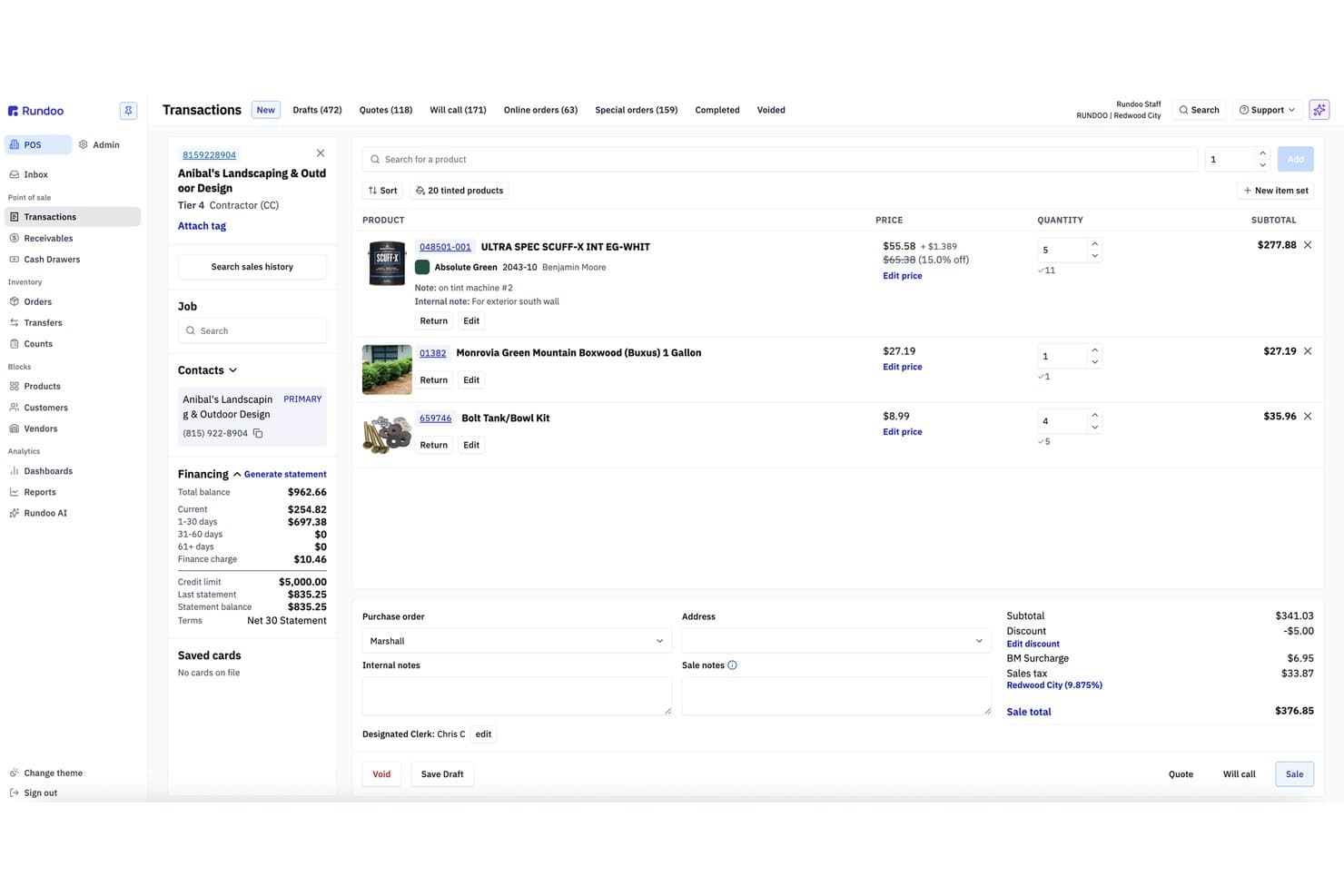
Rundoo ofrece una pantalla de transacciones POS completa con líneas de productos, detalles de financiamiento al cliente, precios, descuentos y totales de ventas para cuentas de contratistas. Rundoo es una plataforma POS basada en navegador diseñada para tiendas de suministros independientes—ferretería, pintura, agropecuarias, jardinería y madera—que combina punto de venta, seguimiento de inventario, gestión de cuentas a crédito e informes potenciados por inteligencia artificial en un solo sistema.
¿Para Quién Es Mejor Rundoo?
Rundoo está creado para propietarios de tiendas de suministros independientes que gestionan uno o varios locales en sectores de ferretería, pintura, agropecuaria, jardinería o madera.
Por Qué Elegí Rundoo
Rundoo merece estar en mi lista corta por Dooey, su inteligencia artificial integrada que analiza los datos de ventas, inventario y cuentas a crédito de la tienda para ofrecer respuestas a demanda. Me encanta que, en vez de generar informes manualmente, puedas preguntarle algo como “¿qué productos perdieron margen el mes pasado?” y recibir una respuesta directa. También utiliza esos mismos datos para generar órdenes de compra según la rotación de ventas y patrones estacionales, lo que resulta realmente útil en tiendas con cientos de referencias.
Funciones Clave de Rundoo
- Sincronización de inventario en tiempo real: Todas las ventas, devoluciones y pedidos ajustan los conteos de stock en vivo en cada terminal y sucursal.
- Gestión integrada de cuentas a crédito: Administra cuentas, estados de cuenta y límites de crédito de clientes y contratistas directamente desde el POS.
- Acceso a catálogos de múltiples proveedores: Busca catálogos de proveedores como Orgill, AllPro y Emery Jensen desde la interfaz del POS.
- Interfaz de caja basada en navegador: Realiza ventas en cualquier PC de mostrador, tablet o dispositivo móvil usando solo un navegador web.
Integraciones de Rundoo
Rundoo ofrece integraciones nativas con Stripe, QuickBooks, Benjamin Moore COLORx, Orgill, Do It Best, True Value, Sherwin-Williams, PPG y más. Hay una API disponible para integraciones personalizadas.
Pros and Cons
Pros:
- La IA genera automáticamente órdenes de compra a partir de los datos de ventas
- Gestión de cuentas a crédito integrada en el POS
- Funciona en cualquier navegador sin hardware propietario
Cons:
- Procesamiento de pagos vinculado solo a Stripe
- No incluye programa de fidelización ni herramientas de crédito en tienda
Learn more about Rundoo: Mejor terminal POS integral
- Demo gratuita disponible
- Desde $399 o $34/mes con financiamiento
Visit WebsiteCustomer Rating:4.7/5
El Square Stand es una de las varias opciones de terminal POS que puedes elegir. Square te ofrece una configuración flexible de terminal POS, ya sea que gestiones un piso de ventas concurrido, una cafetería o un negocio de servicios móviles que funciona en eventos y pop-ups.
Obtienes hardware para tarjetas presente que se comunica directamente con tu software POS, lo que te permite mantener los cobros rápidos, el inventario preciso y las tarifas predecibles en todas las ubicaciones.
Por qué elegí Square
Elegí Square porque puedes adaptar el hardware a la forma en que vendes—Square Stand en un iPad para cobros en mostrador, Square Register para líneas de servicio completo, Square Terminal o Handheld para pedidos en mesa o a pie de calle—todo funcionando con el mismo software y catálogo POS.
Mantienes el control de los pagos gracias a las tarifas de procesamiento fijas y publicadas para cada terminal, así que siempre conoces tu costo por deslizamiento o toque en persona.
Tu equipo también cuenta con herramientas integradas como propinas, modificadores de artículos y perfiles de clientes directamente en las pantallas de los terminales, lo que reduce errores de pedido y capta los datos que realmente necesitas.
Me gusta que puedas empezar con un solo Stand o Terminal, y después agregar más dispositivos y ubicaciones sin tener que cambiar tu POS o el adquiriente.
Funciones clave de Square
Además de la variedad de hardware, Square incluye algunas funciones diseñadas para terminales que realmente son útiles cada día para los comercios.
- Aceptación de tarjetas sin conexión: Sigue aceptando pagos con chip y contacto durante interrupciones de internet y súbelos automáticamente cuando la conexión regrese.
- Herramientas de gestión de equipo: Controla entradas, permisos y ventas por miembro del personal directamente desde tus terminales POS.
- Perfiles de clientes y recibos: Captura correos electrónicos y números de teléfono en el cobro para enviar recibos digitales y construir listas de marketing.
- Inventario y modificadores de artículos: Permite que tu personal personalice pedidos (tamaños, extras, modificadores) mientras mantiene precisos los conteos y recetas en segundo plano.
Integraciones de Square
Las integraciones incluyen Square Online, WooCommerce, Wix, BigCommerce, Ecwid, GoDaddy Websites + Marketing, QuickBooks Online, Xero, Magento y Zen Cart.
Pros and Cons
Pros:
- Tarifas planas y transparentes para pagos presenciales que simplifican la previsión de costos.
- Múltiples opciones de hardware para mostradores, food trucks y rutas de servicio.
- Propinas, modificadores y perfiles de cliente integrados que apoyan retail y alimentos y bebidas.
Cons:
- Configuraciones grandes con varias cajas y accesorios pueden ocupar mucho espacio.
- Vinculado al ecosistema de Square; no puedes operar los terminales en Windows.
 3Mejor para vendedores B2B
Stax
- Cotización gratis disponible
- Precios a consultar
Visit WebsiteCustomer Rating:4.2/5
Stax Pay ofrece una variedad de funciones e integraciones para agilizar el procesamiento de pagos y mejorar las operaciones comerciales. Stax Pay ayuda a los vendedores B2B y de alto volumen a salir del juego de la “ruleta de tarifas” con precios tipo suscripción y herramientas que realmente se adaptan a facturas complejas y a importes más altos.
Obtienes flexibilidad en hardware de punto de venta (POS) además de facturación, ACH y pagos en línea en un solo lugar, para que tu equipo financiero no tenga que supervisar cinco sistemas diferentes.
Por qué elegí Stax Pay
Elegí Stax Pay porque su precio de membresía te ayuda a controlar los costos mediante una tarifa mensual fija, lo cual es importante cuando tu importe promedio por venta es mayor que en la mayoría de los entornos minoristas.
Dispones de terminales para tarjeta presente, un terminal virtual, soporte para ACH y pagos en línea, para que tu equipo pueda cobrar tanto si el cliente está en el mostrador como si paga una factura grande a distancia.
Las herramientas de facturación y cobros recurrentes también reducen la cobranza manual permitiéndote enviar facturas con enlaces de pago integrados y automatizar cargos repetidos.
Las vistas de informes te brindan visibilidad sobre las comisiones por canal, ayudándote a decidir qué métodos de pago fomentar sin hacer conciliaciones manuales.
Funciones clave de Stax Pay
Aquí tienes algunas funciones adicionales especialmente útiles si consideras tus terminales POS como parte de una pila de pagos B2B más amplia.
- Aceptación omnicanal: Usa terminales, un terminal virtual y páginas de pago alojadas juntas para que los pagos presenciales, telefónicos y en línea se gestionen en la misma plataforma.
- Pagos por SMS y enlaces de pago: Permite que tu equipo envíe enlaces de pago seguros o solicitudes por mensaje de texto para que los clientes puedan pagar facturas grandes desde su teléfono o buzón de correo.
- Herramientas de cobro recurrente: Configura suscripciones o pagos en cuotas directamente en la plataforma para que los pedidos B2B frecuentes y anticipos se cobren automáticamente.
- Programas de recargos y comisiones: Configura recargos o comisiones adicionales donde esté permitido para proteger tus márgenes en segmentos de clientes que utilizan principalmente tarjetas.
Integraciones de Stax Pay
Las integraciones incluyen QuickBooks Online, NetSuite, Salesforce, HubSpot y Avalara.
Pros and Cons
Pros:
- El precio por membresía puede reducir costos para comerciantes B2B de alto volumen e importes elevados.
- Admite tarjetas, ACH y facturación, lo que se adapta a flujos de pago B2B complejos.
- El enfoque independiente de hardware te permite emparejar Stax con una variedad de terminales POS.
Cons:
- Las cuotas mensuales de suscripción pueden ser difíciles de justificar para vendedores de bajo volumen.
- Principalmente adecuado para empresas con sede en EE. UU., con soporte internacional más limitado.
Learn more about Stax: Ideal para negocios de alto volumen en varias industrias
- Prueba gratuita de 3 meses
- Desde $79/mes
Visit WebsiteCustomer Rating:4.7/5
El exclusivo modelo de precios interchange+ de Payment Depot ayuda a negocios de alto volumen a ahorrar en comisiones de procesamiento de pagos. La estructura de precios por membresía de Payment Depot está diseñada para minoristas y restaurantes que manejan altos volúmenes de tarjetas a través de terminales físicos y no quieren sorpresas en su estado de cuenta mensual.
Obtienes precios de tipo interchange-plus ligados a una suscripción predecible, además de acceso a terminales y opciones de POS modernas sin estar atado a un solo ecosistema de hardware.
Por Qué Elegí Payment Depot
Elegí Payment Depot porque el modelo de suscripción te permite controlar los costos de terminal a medida que aumenta el volumen: tus ahorros provienen de tasas de intercambio al por mayor más una tarifa mensual fija en lugar de sobrecostos inflados.
Para el cobro en tienda, puedes combinar ese modelo de precios con los terminales POS Clover o Vital Select, así tu equipo utiliza hardware conocido y bien soportado, mientras Finanzas obtiene estructuras de tarifas más claras.
También puedes usar terminales y lectores móviles impulsados por SwipeSimple, lo que significa que tu personal de campo o ubicaciones temporales pueden aceptar pagos por contacto, inserción o tecleo sin un procesador separado.
Me gusta que a menudo puedes reprogramar muchos terminales existentes en lugar de comprar una nueva flota completa, lo cual importa si buscas mejorar la economía del procesamiento sin agotar tu presupuesto de hardware este año.
Características Clave de Payment Depot
Una vez que has fijado el modelo de precios, estas funciones centradas en terminales realizan la mayoría del trabajo diario.
- Catálogo y Reprogramación de Terminales: Accede a una amplia gama de terminales de sobremesa, inteligentes y móviles, o reprograma muchos dispositivos existentes para poder cambiar de procesador sin renovar todo el hardware.
- Back Ends Multiprocesador: Opera terminales en Fiserv (Clover) o TSYS (Vital) para poder adaptar los rieles de procesamiento y hardware a tu perfil de riesgo, tamaño de ticket y relaciones bancarias existentes.
- Terminal Virtual y Enlaces de Pago: Permite al personal ingresar pedidos telefónicos o enviar enlaces de pago a través de un terminal virtual basado en navegador para que Finanzas gestione flujos de pago con tarjeta presente y no presente bajo un solo proveedor.
- App Móvil y Opciones de Terminal: Usa la app móvil de SwipeSimple y terminales compatibles para que empleados de tienda, representantes de campo o ubicaciones temporales acepten pagos por chip, banda o sin contacto bajo el mismo plan de tarifas.
Integraciones de Payment Depot
Las integraciones incluyen Clover POS, SwipeSimple, Vital Select, Authorize.Net, Shopify, WooCommerce, BigCommerce, PrestaShop, OpenCart y Revel Systems.
Pros and Cons
Pros:
- La membresía es atractiva para negocios con alto volumen en terminales y tráfico en tienda.
- Soporta terminales Clover y Vital Select para hardware POS moderno y listo para el comercio.
- Muchos terminales existentes pueden reprogramarse, lo que reduce el gasto inicial en hardware.
Cons:
- Menos rentable para negocios de bajo volumen con uso limitado de terminales.
- Limitado a comerciantes en EE.UU., que no sean de alto riesgo, para procesamiento en tienda.
Learn more about Payment Depot: Mejor para gestión de inventario en tiempo real
- Prueba gratuita + demo gratuita disponible
- Desde $59/mes
Visit WebsiteCustomer Rating:4.8/5
KORONA POS incluye herramientas CRM para gestionar información de clientes, rastrear historial de compras y personalizar las interacciones con los clientes. KORONA POS ofrece a minoristas de alto volumen, lugares de venta de entradas y franquicias una forma de mantener los terminales, el inventario y las ubicaciones alineados sin tener que realizar correcciones manuales constantemente.
Está diseñado para operadores que se preocupan por la precisión en tiempo real del stock a través de varios terminales.
Por qué elegí KORONA POS
Elegí KORONA POS porque cada terminal sincroniza el inventario en tiempo real, de modo que los recuentos de stock se mantienen precisos con cada venta, devolución o transferencia.
Me gusta que puedas gestionar productos y precios de forma centralizada, lo que da a los minoristas con múltiples ubicaciones una única fuente de veracidad sobre el funcionamiento de sus terminales.
También obtienes flexibilidad con el hardware y los procesadores de pago, para que puedas negociar mejores tarifas y seguir utilizando los terminales que ya posees.
Características clave de KORONA POS
Aquí tienes algunas capacidades centradas en el terminal que son importantes para las operaciones del día a día.
- Control de múltiples tiendas: Ajusta precios, inventario y productos por ubicación desde un solo panel.
- Venta de entradas y control de acceso: Vende entradas y gestiona el acceso directamente desde cada terminal.
- Herramientas de gestión de efectivo: Haz seguimiento de los conteos de caja, variaciones y movimientos de efectivo por dispositivo.
- Informes avanzados: Crea informes personalizados de ventas e inventario agrupados por terminal o tienda.
Integraciones de KORONA POS
Las integraciones incluyen QuickBooks, WooCommerce, Shopify, Magento, BigCommerce, Mailchimp, PayPal, Stripe, Worldpay, Authorize.Net y CardConnect.
Pros and Cons
Pros:
- Actualizaciones en tiempo real del stock por terminal que reducen errores de inventario.
- Soporta configuraciones de hardware mixtas sin bloqueo de proveedor.
- Potentes controles para múltiples ubicaciones para franquicias y minoristas con varias tiendas.
Cons:
- Cada terminal requiere su propia tarifa de licencia.
- La personalización de informes puede tomar tiempo para configurar.
Learn more about KORONA POS: Mejor para integración minorista omnicanal
- Prueba gratuita de 3 días
- Desde $29/mes (facturado anualmente)
Visit WebsiteCustomer Rating:4.4/5
Shopify POS te permite acceder rápidamente a funciones y productos a través de su cuadrícula inteligente. Shopify POS te proporciona un terminal de mostrador dedicado que realmente se comunica con el resto de tu ecosistema minorista: el inventario en línea, los perfiles de clientes y las ubicaciones de tiendas viven todos en un solo lugar.
Es ideal para minoristas omnicanal que ya usan Shopify y quieren un terminal orientado al cliente que reduzca los tiempos de espera sin crear un silo de datos adicional.
Por qué elegí Shopify POS
Elegí Shopify POS porque puedes gestionar tu terminal en tienda y tu tienda online desde el mismo catálogo de productos y motor de inventario, por lo que no tienes que conciliar dos existencias diferentes después de cada fin de semana.
Tus clientes tienen una pantalla dedicada, orientada al comprador, en el terminal POS, donde pueden ver carritos desglosados e información de pago para revisar los artículos, añadir propinas y elegir opciones de recibo sin invadir la pantalla de tu personal.
Tu equipo puede utilizar la cuadrícula inteligente de POS para fijar descuentos, apps y productos populares en la pantalla principal, lo que agiliza el proceso de cobro en horas pico.
También tienes soporte nativo para pagos por proximidad, chip y banda magnética a través de Shopify Payments, lo que te permite aceptar métodos de pago modernos manteniendo las comisiones y liquidaciones en un solo lugar.
Funciones clave de Shopify POS
Además del propio hardware del terminal, Shopify POS ofrece a los minoristas herramientas que tu equipo realmente usará en el mostrador y en la oficina.
- Catálogo de productos unificado: Administra productos, precios y variantes una sola vez, y véndelos tanto en canales online como en tienda física.
- Inventario omnicanal: Controla el inventario por ubicación y gestiona recogidas, envíos desde tienda y transferencias sin usar hojas de cálculo.
- Perfiles de clientes: Almacena historial de compras y preferencias para impulsar promociones personalizadas y programas de fidelidad.
- Permisos de personal: Asigna roles y niveles de acceso para que los asociados puedan vender con confianza sin tocar configuraciones sensibles.
Integraciones de Shopify POS
Las integraciones incluyen QuickBooks, Xero, Mailchimp, Klaviyo, LoyaltyLion, Yotpo, ShipStation, DHL Express, UPS y Canada Post.
Pros and Cons
Pros:
- El terminal dedicado orientado al cliente mejora la transparencia y la opción de dar propina en el pago.
- La cuadrícula inteligente permite al personal fijar apps clave, descuentos y productos.
- El catálogo y el inventario compartido te permiten vender online y en tienda física desde un solo sistema.
Cons:
- Los flujos de trabajo minoristas avanzados pueden requerir aplicaciones adicionales de pago desde la Shopify App Store.
- El Terminal POS y la aceptación de tarjetas en persona requieren Shopify Payments en países compatibles.
Learn more about Shopify POS: 7Ideal para sistemas de TPV en iPad
Lavu
- Demostración gratuita disponible
- Precio a consultar
Visit WebsiteCustomer Rating:5/5
Lavu ofrece un terminal de TPV en iPad fácil de usar para restaurantes y otros negocios del sector de la hostelería y bebidas. Lavu ofrece a los equipos de restaurantes un terminal basado en iPad que realmente responde durante los picos de servicio: los pedidos en mesa, cuentas de bar y tickets de entrega fluyen todos por una sola pantalla en vez de un montón de dispositivos.
Es ideal para restaurantes, bares y cafeterías que buscan hardware móvil, compatible con Wi-Fi, vinculado a potentes herramientas de inventario e informes en lugar de una simple caja registradora.
Por qué elegí Lavu
Elegí Lavu para operadores que quieren un terminal de iPad diseñado para el verdadero caos de un restaurante, no solo para horas tranquilas: su soporte de tarjetas en modo offline te permite seguir aceptando pagos incluso cuando hay interrupciones de internet.
Obtienes una sola pantalla de iPad que reúne pedidos, pagos y ventas en línea utilizando pedidos web incorporados y la plataforma MenuDrive, evitando que tu equipo tenga que reintroducir manualmente los tickets de entrega.
Me gusta que tu personal pueda enviar los pedidos directamente a un sistema de visualización en cocina mientras el inventario se actualiza en tiempo real en segundo plano, manteniendo la disponibilidad del menú precisa durante los momentos de mayor demanda.
Es una opción excelente si diriges un restaurante, bar o cafetería y deseas terminales de iPad ligeros que tus camareros puedan llevar a la mesa en vez de depender de un voluminoso TPV de mostrador.
Características clave de Lavu
Además de las herramientas principales de pedidos y pagos, aquí tienes algunas funciones del terminal relevantes para equipos de hostelería con mucho movimiento.
- Precios duales y descuento por pago en efectivo: Ofrece descuentos por pago en efectivo y precios duales para compensar las comisiones de tarjeta manteniendo los totales claros para los clientes.
- Fidelización y tarjetas regalo: Gestiona programas de fidelidad integrados y tarjetas regalo digitales o físicas directamente desde el terminal.
- App móvil para gerentes: Revisa ventas en vivo, personal y reportes clave desde la app para gerentes cuando estés fuera del restaurante.
- Herramientas para menús y plano de salón: Crea menús, modificadores y distribución de mesas en la oficina administrativa, así cada terminal muestra secciones y precios claros.
Integraciones de Lavu
Las integraciones incluyen Marketman, Bar-i Liquid Accounting, Digital Pour, Restaurant365, OpenTable, Otter, Chowly, Up'n Go, QuickBooks y Xero.
Pros and Cons
Pros:
- Los terminales iPad facilitan la toma de pedidos rápidos en mesa y pagos en el asiento.
- El pedido web de MenuDrive se conecta directamente con el TPV y la cocina.
- El inventario y los informes en tiempo real ayudan a evitar quedarse sin stock durante el servicio.
Cons:
- El diseño solo para iPad limita el uso de hardware TPV existente que no sea de Apple.
- El coste total aumenta al añadir pedidos web y funcionalidades avanzadas.
Learn more about Lavu:

Epos Now ofrece una solución todo en uno de punto de venta con funciones diseñadas para los sectores de comercio minorista y hostelería. Para negocios en crecimiento en los sectores de comercio minorista y hostelería, Epos Now te ofrece una configuración de terminal punto de venta (POS) que puede adaptarse desde una sola tienda hasta múltiples ubicaciones sin requerir una renovación total del hardware.
Es una buena opción si deseas tener control basado en la nube sobre cajas, tabletas y dispositivos portátiles, manteniendo la mayoría de tus flujos de trabajo actuales prácticamente intactos.
Por qué elegí Epos Now
Elegí Epos Now porque te permite escalar de un terminal a varios utilizando el mismo back office en la nube en diferentes configuraciones de hardware, de modo que puedes añadir puntos de venta o ubicaciones sin tener que reconstruir tu sistema.
También puedes elegir entre el servicio de pagos propio de Epos Now o procesadores de terceros compatibles, lo que te ayuda a negociar mejores tasas en lugar de estar atado a una sola opción.
Me gusta que tu equipo pueda iniciar sesión desde cualquier lugar para consultar el rendimiento en tiempo real y la actividad de los dispositivos, lo que te permite estar al tanto de lo que sucede en cada caja.
Para los minoristas que añaden nuevos canales o ubicaciones, esa combinación de terminales flexibles, elección de procesador y visibilidad remota facilita el crecimiento sin tener que reemplazar todo lo que ya funciona.
Funciones clave de Epos Now
Aquí tienes algunas funciones prácticas que importan al elegir una configuración de terminal POS para un negocio de comercio minorista o de hostelería en expansión.
- Inventario multilocalización en tiempo real: Sincroniza los niveles de stock entre tiendas y canales para que los terminales siempre reflejen lo que realmente tienes disponible.
- Back office centralizado: Gestiona productos, precios, promociones y permisos de usuario desde un solo panel, en lugar de configurar cada dispositivo por separado.
- Informes y paneles integrados: Haz seguimiento de las ventas, el rendimiento de artículos y las horas pico desde cualquier dispositivo, para tomar decisiones sobre personal y compras.
- Gestión de personal y permisos: Configura el acceso por roles en cada terminal para que cajeros, supervisores y gerentes solo vean las herramientas que necesitan.
Integraciones de Epos Now
Las integraciones incluyen QuickBooks, Xero, Sage, Mailchimp, Shopify, WooCommerce, BigCommerce, PayPal, Stripe y Zapier.
Pros and Cons
Pros:
- Funciona con una amplia gama de hardware y terminales POS.
- Soporta más de 100 aplicaciones de terceros para configuraciones personalizadas de retail.
- Te permite elegir entre procesadores de pago propios y de terceros.
Cons:
- Los detalles de precios están poco disponibles en línea; muchos planes requieren cotización.
- Los contratos a largo plazo y los planes de soporte de pago pueden reducir la flexibilidad.
Learn more about ePOS : Ideal para soluciones de pago transparentes
- Demo gratuita disponible
- Desde Interchange + 0.40% + 8¢ (varía según volumen)
Visit WebsiteCustomer Rating:4.4/5
Los terminales de Helcim pueden procesar tarjetas chip y PIN, tarjetas de banda magnética y pagos sin contacto. Los terminales inteligentes de Helcim están diseñados para minoristas que valoran tanto la transparencia en los precios como la rapidez en el cobro: obtienes tarifas interchange-plus, sin contratos a largo plazo y hardware que funciona tanto en el mostrador como en la sala de ventas.
Es una buena opción para pequeños y medianos comercios en EE. UU. y Canadá que desean pagos con tarjeta presencial, inventario y datos de clientes en un solo sistema en vez de en cinco distintos.
Por qué elegí Helcim
Elegí Helcim porque obtienes precios interchange-plus con descuentos automáticos por volumen, así que tu tasa efectiva disminuye a medida que aumenta el volumen de tarjetas presentes en tienda.
Ese control de costes está vinculado a herramientas reales: un terminal inteligente con software POS integrado, impresora y lector de tarjetas que mantiene sincronizadas las ventas presenciales y en línea, el inventario y los perfiles de los clientes.
También me gusta que puedas usar Tap to Pay en iPhone a través de la app POS de Helcim, lo que permite a tu equipo aceptar pagos sin contacto en cualquier punto del área de ventas sin equipamiento adicional. Para los comercios preocupados por el margen, las opciones Fee Saver y recargo conforme a la normativa te ayudan a compensar las comisiones de tarjeta usando configuraciones integradas directamente en el terminal y el POS.
Si quieres mantener tu POS existente o una configuración personalizada, el terminal inteligente está listo para API, de modo que puedes integrar el hardware y la tarifa de Helcim en tu infraestructura actual sin reconstruir todo desde cero.
Funciones clave de Helcim
Además del modelo de precios principal y el terminal inteligente, estas funciones son relevantes para equipos de venta minorista.
- Terminal inteligente todo en uno: Combina software POS, lector de tarjetas EMV y una impresora de recibos en un solo dispositivo que funciona por Wi-Fi o 4G.
- Catálogo de productos centralizado: Gestiona artículos, precios e impuestos en Helcim para que tus terminales, la app POS y el checkout online utilicen los mismos datos de productos.
- Perfiles de clientes: Guarda tarjetas, consulta el historial de compras y gestiona los datos de clientes desde el mismo sistema que usas en el terminal.
- Depósitos al siguiente día laborable: Agrupa las transacciones con tarjeta presencial para recibir los fondos en tu cuenta bancaria tan pronto como el siguiente día hábil.
Integraciones de Helcim
Las integraciones incluyen QuickBooks Online, Xero, WooCommerce, Foxy.io, Great Exposure y Magento.
Pros and Cons
Pros:
- Precios interchange-plus transparentes con descuentos automáticos por volumen para mayor número de pagos con tarjeta.
- El terminal inteligente sincroniza pagos, inventario y datos de clientes entre tienda física y online.
- Tap to Pay en iPhone permite agilizar filas y ofrecer cobro en puntos de venta temporales sin hardware adicional.
Cons:
- Las herramientas de inventario y gestión de personal son más sencillas que las suites completas de gestión minorista.
- Solo disponible para comercios en Estados Unidos y Canadá.
Learn more about Helcim: 10La mejor opción por su facilidad de uso
Clover
- Demo de producto gratuita disponible
- Desde $599 al mes
Visit WebsiteCustomer Rating:3.9/5
El Clover Flex tiene un diseño sencillo y moderno. Clover Flex te ofrece un terminal POS completo en un solo dispositivo portátil: acepta pagos con chip, tarjeta deslizada y pagos sin contacto mientras recorres el local, atiendes en la acera o trabajas en eventos.
Es ideal para comercios ocupados que buscan una configuración rápida, formación sencilla para el personal y un hardware que realmente pueda resistir toda una jornada sin regresar continuamente al mostrador.
Por qué elegí Clover
Elegí Clover porque obtienes un auténtico terminal portátil todo en uno: pagos, recibos, consultas de inventario y datos básicos de clientes, todo en un solo dispositivo en lugar de un conjunto de aparatos diferentes.
Tu equipo puede aceptar pagos con chip, deslizar la tarjeta y pagos sin contacto (incluyendo Apple Pay, Google Pay y Samsung Pay) en el mismo terminal, por lo que no alejas a usuarios de billeteras digitales ni retrasas la fila buscando alternativas.
También me gusta que Flex se puede emparejar con otros dispositivos Clover, así que puedes empezar con un solo terminal portátil y luego añadir una estación fija sin tener que reconstruir tu sistema.
La configuración es sencilla y, una vez ajustado, el personal trabaja directamente en la pantalla de inicio y los módulos de la aplicación, en vez de perder tiempo navegando por menús.
Características clave de Clover
Además de su formato portátil, Clover incorpora una serie de herramientas prácticas muy relevantes al elegir un terminal POS.
- Batería y conectividad para todo el día: Hasta 8 horas de batería junto con opciones de WiFi y LTE para que el personal pueda cobrar en cualquier parte del local sin tener que acoplar el dispositivo continuamente.
- Impresión y escaneo integrados: Impresora de recibos integrada, cámara y lector de códigos de barras para imprimir y escanear artículos o entradas sin equipos adicionales.
- Perfiles y permisos para empleados: Inicios de sesión según el cargo controlan quién puede emitir reembolsos, aplicar descuentos o acceder a informes, ayudando a reducir robos y anular ventas de forma indebida.
- Apps y complementos en el dispositivo: El acceso al App Market de Clover te permite añadir herramientas como fidelidad, inventario o control de horas directamente en el terminal a medida que tus necesidades crecen.
Integraciones de Clover
Las integraciones incluyen Apple Pay, Google Pay, Samsung Pay, QuickBooks (a través de Commerce Sync), Xero, Shopify, WooCommerce, Adobe Commerce y los plugins de pago de WordPress/WooCommerce.
Pros and Cons
Pros:
- El dispositivo portátil con impresora y lector reemplaza varios equipos.
- Larga duración de batería y LTE/WiFi para cobros realmente móviles y pagos en mesa.
- El App Market ofrece complementos de contabilidad, fidelización e inventario a medida que creces.
Cons:
- El hardware y el procesamiento de pagos normalmente se incluyen en contratos de varios años.
- Muchas funciones avanzadas de informes y herramientas específicas por sector requieren aplicaciones extra de pago.
Learn more about Clover:
Otras opciones
Aunque los siguientes terminales POS no llegaron a formar parte de mi lista principal, estas opciones alternativas que encontré durante mi investigación siguen mereciendo consideración si ninguna de las opciones anteriores te pareció la elección adecuada.
- 11Merchant OneMejor opción por bajas tasas y cuotas
- 12ShopifyIdeal para ecommerce y tiendas físicas
- 13HeartlandIdeal para minoristas de ropa y moda
- 14PayPal ZettleLa mejor opción sin cuota mensual
- 15ToastMejor para hardware duradero
- 16Revel SystemsMejor para grandes cadenas de restaurantes
- 17CardPointeIdeal para variedad de métodos de pago
- 18ProMerchantIdeal para precios transparentes
- 19TouchBistroLo mejor para restaurantes
- 20GoDaddy PoyntIdeal para funciones analíticas
- 21Payline DataMejor para opciones versátiles de POS
Cómo Evalúo las Terminales POS
Divido mi evaluación en dos capas: lo básico imprescindible como la aceptación EMV, sincronización de inventario y soporte para periféricos, y los diferenciadores que revelan qué terminal se adapta a tu operación.
Funcionalidad Básica (Requisitos para esta Lista)
Cuando selecciono herramientas para mi lista, califico cada una en una escala del 0 (no ofrece la funcionalidad) al 5 (sobresale en esta área) para cada funcionalidad básica indicada abajo. Después, calculo el puntaje total de la herramienta y lo convierto en porcentaje. Cada herramienta debe alcanzar una puntuación mínima total del 65% para ser considerada en la inclusión.
- Procesamiento de Pagos: Verifico si una terminal acepta chip EMV, contactless/NFC, banda magnética y monederos móviles—y si te obliga a usar un solo procesador o te da opciones.
- Gestión de Inventario: El seguimiento de existencias en tiempo real es fundamental, especialmente cuando una venta en una caja debe actualizar instantáneamente los conteos en todas las ubicaciones y canales.
- Manejo de Transacciones de Venta: Analizo el flujo completo de la transacción—ventas, descuentos, cálculo de impuestos, devoluciones, cambios y opciones de recibo—para ver cómo maneja una línea de caja concurrida.
- Compatibilidad de Hardware: Cada terminal debe soportar periféricos estándar como lectores de código de barras, impresoras de recibos, cajones de dinero y lectores de tarjetas sin exigir un montaje exclusivo o propietario.
- Informes y Analítica: Evalúo si el sistema genera informes significativos de ventas, impuestos e inventario a nivel tienda y multi-sucursal, no solo totales básicos diarios.
- Gestión de Clientes: La capacidad de vincular el historial de compras a perfiles individuales y soportar programas de fidelización convierte una terminal en más que una simple caja registradora.
Una vez que tengo una lista de herramientas que cumplen con este criterio, considero qué diferencia a cada plataforma.
Factores Diferenciadores (Qué Distingue a los Proveedores)
Así comparo y contrasto los distintos proveedores:
Características Destacadas
El modo offline es clave—si tu internet falla a mitad de una transacción, una terminal que almacena ventas localmente y las sincroniza cuando vuelve la conectividad permite que la caja siga funcionando. También evalúo la integración con comercio electrónico, ya que minoristas que venden a través de Shopify o BigCommerce necesitan que el inventario y los pedidos se mantengan unificados en todos los canales. La capacidad de POS móvil es relevante para tiendas que hacen pop-ups o necesitan agilizar filas en horas pico con tabletas o dispositivos portátiles.
Más Allá de las Características
El costo total de propiedad es lo primero que evalúo—algunos proveedores incluyen hardware y tarifas de procesamiento en un solo paquete, mientras que otros lo cobran por separado, por lo que analizo el panorama completo antes de comparar. El cumplimiento de PCI y soporte para P2PE también son relevantes, ya que una brecha en la caja puede ser devastadora para cualquier minorista. La flexibilidad de hardware complementa mi evaluación: verifico si un sistema te permite traer tus propios dispositivos o te obliga a usar equipos propietarios costosos de reemplazar o escalar.
¿Qué es un terminal POS?
Los terminales POS son dispositivos electrónicos que te permiten aceptar pagos, registrar ventas y gestionar el inventario directamente en el punto de pago.
Conectan tu hardware, como lectores de tarjetas, escáneres de códigos de barras e impresoras de recibos, con tu procesador de pagos y tu sistema de gestión de inventario.
Los trabajadores del comercio minorista y los propietarios de pequeñas empresas los utilizan para registrar rápidamente las compras de los clientes, aceptar tarjetas y monederos digitales, y saber en tiempo real qué productos se están vendiendo.
Te ahorran la molestia de tener que manejar varias herramientas o lidiar con un inventario desorganizado, ya que reúnen todo lo que necesitas en un solo lugar.
Cómo elegir tu terminal POS
Elegir el terminal POS adecuado no consiste en escoger el que esté de moda o tenga la pantalla más llamativa. Se trata de adaptar las necesidades de tu negocio, los métodos de pago y la realidad del día a día a un dispositivo que funcione realmente para tu equipo y tus clientes.
Así puedes tomar una decisión inteligente y práctica, sin quebraderos de cabeza.
| Qué hacer | Por qué es importante |
|---|---|
| Qué hacerHaz una lista de las funciones imprescindibles (p. ej., pagos sin contacto, lector de códigos de barras, compatibilidad con varias tiendas) | Por qué es importanteEvita malgastar dinero en funciones que nunca utilizarás o no disponer de las que necesitas a diario. |
| Qué hacerAnaliza tu proceso de pago actual y sus puntos problemáticos | Por qué es importanteIdentifica dónde tu sistema POS actual te ralentiza o genera errores, para que sepas qué debes solucionar. |
| Qué hacerComprueba la compatibilidad del hardware y las integraciones | Por qué es importanteGarantiza que el terminal POS funciona con tu procesador de pagos, el software de gestión de inventario y los dispositivos móviles que ya utilizas. |
| Qué hacerCompara los precios: costes iniciales, cuotas mensuales y tarifas por transacción | Por qué es importanteTe ayuda a elaborar un presupuesto preciso y a detectar costes ocultos que pueden reducir tus márgenes. |
| Qué hacerExige una demostración real (no solo un vídeo) y prueba con transacciones reales | Por qué es importanteConfirma que el sistema es fácil de aprender para el personal, funciona en tus momentos de mayor actividad y no se bloquea con tu combinación de métodos de pago. |
| Qué hacerPregunta por el soporte y las opciones de actualización | Por qué es importanteTe asegura que podrás obtener ayuda rápidamente y que no tendrás que quedarte con hardware obsoleto a medida que crezca tu negocio. |
Funciones de los mejores terminales POS
Tu terminal POS necesita algunas funciones para asegurarse de que tus clientes estén satisfechos y sigan comprando. Estas son las funciones que debes buscar:
- Acepta todos los principales métodos de pago. Chip, banda magnética, pagos sin contacto, carteras digitales y pagos móviles: ningún cliente se quedará sin poder pagar.
- Seguimiento del inventario en tiempo real. Actualiza los niveles de existencias al instante a medida que se realizan las ventas, para que siempre sepas qué tienes disponible.
- Lector de códigos de barras e impresora de recibos integrados. Agilizan el proceso de pago y reducen los errores de introducción manual.
- Opciones de POS en la nube y para móviles. Accede a tus ventas e informes desde cualquier lugar: tienda, almacén o mientras estás fuera.
- Seguridad integrada y cumplimiento de la normativa PCI. Protege los datos de pago confidenciales y evita problemas a tu negocio.
- Permisos de usuario personalizables. Controla quién puede procesar reembolsos, acceder a informes o gestionar el inventario.
- Integraciones fluidas. Se conecta con tus herramientas de contabilidad, comercio electrónico y programas de fidelización.
Principales ventajas de los terminales POS
Y esto es lo que obtienes con unos terminales POS que cumplen su función:
- Pagos más rápidos y precisos. Colas más cortas, clientes más satisfechos y menos errores en caja.
- Mejor control del inventario. Reduce las roturas de stock y los pedidos excesivos con datos actualizados al minuto.
- Opciones de pago flexibles. Acepta pagos en la tienda, en establecimientos temporales o en la acera, según prefieran pagar tus clientes.
- Información empresarial útil para la toma de decisiones. Obtén informes claros sobre ventas, inventario y rendimiento de los empleados sin tener que revisar hojas de cálculo.
- Formación más sencilla para el personal. Las interfaces fáciles de usar permiten que las nuevas incorporaciones aprendan rápidamente.
- Mejor experiencia del cliente. Ofrece programas de fidelización, tarjetas regalo y recibos rápidos para que los compradores vuelvan.
- Escalable a medida que creces. Añade nuevas ubicaciones, dispositivos o canales de venta sin cambiar de sistema.
Coste y precios de los terminales POS
Los precios de los terminales POS varían mucho, por lo que merece la pena leer la letra pequeña antes de contratar. Aquí tienes un desglose claro que te ayudará a elaborar tu presupuesto:
| Tipo de plan | Precio medio | Funciones habituales | Ideal para |
|---|---|---|---|
| Tipo de planBásico | Precio medio$100–$500 por única vez o $15–$30/mes | Funciones habitualesProcesamiento de pagos básico, inventario sencillo, impresión de recibos | Ideal paraPequeñas empresas, establecimientos temporales |
| Tipo de planIntermedio | Precio medio$500–$1,500 por única vez o $30–$80/mes | Funciones habitualesInventario avanzado, lectura de códigos de barras, POS móvil, informes | Ideal paraComercios en crecimiento, tiendas con varias ubicaciones |
| Tipo de planTodo en uno/en la nube | Precio medio$1,000–$3,000+ de configuración o $80–$200/mes | Funciones habitualesVentas omnicanal, programas de fidelización, integraciones, análisis | Ideal paraComercios consolidados, comercio electrónico, grandes volúmenes |
| Tipo de planPersonalizado/empresarial | Precio medioPrecio personalizado | Funciones habitualesCompatibilidad con varias tiendas, gestor de cuenta exclusivo, integraciones personalizadas | Ideal paraGrandes cadenas, franquicias |
- Las tarifas por transacción suelen oscilar entre el 1.5% y el 3% por venta, según tu procesador de pagos y el tipo de tarjeta.
- Presta atención a las tarifas adicionales: el alquiler del hardware, las actualizaciones del software, el cumplimiento de la normativa PCI y el soporte pueden acumularse.
- Algunos proveedores cobran por terminal o por ubicación; compruébalo detenidamente si tienes previsto ampliar tu negocio.
- La mayoría de los proveedores ofrecen una demostración o prueba gratuitas, pero el hardware puede requerir un depósito o una compra inicial.
Si no tienes claro qué se adapta a tu negocio, empieza con un plan mensual y actualízalo a medida que crezcas. No te comprometas con un contrato de larga duración a menos que estés seguro de que el sistema cumple con tus necesidades.
Preguntas frecuentes sobre terminales POS
Estas son las respuestas a algunas preguntas frecuentes sobre los terminales POS:
¿Puede funcionar un terminal POS sin conexión si se cae mi Wi-Fi?
Sí, muchos terminales POS modernos pueden funcionar sin conexión. Podrás seguir procesando ventas, pero algunas funciones, como las actualizaciones del inventario en tiempo real, pueden pausarse hasta que vuelvas a estar conectado. Confirma siempre las funciones sin conexión con tu proveedor.
¿Qué nivel de seguridad ofrecen los terminales POS frente al fraude y la piratería informática?
Los terminales POS utilizan ahora sólidas medidas de seguridad, como el cifrado, la tokenización y el cumplimiento de la norma PCI DSS. Para obtener la mejor protección, mantén actualizados el hardware y el software, y forma a tu equipo en prácticas seguras.
¿Qué integraciones de software debería buscar en un terminal POS?
Busca terminales POS que se conecten con tus sistemas de inventario, contabilidad, comercio electrónico y fidelización. La integración reduce la introducción manual de datos y hace que tu negocio sea más eficiente.
¿Hay tarifas o costes ocultos en los terminales POS que deba tener en cuenta?
Algunos proveedores cobran un importe adicional por la configuración, las suscripciones de software, el procesamiento de pagos o determinadas integraciones. Solicita por adelantado una lista de precios completa para evitar cargos inesperados.
¿Qué dificultad tiene formar a nuevos empleados en el uso de un terminal POS?
La mayoría de los sistemas POS modernos son fáciles de usar y están diseñados para una formación rápida, a veces de menos de una hora. Las interfaces táctiles y la asistencia del proveedor pueden agilizar aún más la incorporación.
¿Necesito terminales POS diferentes para varias ubicaciones de mi tienda?
Por lo general, no. Muchas plataformas POS admiten varias ubicaciones dentro de un mismo sistema, pero debes comprobar los requisitos de hardware y preguntar a los proveedores por la compatibilidad con varias ubicaciones antes de comprar.
¿Qué tipo de informes debería ofrecer un terminal POS moderno?
Espera obtener informes sobre ventas, inventario, rendimiento de los empleados y datos de los clientes. Los buenos informes ayudan a detectar tendencias, gestionar las existencias y tomar decisiones empresariales más acertadas.