


Square vs. Clover: Comparison & Expert Reviews for 2026

We review tools independently, and commissions help fund our testing. See our transparency policy, our methodology, or suggest a tool.
Choosing between Square and Clover can feel overwhelming when you just want fast, reliable payments and fewer headaches at checkout. You need payment processing software that keeps up with your business, whether you’re running a busy shop or selling online. Both Square and Clover promise easy setup, sleek hardware, and helpful features—but which one actually fits your workflow and budget?
In this article, you’ll get a side-by-side comparison of Square and Clover, including pros and cons, real-world use cases, pricing, security, and usability. I’ll help you cut through the noise so you can pick the right solution for your business.
Square
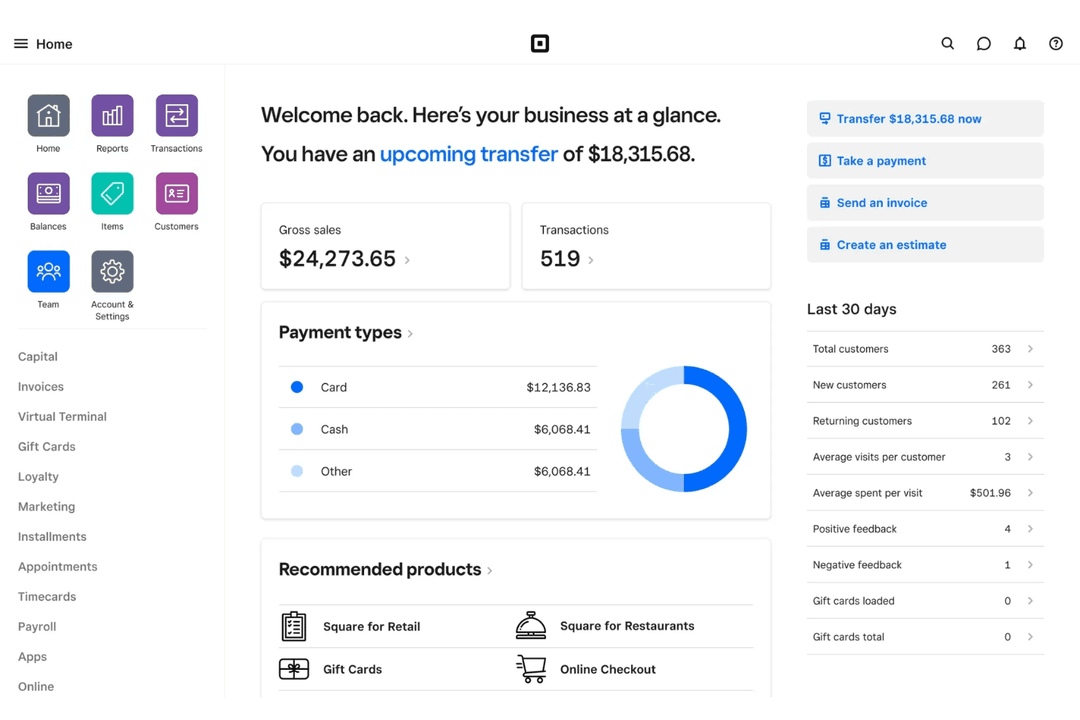
4.7/5
- Free plan available; 30-day free trial on paid tiers
- From $49/month
Clover
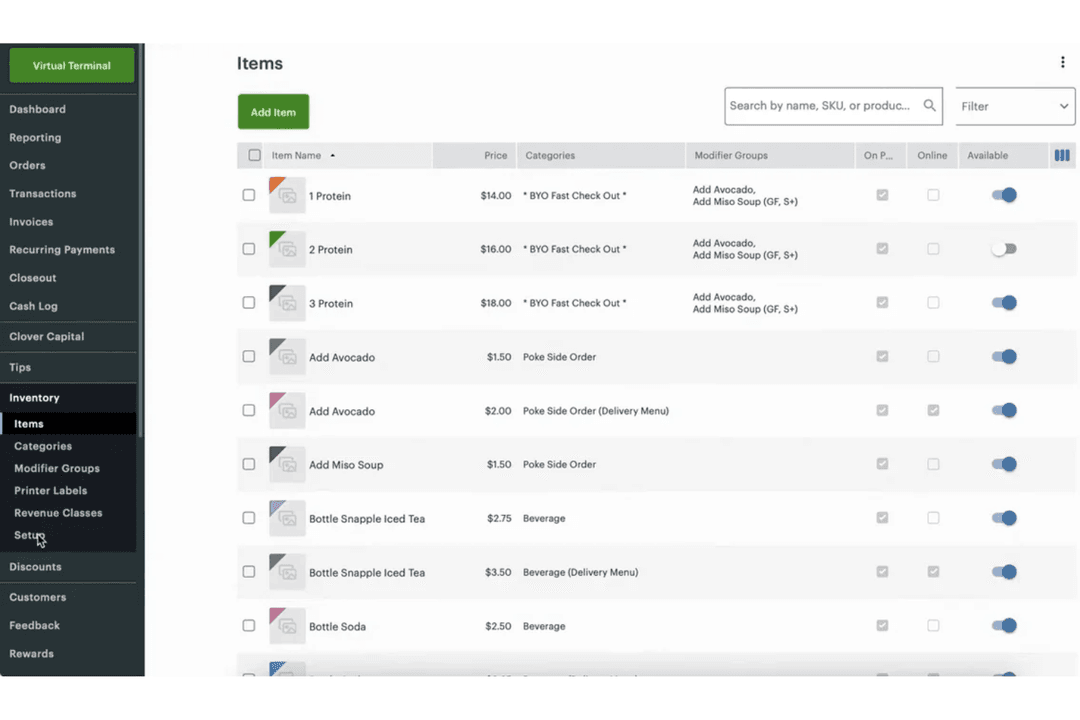
3.9/5
- 90-day free trial
- From $16/month
Why Trust Our Software Recommendations
6,700+
Reviews
20
Industry experts
16+
Evaluation factors
14
Years
Our team has been testing and reviewing software since 2012. As retail leaders ourselves, we know how difficult—and important—it is to choose the right software.
For this guide, we evaluated tools using hands-on testing and independent research, scoring tools using our selection criteria.
Our reviews reflect our independent judgment—not a sales pitch.
| Square | Clover | |
|---|---|---|
| Free Trial | Free plan available; 30-day free trial on paid tiers | 90-day free trial |
| Pricing | From $49/month | From $16/month |
Square vs. Clover Pricing & Hidden Costs
Square offers straightforward pricing with no monthly fee for its basic plan—you mainly pay per transaction. This makes costs predictable, though add-ons like marketing, loyalty programs, or premium features can increase your total spend.
Clover’s pricing is more customizable but less transparent upfront. Costs typically include monthly software fees, hardware expenses, and variable processing rates based on your provider or plan. While Clover advertises simple, flexible pricing, most businesses need a custom quote, and additional apps or features can raise costs over time.
To choose the right option, look beyond headline pricing. Consider your transaction volume, required hardware, and which features you’ll actually use. Reviewing contract terms, potential add-ons, and total cost of ownership will help you avoid surprises and choose the better long-term fit.
Square and Clover both offer essential features like in-person and online payment acceptance, inventory tracking, sales reporting, and customer management. Each platform supports mobile payments, digital receipts, and basic employee management, making them strong choices for retail and food service businesses.
Square stands out with its free online store builder and seamless integrations for ecommerce and invoicing. Clover, on the other hand, shines with its customizable hardware options and a robust app marketplace that lets you tailor your system to your business. These unique features can make a big difference depending on how you sell and what tools you need.
| Square | Clover | |
|---|---|---|
| 2-Factor Authentication | Yes | Yes |
| API | Yes | Yes |
| BitCoin | No | No |
| Dashboard | Yes | Yes |
| Data Export | Yes | Yes |
| Data Import | Yes | Yes |
| Data Visualization | Yes | Yes |
| External Integrations | Yes | Yes |
| Inventory Tracking | Yes | Yes |
| Multi-User | Yes | Yes |
| Notifications | No | Yes |
| Order Management | Yes | No |
| Payment Processor | Yes | Yes |
| PayPal | No | Yes |
| Stripe | No | No |
| Third-Party Plugins/Add-Ons | Yes | No |
| Integration | Square | Clover |
| QuickBooks | ✅ | ✅ |
| Xero | ✅ | ✅ |
| Mailchimp | ❌ | ✅ |
| Homebase | ✅ | ✅ |
| Ecwid | ✅ | ✅ |
| WooCommerce | ✅ | ✅ |
| Shopify | ✅ | ❌ |
| Gusto | ❌ | ✅ |
| ShipStation | ✅ | ❌ |
| Pointy by Google | ❌ | ✅ |
| API | ✅ | ✅ |
| Zapier | ✅ | ✅ |
Square and Clover both cover the most-used integrations for accounting, ecommerce, and scheduling, but each has a few unique connections. Both offer API and Zapier support, so you can connect to hundreds of other tools, making either platform flexible enough for most retail and ecommerce needs.
| Factor | Square | Clover |
| PCI Compliance | Automatically PCI compliant with no extra fees or paperwork. | PCI compliance included, but may require additional setup for some users. |
| Data Encryption | End-to-end encryption for all transactions and card data. | Uses point-to-point encryption to protect payment information. |
| Fraud Protection | Built-in fraud detection and dispute management tools. | Offers real-time fraud monitoring and chargeback support. |
| Uptime Reliability | High uptime with cloud-based backups and offline payment support. | High uptime with redundant systems and offline transaction capability. |
| Data Privacy | Strict privacy policies and limited employee access to sensitive data. | Follows privacy best practices and allows customizable user permissions. |
Both Square and Clover deliver strong security and compliance, but Square’s automatic PCI coverage and seamless encryption give it a slight edge for peace of mind. Clover stands out for customizable user permissions and robust fraud monitoring, while Square’s reliability and hands-off compliance make it especially appealing for busy teams.
| Factor | Square | Clover |
| User Interface | Clean, intuitive dashboard with simple navigation and clear labeling. | Modern interface with customizable layouts and easy access to key tools. |
| Onboarding | Quick, guided setup with helpful prompts and video tutorials. | Step-by-step onboarding with in-person support from resellers. |
| Hardware Setup | Plug-and-play hardware that works out of the box. | Hardware requires more configuration but offers flexible options. |
| Customer Support | 24/7 live chat, phone, and email support with a large help center. | Phone and email support, plus local reseller assistance. |
| Training Resources | Extensive online guides, webinars, and community forums. | In-person training available through partners and a searchable help site. |
Square is famously easy to set up and use, while Clover’s flexibility and in-person support make it a strong choice for businesses that want more customization. Square’s plug-and-play approach is perfect for fast launches, but Clover’s hands-on onboarding and training shine for teams that value personal guidance.
Square
- All-in-one platform combining POS, payments, and business tools.
- Free core POS with fast, simple setup process.
- Flexible hardware options for mobile, countertop, and retail use.
- Must use Square Payments, limiting processor choice and negotiation flexibility.
- Flat-rate processing fees can become expensive at higher volumes.
- Not ideal for complex or enterprise-level business operations.
Clover
- Built-in payment processing with fast deposits.
- Wide range of hardware options for different business types.
- Strong reporting and inventory management features.
- Some third-party apps require extra fees or subscriptions.
- Customer support response times can be inconsistent.
- Monthly costs increase with add-ons and advanced features.
Square
- Food TrucksMobile POS, offline mode, and tap-to-pay make selling anywhere fast and reliable.
- Pop-Up ShopsQuick setup and no contracts make it ideal for short-term or seasonal retail.
- Service ProvidersBuilt-in scheduling, invoicing, and client management simplify operations for service-based businesses.
- Small to Mid-Sized Retail (Omnichannel Sellers)Syncs in-store and online sales with inventory, orders, and customer data in real time.
- Quick-Service Restaurants & CafésSupports fast-paced ordering, tipping, and menu management for quick-service food environments.
- New & First-Time Business OwnersFree POS (plus transaction rates) and simple setup make it easy to start selling quickly.
Clover
- Boutique Fitness StudiosRecurring billing and class scheduling features support membership-based businesses.
- Pop-Up ShopsPortable devices and easy setup work well for temporary locations.
- Salons and SpasAppointment scheduling and customer profiles help manage repeat business.
- Food TrucksMobile hardware and offline payment support suit on-the-go sales.
- Quick-Service RestaurantsOrder management and kitchen display integrations support fast-paced food service.
- Small Retail StoresClover’s inventory tracking and barcode scanning make daily sales simple.
Who Should Use Square, And Who Should Use Clover?
Square is best for small businesses, startups, and mobile-first operations that want a simple, all-in-one POS with minimal setup and predictable pricing. It’s especially well-suited for cafés, food trucks, solo operators, and retailers who value ease of use and built-in tools over customization.
Clover is a better fit for established or growing businesses that need more flexibility, advanced features, or the ability to customize their POS setup. It works well for restaurants, retail stores, and service businesses that want specialized hardware, app integrations, or control over payment processing.
| Square | Clover | |
|---|---|---|
| Customization | Square Simple, out-of-the-box setup with limited customization. | Clover Highly customizable with an extensive app marketplace. |
| Ecommerce Features | Square Free online store builder and strong ecommerce integrations. | Clover Online ordering/ecommerce requires third-party apps or add-ons. |
| Hardware Options | Square Limited, proprietary hardware that’s easy to set up. | Clover Wide range of customizable hardware for different needs. |
| Payment Processing | Square Must use Square's built-in processor. | Clover Can choose your own payment processor. |
| Scalability | Square Limited scalability for complex operations. | Clover Better for scaling and complex workflows. |
| Core Functionality | Both offer all-in-one POS systems for in-person, online, and mobile payments. |
|---|---|
| Customer Management | Each offers tools for customer profiles, purchase history, and engagement. |
| Inventory Management | Each offers built-in inventory tracking, low-stock alerts, and product catalog management. |
| Payment Types | Both accept credit cards and other cards in-person, online, and mobile payments, supporting chip, tap, and swipe transactions. |
| Reporting Tools | Both provide real-time sales analytics, customizable reports, and daily summaries for business insights. |