
37 Best Ecommerce Tools to Scale Your Brand in 2026

The Best Ecommerce Tools You Really Should Be Using
Before we get into all the words about the software, let’s just appreciate these top picks for best ecommerce tools and what they are so great for.


The best ecommerce tools help you run your store smarter, faster, and with way fewer headaches.
From building your site to converting customers, shipping orders, and tracking revenue—there’s a tool for every job. And yes, using the right ones makes a real difference.
But with thousands of options and way too many “ultimate” lists, choosing the right stack can feel like another full-time gig.
That’s where this guide comes in.
Based on real-world retail experience (plus a transparent, score-based system), we’ve ranked the ecommerce tools that actually deliver.
Just the good stuff—broken down by what each tool does best, so you can pick what works for your store and skip the rest.
Why Trust Our Software Reviews
Comparing the Best Ecommerce Tools for Small Business (& Big)
Below, you’ll find a table comparing prices, trial info, and ideal use cases for these top ecommerce business tools. Given they don’t all do the same things, don’t compare them one to one. Nevertheless…
| Tool | Best For | Trial Info | Price | ||
|---|---|---|---|---|---|
| 1 | Best for comprehensive solutions for subscription-based businesses | 14-day free trial | From $29/month | Website | |
| 2 | Best for real-time price monitoring | Free trial available | From $39.95/month | Website | |
| 3 | Best ecommerce platform for product marketing & SEO | 15-day free trial | From $29/month (billed annually) | Website | |
| 4 | Best AI-powered lead conversion tools | Free demo + 21-day free trial available | From $9/user/month (billed annually) | Website | |
| 5 | Best for ecommerce omnichannel marketing | Free plan available | From $16/month | Website | |
| 6 | Best ecommerce email marketing | 14-day free trial + free demo available | From $15/month (billed annually) | Website | |
| 7 | Best for responsive landing pages | Free demo available | From $13.79/user/month (billed annually) | Website | |
| 8 | Best for omnichannel marketing data analytics | Free trial available | Pricing upon request | Website | |
| 9 | Best for ecommerce that uses subscription-based billing | Free trial available | From $7,188/year | Website | |
| 10 | Best for lost sales funnel tracking | Free demo available | Pricing upon request | Website | |
| 11 | Best for day-to-day ecomm content marketing | 14-day Free trial | From $100/month | Website | |
| 12 | Best for ecommerce product review management | Free demo available | Pricing upon request | Website | |
| 13 | Best reporting automation tool for PPC & socials | 14-day free trial | From $37/month (billed annually) | Website | |
| 14 | Best inventory management platform | Free plan + free demo available | From $19/month | Website | |
| 15 | Best ecommerce CRM | Free demo + 14-day free trial available | From $29/user/month (billed annually) | Website | |
| 16 | Best enterprise ecommerce marketing software | Free demo | From $895/month | Website | |
| 17 | Best AI-optimzed online ad tools | Free plan available | From $69/month | Website | |
| 18 | Best for ecommerce tax compliance | Free plan + 30-day free trial available | From $39/month | Website | |
| 19 | Best for sales content management | 14-day free trial available | Pricing upon request | Website | |
| 20 | Best for shipping & fulfillment | Free demo available | From $1,850/month | Website |

The Best Ecommerce Tools for Growing Your Brand, Reviewed
Here, you’ll find my quick review of each ecommerce tool, explaining what it does, why I picked it, its awesome features and integrations, and even some pros and cons for good measure.

Subbly
Best for comprehensive solutions for subscription-based businesses
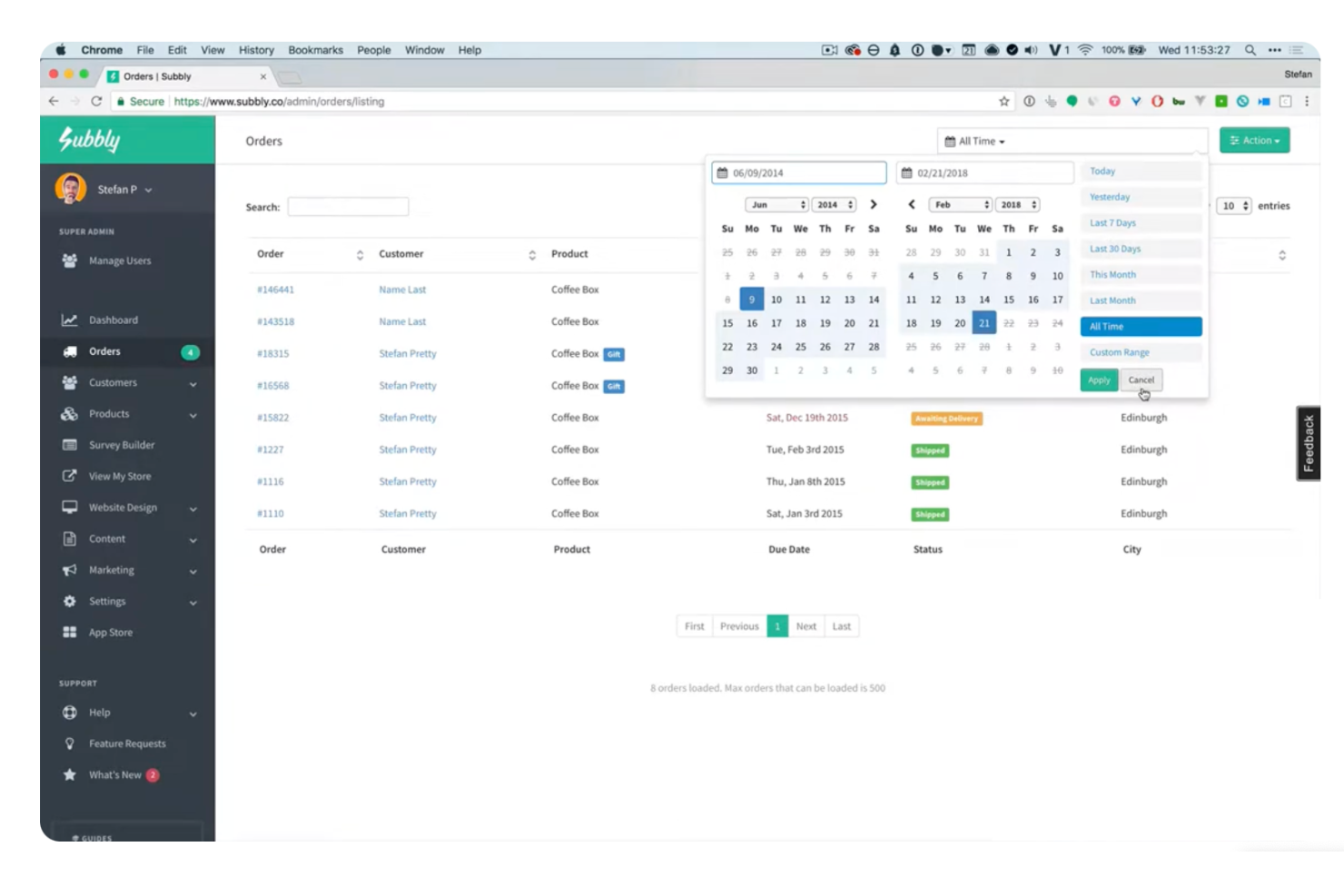
Subbly is a subscription-first commerce platform with AI features, designed to help businesses prioritize recurring revenue models. It offers a range of tools and features such as funnel and bundle builders, website creation, and migration assistance, with unique selling points including website building, data ownership policies, and native AI capabilities for revenue maximization and customer retention.
Why I picked Subbly: I chose to include Subbly as an all-in-one ecommerce solution because of its comprehensive website building, e-commerce, and subscription management capabilities. Its native AI capabilities, flexible bundle builder, and drag-and-drop builders make it stand out, allowing for extensive customization and integration. Subbly is best for subscription-first businesses due to its focus on subscription-based commerce, cost savings, and industry-influenced features, making it a solid choice for businesses looking to grow their subscription-based revenue.
Subbly Standout Features and Integrations
Subbly Standout features include customizable subscription plans, customer account and billing management, and analytics tools. It also provides a user-friendly interface and support for various payment gateways. Additionally, Subbly differentiates itself by offering native AI capabilities, drag-and-drop builders, and no data-hostage policies, as well as resources for business success in the subscription industry. The platform also offers support for gifting, cost savings, and industry-influenced subscription features, as well as real-time data on site traffic for website owners and marketers.
Integrations include Twilio, Zapier, Intercom, Mailchimp, Google Analytics, Zendesk, Hotjar, Drip, Klaviyo, Facebook, ChartMogul, Flodesk, and TaxJar.
Pros and Cons
Pros:
- User-friendly interface and functionalities
- Data portability allows for easy platform switching
- Significant customization flexibility
Cons:
- Lacks automated shipping estimation by weight
- Limited API and CRM integration with popular CRM platforms
New Product Updates from Subbly

Subbly AI Builder Adds Agent Skills and Knowledge Enhancements
Subbly introduces Agent Skills and enhanced AI knowledge for its AI Builder. This update improves performance, expands functionality, and enables more intelligent subscription site creation. For more information, visit Subbly’s official site.
 .
.

Price2Spy is an online tool designed to help ecommerce businesses monitor and analyze competitor pricing. It offers features that allow you to track market trends and adjust your pricing strategies accordingly.
Why I picked Price2Spy: You can keep an eye on your competitors' prices in real time, allowing you to respond promptly to market changes. This feature helps you maintain a competitive edge by ensuring your pricing aligns with current market conditions. Another valuable feature is the dynamic pricing module. This allows you to set rules for automatic price adjustments based on market data. By automating the repricing process, you can save time and ensure your prices remain competitive without constant manual intervention.
Price2Spy Standout Features and Integrations
Features include historical reporting, which lets you track pricing trends over time, providing insights into market fluctuations. The pricing dashboard offers a centralized view of all your pricing data, making it easier to analyze and make decisions. Additionally, the tool captures screenshots of monitored pages, giving you visual confirmation of pricing information.
Integrations include Magento, Shopify, BigCommerce, WooCommerce, Google Analytics 4, 3dcart, Shift4Shop, Google Shopping Feed.
Pros and Cons
Pros:
- Effective for monitoring competitors' prices on a large scale
- Provides clear and understandable reports
- Helps maintain competitiveness in the market
Cons:
- Learning curve for advanced features
- Limited range of visualizations available

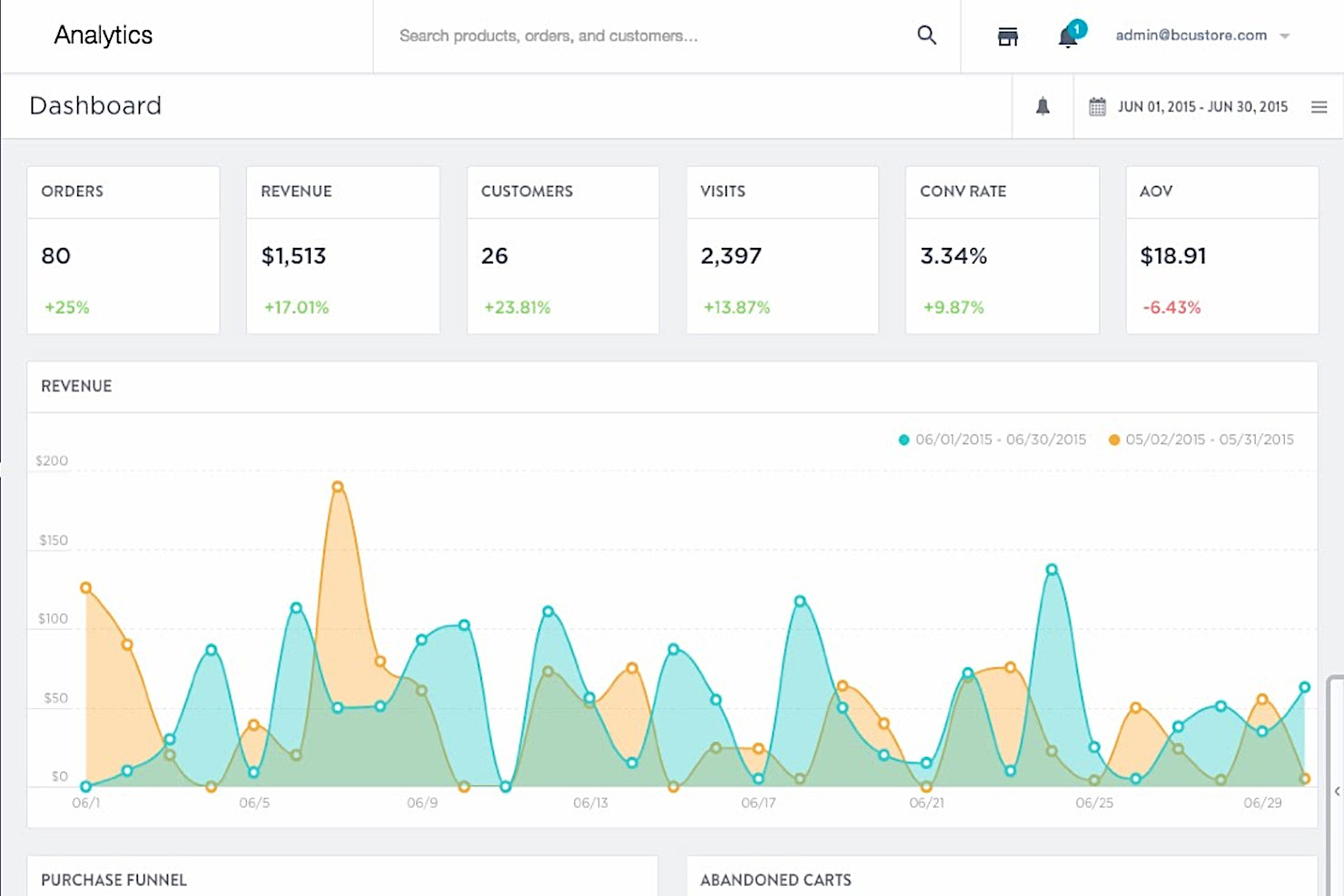
BigCommerce is a cloud-based ecommerce platform that enables businesses to build their own fully customized online stores. It offers features such as integrated payment processing, built-in marketing tools, SEO tools, and analytics capabilities.
Why I Picked BigCommerce: BigCommerce offers powerful marketing tools that allow users to promote their products or services more effectively online. It comes with built-in email marketing functionality which allows users to easily send out promotional campaigns directly from the platform itself. It also offers support for loyalty programs so businesses can reward customers for returning purchases or referring friends and family members. Plus, there are features like coupons and discounts which make it easy for businesses to increase sales by providing incentives for customers who purchase goods or services from them regularly.
BigCommerce Standout Features & Integrations
Features include customizable templates, built-in SEO, marketing tools, shipping & fulfillment, inventory management, reporting features, mobile-friendly design, responsive checkout, multiple payment gateway options, extensive third-party integrations, and 24/7 customer support.
Integrations include LiveChat, ShipStation, Georgias, Mailchimp, Quickbooks Online, Yotpo Product Reviews, Justuno, Brightpearl, Acumatica, ActiveCampaign, Hubspot, Klavyio, Shopgate, Printify, and dozens of other apps.

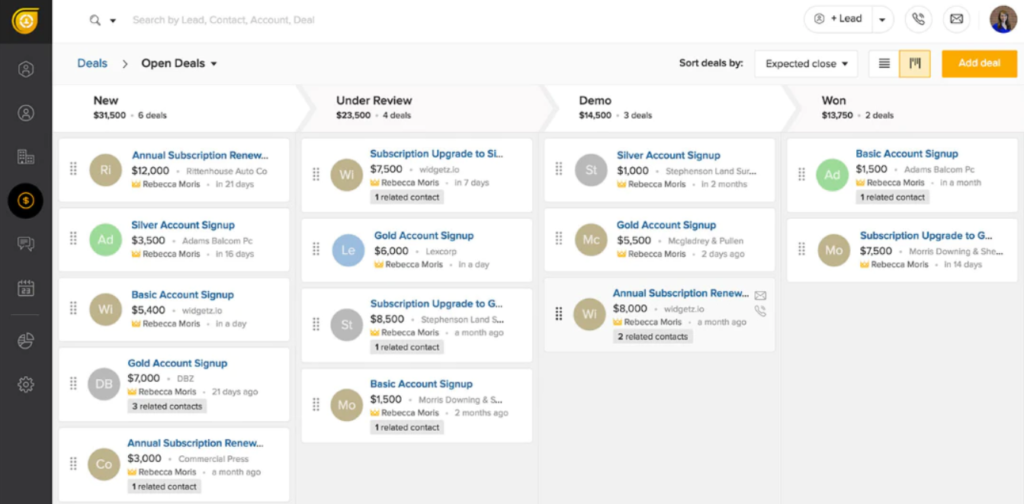
FreshSales is a sales CRM to help you manage your ecommerce business by allowing you to track your sales activities. It is a multi-currency and multi-language platform making it suitable for servicing customers from different locations. You can use FreshSales to auto-assign leads to selected salespeople, ensuring that leads with special requirements receive white-glove treatment. It has tools you can use to promote products, such as chat and email marketing tools.
Why I Picked FreshSales: FreshSales is the best sales CRM for using artificial intelligence to determine which leads are ready for closing. FreshSales uses AI to help you find the best deals to propose to customers using their chat responses and activity trends. FreshSales also gives you a 360-degree view of your customers to help you upsell, cross-sell, and develop lasting relationships.
FreshSales Standout Features & Integrations
Features include API, calendar management, contact management, dashboard, data import and export, external integrations, file transfers and sharing, lead management, multi-user, scheduling, third-party plugin/add-ons, call tracking, sales automation, customer management, data visualization, forecasting, lead scoring, multi-currency, notifications, pipeline management, task scheduling/tracking.
Integrations include Salesforce, HubSpot, Microsoft Dynamics 365, Pipedrive, Oracle Netsuite, Insightly, Copper, Zoho CRM, Close, Zendesk, TeamSupport, Help Scout, Jira Service Desk, Zoho Desk, Chargebee, Recurly, Sage Intacct, QuickBooks Online, Xero, Intercom, Google Calendar, Azure, and a growing list of other useful apps. They, of course, integrate with their own first-party software like Freshdesk, Freshworks CRM, and Freshservice, as well.


Omnisend is an omnichannel marketing platform that enables ecommerce businesses to increase sales and engagement with their customers through email and SMS campaigns. The software offers several features for ecommerce businesses, such as abandoned cart recovery, product recommendations, and checkout abandonment prevention.
Omnisend's database of templates is extensive and offers you great flexibility when creating professional emails and SMS. The templates can be easily customized to fit your brand's specific look and feel, and they come with a range of built-in features that make it easy to add products, dynamic discount codes, and multimedia to messages. Thankfully, you can also save your campaigns as future templates.
Why I Picked Omnisend: Omnisend's automation library has pre-built workflows for every step of the customer journey. Omnisend makes it easy to adjust and visualize the sequencing with drag-and-drop workflow editing. The library includes many triggers, such as signup forms, abandoned cart emails, and product reviews. Users can also set up sequence timers to delay or split messages into groups or send messages on specific days or times.
Omnisend Standout Features & Integrations
Features include audience targetting, contact management, conversion tracking, dashboards, data import and export, email integration, scheduling, third-party plug-ins/add-ons, calendar management, customer management, external integrations, marketing automation, notifications, and SMS.
Integrations include Shopify, Magento, BigCommerce, WooCommerce, AfterShip, Amazon Ads, Bold Commerce, Cartloop, Digioh, Easyship, Email Collection Bar, Gatsby, FyreBox, GemPages, Intercom, LiveChat, OpenCart, and other tools that you can check out on their partners' page.
New Product Updates from Omnisend

Omnisend Enhances Cross-Store Segment Management
Omnisend introduces Copy Segments Across Stores that lets you duplicate and transfer audience segments between stores, helping teams manage multiple stores more efficiently and maintain consistent targeting. For more information, visit Omnisend's official site.
 .
.
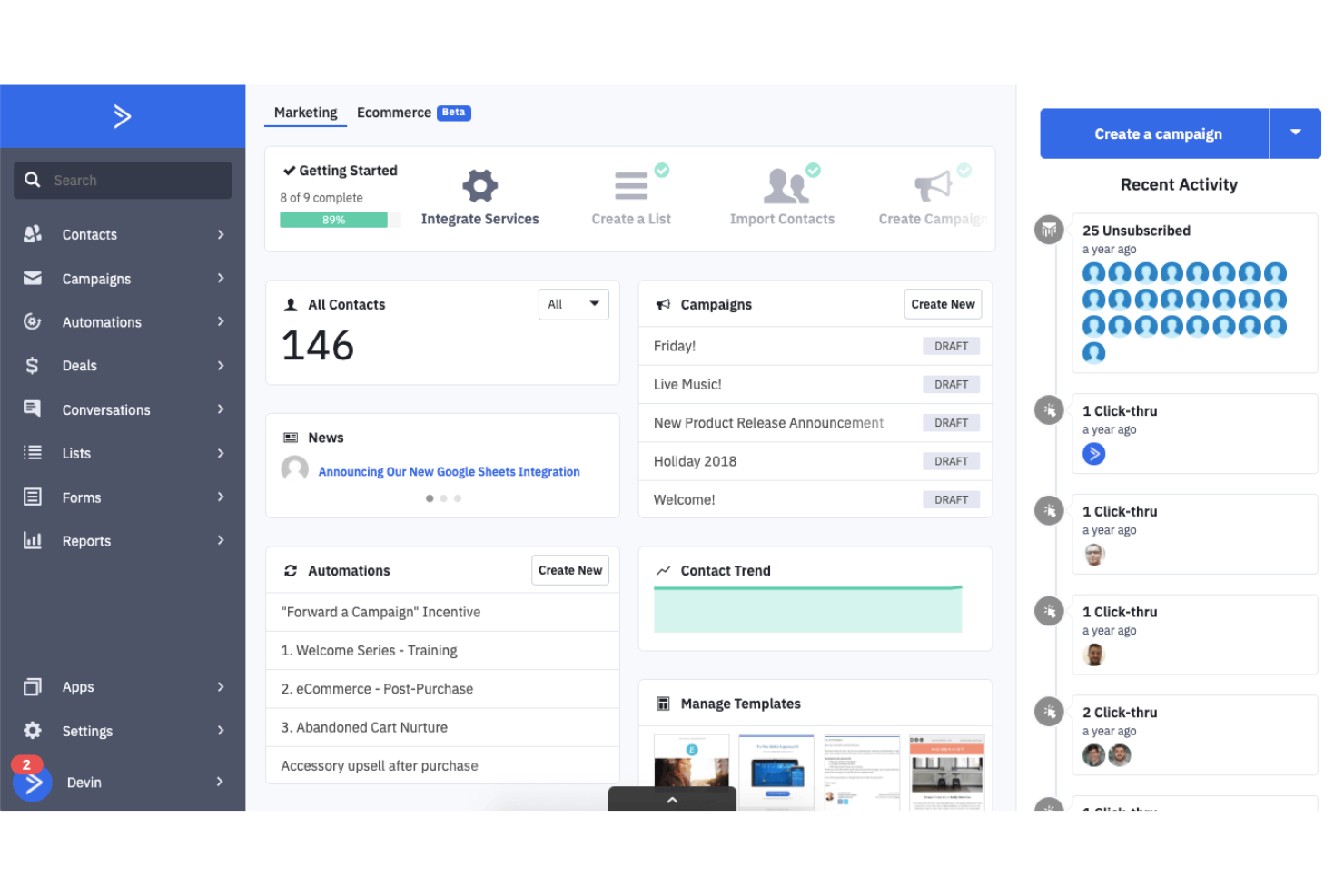
ActiveCampaign is a commerce marketing tool for customer management, capmaign tracking, and lead generation. You can use ActiveCampaign to create subscription forms that allow you to collect customer information like contact details and product preferences. ActiveCampaign lets you add tags to customer accounts, so you know where leads come from and the products that interest them. ActiveCampaign lets you automate tasks like sending a welcome note to new customers or website visitors.
Why I Picked ActiveCampaign: ActiveCampaign has great email marketing features that ecommerce owners can use. ActiveCampaign’s predictive capabilities can help you ensure that customers receive campaign materials at the right moment. Perfectly timed marketing emails can address customers with the material they most need wherever they are in the buyer's journey to encourage tehm to complete the sale.
ActiveCampaign Standout Features & Integrations
Features include 2-factor authentication, API, calendar managerment, contact management, conversion tracking, dashbaord, data import and export, lead management, marketing automations, notifications, sales automations, A/B testing, audience targeting, chat, customer management, external integrations, multi-user, password & access management, third-party plugin/add-ons, and pipeline management.
Integrations include Microsoft, Shopify, Square, Facebook, and Salesforce.

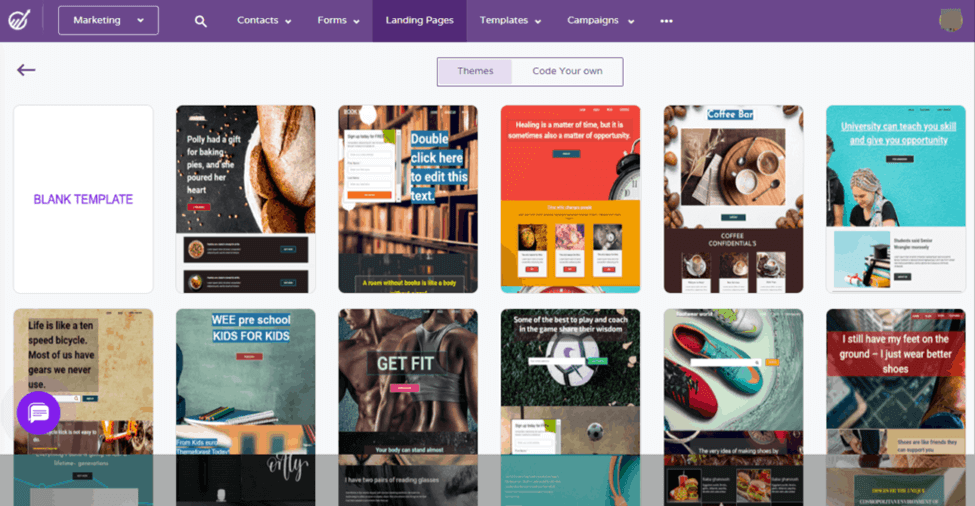
Engagebay is an all-in-one ecommerce tool with features for CRM, marketing, and sales support. It has a reporting dashboard to help keep you on top of your ecommerce business’s performance. Engagebay’s CRM feature lets you manage all of your contact information and leads to help you build your relationship with customers. Engagebay also has a live chat feature you can use to attend to customers’ immediate concerns and boost customer satisfaction.
Why I Picked Engagebay: First impressions last, and you can use Engagebay to create a landing page that can help impress customers and increase sales conversion. Engagebay lets you manage the SEO settings of your landing page to ensure it becomes more visible to web searchers. You can also use Engagebay to monitor how your landing page performs according to the number of visitors, and new subscribers.
Engagebay Standout Features & Integrations
Features include calendar management, contact management, conversion tracking, customer management, data export and import, data visualizations, external integrations, marketing automation, multi-currency, multi-user, password & access management, referral tracking, task scheduling/tracking, customer data forms, sales motivators, sales proposals, landing pages, pipeline management, A/B testing, API, chat, lead scoring, project management, call tracking, click-to-dial, sales automation, and ticket management.
Integrations include Stripe, Zapier, Xero, QuickBooks, and RingCentral.
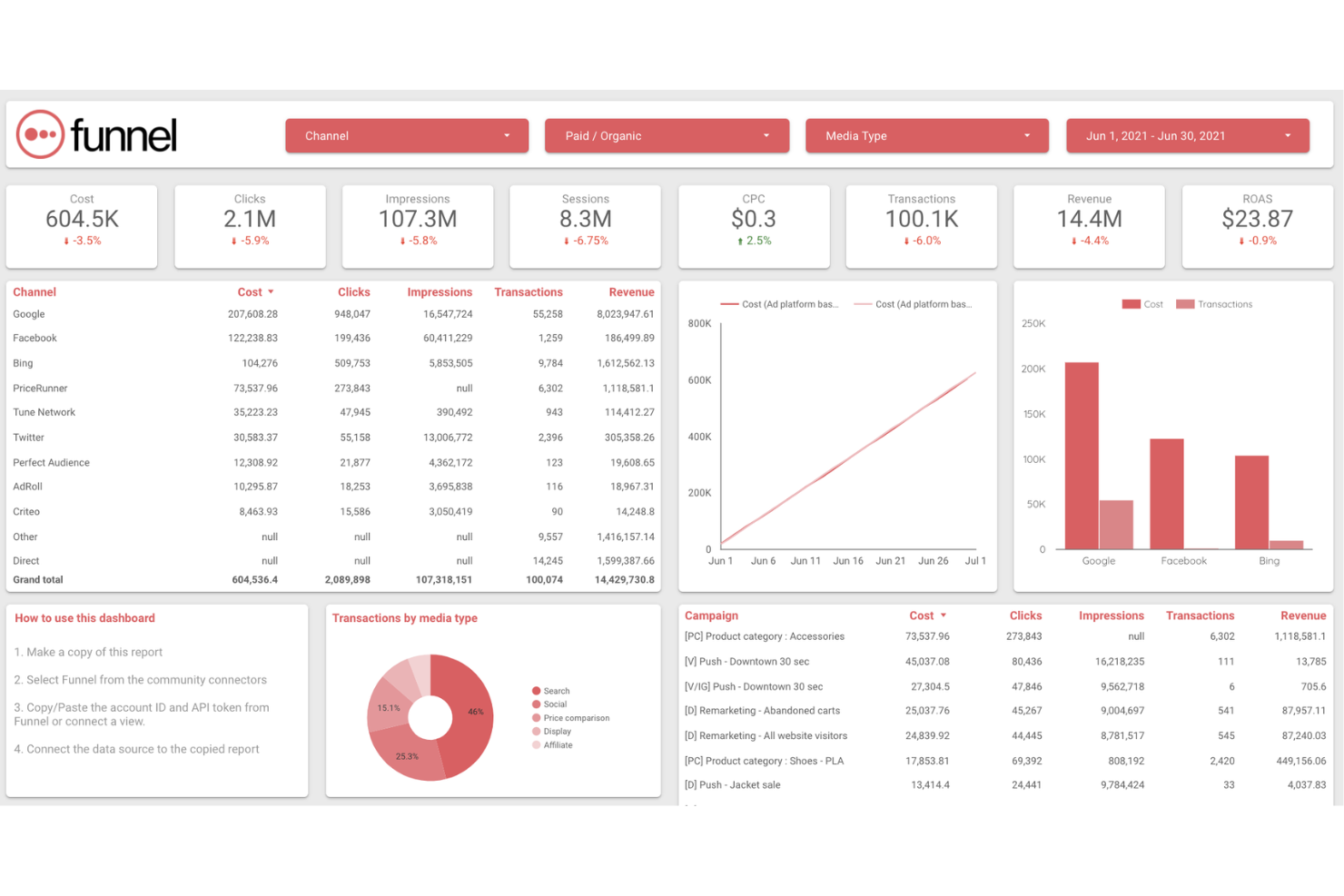
Funnel is a marketing and sales data collection software for combining sales and advertising data to determine conversion and ROI rates. It lets you channel data to your preferred reporting tool to develop reports that your team can easily understand. Funnel stores data from up to two years back, ensuring you have historical data available for comparison and reporting purposes.
Why I Chose Funnel: Funnel lets you automatically collect and analyze marketing data from multiple sources, not just from your ecommerce website but from different social media accounts so you can analyze them to craft an effective email marketing campaign. You can use Why I Picked Funnel: Funnel to segment data into useful categories like the number of products sold or the number of new customers. It has an automatic currency conversion to make it easier to understand revenue from your eCommerce website that services customers from different countries.
Funnel Standout Features & Integrations
Features include analytics, conversion tracking, dashboards, data import and export, external integrations, multi-site, social media integrations, API, customer management, data visualizations, forecasting, multi-user, and referral tracking.
Integrations include Google BigQuery, Amazon Redshift, Google Data Studio, Google Analytics, Adobe Analytics, Facebook Ads, Shopify, and other tools.

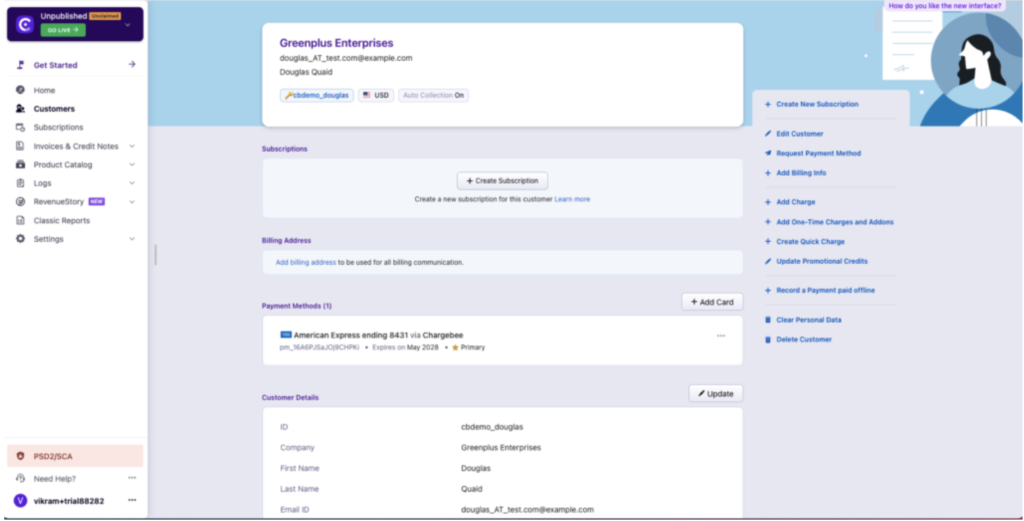
Chargebee is a subscription management platform that lets you automate subscription box billing and management, streamline order management, provide add-ons and gift subscriptions, and derive insights with detailed analytics. They handle subscriptions, billing, and payments in 30+ countries. Chargebee has a free plan for up to 3 users or a free 14-day trial of the full-featured paid plan.
Ecommerce managers can build efficient workflows for their business with a subscription ecommerce platform that comes with a flexible architecture and pre-built integrations across platforms like BigCommerce and Shopify Plus. You can sync subscription orders with customer information and integrate them with customer support systems to streamline operations and deliver seamless customer experiences.
Why I Picked Chargebee: Chargebee supports 480+ recurring billing use cases and specializes in futureproofing your ecommerce revenue operations. Payment preferences, trends, and tools change often and Chargebee ensures you can manage billing processes no matter what the future throws at you. Through Chargebee, you can set up automatic subscriptions, free trial periods, feature mapping/flags, and even create unique monetization models to fit your product specifications.
Chargebee Standout Features & Integrations
Features include 2-factor authentication, accounts receivable, billing/invoice, calendar management, data export and import, external integrations, multi-currency, notifications, third-party plugins/add-ons, API, CRM integration, dashboards, multi-user, and tax management.
Integrations include PayPal, Stripe, Microsoft Dynamics GP, Zoho CRM, BigCommerce, Google Analytics, Mailchimp, Refersion, Avalara, Slack, GetAccept, Shipstation, Salesforce, Friendbuy, FirstPromoter, ChartMogul, ReferralCandy, Xero, QuickBooks Online, ProfitWell, PieSync, TaxJar, Baremtrics, Sage Intacct, Moxtra, LeadDyno, Freshdesk, Intercom, Zendesk, HubSpot, Groove, Active Campaign, Pipedrive, Stitch, Natero, Klaviyo, and more if you use Zapier (may require a separate paid plan).

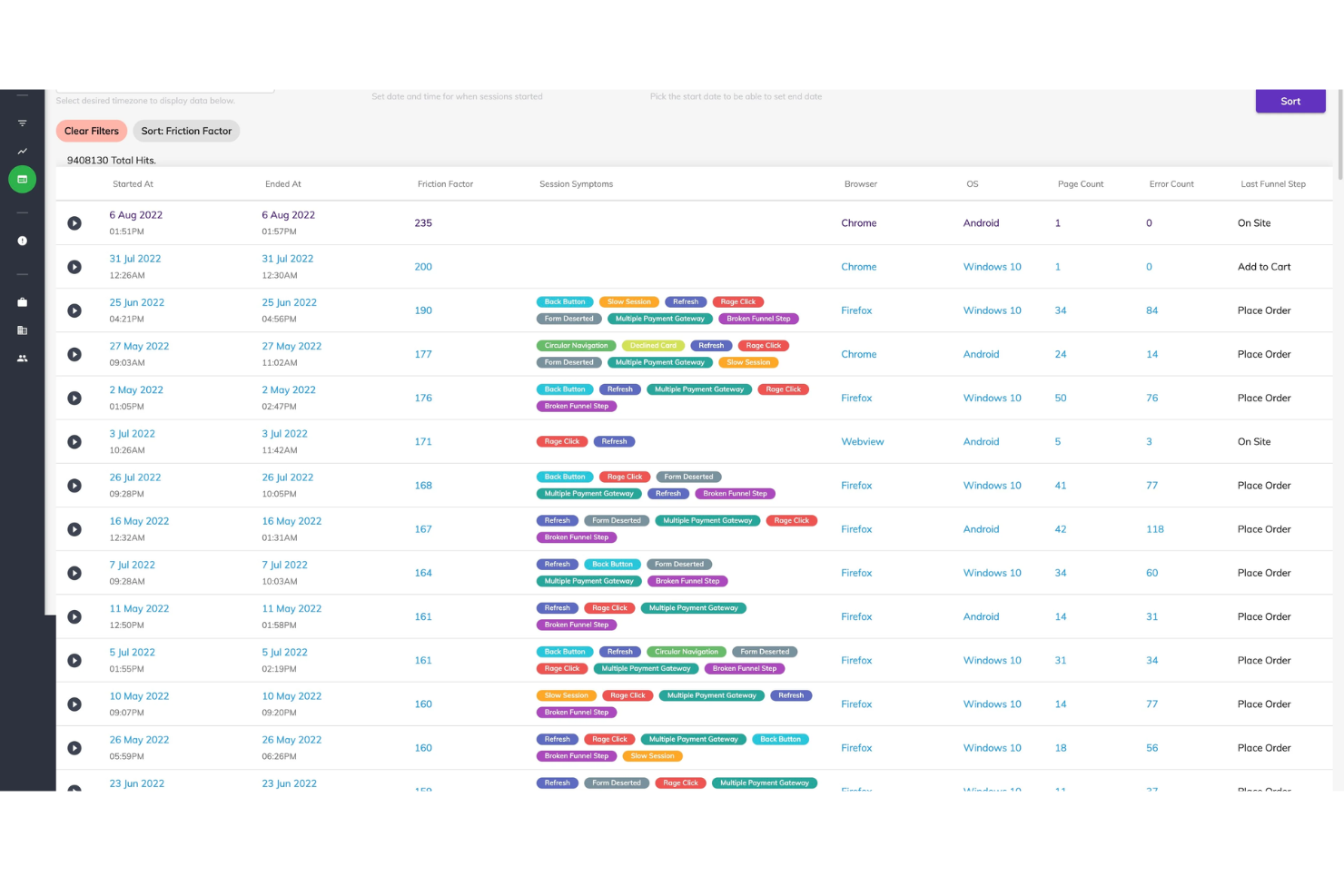
Noibu is a SaaS product designed to help ecommerce businesses identify and fix critical errors on their websites in real-time. It's a tool that monitors your website 24/7 and alerts you whenever there's an issue that could potentially affect your sales or user experience. With Noibu, you can quickly address these problems and ensure that your online store is always running smoothly.
By integrating Noibu into an ecommerce site, businesses can gain real-time insights into critical errors and issues that impact their customers' journey, such as broken checkout processes, missing or malfunctioning product pages, and payment gateway errors. Noibu's intelligent error detection and comprehensive reporting help ecommerce teams quickly identify and prioritize issues, enabling faster resolution and minimizing revenue loss. With Noibu, ecommerce sites can ensure a seamless and error-free shopping experience, leading to improved customer satisfaction
Why I picked Noibu: Noibu is a game-changer when it comes to maintaining a high-quality online shopping experience for your customers. As an ecommerce business owner, you know how important it is to keep your website running smoothly and error-free. Noibu takes the guesswork out of this process by constantly monitoring your site and alerting you to any issues. This proactive approach to error management sets Noibu apart from other tools in the market. With Noibu, you can track add-to-cart and checkout errors and even replay user sessions to see where things went wrong.
Noibu Standout Features & Integrations
Features include real-time error detection, notifications & alerts, error summaries, issue prioritization, add-to-cart monitoring, diagnosing checkout errors, website uptime monitoring, site health dashbaord, JS & HTTP error capture, sales funnel tracking, video replay, ticket triaging, reporting & analytics, no-code custom attributes,SDK,
Integrations inclide Shopify, Magento, WooCommerce, SAP Hybris, BigCommerce, and Salesforce Commerce Cloud.

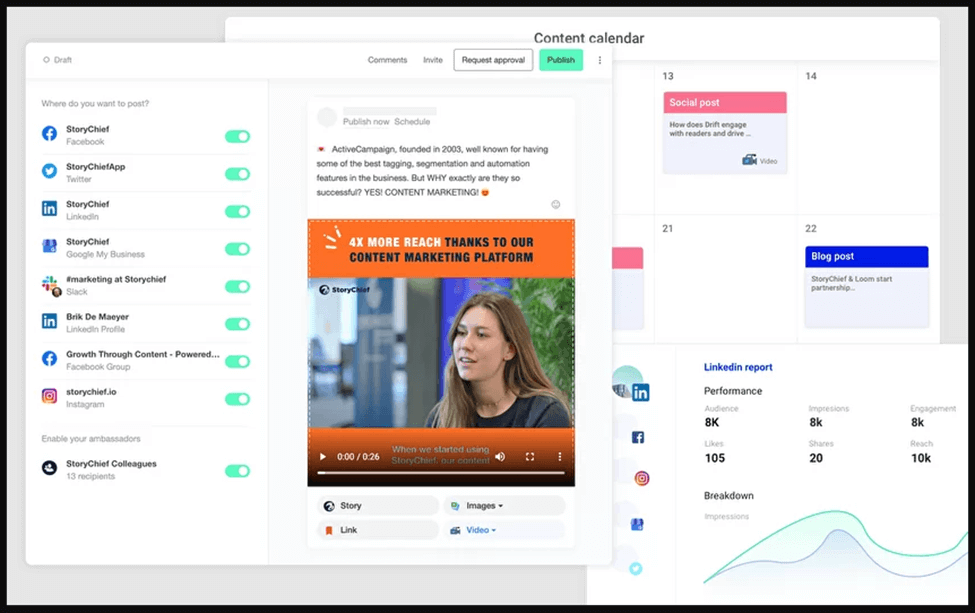
To be successful in ecommerce, you need to be successful in content creation. StoryChief is content planning and creation software to help you build and publish marketing content to promote your online store and products. It has a built-in SEO assistant to ensure organic growth while also tailoring content intent to your customers' major pain points.
If you want to engage customers using interactive content, then StoryChief is the best software for you because it lets you craft a marketing campaign that encourages customer engagement. You can use StoryChief to analyze your content and gauge its impact on your audience.
Why I Picked StoryChief: StoryChief lets you plan your social media and blog content, letting you automate publishing and distribution. You can also use StoryChief to organize all your photos and videos and crop and edit them to be ready for dissemination. StoryChief also lets you view all your marketing content, so you know which ones require approval and which ones are ready for publishing.
StoryChief Standout Features & Integrations
Features include calendar management, external integrations, notifications, API, conversion tracking, dashboards, marketing automation, multi-user, digital asset management, and content creation.
Integrations include Slack, Trello, Mailchimp, Google Contacts, and Twitter.

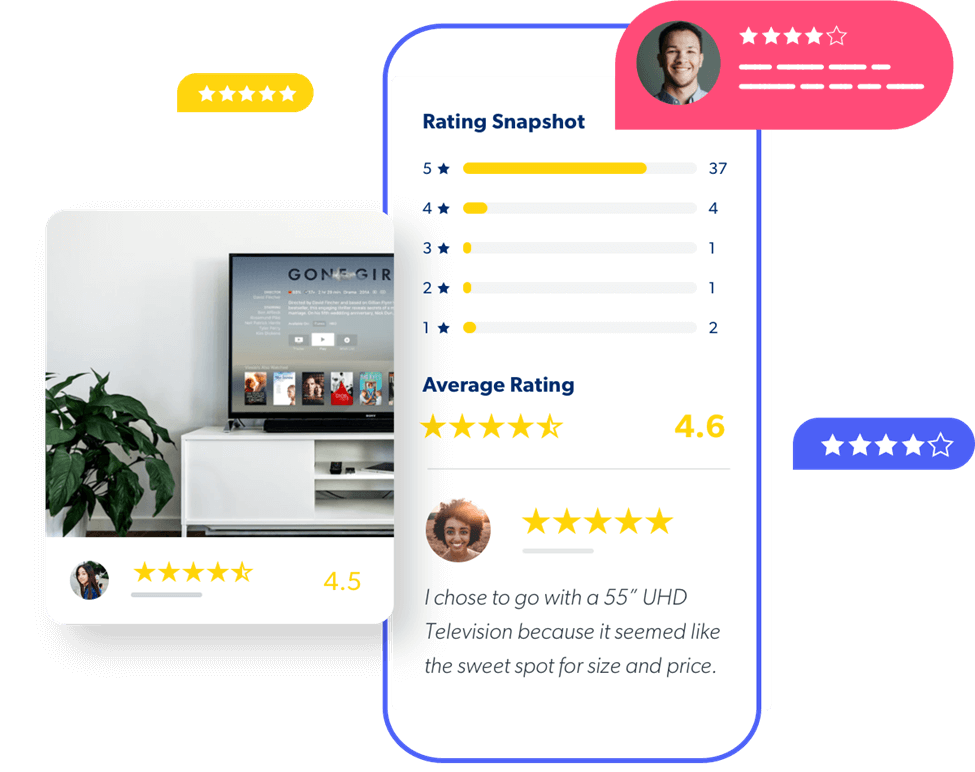
Bazaarvoice is a customer service and product review management tool for growing your ecommerce business with several features, including one that lets you respond to queries about your e-store products. It has a feature that you can use with your website builder to showcase carousels and gallery pages that showcase your products. You can also integrate social media content from TikTok, Facebook, Twitter, or Pinterest influencers to boost interest in your products. Bazaarvoice also lets you launch sampling programs that allow customers to try new products and drive user-generated content.
Why I Picked Bazaarvoice: Bazaarvoice is an excellent ecommerce platform to use in collecting and managing customer reviews and ratings. By analyzing customer reviews, you can improve your ecommerce website to deliver a better user experience. You can also highlight selected customer reviews on your ecommerce website to inspire other customers toward a purchasing decision.
Bazaarvoice Standout Features & Integrations
Features include API, dashboards, external integrations, customer support, review management, and notifications.
Integrations include Facebook, Twitter, Adobe Analytics, Google Analytics, Salesforce Commerce Cloud, Magento, IBM WebSphere Commerce, and SAP.
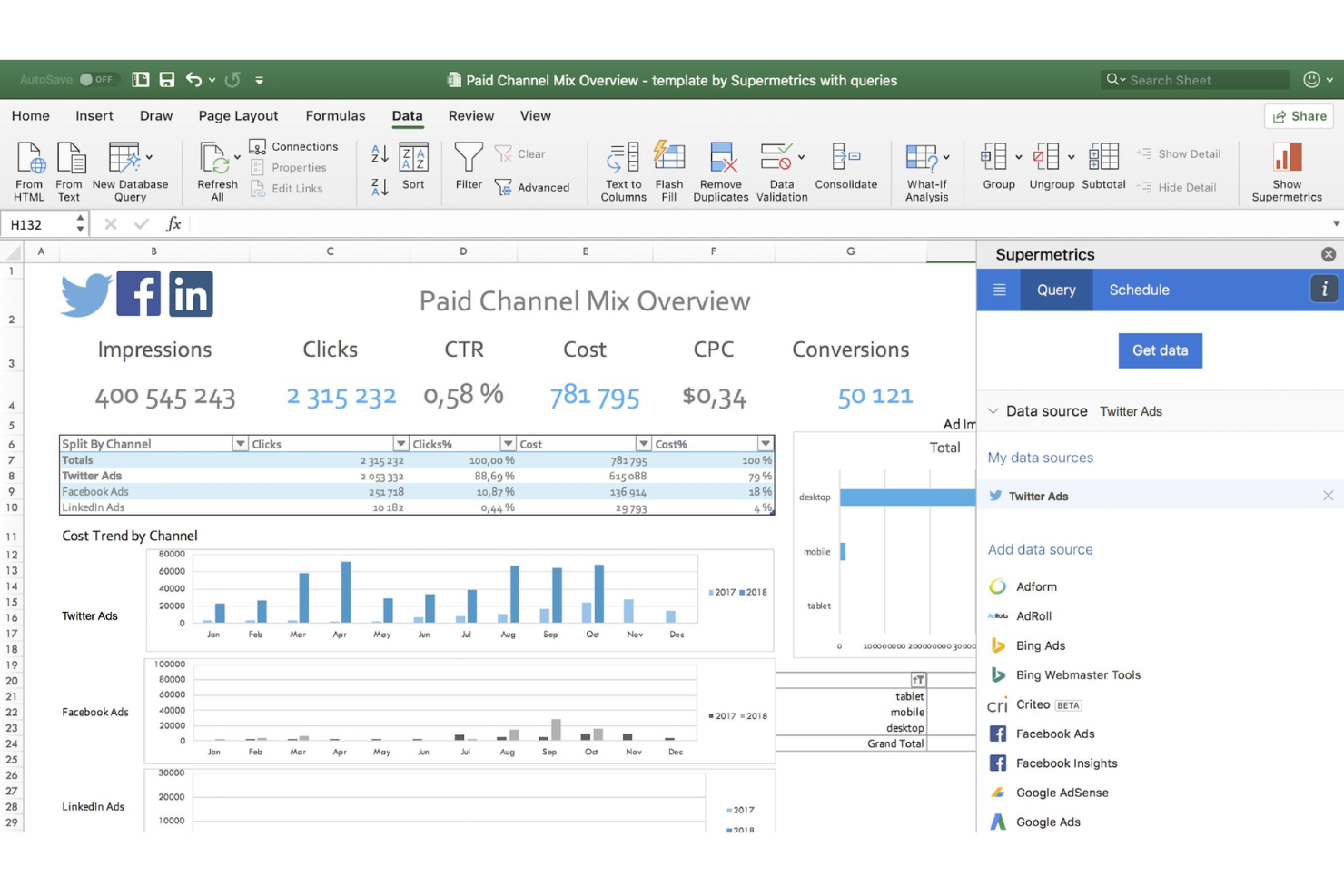
Zoho Desk is a cloud-based customer service solution that lets you manage customer support tickets to address customer needs. It has a CRM feature to assist your customer support team in delivering exceptional services and maintaining customer relationships. You can use Zoho Desk to automate workflows like sending alerts or adding tasks. You can also automate notifications ensuring that customers receive timely updates on the progress of their tickets.
Why I Picked Zoho Desk: Your customer support team can use Zoho Desk to respond to customer concerns across multiple channels, including phone, email, chat, social media, and your ecommerce storefront website. You can also use Zoho Desk to develop self-service options to help customers anytime, even if you don’t have a 24/7 customer support team. Zoho Desk also has an AI-powered assistant that automatically analyses tickets for proper routing.
Zoho Desk Standout Features & Integrations
Features include analytics, batch permissions & access, chat, contact sharing, customer management, data xport and import, data visualizations, email integration, external integrations, inventory tracking, lead scoring, multi-user, third-paty plugins/add-ons, time management, workflow management, social media integrations, a knowledge base, API, calendar management, contact management, dashboards, lead management, notifications, scheduling, call tracking, real-time alerts, self-service portal, and call integration.
Integrations include Microsoft Office 365, Microsoft Teams, Google Drive, Zapier, Zendesk, and ServiceNow. Integrations via Zapier and Zoho Flow are also supported. Being part of the Zoho ecosystem allows you to connect to several of Zoho’s own services for Sales, Marketing, CRM, customer service, and more tool options.

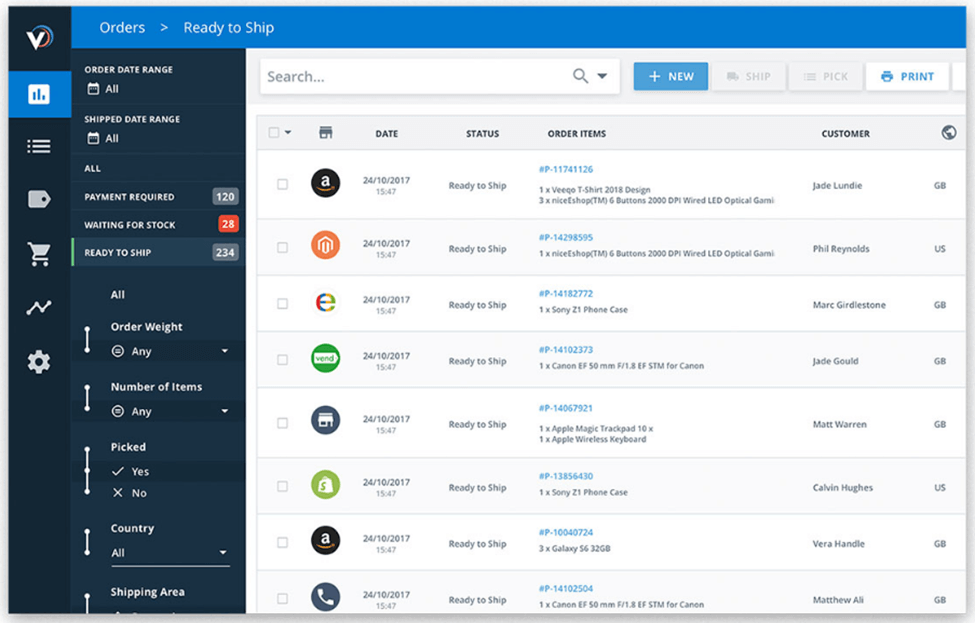
Veeqo is an ecommerce inventory management tool that can handle managing multiple online stores with different products and requirements. It has order management features to handle shipments and process returns for customers.
You can use Veeqo to automate order workflows according to specific triggers like weight, value, or product type, so you can trigger receipt sending, follow-up messages, or upsell/next sell recommendations. Veeqo offers easy reporting to help you analyze sales figures and fulfillment reports.
Why I Picked Veeqo: Veeqo is the best ecommerce tool for inventory management across multiple stores because it allows you to unify and sync orders and inventory across different channels. You can track and manage inventory in any warehouse, letting you move supplies to high-traffic areas. Veeqo has shipping tools that enables you to print labels in bulk, ship orders, and track them using one program.
Veeqo Standout Features & Integrations
Features include API, dashboard, data import and export, forecasting, notifications, shipping management, warehouse management, budgeting, customer management, data visuzliation, external integrations, inventory tracking, multi-user, supplier management, product catalog, and order management.
Integrations include Hubspot, Asana, DotDigital, Salesforce, Campaign Monitor, Mailchimp, Intercom, Gmail, Facebook Pages, Manychat, Zendesk, Klaviyo, LinkedIn, Constant Contact, Freshdesk, AWeber, Buffer, monday.com, Insightly, Infusionsoft by Keap, and other tools if you use Zapier but that might require an additional fee.

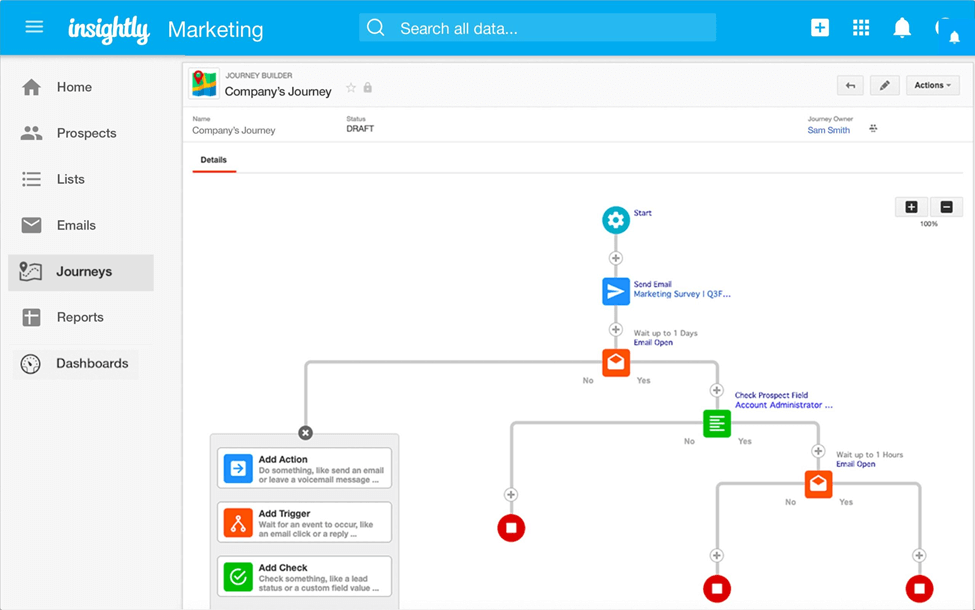
Insightly is a CRM SaaS with sales, project management, marketing, and ecommerce features so you can manage your business using one software. It has an automation feature to automate simple tasks like sending email alerts or updating records so you can focus on other aspects of your ecommerce business. Its project management feature lets you plan projects, assign tasks, and track milestones to ensure the timely delivery of projects.
You can also use Insightly to send bulk emails as part of your marketing campaign to reach as many customers as possible.
Why I Picked Insightly: Insightly’s lead routing feature can help you ensure that leads get directed to the right salespeople. Insightly routes leads in real-time so sales team members can follow up on leads while they are still hot.
Insightly Standout Features & Integrations
Features include analytics, contact management, conversion tracking, customer management, data export and import, data visualizations, external integrations, file transfer and sharing, Gantt charts, inventory tracking, lead management, multi-currency, notifications, referral tracking, supplier management, click-to-dial, roadmapping, pipeline management, API, batch permissions & access, calendar management, contact sharing, dashboard, lead scoring, multi-user, project management, task scheduling/racking, call tracking, and resource management.
Integrations include ADP Workforce Now, Asana, BambooHR, Calendly, DocuSign, Drift, Jira, Microsoft Power BI, Shopify, Slack, WooComerce, Workday, Sage Intacct, and other tools.

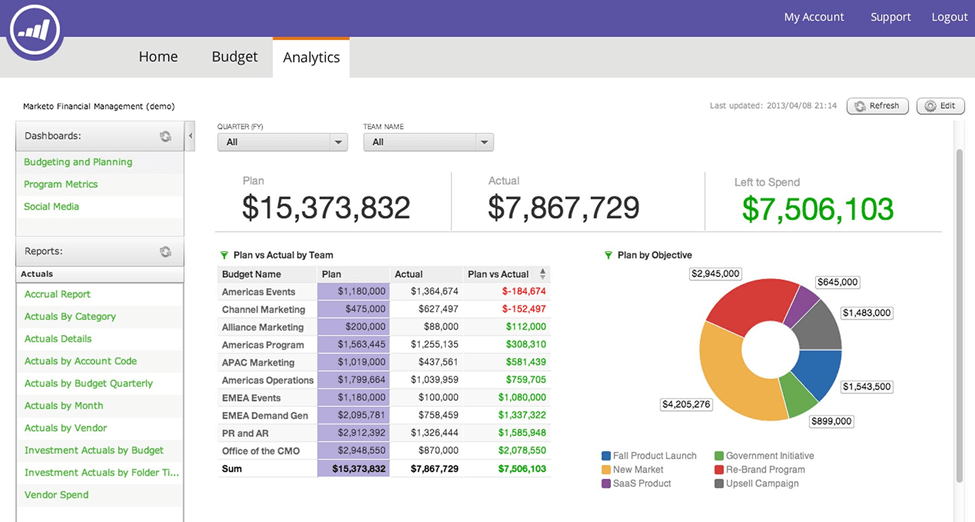
Marketo is a marketing automation software to help you identify, engage, and improve customer experience to help you increase revenue. Marketo lets you use behavior tracking to engage the right customers. It also has a pipeline and conversion analysis feature to help you determine the effectiveness of your sales team in converting leads.
Launching marketing campaigns blindly can waste your resources, and Marketo’s impact analytics feature can help you gauge the effectiveness of campaigns to determine campaigns that increase your revenue.
Why I Picked Marketo: Marketo lets you centralize your enterprise sales, marketing, and ads performance data, giving you complete visibility of your efforts and results. Marketo can map out all the stages of your customers’ journeys to spot which stages need additional engagement. It also lets you analyze different channels to know which ones customers find useful—and why.
Marketo Standout Features & Integrations
Features include audience targeting, conversion tracking, data export and import, data visualization, lead management, notifications, scheduling, API, calendar management, dashboards, external integrations, lead scoring, and marketing automations.
Integrations include Salesforce, Microsoft Dynamics, Netsuite, Oracle, SugarCRM, Seamless Connections, WordPress, LinkedIn, Facebook, Citrix GoTo Webinar, Magento, Eventbrite, NetSuite, SOAP API, Google AdWords, FunnelEnvy, Wistia, atEvent, Cvent, Hootsuite, and other tools you probably already use.

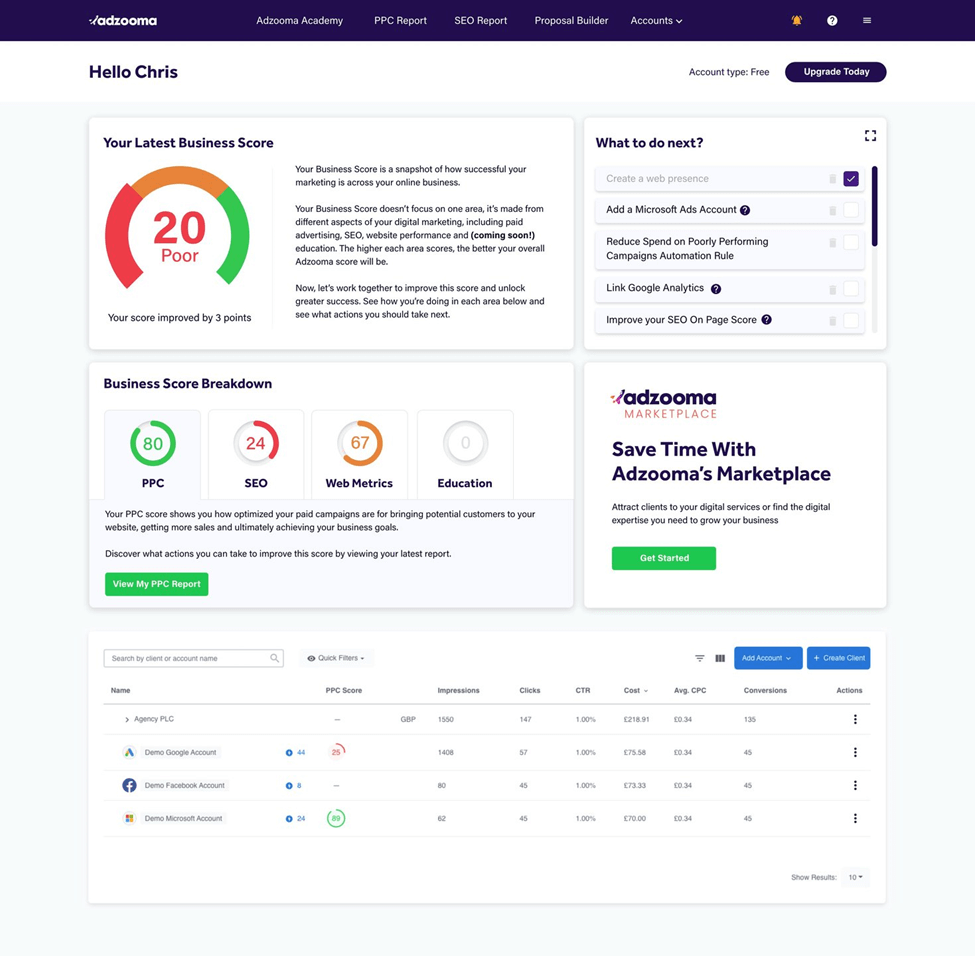
Adzooma is an ecommerce platform to set up and run your online marketing efforts on different channels, including your online store, mobile app, and social media accounts. It has playbooks and courses to help your marketing team members gain expert knowledge to devise effective marketing campaigns. Adzooma has a review management feature so customers can send reviews through emails or text messages and help you determine your marketing’s weak spots.
Adzooma also makes content marketing easier by simplifying SEO to ensure that your company has maximum visibility. Adzooma integrates with Google Analytics to give you valuable insights into how users behave on your website.
Why I Picked Adzooma: If you want to eliminate human error in assessing marketing activities, then Adzooma is the best choice for you because it uses machine learning to help you assess your marketing efforts. It lets you analyze your PPC performance and gives suggestions on how you can improve them.
Adzooma Standout Features & Integrations
Features include analytics, conversion tracking, dashboards, data import and export, external integrations, multi-site, social media integrations, API, customer management, data visualizations, forecasting, multi-user, and referral tracking.
Integrations include Google, Microsoft, and Facebook products.

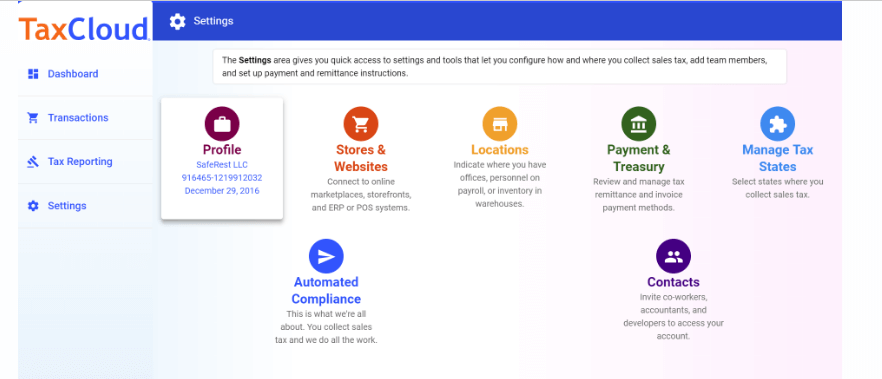
TaxCloud is a comprehensive tool designed to simplify sales tax compliance for ecommerce businesses. It offers real-time sales tax calculations, instant collection of sales tax, and automated filing and remittance of sales tax proceeds to the appropriate state and local jurisdictions.
Why I Picked TaxCloud: TaxCloud is a comprehensive sales tax compliance solution that calculates applicable sales tax in real-time during the checkout process, ensuring accurate tax collection based on the customer's location. It simplifies the tax compliance process by automating the filing and remittance of sales tax to over 13,000 U.S. tax jurisdictions. Additionally, TaxCloud integrates with various e-commerce platforms and marketplaces, facilitating automated sales tax calculations within the online sales process.
TaxCloud Standout Features & Integrations
Features include sales tax filing and remittance services for businesses. This unique feature further reduces the compliance burden on businesses by automating the often complex and time-consuming process of filing sales tax returns and remitting tax payments to state authorities. TaxCloud takes care of the entire filing process, from preparing the returns to submitting them to the appropriate tax jurisdictions, which can save businesses significant time and resources.
Integrations include Ability Commerce, BigCommerce, QuickBooks, Square, Stripe, Shopify, WooCommerce, Odoo, Volusion, Cart.com, Oracle NetSuite, Acumatica, Sage, and Magento.

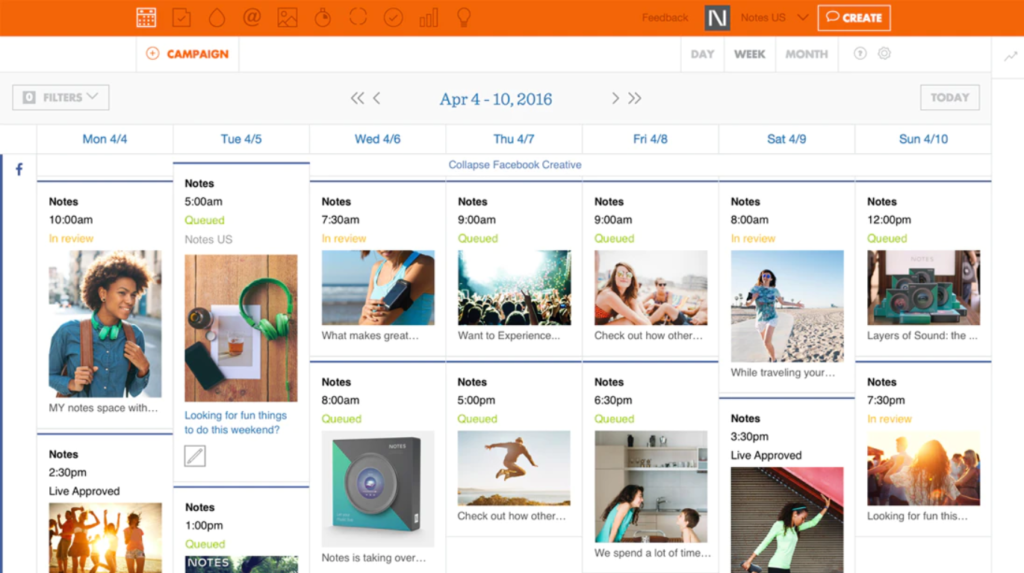
Percolate is an ecommerce content marketing tool that gives you visibility and control over all aspects of your company’s marketing life cycle. It can help you create digital content to ensure customers have engaging digital experiences visiting your ecommerce site. Percolate can help you analyze your marketing activities to determine which ones are working so you can replicate them. You can also use Percolate to launch training programs internally so your team is up-to-date on new processes and procedures.
Why I Picked Percolate: Percolate acts as a central hub for planning, managing, and executing content marketing campaigns across multiple channels like your ecommerce site, mobile app, and social media accounts. Percolate has templates and workflows you can use to decrease the time required to launch marketing campaigns and help you save time building content that supports your product sales goals. You can build blogs, product tutorials, videos, flyers, landing pages, social media ads, and brochures—to name a few ideas!
Percolate Standout Features & Integrations
Features include audience targeting, conversion tracking, data export and import, data visualization, lead management, notifications, scheduling, API, calendar management, dashboards, external integrations, lead scoring, and marketing automations.
Integrations include Adobe Experience Manager, Salesforce, BambooHR, Dropbox, and Google Workspace.
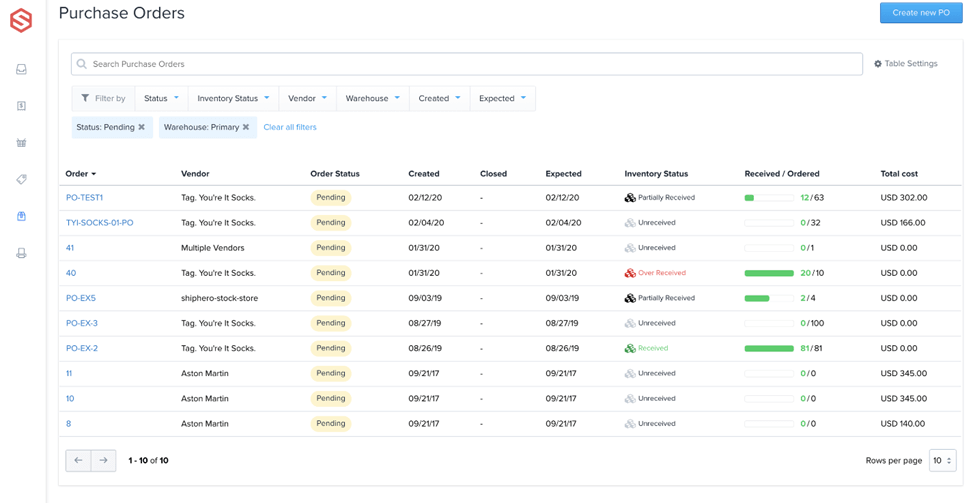
ShipHero is an ecommerce shipping and fulfillment platform with fast shipping options and integration with all major postal operator companies, like FedEx, Canada Post, DHL Ecommerce, Purolator, Shippo, UPS, USPS, and dozens more. ShipHero gives you visibility of your orders and how they are getting packed to help you with quality control. ShipHero has a mobile app you can use to manage your business anywhere.
ShipHero has a reporting feature to let you analyze the products you ship and their costs to gauge your profits and make adjustments if needed. ShipHero’s inventory management feature lets you check your current inventory levels to replenish fast-selling products and keep up with demands.
Why I Picked ShipHero: ShipHero is the best ecommerce tool for shipping and fulfillment services for smaller sellers who don't have their own warehouse. They offer transparent, flat-rate fees so you're never surprised. They offer outsourced fulfillment, shipment tracking, and photo confirmation for every new package leaving the warehouse.
ShipHero Standout Features & Integrations
Features include data visualization, dashboards, shipping management, warehouse management, fulfillment management, external integrations, cost tracking, forecasting, inventory auditing, and reporting.
Integrations include Etsy, Amazon, CartRover, Loop, Inventory Planner, BigCommerce, Shopify, MyStoreNo, eBay, Walmart, Google Shopping, Returnly, APIWorks, Pipe 16, Klaviyo, Shopify, and all major global shipping carriers.
Other Ecommerce Tools You Should Consider
Here are a few more that didn’t make the top list:
- Blueshift
Customer segmentation tools
- Market Plan
For funnel forecasting & projections
- Zoho Desk
Cloud-based ecommerce helpdesk
- Aircall
Telephony ecommerce tool for sales and support teams
- ShipStation
For streamlining the ecommerce shipping process
- Trellis
For dynamic pricing adjustments for Amazon sellers
- ShipEngine
For discounted carrier rates
- PrestaShop
Multilingual store builder
- Shopify
For ease of use
- Algolia
For delivering conversion-boosting site searches
- Squarespace
Ready-to-go storefront templates
- Adobe Commerce
For B2B ecommerce
- OpenCart
Mobile/tablet responsive storefront
- Volusion
For access to site design experts
- Wix eCommerce
Free storefront builder
- WooCommerce
Open source eccomerce platform
- Shift4Shop
Turnkey ecommerce solution


Our Selection Criteria for the Best Ecommerce Tools
Picking the best ecommerce tools means taking a good, hard look at what they offer and how they can make your life easier. We've put these tools through the wringer to help you make an informed choice without all the guesswork.
Core functionality (25% weighting score)
A great ecommerce tool has to nail the basics. We’re talking about the bread-and-butter features that keep your store running smoothly.
Not every tool will do all of these things—each has its own strengths, and that's what makes building a smart tech stack so powerful. Here’s what we focus on:
- Website building and customization. Tools should offer easy-to-use features for creating a functional and attractive online store without needing to code.
- Order and inventory management. Tools need to handle real-time inventory tracking and seamless order fulfillment.
- Marketing capabilities. Tools must help optimize marketing campaigns, including automation, customer engagement, and abandoned cart recovery.
- Payment and checkout processes. A smooth, secure checkout experience with support for multiple payment methods is a must.
- Customer support. Effective customer support features like chat and ticketing tools are crucial for customer satisfaction.
Additional standout features (25% weighting score)
Once the basics are covered, it’s the extra flair that sets the best tools apart. We’re on the lookout for:
- Automation capabilities. Tools that offer automation for repetitive tasks, making operations more efficient.
- Customization options. Flexibility to tailor features to fit specific business needs.
- Advanced analytics. Comprehensive reporting and insights that help businesses make smarter decisions.
- Scalability. The ability to handle growth without a hitch.
- User experience enhancements. Features that make the experience more seamless for both the team and the customers.
Onboarding (10% weighting score)
Getting started with a new tool shouldn’t feel like climbing Everest. We look for tools that make onboarding easy by providing:
- Training materials. In-depth guides, webinars, or documentation that help users get familiar with the features quickly.
- Interactive onboarding. Tools that offer a step-by-step guide or walkthrough to help new users get set up confidently.
- Support during setup. Access to dedicated support during the initial stages to ensure a smooth transition.
Usability (10% weighting score)
If a tool’s confusing or clunky, it’s going to slow you down. We look for:
- Ease of use. Tools should have an intuitive design that makes it easy to navigate and complete tasks.
- Accessibility. Features that work well across different devices and platforms.
Customer support (10% weighting score)
When things go wrong (and they will), you need someone ready to help. Here’s what we consider:
- Multiple support channels. Access to support via chat, email, or phone.
- Responsive assistance. Quick and effective help when you need it.
- Community support. Access to user forums or groups for additional guidance.
Value for money (10% weighting score)
You want to make sure you’re getting your money’s worth. We look at:
- Transparent pricing. Clear, upfront costs with no hidden fees.
- Flexible plans. Options that allow the business to grow without switching tools.
- Free trials or demos. Opportunities to test before committing.
Customer reviews (10% weighting score)
Nothing beats hearing from people who’ve used the tool in real life. We check out:
- Positive testimonials. Overall satisfaction among users.
- Issue resolution. How well the tool handles and resolves problems.
- Long-term value. Whether users see sustained benefits from using the tool.
By carefully weighing these criteria, you can select ecommerce tools that not only meet but exceed your expectations, helping your online business thrive.
What are Ecommerce Tools?
Ecommerce tools are digital platforms that help you build, run, and grow your online store.
From storefront creation to shipping logistics and customer retention, these tools handle the gritty details so you can focus on scaling your business—not babysitting spreadsheets. Features like advanced ecommerce search capabilities help customers find products faster.
The best ecommerce tools cover every part of the funnel:
- Website builders that make your storefront look pro (no developer required).
- Marketing and sales tools that automate campaigns, recover abandoned carts, and actually move product.
- Inventory and order management systems that sync across channels so you’re never oversold—or stuck with dead stock.
- Analytics dashboards that tell you what’s working (and what’s not).
- Customer support solutions that let you deliver five-star service without drowning in tickets.
- Payment and checkout systems that make buying fast and frictionless.
- Shipping and fulfillment software that keeps packages moving and customers happy.
Whether you’re just launching or leveling up, ecommerce tools give you the infrastructure to run like a bigger, more efficient operation. And in today’s ecommerce game, that’s the edge you need.
How to Choose the Best Ecommerce Tools for Your Brand
The ecommerce business tools you select will comprise your final tech stack and, ultimately, determine your ability to grow your brand effectively—whether that's managing inventory, processing payments, or handling subscription billing management. Anybody can pick great tools for the brand they have now, but the smart ones pick the tools that'll take them to where they want to go.
So, you gotta know how to pick right. Otherwise, you'll have to do it all over again later, which will cost you psychically and in actual dollar bills.
Here’s how to choose smarter—so you build a stack that works now and scales with you.
| Step | What to do | Why it matters |
|---|---|---|
| 1. Audit your biggest bottlenecks | Look at where you’re spending too much time or losing revenue—whether it’s fulfillment delays, low conversion rates, or clunky checkout flows. | You’ll know exactly what you need a tool to fix, instead of getting distracted by bells and whistles. |
| 2. Prioritize seamless integrations | Make sure the tools play nice with your ecommerce platform, POS, CRM, and shipping software. | A disconnected stack means more manual work, more errors, and less visibility. |
| 3. Think 12–24 months ahead | Choose tools that can grow with you: higher volume, more SKUs, more channels. | Replatforming is a nightmare. Future-proof your stack now. |
| 4. Compare features that solve real problems | Skip the fluff. Look for automation, analytics, customization, and ease of use. | The right features save time, unlock insights, and actually move the needle. |
| 5. Test usability with your team | Get hands-on or trial the tools. Ask: Is this intuitive? How steep is the learning curve? | A tool your team hates won’t get used—and that’s money wasted. |
| 6. Break down the total cost | Don’t just look at monthly fees. Factor in setup, add-ons, user limits, and the cost of switching later. | A tool is only affordable if it brings enough value to justify its price. |
| 7. Check reviews and support quality | Read third-party reviews and test their support team before buying. | When things break (and they will), fast, reliable support is everything. |
Choose tools like you're building your future business—because you are.
Trends in Ecommerce Tools
Ecommerce tools are evolving at warp speed to meet shifting consumer expectations and leverage cutting-edge technologies. Here's what's shaping the landscape:
- AI-driven personalization. Artificial intelligence is now the backbone of ecommerce, delivering hyper-personalized shopping experiences. From tailored product recommendations to dynamic content, AI ensures each customer feels uniquely catered to, boosting engagement and sales.
- Social commerce dominance. Shopping directly through social media platforms like Instagram, TikTok, and Pinterest has become second nature. Ecommerce tools are integrating seamlessly with these platforms, turning social interactions into instant purchasing opportunities.
- Voice commerce and conversational AI. With the rise of voice-activated assistants, consumers are increasingly using voice commands to shop online. Ecommerce tools are optimizing for voice search and conversational shopping, making transactions as simple as speaking a request.
- Augmented reality (AR) experiences. AR technology allows customers to visualize products in their own environment or try on items virtually, bridging the gap between online and in-store shopping. This immersive experience reduces uncertainty and increases purchase confidence.
- Sustainability integration. Eco-conscious consumers demand more from brands. Ecommerce tools now offer features like carbon footprint tracking, sustainable sourcing information, and options for eco-friendly shipping, aligning business practices with consumer values.
- Advanced analytics and business intelligence. Data is king, and modern ecommerce tools provide deep insights into customer behavior, sales trends, and operational efficiency. Leveraging this data enables businesses to make informed decisions and stay ahead of the competition.
- Composable commerce architectures. Flexibility is crucial. Composable commerce allows businesses to build and customize their tech stack with best-of-breed solutions, adapting swiftly to market changes and customer demands.
By integrating these advanced tools and strategies, including comprehensive retail analytics software, companies can enhance customer experiences, streamline operations, and maintain a competitive edge.
Key Features of Top Ecommerce Business Tools
Ecommerce tools aren’t one-size-fits-all—they’re a dream team where each tool specializes in making your business better.
The goal? Build a tech stack that covers every base, from operations to customer experience.
Here are the must-have features to look for:
- Website building and customization. Easy-to-use templates, drag-and-drop builders, and mobile-friendly designs help you create a standout store without coding skills. Bonus for SEO tools baked in.
- Marketing and sales tools. Automate email campaigns, recover abandoned carts, and personalize customer interactions to keep your audience engaged and coming back.
- Order and inventory management. Stay on top of stock levels and process orders seamlessly across multiple channels, from your website to marketplaces like Amazon.
- Payment and checkout solutions. Look for tools with secure payment methods, one-click checkouts, and subscription management to streamline transactions and reduce cart abandonment.
- Shipping and logistics. Automate shipping labels, track deliveries, and get competitive carrier rates to speed up fulfillment and keep customers happy.
- Customer support features. Live chat, ticketing systems, and AI chatbots ensure fast, reliable responses that build trust and loyalty.
- Analytics and reporting. Clear insights on conversion rates, customer behavior, and campaign performance help you make smarter decisions.
- Automation. Tools that handle repetitive tasks like marketing workflows and inventory syncing save time and reduce errors.
- Scalability. Choose tools that can handle growth—whether it’s more traffic, products, or markets.
- User experience enhancements. Features like personalized recommendations, intuitive navigation, and fast search results make shopping enjoyable and boost sales.
The right ecommerce tools work together seamlessly, helping you streamline operations, enhance customer experiences, and scale with confidence.
Your tech stack should grow with you—without breaking a sweat.
Benefits of Using Ecommerce Tools
Ecommerce tools are like the backstage crew for your business—handling the heavy lifting while you focus on dazzling your customers.
Here’s how they help you crush your ecommerce goals:
- Streamline operations. Automate tedious tasks like inventory updates, order processing, and shipping logistics. With fewer manual processes, your team can focus on strategic growth rather than firefighting daily issues.
- Boost customer satisfaction. Tools with personalization features make every customer feel like your business was made just for them. Tailored recommendations, speedy checkouts, and proactive customer support build loyalty and keep shoppers coming back.
- Increase efficiency. Whether it’s syncing inventory across platforms or automating marketing campaigns, ecommerce tools save time and reduce human error. Efficiency = happy team = more sales.
- Make smarter decisions. Advanced analytics help you uncover hidden patterns and trends, like what’s driving conversions or why certain products are outperforming others. Armed with data, you can tweak strategies for maximum impact.
- Scale effortlessly. Growing pains? Not with the right tools. From handling seasonal spikes in traffic to expanding into new markets, scalable solutions grow with you, keeping operations smooth no matter the volume.
- Stay competitive. The ecommerce landscape moves fast, and the right tools help you keep up with trends like social commerce, voice shopping, and sustainability. Stay ahead of the curve and in tune with your customers’ evolving expectations.
- Save money. While investing in tools has upfront costs, the long-term ROI can be huge. Automating workflows, reducing errors, and improving customer retention all add up to significant savings.
In short, ecommerce tools are the MVP of your business operations. They take care of the nitty-gritty so you can focus on what really matters—creating an exceptional experience for your customers and scaling your brand to new heights.
Ecommerce Tools FAQs
You have questions, so many questions. Finally, somebody is here to answer them. Hopefully these are your questions!
What are the must-have tools for a successful ecommerce business?
The essential tools depend on your business goals, but a typical ecommerce toolkit includes:
- A website builder for creating a stunning, functional store.
- Inventory and order management software to track stock and streamline fulfillment.
- Marketing automation tools for email campaigns, abandoned cart recovery, and personalization.
- A payment gateway for secure, hassle-free transactions.
- Analytics tools to track performance and uncover growth opportunities.
Start with your most pressing need—then expand your stack as your business scales.
How can I tell if an ecommerce tool is scalable?
Scalable tools grow with your business without breaking the bank—or your systems. Look for:
- Flexible pricing plans based on usage or revenue.
- Features designed for growth, like multichannel integrations and international capabilities.
- High user capacity, so the tool can handle more traffic, orders, and team members over time.
If you’re eyeing rapid expansion, scalability is non-negotiable. Always check reviews or case studies to see how the tool has supported businesses like yours.
Do I need technical skills to use ecommerce tools?
Not really! Modern ecommerce tools prioritize user-friendliness. Most offer drag-and-drop interfaces, intuitive dashboards, and guides for setup. If you can use social media, you’re already equipped to handle most tools. For advanced setups, like custom integrations, some coding knowledge or professional help might be needed, but it’s not a daily requirement.
How can ecommerce tools help with customer retention?
Retention is all about building relationships, and the right tools make it seamless.
- CRM and marketing automation tools keep customers engaged with personalized emails, rewards programs, and exclusive offers.
- Customer support tools like live chat and chatbots resolve issues quickly, keeping satisfaction high.
- Analytics tools identify trends in repeat purchases, so you can refine your strategy to keep customers coming back.
Are there free ecommerce tools worth using?
Yes, but with some trade-offs. Free tools like Canva (design), HubSpot (basic CRM), or Mailchimp (email marketing) are great starting points. However, they often have feature limitations or branding requirements.
For growing businesses, it’s worth investing in paid versions or alternatives to unlock advanced capabilities and maintain a professional look.
How do I future-proof my ecommerce tech stack?
Think long-term when choosing tools. Look for:
- Regular updates and feature rollouts. Stagnant tools fall behind quickly in the fast-paced ecommerce world.
- Integration options. Ensure the tool works with others you might add later.
- Customer support and training. You want tools that grow with you—not leave you stranded as your needs evolve.
Future-proofing is about building a stack that adapts to changes in technology, trends, and your business itself.
Other Ecommerce Tool Reviews
Ecommerce managers use dozens of different types of ecommerce tools to carry out an online business endeavor, including sales platforms, e-cart services, inventory management, sales tracking, content marketing, marketing automation software, and more.
Here are additional marketing tool types you can check out:
Website builder
Warehouse & inventory
- Warehouse Management Software
- Free Inventory Management Software
- Cloud-Based Inventory Management Software
- Inventory Management Software
- Open Source Warehouse Management Software
Shipping & fulfillment
- Ecommerce Shipping Companies
- Ecommerce Fulfillment Services
- Order Management Software
- Order Tracking Software
Payment & tax processing
- Payment Processing Software
- Ecommerce Sales Tax Software
- Buy-Now-Pay-Later (BNPL) Platforms
- Ecommerce Subscription Software
Customer support software
Other ecommerce support software
- Product Information Management Software (PIM)
- Retail Ops Software
- Ecommerce Enterprise Resource Planning Software (ERP)
- Omnichannel Commerce Platforms
What’s Next:
If you're in the process of researching ecommerce tools, connect with a SoftwareSelect advisor for free recommendations.
You fill out a form and have a quick chat where they get into the specifics of your needs. Then you'll get a shortlist of software to review. They'll even support you through the entire buying process, including price negotiations.