

"In this world nothing can be said to be certain, except death and taxes." So said Benjamin Franklin, at least. For ecommerce merchants, it's the taxes part we really need to worry about (the former to be left for another day). In this instance, we're talking sales tax.
Every transaction your store processes needs to account for variable sales tax rates based on where your customers live.
In the US, that’s a three-layer cake of complexity: state, county, and city tax rates. Add in varying tax rates for different product categories—like general merchandise, apparel, or food and beverage—and things can get messy fast.
That’s why you need software that doesn’t just crunch numbers but automates the heavy lifting: calculating, collecting, and filing sales taxes seamlessly.
You’re here because you know you need the right tool for the job—and you’re in good hands. With our experience in the ecommerce trenches, we’ve narrowed down the top sales tax software options to suit a variety of business needs.
Now, please scroll to continue.
Why Trust Our Software Recommendations
6,700+
Reviews
20
Industry experts
16+
Evaluation factors
14
Years
Our team has been testing and reviewing software since 2012. As retail leaders ourselves, we know how difficult—and important—it is to choose the right software.
For this guide, we evaluated tools using hands-on testing and independent research, scoring tools using our selection criteria.
Our reviews reflect our independent judgment—not a sales pitch.
Comparison Table: Sales Tax Software for Ecommerce Stores
This comparison table summarizes pricing details for my top sales tax software for ecommerce stores.
| Tool | Best For | Trial Info | Price | ||
|---|---|---|---|---|---|
| 1 | Best for SaaS and digital goods tax codes | 30-day free trial available | From $39/month | Website | |
| 2 | Best enterprise sales tax solution | Free demo | Pricing upon request | Website | |
| 3 | Best for a range of integrations | Free demo available | Pricing upon request | Website | |
| 4 | Best for SST-certified filing in member states | 30-day free trial | From $19/month | Website | |
| 5 | Best for enterprise-level tax customizability | Free demo available | Pricing upon request | Website | |
| 6 | Best for exemption certificate automation | Free demo available | Pricing upon request | Website | |
| 7 | Best for high-volume ERP tax calculation | Not available | Pricing upon request | Website | |
| 8 | Best for SaaS brands moving into ecommerce tax | Free demo available | From $100/month | Website | |
| 9 | Best for fully managed filing and error coverage | Free plan available | Pricing upon request | Website | |
| 10 | Best for multichannel ecommerce nexus tracking | Free plan available | From $75/month | Website |


The 10 Best Ecommerce Sales Tax Software for Simplifying Compliance
Now on to the reviews. For each sales tax software solution, we’ll explain what it does, why we picked it, its top features and integrations, plus the pros and cons you can expect.
 Best for SaaS and digital goods tax codes
- 30-day free trial available
- From $39/month
Visit WebsiteCustomer Rating:4.6/5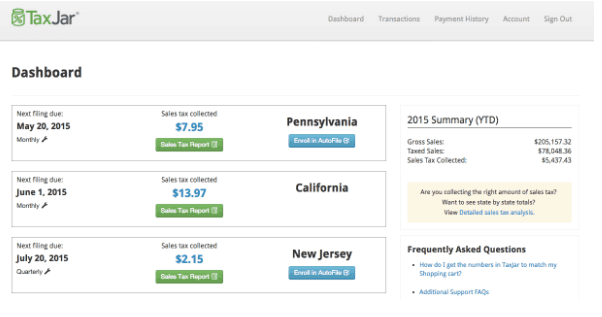
TaxJar makes it easy to collect the right amount of sales tax in different jurisdictions. TaxJar is a sales tax automation platform that handles real-time checkout calculations, multi-state return filing, nexus monitoring, and marketplace facilitator reconciliation across major ecommerce platforms.
Who Is TaxJar Best For?
TaxJar is a strong fit for SaaS companies and digital product sellers that need accurate, up-to-date tax codes across U.S. states where software taxability rules vary widely.
Why I Picked TaxJar
I picked TaxJar as one of the best because it's one of the few sales tax tools that treats SaaS and digital goods as a genuine use case rather than an afterthought. It maintains dedicated product tax codes for digital products and employs researchers who actively track state-by-state SaaS taxability changes, which matters when a single software subscription can be taxable in Texas but exempt in California. I also like its API accuracy guarantee: if a miscalculated result triggers an audit, TaxJar covers the uncollected tax, penalties, and interest.
TaxJar Key Features
- AutoFile return filing: Automatically prepares and files sales tax returns across 45 U.S. states, with a filing guarantee that covers penalties and interest if TaxJar misses a deadline.
- Rooftop-level tax calculation: Calculates tax at checkout down to the street address level, covering state, county, city, and special district rates across 11,000+ U.S. jurisdictions.
- Economic Nexus Insights dashboard: Tracks your sales against state economic nexus thresholds and alerts you as you approach them.
- Marketplace facilitator reconciliation: Identifies tax already collected and remitted by platforms like Amazon, Etsy, eBay, and Walmart so you don't remit it twice in AutoFile.
TaxJar Integrations
TaxJar offers documented integrations with Shopify, BigCommerce, WooCommerce, Magento 2, Amazon, eBay, Etsy, Walmart, QuickBooks Online, and Xero. Its REST API and CSV import support custom or unsupported storefront connections.
Pros and Cons
Pros:
- Marketplace reconciliation prevents duplicate tax remittance
- Rooftop-level calculations improve checkout accuracy
- Dedicated SaaS and digital goods tax codes
Cons:
- Exemption certificates lack validation and expiry alerts
- No international VAT or GST support
Learn more about TaxJar:

Vertex offers real-time sales tax calculation with the help of their powerful tax technology. Vertex is a leading provider of enterprise tax software solutions, including sales and use tax calculation, returns, and exemption certificate management. The software is designed to automate the sales tax calculation process, and provides real-time sales tax rates and rules for all US states and Canadian provinces.
Why I Picked Vertex: Vertex integrates with multiple enterprise resource planning (ERP) systems, enabling businesses to manage their tax compliance across multiple jurisdictions from a single platform. The software also offers audit defense support, tax research, and global tax solutions. Vertex is known for its accuracy, scalability, and comprehensive coverage of complex tax regulations, making it a preferred choice for large enterprises and multinational corporations.
Vertex Standout Features & Integrations
The standout features of Vertex make tax compliance a breeze with its integrated automated returns and filing service. This functionality allows businesses to streamline the generation and filing of sales tax returns directly from the platform. Supporting e-filing and connecting with various tax authorities, it eliminates the manual hassle, saving significant time and effort for busy ecommerce operations.
Integrations include Accumatica, Adobe Commerce, BigCommerce, ChargeBee, commercetools, Elastic Path, IBM Cognos, Intuit, Kibo Commerce, Microsoft Dynamics 365, NetSuite, and dozens more in the areas of ERP, ecommerce, procurement, and point-of-sale.
Pros and Cons
Pros:
- Comprehensive sales tax automation capabilities
- Extensive global tax content and expertise
- All-in-one enterprise accounting solution
Cons:
- Complex initial implementation
- Pricing not appropriate for small biz
Learn more about Vertex: Best for a range of integrations
- Free demo available
- Pricing upon request
Visit WebsiteCustomer Rating:4/5
Avalara’s simple and clean interface makes it easy to work with its multiple tools. Avalara is a cloud-based sales tax software designed to help businesses of all sizes automate their sales tax compliance. The software provides real-time sales tax rates and rules for all US states and territories, as well as VAT and GST for international jurisdictions.
Why I Picked Avalara: Avalara’s Avatax removes the no.1 pain point of accounting overwhelm by supplying sales tax calculations and rules based on geolocation and product classification. It offers more than 700 integrations. Use it to manage your data across various apps connected with your ecommerce platform. Apart from that, it removes tax from exempt sales and skillfully manages and organizes exempt documentation.
Avalara Standout Features & Integrations
The standout features of Avalara shine in its Cross-Border functionality, which simplifies the complexities of international sales tax and cross-border ecommerce. This feature is a big deal for businesses involved in global trade, providing access to a comprehensive database of international tax rules, rates, and regulations across more than 200 countries. Whether you're navigating VAT, GST, or other global tax requirements, AvaTax Cross-Border ensures compliance with ease.
Integrations include WooCommerce, Shopify, Quickbooks, Stripe, Magento, NetSuite, Sage, Infor, Amazon, BigCommerce, eBay, SAP, Amazon, and other systems and tools.
Pros and Cons
Pros:
- Seamless integration with numerous systems
- Scalable solutions for businesses of all sizes
- Automates the sales tax calculation process
Cons:
- Customer support sometimes slow to respond
- Costs based on the volume of transactions
Learn more about Avalara: Best for SST-certified filing in member states
- 30-day free trial
- From $19/month
Visit WebsiteCustomer Rating:3.6/5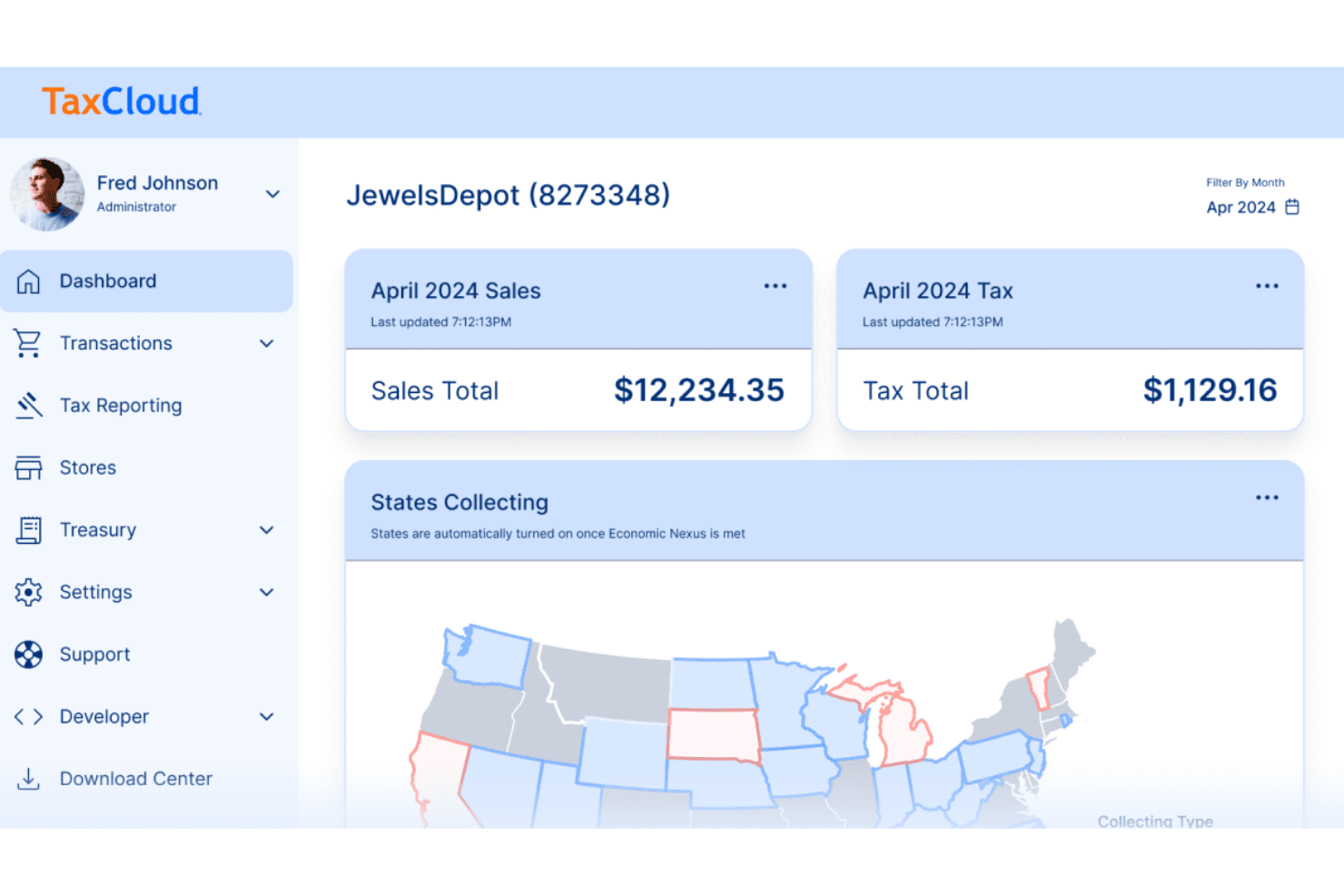
The TaxCloud dashboard offers a host of features that can take care of all your tax compliance needs. TaxCloud is a US and Canada sales tax compliance platform that handles real-time tax calculation across 13,000+ jurisdictions, economic nexus tracking, return filing, remittance, and exemption certificate management for ecommerce businesses.
Who Is TaxCloud Best For?
TaxCloud is a strong fit for US-based ecommerce businesses that sell across multiple states and want to reduce filing costs through SST-certified compliance.
Why I Picked TaxCloud
TaxCloud earns its spot on my shortlist because of its SST Certified Service Provider status across all 24 member states, which means registration, filing, remittance, and audit support are completely free in those states. I love that this isn't just a discount—it's a structural cost advantage that compounds as you sell into more SST states. One customer I've seen cited cut their paid filing count by 60% through SST alone, which is the kind of saving that's hard to replicate with other tools.
TaxCloud Key Features
- Economic nexus tracking: Monitors all 50 states daily and sends alerts as your sales approach or cross thresholds, included on both Starter and Premium plans.
- Canada sales tax calculation: Calculates GST, HST, PST, RST, and QST in real time and files with the Canada Revenue Agency and provincial agencies.
- Marketplace facilitator handling: Imports marketplace sales to count toward nexus while excluding them from filing, with support for 30+ marketplaces through the Shopify integration.
- Audit support: Provides audit-ready reports and a Government Affairs team, with paid audit defense starting at $99/month and free audit support in all 24 SST member states.
TaxCloud Integrations
TaxCloud offers documented integrations with Shopify, BigCommerce, WooCommerce, Magento Open Source, Adobe Commerce, Stripe, QuickBooks Online, Chargebee, Miva, and Odoo. It also supports 30+ marketplace integrations through Shopify and REST API connectivity for custom integrations.
Pros and Cons
Pros:
- Responsive onboarding support for complex filings
- Monitors nexus thresholds across all 50 states
- Free SST filing across 24 member states
Cons:
- International coverage stops beyond Canada
- Exemption certificates lack validation and expiry tracking
Learn more about TaxCloud: Best for enterprise-level tax customizability
- Free demo available
- Pricing upon request
Thomas Reuters ONESOURCE helps organize and manage your sales and use tax in a streamlined way. Thomson Reuters ONESOURCE is a tax compliance software that provides a range of tax solutions, including income tax, indirect tax, property tax, transfer pricing, and tax information reporting. ONESOURCE also offers a tax research database that provides users with up-to-date tax laws, regulations, and court cases from around the world.
Why I Picked ONESOURCE: Though it may sound like an old school news bureau, Thomas Reuters packs a massive punch in the world of ecommerce tax software. It uses the latest rules and rates to ascertain sales tax, use tax, VAT, and GST. It makes managing sales and use tax a breeze, with GST and VAT compliance done in a streamlined way through one system. The team also provides step by step sales tax guidance and answers, all in a single place.
ONESOURCE Standout Features & Integrations
The standout features of ONESOURCE are its flexibility and precision. This platform is highly customizable, making it a perfect fit for businesses of all sizes—whether you’re a scrappy startup or a sprawling multinational. By tailoring its tools to your unique tax compliance needs, ONESOURCE helps reduce the risk of tax errors, keeps you ahead of ever-changing tax laws, and boosts overall compliance efficiency. It’s like having a tax expert on call, 24/7.
Integrations include Acumatica, BigCommerce, Braintree, Cavallo, Coupa, Epicor P21, and EFI solutions.
Pros and Cons
Pros:
- Advanced reporting and analytics tools
- Integrates with various financial and ERP systems
- Comprehensive tax technology platform
Cons:
- Not for smaller businesses
- Can be complex to implement and use
Learn more about ONESOURCE:
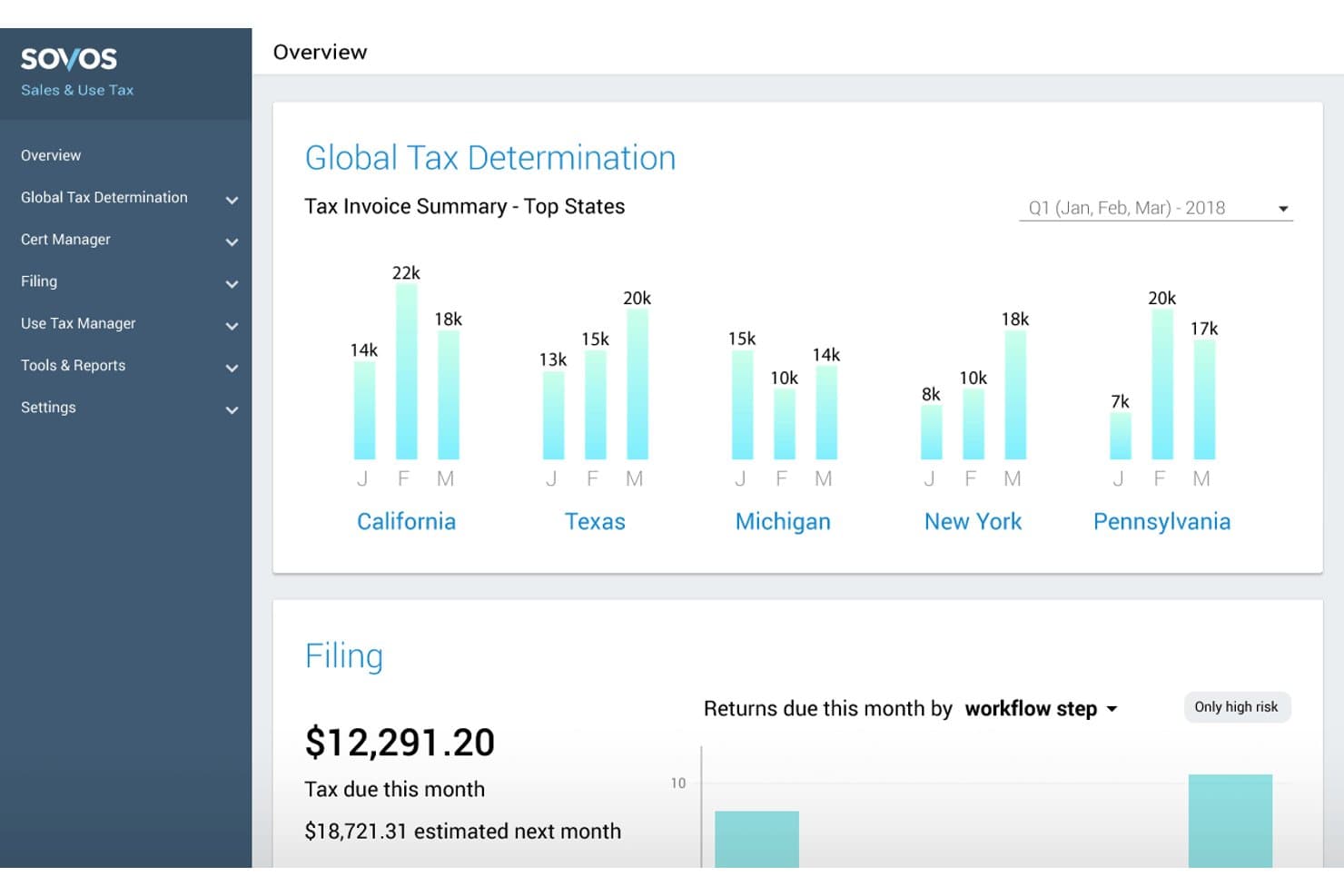
Sovos tracks tax invoices across top states with quarterly charts. Sovos is an enterprise-grade sales tax software platform that covers real-time tax calculation, multi-jurisdiction return filing, exemption certificate management, and VAT/GST compliance across the US and global markets.
Who Is Sovos Best For?
Sovos is a strong fit for enterprise finance and tax compliance teams managing complex, multi-jurisdiction obligations across ERP systems like SAP, Oracle, or NetSuite.
Why I Picked Sovos
I've included Sovos in my top picks because its CertManager module handles exemption certificate automation better than anything else I've seen at scale. It manages the full certificate lifecycle: automated collection, real-time validation, and expiration tracking, plus a self-service portal where B2B customers submit their own certificates. I also like that every stored certificate is audit-ready by design, so when a notice arrives, you're not scrambling through email threads to prove exemption status.
Sovos Key Features
- Real-time tax calculation: A calculation engine that handles product taxability, shipping, caps, and tax holidays across 12,000+ US jurisdictions and ~200 global jurisdictions.
- Multi-tier return filing: Choose between self-service filing software, fully outsourced managed filing with a dedicated tax preparer, or SST Model 1 for eligible remote sellers.
- AI product tax code mapping: The Sovi AI Mapping Agent suggests product tax codes in bulk, ranked by confidence score, with high-confidence items processed automatically.
- EU VAT compliance tools: A managed service covering OSS and IOSS registration, return filing, and a reporting dashboard for cross-border ecommerce into the EU.
Sovos Integrations
Sovos offers integrations with SAP, Oracle, NetSuite, Microsoft Dynamics, Adobe Commerce (Magento), SAP Commerce Cloud, Salesforce Commerce Cloud, and BigCommerce. REST APIs and a developer toolkit support custom connections.
Pros and Cons
Pros:
- Offers outsourced filing with audit support
- Automates exemption certificate collection and renewals
- Handles 12,000-plus US tax jurisdictions
Cons:
- Enterprise implementation requires dedicated tax staff
- Nexus monitoring lacks threshold alerts
Learn more about Sovos: Best for high-volume ERP tax calculation
- Not available
- Pricing upon request
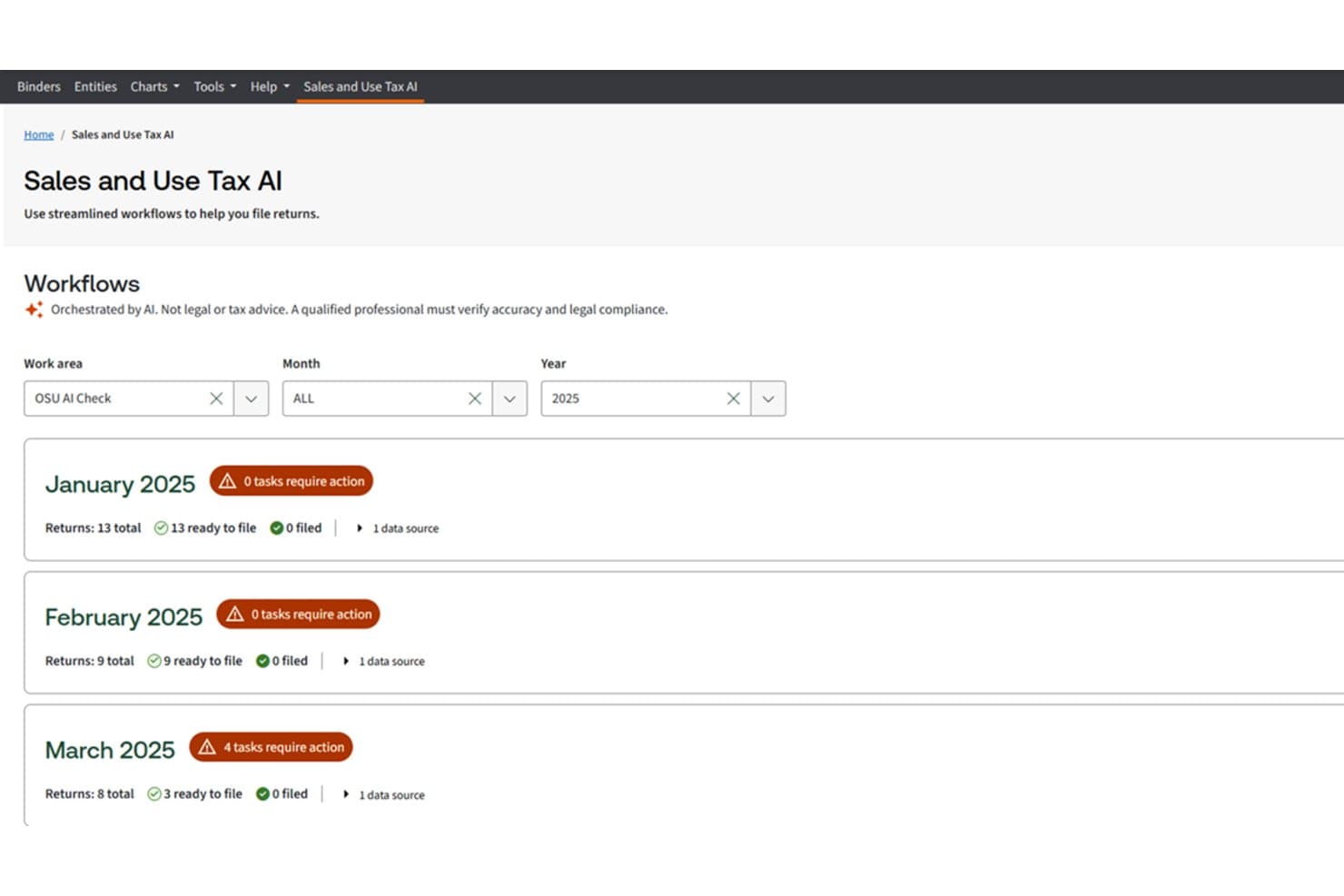
Thomson Reuters ONESOURCE tracks sales tax return statuses by month. Thomson Reuters ONESOURCE is an enterprise tax engine that handles real-time indirect tax calculation, exemption certificate management, and return filing across thousands of global jurisdictions.
Who Is Thomson Reuters ONESOURCE Best For?
ONESOURCE is built for large enterprises with high transaction volumes that run SAP, Oracle, or Microsoft Dynamics and need a tax calculation engine that plugs directly into their ERP.
Why I Picked Thomson Reuters ONESOURCE
I picked Thomson Reuters ONESOURCE as one of the best because its Determination engine is built for the kind of transaction volume that breaks other tools. It processes up to 10 million transactions per hour at around 40 ms per call, which means tax calculation keeps pace with checkout even at peak demand. I also love how its 460,000+ product-level tax codes apply taxability rules at the line-item level, not just the order level, which matters when you're running SAP or Oracle and need accuracy that holds up in an audit.
Thomson Reuters ONESOURCE Key Features
- Exemption certificate management: Validates certificates against state rules, tracks expiration dates, sends reminders, and feeds exemptions directly into the tax calculation engine at transaction time.
- Return preparation with AI assistance: Pulls transaction data, populates 1,200+ U.S. returns, and handles exceptions, covering e-filing across 33 states and Canada.
- Global VAT and GST compliance: Manages indirect tax filings across multiple countries, including SAF-T and SII reporting through ONESOURCE Indirect Compliance.
- Audit-ready reporting: Generates transaction-level reports and review packages that support audit documentation across jurisdictions.
Thomson Reuters ONESOURCE Integrations
Thomson Reuters ONESOURCE offers 60+ pre-built integrations, including SAP, Oracle, Microsoft Dynamics, NetSuite, and Adobe Commerce. Its REST APIs and 200+ system connections support custom integrations.
Pros and Cons
Pros:
- Connects certificates directly to calculations
- Keeps product taxability rules current
- Handles high-volume tax calculations reliably
Cons:
- Some users report slow support responses
- Complex implementation requires extensive training
Learn more about Thomson Reuters ONESOURCE:
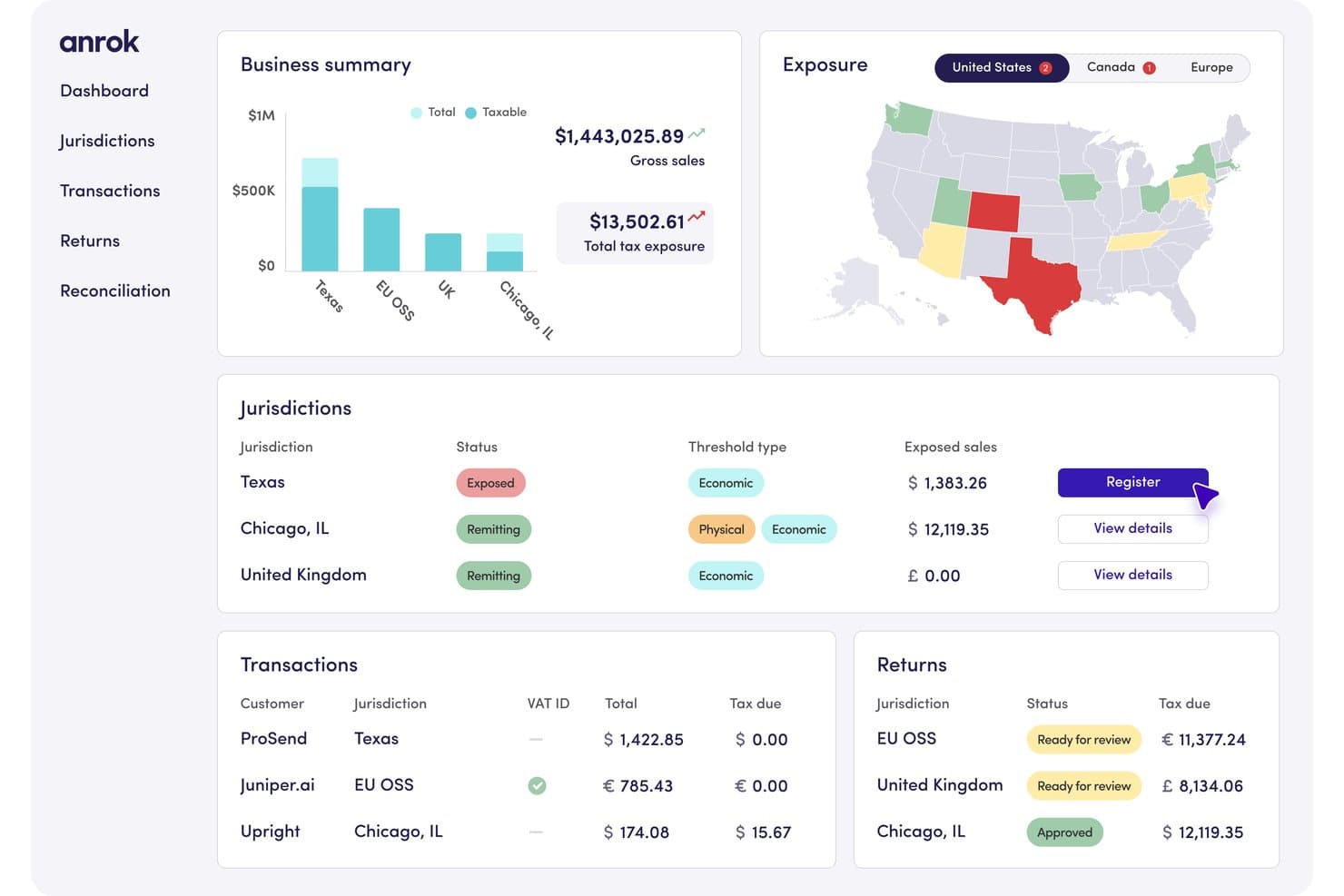
Anrok tracks sales tax exposure and jurisdictions across regions. Anrok is a sales tax compliance platform that handles nexus tracking, real-time tax calculation, return filing, exemption certificate management, and multi-jurisdiction coverage across the US and internationally.
Who Is Anrok Best For?
Anrok is a strong fit for finance and tax teams at SaaS or software companies that are expanding into ecommerce and need a single platform to manage their full tax compliance lifecycle.
Why I Picked Anrok
I've included Anrok in my top picks because it covers the full tax compliance lifecycle in a single platform, which is exactly what a SaaS company scaling into ecommerce needs when its tax obligations suddenly span physical goods, digital products, and multiple jurisdictions at once. I particularly like its physical nexus tracking through HR integrations like Rippling and Workday, which automatically flags when a remote hire creates a new tax obligation. Its reconciliation tool also traces every transaction from checkout to filed return, which makes audit prep far less painful than manually piecing records together.
Anrok Key Features
- Exemption certificate management: Anrok validates certificates by jurisdiction, tracks expiry dates, and automatically reprocesses past transactions to refund tax once a certificate is approved.
- Anrok Atlas AI assistant: An AI tool that answers questions about your tax data, flags unprocessed transactions and mismatches, and surfaces them by priority.
- Multi-jurisdiction filing and remittance: Anrok prepares, files, and pays US returns on monthly, quarterly, or annual schedules, using local partners for international filings.
- HR system integrations for physical nexus: Connections to HR platforms like Rippling, Workday, and Gusto automatically detect when remote hires create new tax obligations.
Anrok Integrations
Anrok claims 40+ native integrations, including Shopify, WooCommerce, QuickBooks, Xero, NetSuite, and Sage Intacct. It supports Amazon, Etsy, and Walmart through marketplace reconciliation, plus a public API for custom connections.
Pros and Cons
Pros:
- Automates exemption certificate validation and refunds
- Reconciles transactions through filed returns
- Tracks economic and physical nexus proactively
Cons:
- Marketplace reconciliation remains limited for sellers
- Checkout tax calculation isn’t native
Learn more about Anrok:
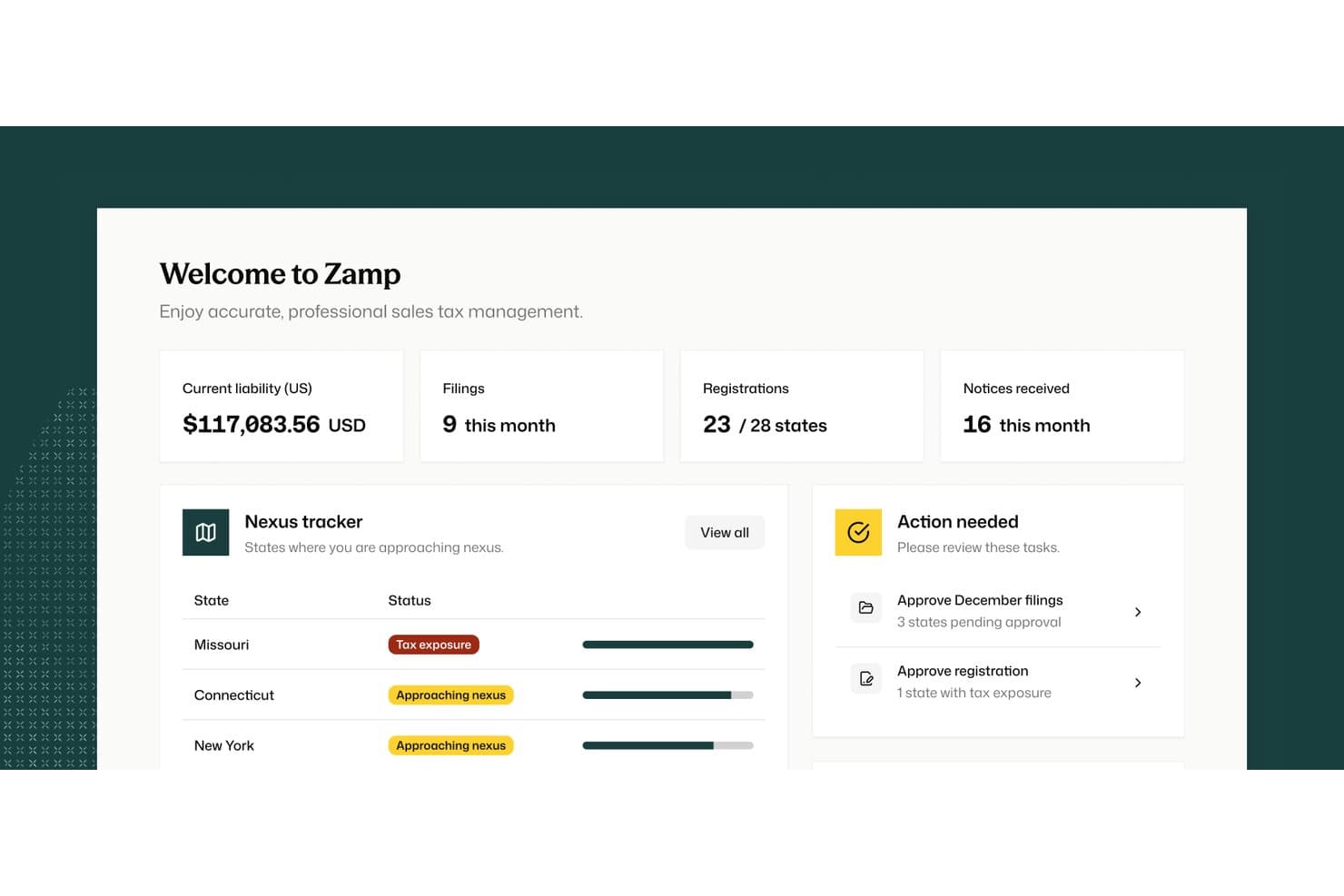
Zamp centralizes sales tax liability, filings, and nexus tracking in one dashboard. Zamp is a sales tax compliance platform that combines automated real-time calculation, nexus tracking, return filing, and a fully managed service model where Zamp's tax experts handle registrations, filings, and notices on your behalf.
Who Is Zamp Best For?
Zamp is a strong fit for ecommerce finance and accounting teams that want a tax expert—not just software—handling filings, registrations, and notices on their behalf.
Why I Picked Zamp
I've included Zamp in my top picks because it's the only option on this list that treats tax compliance as a service, not just software. When a nexus threshold is crossed, Zamp's team handles the state registration, sets up the account, and starts filing automatically. I also rate its written error-coverage guarantee highly: if an API miscalculation triggers an audit, Zamp covers the uncollected tax, penalties, and interest up to your prior 12 months of fees paid.
Zamp Key Features
- Rooftop-level tax calculation: Zamp calculates rates from the buyer's exact building address using geospatial data, not ZIP codes.
- Multichannel nexus tracking: Monitors thresholds across website, Amazon, wholesale, and social channels, with alerts at 80% of each state's limit.
- Notice management: Zamp checks state portals daily, sorts notices with AI, and drafts responses backed by transaction-level audit trails.
- Exemption certificate management: Validates form completeness across 38 certificate types and sends expiration alerts at 60, 30, and 7 days out.
Zamp Integrations
Zamp lists 37 integrations, including Shopify, BigCommerce, WooCommerce, Amazon, eBay, Etsy, Walmart, QuickBooks Online, Xero, and NetSuite. It also offers an API for custom or headless ecommerce setups.
Pros and Cons
Pros:
- Tracks nexus across multiple sales channels
- Written coverage for calculation errors
- Fully managed registrations, filings, and notices
Cons:
- International coverage beyond Canada remains unclear
- Filing approvals cannot be automated
Learn more about Zamp:
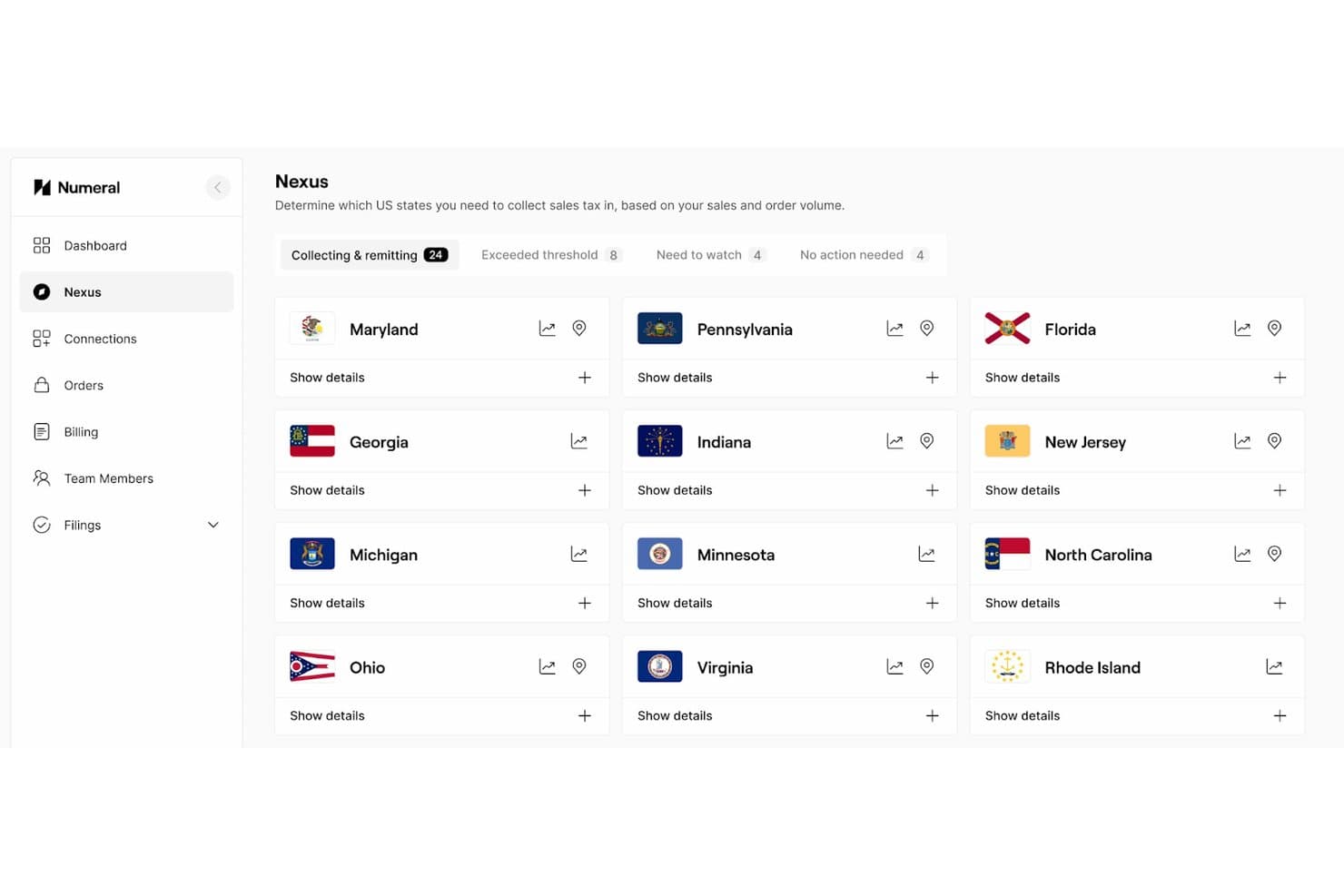
Numeral tracks sales tax nexus obligations across 24 US states. Numeral is an AI-assisted sales tax compliance platform that handles nexus monitoring, automated registrations, tax calculation, filing and remittance, and exemption certificate management across U.S. jurisdictions and 90+ countries.
Who Is Numeral Best For?
Numeral is a strong fit for multichannel ecommerce brands selling across DTC, Amazon, eBay, and Walmart who need a single nexus view without stitching together multiple tools.
Why I Picked Numeral
I picked Numeral as one of the best because its nexus monitoring pulls DTC, Amazon, eBay, and Walmart sales into a single dashboard, so you're never manually reconciling marketplace revenue against state thresholds. I love how it flags marketplace-facilitated sales separately, letting you report them as exempt or informational without touching your core liability numbers. The free Monitoring plan includes a full nexus study, which means you can see your actual exposure before spending a dollar.
Numeral Key Features
- AI product classification: Automatically assigns tax categories to SKUs using AI, included on the Professional plan.
- Autoregister: Files for state permits automatically when you cross a nexus threshold, with optional dashboard review before submission.
- Exemption certificate management: Validates 500+ U.S. certificate types using AI, with automated renewal campaigns and real-time application through connected POS or ERP systems.
- Virtual tax mailbox: Scans incoming state tax mail and monitors state portals daily to catch notices, filing frequency changes, and compliance deadlines.
Numeral Integrations
Numeral offers 40+ integrations, including Shopify, BigCommerce, WooCommerce, Adobe Commerce, Amazon, eBay, Walmart, QuickBooks, NetSuite, and Xero. It also provides a REST API with Java, Python, and Ruby SDKs for custom integrations.
Pros and Cons
Pros:
- Concierge support handles filing backlogs
- Marketplace sales separated from liabilities
- Unified nexus view across sales channels
Cons:
- Complex cases can require extra follow-up
- International coverage trails larger providers
Learn more about Numeral:
Other Ecommerce Sales Tax Software Options
Here are a few more that didn’t make the top list.
- 11KintsugiBest for AI-guided SKU tax classification
- 12CommendaBest for US and global tax in one managed platform
- 13ShopifyBest for Shopify-native tax calculation & nexus alerts
- 14FastSpringBest tax software for subscription services
- 15LovatBest for international sellers
- 16QuadernoBest for a global customer base
- 17TaxValetBest for penalty-free managed filing and audit cover
- 18GalvixBest for ecommerce sellers outgrowing DIY filing
- 19Stripe TaxBest for Stripe-native checkout tax automation
How I Evaluate ecommerce Sales Tax Software
I split my evaluation into three parts, with core functionality carrying the most weight: calculate checkout tax and track nexus thresholds. Next, I look for AI SKU classification, such as bulk catalog coding. Finally, I consider onboarding, support, integrations, and pricing value.
Core Functionality (Table Stakes For This List)
When I'm selecting tools for my list, I score each one on a scale from 0 (does not offer the functionality) to 5 (excels in this area) for each core functionality listed below. I then convert the total into a percentage to help assess each tool's overall fit, with extra weight on any functionalities I’ve deemed essential.
- Tax Calculation (Essential): I check checkout accuracy by product type, buyer location, shipping charges, and jurisdiction-specific rules.
- Nexus Monitoring (Essential): I look for transaction tracking, threshold alerts, and registration guidance across the regions where a seller operates.
- Jurisdiction Coverage: I assess current rates and taxability rules across local, national, and international jurisdictions relevant to ecommerce.
- Return Filing: I evaluate return preparation, filing, remittance, deadline tracking, and support for recurring obligations across jurisdictions.
- Platform Integrations: I check connections with ecommerce platforms, marketplaces, carts, and accounting systems to support reliable transaction data flow.
- Exemption Certificates: I look for certificate collection, validation, expiration tracking, and audit-ready storage for tax-exempt customers.
Once I have a list of tools that meet the criteria, I consider what sets each platform apart.
Differentiating Factors (What Sets Vendors Apart)
Here's how I compare and contrast different vendors:
Standout Features
I look for AI SKU classification that can bulk-assign taxability codes across a large catalog—essential when you're listing thousands of products with different tax treatments. Marketplace facilitator reconciliation matters just as much, since platforms like Amazon already collect tax on your behalf, and double-remitting cuts into margins fast. I also evaluate audit defense support, checking whether a vendor provides documentation packages and dedicated assistance if a jurisdiction challenges your filings.
Beyond Features
I evaluate how well each platform scales as your nexus footprint grows—jumping from a few regions to dozens shouldn't force a painful migration. Onboarding support matters just as much, especially when you're connecting multiple storefronts and an ERP like NetSuite or QuickBooks for the first time. I also check whether a vendor backs its calculations with liability coverage, since a single filing error during a peak holiday season can trigger penalties that dwarf the software's cost.
What is Ecommerce Sales Tax Software?
Ecommerce sales tax software is like your tax-savvy co-pilot, taking the wheel on calculating, collecting, and remitting sales tax for online sales.
It automatically syncs with your ecommerce platform, tracking down the right tax rates based on where your customers are and what they’re buying—no manual math required.
Why does it matter?
Because sales tax compliance is a moving target. Rates and rules change constantly across states, counties, and even cities. Good sales tax software keeps up with these regulatory changes, making sure you stay on the right side of the law while cutting down on costly errors.
The bottom line: This software takes a hefty admin load off your plate and saves you from tax-time headaches.
How to Choose the Best Ecommerce Sales Tax Software
Choosing sales tax software isn’t a one-size-fits-all deal. Here’s how to pick a solution that fits your business like a glove:
- Check for seamless integrations. Make sure the software plays nice with your ecommerce platform—whether it's Shopify, WooCommerce, BigCommerce, or something else. You want a tool that plugs right in and starts working without a long setup.
- Prioritize automated updates. Tax laws are like fashion trends—always changing. Your software should stay current with the latest tax rules automatically so you’re never caught off guard by new rates or regulations.
- Look for accuracy you can trust. Sales tax is serious business. Choose a tool with a rock-solid reputation for precision. That way, you’re not sweating over calculations or dealing with error-prone estimates that could come back to bite.
- Think about scalability. If you’re planning to grow, pick software that grows with you. Look for flexible pricing and features that expand as you do, so you’re not constantly upgrading or switching as your sales volume rises.
- Look for customization where it counts. Some tools let you tailor tax rules by product type, region, or channel. Others offer industry-specific workflows or let you build approval processes around your operations. This flexibility can be a game-changer for niche businesses or complex catalogs.
- Evaluate support and training resources. Even the best tools come with a learning curve. Make sure your pick has reliable customer support, plus helpful training materials or webinars, so you’re not left scrambling when you need answers.
In a nutshell: Go for sales tax software that’s easy to set up, accurate, and scalable, with top-notch support to keep you on track.
Trends in Ecommerce Sales Tax Software
As ecommerce booms globally, the tax landscape is becoming more complex, requiring robust software solutions to keep pace. Here’s what to expect in 2026:
- AI-driven compliance and forecasting. Artificial intelligence (AI) is moving beyond basic automation to predictive analytics, allowing software to foresee potential tax obligations based on sales data and legislative trends. This proactive approach will help ecommerce brands stay compliant amid shifting tax laws without scrambling to adapt after the fact.
- Marketplace-focused tax obligations. Marketplace facilitator laws continue expanding, making platforms like Amazon, Etsy, and eBay increasingly responsible for sales tax collection. However, as definitions evolve, sellers will still need tools that clarify their tax responsibilities within each marketplace. Look for software that adapts quickly to new marketplace requirements.
- Digital goods and services taxation. With digital goods and services (like SaaS) representing a larger share of ecommerce, more states are enacting or expanding sales tax laws around these items. Expect software to offer enhanced features for identifying and accurately taxing digital transactions, addressing new requirements for items like downloadable content or digital advertising.
- Simplified multistate and global compliance. The trend toward sales tax harmonization and simplification continues, with some states streamlining their tax requirements. Additionally, as ecommerce goes global, VAT compliance across jurisdictions is a priority. Cloud-based tax solutions are expected to offer even better cross-border capabilities, reducing the complexity of meeting international and multistate obligations.
- Blockchain for transparency and security. Blockchain technology is gaining traction for its potential to ensure accurate, tamper-proof records, especially useful during audits. By creating a transparent ledger of tax transactions, blockchain can help businesses navigate complex cross-border sales and build trust with customers.
These innovations position sales tax software as a key partner in ecommerce, helping businesses navigate a complex tax environment with greater ease and accuracy.
Key Features of Sales Tax Management Software
Great sales tax software does more than just slap on a tax rate. It’s a multi-tool designed to handle every tax hurdle that comes your way.
Here are the key features to keep an eye out for:
- Automated tax calculations. Calculates the correct rate for each sale based on the customer’s location and product type, sparing you the time and risk of doing it yourself.
- Real-time tax rate updates. Keeps up with the latest state and local tax changes automatically, so you’re always up to date without lifting a finger.
- One-click filing and remittance. Files returns and submits payments to tax authorities without you having to fuss over filing deadlines and paperwork.
- Crystal-clear reporting. Generates easy-to-read reports on tax collected, filed, and owed—so audits and year-end reviews aren’t just doable, they’re (almost) a breeze.
- Exemption certificate management. Automatically stores and validates exemption certificates, flags expired ones, and simplifies exempt sale reporting—making audit prep way less painful.
- Nexus tracking and alerts. Tracks where you have tax obligations and sends you a heads-up when new thresholds are reached, keeping your compliance radar sharp.
- Exemption management. Keeps track of tax-exempt transactions and exemption certificates, handling B2B sales and other exceptions with ease.
- Multichannel support. Manages tax collection across all your sales channels—from Shopify and WooCommerce to Amazon—without juggling multiple tools.
- Built-in international compliance. Simplifies VAT, GST, and other global tax requirements, letting you take on new markets without breaking a sweat.
- Custom configurations and workflows. Many tools let you tweak tax rules by region, product type, or sales channel. Some even use customer feedback to roll out industry-specific features that actually fit how you operate.
These features transform sales tax software from a “nice-to-have” to a “can’t-live-without” tool. In short, it’s your all-in-one solution for making tax compliance as smooth as it gets.
Benefits of Sales Tax Software for Online Retailers
Sales tax isn’t fun, but the right software makes it as close to painless as possible. Here’s how sales tax software can be your business’s tax-compliance superhero:
- Cuts down on time-sucking tasks. It’s like having an extra team member dedicated to taxes. From calculating rates to filing returns, the software automates the whole process so you can get back to the parts of your business that you actually enjoy.
- Keeps you on the straight and narrow. Manually calculating taxes across multiple states (or even countries) leaves way too much room for error. Sales tax software reduces the risk of mistakes that could trigger those dreaded penalties or, worse, audits.
- Tames the multistate madness. Each state seems to have its own idea of tax laws—fun! Sales tax software keeps track of each jurisdiction’s quirks and updates, so you don’t have to.
- Grows with you. Expanding to new states or online marketplaces? No problem. Sales tax software scales effortlessly, keeping up with your growth without missing a beat.
- Turns audits into a non-event. It’s hard to stress about an audit when you have software that keeps tidy, error-free records ready to go. Auditors can ask all they want; you’re prepared.
- Builds trust with your customers. No more surprises at checkout! Sales tax software ensures customers see the right tax amount from the start, giving them confidence that your store is on top of things.
- Opens doors to international markets. VAT, GST—whatever the tax type, software simplifies it so you can sell worldwide without getting bogged down in international tax headaches.
In a nutshell, sales tax software is like having a tax-savvy assistant who’s always on the ball, leaving you free to focus on building your business (and never worrying about tax compliance again).
Cost & Pricing of Sales Tax Software
Sales tax software pricing can vary, depending on the software’s depth and complexity. Here’s a rundown of what you can expect from each tier:
| Plan type | Average price | Common features | Best for |
|---|---|---|---|
| Plan typeFree | Average priceFree (limited use) | Common featuresBasic tax calculation, single-state filing, limited support | Best forSmall or low-volume businesses looking to dip their toes in the software world |
| Plan typeBasic | Average price$20 - $100/month | Common featuresCore calculations, real-time tax rate updates, limited reporting | Best forStartups, single-state sellers, and small businesses with straightforward tax needs |
| Plan typeProfessional | Average price$100 - $300/month | Common featuresMulti-state filing, automatic filing, enhanced reporting, integration with accounting systems | Best forGrowing businesses expanding into multiple states |
| Plan typeEnterprise | Average price$300+/month | Common featuresCustomizable options, full API access, advanced nexus tracking, dedicated support, international compliance | Best forLarge businesses with complex tax obligations or global sales reach |
Key considerations
- Free plans are a great way to test the waters with basic calculation and single-state coverage. These are ideal for very small businesses or those with low-volume sales that just need a basic tool to start.
- Basic plans are affordable for small businesses that need reliable core features like real-time calculations and basic compliance updates. Perfect for single-state operations or those with simple setups.
- Professional plans add more automation to the mix, like multi-state filing, integration with your existing systems, and extra reporting, making it a sweet spot for growing businesses.
- Enterprise plans cater to businesses that live in the deep end of tax complexity, with custom features, international compliance, and dedicated support teams to handle high volumes and unique tax requirements.
Additional costs to consider
- Implementation and integration fees. Getting the software smoothly embedded into your existing systems might come with setup fees.
- Premium support. While some level of support is usually included, dedicated account managers or priority response options can cost extra.
- Customization and training. Custom setups and team training sessions may also add to the final price tag, especially for larger teams or specific requirements.
Balancing features with your current and future needs will help you find a solution that grows with your business—without overburdening your budget upfront.
Ecommerce Sales Tax Software FAQs
I wanted to leave some space to discuss some of the most frequently asked questions related to ecommerce sales tax software.
How does ecommerce sales tax work, and when do I need to collect it?
Ecommerce sales tax is based on where your business has a “nexus” or significant connection—like an office, warehouse, or even just hitting a state’s sales threshold.
When you have a nexus in a state, you’re generally required to charge sales tax there. Thanks to recent laws, more states can require sales tax collection even without a physical presence, so it’s smart to stay updated!
What is sales tax nexus, and how do I know if I have it in a state?
Nexus is a fancy term for having enough presence in a state to owe sales tax there. You’ll have nexus if you’ve got a physical presence (like an office), employees, inventory, or if your sales exceed the state’s minimum threshold (aka economic nexus). Sales tax software can track nexus for you and let you know when you’ve reached it.
How do I manage sales tax for out-of-state and international orders?
For out-of-state orders, most states use the destination-based tax, so you charge tax based on the buyer’s location. For international sales, you may need to handle VAT or other taxes based on the country. Some sales tax software includes features for VAT compliance, so look for that if you’re selling internationally.
What happens if I miss collecting sales tax in a state where it’s required?
Missing sales tax collection can lead to some headaches—think penalties, interest, and even audits from state authorities. Using software helps you avoid this by automating the whole process, keeping you compliant and worry-free.
How does sales tax software integrate with my ecommerce platform, and is it easy to set up?
Most sales tax software integrates directly with platforms like Shopify, WooCommerce, or Amazon through APIs or plugins. Setup is usually straightforward: install the app, configure your settings, and the software starts handling tax calculations automatically.
What features should I prioritize in sales tax software for multi-state compliance?
For multi-state compliance, focus on automatic tax rate updates, nexus tracking, and multi-state filing support. These features keep you compliant as you expand and make sure you’re covered across different tax jurisdictions with minimal manual work.
How do I handle tax exemptions and certificates with ecommerce sales tax software?
Most sales tax tools support exemption management by letting you collect, store, and validate exemption certificates digitally. Some even flag expired or invalid certificates and help prepare documentation for audits. This ensures your B2B or nonprofit transactions stay compliant without manual tracking.
Other Types of Ecommerce Software
If you are looking for ecommerce sales tax software, I assume you are building out your online payment processing toolkit. Here are some additional resources you should check out: