

Esta es la verdad: el mejor sistema TPV para tu pequeña empresa es el que no se interpone en tu camino y te permite vender de forma rápida, fiable y sin agotar tu cuenta bancaria.
Después de más de una década trabajando en operaciones minoristas —reparando terminales TPV en plena hora punta del almuerzo, formando a nuevos empleados sobre la marcha y, sí, negociando con propietarios— he visto qué funciona y qué no es más que un envoltorio llamativo.
Esta lista no trata sobre exageraciones, sino sobre las soluciones TPV que realmente marcan la diferencia para las pequeñas empresas ahora mismo. Vamos a prepararte con herramientas que se ganen su coste.
Por qué confiar en nuestras recomendaciones de software
6,700+
Reviews
20
Industry experts
16+
Evaluation factors
14
Years
Nuestro equipo lleva probando y evaluando software desde 2012. Como líderes del sector retail, sabemos lo difícil —y lo importante— que es elegir el software adecuado.
Para esta guía, evaluamos las herramientas mediante pruebas prácticas e investigación independiente, puntuando las herramientas según nuestros criterios de selección.
Nuestras reseñas reflejan nuestro criterio independiente, no un discurso de ventas.
Tabla comparativa de programas TPV para pequeñas empresas
Esta tabla comparativa resume los detalles de precios de mis principales selecciones de programas TPV para pequeñas empresas:
| Tool | Best For | Trial Info | Price | ||
|---|---|---|---|---|---|
| 1 | La mejor con flujos de trabajo potenciados por IA para tiendas de suministros | Demostración gratuita disponible | Desde $499/mes (facturado anualmente) | Website | |
| 2 | Ideal para integrar la gestión de pagos con analítica | Cotización gratuita disponible | Precio a consultar | Website | |
| 3 | Ideal para el seguimiento avanzado de inventario | Prueba gratuita + demo gratis disponible | Desde $59/mes | Website | |
| 4 | Ideal para terminales de pago físicos, móviles y comercio electrónico | Prueba gratuita de 3 meses | Desde $79/mes | Website | |
| 5 | Mejor sistema de punto de venta omnicanal | Tres primeros meses a $1/mes | Desde $39/mes, más 2.7% por transacción | Website | |
| 6 | Ideal para sistemas POS de restaurantes gestionados con iPad | Demostración gratuita disponible | Precios disponibles a solicitud | Website | |
| 7 | Mejor para la escalabilidad | Precio a consultar | Website | ||
| 8 | La mejor opción para pequeñas empresas que ahorran en comisiones | Demo gratuita disponible | Desde Interchange + 0.40% + 8¢ (varía según volumen) | Website | |
| 9 | Mejor en opciones de hardware | Prueba gratuita de 30 días en el plan sin hardware | Desde $14.95/mes más 2.6% + $0.10 por transacción) | Website | |
| 10 | Ideal para procesamiento directo y de bajo costo | Cotización gratuita disponible | Precios bajo solicitud | Website |


Los 10 mejores programas TPV para pequeñas empresas, analizados
A continuación encontrarás resúmenes de los mejores sistemas TPV para pequeñas empresas. Cada resumen contiene una síntesis de las funciones más destacadas, las integraciones, los detalles de precios disponibles y algunos pros y contras importantes.
 La mejor con flujos de trabajo potenciados por IA para tiendas de suministros
- Demostración gratuita disponible
- Desde $499/mes (facturado anualmente)
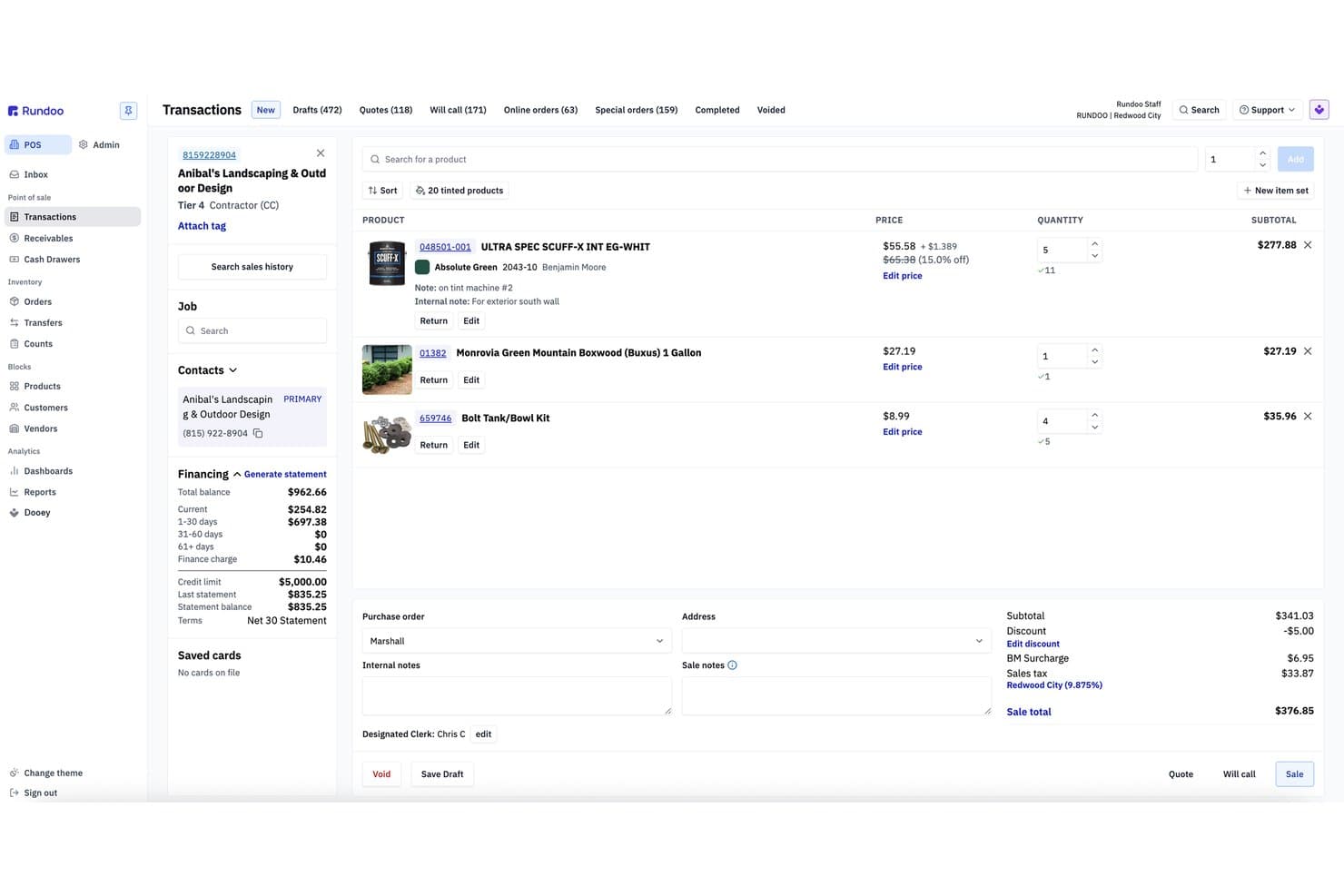
Rundoo ofrece una pantalla detallada de transacciones POS con listado de productos, información de financiamiento al cliente, precios y totales de venta para uso en pequeñas empresas. Rundoo es una plataforma de punto de venta (POS) y ERP creada para tiendas de suministros independientes—ferretería, pintura, campo y forraje, jardinería y madera—combinando punto de venta, inventario en tiempo real, compras, cuentas de clientes y un asistente de IA en un solo sistema.
¿Para Quién Es Mejor Rundoo?
Rundoo es ideal para propietarios de tiendas de suministros independientes en los sectores de ferretería, pintura, campo y forraje, jardinería y madera.
Por Qué Elegí Rundoo
Rundoo se gana su lugar en mi lista corta gracias a Dooey, su asistente de IA integrado que hace cosas que no he visto en otras herramientas de POS para pequeñas empresas. Puedo pedirle que genere una orden de compra basada en tendencias recientes de ventas y niveles actuales de inventario, o que extraiga un informe sobre qué productos perdieron margen el mes pasado. También realiza comparaciones de precios en vivo con competidores cercanos, lo cual es realmente útil para un propietario de tienda de pintura o ferretería que quiere mantenerse competitivo en precios.
Características Clave de Rundoo
- Catálogos de distribuidores integrados: Acceso en tiempo real a datos de productos de proveedores y pedidos automáticos de los principales vendedores de ferretería y pintura.
- Cuentas a crédito para contratistas: Gestiona crédito a contratistas, facturación, precios por cliente y envíos de extractos directamente desde el POS.
- Sincronización de inventario en tiempo real: Controla el stock a través de diferentes ubicaciones con actualizaciones instantáneas al registrar ventas y recibos.
- Módulo de comercio electrónico nativo: Vende en línea con una tienda web integrada y totalmente conectada al inventario y precios en tienda.
Integraciones de Rundoo
Rundoo ofrece integraciones nativas con QuickBooks, Orgill, Emery Jensen, House-Hasson y Do it Best. Hay una API disponible para integraciones personalizadas.
Pros and Cons
Pros:
- Automatiza órdenes de compra e informes
- Diseñado específicamente para ferreterías y tiendas de suministros
- Acceso profundo a catálogos de distribuidores desde el POS
Cons:
- Enfoque de nicho que excluye a la mayoría de minoristas generales
- Comunidad de usuarios más pequeña que los POS convencionales
Learn more about Rundoo: 2Ideal para integrar la gestión de pagos con analítica
Stax
- Cotización gratuita disponible
- Precio a consultar
Visit WebsiteCustomer Rating:4.2/5
Stax Pay ofrece una solución de punto de venta todo en uno para procesar pagos, reportes y análisis. Stax Pay es una plataforma de procesamiento de pagos que proporciona a las empresas soluciones integradas, incluyendo aceptación de pagos, facturación automática y recargos conformes a la normativa. Su software integral de punto de venta (POS) y gestión empresarial permite procesar pagos seguros tanto en persona como en línea, además de integrar herramientas necesarias, como software de contabilidad, dentro de un único panel de control.
Por qué elegí Stax Pay: Elegí Stax Pay porque ofrece una plataforma unificada de gestión empresarial que admite el procesamiento de pagos con tarjeta de crédito tanto presencial como en línea. Este enfoque 'todo en uno' es ideal para pequeñas empresas que buscan consolidar funciones como la emisión de facturas, la programación de cobros recurrentes, el seguimiento de pagos y la gestión financiera. También me gusta que la plataforma ofrece sólidas capacidades de análisis e informes para monitorear tendencias, reembolsos e historial de transacciones.
Características destacadas e integraciones de Stax Pay
Entre las características destacadas se incluyen pagos programados y automáticos, sincronización de información de transacciones presenciales y en línea, y herramientas empresariales integradas. La plataforma también ofrece una función de recargo conforme a la normativa que permite a las empresas transferir las comisiones de procesamiento de tarjetas de crédito a los clientes.
Adicionalmente, Stax Pay ofrece una suite de capacidades de POS para diferentes escenarios de pago, incluyendo integración con plataformas SaaS, pagos ACH, pagos en línea y móviles, y transacciones en persona.
Las integraciones incluyen Slack, Zapier, Microsoft Office, Google Suite y sistemas CRM. También puedes integrar capacidades de procesamiento de pagos en software y aplicaciones móviles con completos kits de desarrollo de software móvil en Javascript y Python.
Pros and Cons
Pros:
- Rentable con posibles ahorros en comisiones por procesamiento
- Herramientas de facturación y cobros recurrentes
- Herramientas integrales y solución de punto de venta
Cons:
- Puede no ser la mejor opción para negocios de bajo volumen
- Posibles costos adicionales
Learn more about Stax: Ideal para el seguimiento avanzado de inventario
- Prueba gratuita + demo gratis disponible
- Desde $59/mes
Visit WebsiteCustomer Rating:4.8/5
KORONA POS es una solución integral para diversas industrias, incluidas tiendas minoristas, restaurantes de servicio rápido y servicios de boletos. KORONA POS es un sistema de punto de venta basado en la nube diseñado para atender una amplia gama de tipos de negocios, incluidas tiendas minoristas, bodegas, espacios para eventos y más. Conocido por su versatilidad y conjunto robusto de características, KORONA POS ofrece una interfaz intuitiva que simplifica el proceso de ventas tanto para empleados como para gerentes.
Por qué elegí KORONA POS: Una de las razones clave por las que KORONA POS destaca para pequeñas empresas es su escalabilidad y facilidad de uso. El sistema está diseñado para crecer junto con tu negocio, ofreciendo integración fluida con diversas herramientas de hardware y software. Además, KORONA POS ofrece sólidas funciones de gestión de inventario que ayudan a los propietarios de pequeñas empresas a mantener el control de los niveles de existencias en tiempo real, reduciendo el riesgo de exceso o falta de stock. Las herramientas de gestión de relaciones con clientes (CRM) del sistema también permiten a las empresas mantener relaciones sólidas con sus clientes.
Características destacadas e integraciones de KORONA POS
Las características destacadas incluyen herramientas de informes detallados y personalizables, lo que permite a las empresas generar informes integrales sobre ventas, inventario y comportamiento del cliente. Además, su procesamiento de pagos integrado admite una variedad de métodos de pago, incluidas tarjetas de crédito, pagos móviles y transacciones sin contacto.
Las integraciones incluyen QuickBooks, WooCommerce, Shopify, Magento, BigCommerce, Mailchimp y varios procesadores de pagos como PayPal, Stripe, Worldpay, Authorize.Net y CardConnect.
Pros and Cons
Pros:
- Admite múltiples ubicaciones comerciales
- El sistema es altamente personalizable
- Ofrece sólidas herramientas de gestión de inventario
Cons:
- Cada terminal tiene un costo adicional
- No cuenta con soporte de instalación en el lugar
Learn more about KORONA POS: Ideal para terminales de pago físicos, móviles y comercio electrónico
- Prueba gratuita de 3 meses
- Desde $79/mes
Visit WebsiteCustomer Rating:4.7/5
Los precios basados en membresía permiten una solución rentable para negocios de alto volumen en diversas industrias. Payment Depot es un proveedor de soluciones para comerciantes que ofrece un sistema de punto de venta (POS) para comercio electrónico, dispositivos móviles y terminales de pago físicos. Al centrarse en una estructura transparente de precios basada en el intercambio, ayuda a las empresas a reducir el gasto en tarifas de servicio para comerciantes, convirtiéndose en una solución rentable para pequeñas y medianas empresas.
Por qué elegí Payment Depot: Seleccioné Payment Depot por su flexibilidad, lo que lo convierte en una buena opción para empresas de diferentes tamaños e industrias. Es adecuado para pequeñas empresas en el sector minorista, servicios, restaurantes y bares, atención médica y más. Está disponible una pasarela de pago gratuita, así como capacidades de terminal virtual proporcionadas a través de alianzas como SwipeSimple. Estas permiten a los comerciantes procesar pagos en línea, por móvil y por teléfono sin incurrir en tarifas adicionales de pasarela.
Características y integraciones destacadas de Payment Depot
Características destacadas incluyen el modelo de precios basado en membresía para el procesamiento de tarjetas de crédito, que ofrece una estructura personalizada de precios por intercambio+. La empresa también es reconocida por su compromiso con el servicio al cliente y ha recibido comentarios positivos de clientes que han experimentado ahorros en costos.
Integraciones incluyen Shopify, WooCommerce, BigCommerce, PrestaShop y OpenCart. También se integra con sistemas de pago como authorize.net y sistemas de gestión empresarial como Revel Systems.
Pros and Cons
Pros:
- Amplia oferta de equipos
- La interfaz de usuario es sencilla e intuitiva
- Rentable para empresas con altos volúmenes de transacciones
Cons:
- No es ideal para empresas con bajo volumen
- Limitado a comerciantes estadounidenses que no sean de alto riesgo
Learn more about Payment Depot: Mejor sistema de punto de venta omnicanal
- Tres primeros meses a $1/mes
- Desde $39/mes, más 2.7% por transacción
Visit WebsiteCustomer Rating:4.4/5
Shopify POS ofrece una experiencia unificada y coherente (tanto para los clientes como para los empleados) en todas las plataformas y canales de venta. Shopify POS es un software que ayuda a optimizar las operaciones comerciales al unificar los canales de venta. Al centrarse en soluciones omnicanal, Shopify ayuda a ofrecer una experiencia de cliente más coherente.
Por qué elegí Shopify POS: Elegí Shopify POS porque está especialmente diseñado para minoristas omnicanal. Los clientes y empleados tendrán una experiencia y flujo de trabajo predecibles, ya sea que el pedido sea en línea, en tienda o para envío a domicilio.
Funcionalidades destacadas incluyen el monitoreo de inventario en tiempo real para que las empresas con múltiples canales de venta puedan asegurar que sus cifras de inventario más actualizadas se sincronicen entre los canales, ayudando a evitar transacciones canceladas y alertas sorpresa de productos agotados.
También me gusta cómo la sincronización en tiempo real de Shopify también se aplica a los datos de los clientes. Antes era difícil analizar el comportamiento de los clientes al manejar múltiples canales de venta, pero Shopify lo simplifica al unificar los registros de datos de los clientes entre los canales y etiquetar automáticamente las transacciones a una cuenta de cliente específica según factores como la tarjeta de crédito utilizada.
Integraciones incluyen PayPal, Stripe, Authorize.Net, Square, QuickBooks, Xero, FreshBooks, Mailchimp, Klaviyo, Zendesk, Google Analytics, Metrilo, ShipStation y Easyship.
Pros and Cons
Pros:
- Gestión y seguimiento preciso de inventario (con sincronización omnicanal)
- Funciones de gestión de relaciones con clientes y seguimiento de datos
- Tarifas competitivas de procesamiento de pagos para negocios de alto volumen
Cons:
- No hay versión gratuita (la opción más barata es $39/mes + comisiones de procesamiento)
- Muchas funciones requieren dos suscripciones de pago: Shopify + POS Pro, que comienza en $89/mes
Learn more about Shopify POS: 6Ideal para sistemas POS de restaurantes gestionados con iPad
Lavu
- Demostración gratuita disponible
- Precios disponibles a solicitud
Visit WebsiteCustomer Rating:5/5
El sistema POS para iPad de Lavu centraliza las actividades del restaurante, como pedidos, personalización de menús y gestión de inventario, en un solo lugar. Lavu es un sistema de punto de venta (POS) diseñado específicamente para restaurantes, bares y otros establecimientos de alimentos y bebidas. Como una solución basada en la nube, Lavu ofrece un conjunto completo de herramientas que centralizan varios aspectos de la gestión de restaurantes, desde el procesamiento de pedidos y la gestión de inventario hasta la programación de empleados y CRM.
Por qué elegí Lavu: Me gusta especialmente el sistema POS para iPad de Lavu, que ofrece una experiencia fluida y fácil de usar, permitiendo al personal tomar pedidos, procesar pagos y gestionar mesas con facilidad. Esta movilidad y flexibilidad son cruciales para los pequeños negocios que necesitan maximizar el espacio y la eficiencia. Además, el sistema POS para iPad admite múltiples métodos de pago, garantiza transacciones rápidas e integra perfectamente otras funciones de Lavu, convirtiéndolo en una herramienta poderosa para cualquier restaurante o bar pequeño.
Funciones destacadas e integraciones de Lavu
Funciones destacadas incluyen el sistema de gestión de pedidos, permitiendo a los negocios personalizar los menús y los procesos de pedido. La función de gestión de inventario ayuda a rastrear los niveles de existencias en tiempo real, y las herramientas de gestión de empleados, como la programación y el seguimiento de horarios, ayudan a optimizar la productividad del personal y monitorear el desempeño.
Las integraciones incluyen Digital Pour, Marketman, CheddarSuite, Up'n Go, CheckPlease, OpenTable, Pepper, LoyaltyMatch, Restaurant365, Shogo, Quickbooks, Xero, ADP, DoorDash, Uber Eats, Grubhub y más.
Pros and Cons
Pros:
- POS diseñado específicamente para restaurantes
- Funciones de informes y análisis
- Herramientas de gestión de inventario
Cons:
- Funcionalidad limitada sin conexión
- No apto para negocios fuera del sector de alimentos y bebidas
Learn more about Lavu:

Epos Now ofrece software y hardware POS para una variedad de negocios, incluyendo los de venta minorista y hostelería. Epos Now es un proveedor de software POS diseñado para satisfacer las necesidades de empresas de varios tamaños, incluidas las pequeñas empresas. Ofreciendo una variedad de soluciones tanto de hardware como de software, Epos Now busca centralizar las operaciones para organizaciones en las industrias de venta minorista y hostelería. El sistema es conocido por su interfaz fácil de usar, sus amplias funciones y su funcionalidad basada en la nube.
Por qué elegí Epos Now: Como software POS para pequeñas empresas, Epos Now destaca por su escalabilidad, su naturaleza basada en la nube y su plataforma rica en funciones. El sistema basado en la nube permite a los propietarios de negocios acceder a datos en tiempo real desde cualquier lugar. Esta flexibilidad garantiza que el software pueda crecer junto con el negocio, adaptándose a demandas crecientes. Otras funciones que benefician a pequeñas empresas incluyen la capacidad de gestionar múltiples ubicaciones, informes detallados de ventas e inventarios y permisos de usuario personalizables.
Características y integraciones destacadas de Epos Now
Características destacadas incluyen sus herramientas de gestión de relaciones con clientes (CRM) para rastrear historiales de compra y preferencias de los clientes, y su sistema de gestión de inventario para que los usuarios puedan seguir niveles de existencias, configurar alertas automáticas de reabastecimiento y gestionar proveedores de manera eficiente. Además, Epos Now ofrece análisis detallados, proporcionando información sobre tendencias de ventas, horarios de empleados y la salud general del negocio.
Las integraciones incluyen WooCommerce, BigCommerce, Magento, PayPal, Stripe, Sage, Zapier, Google Analytics, Workforce.com, APO, Deputy, Deliveroo, Mr Yum, Hopt, QuickBooks, Xero, Mailchimp, Shopify, Appointedd, simpleERB, Worldpay, y más.
Pros and Cons
Pros:
- Interfaz fácil de usar
- Buenas funciones de informes
- Software flexible y personalizable
Cons:
- Rendimiento del sistema ocasionalmente lento
- La configuración inicial puede llevar tiempo
Learn more about ePOS : La mejor opción para pequeñas empresas que ahorran en comisiones
- Demo gratuita disponible
- Desde Interchange + 0.40% + 8¢ (varía según volumen)
Visit WebsiteCustomer Rating:4.4/5
Los terminales POS de Helcim están equipados para manejar una variedad de métodos de pago diferentes, incluyendo tarjetas de débito y crédito. El software POS de Helcim para pequeñas empresas está diseñado para facilitar la aceptación de pagos a través de diversos canales, incluyendo transacciones en tienda, en línea y móviles.
Por qué elegí Helcim: Elegí Helcim porque enfatiza una estructura de precios transparente sin contratos a largo plazo ni tarifas ocultas. También ofrece un entorno seguro para procesar pagos, cumpliendo con los protocolos de seguridad estándar de la industria.
Características e integraciones destacadas de Helcim
Características destacadas incluyen un sistema integrado que permite a las empresas gestionar ventas, controlar inventario y procesar pagos usando una sola plataforma. Incluye herramientas de facturación, gestión de clientes e informes para ayudar a los propietarios a llevar un control de sus ventas e interacciones con clientes.
También me gusta cómo Helcim ofrece un conjunto de servicios como cuentas de comerciante, sistemas POS, lectores de tarjetas y una pasarela de pago en línea, los cuales están diseñados para respaldar las necesidades transaccionales de empresas de diferentes sectores.
Integraciones incluyen Xero Payments, QuickBooks, Great Exposure, Foxy.io y WooCommerce.
Pros and Cons
Pros:
- Procesos de solicitud y aprobación rápidos y sencillos
- Excelente relación calidad-precio
- Los terminales y las impresoras pueden conectarse por USB o Bluetooth
Cons:
- El terminal de tarjetas puede resultar incómodo para los clientes
- No incluye un manual ni instrucciones
Learn more about Helcim: Mejor en opciones de hardware
- Prueba gratuita de 30 días en el plan sin hardware
- Desde $14.95/mes más 2.6% + $0.10 por transacción)
Visit WebsiteCustomer Rating:3.9/5
Clover ofrece múltiples opciones de hardware para su sistema POS. Clover ofrece sistemas de gestión para puntos de venta (POS) y pequeños negocios para todo tipo de empresas—ya sea que necesites un POS de mostrador o un dispositivo portátil.
Por qué elegí Clover: Elegí Clover por sus opciones de hardware de alta calidad. Clover cuenta con hardware POS portátil, móvil y de mostrador, así como varios terminales y dispositivos que puedes conectar fácilmente entre sí para personalizar tu sistema.
Características destacadas e integraciones de Clover:
Las características destacadas incluyen la capacidad de aceptar múltiples formas de pago (todas las principales tarjetas de crédito, pagos móviles, efectivo e incluso el escaneo de cheques). Esto facilita la experiencia del cliente y asegura que no pierdas ninguna venta.
También me gusta que Clover tenga funciones de gestión de equipos y programación integradas en el software POS.
Las integraciones incluyen QuickBooks por Commerce Sync, Thrive Inventory, Digital Loyalty, Time Clock y Skipcart Delivery.
Pros and Cons
Pros:
- Dispositivos POS de mostrador, portátiles y móviles
- Funcionalidad sin conexión
- Soporte telefónico 24/7
Cons:
- Sin hardware gratuito
- Caro
Learn more about Clover: Ideal para procesamiento directo y de bajo costo
- Cotización gratuita disponible
- Precios bajo solicitud
Visit WebsiteCustomer Rating:5/5
Merchant One ofrece una gama de opciones de terminal, incluyendo terminales de mostrador, lectores de tarjetas móviles y terminales virtuales. Merchant One es un servicio de procesamiento de pagos que ofrece a las empresas la capacidad de aceptar y gestionar transacciones con tarjetas de crédito.
Por qué elegí Merchant One: Seleccioné Merchant One porque ofrece diversas herramientas diseñadas para ayudar a los propietarios de pequeños negocios a gestionar las actividades de ventas diarias, rastrear los niveles de inventario y comprender los patrones de compra de los clientes. El software POS de Merchant One también forma parte de una gama más amplia de servicios que incluye cuentas de comerciante y procesamiento de pagos, con el objetivo de proporcionar un sistema integral para que las pequeñas empresas gestionen sus transacciones financieras.
Características destacadas e integraciones de Merchant One
Características destacadas incluyen estructuras de precios competitivas, incluido el modelo de precios de intercambio más margen (interchange-plus), que puede brindar a los negocios transparencia y potencialmente menores costos de procesamiento. Este modelo de precios separa las tarifas de intercambio que cobran las redes de tarjetas del margen que cobra el procesador de pagos, permitiendo a las empresas ver los costos exactos involucrados.
También me gusta cómo Merchant One admite una amplia gama de métodos de pago, incluidas tarjetas de crédito y débito, cheques electrónicos y pagos móviles.
Integraciones incluye First Data Corporation, Fifth Third Bank N.A., Maitre'D, Micros, Paytrace Gateway, Payeezy Gateway, Payflow Pro, Authorize.net, Aloha y USAePay.
Pros and Cons
Pros:
- Proporciona una aplicación móvil para pagos sobre la marcha
- Interfaz fácil de usar
- Ofrece variedad de opciones de hardware
Cons:
- Transparencia limitada en los términos del contrato
- Puede no ser adecuado para negocios de bajo volumen
Learn more about Merchant One:
Otras opciones de programas TPV
Durante mi investigación seleccioné algunas herramientas más. No llegaron a incluirse en mi lista principal, pero aun así podría merecer la pena investigarlas más a fondo.
- 11PayPal POSIdeal para no comprometerse
- 12ToastMejor software POS para restaurantes con múltiples ubicaciones
- 13eHopperMejor por su valor
- 14Revel SystemsIdeal para servicios de entrega y restaurantes de comida para llevar
- 15ProMerchantIdeal para precios transparentes y soporte personalizado
- 16NCR SilverMejor para equipos remotos
- 17TouchBistroLa mejor para la gestión de restaurantes
- 18Payline DataIdeal para potenciar la lealtad de los clientes
- 19STAXIdeal para grandes volúmenes de transacciones
- 20SquareEl software POS más versátil
Cómo evalúo el software POS para pequeñas empresas
Analizo cada POS en dos niveles: lo básico que necesita el propietario de una boutique o un vendedor temporal para operar una caja registradora, y los elementos diferenciadores que hacen que una plataforma sea la opción adecuada a largo plazo.
Funcionalidad principal (requisitos básicos para esta lista)
Al seleccionar las herramientas para mi lista, califico cada una en una escala de 0 (no ofrece la funcionalidad) a 5 (sobresale en esta área) para cada funcionalidad principal que se indica a continuación. Después, convierto la puntuación total de la herramienta en un porcentaje. Cada herramienta debe alcanzar una puntuación total mínima del 65% para ser considerada.
- Procesamiento de pagos: Compruebo si el sistema gestiona tarjetas, pagos sin contacto y billeteras móviles en el mostrador, además de cuántas opciones de procesadores ofrece realmente.
- Gestión de inventario: El seguimiento del stock en tiempo real en todos los SKU y variantes es importante, especialmente para las boutiques que gestionan tallas y colores en un catálogo pequeño.
- Interfaz de pago para comercios minoristas: Evalúo la pantalla de la caja en cuanto a velocidad y preparación para el comercio minorista: el escaneo de códigos de barras, las devoluciones, los descuentos y las opciones de recibos influyen en la evaluación.
- Informes y análisis de ventas: El propietario de una tienda debe poder consultar las ventas por producto, los resúmenes diarios de impuestos y los datos de tendencias sin exportarlo todo a una hoja de cálculo.
- Gestión de clientes y fidelización: Analizo cómo cada herramienta almacena el historial de compras y si admite puntos de fidelidad o recompensas para compradores habituales desde el primer momento.
- Compatibilidad con hardware: Tanto si utilizas una caja con iPad en un mercado de fin de semana como una instalación completa sobre un mostrador, el POS debe ser compatible con tus opciones de hardware.
Una vez que tengo una lista de herramientas que cumplen estos criterios, analizo qué diferencia a cada plataforma.
Factores diferenciadores (qué distingue a los proveedores)
Así es como comparo y contrasto los distintos proveedores:
Funciones destacadas
El modo sin conexión es muy importante para los vendedores temporales y los comerciantes de mercados que no pueden garantizar una conexión estable. Compruebo si el POS pone las transacciones en cola y las sincroniza automáticamente una vez que vuelve a estar en línea. La sincronización con el comercio electrónico es igual de importante para las tiendas que venden tanto en el establecimiento como por internet, ya que una conexión nativa mantiene el inventario actualizado en todos los canales sin necesidad de actualizaciones manuales. También evalúo las herramientas de mercadotecnia integradas, como las campañas de correo electrónico o SMS vinculadas a los datos de compra, que ayudan a los pequeños comercios a fomentar las visitas recurrentes sin una plataforma independiente.
Más allá de las funciones
La transparencia de los precios es uno de los primeros aspectos que evalúo: las comisiones de procesamiento ocultas o los cargos inesperados por cada caja pueden reducir rápidamente los márgenes de un pequeño comercio. También analizo cómo gestiona cada proveedor el hardware, incluido si ofrece kits combinados o permite utilizar tu propio iPad o tableta para mantener bajos los costes iniciales. Las integraciones con herramientas contables como QuickBooks o Xero también son importantes, ya que la mayoría de los propietarios de pequeñas tiendas necesitan que los datos de ventas se incorporen a sus registros contables sin introducirlos manualmente. Por último, compruebo la disponibilidad de asistencia las 24 horas, los 7 días de la semana, porque los problemas con la caja durante la afluencia de un sábado no pueden esperar hasta el lunes.
¿Qué es un programa TPV para pequeñas empresas?
Un programa TPV para pequeñas empresas es una herramienta que procesa las ventas, controla el inventario y conecta los pagos con la gestión interna.
Sustituye la antigua caja registradora por un sistema que gestiona tarjetas, monederos digitales y efectivo, al tiempo que actualiza automáticamente las existencias.
Para los pequeños negocios, un buen TPV reduce los errores, agiliza el proceso de pago y genera informes de ventas claros sin tener que pasar la noche trabajando con hojas de cálculo.
Muchos también incluyen funciones adicionales, como la planificación de turnos de los empleados, programas de fidelización de clientes e integraciones con plataformas de comercio electrónico o programas de contabilidad.
El resultado: menos tiempo lidiando con transacciones y más tiempo gestionando el negocio.
Cómo elegir un programa TPV para pequeñas empresas
Elegir entre los mejores sistemas TPV para comercios no consiste en buscar el mayor número de funciones, sino en adaptar el programa a tu modelo de negocio, tu personal y tus clientes.
La opción adecuada debería agilizar las transacciones, mantener el inventario bajo control y ofrecer informes que realmente vayas a utilizar, sin reducir tus márgenes.
| Paso | Qué hacer | Consejo profesional |
|---|---|---|
| Paso1. Define lo imprescindible | Qué hacerHaz una lista de lo que no puede faltar: tipos de pago, seguimiento del inventario y modo sin conexión. | Consejo profesionalOrdénalos por impacto: ¿qué mantiene la tienda en funcionamiento si nada más funciona? |
| Paso2. Comprueba la compatibilidad de las integraciones | Qué hacerAsegúrate de que el TPV se conecta con la contabilidad, el comercio electrónico, la nómina o el CRM que ya utilizas. | Consejo profesionalCambiar de plataforma más adelante resulta caro; elige una que funcione bien con tu conjunto de herramientas. |
| Paso3. Compara los costes reales | Qué hacerTen en cuenta las tarifas del software, el hardware y las tasas de procesamiento, no solo el precio mensual. | Consejo profesionalPide a los proveedores facturas de ejemplo para descubrir cargos ocultos. |
| Paso4. Prueba la facilidad de uso | Qué hacerHaz una prueba gratuita y pide al personal de primera línea que procese transacciones reales. | Consejo profesionalSi una persona recién contratada no puede registrar una venta en 10 minutos, busca otra opción. |
| Paso5. Evalúa la escalabilidad | Qué hacerAsegúrate de que el TPV puede crecer con más establecimientos, usuarios o canales de venta. | Consejo profesionalElige un software que pueda ampliarse sin duplicar los costes. |
| Paso6. Verifica el servicio de asistencia | Qué hacerConfirma el horario de asistencia y los tiempos de respuesta antes de firmar. | Consejo profesionalLlama a su línea fuera del horario habitual y comprueba cuánto tardas en contactar con una persona. |
Principales funciones del software TPV para pequeñas empresas
El TPV adecuado para pequeñas empresas reúne capacidades prácticas, sin elementos ornamentales. Estas son las funciones importantes tanto en el mostrador como en la oficina administrativa.
- Abonos y disputas. Visibilidad del calendario de abonos, herramientas básicas para devoluciones de cargos y extractos que relacionan las comisiones con las transacciones.
- Pagos integrados. Admite pagos sin contacto, con chip, con banda magnética, tarjetas regalo, monederos móviles, pagos divididos y recargos conformes con la normativa.
- Motor fiscal. Aplica tipos estatales, locales y especiales con reglas por artículo, exenciones y actualizaciones automáticas.
- Inventario y catálogo. Gestiona variantes, lotes y productos compuestos, códigos de barras, órdenes de compra, alertas de existencias bajas y actualizaciones por lotes.
- Sincronización omnicanal. Mantiene alineados los pedidos en tienda, de comercio electrónico y móviles: un inventario, un catálogo de productos y un registro de cliente.
- Flujos de pago. Botones personalizados, descuentos, reservas o apartados, presupuestos, propinas y cuentas abiertas, y recibos digitales o impresos.
- Perfiles de clientes y fidelización. Almacena el historial de compras, etiqueta segmentos, asigna puntos o crédito y permite gestionar promociones o tarjetas regalo.
- Gestión del personal y permisos. Acceso basado en roles, control horario, informes de turnos y aprobaciones de responsables para acciones sensibles.
- Informes y exportaciones. Ventas por artículo, canal, cajero o franja horaria, con filtros personalizados, exportaciones CSV y conectores de inteligencia empresarial.
- Hardware y periféricos. iPad, Android o terminales propietarios, además de lectores certificados, impresoras, escáneres, cajones portamonedas y básculas.
- Modo sin conexión. Permite continuar con las ventas presenciales con tarjeta durante las interrupciones y sincroniza las transacciones y el inventario al restablecerse la conexión.
- Integraciones y API. Conexiones nativas con comercio electrónico, contabilidad, CRM y nóminas, además de API REST y webhooks para flujos personalizados.
- Seguridad y cumplimiento normativo. PCI-DSS, cifrado punto a punto, tokenización, registros de auditoría de usuarios y gestión de dispositivos.
- Gestión del efectivo. Asignación de cajas, retiradas ciegas, depósitos en caja fuerte y cuadre de caja con seguimiento de diferencias.
Principales ventajas del software TPV para pequeñas empresas
Las funciones son los mecanismos; las ventajas son los resultados que importan cuando tienes que gestionar personal, existencias y clientes. Esto es lo que obtienen las pequeñas empresas con el TPV adecuado:
- Pagos más rápidos y menos errores. Los pagos integrados y los flujos intuitivos agilizan las colas, reducen los errores y mantienen satisfechos a los clientes.
- Un control más preciso del inventario. El seguimiento de existencias en tiempo real evita quedarse sin productos por sorpresa o tener que decir incómodamente «se nos ha agotado»; permite conservar ventas y confianza.
- Visibilidad financiera clara. Los informes integrados convierten las ventas diarias en información útil para la toma de decisiones, lo que ayuda a los propietarios a mejorar sus decisiones de compra y personal.
- Mayor fidelización de clientes. Las herramientas de fidelización y los perfiles de clientes facilitan recompensar a los compradores habituales y crear relaciones duraderas.
- Menos complicaciones laborales. La planificación de empleados, los permisos y el control horario reducen la carga administrativa y mantienen clara la responsabilidad.
- Crecimiento fluido en todos los canales. Un solo sistema para gestionar las ventas en línea, móviles y en tienda permite expandirse sin caos.
- Continuidad del negocio. El modo sin conexión mantiene las transacciones en marcha incluso cuando falla internet, protegiendo los ingresos y la reputación.
- Confianza en el cumplimiento normativo. La seguridad PCI y los pagos cifrados reducen el riesgo de filtraciones y multas, lo que proporciona tranquilidad.
En resumen: un sistema TPV moderno libera tiempo, reduce costes ocultos y ayuda a las pequeñas empresas a competir con actores más grandes sin añadir gastos generales.
Desglose de precios y costes del software POS para pequeñas empresas
El precio de un POS no se limita al coste indicado en el software: combina cuotas mensuales, hardware y costes de procesamiento. Este es un resumen rápido de lo que puedes esperar:
| Plan | Precio medio | Funciones habituales | Más adecuado para |
|---|---|---|---|
| PlanInicial | Precio medio$0–$30/mes + 2.5–3.5% por transacción | Funciones habitualesPago básico, compatibilidad con lectores de tarjetas, informes limitados | Más adecuado paraEmprendedores individuales, tiendas temporales y comercios muy pequeños |
| PlanEstándar | Precio medio$30–$100/mes + 2.0–3.0% por transacción | Funciones habitualesFlujos completos de pago, sincronización del inventario, accesos para el personal, informes de ventas | Más adecuado paraPequeños comercios minoristas, cafeterías y restaurantes de servicio rápido |
| PlanAvanzado | Precio medio$100–$300/mes + 1.8–2.9% por transacción | Funciones habitualesProgramas de fidelización, gestión de empleados e integraciones con comercio electrónico | Más adecuado paraEmpresas en crecimiento y operaciones con varias ubicaciones |
| PlanEmpresarial | Precio medio$300+/mes + tarifas de procesamiento personalizadas | Funciones habitualesFlujos de trabajo personalizados, asistencia específica y paquetes de hardware | Más adecuado paraComercios minoristas con gran volumen, franquicias y restaurantes con varios establecimientos |
La mayoría de los proveedores anuncian cuotas mensuales bajas, pero obtienen sus beneficios del procesamiento de pagos. El hardware —como terminales, impresoras de recibos o iPads— puede añadir cientos de dólares de coste inicial o incluirse en contratos de arrendamiento. Si quieres comparar distintos proveedores, consultar las alternativas a Square puede ayudarte a encontrar estructuras de precios más convenientes.
Aspectos importantes que debes tener en cuenta:
- Algunos planes «gratuitos» incluyen comisiones de procesamiento más elevadas.
- Puede haber descuentos para empresas con un gran volumen de operaciones, pero es necesario negociarlos.
- El hardware propietario puede obligarte a permanecer dentro de un único ecosistema.
- Los costes ocultos (comisiones por contracargos, comisiones por extractos y niveles de asistencia) se acumulan; pide siempre una factura de ejemplo.