

The 10 Best POS Terminals, Ranked & Reviewed for 2026

The Top POS Terminals to Consider


A POS terminal is the backbone of in-person retail—it’s how you process payments, track sales, manage inventory, and keep your business running smoothly.
If your current system freezes during rush hour, can’t handle contactless payments, or leaves you guessing which products are running low, it’s time for an upgrade.
With over a decade in retail operations, I’ve seen how the wrong POS system can bottleneck checkout, confuse staff, and create accounting headaches at month-end.
This guide cuts through the marketing noise to show you exactly which POS terminals deliver fast, reliable transactions, support every payment method your customers expect (from chip cards to digital wallets), and make real-time inventory management possible—without a steep learning curve or hidden fees.
Every recommendation here is based on real operational insight, so you can trust you’re getting advice grounded in years of retail experience, not just marketing claims.
Why Trust Our Software Recommendations
Our team has been testing and reviewing software since 2012. As retail leaders ourselves, we know how difficult—and important—it is to choose the right software.
For this guide, we evaluated tools using hands-on testing and independent research, scoring tools using our selection criteria.
Our reviews reflect our independent judgment—not a sales pitch.
Comparing the Best POS Terminals, Side-by-Side
Now let’s quickly compare these top terminals based on pricing, trial info, and what they are best at.
| Tool | Best For | Trial Info | Price | ||
|---|---|---|---|---|---|
| 1 | Best for built-in AI for independent stores | Free demo available | From $499/month (billed annually) | Website | |
| 2 | Best all-around POS terminal | Free plan available; 30-day free trial on paid tiers | From $49/month | Website | |
| 3 | Best for B2B sellers | Free quote available | Pricing upon request | Website | |
| 4 | Best for high-volume businesses in various industries | 3-month free trial | From $79/month | Website | |
| 5 | Best for real-time inventory management | Free trial + free demo available | From $59/month | Website | |
| 6 | Best for omnichannel retail integration | 3-day free trial | From $89/month | Website | |
| 7 | Best for iPad POS systems | Free demo available | Pricing upon request | Website | |
| 8 | Best for scalability | Not available | Pricing upon request | Website | |
| 9 | Best for transparent payment solutions | Free demo available | From Interchange + 0.40% + 8¢ (varies by volume) | Website | |
| 10 | Best for ease of use | 90-day free trial | From $16/month | Website |

The Best POS Terminals for Better Checkouts, Reviewed
Here are our detailed reviews of these top POS terminals, including the pros, cons, top features, and why we picked them.

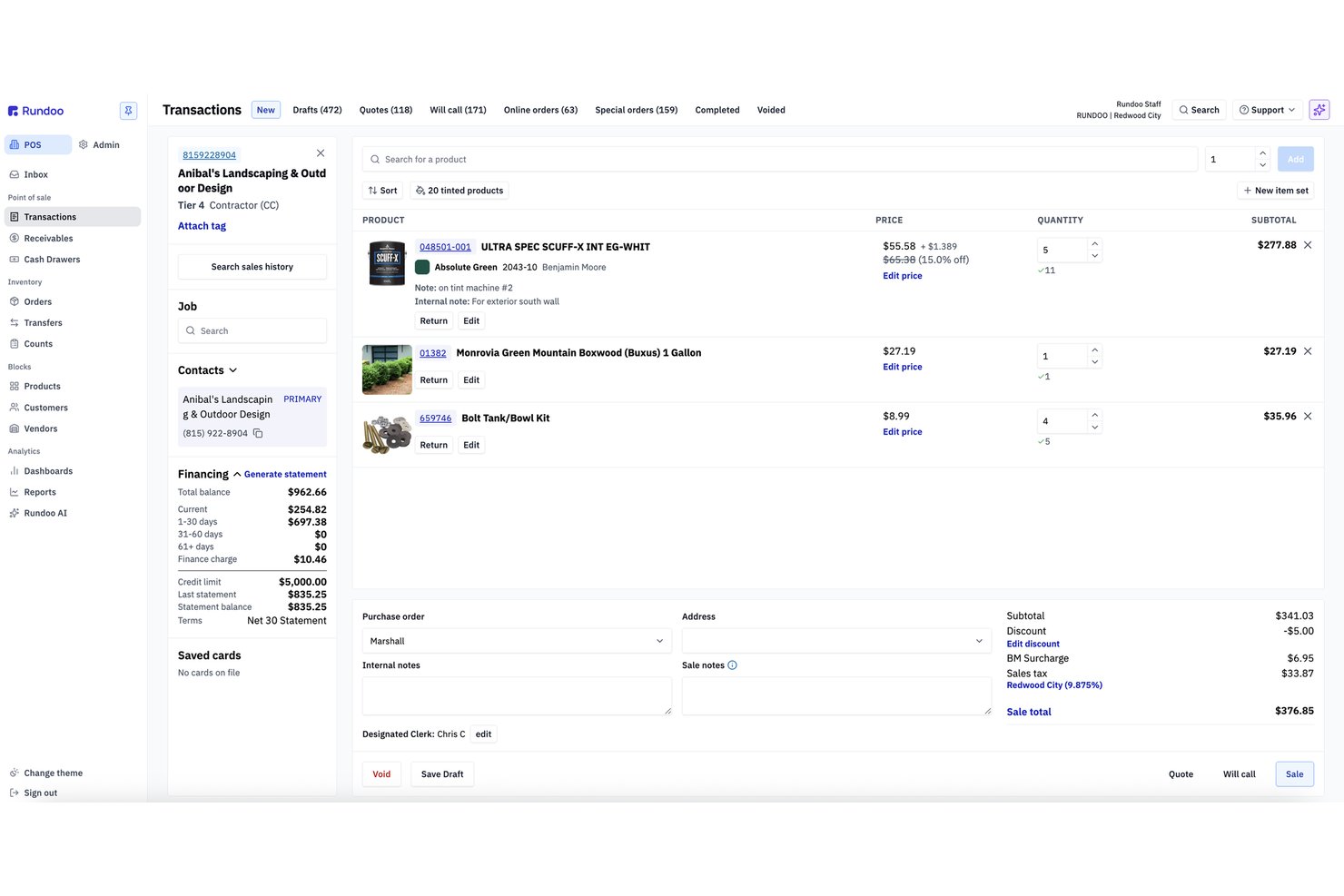
Rundoo is a browser-based POS platform built for independent supply stores—hardware, paint, farm & feed, lawn & garden, and lumber—combining point of sale, inventory tracking, charge account management, and AI-powered reporting in one system.
Who Is Rundoo Best For?
Rundoo is built for independent supply store owners running one or more locations in the hardware, paint, farm & feed, lawn & garden, or lumber trades.
Why I Picked Rundoo
Rundoo earns its spot on my shortlist because of Dooey, its built-in AI that reads your store's own sales, inventory, and charge account data to surface answers on demand. I love that instead of pulling manual reports, you can ask it something like "which products lost margin last month?" and get a direct answer. It also uses that same data to generate purchase orders based on sales velocity and seasonal patterns, which is genuinely useful for stores managing hundreds of SKUs.
Rundoo Key Features
- Real-time inventory sync: All sales, returns, and orders adjust stock counts live across every register and location.
- Integrated charge account management: Handle customer and contractor charge accounts, statements, and credit limits from the POS.
- Multi-vendor catalog access: Search vendor catalogs like Orgill, AllPro, and Emery Jensen right from the POS interface.
- Browser-based register interface: Run sales on any counter PC, tablet, or mobile device using just a web browser.
Rundoo Integrations
Rundoo offers native integrations with Stripe, QuickBooks, Benjamin Moore COLORx, Orgill, Do It Best, True Value, Sherwin-Williams, PPG, and more. An API is available for custom integrations.
Pros and Cons
Pros:
- Runs on any browser without proprietary hardware
- Charge account management built directly into POS
- AI auto-generates POs from sales data
Cons:
- No native loyalty program or store credit tools
- Locked to Stripe for all payment processing

Square
Best all-around POS terminal

Square gives you a flexible POS terminal setup whether you’re running a busy retail floor, a coffee bar, or a mobile service business that lives on pop-ups and events.
You get card-present hardware that talks directly to your POS software, so you can keep checkouts fast, inventory accurate, and fees predictable across locations.
Why I Picked Square
I picked Square because you can match the hardware to how you sell—Square Stand on an iPad for countertop checkouts, Square Register for full-service lanes, Square Terminal or Handheld for tableside or curbside orders—all running the same POS software and catalog.
You keep payments under control through flat, published processing rates tied to every terminal, so you always know your cost per in-person swipe or tap.
Your team also gets built-in tools like tipping, item modifiers, and customer profiles right on the terminal screens, which reduce order errors while capturing the data you actually need.
I like that you can start with a single Stand or Terminal, then add more devices and locations later without re-platforming your POS or swapping acquirers.
Square Key Features
In addition to the hardware variety, Square includes a few terminal-friendly features merchants will actually lean on day to day.
- Offline Card Acceptance: Keep taking chip and tap payments during internet blips, then automatically upload them once you’re back online.
- Team Management Tools: Track clock-ins, permissions, and sales by staff member directly from your POS terminals.
- Customer Profiles and Receipts: Capture emails and phone numbers at checkout to send digital receipts and build marketing lists.
- Inventory and Item Modifiers: Let staff customize orders (sizes, add-ons, modifiers) while keeping item counts and recipes accurate in the background.
Square Integrations
Integrations include Square Online, WooCommerce, Wix, BigCommerce, Ecwid, GoDaddy Websites + Marketing, QuickBooks Online, Xero, Magento, and Zen Cart.
Pros and Cons
Pros:
- Built-in tipping, modifiers, and customer profiles support retail and F&B.
- Multiple hardware options fit counters, food trucks, and service routes.
- Transparent, flat in-person processing rates simplify cost forecasting.
Cons:
- Tied to Square’s ecosystem; you can’t run terminals on Windows.
- Larger setups with multiple registers and accessories can feel space-hungry.
New Product Updates from Square
Square Expands Sales Reporting With Revenue Centers
Square introduces revenue centers for grouping sales data and aligns sales report definitions between Point of Sale and the Dashboard to give you clear, consistent metrics. For more information, visit Square’s official site.
 .
.
Stax
Best for B2B sellers

Stax Pay helps B2B and high-volume sellers get out of the “rate roulette” game with subscription-style pricing and tools that actually fit complex invoices and larger tickets.
You get POS hardware flexibility plus invoicing, ACH, and online payments in one place, so your finance team isn’t babysitting five different systems.
Why I Picked Stax Pay
I picked Stax Pay because its membership pricing helps you control costs through a flat monthly fee, which matters when your average ticket is higher than most retail environments.
You get card-present terminals, a virtual terminal, ACH support, and online checkout, so your team can take payments whether the customer is standing at the counter or paying a large invoice remotely.
The invoicing and recurring billing tools also reduce manual collections by letting you send invoices with embedded payment links and automate repeat charges.
Its reporting views give you fee visibility by channel, helping you decide which payment methods to encourage without running manual reconciliations.
Stax Pay Key Features
Here are a few extra features that are especially useful if you’re treating your POS terminals as part of a larger B2B payments stack.
- Omni-Channel Acceptance: Use terminals, a virtual terminal, and hosted payment pages together so in-person, phone, and online payments all run through the same platform.
- Text-To-Pay And Payment Links: Let your team send secure payment links or text-based requests so customers can pay larger invoices from their phone or inbox.
- Recurring Billing Tools: Set up subscription or installment schedules directly in the platform so repeat B2B orders and retainers are billed automatically.
- Surcharge And Fee Programs: Configure surcharging or convenience fees where allowed so you can protect margins on card-heavy customer segments.
Stax Pay Integrations
Integrations include QuickBooks Online, NetSuite, Salesforce, HubSpot, and Avalara.
Pros and Cons
Pros:
- Hardware-agnostic approach lets you pair Stax with a range of POS terminals.
- Supports cards, ACH, and invoicing, which fits complex B2B payment flows.
- Membership pricing can lower costs for high-ticket, high-volume B2B merchants.
Cons:
- Primarily suited to US-based businesses, with more limited international support.
- Monthly subscription fees may be hard to justify for low-volume sellers.

Best for high-volume businesses in various industries

Payment Depot’s membership-style pricing is built for retailers and restaurants that run serious card volume through physical terminals and don’t want surprises on their monthly statement.
You get interchange-plus pricing tied to a predictable subscription, plus access to modern terminals and POS options without being locked into a single hardware ecosystem.
Why I Picked Payment Depot
I picked Payment Depot because the subscription model lets you control terminal costs as volume scales—your savings come from wholesale interchange rates plus a flat monthly fee instead of padded markups.
For in-store checkout, you can pair that pricing with Clover or Vital Select POS terminals, so your team gets familiar, well-supported hardware while finance gets cleaner fee structures.
You can also use SwipeSimple-powered terminals and mobile readers, which means your field staff or pop-up locations can accept tapped, dipped, or keyed payments without a separate processor.
I like that you can often reprogram many existing terminals rather than buying a full new fleet, which matters if you’re trying to upgrade processing economics without torching your hardware budget this year.
Payment Depot Key Features
Once you’ve locked in the pricing model, these terminal-focused features do most of the day-to-day work.
- Terminal Catalog And Reprogramming: Access a wide range of countertop, smart, and mobile terminals, or have many existing devices reprogrammed so you can shift processors without a full hardware refresh.
- Multi-Processor Back Ends: Run terminals on Fiserv (Clover) or TSYS (Vital) so you can match processing rails and hardware to your risk profile, ticket size, and existing bank relationships.
- Virtual Terminal And Payment Links: Let staff key in phone orders or send payment links through a browser-based virtual terminal so finance teams can keep card-present and card-not-present flows under one provider.
- Mobile App And Terminal Options: Use SwipeSimple’s mobile app and compatible terminals so store associates, field reps, or pop-up locations can take chip, swipe, or tap payments on the same pricing plan.
Payment Depot Integrations
Integrations include Clover POS, SwipeSimple, Vital Select, Authorize.Net, Shopify, WooCommerce, BigCommerce, PrestaShop, OpenCart, and Revel Systems.
Pros and Cons
Pros:
- Many existing terminals can be reprogrammed, reducing upfront hardware spend.
- Supports Clover and Vital Select terminals for modern, retail-ready POS hardware.
- Membership pricing is attractive for high-volume terminal and in-store traffic.
Cons:
- Limited to US-based, non–high-risk merchants for in-store processing.
- Less cost-effective for lower-volume merchants with modest terminal usage.

Best for real-time inventory management

KORONA POS gives high-volume retailers, ticketing venues, and franchises a way to keep terminals, inventory, and locations aligned without constant manual fixes.
It’s built for operators who care about real-time stock accuracy across multiple terminals.
Why I Picked KORONA POS
I picked KORONA POS because every terminal syncs inventory in real time, so your stock counts stay accurate with each sale, return, or transfer.
I like that you can manage products and pricing centrally, giving multi-location retailers one source of truth for how their terminals behave.
You also get flexibility with hardware and payment processors, so you can negotiate better rates and keep using terminals you already own.
KORONA POS Key Features
Here are a few terminal-focused capabilities that matter once you’re running day-to-day operations.
- Multi-Store Control: Adjust pricing, inventory, and products per location from one dashboard.
- Ticketing and Access Control: Sell tickets and manage entry directly from each terminal.
- Cash Management Tools: Track drawer counts, variances, and paid in/out activity per device.
- Advanced Reporting: Build custom sales and inventory reports grouped by terminal or store.
KORONA POS Integrations
Integrations include QuickBooks, WooCommerce, Shopify, Magento, BigCommerce, Mailchimp, PayPal, Stripe, Worldpay, Authorize.Net, and CardConnect.
Pros and Cons
Pros:
- Strong multi-location controls for franchises and multi-store retailers.
- Supports mixed hardware setups without vendor lock-in.
- Real-time terminal-level stock updates reduce inventory errors.
Cons:
- Report customization can take time to configure.
- Each terminal requires its own license fee.
New Product Updates from KORONA POS

KORONA POS Inventory Updates: CSV Import, Multi-OU, Filters & API
KORONA POS adds Stock Receipt imports, multi-location stock order sourcing, warehouse stock verification for inventory transfers, and External Reference fields for stock orders to improve inventory operations and tracking. For more information, visit KORONA POS's official site.

Best for omnichannel retail integration

Shopify POS gives you a dedicated countertop terminal that actually talks to the rest of your retail stack—online inventory, customer profiles, and store locations all live in one place.
It’s best for omnichannel retailers already on Shopify who want a customer-facing terminal that cuts line time without creating a second data silo.
Why I Picked Shopify POS
I picked Shopify POS because you can run your in-store terminal and online store from the same product catalog and inventory engine, so you aren’t reconciling two sets of stock after every weekend.
Your customers get a dedicated, buyer-facing display on the POS Terminal, which shows itemized carts and payment flows so they can review line items, add a tip, and choose receipt options without crowding your staff’s screen.
Your team can use the POS smart grid to pin discounts, apps, and popular products to the home screen, which speeds up checkout during busy hours.
You also get native support for tap, chip, and swipe payments via Shopify Payments, so you can accept modern payment methods while keeping fees and payouts in a single place.
Shopify POS Key Features
In addition to the terminal hardware itself, Shopify POS gives retailers tools your team will actually use at the counter and in the back office.
- Unified Product Catalog: Manage products, prices, and variants once, then sell them across online and in-store channels.
- Omnichannel Inventory: Track inventory by location and support pickups, ship-from-store, and transfers without spreadsheets.
- Customer Profiles: Store purchase history and preferences to power targeted promos and loyalty programs.
- Staff Permissions: Assign roles and access levels so associates can sell confidently without touching sensitive settings.
Shopify POS Integrations
Integrations include QuickBooks, Xero, Mailchimp, Klaviyo, LoyaltyLion, Yotpo, ShipStation, DHL Express, UPS, and Canada Post.
Pros and Cons
Pros:
- Shared catalog and inventory let you sell online and in-store from one system.
- Smart grid layout lets staff pin key apps, discounts, and products.
- Dedicated customer-facing terminal display improves transparency and tipping at checkout.
Cons:
- POS Terminal and in-person card acceptance require Shopify Payments in supported countries.
- Advanced retail workflows may need additional paid apps from the Shopify App Store.
New Product Updates from Shopify POS
Shopify POS Adds Local Delivery at Checkout
Shopify POS now lets staff create local delivery orders during checkout using existing delivery zones and rates, adding delivery details to carts and receipts. For more information, visit Shopify POS's official site.
 .
.
Lavu
Best for iPad POS systems

Lavu gives restaurant teams an iPad-based terminal that actually keeps up with peak service—tableside orders, bar tabs, and delivery tickets all flow through one screen instead of a pile of devices.
It’s best for restaurants, bars, and cafés that want mobile, Wi-Fi–friendly hardware tied to strong inventory and reporting tools rather than a basic cash register.
Why I Picked Lavu
I picked Lavu for operators who want an iPad terminal built for real restaurant chaos, not just slow hours—its offline card support helps you keep taking payments even when the internet dips.
You get a single iPad screen that pulls together orders, payments, and online sales using built-in online ordering and the MenuDrive platform, so your team isn’t re-keying delivery tickets by hand.
I like that your staff can fire tickets straight to a kitchen display system while real-time inventory updates in the background, keeping menu availability accurate during rushes.
It’s a great fit if you run a restaurant, bar, or café and want lightweight iPad terminals your servers can carry tableside instead of being locked to a bulky counter POS.
Lavu Key Features
In addition to the core ordering and payment tools, here are a few terminal-focused features that matter for busy food-and-beverage teams.
- Dual Pricing And Cash Discount: Offer cash discounts and dual pricing to offset card fees while keeping totals clear for guests.
- Loyalty And Gift Cards: Run built-in loyalty programs and digital or physical gift cards directly from the terminal.
- Manager Mobile App: Check live sales, labor, and key reports from a manager app when you’re off-site.
- Menu And Floor Layout Tools: Build menus, modifiers, and floor layouts in the back office so every terminal shows clear sections and pricing.
Lavu Integrations
Integrations include Marketman, Bar-i Liquid Accounting, Digital Pour, Restaurant365, OpenTable, Otter, Chowly, Up'n Go, QuickBooks, and Xero.
Pros and Cons
Pros:
- Real-time inventory and reporting help prevent stockouts during service.
- MenuDrive online ordering feeds directly into the POS and kitchen.
- iPad terminals support fast tableside ordering and in-seat payments.
Cons:
- Total cost increases as you add online ordering and advanced features.
- iPad-only design limits reuse of existing non-Apple POS hardware.

ePOS
Best for scalability

For growing retail and hospitality businesses, Epos Now gives you a POS terminal setup that can flex from a single store to multiple locations without forcing a full hardware reset.
It’s a good fit if you want cloud-based control over tills, tablets, and handhelds while keeping your existing workflows mostly intact.
Why I Picked Epos Now
I picked Epos Now because it lets you scale from one terminal to many by running the same cloud back office across different hardware setups, so you can add lanes or locations without rebuilding your system.
You can also choose between Epos Now’s own payment service or supported third-party processors, which helps you negotiate better rates instead of being locked into a single option.
I like that your team can log in from anywhere to check real-time performance and device activity, which keeps you on top of what’s happening at each register.
For retailers adding new channels or locations, that combination of flexible terminals, processor choice, and remote visibility makes it easier to grow without replacing everything that already works.
Epos Now Key Features
Here are a few practical features that matter when you’re picking a POS terminal setup for a growing retail or hospitality business.
- Real-Time Multilocation Inventory: Sync stock levels across stores and channels so terminals always reflect what you actually have on hand.
- Centralized Back Office: Manage products, pricing, promotions, and user permissions from one dashboard instead of configuring each device individually.
- Built-In Reporting And Dashboards: Track sales, item performance, and peak hours from any device to guide staffing and purchasing decisions.
- Staff And Permissions Management: Set role-based access on each terminal so cashiers, supervisors, and managers only see the tools they need.
Epos Now Integrations
Integrations include QuickBooks, Xero, Sage, Mailchimp, Shopify, WooCommerce, BigCommerce, PayPal, Stripe, and Zapier.
Pros and Cons
Pros:
- Lets you choose between in-house and third-party payment processors.
- Supports over 100 third-party apps for custom retail setups.
- Works with a wide range of POS hardware and terminals.
Cons:
- Long-term contracts and paid support plans may reduce flexibility.
- Pricing details are limited online; many plans require a quote.

Helcim
Best for transparent payment solutions

Helcim’s smart terminals are built for retailers who care about transparent pricing as much as fast checkout—you get interchange-plus rates, no long-term contracts, and hardware that works at the counter and on the floor.
It’s a good fit for small and midsize merchants in the US and Canada that want card-present payments, inventory, and customer data living in one system instead of five.
Why I Picked Helcim
I picked Helcim because you get interchange-plus pricing with automatic volume discounts, so your effective rate drops as your in-store card volume grows.
That cost control is tied to real tools: a smart terminal with built-in POS software, printer, and card reader that keeps in-person and online sales, inventory, and customer profiles in sync.
I also like that you can use Tap to Pay on iPhone through the Helcim POS app, which lets your team take contactless payments anywhere on the sales floor without extra hardware. For margin-conscious retailers, Fee Saver and compliant surcharging options help you offset card fees using settings built directly into the terminal and POS.
If you want to keep your existing POS or custom setup, the smart terminal is API-ready, so you can plug Helcim’s hardware and pricing into your current stack instead of rebuilding everything from scratch.
Helcim Key Features
In addition to the core pricing model and smart terminal, here are a few features that matter for retail teams.
- All-In-One Smart Terminal: Combines POS software, EMV card reader, and receipt printer in a single device that runs on Wi-Fi or 4G.
- Centralized Product Catalog: Manage items, prices, and taxes in Helcim so your terminals, POS app, and online checkout pull from the same product data.
- Customer Profiles: Store cards on file, track purchase history, and manage customer details from the same system you use at the terminal.
- Next-Business-Day Deposits: Batch card-present transactions to get funds in your bank account as early as the next business day.
Helcim Integrations
Integrations include QuickBooks Online, Xero, WooCommerce, Foxy.io, Great Exposure, and Magento.
Pros and Cons
Pros:
- Tap to Pay on iPhone enables line-busting and pop-up checkout without extra hardware.
- Smart terminal syncs payments, inventory, and customer data across in-store and online.
- Transparent interchange-plus pricing with automatic volume discounts for higher card volume.
Cons:
- Only available to merchants in the United States and Canada.
- Inventory and staff tools are lighter than full-scale retail management suites.

Clover
Best for ease of use

Clover Flex gives you a full POS terminal in one handheld device—taking chip, swipe, and contactless payments while you walk the floor, work curbside, or run events.
It’s best for busy retailers who want quick setup, simple staff training, and hardware that can actually survive a full shift without running back to the counter.
Why I Picked Clover
I picked Clover because you get a true all-in-one handheld terminal—payments, receipts, inventory lookups, and basic customer data all live on a single device instead of a patchwork of gadgets.
Your team can accept chip, swipe, and tap payments (including Apple Pay, Google Pay, and Samsung Pay) on the same terminal, so you’re not turning away wallet users or slowing down the line with workarounds.
I also like that Flex can pair with other Clover devices, so you can start with a single handheld and later add a counter station without rebuilding your setup.
Setup is straightforward, and once it’s configured, staff mostly live on the home screen and app tiles instead of fighting through menus.
Clover Key Features
In addition to the handheld form factor, Clover brings a few practical tools that matter when you’re choosing a POS terminal.
- All-Day Battery And Connectivity: Up to 8 hours of battery life plus WiFi and LTE options keep staff taking payments anywhere on the floor without constantly docking the device.
- Built-In Printing And Scanning: Integrated receipt printer, camera, and barcode scanner mean you can print receipts and scan items or tickets without separate hardware.
- Employee Profiles And Permissions: Role-based logins control who can issue refunds, apply discounts, or access reports, which helps you keep shrink and voids under control.
- On-Device Apps And Add-Ons: Access to Clover’s App Market lets you add tools like loyalty, inventory, or time tracking directly to the terminal as your needs grow.
Clover Integrations
Integrations include Apple Pay, Google Pay, Samsung Pay, QuickBooks (via Commerce Sync), Xero, Shopify, WooCommerce, Adobe Commerce, and WordPress/WooCommerce payment plugins.
Pros and Cons
Pros:
- App Market offers accounting, loyalty, and inventory add-ons as you scale.
- Long battery life plus LTE/WiFi supports true line-busting and tableside pay.
- Handheld device with printer and scanner replaces multiple hardware pieces.
Cons:
- Many advanced reporting and vertical-specific tools require extra paid apps.
- Hardware and payment processing are typically bundled into multi-year terms.
Other Options
While the following POS terminals didn’t make it onto my top list, these alternative options that I came across in my research are still worth considering if none of the above options jumped out as the right choice for you.
- Merchant One
For low rates and fees
- Shopify
For ecommerce and retail
- PayPal Zettle
Option with no monthly fee
- Toast
For durable hardware
- Revel Systems
For large restaurant chains
- CardPointe
For range of payment methods
- Heartland
For apparel and fashion retailers
- ProMerchant
For transparent pricing
- TouchBistro
For restaurants
- GoDaddy Poynt
For analytics features
- Payline Data
For versatile POS options
- eHopper
Mobile terminal
- IT Retail
For grocery stores


How I Evaluate POS Terminals
I split my evaluation into two layers: baseline must-haves like EMV acceptance, inventory sync, and peripheral support, and differentiators that reveal which terminal fits your operation.
Core Functionality (Table Stakes For This List)
When I'm selecting tools for my list, I rank each one on a scale from 0 (does not offer the functionality) to 5 (excels in this area) for each core functionality listed below. Then, I calculate the tool's total score into a percentage. Each tool needs to achieve a minimum total score of 65% to be considered for inclusion.
- Payment Processing: I check whether a terminal accepts EMV chip, contactless/NFC, magstripe, and mobile wallets—and whether it locks you into a single processor or gives you options.
- Inventory Management: Real-time stock tracking matters, especially when a sale at one register should instantly update counts across every location and channel.
- Sales Transaction Handling: I look at the full transaction flow—ring-ups, discounts, tax calculations, returns, exchanges, and receipt options—to see how it handles a busy checkout line.
- Hardware Compatibility: Each terminal should support standard peripherals like barcode scanners, receipt printers, cash drawers, and card readers without requiring a proprietary-only setup.
- Reporting & Analytics: I evaluate whether a system generates meaningful sales, tax, and inventory reports at the store and multi-location level, not just basic daily totals.
- Customer Management: The ability to tie purchase history to individual profiles and support loyalty programs turns a terminal into more than a cash register.
Once I have a list of tools that meet this criteria, I consider what sets each platform apart.
Differentiating Factors (What Sets Vendors Apart)
Here's how I compare and contrast different vendors:
Standout Features
Offline mode is a big deal—if your internet drops mid-transaction, a terminal that queues sales locally and syncs once connectivity returns keeps checkout moving. I also evaluate ecommerce integration, since retailers selling through Shopify or BigCommerce need inventory and orders to stay unified across channels. Mobile POS capability matters for stores running pop-ups or needing line-busting during peak hours on tablets or handhelds.
Beyond Features
Total cost of ownership is one of the first things I evaluate—some vendors bundle hardware and processing fees, while others charge separately, so I look at the full picture before comparing. PCI compliance and P2PE support also weigh heavily, since a breach at the register can be devastating for any retailer. Hardware flexibility rounds out my assessment: I check whether a system lets you bring your own devices or locks you into proprietary equipment that's expensive to replace or scale.
What is a POS Terminal?
POS terminals are electronic devices that let you take payments, track sales, and manage inventory right at checkout.
It connects your hardware—like card readers, barcode scanners, and receipt printers—to your payment processor and inventory management system.
Retail workers and small business owners use them to quickly ring up customers, accept cards and digital wallets, and keep tabs on what’s selling in real time.
They save you from the hassle of juggling multiple tools or dealing with tangled-up inventory by putting everything you need in one spot.
How to Choose Your POS Terminal
Choosing the right POS terminal isn’t about picking whatever’s trending or has the flashiest screen. It’s about matching your business needs, payment methods, and daily realities with a device that actually works for your team and customers.
Here’s how to make a smart, practical decision—without the headaches.
| What to do | Why it matters |
|---|---|
| List your must-have features (e.g., contactless payments, barcode scanner, multi-store support) | Avoids wasting money on features you’ll never use or missing the ones you need every day. |
| Audit your current checkout process and pain points | Pinpoints where your existing POS system is slowing you down or creating errors, so you know what to fix. |
| Check hardware compatibility and integrations | Ensures the POS terminal works with your payment processor, inventory management software, and any mobile devices you already use. |
| Compare pricing—look at upfront costs, monthly fees, and transaction rates | Helps you budget accurately and spot hidden costs that can eat into your margins. |
| Demand a real demo (not just a video) and test with real transactions | Confirms the system is easy for staff to learn, works at your busiest times, and doesn’t choke on your payment mix. |
| Ask about support and upgrade paths | Makes sure you can get help fast and won’t be stuck with outdated hardware as your business grows. |
Features of Great POS Terminals
Your POS terminal needs a few things to make sure your customers stay happy and keep giving you cash. Here are the features to look for:
- Accepts every major payment method. Chip, swipe, tap, digital wallets, and mobile payments—no customer gets turned away.
- Real-time inventory tracking. Updates stock levels instantly as sales happen, so you always know what’s on hand.
- Integrated barcode scanner and receipt printer. Speeds up checkout and reduces manual entry errors.
- Cloud-based and mobile POS options. Access your sales and reports from anywhere—store, warehouse, or on the go.
- Built-in security and PCI compliance. Protects sensitive payment data and keeps your business out of hot water.
- Customizable user permissions. Control who can process refunds, access reports, or manage inventory.
- Seamless integrations. Connects with your accounting, ecommerce, and loyalty program tools.
Key Benefits of POS Terminals
And, here's what you get out of POS terminals that make the grade:
- Faster, more accurate checkouts. Shorter lines, happier customers, and fewer mistakes at the register.
- Better inventory control. Reduce stockouts and over-ordering with up-to-the-minute data.
- Flexible payment options. Take payments in-store, at pop-ups, or curbside—however your customers want to pay.
- Actionable business insights. Get clear reports on sales, inventory, and employee performance without digging through spreadsheets.
- Easier staff training. User-friendly interfaces mean new hires can get up to speed quickly.
- Improved customer experience. Offer loyalty programs, gift cards, and quick receipts to keep shoppers coming back.
- Scalable as you grow. Add new locations, devices, or sales channels without switching systems.
Cost & Pricing of POS Terminals
POS terminal pricing is all over the map, so it pays to read the fine print before you sign up. Here’s a clear breakdown to help you budget:
| Plan type | Average price | Common features | Best for |
|---|---|---|---|
| Entry-level | $100–$500 one-time or $15–$30/month | Basic payment processing, simple inventory, receipt printing | Small businesses, pop-ups |
| Mid-tier | $500–$1,500 one-time or $30–$80/month | Advanced inventory, barcode scanning, mobile POS, reporting | Growing retailers, multi-location shops |
| All-in-one/cloud | $1,000–$3,000+ setup or $80–$200/month | Omnichannel sales, loyalty programs, integrations, analytics | Established retailers, ecommerce, high volume |
| Custom/enterprise | Custom pricing | Multi-store support, dedicated account manager, custom integrations | Large chains, franchises |
- Transaction fees typically range from 1.5% to 3% per sale, depending on your payment processor and card type.
- Watch for additional fees: hardware rentals, software upgrades, PCI compliance, and support can add up.
- Some providers charge per terminal or per location—double-check if you’re planning to scale.
- Most vendors offer a free demo or trial, but hardware may require a deposit or purchase up front.
If you’re not sure what fits your business, start with a monthly plan and upgrade as you grow. Don’t get locked into a long contract unless you’re sure the system delivers.
POS Terminals FAQs
Here are answers to some frequently asked questions about POS terminals:
Can a POS terminal work offline if my Wi-Fi drops?
Yes, many modern POS terminals can work offline. You’ll still be able to process sales, but some features like real-time inventory updates may pause until you’re back online. Always confirm offline capabilities with your provider.
How secure are POS terminals against fraud and hacking?
POS terminals now use strong security measures like encryption, tokenization, and PCI DSS compliance. For best protection, keep your hardware and software updated and train your team on secure practices.
What software integrations should I look for in a POS terminal?
Look for POS terminals that connect with your inventory, accounting, ecommerce, and loyalty systems. Integration reduces manual data entry and makes your business more efficient.
Are there hidden fees or costs with POS terminals that I should watch out for?
Some providers charge extra for setup, software subscriptions, payment processing, or certain integrations. Ask for a complete price list up front to avoid unexpected charges.
How hard is it to train new employees on a POS terminal?
Most modern POS systems are user-friendly and designed for fast training—sometimes in under an hour. Touchscreen interfaces and vendor support can further speed up onboarding.
Do I need different POS terminals for multiple store locations?
Usually not. Many POS platforms support multiple locations under one system, but check hardware requirements and ask vendors about multi-location support before buying.
What kind of reporting should I expect from a modern POS terminal?
Expect reports on sales, inventory, employee performance, and customer insights. Good reporting helps spot trends, manage stock, and make smarter business decisions.
Terminal Decision Time for Retail Pros
If your point of sale terminal is holding you back—slowing down checkout, bungling inventory, or making payment processing a daily pain—it’s time to upgrade.
The right POS system won’t just keep your lines moving and your numbers tidy; it’ll give you the control and insight you need to actually run your business, not just react to problems.
Pick a terminal that fits your real-world needs, supports every payment method your customers throw at you, and scales as you grow. Don’t settle for tech that’s stuck in the past. Your team (and your bottom line) will thank you.
Retail never stands still—and neither should you. Subscribe to our newsletter for the latest insights, strategies, and career resources from top retail leaders shaping the industry.