

10 Best Email Marketing Platforms for Ecommerce in 2026

The 10 Best Ecommerce Email Marketing Software


If your email marketing strategy is “send newsletters whenever we remember,” you’re leaving money on the table.
The right ecommerce email marketing software transforms those sporadic blasts into automatic, targeted sales machines—no extra effort required.
Think of these platforms as your silent sales team, nudging shoppers with perfectly-timed reminders and uncanny recommendations.
Whether it’s the sneakers they abandoned or the add-on they didn’t know they needed, your emails land exactly when they should.
And yeah, there are a ton of options—most overpromising, many underdelivering. We’ve sorted through the noise, put the top contenders through their paces, and rounded up the best ecommerce email marketing software you’ll actually want to use.
Let’s get to it.
Why Trust Our Software Recommendations
Our team has been testing and reviewing software since 2012. As retail leaders ourselves, we know how difficult—and important—it is to choose the right software.
For this guide, we evaluated tools using hands-on testing and independent research, scoring tools using our selection criteria.
Our reviews reflect our independent judgment—not a sales pitch.
Ecommerce Email Marketing Software Comparison Table
This comparison table summarizes pricing details for my top ecommerce email marketing software selections:
| Tool | Best For | Trial Info | Price | ||
|---|---|---|---|---|---|
| 1 | Best for beginners | Free plan available | From $13/month | Website | |
| 2 | Best for audience segmentation | Free plan + free demo available | From $11.20/month | Website | |
| 3 | Best for agencies and franchises | Free plan + free demo available | From $30/month | Website | |
| 4 | Best with GDPR compliance tools | Free plan available | From $9/month (billed annually) | Website | |
| 5 | Best for automation features | 30-day free trial | From $25/user/month | Website | |
| 6 | Best for advanced segmentation | Free plan + free demo available | Pricing upon request | Website | |
| 7 | Best for AI-driven personalization | Free demo available | Pricing upon request | Website | |
| 8 | Best for real-time behavioral messaging | 14-day free trial + free demo available | From $100/month | Website | |
| 9 | Best for design-driven email marketing | Free plan + free trial available | From $19/user/month (billed annually) | Website | |
| 10 | Best for advanced integrations | Free plan available | From $20/month | Website |

The Best Ecommerce Email Marketing Software, Reviewed
Let’s look at each of my top 10 email marketing platforms, detailing why it was picked, top features, top integrations, pros and cons, and a screenshot of the tool in action.

Best for beginners

Mailchimp makes my shortlist because it removes a lot of the anxiety around getting started with email marketing. I see new marketers and small teams get their first campaigns out the door without struggling to decode complex automations or setup flows.
What I like is the prebuilt journey templates paired with the simple campaign builder. When I’m setting up segmented lists for a client’s first newsletter, Mailchimp's templates and audience tagging let us launch fast and still look polished.
Mailchimp’s Best For
- Small businesses and marketers launching their first email campaigns
- Teams that need straightforward templates and audience segmentation out-of-the-box
Mailchimp’s Not Great For
- Companies running complex multi-channel automation across multiple brands
- Marketers who need advanced reporting or deep customization in email logic
What Sets Mailchimp Apart
What stands out to me about Mailchimp is how it approaches email with a clear focus on rapid execution. Instead of demanding deep technical or marketing knowledge, it gives you step-by-step campaign builders, ready-made customer journeys, and accessible list management. When I compare it to something like Salesforce Marketing Cloud, Mailchimp strips away the layers of complexity in favor of letting you just send well-designed, targeted emails quickly.
Mailchimp also takes a more hands-on approach than tools like Klaviyo, which immediately expect you to have well-developed audience segments and behavioral data. Mailchimp assumes you might be starting from zero and builds trust by making successful email basics easy through curated templates and logical workflow suggestions right up front.
Tradeoffs with Mailchimp
Mailchimp optimizes for speed and simplicity, which means you can launch campaigns fast, but you’ll hit limits when you want nuanced, highly personalized automations or in-depth reporting. Teams that outgrow the basics often find they need to layer on more specialized tools as their needs become more advanced.
Pros and Cons
Pros:
- Easy audience list segmentation
- Robust analytics and reporting features
- Easy to use
Cons:
- Lean customer support
- Multivariate testing locked to Premium plan
Omnisend
Best for audience segmentation
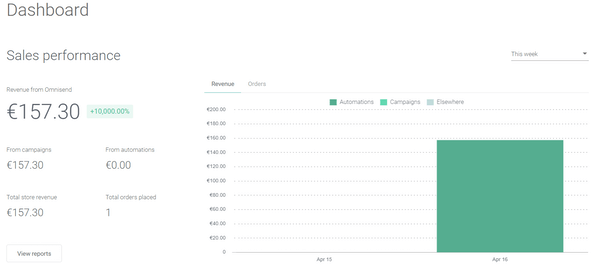
Omnisend is always top of mind for me when audience segmentation is a must-have in email marketing. When campaigns start needing more than just basic split-lists, I reach for Omnisend because their automation lets me build detailed segments based on real-time shopping behaviors and historical activity.
One thing I appreciate is the way I can trigger flows for precise audience groups using Omnisend’s rules and filters. That’s made my campaigns feel more relevant and personal—especially for ecommerce and lifecycle marketing, where granular targeting really pays off.
Omnisend’s Best For
- Ecommerce brands that need advanced audience segmentation and automation
- Marketers who want to trigger email campaigns based on real-time shopping behavior
Omnisend’s Not Great For
- Businesses outside of ecommerce needing deep support for multiple marketing channels
- Teams looking for minimalist, no-frills email campaign tools without segmentation complexity
What Sets Omnisend Apart
Omnisend takes a segmentation-first approach that’s deeply tied to ecommerce behaviors and purchase data. Unlike tools like Mailchimp, which often focus on general list management, Omnisend expects you to define audiences using granular, event-driven filters and use those segments to drive rich, personalized automations.
Omnisend is designed for teams who want every email touchpoint to reflect individual shopping patterns—from browse to buy—without needing to bolt on extra data integrations. It’s less about mass mailing and more about orchestrating nuanced journeys for each customer persona.
Tradeoffs with Omnisend
Omnisend optimizes for segmentation complexity and ecommerce alignment, but that can mean added setup time and process overhead for simpler campaigns. In practice, teams that don’t leverage its automation depth can find the system feels heavy or overengineered for basic sends.
Pros and Cons
Pros:
- Comprehensive resources section
- Easy to create campaign-specific landing pages
- Deep Shopify integration
Cons:
- Has a bit of a learning curve
- Embedding multiple images into an email can be time-consuming
New Product Updates from Omnisend

Omnisend Adds Claude Connector and Updates MCP Features
Omnisend adds a Claude Connector, improved on-brand email templates, and granular MCP permissions. These updates make it easier to work with Omnisend data through AI tools while providing more control over data access. For more information, visit Omnisend’s official site.
 .
.
Best for agencies and franchises

BigMailer.io is an email marketing platform for agencies and franchises looking to manage multiple brands and campaigns from a single dashboard. It supports various email types, including promotional, transactional, and automated messages.
Why I picked BigMailer: You can add unlimited brands to your account, allowing you to handle all your clients or projects in one place. This centralized approach simplifies your workflow and ensures consistency across all your email campaigns. Another benefit is the platform's support for various email campaign types, whether you're sending bulk emails, setting up drip campaigns, or managing transactional emails. This versatility means you can consolidate all your email marketing activities on a single platform, making your processes more efficient.
BigMailer.io standout features & integrations
Standout features include customizable email templates that allow for brand consistency across multiple campaigns, making it easier to maintain a cohesive identity. The platform’s real-time engagement tracking provides instant insights into how recipients interact with emails, helping users refine their strategies. Additionally, automated handling of bounces, unsubscribes, and complaints ensures deliverability and keeps email lists clean without manual intervention.
Integrations include SparkLoop, Zapier, Integromat, Pabbly, Zoho, and SureTriggers.
Pros and Cons
Pros:
- Ability to manage multiple brands from a single dashboard
- Can host on your own domain
- Unlimited email templates
Cons:
- Limited native integrations
- Not ideal for ecommerce businesses

Best with GDPR compliance tools
I picked EmailOctopus for this list because its GDPR compliance features cut out a lot of the anxiety teams face around data privacy. It stands out when you want email marketing that just nails consent management, from built-in audit trails to automated subscriber data requests.
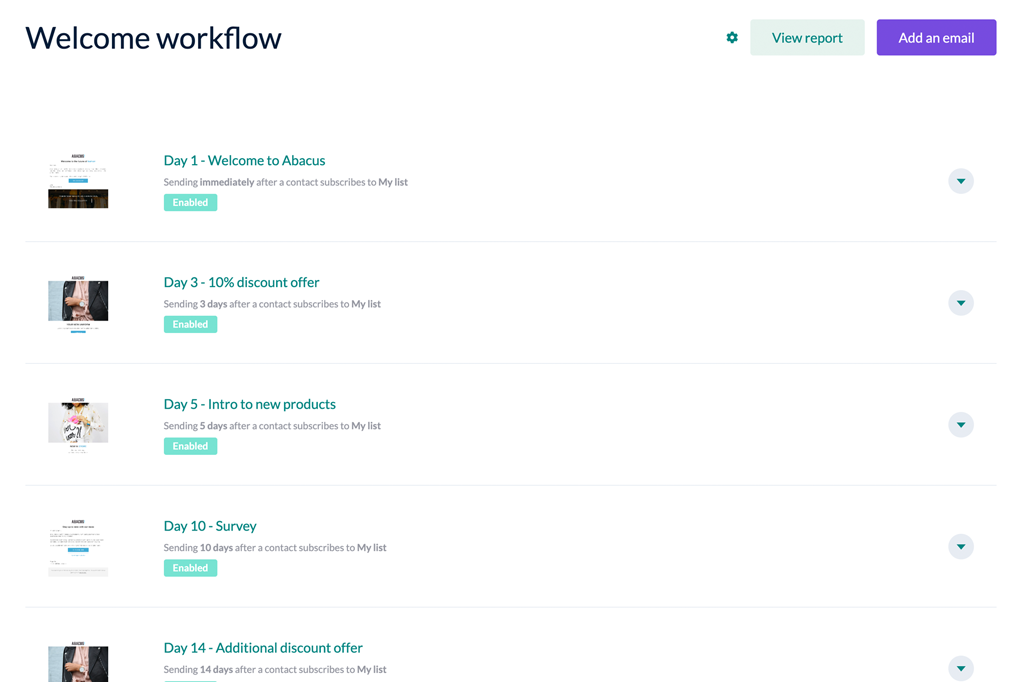
What I appreciate is how direct everything feels—especially when I see teams need to prove compliance quickly. You aren’t just relying on checkboxes; I’m able to set up consent forms, segmentation rules, and subscriber deletion workflows that help reduce manual work and risk.
EmailOctopus's Best For
- Marketing teams that need strong, out-of-the-box GDPR compliance in their campaigns
- Organizations handling subscriber data and requiring transparent consent management features
EmailOctopus's Not Great For
- Marketers who want advanced visual automation builders or deep analytics
- Teams running complex, multi-channel campaigns tied to heavy integrations
What Sets EmailOctopus Apart
EmailOctopus approaches email marketing with a compliance-first mindset—privacy and data rights aren’t separate features, they’re built into how you create, send, and manage campaigns. Unlike something like Mailchimp, which provides compliance controls as add-ons or buried in settings, EmailOctopus pushes consent, deletion, and data handling to the forefront and expects teams to treat subscriber rights as part of every workflow.
The product assumes marketing teams want clarity and confidence about personal data from day one, not as an afterthought. This shows up in simplified data management, disclosure tools, and the way customer preferences drive segmentation and messaging.
Tradeoffs with EmailOctopus
Because EmailOctopus prioritizes compliance and straightforward campaign execution, it doesn’t chase the deepest personalization or multi-layer automation you’ll find in heavier platforms. What usually happens is, teams needing advanced journey mapping or highly tailored experiences start to hit limits as their tactics evolve.
Pros and Cons
Pros:
- Free-forever plan with generous send limits
- Simple automation workflows for drip campaigns
- GDPR compliance tools for subscriber management
Cons:
- Template editor has fewer design elements than some tools
- No built-in SMS or multi-channel messaging

Best for automation features
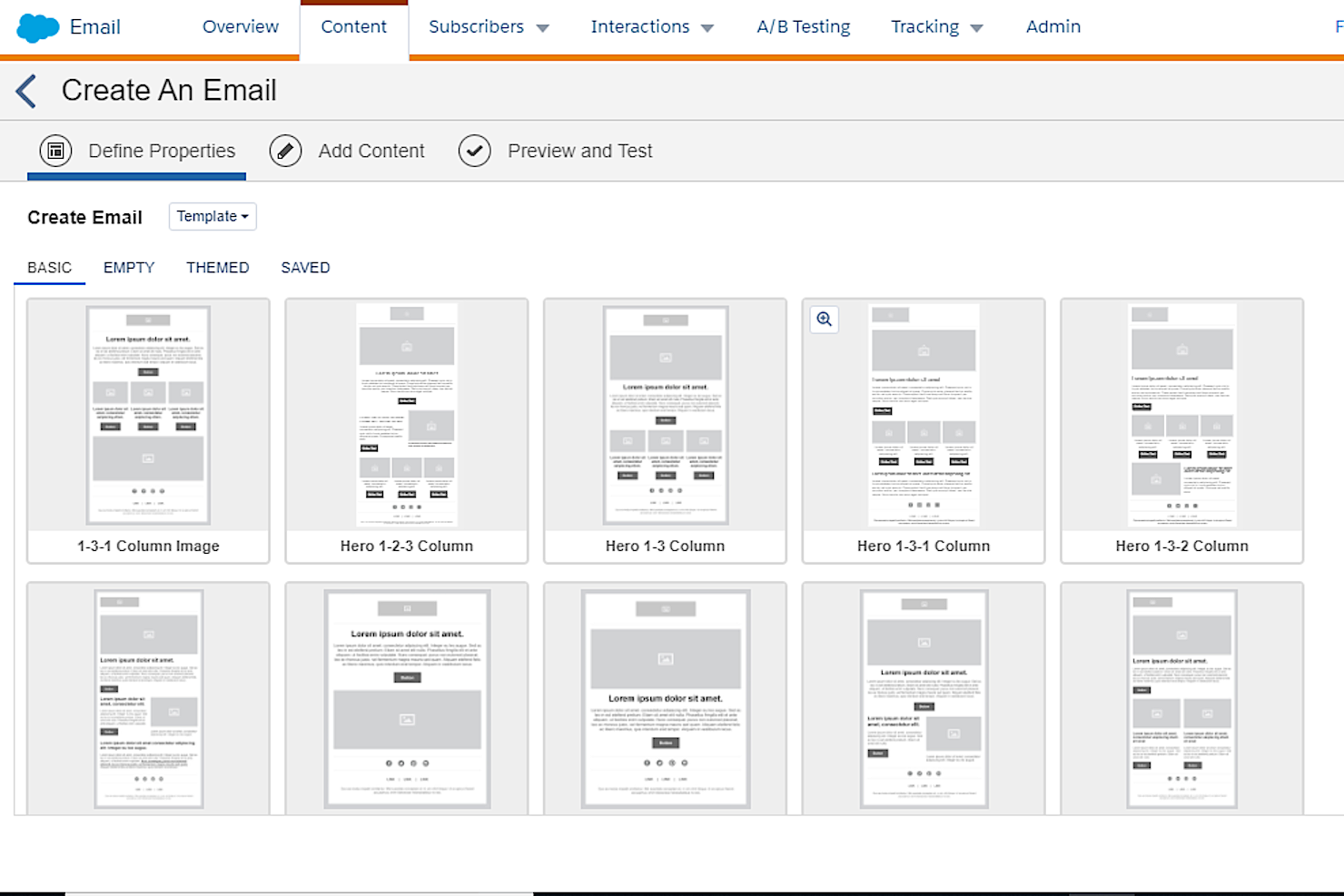
I included Salesforce CRM because, when I need to bring real automation into the email marketing workflow, this is the first tool I think of. When I see teams ready to move beyond basic blast emails and start crafting personalized, trigger-based campaigns, Salesforce CRM’s automation stands out.
I like how you can design complex email journeys using features like Flow Builder and automated triggers tied to customer interactions. My experience is that this lets teams respond to behavior in real time while personalizing messaging at scale—something I haven’t seen as accessible in other platforms.
Salesforce CRM’s Best For
- Marketers who want to automate personalized, trigger-based email campaigns at scale
- Organizations running multi-step customer journeys and lifecycle email programs
Salesforce CRM’s Not Great For
- Small businesses that just need simple, one-off email campaigns
- Teams looking for quick setup without dedicated admin or technical resources
What Sets Salesforce CRM Apart
Salesforce CRM stands out because it’s built around automation as the core of its workflow, not just an added feature. I notice it expects teams to think in terms of customer journeys triggered by real-time actions, rather than just sending batches of emails. Unlike something like AWeber, which centers on lists and campaigns, Salesforce pushes you to map and automate intricate, multi-step email flows tied directly to customer behavior. This approach means teams are designing systems instead of just scheduling blasts—it expects you to connect marketing, sales, and service with automation at the center.
Tradeoffs with Salesforce CRM
Salesforce optimizes for building dynamic, highly automated experiences—but what usually happens is campaign setup gets complex and technical. Teams without dedicated expertise tend to hit roadblocks, finding that even simple changes take more time and coordination than with more campaign-focused platforms.
Pros and Cons
Pros:
- Flexible and comprehensive integration system
- Scalability and customizability
- Robust feature set
Cons:
- May not be appropriate for small businesses
- Steep learning curve
New Product Updates from Salesforce CRM

Salesforce CRM Adds Automated CMS Access Expiration
Salesforce CRM adds automated access expiration and a new view-only support role for Point of Sale CMS users. These controls reduce manual access cleanup and help teams limit unnecessary permissions. For more information, visit Salesforce CRM’s official site.
 .
.
Klaviyo
Best for advanced segmentation
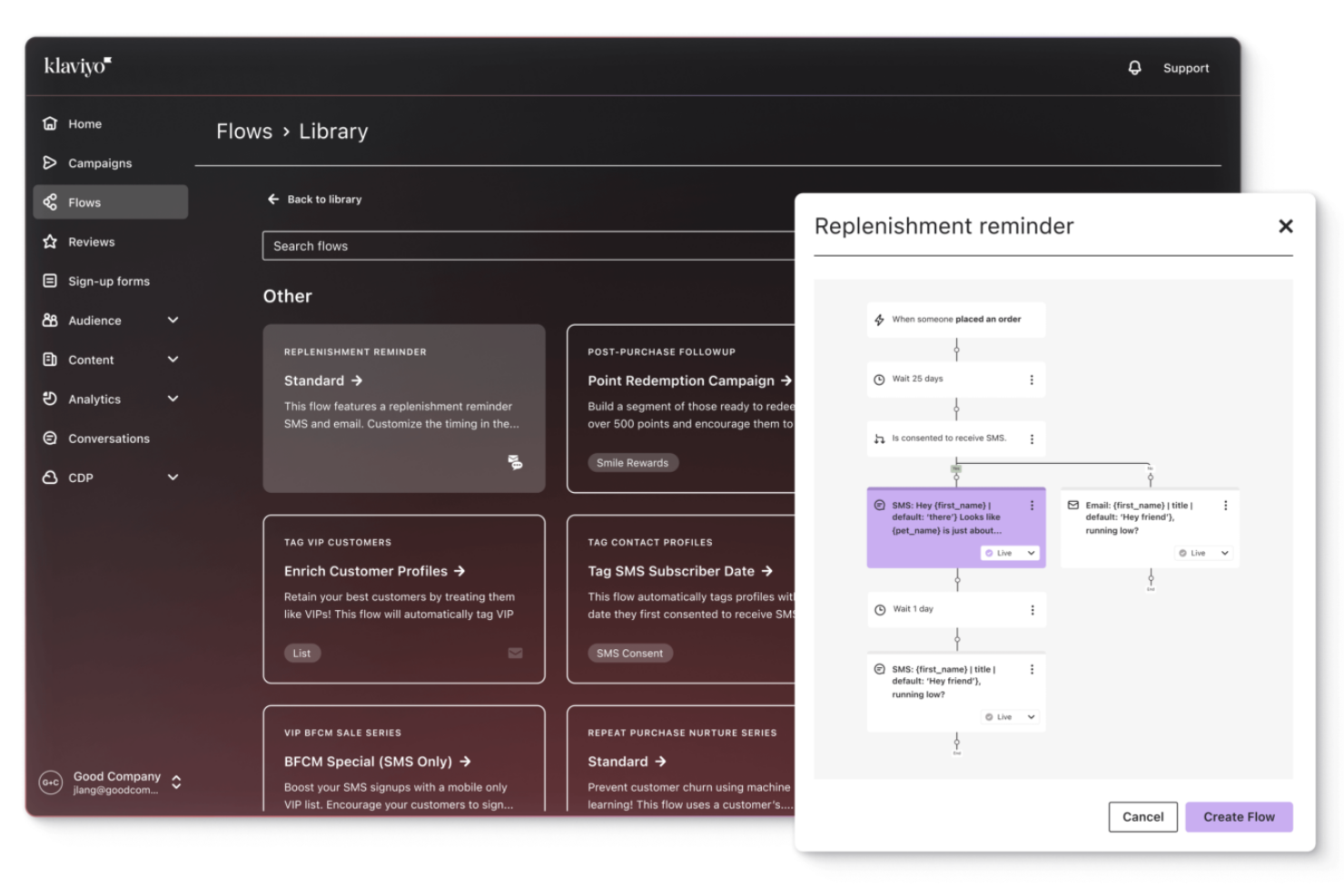
Klaviyo is on my short list because it excels at segmentation and personalization. I use it when I need precise targeting across lifecycle stages—especially for ecommerce brands with diverse audiences and product lines.
I like that I can trigger flows based on website activity, purchase history, and even predicted next order dates in Klaviyo. It lets my team break audiences down to a level that’s tough to match elsewhere, so we aren’t just sending the right message—we’re sending it at exactly the right moment and context.
Klaviyo’s Best For
- Ecommerce brands and marketers who need highly detailed audience segmentation
- Businesses running complex, data-driven email automation based on user behavior
Klaviyo’s Not Great For
- Small teams that only send basic newsletters or simple blasts
- Organizations that need built-in CRM or multichannel marketing beyond email and SMS
What Sets Klaviyo Apart
Klaviyo approaches email marketing with a pure focus on leveraging data for advanced segmentation. Where a platform like Moosend emphasizes simplicity for broad audiences, Klaviyo expects you to work with granular behavioral and transactional data right out of the gate. It’s built for people who want to act on detailed, real-time audience signals—treating every customer touchpoint as a trigger for targeting and automation. I see Klaviyo used most by ecommerce teams who want to build and refine dozens of highly targeted flows instead of relying on one-size-fits-all campaigns.
Tradeoffs with Klaviyo
Klaviyo optimizes for data-driven complexity, but what tends to suffer is the up-front learning curve and setup effort. Teams without dedicated resources for list management or who just want to launch simple campaigns often feel overwhelmed and underuse its more advanced segmentation capabilities.
Pros and Cons
Pros:
- Offers comprehensive data integration for unified customer profiles.
- Provides AI-driven insights for personalized marketing strategies.
- Supports omnichannel marketing, including email, SMS, and social media.
Cons:
- Some users desire more customization options.
- Pricing can escalate quickly as contact lists grow.

Best for AI-driven personalization
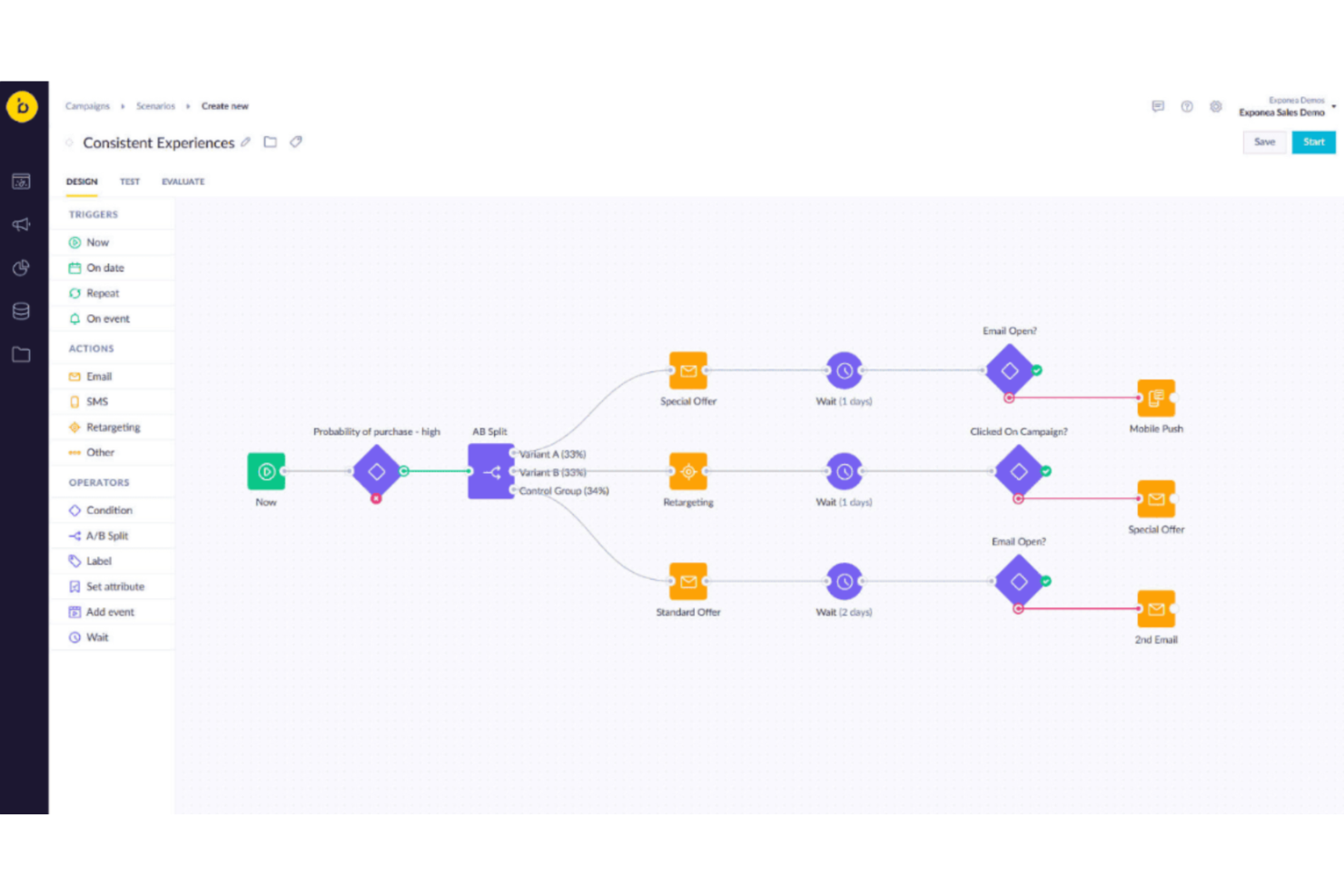
I end up picking Bloomreach whenever teams are demanding next-level personalization and want email campaigns to adapt to each contact in real time. The platform stands out when you need behavioral data and predictive AI to drive product recommendations or content blocks in your campaigns.
What I genuinely appreciate is how Bloomreach blends AI-driven targeting with dynamic customer segmentation, so your messages shift based on live activity. In practice, this means your automations go far beyond standard “if/then” rules—which is exactly where it shines compared to most email marketing platforms.
Bloomreach’s Best For
- Retail, ecommerce, and B2C brands prioritizing real-time, AI-based email personalization
- Marketing teams who want to automate product recommendations and dynamic content at scale
Bloomreach’s Not Great For
- Teams with basic email needs that don’t require advanced segmentation or AI features
- Organizations looking for a simple tool focused just on traditional email campaign builders
What Sets Bloomreach Apart
What I notice about Bloomreach is how it treats personalization as the default, not an add-on—every campaign or automation starts with the assumption that content should adapt to each recipient’s context. Unlike conventional ESPs like Constant Contact, which center on bulk delivery and basic “if/then” triggers, Bloomreach bakes AI recommendations, behavioral data, and commerce signals into how every message gets built and sent.
Instead of aiming for mass outreach, it’s designed for marketers who want every email—whether a promo or a post-purchase drip—to react to real-time changes in customer activity and product availability. I see teams shifting their entire approach, with data-driven audience targeting and recommendations forming the core of their messaging, not just the edge cases.
Tradeoffs with Bloomreach
What usually happens is, because Bloomreach optimizes for deep AI personalization and data connectivity, hands-on marketers who want quick-send campaigns or simple automations find the process heavier and less immediate. As a result, setup and ongoing management can take more involvement from technical and marketing ops teams, which just isn’t necessary if you only need basic newsletters.
Pros and Cons
Pros:
- Supports omnichannel campaigns across email, SMS, and web
- Real time campaign optimization
- Autonomous campaign management agents
Cons:
- Some advanced features feel limited for highly customized marketing workflows
- Certain features require manual adjustments for deeper campaign optimization
New Product Updates from Bloomreach
Bloomreach Adds Smart Triggers for Weblayers
Bloomreach introduces smart triggering for weblayers, enabling the Web SDK to evaluate real-time visitor conditions before display, along with performance and reliability improvements in Android SDK 5.3.0 and iOS SDK 4.3.0. For more information, visit Bloomreach's official site.
 .
.
Best for real-time behavioral messaging
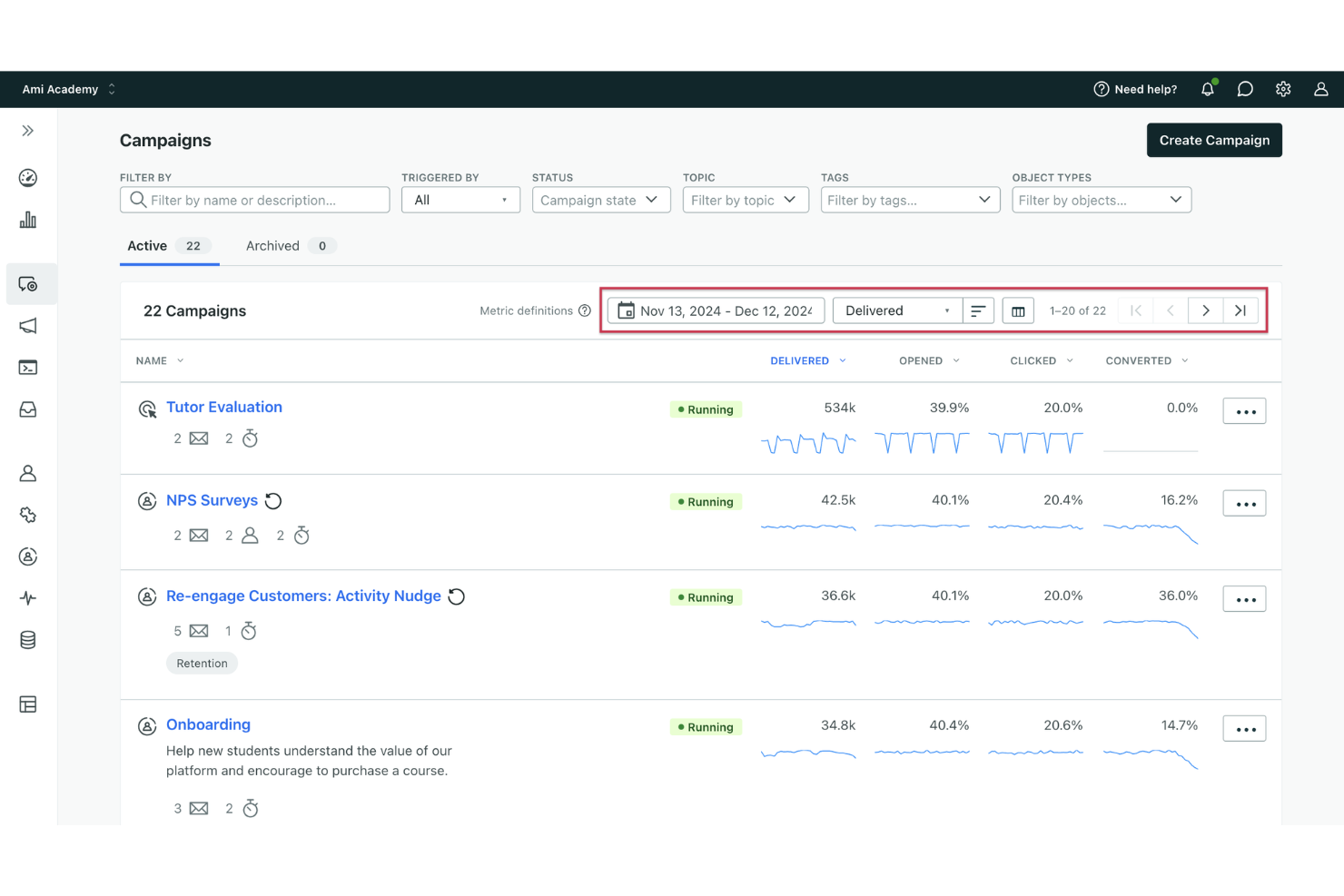
Customer.io is a marketing automation platform that lets you design, build, and send email campaigns through a visual workflow editor, event-based triggers, and flexible audience segmentation.
Who Is Customer.io Best For?
Customer.io is a strong fit for mid-market and enterprise product and growth teams that rely on user behavior and event data to drive their messaging strategy.
Why I Picked Customer.io
Customer.io is one of my top picks because I love how it handles real-time behavioral triggers. When a user completes a key in-app action—like skipping onboarding or hitting a usage threshold—Customer.io fires off a campaign response almost instantly, using live event data to determine the message, channel, and timing. I also rely on its anonymous event tracking, which captures behavior before a user even signs up, so my onboarding campaigns are already personalized by the time someone creates an account.
Customer.io Key Features
- Visual journey builder: Design multi-step email campaigns using a drag-and-drop canvas that maps out branching logic, delays, and conditions.
- A/B and multivariate testing: Test subject lines, content variations, or send times across email campaigns to identify top performers.
- Liquid-based personalization: Insert dynamic content into emails using Liquid syntax to tailor messaging based on user attributes or event data.
- Broadcast campaigns: Schedule and send one-time email blasts to segmented audiences for newsletters, announcements, or promotions.
Customer.io Integrations
Customer.io offers a large integration directory spanning data-in and data-out connections, including Salesforce, HubSpot, Segment, Snowflake, Google BigQuery, Amplitude, Mixpanel, Slack, Twilio, and Google Analytics 4. It's available on Zapier and provides REST APIs, webhooks, and SDKs for custom integrations.
Pros and Cons
Pros:
- Liquid templating for deep email personalization
- Built-in multi-channel messaging orchestration
- Event-driven triggers based on real-time behavior
Cons:
- Limited pre-built email design templates
- Requires technical skill for initial setup
New Product Updates from Customer.io

Customer.io Adds Conversational Analytics for Behavioral Insights
Customer.io’s agent, CLI, and MCP tools can now analyze workspace messaging and behavioral data to generate advanced reports across key performance areas. For more information, visit Customer.io's official site.
 .
.
Flodesk
Best for design-driven email marketing
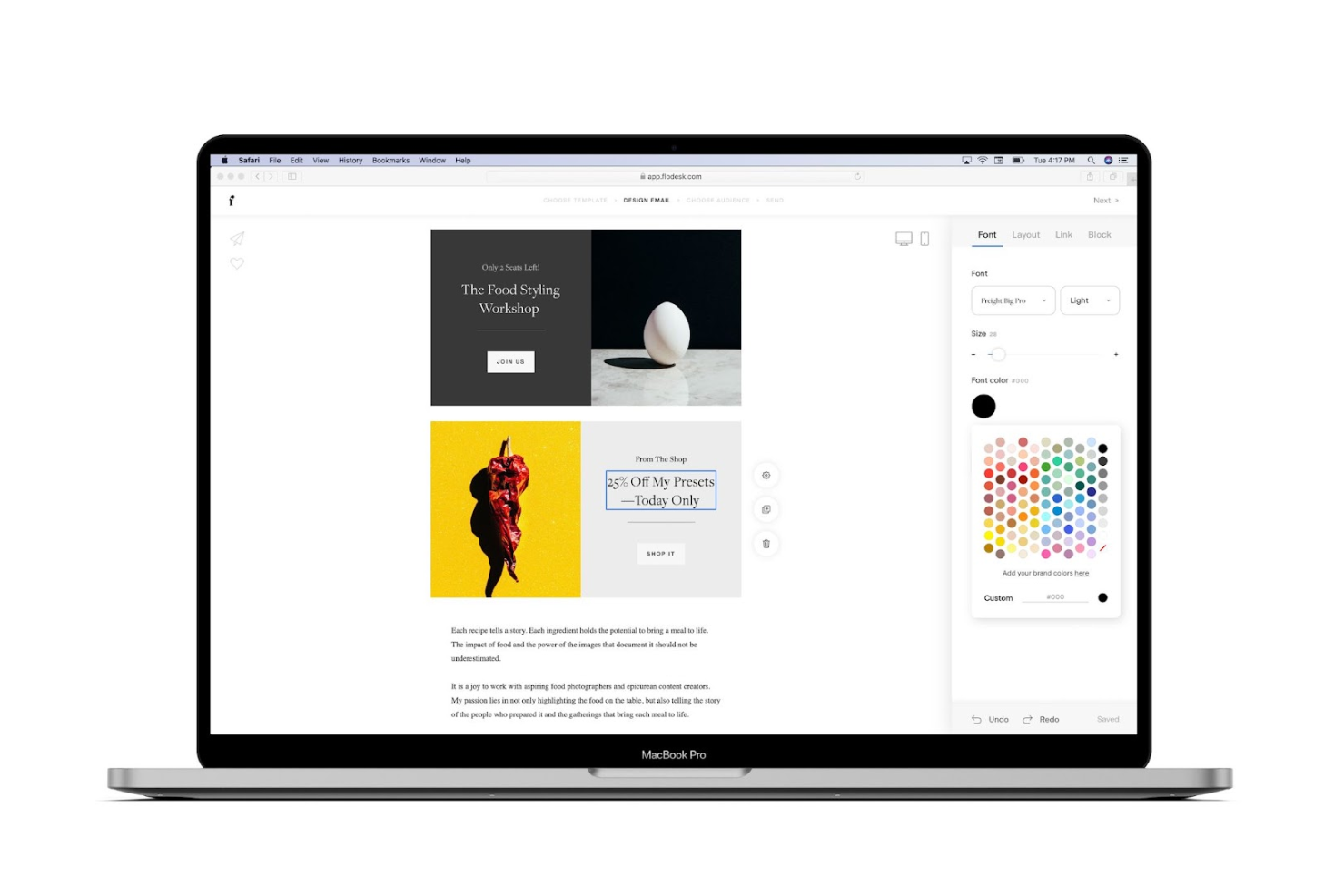
Flodesk stands out to me because it truly focuses on design, letting you create beautiful, brand-forward emails without advanced design skills. I reach for it when I see brands that want their emails to stand out visually but don’t want to bring in a designer for every campaign.
What I really appreciate is how their drag-and-drop editor lets you use rich imagery and layouts the way you’d build an Instagram post. It’s a good fit for teams where visual brand identity is just as important as messaging—especially when you need to keep email design fast, consistent, and stunning.
Flodesk’s Best For
- Brands and creators who rely on strong visual identity in email marketing
- Small businesses that want fast, design-driven emails without a dedicated designer
Flodesk’s Not Great For
- Marketing teams that need advanced automation or segmentation workflows
- Businesses with compliance-heavy or highly technical email requirements
What Sets Flodesk Apart
Flodesk stands out for how it treats email as a visual branding channel rather than a purely tactical marketing tool. When I compare it with something like Mailchimp, the difference is obvious—Flodesk expects teams to prioritize design and consistent aesthetics rather than granular targeting or technical automation.
This design-first approach makes email feel more like an extension of your brand identity, with layouts and styling much closer to what you’d see in Canva than in a traditional ESP. Teams who care most about look and feel tend to thrive here, since almost everything is built around creative expression.
Tradeoffs with Flodesk
In my experience, Flodesk optimizes for beautiful email layouts and visual simplicity. The trade-off is that you give up advanced segmentation, testing, and the depth of analytics you’d get from more technical platforms—so once you need complex marketing automation or granular reporting, you’re working with real limitations.
Pros and Cons
Pros:
- Visually polished email templates
- Built-in automation workflows
- Custom font and brand control
Cons:
- Limited advanced API access
- No built-in SMS marketing

Klaviyo
Best for advanced integrations

Klaviyo is a CRM platform that offers automated email and SMS marketing campaigns with a huge focus on personalization and segmentation. It was designed to help brands drive increased sales through super-targeted email, as well as SMS, Facebook and Instagram marketing campaigns.
Why I picked Klaviyo: Klaviyo offers a streamlined platform focused exclusively on email and SMS marketing. Using their system, your team will stay focused on these core activities without getting bogged down by too many complicated features.
Klaviyo standout features & integrations
Standout features include granular customer segmentation that enables hyper-targeted email and SMS marketing campaigns based on behavior, preferences, and purchase history. The platform’s drag-and-drop email builder and built-in forms make it easy to design high-converting campaigns without needing design or coding expertise. Additionally, Klaviyo’s predictive analytics and data benchmarks help businesses anticipate customer needs and optimize their marketing strategies.
Integrations include 29Next, Cohley, Duel, Email Heatmaps, FindKeep.Love, Google Ads, Gorgias, LeadDyno, Magento, Okendo, OpenCart, Recharge, ReferralCandy, Segmentify, Yieldify, and Viral Loops.
Pros and Cons
Pros:
- Clear UI that’s easy to understand
- Allows you to target users who abandoned their carts
- Exceptional list segmentation ability
Cons:
- No option to automatically export your user segments to Google Ads
- Formatting email fonts can be difficult
Other Ecommerce Marketing Software
If the software options above still don’t meet your needs, here are a few other options you may want to look at:
- ActiveCampaign
For targeting the customer lifecycle
- Drip
For ecommerce businesses
- BigCommerce
For seamless platform integrations
- AWeber
For email automation and sequences
- GetResponse
For engaging email campaigns
- iContact
For drag-and-drop design
- SendGrid
For multichannel marketing campaigns
- Campaign Monitor
For usability and ease of use
- Elastic Email
For API integration and control
- Constant Contact
For automatic subject line testing


How I Evaluate Ecommerce Email Marketing Software
My evaluation splits into two layers: the baseline a tool must clear—think abandoned cart flows and behavioral segmentation—and the differentiators that make one platform the right fit.
Core Functionality (Table Stakes For This List)
When I'm selecting tools for my list, I rank each one on a scale from 0 (does not offer the functionality) to 5 (excels in this area) for each core functionality listed below. Then, I calculate the tool's total score into a percentage. Each tool needs to achieve a minimum total score of 75% to be considered for inclusion.
- Email Campaign Builder: I look for a drag-and-drop editor with responsive templates, mobile preview, and reusable content blocks that make it easy to build on-brand promotional sends.
- Marketing Automation Workflows: Whether it's a post-purchase follow-up or an abandoned cart sequence, I evaluate how each tool handles behavioral triggers and branching logic.
- List & Subscriber Management: Good contact management means tags, custom fields, and preference centers—I check how each tool organizes and syncs subscriber data at scale.
- Segmentation & Personalization: I look at how granular each platform gets with dynamic segments, from filtering by purchase history to inserting conditional content blocks per audience.
- A/B Testing & Optimization: Split-testing subject lines is table stakes—I evaluate whether a tool also supports content and send-time testing with automatic winner deployment.
- Analytics & Deliverability Reporting: Beyond open and click rates, I check for revenue attribution, bounce tracking, and deliverability monitoring to gauge real campaign impact.
Once I have a list of tools that meet this criteria, I consider what sets each platform apart.
Differentiating Factors (What Sets Vendors Apart)
Here's how I compare and contrast different vendors:
Standout Features
Revenue attribution tracking is a big one—I want to see exactly how much revenue a specific abandoned cart flow or product launch campaign generated, not just opens and clicks. Pre-built automation recipes also matter because they let teams launch proven sequences like win-back or post-purchase flows without building from scratch. AI content generation is worth evaluating too, especially when a tool drafts subject line variations or product-driven copy that pairs with send-time optimization to improve performance across high-volume sends.
Beyond Features
Integrations matter a lot here—I check whether a platform natively syncs with ecommerce tools like Shopify or WooCommerce to pull in product and order data without manual workarounds. Deliverability is another factor I evaluate closely, including dedicated IP options, domain authentication support, and built-in spam testing. Pricing structure also shapes my recommendations, especially whether a tool scales predictably as your list grows and offers a free tier or trial that lets smaller teams actually evaluate the platform before committing.
What is Ecommerce Email Marketing Software?
Ecommerce email marketing software is a platform that automatically sends targeted, personalized emails to your shoppers—turning browsers into buyers (and buyers into repeat customers).
It goes way beyond basic newsletters.
This software handles the heavy lifting: abandoned cart nudges, custom product recommendations, and those “just checking in” follow-ups you never have time for.
The real power is in its automation—it tracks what people click, buy, and ignore, then fires off exactly the right message at the perfect moment (no human micromanagement required).
Plug it into your Shopify or WooCommerce store, and you’ll have a tireless marketing machine working behind the scenes.
In short: it keeps your brand in your customers’ inboxes and revenue flowing—while you worry about literally anything else.
How to Choose Ecommerce Email Software
Choosing the right ecommerce email marketing software isn’t about picking the flashiest dashboard—it’s about finding a tool that actually helps you sell more (without giving you a headache). Here’s how to choose one you’ll still love six months from now:
| Step | What to look for | Why it matters |
|---|---|---|
| Automate everything | Flows triggered by real customer actions—cart abandonment, post-purchase, etc. | Keeps you top-of-mind and selling, even when you’re off the clock |
| Segment like a pro | Filters for behavior, purchase history, and demographics | Your emails stop feeling spammy and start actually converting |
| Make it stupid simple | Drag-and-drop editors, prebuilt templates, no “coding experience required” | Spend time writing, not wrestling with a clunky builder |
| Plug in everywhere | Integrations with Shopify, WooCommerce, Magento, and whatever else you use | All your data syncs up—goodbye, manual updates and weird gaps |
| Track what matters | Open/click rates, conversions, revenue per email | You see what’s working, kill what isn’t, and double down on winners |
| Plan for your glow-up | Flexible plans and features that won’t cap you as you scale | You won’t need to migrate software the second you hit your stride |
Focus on these, and you'll actually enjoy email marketing. Or at least, you'll enjoy the sales. And when customers have questions about their orders or need assistance, having quality customer service tools in place keeps the experience smooth.
Ecommerce Email Marketing Trends
Here are some key trends shaping the world of ecommerce email marketing in 2025:
- AI-powered personalization. AI tools are now creating highly personalized experiences by analyzing customer data to send targeted emails based on behavior, past purchases, and future predictions. This trend is helping brands deliver more relevant content to customers.
- Omnichannel marketing integration. Email marketing is evolving into part of a larger omnichannel strategy, with seamless integration of SMS, push notifications, and social media. This approach creates consistent customer journeys across different platforms.
- Interactive emails. Expect more emails featuring interactive content like image carousels, videos, and even embedded quizzes, all designed to increase user engagement and click-through rates.
- Sustainability in email marketing. As consumers become more eco-conscious, businesses are adjusting email frequency and content to minimize environmental impact while emphasizing sustainability in their campaigns.
- AI content generation. AI is taking over content creation by crafting subject lines, product recommendations, and even full email copy, making it easier to send personalized, engaging messages without requiring hours of manual work.
- Zero-party data collection. With the decline of third-party cookies, businesses are turning to zero-party data—information that customers willingly provide through surveys or preference settings—to fuel their email personalization efforts.
- Advanced analytics and real-time reporting. Marketers now have access to real-time data and advanced analytics, allowing them to monitor campaign performance on the fly and make adjustments to maximize engagement and ROI.
Key Features of Ecommerce Email Marketing Platforms
When it comes to ecommerce email marketing software, there are a ton of features designed to help you automate, personalize, and optimize your communication with customers.
Here are the key features you should look for:
- Automated workflows. Set up email sequences that run on autopilot, triggered by customer actions like abandoned carts, post-purchase thank-yous, or even personalized product recommendations based on browsing history. These workflows save you time and keep customers engaged without manual effort.
- Segmentation and personalization. No more one-size-fits-all emails. Use data like purchase history, demographics, or engagement levels to segment your audience and send hyper-targeted, personalized messages that hit the mark.
- Abandoned cart recovery. Nothing says, "we want you back" like a well-timed email reminding customers about the items they left behind. Throw in a discount or free shipping offer, and you’ve got a winning formula to reclaim those lost sales.
- Product recommendations. Using customer behavior data, these platforms can recommend products that fit the shopper’s taste. Whether it’s a cross-sell, upsell, or just a nudge toward items they browsed but didn’t buy, personalized suggestions increase the chances of a sale.
- Dynamic content. Forget static emails—dynamic content customizes itself to each recipient’s data. Think product suggestions, content blocks, or even special offers that change depending on who’s reading the email. It’s like each customer gets their own tailor-made message.
- A/B testing. Curious which subject line gets more clicks? A/B testing allows you to experiment with different email elements—subject lines, copy, layouts, or CTAs—and figure out which version delivers the best results. Data-backed decisions for the win!
- Analytics and reporting. Real-time reporting gives you a bird’s-eye view of your campaign performance. Track open rates, click-throughs, conversions, and even revenue generated, so you know exactly what’s working and what needs tweaking.
- Integration with ecommerce platforms. The best email marketing tools integrate seamlessly with Shopify, WooCommerce, Magento, and more, pulling in customer data to make emails more relevant and timely. Integration is the key to keeping everything—from product inventory to purchase history—aligned.
- Responsive design. With more people reading emails on their phones, having responsive email templates is a must. The software should ensure that your emails look flawless, whether opened on a desktop, tablet, or smartphone.
- Social media integration. Why stop at email? Some platforms let you sync up with social media, so you can promote your email campaigns across multiple channels and engage your audience wherever they hang out online.
- List growth tools. Growing your email list is crucial. Look for features like pop-up forms, exit-intent pop-ups, and lead magnets that help convert visitors into subscribers and increase your audience.
- Transactional emails. Beyond marketing, your software should handle transactional emails like order confirmations and shipping notifications. These must be on-brand and reliable to maintain a smooth customer experience from purchase to delivery.
With these features in your toolkit, you can build a robust email marketing strategy that drives sales, retains customers, and grows your business without a ton of manual effort.
Top Benefits of Ecommerce Email Marketing Software
Ecommerce email marketing software offers significant advantages that help you engage customers, increase sales, and streamline operations.
Here’s how it can boost your business:
- Automates customer engagement. Automated workflows keep customers engaged by sending triggered emails like abandoned cart reminders and post-purchase follow-ups—without requiring manual input.
- Boosts personalization. Segmenting your audience and sending personalized emails based on customer behavior improves engagement, as emails feel more relevant and targeted.
- Recovers lost sales. Abandoned cart recovery emails automatically remind customers about the items they left behind, often leading to completed purchases and salvaged revenue.
- Increases average order value. Personalized product recommendations based on browsing or purchase history encourage customers to add more to their carts, driving cross-sells and upsells.
- Saves time and resources. Automation handles repetitive tasks, allowing your team to focus on strategy and scale your email marketing efforts efficiently.
- Provides data-driven insights. Analytics track performance metrics like open rates and conversions, helping you refine campaigns for maximum effectiveness.
- Strengthens customer relationships. Regular, personalized emails build trust and loyalty, encouraging repeat purchases and keeping customers engaged.
- Enhances mobile engagement. Responsive email templates ensure your messages display correctly on any device, increasing accessibility and reach.
- Streamlines marketing efforts. Integration with ecommerce platforms and marketing tools ensures that your email strategy is aligned with your overall marketing, creating a cohesive customer experience.
Cost & Pricing of Ecommerce Email Marketing Software
Ecommerce email marketing software comes in various pricing tiers to accommodate businesses of all sizes, from startups to large enterprises. The cost typically depends on factors like the number of subscribers, features, and scalability.
Here’s a breakdown of common pricing structures you can expect:
| Plan Type | Average Price | Common Features | Best For |
|---|---|---|---|
| Free | $0 | Basic email campaigns, limited automations, up to 500 subscribers, limited templates, standard support. | Startups, hobbyists, or businesses with very small lists. |
| Basic | $9 – $20/month | Automated workflows, basic segmentation, limited reporting, up to 1,000 subscribers, simple templates. | Small businesses just starting with email marketing. |
| Professional | $50 – $100/month | Advanced segmentation, A/B testing, multichannel marketing (email, SMS), integrations, up to 5,000 subscribers. | Growing businesses needing more advanced features. |
| Advanced | $150 – $300/month | Full marketing automation, dynamic content, personalized product recommendations, advanced reporting, custom branding. | Medium to large businesses with complex needs and larger subscriber bases. |
| Enterprise | $350+/month | Full customizations, dedicated support, enterprise-level automations, priority customer service, up to 100,000+ subscribers. | Large enterprises or businesses handling very high-volume email campaigns. |
Key pricing factors to consider
- Subscriber limits. Most pricing tiers are based on the number of subscribers you manage. Higher tiers generally allow for more subscribers.
- Automation complexity. As you move up the pricing ladder, you’ll gain access to more advanced automation features, such as multichannel workflows, dynamic content, and behavior-based triggers.
- Integrations. Higher-tier plans often include better integrations with popular ecommerce platforms (like Shopify, WooCommerce), CRMs, and other marketing tools.
- Support and resources. Higher pricing tiers often come with dedicated support or priority customer service, which can be essential for troubleshooting or managing complex email campaigns.
- Customization and branding. Professional and enterprise plans typically allow for more robust customization options, ensuring that your email templates match your brand’s identity.
Additional costs to consider
- SMS and multichannel marketing. Some platforms offer SMS and other channels as add-ons, so if you need a multichannel approach, factor this into your budget.
- Overage charges. Exceeding your subscriber limit could result in additional fees, depending on the platform.
- Setup fees. Enterprise-level services may include initial setup or consultation fees.
Understanding these tiers can help you select the right plan based on your current business needs and budget, while also providing scalability as your business grows.
Ecommerce Email Marketing Platforms FAQs
We’ve come a long way, but you probably still have some questions. You’re curious, and I’m going to reward you for it. Let’s see what we’ve got.
How do I measure the success of my email marketing campaigns?
Tracking the right metrics is key to understanding your campaign’s performance. Look at KPIs such as open rates, click-through rates, conversion rates, and unsubscribe rates. Additionally, measuring ROI (revenue generated per campaign) and tracking customer engagement over time can help refine your strategies.
Advanced platforms offer real-time analytics and heatmaps to visualize where users are interacting most with your emails.
Can I switch email marketing platforms easily without losing my data?
Yes, most email marketing platforms offer data migration tools to help you transfer subscriber lists, email templates, and automation workflows from one platform to another. Some platforms provide direct integrations, while others may require using third-party tools (e.g., Zapier).
It’s always a good idea to verify what data can be migrated before making a switch to avoid disruptions.
How important is email deliverability, and how can I improve it?
Email deliverability is crucial because it determines whether your emails land in the recipient’s inbox or their spam folder. Improving deliverability involves:
- Maintaining clean email lists (removing inactive or incorrect addresses).
- Using a reputable email provider with high deliverability rates.
- Personalizing emails to avoid spam filters.
- Ensuring compliance with GDPR or CAN-SPAM regulations to build trust with ISPs (Internet Service Providers).
How much time does it take to set up an effective email marketing campaign?
The time required depends on the complexity of your campaign. For simple newsletters or promotions, using pre-built templates and basic automations can have you up and running in a couple of hours.
More complex campaigns involving segmentation, A/B testing, and multichannel workflows may take a few days to configure properly. Most platforms provide drag-and-drop builders and automation tools to speed up the process.
What’s the difference between email marketing and marketing automation?
Email marketing focuses on sending email campaigns, while marketing automation refers to creating automated workflows that deliver emails (and potentially other types of messages like SMS or push notifications) based on user behavior.
Automation helps you set up triggered emails like abandoned cart reminders or re-engagement campaigns, ensuring customers get the right messages at the right time without manual intervention.
Can email marketing platforms help with customer retention?
Yes, email marketing is one of the most effective tools for customer retention. By sending personalized product recommendations, post-purchase follow-ups, loyalty rewards, and exclusive offers, you can keep customers engaged long after their first purchase.
Automated campaigns, like win-back emails or birthday discounts, help maintain relationships with customers and encourage repeat business.
Other Ecommerce Marketing Software Reviews
Here are a few other lists of key ecommerce marketing software that you can consider for your overall marketing strategy.