

Marketing attribution software finally solves ecommerce’s biggest headache: understanding exactly which ads, emails, and campaigns drive sales (and which ones just drain your budget).
For ecommerce marketers, good attribution is like the last Pringle in the can—you see it, you want it, but it's just out of reach (plus you don't want to deal with getting your hand unstuck again).
Without proper attribution, you're throwing ideas at a dartboard—blindfolded.
The stakes couldn’t be higher: overspending on ineffective channels, underfunding winners, and sweating bullets explaining blurry results to your boss.
Luckily, we’ve tested all the attribution tools to find the best ones for your store. Here are our top picks to help your ecommerce business grow like a weed.
Why Trust Our Software Recommendations
6,700+
Reviews
20
Industry experts
16+
Evaluation factors
14
Years
Our team has been testing and reviewing software since 2012. As retail leaders ourselves, we know how difficult—and important—it is to choose the right software.
For this guide, we evaluated tools using hands-on testing and independent research, scoring tools using our selection criteria.
Our reviews reflect our independent judgment—not a sales pitch.
Marketing Attribution Software Comparison Table
Below, you’ll first find the pricing comparison for these top marketing attribution solutions:
| Tool | Best For | Trial Info | Price | ||
|---|---|---|---|---|---|
| 1 | Best for flexible attribution configuration | Free plan available | From $20/month | Website | |
| 2 | Best free-to-use marketing software | Free plan available | From $50,000/year (billed annually) | Website | |
| 3 | Best for building custom attribution rules | 14-day free trial | From $139/month | Website | |
| 4 | Best for campaign fraud prevention | 30-day free trial | Pricing upon request | Website | |
| 5 | Best B2B software marketing attribution | Free demo available | Pricing upon request | Website | |
| 6 | Best for offline conversion tracking | Not available | From $400/month | Website | |
| 7 | Best omni-channel attribution software | Free plan available | From $500/month | Website | |
| 8 | Best for advanced attribution models | Free demo available | Pricing upon request | Website | |
| 9 | Best holistic enterprise marketing software | Not available | Pricing upon request | Website | |
| 10 | Best for Google ecosystem attribution and MMM | Not available | Pricing upon request | Website |


Pro Tip: Don’t commit blindly. Test-drive your top picks with a free trial or demo. There’s nothing like poking around to see if it clicks with your workflow.
The Best Marketing Attribution Software You Should Be Using
Welcome to the reviews. For each of these lovely marketing attribution tools, we cover what they do, why we picked them, standout features, cool integrations, plus pros and cons to make your decision easier.
 Best for flexible attribution configuration
- Free plan available
- From $20/month
Visit WebsiteCustomer Rating:4.6/5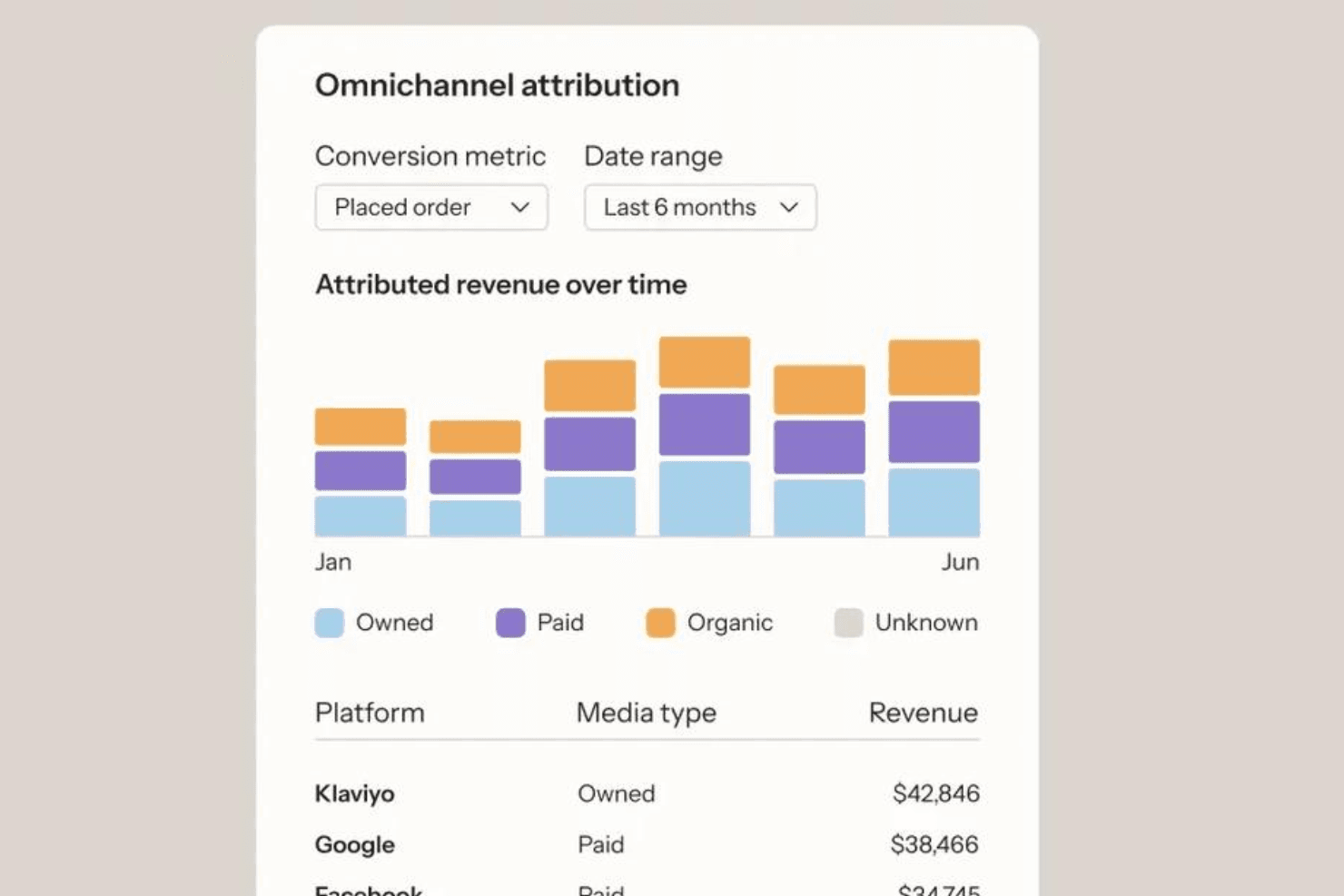
Klaviyo tracks attributed revenue across owned, paid, and organic channels. Klaviyo is a customer data platform and marketing analytics tool that unifies owned-channel data (email, SMS, push) with paid ad performance across Meta, Google, and TikTok, offering customizable multi-touch attribution modeling and cross-channel revenue reporting.
Who Is Klaviyo Best For?
Klaviyo is a strong fit for ecommerce and DTC brands that run email, SMS, and paid social campaigns and need granular control over how revenue gets attributed across those channels.
Why I Picked Klaviyo
Klaviyo earns its spot on my shortlist because of how much control it gives you over attribution configuration. You can set custom lookback windows per touchpoint (email open, SMS click, push delivered) and switch between last-touch and omnichannel linear multi-touch models, with changes applied retroactively across all historical data. I also like that you can preview Klaviyo-Attributed Value before committing to a new model, so you're not flying blind when testing different configurations.
Klaviyo Key Features
- Omnichannel attribution dashboard: A unified view that consolidates revenue attribution across Klaviyo-owned channels and paid ad platforms (Meta, Google, TikTok) without double-counting conversions.
- Noise filtering controls: Built-in settings to exclude bot clicks and Apple Mail Privacy Protection opens from attribution calculations, keeping your revenue data accurate.
- Audience Sync: Syncs first-party Klaviyo segments directly to Meta, Google, TikTok, Pinterest, and Criteo for retargeting and lookalike ad targeting.
- Predictive CLV modeling: Automatically built and retrained weekly using your own customer data, with outputs usable for segmentation by predicted lifetime value.
Klaviyo Integrations
Klaviyo offers 350+ native integrations, including Shopify, Square POS, Shopify POS, Lightspeed Retail, Meta, Google Ads, TikTok, Snowflake, and BigQuery. Its Events API supports custom POS and brick-and-mortar data, but native retail media network connectors aren't documented.
Pros and Cons
Pros:
- Omnichannel dashboard prevents revenue double-counting
- Retroactive attribution model changes are supported
- Customizable attribution windows for every touchpoint
Cons:
- Results can differ from analytics platforms
- No incrementality or media mix modeling
Learn more about Klaviyo: Best free-to-use marketing software
- Free plan available
- From $50,000/year (billed annually)
Visit WebsiteCustomer Rating:4.6/5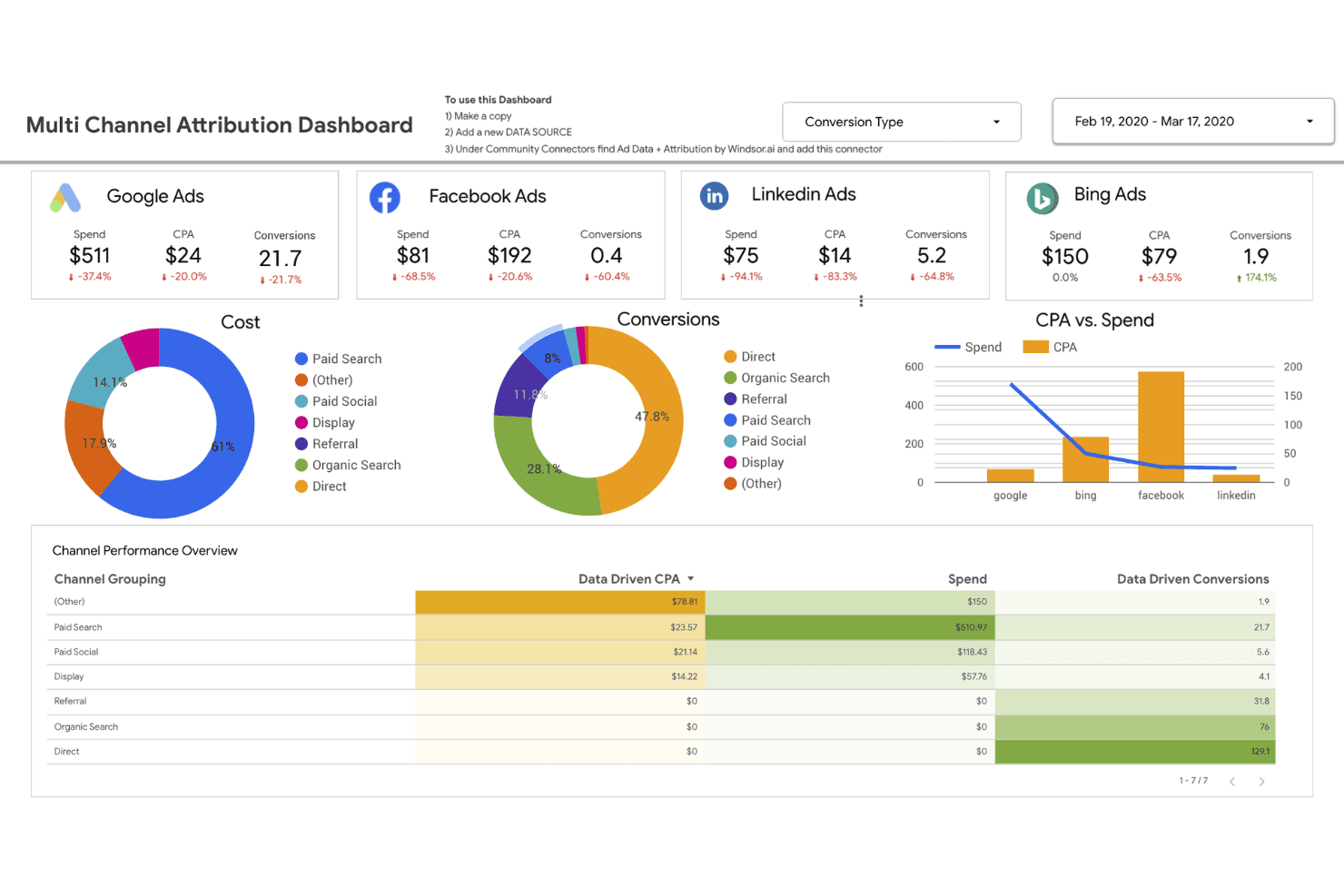
This dashboard tracks ad spend, CPA, and conversions across channels. Google Analytics is a web analytics and attribution platform that tracks user behavior across digital channels, offering data-driven attribution modeling, cross-channel conversion path reporting, and media mix optimization.
Who Is Google Analytics Best For?
Google Analytics is a strong fit for ecommerce growth managers and retail marketing teams that run primarily on Google's ad stack and need solid digital attribution without a software budget.
Why I Picked Google Analytics
Google Analytics earns its spot on my shortlist because it's the only attribution tool that delivers data-driven attribution at zero cost for most businesses. I love how GA4's Data-Driven Attribution uses a counterfactual ML approach, comparing converting and non-converting user paths to assign fractional credit across touchpoints. The Conversion Paths report makes it easy to see exactly which channel sequences drive purchases, whether that's Display to Organic Search to Direct or a paid social assist you'd otherwise miss.
Google Analytics Key Features
- Conversion Paths report: Visualizes the full sequence of channels a user touches before converting, so you can see exactly which channel combinations drive purchases.
- Consent Mode v2 with behavioral modeling: Uses ML to model conversions for users who decline tracking consent, helping you maintain measurement accuracy under GDPR and CCPA constraints.
- BigQuery native export: Sends raw, unsampled event-level data directly to BigQuery, where you can run custom SQL queries or build your own attribution models.
- Predictive audiences: GA4's ML models flag users with high purchase or churn probability, letting you prioritize ad spend toward the highest-value segments.
Google Analytics Integrations
Google Analytics has native integrations with Google Ads, Search Ads 360, Display & Video 360, Google Search Console, BigQuery, Salesforce Marketing Cloud, Shopify, and Firebase. Measurement Protocol and Data Import support custom offline and CRM data connections.
Pros and Cons
Pros:
- Enables advanced ML-based predictive audiences
- Seamlessly connects with Google digital channels
- Provides free data-driven attribution modeling
Cons:
- Attribution models lack audit transparency
- Limited retail media network measurement
Learn more about Google Analytics: Best for building custom attribution rules
- 14-day free trial
- From $139/month
Visit WebsiteCustomer Rating:4.5/5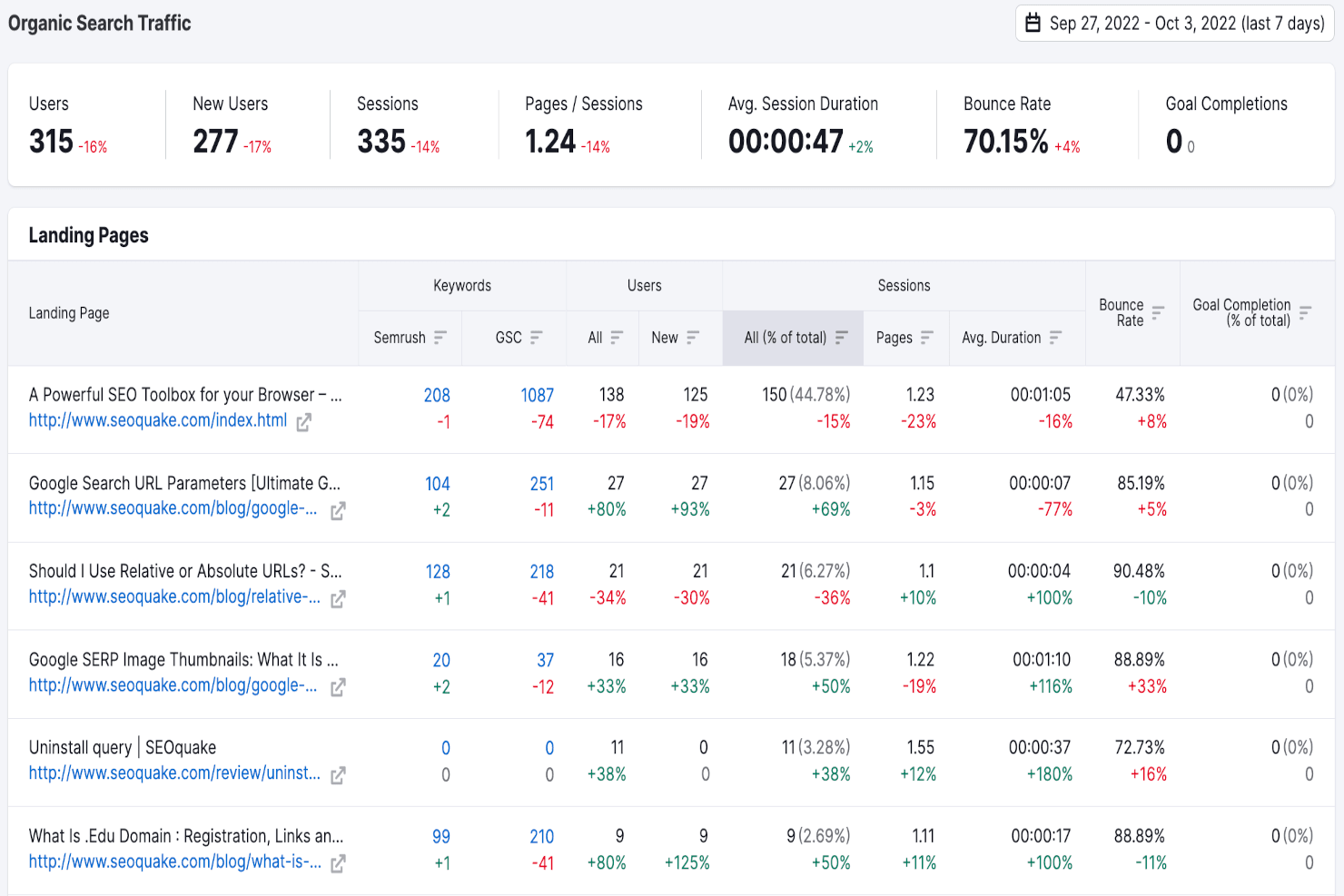
Semrush tracks organic search traffic and landing page performance metrics. Semrush is a digital marketing analytics platform that spans SEO, paid media, competitive intelligence, and cross-channel reporting, with tools for tracking traffic sources, campaign performance, and marketing visibility across search, social, and email channels.
Who Is Semrush Best For?
Semrush fits digital marketing teams that need a single platform to track SEO, paid, social, and email performance alongside competitive intelligence.
Why I Picked Semrush
I've included Semrush in my top picks because it lets you build custom attribution rules that reflect how your channels actually work together, rather than forcing you into a rigid model. I particularly like the My Reports builder, which pulls data from 20+ sources, including Google Ads, Meta Ads, Klaviyo (with revenue attribution), and HubSpot CRM, into a single dashboard you can configure around your own attribution logic. The Traffic Analytics channel breakdown, which covers organic, paid, social, email, and even AI-referred traffic, gives you the granular data you need to define and refine those rules with confidence.
Semrush Key Features
- AI Visibility Toolkit: Tracks how your brand is mentioned and cited across AI platforms like ChatGPT, Gemini, and Perplexity, with competitor benchmarking included.
- Traffic Analytics channel breakdown: Shows traffic volume and engagement metrics segmented by organic, paid, social, email, referral, and AI-referred sources.
- Position Tracking: Monitors daily keyword rankings across Google, Bing, and AI search environments to show how visibility shifts over time.
- Semrush Copilot: An AI assistant that analyzes data across six core platform tools to surface issues, flag competitor movements, and recommend next steps.
Semrush Integrations
Semrush offers 20+ native integrations, including Google Analytics 4, Google Search Console, Google Ads, Meta Ads, Klaviyo, HubSpot CRM, and CallRail. Advanced and Enterprise plans include API access for custom integrations and data warehouse connectivity.
Pros and Cons
Pros:
- Offers proprietary AI visibility tracking tools
- Shows channel-level traffic and revenue breakdowns
- Aggregates data across 20+ digital channels
Cons:
- Lacks offline and in-store attribution capabilities
- No multi-touch attribution modeling engine
Learn more about Semrush: Best for campaign fraud prevention
- 30-day free trial
- Pricing upon request
Visit WebsiteCustomer Rating:4.4/5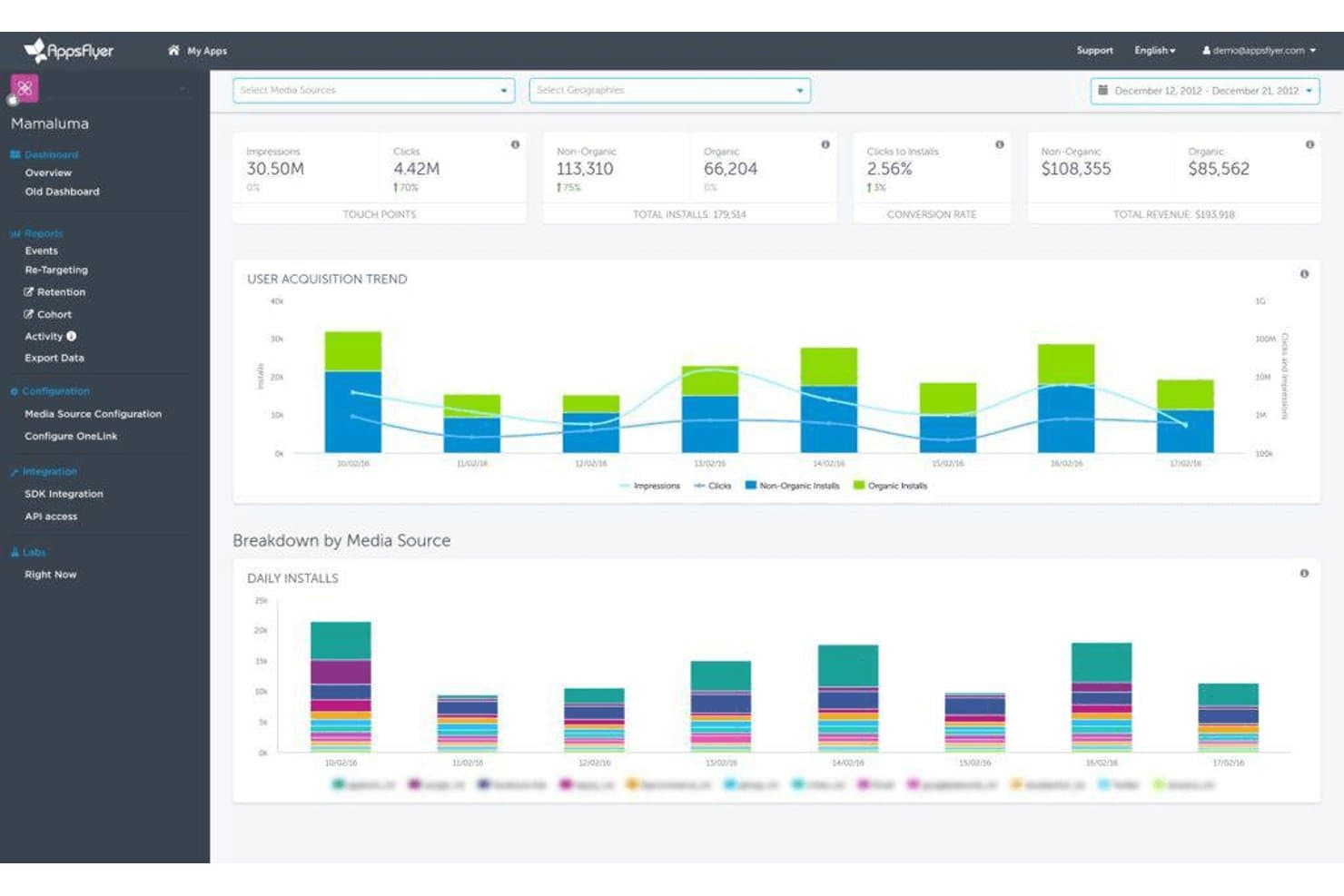
AppsFlyer tracks installs, revenue, and user acquisition trends by media source. AppsFlyer is a mobile-first marketing attribution platform that measures campaign performance across paid, owned, and earned channels—including mobile apps, web, CTV, and retail media networks—with built-in fraud protection, incrementality testing, and cross-channel ROI reporting.
Who Is AppsFlyer Best For?
AppsFlyer is a strong fit for mobile-first retail and ecommerce brands that run paid app campaigns and need to protect ad spend from fraudulent installs and invalid traffic.
Why I Picked AppsFlyer
AppsFlyer earns its spot on my shortlist because Protect360 is the most thorough fraud defense I've seen built into an attribution platform. It catches fraudulent installs in real time using behavioral biometrics and blocks tactics like SDK spoofing and click flooding before they inflate your numbers, then runs post-attribution reconciliation to flag anything that slipped through. I also like that the incrementality testing product lets you validate true campaign lift with holdout groups across networks simultaneously, so you're not just catching fraud but confirming what's actually driving conversions.
AppsFlyer Key Features
- Multi-touch attribution modeling: Supports a full suite of attribution models including first-touch, last-touch, linear, time-decay, position-based, W-shaped, and data-driven ML attribution across mobile, web, and CTV.
- ROI360 cost and revenue reporting: Aggregates cost data from 100+ ad networks and matches it against in-app purchase, subscription, and ad revenue in real-time for unified ROAS reporting.
- Data Clean Room: Enables privacy-safe first-party data collaboration between brands and retail media networks using federated processing and differential privacy, with native Snowflake and BigQuery integration.
- Deep linking: Routes users from any channel—email, SMS, QR codes, social, or web—to specific in-app content, with deferred deep linking support to maintain journey continuity even before app installation.
AppsFlyer Integrations
AppsFlyer offers marketplace integrations with Google Ads, Meta, TikTok, Amazon Ads, Walmart Connect, Braze, Snowflake, BigQuery, and Amazon S3, plus 10,000+ ad network integrations. Push and Pull APIs, Cost API, and Data Locker support custom connections.
Pros and Cons
Pros:
- Retail media network and QR attribution support
- Dedicated incrementality testing included in platform
- Industry-leading fraud prevention for campaigns
Cons:
- Web attribution features still relatively new
- No built-in media mix modeling tool
Learn more about AppsFlyer: Best B2B software marketing attribution
- Free demo available
- Pricing upon request
Visit WebsiteCustomer Rating:4.4/5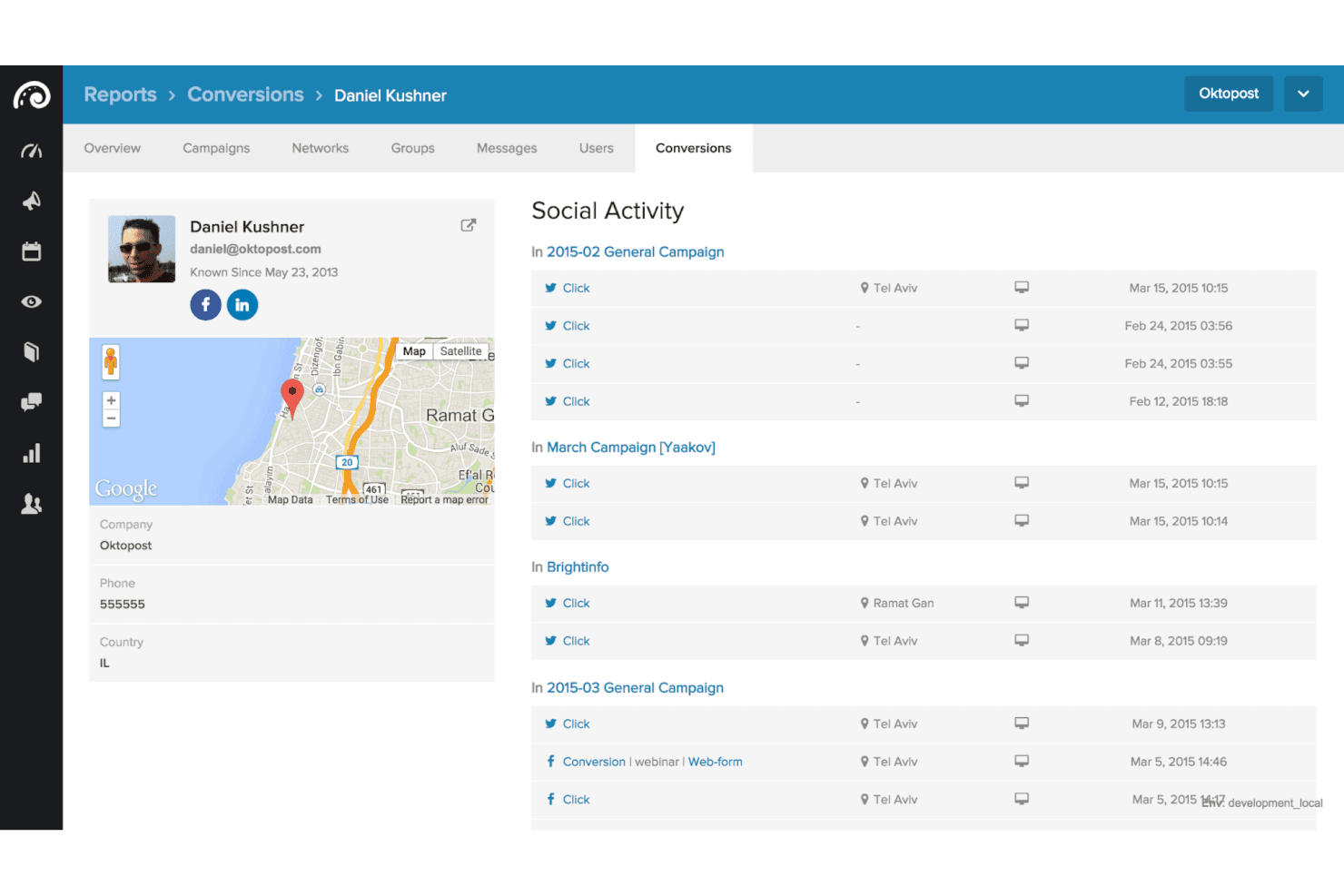
Oktopost tracks individual lead social activity across campaigns. Oktopost is a B2B social media attribution platform that tracks social touchpoints across LinkedIn, Facebook, X, Instagram, and TikTok, connecting them to CRM pipeline data through integrations with Salesforce, HubSpot, Marketo, and Microsoft Dynamics 365.
Who Is Oktopost Best For?
Oktopost is a strong fit for B2B marketing and demand gen teams that need to connect social media activity to CRM pipeline data in Salesforce, HubSpot, or Marketo.
Why I Picked Oktopost
I picked Oktopost as one of the best because it does something most attribution platforms don't: it connects social media activity directly to CRM pipeline data, making it purpose-built for B2B social attribution. I love how it automatically applies unique UTM tags to every company post and employee advocacy share, tracing revenue back to a specific post or advocate in Salesforce. It also maps social touchpoints to contact records as deals progress, so you can see exactly which social interactions influenced a closed deal.
Oktopost Key Features
- Social lead scoring integration: Feeds social engagement data directly into Marketo and HubSpot lead scoring models to adjust MQL qualification based on social intent signals.
- Employee advocacy attribution: Assigns unique UTM tags to each advocate's shares, tracking which individual employees are driving pipeline and closed revenue.
- Dark social tracking: Captures attribution for social interactions that lead to conversions through indirect paths, such as curated third-party links shared on social that convert later via search.
- Configurable attribution lookback windows: Lets you set lookback windows of 24–90 days based on your sales cycle length, with minimum deal stage progression requirements to prevent over-attribution.
Oktopost Integrations
Oktopost offers 10+ documented integrations, including Salesforce, HubSpot, Marketo, Microsoft Dynamics 365, Oracle Eloqua, Adobe Marketo Measure, Power BI, Looker Studio, Outreach, and Zapier. Its API supports custom integrations.
Pros and Cons
Pros:
- Injects social data into CRM journey reporting
- Tracks individual employee advocacy impact on pipeline
- Attributes social engagement directly to closed revenue
Cons:
- Lacks online-to-offline and retail capabilities
- No attribution beyond social media touchpoints
Learn more about Oktopost:
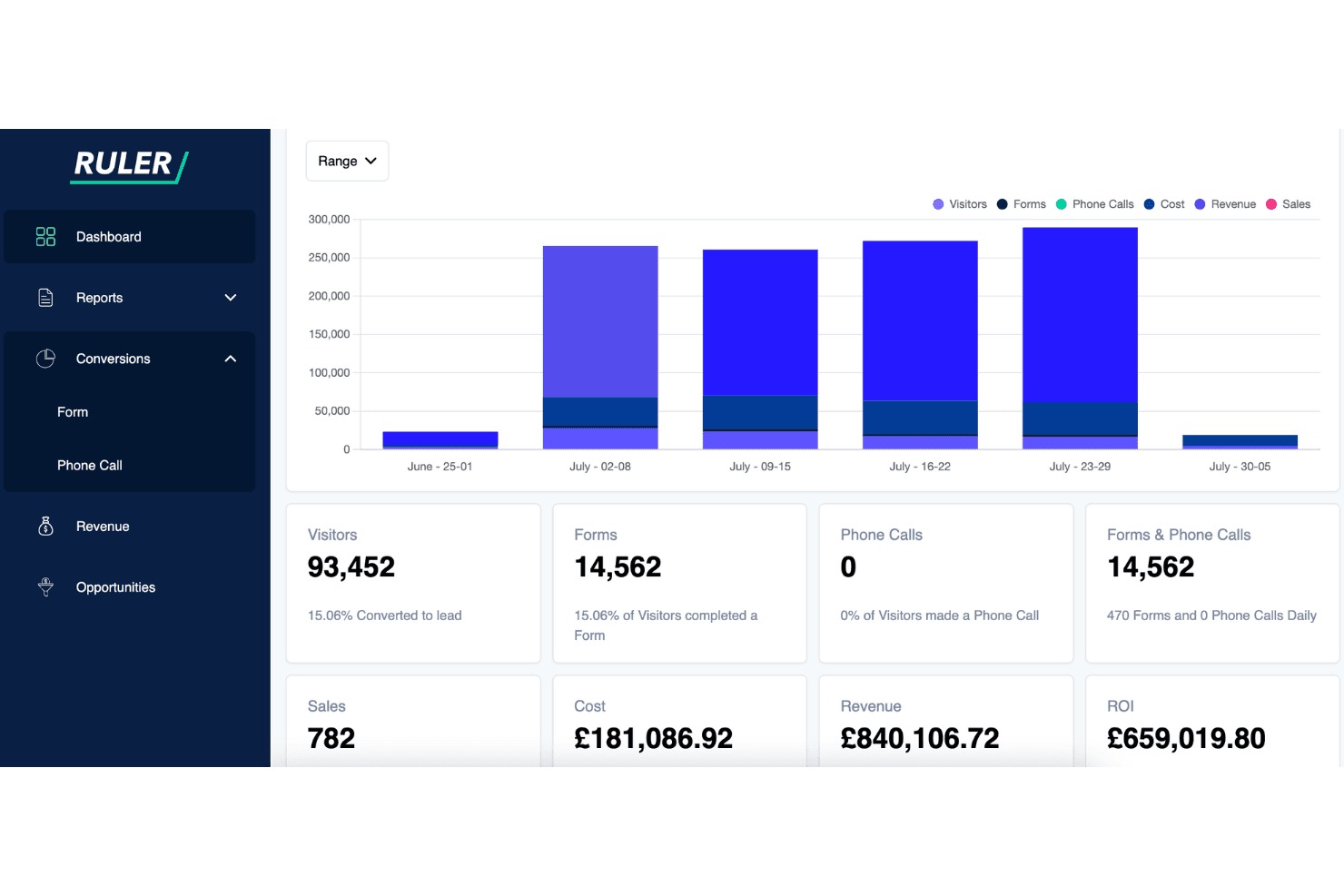
Ruler Analytics tracks visitors, forms, calls, revenue, and ROI in one dashboard. Ruler Analytics is a marketing attribution platform that tracks phone calls, form submissions, live chat, and CRM revenue data across the full customer journey, combining multi-touch attribution, data-driven attribution, and marketing mix modelling in a single tool.
Who Is Ruler Analytics Best For?
Ruler Analytics is a strong fit for marketing teams in phone-heavy or lead-gen-driven industries—like financial services, legal, and home services—where revenue is won offline and tying ad spend to closed deals is the priority.
Why I Picked Ruler Analytics
Ruler Analytics earns its spot on my shortlist because it closes the loop between online ad spend and offline revenue in a way most attribution tools simply don't. I particularly like its dynamic number insertion for call tracking, which ties a specific phone call back to the exact keyword or campaign that drove it. When a CRM deal closes, Ruler automatically pulls that revenue back and attributes it across every prior touchpoint, giving you genuine ROAS data rather than a cost-per-lead estimate.
Ruler Analytics Key Features
- Data-driven attribution model: An ML-backed model that redistributes conversion credit across channels based on statistical analysis, including impression weighting for top-of-funnel activity.
- Budget scenario planner: Models the revenue impact of reallocating spend across channels, using diminishing returns curves to surface where additional budget will generate the most return.
- AI analyst agent: Continuously monitors campaign and channel performance and delivers plain-language explanations of shifts, including early warnings on underperformance.
- Cross-device and cross-domain tracking: Captures 60+ variables per visitor—including UTM parameters, ClickIDs, and device data—across multiple sessions, domains, and devices in a single customer view.
Ruler Analytics Integrations
Ruler Analytics offers 1,000+ integrations, including Google Ads, Meta Ads, TikTok Ads, Amazon Ads, Salesforce, HubSpot, Shopify, BigCommerce, and Tableau. It also supports custom connections through webhooks, CSV/FTP, SQL, and Zapier.
Pros and Cons
Pros:
- Offers data-driven and impression-based attribution
- Provides closed-loop revenue attribution to CRM deals
- Tracks offline conversions from calls and forms
Cons:
- No native POS or retail media connectors
- Requires annual contract commitment without trial
Learn more about Ruler Analytics: Best omni-channel attribution software
- Free plan available
- From $500/month
Visit WebsiteCustomer Rating:4.1/5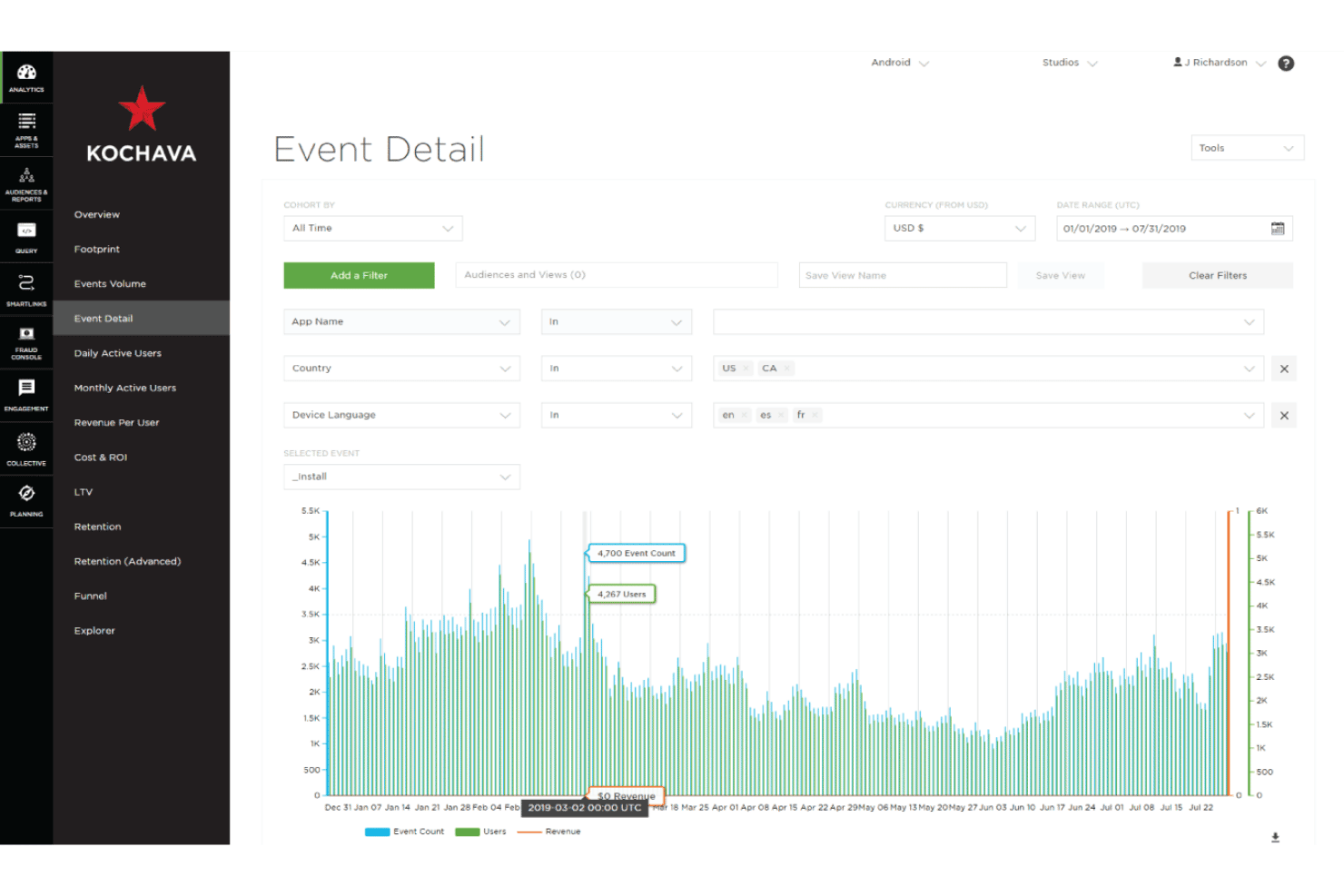
Kochava lets users analyze install events by country, language, and date range. Kochava is a marketing attribution platform that unifies mobile, web, CTV, OOH/DOOH, and retail media measurement with multi-touch attribution, identity resolution, and marketing mix modeling.
Who Is Kochava Best For?
Kochava is a strong fit for omnichannel marketing teams that need to unify attribution across mobile, CTV, OOH/DOOH, and retail media in a single platform.
Why I Picked Kochava
Kochava earns its spot as one of the best on my shortlist because no other platform matches its breadth of omnichannel attribution in a single dashboard. I'm particularly impressed by IdentityLink®, which stitches together 10+ billion consented device profiles to connect mobile, CTV, OOH/DOOH, and offline store visits into one continuous customer view. Layered on top, AIM's always-on marketing mix modeling updates daily, so I'm never working from a stale quarterly model when reallocating budget across channels.
Kochava Key Features
- Predictive churn modeling: An AI algorithm scores each user's churn likelihood at 90% accuracy, then automatically pushes high-risk segments to reengagement partners.
- Self-service incrementality testing: Marketers can build, schedule, and run pulse tests for specific networks, campaigns, or regions directly within the AIM dashboard.
- Walmart Connect measurement partnership: Kochava measures Walmart Connect campaigns—spanning sponsored search, display, in-store screens, and CTV—alongside the rest of your media mix in real time.
- SKAdNetwork and AdAttributionKit support: Kochava handles iOS privacy-compliant attribution via SKAN and AAK, without relying on user-level identifiers.
Kochava Integrations
Kochava reports 5,000+ integrated media partners, including Meta, Google Ads, TikTok, Apple Search Ads, Roku, Spotify, and Walmart Connect. Enterprise plans add custom ETL, postbacks, and server-to-server connectivity for CRM, POS, and data warehouse integrations.
Pros and Cons
Pros:
- Real-time budget reallocation with AIM MMM
- Predictive churn modeling for audience activation
- Unifies online, offline, and CTV attribution
Cons:
- No native retail POS plug-and-play integration
- Offline transaction tracking requires manual data onboarding
Learn more about Kochava: Best for advanced attribution models
- Free demo available
- Pricing upon request
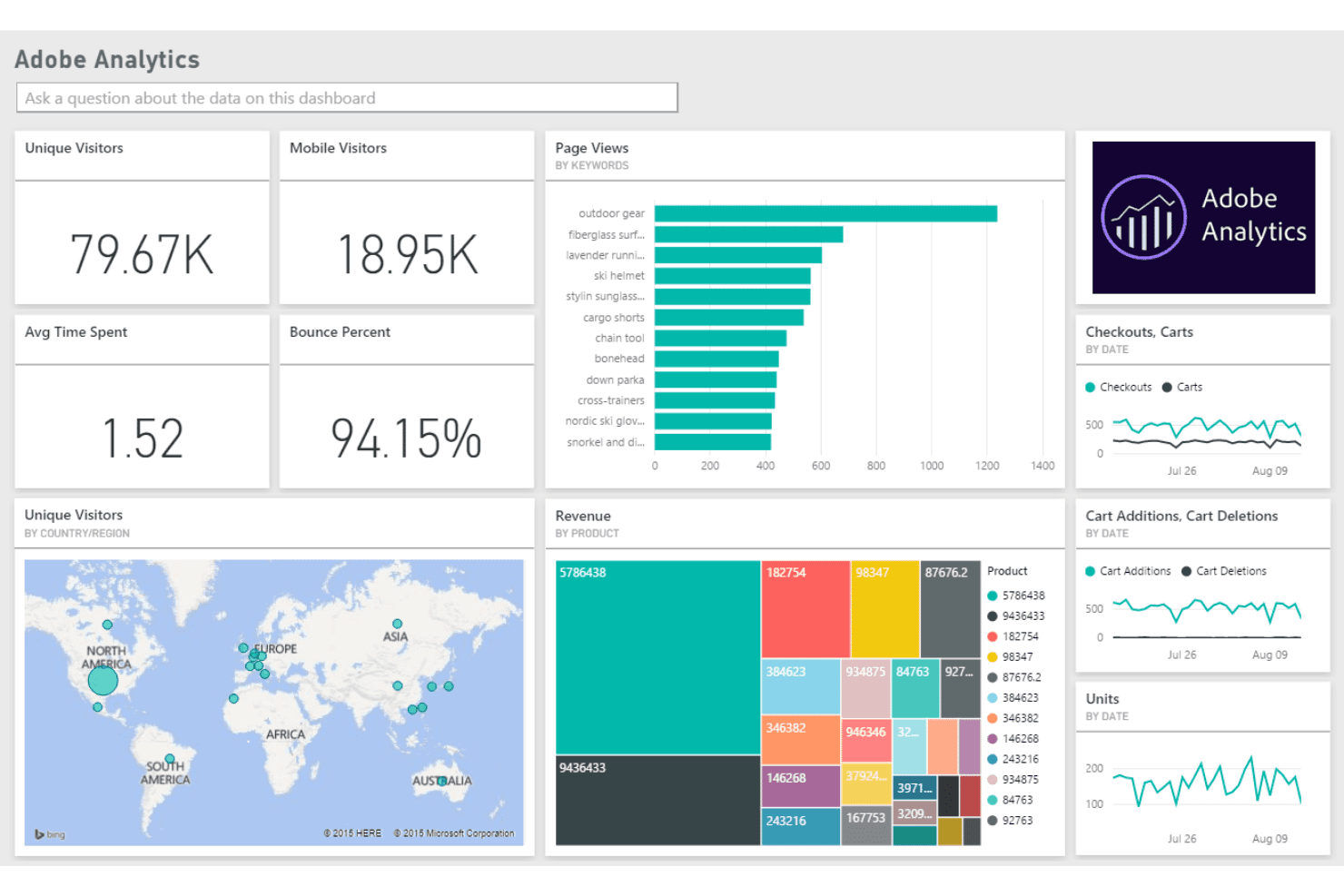
Adobe Analytics centralizes visitor, revenue, and keyword data in one dashboard. Adobe Analytics is an enterprise analytics platform that combines multi-touch attribution modeling, cross-channel data integration, customer journey mapping, and media mix optimization through its Attribution IQ, Customer Journey Analytics, and Marketing Campaign Analytics suite.
Who Is Adobe Analytics Best For?
Adobe Analytics suits enterprise marketing and analytics teams that need to compare multiple attribution models side by side and connect offline data to digital campaign performance.
Why I Picked Adobe Analytics
Adobe Analytics earns its spot on my shortlist because its Attribution IQ suite genuinely sets the bar for attribution modeling depth. I can compare all 11 models side by side in real time, including an algorithmic Shapley value model that calculates each touchpoint's true incremental contribution, without any re-implementation. What I find most compelling is Marketing Campaign Analytics, which layers MMM and MTA together through AI-driven transfer learning so I can run scenario planning across channels and catch diminishing returns before they hit my budget.
Adobe Analytics Key Features
- Cross-device identity stitching: Links multiple identifiers—email, CRM IDs, loyalty cards, and device IDs—into a unified customer profile via the Adobe Experience Platform Identity Graph.
- Journey Canvas: A node-based event sequencing tool that lets you visualize and analyze customer paths and drop-off points across online and offline touchpoints.
- Incrementality measurement: Measures the causal impact of marketing spend across channels, separating true lift from baseline conversions.
- Analysis Workspace freeform reporting: Lets you build fully customizable reports with attribution-adjusted metrics, cohort tables, anomaly detection, and funnel analysis without any code changes.
Adobe Analytics Integrations
Adobe Analytics offers documented integrations with Adobe Experience Platform, Real-Time CDP, Journey Optimizer, Target, Campaign, Marketo Engage, Snowflake, BigQuery, Azure, Google Ads, and Microsoft Advertising. It also supports Adobe Exchange marketplace connections and the Analytics 2.0 API for custom integrations.
Pros and Cons
Pros:
- Provides AI-driven incrementality measurement tools
- Tracks online and offline journeys together
- Offers 11 attribution models side by side
Cons:
- Lacks native retail media network connectors
- No built-in session replay or heatmaps
Learn more about Adobe Analytics: Best holistic enterprise marketing software
- Not available
- Pricing upon request
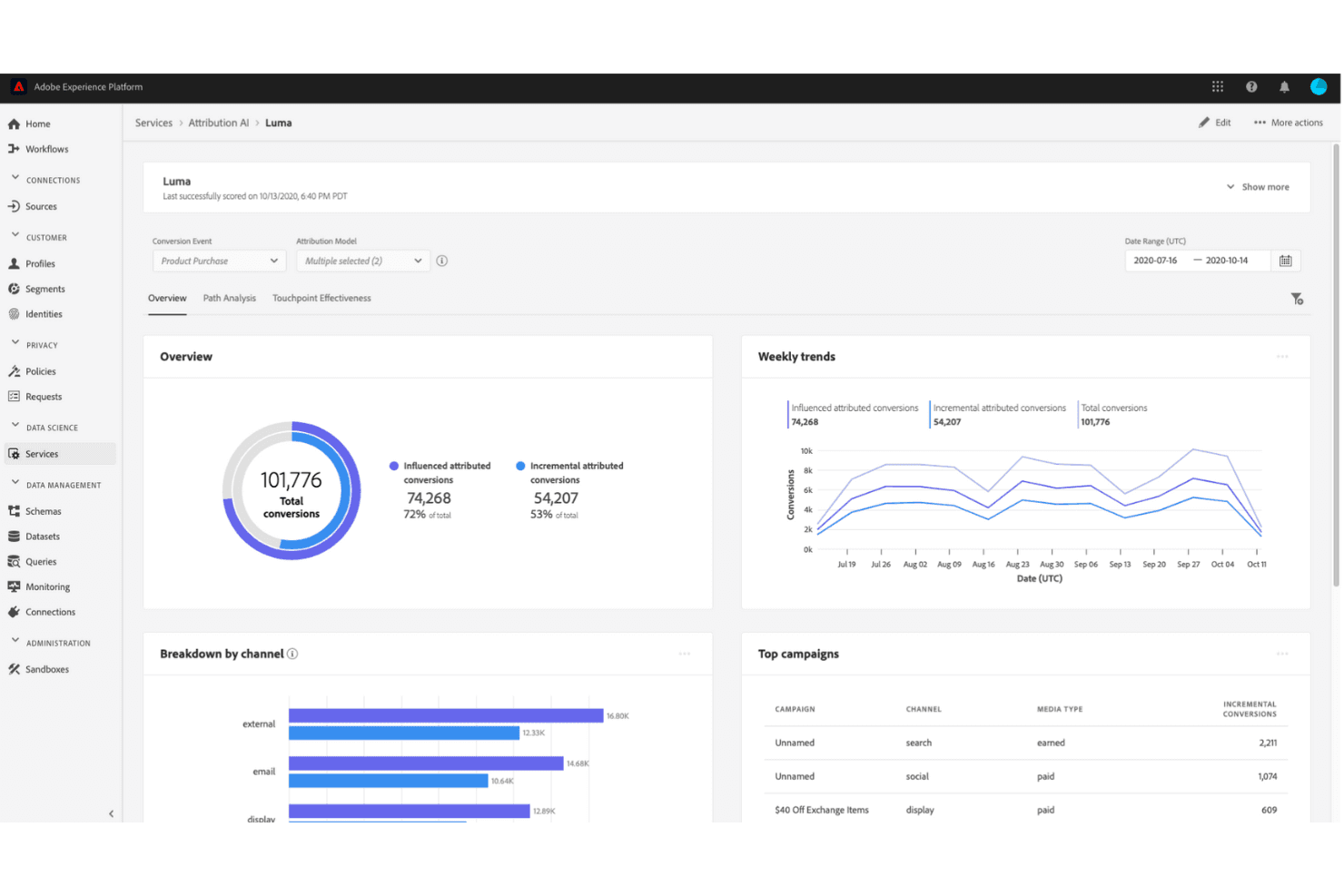
Adobe Experience Platform Attribution AI tracks conversion performance across channels. Adobe Experience Manager is an enterprise CMS and digital asset management platform that, paired with Adobe Analytics, Customer Journey Analytics, and Mix Modeler, delivers multi-touch attribution modeling, media mix optimization, and cross-channel campaign ROI reporting.
Who Is Adobe Experience Manager Best For?
Adobe Experience Manager is built for Fortune 500 retailers and enterprise marketing teams that need content management, digital asset management, and attribution working together inside one ecosystem.
Why I Picked Adobe Experience Manager
Adobe Experience Manager earns its spot on my shortlist because no other platform ties content delivery, attribution modeling, and media mix optimization together inside a single ecosystem the way Adobe does. I'm particularly impressed by Attribution IQ, which lets you run first-touch, time-decay, and algorithmic models side by side in Analysis Workspace, and by Adobe Mix Modeler, which uses Bayesian inference and Shapley values to forecast budget impact across channels before you spend a dollar. That combination is genuinely rare at the enterprise level.
Adobe Experience Manager Key Features
- Cross-channel data integration: Adobe Experience Platform ingests data from web, mobile, email, POS, loyalty, and CRM sources into a single unified view for attribution analysis.
- AI-powered content tagging: Adobe Sensei automatically applies Smart Tags, Smart Crop, and metadata enrichment to digital assets across campaigns.
- Omnichannel journey visualization: Customer Journey Analytics maps individual and aggregated customer paths across web, app, email, call center, and in-store touchpoints.
- Real-time campaign dashboards: Analysis Workspace delivers customizable reporting across channel, campaign, creative, audience, and store-level granularity with AI-assisted anomaly detection.
Adobe Experience Manager Integrations
Adobe Experience Manager has native integrations across Adobe Experience Cloud, including Adobe Analytics, Customer Journey Analytics, Mix Modeler, Experience Platform, Salesforce, Google BigQuery, Azure, Snowflake, and Databricks. It supports audience activation to Google Ads and Meta, plus APIs for custom data connections.
Pros and Cons
Pros:
- Online and offline data unified for attribution
- Side-by-side rule-based and algorithmic attribution
- Native media mix modeling with AI scenario planning
Cons:
- Lacks native retail media network connectors
- Attribution features require multiple separate licenses
Learn more about Adobe Experience Manager: Best for Google ecosystem attribution and MMM
- Not available
- Pricing upon request
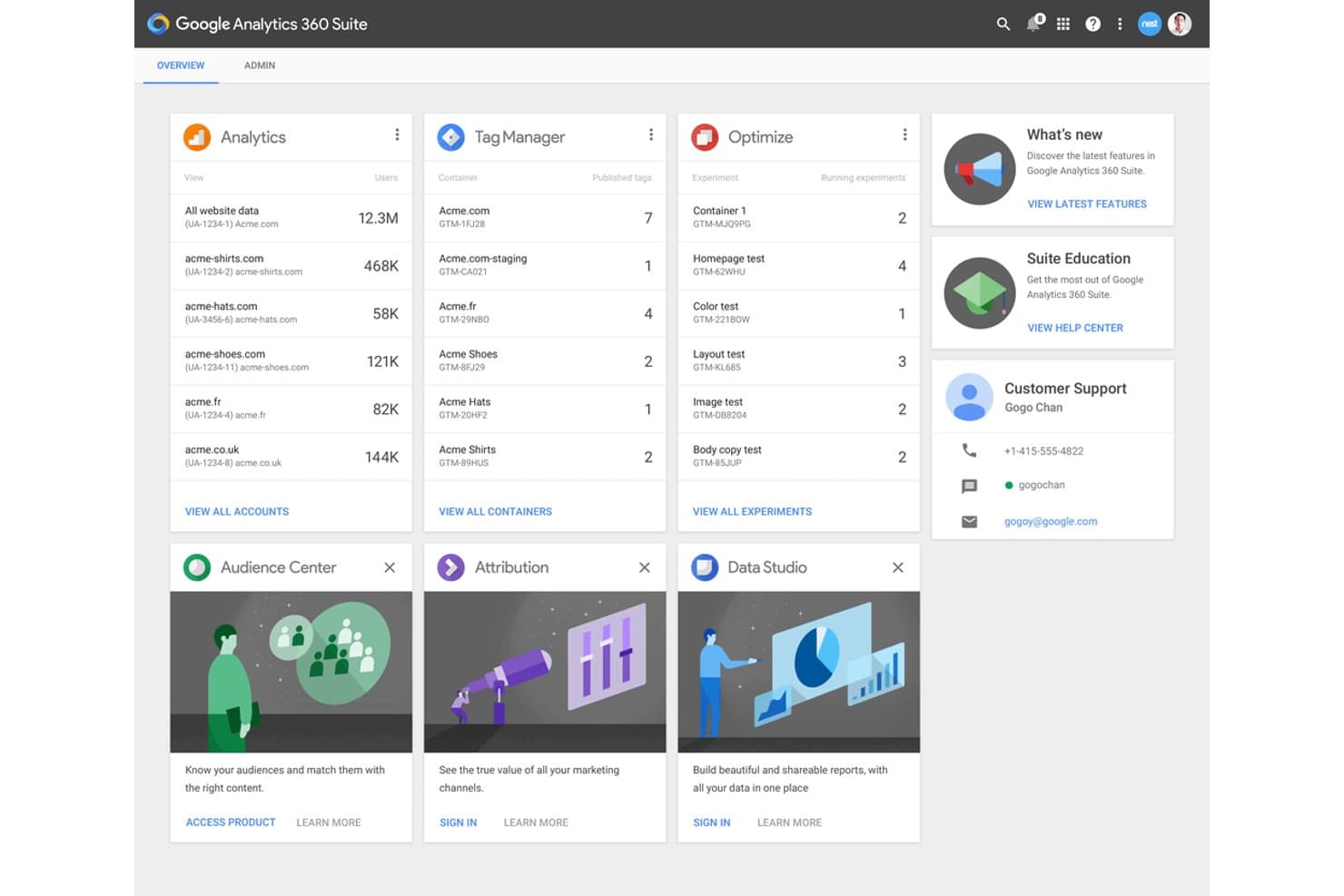
Google Attribution 360 sits within a broader suite dashboard of marketing tools. Google Analytics 360 is an enterprise analytics and attribution platform that combines Data-Driven Attribution, cross-channel reporting, marketing mix modeling via Meridian, and deep Google ecosystem integrations across Google Ads, DV360, SA360, and BigQuery.
Who Is Google Analytics 360 Best For?
Google Analytics 360 is a strong fit for ecommerce teams running Google-centric media programs who need enterprise-scale attribution, unsampled reporting, and marketing mix modeling in one platform.
Why I Picked Google Analytics 360
I picked Google Analytics 360 as one of the best because its Data-Driven Attribution model does something most tools don't: it uses a counterfactual ML approach to calculate how each touchpoint actually shifts conversion probability, not just which click came last. Layered on top of that, the new Meridian MMM integration brings Bayesian media mix modeling directly into the platform, so you can forecast spend outcomes and measure incrementality without stitching together separate tools.
Google Analytics 360 Key Features
- Unsampled data reporting: Access complete, unsampled datasets at up to 50 billion events per day for fully accurate reporting at enterprise scale.
- Sub- and roll-up properties: Segment and consolidate data across brands, regions, or business units within a single Analytics 360 account.
- Conversion paths report: Visualize the full sequence of touchpoints leading to conversion, with side-by-side attribution model comparison built into the Advertising Workspace.
- Predictive audiences: ML models surface users with high purchase probability or churn risk, which you can activate directly in Google Ads campaigns.
Google Analytics 360 Integrations
Google Analytics 360 offers 10+ native integrations, including Google Ads, DV360, SA360, CM360, BigQuery, Google Search Console, Salesforce Marketing Cloud, Google Ad Manager, Google AdMob, Google Play, and Tag Manager. Its Admin API, Data API, and Measurement Protocol support custom integrations.
Pros and Cons
Pros:
- Meridian MMM integration enables media mix modeling
- Data-driven attribution uses machine learning
- Handles up to 50 billion events daily
Cons:
- Deprecated many rule-based attribution models
- No native POS or in-store attribution
Learn more about Google Attribution 360:
Other Marketing Attribution Software
And here are a few other options if none of the marketing attribution software options on the top ten list make the cut:
- 11InvocaBest for phone call-based marketing metrics
- 12StatcounterBest free marketing attribution software
- 13NeustarBest TV analytics and attribution solution
- 14Nielsen Visual IQBest marketing attribution software for enterprises
- 15InsightlyBest custom event triggering and reporting
- 16SingularBest retail marketing attribution software
- 17MatomoBest open source attribution marketing software
- 18ConversionLogicBest for a tree ensemble method
How I Evaluate Marketing Attribution Software
I evaluate marketing attribution tools in two layers: the baseline requirements—like O2O tracking and cross-channel data integration—and the differentiators that determine best fit for retail teams.
Core Functionality (Table Stakes For This List)
When I'm selecting tools for my list, I rank each one on a scale from 0 (does not offer the functionality) to 5 (excels in this area) for each core functionality listed below. Then, I calculate the tool's total score into a percentage. Each tool needs to achieve a minimum total score of 65% to be considered for inclusion.
- Multi-Touch Attribution Modeling: I check whether a platform supports rule-based models like linear and time-decay, plus algorithmic or data-driven models for comparing how credit gets distributed across touchpoints.
- Cross-Channel Data Integration: Each tool needs to pull data from paid search, social, display, email, and ideally offline sources like POS and CRM systems into one unified view.
- Online-to-Offline Tracking: Retail teams need to connect digital ad exposure to in-store purchases, so I evaluate how each tool ingests POS data and matches it to online touchpoints.
- Campaign ROI Reporting: I look for dashboards that break down ROAS at the channel, campaign, and creative level—retail marketers need to see which holiday promo or product-specific ad actually drove revenue.
- Customer Journey Mapping: A good attribution tool should visualize the full path from first click to purchase, including cross-device stitching for shoppers who browse on mobile and buy on desktop or in-store.
- Media Mix Optimization: Beyond just reporting what happened, I evaluate whether a tool offers budget reallocation recommendations or scenario planning to help shift spend toward higher-performing channels.
Once I have a list of tools that meet this criteria, I consider what sets each platform apart.
Differentiating Factors (What Sets Vendors Apart)
Here's how I compare and contrast different vendors:
Standout Features
Incrementality testing is a big differentiator. I look for tools that run geo-lift or holdout experiments to prove a campaign actually drove sales, not just captured existing demand. Retail media network integration matters too, especially for brands advertising on Amazon Ads, Walmart Connect, or Instacart. I also evaluate identity resolution capabilities, since retail shoppers often browse on mobile, click an email on desktop, and buy in-store. Tools that stitch those interactions together give you a much clearer picture of what's working.
Beyond Features
Retail tech stack integrations are one of the first things I check. A tool that connects natively to your POS, ecommerce platform, and CDP saves weeks of setup compared to custom API work. Data privacy compliance is equally important—I evaluate whether a platform supports first-party data strategies and meets standards like GDPR and CCPA, since attribution relies on customer-level data. I also consider reporting accessibility, because marketing directors and merchandising leads need dashboards they can read without asking a data analyst to pull numbers.
What is Marketing Attribution Software?
Marketing attribution software is a data-driven tool that assigns credit to every marketing touchpoint—ads, emails, social posts, and more—to reveal which channels drive the most sales.
It tracks real-time metrics like CAC payback and LTV:CAC ratios, so you know exactly which campaigns are profit heroes and which are budget burners.
By blending multi-touch attribution, marketing mix modeling, and incrementality testing, it gives you one holistic dashboard instead of three disconnected ones. No more blind guesses—just clear insights to optimize spend, scale winners, and crush your ROI goals.
How to Choose Marketing Attribution Software
Choosing marketing attribution software can feel overwhelming—there are plenty of features, promises, and fancy terms flying around. But it doesn’t have to be complicated.
Use the table below to quickly identify the essential criteria you need when picking the right attribution tool for your ecommerce business:
| Key consideration | What to look for & why it matters |
|---|---|
| Key considerationChannel-specific insights | What to look for & why it mattersSoftware should clearly show you which marketing channels deliver the lowest CAC and highest ROI—critical for smart budgeting. |
| Key considerationReal-time metrics tracking | What to look for & why it mattersLook for tools offering real-time CAC payback and LTV:CAC tracking, so you can pivot your marketing strategy quickly. |
| Key considerationIntegration of attribution methods | What to look for & why it mattersSeek platforms integrating MTA, MMM, and incrementality testing to gain a comprehensive view of your marketing performance. |
| Key considerationFlexible attribution models | What to look for & why it mattersChoose software supporting multiple models (first-click, last-click, linear, custom), ensuring alignment with your goals. |
| Key considerationCross-device and multi-channel tracking | What to look for & why it mattersConfirm robust tracking across devices and channels, so no customer interactions slip through the cracks. |
| Key considerationCustomizable reporting | What to look for & why it mattersOpt for tools with easily tailored dashboards, ensuring your team quickly accesses the most critical metrics. |
| Key considerationPredictive analytics | What to look for & why it mattersConsider software using AI-driven insights to proactively identify opportunities, forecast trends, and inform strategy. |
| Key considerationEasy integrations | What to look for & why it mattersMake sure your software seamlessly connects with ecommerce platforms (Shopify, WooCommerce) and your CRM for unified insights. |
| Key considerationIncrementality testing | What to look for & why it mattersSelect tools offering incrementality testing to accurately measure the true, incremental impact of your marketing spend. |
| Key considerationSupport and ease of use | What to look for & why it mattersPrioritize user-friendly tools backed by excellent support resources—no tool is helpful if your team struggles to use it. |
With these criteria in hand, you’ll pick the attribution software that helps your ecommerce brand thrive—not just survive.
Marketing Attribution Software Trends
The world of marketing attribution software is evolving fast, especially for ecommerce. Here’s what you need to keep top of mind:
- AI-powered attribution is here to stay. Tools are getting smarter, using AI to dig deeper into customer behavior and serve up insights you didn’t even know you needed.
- Privacy-first models are the new normal. With data privacy laws tightening, software is shifting to more ethical, consent-driven tracking methods that keep customers happy and compliant.
- Cross-channel measurement is a must. Customers don’t stick to one platform, and neither should your attribution. Tools are focusing on giving you a unified view across channels.
- Real-time insights are non-negotiable. Waiting days for data updates? Forget it. Real-time attribution lets you pivot your strategy while the campaign is still running.
- Connected devices are adding new touchpoints. Smart speakers, wearables, and other IoT gadgets are becoming key players in the customer journey. Attribution tools are catching up to track these interactions.
- Enhanced attribution models are leveling up. The days of relying solely on first-click or last-click are over. Advanced models now better capture the full customer journey.
- Customer experience is taking center stage. Attribution isn’t just about metrics anymore—it’s about understanding what customers want and delivering on it at every touchpoint.
Features of Marketing Attribution Software
Great marketing attribution software doesn’t just crunch numbers—it delivers actionable insights to sharpen your ecommerce strategy. Here’s what the best tools include:
- Multichannel tracking. Track and analyze interactions across email, social, paid ads, and your ecommerce site, revealing exactly how each channel performs.
- Real-time analytics & metric tracking. Instantly measure critical metrics like CAC payback, customer lifetime value (LTV), and LTV:CAC ratios to rapidly adjust campaigns and budgets.
- Cross-device attribution. Accurately track customers as they bounce between desktop, mobile, and tablet devices, ensuring no key interactions slip through the cracks.
- Advanced multi-touch attribution models. Easily assign credit across first-touch, last-touch, linear, or custom models, letting you find exactly the right fit for your business and optimize spend accordingly.
- Integrated MMM, MTA, and incrementality testing. Combine multi-touch attribution (MTA), marketing mix modeling (MMM), and incrementality tests into one platform for a holistic view of your marketing effectiveness—no more disconnected, siloed tools.
- Marketing mix modeling insights. Quantify the true impact of your offline and digital marketing efforts, helping you understand broader strategies beyond immediate digital touchpoints.
- Incrementality testing capability. Go beyond standard metrics by isolating specific marketing activities to see their true incremental impact on sales, ensuring your budget isn't just shifting results around.
- Predictive analytics & AI-driven insights. Leverage machine learning to uncover hidden opportunities, anticipate trends, and proactively adjust your marketing strategies before your competitors do.
- Customizable reporting dashboards. Build dashboards highlighting the exact metrics your team cares most about, simplifying decision-making and reporting.
- Robust integration capabilities. Effortlessly connect with platforms like Shopify, BigCommerce, WooCommerce, Google Ads, Facebook, and your CRM, keeping data seamlessly synchronized.
With these features, marketing attribution software empowers you to make smarter, faster decisions—and get serious about growing your ecommerce business.
Benefits of Marketing Attribution Software
Marketing attribution software isn’t just another fancy dashboard—it’s your secret weapon for smarter ecommerce growth. Here’s why you’ll love it:
- Identify top-performing marketing channels. Quickly pinpoint which channels (email, social, paid ads) drive the lowest customer acquisition costs (CAC) and highest ROI, so you know exactly where to double down.
- Track real-time metrics like CAC payback and LTV:CAC. See immediate data on your marketing spend efficiency. No waiting around—make decisions while campaigns are running, not weeks later.
- Get a holistic view with integrated attribution models. By combining multi-touch attribution (MTA), marketing mix modeling (MMM), and incrementality testing, you see the complete marketing performance picture without gaps or guesswork.
- Optimize the entire customer journey. Easily identify key touchpoints influencing conversions, from initial awareness to final checkout, to improve engagement and reduce drop-off.
- Measure incrementality—not vanity metrics. Incrementality testing isolates which campaigns genuinely boost sales, so you’re investing in results that actually matter.
- Improve team alignment and clarity. End the debates and confusion around campaign effectiveness by providing a single source of truth for marketing and sales teams.
- Maximize marketing ROI. Focus budgets precisely on high-performing campaigns while cutting wasteful spending, ensuring every dollar spent has clear purpose and impact.
- Adapt campaigns on the fly. Real-time insights let you pivot marketing strategies rapidly, staying ahead of competitors who rely on slow, outdated reporting.
Cost & Pricing for Marketing Attribution Software
Marketing attribution software comes in a variety of flavors, each with its own price tag and set of features.
Whether you're a startup on a shoestring budget or an enterprise with complex needs, there's something out there for you.
Here's a breakdown of typical pricing tiers and what they offer:
| Plan Type | Average Price | Common Features | Best For |
|---|---|---|---|
| Plan TypeFree | Average Price$0/month | Common FeaturesBasic attribution models, limited channel tracking, entry-level reporting | Best ForStartups and small businesses testing the waters |
| Plan TypeBasic | Average Price$50 - $200/month | Common FeaturesMulti-channel tracking, standard attribution models, basic integrations with ecommerce platforms, limited users | Best ForSmall to mid-sized businesses seeking affordable insights |
| Plan TypeProfessional | Average Price$200 - $1,000/month | Common FeaturesAdvanced attribution models, real-time insights, predictive analytics, custom dashboards, cross-device tracking | Best ForGrowing businesses needing deeper insights |
| Plan TypeEnterprise | Average Price$1,000+/month | Common FeaturesCustom attribution models, unlimited users, advanced integrations, AI-powered analytics, dedicated account management | Best ForLarge enterprises with complex requirements |
Additional costs to consider
Beyond the subscription fees, keep an eye out for these potential extras:
- Onboarding and training fees. Some platforms charge for setup and training, which can range from $500 to $5,000 depending on your plan and business complexity.
- Add-ons and advanced features. Need extras like AI-driven insights or additional integrations? These often come with additional fees, starting at $10 to $50/month per feature.
- Per-user pricing. Some software charges per user, so costs can climb quickly as your team grows.
- Annual vs monthly billing. Many tools offer discounts for annual plans—up to 20% in savings—so consider paying upfront if your budget allows.
- Scaling costs. As your business expands, you might need more advanced features or higher-tier plans. Factor this into your long-term budget.
By considering these factors, you can choose a marketing attribution software that fits your ecommerce business's needs and budget, without any unpleasant surprises down the road.
Marketing Attribution Software FAQs
It’s that time, ladies and gentlefellas—time for questions. You got ’em, we answer them. (But, actually, this isn’t a live venue for Q&A, so I just picked some relevant questions and answered them for you). Let’s do it.
What is attribution modeling?
Attribution modeling is how you figure out which marketing efforts deserve credit for a sale. It’s like dividing up the credit in a group project: who did the heavy lifting and who just showed up. Common models include:
- First-click attribution: Full credit goes to the customer’s first interaction with your brand.
- Last-click attribution: The final touchpoint before purchase takes all the glory.
- Linear attribution: Every touchpoint gets an equal share of the credit.
- Time decay attribution: Recent interactions get more credit because they’re “closer” to the sale.
- U-shaped attribution: The first and last touchpoints get the most credit, with a little love sprinkled in for the middle.
- Algorithmic attribution: Machine learning analyzes all touchpoints and assigns credit based on actual impact.
The right model depends on your goals and how your customers move through their buying journey.
What’s the difference between attribution models like first-click, last-click, and multi-touch?
Attribution models differ in how they assign credit to touchpoints during the customer journey:
- First-click credits the first interaction, ideal for understanding top-of-funnel strategies.
- Last-click focuses on the final touchpoint, great for evaluating direct-response campaigns.
- Multi-touch spreads credit across multiple interactions, giving a fuller picture of what influenced the sale.
Think of it as zooming in or out—each model highlights a different part of the journey, and multi-touch lets you see the big picture.
How does marketing attribution software handle offline channels like in-store purchases?
Attribution tools aren’t just for digital—they can include offline data, too. Many integrate with point-of-sale systems or use tracking methods like loyalty cards and QR codes to link in-store actions to digital campaigns. This gives you a complete view of your customer journey, whether they click “buy now” online or swipe their card in your shop.
Is it worth paying extra for AI-driven insights in marketing attribution software?
Absolutely, especially if your business handles a lot of data or runs complex, multi-channel campaigns. AI doesn’t just crunch numbers; it finds patterns and opportunities you might miss. For example, it can predict which channels will perform best, saving you time and making your marketing budget go further. If growth and optimization are priorities, AI is a worthwhile investment.
How to Choose Marketing Attribution Software
Choosing marketing attribution software can feel overwhelming—so many features, so many promises. But fear not!
Here’s how to cut through the noise and land the right tool for your ecommerce business:
-
- Plug it into your ecosystem. Make sure the software connects with your ecommerce platform (Shopify, WooCommerce, BigCommerce) and all your marketing tools. If it doesn’t integrate, it’s not worth your time.
-
- Demand flexible models. Choose software that supports various attribution models—first-click, last-click, linear, or even custom setups. You’ll need options to match your campaigns and goals.
-
- Keep it simple. Pick a tool your team can actually use. If it feels like you need a PhD to pull a report, move on. Your time is better spent running campaigns, not deciphering user manuals.
-
- Insist on real-time insights. Go for tools that deliver data as it happens. In ecommerce, waiting a week for updates is like selling Christmas sweaters in January—useless.
-
- Customize it to you. Your business is unique, and your software should be too. Look for tools that let you tweak settings and reports to fit your exact needs.
-
- Ask for help. No shame in needing support! Find a provider with great training resources and responsive customer service. Bad support can turn great software into a nightmare.