

Il software per la gestione della vendita al dettaglio semplifica tutto, dal monitoraggio dell'inventario basato sui codici a barre alle transazioni POS mobili, dalla precisione degli ordini di acquisto alla reportistica multicanale, aiutandoti a gestire il tuo negozio in modo più efficiente e ad aumentare i profitti.
La piattaforma giusta elimina i rallentamenti del sistema, così puoi mantenere gli scaffali riforniti e i clienti soddisfatti in tempo reale.
Dopo anni trascorsi nella logistica internazionale, nelle attività di magazzino e nell'e-commerce, ho messo alla prova i migliori software per la gestione della vendita al dettaglio.
Qui ti mostrerò quali strumenti offrono risultati concreti e come scegliere quello più adatto alla tua attività.
Perché fidarsi dei nostri consigli sui software
6,700+
Reviews
20
Industry experts
16+
Evaluation factors
14
Years
Il nostro team testa e recensisce software dal 2012. In quanto leader del retail noi stessi, sappiamo quanto sia difficile — e importante — scegliere il software giusto.
Per questa guida, abbiamo valutato gli strumenti attraverso test pratici e ricerche indipendenti, assegnando un punteggio agli strumenti in base ai nostri criteri di selezione.
Le nostre recensioni riflettono il nostro giudizio indipendente, non un discorso di vendita.
Tabella comparativa dei software per la gestione della vendita al dettaglio
\u003cp data-start=\u0022223\u0022 data-end=\u0022491\u0022\u003eLa tabella seguente riassume ogni software per la gestione della vendita al dettaglio in una riga con l’indicazione dell’uso ideale, i dettagli della prova e il prezzo di partenza:\u003c/p\u003e
| Tool | Best For | Trial Info | Price | ||
|---|---|---|---|---|---|
| 1 | Ideale per negozi di forniture indipendenti | Demo gratuita disponibile | Prezzo su richiesta | Website | |
| 2 | Ideale per i rivenditori enterprise | Demo gratuita disponibile | Prezzo su richiesta | Website | |
| 3 | Ideale per notifiche di scorte in tempo reale | Prova gratuita + demo gratuita disponibile | Da $59/mese | Website | |
| 4 | Ideale per la gestione retail end-to-end | Demo gratuita disponibile | Prezzi su richiesta | Website | |
| 5 | Ideale per flussi di lavoro trasversali ai moduli | Demo gratuita disponibile | Prezzo su richiesta | Website | |
| 6 | Ideale per la gestione di magazzino | Prova gratuita di 14 giorni + piano gratuito + demo gratuita disponibile | Da $29/mese (fatturazione annuale) | Website | |
| 7 | Ideale per la gestione delle squadre sul campo | Demo gratuita disponibile | Prezzi su richiesta | Website | |
| 8 | Ideale per ristoranti con servizio al tavolo | Demo gratuita disponibile | Da $99/mese | Website | |
| 9 | Ideale per la gestione del flusso di cassa retail | Piano gratuito disponibile | Da $199/mese | Website | |
| 10 | Ideale per le piccole imprese | Piano gratuito disponibile | Da $29/mese | Website |


I migliori software per la gestione della vendita al dettaglio, recensiti
Le recensioni che seguono analizzano come ogni piattaforma gestisce i flussi di lavoro reali: precisione dei codici a barre, continuità operativa del POS mobile, gestione degli ordini e reportistica multicanale. Ho lasciato intatte le descrizioni sintetiche degli strumenti, aggiungendo però informazioni sul funzionamento, sulle particolarità dei prezzi e su chi dovrebbe (o non dovrebbe) inserirli nella propria infrastruttura tecnologica.
 Ideale per negozi di forniture indipendenti
- Demo gratuita disponibile
- Prezzo su richiesta
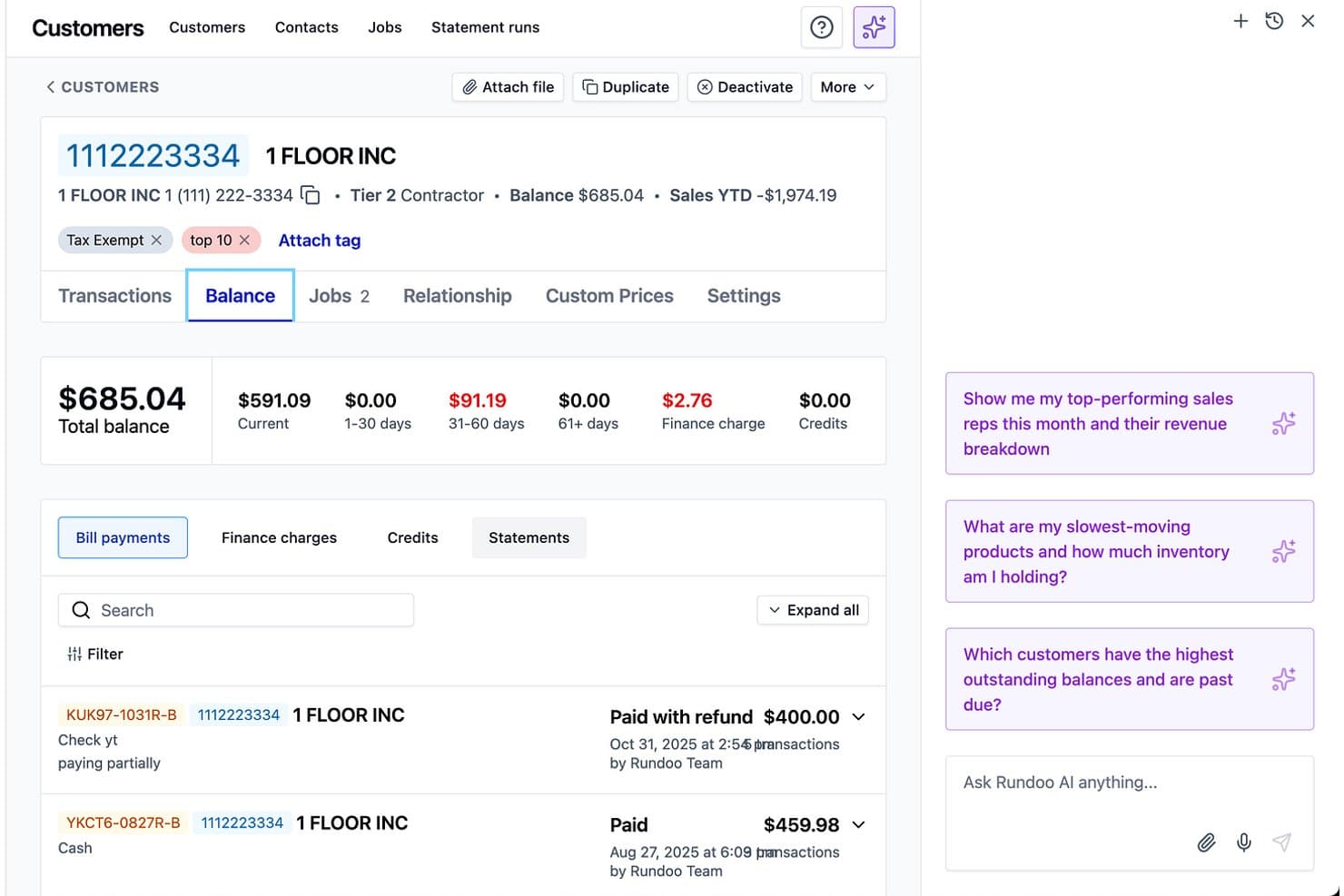
Rundoo offre una schermata dettagliata del saldo cliente e approfondimenti aziendali basati su IA per la gestione della fatturazione del negozio. Rundoo è una piattaforma POS e ERP basata su cloud progettata per i rivenditori indipendenti di forniture, che copre il punto vendita, la gestione dell'inventario, gli acquisti, i conti a credito per appaltatori e la reportistica guidata dall'IA in un solo sistema.
Per chi è ideale Rundoo?
Rundoo è particolarmente adatto ai proprietari indipendenti di negozi di ferramenta, colorifici, materiali da costruzione, agrarie, negozi per animali e centri giardinaggio che desiderano abbandonare vecchi sistemi POS come Epicor Eagle o Paladin.
Perché ho scelto Rundoo
Rundoo si guadagna un posto nella mia lista perché è costruito esattamente intorno al modo in cui i negozi di forniture indipendenti vendono davvero. Mi piace il fatto che Dooey, l’assistente IA di Rundoo, generi automaticamente gli ordini di acquisto leggendo la reale velocità di vendita, i segnali di scorte basse e i modelli stagionali. Inoltre, i conti a credito per appaltatori con prezzi personalizzati per cliente e pagamento automatico sono integrati direttamente nel POS, una funzione che la maggior parte delle soluzioni retail generiche non gestisce nativamente.
Funzionalità principali di Rundoo
- Integrazione con sistemi per la miscelazione delle vernici: Rundoo si sincronizza direttamente con i principali cataloghi di colori e macchine per la tintura delle vernici, supportando vendite e inventario in un unico flusso di lavoro.
- Monitoraggio inventario multi-sede: Gestisci magazzino, trasferimenti e varianti su più punti vendita, comprese necessità specifiche come inventario dimensionale e sfuso.
- Integrazione con cataloghi fornitori: Si collega ai principali distributori industriali e gruppi d'acquisto, automatizzando la configurazione degli articoli e l’aggiornamento dei prezzi dai feed dei fornitori.
- Gestione dei conti appaltatori: Offre strumenti per gestire conti a credito, prezzi personalizzati per cliente, estratti conto e pagamenti automatici per clienti professionali.
Integrazioni di Rundoo
Rundoo offre integrazioni native con Stripe, QuickBooks, Benjamin Moore COLORx, Orgill, Do It Best, True Value, Sherwin-Williams, PPG e altri. Un’API è disponibile per integrazioni personalizzate.
Pros and Cons
Pros:
- Progettato specificamente per la distribuzione di forniture
- Ordini di acquisto generati tramite IA basati sui dati di vendita reali
- Conti a credito per appaltatori integrati nel POS
Cons:
- Nessun supporto per vendite ecommerce o omnicanale
- Manca la pianificazione del personale e il monitoraggio delle ore lavorate
Learn more about Rundoo: Ideale per i rivenditori enterprise
- Demo gratuita disponibile
- Prezzo su richiesta
Visit WebsiteCustomer Rating:5/5
La funzione di merchandising di Oracle Retail aiuta a gestire e ottimizzare le operazioni retail abilitando una gestione efficiente dell’inventario, la previsione della domanda e la pianificazione dell’assortimento. Oracle Retail è pensato per i rivenditori enterprise che necessitano di un controllo preciso e cross-canale su merchandising, prezzi e inventario.
Offre una piattaforma unificata per pianificare, acquistare, allocare e tracciare lo stock su vaste reti di negozi. È ideale per i team che gestiscono gerarchie di prodotto complesse e ampi assortimenti stagionali.
Per chi è Oracle Retail?
Responsabili delle operazioni retail e dirigenti del merchandising in grandi aziende che gestiscono operazioni retail complesse e flussi di lavoro di livello enterprise a livello globale.
Perché ho scelto Oracle Retail
Ho scelto Oracle Retail perché offre un unico sistema per l’impostazione degli articoli, l’acquisto e la governance delle scorte, fondamentale quando si gestiscono migliaia di SKU in centinaia di negozi.
Il tuo team beneficia di strumenti di previsione della domanda e pianificazione che raccomandano acquisti e allocazioni basandosi su pattern reali di vendita, non su sensazioni.
Apprezzo anche il fatto che i moduli di pricing e promozione colleghino direttamente gli obiettivi di margine alle strategie di prezzo regolare, promo e saldo.
Infine, gli strumenti di gestione dei negozi di Oracle aiutano lo staff a ricevere, contare ed evadere gli ordini con dati più precisi sulla disponibilità effettiva.
Funzionalità principali di Oracle Retail
Oltre agli strumenti core di merchandising, Oracle Retail include diversi moduli che puoi utilizzare per rafforzare la pianificazione quotidiana e l’esecuzione in negozio.
- Ottimizzazione del Pricing nel Ciclo di Vita: Modella prezzi regolari, promozionali e di saldo rispetto agli obiettivi di margine e sell-through.
- Pianificazione dell’Assortimento: Aiuta i planner a localizzare gli assortimenti con conteggi di opzioni guidati da previsioni e insight stagionali.
- Suite di Gestione Ordini: Smista ed evade ordini su tutti i canali in base alla disponibilità reale.
- Operazioni di Inventario nel Negozio: Supporta la ricezione, il conteggio e le regolazioni d’inventario da dispositivi mobili.
Integrazioni Oracle Retail
Le integrazioni includono Salesforce, SAP, Shopify, Snowflake, ServiceNow e Workday.
Pros and Cons
Pros:
- Strumenti di pianificazione e pricing estesi supportano strutture retail complesse.
- I workflow unificati di merchandising migliorano l’accuratezza finanziaria e d’inventario.
- Gli strumenti OMS e per i negozi aiutano i team a evadere gli ordini con meno errori di stock.
Cons:
- Implementazioni lunghe e che richiedono molte risorse.
- Il prezzo è più orientato ad aziende retail di grandi dimensioni che a catene più piccole.
Learn more about Oracle Retail: Ideale per notifiche di scorte in tempo reale
- Prova gratuita + demo gratuita disponibile
- Da $59/mese
Visit WebsiteCustomer Rating:4.8/5
KORONA POS ti permette di monitorare e gestire le scorte da remoto grazie al sistema cloud-based. KORONA POS offre ai rivenditori in crescita un modo per mantenere gli scaffali sempre pieni, i negozi conformi alle normative e i margini sotto controllo, sia in una singola sede che in più punti vendita.
È particolarmente utile se gestisci un inventario complesso—alcolici, articoli per svapo, alimentari speciali o negozi di articoli da regalo—e hai bisogno di visibilità in tempo reale invece di indovinare dai report del giorno prima.
Per chi è ideale KORONA POS?
Responsabili di negozio e supervisori di inventario in aziende retail di piccole e medie dimensioni in Nord America ed Europa che necessitano di notifiche di scorte in tempo reale.
Perché ho scelto KORONA POS
Ho scelto KORONA POS perché offre notifiche sulle scorte in tempo reale e riordino automatico, così puoi impostare livelli di par e lasciare che il sistema segnali eventuali problemi prima che si verifichi una rottura di stock o un eccesso di merce in magazzino riflesso nel bilancio.
Puoi anche gestire i fornitori direttamente tramite la piattaforma, il che significa che il tuo team può confrontare le prestazioni dei fornitori e migliorare le procedure di acquisto invece di rincorrere i fogli Excel.
Mi piace che la stessa logica di inventario funzioni sia che tu gestisca un unico punto vendita sia una catena in espansione, così il tuo team può seguire un'unica strategia mentre aggiungi sedi.
Per i negozi con molti obblighi normativi, KORONA POS include la verifica dell’età e avvisi sui prodotti che aiutano i cassieri a individuare gli articoli soggetti a restrizioni alla cassa, riducendo il rischio e mantenendo le file scorrevoli.
Lato pagamenti, resta indipendente dal processore, così puoi cercare tariffe migliori invece di essere vincolato a un unico fornitore.
Caratteristiche principali di KORONA POS
Oltre agli strumenti di inventario e conformità, alcune funzionalità extra fanno sì che KORONA POS sembri una vera piattaforma di gestione retail, non solo una cassa.
- KORONA Studio Dashboard: Back office cloud-based dove modifichi prezzi, promozioni e regole di riordino da ovunque ti trovi.
- Reportistica avanzata e KPI: Report preimpostati per vendite, categorie, sedi e prestazioni dello staff in modo da individuare più rapidamente le tendenze.
- Programmi di fidelizzazione clienti: Motore integrato di loyalty e promozioni che consente di premiare i clienti abituali senza dover integrare un’altra app.
- Strumenti per biglietteria e membership: Supporto per biglietti, pass e abbonamenti per settori come musei, cantine e attrazioni.
Integrazioni di KORONA POS
Le integrazioni includono WooCommerce, Adobe Commerce, QuickBooks Online, Bookkeep, bLoyal, Bottlecapps, TimeForge, Octopus Bridge, Card Market e CMS Max.
Pros and Cons
Pros:
- Le notifiche di inventario in tempo reale evitano rotture di stock e sovraccarichi di magazzino in tutte le sedi.
- Gli strumenti per il franchising gestiscono royalties e reportistica multisede in un back-end condiviso.
- Verifica dell'età e monitoraggio della scadenza supportano i rivenditori di alcolici, svapo e prodotti alimentari speciali.
Cons:
- Funzionalità offline limitate; alcune caratteristiche richiedono una connessione internet costante.
- Le prestazioni su alcuni tablet possono essere lente nelle ore di punta del negozio.
Learn more about KORONA POS: Ideale per la gestione retail end-to-end
- Demo gratuita disponibile
- Prezzi su richiesta
Visit WebsiteCustomer Rating:4.4/5
Brightpearl è un software di gestione retail che aiuta le aziende a gestire le proprie operazioni attraverso diversi canali di vendita. Brightpearl offre a rivenditori e grossisti multicanale in crescita un'unica piattaforma per gestire inventario, ordini, acquisti, magazzino, CRM e contabilità.
È ideale se hai superato la fase degli strumenti per principianti e hai bisogno di un controllo più rigoroso delle operazioni post-acquisto tra ecommerce, marketplace e negozi fisici.
Per chi è più indicato Brightpearl?
Responsabili retail e responsabili operativi di rivenditori omnicanale di piccole e medie dimensioni in tutto il mondo che gestiscono operazioni retail a 360 gradi.
Perché ho scelto Brightpearl
Ho scelto Brightpearl per i rivenditori che vogliono una sola “fonte di verità” per le operazioni invece di dover integrare strumenti separati per inventario, ordini e contabilità.
Quando aggiorni le scorte, spedisci un ordine o registri un ordine di acquisto, le modifiche passano attraverso lo stesso sistema, così il tuo team non deve riconciliare fogli di calcolo a fine mese.
Puoi impostare regole affinché Brightpearl assegni automaticamente le scorte, dia priorità a certi canali o indirizzi gli ordini al magazzino giusto, il che significa che il tuo team passerà più tempo a risolvere eccezioni e meno ad aggiornare manualmente i dati.
Per i marchi multicanale, supporta volumi elevati di ordini—online, marketplace e in negozio—garantendo comunque numeri precisi della disponibilità alla vendita e margini che tengono conto dei costi sostenuti.
Poiché i dati di contabilità, inventario e ordini vivono insieme, ottieni report sulle performance più precisi per prodotto, canale e sede, semplificando le decisioni su dove investire in scorte e marketing.
Funzionalità principali di Brightpearl
Ecco alcune funzionalità di Brightpearl realmente utilizzate dai rivenditori ogni giorno.
- Pianificazione inventario su più sedi: Coordina scorte, trasferimenti e livelli di sicurezza tra i magazzini così i pianificatori possono garantire la disponibilità senza eccedere negli acquisti.
- Gestione preordini e ordini arretrati: Intercetta la domanda quando gli articoli non sono disponibili a magazzino e assegna automaticamente le scorte in arrivo per mantenere allineate vendite, acquisti e assistenza.
- Flussi di lavoro per resi e RMA: Traccia i resi dall'autorizzazione fino al riassortimento o allo scarico così rimborsi, livelli di magazzino e margini restano accurati.
- Cruscotti di analisi retail: Monitora la performance di canali, SKU e sedi con viste configurabili così la direzione può individuare rapidamente colli di bottiglia e linee sotto-performanti.
Integrazioni di Brightpearl
Le integrazioni includono Shopify, BigCommerce, Magento, Amazon, eBay, Walmart, Xero, QuickBooks Online, Sage Intacct e Mailchimp.
Pros and Cons
Pros:
- Piattaforma operativa unificata per inventario, ordini, acquisti, CRM e contabilità.
- Le regole di automazione riducono il lavoro manuale in allocazione, acquisti e instradamento ordini.
- La sincronizzazione dell'inventario multicanale aiuta a prevenire overselling su ecommerce, marketplace e negozi.
Cons:
- Implementazione e configurazione iniziali possono essere impegnative per team interni più piccoli.
- Prezzi su preventivo e assenza di fasce pubbliche complicano il confronto dei costi iniziali.
Learn more about Brightpearl: Ideale per flussi di lavoro trasversali ai moduli
- Demo gratuita disponibile
- Prezzo su richiesta
Visit WebsiteCustomer Rating:4.4/5
Acumatica Cloud ERP offre funzionalità per la gestione al dettaglio su un'unica piattaforma. Acumatica Cloud ERP è progettato per i rivenditori che cercano di gestire inventario, ordini e clienti tra negozi, magazzini ed ecommerce senza dover ricorrere ai fogli di calcolo.
È una soluzione adatta ai rivenditori di fascia media con operazioni multi-sede o omnicanale che desiderano gestire scorte, aspetti finanziari, POS e commercio da un’unica piattaforma invece di assemblare una dozzina di soluzioni puntuali.
Per chi è più indicato Acumatica Cloud ERP?
Team finanziari e operativi di aziende di medie e grandi dimensioni in Nord America ed Europa che coordinano i flussi di lavoro tra diversi moduli aziendali.
Perché ho scelto Acumatica Cloud ERP
Ho scelto Acumatica Cloud ERP perché offre un unico sistema per gestire inventario, ordini, clienti e finanze, evitando al team di dover riconciliare dati incoerenti ogni settimana.
Si ottiene visibilità in tempo reale delle scorte tra magazzini, negozi ed ecommerce, aiutando a ridurre le vendite in eccesso mantenendo un inventario snello.
Il POS si integra direttamente con i dati di ordini e inventario, consentendo di supportare BOPIS e resi senza reinserimenti manuali.
Apprezzo anche i connettori nativi per il commercio elettronico, che mantengono sincronizzati i dati prodotto e ordini su Shopify, BigCommerce e Amazon.
Caratteristiche principali di Acumatica Cloud ERP
Ecco alcune funzionalità specifiche per il retail che diventano fondamentali quando si va oltre la gestione base dell’inventario e si desidera un vero controllo operativo.
- Portale self-service per i clienti: Permette ai clienti di tracciare ordini, visualizzare fatture e aprire segnalazioni online, riducendo le richieste di supporto e mantenendo la cronologia account collegata al CRM.
- Sistema di gestione del magazzino: Utilizza ricevimenti, prelievi e imballaggi guidati da codici a barre per sincronizzare le attività di magazzino con le vendite, riducendo errori negli ordini e nelle spedizioni.
- Dashboard basate sui ruoli: Fornisce a responsabili negozio, buyer e personale finanziario KPI personalizzati e aggiornati in tempo reale su vendite, margini, rotazione scorte e resi, evitando report statici già superati dal lunedì pomeriggio.
- Piani prezzi e promozioni per il retail: Centralizza cataloghi, prezzi e regole di sconto così da poter gestire promozioni coerenti su negozi e canali senza modifiche manuali a POS ed ecommerce.
Integrazioni di Acumatica Cloud ERP
Le integrazioni includono Shopify, BigCommerce, Magento, Amazon, ShipStation, SPS Commerce, 3G Pacejet Shipping e Avalara.
Pros and Cons
Pros:
- La gestione in tempo reale dell'inventario su negozi e canali riduce il rischio di sovravendita.
- I connettori ecommerce nativi mantengono affidabilmente sincronizzati ordini online e magazzino.
- Le dashboard basate sui ruoli offrono a responsabili di negozio e operativi una visione immediata dei margini.
Cons:
- L’implementazione e la configurazione richiedono solitamente un partner esperto nel settore retail.
- La configurazione avanzata può risultare complessa per rivenditori di piccole dimensioni con un solo punto vendita.
Learn more about Acumatica: Ideale per la gestione di magazzino
- Prova gratuita di 14 giorni + piano gratuito + demo gratuita disponibile
- Da $29/mese (fatturazione annuale)
Visit WebsiteCustomer Rating:4.3/5
La funzione di inventario di Zoho Inventory consente alle aziende di gestire e tracciare efficacemente i livelli di stock, gli ordini e i processi di evasione in un sistema centralizzato. Zoho Inventory è progettato per rivenditori e grossisti che gestiscono l’inventario su più magazzini, canali e regioni.
Hai un controllo dettagliato su lotti, numeri di serie e ubicazioni, così puoi vedere esattamente cosa si trova dove—e cosa rischia di scadere o esaurirsi—senza dover passare a un pesante ERP.
È perfetto se il tuo team ha bisogno di visibilità a livello di magazzino, non solo di conoscere la quantità disponibile al POS.
Per chi è ideale Zoho Inventory?
Responsabili di magazzino e team operativi in organizzazioni di piccole e medie dimensioni in tutto il mondo che supervisionano il monitoraggio dell’inventario e il controllo delle scorte.
Perché ho scelto Zoho Inventory
Ho scelto Zoho Inventory perché offre una vera visibilità multi-magazzino: ogni sede ha le proprie scorte, ubicazioni e ordini di trasferimento, così puoi indirizzare l’evasione degli ordini con sicurezza.
Hai anche la gestione a lotti e seriali per prodotti che necessitano tracciabilità, permettendo al tuo team di gestire richiami, garanzie o articoli sensibili alla scadenza senza bisogno di fogli di calcolo.
La scansione dei codici a barre velocizza le operazioni di picking e packing registrando SKU, lotti o numeri di serie direttamente negli ordini.
Inoltre, gli avvisi di riordino integrati ti mantengono al riparo da problemi di scorte basse collegando il riapprovvigionamento all’effettiva attività di magazzino.
Caratteristiche principali di Zoho Inventory
Oltre alle funzionalità di base di gestione del magazzino, Zoho Inventory aggiunge alcune funzioni operative che il tuo team userà quotidianamente.
- Pianificazione del riapprovvigionamento: Utilizza livelli di riordino e viste dedicate per evidenziare gli articoli a scorta minima, così puoi emettere ordini prima che si esauriscano.
- Workflow Prelievo, Imballaggio e Spedizione: Supporta liste di prelievo, pacchi e spedizioni in un’unica piattaforma così il tuo team può gestire gli ordini dallo scaffale al camion senza cambiare strumenti.
- Gestione delle tariffe e delle etichette di spedizione: Si connette ai corrieri per tariffe aggiornate, generazione etichette e monitoraggio spedizioni direttamente all’interno di Zoho Inventory.
- Reportistica su inventario e vendite: Mostra i movimenti di stock, i backorder e le performance di magazzino così puoi ottimizzare layout, quantità di acquisto e regole di evasione basandoti su dati concreti.
Integrazioni di Zoho Inventory
Le integrazioni includono Shopify, Amazon, eBay, Etsy, Zoho Commerce, Zoho Books, Zoho CRM, USPS, UPS e AfterShip.
Pros and Cons
Pros:
- Tracciamento multi-magazzino con ordini di trasferimento mantiene le scorte bilanciate tra le sedi.
- Gestione a lotti e seriali più scansione di codici a barre per un picking preciso.
- Avvisi di riordino e viste di riapprovvigionamento riducono il rischio di esaurimento scorte.
Cons:
- Le funzionalità avanzate di tracciamento sono disponibili solo con piani a pagamento di livello superiore.
- Nessuna previsione della domanda integrata per gestire modelli di inventario complessi e multi-stagionali.
Learn more about Zoho Inventory: Ideale per la gestione delle squadre sul campo
- Demo gratuita disponibile
- Prezzi su richiesta
Visit WebsiteCustomer Rating:4.4/5
Repsly offre analisi in tempo reale con dashboard di insight per monitorare le metriche di performance. Repsly aiuta i marchi di beni di consumo confezionati (CPG) e i fornitori di servizi al dettaglio a mantenere sotto controllo i rappresentanti sul campo, i merchandiser e le condizioni dei punti vendita su un vasto numero di negozi.
Ottieni un'app mobile per le visite sul campo e dashboard per l'ufficio che trasformano le attività a livello di negozio, foto e sondaggi in decisioni riguardanti promozioni, spazi espositivi e disponibilità.
Per chi è ideale Repsly?
Responsabili delle vendite sul campo e supervisori di team in aziende di beni di consumo e retail di medie dimensioni in Nord America ed Europa che gestiscono squadre mobili.
Perché ho scelto Repsly
Ho scelto Repsly perché offre ai team sul campo agende chiare per le visite, strumenti fotografici e moduli mobili in modo che ogni tappa in negozio produca dati utili e non supposizioni.
Il suo riconoscimento immagini basato su AI trasforma le foto degli scaffali in insight a livello di SKU, aiutandoti a individuare rapidamente le rotture di stock e i problemi di esposizione attraverso modelli allenati collegati al tuo catalogo prodotti.
I manager ricevono dashboard che confrontano l'esecuzione per rivenditore, marchio o rappresentante, fornendo azioni di follow up concrete anziché aneddoti.
Caratteristiche principali di Repsly
Oltre alla semplice tracciabilità delle visite, Repsly offre strumenti specifici per assicurare qualità ed estensione nell’esecuzione in negozio.
- Gestione territoriale e programmazione: Definisci territori, imposta la frequenza delle visite e assegna i percorsi affinché i rappresentanti visitino i clienti prioritari con la giusta cadenza.
- Raccolta ordini in negozio: Permetti ai rappresentanti di inviare ordini, resi e richieste di rifornimento direttamente dalla corsia, collegati allo storico di ciascun cliente.
- Moduli e sondaggi mobili: Crea template per audit del punto vendita, checklist di conformità promozionale e moduli di sondaggio che i rappresentanti compilano direttamente tramite smartphone.
- Dashboard di insight e KPIs: Monitora metriche operative, condizioni degli scaffali e performance promozionali in quasi tempo reale su regioni e team.
Integrazioni di Repsly
Le integrazioni includono Salesforce, HubSpot, Zoho CRM, QuickBooks, Xero, Mailchimp, Google Sheets e Microsoft 365.
Pros and Cons
Pros:
- Il riconoscimento scaffali tramite AI aiuta a individuare rapidamente rotture di stock e problemi di esposizione.
- Strumenti di pianificazione delle visite e dei territori supportano grandi reti di punti vendita distribuiti.
- Moduli e sondaggi mobili permettono di raccogliere dati coerenti durante ogni visita in negozio.
Cons:
- Il costruttore di moduli può richiedere tempo nella configurazione di flussi di lavoro complessi.
- Le submission delle visite sono difficili da correggere se i rappresentanti si registrano in una posizione errata.
Learn more about Repsly: Ideale per ristoranti con servizio al tavolo
- Demo gratuita disponibile
- Da $99/mese
Visit WebsiteCustomer Rating:3.8/5
Gestisci facilmente gli ordini di un ristorante con servizio al tavolo tramite l’interfaccia POS di Revel. Revel Systems è pensato per ristoranti con servizio al tavolo molto frequentati e rivenditori multilocation che non possono permettersi confusione negli ordini o supposizioni sulle scorte.
Ottieni un POS basato su iPad che collega la gestione dei tavoli, l’inventario a livello di ingrediente e la reportistica centrale, così puoi processare gli ordini senza interruzioni e avere davvero fiducia nei tuoi numeri.
Per chi è ideale Revel Systems?
Manager e proprietari di ristoranti con servizio al tavolo nel Nord America che hanno bisogno di un sistema POS integrato e di una gestione ottimizzata dei flussi di lavoro.
Perché ho scelto Revel Systems
Ho scelto Revel Systems perché offre ai ristoranti con servizio al tavolo e alle catene un vero controllo sia sulla sala che sul back office.
Puoi gestire tavoli, dividere conti, indirizzare gli ordini alle giuste postazioni in cucina e controllare i tempi delle comande tutto da uno stesso schermo POS, così il servizio non si blocca nei momenti di punta, come il venerdì sera.
Per attività simili al retail, il monitoraggio dell’inventario per ingrediente e per prodotto ti permette di controllare le scorte su tutte le sedi e quindi generare ordini di acquisto in base al reale consumo anziché all’intuito.
Apprezzo anche la modalità “Always On”, che ti consente di continuare a prendere ordini e pagamenti anche in caso di problemi internet, sincronizzando tutto non appena torni online, in modo che lo storico delle vendite e i conteggi delle scorte siano sempre precisi.
Infine, la console centralizzata di Revel permette di modificare menu, prezzi e promozioni una sola volta e aggiornarli su tutti i punti vendita, risparmiando al team il fastidio di entrare in decine di sistemi diversi col rischio di dimenticarne uno.
Funzionalità chiave di Revel Systems
Oltre agli strumenti per tavoli e comande, Revel offre alcune funzioni extra essenziali per le attività serie di vendita al dettaglio e ristorazione.
- Sistemi di visualizzazione cucina: Invia comande digitali agli schermi in cucina, dai priorità alle portate e monitora i tempi di lavorazione per mantenere fluido il servizio.
- Pianificazione del personale e cartellini orari: Crea turni, registra le timbrature e collega i report sulle presenze alle vendite per individuare turni sovrastaffati.
- Gestione centralizzata di menu e cataloghi: Aggiorna prodotti, prezzi e modificatori una sola volta nell’area di back office e applica le variazioni in tutte le sedi.
- Profili clienti e programmi fedeltà: Raccogli dati degli ospiti, registra la cronologia delle visite e gestisci programmi fedeltà integrati per premiare clienti abituali e acquirenti.
Integrazioni di Revel Systems
Le integrazioni includono QuickBooks Online, Como Loyalty, Punchh, Twilio, DoorDash Marketplace, Uber Eats, Apple Pay e Revel Advantage (Adyen).
Pros and Cons
Pros:
- La modalità Always On offline mantiene ordini e pagamenti operativi anche durante i blackout.
- Strumenti di inventario a livello di ingrediente aiutano a prevenire esaurimenti e sovraordini su più location.
- La console centralizzata aggiorna menu, prezzi e promozioni in ogni sede.
Cons:
- La configurazione e l’implementazione possono risultare complesse senza un IT dedicato.
- Alcuni utenti segnalano occasionali problemi di sincronizzazione che richiedono tempo per la riconciliazione.
Learn more about Revel Systems: Ideale per la gestione del flusso di cassa retail
- Piano gratuito disponibile
- Da $199/mese
Visit WebsiteCustomer Rating:5/5
La dashboard di Settle offre visibilità su vari indicatori, come flusso di cassa e pagamenti. Settle offre ai rivenditori con inventario un'unica piattaforma per gestire le uscite di cassa, collegando ordini d'acquisto, fatture fornitori e pagamenti, così non perdi traccia di ciò che è bloccato nello stock.
È particolarmente utile per marchi CPG e omnicanale che devono gestire costantemente riordini, lunghi tempi di consegna e margini ridotti.
Per chi è ideale Settle?
Responsabili finanziari e delle operazioni retail di piccoli e medi rivenditori in Nord America che devono ottimizzare flusso di cassa e processi di pagamento.
Perché ho scelto Settle
Ho scelto Settle per la gestione retail perché collega il pagamento delle fatture, l’inventario e gli acquisti, così puoi vedere esattamente come ogni ordine d’acquisto influisce su flusso di cassa e livelli di stock.
Non stai solo pagando fatture in modo isolato—le abbini agli ordini d’acquisto e alle ricevute, il che aiuta a individuare sovrafatturazioni e discrepanze nelle quantità prima che il denaro esca dal tuo conto.
Per i marchi con molto inventario, mi piace che Settle calcoli i costi complessivi fino al livello SKU, usando fatture reali, trasporto e dazi doganali, così il tuo team ottiene numeri di margine reali invece che stime. Gli strumenti di capitale circolante ti permettono di finanziare ordini d’acquisto direttamente nella stessa piattaforma usata per la gestione dei pagamenti, aiutandoti a coprire grandi acquisti senza bloccare il resto dell’azienda.
Se lavori con Shopify e vendi attraverso marketplace, Settle importa anche dati su ordini e prodotti, rendendo più facile dare priorità a riordini e decisioni finanziarie in base a ciò che si vende davvero, non solo a quello che c’è in un foglio di calcolo.
Funzionalità principali di Settle
Oltre all’automazione dell’AP e al monitoraggio dei costi complessivi, ecco alcune altre capacità su cui i team retail possono contare quotidianamente.
- Pagamenti consapevoli dell’inventario: Collega le fatture a specifici ordini d’acquisto e ricevute, così ogni pagamento a fornitori corrisponde a movimenti reali di inventario.
- Automazione degli ordini d’acquisto: Genera, approva e aggiorna ordini d’acquisto da un’unica piattaforma, mantenendo acquirenti e finanza allineati su quantità, tempi e condizioni fornitore.
- Programmi di capitale circolante: Accedi a finanziamenti per ordini d’acquisto e inventario all’interno dello stesso flusso usato per i pagamenti, con piani di rimborso chiari che seguono il tuo flusso di cassa.
- Visibilità multi-canale dell’inventario: Importa dati di prodotto e vendita da piattaforme ecommerce e marketplace così puoi identificare i prodotti a rotazione rapida e regolare i riordini prima di rimanere senza stock.
Integrazioni di Settle
Le integrazioni includono QuickBooks Online, NetSuite, Shopify, Amazon, Walmart, Faire, TikTok Shop, A2X, Finaloop e vari sistemi di gestione magazzino.
Pros and Cons
Pros:
- I flussi di lavoro AP sensibili all’inventario collegano ordini d’acquisto, fatture e pagamenti fornitori.
- Il monitoraggio dei costi complessivi a livello SKU offre margini precisi per i marchi focalizzati sull’inventario.
- Il capitale circolante integrato consente di finanziare gli acquisti di inventario senza strumenti separati.
Cons:
- Progettato principalmente per marchi CPG e con grandi volumi di inventario, non per aziende di servizi.
- Il valore pieno si ottiene solo collegando integrazioni contabili, canali vendita e WMS.
Learn more about Settle:

L'app POS di Square for Retail consente alle aziende di elaborare vendite, gestire l'inventario e tracciare i dati dei clienti direttamente al punto vendita. Square for Retail è pensato per i piccoli rivenditori che desiderano un modo semplice per gestire vendite, inventario e dati dei clienti in un unico posto.
È particolarmente utile per i proprietari di negozi e i gestori di boutique che necessitano di un sistema di elaborazione pagamenti integrato e di scansione dei codici a barre senza hardware aggiuntivo. La piattaforma ti aiuta a tenere traccia dello stock, gestire resi e amministrare lo staff da un'unica dashboard facile da usare.
Per chi è ideale Square for Retail?
Proprietari di piccole imprese e gestori di negozi in Nord America ed Europa che cercano soluzioni punto vendita semplici.
Perché ho scelto Square for Retail
Per le piccole imprese, Square for Retail si distingue perché unisce le funzioni fondamentali del retail in una piattaforma accessibile e unica.
L'ho scelto per l'elaborazione pagamenti integrata, che consente di accettare pagamenti con carta e contactless senza hardware aggiuntivo o configurazioni complicate.
Gli strumenti di gestione dell'inventario sono intuitivi e ti permettono di monitorare le scorte, impostare avvisi e gestire facilmente le varianti dei prodotti.
Queste funzioni rendono Square for Retail una scelta pratica per chi desidera mantenere le operazioni semplici ed efficienti.
Funzionalità principali di Square for Retail
Altre funzionalità che rendono Square for Retail utile per i piccoli imprenditori includono:
- Directory clienti: Archivia e organizza i profili dei clienti, la cronologia degli acquisti e le informazioni di contatto in un unico posto.
- Stampa etichette con codice a barre: Stampa etichette con codice a barre direttamente dal sistema per una facile scansione e tracciabilità dei prodotti.
- Permessi dipendenti: Imposta livelli di accesso personalizzati per lo staff per controllare chi può visualizzare i report, gestire i rimborsi o amministrare l'inventario.
- Gestione multi-sede: Gestisci inventario, vendite e staff di più punti vendita da un'unica dashboard.
Integrazioni di Square for Retail
Le integrazioni includono QuickBooks, Xero, WooCommerce, BigCommerce, Wix, Mailchimp, Tidio, Afterpay e QuickBooks Online.
Pros and Cons
Pros:
- Compatibile con dispositivi iOS.
- Prezzi competitivi.
- Include un piano gratuito.
Cons:
- Dipendenza dal software di elaborazione dei pagamenti Square.
- Funzionalità di inventario limitate.
Learn more about Square for Retail:
Altri software per la gestione della vendita al dettaglio
Ecco un elenco di altri software per la gestione della vendita al dettaglio che puoi prendere in considerazione:
- 11Microsoft Dynamics 365 for RetailIl miglior software all-in-one per la gestione retail
- 12SAP RetailIdeale per la gestione della merce
- 13NetSuite SuiteCommerceIdeale per integrazione diretta con NetSuite ERP
- 14Lightspeed RetailIdeale per la gestione dell'inventario
- 15ZebraIdeale per soluzioni di codici a barre nel settore retail
- 16Epicor Retail Management SuiteIdeale per aziende retail specialistiche
- 17Payline DataIdeale per aumentare la fedeltà dei clienti
- 18Retail ProIdeale per reportistica approfondita
- 19DualEntryIdeale per le vendite multicanale
- 20FishbowlIdeale per acquisti automatizzati
- 21SimplyDepoIdeale per l'esecuzione al dettaglio CPG
Recensioni correlate sui software per l'e-commerce
Se non hai ancora trovato quello che cerchi, dai un'occhiata a questi strumenti per l'e-commerce correlati che abbiamo testato e valutato.
- Piattaforme per l'e-commerce
- Software per la gestione dell'inventario
- Software per l'elaborazione dei pagamenti
- Soluzioni per il carrello
- Sistemi di gestione degli ordini
- Software per la gestione del magazzino
Come Valuto i Software di Gestione Retail
Divido la mia valutazione in requisiti di base—come POS, inventario e sincronizzazione omnicanale—e in quei fattori che differenziano una buona piattaforma da quella giusta per la tua attività.
Funzionalità di Base (Requisiti Minimi per Questa Lista)
Quando seleziono gli strumenti per la mia lista, valuto ciascuno di essi su una scala da 0 (non offre la funzionalità) a 5 (eccelle in quest'area) per ogni funzionalità fondamentale elencata di seguito. Poi, converto il punteggio totale dello strumento in percentuale. Ogni strumento deve raggiungere un punteggio totale minimo del 75% per essere considerato per l'inclusione.
- Sistema Point of Sale: Verifico se il POS gestisce pagamenti divisi, resi, cambi e scansione dei codici a barre sincronizzando ogni transazione con l'inventario.
- Gestione dell'Inventario: In questa sezione valuto il monitoraggio degli stock su più sedi, la gestione delle varianti per taglie e colori, e i trigger automatici per il riordino.
- Integrazione Vendite Omnicanale: Analizzo quanto bene una piattaforma unifica il proprio catalogo prodotti tra negozio fisico, ecommerce e canali marketplace come Amazon o Etsy.
- Gestione Acquisti e Fornitori: Uno strumento dovrebbe consentire la creazione di ordini d'acquisto, il tracciamento dei tempi di consegna dei fornitori e la ricezione delle scorte contro gli ordini senza dover passare a un altro sistema.
- Reportistica e Analisi Retail: Valuto se i report suddividono le vendite per negozio, prodotto e periodo di tempo, così da poter individuare rapidamente problemi di margine o i top performer.
- Gestione Clienti e Fedeltà: La capacità di raccogliere la cronologia acquisti e gestire un programma fedeltà a punti o a livelli all'interno della stessa piattaforma è ciò che cerco qui.
Una volta ottenuta una lista di strumenti che soddisfano questi criteri, considero ciò che rende unica ogni piattaforma.
Fattori Differenzianti (Cosa Distingue i Fornitori)
Ecco come confronto e metto a paragone i diversi fornitori:
Funzionalità Distintive
POS mobili e strumenti di clienteling sono fondamentali per i negozi in cui gli addetti devono poter verificare le disponibilità o concludere la vendita ovunque nel punto vendita. Valuto anche se una piattaforma offre la previsione della domanda—i rivenditori stagionali traggono vantaggio quando i suggerimenti di riassortimento tengono conto delle tendenze storiche e della velocità di rotazione. Un'API aperta e un marketplace di applicazioni sono altri fattori che considero, poiché la maggior parte dei team retail deve collegare la propria piattaforma di gestione a strumenti preesistenti per contabilità, spedizioni o marketing.
Oltre le Funzionalità
La scalabilità è fondamentale—verifico se una piattaforma può crescere da un solo punto vendita a dozzine di sedi senza la necessità di migrare a un diverso livello di prodotto. L'ecosistema di integrazioni è altrettanto importante, poiché la maggior parte dei rivenditori si affida a strumenti come QuickBooks o Xero per la contabilità e necessita che i dati di vendita vengano trasferiti automaticamente. Valuto anche la conformità e la sicurezza dei pagamenti, in particolare il rispetto degli standard PCI-DSS e la gestione fiscale adeguata per aziende che vendono in più giurisdizioni.
Come scegliere il software per la gestione della vendita al dettaglio
La demo più appariscente non significa nulla se la piattaforma non funziona bene nell'area vendite. Prima di strisciare una carta di credito, analizza la realtà della tua attività: SKU, personale, canali e flusso di cassa, e chiedi a ogni fornitore di dimostrare di poterli gestire.
La tabella seguente illustra un processo di valutazione concreto che utilizzo quando un CEO mi dice: “Scegli qualcosa che non si blocchi il giorno del lancio”. Segui questi passaggi e il vincitore si rivelerà rapidamente.
| Passaggio | Azione | Perché è importante |
|---|---|---|
| Passaggio1. Individua il collo di bottiglia | AzioneElenca i tre principali punti critici (procedura di pagamento lenta, inventario fantasma, dati online/offline disconnessi). | Perché è importanteTi impedisce di acquistare un coltellino svizzero quando in realtà ti serve un bisturi. |
| Passaggio2. Mappa i flussi di lavoro critici | AzioneAbbozza come si spostano oggi gli ordini, l'inventario e i dati dei clienti e dove si interrompono. | Perché è importanteTi consente di pretendere dimostrazioni dal vivo sul tuo flusso di lavoro, non una presentazione standard. |
| Passaggio3. Metti alla prova le integrazioni | AzioneConsegna al fornitore l'elenco del tuo insieme di tecnologie e chiedi un ambiente di prova funzionante o un cliente di riferimento. | Perché è importanteEvita costi imprevisti per il software intermedio e lo scaricabarile dopo l'avvio. |
| Passaggio4. Esegui un progetto pilota “Una giornata tipo” | AzioneCoinvolgi il personale operativo nella prova: ricevi una spedizione, gestisci i resi, estrai un rapporto sulle vendite. | Perché è importanteFa emergere difetti di usabilità che il team IT non nota mai. |
| Passaggio5. Calcola il vero costo totale di proprietà | AzioneAggiungi hardware, elaborazione dei pagamenti, moduli aggiuntivi e costi di implementazione al prezzo di listino. | Perché è importantePreviene gli sforamenti del budget dopo sei mesi. |
| Passaggio6. Definisci presto le metriche di successo | AzioneDefinisci due KPI imprescindibili (ad esempio, differenze inventariali <1%, accuratezza delle scorte 98%). Collegali alle clausole di rinnovo. | Perché è importanteTi dà potere contrattuale se il fornitore non mantiene le promesse e ancora il progetto ai risultati, non all'entusiasmo. |
Che cos'è il software per la gestione del commercio al dettaglio?
Il software per la gestione del commercio al dettaglio è un centro di controllo basato sul cloud che riunisce POS, inventario, CRM e rapporti in un unico pannello di controllo.
I proprietari di negozi, gli operatori del commercio elettronico e le catene con più sedi lo utilizzano per abbandonare i fogli di calcolo, ridurre le rotture di stock e sincronizzare i dati delle vendite in negozio e online con i migliori sistemi POS per il commercio al dettaglio.
Se sei costretto a passare da un'app all'altra per gestire SKU, ordini di acquisto ai fornitori e programmi fedeltà, un sistema per la gestione del commercio al dettaglio riunisce questi flussi di lavoro in un'unica visualizzazione in tempo reale, così puoi agire invece di tirare a indovinare.
Caratteristiche di un ottimo software per la gestione del commercio al dettaglio
Lascia perdere le interminabili tabelle delle funzionalità. Se una soluzione per la gestione del commercio al dettaglio eccelle negli otto elementi indicati di seguito, sei pronto per gestire i negozi senza intoppi e crescere senza stress.
- POS + CRM unificati. Un unico pannello di controllo basato sul cloud collega i dati di vendita in tempo reale ai profili dei clienti, ai programmi fedeltà e alle promozioni mirate, così smetti di tirare a indovinare e inizi a personalizzare.
- Controllo dell'inventario automatico. La scansione dei codici a barre, i riordini automatici e le visualizzazioni delle scorte su più sedi mantengono accurati gli SKU nei magazzini, nei negozi temporanei e nel tuo negozio di commercio elettronico.
- Instradamento degli ordini omnicanale. La spedizione dal negozio, il ritiro in negozio degli ordini online e la sincronizzazione con le piattaforme di mercato avvengono nativamente, senza moduli aggiunti alla meno peggio o file elaborati durante la notte.
- Analisi utili per l'azione. I dati sulle vendite, le mappe di calore dei margini e le previsioni della domanda compaiono direttamente nell'applicazione, senza dover esportare dati nei fogli di calcolo, a meno che tu non ne senta la nostalgia.
- Flussi di lavoro progettati prima di tutto per i dispositivi mobili. POS completo, ricezione delle merci e conteggi ciclici su dispositivi iOS e Android, così il personale in sala può sbrigare le attività senza correre nel retrobottega.
- Integrazioni aperte. Connettori pronti all'uso per Shopify, NetSuite, QuickBooks e la maggior parte dei gestori dei pagamenti; API REST per tutto il resto.
- Automazione e avvisi. Messaggi per le scorte ridotte, regole per le variazioni di prezzo e segnalazioni di frode si attivano automaticamente, riducendo drasticamente i controlli manuali e le differenze inventariali impreviste.
- Cloud scalabile e sicuro. Infrastrutture conformi agli standard SOC, depositi crittografati per le carte di credito e aggiornamenti senza gestione delle versioni, così puoi concentrarti sul coinvolgimento dei clienti, non sulla gestione degli aggiornamenti correttivi.
Vantaggi del software per la gestione del commercio al dettaglio
Un elenco di funzionalità è utile; i risultati lo sono ancora di più. Ecco cosa offre il miglior software per la gestione del commercio al dettaglio una volta entrato in funzione.
- Crescita senza ostacoli. Gli strumenti per la gestione di più negozi, valute e magazzini ti consentono di aggiungere sedi o canali senza ricostruire il tuo insieme di tecnologie.
- Margini più elevati. Un inventario accurato e prezzi dinamici impediscono gli sconti dovuti alle scorte eccessive e le vendite perse.
- Clienti più soddisfatti. Una procedura di pagamento rapida, punti fedeltà unificati e visibilità in tempo reale delle scorte aumentano la soddisfazione dei clienti e le visite ripetute.
- Meno notti in bianco. Ordini di acquisto, fatturazione e pianificazione dei turni dei dipendenti automatizzati riducono drasticamente il lavoro amministrativo ripetitivo.
- Decisioni più intelligenti. L'analisi aziendale integrata mette in evidenza le tendenze per canale, sede e SKU senza bisogno di un team BI.
Costi e prezzi del software per la gestione del commercio al dettaglio
I prezzi di listino variano enormemente, dai piani gratuiti per sempre ai contratti ERP a cinque cifre, quindi ti serve un parametro chiaro prima che i fornitori ti sommergano di presentazioni patinate.
Ho raccolto i prezzi aggiornati di 2026 direttamente dai siti dei fornitori e dai rapporti degli analisti per offrirti un controllo realistico.
| Tipo di piano | Fascia di prezzo tipica (USD / mese) | Funzionalità comuni | Ideale per |
|---|---|---|---|
| Tipo di pianoGratuito | Fascia di prezzo tipica (USD / mese)$0 | Funzionalità comuniPOS di base, inventario limitato, un singolo negozio, assistenza della community | Ideale perAttività secondarie, progetti pilota di prova del concetto |
| Tipo di pianoBase | Fascia di prezzo tipica (USD / mese)$29 – $89 | Funzionalità comuniPOS principale, codici a barre e conteggio delle scorte, una sede, report iniziali | Ideale perNegozi temporanei, primo punto vendita |
| Tipo di pianoProfessionale | Fascia di prezzo tipica (USD / mese)$79 – $249 | Funzionalità comuniGestione avanzata dell'inventario, CRM/fidelizzazione, sincronizzazione di più negozi, pannelli analitici | Ideale perRivenditori omnicanale in crescita |
| Tipo di pianoAziendale | Fascia di prezzo tipica (USD / mese)$999 – $4,000+ | Funzionalità comuniIntegrazione completa con l'ERP, moduli personalizzati, SKU illimitati, assistenza dedicata | Ideale perCatene complesse con più sedi & marchi globali |
Considerazioni aggiuntive sui costi
- Hardware e periferiche. I lettori di carte costano $0–$49; le casse complete con schermo tattile superano i $1,200 ciascuna. Prevedi a budget scanner, stampanti per etichette e cassetti portadenaro di riserva.
- Commissioni di elaborazione dei pagamenti. Prevedi il 2.3 %–2.6 % + $0.10 per ogni pagamento effettuato in negozio; negozia, altrimenti vedrai il margine scomparire.
- Componenti aggiuntivi per sede o cassa. Molti fornitori di POS aggiungono $14.95–$39 per ogni cassa o sede aggiuntiva: una voce di piccola entità che cresce rapidamente con l'espansione.
- Implementazione e formazione. Le suite aziendali spesso includono un inserimento obbligatorio; considera da 1× a 3× i costi della licenza del primo anno per la migrazione dei dati, i test in ambiente di prova e la formazione del personale.
- Moduli futuri. Il marketing via e-mail, la gestione del magazzino o i portali B2B possono essere extra acquistabili separatamente, quindi definisci un piano triennale prima di firmare.
- Durata del contratto e clausole di recesso. Alcuni fornitori ti vincolano a contratti di 36 mesi con pesanti penali per la risoluzione anticipata. Insisti per una formula rinnovabile mensilmente se la liquidità è la priorità.
In sintesi: calcola il costo totale di proprietà—software, hardware, integrazioni e commissioni sulle carte—rispetto ai fattori del ROI che contano (differenze inventariali, tasso di vendita, ore della forza lavoro). È così che mantieni i budget sotto controllo e fai funzionare senza intoppi le tue operazioni di pianificazione della vendita al dettaglio.
Domande frequenti sul software di gestione al dettaglio
Ecco le risposte alle domande frequenti sul sistema di gestione al dettaglio (RMS):
Quanto tempo richiede l'implementazione del software di gestione al dettaglio?
Dipende, ma non dovrete aspettare un miracolo. La maggior parte dei team è operativa in 2-12 settimane. Se state migrando da carta e penna, di solito è più veloce. Le implementazioni più ampie, con più sedi e funzionalità personalizzate, possono richiedere più tempo.
Il vero fattore decisivo? Quanto sono puliti i dati attuali e se il vostro team partecipa davvero alla formazione. Consiglio pratico: assegnate un responsabile di progetto preciso, altrimenti perderete settimane a rincorrere le approvazioni.
Qual è il modo più sicuro per migrare i dati storici a un nuovo sistema?
Iniziate trasferendo solo ciò che utilizzerete davvero: non lasciate che quel cimitero di SKU antichi vi segua. Esportate i dati e ripuliteli. Poi eseguite un backup, due volte.
Per l’importazione, collaborate con il vostro fornitore o con un professionista esperto nelle migrazioni nel settore del commercio al dettaglio. E se vi suggeriscono una prova in un ambiente di test, accettate. Ho visto iniziare più di qualche storia dell’orrore con: «Pensavamo che la migrazione completa fosse una buona idea…». Testate prima.
Quali KPI dovrei monitorare nei primi 90 giorni?
Concentratevi sul tasso di vendita, sulla rotazione delle scorte, sul margine lordo e sulle differenze inventariali. Non trascurate neppure le prestazioni del personale o la fidelizzazione dei clienti. I primi tre mesi servono a dimostrare che il sistema funziona e a ottenere risultati rapidi, non a risolvere ogni problema possibile. Cercate segnali d’allarme, colli di bottiglia o errori degli utenti e risolvete quelli, invece di creare report che non controllerete mai.
A quali integrazioni dovrei dare priorità con il software di gestione al dettaglio?
Iniziate dalla contabilità, ad esempio QuickBooks o Xero, e dalla vostra piattaforma di commercio elettronico. La fidelizzazione, l’ERP e le spedizioni vengono dopo, ma solo se sono fondamentali per le vostre attività quotidiane.
Non fatevi risucchiare dalla «proliferazione delle integrazioni». Ogni collegamento aggiuntivo è un altro elemento che può rompersi quando siete sommersi di lavoro il sabato. Scegliete quelli che vi fanno risparmiare tempo concreto o proteggono i vostri margini.
Come confronto i software di gestione al dettaglio per la gestione di più sedi?
Vi servono pannelli di controllo centralizzati, visibilità sull’inventario in tempo reale e report specifici per sede. I sistemi migliori consentono di passare da un negozio all’altro con un clic, senza perdere di vista l’insieme.
Le autorizzazioni utente flessibili sono indispensabili: altrimenti, un principiante nel pannello di controllo sbagliato può compromettere l’intera attività. Punti bonus per gli strumenti che consentono di applicare promozioni o prezzi a più sedi senza creare un incubo di fogli di calcolo.
Quali funzionalità di sicurezza dovrebbe includere il software di gestione al dettaglio?
Non risparmiate su questo aspetto. La conformità PCI, la crittografia dei dati inattivi e in transito, i controlli di accesso degli utenti e i registri di audit dettagliati sono requisiti fondamentali. L’autenticazione a due fattori è quasi indispensabile.
Chiedete se il software fornisce aggiornamenti di sicurezza regolari, non solo dopo che qualcosa si è rotto. Se la risposta del fornitore è: «Prendiamo la sicurezza molto seriamente», ma senza dettagli concreti, lasciate perdere.
Il software di gestione al dettaglio può aiutare a monitorare le prestazioni dei dipendenti?
Assolutamente. Le piattaforme migliori collegano i dati sulle vendite, le prestazioni durante i turni e persino i riscontri dei clienti ai singoli dipendenti, senza trasformarvi nel Grande Fratello.
Usatelo per individuare i vostri eroi silenziosi o per seguire i membri del team in difficoltà. Non lasciate però che siano solo i numeri a parlare: il contesto conta ancora, perché sappiamo tutti chi si ritrova a gestire i resi nelle giornate peggiori.