
20 Best Shopping Cart Solutions for 2026

The 10 Best Shopping Cart Solutions Shortlist
Before we get into all the words I’m about to write, here’s our shortlist of the top 10 ecommerce shopping cart software of the 20 we’re featuring today.


Shopping cart solutions turn casual scrolling into real revenue by letting shoppers stash products, auto-calculate tax and shipping, and breeze through checkout without a single “Wait, where do I pay?” moment.
A clunky cart tanks conversions; the right one syncs inventory, supports one-page checkout, and plugs into your payment gateway in minutes—no midnight coding marathon required.
After a decade wrangling stock counts and abandoned carts for global retailers, I’ve seen slick carts lift conversion rates by double digits and slash support tickets in half.
Below, you’ll find the top shopping cart platforms we’d actually install in our own stores, ranked for setup speed, omnichannel muscle, and true total cost.
Pick yours, watch the “Order Placed” emails roll in, and get back to the fun stuff.
Why Trust Our Shopping Cart Software Reviews
We’ve been testing and reviewing ecommerce software since 2021.
As ecommerce experts ourselves, we know how critical, and how difficult it is to make the right decision when selecting software.
We invest in deep research to help our audience make better software purchasing decisions.
We’ve tested more than 2,000 tools for different ecommerce use cases and written over 1,000 comprehensive software reviews.
Learn how we stay transparent & our software review methodology.
Comparing the Best Shopping Cart Solutions
To start, you can compare the prices of each of these shopping cart software options. Then, click Compare Software below to find a whole mess of other feature comparisons.
| Tool | Best For | Trial Info | Price | ||
|---|---|---|---|---|---|
| 1 | Best for subscription-based businesses | 14-day free trial | From $29/month | Website | |
| 2 | Best shopping cart solution for small businesses | Free plan available | From $14.08/month (billed annually) | Website | |
| 3 | Best for all-in-one ecommerce integration | 14-day free trial | From $20 /month | Website | |
| 4 | Best shopping cart for SEO | 14-day free trial | Free for open source/hosted from $34/month | Website | |
| 5 | Best shopping cart solution for open-source design modifications | Free plan available | OpenCart is free to use | Website | |
| 6 | Best shopping cart solution for email marketing integration | Free trial available | From $12/month | Website | |
| 7 | Best for ecommerce tax compliance | Free plan + 30-day free trial available | From $39/month | Website | |
| 8 | Best shopping cart solution for upsells and add-ons | 7-day free trial | From $59/month | Website | |
| 9 | Best shopping cart solution for increasing conversion rates | Demo available upon request | $495 lifetime plan | Website | |
| 10 | Best for consistent in-store and online POS experience | Free plan available. | From $35/month. | Website |
The 10 Best Shopping Cart Software Solutions, Reviewed
Below, we’ll briefly review each shopping cart solution, including why we picked it, its top features and integrations, pros and cons, and screengrabs of the tool itself.

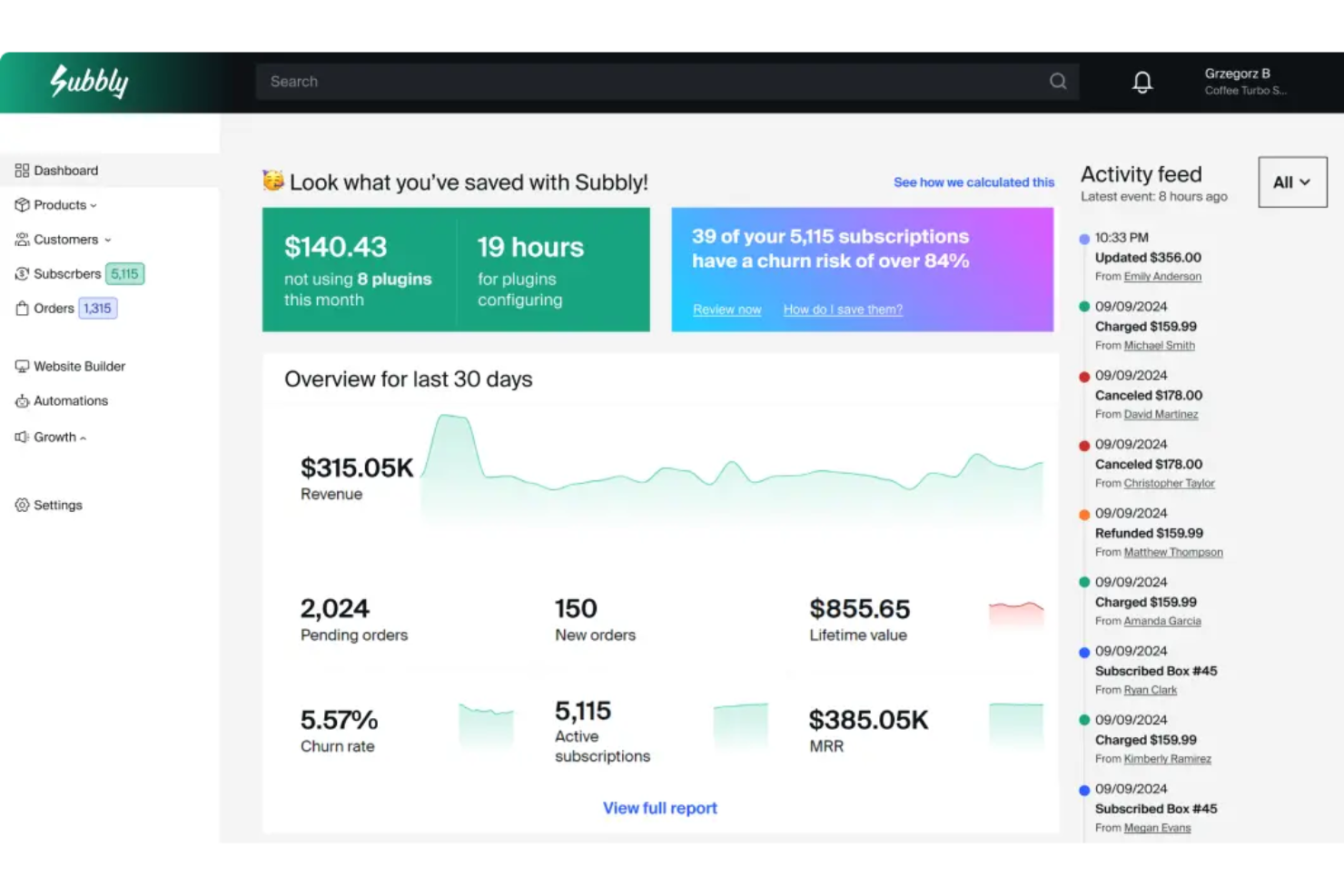
Subbly is an ecommerce platform tailored for businesses that offer subscription-based products or services.
Why I picked Subbly: One aspect of Subbly that stands out is its integrated checkout system for subscription-based businesses, which supports multiple payment gateways including Stripe, Google Pay, Apple Pay, Braintree, PayPal, and more. This flexibility ensures that businesses can cater to a wide range of customer preferences, enhancing the overall shopping experience.
Additionally, Subbly's checkout process is highly customizable, allowing businesses to embed the checkout directly on their website or open it on a separate page. This level of customization ensures that the checkout process aligns with the brand's aesthetic and operational needs.
Subbly standout features & integrations
Standout features include a funnel builder that allows businesses to optimize their subscription sales flow and a bundle builder for creating custom product groupings. The no-code website builder features drag-and-drop capabilities, making it easy to design and launch a branded storefront. Subbly also provides checkout templates for a streamlined purchase experience and supports multi-language functionality to cater to a global audience.
Integrations include Twilio, Zapier, Intercom, Mailchimp, Google Analytics, Zendesk, Hotjar, Drip, Klaviyo, Facebook, ManyChat, ChartMogul, Flodesk, TaxJar, Shopify, WooCommerce, Wix, Bold, and Squarespace.
Pros and Cons
Pros:
- Lots of customization options
- Automation capabilities
- All-in-one subscription business management
Cons:
- No mobile app available
- Entering product variants can be time-consuming
New Product Updates from Subbly

Subbly Enhances AI Builder With UX and Performance Updates
Subbly enhances its AI Builder with improved interface, workflow, and performance updates to create a faster and more seamless building experience. For more information, visit Subbly’s official site.
 .
.

Ecwid is a shopping cart solution that offers a permanent free plan.
Why I picked Ecwid: For small businesses who want a simple online storefront to sell a small number of products, Ecwid offers a completely free plan. Bells and whistles like coupon codes, e-goods, advanced SEO, and live chat are offered via the next plan up, which is still very reasonably priced.
Ecwid connects with email marketing tools like Mailchimp, advertising tools on Google and Facebook, and external marketplaces like Etsy, Amazon, and eBay. The intuitive dashboard provides a simple interface through which you can keep an eye on sales and marketing straight from their mobile app.
Ecwid standout features & integrations
Standout features include a built-in inventory management system that simplifies tracking stock levels and sales, ensuring seamless order fulfillment. The mobile app allows business owners to manage their store on the go, providing real-time updates on sales and marketing performance. Ecwid also offers flexible shipping options and customizable design templates, making it easy to create a professional-looking storefront without technical expertise.
Integrations include Printful, SUP Dropshipping, TaxJar, Intercom, and Pinterest. Additional integrations are available through a paid Zapier account.
Pros and Cons
Pros:
- No setup or transaction fees
- Sell across a variety of mediums
- Free plan
Cons:
- Mobile POS integration is for iOS only
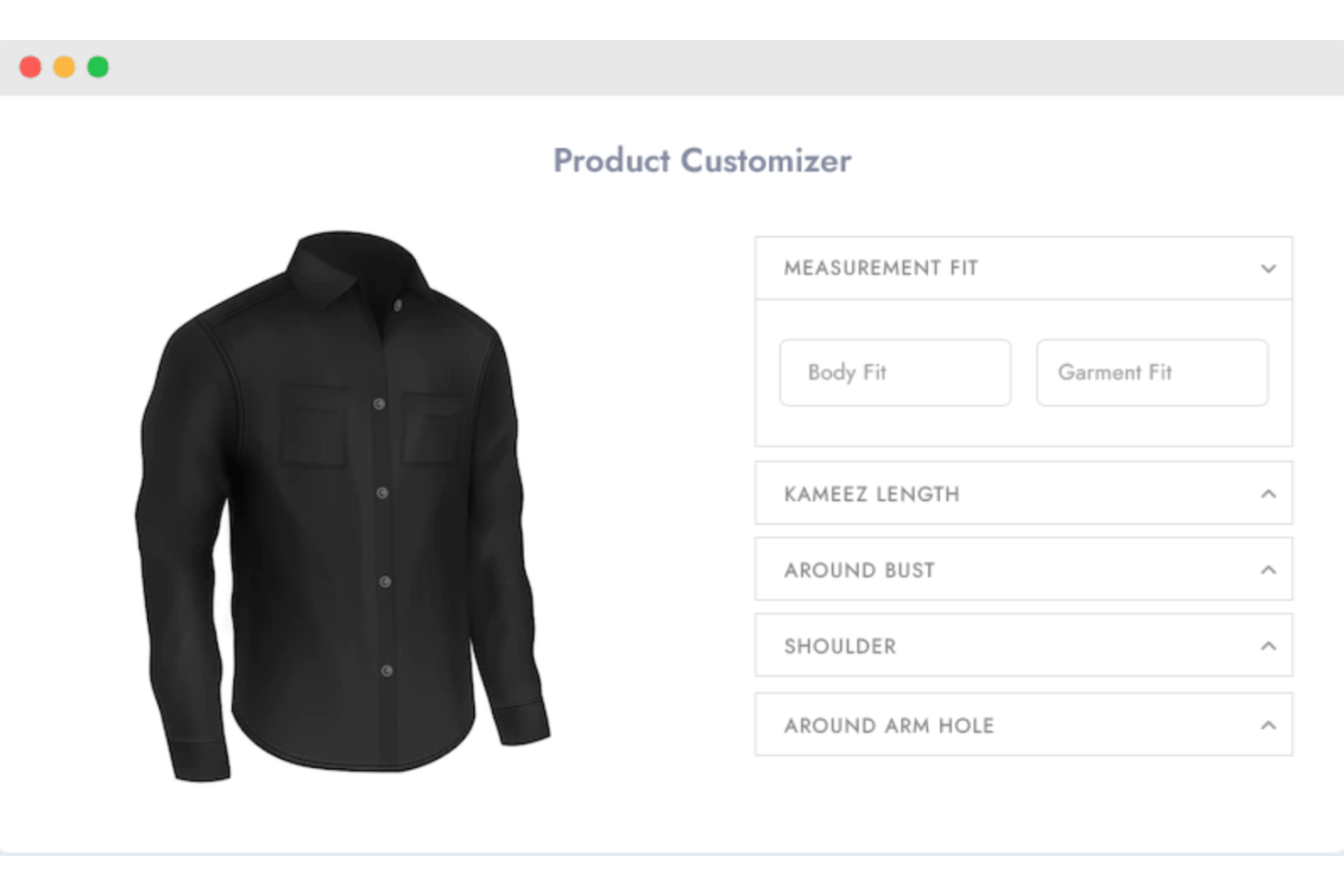
Shopaccino is a shopping cart solution that lets you manage your entire ecommerce business end-to-end.
Why I picked Shopaccino: Shopaccino is an integrated shopping cart solution with an all-in-one ecommerce platform. You can build your branded website, sync their native mobile app to your storefront, and sync your accounting and ERP using their APIs. Inventory and order management, product cataloging, and customer engagement can all be done from their single interface.
Shopaccino’s in-depth marketing features allow you to track campaign performance across email marketing, Google, Facebook, and other channels. They offer functions like Auto SMS and abandoned cart emails as well to enhance conversions. Loyalty and rewards points can be provided to customers to keep them coming back for more.
Shopaccino standout features & integrations
Standout features include a built-in email marketing system and social media marketing tools, enabling businesses to run campaigns across multiple channels directly from the platform. The order management system helps streamline fulfillment, while abandoned cart emails and Auto SMS features work to recover lost sales and boost conversions. Shopaccino also includes a website builder, allowing users to create a branded online store without needing external design tools.
Integrations include payment gateways like Stripe, Google Pay, and Amazon Pay; shipping providers such as DHL, Blue Dart, and Dotzot; and live chat tools like Zendesk Chat and Olark.
Pros and Cons
Pros:
- Easy to pull reports
- Easy setup
- Excellent customer service
Cons:
- No drag-and-drop design tools

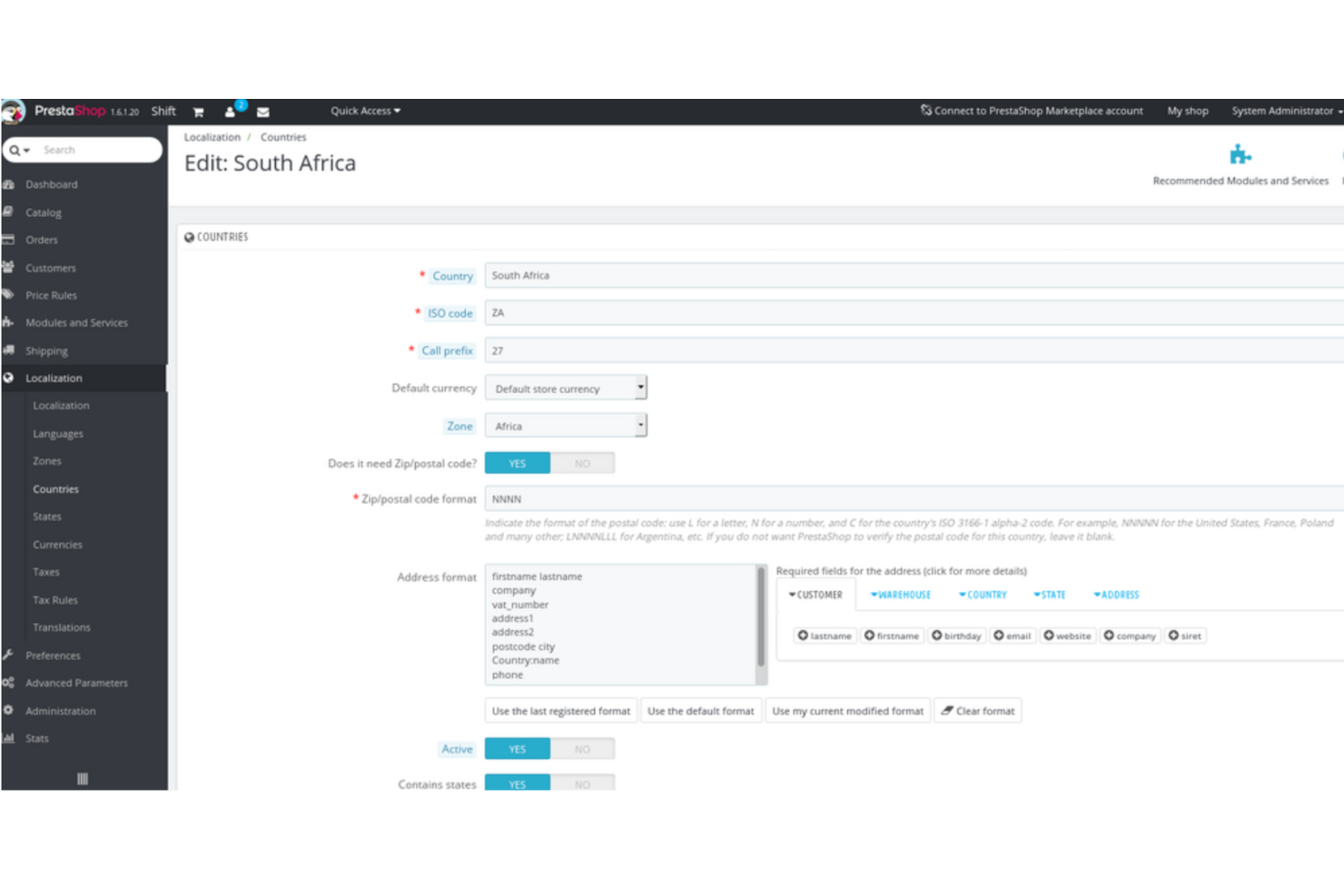
PrestaShop is an open-source shopping cart solution that is available in over 75 languages.
Why I picked PrestaShop: If you’ve got your sights set on global domination, PrestaShop has the tools to help you grow your sales territory across the globe. Available in over 75 languages, you can use a multi-language sheet to easily adapt your product descriptions to different markets. You can also set currencies and then automate the exchange rate movements.
PrestaShop’s email marketing functionality is used not only for promotions, but also to reach out to customers in cart abandonment scenarios. If a product is out of stock when a customer is searching, they can sign up to receive back-in-stock notifications. You can also customize your SEO and link social media accounts to begin selling on social platforms.
PrestaShop standout features & integrations
Standout features include built-in SEO optimization tools that allow businesses to customize metadata, URLs, and product descriptions for better search visibility. Cart abandonment recovery features help re-engage potential customers through automated email reminders, while back-in-stock notifications ensure customers stay informed about product availability. The one-page checkout streamlines the purchasing process, reducing friction and improving conversion rates.
Integrations include HubSpot, QuickBooks, Salesforce, Zoho CRM, and Xero. Additional integrations are available through a paid Zapier account.
Pros and Cons
Pros:
- Many free plugins
- User-friendly interface
- Open source
Cons:
- Lack of free design templates

OpenCart
Best shopping cart solution for open-source design modifications
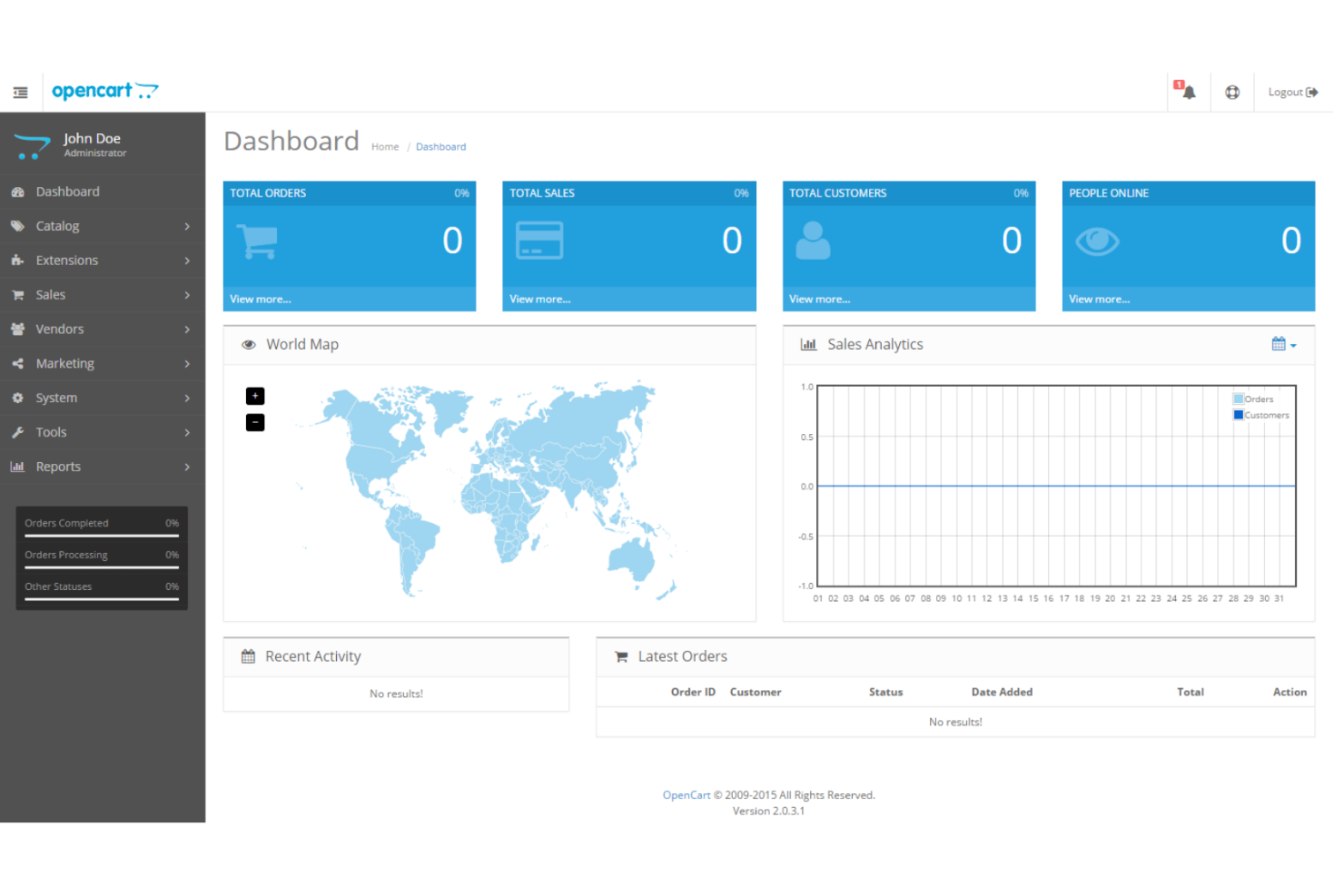
OpenCart is an open source shopping cart solution with many free downloads and upgrades.
Why I picked OpenCart: OpenCart’s site builder is module-based, allowing users to expand store functionality. Their marketplace features over 13,000 themes and modules, including options for payment providers, shipping, social media, accounting, and reporting. If you need a highly customizable option for your online store, OpenCart can help you build to spec.
Unlimited categories and products can be categorized by custom filters, making it easy for your customers to find exactly what they’re looking for. OpenCart also comes with a built-in affiliate system that allows you to offer payment options and collaborate with affiliates.
OpenCart standout features & integrations
Standout features include multi-store support, allowing businesses to manage multiple storefronts from a single interface. The built-in discounts and coupons system makes it easy to create promotional campaigns, while unlimited product and category management with custom filters helps customers find exactly what they need. OpenCart’s extensive extensions marketplace offers over 13,000 modules for additional functionality, including payment providers, shipping, and reporting tools.
Integrations include WordPress, Mailchimp, Zoho, and Zendesk, with many more available through the OpenCart extensions marketplace. The Intercom OpenCart integration is particularly popular for improving customer service and support.
Pros and Cons
Pros:
- Multiple payment gateways
- Easy to add modules
- Highly customizable
Cons:
- No transparent pricing
Best shopping cart solution for email marketing integration

Constant Contact is an email marketing platform with a website builder and online store functionality.
Why I picked Constant Contact: For businesses with an existing email marketing strategy, creating a storefront with Constant Contact allows you to work within a familiar platform while maximizing your current strengths. You can create custom emails with their drag-and-drop function and send customers straight from their inbox to your online store with just a few clicks.
Constant Contact provides professionally designed templates to help you customize your online store design. Lead-generation landing pages can help drive traffic to your products. Constant Contact manages the web hosting, and business owners will benefit from the added email marketing benefits for their ecommerce store.
Constant Contact standout features & integrations
Standout features include an integrated email marketing system that allows businesses to seamlessly connect campaigns with their online store. The drag-and-drop email editor makes it easy to create custom campaigns that drive traffic directly to product pages. Constant Contact also offers a website builder with professionally designed templates, simplifying store setup while handling web hosting for business owners.
Integrations include Salesforce, Gmail, Outlook, Eventbrite, QuickBooks, Canva, Etsy, and Mindbody.
Pros and Cons
Pros:
- Choice of email templates
- Send customers from email to online store
- Extensive email marketing capabilities
Cons:
- Primarily an email marketing platform

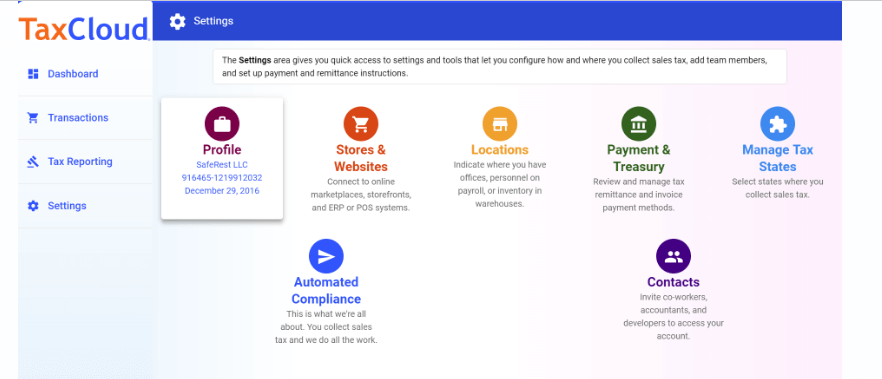
TaxCloud is a comprehensive tool designed to simplify sales tax compliance for ecommerce businesses by offering real-time sales tax calculation and filing services. Its unique selling point lies in its ability to calculate sales tax rates across 13,000+ U.S. jurisdictions, file with 100% accuracy, and manage audits, making it a preferred choice for ecommerce tax compliance.
Why I Picked TaxCloud: I chose TaxCloud for shopping cart solutions because it offers comprehensive sales tax compliance across the vast landscape of U.S. tax jurisdictions. Its ability to instantly calculate and collect sales tax at the point of transaction, coupled with its automated filing and remittance services, makes it a standout choice. I believe TaxCloud is best for ecommerce tax compliance due to its integration capabilities with various ecommerce platforms, its user-friendly interface, and its reputation for accuracy and reliability in tax handling.
TaxCloud Standout Features & Integrations
Key features include sales tax filing and remittance services for businesses. This unique feature further reduces the compliance burden on businesses by automating the often complex and time-consuming process of filing sales tax returns and remitting tax payments to state authorities. TaxCloud takes care of the entire filing process, from preparing the returns to submitting them to the appropriate tax jurisdictions, which can save businesses significant time and resources.
Integrations include Ability Commerce, BigCommerce, QuickBooks, Square, Stripe, Shopify, WooCommerce, Odoo, Volusion, Cart.com, Oracle NetSuite, Acumatica, Sage, and Magento.
Pros and Cons
Pros:
- Collect sales tax automatically
- Integrations with a variety of ecommerce tools
- Database of up-to-date sales tax rates and rules
Cons:
- May be too basic for larger enterprises
- Transaction volume limitations on lower plans
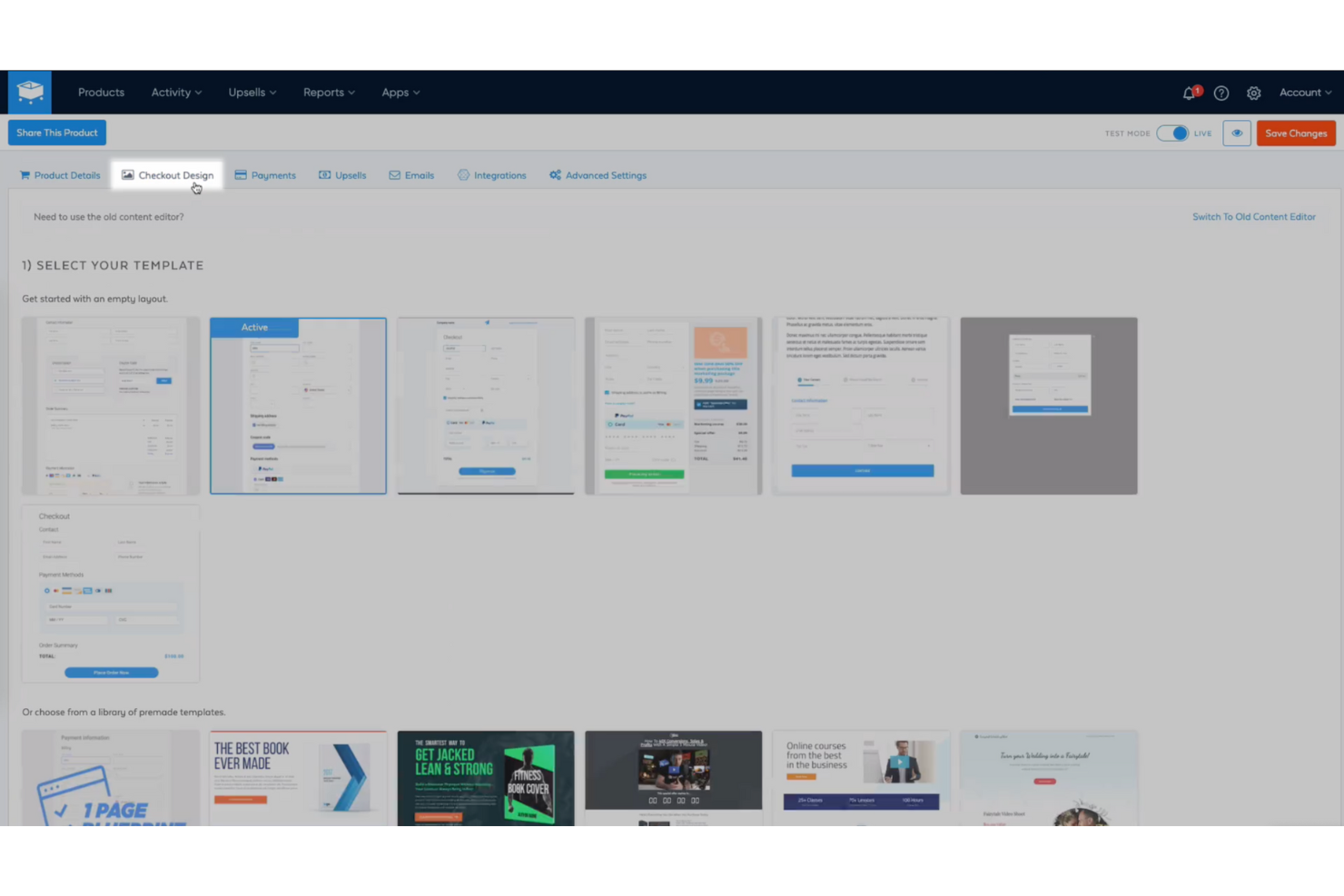
SamCart is a shopping cart software solution that offers a variety of revenue optimization tools.
Why I picked SamCart: In addition to the basic features like payment processing, abandoned cart, and customizable design, small businesses will love SamCart’s revenue optimization features. Their pre-purchase order bumps make it easy for customers to access add-ons, and at checkout their one-click upsells help you increase the volume in every online shopping cart. You can also accept donations with a pay-what-you-want feature.
SamCart makes it easy to create coupons for recurring or one-time sales. You can offer subscriptions, free trials, and payment plans to customize payment options. And their drag-and-drop builder means that you don’t need any knowledge of code in order to create a beautiful and engaging storefront.
SamCart Standout Features and Integrations
Features include custom domains, unlimited products, pre-designed templates, one-click upsells, CRM integration, and abandoned cart recovery.
Integrations include Stripe, PayPal, HubSpot, ConvertKit, Intercom, AWeber, Kajabi, InflusionSoft, Drip, Mailchimp, and many others. Connect your paid Zapier account to access more options.
SamCart Plans and Pricing
SamCart does not charge transaction fees. Their plans begin at $59/month, and a 7-day free trial is available.
Pros and Cons
Pros:
- Unlimited products
- Extensive integrations
- No transaction fees
Cons:
- Most suitable for selling physical products
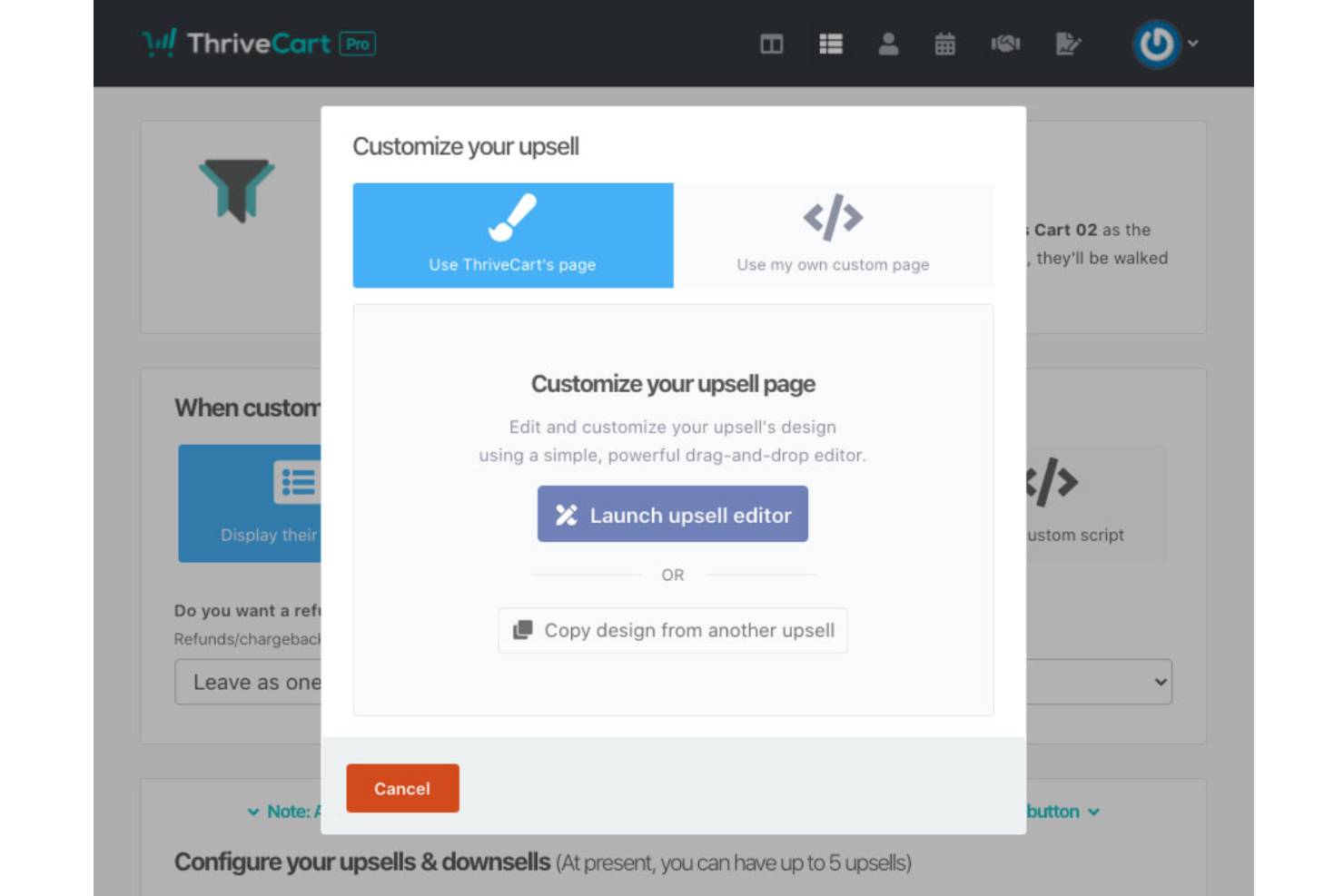
ThriveCart is a shopping cart solution with revenue optimization features like high-converting cart pages, affiliate pages, and sales funnels.
Why I picked ThriveCart: ThriveCart’s drag-and-drop editor makes it easy to customize the checkout process and adds opportunities for cross-selling and upselling. Embeddable pop-up carts help to mitigate cart abandonment, and functions like bump offers, free trials, and one-click funnels have the potential to improve conversion rates and increase average order value.
ThriveCart has extensive analytics and reporting, allowing you to view data like live traffic and conversion rates, projected revenue forecasting, and average daily revenue. You can also provide customers with perks like free trials, subscriptions, and discount offers to incentivize both first-time and recurring purchases.
ThriveCart Standout Features and Integrations
Features include bump offers, 1-click-upsells, coupons, affiliate center, reporting and analytics, secure URLs, funnel stats, and subscription management.
Integrations include Stripe, PayPal, Apple Pay, ShipStation, Teachable, Slack, HubSpot, Mailchimp, ConvertKit, and ActiveCampaign. More integrations are also available by connecting a paid Zapier account.
Pros and Cons
Pros:
- Built-in affiliate management
- User-friendly interface
- Extensive integrations
Cons:
- Lifetime plan rather than monthly payment
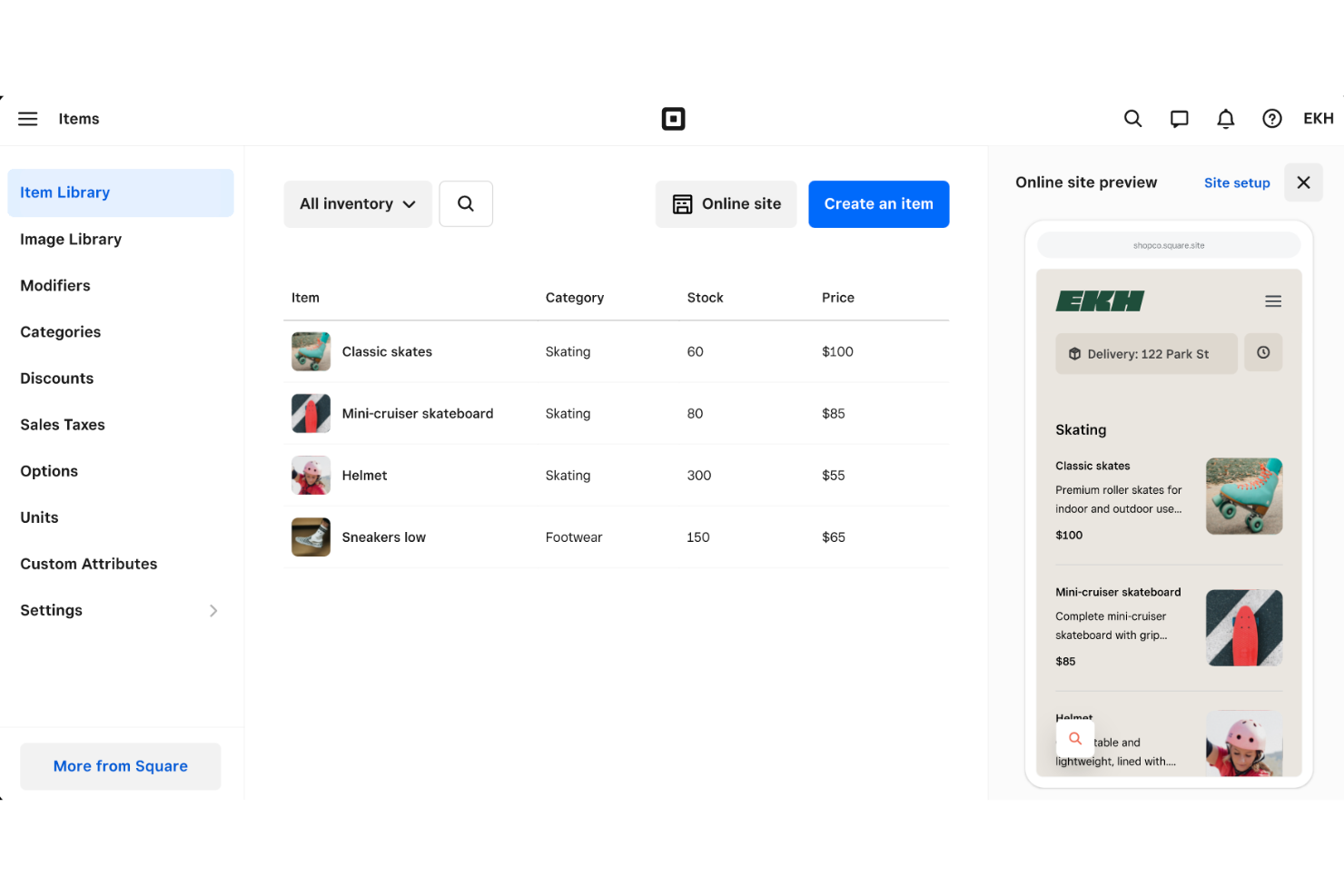
Square is an ecommerce software that operates at both in-store and online points of purchase.
Why I picked Square: If you need an ecommerce solution that will also operate within your bricks and mortar store, Square is an excellent choice. Since Square offers an integrated approach to online and in-store sales, you can manage purchases from both channels within one unified system.
Square’s mobile-first design feels like you’re navigating an app when exploring your online store. You can customize your shipping options, including discounts, free in-store pickup, and local delivery. Their payment gateway is easy to navigate and can be linked to both Instagram and Facebook so that customers can buy right from social media.
Square standout features & integrations
Standout features include a fully integrated in-store and online checkout system, allowing businesses to manage all sales channels from one platform. The mobile-first design ensures a seamless shopping experience, whether customers are browsing on desktop or mobile. Customizable shipping options, including discounts, free in-store pickup, and local delivery, give businesses the flexibility to tailor fulfillment options to customer needs.
Integrations include Mailchimp, Wix, LinkTree, Acuity Scheduling, Craver, Local Line, Trunk, Synder, and Doordash.
Pros and Cons
Pros:
- Free option has unlimited products
- User-friendly interface
- Seamless online + in-store experience
Cons:
- Some features only available in top tier plans
Other Shopping Cart Solutions
Here are a few more options that didn’t make the best shopping cart solutions list:
- Mailchimp Stores
Best shopping cart solution for ease of setup
- Big Cartel
Shopping cart solution for creators and artists
- GoDaddy Online Store
Shopping cart solution for reaching new customers
- ShopWired
Shopping cart solution for customizing your online store design
- Shopify
Best shopping cart solution with inventory management
- BigCommerce
Best shopping cart solution for omnichannel marketing
- Adobe Commerce
Best shopping cart solution for integrating with other Adobe tools
- 1ShoppingCart
Best shopping cart solution for customer support
- X-Cart
Best shopping cart solution for custom bundle pricing plans
- Selldone
Best shopping cart solution for no-code shop building


Related Ecommerce Software Reviews
If you still haven't found what you're looking for here, check out these related ecommerce tools that we've tested and evaluated.
- Ecommerce Platforms
- Inventory Management Software
- Payment Processing Software
- Shopping Cart Solutions
- Order Management Systems
- Warehouse Management Software
Our Selection Criteria for Top Shopping Cart Systems
Selecting the right shopping cart solutions requires evaluating their offerings. Through trials and research, we've developed criteria to guide software buyers in making informed decisions.
Core functionality (25% of total weighting score)
Key functionalities of shopping cart solutions include:
- Product management: Ability to easily add, edit, and manage products, including descriptions, prices, and photos.
- Checkout process: A streamlined, secure checkout process that minimizes steps and reduces cart abandonment.
- Payment integration: Support for multiple payment gateways and methods, facilitating global transactions.
- Shipping and tax calculations: Automatic calculation of shipping costs and taxes based on customer location and product specifics.
- Mobile optimization: Ensuring the shopping cart is fully functional and responsive on mobile devices.
Additional standout features (25% of total weighting score)
Innovative features that differentiate a solution include:
- Unique customization options that allow for a tailored shopping experience.
- Advanced analytics and reporting tools for deeper insights into customer behavior and sales trends.
- Integration with CRM and ERP systems for streamlined operations.
- AI-driven recommendations and personalization to enhance the shopping experience.
- Exceptional security features, like fraud detection and prevention capabilities.
Usability (10% of total weighting score)
Criteria for usability focus on:
- Intuitive design and navigation that minimize the learning curve.
- Clear, visually appealing product displays and descriptions.
- Easy-to-use administrative backend for efficient management.
Onboarding (10% of total weighting score)
Effective onboarding is evaluated by:
- Availability of comprehensive guides, tutorials, and customer support from the outset.
- Access to templates and best practices for setup and deployment.
- Interactive tools, such as product tours, that facilitate a quick start.
Customer support (10% of total weighting score)
Looking for:
- Responsive, 24/7 customer service via multiple channels (chat, email, phone).
- A robust knowledge base that offers self-help options and troubleshooting guides.
- Community forums or networks for peer support and advice.
Value for money (10% of total weighting score)
Assessment includes:
- Competitive pricing models that offer good value based on the features provided.
- Transparent pricing with no hidden fees.
- Flexible plans that cater to different sizes and types of ecommerce businesses.
Customer reviews (10% of total weighting score)
Evaluation of customer feedback focuses on:
- Consistently high ratings in user satisfaction and ease of use.
- Positive testimonials about specific features or benefits.
- How the shopping cart solution has helped improve sales and customer experience.
Choosing shopping cart solutions depends on core functionalities, usability, innovative features, onboarding, support, value for money, and customer reviews.
What Are Shopping Cart Solutions?
Shopping cart solutions are ecommerce tools that turn an “Add to Cart” click into a completed order by handling product selection, real-time totals (taxes and shipping included), and secure payment processing in one clean flow.
Retail teams use them to sync inventory, plug in their favorite gateways, and keep shoppers cruising—no browser-crashing pop-ups, no midnight math.
The right cart lifts conversion rates and chops support tickets, freeing you from weekend CSV purgatory. If checkout still feels clunky, upgrading the cart is the fastest path to more sales and fewer abandoned tabs.
How to Choose the Right Shopping Cart Solution
Picking a shopping cart solution shouldn’t feel like speed-dating 40 look-alike apps.
Focus on the problems you’re actually trying to fix, grill each platform with the right questions, and only swipe right on the cart that makes checkout smoother and your back-office life easier.
| Step | Key question to ask | Non-negotiables |
|---|---|---|
| 1. Pinpoint the pain | “Where are customers or team members getting stuck right now?” | A cart that shortens your current friction point—be it a bloated checkout, clumsy mobile flow, or missing shipping rules. |
| 2. Know the driver | “Who uses this daily—ecom leads only or the whole crew?” | Intuitive UI + permissions, so anyone from marketing to ops can jump in without a 43-page manual. |
| 3. Check the plug-ins | “Will it play nice with our payment gateway, CRM, and accounting stack?” | Native integrations or open APIs that slash zap-and-pray workarounds (and extra subscriptions). |
| 4. Define the win | “Is success higher conversion, fewer abandons, or deeper analytics?” | Built-in reports and KPIs that map directly to your goal—no spreadsheet gymnastics required. |
| 5. Future-proof it | “Can this cart handle 10× traffic and multi-store syncing next year?” | Scalability options (multi-currency, multi-storefront) and transparent pricing as volume grows. |
| 6. Vet the backup crew | “When something breaks at 2AM, who answers?” | 24/7 human support plus solid dev docs or an active community for quick DIY fixes. |
| 7. Reality-check fit | “Does this streamline our workflows—or just add more tabs?” | A trial or sandbox that lets you stress-test real orders before you commit. |
Lock down those seven boxes and you’ll skip the buyer’s-remorse phase—landing a cart that keeps customers clicking “Place Order” and your ops team off aspirin.
Trends in Shopping Cart Solutions
More than ever, it's all about enhancing the online shopping experience, blending convenience with next-gen tech. Here’s what’s shaping up to be big in the world of shopping cart solutions:
- AI-powered personalization. Shopping carts are using AI to make smarter product recommendations, tailoring suggestions based on customer habits. Think of it as a personal shopping assistant that knows you better than your best friend.
- One-click checkout. The days of drawn-out checkout processes are numbered. Carts are adopting streamlined, single-click checkout to boost conversion rates and cut down on abandoned carts. Because who has time to re-enter all those details?
- Augmented reality (AR) integration. AR in shopping carts lets customers “try before they buy” by visualizing products in their space. From seeing that couch in the living room to trying on virtual sunglasses, it’s interactive and reduces returns.
- Voice commerce compatibility. Hands-free shopping is on the rise with carts incorporating voice-activated purchases. Imagine telling your smart speaker, “Add those shoes to my cart,” and it’s done.
- Enhanced security measures. With online fraud on the rise, carts are stepping up security, adding advanced encryption and strict compliance standards to protect customer data and boost trust.
- Mobile-first design. With mobile as king, carts are prioritizing responsive, mobile-friendly designs that ensure smooth browsing and buying on any device.
- Sustainability features. For eco-conscious shoppers, carts now offer sustainable checkout options, like carbon offsets and eco-friendly packaging choices, letting customers make planet-friendly purchases.
- Subscription support. As subscription boxes and services keep booming, carts are fine-tuning their capabilities to handle recurring payments, cancellations, and customer engagement around subscriptions.
- Gamified checkout processes. Why stop at “thank you for your purchase”? Some carts are making checkout fun with progress bars, surprise rewards, and even mini-games to keep customers engaged and nudge them toward completing the sale.
- Composable commerce. Instead of an all-in-one monolithic solution, businesses are assembling their perfect shopping cart setup by integrating specialized tools for payment, inventory, and checkout. It’s the ultimate in flexibility and future-proofing.
These trends are all about making the online shopping experience smarter, faster, and more enjoyable—giving customers what they want before they even know they want it.
Features of Top Shopping Cart Software
Here’s the checklist I use to make sure a shopping cart solution has all the bells and whistles your business—and customers—need to keep the checkout process smooth and satisfying:
- Shopping cart functionality. A smartly designed cart page where users can easily add, update, and remove items, or even save them for later. It’s all about giving customers full control without the headache.
- Payment integration. Secure, seamless payment options are a must, with support for credit cards, PayPal, and digital wallets. A cart should handle whatever payment method your customers throw at it.
- Order management. Keeps businesses in the loop on every order, from processing to shipping updates, invoicing, and everything in between.
- Inventory management. Tracks stock levels in real time, so you’ll never have to deal with overselling (or explaining why you’re out of that hot item right now).
- Shipping and tax calculation. Automatically calculates taxes and shipping costs based on the customer’s location, saving everyone from surprise fees at checkout.
- Customer accounts and profiles. Makes it easy for customers to save preferences, check past orders, and track shipments—turning one-time buyers into repeat customers.
- Mobile responsiveness. Ensures a flawless experience across devices so customers can shop on the go without missing a beat.
- Customization and branding. Lets you brand the cart page to match your site, creating a seamless experience that feels cohesive from homepage to checkout.
- Analytics and reporting. Tracks everything from conversion rates to abandoned carts, giving you insights into customer behavior and letting you make data-backed improvements.
- Abandoned cart recovery. Built-in tools to bring back those who bailed mid-checkout, whether through reminder emails, incentives, or just a little nudge to complete their purchase.
With these features, your shopping cart solution isn’t just a “buy now” button—it’s a complete, customer-focused experience that supports your business goals and keeps customers coming back for more.
Key Benefits of Shopping Cart Software
Shopping cart solutions are the bridge between browsing and buying, transforming the ecommerce experience for both shoppers and businesses.
Here’s how the right cart software can boost your bottom line and make life easier:
- Simplified checkout process. A streamlined, no-fuss checkout keeps customers on track and minimizes abandoned carts. When checking out is smooth and efficient, you’ll see higher conversion rates and happier customers who won’t bail last minute.
- Enhanced security measures. Customers want to feel safe entering their payment info, and advanced security protocols build that trust. With top-notch data protection, you not only safeguard customer information but also earn loyalty and confidence.
- Improved inventory and order management. Forget scrambling to check stock; shopping carts with integrated inventory tracking let you monitor stock levels in real time and streamline order processing. This translates to better backend efficiency and fewer unhappy customers finding items out of stock.
- Increased payment options flexibility. Today’s shoppers want choices, from credit cards to digital wallets. A good shopping cart solution supports multiple payment gateways, making transactions easier for a wider range of customers, no matter where they are or how they prefer to pay.
- Data analytics and insights. Knowing your customers’ buying habits is gold. With built-in analytics, shopping carts give you insights into customer behavior, popular products, and conversion trends, empowering you to make strategic decisions that drive growth.
In a nutshell, shopping cart software isn’t just about moving products—it’s about creating an intuitive, secure, and data-rich experience that benefits both your customers and your business.
Cost & Pricing for Shopping Cart Solutions
Selecting the right shopping cart solution is crucial for any ecommerce business, especially for those new to such software.
The market offers a variety of plans and pricing options to accommodate different business sizes, needs, and budgets.
Plan comparison table for shopping cart solutions
Here's a breakdown of typical plan options and their pricing to assist in your decision-making process.
| Plan Type | Average Price | Common Features Included | Best For |
|---|---|---|---|
| Free | $0 | Basic payment processing, limited product listings, basic analytics | Small startups, hobbyists |
| Basic | $10 - $30/month | Standard payment processing, basic analytics, product listings | Small businesses |
| Intermediate | $35 - $100/month | Advanced analytics, marketing tools, customer segmentation, increased product listings | Growing businesses |
| Advanced | $100 - $300/month | Full customization, advanced security features, API access, multi-channel selling | Established businesses, large SMEs |
| Enterprise | Custom pricing | Dedicated support, custom integrations, unlimited listings, comprehensive analytics | Large enterprises, high-volume sellers |
When evaluating shopping cart solutions, consider not only the cost but also the features and scalability of each plan, especially if you need subscription billing capabilities. The ideal software should fit your current budget and support your ecommerce venture as it evolves.
Shopping Cart Solutions FAQs
Here are a few questions I’ve heard before and want to address here.
What shopping cart solution is easiest to learn?
The easiest shopping cart solution to learn varies based on individual preferences and technical familiarity. However, some popular platforms known for their user-friendly interfaces include ThriveCart, WooCommerce (a WordPress plugin), and Shift4Shop.
These solutions offer intuitive dashboards, drag-and-drop functionalities, and comprehensive documentation or customer support, making them accessible to users with varying levels of technical expertise. For some, an integrated solution like Kajabi, which includes built-in shopping cart functionality, may be the simplest option.
How do shopping cart solutions handle international taxes and VAT?
Ecommerce shopping cart solutions typically include features or integrations that automatically calculate international taxes and VAT during the checkout process.
They use geolocation to determine the customer’s location and apply the correct tax rates according to local laws. Some platforms also allow merchants to set tax rates manually for specific regions, ensuring compliance with global tax regulations.
Can shopping cart platforms support multiple currencies for global sales?
Yes, many ecommerce shopping cart platforms support transactions in multiple currencies, facilitating global sales. They offer dynamic currency conversion features that allow customers to view prices and complete transactions in their local currency. This capability enhances the shopping experience for international customers and can significantly increase global sales conversions.
What are the security features of ecommerce shopping cart solutions?
Ecommerce shopping cart solutions prioritize security by implementing features such as SSL certificates, secure payment gateway integrations, and compliance with PCI DSS standards. These features ensure that customer data, especially payment information, is encrypted and transmitted securely. Many platforms also offer fraud detection tools and regular security updates to protect against new threats.
Do any shopping cart solutions offer built-in A/B testing features?
While not all, some advanced ecommerce shopping cart solutions include built-in A/B testing features, allowing merchants to experiment with different elements of their online store to optimize conversions. These features enable testing of product descriptions, pricing strategies, and call-to-action buttons, among others. This capability is invaluable for improving the shopping experience and increasing sales.
Other Ecommerce Payment Software
If you're looking for shopping cart solutions, you might be thinking about ecommerce payment software more generally, too. Here are some related software reviews you might be interested in.
- Ecommerce Accounting Software
- Buy-Now-Pay-Later Platforms
- Credit Card Processing
- Ecommerce Sales Tax Software
- Payment Processing Software
- Abandoned Cart Software
Put the Right Software in Your Shopping Cart
Just as with anything you want to buy, you need to research to find the shopping cart software that will best serve your brand.
When looking at the options, put yourself in your customers' shoes. Ultimately, the right decision will bear out in how easy it is for them to buy your stuff.
After that, look for the features that make your life easier. At the intersection of these two is your perfect shopping cart solution. Pounce on it and start getting those sales.
And to stay up-to-date on all our content here, don’t forget to subscribe to our newsletter.