

10 Best Salon POS Software Systems Ranked for 2026

The Top 10 Salon POS Software


Salon POS software tackles booking, no-shows, and payment headaches.
They automate appointment scheduling, send SMS and email reminders, process credit-card transactions online or in-store, manage inventory, and power loyalty programs.
They’ll even give you a real-time dashboard for multi-location visibility and plug into QuickBooks, your CRM, and social-media booking.
In this guide I review top salon point-of-sale systems—comparing pricing, core functionality, payment options, and no-show reduction features—so you can zero in on the right one.
I’ve spent over a decade in retail operations and tested hundreds of POS and management platforms. These solutions cut the noise—offering reliable tools to streamline bookings, payments, and stock so you can run your salon with confidence.
Why Trust Our Software Recommendations
Our team has been testing and reviewing software since 2012. As retail leaders ourselves, we know how difficult—and important—it is to choose the right software.
For this guide, we evaluated tools using hands-on testing and independent research, scoring tools using our selection criteria.
Our reviews reflect our independent judgment—not a sales pitch.
Salon POS Software Comparison Table
This comparison table summarizes pricing details for my top salon POS software selections:
| Tool | Best For | Trial Info | Price | ||
|---|---|---|---|---|---|
| 1 | Best for appointment and payment integration | Free plan available; 30-day free trial on paid tiers | From $49/month | Website | |
| 2 | Best for automation features | 21-day free trial | From $120/month per location + $10/user/month | Website | |
| 3 | Best for loyalty programs | Free demo available | Pricing upon request | Website | |
| 4 | Best for small businesses | 30-day free trial | From $30/month | Website | |
| 5 | Best for online booking | Free plan available | From $11.9/month (billed annually) | Website | |
| 6 | Best for large enterprises | Free demo available | Pricing upon request | Website | |
| 7 | Best for free scheduling | 7-day free trial | From $19.95/month | Website | |
| 8 | Best for wellness integration | Free demo available | From $99/month | Website | |
| 9 | Best for custom dashboards | Free demo available | From $179/month | Website | |
| 10 | Best for mobile bookings | Free plan available | From $29.99/month | Website |
The 10 Best Salon POS Software, Reviewed
Next, you’ll find in-depth rundowns of each top 10 system—key features, pros and cons, standout integrations, and who it’s built for. Use these summaries to pinpoint the salon POS software that fits your workflows and growth plans.
Square
Best for appointment and payment integration
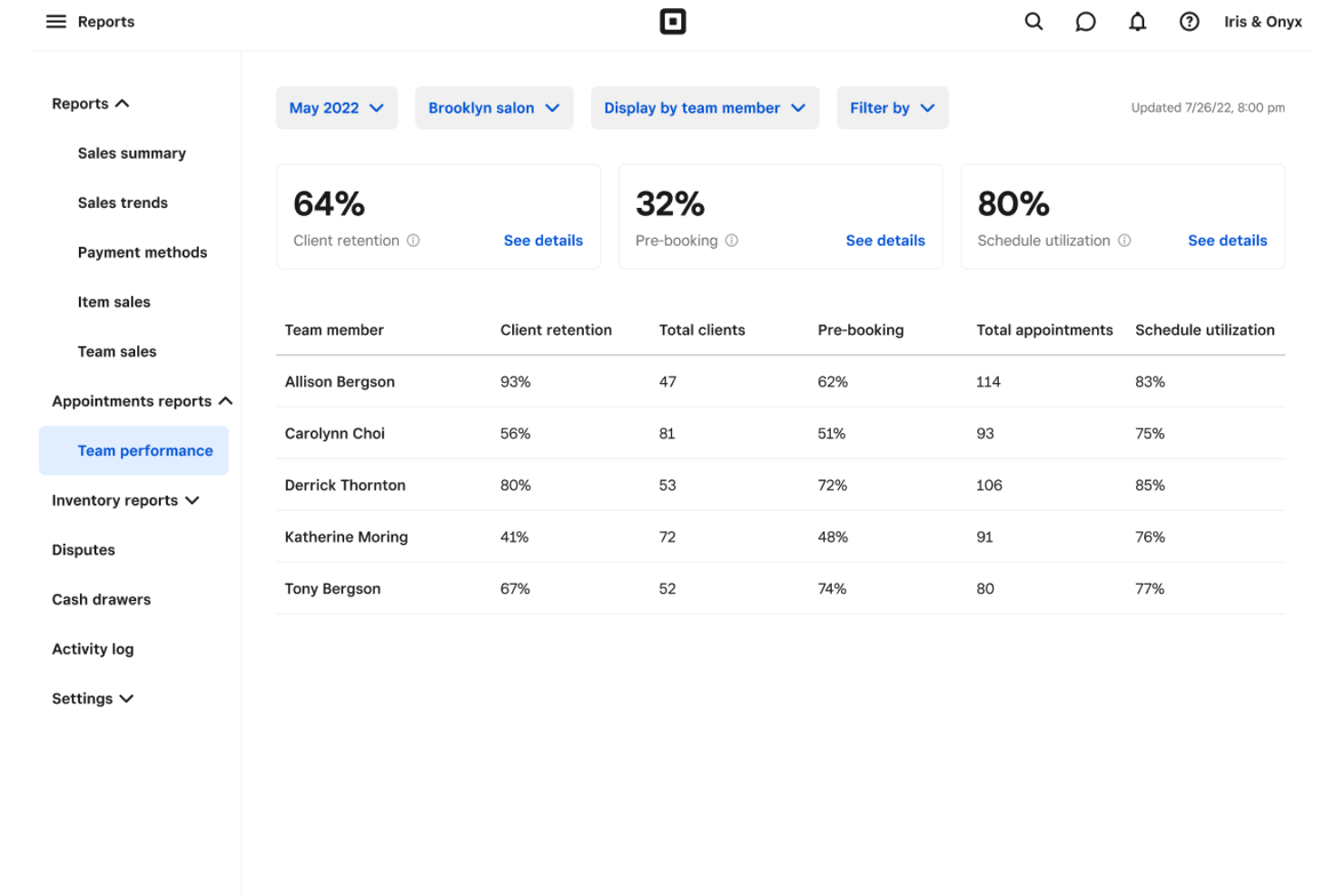
Square's salon software is an ideal choice for beauty businesses such as salons, spas, and barbershops, offering a comprehensive management solution tailored to their unique needs. By integrating appointment scheduling, payment processing, and inventory management, Square enables you to streamline operations, enhance customer service, and manage your team effectively. With additional features like marketing tools and customer loyalty programs, you can focus on growing your business while ensuring a seamless experience for your clients.
Why I Picked Square
I picked Square for its seamless integration of appointment scheduling and payment processing, which are crucial for any salon business. With Square, you can manage bookings and process payments all in one place, reducing the hassle of juggling multiple systems. Its inventory management feature also stands out, allowing you to keep track of retail products and supplies efficiently. This combination of features makes Square a practical choice for salon owners looking to enhance operational efficiency and improve customer experiences.
Square Key Features
In addition to appointment and payment integration, Square offers:
- Client Management: Store and manage client information, track service history, and personalize customer interactions easily.
- Staff Management: Manage staff schedules, track commissions, and set custom permissions to ensure smooth operations.
- Marketing Tools: Utilize built-in marketing tools to create campaigns and engage with your clients effectively.
- Loyalty Programs: Implement customer loyalty programs to reward repeat clients and boost customer retention.
Square Integrations
Integrations include QuickBooks, Xero, WooCommerce, BigCommerce, Wix, Mailchimp, Acuity Scheduling, and Google Ads, plus Square Online via Weebly and Square payments in Jotform.
Pros and Cons
Pros:
- Built-in reporting tracks sales totals, item performance, and trends
- Hardware and app pairing supports mobile card payments anywhere
- Simple checkout flow for items, discounts, tips, and receipts
Cons:
- Feature requests can take time to arrive compared with larger POS suites
- Some advanced POS features require paid add-ons or upgrades
New Product Updates from Square
Square Expands Sales Reporting With Revenue Centers
Square introduces revenue centers for grouping sales data and aligns sales report definitions between Point of Sale and the Dashboard to give you clear, consistent metrics. For more information, visit Square’s official site.
 .
.
Best for automation features

Mangomint is a salon POS software designed for beauty businesses seeking efficiency through automation. It caters to salons, spas, and wellness centers by managing appointments, client data, and payments.
Why I picked Mangomint: Mangomint excels in automation, reducing manual tasks for your team. It offers features like automated booking confirmations, reminders, and follow-ups.
You can also automate inventory management, ensuring stock levels are always accurate. These automation features save time and improve accuracy, making it a great fit for busy salons.
Standout features & integrations:
Features include a customizable dashboard that allows you to track key metrics, a loyalty program to reward your clients, and detailed reporting tools that provide insights into your business performance.
Integrations include QuickBooks, Mailchimp, Stripe, Square, Zoom, Google Calendar, Facebook, Instagram, Shopify, and Xero.
Pros and Cons
Pros:
- Effective client loyalty program
- Accurate inventory management
- Strong automation capabilities
Cons:
- Limited offline functionality
- Initial setup can be complex

Phorest
Best for loyalty programs

Phorest is a comprehensive salon POS software designed for beauty businesses focused on client retention. It offers features such as appointment scheduling, client management, and payment processing to enhance the customer experience.
Why I picked Phorest: Phorest is renowned for its loyalty programs, providing tools to build and maintain strong client relationships. It includes features like a customizable loyalty points system and automated client reminders.
You can also create personalized marketing campaigns to keep clients engaged. These features ensure your clients feel valued and keep coming back.
Standout features & integrations:
Features include detailed reporting that helps you track business performance, a staff management system that simplifies scheduling and payroll administration, and an online booking system that enables clients to schedule appointments easily.
Integrations include Mailchimp, QuickBooks, Xero, Facebook, Instagram, Google Calendar, Stripe, Square, PayPal, and Constant Contact.
Pros and Cons
Pros:
- Detailed business reporting
- Automated client reminders
- Strong loyalty program options
Cons:
- Can be complex to set up
- Occasional software glitches

Vagaro
Best for small businesses

Vagaro is a salon POS software tailored for small businesses in the beauty industry. It handles scheduling, payment processing, and customer management, making it easier for you to run your salon efficiently.
Why I picked Vagaro: Vagaro is ideal for small businesses due to its affordability and ease of use. It offers features such as online booking, client management, and marketing tools that are accessible to companies with limited resources.
You can also customize services and manage appointments seamlessly. These features make it a great choice for those just starting or looking to grow their business without high costs.
Standout features & integrations:
Features include automated appointment reminders that help reduce no-shows, a user-friendly interface that simplifies daily tasks, and a marketing suite to help you effectively reach more clients.
Integrations include QuickBooks, Google Calendar, Facebook, Yelp, Instagram, Mailchimp, Zoom, Stripe, PayPal, and Square.
Pros and Cons
Pros:
- Automated reminders reduce no-shows
- Easy to learn and use
- Affordable for small businesses
Cons:
- Some features require additional fees
- Customer support can be slow

Best for online booking

SimplyBook.me is a scheduling software specifically designed for hair and beauty services, providing a comprehensive booking system for salons and spas. It manages appointments, client information, and payments, making it an ideal solution for businesses that prioritize online bookings.
Why I picked SimplyBook.me: SimplyBook.me specializes in online booking, providing a user-friendly platform for clients to schedule appointments. It includes features like custom booking pages and automated reminders, ensuring clients can book with ease.
The platform also offers promotions and gift cards directly through the booking system. These features make it perfect for salons looking to enhance their online presence and client convenience.
Standout features & integrations:
Features include a booking widget that can be added to your website, a client app that allows you to schedule appointments on the go, and a promotion management tool that helps you run special offers.
Integrations include Google Calendar, Facebook, Instagram, PayPal, Stripe, Zapier, Zoom, Mailchimp, WordPress, and Weebly.
Pros and Cons
Pros:
- Booking widget for websites
- Automated client reminders
- Custom booking pages
Cons:
- Some features require additional fees
- Limited customization options

Zenoti
Best for large enterprises

Zenoti is an enterprise-level salon POS software designed for large beauty businesses and chains. It supports scheduling, client management, and payment processing, making it suitable for salons requiring robust operational support.
Why I picked Zenoti: Zenoti is tailored for large enterprises, offering features that cater to the needs of big salons and chains. It provides centralized management tools that help streamline operations across multiple locations.
You can also benefit from its comprehensive analytics and reporting capabilities. These features make Zenoti a great fit for businesses looking to manage complex operations efficiently.
Standout features & integrations:
Features include a loyalty program that helps retain clients, an inventory management system that tracks stock, and an employee management feature that streamlines staff scheduling and payroll.
Integrations include QuickBooks, Salesforce, Mailchimp, Stripe, Square, Google Calendar, Facebook, Instagram, Xero, and Constant Contact.
Pros and Cons
Pros:
- Centralized management tools
- Comprehensive analytics capabilities
- Ideal for large-scale operations
Cons:
- High initial learning curve
- Complex setup process

Fresha
Best for free scheduling

Fresha is a salon POS software aimed at beauty businesses looking for cost-effective solutions. It provides scheduling, client management, and payment processing to help you manage your salon efficiently.
Why I picked Fresha: Fresha is ideal for businesses seeking free scheduling tools. It offers features such as online appointment booking, calendar management, and automated reminders, all without additional fees.
The platform also enables you to access a large marketplace, allowing you to attract new clients. These options make it a great choice for businesses seeking to reduce costs while expanding their customer base.
Standout features & integrations:
Features include a no-show protection feature that minimizes lost revenue, a point-of-sale system that simplifies transactions, and detailed analytics to help you understand your business performance.
Integrations include Google Calendar, Facebook, Instagram, Square, Stripe, PayPal, QuickBooks, Xero, Mailchimp, and Zoom.
Pros and Cons
Pros:
- Automated appointment reminders
- Access to a large marketplace
- No fees for scheduling
Cons:
- Limited offline capabilities
- Some advanced features cost extra

MindBody
Best for wellness integration

Mindbody is a salon POS software designed for beauty businesses like hair salons and barbershops. It manages scheduling, staffing, payment processing, and reporting, helping you run your business smoothly.
Why I picked Mindbody: This software excels in wellness integration, offering features like integrated marketing tools and a mobile app for on-the-go management. It stands out by providing AI-driven customer service, customizable booking options, and access to a large consumer network through its app. These features make it ideal for businesses looking to attract clients and grow.
Standout features & integrations:
Features include marketing tools that help you reach more clients, a mobile app to manage your business on the go, and AI-driven customer service to enhance client interactions.
Integrations include Facebook, Instagram, Google, Zoom, Mailchimp, QuickBooks, Xero, ClassPass, Constant Contact, and FitMetrix.
Pros and Cons
Pros:
- Mobile app for management
- Integrated marketing campaigns
- Customizable booking options
Cons:
- Can be expensive for small businesses
- Steep learning curve

Meevo
Best for custom dashboards

Meevo is a salon POS software designed for beauty businesses that need flexibility in managing their operations. It supports scheduling, client management, and payment processing, making it suitable for salons of various sizes.
Why I picked Meevo: Meevo offers custom dashboards that allow you to tailor the interface to fit your specific needs. It includes features such as drag-and-drop scheduling, which simplifies appointment management. You can also create personalized client profiles to enhance customer service. These customizable options make it ideal for salons looking to optimize their workflow.
Standout features & integrations:
Features include an appointment book with color-coded scheduling, a marketing suite to help promote your services, and inventory management to track your stock.
Integrations include QuickBooks, Mailchimp, Google Calendar, Facebook, Instagram, Square, Stripe, PayPal, Constant Contact, and Zoom.
Pros and Cons
Pros:
- Color-coded appointment book
- Drag-and-drop scheduling
- Highly customizable dashboards
Cons:
- Some features are add-ons
- Steeper learning curve

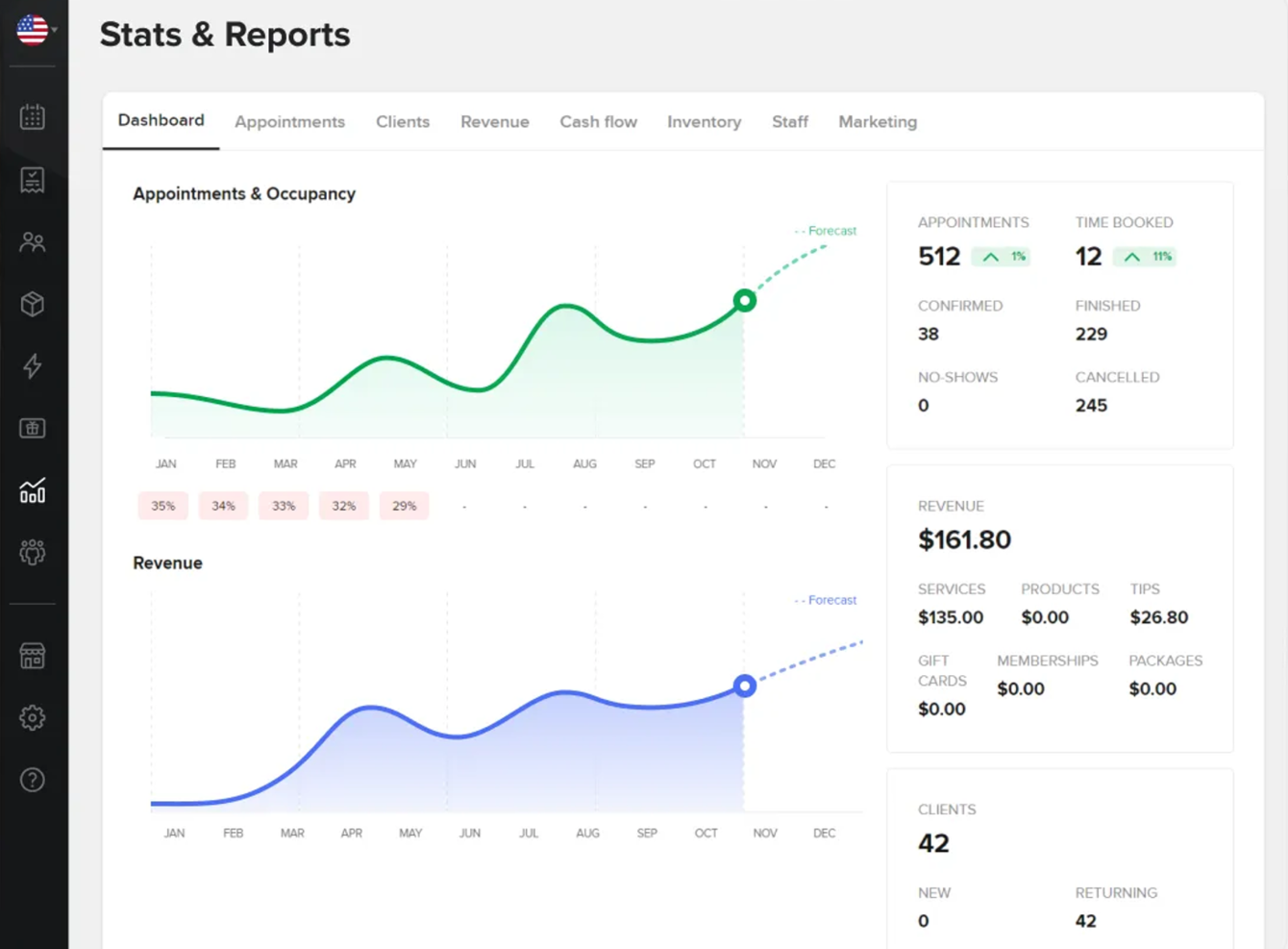
Booksy is a salon POS software designed for businesses that prioritize mobile bookings. It simplifies appointment scheduling, client management, and payment processing, making it ideal for salons that want to offer convenience to their clients.
Why I picked Booksy: Booksy excels in mobile bookings, providing clients with an easy-to-use app for scheduling appointments. It offers features like real-time availability, client reminders, and mobile payment options.
The app's user-friendly interface enables clients to book appointments quickly and easily. This focus on mobile convenience makes it ideal for salons seeking to attract tech-savvy clients.
Standout features & integrations:
Features include a real-time calendar management system, marketing tools to help promote your services, and client management features that track client history and preferences.
Integrations include Instagram, Facebook, Google Calendar, QuickBooks, Square, Stripe, Xero, PayPal, Mailchimp, and Yelp.
Pros and Cons
Pros:
- User-friendly client app
- Effective client reminders
- Strong mobile booking capabilities
Cons:
- Requires internet for full functionality
- Occasional app glitches
Other Salon POS Software
Here are some additional salon POS software options that didn’t make it onto my shortlist, but are still worth checking out:
- DaySmart
For appointment reminders
- SalonBiz
For multi-location salons
- Versum
For user customization
- Bookedin
For client communication
- Acuity Scheduling
For appointment management
- Rosy Salon Software
For scheduling simplicity
- MyTime
For marketing tools
- Timely
For time tracking
- GlossGenius
For intuitive design
- AestheticsPro
For medical spa features


How I Evaluate Salon POS Software
I split my evaluation into two layers: the baseline a tool must clear—think booking-to-checkout sync, commission tracking, and client profiles—and the differentiators that find the right fit.
Core Functionality (Table Stakes For This List)
When I'm selecting tools for my list, I rank each one on a scale from 0 (does not offer the functionality) to 5 (excels in this area) for each core functionality listed below. Then, I calculate the tool's total score into a percentage. Each tool needs to achieve a minimum total score of 65% to be considered for inclusion.
- Salon Checkout Processing: I check whether checkout handles a mixed ticket of services and retail in one transaction, with tip prompts, split tenders, and integrated card readers.
- Appointment-POS Integration: Booked services should flow into the POS as a ready-to-pay ticket so front desk staff aren't re-entering color, cut, and add-on details manually.
- Commission & Tip Management: I look for configurable commission structures—flat, tiered, or sliding—plus automated tip-out splits and exports that feed into payroll.
- Retail Product Inventory: Tracking should distinguish back bar stock from retail shelf product, with SKU management, reorder alerts, and vendor-level purchase tracking.
- Client Profile Management: Each client record should store formula notes, color history, product purchases, and loyalty data so any stylist can pick up where another left off.
- Salon-Specific Reporting: I evaluate whether reports break out service vs. retail revenue, stylist productivity, chair utilization, and rebooking rates beyond basic sales totals.
Once I have a list of tools that meet this criteria, I consider what sets each platform apart.
Differentiating Factors (What Sets Vendors Apart)
Here's how I compare and contrast different vendors:
Standout Features
Automated rebooking reminders and win-back campaigns keep chairs filled without staff chasing clients by phone. I also look for native membership and package management—salons that sell monthly blowout memberships or prepaid highlight series need the POS to handle recurring billing and track remaining sessions. A client-facing online booking widget with waitlist management matters too, since it lets clients grab open slots after cancellations and cuts no-show rates through automated SMS confirmations.
Beyond Features
Payment processing terms matter a lot here—I check whether a platform locks you into proprietary processing or lets you bring a third-party processor, since that flexibility directly affects per-transaction costs. Onboarding support is another big differentiator. Switching POS systems mid-operation means migrating years of client records, formula notes, and gift card balances, so I look for vendors that offer dedicated migration assistance. Pricing structure also gets close attention—per-chair or per-staff models scale very differently than flat-rate plans as your team grows.
What Is Salon POS Software?
Salon POS software is a unified system that handles appointment scheduling, client management, and credit-card processing for hair and beauty businesses.
It automates booking reminders via SMS or email, tracks inventory and retail sales, and powers loyalty programs and gift-card management.
Salon owners and stylists use it to cut no-shows, simplify payment processing—online or in-store—and get real-time dashboards across one or multiple locations.
How to Choose Salon POS Software
Picking the right salon POS system can make or break your day. Focus on features that solve real salon headaches—like no-shows, payment hiccups, and inventory surprises—and make sure it fits your budget and growth plans.
| Step | What to look for | Why it matters |
|---|---|---|
| Define your must-haves | List core functions: appointment scheduling, payment processing, inventory management, loyalty programs | Keeps you focused on tools you’ll actually use |
| Test no-show and reminder workflows | Run through booking, SMS/email reminders, and waitlist features | Reduces no-shows and fills empty slots |
| Compare payment options and fees | Check integrated credit-card processing, cash drawer support, and processing fees | Prevents surprise costs and speeds up checkout |
| Verify integrations | Confirm compatibility with QuickBooks, CRM, online booking, social media, and add-ons | Avoids data silos and streamlines your workflow |
| Evaluate support and onboarding | Look for live chat, phone, video tutorials, and dedicated setup help | Gets you running fast and keeps you moving when issues arise |
Use this checklist as your north star. Nail these steps, and you’ll end up with a salon management tool that keeps stylists on the floor and clients in the chair.
Features of Salon POS Software
These are the must-have features that separate a basic booking app from a salon point-of-sale powerhouse.
Each one tackles a daily pain point—no-shows, payment hang-ups, inventory headaches—and gives you the control to keep stylists and providers focused on clients, not chaos.
- Real-time dashboard. See appointments, sales, inventory levels, and no-show stats at a glance.
- Appointment scheduling with online booking. Let clients book 24/7 via your website or social media without extra plugins.
- Automated SMS and email reminders. Cut no-shows by sending customizable alerts and cancellation links.
- Integrated credit-card processing. Swipe, tap, or key in payments in-store or online with transparent processing fees.
- Gift-card and membership management. Sell and track gift cards or recurring memberships in the same system.
- Inventory management. Get low-stock alerts, order suggestions, and retail-product tracking to prevent surprises.
- Loyalty programs. Reward repeat clients with points, discounts, or free services that auto-apply at checkout.
- Multi-location support. Centralize appointments, staff schedules, and reporting across all your salons.
- Mobile app and tablet-optimized POS. Run your salon from an iPad or smartphone with a touchscreen cash drawer option.
- CRM and QuickBooks integrations. Sync client histories, sales data, and financials without manual exports.
Benefits of Salon POS Software
When those features work together, you’re not just running appointments—you’re building a salon business that scales. Here’s what you get when you pick the right system:
- Fewer no-shows. Automated reminders and waitlist tools keep chairs filled and stylists busy.
- Faster check-out. Integrated payments and gift-card support mean shorter lines and happier clients.
- Better inventory control. Automatic stock tracking cuts waste and ensures you never run out of top-seller products.
- Stronger client loyalty. Points programs and personalized offers turn one-time visitors into regulars.
- Data-driven decisions. Real-time analytics show which services, stylists, and products are driving revenue.
- Time savings. Automation of reminders, reporting, and marketing frees you to focus on growth.
- Seamless scalability. Add stylists, services, or new locations without rebuilding your workflows.
Costs and Pricing of Salon POS Software
Salon POS pricing ranges from free plans to enterprise tiers—with fees for users, transactions, and add-ons. Match your budget to your salon’s size and feature needs.
| Plan type | Average price | Common features | Best for |
|---|---|---|---|
| Free plan | $0 | Basic appointment scheduling, limited client profiles, simple reports | Solo stylists and micro salons |
| Personal plan | $10–30 /user per month | Online booking, payment processing, inventory tracking, basic loyalty | Small teams and independent pros |
| Business plan | $50–100 /user per month | Advanced analytics, marketing suite, memberships, gift-card support | Growing salons and multi-stylist |
| Enterprise plan | $150–300 /user per month | Multi-location dashboards, custom dashboards, dedicated support | Chains, franchises, large volumes |
Additional pricing considerations
- Processing fees vary by provider. Inspect swipe, tap, and keyed-in rates for Stripe, Square, or integrated payment options to avoid surprise costs.
- Per-user and per-location fees. Some platforms charge per stylist or per site—factor that into multi-location budgets.
- Hardware and add-ons. Card readers, receipt printers, and touchscreen iPad stands often cost extra—or require vendor-specific models.
- Billing frequency discounts. Annual plans usually knock off 10–20% compared to month-to-month; lock in savings if you’re in for the long haul.
- Transaction volume tiers. High-volume salons can qualify for reduced processing fees—ask about tiered pricing once you exceed thresholds.
Salon POS Software FAQs
Here are some answers to common questions about salon POS software:
Can I use salon POS software offline?
Some platforms offer limited offline modes—typically letting you ring up services and retail sales without internet. Once you’re back online, data syncs automatically.
If you’ve got spotty Wi-Fi or mobile coverage, look for a system with true offline support, not just a “cache and pray” feature.
What hardware do I need for a salon POS system?
At minimum you’ll need a computer or iPad plus a reliable internet connection. To run payments you’ll add a card reader (magstripe, chip, or contactless), a receipt printer, and a cash drawer.
Check if your vendor locks you into proprietary devices or supports generic USB and Bluetooth peripherals.
How do salon POS systems manage gift cards and memberships?
Good systems treat gift cards like cash—selling, redeeming, and reporting on balances in one place. Memberships (subscriptions or packages) auto-renew if you set them up.
Look for built-in accounting and CRM hooks so you can track redemptions, expiry dates, and recurring revenue without manual spreadsheets.
How secure is payment processing in salon POS software?
Top-tier salon POS platforms are PCI-compliant and tokenize card data end-to-end. That means no raw credit-card numbers sitting on your system.
They also support EMV chip and NFC payments. Always confirm that your provider runs regular security audits and offers role-based access to protect sensitive client data.
What training resources are available for salon POS software?
Most vendors bundle video tutorials, step-by-step guides, and live webinars. Some include interactive demos or one-on-one onboarding calls.
If you’ve got a high-turnover team, prioritize platforms with searchable knowledge bases and in-app tooltips—so your new hires aren’t left guessing.
Can salon POS software scale with multiple locations?
Yes—look for centralized dashboards that roll up appointments, sales, and inventory across all sites in real time.
You’ll want granular permissions so each manager can only see their location’s data, plus consolidated reports for owner-operators. That way you avoid hopping between logins when you grow.