10 Best Inventory Software For Small Business in 2026

The Top Inventory Management Software for Small Businesses


Inventory management software should do more than just replace your Excel sheet. It should give you control, speed, and the kind of accuracy that keeps your margins healthy.
If you’re tired of low stock surprises or chasing down missing inventory, you’re not alone. I’ve spent over a decade in logistics—warehouse manager, international shipping manager, inventory controller—for wholesale and retail brands.
I know which features matter when you’re under pressure, and which ones just look good in a demo.
This guide is straight to the point. I’ll walk you through the inventory systems that actually work: real-time tracking, clean integrations, honest pricing, and tools that don’t fall apart when things get busy.
Whether you run a storefront, an online shop, or both, you’ll find what you need to keep your inventory in check and your business moving forward.
Why Trust Our Software Recommendations
Our team has been testing and reviewing software since 2012. As retail leaders ourselves, we know how difficult—and important—it is to choose the right software.
For this guide, we evaluated tools using hands-on testing and independent research, scoring tools using our selection criteria.
Our reviews reflect our independent judgment—not a sales pitch.
Inventory Management Software for Small Businesses Comparison Table
This comparison table makes it easier to compare pricing and key strengths across inventory management software for small businesses.
| Tool | Best For | Trial Info | Price | ||
|---|---|---|---|---|---|
| 1 | Best for tracking component usage | 30-day free trial | From $49/user/month | Website | |
| 2 | Best for small retail businesses | 14-day free trial + free demo available | From $129/month (billed annually) | Website | |
| 3 | Best for manufacturing teams | Free plan available | From $299/month | Website | |
| 4 | Best for accounting features | 30-day free trial available | From $2.50/month | Website | |
| 5 | Best for accurate demand forecasting | Free demo available | Pricing upon request | Website | |
| 6 | Best for inventory planning | Free demo available | Pricing upon request | Website | |
| 7 | Best for multichannel sales | 14-day free trial + free demo available | From $29/organization/month (billed annually) | Website | |
| 8 | Best for detailed inventory reporting | 15-day free trial | From $135/month | Website | |
| 9 | Best for visual inventory management | Free plan available and 14-day free trial | From $49/month | Website | |
| 10 | Best for real-time inventory tracking | Free demo available | Pricing upon request | Website |
The Best Inventory Management Software for Small Business, Reviewed
Below, I break down what actually matters for each inventory management software on this list. You’ll see where each option stands out, where it falls short, and what kind of business and workflows it’s built for. No marketing fluff—just practical insights from someone who’s done the job.

MRPeasy
Best for tracking component usage
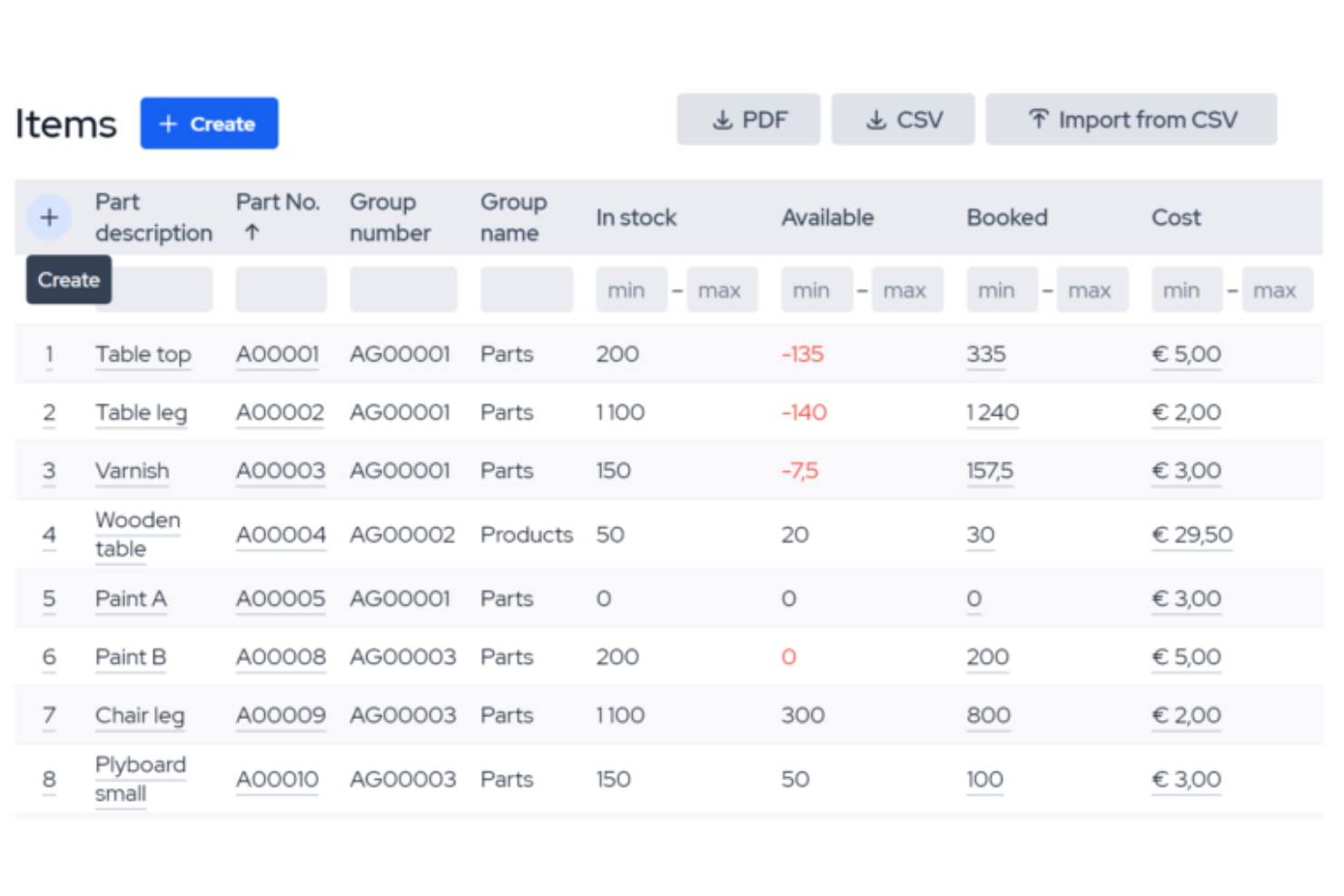
MRPeasy helps small manufacturers and distributors keep a tight grip on stock while jobs are flying through the shop.
It’s best for teams that need inventory, production, and purchasing tied together so you’re not guessing what’s available when you schedule the next run.
Why I Picked MRPeasy
I picked MRPeasy for small manufacturers that want your inventory plan to actually match what’s happening on the floor.
You get real-time visibility into on-hand, booked, and incoming stock by location, so your team can schedule production based on what’s truly available instead of gut feel.
I also like its lot and serial tracking, which links every batch back to purchase orders and work orders, giving you cleaner audits and faster recalls when something goes wrong.
For growing shops, barcode-based stock movements and mobile access mean operators can update inventory as they work, so you’re not trying to fix yesterday’s mess at the end of every shift.
MRPeasy Key Features
Here are a few inventory-focused capabilities your team will actually use day to day.
- Material Requirements Planning (MRP): Calculates what materials you need and when, based on confirmed and forecasted production, so you can avoid last-minute supplier scrambles.
- Reorder Point Automation: Triggers purchase suggestions when items hit minimum levels, helping you prevent stockouts without parking too much cash in raw materials.
- Integrated Purchase Management: Converts material requirements into purchase orders and tracks supplier lead times, giving you more realistic promise dates for customers.
- Sales and Inventory Connection: Reserves stock against customer orders and updates availability automatically, so your sales team isn’t selling inventory that production already claimed.
MRPeasy Integrations
Integrations include Amazon, BigCommerce, Shopify, WooCommerce, QuickBooks Online, Xero, HubSpot, Pipedrive, Salesforce, ShipStation, and Microsoft Power BI.
Pros and Cons
Pros:
- Native accounting and ecommerce integrations reduce manual rekeying between systems.
- Lot and serial tracking help with traceability and regulated product compliance.
- Real-time stock visibility across locations supports confident scheduling and quoting.
Cons:
- Deeper workflow customization often requires workarounds or technical implementation help.
- Feature depth can be overkill for very simple inventory-only use cases.
New Product Updates from MRPeasy
MRPeasy Expands REST API v2 With New Data Endpoints
MRPeasy expands REST API v2 with new endpoints for reports, dashboard data, production resources, stock, and settings. This gives users broader programmatic access to operational data. For more information, visit MRPeasy’s official site.
 .
.
Best for small retail businesses

inFlow Inventory is built for small retail businesses that have outgrown spreadsheets but don’t want full-blown ERP complexity.
You get one place to control stock, purchasing, and sales so you can keep shelves, stockrooms, and online channels in sync.
Why I Picked inFlow Inventory
I picked inFlow Inventory for small retailers who need clear, real-time stock visibility across the store, back room, and any basic online channels.
You manage purchasing, sales orders, and inventory in one system, so you can see what’s on hand, what’s incoming, and what’s already committed before you place your next order.
I also like how it supports multi-location tracking with bin and aisle details, giving you faster picking and fewer “we swear it’s here somewhere” moments through structured locations and transfers.
For omnichannel shops, you can plug in ecommerce and accounting tools so online orders, invoices, and inventory updates land in the same hub instead of living in separate apps.
inFlow Inventory Key Features
Beyond the core stock and order workflows, these features matter most for busy retail environments.
- Reorder Points And Alerts: Set per-location reorder points so the system flags low stock before you hit a stockout, instead of relying on manual checks.
- Barcode And Label Tools: Generate barcode or QR labels, then scan items during counts, receiving, and checkout to cut data entry and reduce mis-picks.
- Mobile Inventory Apps: Use the mobile app and Smart Scanner to receive goods, count stock, and fulfill orders on the floor instead of walking back to a computer.
- Shipping And Fulfillment Tools: Buy shipping labels from dozens of carriers inside inFlow, keeping picking, packing, and shipping tied directly to each sales order.
inFlow Inventory Integrations
Integrations include Shopify, WooCommerce, Amazon, Squarespace, QuickBooks Online, Xero, Zapier, and EasyPost.
Pros and Cons
Pros:
- B2B Showroom portal turns wholesale buyers into fast, self-service orders.
- Barcode and mobile apps let staff update counts directly from store.
- Retail-ready workflows link stock, purchasing, and sales in one place.
Cons:
- Some ecommerce channels still need Extensiv or Zapier-style connectors.
- Advanced reporting and analytics are lighter than some enterprise systems.

Katana
Best for manufacturing teams

Katana gives small manufacturers a live view of raw materials, work-in-progress, and finished goods, so you’re not guessing what you can actually make today.
It’s best if you sell across multiple channels and need your production schedule and inventory levels to stay in sync without babysitting spreadsheets.
Why I Picked Katana
I picked Katana because it gives your team a real-time production board that ties directly to material availability, so you can promise ship dates based on what you can actually build.
Your sales orders from ecommerce channels land in one place, and Katana automatically allocates raw materials to the right jobs, helping you avoid surprise stockouts while keeping important orders at the front of the line.
On the shop floor, your operators get clear task lists via the Shop Floor App, so work moves through each stage with less back-and-forth and fewer missed steps.
I also like that you get manufacturing-focused inventory features—like batch and lot tracking, average costing, and make-to-order support—without needing a full-blown ERP that overwhelms a small team.
Katana Key Features
Here are a few inventory-focused features that matter for small manufacturing businesses.
- Reorder Point Automation: Set reorder points for materials and finished goods so Katana flags what to buy before stockouts hit.
- Batch And Lot Tracking: Track components and finished products by batch or lot to support recalls, quality checks, and regulated industries.
- Multi-Location Inventory: Manage stock across multiple warehouses, stores, and channels from a single view, including transfers.
- Average Costing And Margins: Use moving average cost calculations to see accurate product margins and make better pricing decisions.
Katana Integrations
Integrations include Shopify, WooCommerce, BigCommerce, Amazon, eBay, Etsy, QuickBooks Online, Xero, HubSpot, and Zapier.
Pros and Cons
Pros:
- Real-time material and product visibility reduces stockouts across sales channels.
- Shop Floor App gives operators clear tasks and live production priorities.
- Multi-location support helps growing brands coordinate inventory across warehouses and stores.
Cons:
- Pricing can feel steep for very small or early-stage teams.
- Cloud-based tool with limited offline functionality during internet outages.

Xero
Best for accounting features

Xero suits small retailers that want basic stock control tied directly to their accounting, without adding another separate inventory platform.
It’s best if you’re running a simple catalog and care more about accurate margins and clean books than barcodes and complex warehouse logic.
Why I Picked Xero
I picked Xero because it lets you manage inventory and accounting in one place, so your team sees stock, sales, and cash flow from the same dashboard.
You can track up to 4,000 finished items, using real-time on-hand quantities and item reports to see what’s selling and when you actually need to reorder.
Your purchase orders can be raised inside Xero and turned into bills and COGS entries, which helps you protect margins without exporting everything to spreadsheets.
For small, single-location or straightforward multichannel retailers, I like that you can start with native stock tracking and only bolt on extra inventory apps when your volume and complexity justify it.
Xero Key Features
Beyond the accounting focus, Xero has a handful of inventory tools that matter for everyday retail operations.
- Tracked Inventory Items: Enable tracked items so every purchase and sale automatically updates quantities and costs.
- Inventory Performance Reports: Run item and margin reports to identify bestsellers, slow movers, and products hurting cash flow.
- Item Libraries And Price Lists: Store SKUs, descriptions, and default buy/sell prices to speed up quoting, invoicing, and purchasing.
- Inventory Plus Multichannel Sync: Use Inventory Plus to sync Shopify and Amazon FBA stock and orders into a single Xero-connected view.
Xero Integrations
Integrations include PayPal, Stripe, Shopify, WooCommerce, Square, Vend (Lightspeed Retail), HubSpot, Mailchimp, Gusto, and Expensify.
Pros and Cons
Pros:
- Purchase orders convert to bills, tightening COGS and margin visibility.
- Tracked item catalog handles up to 4,000 SKUs for growing shops.
- Integrated accounting and inventory keeps stock, sales, and cash flow aligned.
Cons:
- Advanced retail inventory needs third-party apps like Unleashed or Cin7.
- No native serial, batch, or multi-warehouse tracking for complex ops.

Best for accurate demand forecasting

Inventory Planner is built for merchants who are bleeding cash on overstock while still stocking out of key SKUs.
It’s best for multichannel ecommerce retailers that have moved beyond basic platform reports and need serious forecasting help without hiring a full-time planner.
Why I Picked Inventory Planner
I picked Inventory Planner because it turns your messy sales history into demand forecasts that factor in seasonality, promotions, and lead times, so you order what you’ll actually sell instead of guessing.
For a small team juggling thousands of SKUs, I like that it converts those forecasts into purchase-order recommendations by supplier, so you can send POs in batches instead of rebuilding them in spreadsheets every week.
You also get a clear view of stock across warehouses, stores, and FBA/3PL locations, so you can transfer inventory between locations before you reorder and protect cash flow.
If you’re growing fast, the detailed reporting on sell-through, stock aging, and margins makes it much easier to decide what to double down on, what to mark down, and what to kill.
Inventory Planner Key Features
Here are a few features that help small retailers treat inventory like an investment instead of a guess.
- Open-To-Buy Planning: Turn revenue and margin targets into category-level purchasing budgets so you don’t over-commit cash to slow movers.
- ABC Inventory Segmentation: Group SKUs by contribution and velocity so your team focuses reordering and marketing on the products that actually drive profit.
- Vendor Performance Analytics: Track supplier lead times, fill rates, and delays in one place so you can adjust safety stock and negotiate from real data.
- Multichannel Assortment Planning: Compare SKU performance by channel to decide which products to stock, drop, or expand on each marketplace or storefront.
Inventory Planner Integrations
Integrations include Shopify, BigCommerce, Amazon, eBay, WooCommerce, Walmart, NetSuite, Brightpearl, QuickBooks, and ShipStation.
Pros and Cons
Pros:
- Seasonality-aware forecasts reduce stockouts and excess inventory across channels.
- Automated PO suggestions cut manual spreadsheet work for growing teams.
- Multi-location planning helps small retailers coordinate stores, warehouses, and 3PLs.
Cons:
- Feature depth creates a steeper learning curve for new users.
- Pricing and contracts can feel heavy for very small brands.

Best for inventory planning

Brightpearl is built for growing retailers that are drowning in multichannel stock chaos and messy back-office workflows.
It’s best for small to midsize merchants with serious order volume who need accurate inventory planning, not another spreadsheet ritual.
Why I Picked Brightpearl
I picked Brightpearl because its Inventory Planner helps you predict demand using real sales data across channels, then turns that into concrete purchase recommendations so you don’t guess at reorder quantities.
You also get an automation engine that actually matters for inventory planning—your team can set rules to allocate stock, route orders, and trigger purchasing based on thresholds, instead of babysitting every channel.
Brightpearl ties inventory and accounting together, so you can see true margins by SKU and channel while you’re making buying decisions, not weeks later.
If you’re managing multiple warehouses or stores, the real-time stock view across locations gives you the confidence to promise availability without quietly praying you didn’t oversell.
Brightpearl Key Features
Here are a few inventory-focused capabilities that help retail teams plan stock with fewer surprises.
- Multi-Warehouse Inventory Mapping: Assign specific warehouses to each channel so availability reflects real stock, not a single blended pool.
- Backorder and Preorder Handling: Support preorders and backorders with rules that reserve future stock and keep commitments realistic.
- Landed Cost Tracking: Capture freight, duties, and fees against SKUs so planning and pricing reflect true product costs.
- Inventory Analytics Dashboards: Monitor sell-through, aging inventory, and replenishment needs from a central view instead of stitching together reports.
Brightpearl Integrations
Integrations include Shopify, Shopify Plus, BigCommerce, Magento, Amazon, eBay, Xero, QuickBooks Online, Sage Intacct, and ShipStation.
Pros and Cons
Pros:
- Automation engine reduces manual allocation and purchasing decisions at scale.
- Native Shopify and BigCommerce connectors support complex multistore setups.
- Inventory Planner converts demand forecasts into concrete purchase orders.
Cons:
- Pricing and feature depth skew toward higher-volume retail operations.
- Implementation and configuration are heavy for very small merchants.
Best for multichannel sales

Zoho Inventory helps small ecommerce and retail businesses keep multichannel stock under control, so you’re not guessing what’s available on Shopify, Amazon, or your own store.
It’s best if you’re selling physical products across several channels and want real-time stock updates tied directly to orders and shipping.
Why I Picked Zoho Inventory
I picked Zoho Inventory because it gives you a single view of orders and stock across Amazon, eBay, Etsy, Shopify, and offline channels, so you can avoid overselling while orders sync into one dashboard.
You also get real-time stock adjustments whenever an order comes in, because Zoho updates inventory across connected channels automatically instead of relying on manual exports.
For fast-growing shops, I like that you can add warehouses and map orders to specific locations, which helps you keep online availability accurate while you move inventory between sites.
Zoho’s shipping tools are useful too—you can compare carrier rates, generate labels, and push shipment details back to your sales channels, so customers see tracking updates without your team rekeying data.
Zoho Inventory Key Features
Beyond multichannel syncing, Zoho Inventory includes a few inventory controls that matter when you’re scaling a small product business.
- Batch And Expiry Tracking: Track lot numbers and expiry dates so you can sell the right batches first and reduce write-offs.
- Composite Items And Kitting: Build product bundles and assemblies from existing SKUs while automatically adjusting component stock as orders ship.
- Multi-Warehouse Management: Monitor inventory across multiple locations, transfer stock between sites, and allocate orders from the most appropriate warehouse.
- Serial Number Tracking: Track individual high-value items by serial number for better warranty handling and audit trails.
Zoho Inventory Integrations
Integrations include Shopify, Amazon, eBay, Etsy, QuickBooks Online, Xero, Stripe, PayPal, and UPS.
Pros and Cons
Pros:
- Batch, serial, and multi-warehouse tracking support more complex operations.
- Real-time stock updates across connected channels reduce overselling risk.
- Strong multichannel sync for Shopify, marketplaces, and offline orders together.
Cons:
- Free and lower-tier plans cap orders and advanced tracking features.
- Initial setup and channel configuration can take time and technical patience.

Best for detailed inventory reporting

Megaventory centralizes your stock, orders, and light manufacturing so you’re not guessing which location has what or whether you can actually fulfill that new order.
It’s a strong fit for growing retail and DTC teams that need multi-location visibility, simple production tracking, and reliable numbers for purchasing and margin decisions.
Why I Picked Megaventory
I picked Megaventory for small and midsize retailers that need a clear, location-by-location picture of stock, availability, and backorders in one place.
You can tie purchasing to real demand using purchase orders driven by minimum stock levels and sales history, so reordering stops feeling like guesswork.
Manufacturing and kitting workflows let you track components consumed and finished goods produced, which helps your team see the true cost and margin of each SKU.
I also like that you get user permissions and audit trails showing who changed products, documents, and quantities, keeping fast-moving teams honest during busy seasons.
Megaventory Key Features
Beyond the core inventory and order flows, Megaventory adds a few practical tools that help small retailers run tighter operations.
- Mobile App: Count stock, scan barcodes, and update orders directly from the warehouse floor.
- Returns Management: Log returns and RMAs with trackable statuses so you can see what’s coming back and why across locations.
- Landed Cost Calculations: Allocate freight, duties, and other charges across receipts for accurate per-unit costs and cleaner margins.
- Reporting And Alerts: Build location-level reports and low-stock alerts focused on your top SKUs and key channels.
Megaventory Integrations
Integrations include Shopify, WooCommerce, Magento, Amazon Business, QuickBooks Online, ShipStation, Zapier, SPS Commerce, and Lokad.
Pros and Cons
Pros:
- Detailed costing and documents give small teams visibility into margin by SKU and order.
- Multi-location inventory with light manufacturing support suits retailers that assemble products.
- Real-time stock sync helps reduce overselling across ecommerce stores and physical locations.
Cons:
- Interface can feel busy and dated until teams learn the workflows.
- Initial setup needs careful configuration of locations, products, and document flows.

Sortly
Best for visual inventory management

Sortly gives small teams a visual, mobile-first way to track tools, parts, and products across locations without babysitting spreadsheets.
It’s a strong fit if you want barcode and QR-based inventory control that your field and shop-floor staff will actually use.
Why I Picked Sortly
I picked Sortly for small businesses that live in the real world—stock on shelves, trucks, and job sites—not just in a spreadsheet.
You can organize everything into photo-rich folders and item records, so your team can recognize “the blue drill in the red case,” not just a SKU.
Your staff can update counts right from their phones using built-in barcode and QR scanning, which cuts down on manual typing and fat-finger errors.
I also like that you can set low stock alerts and basic min/max levels, so you get a heads-up before materials for your next job quietly disappear.
Sortly Key Features
Here are a few extra Sortly features that matter for busy small operations.
- Stock Counts: Create and assign count projects so multiple team members can complete cycle counts and physical inventory with one connected workflow.
- Pick Lists: Build item pick lists from your catalog to make it easier for staff to pull the right products, tools, or parts for jobs or orders.
- Custom Fields And Tags: Add your own fields and tags for things like job codes, condition, or customer name, so the system reflects how your business actually talks about inventory.
- User Permissions: Control who can view, edit, or approve inventory changes, which helps when you’ve got a mix of managers, techs, and temporary staff touching stock.
Sortly Integrations
Integrations include QuickBooks Online, Slack, Microsoft Teams, and Amazon Business.
Pros and Cons
Pros:
- Low stock alerts help small teams avoid surprise stockouts on key items.
- Mobile barcode and QR scanning speeds up counts and item updates.
- Visual item photos and folders make it easier for staff to find stock.
Cons:
- Native integrations and API access require higher-tier paid plans.
- Better suited to small and midsize operations than complex enterprise warehouses.

Cin7
Best for real-time inventory tracking

Cin7 helps small but growing retailers, wholesalers, and light manufacturers keep stock, orders, and purchasing in one place instead of across spreadsheets and disconnected apps.
It’s a good fit when you sell across multiple channels and need real-time visibility into what you have, where it lives, and what to buy next.
Why I Picked Cin7
I picked Cin7 because it gives you live stock visibility across locations and channels through a single inventory ledger, so you’re not reconciling marketplace, ecommerce, and in-store counts by hand.
For small teams, purchase ordering gets easier because you can build POs from demand and minimum stock levels, then receive against them in the same system.
I also like the built-in B2B portal, which lets wholesale customers place orders against accurate inventory using their own pricing and terms instead of emailing PDFs back and forth.
If you do light manufacturing or kitting, bills of materials and simple production workflows help you track components and finished goods without bolting on a separate MRP tool.
Cin7 Key Features
Here are a few extra Cin7 features that matter when you’re tightening up inventory control as a small business.
- Barcode And Mobile Scanning: Use barcode scanners and mobile apps for faster picking, receiving, and stock counts.
- Automated Reorder Rules: Set minimums and preferred suppliers so the system can suggest or generate purchase orders before you run out.
- Batch And Expiry Tracking: Track lots, batches, and expiry dates to keep perishable or regulated stock moving in the right order.
- Inventory Analytics Dashboards: Use built-in reports on stock turns, aging inventory, and sales trends to fine-tune purchasing.
Cin7 Integrations
Integrations include Shopify, Amazon, BigCommerce, WooCommerce, Walmart Marketplace, eBay, QuickBooks Online, Xero, and ShipStation.
Pros and Cons
Pros:
- Supports light manufacturing with bills of materials and simple production workflows.
- Real-time, multi-location inventory ledger reduces manual reconciliations across channels.
- Built-in B2B portal gives wholesale buyers self-service ordering with correct pricing.
Cons:
- Feature depth and configuration options can feel heavy for very simple catalogs.
- Pricing and onboarding may be high for micro-businesses with basic inventory needs.
Other Inventory Management Software for Small Businesses
Here are some additional inventory management software for small businesses options that didn’t make it onto my shortlist, but are still worth checking out:
- Lightspeed
For retail POS integration
- Asset Panda
For asset tracking
- Unleashed
For precise demand planning
- Fulfil
For multichannel stock visibility
- SOS Inventory
For multi-location inventory tracking
- Backbar
For bar inventory management
- Craftybase
For handmade product sellers
- Veeqo
For centralized orders and inventory across channels
- QuickBooks Online
For small business accounting
- Fishbowl
For QuickBooks integration
- SkuVault
For cycle counting efficiency
- WhereFour
For tailored inventory methods
- Netstock
For real-time inventory insights


How I Evaluate Inventory Management Software for Small Businesses
I look for two things in every tool: the baseline capabilities—like real-time stock sync and reorder automation—and the differentiators that actually matter to small retailers.
Core Functionality (Table Stakes For This List)
When I'm selecting tools for my list, I rank each one on a scale from 0 (does not offer the functionality) to 5 (excels in this area) for each core functionality listed below. Then, I calculate the tool's total score into a percentage. Each tool needs to achieve a minimum total score of 65% to be considered for inclusion.
- Real-Time Stock Tracking: I check whether quantities update live as sales, returns, and transfers happen across every location and channel—not just at end-of-day.
- SKU & Barcode Management: Handling product variants like size and color runs matters, so I evaluate how each tool structures SKUs, generates barcodes, and supports scanning.
- Purchase Orders & Reordering: I look for automated reorder point alerts and PO creation, especially for retailers juggling dozens of suppliers with different lead times.
- Multi-Channel & POS Integration: A boutique selling on Shopify, Etsy, and in-store through Square needs two-way sync across all three—I evaluate which platforms each tool connects to natively.
- Inventory Reporting & Analytics: Beyond a basic stock list, I look for sell-through rates, inventory valuation, and demand trend reports that actually help inform purchasing decisions.
- Small Business Accessibility: Pricing tiers, self-serve onboarding, and free trials all factor in—tools gated behind enterprise contracts or custom quotes don't fit this list.
Once I have a list of tools that meet this criteria, I consider what sets each platform apart.
Differentiating Factors (What Sets Vendors Apart)
Here's how I compare and contrast different vendors:
Standout Features
Demand forecasting sets tools apart. I look for platforms that analyze sales history and suggest reorder quantities ahead of seasonal rushes—so you buy based on data, not gut feel. A native mobile app matters for small teams where the owner runs stock counts between helping customers. I also evaluate cycle counting features, since scheduled counts and adjustment logs help catch shrinkage without closing the store for a full inventory.
Beyond Features
Integration coverage is a big differentiator. I check whether a tool connects natively to the POS, ecommerce platforms, and accounting software a retailer already uses—swapping your entire tech stack to fit one tool isn't realistic. Pricing transparency also matters: I look for publicly listed plans with predictable per-location costs so a growing shop isn't blindsided after adding a second store. Finally, I evaluate time-to-value. A small retailer needs to import their catalog and go live in days, not weeks of consultant-led setup.
How to Choose Inventory Management Software for Small Businesses
Choosing inventory management software shouldn’t take longer than your next inventory count. Here’s a no-nonsense checklist to help you quickly narrow your options, avoid the common traps, and pick a system that actually fits your business.
| Step | What to do |
|---|---|
| Define your must-haves | List your inventory pain points—barcode scanning, low stock alerts, mobile app, etc. |
| Map your integrations | Identify the accounting software, ecommerce platforms, or POS you need to connect. |
| Set a real budget | Nail down what you can actually spend each month—watch for hidden user or integration fees. |
| Test the usability | Always demo the interface yourself. If it feels clunky, your staff will hate it too. |
| Check for automation | Make sure the system can automate purchase orders, low stock notifications, and reporting. |
| Review support & setup | Look for responsive customer support, onboarding help, and a knowledge base that isn’t useless. |
| Read real reviews | Filter for recent feedback from businesses like yours—not just glowing testimonials. |
Trends In Inventory Management Software for Small Businesses
Inventory management isn’t standing still, and neither should your tech stack. Here’s what I’m seeing on the front lines—trends that actually help small businesses run tighter operations and get ahead:
- AI-powered demand forecasting. More platforms are finally delivering real demand forecasting that’s accurate enough to cut overstocking and stockouts—not just guessing based on last month’s sales.
- Automated reorder and supplier workflows. Top systems can trigger purchase orders automatically when inventory hits reorder points, so you’re not stuck babysitting stock levels or scrambling to source inventory.
- Unified dashboard for multichannel sales. Small businesses need inventory visibility across all sales channels—retail, ecommerce, wholesale—in one place. The best inventory management software now pulls everything into a single, real-time dashboard.
- Seamless integrations with cloud-based accounting and POS. The days of exporting spreadsheets for your accountant are over. Look for direct, two-way integrations with QuickBooks, Shopify, and other business-critical tools.
- Mobile-first inventory management. Warehouse managers and staff expect to do inventory counts, receive shipments, and scan barcodes right from a phone or tablet—no more being tied to a back office computer.
- Proactive low stock and exception alerts. The best systems are getting smarter about flagging anomalies—missed shipments, sudden drops in inventory, or potential supply chain disruptions—so you can react before they cost you money.
- Built-in support for compliance and traceability. If you’re in regulated industries or dealing with recalls, advanced tracking and audit trails are now table stakes—not optional extras.
What is Inventory Management Software for Small Businesses?
Inventory management software for small businesses is a digital system that automates tracking, controls stock levels, and manages sales and purchase orders across all your channels.
Business owners, inventory managers, and warehouse teams use these tools to replace manual spreadsheets, avoid stockouts, streamline order fulfillment, and keep real-time tabs on every inventory item.
The best inventory management software supports barcode scanning, low stock alerts, POS and accounting software integrations, and mobile access—helping you optimize inventory control, reduce costs, and free up time to actually grow your business. Many of the top open source options offer these essential features while giving you complete control over customization and data.
Features of Inventory Management Software for Small Businesses
When you’re evaluating inventory management software, skip the laundry list of generic features. Focus on what’s actually going to move the needle for your business:
- Real-time inventory tracking. See what’s in stock across every location and channel—no more guesswork or outdated numbers.
- Automated purchase orders and reordering. Set smart reorder points so the system creates purchase orders for you and flags low stock before it’s a problem.
- Barcode and QR code scanning. Speed up inventory counts, receiving, and transfers—less manual entry, fewer errors.
- Multichannel and ecommerce integration. Manage inventory seamlessly across your POS, Shopify, Amazon, and more from a single dashboard.
- Customizable reporting and dashboards. Get real answers fast—sales trends, inventory aging, low stock alerts—without running 10 different reports.
- Mobile app and cloud access. Check stock, process sales orders, or update inventory counts from anywhere, right from your phone.
- Batch, lot, and serial number tracking. Track expiration dates, warranty periods, or compliance details with ease—especially critical for food, beverage, or electronics businesses.
- Role-based permissions and audit trails. Lock down who can do what and see every change made, so you’re always in control.
Pick the features that solve your current pain points and leave the rest. The right ecommerce inventory management system should make life easier, not more complicated.
Benefits of Inventory Management Software for Small Businesses
You’re not investing in inventory management software for the fun of it—you need real results. Here’s what you should expect if you pick the right solution:
- Less time wasted on manual counts and spreadsheets. Automated tracking frees up your team for actual work that grows the business.
- Fewer stockouts and overstock situations. Real-time alerts and smarter forecasting help you keep shelves stocked—without tying up cash in dead inventory.
- Tighter profit margins. Better inventory control means less waste, fewer write-offs, and more cash in the bank.
- Accurate, on-demand data. Make informed decisions on purchasing, promotions, and pricing—no more flying blind.
- Smoother order fulfillment. Orders move faster and with fewer errors, keeping customers and your accountant happy.
- Stronger compliance and traceability. Track every inventory item, batch, or order for audits and recalls without breaking a sweat.
- Easy scaling as your business grows. The right software is flexible, so you’re not rebuilding your inventory system every time you add a new sales channel or location.
Costs and Pricing of Inventory Management Software for Small Businesses
Inventory management software isn’t one-size-fits-all—and pricing goes deeper than the base plan. Below is a streamlined view of common pricing tiers you'll run into. Think of this as your rough map, not gospel—actual costs depend on users, roles, and extras.
| Plan type | Price range | Common features | Best for |
|---|---|---|---|
| Free | $0 | Fundamental inventory tracking, basic low stock alerts | Sole proprietors or bootstrapped side hustles |
| Starter | $5–$25/user/month | Barcode or QR scanning, order fulfillment, minimal integrations | Small businesses kicking off inventory tracking |
| Business | $30–$100/user/month | Real-time tracking, multi-location, dashboards, forecasting | Growing ecommerce or retail businesses |
| Enterprise | $100+/user/month | Custom integrations, API access, advanced reporting, SLA support | Multi-channel retailers or high-volume ops |
Additional costs to budget for
This is where the "free" or "low-cost" plan gets stuffed with unexpected fees:
- Seat and role licensing: Some platforms charge per user, others charge by user role—admin versus warehouse staff.
- Integration or add-on fees: Need QuickBooks, Shopify, or POS sync? Don’t assume it’s included.
- Barcode scanners and hardware: Budget $200–$500 per warehouse for scanners, printers, tablets.
- Onboarding, data migration, training: Implementation help may cost 10–30% of your annual plan.
- Transaction or order fees: Some charge micro‑fees per order or fulfillment headcount.
- Support level tiers: Want prioritized or 24/7 support? Prepare to pay for premium access.
Even a “cheap” plan can turn expensive fast. Pin down exactly what’s included—and what isn’t—before you commit.
Inventory Management Software for Small Businesses FAQs
Here are some answers to common questions about inventory management software for small businesses:
Can I integrate inventory management software with my accounting or POS systems?
Yes, most inventory management software plays well with others—or it should. Look for tools that offer plug-and-play integrations or, at the very least, connect through APIs or third-party apps like Zapier.
That way, your sales and finances talk to your inventory in real-time. Less time spent clicking between ten tabs, more time growing the business.
How secure is my inventory data in these systems?
If security isn’t top priority, it ought to be. Any reputable inventory platform encrypts your data in transit and at rest. Expect two-factor authentication, regular backups, and, if you’re cautious, look for compliance with standards like SOC 2 or ISO.
Just remember: no system’s bulletproof, so good passwords and staff training matter too.
How fast can I get up and running with inventory management software?
If you’ve got five uninterrupted hours—lucky you—it’s usually possible to move in over a weekend. Realistically, expect a few days to import your spreadsheets, connect your tools, and clean up any “wait, what SKU is this?” moments.
Many vendors provide onboarding help. The more prepared you are (organized data, clear processes), the faster you’ll go live.
Can I migrate my messy Excel spreadsheets and inventory data into these systems without losing everything?
Yes, you’re not the first person whose Excel spreadsheet could give a data scientist a nosebleed. Most inventory software lets you import CSVs, map columns, and do some sanity-checking before you commit. Back up everything first—just in case you find a typo that turns “T-shirts” into “tsunamis.”
Can I use inventory management software on mobile devices for warehouse or remote teams?
Yes, and it’s not a gimmick. Leading tools have solid mobile apps so your team can scan barcodes, check on-hand levels, or handle receiving—all from a phone or tablet. Useful when your “warehouse” is also the stockroom, the break room, and, occasionally, your trunk.
How does inventory management software handle returns, exchanges, and refunds?
Most systems worth your time track returns, flag items for restocking, and sync status across channels. That means fewer inventory “black holes” and less arguing between sales and operations over what’s actually available.
If your return process is creative—or just complicated—double-check the workflows before you commit.
What kinds of reporting and analytics should I expect from inventory management tools?
Look for low-friction dashboards: stock movement, top sellers, aging inventory, demand forecasting. The best tools give you reports you’ll actually read, not just pretty graphs.
Pro tip: If you can’t find the answer to “what do I actually need to reorder this week?”, keep shopping.
What support options are typically available if I run into problems?
You’ll find everything from live chat and email to old-fashioned phone support. Some vendors offer 24/7 support; others, just business hours. Got a tricky issue at 6 PM on a Saturday? Check if your provider’s there. Bonus points for a searchable knowledge base—sometimes you just want to fix it yourself.