

You’re here for the best omnichannel inventory management software—a ranked shortlist and a clear way to pick fast. Lucky you, cause we’ve got you covered here.
The pain is familiar: overselling, stockouts, stale counts, and laggy sync between ecommerce, marketplaces, and POS.
Barcode scanners drop off Wi-Fi, onboarding drags, APIs break, and pricing plays hide-and-seek. You need real-time visibility, clean order management, dependable forecasting, and SLAs that don’t wobble.
We scored each provider on operator priorities: core functionality, standout features, usability, onboarding, customer support, value for money, and what real users report.
We looked hard at integrations (Shopify, Amazon), inventory visibility across locations, routing and fulfillment workflows, data portability (CSV/XLSX/JSON), and pricing clarity—plus how each fits a multichannel supply chain when evaluating the best inventory management software.
I’ve worked in retail and ecommerce for over a decade—as an inventory controller, warehouse manager, and international shipping manager—so this stays practical. Expect quick “best for” tags, a side-by-side comparison, and concise reviews you can act on today.
Why Trust Our Software Recommendations
6,700+
Reviews
20
Industry experts
16+
Evaluation factors
14
Years
Our team has been testing and reviewing software since 2012. As retail leaders ourselves, we know how difficult—and important—it is to choose the right software.
For this guide, we evaluated tools using hands-on testing and independent research, scoring tools using our selection criteria.
Our reviews reflect our independent judgment—not a sales pitch.
Omnichannel Inventory Management Software Comparison Table
The table below compares pricing, trial or setup details, and ideal use cases for my top omnichannel inventory management software selections.
| Tool | Best For | Trial Info | Price | ||
|---|---|---|---|---|---|
| 1 | Best for barcode scanning | 14-day free trial + free demo available | From $129/month (billed annually) | Website | |
| 2 | Best for shipping management | 15-day free trial + free plan available | From $349/month | Website | |
| 3 | Best for high-volume sellers | Free demo available | From $499/month | Website | |
| 4 | Best for Zoho ecosystem users | 14-day free trial + free demo available | From $29/organization/month (billed annually) | Website | |
| 5 | Best for multi-location tracking | 15-day free trial | From $135/month | Website | |
| 6 | Best for Shopify users | 49 free orders per month | From $0.25/month | Website | |
| 7 | Best for QuickBooks users | Free demo available | From $229/month (billed annually) | Website | |
| 8 | Best for small retailers | Free demo available | From £114/month | Website | |
| 9 | Best for AI-powered operations | Free demo available | Pricing upon request | Website | |
| 10 | Best for field sales & route-based distributors | 14-day free trial | From $200/month | Website |


The 10 Best Omnichannel Inventory Management Software, Reviewed
Short, operator-focused rundowns: standout features, key integrations, pricing notes, and trade-offs—so you can pick fast and avoid surprises.
 Best for barcode scanning
- 14-day free trial + free demo available
- From $129/month (billed annually)
Visit WebsiteCustomer Rating:4.6/5
inFlow Inventory tracks stock with efficient barcode scanning for retail and wholesale inFlow Inventory is an inventory management system designed for businesses that require efficient barcode scanning. Its primary users include retail and wholesale businesses that need accurate and quick stock tracking.
Why I picked inFlow Inventory: inFlow Inventory works for teams that rely on barcode scanning for inventory control. You can create and scan barcodes to update stock levels quickly. The system works on mobile devices, so you can manage inventory wherever you are. Its reporting tools give you clear insights into stock levels and movement, helping your team stay accurate and fast.
Standout features & integrations:
Features include barcode generation, which allows you to create and print barcodes for all your products. Mobile app support enables you to manage inventory from anywhere. The reporting feature lets you analyze stock levels and sales trends easily.
Integrations include QuickBooks Online, Xero, Shopify, Amazon, WooCommerce, Square, Zapier, Salesforce, and Mailchimp.
Pros and Cons
Pros:
- Easy barcode generation
- Detailed reporting tools
- Mobile app support
Cons:
- Occasional sync issues
- Learning curve for new users
Learn more about inFlow Inventory: Best for shipping management
- 15-day free trial + free plan available
- From $349/month
Visit WebsiteCustomer Rating:4.7/5
Ordoro controls inventory, creates shipping labels, and tracks orders for ecommerce Ordoro is an inventory management and shipping solution designed for ecommerce businesses looking to streamline their shipping processes. It provides tools for inventory control, shipping label creation, and order tracking, making it ideal for small to medium online retailers.
Why I picked Ordoro: Ordoro is built for ecommerce teams that need efficient shipping management. You can automate shipping label creation, track orders, and manage dropshipping vendors from one platform. Its kitting feature lets you bundle products, making it easier to optimize your shipping and inventory.
Standout features & integrations:
Features include automated shipping label creation, which saves time by generating labels in bulk. The dropshipping support lets you manage multiple suppliers efficiently. The kitting feature helps you bundle products for promotional sales or shipping efficiency.
Integrations include Shopify, Amazon, eBay, WooCommerce, BigCommerce, Etsy, ShipStation, USPS, UPS, and FedEx.
Pros and Cons
Pros:
- Centralized vendor management
- Handles bulk shipments
- Supports product kitting
Cons:
- Limited customization options
- Requires setup time
Learn more about Ordoro:

Finale Inventory controls stock and manages orders for high-volume multichannel sellers Finale Inventory is an inventory management system designed for high-volume sellers who need precise stock control and order management. It caters to businesses that require efficient inventory tracking and fulfillment processes across multiple channels.
Why I picked Finale Inventory: Finale Inventory suits teams that handle large volumes of inventory and sales. It updates stock levels in real time to reduce errors. Its order management supports high-volume processing, helping your operations run smoothly. You can also manage multiple warehouses, giving your team flexibility as you scale.
Standout features & integrations:
Features include dynamic inventory control that automatically adjusts stock levels to prevent discrepancies. The order management feature handles high-volume processing efficiently, reducing delays. Multi-warehouse management allows you to oversee stock across various locations, supporting business growth.
Integrations include Shopify, Amazon, eBay, WooCommerce, QuickBooks, Xero, ShipStation, Etsy, BigCommerce, and Magento.
Pros and Cons
Pros:
- Flexible for scaling businesses
- Multi-warehouse management
- Supports high-volume processing
Cons:
- Limited customization options
- Learning curve for new users
Learn more about Finale Inventory: Best for Zoho ecosystem users
- 14-day free trial + free demo available
- From $29/organization/month (billed annually)
Visit WebsiteCustomer Rating:4.3/5
Zoho Inventory manages stock, processes orders, and handles shipping for SMEs Zoho Inventory is an inventory management tool that caters to businesses already using Zoho's suite of applications. It provides efficient stock management, order processing, and shipping solutions, making it ideal for small to medium-sized enterprises.
Why I picked Zoho Inventory: Zoho Inventory is a good fit if your team already uses other Zoho products. You can set up automated workflows, track inventory in real time, and manage sales from multiple channels in one place. Its analytics give you clear insights into sales and inventory performance, helping your team make informed decisions.
Standout features & integrations:
Features include automated reorder points, which help maintain optimal stock levels. The multichannel selling feature allows you to manage orders from various platforms within a single interface. Detailed analytics offer insights into sales trends and inventory performance.
Integrations include Shopify, Amazon, eBay, Etsy, WooCommerce, Stripe, PayPal, AfterShip, and Zoho CRM.
Pros and Cons
Pros:
- Provides detailed analytics
- Supports multichannel selling
- Seamless Zoho product integration
Cons:
- Requires Zoho ecosystem familiarity
- Limited customization options
Learn more about Zoho Inventory:

Megaventory handles multi-location stock tracking for medium-sized enterprises Megaventory is an inventory management software ideal for businesses needing multi-location tracking. It primarily serves medium-sized enterprises that require comprehensive stock management across various sites.
Why I picked Megaventory: Megaventory helps teams that manage operations across multiple locations and need centralized control. You can track stock levels for all sites from one platform and handle transfer orders to ensure inventory reaches the right location. It also supports multiple currencies and languages, making it easier to manage international operations.
Standout features & integrations:
Features include order fulfillment management, which streamlines the process from order to delivery. Inventory alerts notify you when stock levels fall below set thresholds. The reporting feature gives insights into sales trends and inventory performance.
Integrations include QuickBooks, Zapier, Magento, Shopify, WooCommerce, Salesforce, Dropbox, Google Drive, and Xero.
Pros and Cons
Pros:
- Multi-warehouse management
- Detailed reporting capabilities
- Supports multiple currencies
Cons:
- Limited customization options
- It can be complex to set up
Learn more about Megaventory:

SKUSavvy controls stock and manages orders for Shopify-based small to medium businesses SKUSavvy is an inventory management tool designed specifically for Shopify users who need efficient stock control and order management. It serves small to medium-sized businesses by providing features that enhance inventory tracking and fulfillment processes.
Why I picked SKUSavvy: SKUSavvy suits Shopify users who need a dedicated solution for inventory and order management. You get real-time inventory updates to maintain accurate stock levels. The dashboard makes tracking orders and shipments simple, and the mobile app lets you handle inventory from anywhere.
Standout features & integrations:
Features include real-time inventory updates that keep your stock levels accurate across all sales channels. The intuitive dashboard simplifies tracking orders and shipments. Mobile app support enables you to manage inventory from anywhere, adding flexibility to your operations.
Integrations include Shopify, Amazon, eBay, Etsy, QuickBooks, Xero, WooCommerce, ShipStation, and DHL.
Pros and Cons
Pros:
- Mobile app support
- Real-time inventory updates
- Tailored for Shopify users
Cons:
- Learning curve for new users
- High starting price
Learn more about SKUSavvy: Best for QuickBooks users
- Free demo available
- From $229/month (billed annually)
Visit WebsiteCustomer Rating:4/5
Fishbowl Inventory controls stock, manages orders, and supports manufacturing Fishbowl Inventory is an inventory management solution designed for businesses that rely heavily on QuickBooks for accounting. It serves small to medium-sized enterprises by providing inventory control, order management, and manufacturing support.
Why I picked Fishbowl Inventory: Fishbowl Inventory fits teams that need strong integration with QuickBooks. You get advanced inventory tracking to maintain accurate stock levels and reduce discrepancies. Its order management keeps sales moving efficiently, and the manufacturing module helps with production planning and management.
Standout features & integrations:
Features include advanced inventory tracking that helps maintain accurate stock levels. The order management feature streamlines sales processes, reducing delays and errors. The manufacturing module supports production planning, giving your team the tools needed for efficient operations.
Integrations include QuickBooks Desktop, QuickBooks Online, Xero, Shopify, Amazon, eBay, WooCommerce, Salesforce, Magento, and BigCommerce.
Pros and Cons
Pros:
- Suitable for manufacturing businesses
- Supports production planning
- Strong QuickBooks integration
Cons:
- Limited customization options
- Steep learning curve
Learn more about Fishbowl Inventory:

ChannelGrabber manages inventory across multiple sales channels for small retailers ChannelGrabber is an inventory management software designed for small retailers to manage inventory across multiple sales channels like Shopify, Amazon, eBay, and Etsy. It focuses on real-time stock control and order processing to prevent overselling and improve customer satisfaction.
Why I picked ChannelGrabber: ChannelGrabber is built for small retailers who want to manage inventory without dealing with complex systems. You get real-time stock sync, automated SKU-based listings, and centralized inventory management. These tools help your team maintain accurate stock levels and prevent missed sales. Its simple interface makes it easy for even small teams to stay on top of inventory.
Standout features & integrations:
Features include real-time stock updates, which prevent overselling by automatically adjusting levels across all channels. It also offers bundle sales options, allowing you to sell items in kits with automatic stock management. The intuitive interface simplifies inventory tracking throughout the supply chain.
Integrations include Shopify, Amazon, eBay, Etsy, WooCommerce, Royal Mail, DPD, and OnBuy.
Pros and Cons
Pros:
- Intuitive interface
- Centralized stock control
- Real-time inventory updates
Cons:
- Limited advanced features
- Steep learning curve
Learn more about ChannelGrabber: Best for AI-powered operations
- Free demo available
- Pricing upon request
Visit WebsiteCustomer Rating:4.1/5
Fulfil’s inventory management dashboard offers real-time visibility and AI-powered optimization for omnichannel operations. Fulfil is an AI-native ERP and inventory management system built for ecommerce and wholesale businesses that need real-time visibility across multiple sales channels. It unifies order management, inventory, and accounting in one platform, making it easier to manage omnichannel fulfillment from procurement to delivery.
Why I picked Fulfil: I picked Fulfil for its AI-powered operations that simplify complex inventory and financial workflows. You can automate tasks like report generation and package optimization, reducing manual effort while keeping data accurate. I also like how it centralizes orders from multiple channels, so your team can manage ecommerce and retail sales together without switching tools. Its transaction-level accounting adds clarity to financials, which helps maintain accuracy as you scale.
Standout features & integrations:
Features include AI-powered automation for reporting, package optimization, and stock control. Real-time inventory synchronization prevents overselling and improves accuracy across channels. The platform also supports BOPIS, BORIS, and cross-docking, making fulfillment flexible for modern retail.
Integrations include Amazon, Shopify, eBay, FedEx, UPS, PayPal, Stripe, DHL, Amazon Multi-Channel Fulfillment, ShipBob, Klarna, and TikTok Shop.
Pros and Cons
Pros:
- Centralized order management dashboard
- Real-time inventory synchronization
- Accurate transaction-level accounting
Cons:
- Limited customization flexibility
- Steep learning curve initially
Learn more about Fulfil: Best for field sales & route-based distributors
- 14-day free trial
- From $200/month
Visit WebsiteCustomer Rating:4.4/5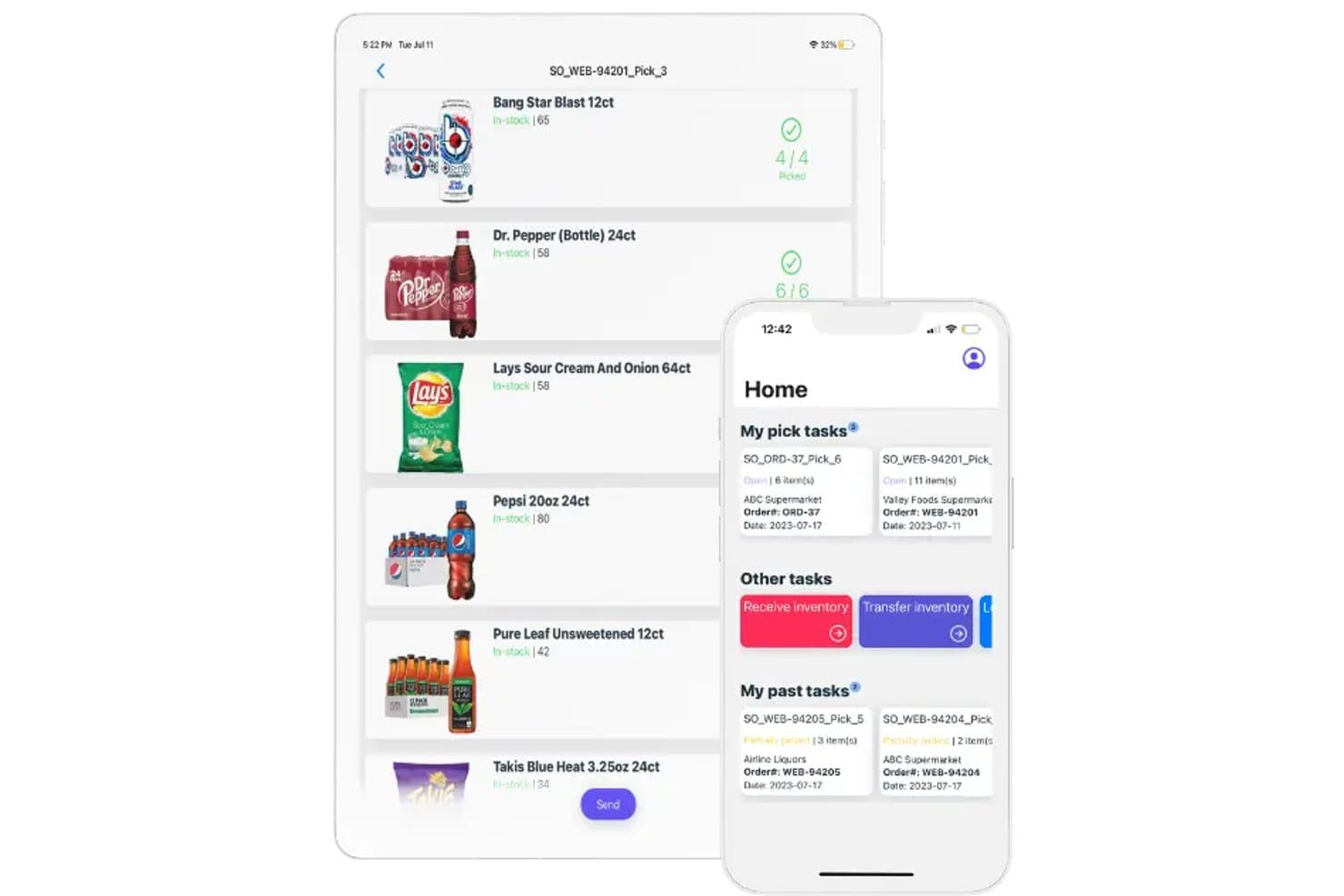
InSitu Sales offers a mobile pick task interface showing real-time inventory counts, product picking progress, and a home screen with active and past pick tasks for omnichannel order fulfillment. InSitu Sales is a field sales and distribution management platform built for wholesale distributors, combining mobile order taking, real-time inventory tracking, route optimization, and B2B eCommerce into a single system.
Who Is InSitu Sales Best For?
InSitu Sales is a strong fit for small wholesale distributors in food and beverage who manage outside sales reps and route-based delivery operations.
Why I Picked InSitu Sales
I picked InSitu Sales as one of the best because of how tightly it connects field reps to live inventory data. A rep visiting a restaurant buyer can check real-time stock, apply tiered pricing, and place an order without a single call to the warehouse. The Dispatch app then converts that order into an optimized delivery route, so drivers leave with accurate manifests every time.
InSitu Sales Key Features
- Warehouse picker app: Enables pickers to manage back-orders, inventory transfers, and fulfillment activities directly from a mobile device.
- B2B eCommerce portal: Lets customers place orders with real-time inventory availability and custom pricing through a personalized web portal.
- Mobile barcode scanning: Allows field reps and warehouse staff to quickly scan product barcodes for order entry and inventory management.
- Custom form builder: Supports creating questionnaires and adding custom fields, photos, or signatures during sales or delivery workflows.
InSitu Sales Integrations
InSitu Sales offers native integrations with QuickBooks Online, QuickBooks Desktop, Oracle NetSuite, SAP Business One, Xero, Zoho, Fishbowl, Odoo, Epicor, and Siigo. An API is available for custom integrations.
Pros and Cons
Pros:
- Route optimization for direct store delivery workflows
- Built-in B2B eCommerce portal with custom pricing
- Real-time inventory for field and delivery teams
Cons:
- Lacks true distributed order management features
- No integrations with major ecommerce platforms
Learn more about InSitu Sales:
Other Omnichannel Inventory Management Software
Here are some additional omnichannel inventory management software solutions that didn’t make it onto my shortlist, but are still worth checking out:
- 11Unleashed SoftwareBest for manufacturing businesses
- 12ExtensivBest for warehouse management
- 13ExpandlyBest for ecommerce integration
- 14HandiFoxBest for QuickBooks integration
- 15NetSuiteBest for ERP integration
- 16AgilironBest for integrated POS
- 17BrightpearlBest for retail financials
- 18SellbriteBest for multichannel sales
- 19SellerCloudBest for marketplace reach
- 20LinnworksBest for automation features
- 21JazvaBest for warehouse efficiency
- 22Cin7 CoreBest for retail chains
- 23AcctivateBest for QuickBooks integration
- 24ZentailBest for catalog management
- 25SellerActiveBest for price management
- 26SKUlabsBest for barcode scanning
- 27VeegoBest for shipping solutions
- 28ChannelEngineBest for global expansion
- 29Solid CommerceBest for order fulfillment
- 30FlxpointBest for dropshipping
How I Evaluate Omnichannel Inventory Management Software
I evaluate each tool in two layers: the core capabilities needed to sync inventory across a storefront, marketplace, and warehouse—and the differentiators that separate good options from great ones.
Core Functionality (Table Stakes For This List)
When I'm selecting tools for my list, I rank each one on a scale from 0 (does not offer the functionality) to 5 (excels in this area) for each core functionality listed below. Then, I calculate the tool's total score into a percentage. Each tool needs to achieve a minimum total score of 65% to be considered for inclusion.
- Multi-Channel Inventory Sync: I check whether stock updates push across every connected channel in real time—so selling a unit on Amazon instantly adjusts counts in-store and on Shopify.
- Centralized Stock Management: A single dashboard for managing SKUs, variants, bundles, and stock levels across all locations matters—especially for retailers juggling seasonal assortments.
- Order Orchestration & Routing: I look for configurable fulfillment logic that supports BOPIS, ship-from-store, and split shipments routed by proximity or stock availability.
- Sales Channel Integrations: Native connectors to major ecommerce platforms, marketplaces like Amazon and Walmart, and POS systems show me how well a tool fits a real retail tech stack.
- Demand Forecasting & Replenishment: Automated reorder points and forecasting help prevent dead stock and stockouts—I evaluate how each tool handles replenishment across multiple locations.
- Warehouse & Location Management: Multi-warehouse tracking with transfer workflows, bin-level organization, and lot or serial traceability tells me whether the tool scales beyond basic setups.
Once I have a list of tools that meet this criteria, I consider what sets each platform apart.
Differentiating Factors (What Sets Vendors Apart)
Here's how I compare and contrast different vendors:
Standout Features
Endless aisle capabilities stand out because they let store associates sell items that aren't physically on the shelf—pulling from warehouse or vendor stock right at the POS. Cross-channel returns matter just as much. I look at how each tool handles a customer buying online and returning in-store, including automated restocking and refund routing. Vendor and dropship management is another area I evaluate, where orders route straight to suppliers without the retailer holding that inventory. These features separate true omnichannel tools from basic inventory syncing platforms.
Beyond Features
Integration depth is a big differentiator. I check whether a platform connects natively to the POS, ERP, and 3PL systems a retailer already uses—or if it requires middleware to bridge those gaps. Scalability also matters: a tool that syncs fine with 500 SKUs can fall apart during a peak-season spike across tens of thousands. Pricing transparency is something I evaluate closely, too. Some vendors tie costs to order volume, others to locations or channels, and hidden fees for connectors or API calls can quietly inflate total cost of ownership over time.
How to Choose Omnichannel Inventory Management Software
Pick like an operator, not a demo tourist. Define your needs, test with real orders, and price the total cost—then choose the platform that keeps inventory accurate at scale.
| Step | What to do | Action tip |
|---|---|---|
| Step1) Map channels and volume | What to doList ecommerce, marketplaces, POS, and locations with daily peak orders and SKU count. | Action tipSet a stock-sync target (≤5 minutes) and a max acceptable error rate. |
| Step2) Lock must-haves | What to doDraw a hard line on real-time inventory, multichannel order management, multi-location, and returns. | Action tipKeep a five-item must-have list; everything else is nice-to-have. |
| Step3) Verify integrations and data ownership | What to doConfirm native connectors to Shopify, Amazon, accounting, ERP/WMS, and carriers. | Action tipRequire CSV/XLSX/JSON exports, an open API, and webhooks—no data lock-in. |
| Step4) Audit the data model | What to doCheck variants, kits/bundles, lot/serial, and per-location buffers. | Action tipRun a kit and substitution test to see how stock decrements. |
| Step5) Model real workflows | What to doWalk receiving, putaway, cycle counts, pick/pack/ship, and buy online, pick up in store (BOPIS). | Action tipPush 10 test orders across channels, including a return. |
| Step6) Validate forecasting and replenishment | What to doReview lead times, min/max, and seasonality handling. | Action tipCompare suggested POs to your last 90 days and vendor SLAs. |
| Step7) Confirm onboarding and migration | What to doNail down timeline, resources, training, and sandbox access. | Action tipDemand a project plan with owners and sample import templates. |
| Step8) Stress-test performance | What to doCheck uptime, status page, and incident history. | Action tipFire 500 test orders; measure sync lag and failure handling. |
| Step9) Price the total cost | What to doCount users, locations, order caps, connectors, and 3PL fees. | Action tipBuild a 12-month TCO with peak-season overages and add-ons. |
| Step10) Pilot, then decide | What to doRun a short pilot with real SKUs and carriers. | Action tipUse pass/fail criteria: stockouts, overselling, pick errors, label time. |
What is Omnichannel Inventory Management Software?
Omnichannel inventory management software is the system that centralizes inventory data across ecommerce, marketplaces, POS, and warehouses—one source of truth for sales and fulfillment.
It’s used by retail operators, ecommerce teams, and warehouse managers who need real-time visibility, clean order management, and accurate stock levels across locations.
The software prevents overselling and stockouts, speeds up routing and replenishment, and streamlines returns without spreadsheet gymnastics. It connects to your sales channels, carriers, 3PLs, and ERP/WMS, with exports your finance team can actually use.
Key Features of Omnichannel Inventory Management Software
You don’t need a brochure; you need features that keep counts honest and customer orders moving. The right omnichannel inventory management software gives you real-time data, clean order management, and automation that holds up across ecommerce, marketplaces, POS, and warehouses.
Here’s what to verify before you buy.
- Real-time inventory visibility. Accurate counts across ecommerce, marketplaces, POS, and warehouses with low-latency sync.
- Centralized order management. One place for allocations, backorders, partials, cancellations, and RMAs.
- Robust channel integrations. Native connectors for Shopify, Amazon, social, and ecommerce platforms that hold up under volume.
- Smart routing and fulfillment. Rules that choose the best node based on stock levels, SLA, shipping cost, and distance.
- Demand forecasting and replenishment. Lead-time-aware suggestions with seasonality and vendor MOQs baked in.
- Multi-location and WMS tooling. Bins, zones, wave picking, cycle counts, and putaway that reduce footsteps and errors.
- Barcode and mobile workflows. Scan-to-receive, scan-to-pick, and adjustments on Android/iOS for in-store and warehouse teams.
- Data portability and API access. Clean CSV/XLSX/JSON exports, webhooks, and an API that plays nice with ERP and accounting.
- Permissions and audit trails. Role-based access and change logs that keep your inventory data honest.
- Performance and reliability. Uptime transparency, status pages, and alerts when syncs slow or fail.
- Configurable automation. If/then workflows for kitting, substitutions, bundling, and exception handling.
Top Benefits of Omnichannel Inventory Management Software
Here’s what you get out of a solid inventory management system: fewer surprises, faster fulfillment, and tighter working capital.
Centralized inventory, real-time visibility, and dependable automation improve customer experience across every sales channel and physical store.
- Fewer stockouts and overselling. Real-time data prevents surprises and protects margin and customer satisfaction.
- Faster order processing. Clean routing, batch picking, and label creation speed up the fulfillment process.
- Lower carrying costs. Forecasting and disciplined replenishment reduce overstocking without risking out of stock.
- Consistent customer experience. Accurate inventory across touchpoints supports BOPIS, ship-from-store, and in-store lookups.
- Stronger multichannel economics. Centralized inventory and automation curb manual work and fees across online stores and brick-and-mortar stores.
- Cleaner finance and reporting. Reliable inventory data improves COGS accuracy and eases ERP and accounting reconciliations.
- Scalable operations. Add locations, SKUs, or new sales channels without rebuilding your inventory system.
- Better decisions, faster. Actionable analytics and inventory visibility highlight what to replenish, where to route, and what to retire.
- Reduced risk. Audit trails, permissions, and dependable SLAs keep operations stable during peaks.
- Happier teams. Mobile tools and clear workflows cut busywork so associates can focus on customers.
Costs & Pricing of Omnichannel Inventory Management Software
Price the total cost, not the demo. Most omnichannel inventory management software is billed per org, with ranges driven by order volume, locations, users, and connectors.
Use this baseline, then model it against your real mix.
| Plan | Average price | Common features | Best for |
|---|---|---|---|
| PlanFree | Average price$0 | Common featuresBasic inventory tracking, 1–2 sales channels, limited orders, simple reporting | Best forVery small sellers testing workflows |
| PlanStarter | Average price$29–$129 per org/month | Common featuresCore inventory, multichannel sync, basic order management, standard support | Best forSmall teams going multichannel |
| PlanSMB/Pro | Average price$150–$500 per org/month | Common featuresAdvanced inventory, returns and RMAs, mobile scanning, forecasting, standard connectors | Best forGrowing retailers with 1–3 warehouses |
| PlanGrowth | Average price$500–$1,000 per org/month | Common featuresMulti-warehouse and WMS-lite, automation and routing, custom reporting, API and webhooks | Best forHigher-volume operations with 3+ locations |
| PlanEnterprise | Average price$1,000–$2,500+ per org/month | Common featuresFull WMS, advanced routing, SSO and audit, premium SLAs, dedicated success | Best forComplex ops with ERP/WMS and 3PL networks |
Other cost considerations when shopping
- Per-order and per-location fees. Confirm how overages, additional locations, and seasonal spikes are billed.
- Integration and connector costs. Price native connectors for Shopify, Amazon, POS, ERP/WMS, 3PLs, and carriers.
- Implementation and data migration. Budget for mapping, imports, sandbox time, and any vendor-led setup.
- Hardware and supplies. Plan for scanners, printers, labels, and Wi-Fi upgrades for warehouses and retail stores.
- API and usage limits. Check rate limits, webhook caps, and premium API pricing for real-time data needs.
- Support and SLAs. Compare response times, escalation paths, and weekend or peak-season coverage.
- Add-ons and modules. Forecasting, advanced analytics, returns portals, and automation rules may be extra.
- Contracts and pricing protections. Look for price caps, renewal terms, and clear data portability if you switch platforms.
Omnichannel Inventory Management Software FAQs
Here are some answers to common questions about omnichannel inventory management software:
How should I run a pilot and set pass/fail criteria?
- Pilot with real SKUs, channels, and carriers—two weeks minimum.
- Define hard targets: real-time inventory sync ≤5 minutes, pick accuracy ≥99.5%, label creation ≤10 seconds, and zero overselling.
- Include edge cases: kits/bundles, partial shipments, cancellations, RMAs, lot/serial, and BOPIS.
- Push at least one peak-day’s volume through the system, then audit inventory visibility across locations.
- Require a clean rollback plan and a written cutover checklist. If SLAs wobble, error handling is manual, or you’re still reconciling counts in spreadsheets, it’s a fail.
Which integrations matter most—and how do I verify them?
Prioritize ecommerce (Shopify, Amazon), POS, accounting, ERP/WMS, 3PLs, and carriers.
In testing, run an end-to-end order: marketplace → order management system → warehouse → carrier → return, and confirm status and inventory levels update everywhere in real time. Validate data mapping for variants, barcodes, kits, and locations.
Export inventory data (CSV/XLSX/JSON), hit the API, and trigger webhooks—no lock-in. Check rate limits and incident history.
If an integration requires manual “resync” buttons, expect pain at scale.
What does a realistic implementation timeline look like?
SMB: 4–8 weeks. Mid-market: 8–16. You need a project owner, warehouse lead, store ops rep, and finance.
- Week 1–2: data cleanup and mapping.
- Week 3–4: sandbox, workflow tests (receiving, putaway, cycle counts, pick/pack/ship, returns).
- Week 5–6: parallel run, user training, and SOPs.
- Final: cutover with vendor on standby. Require import templates, a migration plan, and change-management support.
If a provider can’t show a sample project plan, they’re not ready for your volume.
How do I forecast demand and set replenishment that works?
Use 90–365 days of sales, vendor lead times, and seasonality. Set min/max by location, with safety stock for fast movers and BOPIS. Apply ABC analysis to focus working capital.
For omnichannel retail, forecast at the SKU-location level, not just channel. Compare suggested POs to actuals from the last quarter and spot-check against promotions. Lock reorder points behind real-time data—no weekly batch files.
If forecasts ignore lead-time variability, build buffers or you’ll buy air.
How does pricing scale—and what should I negotiate?
Most plans price per org with thresholds for orders, locations, users, and connectors. Model your peak season, not your average.
Negotiate order caps, seasonal flex, connector fees (Shopify, Amazon, ERP/WMS, 3PL), and support SLAs. Ask for implementation credits, a price-increase cap, and data-portability guarantees (exports, API, webhooks).
Push for a 30–60 day out if SLAs aren’t met. If the quote hides usage tiers or “premium” API access, assume it will cost more when you grow.
How do I handle returns, BOPIS, and ship-from-store cleanly?
Your OMS needs RMAs with reasons, restock rules, and quarantine states to protect accurate inventory.
For BOPIS, reserve stock on order placement, set pick SLAs, and notify if inventory falls below buffer. Ship-from-store should route by proximity, stock levels, and labor capacity—then update counts in real time across all sales channels.
Measure cycle time on returns, putaway accuracy, and cancellations. If returns land back on shelves without inspection or disposition codes, expect shrink and bad data.