

10 Best Ecommerce Inventory Management Software for 2026

The Best Inventory Management Software for Ecommerce Brands


Ecommerce inventory management software keeps every SKU synced across Shopify, marketplaces, your warehouse, and your 3PL—so you stop overselling, protect margin, and ship on time.
The right platform auto-updates stock across channels, routes orders, and tracks POs, transfers, and cycle counts without manual spreadsheet reconciliation.
It supports bundles/kits, backorders, barcodes, and returns, then feeds clean data to your WMS, shipping app, and accounting.
For online retailers, the payoff is simple: fewer stockouts, fewer customer issues, and a tighter cash conversion cycle. You get reliable counts, smarter reorders (demand forecasting + safety stock), and visibility from inbound to doorstep.
I’ve run inventory for a major retailer and managed the warehouse & shipping for a wholesaler—so the picks below favor platforms that hold up under peak volume, complex catalogs, and real-world returns.
Below, we’ve curated the best ecommerce inventory management software for brands that sell across channels. Pick a tool that matches your catalog complexity and ops stack—and scale without losing your weekends.
Why Trust Our Software Recommendations
Our team has been testing and reviewing software since 2012. As retail leaders ourselves, we know how difficult—and important—it is to choose the right software.
For this guide, we evaluated tools using hands-on testing and independent research, scoring tools using our selection criteria.
Our reviews reflect our independent judgment—not a sales pitch.
Inventory Management Software for Ecommerce Brands Comparison Table
This comparison table summarizes pricing details for my top inventory management software for ecommerce brands selections:
| Tool | Best For | Trial Info | Price | ||
|---|---|---|---|---|---|
| 1 | Best stock forecasting, plus multichannel listing tools | Free demo available | From $449/month (volume-based pricing) | Website | |
| 2 | Best for ecommerce integration with automated synchronization | 30-day free trial | From $49/user/month | Website | |
| 3 | Best for inventory management across multiple warehouses | Free demo available | Pricing upon request | Website | |
| 4 | Best for small business inventory + POS in one | Free demo available | From Interchange + 0.40% + 8¢ (varies by volume) | Website | |
| 5 | Best with integrated profit analysis tools | Free trial + free plan available | From $19/month | Website | |
| 6 | Best for automated order management | Free 60-day trial available | Pricing upon request | Website | |
| 7 | Best free plan for small businesses with an inventory management add-on | Free account available | From $5/month (billed annually) | Website | |
| 8 | Best for managing multiple business functions | Free demo available | Pricing upon request | Website | |
| 9 | Best for high volume ecommerce businesses | Free demo available | From $499/month | Website | |
| 10 | Best for complex ecommerce inventory needs | Free demo available | Pricing upon request | Website |
The Best Ecommerce Inventory Management Software, Reviewed
Now, let’s take a look at the top ecommerce IMS picks. We’ve got a brief review for each with what they do best, top features, pros and cons, pricing details, and screenshots of the tool in action.

Best stock forecasting, plus multichannel listing tools

Linnworks centralizes your ecommerce inventory, orders, and listings across marketplaces so you stop firefighting stockouts and oversells.
It’s best for fast-growing, multichannel retailers that need accurate inventory across warehouses and sales channels without building their own ops stack from scratch.
Why I Picked Linnworks
I picked Linnworks because it gives you one place to manage inventory, orders, and listings across all your key marketplaces and webstores, so you’re not reconciling spreadsheets or hopping between dashboards.
You get real-time stock syncing across channels, which helps you prevent overselling by updating inventory as orders land and as you adjust counts in your warehouses. The same engine supports multi-warehouse logic, so you can route orders from the best location based on stock, region, or service-level rules.
I also like that you can use demand forecasting and sales history to set smarter reorder points instead of guessing, which helps you cut dead stock while still covering spikes.
For teams managing serious volume, those forecasting tools paired with rules-based automation can take a big chunk of repetitive inventory work off your plate.
Linnworks Key Features
Beyond the core multichannel inventory sync, here are a few features that matter for inventory-heavy retailers.
- Rules-Based Automation: Build if/then rules to handle tasks like order routing, tagging, and stock updates so repetitive inventory admin runs in the background.
- Purchase Order Management: Raise purchase orders from demand and stock data, then track receipts against expected quantities to keep replenishment tight.
- Inventory Analytics: Use reporting on sales velocity, stock aging, and channel performance to decide what to reorder, retire, or push with promotions.
- Multi-Warehouse Controls: Set location-specific rules, track transfers between warehouses, and keep a consolidated view of on-hand and available stock.
Linnworks Integrations
Integrations include Amazon, eBay, Walmart, Shopify, BigCommerce, Magento, TikTok Shop, Etsy, Wayfair, and WooCommerce.
Pros and Cons
Pros:
- Deep marketplace coverage for centralizing multi-channel inventory and orders.
- Strong multi-warehouse logic for routing and balancing stock across locations.
- Demand forecasting tools to set smarter reorder points and avoid stockouts.
Cons:
- Pricing is opaque, with quotes handled through sales conversations only.
- No classic free trial; you’ll need to book a demo to get started.
New Product Updates from Linnworks
Linnworks Adds DMSExpress and Trade Order POS Apps
Linnworks adds DMSExpress and Trade Order POS to its App Store for shipping automation and point-of-sale order creation. These new apps expand fulfillment and sales workflows by connecting multi-carrier shipping and trade order processing directly with Linnworks. For more information, visit Linnworks’ official site.
 .
.
MRPeasy
Best for ecommerce integration with automated synchronization

MRPeasy is built for small manufacturers and product sellers who need ecommerce inventory to stay locked in with production instead of hiding in disconnected spreadsheets.
It connects your stores and marketplaces to real-time stock, work orders, and purchasing, so you can keep bestsellers available without losing track of what’s happening on the shop floor.
Why I Picked MRPeasy
I picked MRPeasy because its native Shopify, BigCommerce, WooCommerce, Magento, and Amazon integrations let you sync orders, stock movements, and shipments automatically, so you’re not hand-keying data between systems.
That sync is backed by proper manufacturing logic: sales orders can trigger production jobs, so your team can run make-to-order or assemble-to-order workflows while inventory updates in the background.
You also get a single view of inventory across warehouses and production locations, which helps you promise realistic ship dates because you’re looking at actual available and on-order stock.
For ecommerce brands that manufacture or assemble their own products, it’s a practical way to tie web demand, production schedules, and inventory planning together in one place.
MRPeasy Key Features
Beyond the ecommerce sync, MRPeasy gives you inventory tools your ops and production teams can actually use day to day.
- Reorder Point Management: Configure min/max levels and use system suggestions to raise POs before key SKUs run dry.
- Lot And Serial Tracking: Track batches and serial numbers from components through finished goods and shipments for full traceability.
- B2B Customer Portal: Let wholesale customers place orders and check status against real-time stock without email back-and-forth.
- Purchase Management: Tie supplier lead times, planned receipts, and purchase orders directly to material requirements from your sales and production plans.
MRPeasy Integrations
Integrations include Shopify, BigCommerce, WooCommerce, Magento, Amazon, ShipStation, QuickBooks Online, Xero, HubSpot, and Salesforce.
Pros and Cons
Pros:
- Multi-warehouse inventory views help you route orders from the best location.
- Supports make-to-order flows, linking web orders directly to production jobs.
- Automated sync keeps ecommerce orders, stock levels, and shipments aligned.
Cons:
- Limited native marketplace options beyond major platforms; others require connectors.
- Initial configuration is detailed, especially if you lack manufacturing processes.
New Product Updates from MRPeasy
MRPeasy Expands REST API v2 With New Data Endpoints
MRPeasy expands REST API v2 with new endpoints for reports, dashboard data, production resources, stock, and settings. This gives users broader programmatic access to operational data. For more information, visit MRPeasy’s official site.
 .
.
SkuVault
Best for inventory management across multiple warehouses

SkuVault is built for ecommerce teams juggling multiple warehouses, marketplaces, and webstores that need one source of truth for physical stock.
It’s best suited to high-volume brands that care about accurate counts, fewer mis-picks, and tighter control over inventory across every location.
Why I Picked SkuVault
I picked SkuVault because it gives you real-time, location-level inventory across multiple warehouses and sales channels, so you can see exactly what’s available before you promise it to customers.
You reduce stockouts and overstock by using tools like quantity buffers and demand-driven reorder alerts instead of guessing from spreadsheets.
Your team also benefits from barcode-based picking and built-in quality control checks, which cut mis-picks and reships by tying every pick to a scan and verification step.
If you sell regulated or perishable products, lot and expiration tracking with FIFO/FEFO picking helps you rotate stock properly and stay audit-ready without bolting on a separate compliance tool.
SkuVault Key Features
Beyond the multi-warehouse control, there are a few extra capabilities inventory-heavy ecommerce teams tend to lean on.
- Kitting And Bundling: Create kits, multi-packs, and assembled SKUs while keeping component inventory accurate down to each warehouse location.
- Cycle Counting And Audits: Run rolling cycle counts and inventory audits without shutting down entire aisles for full physical counts.
- Lot And Expiration Tracking: Track lots and expiry dates end to end so you can prioritize older stock, reduce write-offs, and handle recalls cleanly.
- 3PL And External Warehouse Workflows: Give 3PLs and satellite warehouses controlled access and location-level views so external teams follow the same inventory rules you do.
SkuVault Integrations
Integrations include Shopify, Amazon, eBay, Walmart, BigCommerce, WooCommerce, Magento, ShipStation, and ShipWorks.
Pros and Cons
Pros:
- Lot tracking and FEFO picking support compliance for regulated products.
- Barcode-based picking and QC reduce mis-picks and costly reshipments.
- Multi-warehouse visibility prevents overselling and stock gaps across busy channels.
Cons:
- Reporting customization is limited for highly tailored analytics and dashboards.
- Interface feels dated in places, so onboarding new staff takes longer.

Helcim
Best for small business inventory + POS in one

Helcim gives small and midsize retailers in the US and Canada a way to manage inventory and payments in one place, without paying extra for stock tracking.
If you’re running a hybrid setup—POS in-store and carts online—it’s built to keep quantities, catalog data, and orders aligned so you don’t live in spreadsheets.
Why I Picked Helcim
I picked Helcim because you get a full inventory manager baked into your payment platform, so you can track products, variants, and stock levels without adding yet another subscription.
Your team can sell through the Helcim POS, online checkout, and invoices while inventory updates in real time, which cuts down on overselling because every sale automatically adjusts stock.
I also like that you can set low-stock alerts and use sales and product reports to decide what to reorder, instead of guessing and hoping your bestsellers are in the next shipment.
On the cost side, Helcim’s interchange-plus pricing and free account structure help you keep processing and inventory in one tool, which is handy if you’re watching margins but still need a modern POS and ecommerce stack.
Helcim Key Features
Here are a few inventory-focused tools that matter once you’re past the “I track stock in my head” stage.
- Catalog And Variants Management: Build a detailed product catalog with SKUs, images, variants, and modifiers so staff can ring up the right item every time.
- Bulk Imports And Updates: Import products via CSV and perform bulk edits, which is a lifesaver when you’re migrating from another system or cleaning up a large catalog.
- Device-Agnostic Inventory Access: Manage stock and product details from desktop, tablet, phone, or Helcim’s smart terminal so you can tweak counts from the stockroom or sales floor.
- Inventory And Product Reporting: Use top-selling and top-grossing reports to see which items drive revenue, then adjust purchasing and merchandising accordingly.
Helcim Integrations
Integrations include Xero, QuickBooks Online, WooCommerce, Foxy.io, and Great Exposure.
Pros and Cons
Pros:
- Bulk import, variants, and organized catalogs support growing SKU counts.
- Real-time sync between POS, online checkout, and invoices reduces overselling risk.
- Inventory tracking included at no extra cost with your Helcim account.
Cons:
- Available only to merchants in Canada and the United States.
- Best suited to single-location or simple operations, not complex multi-warehouse setups.

Veeqo
Best with integrated profit analysis tools
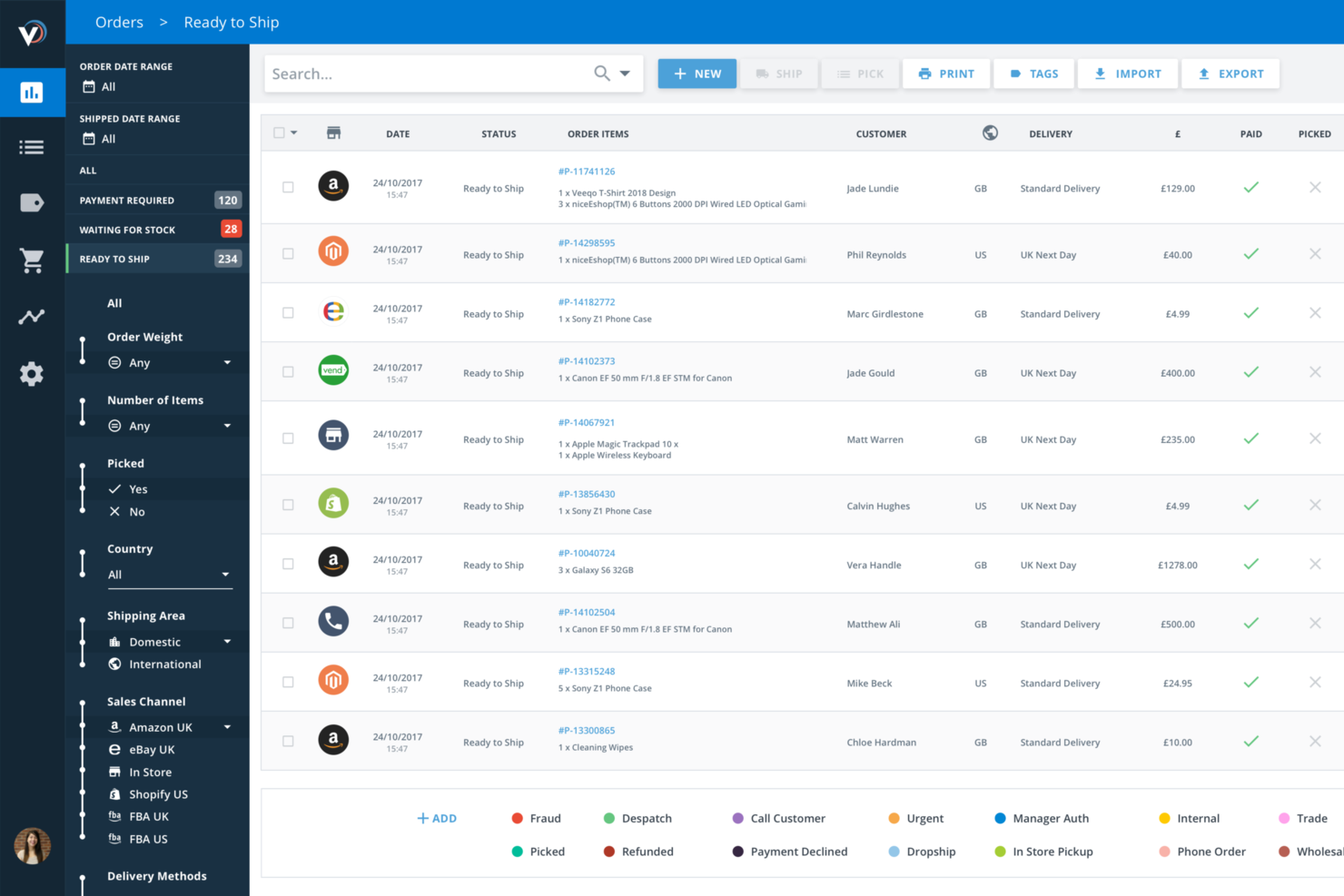
Veeqo is an ecommerce inventory management platform that connects your sales channels, syncs inventory in real time, manages orders, and integrates shipping and analytics tools for retailers selling across multiple platforms.
Who Is Veeqo Best For?
Veeqo suits ecommerce retailers and operations teams managing inventory, orders, and shipping across multiple online sales channels.
Why I Picked Veeqo
Veeqo earns its spot as one of the best on my shortlist because I can access integrated profit analysis tools right inside the platform. I use Veeqo’s profit reports to see margins by product, channel, and order in real time. My team is able to track costs, fees, and shipping expenses for a clear view of actual profitability.
Veeqo Key Features
- Real-time inventory syncing: Automatically updates stock levels across all connected sales channels.
- Multi-channel order management: Centralizes orders from Amazon, eBay, Shopify, and more in one dashboard.
- Integrated shipping label creation: Lets you generate and print shipping labels for multiple carriers directly in the platform.
- Detailed sales and inventory reporting: Provides analytics on product performance, sales trends, and inventory turnover.
Veeqo Integrations
Veeqo offers native integrations with Amazon, eBay, Shopify, WooCommerce, Magento, Walmart, Royal Mail, USPS, FedEx, DHL, UPS, and Wix (for US and UK users). An API is available for custom integrations.
Pros and Cons
Pros:
- Automated order routing and shipping rules
- Built-in profit analysis and reporting tools
- Real-time inventory sync across all channels
Cons:
- Fewer integrations than some competitors offer
- No built-in forecasting or demand planning
New Product Updates from Veeqo
Veeqo Adds Wix Integration for US and UK Users
Veeqo now integrates with Wix for US and UK users, letting you connect your Wix account and manage orders and inventory from a single place. For more information, visit Veeqo's official site.
 .
.
Best for automated order management
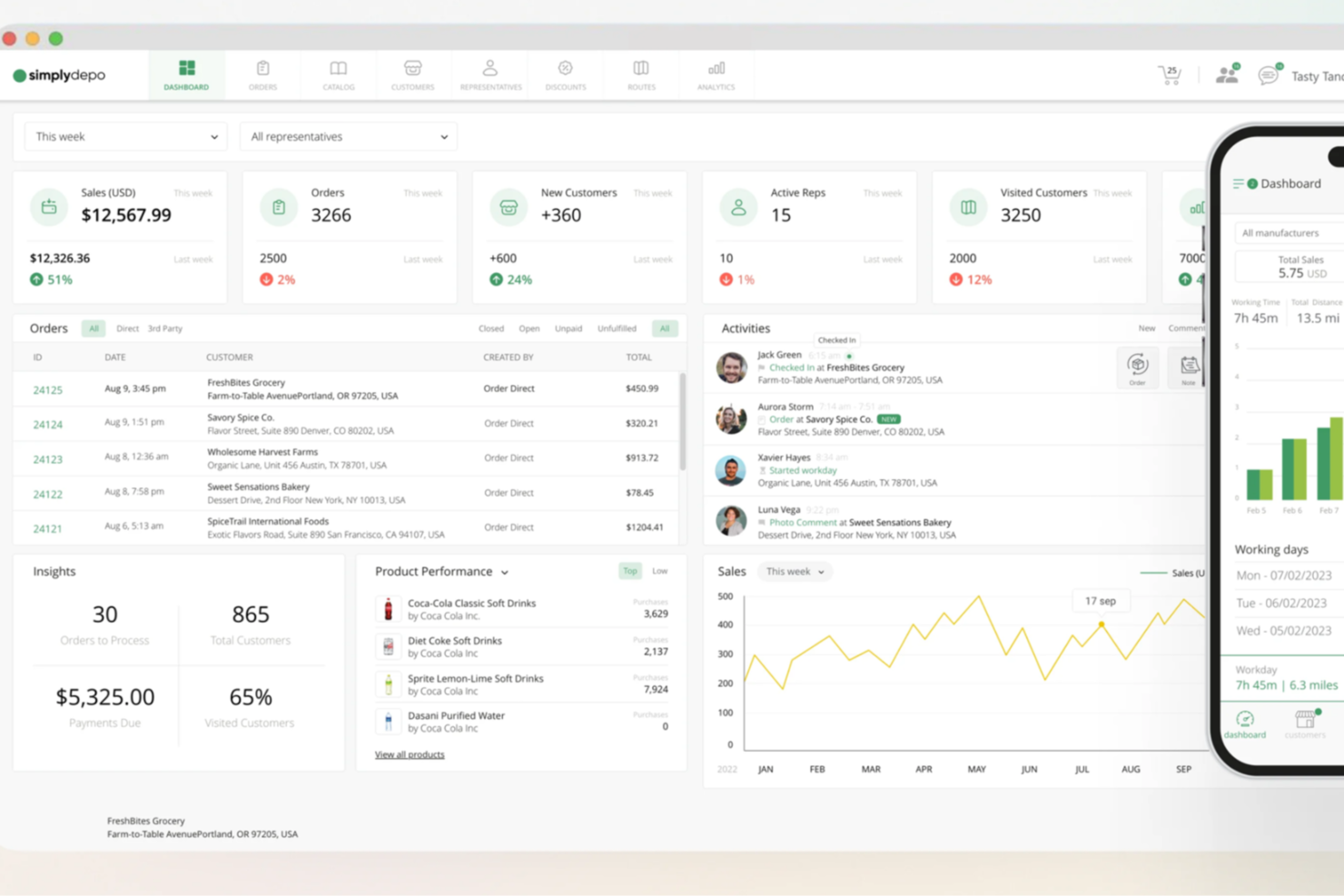
For businesses seeking a reliable ecommerce inventory management solution, SimplyDepo offers a tailored approach that resonates with brands, distributors, and wholesalers. By streamlining order and delivery processes, it addresses the operational challenges faced by small and emerging brands aiming to scale their businesses. With its focus on enhancing efficiency and customer relationships, SimplyDepo stands out as a valuable tool for those looking to optimize their inventory management and drive growth.
Why I Picked SimplyDepo
I picked SimplyDepo because of its specialized focus on enhancing operational efficiency through features like automated order management and real-time inventory access. These functionalities directly address the need for streamlined workflows and reduced manual errors, which are critical in ecommerce inventory management. Additionally, its B2B order portal simplifies the process of reordering and managing client interactions, making it an appealing solution for distributors looking to improve their order processing and customer service.
SimplyDepo Key Features
In addition to its unique selling points, SimplyDepo offers several key features that cater to ecommerce inventory management needs:
- Field CRM: Provides tools for tracking sales journeys and follow-ups, enhancing customer relationship management.
- Route Optimization: Helps in planning efficient delivery routes, saving time and resources.
- Centralized Customer Data: Allows for easy access to client information, aiding in personalized service and retention.
- Sales Rep App: Equips sales teams with mobile tools to manage orders and client interactions on-the-go.
SimplyDepo Integrations
Integrations include Quickbooks, Shopify, Salesforce, and SimplyDepo offers an API for custom integrations.
Pros and Cons
Pros:
- API for custom integrations available
- B2B ordering with customer portals
- Real-time inventory and order management
Cons:
- Onboarding requires training for teams
- Customization options limited for workflows

Ecwid
Best free plan for small businesses with an inventory management add-on
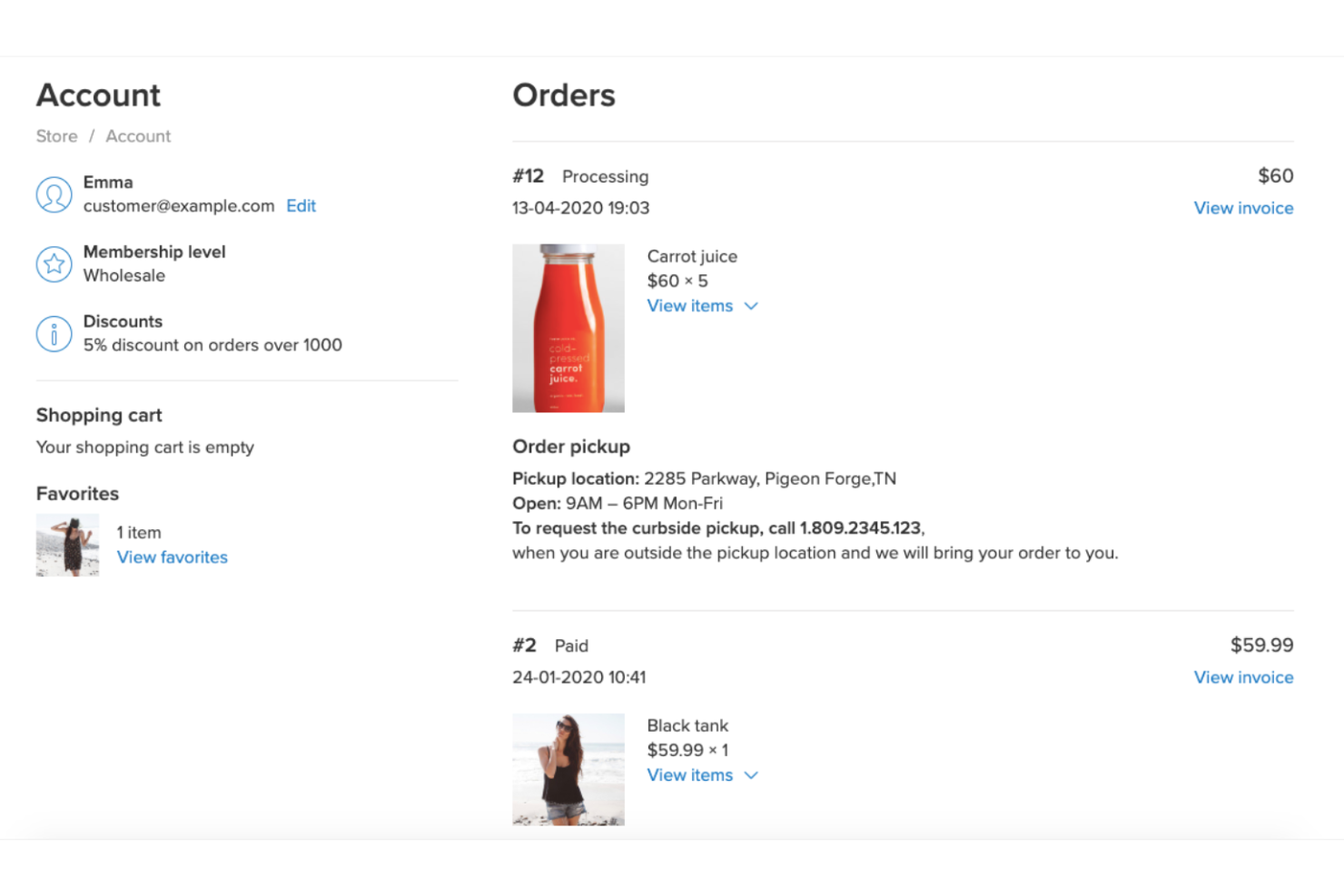
Ecwid is a good fit if you want basic inventory control baked into your ecommerce platform instead of bolting on a separate system.
It works best for small retailers and solo operators who care about staying in stock across a few channels without babysitting spreadsheets all day.
Why I Picked Ecwid
I picked Ecwid because you can manage your product catalog, stock levels, and pricing from a single dashboard, so you always know what’s actually available to sell.
That benefit is backed by built-in stock tracking, low-stock alerts, and in-store “in stock” messaging you can expose to shoppers to nudge earlier purchases.
It also suits teams that sell in more than one place: your inventory updates as orders come in from your website, social storefronts, and other connected channels, which reduces the odds of double-selling your last unit.
If you work on the go, the mobile app lets you adjust stock counts, process orders, and check recent sales from your phone, which is handy for markets, pop-ups, and small stores without a back office.
Ecwid Key Features
Here are a few inventory-focused features that help smaller retailers stay organized.
- Product And Variant Stock Tracking: Track quantities at both product and option level, so sizes, colors, or other variants don’t quietly oversell.
- Low-Stock Alerts And Visibility Controls: Configure low-stock notifications and choose what shoppers see when items are low, out of stock, or available for pre-order.
- Bulk Inventory Editing: Update stock counts, pricing, and catalog details in batches, which is helpful when you’re refreshing seasonal lines or correcting a bad count.
- Inventory Apps And Automations: Connect add-ons like Google Sheets sync, purchase order tools, and barcode workflows to extend Ecwid into a light inventory back office.
Ecwid Integrations
Integrations include FreshBooks, LiveChat, Mailchimp, PayPal, ShippingEasy, Stripe, Square, Wix, WordPress, and Zapier.
Pros and Cons
Pros:
- Built-in stock tracking and alerts help prevent small-store stockouts.
- Centralized catalog keeps inventory aligned across website, social, and other channels.
- iOS and Android apps support on-the-go stock edits and order handling.
Cons:
- Advanced workflows like assemblies and production planning require third-party apps.
- Deeper multi-location inventory relies on Lightspeed Retail integrations, not Ecwid alone.

Best for managing multiple business functions
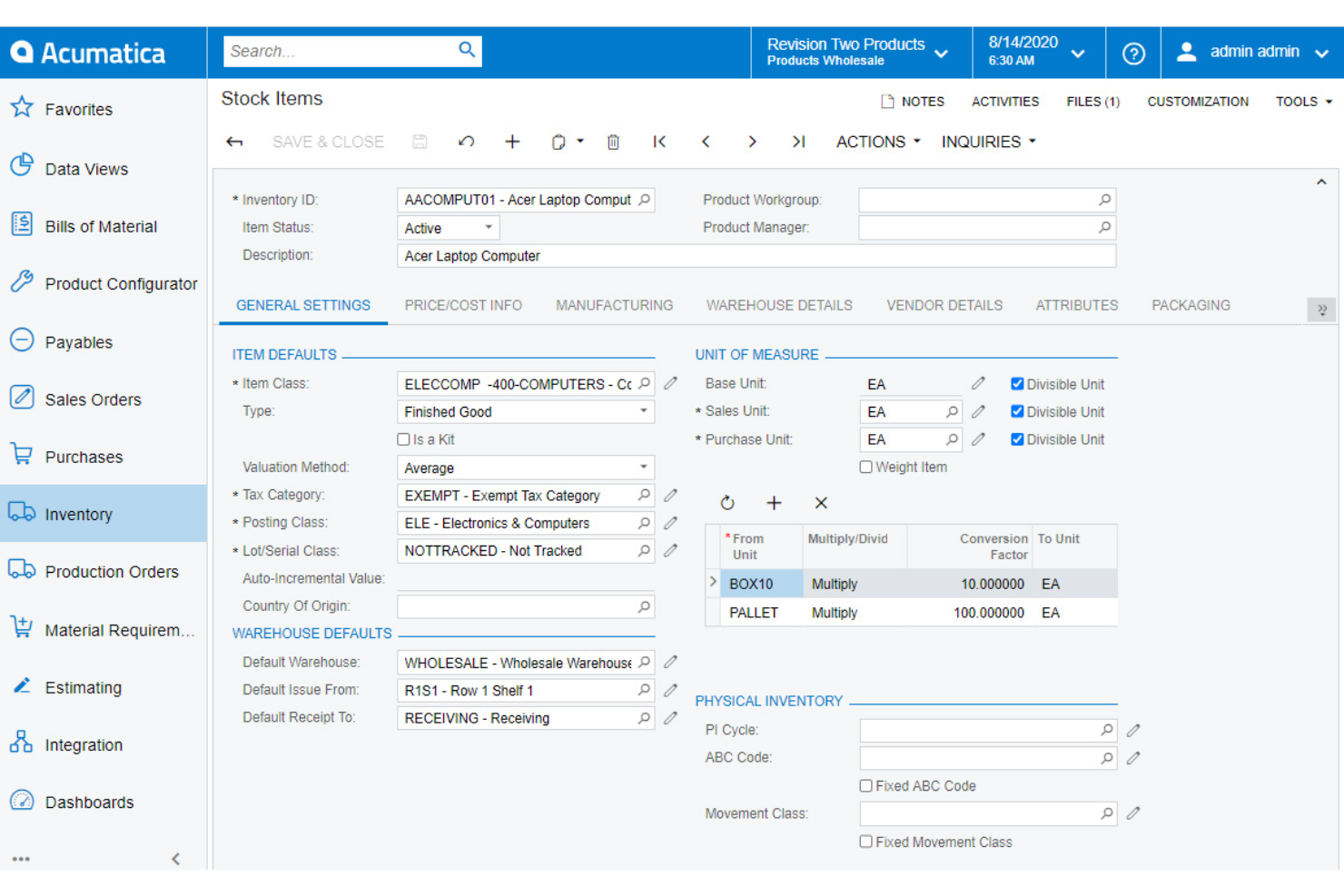
Acumatica Cloud ERP gives growing ecommerce and omnichannel retailers a single source of truth for stock, orders, and customers, so you’re not juggling spreadsheets every time a sale hits Shopify or Amazon.
It’s best if you’re running multiple warehouses or channels and need real-time inventory data tied directly into purchasing, fulfillment, and financials.
Why I Picked Acumatica Cloud ERP
I picked Acumatica for ecommerce inventory management because you get real-time stock visibility across warehouses, stores, 3PLs, and online channels, backed by a centralized inventory engine that updates availability the moment units move.
Your team can cut oversells and backorders because the system pushes accurate available-to-promise quantities to your ecommerce storefronts using native connectors, instead of relying on manual imports or stale CSV files.
I also like that inventory lives in the same system as purchasing and finance, so when you receive a PO or ship an order, costs and margins update automatically in your reporting.
For teams with complex catalogs, flexible item definitions, attributes, and units of measure help you manage variants and bundles without hacking together workarounds.
Acumatica Cloud ERP Key Features
Here are a few inventory-specific tools ecommerce teams will actually use day to day.
- Multi-Location Inventory Control: Track on-hand, in-transit, and allocated stock across warehouses, stores, and 3PLs from a single inventory module.
- Inventory Replenishment Rules: Configure min/max levels, safety stock, and demand-based reorder points to trigger purchase or transfer suggestions before you stock out.
- Kitting And Bundling: Support kits, bundles, and substitutions so component items decrement correctly and you can keep orders flowing when a primary SKU runs short.
- Granular Location Tracking: Use warehouse, aisle, rack, shelf, and bin locations to tighten pick paths and reduce mis-picks as order volumes climb.
Acumatica Cloud ERP Integrations
Integrations include Shopify, Shopify POS, BigCommerce, Amazon, Avalara, ShipEngine, DocuSign, Smartsheet, Power BI, and EazyStock.
Pros and Cons
Pros:
- Strong support for kits, bundles, and substitutions for complex product catalogs.
- Native ecommerce connectors reduce manual order re-entry and stock spreadsheets.
- Real-time inventory updates across warehouses, stores, 3PLs, and connected channels.
Cons:
- Initial implementation and configuration can be complex for lean teams.
- Mid-market focus makes it overkill for very small, single-channel sellers.

Best for high volume ecommerce businesses

Finale Inventory is built for ecommerce brands handling high order volumes across marketplaces, FBA, and multiple warehouses.
It gives your team a single source of truth for inventory and purchasing so you can avoid stockouts, overselling, and manual spreadsheet chaos.
Why I Picked Finale Inventory
I picked Finale Inventory for growing ecommerce teams that need one place to manage inventory, orders, and purchasing across every channel you sell on.
You can connect dozens of marketplaces and carts, then have Finale push updated stock levels back out in near real-time so you stop overselling during promos and busy seasons.
I also like its deep support for Amazon FBA and multi-warehouse operations—you can move stock between locations and FBA while barcode scanning keeps counts accurate on receiving, picking, and packing.
For teams outgrowing spreadsheets, guided onboarding and configurable workflows help you formalize the messy processes you already use, rather than forcing everyone into a rigid, one-size-fits-all system.
Finale Inventory Key Features
Beyond core multichannel syncing, Finale gives ecommerce teams several tools that directly improve inventory accuracy and profitability.
- Reorder Point Automation: Calculates reorder points and purchasing suggestions based on sales velocity and lead times.
- Kitting And Bundling: Tracks kit and bundle components individually so multipacks and sets don’t break your stock counts.
- Inventory Accounting And COGS: Rolls landed costs like freight and duties into product costs for clearer margins.
- Channel Performance Reporting: Breaks out sales and profitability by channel so you can prioritize the SKUs and marketplaces that actually make money.
Finale Inventory Integrations
Integrations include Amazon, eBay, Shopify, WooCommerce, Etsy, Walmart, ShipStation, QuickBooks Online, Square, and Faire.
Pros and Cons
Pros:
- Dynamic reorder suggestions help you avoid stockouts during demand spikes.
- Barcode-based warehouse workflows reduce receiving, picking, and shipping mistakes.
- Multichannel sync prevents overselling across marketplaces and shopping carts at once.
Cons:
- API access and advanced automation tools require higher-priced subscription tiers.
- Inventory sync windows are near real-time but not truly instant.

Fulfil
Best for complex ecommerce inventory needs
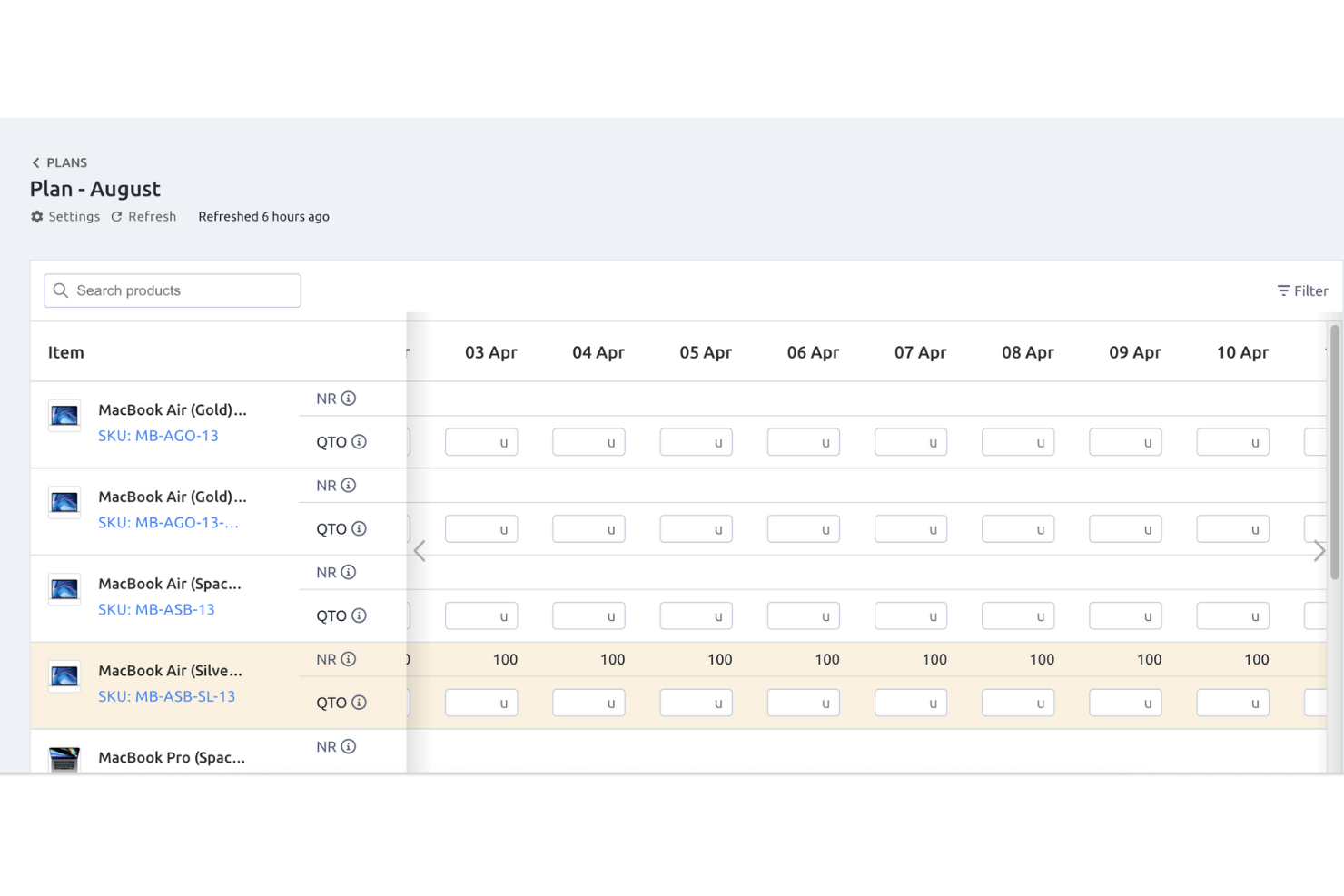
For fast-growing ecommerce brands drowning in multi-warehouse stock chaos, Fulfil ties inventory, orders, and financials together in one system so you’re not reconciling spreadsheets at midnight.
It’s best for Shopify and multichannel teams that need real-time visibility across warehouses, 3PLs, and Amazon programs—not a lightweight plugin that taps out when volume spikes.
Why I Picked Fulfil
I picked Fulfil for complex ecommerce inventory because it gives you real-time stock and COGS by SKU across every warehouse, 3PL, and channel, so you can see true profitability instead of guessing from exports.
You get practical inventory controls like warehouse mapping and availability rules that let you decide exactly which stock pools feed each channel, which is huge when you’re juggling FBA, your own DC, and one or more 3PLs.
I also like how its inventory forecasting pulls from inbound POs, buildable inventory, and historical demand to help your team plan purchasing instead of react to stockouts.
For operations leaders, the automation rules that route orders between your warehouses, 3PLs, and Amazon MCF mean fewer manual touches, fewer mis-routed orders, and a lot less firefighting when volume ramps up.
Fulfil Key Features
Here are a few inventory-focused features your team will actually use day to day.
- Real-Time Inventory Ledger: Tracks every movement from PO receipt to shipment, giving finance and ops a single source of truth for on-hand, in-transit, and adjusted stock.
- Channel Availability Rules: Lets you set channel-specific availability formulas (including inbound and buildable units), so you can push aggressive stock to Amazon while keeping safety buffers for Shopify or wholesale.
- Pre-Order and Restock Management: Supports restock dates and pre-order logic at the SKU level, helping you keep selling without overselling when items are inbound or in production.
- Multi-Warehouse Support: Manages inventory across internal warehouses and 3PL locations in one view, with the ability to split orders automatically across locations when items are distributed.
Fulfil Integrations
Integrations include Shopify, Amazon, Amazon Multi-Channel Fulfillment (MCF), FedEx, UPS, USPS, DHL, and 247 Fulfillment.
Pros and Cons
Pros:
- Native Amazon FBA/MCF and 3PL integrations support complex omnichannel setups.
- Flexible availability rules help prevent overselling on Shopify and marketplaces.
- Real-time inventory and COGS by SKU across warehouses and channels.
Cons:
- Fixed implementation approach may feel heavy for very simple inventory operations.
- Feature depth and implementation effort are better suited to midsize and larger brands.
Other Ecommerce Inventory Management Software
Here are a few more worthwhile options that didn’t make the best ecommerce inventory management software list:
- Settle
For real-time inventory tracking
- Odoo
For total traceability with double-entry inventory
- QuickBooks eCommerce
For keeping track of inventory and expenses simultaneously
- Rocketspark
For basic stock and inventory management
- Square Online
Free plan for any business with retail-targeted solutions
- SphereWMS
For real-time inventory control
- Cadence WMS
For inventory and warehouse management in one
- SKULabs
For packing and shipping with more accuracy
- Acctivate Inventory Management
Inventory management for integrating with QuickBooks
- Kentro
For optimizing and managing your supply chain
- ShipStation
For all-in-one inventory and shipping
- Cin7 Core
For manufacturers and product sellers
- BigCommerce
All-in-one SaaS platform to grow and establish online businesses
- Adobe Commerce
For content staging, product relations, and visual merchandising
- Brightpearl
Ecommerce inventory management platform for integration with other third-party software
- Shopify POS
Point of sales solution for streamlining operations related to inventory tracking
- Sana Commerce
ERP-integrated ecommerce platform with inventory tracking tools
- Shift4Shop
For secure global sales and all-around management
- Rain POS
Platform for cloud-based point of sale (POS) system for in-store and online sales
- SellerChamp
Ecommerce inventory management software for scaling your business


Related Reviews
If you still haven't found what you're looking for here, check out these related ecommerce tools that we've tested and evaluated.
- Ecommerce Platforms
- Inventory Management Software
- Enterprise Inventory Management Software
- Multichannel Inventory Management Software
- Payment Processing Software
- Shopping Cart Solutions
- Order Management Systems
- Warehouse Management Software
How I Evaluate Ecommerce Inventory Management Software
I look for tools across two layers: the baseline functionality needed to sync stock, manage SKUs, and route orders, and the differentiators that separate the best fit from the rest.
Core Functionality (Table Stakes For This List)
When I'm selecting tools for my list, I rank each one on a scale from 0 (does not offer the functionality) to 5 (excels in this area) for each core functionality listed below. Then, I calculate the tool's total score into a percentage. Each tool needs to achieve a minimum total score of 65% to be considered for inclusion.
- Multi-Channel Inventory Sync: I check how many native marketplace and platform connectors each tool offers and whether stock updates flow bidirectionally in real time.
- Real-Time Stock Tracking: Accurate counts across every warehouse and channel matter most during flash sales and peak events when overselling risk spikes.
- SKU & Variant Management: I evaluate how each tool handles complex catalogs with variants, kits, and bundles, especially for sellers listing different SKUs per channel.
- Purchase Order & Reorder Automation: Smart reorder triggers based on sales velocity and supplier lead times separate useful tools from basic ones with manual-only POs.
- Order & Fulfillment Management: I look at how orders route from checkout to shipment, including pick/pack support, carrier integrations, and 3PL handoffs.
- Inventory Reporting & Forecasting: Sell-through rates, stock aging, and demand forecasting by SKU or channel tell me whether a platform delivers actionable inventory insights.
Once I have a list of tools that meet this criteria, I consider what sets each platform apart.
Differentiating Factors (What Sets Vendors Apart)
Here's how I compare and contrast different vendors:
Standout Features
Demand forecasting AI is a big one. I look at whether a tool can analyze historical sales and seasonality to recommend reorder quantities by SKU, not just flag low stock after it's already a problem. Landed cost tracking also matters for brands importing products, since freight, duties, and supplier fees directly affect margin decisions at the channel level. For sellers managing both DTC and wholesale, I evaluate whether the platform supports B2B portals with tiered pricing and customer-specific catalogs without requiring a separate system.
Beyond Features
Ecommerce tech stack integrations are where I spend the most time. A tool that connects to your sales channels but can't sync with your accounting software or 3PL creates manual workarounds that defeat the purpose. Scalability matters just as much—I look at whether a platform can handle seasonal order spikes without degrading sync speed or forcing a mid-peak plan upgrade. Pricing transparency also weighs heavily in my evaluation, since hidden fees for API access or extra channel connections can inflate total cost well beyond what the sticker price suggests.
How To Choose Ecommerce Inventory Management Software
Picking ecommerce inventory management software should feel like solving problems, not adding new ones.
Most platforms promise the world, but only a handful will actually make your operations more efficient—and even fewer will scale with you as you grow.
Here’s a focused checklist to cut through the noise:
| Step | What to look for | Why it matters |
|---|---|---|
| Diagnose your bottlenecks | Identify your repeat headaches—stockouts, slow fulfillment, manual reconciliations. Your must-haves should solve these first. | No software can fix problems you don’t name. Prioritize by impact. |
| Map your user base | Who needs to use this—warehouse, ecommerce, finance, ops? Look for clean UX, permission settings, and mobile access. | Adoption fails if the tool’s too technical for real users. |
| Check integrations | List your key platforms (Shopify, Amazon, accounting, shipping) and require native or robust API integrations. | Saves you from data silos, double entry, and custom dev headaches. |
| Prioritize core outcomes | Don’t just chase features—focus on reducing stockouts, increasing inventory turns, and speeding up fulfillment. | Features mean nothing if they don’t move the numbers you care about. |
| Plan for scale | Can it handle more SKUs, more channels, or more automation as you grow? Ask about pricing tiers and modular upgrades. | Growing brands outgrow “starter” tools faster than you think. |
| Test drive with real data | Run a trial with your team and real SKUs. Evaluate onboarding, support, and user feedback—not just the demo. | You’ll spot dealbreakers before you sign anything long-term. |
Ecommerce Inventory Management Trends for 2026
Inventory management isn’t just about keeping stock on shelves anymore—it’s about powering faster fulfillment, smarter decisions, and better customer experiences. Here’s what’s trending in 2026:
- Data security as a priority. With inventory systems increasingly digital, protecting against breaches and data loss is more important than ever.
- AI-powered demand forecasting. AI tools now predict sales using everything from past data to market signals. They’re more accurate than ever—but still face challenges with surprise spikes or rapid trend shifts.
- IoT smart warehouses. Sensors track stock, flag issues, and optimize layouts in real time. It’s like giving your warehouse eyes and a brain.
- Blockchain transparency. Blockchain tech is helping brands verify product origins, track shipments, and secure supply chain data.
- Mix-and-match inventory strategies. Businesses are blending just-in-time, bulk ordering, and perpetual inventory systems based on product type and channel needs.
- Omnichannel inventory syncing. Managing stock across physical stores, online shops, and marketplaces is now expected. Real-time syncing tools keep everyone on the same page.
- Automation and AR in warehouses. Robotics handle picking and packing; AR helps workers find items faster and reduce errors.
- Eco-conscious inventory. Brands are reducing waste and embracing green warehousing practices like energy-efficient lighting and sustainable packaging.
- Dynamic pricing based on stock levels. Prices now flex based on inventory, demand, and competitor activity—automatically.
- Cloud-powered scalability. Cloud-native tools help businesses grow fast without needing a full IT overhaul.
What is Ecommerce Inventory Management Software?
Ecommerce inventory management software is a tool for online retailers to track, sync, and automate stock across storefronts, marketplaces, warehouses, and 3PLs in real time.
It keeps every SKU aligned across channels and locations, updating counts as sales post, returns land, and POs receive—so you stop overselling and stop padding safety stock.
Expect multi-location tracking, bundles/kits, barcodes, cycle counts, demand forecasting, safety-stock rules, and automated reordering tied to vendor lead times.
Ops teams use it to cut stockouts and manual reconciliation while feeding clean data to shipping, WMS, marketplaces, and accounting.
Key Features of Ecommerce Inventory Management Software
Think of your inventory software wishlist like your go-to grocery list—it keeps you focused on the essentials, not the flashy extras you’ll regret later.
With ecommerce’s complexity (hello, multichannel chaos and SKU overload), these are the features that actually matter:
- Real-time inventory tracking. Live updates on stock levels help prevent oversells, stockouts, and customer headaches.
- Multichannel integration. Sync inventory across platforms like Shopify, Amazon, eBay, and in-store POS systems. One source of truth = fewer errors.
- Order and warehouse management. From order aggregation to picking, packing, and returns, top systems streamline the full workflow.
- Smart demand forecasting. Advanced tools analyze trends and external factors (seasonality, promos, etc.) to help you buy smarter—not just faster.
- Barcode and RFID support. Speed up receiving, scanning, and tracking with built-in barcode/RFID compatibility.
- Automated reordering and alerts. Auto-generate purchase orders and get low-stock alerts before you hit a crisis. Some tools even flag aging inventory to avoid deadstock.
- Batch and expiry tracking. For perishables or regulated products, track lot numbers and expiration dates to stay compliant and reduce waste.
- Reporting and analytics. Get actionable insights on sales trends, fulfillment speed, and stock health. Custom dashboards = bonus points.
- Mobile-friendly access. Manage inventory on the go from your phone or tablet—whether you're in the warehouse or on WiFi at 30,000 feet.
- Cloud-based with role-based security. Access anywhere with automatic backups, encryption, and permission controls to protect sensitive data.
The best inventory software doesn’t just handle complexity—it makes it feel simple. Start with these core features, and you’ll have a system that scales with your store (not against it).
Top Benefits of Ecommerce Inventory Management Software
Ecommerce inventory management software is like having a backstage crew that keeps your operations running smoothly, letting you focus on the main act: selling.
It’s a game-changer for handling stock levels, managing orders, and keeping everything in sync across your sales channels. Here are five key benefits that make it indispensable:
- Real-time inventory tracking. Keeps your stock levels updated in real time, ensuring you never oversell or experience dreaded stockouts. This not only avoids unhappy customers but also optimizes inventory turnover by reducing deadstock.
- Multichannel integration. Syncs inventory across all your sales channels—whether it’s your online store, Amazon marketplace, or a pop-up shop. Managing everything from one platform slashes the time spent on manual updates and ensures every channel reflects accurate stock levels.
- Automated reordering. Automatically generates purchase orders when stock hits predefined thresholds. Advanced tools can factor in supplier lead times and seasonality, making reordering smarter and ensuring popular items stay in stock during high-demand periods.
- Detailed analytics and reporting. Transforms raw data into actionable insights about sales trends, inventory turnover, and even regional product preferences. Want to know which product to feature in your next campaign? The software has the answer.
- Boosted efficiency and productivity. Automates tedious manual tasks, like updating inventory records or creating reports, freeing your team to focus on strategic growth activities. This boost in productivity not only cuts costs but also supports scaling without bloated overheads.
Cost & Pricing For Ecommerce Inventory Management Software
Choosing the right ecommerce inventory management software is an investment in your business’s efficiency and scalability.
These systems come in a range of pricing options tailored to businesses of all sizes—from scrappy startups to large-scale enterprises. The key is understanding the features each pricing tier offers and how those align with your business needs and growth plans.
Plan comparison table for ecommerce inventory management software
| Plan Type | Average Price | Common Features Included | Best For |
|---|---|---|---|
| Basic | $29 - $99/month | Inventory tracking, basic reporting, single user access, integration with major ecommerce platforms | Small startups, solo entrepreneurs |
| Professional | $99 - $299/month | Multi-user access, advanced reporting, multi-channel integration, customer support | Growing businesses, mid-sized companies |
| Enterprise | $299+/month | Custom integrations, API access, advanced analytics, dedicated account manager | Large enterprises, high-volume sellers |
| Free | $0 | Limited inventory tracking, basic reporting, community support | New businesses, budget-conscious users |
Considerations as you price plans out
- Scalability matters. Small businesses may find Basic plans appealing, with features like inventory tracking and integration with platforms like Shopify or Amazon. But as your business expands, you’ll likely need Professional or Enterprise plans for advanced features like multichannel syncing or API access.
- Free plans are stepping stones. While free plans provide a great starting point for new businesses, they often lack the tools needed for growth, such as multi-user support or automation. Upgrade as soon as your needs exceed these limitations.
- Professional plans are the sweet spot. Most growing ecommerce businesses land in this tier, gaining essential features like advanced reporting and multi-user access without the complexity or cost of enterprise-grade software.
- Enterprise plans are for scale. Large-scale sellers benefit from custom integrations and dedicated support teams to manage high-volume operations, ensuring nothing falls through the cracks.
By selecting the right plan, you’ll ensure the software aligns with your budget while supporting your business's operational needs and future scalability.
Whether you’re just starting or running a high-volume operation, understanding these pricing tiers will help you invest wisely in your inventory management strategy.
Ecommerce Inventory Management Software FAQs
You might still have questions at this point, which we’ve luckily planned for. Here are some questions we figured you might still have. Insofar as we’re correct on this, your answers should lay below.
Does Shopify offer an inventory management system?
Yes, Shopify includes a solid inventory management system out of the box, but it’s not the end of the story. Their tools handle basics like stock counting, barcode scanning, and low-stock alerts. If you’re running a serious, multichannel operation—or outgrowing Shopify’s limits—consider plugging in a dedicated inventory solution to keep things tight as you scale.
What’s the difference between inventory management and warehouse management?
Inventory management tracks what you’ve got, where it’s sitting, and when it’s running low. Warehouse management, on the other hand, is about the flow—how those items move and how your team physically handles them. The best teams use both: one to keep count, the other to keep orders moving and floors clear.
What are the key metrics to track for ecommerce inventory management?
You want eyes on stock turn rate, sell-through, days on hand, order accuracy, and shrinkage—if it’s costing you money or slowing you down, it belongs here. Drill into dead stock and overstocks too. Metrics aren’t just numbers; they’re the warning lights telling you when to pivot fast.
Can inventory management tools really help with customer experience?
Yes, and not just in theory. Fast, accurate inventory data means fewer out-of-stocks, fewer dreaded “sorry, it’s not actually available” emails, and quicker shipping. That’s how you earn repeat business. Inventory chaos isn’t just a warehouse issue; it’s a customer loyalty problem.
How do I choose the right inventory management strategy (like JIT or bulk)?
Start with your product demand and supplier reliability. Selling fast-movers with stable supply chains? JIT may keep your capital lean. Stocking slow-movers or navigating supplier roulette? Bulk buys—even with higher carrying cost—might save more headaches than they cause. Most smart teams blend approaches based on category and cash flow.
What integrations should I prioritize in my inventory software?
Sync inventory with ecommerce platforms (like Shopify, Amazon, eBay), your accounting system, and your warehouse or shipping partner. That’s the minimum. Bonus points if it plays nicely with analytics and POS. Don’t get dazzled by a laundry list; look for integrations that reduce manual work and errors right where you feel them most.
What’s the best way to handle multichannel inventory sync?
Automate it. Manual syncing is a great way to double-sell and quadruple your headaches. Use tools that push real-time stock numbers everywhere you sell, flag oversells before they land, and give you a unified view. The right software will let you quit chasing spreadsheets and focus on growing sales channels, not fixing them.
Additional Inventory Software Reviews
Still haven't found the best inventory management software for your needs? Here are some other ecommerce inventory solution reviews I've compiled that can guide the next leg of your search: