

10 migliori software gratuiti per la gestione dell’inventario per le PMI nel 2026

Il miglior software gratuito per la gestione dell'inventario per le piccole imprese


Il software gratuito per la gestione dell'inventario è il tuo strumento per monitorare ogni movimento dei prodotti, in modo accurato, automatico e senza costi mensili.
Per chiunque abbia lottato con fogli di calcolo dell'inventario o visto sfumare le vendite, lo strumento gratuito giusto significa poter finalmente tenere sotto controllo le scorte e rispettare le promesse di evasione degli ordini.
In qualità di professionisti dell'inventario che hanno gestito magazzini e spedizioni internazionali, abbiamo messo alla prova queste soluzioni, così puoi scegliere opzioni pratiche e valutate da esperti che risolvono davvero i problemi che affronti ogni giorno.
Se sei pronto a dedicare meno tempo alle attività ripetitive, affrontare meno imprevisti e crescere in modo più intelligente, sei nel posto giusto.
Perché fidarsi dei nostri consigli sui software
Il nostro team testa e recensisce software dal 2012. In quanto leader del retail noi stessi, sappiamo quanto sia difficile — e importante — scegliere il software giusto.
Per questa guida, abbiamo valutato gli strumenti attraverso test pratici e ricerche indipendenti, assegnando un punteggio agli strumenti in base ai nostri criteri di selezione.
Le nostre recensioni riflettono il nostro giudizio indipendente, non un discorso di vendita.
Tabella comparativa dei software gratuiti per la gestione dell'inventario
Questa tabella comparativa riassume i dettagli sui prezzi delle mie migliori selezioni di software gratuiti per la gestione dell’inventario:
| Tool | Best For | Trial Info | Price | ||
|---|---|---|---|---|---|
| 1 | Ideale per le piccole aziende manifatturiere | Prova gratuita di 30 giorni disponibile | A partire da $49/utente/mese | Website | |
| 2 | Ideale per il monitoraggio automatico dell'inventario | Prova gratuita + demo gratuita disponibile | Da $59/mese | Website | |
| 3 | Ideale per piccole imprese con inventario e POS in un'unica soluzione | Demo gratuita disponibile | Da Interchange + 0,40% + 8¢ (varia in base al volume) | Website | |
| 4 | Il miglior software gratuito di gestione dell'inventario per aziende guidate dai dati | Prova gratuita di 14 giorni + demo gratuita disponibile | Da $129/mese (fatturato annualmente) | Website | |
| 5 | Il miglior software gratuito di gestione dell'inventario per la produzione | Prova gratuita + demo gratuita disponibili | Da $24/utente/mese | Website | |
| 6 | Il miglior software gratuito di gestione dell'inventario per operazioni con un singolo magazzino | Prova gratuita di 14 giorni + piano gratuito + demo gratuita disponibile | A partire da $29/mese (fatturazione annuale) | Website | |
| 7 | Il miglior software di gestione dell'inventario gratuito per facilità d'uso | Piano gratuito disponibile + prova gratuita di 14 giorni | A partire da $24/mese (fatturazione annuale) | Website | |
| 8 | Ideale per aziende CPG | Piano gratuito disponibile | Da $199/mese | Website | |
| 9 | Miglior software di gestione inventario open source gratuito | Prova gratuita di 15 giorni | Da $31/utente/mese | Website | |
| 10 | Il miglior software gratuito per la gestione dell'inventario con marketplace di add-on | Not available | Gratuito | Website |

Il miglior software gratuito per la gestione dell'inventario, recensito
Ecco una breve descrizione di ogni soluzione gratuita per la gestione dell’inventario, per evidenziare il caso d’uso migliore di ciascuno strumento, alcune funzionalità degne di nota e schermate che offrono una panoramica dell’interfaccia utente.

MRPeasy
Ideale per le piccole aziende manifatturiere
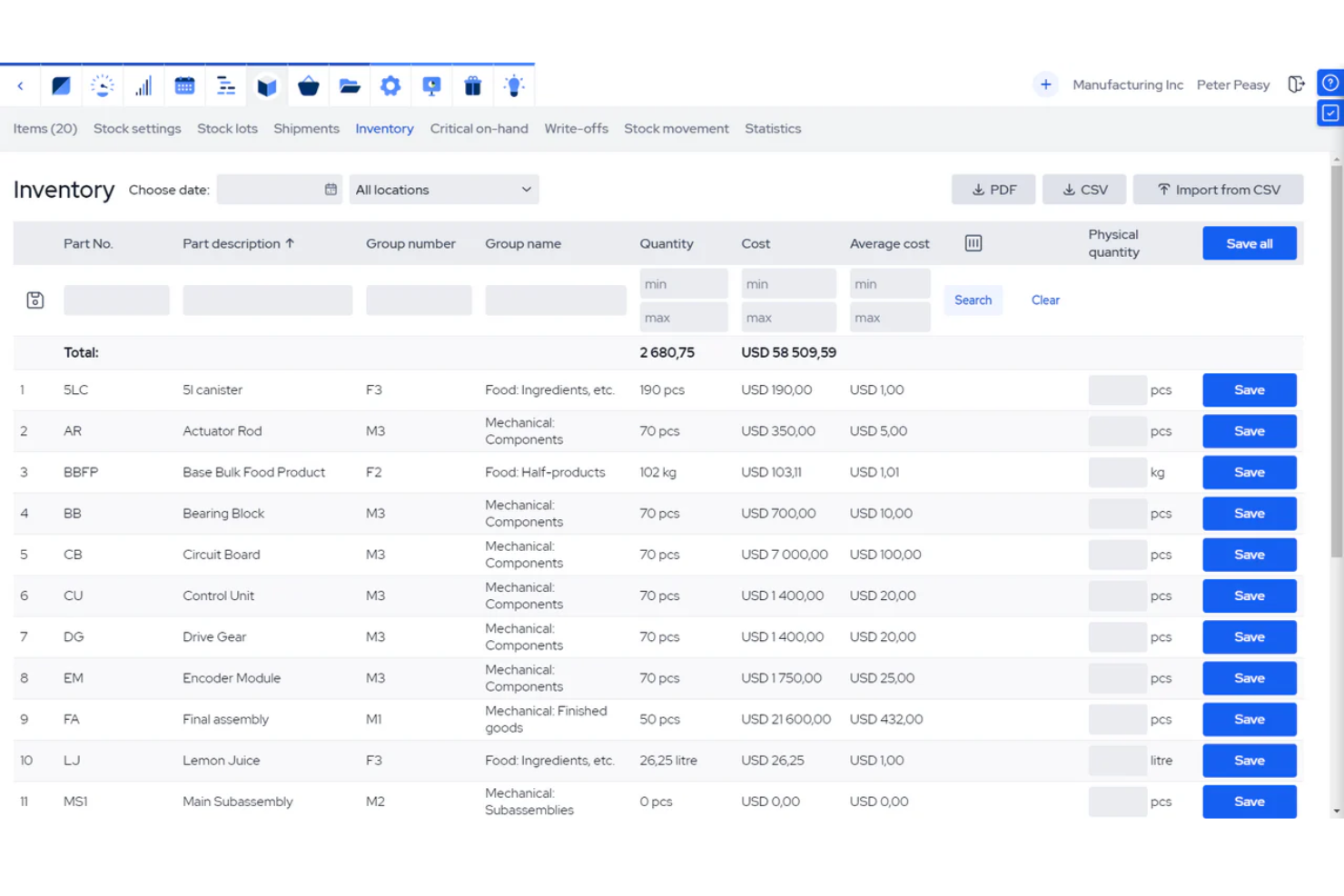
MRPeasy è un software MRP basato sull’intelligenza artificiale, progettato specificamente per le piccole aziende manifatturiere. Grazie alla sua interfaccia facile da navigare e alle potenti funzionalità di gestione delle scorte, MRPeasy aiuta le piccole imprese a restare organizzate e a migliorare l’efficienza nella gestione dei processi produttivi e di distribuzione.
Perché ho scelto MRPeasy: Questo strumento è un software di gestione dell’inventario semplice che integra la pianificazione della produzione, una panoramica in tempo reale delle scorte e una comunicazione senza interruzioni tra i vari reparti aziendali. Questo significa che tutti gli stakeholder possono accedere alle informazioni di cui hanno bisogno in un unico posto.
Sfruttando l’IA, MRPeasy offre monitoraggio in tempo reale dei livelli di magazzino, riordino automatico e dati storici dettagliati sui movimenti di stock, tutte funzioni essenziali per mantenere livelli ottimali di inventario e ridurre il rischio di esaurimenti o sovraccarichi di magazzino. In un ambiente produttivo di piccole dimensioni, queste funzioni automatizzate aiutano a migliorare l’utilizzo delle risorse.
Caratteristiche e integrazioni di spicco di MRPeasy
Le caratteristiche principali includono reportistica di produzione che permette agli utenti di impostare tempi di consegna accurati per preventivi, migliorando l’utilizzo degli impianti e l’efficienza operativa. Le sue capacità CRM consentono di calcolare rapidamente i costi di produzione e i tempi di consegna, offrendo così ai clienti una comunicazione più accurata. Inoltre, le sue funzionalità di contabilità forniscono una visione in tempo reale dei flussi di cassa, dei profitti e delle perdite, aiutando le piccole aziende manifatturiere a restare sempre aggiornate sul piano finanziario.
Le integrazioni includono Amazon, BigCommerce, Crossfire, Dropbox, Google Drive, OneDrive, HubSpot, QuickBooks, ShipStation, Salesforce, Shopify, Zapier e altri ancora.
Cosa è gratuito? MRPeasy offre una prova gratuita di 30 giorni per esplorare le sue funzionalità.
Pros and Cons
Pros:
- Integra tutti gli aspetti del processo produttivo
- Supporto video per la configurazione iniziale
- Aggiornamenti automatici dei livelli di stock
Cons:
- Manca di funzionalità avanzate a causa dell’interfaccia semplice
- L’inserimento manuale dell’inventario può creare problemi
New Product Updates from MRPeasy
MRPeasy Expands REST API v2 With New Data Endpoints
MRPeasy expands REST API v2 with new endpoints for reports, dashboard data, production resources, stock, and settings. This gives users broader programmatic access to operational data. For more information, visit MRPeasy’s official site.
 .
.
Ideale per il monitoraggio automatico dell'inventario
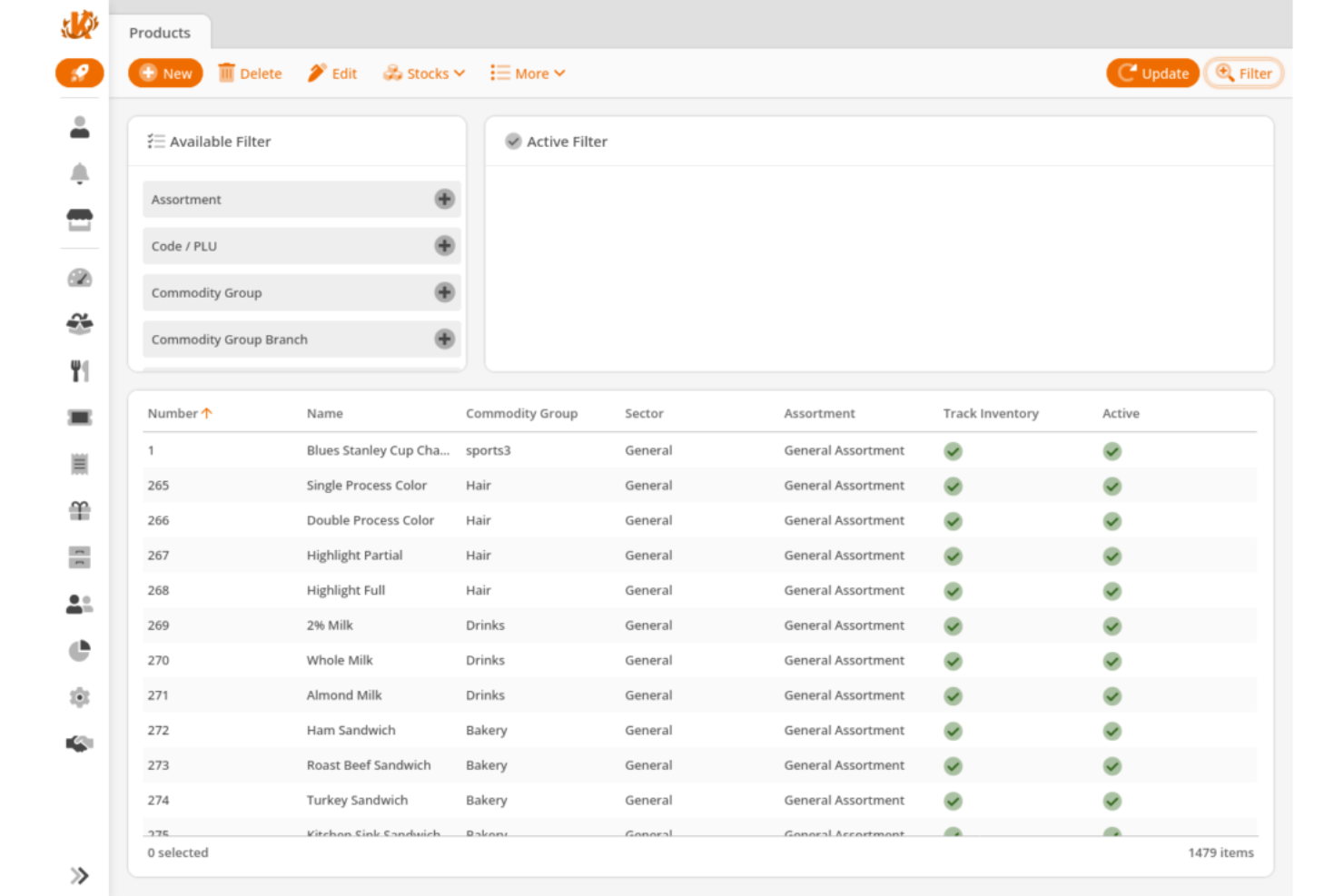
KORONA POS è un sistema completo di punto vendita (POS) basato su cloud, pensato per diversi tipi di attività, tra cui il commercio al dettaglio, la ristorazione e la gestione di eventi. Offre un'ampia gamma di funzionalità come la gestione dell'inventario, il customer relationship management e reportistica e analisi avanzate.
Perché ho scelto KORONA POS: Ho scelto KORONA POS per il suo monitoraggio automatizzato dell'inventario, che riduce gli errori manuali e migliora l'efficienza nella gestione dei livelli di stock. Il sistema invia notifiche automatiche per le situazioni di scorta bassa, sovraccarico o esaurimento scorte, permettendo alle aziende di reagire tempestivamente e mantenere livelli di inventario ottimali. Inoltre, KORONA POS supporta la gestione dell'inventario in mobilità, consentendo agli utenti di effettuare conteggi direttamente dal POS o tramite app mobile.
Funzionalità distintive e integrazioni di KORONA POS
Le funzionalità distintive includono la conta e il riordino automatici dello stock, riducendo così il lavoro manuale e mantenendo livelli di inventario precisi. La reportistica e le analisi in tempo reale offrono informazioni su prestazioni di vendita, movimento dell'inventario e comportamento dei clienti, aiutando l'azienda a prendere decisioni basate sui dati. Sono inoltre disponibili strumenti CRM come programmi fedeltà e promozioni personalizzabili, e il supporto per la gestione efficiente di più sedi.
Le integrazioni includono Bookkeep, Octopus Bridge, Card Market, Bottlecapps, bLoyal, BlockChyp, Sekure, NearSt, Groc, BOLD Integrated Payments, BLUbeem, LineupApp, Microsoft Excel, WooCommerce, QuickBooks Online Advanced e Adobe Commerce.
Cosa è gratuito? KORONA POS offre una prova gratuita per consentire alle aziende di esplorare le sue funzionalità.
Pros and Cons
Pros:
- Scalabile per terminali singoli, operazioni multi-sede e franchising
- Flessibilità cloud per accesso remoto
- Funzionalità avanzate di gestione dell'inventario
Cons:
- Non supporta più lingue e valute
- Funzionalità offline limitate
New Product Updates from KORONA POS

KORONA POS Inventory Updates: CSV Import, Multi-OU, Filters & API
KORONA POS adds Stock Receipt imports, multi-location stock order sourcing, warehouse stock verification for inventory transfers, and External Reference fields for stock orders to improve inventory operations and tracking. For more information, visit KORONA POS's official site.

Helcim
Ideale per piccole imprese con inventario e POS in un'unica soluzione
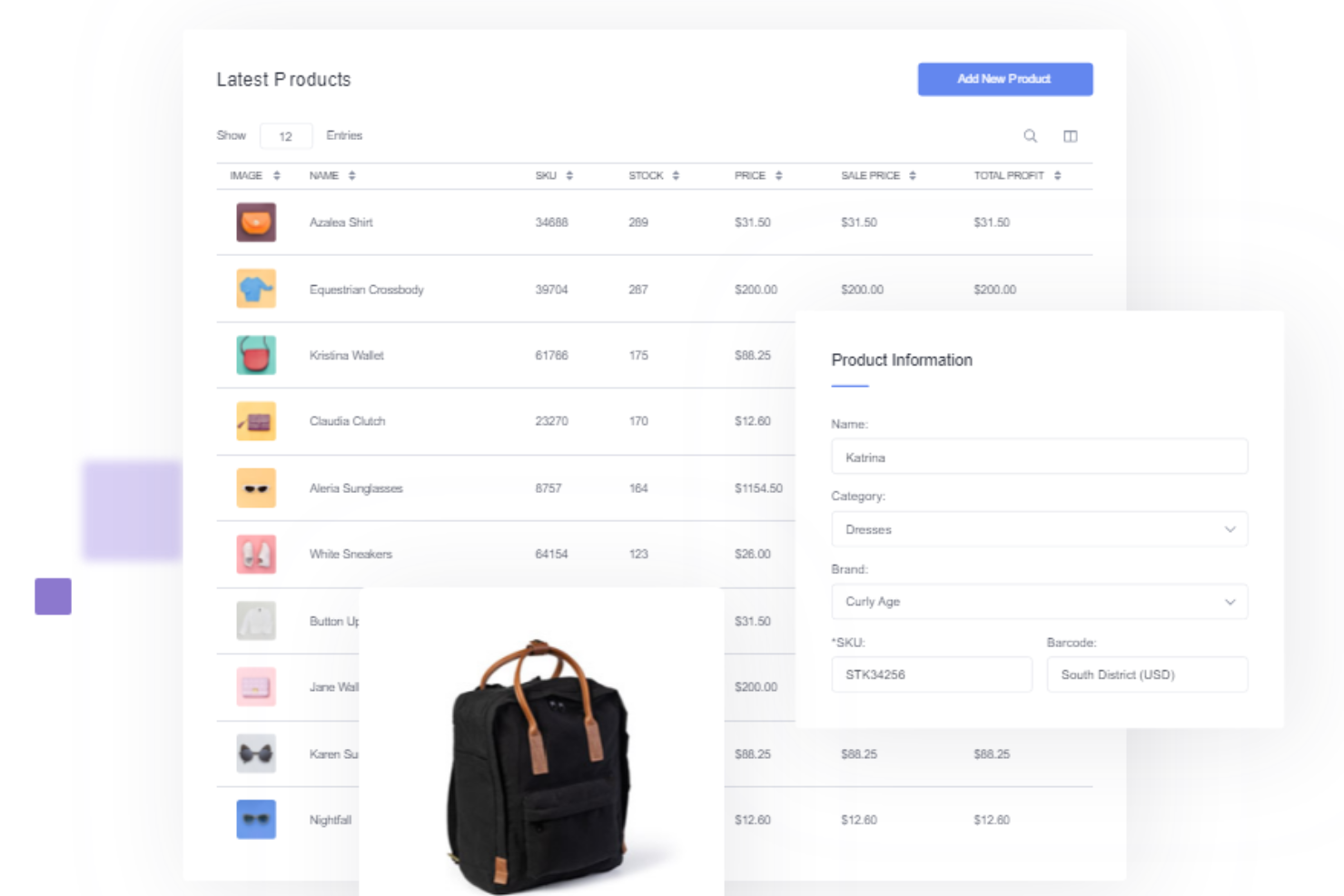
Helcim è uno strumento di elaborazione dei pagamenti progettato per offrire alle aziende soluzioni economiche e trasparenti per accettare pagamenti con carte di credito e di debito, sia online che di persona. L'azienda si distingue per non applicare costi nascosti, non richiedere contratti e offrire depositi rapidi in due giorni lavorativi, posizionandosi come una scelta conveniente per le aziende che desiderano ridurre i costi di elaborazione dei pagamenti mantenendo trasparenza ed efficienza.
Perché ho scelto Helcim: Ho scelto Helcim per il 'software di gestione dell'inventario gratuito' grazie al suo impegno nell'offrire tariffe di elaborazione basse e il Helcim Fee Saver, che può aiutare le aziende a risparmiare sulle commissioni delle carte di credito. Ciò che rende Helcim diverso è il suo modello di pricing trasparente Interchange Plus, una vasta gamma di opzioni di pagamento e una forte attenzione alla sicurezza e alla conformità. Credo che Helcim sia la soluzione migliore per l'elaborazione dei pagamenti a basso costo perché offre tariffe accessibili senza obbligo di contratto e fornisce un'interfaccia intuitiva sia per i commercianti che per i clienti.
Funzionalità e integrazioni distintive di Helcim
Le funzionalità distintive includono conti commerciante per accettare pagamenti con carte di credito e di debito, offrendo alle aziende flessibilità nel modo in cui elaborano le transazioni. L'app mobile per iOS e Android permette di accettare pagamenti ovunque, mentre i terminali virtuali consentono alle aziende di gestire transazioni telefoniche o tramite metodi indiretti. Inoltre, i gateway di pagamento si integrano facilmente con i siti web, offrendo funzionalità come pagine di pagamento ospitate, codici QR e piani di pagamento ricorrenti.
Le integrazioni includono Xero, QuickBooks, WooCommerce, Foxy.io e Great Exposure.
Cosa è gratuito? Helcim offre strumenti gratuiti di gestione dell'inventario come parte della sua piattaforma di elaborazione dei pagamenti.
Pros and Cons
Pros:
- Ampia gamma di servizi oltre la sola gestione dell’inventario
- Il modello di prezzo Interchange-plus è altamente trasparente
- Supporto tramite telefono, email e sistema online di ticket
Cons:
- Complessità per i piccoli commercianti
- Presenza fisica limitata al di fuori di Canada e Stati Uniti

Il miglior software gratuito di gestione dell'inventario per aziende guidate dai dati
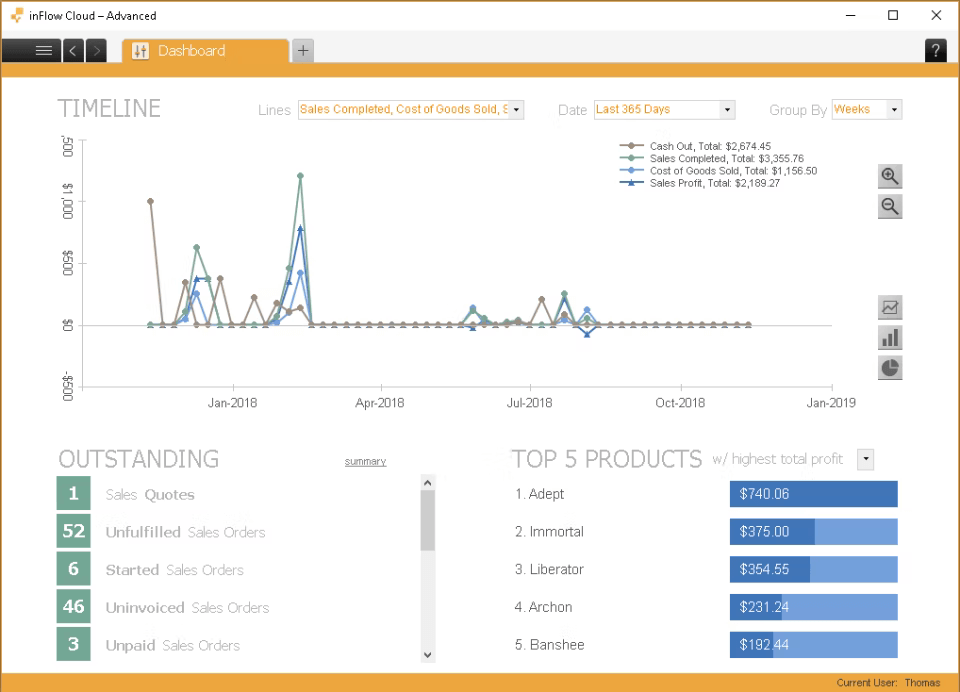
inFlow Inventory è un software di gestione dell'inventario che ti aiuta a tenere traccia degli ordini e dei livelli di magazzino. Il software consente alle aziende di gestire ordini di vendita, ordini di acquisto e ordini di lavoro da un'unica piattaforma. Le aziende possono creare, monitorare e gestire ordini, nonché stampare fatture e documenti di trasporto.
Perché ho scelto inFlow Inventory: la funzione di reportistica di inFlow Inventory è eccellente e offre preziose informazioni sulla tua organizzazione. inFlow Inventory consente alle aziende di monitorare i livelli di inventario in tempo reale, così sanno sempre quanta merce hanno a disposizione. Il software offre anche uno storico dei livelli di inventario, permettendo alle aziende di analizzare le tendenze nel tempo.
Con inFlow Inventory puoi creare categorie di prodotti, tracciare qualsiasi ordine di acquisto e articoli in riparazione, gestire i resi e mantenere registri accurati delle tue vendite. Questo software gratuito di gestione delle scorte permette di creare un numero illimitato di utenti con diversi livelli di permessi per gli utenti della rete locale. Tuttavia, due utenti non possono apportare modifiche all'inventario contemporaneamente. Quando un utente effettua delle modifiche, gli altri hanno accesso in sola lettura.
Funzionalità e integrazioni distintive di inFlow Inventory
Funzionalità principali comprendono la facile scansione dei codici a barre, che permette alle aziende di aggiornare rapidamente i livelli di inventario tramite la dedicata app mobile. Il software supporta anche il monitoraggio in più sedi, consentendo alle aziende di controllare i livelli delle scorte in diversi magazzini o punti vendita. Inoltre, le sue solide capacità di reporting offrono preziose informazioni sulle tendenze di inventario, aiutando le aziende a prendere decisioni informate basate sui dati.
Le integrazioni sono limitate. inFlow non si integra direttamente con altre app, ma gli utenti possono esportare i dati su QuickBooks Online come file CSV.
Cosa è gratuito? inFlow è gratuito fino a 100 prodotti e 100 clienti e consente la creazione di 15 report. Superati questi limiti, è necessaria una licenza a pagamento per continuare a utilizzare la piattaforma.
Pros and Cons
Pros:
- Ottimo servizio clienti e assistenza
- Supporto multi-sede
- Potenti funzioni di report e analisi
Cons:
- Opzioni di integrazione limitate
- Configurazione lunga e impegnativa

UpKeep
Il miglior software gratuito di gestione dell'inventario per la produzione
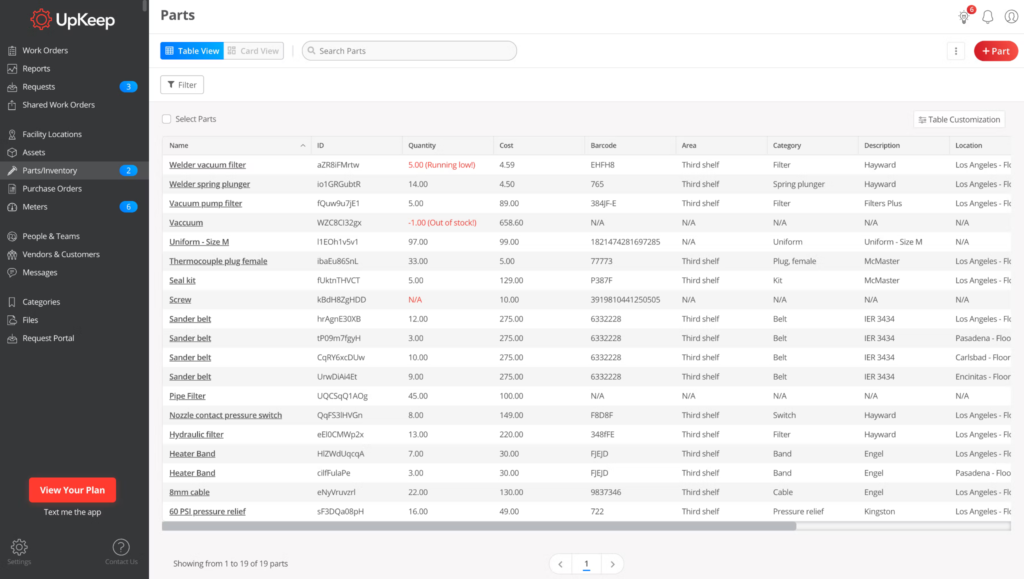
UpKeep è un software di controllo dell'inventario che ti aiuta a gestire le scorte e supervisionare l'evasione degli ordini. La piattaforma crea un luogo centralizzato per i tuoi conteggi di inventario, così sai esattamente dove si trova ogni articolo e quanti articoli devi rifornire. Questa soluzione non offre un'app mobile dedicata, ma è ottimizzata per il web mobile, quindi funzionerà su qualsiasi dispositivo mobile.
Perché ho scelto UpKeep: Non lasciarti ingannare dai loro servizi 'in presenza' (come la pianificazione dei tecnici e gli ordini di lavoro), UpKeep è un software di gestione dell'inventario completo, ideale per qualsiasi attività di ecommerce. Il software aggiorna automaticamente i conteggi dell'inventario e ti invia notifiche push ed e-mail quando i livelli di stock sono bassi. Inoltre la piattaforma ti consente di gestire sedi diverse. Si concentrano su aziende manifatturiere multi-sede, permettendoti di vendere prodotti e pezzi di ricambio online.
Caratteristiche chiave e integrazioni di UpKeep
Le funzionalità principali includono una solida gestione delle risorse, che ti consente di caricare e archiviare documenti tecnici, immagini, testo e persino contenuti video per ogni prodotto. Il software di controllo dell'inventario facilita la gestione delle quantità e dei costi dei prodotti direttamente da una piattaforma ottimizzata per dispositivi mobili, ideale per chi lavora in mobilità. Inoltre, i conteggi dell'inventario vengono aggiornati automaticamente quando i prodotti vengono aggiunti a fatture o ordini di lavoro, semplificando le operazioni.
Le integrazioni sono bloccate ai piani a pagamento, quindi non sono disponibili nella versione gratuita.
Cosa è gratuito? La versione gratuita di UpKeep include utenti illimitati con sola visualizzazione, fornitori illimitati, gestione di più sedi e assistenza via chat e telefono, seppur con funzionalità limitate.
Pros and Cons
Pros:
- Ottimo per servizi di ristorazione, vendita pezzi e ospitalità
- Sistema di gestione delle risorse robusto
- Piano freemium generoso
Cons:
- Integrazioni assenti nel piano gratuito
- Forte attenzione ai servizi in presenza

Il miglior software gratuito di gestione dell'inventario per operazioni con un singolo magazzino
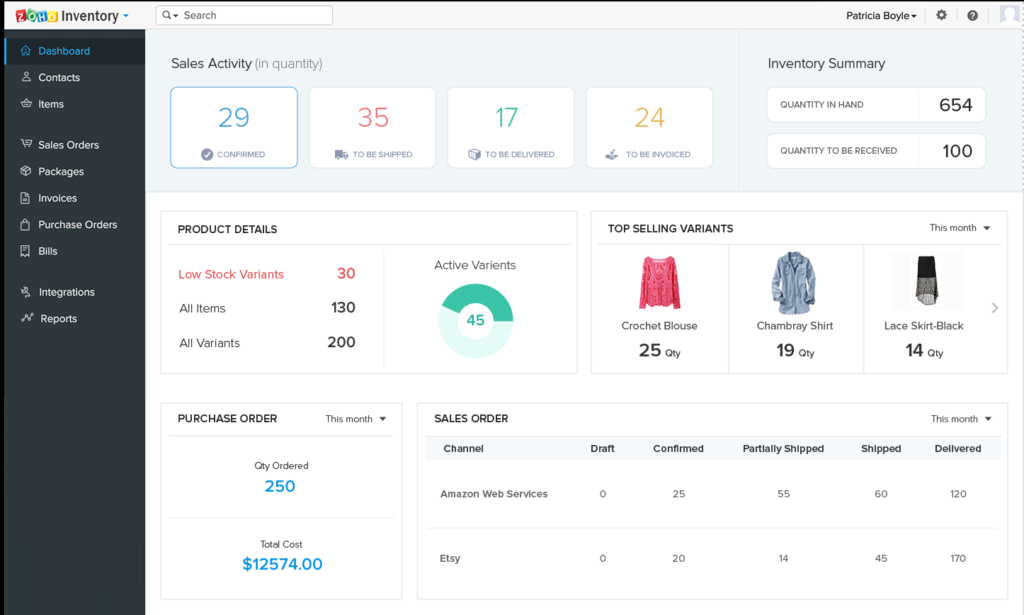
Zoho Inventory è uno strumento di gestione dell'inventario basato su cloud che ti aiuta a monitorare le variazioni di magazzino, gestire ordini di vendita e acquisto, e pubblicare i tuoi prodotti su canali di vendita multipli. Questa soluzione crea un sistema di inventario centralizzato per tutte le tue vendite online.
Perché ho scelto Zoho Inventory: Zoho Inventory aggiorna la quantità dell'inventario ogni volta che viene effettuata una vendita, mantenendo così sincronizzati i livelli di magazzino su diversi canali. Il software dispone di flussi di lavoro predefiniti che automatizzano le attività di routine come ordini di acquisto, ordini di vendita e monitoraggio delle spedizioni.
Uno degli aspetti migliori di questa soluzione è l'uso di dashboard complete. Le dashboard di Zoho Inventory offrono una maggiore visibilità sulla tua attività, permettendoti di vedere facilmente le variazioni di magazzino e i prodotti più venduti.
Caratteristiche principali e integrazioni di Zoho Inventory
Le caratteristiche principali includono la vendita multicanale, che ti consente di elencare e gestire i prodotti su diverse piattaforme come Amazon, eBay e il tuo negozio online, aiutandoti a raggiungere più clienti. La piattaforma supporta anche più valute, rendendo semplici le transazioni internazionali. Le dashboard complete forniscono una visibilità chiara sulle variazioni di inventario, i bestseller e le prestazioni di vendita, facilitando decisioni più intelligenti.
Le integrazioni includono Shopify, eBay, Stripe, PayPal, Amazon, Etsy, Salesforce e Google Shopping.
Cosa c'è di gratuito? Zoho Inventory è gratuito per le organizzazioni con un solo magazzino e fino a 50 ordini al mese, inclusi 50 etichette di spedizione al mese.
Pros and Cons
Pros:
- Si integra con altri software Zoho
- Molto facile da configurare e utilizzare
- Forte integrazione con piattaforme ecommerce
Cons:
- Limite di 50 ordini/mese
- Non adatto per più magazzini

Sortly
Il miglior software di gestione dell'inventario gratuito per facilità d'uso
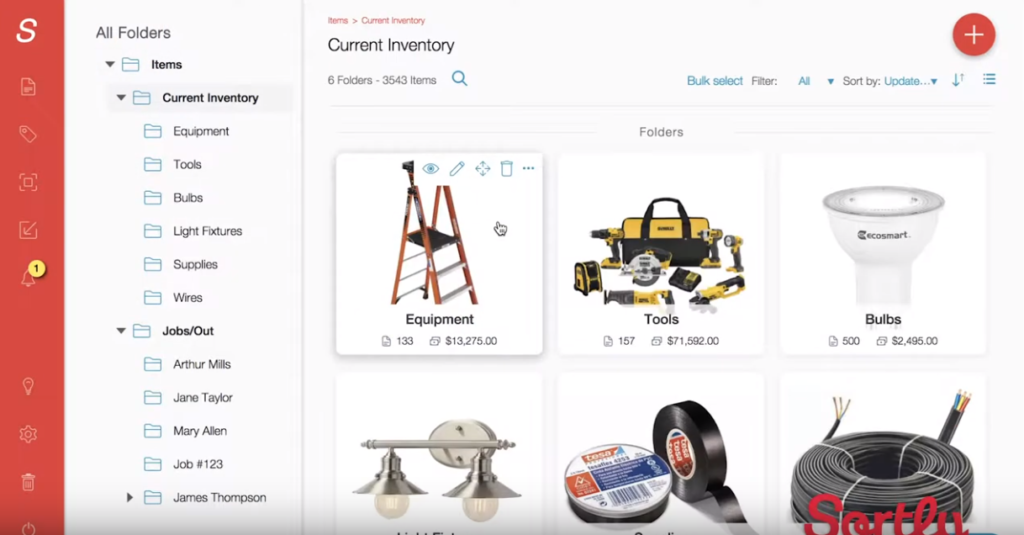
Sortly è un software di gestione dell'inventario che ti permette di aggiungere prodotti al tuo inventario, suddividere i prodotti in diverse categorie e monitorare ogni ordine di vendita. La piattaforma presenta un'interfaccia gradevole e facile da padroneggiare, oltre a un design compatibile con tutti i dispositivi mobili.
Perché ho scelto Sortly: Sortly rende semplice la gestione dell'inventario grazie ad avvisi automatici per scorte basse e promemoria basati sulle date per prodotti con garanzie brevi o date di scadenza vicine. Puoi inoltre creare dashboard personalizzate per avere una visione d’insieme della tua attività.
Il software di inventario gratuito consente di creare un campo personalizzato. Questo ti permette di creare una categoria di inventario personalizzata per prodotti che non rientrano nei campi predefiniti. Questo può essere utile per le aziende che hanno prodotti unici, innovativi o difficili da classificare.
Funzionalità principali e integrazioni di Sortly
Le funzionalità principali includono il tracciamento intuitivo degli articoli, che consente alle aziende di creare un database di inventario con immagini, descrizioni e campi personalizzati per una migliore organizzazione. La piattaforma permette inoltre di impostare avvisi e promemoria personalizzati per livelli di scorte bassi o date di scadenza, facilitando la gestione delle esigenze di inventario. Inoltre, l'app mobile consente alle aziende di gestire l'inventario in modo efficiente anche in movimento.
Le integrazioni non sono disponibili nel piano gratuito.
Cosa è gratuito? Sortly è gratuito per un utente, un campo personalizzato e fino a 100 articoli.
Pros and Cons
Pros:
- App mobile ben progettata
- Facile da configurare e usare
- Campi e avvisi personalizzabili
Cons:
- Integrazioni limitate con altri software
- Reportistica e analisi limitate

Settle
Ideale per aziende CPG
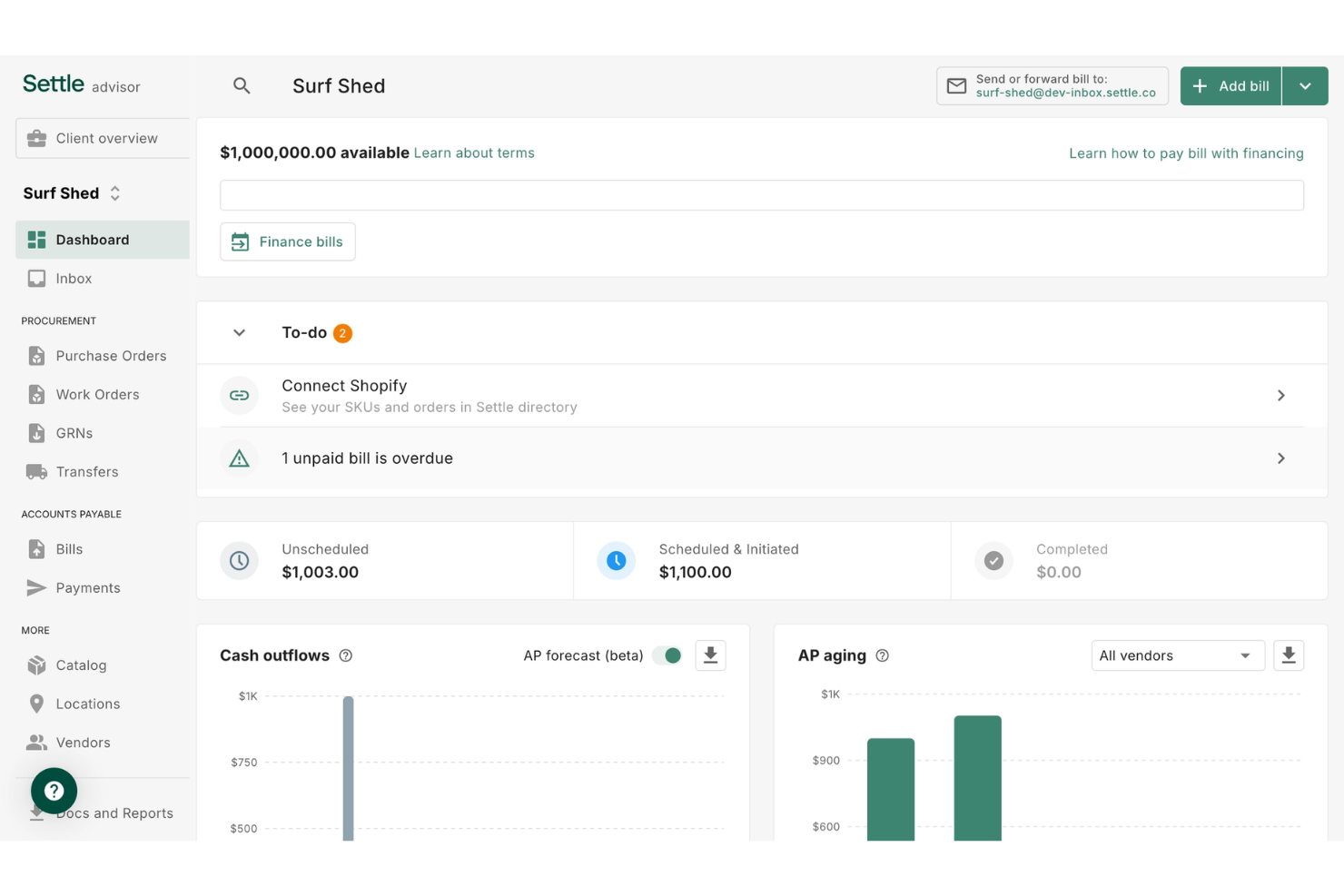
Settle è una piattaforma unificata progettata per aiutare i marchi di beni di consumo confezionati (CPG) a pianificare, acquistare e pagare preventivamente l'inventario. Integrando la gestione dell'inventario, l'approvvigionamento e i pagamenti, Settle offre alle aziende chiarezza e controllo in tempo reale sulle proprie operazioni.
Perché ho scelto Settle: Apprezzo la capacità di Settle di offrire una visibilità end-to-end sulla catena di approvvigionamento. Questa funzione consente al tuo team di tracciare l'inventario dall'acquisto alla vendita attraverso diversi canali e centri di distribuzione, assicurando che tu sappia sempre dove si trovano i tuoi prodotti e riducendo il rischio di esaurimento o eccesso di scorte. Include inoltre il calcolo in tempo reale dei costi totali sostenuti. Collegando le fatture agli ordini di acquisto, ordini di lavoro o trasferimenti, Settle calcola i costi totali a livello di SKU, fornendoti una chiara comprensione dei tuoi margini di profitto.
Funzionalità distintive e integrazioni di Settle
Le funzionalità distintive includono previsioni di inventario supportate dall'intelligenza artificiale che si adattano alle esigenze in evoluzione della tua azienda, notificandoti in caso di quantità basse di SKU e suggerendo i tempi ottimali per il riordino basati sui tempi di consegna e il coordinamento della distinta base dei materiali. Inoltre, Settle offre una corrispondenza automatica a tre vie tra ordini di acquisto, note di ricezione delle merci e fatture, aiutandoti a evitare pagamenti in eccesso e a mantenere registri finanziari accurati.
Le integrazioni includono QuickBooks Online, NetSuite, Shopify, Amazon, Cin7, Google e Xero.
Cosa è gratuito? Settle offre un piano gratuito, Launch, che comprende utenti e transazioni illimitati. Inoltre offre una prova gratuita di un mese per i piani a pagamento.
Pros and Cons
Pros:
- Cruscotto finanziario completo
- Gestione automatizzata delle fatture
- Gestione e previsione dell'inventario
Cons:
- Potrebbe offrire maggiore personalizzazione per flussi di lavoro specifici
- La funzione di ricerca delle fatture potrebbe essere più avanzata


Odoo è un sistema di gestione dell'inventario pluripremiato, gratuito e open source che ha raccolto oltre 7 milioni di utenti dal suo lancio. Attualmente è utilizzato da aziende di diversi settori di vendita e produzione, come Toyota, Cox, Hyundai e Danone.
Perché ho scelto Odoo Inventory: Odoo Inventory è particolarmente noto per la sua flessibilità nelle personalizzazioni e l'ampia gamma di soluzioni offerte, tra cui CRM, ecommerce, contabilità, inventario, punto vendita e gestione progetti. Puoi scegliere solo le soluzioni che ti servono o integrarle tutte per un approccio aziendale completo.
Odoo Inventory è una soluzione completa per la gestione dell'inventario e delle vendite e, con un po' di impegno, è altamente flessibile e può essere modellato secondo le tue necessità specifiche. Una documentazione solida, il DNA open source e un elenco dettagliato di integrazioni possono trasformarlo nello strumento esatto di cui hai bisogno. Ovviamente, qualsiasi soluzione open source con questo livello di personalizzazione richiede conoscenze tecniche aggiuntive. Odoo è ideale per chi dispone di personale IT a disposizione.
Caratteristiche principali e integrazioni di Odoo Inventory
Le caratteristiche principali includono il supporto per la gestione dell'inventario just-in-time (JIT), che consente alle aziende di ottimizzare i livelli di stock e ridurre gli sprechi mantenendo l'efficienza. Il monitoraggio inventariale in tempo reale con supporto multi-sede garantisce completa visibilità tra i magazzini. Altre funzionalità includono la scansione dei codici a barre, spedizione/ricezione integrata e un'app mobile per ottimizzare le operazioni in mobilità.
Le integrazioni includono RocketChat, QuickBooks, Google Sheets, WordPress, Slack, Hubstaff, Microsoft SQL e altri. Ulteriori opzioni di integrazione possono essere sbloccate tramite un piano Zapier a pagamento, oppure puoi costruire integrazioni personalizzate sfruttando la flessibilità open source di Odoo.
Cosa è gratuito? L'edizione community open source di Odoo è completamente gratuita, sebbene abbia alcune limitazioni nelle funzionalità.
Pros and Cons
Pros:
- Ottimo supporto clienti + forum della community
- Gestione inventariale JIT
- Completo e personalizzabile
Cons:
- Curva di apprendimento ripida per alcuni utenti
- I vantaggi dell'open source richiedono competenze tecniche

RightControl
Il miglior software gratuito per la gestione dell'inventario con marketplace di add-on
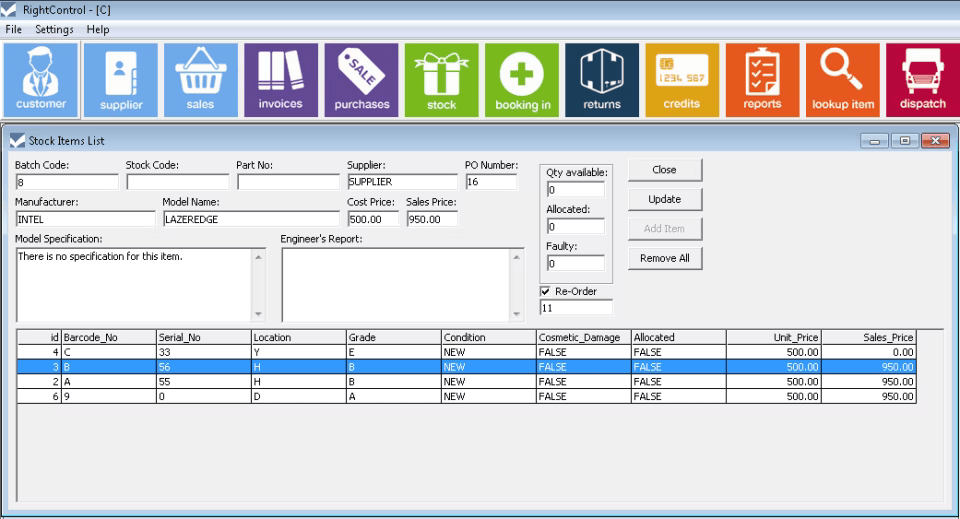
RightControl è un software che offre una soluzione integrata per gestire l'inventario di magazzino, le vendite, le fatture, i contatti di clienti e fornitori, la generazione e stampa di codici a barre, la spedizione e i report. È pensato per piccole e medie imprese.
Perché ho scelto RightControl: RightControl è ideale per le PMI che cercano un sistema di gestione dell'inventario completo capace di gestire diversi tipi di entrata in magazzino, inclusa la tracciabilità degli oggetti singoli con codici a barre unici, l'inserimento in batch per articoli come i piselli in scatola, o le kit assembly che richiedono la creazione di un prodotto unico a partire da una distinta dei materiali.
RightControl propone versioni differenti, adeguate a vari bisogni aziendali: dalle start-up e utenti domestici che vendono su eBay fino ad aziende in espansione che necessitano di un sistema client-server multiutente. Gli utenti possono passare facilmente dal programma Lite al sistema Enterprise man mano che la loro attività cresce.
Funzionalità e integrazioni principali di RightControl
Le funzionalità includono tutto quanto sopra elencato, oltre a un marketplace software dove puoi scaricare gratuitamente software aggiuntivi per aumentare la funzionalità di RightControl. Il loro marketplace è davvero completo, comprende tutto, dalle soluzioni per ecommerce e project management (anch'esse gratuite) fino a strumenti come i font per codici a barre. Non tutti i componenti aggiuntivi sono gratuiti, ma sono tutti chiaramente etichettati così sai quali lo sono. Gli add-on a pagamento hanno comunque una prova gratuita prima di qualsiasi addebito.
Le integrazioni non sono riportate sul loro sito.
Cosa è gratis: RightControl è completamente gratuito per la gestione dell'inventario. Puoi scaricare gratuitamente anche le loro soluzioni aggiuntive per POS, scansione codici a barre ed ecommerce.
Pros and Cons
Pros:
- Offerte gratuite generose
- Offre sistemi gratuiti di ecommerce e inventario
- Ricco di funzionalità con componenti aggiuntivi gratuiti
Cons:
- Non adatto ad aziende di grandi dimensioni
- Non aggiornato regolarmente
Altri software gratuiti per la gestione dell'inventario per le PMI
Ecco le altre opzioni che potresti prendere in considerazione.
- SalesBinder
Il miglior software gratuito di gestione dell'inventario per una vasta gamma di funzionalità
- PartKeepr
Il miglior software gratuito di gestione dell'inventario per la personalizzazione
- Stockpile
Il miglior software di gestione dell'inventario gratuito per articoli illimitati
- ABC Inventory
La migliore soluzione di gestione dell'inventario on-premise gratuita
- ShipStation
Ideale per semplificare la gestione di spedizioni e inventario per un ecommerce efficiente
- Cin7 Core
Ideale per più canali di vendita
- Fishbowl
Ideale per il monitoraggio dell'inventario in tempo reale


Recensioni correlate di software per l'e-commerce
Se non hai ancora trovato quello che cerchi, dai un'occhiata a questi strumenti di e-commerce correlati che abbiamo testato e valutato.
- Piattaforme di e-commerce
- Software per la gestione dell'inventario
- Software per la gestione dell'inventario dei componenti
- Software per l'elaborazione dei pagamenti
- Soluzioni per il carrello degli acquisti
- Sistemi di gestione degli ordini
- Software per la gestione del magazzino
- Software per la gestione dell'inventario all'ingrosso
Come valuto i software gratuiti per la gestione dell'inventario
Divido la mia valutazione in due livelli: il requisito minimo che uno strumento deve soddisfare per essere utile a un commerciante che traccia SKU su più sedi, e i fattori differenzianti che distinguono le migliori opzioni.
Funzionalità di base (Requisiti indispensabili per questa lista)
Quando seleziono gli strumenti per la mia lista, valuto ciascuno su una scala da 0 (non offre la funzionalità) a 5 (eccelle in quest'area) per ogni funzionalità di base elencata qui sotto. Successivamente, calcolo il punteggio totale dello strumento in una percentuale. Ogni strumento deve raggiungere un punteggio totale minimo del 65% per essere preso in considerazione.
- Tracciamento delle scorte in tempo reale: Verifico che lo strumento aggiorni le quantità man mano che avvengono le vendite, così un negoziante che vende sia in negozio sia online non dovrà indovinare cosa c'è effettivamente in magazzino.
- Piano realmente gratuito: Ogni strumento deve offrire un piano gratuito utilizzabile, non solo una prova di 14 giorni. Analizzo se il piano gratuito supporta abbastanza prodotti e utenti per consentire a una piccola attività di vendita al dettaglio di gestire le operazioni quotidiane.
- Gestione del catalogo prodotti: Gestire centinaia di SKU con varianti come taglia e colore è fondamentale nella vendita al dettaglio. Valuto come ogni strumento gestisce le schede prodotto, l'assegnazione di codici a barre e l'organizzazione in categorie.
- Avvisi di scorte basse & riordino: Quando un articolo più venduto scende sotto una soglia impostata, il sistema dovrebbe segnalarlo. Verifico la presenza di livelli di allerta configurabili e di flussi di lavoro per l'ordine di acquisto collegati all'azione di riordino.
- Integrazione con i canali di vendita: Il valore di uno strumento dipende da quanto bene si sincronizza con le piattaforme su cui si vende effettivamente. Valuto le connessioni con sistemi POS e piattaforme e-commerce come Shopify, Square e WooCommerce.
- Reportistica sull'inventario: Cerco report che vadano oltre una semplice lista di scorte. Gli strumenti utili forniscono dati su movimenti di inventario, valutazione delle scorte e percentuali di vendita, così puoi prendere decisioni di acquisto più intelligenti.
Una volta individuati gli strumenti che soddisfano questi criteri, considero cosa rende ciascuna piattaforma unica.
Fattori differenzianti (Cosa distingue i fornitori)
Ecco come confronto i diversi fornitori:
Funzionalità distintive
L'accesso a un'app mobile è per me una delle principali caratteristiche. Gli addetti alle vendite che possono scansionare i codici a barre e controllare le scorte direttamente dal negozio non dovranno tornare al computer. Valuto anche il tracciamento dei trasferimenti tra sedi, importante quando si sposta inventario tra un magazzino e un pop-up o un secondo punto vendita. Un'altra funzionalità che cerco è la previsione della domanda: gli strumenti che mettono in risalto le tendenze di vendita aiutano ad acquistare in modo più intelligente invece di reagire semplicemente a scorte esaurite.
Oltre le funzionalità
Le limitazioni dei piani gratuiti qui sono fondamentali. Valuto quanti prodotti, utenti e sedi permette ogni strumento prima di spingerti verso una versione a pagamento—perché un commerciante con 500 SKU deve saperlo in anticipo. La facilità di implementazione è un altro fattore che considero, soprattutto per piccoli team senza supporto IT. Una procedura guidata di configurazione o uno strumento di importazione CSV possono fare la differenza tra andare online in un giorno o fermarsi. Verifico inoltre se gli utenti del piano gratuito ricevono un vero supporto clienti o sono limitati a forum di comunità quando qualcosa si rompe.
Che cos'è il software gratuito per la gestione dell'inventario?
Il software gratuito per la gestione dell'inventario è uno strumento digitale che monitora prodotti, ordini e movimenti della catena di approvvigionamento, senza costarti nulla.
Progettato per piccole imprese e negozi di e-commerce, automatizza il conteggio delle scorte, evidenzia cosa vende (e cosa rimane invenduto) e si sincronizza con piattaforme come Shopify, così non devi aggiornare i numeri manualmente.
Che tu gestisca un singolo magazzino o più canali di vendita, questi strumenti gratuiti ti aiutano a evitare l'esaurimento delle scorte, organizzare i tuoi SKU e prendere decisioni più intelligenti, senza bisogno di un budget da grande impresa. Per le aziende pronte a esplorare le soluzioni open source per la gestione dell'inventario, sono disponibili opzioni ancora più potenti.
Come scegliere un software gratuito per la gestione dell'inventario
Scegliere un software gratuito per la gestione dell'inventario non dovrebbe sembrare come scegliere una nuova religione. Vuoi qualcosa che funzioni davvero per la tua azienda, non l'ennesimo strumento luccicante che abbandonerai dopo una settimana.
Avendo gestito magazzini, domato fogli di calcolo e superato il caos delle spedizioni globali, ecco come individuare la soluzione più adatta, senza fronzoli, solo risultati.
| Cosa dovresti chiederti | Cosa cercare | Perché è importante |
|---|---|---|
| Qual è il mio problema più grande? | Monitoraggio in tempo reale, automazione, avvisi | Risolve prima i tuoi problemi effettivi |
| Chi deve usare questo strumento? | Interfaccia chiara, accesso da dispositivi mobili, ruoli | Mantiene l'intero team sulla stessa lunghezza d'onda |
| Con cosa ho bisogno che si integri? | Shopify, QuickBooks, Google Sheets, ecc. | Niente gare di copia e incolla |
| Che aspetto ha il “successo” in questo caso? | Reportistica, avvisi di scorte basse, configurazione rapida | Concentrati su ciò che fa davvero la differenza |
| Riuscirà a crescere insieme alla mia attività? | Aggiornamenti semplici, nessuna perdita di dati, flessibilità | Rende le tue operazioni pronte per il futuro |
| Funzionerà con il mio processo attuale? | Curva di apprendimento minima, flussi di lavoro intelligenti | Non è necessario reinventare la ruota |
In definitiva: non accontentarti di uno strumento “gratuito” che ti costa in termini di grattacapi. Scegli ciò che si adatta alle tue esigenze, funziona e cresce insieme a te, così potrai tornare davvero a gestire la tua attività.
Tendenze nei software gratuiti per la gestione dell'inventario per 2026
Il mondo della gestione dell'inventario si sta evolvendo rapidamente, anche per quanto riguarda gli strumenti gratuiti. Ecco le principali tendenze che stanno plasmando il futuro dei software gratuiti per l'inventario nel 2026:
- Sistemi di inventario basati sul cloud. Consentono di gestire le scorte da qualsiasi luogo con una connessione Internet, rendendoli ideali per le piccole aziende in fase di crescita. I sistemi basati sul cloud eliminano i costi iniziali elevati e garantiscono aggiornamenti in tempo reale su più dispositivi.
- Integrazione con l'Internet delle cose (IoT). I dispositivi IoT, come i tag RFID e i sensori, stanno diventando sempre più comuni. Questi dispositivi forniscono dati in tempo reale sui livelli delle scorte, sulle condizioni e sulla posizione dei prodotti, contribuendo a prevenire l'esaurimento delle scorte e a ottimizzare il rifornimento.
- Analisi predittiva basata sull'IA. L'intelligenza artificiale e l'apprendimento automatico vengono integrati negli strumenti gratuiti per aiutare le aziende a prevedere la domanda, ottimizzare i livelli delle scorte e automatizzare attività come il riordino. Ciò riduce la necessità di interventi manuali e garantisce una gestione delle scorte più accurata.
- Piattaforme ottimizzate per dispositivi mobili. Con la continua diffusione dell'uso dei dispositivi mobili, molte opzioni di software gratuito per la gestione dell'inventario stanno ottimizzando le proprie piattaforme per l'uso mobile, consentendo di gestire l'inventario ovunque ci si trovi tramite app facili da usare e design responsivi.
- Sostenibilità e riduzione degli sprechi. Poiché le aziende si concentrano sempre più sulla sostenibilità, gli strumenti gratuiti per la gestione dell'inventario offrono sempre più funzioni che aiutano a ridurre gli sprechi ottimizzando i livelli delle scorte, minimizzando la sovrapproduzione e migliorando l'uso delle risorse.
- Automazione del magazzino. Gli strumenti gratuiti stanno iniziando a offrire funzioni di automazione di base, come la scansione dei codici a barre e gli aggiornamenti automatici delle scorte, per migliorare la precisione e ridurre il lavoro manuale negli ambienti di magazzino. I sistemi avanzati possono utilizzare robot mobili autonomi (AMR) per ottimizzare ulteriormente le operazioni.
Queste tendenze stanno trasformando i software gratuiti per l'inventario da semplici sistemi di monitoraggio in piattaforme intelligenti e basate sui dati, che aiutano le aziende a gestire le scorte in modo più efficace ed efficiente.
Funzioni principali dei software gratuiti per la gestione dell'inventario
Gli strumenti gratuiti per la gestione dell'inventario sono più potenti che mai e, se scelti correttamente, possono soddisfare la maggior parte delle esigenze delle piccole e medie imprese. Ecco le funzioni essenziali da cercare:
- Monitoraggio dell'inventario. Aggiornamenti delle scorte in tempo reale, scansione dei codici a barre e monitoraggio in più sedi garantiscono che tu non debba mai indovinare cosa è disponibile. Alcuni strumenti supportano persino i numeri di serie e il monitoraggio dei lotti per una maggiore tracciabilità.
- Gestione degli ordini. Gestisci vendite, ordini di acquisto, resi e fatture da un'unica piattaforma. Cerca la sincronizzazione con i negozi online per automatizzare gli aggiornamenti in tutto il tuo ecosistema.
- Gestione del magazzino. Sposta le scorte tra le sedi, assegna gli articoli a contenitori o scaffali e utilizza il metodo FIFO o il monitoraggio delle scadenze per i prodotti deperibili o regolamentati.
- Reportistica e automazione. Gli strumenti di base offrono report sulle scorte e sulle vendite, ma alcuni si spingono oltre con pannelli di controllo in tempo reale, attivazioni automatiche dei riordini e previsioni basate sull'intelligenza artificiale.
- Supporto per più sedi. Monitora le scorte tra magazzini, negozi o operatori logistici di terze parti senza perdere visibilità. Un vantaggio aggiuntivo è la sincronizzazione automatica tra le sedi.
- Identificazione dei prodotti. Il supporto per codici a barre e RFID, insieme ai campi personalizzati e ai tag dei prodotti, ti aiuta a monitorare e organizzare gli articoli più rapidamente.
- Ottimizzazione dell'inventario. Alcuni strumenti suggeriscono automaticamente i riordini o segnalano gli articoli a rotazione lenta, aiutandoti a ridurre gli sprechi ed evitare l'esaurimento delle scorte senza interventi manuali.
- Funzionalità di integrazione. Cerca la compatibilità con strumenti come Shopify, QuickBooks, AfterShip, ShipStation, Zapier o persino Google Sheets per flussi di lavoro flessibili.
- Monitoraggio dei lotti e delle date di scadenza. Monitora per lotto o data di scadenza l'inventario soggetto a limiti di conservazione. Particolarmente utile per i marchi del settore alimentare, degli integratori e farmaceutico.
- Sicurezza e controlli degli accessi. Gratuito non significa non sicuro: le autorizzazioni basate sui ruoli e i registri di controllo possono mantenere i dati dell'inventario accurati e protetti.
- Riordino automatico. Attiva automaticamente ordini di acquisto o avvisi di scorte ridotte in base a soglie o alla domanda prevista.
- Accesso da dispositivi mobili e basato sul cloud. Le app per dispositivi mobili e i pannelli di controllo cloud ti consentono di gestire le scorte ovunque ti trovi; alcuni offrono persino funzionalità offline per i magazzini con una connessione Wi-Fi instabile.
Vantaggi del software gratuito per la gestione dell'inventario
Il software gratuito per la gestione dell'inventario sta cambiando il modo in cui operano le aziende, offrendo strumenti potenti per migliorare le attività, senza costi aggiuntivi.
Ecco cinque vantaggi principali che questi strumenti offrono:
- Riduzione dei costi. Automatizzando il monitoraggio dell'inventario e riducendo i conteggi manuali, il software gratuito aiuta a diminuire i costi operativi. Inoltre, previene l'eccesso di scorte e l'esaurimento dei prodotti, riducendo gli sprechi e favorendo un uso più efficiente delle risorse.
- Maggiore efficienza. L'automazione accelera processi come il monitoraggio degli ordini e la gestione dell'inventario, lasciando al tuo team più tempo da dedicare ad attività strategiche. Meno errori manuali significano operazioni complessivamente più fluide.
- Maggiore precisione. Il monitoraggio in tempo reale garantisce che i dati dell'inventario siano sempre aggiornati, aiutandoti a prendere decisioni migliori. Questo porta a previsioni della domanda più accurate e riduce il rischio di avere troppe o troppo poche scorte disponibili.
- Aumento delle vendite e della redditività. Quando hai in magazzino i prodotti giusti, puoi soddisfare la domanda dei clienti con maggiore continuità. Questo non solo aumenta le vendite, ma mantiene anche i clienti soddisfatti, favorendo la fidelizzazione e la redditività a lungo termine.
- Processo decisionale basato sui dati. Gli strumenti gratuiti spesso includono funzionalità di reportistica che offrono informazioni sulle tendenze dell'inventario e sui modelli di vendita. Grazie a queste informazioni, puoi ottimizzare i livelli delle scorte, modificare la tua offerta di prodotti e pianificare la crescita in modo più efficace.
Il software gratuito per la gestione dell'inventario offre molto più del semplice risparmio sui costi: migliora l'efficienza, la precisione e la redditività, fornendoti al contempo i dati necessari per prendere decisioni più intelligenti.
Costi e prezzi del software per la gestione dell'inventario
Comprendere la struttura dei costi del software per la gestione dell'inventario è essenziale quando si deve scegliere tra piani gratuiti e a pagamento. Le opzioni gratuite possono aiutarti a iniziare, ma i piani a pagamento offrono funzionalità più complete man mano che la tua azienda cresce.
Ecco una suddivisione tipica dei livelli di prezzo:
| Tipo di piano | Prezzo medio | Funzionalità comuni incluse | Ideale per |
|---|---|---|---|
| Gratuito | $0 | Monitoraggio di base dell'inventario, aggiornamenti manuali delle scorte, report limitati, supporto della comunità. | Nuove imprese o piccole imprese con esigenze minime. |
| Base | $9 - $30/mese | Monitoraggio automatizzato, scansione dei codici a barre, supporto per più sedi, gestione di base degli ordini, alcune integrazioni. | Piccole imprese che necessitano di maggiore automazione. |
| Standard | $30 - $100/mese | Gestione avanzata dell'inventario, molteplici integrazioni (commercio elettronico, contabilità), analisi di base, assistenza clienti. | Imprese in crescita con vendite su più canali. |
| Premium | $100 - $300/mese | Analisi avanzate, previsione della domanda, riordino automatizzato, assistenza clienti prioritaria, utenti illimitati. | Imprese più grandi con esigenze di inventario complesse. |
| Aziendale | $300+/mese (piani personalizzati) | Funzionalità personalizzate, assistenza dedicata, automazione completa, sedi e transazioni illimitate, previsioni avanzate. | Grandi aziende con operazioni ad alto volume. |
Costi aggiuntivi da considerare
Sebbene i piani gratuiti e a pagamento coprano molte funzionalità fondamentali, spesso ci sono costi aggiuntivi di cui le imprese devono essere consapevoli:
- Licenze utente. Alcuni piani applicano un costo per ogni utente aggiuntivo oltre al numero incluso, soprattutto nei piani di fascia più alta.
- Integrazioni. Il collegamento con sistemi di terze parti, come software di contabilità o CRM, può comportare costi aggiuntivi, in particolare nei piani più economici (anche se alcuni strumenti di contabilità includono la gestione dell'inventario).
- Assistenza clienti. Sebbene l'assistenza di base possa essere gratuita, l'assistenza clienti premium o prioritaria spesso comporta un costo aggiuntivo.
- Limiti di archiviazione e transazioni. I piani gratuiti e di fascia inferiore possono imporre limiti al numero di prodotti, transazioni o alla capacità di archiviazione, con costi aggiuntivi in caso di superamento di tali limiti.
- Formazione e configurazione. Alcune piattaforme applicano costi per l'avvio, la formazione o la configurazione delle integrazioni, soprattutto per le funzionalità avanzate.
Questi potenziali costi aggiuntivi sono importanti da considerare quando si definisce il budget per il software di gestione dell'inventario, soprattutto con la crescita dell'impresa e la necessità di funzionalità più avanzate o di un accesso per un numero maggiore di utenti.
Domande frequenti sul software gratuito per la gestione dell'inventario
Ora passiamo alle domande del pubblico ipotetico. Abbiamo pensato ad alcune domande che potreste aver posto e abbiamo fornito le relative risposte. Iniziamo.
Altre recensioni di software per la gestione dell'inventario
Quando il vostro negozio online cresce e vi accorgete che il software gratuito per la gestione dell'inventario non è più sufficiente, potete provare queste opzioni per passare a un piano superiore.