
15 Best Retail CRM Solutions for 2026

Retail CRM Shortlist
Here’s my shortlist of retail CRM solutions:
- 5. HubSpot CRM


A retail CRM is a customer relationship management platform designed to help retailers organize customer data, manage sales pipelines, and personalize engagement across channels.
If you’re searching for the best retail CRM, you’re likely looking to improve how your team tracks leads, builds loyalty, and connects every touchpoint—from in-store to online. With so many options, it’s tough to know which CRM will actually fit your workflows, integrate with your systems, and support your growth goals.
This list breaks down the top retail CRM tools for 2026, so you can compare features and find the right fit for your business.
Why Trust Our Software Reviews
Best Retail CRM Systems Summary
This comparison chart summarizes pricing details for my top retail CRM systems selections to help you find the best one for your budget and business needs.
| Tool | Best For | Trial Info | Price | ||
|---|---|---|---|---|---|
| 1 | Best for action-focused contact management | 21-day free trial + free demo available | From $9.95/user/month (billed annually) | Website | |
| 2 | Best with enterprise system integrations | Free plan + free trial available | From $80/user/month (billed annually) | Website | |
| 3 | Best for low-code process customization | Free demo available | From $25/user/month | Website | |
| 4 | Best for omnichannel customer engagement | Free plan available | From $20/seat/month (billed annually) | Website | |
| 5 | Free plan + free demo available | From $45/seat/month (billed annually) | Website | ||
| 6 | Best for visual sales pipeline management | 14-day free trial + free demo available | From $14/user/month (billed annually) | Website | |
| 7 | Best for AI-powered lead scoring | 21-day free trial + free demo available | From $9/user/month (billed annually) | Website | |
| 8 | Best for built-in calling features | Free 15-day trial available | From $23/user/month (billed annually) | Website | |
| 9 | Best with advanced analytics tools | Free plan available | From $25/user/month (billed annually) | Website | |
| 10 | Best for small retail teams | 15-day free trial + free plan available | From $7/user/month (billed annually) | Website |

Retail CRM Reviews
Below are my detailed summaries of the retail CRM solutions that made it onto my shortlist. My reviews offer a detailed look at the features, integrations, and best use cases of each platform to help you find the best one for your business.
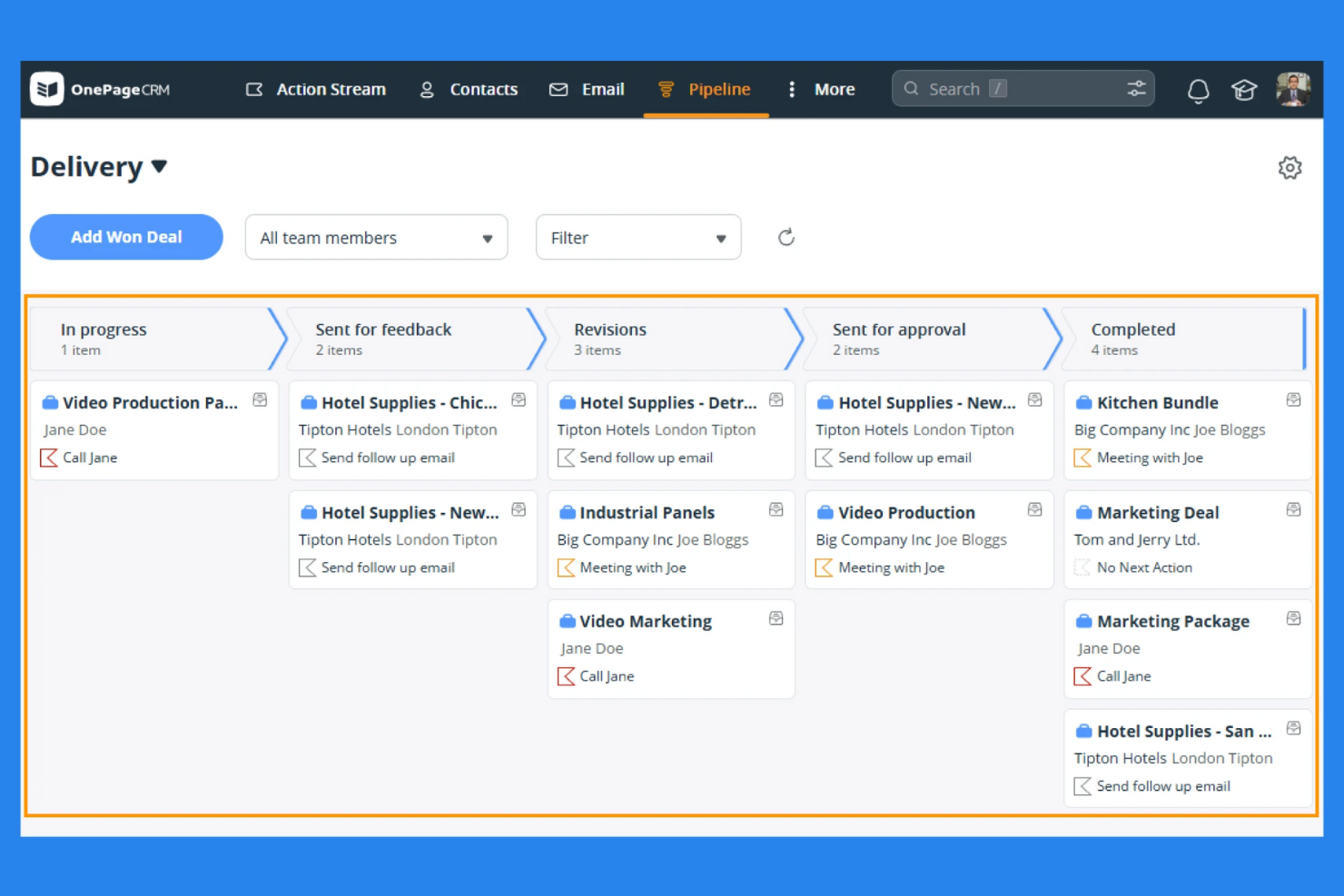
For retail teams that want to turn every customer interaction into a next step, OnePageCRM puts action at the center of contact management. It’s designed for sales-focused retailers and small businesses that need a simple way to keep follow-ups and deals moving forward. The tool’s unique Next Action approach helps you prioritize outreach and never lose track of a lead or customer conversation.
Why I Picked OnePageCRM
What sets OnePageCRM apart for retail teams is its focus on turning contacts into actionable sales steps. I picked this tool because its Next Action sales method prompts you to assign a clear follow-up for every customer, helping retail staff stay proactive with leads and repeat buyers. The built-in sales pipeline lets you track deals visually and move opportunities forward with simple drag-and-drop actions. This action-focused approach is especially useful for retailers who want to keep customer engagement consistent and never let a sales opportunity slip through the cracks.
OnePageCRM Key Features
In addition to its action-focused workflow, I also found these features helpful for retail teams:
- Contact Import and Deduplication: Quickly bring in customer lists from spreadsheets or other CRMs and automatically merge duplicates.
- Email Sync and Templates: Send, receive, and track emails directly from the CRM, with reusable templates for common retail communications.
- Custom Tags and Filters: Organize contacts by store location, purchase history, or loyalty status using flexible tagging and filtering options.
- Mobile App for On-the-Go Updates: Access customer details, add notes, and complete tasks from anywhere using the dedicated mobile app.
OnePageCRM Integrations
Integrations include Mailchimp, Gmail, Outlook, Xero, QuickBooks, MailerLite, Help Scout, Aircall, Dropbox, and ActiveCampaign.
Pros and Cons
Pros:
- Provides a mobile app for in-store customer updates
- Includes email tracking capabilities
- Next Action system keeps follow-ups organized
Cons:
- No customer-facing portal for order tracking
- Limited automation for recurring retail tasks

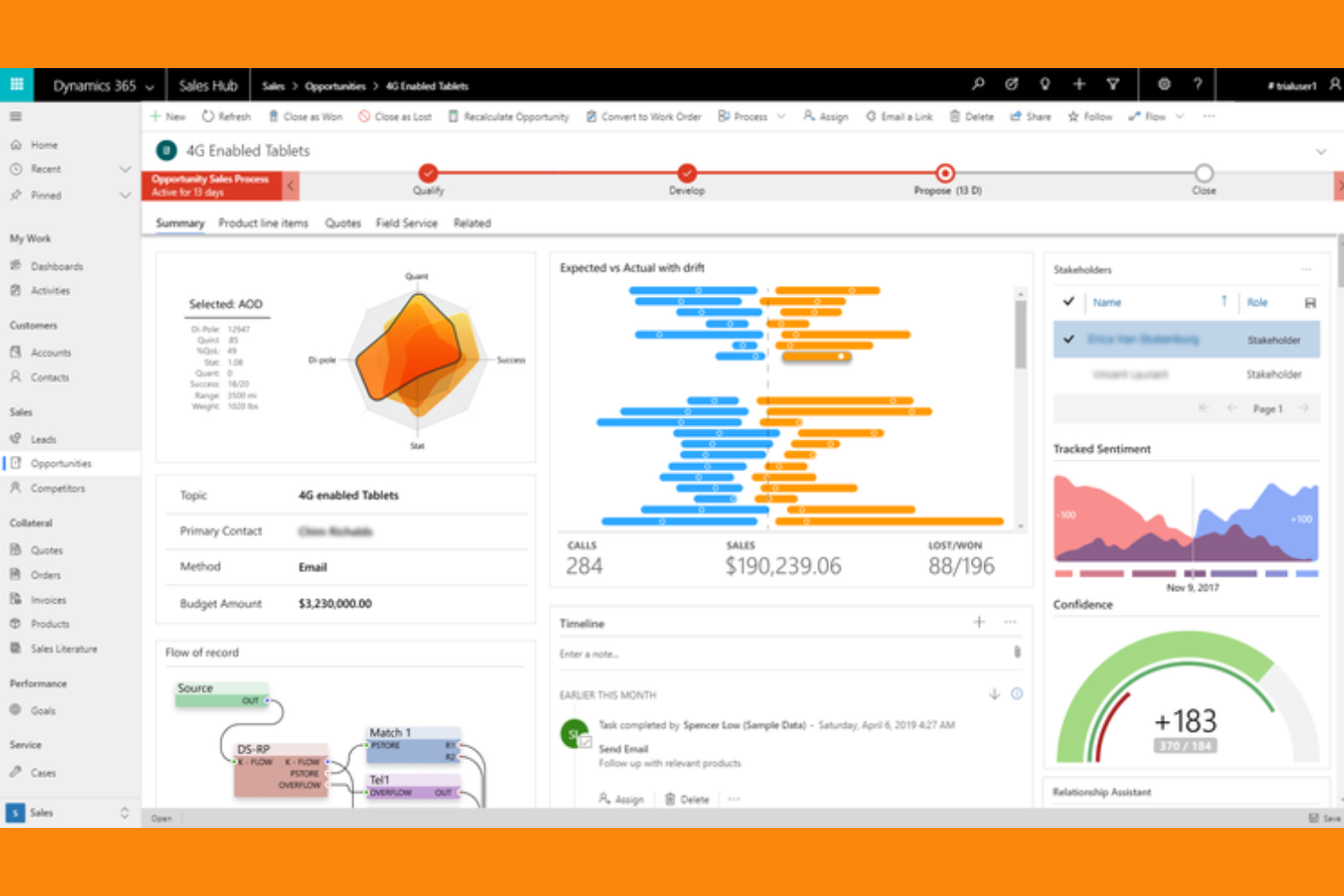
Retailers managing complex operations across multiple systems often turn to Microsoft Dynamics 365 for its deep integration capabilities. This platform is a strong fit for enterprise retailers and omnichannel brands that need to connect CRM data with finance, supply chain, and ERP tools. Its unified approach helps teams break down data silos, automate cross-department workflows, and deliver consistent customer experiences at scale.
Why I Picked Microsoft Dynamics 365
When retail businesses need a CRM that connects with their existing enterprise systems, Microsoft Dynamics 365 is a clear choice. I picked Dynamics 365 because it lets you unify customer data with inventory, finance, and supply chain management in one platform. The tool’s real-time data syncing and workflow automation help retail teams coordinate promotions, manage stock, and track customer journeys across every channel. This level of integration is especially valuable for large retailers who want to eliminate data silos and create a single source of truth for their operations.
Microsoft Dynamics 365 Key Features
Some other features that make Dynamics 365 valuable for retail teams include:
- Customer Insights Platform: Analyze customer behavior and segment audiences using AI-driven analytics.
- Personalized Marketing Campaigns: Design and automate targeted email, SMS, and social campaigns within the CRM.
- Loyalty Program Management: Build and manage customer loyalty programs directly from the platform.
- Case Management Tools: Track and resolve customer service issues with built-in ticketing and escalation workflows.
Microsoft Dynamics 365 Integrations
Integrations include Docusign, Meta, Twilio, SAP, Mailchimp, Zendesk, and more.
Pros and Cons
Pros:
- Native integration with Microsoft 365 suite
- AI-driven customer segmentation tools
- Real-time inventory visibility across all channels
Cons:
- Analytics dashboards need manual configuration
- Mobile app lacks full CRM functionality
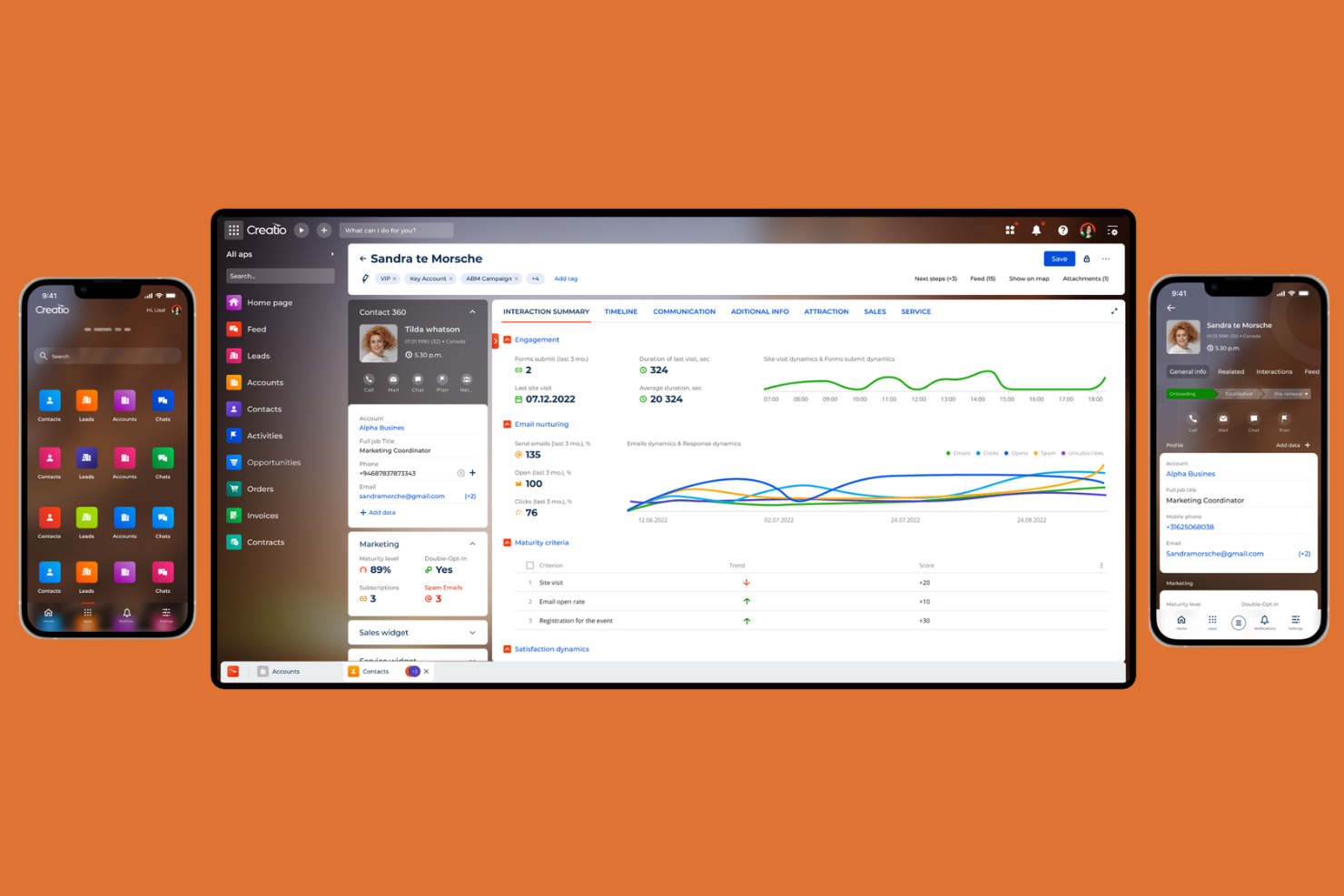
If your retail operation needs a CRM that adapts to unique workflows, Creatio offers a low-code platform for process customization. It’s a strong fit for retailers with complex or evolving sales, service, or marketing processes that don’t fit out-of-the-box solutions. With Creatio, you can design and automate customer journeys, approvals, and data flows to match your business’s exact needs.
Why I Picked Creatio
Retailers who need to tailor their CRM to fit unique business processes will find Creatio’s low-code customization especially valuable. I picked Creatio because it lets you visually design workflows, automate tasks, and build custom dashboards without heavy IT involvement. The platform’s process designer supports drag-and-drop configuration for everything from customer onboarding to returns management. This flexibility helps retail teams adapt quickly as their operations or customer engagement strategies evolve.
Creatio Key Features
Some other features that retail teams may find useful include:
- Omnichannel Communication Tools: Manage customer interactions across email, phone, chat, and social channels from one interface.
- Customer Data Unification: Consolidate customer profiles and purchase history for a single view of each shopper.
- AI-Powered Lead Scoring: Automatically prioritize leads based on behavior and engagement signals.
- Role-Based Access Controls: Set permissions and data visibility for different team members or departments.
Creatio Integrations
Integrations include Microsoft Outlook, Microsoft Exchange, Google Workspace, Docusign, Twilio, SAP, Mailchimp, and Zendesk.
Pros and Cons
Pros:
- Centralized customer profiles with purchase history
- AI tools for lead and opportunity scoring
- Visual process designer for custom retail workflows
Cons:
- Marketplace add-ons often require extra fees
- No native integration with Shopify or WooCommerce
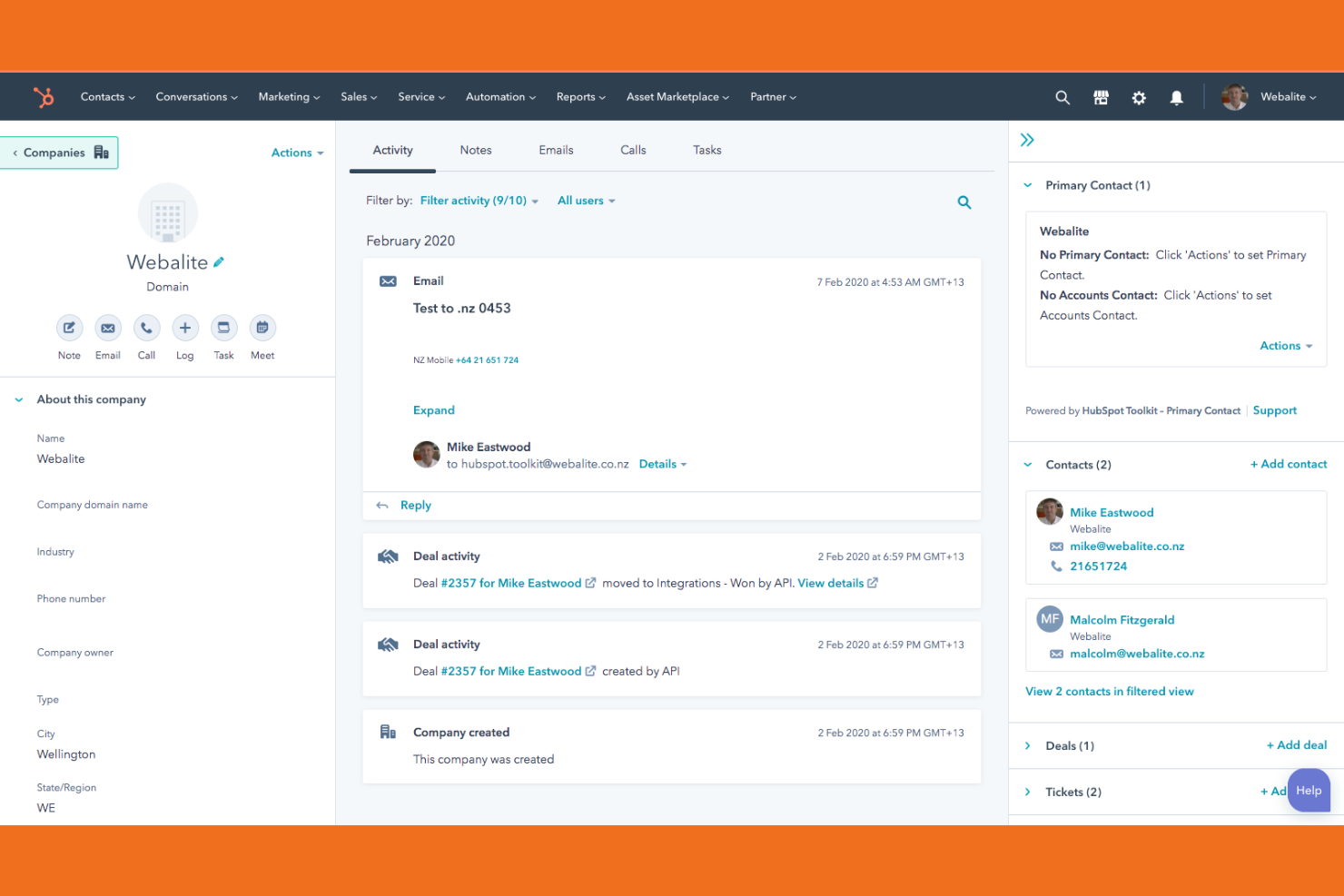
If you’re looking for a retail CRM that connects every customer touchpoint, HubSpot is worth a close look. This platform helps retail teams unify in-store, online, and mobile engagement in one place. It’s a strong fit for businesses that want to manage marketing, sales, and service interactions across multiple channels without juggling separate tools.
Why I Picked HubSpot
For retail teams that need to engage customers across multiple channels, HubSpot stands out for its omnichannel capabilities. I picked HubSpot because it lets you manage email, SMS, live chat, and social messaging from a single dashboard, so you can keep every conversation connected. The platform’s customer timeline feature gives you a unified view of each shopper’s interactions, whether they browse online or visit your store. Automated workflows also help you deliver targeted follow-ups based on real-time customer behavior, making it easier to deliver personalized experiences at scale.
HubSpot Key Features
Some other features in HubSpot that retail teams may find useful include:
- Product Library: Store and manage your entire product catalog within the CRM for quick reference during sales and support interactions.
- Deal Tracking: Monitor sales opportunities with customizable pipelines that reflect your retail sales process.
- Inventory Management Integrations: Connect with inventory tools to sync stock levels and automate product availability updates.
- Customer Segmentation: Create dynamic lists based on purchase history, location, or engagement to target specific customer groups.
HubSpot Integrations
Integrations include Shopify, Gmail, Outlook, Slack, Mailchimp, Asana, Google Ads, Intercom, Meta Ads, and more.
Pros and Cons
Pros:
- Customer timeline tracks all touchpoints
- Built-in marketing automation for retail campaigns
- Omnichannel messaging for unified conversations
Cons:
- Email send limits on lower-tier plans
- POS integration options are limited


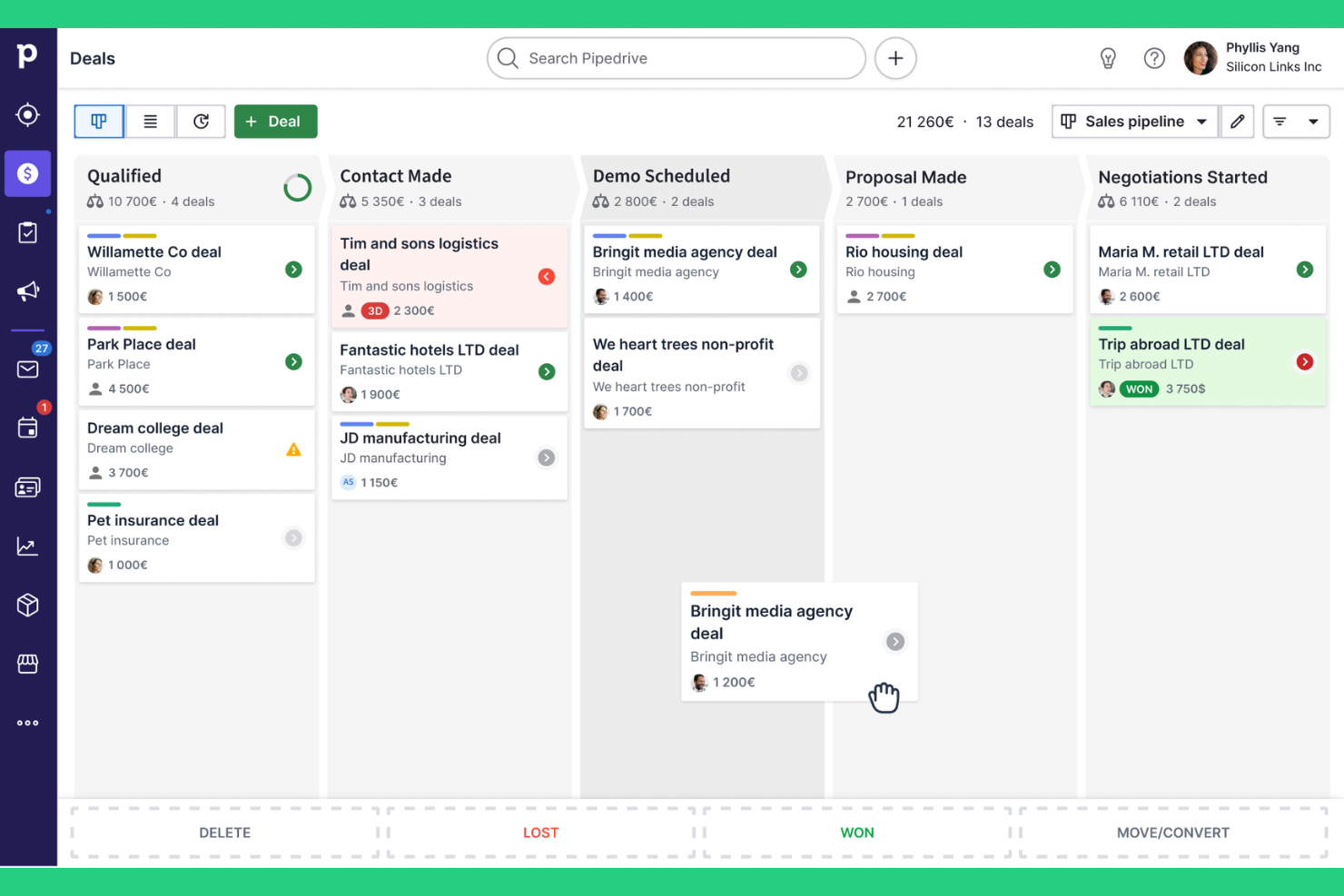
If your retail team needs a clear, visual way to manage sales opportunities, Pipedrive offers a pipeline-focused CRM built for tracking deals at every stage. It’s especially useful for retail businesses that want to see exactly where each customer or order stands, and quickly spot bottlenecks or stalled deals. Pipedrive’s drag-and-drop interface helps sales and store teams keep workflows organized and actionable without extra complexity.
Why I Picked Pipedrive
What sets Pipedrive apart for retail CRM is its highly visual sales pipeline, which makes it easy to track deals and customer journeys at a glance. I picked Pipedrive because you can customize pipeline stages to match your retail sales process, whether you’re managing in-store orders, online inquiries, or wholesale accounts. The drag-and-drop interface lets your team move deals between stages quickly, so nothing falls through the cracks. With color-coded indicators and activity reminders, retail staff can prioritize follow-ups and keep sales moving forward.
Pipedrive Key Features
Some other features that retail teams may find useful include:
- Product Catalog Management: Lets you add, organize, and track products within deals for better sales tracking.
- Email Integration: Connects with your email provider to send, receive, and track emails directly from the CRM.
- Activity Scheduler: Helps you plan calls, meetings, and tasks with automated reminders.
- Custom Fields: Allows you to tailor contact and deal records to fit your retail business needs.
Pipedrive Integrations
Integrations include PandaDoc, Leadfeeder, JustCall, LinkPort, Outfunnel, Slack, QuickBooks, Trello, Zoom, and Gmail.
Pros and Cons
Pros:
- Activity scheduler supports in-store follow-ups
- Bulk email sends for retail promotions
- Product catalog links items to each deal
Cons:
- No built-in inventory management tools
- Limited support for multi-location retail chains

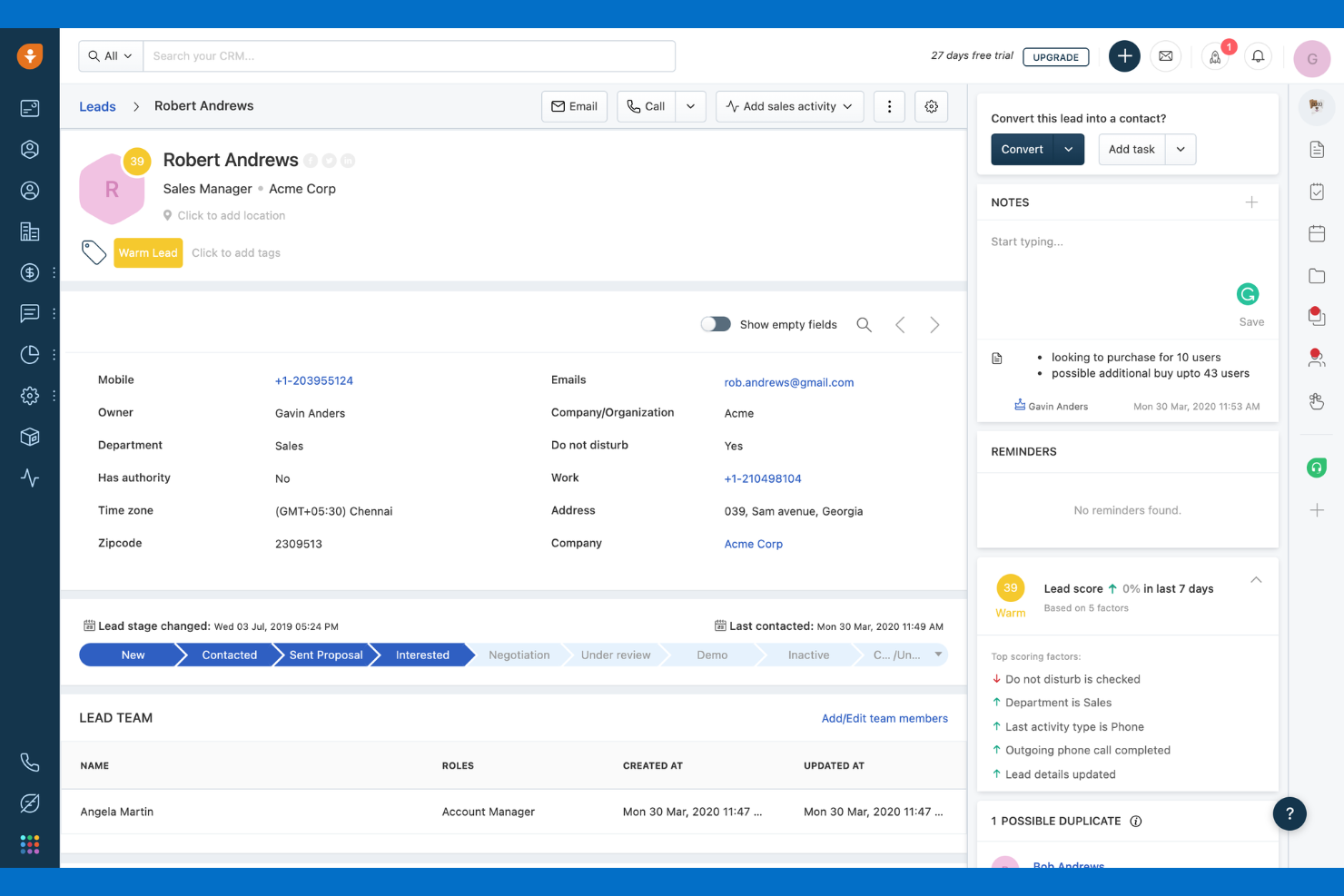
Retailers looking to prioritize high-value leads and automate follow-ups may find Freshsales especially useful. This CRM uses AI-powered lead scoring to help sales and marketing teams focus on shoppers most likely to convert. With built-in communication tools and workflow automation, Freshsales supports retail businesses aiming to boost conversion rates and personalize outreach.
Why I Picked Freshsales
Freshsales stands out for retail CRM because its AI-powered lead scoring helps retail teams quickly identify which shoppers are most likely to buy. I picked Freshsales since it automatically analyzes customer behavior and engagement, assigning scores that let you prioritize outreach and follow-up. The CRM also offers predictive contact scoring and sales sequences, so your team can automate personalized messages to high-potential leads. This approach helps retail businesses focus their efforts where they’ll have the most impact.
Freshsales Key Features
Some other features that retail teams may find valuable include:
- Built-In Phone and Email: Lets you make calls and send emails directly from the CRM platform.
- Contact and Account Management: Organizes customer and company records with detailed activity timelines.
- Sales Pipeline Visualization: Displays deals in customizable stages for easy tracking and management.
- Marketplace App Integrations: Connects with ecommerce, marketing, and support tools through the Freshworks Marketplace.
Freshsales Integrations
Integrations include Google Workspace, Microsoft Outlook, Zapier, Mailchimp, Slack, QuickBooks, Shopify, Docusign, HubSpot, and Xero.
Pros and Cons
Pros:
- Automated workflows manage retail follow-ups
- Visual pipelines track retail deal progress
- AI lead scoring highlights likely retail buyers
Cons:
- No direct POS system integration
- Limited retail-specific reporting templates
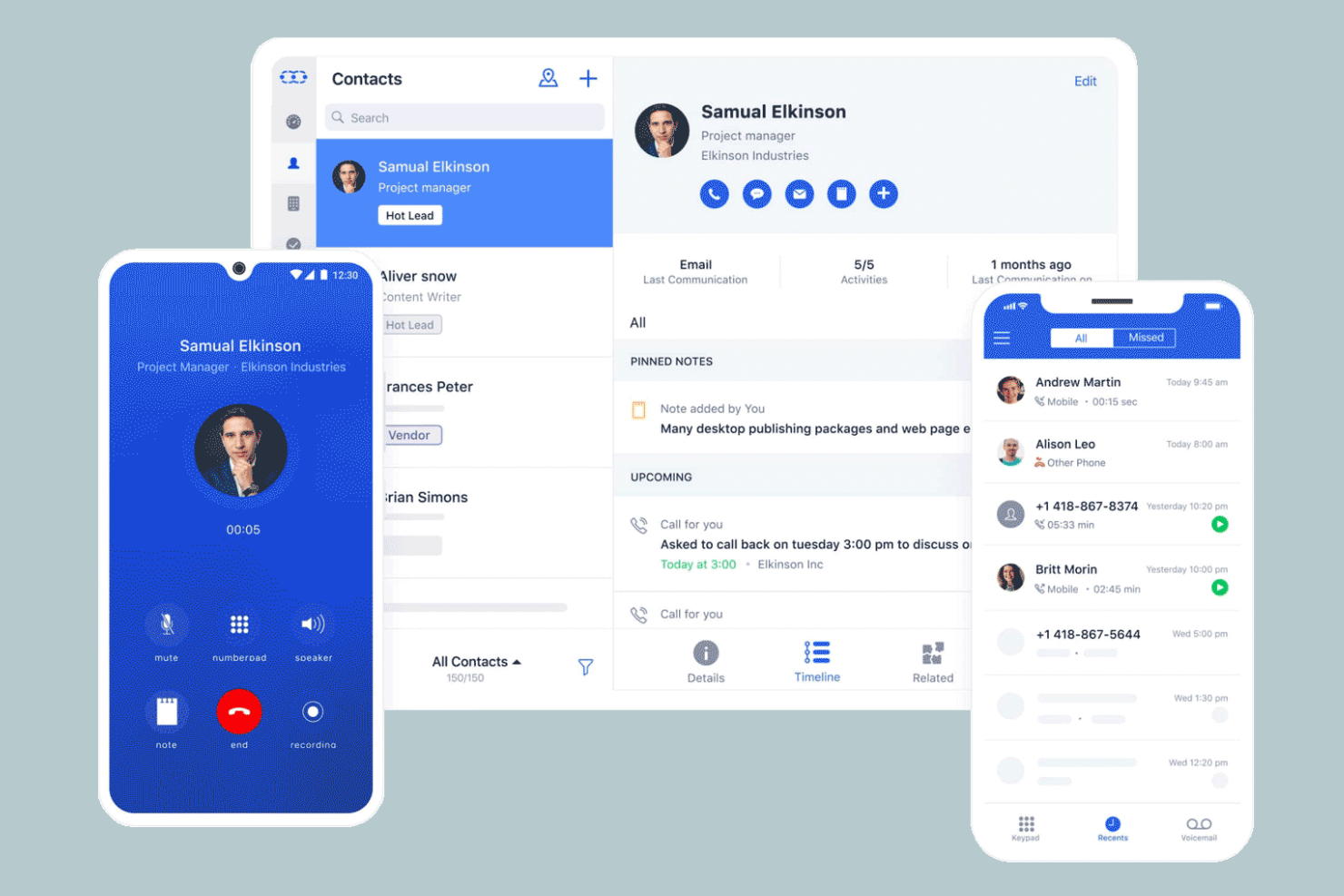
Salesmate stands out for retail teams that want to manage customer calls, texts, and sales conversations directly from their CRM. It’s a strong fit for businesses that rely on outbound calling or need to track phone-based interactions alongside deals and contacts. With built-in calling features, Salesmate helps retail staff keep communication organized and accessible without switching between multiple tools.
Why I Picked Salesmate
For retail teams that need to handle a high volume of customer calls, Salesmate’s built-in calling features make it a practical choice. I picked Salesmate because it lets you make, receive, and log calls directly from the CRM, so your team can track every conversation without leaving the platform. The tool also supports call recording and voicemail, which helps with quality control and follow-up. These features are especially useful for retail businesses that rely on phone outreach or need to keep a detailed record of customer interactions.
Salesmate Key Features
In addition to its calling capabilities, I also found these features useful for retail teams:
- Sales Pipeline Management: Lets you visualize and manage deals through customizable sales stages.
- Contact Management: Stores detailed customer profiles, purchase history, and communication logs.
- Email Automation: Sends personalized emails and tracks engagement from within the CRM.
- Built-in Text Messaging: Enables sending and receiving SMS messages directly from customer records.
Salesmate Integrations
Integrations include Shopify, QuickBooks Online, Mailchimp, Google Calendar, Microsoft Teams, Docusign, Xero, Slack, BigCommerce, and Zoom.
Pros and Cons
Pros:
- Contact timeline shows all customer interactions
- Shopify and BigCommerce integrations
- Automated email sequences for promotions
Cons:
- Product catalog management is not included
- Limited advanced analytics for retail trends
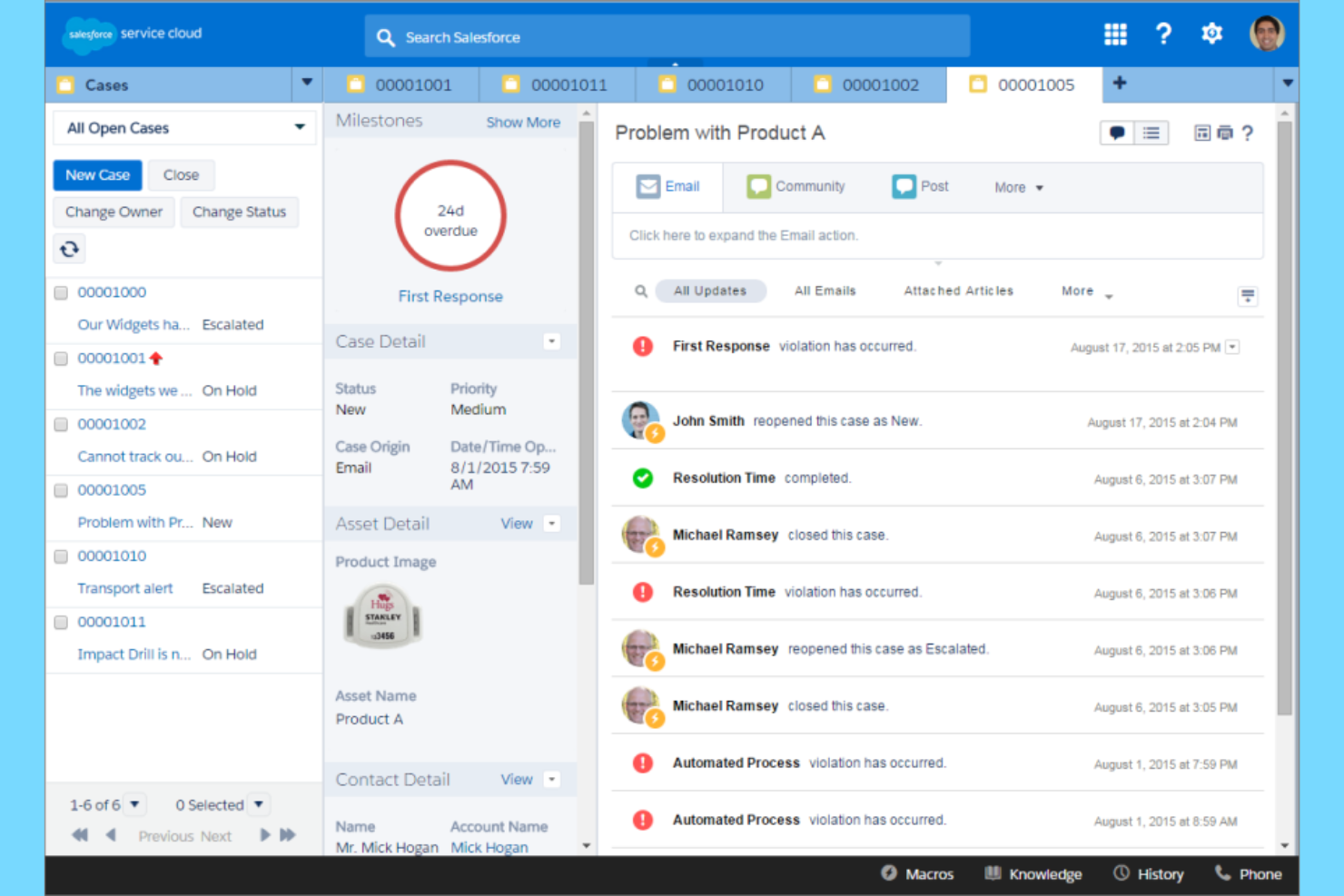
Retailers looking for deep analytics and customizable reporting often turn to Salesforce for its advanced CRM capabilities. The platform is built for businesses that need to unify customer data, track omnichannel sales, and analyze performance across locations or brands. Salesforce is especially useful for retail teams that want to use predictive insights and automation to drive smarter merchandising and marketing decisions.
Why I Picked Salesforce
When advanced analytics are a top priority for retail teams, Salesforce offers a level of depth that’s hard to match. I picked Salesforce because its built-in reporting and dashboard tools let you analyze sales, inventory, and customer behavior in real time. The platform’s AI-powered analytics, like Einstein Analytics, help you forecast demand and identify trends across multiple channels. For retailers who want to make data-driven decisions about merchandising, marketing, and customer engagement, these analytics features are especially valuable.
Salesforce Key Features
Some other features that make Salesforce a strong choice for retail teams include:
- Customer 360: Unifies customer data from every channel for a single, up-to-date profile.
- Order Management: Tracks orders from purchase through fulfillment and returns.
- Marketing Automation: Automates email campaigns, promotions, and customer journeys.
- AppExchange Marketplace: Offers thousands of pre-built apps and integrations for retail-specific needs.
Salesforce Integrations
Integrations include Slack, Google Workspace, Microsoft 365, QuickBooks, Mailchimp, Docusign, Shopify, Dropbox, and more.
Pros and Cons
Pros:
- AI-driven product recommendations for upselling
- Dashboards track multi-store performance
- Advanced segmentation for retail campaigns
Cons:
- Time-consuming custom report building
- Complex data migration from legacy systems
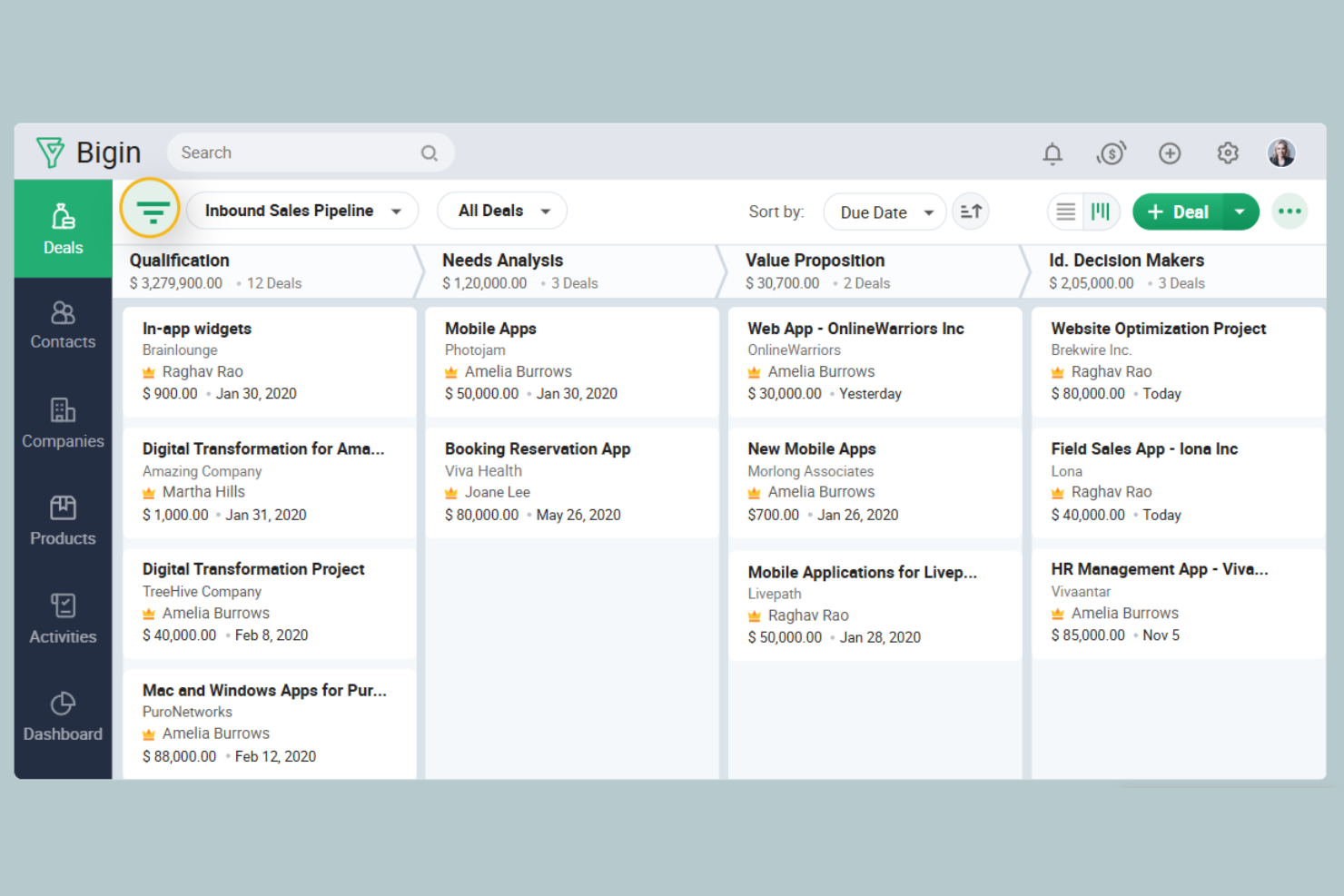
If you’re running a small retail team and want a CRM that’s simple to set up, Bigin is designed with you in mind. It offers pipeline management and customer tracking without the complexity of larger platforms. Bigin is a good fit for shops or boutiques that need to organize sales activities and customer details in one place.
Why I Picked Bigin
For small retail teams that want to get organized quickly, Bigin stands out with its focused, straightforward approach. I picked Bigin because it offers customizable sales pipelines and contact management that don’t require a steep learning curve or heavy setup. The tool’s built-in telephony and email features let you track every customer conversation right alongside your deals. For retail shops with limited staff, these features help keep sales activities and customer follow-ups on track without extra complexity.
Bigin Key Features
In addition to its core sales and contact tools, Bigin includes several features that support retail teams:
- Webforms: Capture leads directly from your website and funnel them into your pipeline.
- Activity Management: Schedule and track tasks, calls, and events for each customer or deal.
- Custom Fields: Add fields to store retail-specific information like product preferences or purchase history.
- Mobile App: Access pipelines, contacts, and activities from anywhere using the Bigin mobile app.
Bigin Integrations
Integrations include Zoho Books, Zoho CRM, Zoho Desk, Zoho Campaigns, Google Workspace, Microsoft 365, Microsoft Teams, WhatsApp, and Shopify.
Pros and Cons
Pros:
- Built-in telephony supports customer follow-up
- Webforms capture leads from retail websites
- Pipeline view is tailored for retail sales
Cons:
- Limited automation for multi-step retail workflows
- No built-in loyalty program management
Other Retail CRM
Here are some additional retail CRM options that didn’t make it onto my shortlist, but are still worth checking out:


Retail CRM Selection Criteria
When selecting the best CRM for the retail industry, I considered common buyer needs and pain points like managing omnichannel customer data and improving customer retention. I also used the following framework to keep my evaluation structured and fair:
Core Functionality (25% of total score)
To be considered for inclusion in this list, each solution had to fulfill these common use cases:
- Store and organize customer contact information
- Track sales and purchase history
- Manage customer communications and follow-ups
- Segment customers for targeted marketing
- Generate reports on sales and customer activity
Additional Standout Features (25% of total score)
To help further narrow down the competition, I also looked for unique features, such as:
- Built-in loyalty program management
- Real-time inventory integration
- AI-driven actionable insights
- Omnichannel order management
- Automated marketing campaign tools
Usability (10% of total score)
To get a sense of the usability of each system, I considered the following:
- Simple and intuitive user interface
- Customizable dashboards and views
- Fast navigation between modules
- Mobile accessibility and responsive design
- Minimal clicks to complete common tasks
Onboarding (10% of total score)
To evaluate the onboarding experience for each platform, I considered the following:
- Step-by-step product tours
- Availability of training videos and webinars
- Pre-built templates for retail workflows
- In-app chatbots for onboarding support
- Clear documentation for data migration
Customer Support (10% of total score)
To assess each software provider’s customer support services, I considered the following:
- 24/7 live chat or phone support
- Dedicated account managers
- Access to a knowledge base or help center
- Community forums for peer support
- Fast response times to support tickets
Value For Money (10% of total score)
To evaluate the value for money of each platform, I considered the following:
- Transparent and predictable pricing
- Flexible plans for different business sizes
- Features included in base pricing
- Discounts for annual commitments
- No hidden fees or surprise charges
Customer Reviews (10% of total score)
To get a sense of overall customer satisfaction, I considered the following when reading customer reviews:
- Positive feedback on retail-specific features
- Reports of reliable system uptime
- Comments on integration with other tools
- User sentiment about customer support
- Feedback on ease of adoption and training
How to Choose Retail CRM
It’s easy to get bogged down in long feature lists and complex pricing structures. To help you stay focused as you work through your unique software selection process, here’s a checklist of factors to keep in mind:
| Factor | What to Consider |
|---|---|
| Scalability | Will the CRM handle your growth in locations, SKUs, and customer volume without major upgrades? |
| Integrations | Does the CRM connect natively to your POS, ecommerce, ERP, and marketing tools? |
| Customizability | Can you tailor workflows, fields, and reports to match your retail processes and terminology? |
| Ease of use | Will your store staff and managers adopt the system quickly, or will it require extensive training? |
| Implementation and onboarding | How long will it take to migrate data, set up users, and get teams using the CRM day-to-day? |
| Cost | Are there extra fees for users, integrations, or advanced modules that could impact your budget? |
| Security safeguards | Does the CRM offer role-based access, data encryption, and audit logs to protect sensitive data? |
| Support availability | Can you reach support during your business hours, and is help available via chat, phone, or email? |
What Is Retail CRM?
A retail CRM is a customer relationship management system designed specifically for retailers to organize customer data, track sales interactions, and manage marketing activities across channels. These platforms help retail teams centralize customer profiles, segment audiences, and coordinate communications, making it easier to deliver consistent experiences and build loyalty both online and in-store.
Retail CRM tools often include features for inventory visibility, loyalty programs, and omnichannel engagement.
Features
When selecting retail CRM, keep an eye out for the following key features:
- Customer profile management: Store, update, and access detailed customer information, including contact details, purchase history, preferences, and communication logs, all in one place.
- Sales tracking: Monitor sales activities, transactions, and order histories to understand buying patterns and identify opportunities for follow-up or upselling.
- Segmentation tools: Group customers based on demographics, purchase behavior, or engagement level to target marketing and communications more effectively.
- Omnichannel communication: Manage customer interactions across email, SMS, phone, and social media from a single dashboard, ensuring consistent messaging.
- Loyalty program management: Create, track, and manage customer loyalty or rewards programs to encourage repeat purchases and increase retention.
- Inventory visibility: Connect CRM data with inventory systems to provide real-time stock information for sales and customer service teams.
- Marketing campaign management: Plan, execute, and track marketing campaigns directly within the CRM, linking customer responses to sales and engagement data.
- Task and activity management: Assign, schedule, and monitor tasks or follow-ups for sales and service teams to ensure timely customer engagement.
- Reporting and analytics: Generate customizable reports on sales, customer behavior, and campaign performance to support data-driven decision-making.
Common Retail CRM AI Features
Beyond the standard retail CRM features listed above, many of these solutions are incorporating AI with features like:
- Predictive customer insights: Analyze historical data to forecast customer behavior, such as likelihood to purchase or churn, helping teams prioritize outreach and retention efforts.
- Automated lead scoring: Use AI algorithms to evaluate and rank leads based on their engagement and buying signals, so sales teams can focus on the most promising prospects.
- Personalized product recommendations: Deliver tailored product suggestions to customers in real time, both online and in-store, based on their browsing and purchase history.
- Natural language chatbots: Provide instant, AI-driven responses to customer inquiries across chat, email, or social channels, improving response times and freeing up staff for complex issues.
- Sentiment analysis: Automatically assess the tone and emotion in customer communications to flag urgent issues or identify opportunities for proactive engagement.
Benefits
Implementing retail CRM provides several benefits for your team and your business. Here are a few you can look forward to:
- Centralized customer data management: Keep all customer profiles, purchase histories, and communications organized in one place for easy access and better service.
- Improved customer retention: Use segmentation, loyalty program management, and targeted outreach to encourage repeat business and build long-term relationships.
- Consistent omnichannel experiences: Coordinate communications and service across online, in-store, and mobile channels to deliver a unified customer journey.
- Faster, data-driven decisions: Leverage reporting, analytics, and AI-powered insights to identify trends, optimize campaigns, and respond quickly to changing customer needs.
- Improved team workflows: Assign tasks, automate follow-ups, and manage activities from a single dashboard, reducing manual work and missed opportunities.
- Enhanced marketing effectiveness: Run targeted campaigns and track results directly within the CRM, connecting marketing efforts to real sales outcomes.
- Real-time inventory and sales visibility: Integrate inventory data with customer interactions to provide accurate stock information and support smarter selling.
Costs and Pricing
Selecting retail CRM requires an understanding of the various pricing models and plans available. Costs vary based on features, team size, add-ons, and more. The table below summarizes common plans, their average prices, and typical features included in retail CRM solutions:
Plan Comparison Table for Retail CRM
| Plan Type | Average Price | Common Features |
|---|---|---|
| Free Plan | $0 | Basic contact management, limited sales tracking, simple segmentation, and email support. |
| Personal Plan | $10-$25/user/month | Customer profiles, sales tracking, basic reporting, email marketing, and limited integrations. |
| Business Plan | $30-$60/user/month | Advanced segmentation, marketing automation, omnichannel communication, inventory visibility, and task management. |
| Enterprise Plan | $70-$150/user/month | Custom workflows, advanced analytics, dedicated support, API access, and enhanced security controls. |
Retail CRM FAQs
Here are some answers to common questions about retail CRM:
How does retail CRM differ from general CRM software?
Retail CRM is designed for the unique needs of retail businesses, with features for managing omnichannel sales, loyalty programs, and inventory visibility. General CRM software may lack these retail-specific tools and integrations.
Can retail CRM integrate with my existing POS and ecommerce systems?
Yes, most retail CRM solutions offer integrations with popular point-of-sale and e-commerce platforms. Always check for native connectors or available APIs to ensure smooth data flow between your systems.
What data security measures should I expect from a retail CRM?
Look for features like role-based access controls, data encryption, audit logs, and compliance with standards such as GDPR or PCI DSS. These safeguards help protect sensitive customer and transaction data.
How long does it take to implement a retail CRM?
Implementation time varies by system complexity and data migration needs. Many cloud-based retail CRMs can be set up in a few days, while larger deployments with custom integrations may take several weeks.
Is training required for staff to use retail CRM?
Most retail CRMs are designed for ease of use, but some training is usually needed. Look for solutions that offer onboarding guides, video tutorials, and in-app support to help your team get started quickly.
What’s Next:
If you're in the process of researching retail CRM, connect with a SoftwareSelect advisor for free recommendations.
You fill out a form and have a quick chat where they get into the specifics of your needs. Then you'll get a shortlist of software to review. They'll even support you through the entire buying process, including price negotiations.