

Running a retail operation isn't easy, and managing your team's schedule can be a real headache. You deal with last-minute changes, unexpected absences, and balancing hours to keep everyone happy. That's where retail employee scheduling software comes in. It helps you save time, reduce conflicts, and keep your team organized.
I've spent years testing and reviewing these tools to find the best options for you. In this article, I'll share my top picks, focusing on what makes each one stand out. My goal is to help you find a solution that fits your needs and makes your life easier. Let's dive into the world of scheduling software and discover what works best for your team.
Why Trust Our Software Recommendations
6,700+
Reviews
20
Industry experts
16+
Evaluation factors
14
Years
Our team has been testing and reviewing software since 2012. As retail leaders ourselves, we know how difficult—and important—it is to choose the right software.
For this guide, we evaluated tools using hands-on testing and independent research, scoring tools using our selection criteria.
Our reviews reflect our independent judgment—not a sales pitch.
Best Retail Employee Scheduling Software Summary
This comparison chart summarizes pricing details for my top retail employee scheduling software selections to help you find the best one for your budget and business needs.
| Tool | Best For | Trial Info | Price | ||
|---|---|---|---|---|---|
| 1 | Best for deskless teams | 14-day free trial | From $29/month (billed annually) | Website | |
| 2 | Best with built-in biometric security | 30-day free trial + free demo available | From $50/user/month | Website | |
| 3 | Best for labor compliance | 14-day free trial + free demo available | From $5/user/month | Website | |
| 4 | Best for mobile scheduling | Free trial available | From $2.50/user/month | Website | |
| 5 | Best for integration capabilities | Free demo available | Pricing upon request | Website | |
| 6 | Best for complex scheduling | Free demo available | Pricing upon request | Website | |
| 7 | Best for global workforce | Free demo available | Pricing upon request | Website | |
| 8 | Best for seasonal businesses | Free 14-day trial + free plan + free demo available | From $2/active member/month (billed annually) | Website | |
| 9 | Best for contact centers | Free demo available | Pricing upon request | Website | |
| 10 | Best for small retailers | Free trial + free plan available | From $1.70/user/month (billed annually) | Website |


Best Retail Employee Scheduling Software Review
Below are my detailed summaries of the best retail employee scheduling software that made it onto my shortlist. My reviews offer a detailed look at the key features, pros & cons, integrations, and ideal use cases of each tool to help you find the best one for you.
 Best for deskless teams
- 14-day free trial
- From $29/month (billed annually)
Visit WebsiteCustomer Rating:4.6/5
Connecteam streamlines management for deskless teams across all industries. Connecteam is an employee management tool for deskless teams, offering scheduling, time tracking, task management, and communication tools. It's designed for various industries, such as retail, and suits both small businesses and large enterprises.
Why I picked Connecteam: Connecteam focuses on deskless teams with features like time tracking and task management, making it ideal for industries like retail. Its standout feature is the scheduling tool that allows you to manage shifts efficiently. The communication tools keep your team connected, ensuring everyone stays informed. The HR functionalities help streamline administrative tasks, saving you time and effort.
Standout features & integrations:
Features include time tracking that helps monitor employee hours accurately, task management to assign and track tasks easily, and communication tools to keep your team engaged and informed.
Integrations include Gusto, QuickBooks, Xero, Zapier, Google Calendar, Microsoft Outlook, Slack, HubSpot, Salesforce, and BambooHR.
Pros and Cons
Pros:
- Suitable for various industries
- Efficient time tracking
- Strong communication tools
- Customizable task management
- Easy mobile access
Cons:
- Weekly-only bulk edits
- Occasional app glitches
- Limited advanced analytics
- Export options require upgrade
- Less intuitive mobile calendar
Learn more about Connecteam: Best with built-in biometric security
- 30-day free trial + free demo available
- From $50/user/month
Visit WebsiteCustomer Rating:4.5/5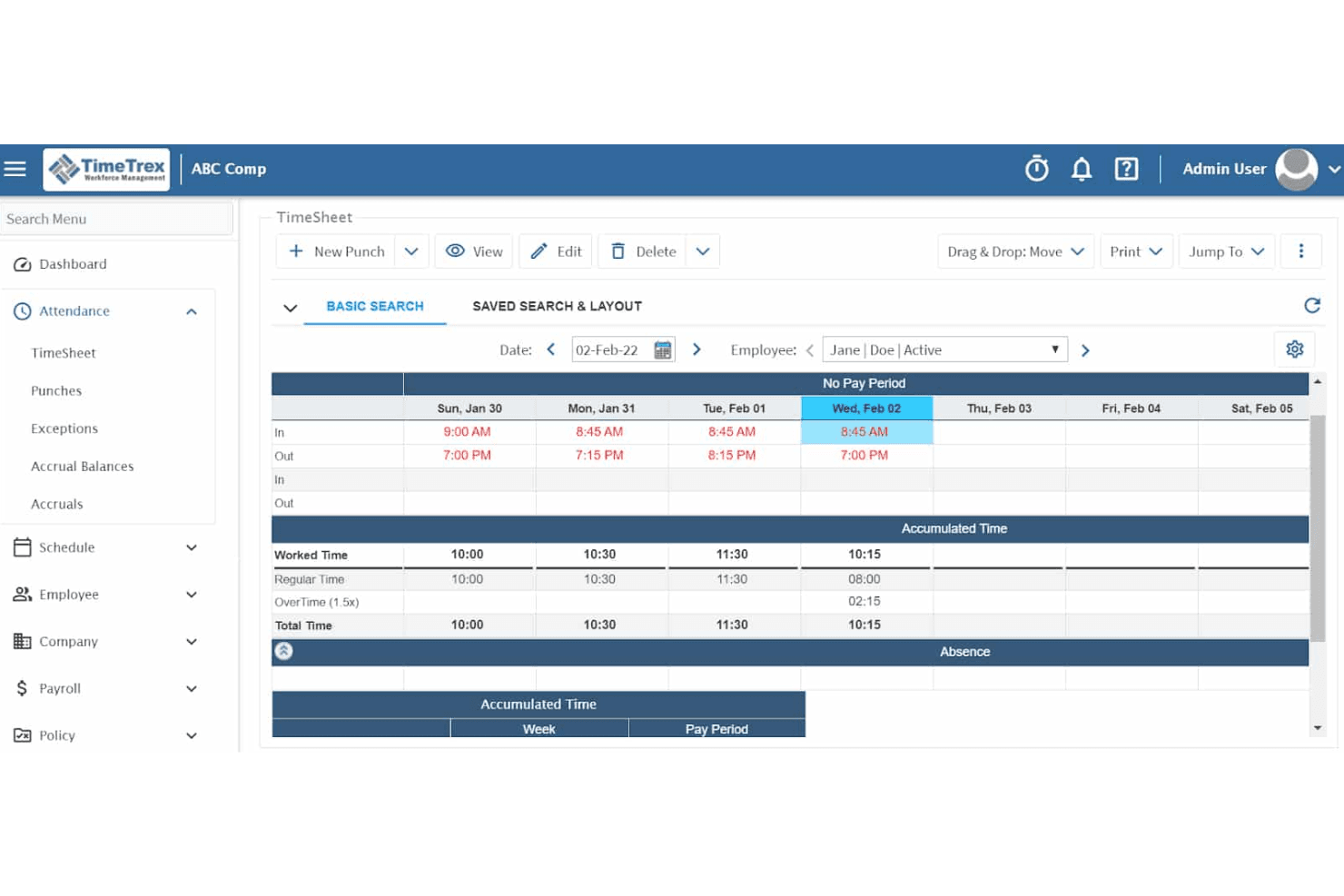
TimeTrex's time and attendance feature ensures accurate data collection for payroll and compliance. TimeTrex is a workforce management platform that combines employee scheduling, time and attendance tracking, payroll processing, and HR management in a single system.
Who Is TimeTrex Best For?
TimeTrex suits multi-location retail and franchise operators who need tight control over clock-in integrity and time theft across multiple sites.
Why I Picked TimeTrex
I picked TimeTrex as one of the best because its biometric facial recognition timeclocks are included from the base Professional tier, not locked behind an enterprise upsell. In a retail environment with high staff turnover and part-time workers clocking in across multiple tills, that distinction matters. I also like that geofencing works alongside biometrics, so a manager running three store locations can restrict clock-ins to a specific physical perimeter at each site.
TimeTrex Key Features
- Drag-and-drop schedule builder: Lets managers quickly assign and adjust shifts for multiple employees in a visual calendar view.
- Multi-location reporting: Consolidates time, attendance, and scheduling data across several store locations into unified dashboards.
- Job costing module: Tracks labor spend by department, role, or project for more detailed payroll and operational analysis.
- Employee availability and time-off requests: Employees can submit their shift preferences and request days off directly through the platform.
TimeTrex Integrations
TimeTrex offers native integrations with ADP, QuickBooks, Sage, and Paychex. An API is available for custom integrations.
Pros and Cons
Pros:
- Open-source edition available for self-hosted deployments
- Payroll and scheduling managed in one platform
- Built-in biometric clock-in prevents buddy punching
Cons:
- Mobile app experience lags behind newer rivals
- Scheduling interface feels dated compared to competitors
Learn more about TimeTrex: Best for labor compliance
- 14-day free trial + free demo available
- From $5/user/month
Visit WebsiteCustomer Rating:4.6/5
Deputy simplifies retail workforce scheduling and ensures labor-law compliance. Deputy is a scheduling and workforce management software for businesses of all sizes, particularly in retail. It helps with scheduling, time tracking, and task management, ensuring compliance with labor laws.
Why I picked Deputy: Deputy focuses on labor compliance, offering features that help your team stay within legal requirements. The scheduling tool automatically calculates overtime and ensures fair shift distribution. It provides real-time insights into labor costs and compliance. The time and attendance tracking features help prevent time theft and ensure accurate payroll processing.
Standout features & integrations:
Features include a shift swapping feature that allows employees to swap shifts with ease, an automated scheduling tool that creates schedules based on employee availability, and a task management system that assigns and tracks tasks efficiently.
Integrations include Xero, QuickBooks, ADP, Gusto, Square, MYOB, NetSuite, BambooHR, Vend, and Shopify.
Pros and Cons
Pros:
- Supports multiple locations
- Flexible scheduling options
- Detailed labor cost insights
Cons:
- Initial setup can be complex
- Restrictive leave approval logic
Learn more about Deputy: Best for mobile scheduling
- Free trial available
- From $2.50/user/month
Visit WebsiteCustomer Rating:4.5/5
When I Work offers mobile-friendly, flexible scheduling for on-the-go retail teams. When I Work is a scheduling and communication tool for businesses that need mobile-friendly solutions. It's ideal for industries like retail where team members are often on the go and require flexible scheduling options.
Why I picked When I Work: When I Work excels in mobile scheduling, offering a user-friendly mobile app that lets your team manage schedules anytime. The app allows employees to clock in and out from their phones, making it convenient for those on the move. It also provides shift reminders to ensure your team doesn’t miss their shifts. The communication tools keep everyone connected, enhancing team coordination.
Standout features & integrations:
Features include a shift swapping feature that allows employees to easily trade shifts, a team messaging tool to facilitate communication, and a time tracking feature that ensures accurate payroll processing.
Integrations include QuickBooks, Gusto, ADP, BambooHR, Square, Xero, Google Calendar, Microsoft Outlook, Slack, and Salesforce.
Pros and Cons
Pros:
- Efficient time tracking
- Instant shift notifications
- Easy shift swapping
Cons:
- Chat requires separate app
- Limited custom fields
Learn more about When I Work: Best for integration capabilities
- Free demo available
- Pricing upon request
Visit WebsiteCustomer Rating:4.3/5
Workday unifies scheduling, tracking, and analytics for large workforce operations. Workday is a cloud-based workforce management solution ideal for large organizations that need integrated HR and payroll systems. It provides scheduling, time tracking, and workforce analytics to enhance operational efficiency.
Why I picked Workday: Workday excels in integration capabilities, making it a top choice for organizations needing unified systems. The platform connects HR and payroll, reducing administrative overhead. Its analytics tools provide insights into workforce performance, helping you make data-driven decisions. The scheduling features are adaptable, supporting complex organizational needs.
Standout features & integrations:
Features include a mobile app for on-the-go access to schedules and time tracking, a customizable dashboard that lets you tailor your view, and a compliance management feature to ensure adherence to labor laws.
Integrations include Salesforce, Adobe, Slack, Microsoft Teams, SAP, Oracle, Kronos, ServiceNow, ADP, and Google Workspace.
Pros and Cons
Pros:
- Mobile access for convenience
- Flexible scheduling options
- Detailed workforce analytics
Cons:
- Complex reporting customization
- Inflexible scheduling workflows
Learn more about Workday:

Shiftboard handles complex scheduling with advanced time tracking and compliance tools. Shiftboard is a scheduling software for industries that require complex scheduling solutions, such as healthcare and manufacturing. It offers advanced scheduling, time tracking, and compliance management to ensure efficiency and accuracy.
Why I picked Shiftboard: Shiftboard is tailored for complex scheduling needs, providing features that handle intricate shift patterns and rotations. The software allows you to set up rules and constraints to ensure compliance and fair scheduling. Its advanced reporting tools offer insights into workforce productivity and labor costs. The real-time updates keep your team informed of any schedule changes, reducing confusion.
Standout features & integrations:
Features include an advanced rule-based scheduling engine that ensures compliance with labor laws, a real-time communication tool that keeps your team updated, and a comprehensive reporting feature that provides insights into workforce efficiency.
Integrations include ADP, SAP, Oracle, Microsoft Dynamics, QuickBooks, Kronos, Workday, BambooHR, Paychex, and Gusto.
Pros and Cons
Pros:
- Ensures compliance with labor laws
- Advanced rule-based scheduling
- Handles complex shift patterns
Cons:
- Delayed real-time schedule updates
- Missing shift overlaps alert
Learn more about Shiftboard: 7Best for global workforce
UKG
- Free demo available
- Pricing upon request
Visit WebsiteCustomer Rating:4.4/5
UKG unifies scheduling, tracking, and HR for complex global workforces. UKG is a workforce management solution for enterprises with a global presence. It combines scheduling, time tracking, and HR management to support complex and diverse workforce needs across different regions.
Why I picked UKG: UKG is designed for managing a global workforce, offering features that accommodate diverse compliance requirements. It provides tools for scheduling and tracking time across multiple locations, ensuring consistency. The software supports multilingual capabilities, making it accessible to your international team. Its compliance management features help navigate different labor laws, reducing risks.
Standout features & integrations:
Features include compliance management that helps you adhere to various international labor laws, a multilingual interface that supports diverse teams, and advanced scheduling tools that manage complex shift patterns across multiple regions.
Integrations include SAP, Oracle, Workday, Microsoft Dynamics, Salesforce, ADP, Kronos, QuickBooks, BambooHR, and Gusto.
Pros and Cons
Pros:
- Reduces compliance risks
- Manages complex shift patterns
- Multilingual capabilities
Cons:
- Hard to navigate mobile app
- Occasional syncing issues
Learn more about UKG: Best for seasonal businesses
- Free 14-day trial + free plan + free demo available
- From $2/active member/month (billed annually)

ZoomShift helps retail teams manage shifting schedules and seasonal staffing needs. ZoomShift is a scheduling tool for businesses with fluctuating staffing needs, such as those in retail and hospitality. It offers shift scheduling, time tracking, and team communication features to help manage seasonal changes efficiently.
Why I picked ZoomShift: ZoomShift caters to seasonal businesses by providing flexible scheduling options that adapt to changing workforce needs. Its drag-and-drop schedule builder lets you quickly adjust shifts as demand changes. The time tracking feature ensures accurate payroll processing during busy seasons. Notifications keep your team informed, reducing confusion and last-minute changes.
Standout features & integrations:
Features include a time off management tool that lets your team request and approve time off easily, a payroll export feature that simplifies payroll processing, and a budgeting tool to help manage labor costs effectively.
Integrations include QuickBooks, Gusto, ADP, Xero, Paychex, BambooHR, Square, Google Calendar, Microsoft Outlook, and Slack.
Pros and Cons
Pros:
- Supports seasonal staffing
- Effective budgeting tools
- Quick payroll export
Cons:
- Limited advanced features
- Simple shift rotation only
Learn more about ZoomShift:

Calabrio optimizes contact-center scheduling, performance, and service quality. Calabrio is a workforce optimization software for contact centers, focusing on scheduling, performance analytics, and quality management. It helps businesses enhance customer service by optimizing employee performance and operational efficiency.
Why I picked Calabrio: Calabrio is tailored for contact centers, offering features that improve scheduling accuracy and employee engagement. The software provides detailed analytics to help you understand performance trends and make informed decisions. Its quality management tools support consistent customer service delivery. The customizable dashboards allow you to monitor key metrics that matter to your team.
Standout features & integrations:
Features include a speech analytics tool that provides insights into customer interactions, a quality management system that ensures consistent service, and a performance dashboard that helps track key metrics efficiently.
Integrations include Salesforce, Microsoft Dynamics, SAP, Oracle, Cisco, Avaya, Genesys, Five9, NICE, and Amazon Connect.
Pros and Cons
Pros:
- Accurate scheduling tools
- Customizable dashboards
- Detailed performance analytics
Cons:
- Limited scheduling flexibility
- Slow loading dashboards
Learn more about Verint: 10Best for small retailers
Sling
- Free trial + free plan available
- From $1.70/user/month (billed annually)

Sling streamlines retail scheduling and keeps teams organized and connected. Sling is a scheduling and communication tool for small retail businesses, offering features like shift management, time tracking, and team communication. It helps streamline scheduling processes and keeps teams connected and organized.
Why I picked Sling: Sling is ideal for small retailers, emphasizing ease of use and affordability. The shift management feature allows your team to manage schedules efficiently. It offers time tracking to ensure accurate payroll processing. Communication tools keep your team informed and engaged, making it a great fit for small operations.
Standout features & integrations:
Features include a time clock that helps track employee hours accurately, a newsfeed that keeps everyone updated on important announcements, and a task list to assign and manage tasks efficiently.
Integrations include Google Calendar, Microsoft Outlook, Apple Calendar, Slack, Gusto, QuickBooks, ADP, BambooHR, Square, and Xero.
Pros and Cons
Pros:
- Customizable notifications
- Suitable for small teams
- Simple shift swapping
Cons:
- Limited admin role options
- Complex rotating shift setup
Learn more about Sling:
Other Retail Employee Scheduling Software
Here are some additional retail employee scheduling software options that didn’t make it onto my shortlist, but are still worth checking out:
- 11ADP WorkForce SuiteBest for large enterprises
- 12TCP SoftwareBest for time tracking
- 13ShiftlabBest for performance metrics
- 14Workforce.comBest for workforce analytics
- 15HomebaseBest for free scheduling tools
- 16LegionBest for AI-driven scheduling
- 17KenjoBest for small HR teams
How I Evaluate Retail Employee Scheduling Software
I split my evaluation into two layers: the baseline a tool must clear—like POS-linked forecasting and fair workweek compliance—and the differentiators that set the best options apart.
Core Functionality (Table Stakes For This List)
When I'm selecting tools for my list, I rank each one on a scale from 0 (does not offer the functionality) to 5 (excels in this area) for each core functionality listed below. Then, I calculate the tool's total score into a percentage. Each tool needs to achieve a minimum total score of 65% to be considered for inclusion.
- Shift Scheduling & Templates: I look for drag-and-drop builders with reusable templates so a manager can clone last week's schedule across departments in a few clicks.
- Demand-Based Forecasting: I check whether the tool pulls POS or foot traffic data to project staffing needs—like ramping up coverage ahead of a weekend promo.
- Mobile Employee Self-Service: Associates should be able to swap shifts, set availability, and submit time-off requests from their phones without calling a manager.
- Labor Law Compliance: I evaluate how the platform handles overtime caps, required break windows, and predictive scheduling rules for hourly retail teams.
- Time & Attendance Tracking: I look for built-in clock-in/out tied to the schedule—geofencing and exception alerts help managers catch no-shows before a shift gap grows.
- Team Communication: I check whether managers can push announcements and message individuals or groups.
Once I have a list of tools that meet this criteria, I consider what sets each platform apart.
Differentiating Factors (What Sets Vendors Apart)
Here's how I compare and contrast different vendors:
Standout Features
AI auto-scheduling is a major differentiator. I look for tools that generate a full week's schedule by factoring in availability, skills, and labor targets so managers aren't spending hours on manual adjustments. A shift marketplace adds real value for multi-location retailers, giving associates a way to pick up open shifts at nearby stores without a chain of phone calls. I also check for task management tied to shifts, where opening checklists or restocking duties are assigned alongside the schedule itself.
Beyond Features
POS and payroll integrations matter a lot here. I check whether a platform connects natively to systems like Shopify, Square, or Lightspeed so forecasted sales data actually drives scheduling decisions. Payroll connectors are equally important—if timesheets need manual export, that's a gap your payroll team will feel every pay period. Scalability is another factor I evaluate closely, especially for franchise operators who need district-level hierarchies and cross-store labor pools. Pricing transparency also plays a role; I look at whether core features like compliance tools or forecasting sit behind premium tiers.
How to Choose Retail Employee Scheduling Software
It’s easy to get bogged down in long feature lists and complex pricing structures. To help you stay focused as you work through your unique software selection process, here’s a checklist of factors to keep in mind:
| Factor | What to Consider |
|---|---|
| FactorScalability | What to ConsiderCan the software grow with your business? Consider whether it can handle more employees or locations as you expand. |
| FactorIntegrations | What to ConsiderDoes it connect with your existing systems? Check if it integrates with payroll, HR software, or other tools you use. |
| FactorCustomizability | What to ConsiderCan you tailor it to fit your needs? Look for options to customize schedules, reports, and notifications. |
| FactorEase of use | What to ConsiderIs the interface intuitive? Test its user-friendliness to ensure your team can quickly learn and use it. |
| FactorImplementation and onboarding | What to ConsiderHow long will it take to set up? Consider the time and resources needed to get it up and running smoothly. |
| FactorCost | What to ConsiderDoes it fit your budget? Compare pricing plans and ensure there are no hidden fees or unexpected costs. |
| FactorSecurity safeguards | What to ConsiderAre your data protected? Verify the security measures in place to protect employee and company information. |
| FactorCompliance requirements | What to ConsiderDoes it help meet legal standards? Ensure it supports compliance with labor laws specific to your industry and location. |
What Is Retail Employee Scheduling Software?
Retail employee scheduling software is a tool that helps businesses manage their staff schedules efficiently. Store managers, HR professionals, and team leaders typically use these tools to ensure proper shift coverage and reduce scheduling conflicts. Automated scheduling, shift swapping, and time tracking features help with managing shifts, improving communication, and ensuring compliance with labor laws. Overall, these tools save time and improve operational efficiency for retail operations.
Features
When selecting retail employee scheduling software, keep an eye out for the following key features:
- Automated scheduling: Automatically creates shift schedules based on employee availability and business needs, saving time and reducing errors.
- Shift swapping: Allows employees to easily trade shifts with coworkers, helping maintain coverage and flexibility.
- Time tracking: Monitors employee hours accurately to ensure proper payroll processing and compliance with labor laws.
- Notifications: Sends alerts and reminders to employees about upcoming shifts and schedule changes, improving communication.
- Mobile access: Provides a mobile app for on-the-go access to schedules and time tracking, enhancing convenience for employees.
- Compliance management: Helps ensure adherence to labor laws and regulations, reducing the risk of legal issues.
- Customizable reporting: Offers tailored reports to track workforce productivity and labor costs, aiding in informed decision-making.
- Integration capabilities: Connects with payroll, HR, and other systems to streamline operations and data management.
- Employee self-service: Allows employees to view schedules, request time off, and manage their availability, empowering them with control.
- Performance analytics: Provides insights into employee performance and productivity, supporting data-driven management decisions.
Benefits
Implementing retail employee scheduling software provides several benefits for your team and your business. Here are a few you can look forward to:
- Time savings: Automated scheduling reduces the time spent manually creating and adjusting shift schedules.
- Improved communication: Notifications and mobile access keep your team informed about shifts and changes, reducing misunderstandings.
- Flexibility: Shift swapping and self-service features give employees control over their schedules, enhancing job satisfaction.
- Compliance assurance: Compliance management helps you adhere to labor laws, minimizing legal risks.
- Accurate payroll: Time tracking ensures precise recording of hours worked, leading to correct payroll processing.
- Data-driven decisions: Performance analytics and customizable reports provide insights to help you make informed management decisions.
- Enhanced efficiency: Integration capabilities streamline operations by connecting with payroll and HR systems, reducing administrative work.
Costs & Pricing
Selecting retail employee scheduling software requires an understanding of the various pricing models and plans available. Costs vary based on features, team size, add-ons, and more. The table below summarizes common plans, their average prices, and typical features included in retail employee scheduling software solutions:
Plan Comparison Table for Retail Employee Scheduling Software
| Plan Type | Average Price | Common Features |
|---|---|---|
| Plan TypeFree Plan | Average Price$0 | Common FeaturesBasic scheduling, shift swapping, and notifications. |
| Plan TypePersonal Plan | Average Price$5-$15/user/month | Common FeaturesAdvanced scheduling, time tracking, and mobile access. |
| Plan TypeBusiness Plan | Average Price$20-$35/user/ month | Common FeaturesCompliance management, integration capabilities, and performance analytics. |
| Plan TypeEnterprise Plan | Average Price$40-$60/user/ month | Common FeaturesCustomizable reporting, dedicated support, and enhanced security features. |
Retail Employee Scheduling Software FAQs
Here are some answers to common questions about retail employee scheduling software:
How secure is retail employee scheduling software?
Yes, retail employee scheduling software is generally secure. Most solutions use encryption to protect your data and comply with industry standards. When evaluating options, look for features like two-factor authentication and regular security updates. Always review the vendor’s privacy policy and ask about their data protection practices to ensure your information is safe.
Can retail employee scheduling software integrate with existing systems?
Yes, most retail employee scheduling software can integrate with existing systems like payroll, HR, and communication tools. Check the software’s integration capabilities to see if it supports the systems you use. This can help reduce manual data entry and improve workflow efficiency. Some tools offer API access for custom integrations, providing even more flexibility.
Is training required to use retail employee scheduling software?
Yes, some training is often required, but many solutions offer intuitive interfaces that minimize the learning curve. Look for software that provides training resources like videos, webinars, and user guides. These resources can help your team get up to speed quickly.
Can retail employee scheduling software handle multiple locations?
Yes, many retail employee scheduling software solutions are designed to manage multiple locations. These tools let you create schedules for different locations from a single platform, making it easier to oversee operations. Check if the software offers location-based reporting and compliance management to ensure it meets your needs.
What happens if there's a software outage?
In the event of a software outage, most vendors have contingency plans to minimize disruption. Look for providers that offer reliable customer support and transparent communication about service issues. It’s wise to have backup procedures in place, like exporting schedules regularly, to ensure continuity. Some tools also offer offline access to essential features.
What’s Next:
If you're in the process of researching retail employee scheduling software, connect with a SoftwareSelect advisor for free recommendations.
You fill out a form and have a quick chat where they get into the specifics of your needs. Then you'll get a shortlist of software to review. They'll even support you through the entire buying process, including price negotiations.