
14 HubSpot Alternatives for 2026

HubSpot Alternatives Shortlist
Here’s my shortlist of HubSpot alternatives:


What Is HubSpot?
HubSpot is a cloud-based customer relationship management (CRM) platform that helps businesses manage sales, marketing, and customer service activities in one place. It offers tools for contact management, email marketing, lead tracking, automated workflows, and analytics. HubSpot is widely used by teams looking to centralize customer data, automate routine tasks, and improve collaboration across departments. Its scalable design supports businesses of all sizes, from startups to large enterprises.
Why Trust Our Software Reviews
Best HubSpot Alternatives Summary
This comparison chart summarizes pricing details for my top HubSpot CRM alternative selections to help you find the best one for your budget and business needs.
| Tool | Best For | Trial Info | Price | ||
|---|---|---|---|---|---|
| 1 | Best for low-code customization | Free demo available | From $25/user/month | Website | |
| 2 | Best for small business automation | 14-day free trial available | From $299/month (billed annually) | Website | |
| 3 | Best for on-premise deployment options | 14-day free trial available | From $30/user/month (billed annually) | Website | |
| 4 | Best for intuitive user interface | Free plan + free trial available | From $9/agent/month (billed annually) | Website | |
| 5 | Best for visual sales pipelines | 14-day free trial available | From $14/user/month (billed annually) | Website | |
| 6 | Best for omnichannel customer support | 14-day free trial + free demo available | From $19/agent/month (billed annually) | Website | |
| 7 | Best for enterprise data security | Free demo available | Pricing upon request | Website | |
| 8 | Best for built-in communication suite | 15-day free trial + free demo available | From $49/organization/month (billed annually) | Website | |
| 9 | Best for integrated telephony features | Free plan available | From $8.99/user/month (billed annually) | Website | |
| 10 | Best for project management integration | Free demo + free trial available | From $29/user/month (billed annually) | Website |
HubSpot Alternatives Reviews
Below are my detailed summaries of the best HubSpot alternatives that made it onto my shortlist. My reviews offer a detailed look at the features, integrations, and pricing of each platform to help you find the best one for you.

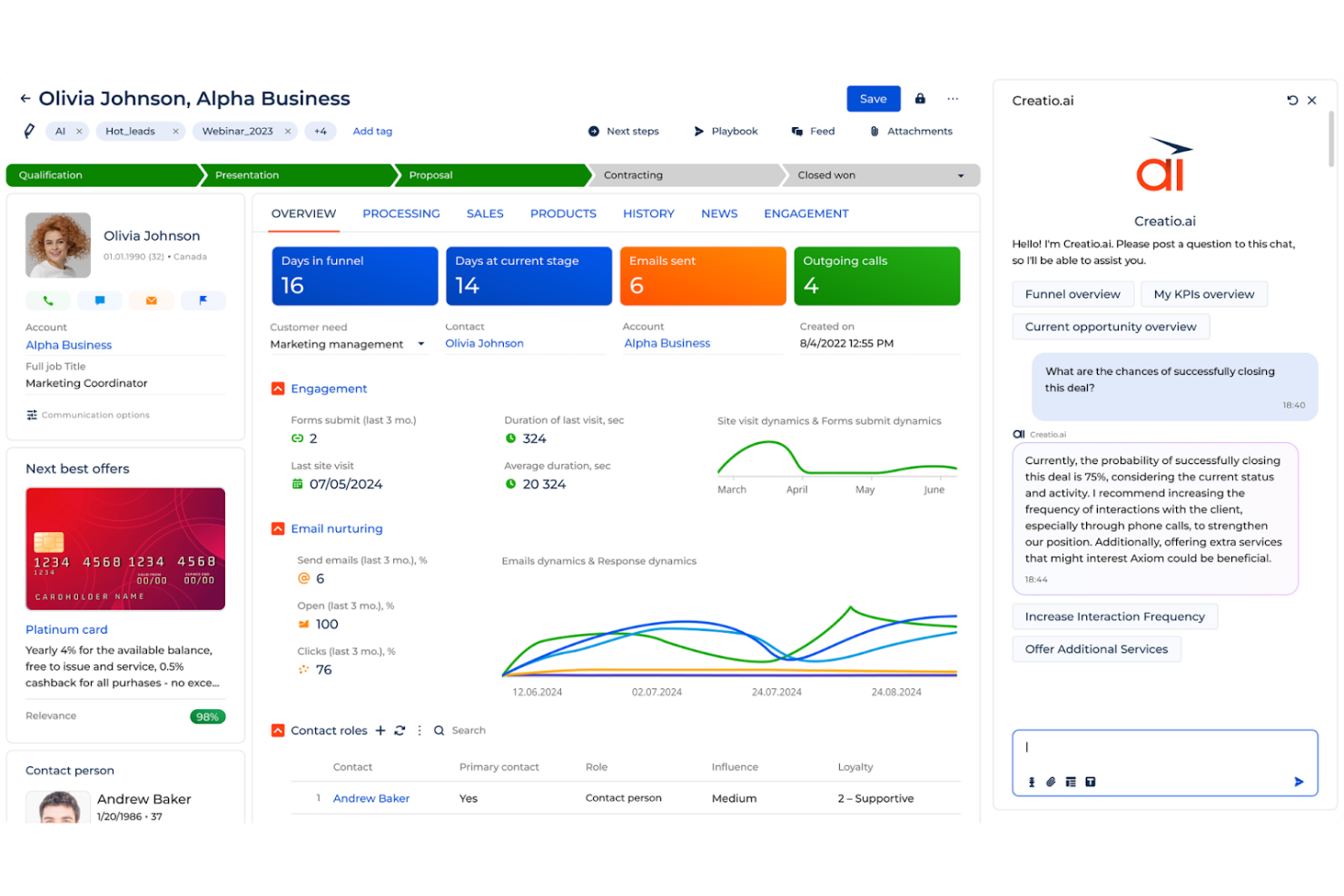
If you need a CRM platform that adapts to your unique workflows, Creatio is worth a look. This solution is built for teams that want to design and automate sales, marketing, or service processes without heavy IT involvement. Unlike HubSpot, Creatio stands out for its low-code customization tools, letting you tailor the platform to fit complex or evolving business needs.
Why Creatio Is a Good HubSpot Alternative
For teams that want a CRM platform they can truly shape to their business, Creatio offers a level of low-code customization that’s hard to match. I picked Creatio because it lets you build custom workflows, forms, and dashboards using visual design tools, so you don’t need to rely on developers for every change. The platform also supports process automation, allowing you to map out and automate complex sales, marketing, or service processes as your needs evolve. If you’re looking for a CRM that adapts to your organization’s unique requirements, Creatio gives you the flexibility to do just that.
Creatio Key Features
Some other features in Creatio that may interest CRM buyers include:
- Lead Management Tools: Capture, qualify, and track leads through every stage of the sales funnel.
- Omnichannel Communication: Manage customer interactions across email, phone, chat, and social media from one platform.
- Document Flow Automation: Automate document approvals, versioning, and storage within the CRM.
- Advanced Analytics and Reporting: Build custom dashboards and generate detailed reports on sales, marketing, and service activities.
Creation Integrations
Integrations include Salesforce, Microsoft 365, Google Workspace, and Zapier.
Pros and Cons
Pros:
- Highly customizable visual workflows
- All-in-one sales marketing and service
Cons:
- Occasional lag with large data sets
- Initial setup takes significant time
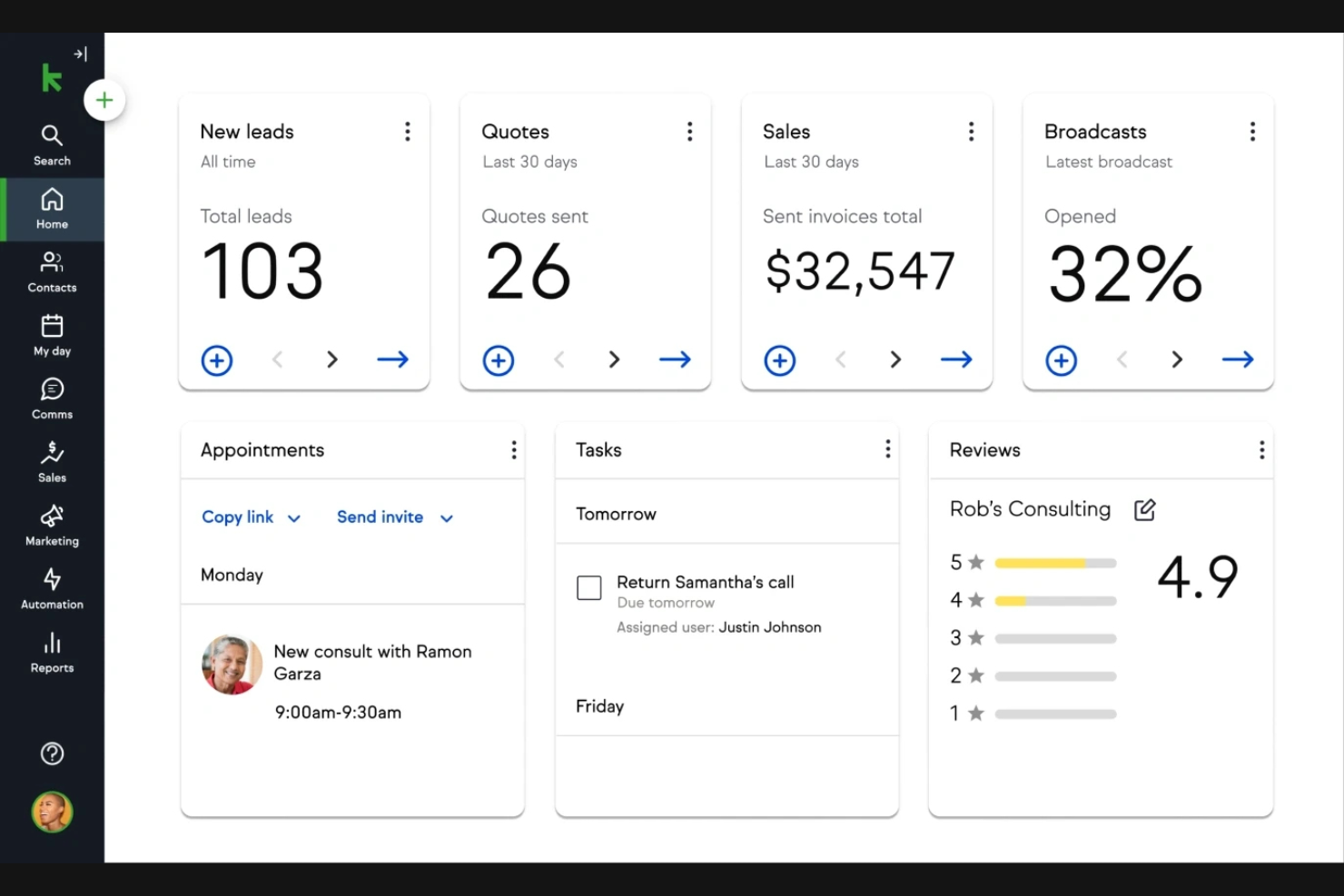
Keap is built for small businesses that want to automate sales and marketing without a steep learning curve. It’s especially useful for service-based businesses and solo entrepreneurs who need CRM and email marketing automation tools in one place. Unlike HubSpot, Keap puts advanced automation features and payment tools front and center, making it easier to nurture leads and manage client workflows.
Why Keap Is a Good HubSpot Alternative
For small businesses that want to automate repetitive tasks, Keap offers a focused approach that’s different from HubSpot. I picked Keap because its built-in automation tools let you set up follow-up emails, appointment reminders, and lead nurturing sequences without extra add-ons. The platform also includes invoicing and payment collection features, so you can manage client billing alongside your sales pipeline. If you’re looking for a CRM that puts automation and client management at the core, Keap is a strong alternative.
Keap Key Features
Some other features in Keap that may interest CRM buyers include:
- Contact Segmentation: Organize contacts into lists based on tags, behaviors, or custom fields.
- Landing Page Builder: Create and publish landing pages directly from the platform.
- SMS Marketing: Send text message campaigns to leads and clients from within Keap.
- Appointment Scheduling: Allow clients to book meetings using a built-in calendar tool.
Keap Integrations
Integrations include QuickBooks, Zapier, Mailchimp, Shopify, and Stripe.
Pros and Cons
Pros:
- Includes landing pages and SMS tools
- Dedicated customer success manager
- Visual drag-and-drop campaign builder
Cons:
- Price scales quickly as contacts grow
- Mandatory one-time onboarding fee

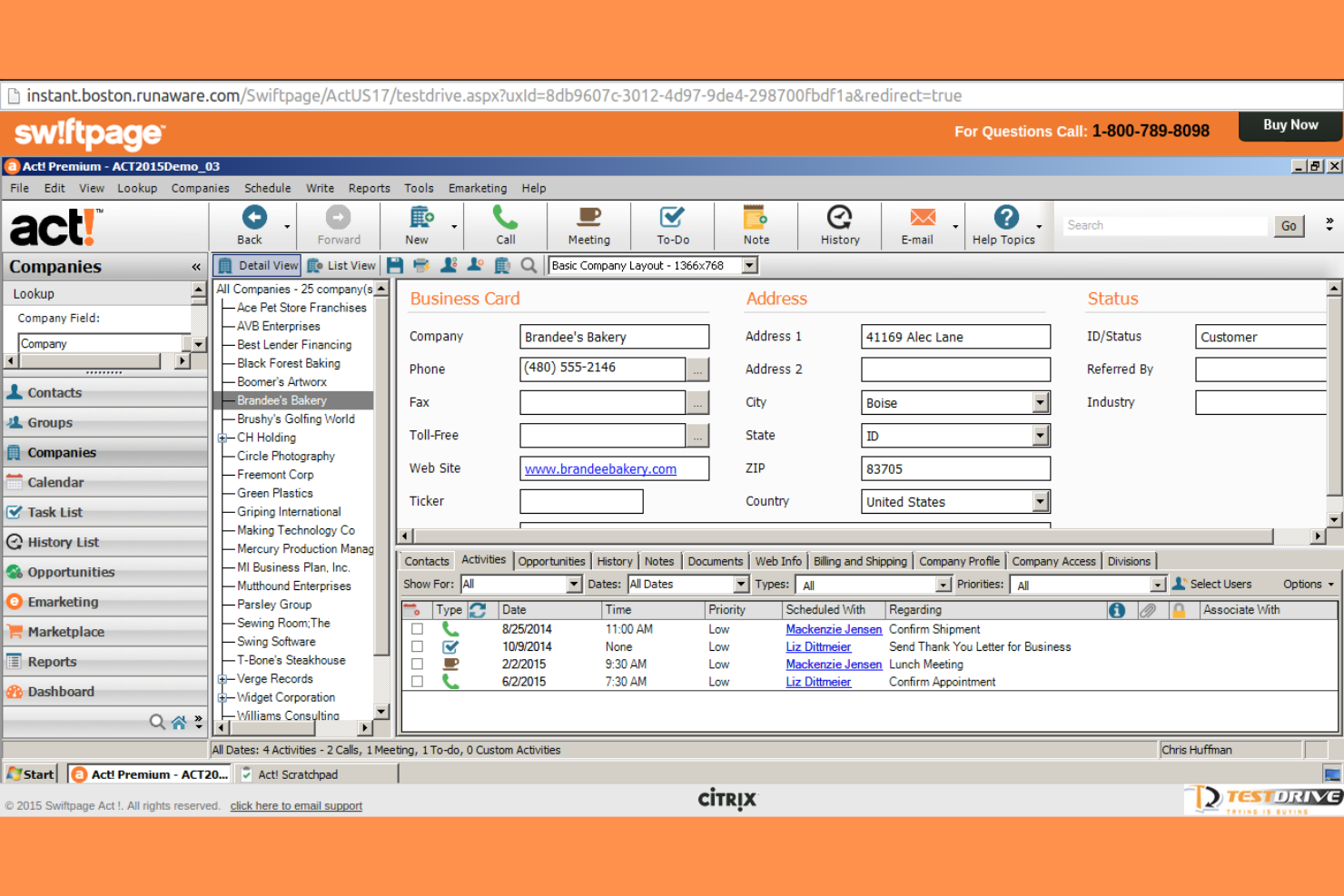
If your business needs a CRM platform that can be deployed and managed on-premise, Act! offers a flexible alternative to cloud-only solutions. This tool is a strong fit for organizations with strict data residency, privacy, or IT control requirements. Unlike HubSpot, Act! gives you the option to host your CRM environment locally, supporting businesses that need to keep customer data in-house.
Why Act! Is a Good HubSpot Alternative
For teams that need full control over their CRM environment, Act! stands out by offering on-premise deployment options that cloud-based platforms like HubSpot don’t provide. I picked Act! because it lets businesses manage customer data on their own servers, which is important for organizations with strict data residency or compliance requirements. The platform also supports advanced user access controls and customizable security settings, giving IT teams more oversight. If your business needs to keep sensitive information in-house, Act! delivers flexibility that’s hard to find in most modern CRM solutions.
Act! Key Features
Some other features in Act! that may interest CRM buyers include:
- Integrated Email Marketing: Create, send, and track email campaigns directly from the CRM platform.
- Opportunity Tracking: Monitor sales opportunities and manage deal stages within a centralized dashboard.
- Customizable Dashboards: Build personalized dashboards to visualize sales, marketing, and customer data.
- Calendar and Activity Management: Schedule meetings, set reminders, and track tasks for your team.
Act! Integrations
Integrations include Microsoft Office, Outlook, QuickBooks, Slack, Dropbox, and Evernote.
Pros and Cons
Pros:
- Offline access with desktop sync
- Strong Outlook and Office integration
- Highly customizable layouts and fields
Cons:
- Phone support costs extra for basics
- Frequent performance lags and crashes
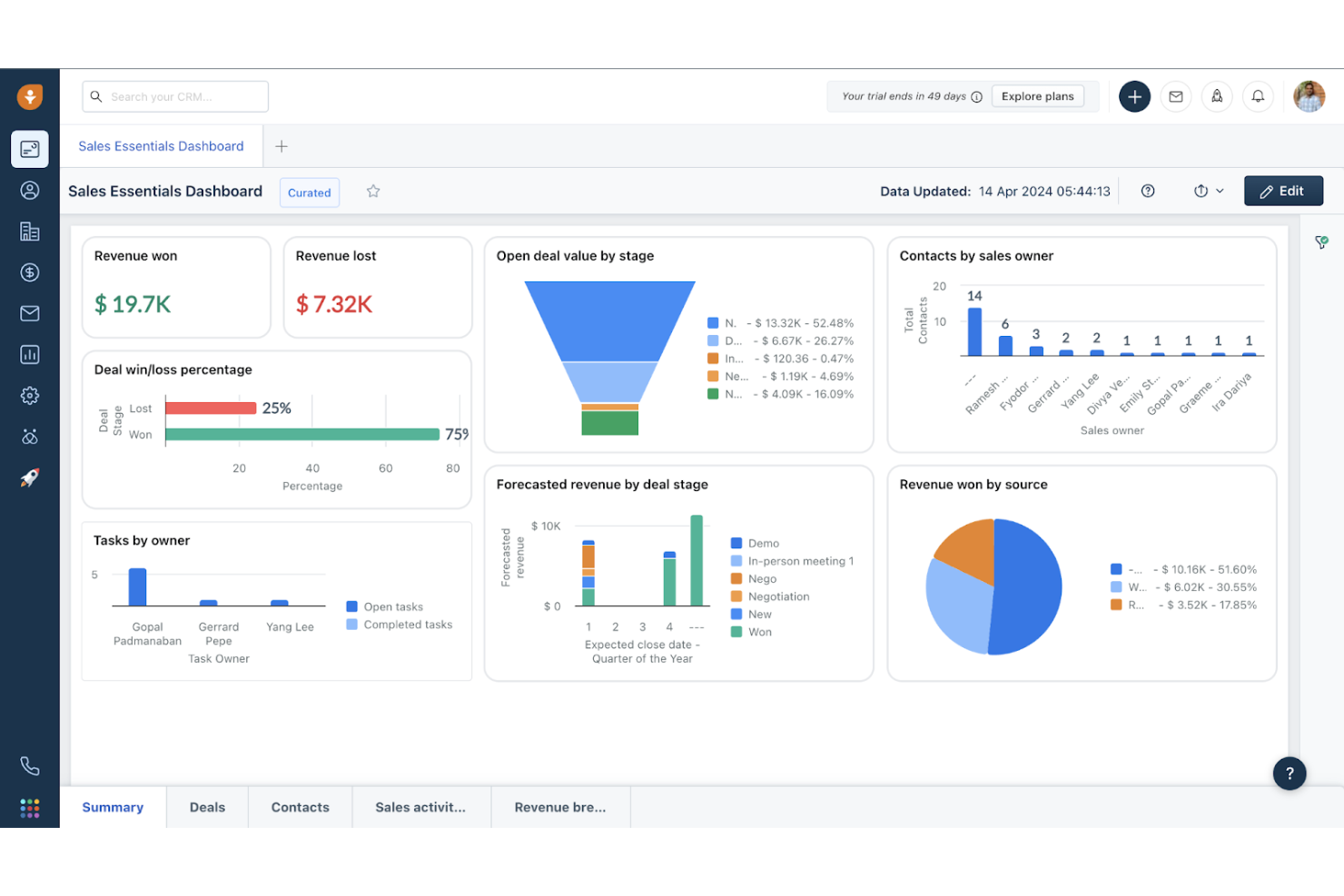
Freshworks is designed for teams that want a CRM platform with a clean, intuitive interface. It’s a strong fit for sales and support teams that need to onboard quickly and manage customer relationships without a steep learning curve. Unlike HubSpot, Freshworks puts a clear focus on usability, making it easier for users to navigate features and keep daily tasks organized.
Why Freshworks Is a Good HubSpot Alternative
If you’re looking for a CRM that prioritizes a straightforward, user-friendly experience, Freshworks is worth considering. I picked Freshworks because its dashboard design, drag-and-drop deal management, and guided setup make it easy for teams to get started and stay organized. The platform’s visual sales pipeline and contextual customer data panels help users focus on the right leads and actions without getting lost in cluttered menus. For businesses that want a CRM with a clear, approachable interface, Freshworks offers a refreshing alternative to more complex platforms like HubSpot.
Freshworks Key Features
Some other features in Freshworks that may appeal to CRM buyers include:
- AI-Powered Lead Scoring: Automatically prioritize leads based on engagement and likelihood to convert.
- Built-In Phone and Email Integration: Make calls and send emails directly from the CRM platform.
- Workflow Automation: Set up rules to automate repetitive sales and support tasks.
- Customizable Reports and Dashboards: Create tailored views and analytics to track team and individual performance.
Freshworks Integrations
Integrations include Mailchimp, Slack, Google Workspace, Freshsales, Microsoft Outlook, Zoho CRM, Salesforce, and HubSpot.
Pros and Cons
Pros:
- Free version for up to three users
- Built-in phone and email in one screen
- Freddy AI scores leads and predicts wins
Cons:
- Custom reporting takes time to master
- Big price jump from Growth to Pro plan

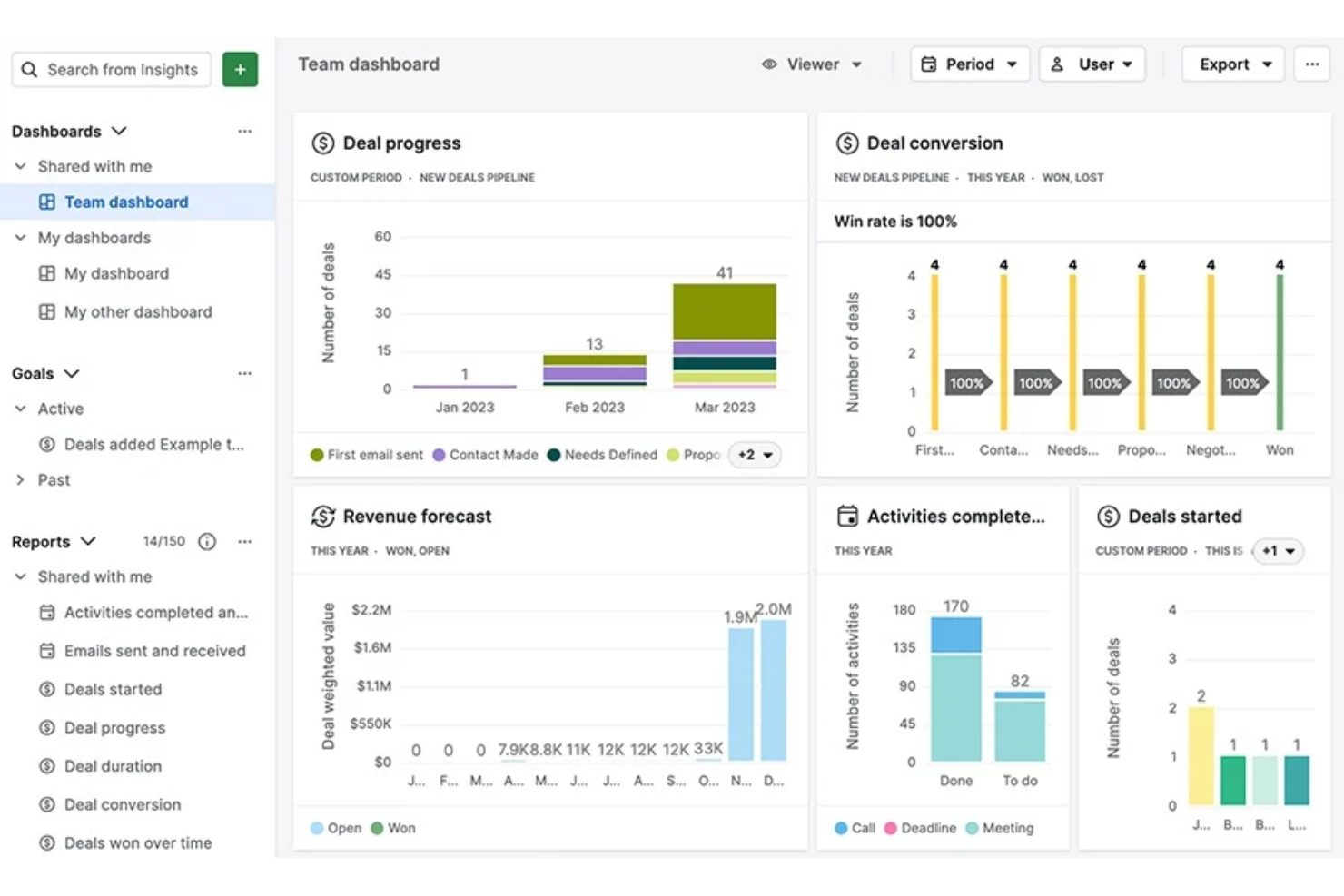
Sales-focused teams looking for a CRM with a highly visual approach to deal management will find Pipedrive appealing. The platform is built around customizable pipelines that make it easy to track, update, and prioritize deals at every stage. Unlike HubSpot, Pipedrive puts pipeline visibility and hands-on control at the center of the user experience.
Why Pipedrive Is a Good HubSpot Alternative
For teams that want a CRM centered on visual deal tracking, Pipedrive offers a clear advantage. I picked Pipedrive because its drag-and-drop sales pipelines let users see every deal’s status at a glance and quickly update progress. The platform’s customizable pipeline stages and color-coded deal indicators help sales teams focus on the right opportunities and avoid bottlenecks. If you need a CRM that puts pipeline management front and center, Pipedrive is a strong alternative to HubSpot.
Pipedrive Key Features
Some other features in Pipedrive that may interest CRM buyers include:
- Email Sync and Tracking: Connect your email account to send, receive, and track emails directly within the CRM.
- Activity Reminders: Set up reminders for calls, meetings, and follow-ups to keep deals moving forward.
- Sales Reporting and Forecasting: Access detailed reports and sales forecasts to monitor team performance and pipeline health.
- Marketplace Integrations: Connect with a wide range of third-party apps for marketing, support, and productivity.
Pipedrive Integrations
Integrations include Mailchimp, Trello, Google Workspace, Microsoft Outlook, Slack, Zapier, QuickBooks, Xero, Asana, and HubSpot.
Pros and Cons
Pros:
- Top-tier syncing for email and calendar
- Great mobile app for sales on the go
- Smart automation for repetitive tasks
Cons:
- Limited support for post-sale support
- Marketing tools cost extra as add-ons

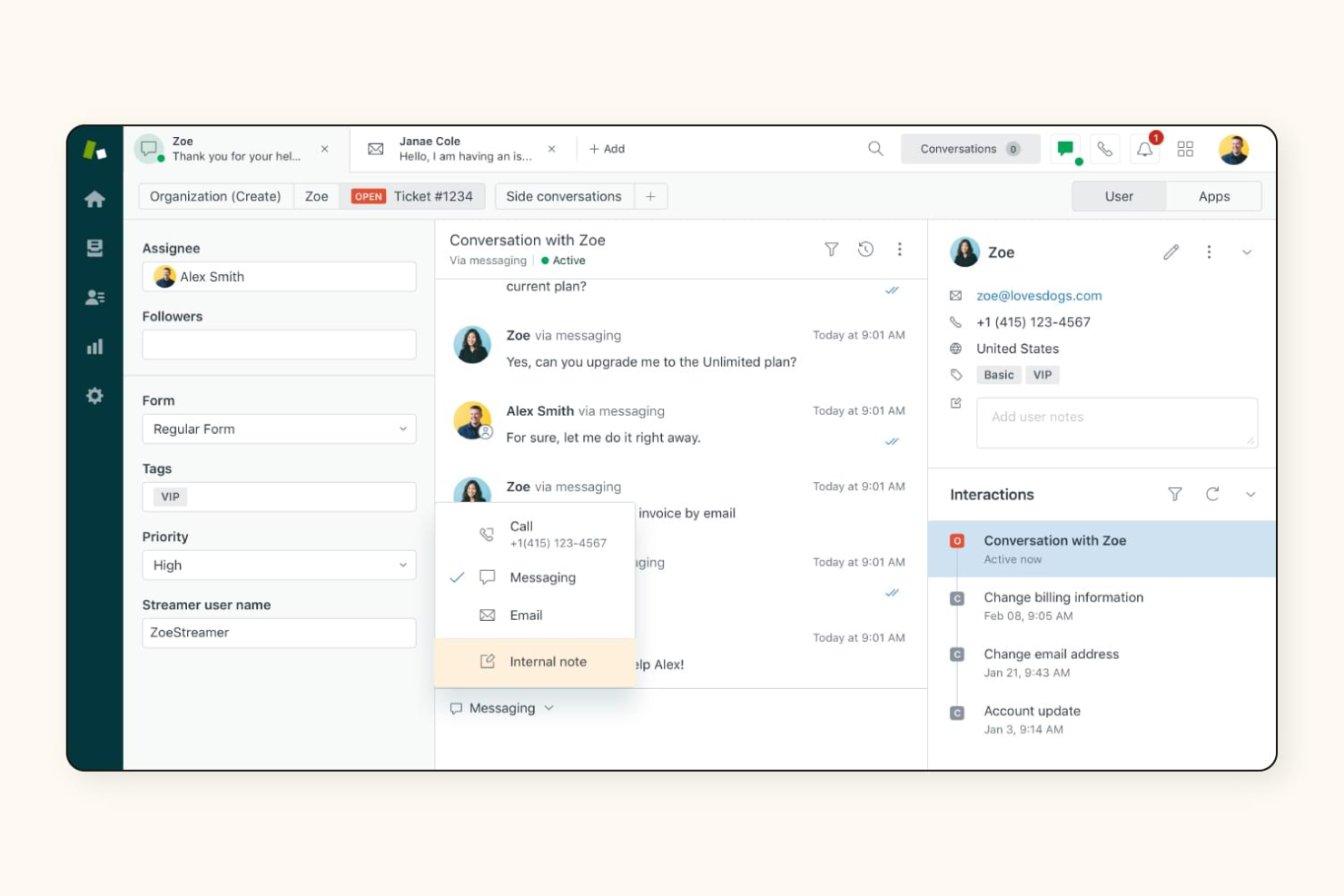
Retailers and ecommerce teams looking to unify customer conversations across every channel may want to consider Zendesk. This platform is designed for businesses that need to manage support requests from email, chat, social, phone, and more—all in one place. Unlike HubSpot, Zendesk specializes in omnichannel support, helping your team deliver consistent service no matter where customers reach out.
Why Zendesk Is a Good HubSpot Alternative
If your business needs to manage customer support across multiple channels, Zendesk is built specifically for that purpose. I picked Zendesk because it brings together email, live chat, social media, and phone support into a single workspace, making it easier for teams to track and resolve issues no matter where customers reach out. The platform also offers unified ticketing and automated routing, so you can prioritize and assign requests efficiently. For organizations focused on delivering consistent, high-quality support across every touchpoint, Zendesk offers capabilities that go beyond what most CRM platforms provide.
Zendesk Key Features
Some other features in Zendesk that may interest CRM buyers include:
- Customizable Help Center: Build a branded self-service portal with FAQs and knowledge base articles.
- AI-Powered Chatbots: Automate responses and handle common customer questions using built-in AI tools.
- Customer Satisfaction Surveys: Collect feedback directly after support interactions to monitor service quality.
- Role-Based Access Controls: Set permissions and manage access for different team members within the platform.
Zendesk Integrations
Integrations include Microsoft Teams, ActiveCampaign, Slack, Mailchimp, HubSpot, Salesforce, and Shopify.
Pros and Cons
Pros:
- Easy to set up for small sales teams
- Smart lists for lead and deal tracking
- Robust mobile app for sales on the go
Cons:
- Limited email marketing automation capabilities
- Higher cost compared to simple CRM tools
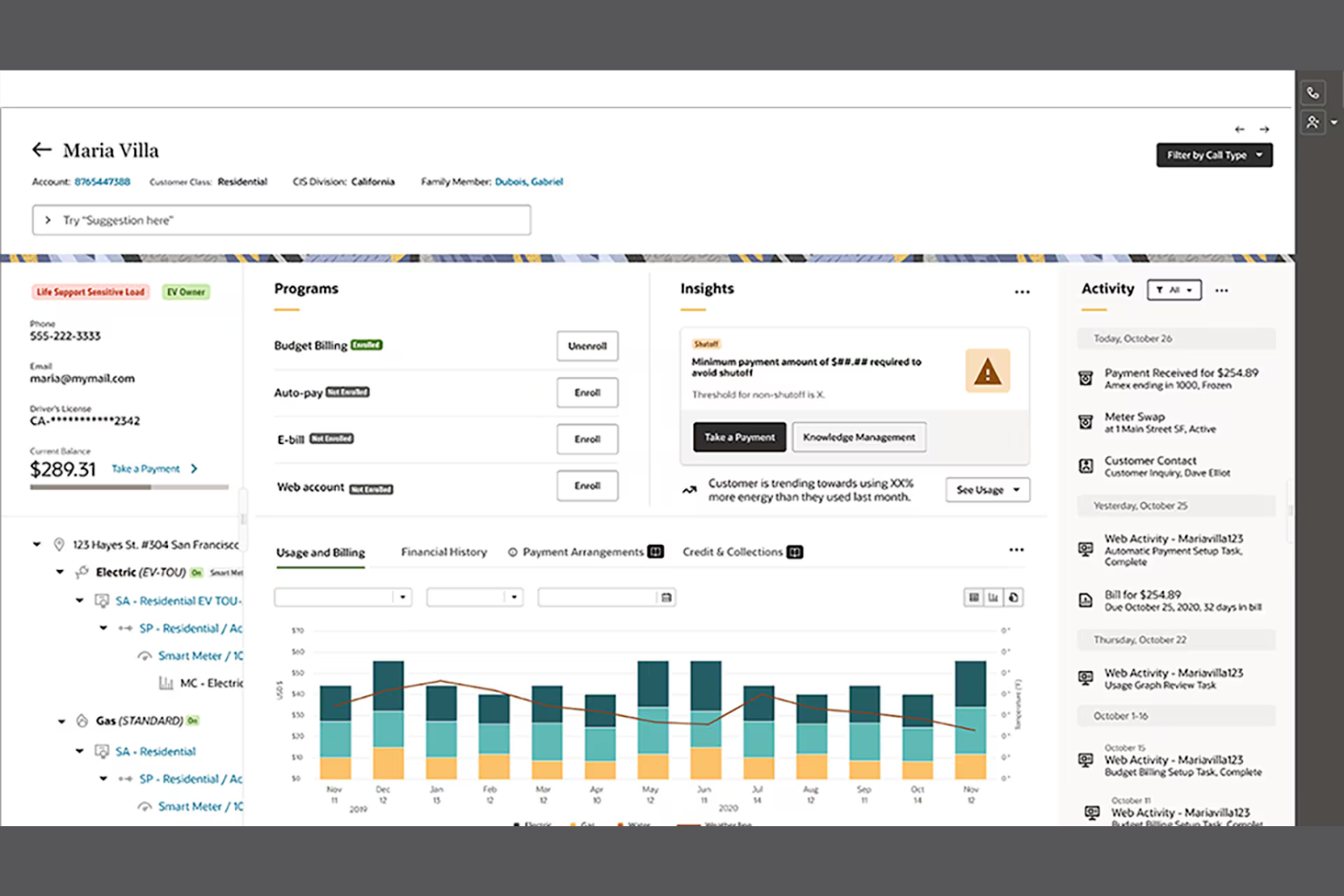
For organizations with strict data security and compliance needs, Oracle offers a CRM platform built for enterprise-scale protection. This solution is designed for large businesses in regulated industries that need advanced controls over customer data, privacy, and access. Unlike HubSpot, Oracle’s CRM tools are deeply integrated with its security, identity management, and audit capabilities, helping teams manage sensitive information with confidence.
Why Oracle Is a Good HubSpot Alternative
When enterprise data security is your top priority, Oracle stands out as a CRM platform built for organizations with complex compliance and privacy requirements. I picked Oracle because it offers advanced security features like granular user permissions, end-to-end encryption, and detailed audit trails that help protect sensitive customer data. The platform also supports industry-specific compliance standards, making it a strong fit for businesses in finance, healthcare, and other regulated sectors. If your team needs a CRM that prioritizes data protection at every level, Oracle delivers capabilities that go beyond what HubSpot provides.
Oracle Key Features
Some other Oracle CRM features that may interest enterprise buyers include:
- AI-Powered Sales Forecasting: Generate predictive sales forecasts using machine learning models built into the platform.
- Integrated Marketing Automation: Design, launch, and track multi-channel marketing campaigns from within the CRM.
- Customer Data Enrichment: Automatically update and enhance customer records with external and internal data sources.
- Mobile CRM App: Access customer information, manage tasks, and update records from any mobile device.
Oracle Integrations
Integrations include Microsoft Outlook, Google Workspace, Slack, LinkedIn, Dropbox, and SAP.
Pros and Cons
Pros:
- Global security and compliance
- Deep industry-specific configurations
- Advanced AI for predictive sales leads
Cons:
- Customization requires expert technicals
- High cost is prohibitive for small firms
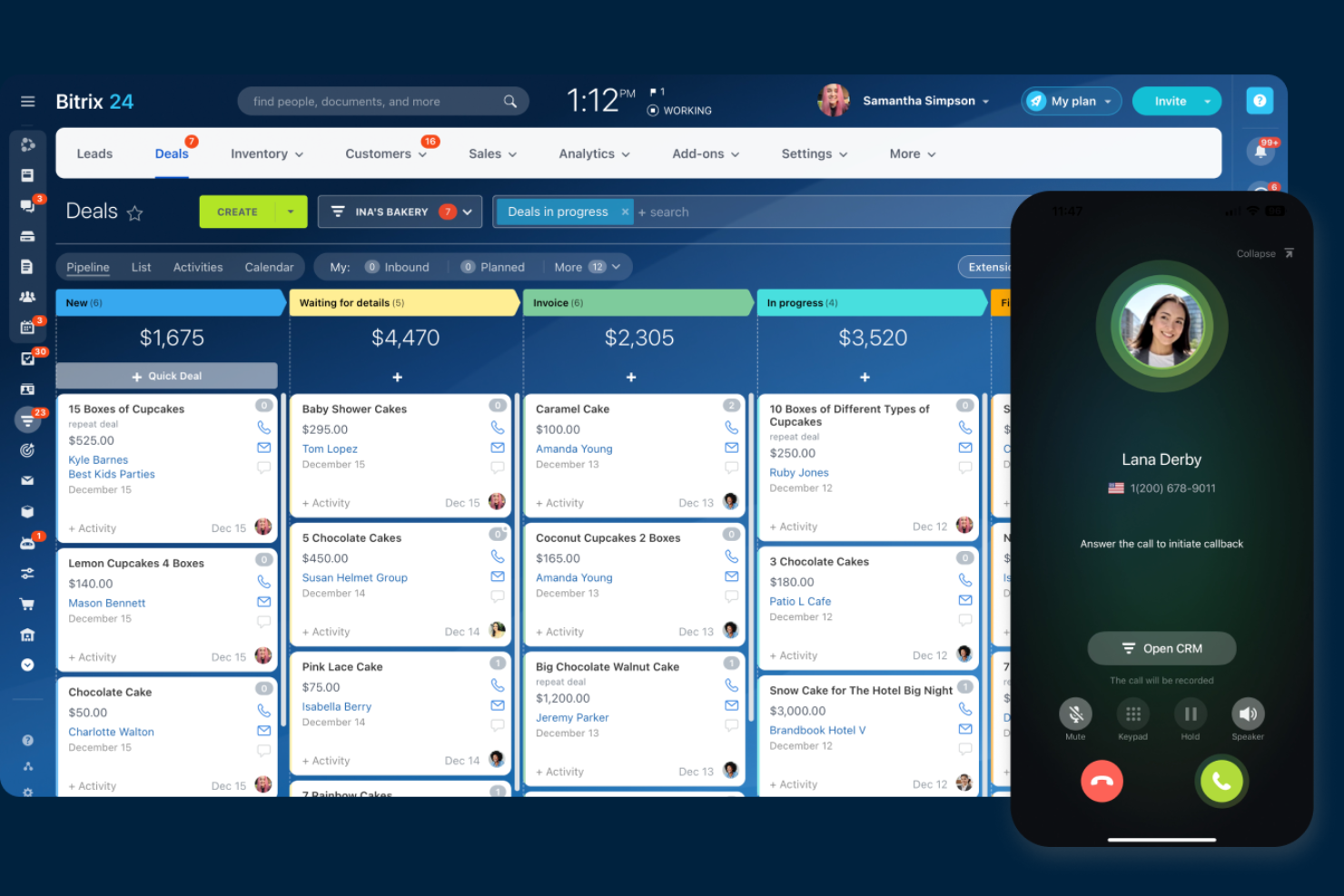
Teams looking for a CRM that doubles as a full-featured communication hub may want to consider Bitrix24. This platform combines CRM tools with built-in chat, video calls, and project management, making it a fit for businesses that prioritize internal collaboration alongside customer management. Unlike HubSpot, Bitrix24 puts real-time team communication and task coordination at the center of its CRM experience.
Why Bitrix24 Is a Good HubSpot Alternative
If your team needs a CRM that also supports daily communication, Bitrix24 is worth a close look. I picked Bitrix24 because it offers built-in chat, video conferencing, and group workspaces directly inside the CRM, so your team can collaborate without switching tools. The platform also includes shared calendars and document management, which help keep everyone aligned on client activities and internal projects. For businesses that want customer management and team communication in one place, Bitrix24 stands out as a practical HubSpot alternative.
Bitrix24 Key Features
Some other features in Bitrix24 that may interest CRM buyers include:
- Sales Funnel Visualization: Track leads and deals through customizable pipeline stages.
- Web Form Builder: Create and embed forms for lead capture on your website.
- Task and Project Management: Assign tasks, set deadlines, and monitor project progress within the platform.
- Contact Center Integration: Manage customer interactions across email, phone, social media, and live chat from one dashboard.
Bitrix24 Integrations
Integrations include Mailchimp, Slack, Google Workspace, Microsoft Outlook, and Shopify.
Pros and Cons
Pros:
- Built-in telephony and video calls
- Powerful project and task management
- Massive free plan with unlimited users
Cons:
- Frequent bugs and system performance lags
- Support responses can be very slow
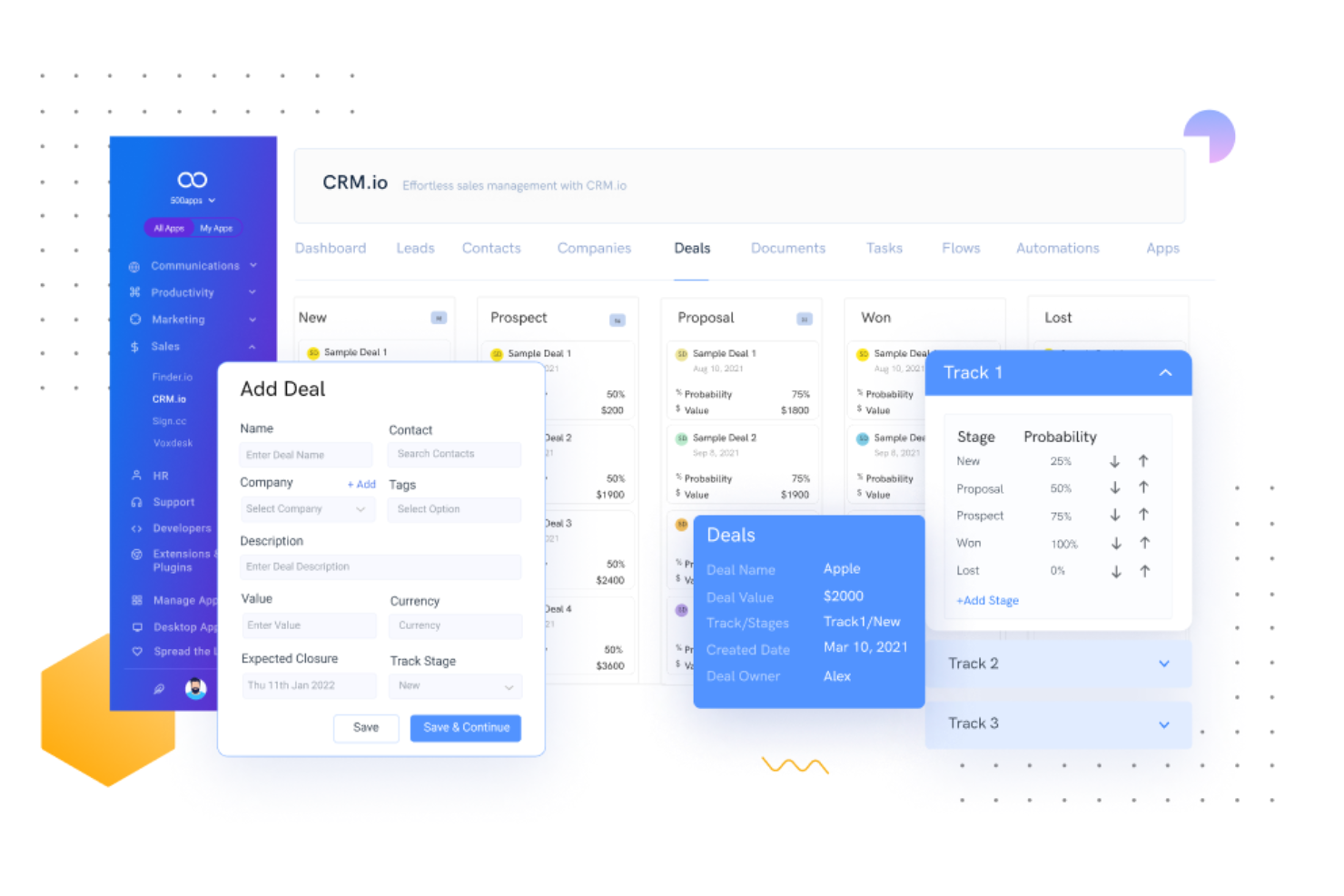
If your team needs built-in telephony alongside CRM features, Agile CRM is worth a look. It’s designed for sales and support teams that want to manage calls, contacts, and deals from a single platform. Unlike HubSpot, Agile CRM offers native telephony tools that help you track, record, and automate calls without relying on third-party add-ons.
Why Agile CRM Is a Good HubSpot Alternative
Agile CRM stands out for teams that need integrated telephony features built directly into their CRM platform. You can make, receive, and log calls from within the system, eliminating the need for separate phone software or manual call tracking. I like that Agile CRM also supports call recording and automated call workflows, which help sales and support teams stay organized and responsive. If your business relies on phone communication as part of your customer management process, Agile CRM offers capabilities that HubSpot doesn’t natively provide.
Agile CRM Key Features
Some other Agile CRM features that may interest CRM buyers include:
- Marketing Automation: Set up email campaigns, web pop-ups, and autoresponders to nurture leads automatically.
- Contact Management: Store, segment, and manage all your customer data in one place.
- Deal Tracking: Visualize and update deal stages using a drag-and-drop sales pipeline.
- Appointment Scheduling: Allow customers to book meetings directly through integrated calendar tools.
Agile CRM Integrations
Integrations include Google Workspace, Outlook, Shopify, Facebook, and LinkedIn.
Pros and Cons
Pros:
- Built-in telephony and social tools
- Visual drag-and-drop automation builder
- Affordable entry-level pricing plans
Cons:
- Occasional bugs and performance lags
- Notoriously slow customer support

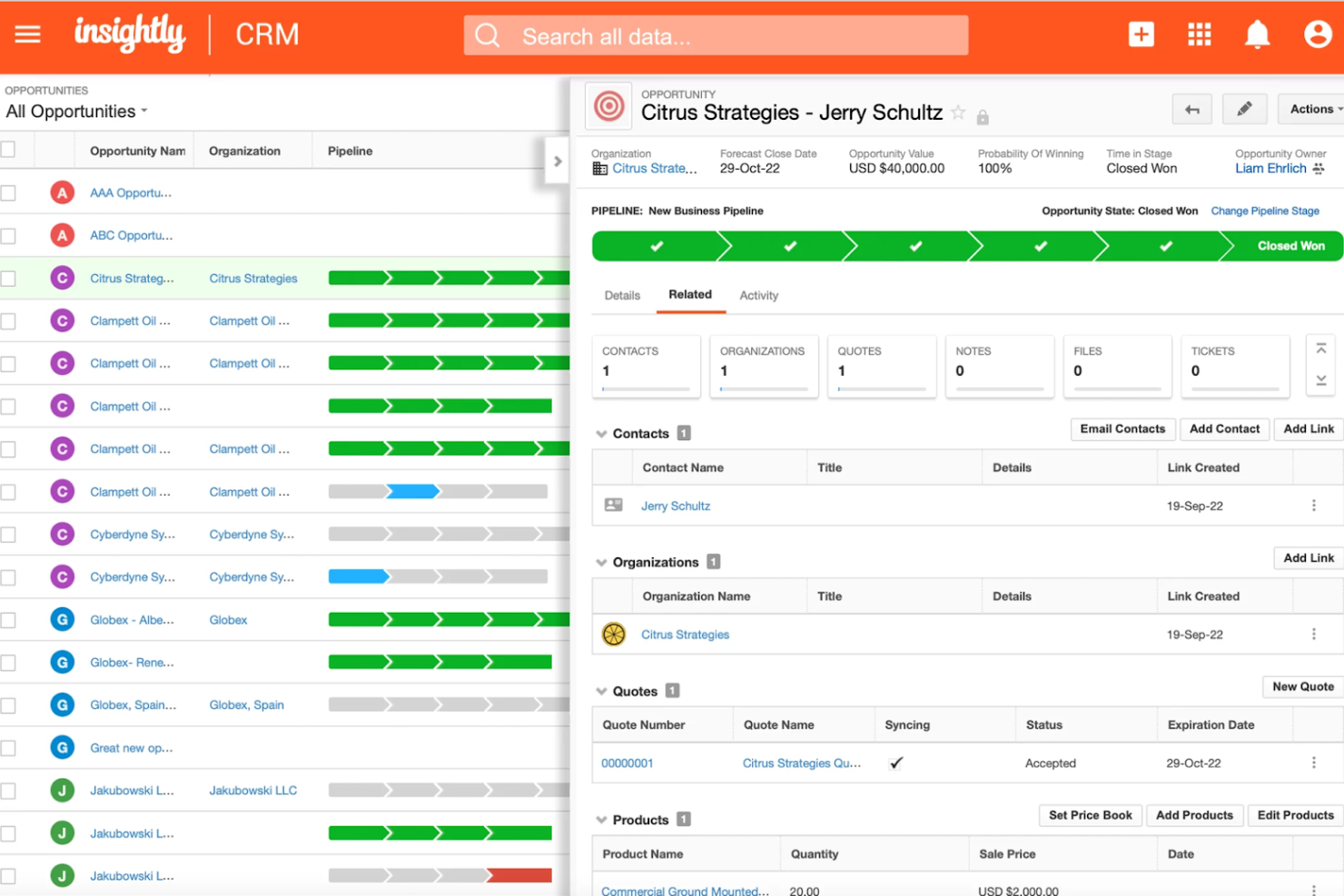
Teams that need CRM and project management in one platform often turn to Insightly. This tool is built for businesses that want to manage sales pipelines and post-sale project delivery without switching systems. Unlike HubSpot, Insightly connects CRM data directly to project tasks, milestones, and timelines, making it easier to track work from lead to completion.
Why Insightly Is a Good HubSpot Alternative
If your team needs CRM and project management in one place, Insightly is a strong option. The platform lets you convert won opportunities directly into projects, so you can track delivery tasks, milestones, and deadlines without leaving the CRM. I appreciate how Insightly links contacts, emails, and project activities, giving you a full view of customer relationships from first touch through project completion. For businesses that manage both sales and project workflows, Insightly offers a level of integration that HubSpot doesn’t natively provide.
Insightly Key Features
Some other Insightly features that may interest CRM buyers include:
- Custom Fields and Page Layouts: Tailor records and views to match your business processes and data needs.
- Workflow Automation: Set up rules to automate repetitive tasks, such as sending emails or updating records.
- Lead Routing: Automatically assign new leads to the right team members based on custom criteria.
- Email Tracking: Monitor when emails are opened and clicked directly from within the CRM.
Insightly Integrations
Integrations include Gmail, Outlook, Microsoft 365, Mailchimp, and Xero.
Pros and Cons
Pros:
- Scales well from small to mid-size teams
- User-friendly interface for daily tasks
- Links contacts and projects seamlessly
Cons:
- Limited automation on lower-priced plans
- Reporting lacks deep custom analytics
Other HubSpot Alternatives
Here are some additional HubSpot alternatives options that didn’t make it onto my shortlist, but are still worth checking out:
- monday CRM
For team collaboration tools
- Salesforce
For advanced workflow automation
- Apptivo
For customizable app integrations
- Less Annoying CRM
For straightforward contact management


HubSpot Alternatives Selection Criteria
When selecting the best HubSpot alternatives to include in this list, I considered common buyer needs and pain points related to Customer Relationship Management (CRM) platform products, like multi-channel customer interaction optimization and sales automation. I also used the following framework to keep my evaluation structured and fair:
Core Functionality (25% of total score)
To be considered for inclusion in this list, each solution had to fulfill these common use cases:
- Store and organize customer contact information
- Track sales opportunities and deal stages
- Log and manage customer communications
- Assign and monitor tasks for team members
- Generate basic sales and activity reports
Additional Standout Features (25% of total score)
To help further narrow down the competition, I also looked for unique features, such as:
- Built-in communication tools like chat or telephony
- Advanced workflow automation and triggers
- AI-powered lead scoring or forecasting
- Customizable dashboards and reporting
- Integrated project or task management
Usability (10% of total score)
To get a sense of the usability of each system, I considered the following:
- Simple and intuitive navigation
- Clean and modern interface design
- Logical organization of features and menus
- Minimal clicks to complete common tasks
- Responsive performance across devices
Onboarding (10% of total score)
To evaluate the onboarding experience for each platform, I considered the following:
- Availability of step-by-step product tours
- Access to training videos and documentation
- Pre-built templates for common workflows
- In-app chatbots or guided setup wizards
- Live or recorded onboarding webinars
Customer Support (10% of total score)
To assess each software provider’s customer support services, I considered the following:
- Multiple support channels like chat, email, and phone
- Availability of 24/7 or extended support hours
- Access to a searchable knowledge base
- Responsiveness and helpfulness of support staff
- Community forums or user groups
Value For Money (10% of total score)
To evaluate the value for money of each platform, I considered the following:
- Transparent and predictable pricing structure
- Range of features included at each price tier
- Availability of a free plan or free trial
- Flexibility to scale up or down as needed
- No hidden fees or surprise charges
Customer Reviews (10% of total score)
To get a sense of overall customer satisfaction, I considered the following when reading customer reviews:
- Consistency of positive feedback across platforms
- Recurring praise or complaints about specific features
- Reported issues with reliability or downtime
- Quality of post-sale support and service
- Willingness of users to recommend the product
Why Look For a HubSpot Alternative?
While HubSpot is a good choice of Customer Relationship Management (CRM) platform, there are a number of reasons why some users seek out alternative solutions. You might be looking for a HubSpot alternative because…
- You need more advanced customization for workflows or fields
- Your team requires built-in project management or communication tools
- You want a lower-cost solution for a large number of users
- Your business operates in regions where HubSpot support is limited
- You need deeper integration with industry-specific software
If any of these sound like you, you’ve come to the right place. My list contains several Customer Relationship Management (CRM) platform options that are better suited for teams facing these challenges with HubSpot and looking for alternative solutions.
HubSpot Key Features
Here are some of the key features of HubSpot, to help you contrast and compare what alternative solutions offer:
- Contact and lead management
- Sales pipeline tracking and deal management
- Marketing automation and email campaigns
- Built-in live chat and chatbot tools
- Customizable dashboards and reporting
- Task and activity tracking for sales teams
- Integration with popular apps and services
- Knowledge base and ticketing for customer support
- Workflow automation for sales and marketing processes
- Mobile app for on-the-go access