
12 Best Inventory Management Software for Restaurants Reviewed in 2026

Best Inventory Management Software for Restaurants: Shortlist
Here’s my shortlist of the best inventory management software for restaurants:


Managing a restaurant's inventory can feel like a juggling act. You're constantly balancing stock levels, reducing food waste, and keeping costs in check. That's where inventory management software comes in. It helps you track everything, making your job a bit easier.
In my experience, choosing the right software can transform how your team operates. I've independently tested and reviewed various options to give you an unbiased look at what's available.
In this article, you'll find my top picks for inventory management software. I'll walk you through their features, benefits, and why they might be the perfect fit for your restaurant. Let's make inventory management less of a headache for you and your team.
Why Trust Our Software Reviews
Best Inventory Management Software for Restaurants Summary
This comparison chart summarizes pricing details for my selections of the top inventory management software for restaurants to help you find the best one for your budget and business needs.
| Tool | Best For | Trial Info | Price | ||
|---|---|---|---|---|---|
| 1 | Best for reducing food waste | Free demo available | From $199/month | Website | |
| 2 | Best for integration with POS systems | Free demo + free plan available | From $69/month | Website | |
| 3 | Best for automated invoice processing | Free demo available | From $330/location/month | Website | |
| 4 | Best for multi-location management | Free demo available | Pricing upon request | Website | |
| 5 | Best for real-time inventory tracking | 14-day free trial + free demo available | Pricing upon request | Website | |
| 6 | Best for visual inventory management | Free 14-day trial + free plan available | From $24/month (billed annually) | Website | |
| 7 | Best for large enterprises | Free demo available | Pricing upon request | Website | |
| 8 | Best for cost control | Free demo available | Pricing upon request | Website | |
| 9 | Best for detailed reporting | Free demo available | Pricing upon request | Website | |
| 10 | Best for real-time inventory synced with sales | Free plan available (only pay when you take a payment) + 30-day free trial | From $49/per location/month | Website |
Best Inventory Management Software for Restaurant Reviews
Below are my detailed summaries of the best inventory management software for restaurants that made it onto my shortlist. My reviews offer a detailed look at the key features, pros and cons, integrations, and ideal use cases of each tool to help you find the best one for you.


MarketMan is a restaurant inventory management software designed for improving cost control and efficiency. It serves restaurants by offering inventory tracking, invoicing, and recipe costing, all within a user-friendly platform.
Why I picked MarketMan: It focuses on reducing food waste, with features such as AI-powered automation for inventory control. You can track purchases and costs in real time, ensuring you only stock what you need. The system also provides insights into purchasing trends, helping you identify areas where you could cut waste. Recipe costing further supports this by showing the exact cost of goods sold, enabling better pricing decisions.
Standout Features and Integrations:
Features include AI-powered automation to simplify tasks, real-time analytics for inventory and COGS, and mobile app access for on-the-go management.
Integrations include Square, QuickBooks, Xero, Toast, Lightspeed, Clover, Revel, Aloha, Micros, Squirrel, and more.
Pros and Cons
Pros:
- Detailed recipe costing
- Mobile app convenience
- AI-driven automation
Cons:
- Custom plans needed for large enterprises
- Relatively high starting price

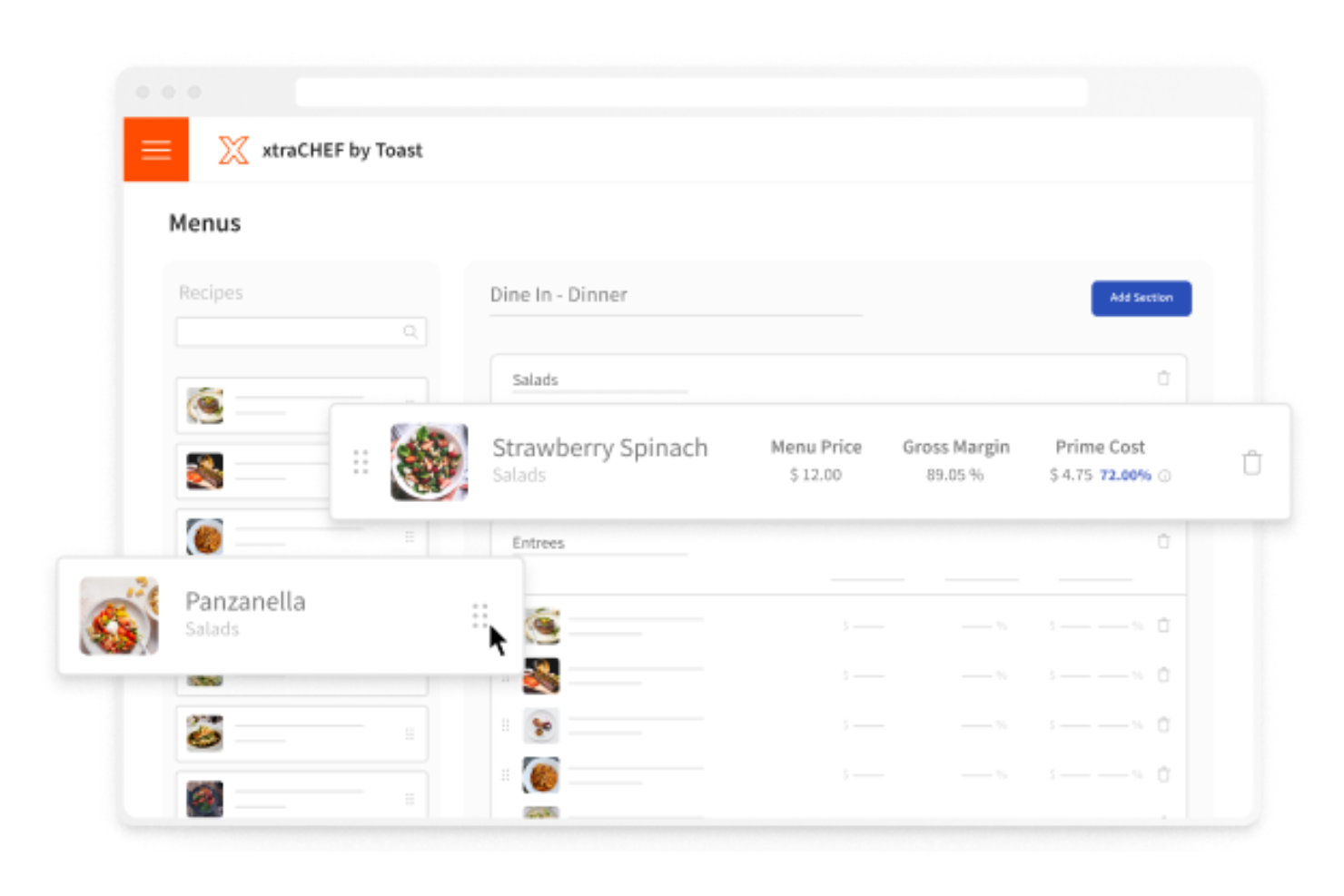
Toast is a point-of-sale and restaurant management system designed for restaurants of all sizes. It helps simplify operations by managing orders, payments, and inventory.
Why I picked Toast: It offers smooth integration with POS systems, making it simple for you to manage your restaurant's operations in one place. The system allows real-time updates to your menu items and order tracking, which helps increase your service efficiency. You can also access detailed sales reports that help you make informed business decisions. This integration capability makes Toast a great choice for those looking to unify their restaurant management tools.
Standout Features and Integrations:
Features include real-time menu management that allows instant updates, detailed sales reporting for data-driven decisions, and mobile order and pay options to improve customer experience.
Integrations include Grubhub, Uber Eats, DoorDash, OpenTable, 7shifts, PeachWorks, Compeat, Homebase, BevSpot, and more.
Pros and Cons
Pros:
- Mobile payment options
- Real-time order management and tracking
- Easy menu updates
Cons:
- Reliance on third-party add-ons
- Time-consuming inventory setup and upkeep

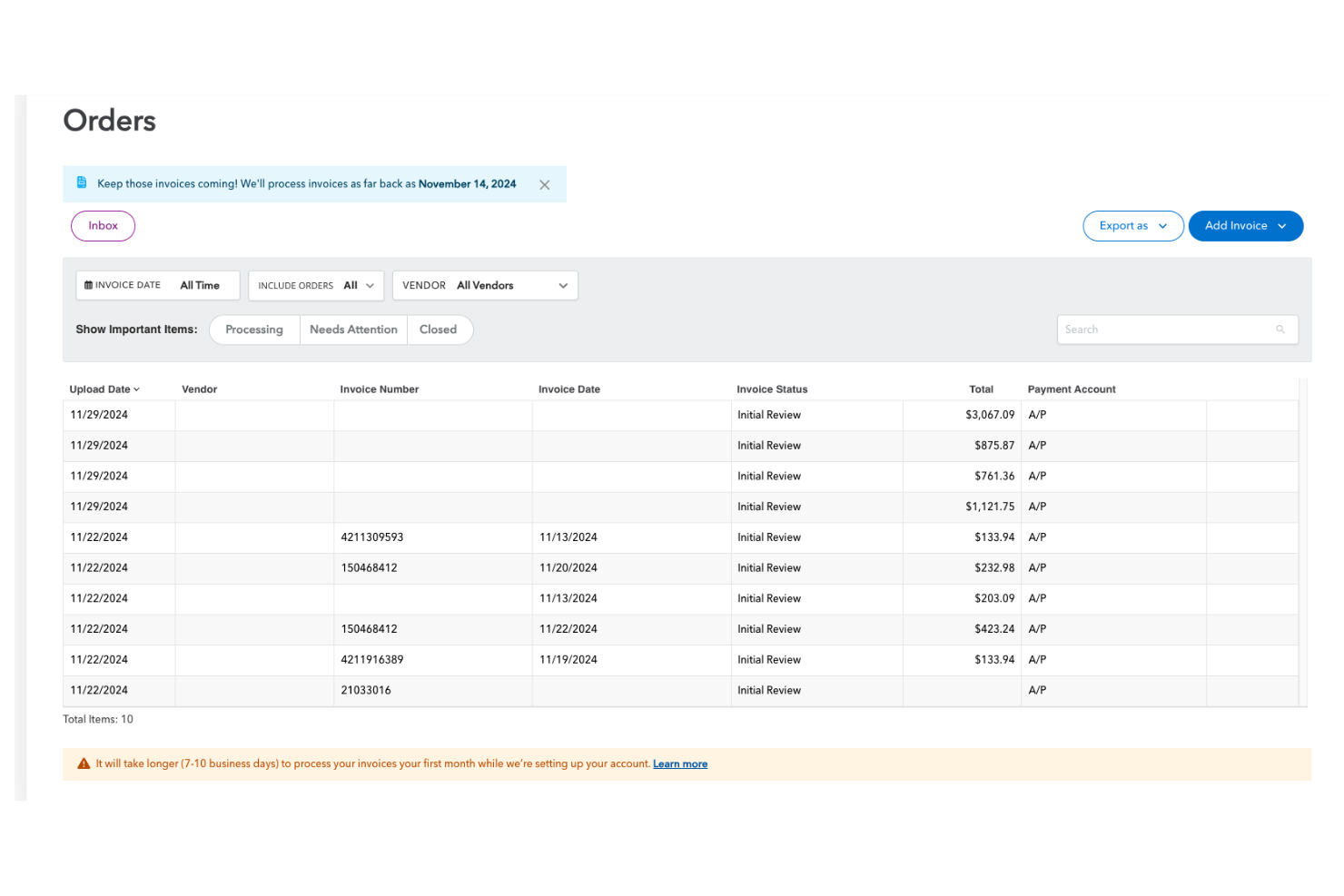
MarginEdge is a restaurant management software tailored for inventory and financial management. It serves restaurant owners and managers by offering tools for cost tracking, invoice processing, and inventory control.
Why I picked MarginEdge: It automates invoice and purchase order processing, reducing manual data entry and errors. You can send invoices via email or mobile, and the system will process and categorize them automatically. This feature saves time and helps ensure accuracy in your financial records. Additionally, MarginEdge integrates with many accounting systems, making it easier for your team to manage expenses and improve your bottom line.
Standout Features and Integrations:
Features include real-time food cost tracking to help you manage budgets, customizable reporting for detailed insights, and menu analysis tools that aid in pricing decisions.
Integrations include QuickBooks, Xero, Toast, Square, Aloha, Oracle MICROS, Compeat, Restaurant365, Clover, Revel, and more.
Pros and Cons
Pros:
- Smooth accounting integration
- Real-time cost tracking
- Efficient invoice automation
Cons:
- Advanced features may need additional training
- Invoice errors need review
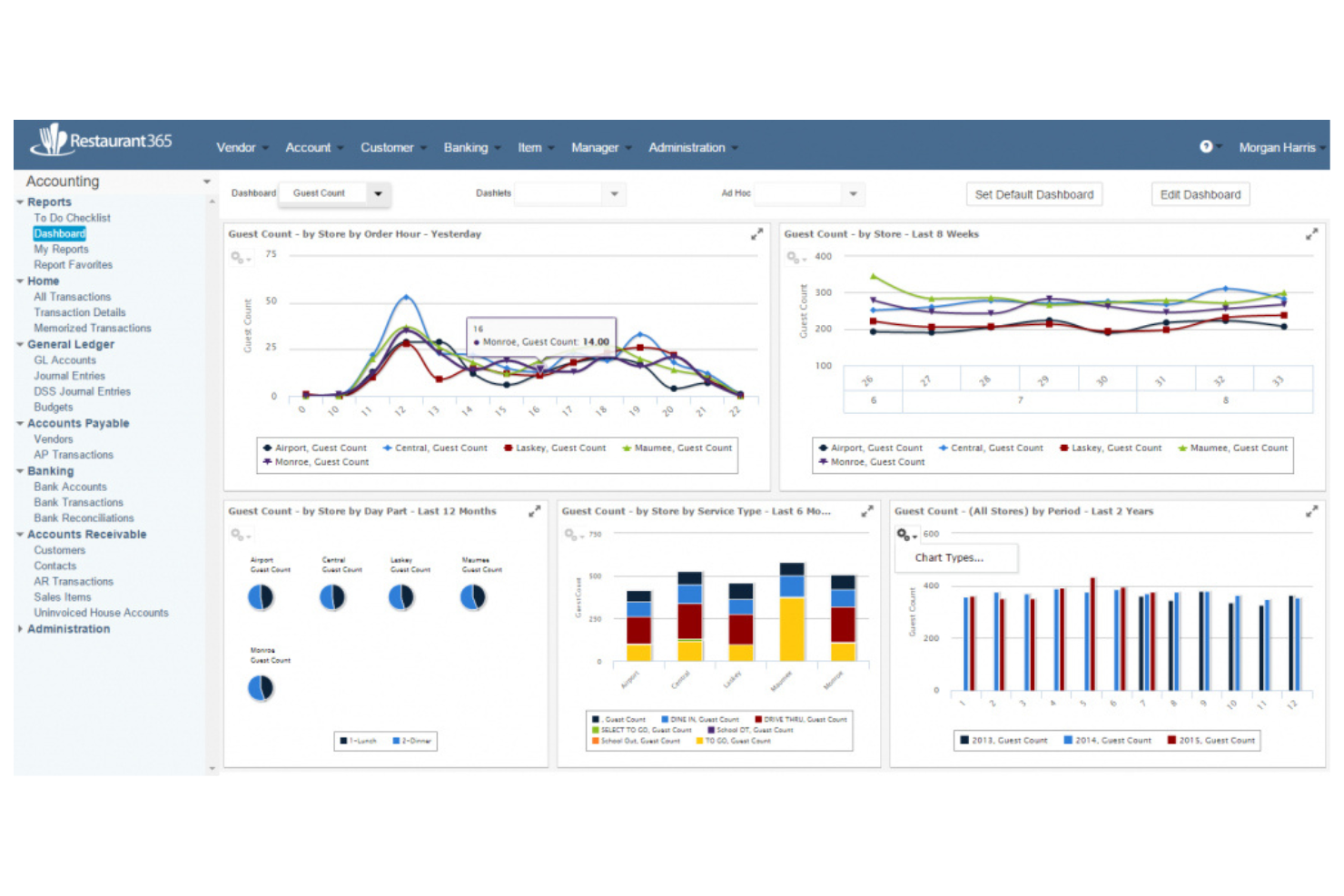
Restaurant365 is a cloud-based software designed for restaurant management that focuses on accounting, inventory, and scheduling. It's popular among multi-location restaurants seeking to centralize operations and improve efficiency.
Why I picked Restaurant365: It excels at managing multiple locations by offering features such as centralized accounting and inventory tracking across all sites. The platform enables you to consolidate financial and inventory data, which helps ensure consistency and accuracy. The tool also offers customizable dashboards to monitor performance metrics for each location. This makes it a strong choice for restaurants that need a unified view of their operations.
Standout Features and Integrations:
Features include automated accounting to reduce manual errors, customizable dashboards for performance tracking, and scheduling tools to optimize staff management.
Integrations include QuickBooks, Xero, Square, Toast, Aloha, Oracle MICROS, Revel, Clover, Paychex, ADP, and more.
Pros and Cons
Pros:
- Detailed scheduling tools
- Multi-location support
- Centralized accounting
Cons:
- Performance issues with large datasets
- Requires ongoing training

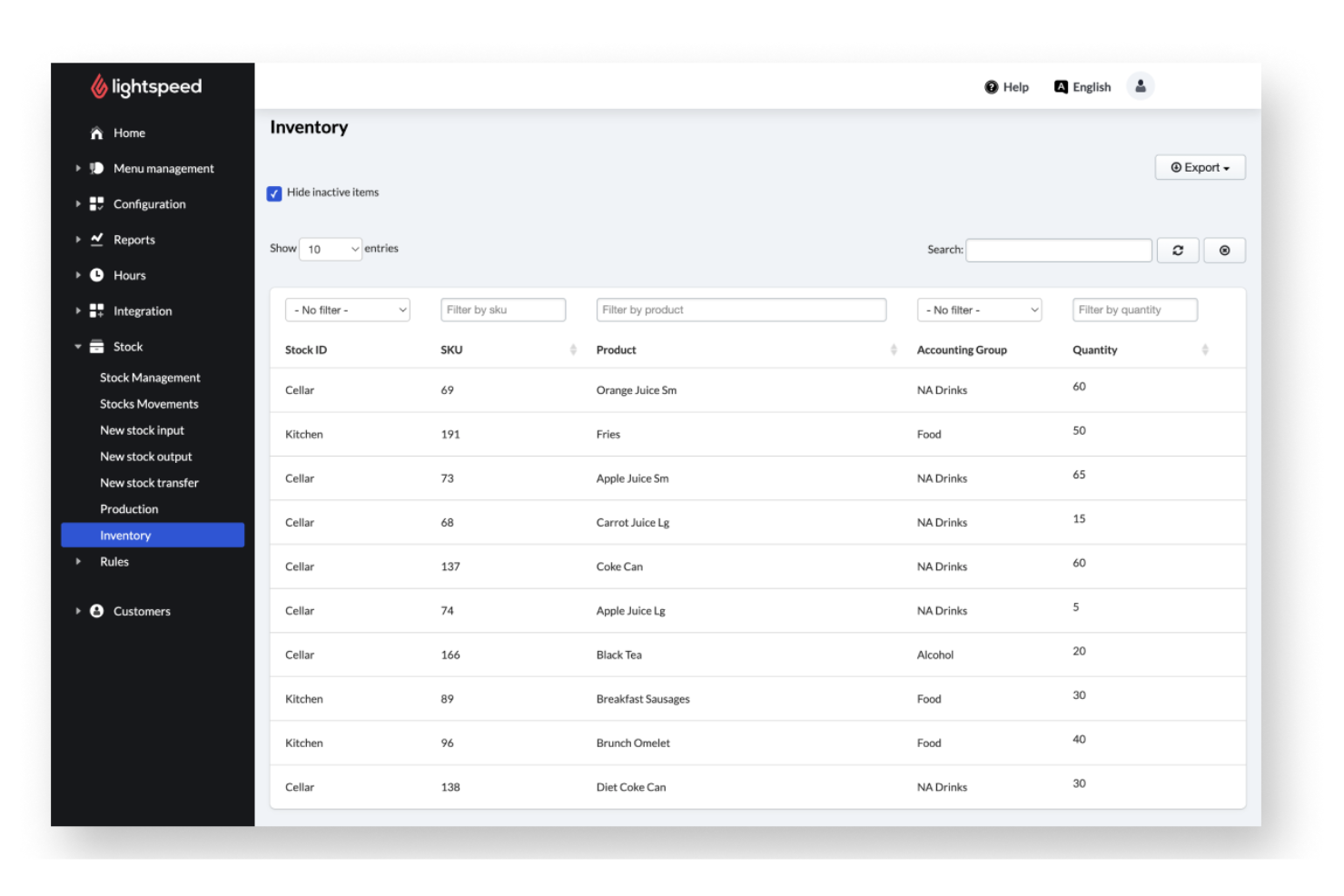
Lightspeed is a multi-purpose restaurant management system that caters to a variety of dining establishments. It offers solutions for point-of-sale, inventory management, and customer engagement.
Why I picked Lightspeed: Its inventory management system excels in real-time inventory tracking, allowing you to monitor stock levels as sales occur. This feature helps your team reduce waste and optimize ordering processes. The platform also provides detailed analytics, giving you insights into sales trends and inventory needs. This is ideal for restaurants aiming to improve operational efficiency and increase their profit margins through precise inventory control.
Standout Features and Integrations:
Features include advanced reporting tools that help you understand sales patterns, customizable menu management for easy updates, and a built-in loyalty program to boost customer retention.
Integrations include QuickBooks, Xero, Mailchimp, 7shifts, Uber Eats, OpenTable, Resy, Deliverect, and more.
Pros and Cons
Pros:
- Supports both small and large businesses
- Built-in loyalty programs
- Real-time stock updates
Cons:
- Add-ons increase total cost
- Reliance on stable internet

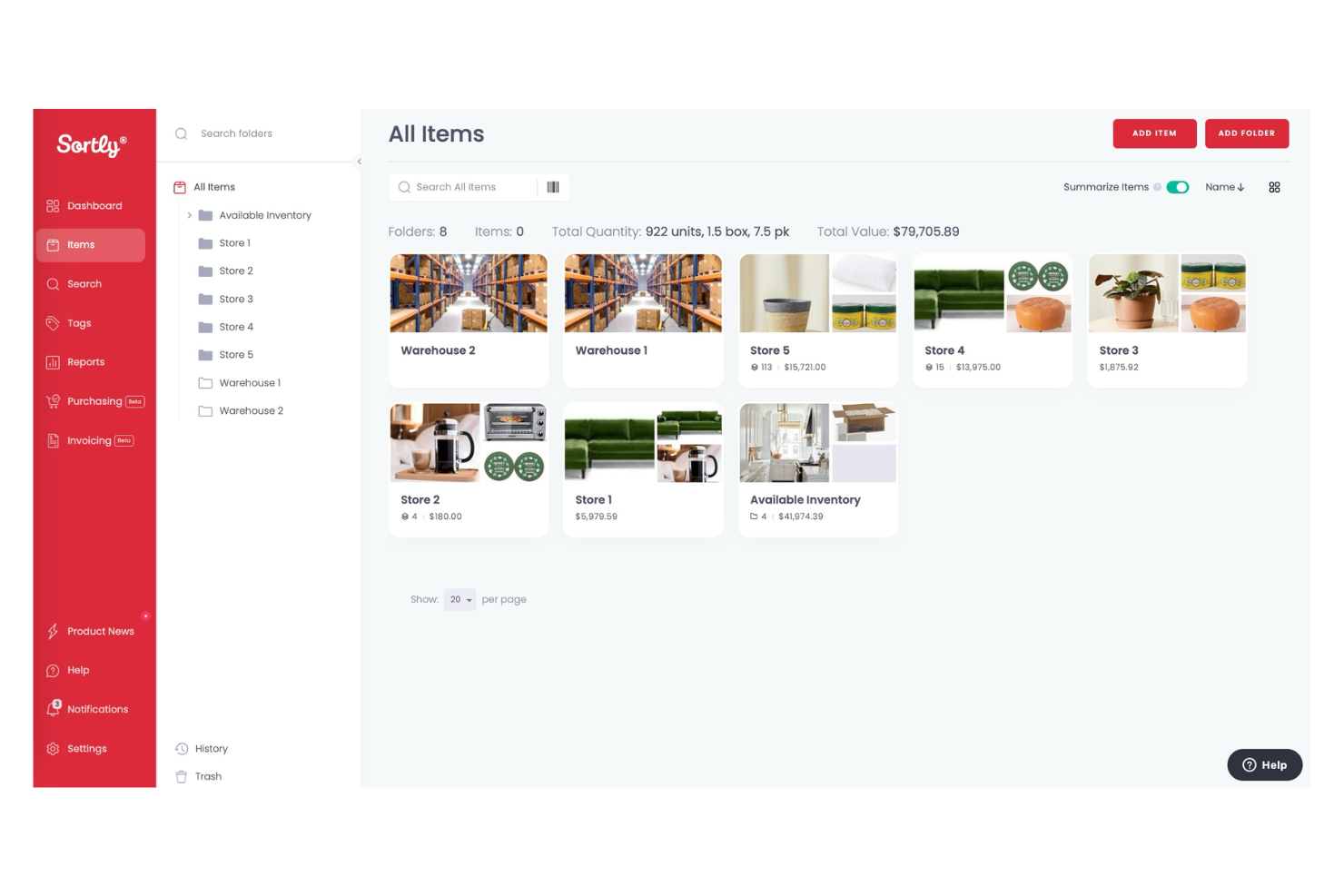
Sortly is an inventory management software designed for small to midsize businesses looking for an intuitive way to manage their stock. It provides features that enable easy tracking and organization of inventory using visual cues and simple interfaces.
Why I picked Sortly: It excels in visual inventory management, allowing you to use photos to categorize and track items. This makes it easier for your team to recognize products and manage them efficiently. The software provides QR code generation for quick access to inventory details. You can also customize fields to suit your specific needs, improving the flexibility of your inventory management process.
Standout Features and Integrations:
Features include photo-based inventory tracking, QR code generation for easy item lookup, and customizable fields to tailor the system to your specific requirements.
Integrations include QuickBooks, Shopify, Amazon Business, Zapier, Slack, and more.
Pros and Cons
Pros:
- No technical expertise needed
- Easy QR code generation
- Visual inventory tracking
Cons:
- Not ideal for large inventories
- Limited advanced features
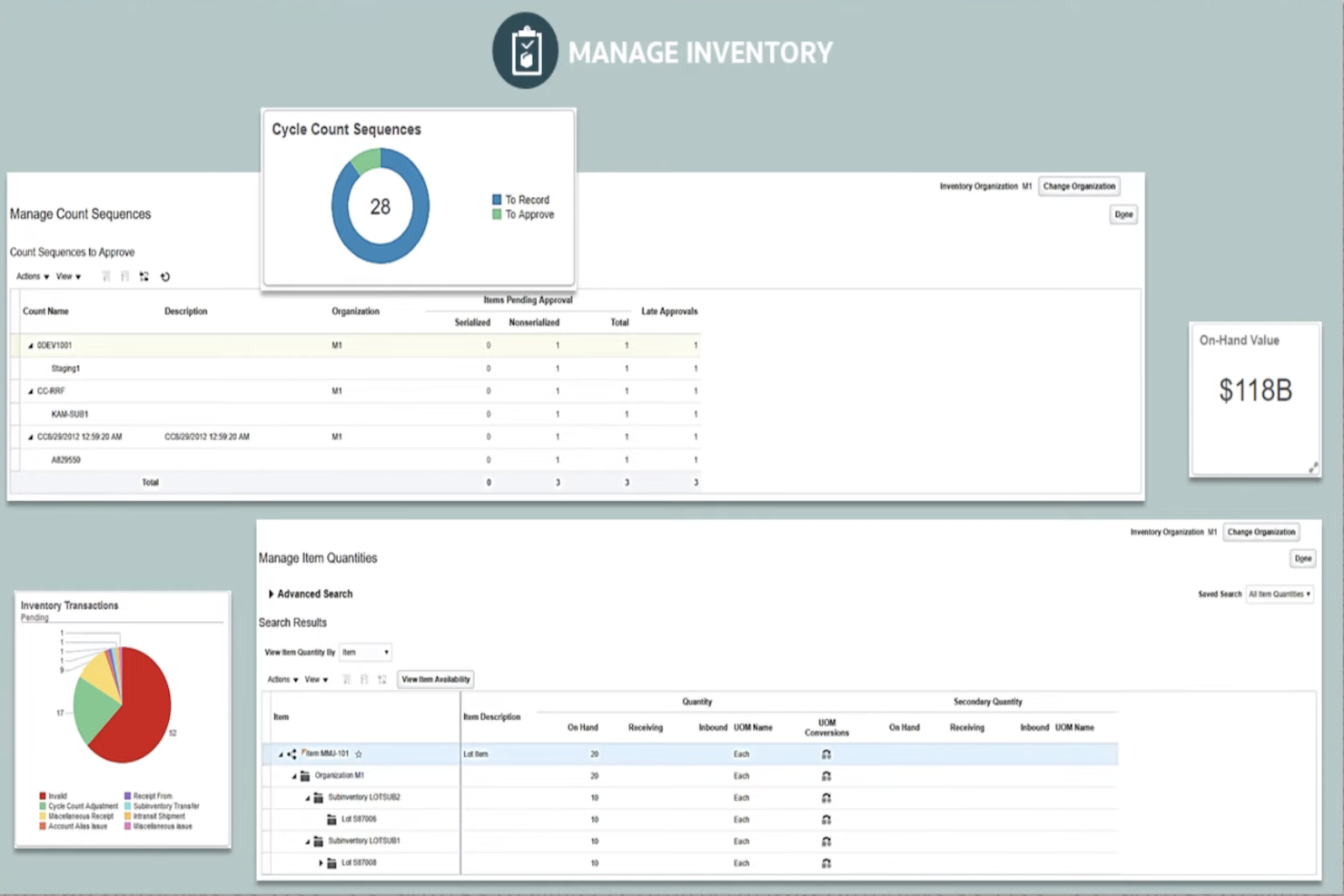
Oracle is an enterprise-level inventory management software designed for large restaurants and chains. It specializes in providing solutions for inventory control, financial management, and procurement.
Why I picked Oracle: It's tailored for large enterprises, with features such as advanced analytics and real-time data access. You can manage extensive physical inventory across multiple locations. The platform also offers reporting tools that help you make informed decisions. This makes it suitable for complex operations that require detailed oversight.
Standout Features and Integrations:
Features include predictive analytics for demand forecasting, automated procurement processes to reduce manual tasks, and customizable reporting tools that can be tailored to fit your business needs.
Integrations include SAP, Microsoft, Salesforce, Google Cloud, Amazon Web Services, IBM, VMware, Slack, Zoom, and more.
Pros and Cons
Pros:
- Scalable for growing businesses
- Suitable for complex operations
- Extensive customization options
Cons:
- Costly licensing & upgrades
- Slow item-level updates
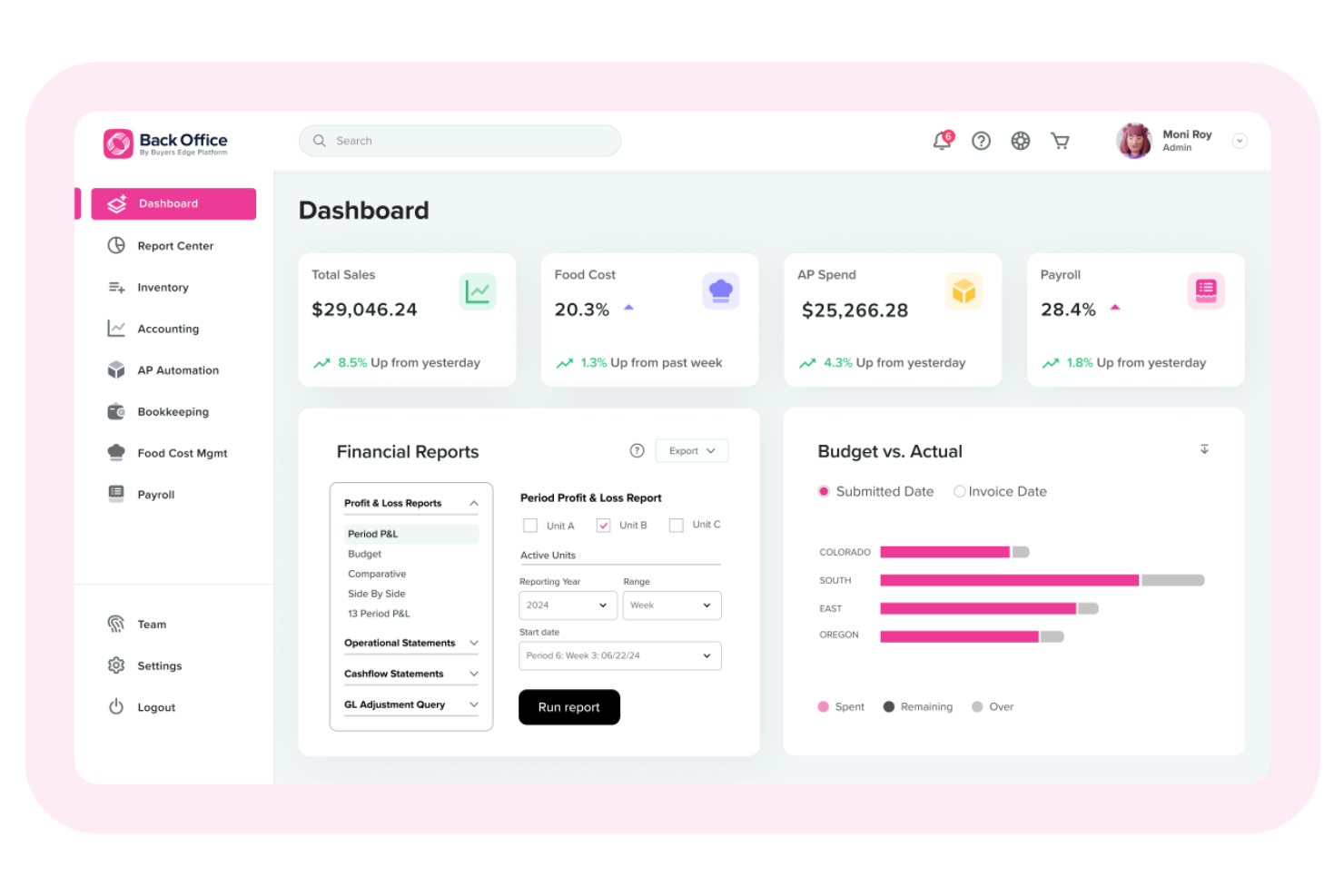
Back Office is a thorough restaurant management software designed for independent restaurants, multi-concept operations, franchisees, and franchisors. It offers solutions for inventory management, accounting, payroll, and food cost management.
Why I picked Back Office: It's focused on cost control, with features such as detailed financial reporting and recipe costing. You can track expenses accurately and manage your labor and food costs. The software also provides data analytics to help you make informed decisions. This makes it ideal for restaurants looking to improve their financial oversight and profitability.
Standout Features and Integrations:
Features include cash management for cohesive financial operations, automated accounts payable for efficient expense tracking, and customizable reporting tools for detailed insights.
Integrations include QuickBooks, Square, Toast, Aloha, Micros, Revel, Lightspeed, Linga, Maitre'D, Squirrel, Sync POS, and more.
Pros and Cons
Pros:
- Supports multi-unit operations
- Detailed financial reporting
- Effective cost management
Cons:
- Requires ongoing training
- Occasional performance issues
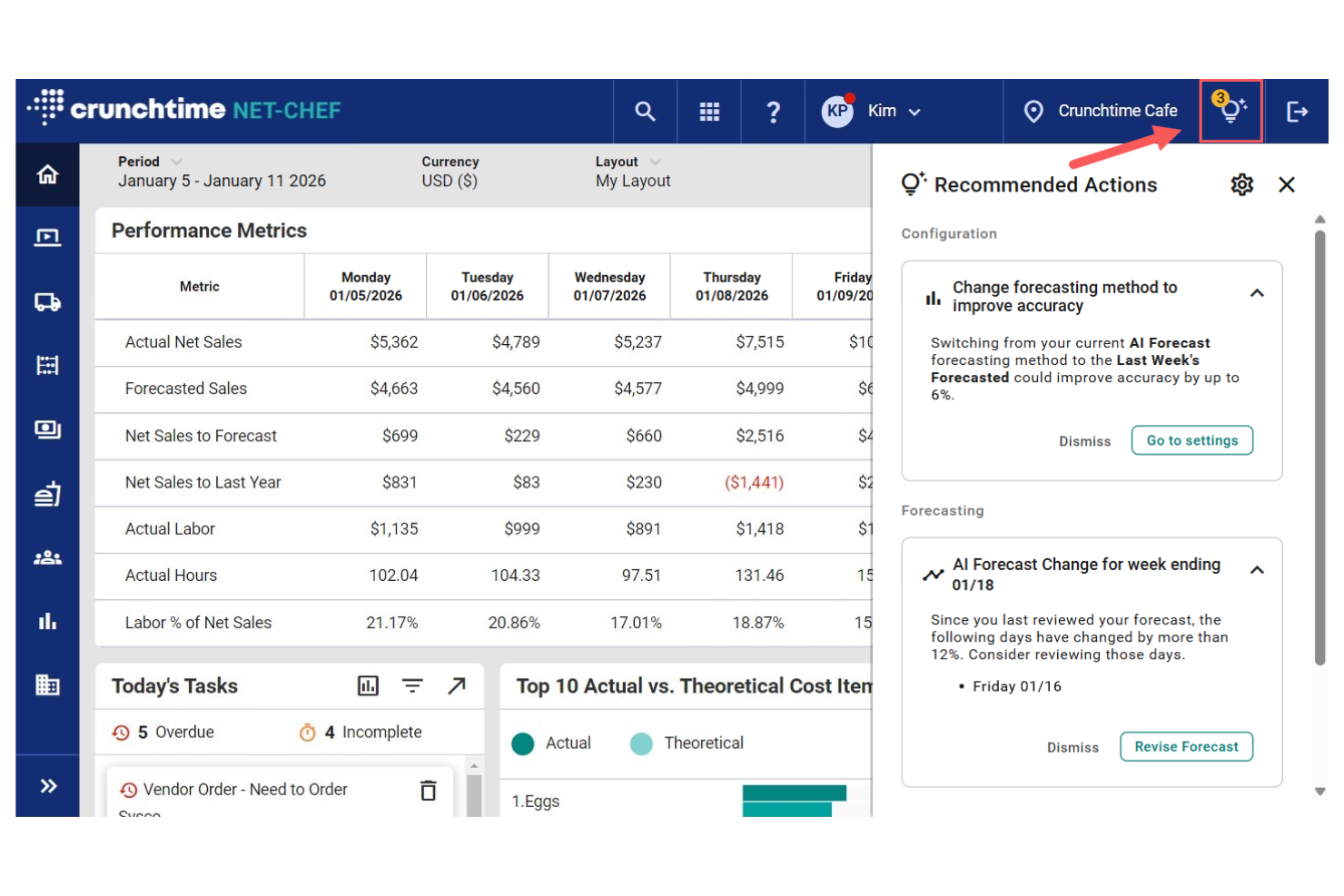
Crunchtime is an inventory management solution tailored for restaurants and food service businesses. It offers core functions in inventory control, workforce management, and supply chain operations.
Why I picked Crunchtime: It provides detailed reporting capabilities that give you in-depth insights into your operations. You can track inventory usage and costs with precision, helping your team make informed decisions. The system also supports labor management, allowing you to optimize staffing levels based on sales data. These features make it a great choice for those who value detailed reporting for operational efficiency.
Standout Features and Integrations:
Features include recipe management that helps you maintain consistency, automated inventory tracking to reduce discrepancies and manual errors, and sales forecasting tools to predict your future needs.
Integrations include QuickBooks, ADP, Paycor, Paylocity, Square, Revel, Oracle MICROS, Aloha, Squirrel, and more.
Pros and Cons
Pros:
- Effective supply chain management
- Accurate inventory tracking
- Supports labor management
Cons:
- Limited real-time visibility
- Requires regular updates

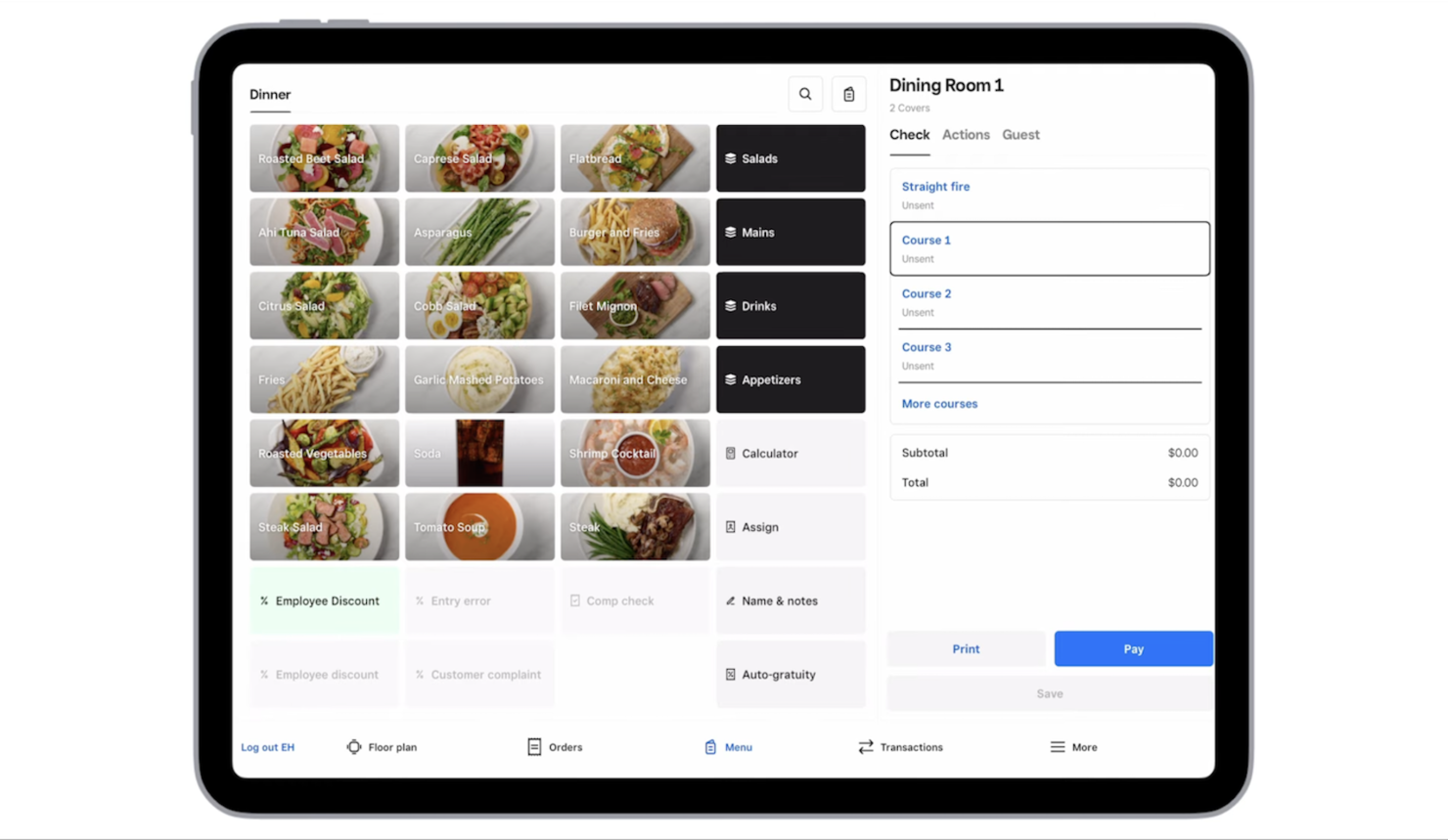
Square Inventory Management for Restaurants is built into Square’s POS system and is designed for small to midsize restaurants that need real-time inventory tracking tied directly to sales. It helps restaurant owners manage ingredients, menu items, and stock levels automatically as orders are placed.
Why I picked Square: It stands out for its seamless integration with Square for Restaurants POS, ensuring inventory updates automatically with every sale. This reduces manual counting and helps prevent stockouts on key ingredients. Square also supports modifiers and item variations, making it easier to track ingredients across different menu items. Low-stock alerts help restaurant managers reorder before supplies run out, improving operational efficiency.
Standout Features and Integrations:
Features include real-time inventory syncing with POS sales, ingredient-level tracking, low-stock alerts, and support for item modifiers and variations.
Integrations include Square for Restaurants, Square Online, QuickBooks, DoorDash, Uber Eats, and other Square ecosystem tools.
Pros and Cons
Pros:
- Easy setup with Square POS
- Built specifically for restaurant workflows
- Automatic inventory updates from sales
Cons:
- Best suited for Square-based restaurants
- Limited advanced ingredient forecasting
New Product Updates from Square
Square Introduces Neighborhoods on Cash App
Square launches Neighborhoods on Cash App, offering businesses access to over 57 million active accounts, direct marketing, neighborhood rewards, and a 1% processing fee. For more information, visit Square's official site.
 .
.Other Inventory Management Software for Restaurants
Here are some additional inventory management software for restaurants options that didn’t make it onto my shortlist, but are still worth checking out:
- TouchBistro
For iPad-based POS systems
- NetSuite
For integrated business management


Inventory Management Software for Restaurant Selection Criteria
When selecting the best inventory management software for restaurants to include in this list, I considered common buyer needs and pain points, such as reducing food waste and improving stock accuracy. I also used the following framework to keep my evaluation structured and fair:
Core Functionality (25% of total score)
To be considered for inclusion in this list, each solution had to fulfill these common use cases:
- Track inventory levels
- Manage supplier orders
- Generate inventory reports
- Forecast inventory needs
- Support multi-location management
Additional Standout Features (25% of total score)
To help further narrow down the competition, I also looked for unique features, such as:
- Automated invoice processing
- Real-time analytics dashboards
- Mobile app access
- Recipe costing tools
- Integration with POS systems
Usability (10% of total score)
To get a sense of the usability of each system, I considered the following:
- Intuitive interface design
- Easy navigation
- Minimal learning curve
- Customizable user settings
- Responsive design for mobile devices
Onboarding (10% of total score)
To evaluate the onboarding experience for each platform, I considered the following:
- Availability of training videos
- Interactive product tours
- Access to webinars
- Step-by-step setup guides
- Availability of chatbots for assistance
Customer Support (10% of total score)
To assess each software provider's customer support services, I considered the following:
- 24/7 availability
- Multiple support channels
- Response time
- Quality of support resources
- Availability of a dedicated account manager
Value for Money (10% of total score)
To evaluate the value for money of each platform, I considered the following:
- Competitive pricing
- Range of features included
- Availability of tiered pricing plans
- Cost relative to benefits
- Satisfaction with pricing transparency
Customer Reviews (10% of total score)
To get a sense of overall customer satisfaction, I considered the following when reading customer reviews:
- Overall satisfaction rating
- Frequency of updates and improvements
- Feedback on reliability
- Comments on ease of use
- Comparison to competitors' offerings
How To Choose Inventory Management Software for Restaurants
It's easy to get bogged down in long feature lists and complex pricing structures. To help you stay focused as you work through your unique software selection process, here's a checklist of factors to keep in mind:
| Factor | What To Consider |
|---|---|
| Scalability | Will the software grow with your business? Check if it can handle more locations or increased inventory as you expand. Look for solutions that offer tiered plans with room to grow. |
| Integrations | Does it work with your current systems? Ensure it connects with your POS, accounting software, and other tools to avoid data silos and manual work. |
| Customizability | Can you adjust it to fit your needs? Look for options that let you customize reports, workflows, and settings to match your unique processes. |
| Ease of Use | Is the interface intuitive? Test the software to see if your team can learn and use it without extensive training. A complex system might slow down operations. |
| Implementation and Onboarding | How long will it take to get up and running? Consider the time and resources needed for setup and training. Look for vendors offering strong onboarding support. |
| Cost | Does it fit your budget? Compare pricing models and watch for hidden fees. Ensure you understand the total cost of ownership, including any extra charges for additional features. |
| Security Safeguards | How secure is the data? Check for encryption, user permissions, and compliance with data protection laws to protect sensitive information. |
| Support Availability | What support options are available? Consider the availability of customer service and technical support. Look for 24/7 access if your operations run around the clock. |
What Is Inventory Management Software for Restaurants?
Inventory management software for restaurants is a tool that helps manage and track food and supply inventories. Restaurant managers, chefs, and procurement teams generally use these tools to reduce waste, control costs, and keep stock levels accurate.
Real-time tracking, automated ordering, and detailed reporting features help with efficient inventory control and decision-making. These tools provide value by improving operational efficiency and profitability for restaurant businesses.
Features
When selecting inventory management software for restaurants, keep an eye out for the following key features:
- Real-time tracking: Monitor inventory levels instantly to avoid overstocking or running out of essential items.
- Automated ordering: Automatically reorder supplies when inventory counts fall below set thresholds, saving time and reducing manual errors.
- Detailed reporting: Generate reports on inventory usage, sales trends, and cost analysis to make informed business decisions.
- Recipe costing: Calculate the cost of recipes to ensure pricing accuracy and profitability.
- Mobile app access: Manage inventory on the go with mobile capabilities, allowing for flexibility and convenience.
- Multi-location support: Track inventory across multiple restaurant locations to maintain consistency and control.
- Customizable dashboards: Personalize dashboards to display key metrics and data that are most relevant to your operations.
- Supplier management: Keep track of supplier details, orders, and performance to improve vendor management while ensuring timely deliveries and quality supplies.
Benefits
Implementing inventory management software for restaurants provides several benefits for your team and your business. Here are a few you can look forward to:
- Reduced waste: Real-time tracking and automated ordering help minimize waste by ensuring you only purchase what you need.
- Cost savings: Recipe costing and detailed reporting provide insights into expenses, helping you identify areas to cut costs and improve profitability.
- Improved efficiency: Automating inventory processes frees up time for your team to focus on other tasks, boosting overall productivity and reducing labor costs.
- Better decision-making: Access to detailed analytics and reports enables informed decisions about stock levels, pricing, and supplier management.
- Increased accuracy: Automated data entry and tracking reduce manual errors, ensuring more accurate inventory records.
- Stronger supplier relationships: Managing supplier details and performance helps maintain timely deliveries and quality supplies.
- Flexibility and mobility: Mobile app access allows you to manage inventory from anywhere, providing flexibility and convenience.
Costs and Pricing
Selecting inventory management software for restaurants requires an understanding of the various pricing models and plans available. Costs vary based on features, team size, add-ons, and more. The table below summarizes common plans, their average prices, and typical features included in inventory management software solutions for restaurants:
Plan Comparison Table for Inventory Management Software for Restaurants
| Plan Type | Average Price | Common Features |
|---|---|---|
| Free Plan | $0 | Basic inventory tracking, limited reporting, and basic supplier management. |
| Personal Plan | $24-$69/month | Inventory tracking, basic reporting, mobile access, and limited integrations. |
| Business Plan | $150-$300/month | Advanced reporting, automated ordering, recipe costing, and multi-location support. |
| Enterprise Plan | $150-$500/month | Customizable dashboards, detailed analytics, a full integration suite, and dedicated support. |
Inventory Management Software for Restaurants FAQs
Here are some answers to common questions about inventory management software for restaurants:
Does inventory management software for restaurants support perishable inventory tracking?
Yes, many restaurant inventory platforms are built to track perishables, including expiration dates and shelf life. You can receive alerts when ingredients near spoilage and monitor stock rotation. This reduces food waste, lowers inventory costs, and helps maintain food safety compliance in the kitchen.
Can I integrate inventory management software with my existing POS system?
Yes, most inventory management software solutions offer integrations with popular POS systems. Before purchasing, check if the software supports your specific POS system to ensure effective data flow between platforms. Integration allows for real-time updates and helps maintain accurate inventory counts.
If your current POS isn’t supported, consider using a middleware solution to bridge the gap. Always test the integration during a trial period to iron out any issues before fully committing
What kind of support should I expect from software vendors?
You should expect inventory management products to have in-depth support options, including email, phone, and live chat. Many vendors offer dedicated account managers to assist with onboarding and ongoing issues. Look for vendors that provide extensive online resources, such as FAQs, user forums, and video tutorials.
Consider the availability of support during your operating hours, especially if you run a late-night or 24/7 operation. Check reviews or ask for references to gauge the quality and responsiveness of their support team.
How can inventory management software help with compliance?
Inventory management software can assist with compliance by automating record-keeping and providing audit trails. It helps you maintain accurate stock levels and track expiry dates to adhere to health regulations. Some software also offers features for labeling and tracking allergens, which is vital for food safety compliance.
Regular updates from the vendor can keep your system aligned with the latest regulations. Always verify that the software meets local compliance standards before purchasing.
What's Next:
If you're in the process of researching inventory management software for restaurants, connect with a SoftwareSelect advisor for free recommendations.
You fill out a form and have a quick chat where they get into the specifics of your needs. Then you'll get a shortlist of software to review. They'll even support you through the entire buying process, including price negotiations.