
20 Best Email Marketing Platforms for Ecommerce in 2026

The 10 Best Ecommerce Email Marketing Software
Let’s first look at our top 10 picks of the best ecommerce email platforms for smarter marketing in their inboxes.


If your email marketing strategy is “send newsletters whenever we remember,” you’re leaving money on the table.
The right ecommerce email marketing software transforms those sporadic blasts into automatic, targeted sales machines—no extra effort required.
Think of these platforms as your silent sales team, nudging shoppers with perfectly-timed reminders and uncanny recommendations.
Whether it’s the sneakers they abandoned or the add-on they didn’t know they needed, your emails land exactly when they should.
And yeah, there are a ton of options—most overpromising, many underdelivering. We’ve sorted through the noise, put the top contenders through their paces, and rounded up the best ecommerce email marketing software you’ll actually want to use.
Let’s get to it.
Why Trust Our Software Reviews
Comparing the Best Ecommerce Email Marketing Software, Feature by Feature
One of your top of mind considerations when choosing an email marketing solution is definitely pricing. So, first we’ll compare pricing on our top ecommerce email platforms. Then, click Compare Software to compare the other key features.
| Tool | Best For | Trial Info | Price | ||
|---|---|---|---|---|---|
| 1 | Best for automation features | Free trial + free plan available | From $25/user/month (billed annually) | Website | |
| 2 | Best for API integration and control | Free plan available | From $19/month | Website | |
| 3 | Best for advanced segmentation | Free plan + free demo available | From $20/month | Website | |
| 4 | Best for AI-driven personalization | Free demo available | Pricing upon request | Website | |
| 5 | Best for design-driven email marketing | Free plan available | From $19/user/month (billed annually) | Website | |
| 6 | Best for audience segmentation | Free plan available | From $16/month | Website | |
| 7 | Best for targeting the customer lifecycle | 14-day free trial + free demo available | From $15/month (billed annually) | Website | |
| 8 | Best for multichannel marketing campaigns | 60-day free trial available | From $19.95/month | Website | |
| 9 | Best for ecommerce businesses | 14-day free trial + free demo available | From $39/month | Website | |
| 10 | Best for seamless platform integrations | Free demo | Pricing upon request | Website |

The Best Ecommerce Email Marketing Software, Reviewed
Let’s look at each of my top 10 email marketing platforms, detailing why it was picked, top features, top integrations, pros and cons, and a screenshot of the tool in action.

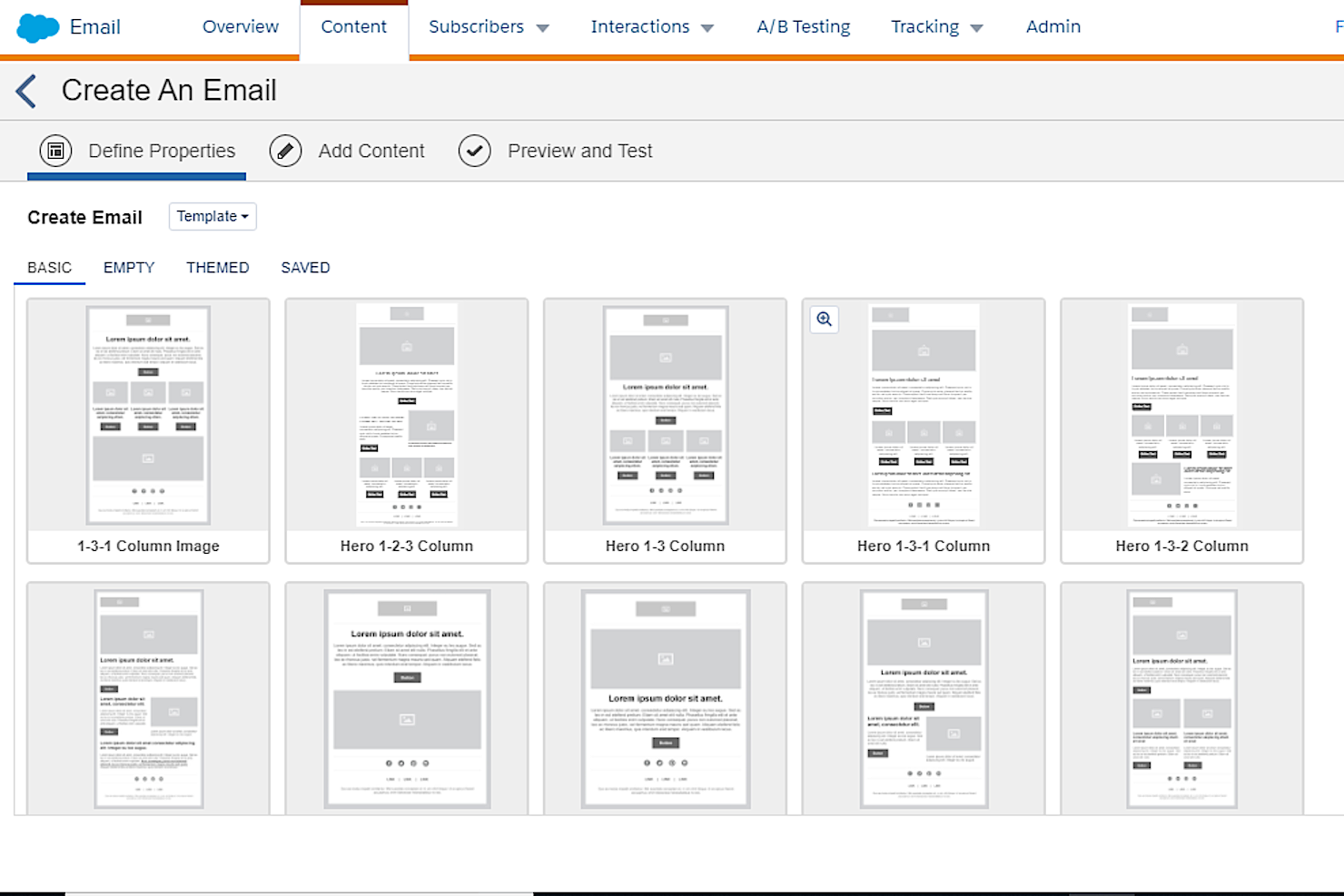
Salesforce CRM serves as a versatile tool for businesses seeking to enhance their email marketing strategies. Its email marketing capabilities are particularly appealing to organizations that value personalized customer engagement and streamlined marketing processes. By offering advanced features such as segmentation and automation, Salesforce CRM addresses the challenge of delivering timely, relevant content to diverse audience segments. Whether you're a marketing professional in a large enterprise or part of a growing business, the platform's ability to integrate with existing systems and its emphasis on analytics can help you optimize your campaigns and achieve measurable results.
Why I Picked Salesforce CRM
I picked Salesforce CRM for its exceptional automated features, which are integral to modern email marketing strategies. The platform's automation tools allow you to set up complex workflows that can trigger emails based on specific customer behaviors or events, ensuring timely and relevant communication. Additionally, Salesforce CRM's dynamic content capabilities enable you to personalize emails on a large scale, tailoring messages to individual customer preferences. These features not only enhance customer engagement but also free up your team's time, allowing them to focus on crafting compelling content rather than manual tasks.
Salesforce CRM Key Features
In addition to its powerful automation capabilities, Salesforce CRM offers several other features that can elevate your email marketing efforts:
- Segmentation Tools: Allow you to create targeted email lists based on customer behavior and preferences, ensuring your messages reach the right audience.
- Customizable Email Templates: Provide a user-friendly interface for designing visually appealing emails that align with your brand's aesthetic.
- Performance Analytics: Offer insights into campaign effectiveness, enabling data-driven decisions to optimize future marketing efforts.
- Integration with Einstein AI: Leverages artificial intelligence to provide personalized recommendations and insights, enhancing the overall impact of your email campaigns.
Salesforce CRM Integrations
Integrations include Google Analytics, Mailchimp, HubSpot, Marketo, Microsoft Outlook, Slack, Dropbox, Zendesk, QuickBooks, and DocuSign.
Pros and Cons
Pros:
- Flexible and comprehensive integration system
- Scalability and customizability
- Robust feature set
Cons:
- May not be appropriate for small businesses
- Steep learning curve
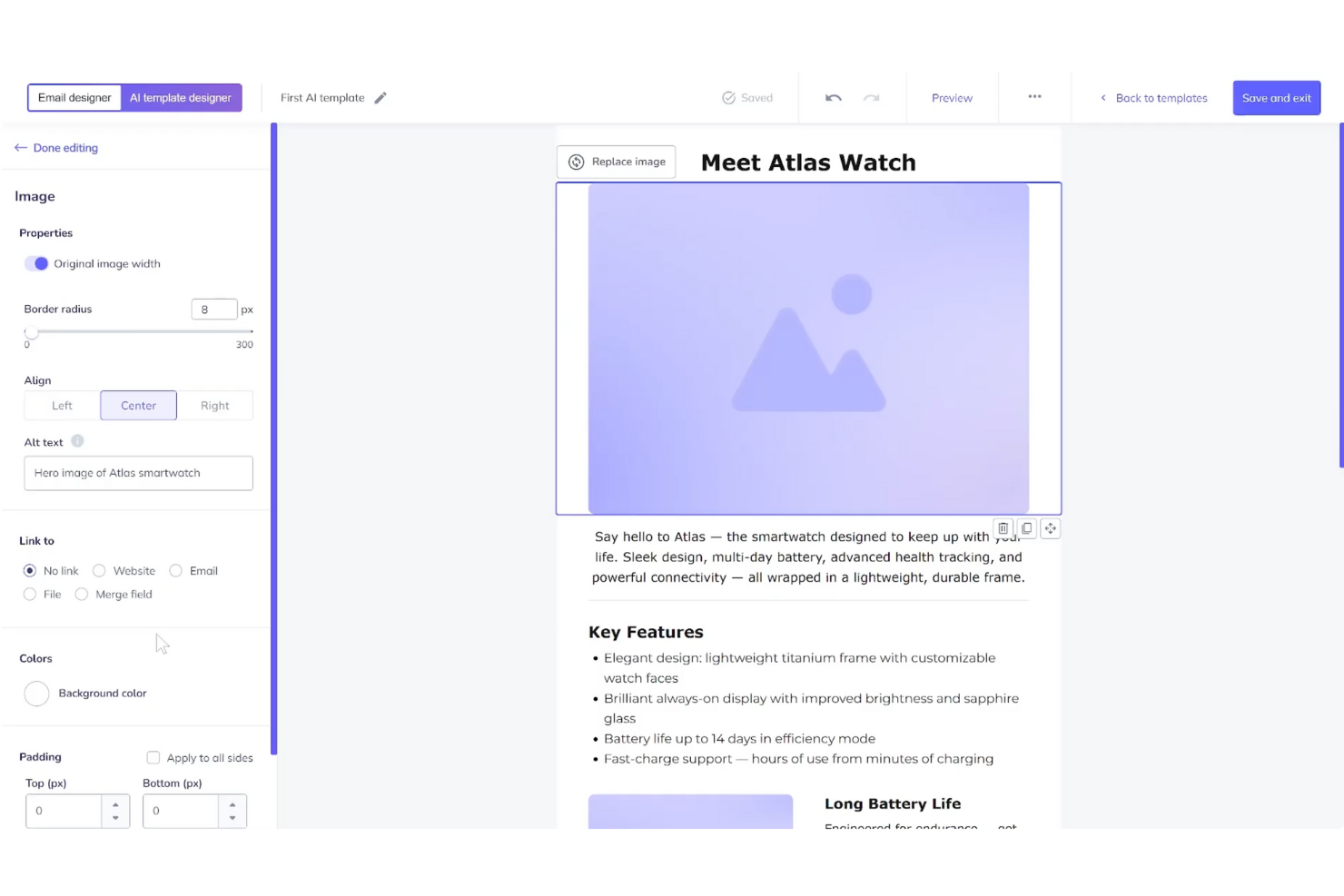
For businesses seeking a dynamic email marketing solution, Elastic Email stands out with its suite of tools designed to enhance communication and engagement. Whether you're a small business owner or part of a larger marketing team, Elastic Email provides the capabilities to manage subscribers, design compelling newsletters, and automate email flows, all while ensuring data security and compliance. By integrating with applications like HubSpot and Shopify, you can refine your marketing operations.
Why I Picked Elastic Email
I picked Elastic Email for its powerful API integration, which offers full control over email sending and automation, making it a great fit for developers and marketers alike. The AI Template Designer is another standout feature that lets you quickly create visually appealing email templates. Additionally, the platform provides comprehensive tools for subscriber management and campaign monitoring, helping email marketers maintain audience engagement and track performance.
Elastic Email Key Features
In addition to API integration and control, Elastic Email offers:
- Landing Pages: Create custom landing pages to capture leads and enhance your marketing campaigns.
- Customizable Signup Forms: Design and embed forms on your website to grow your subscriber list.
- Team Chat: Facilitate internal communication with a built-in chat feature for team collaboration.
- Live Chat and Help Desk: Provide real-time customer support and manage inquiries efficiently.
Elastic Email Integrations
Integrations include HubSpot, PayPal, Shopify, Google Analytics, WordPress, WooCommerce, Zapier, Salesforce, Microsoft Dynamics, and Mailchimp. An API is available for custom integrations.
Pros and Cons
Pros:
- Built-in email automation enhances marketing workflows
- Strong analytics and reporting tools for tracking performance
- Comprehensive API integration for flexible email management
Cons:
- Some users report occasional deliverability issues
- Interface is criticized for being less polished than rivals

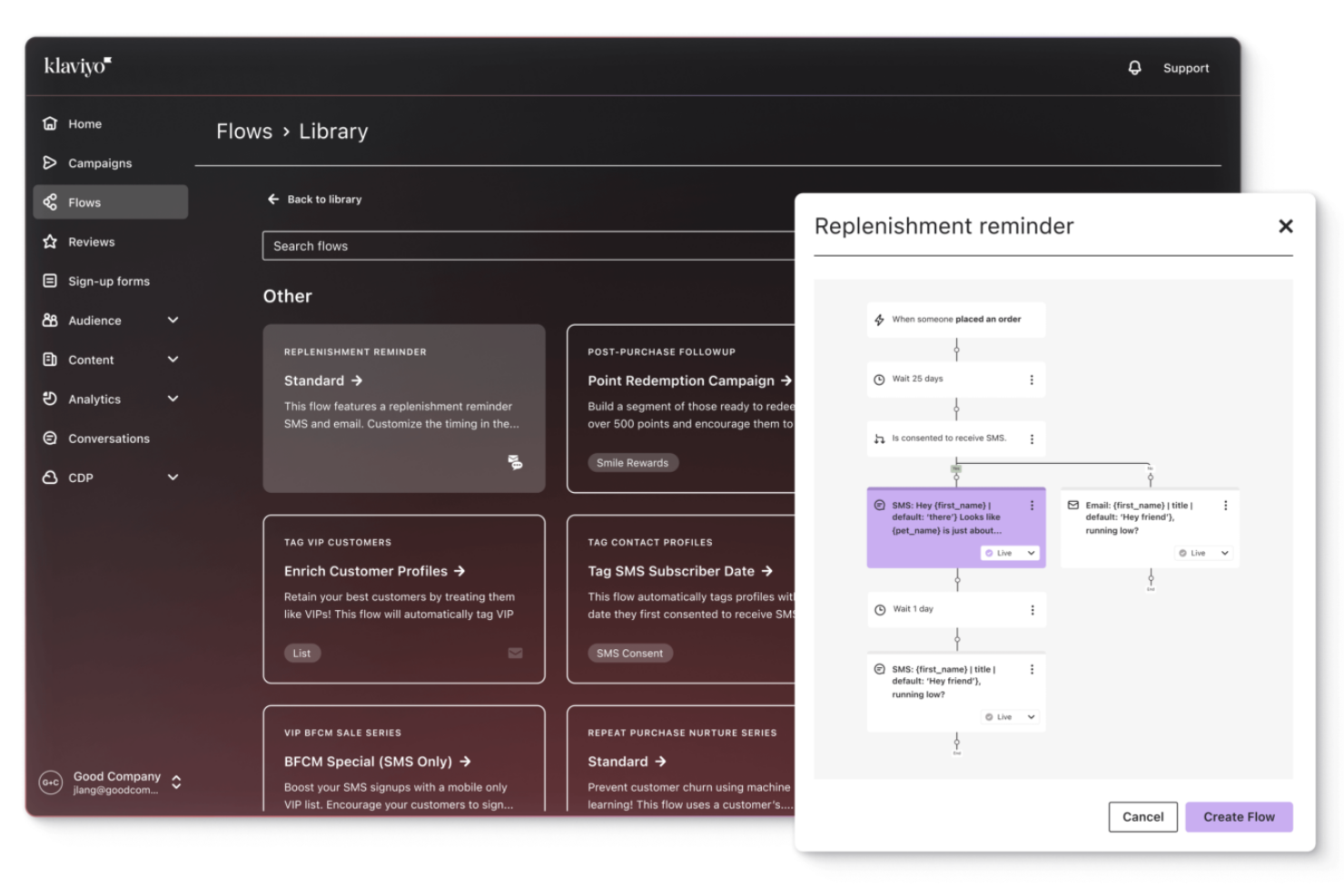
Whether you're a small startup or a large enterprise, Klaviyo's robust platform can help you personalize marketing across email, SMS, and social media. With its focus on data-driven decision-making and seamless integration with numerous applications, Klaviyo addresses the challenge of unifying scattered customer information to enhance marketing performance.
Why I Picked Klaviyo
I picked Klaviyo for its ability to turn customer data into personalized marketing strategies. The platform's AI-driven insights allow you to predict customer behavior and tailor your campaigns accordingly, ensuring that your messaging resonates with your audience. Additionally, Klaviyo's advanced segmentation feature lets you target specific customer groups with precision, enhancing engagement and conversion rates. These capabilities make Klaviyo a compelling choice for businesses looking to optimize their email marketing efforts.
Klaviyo Key Features
In addition to its advanced segmentation and AI-driven insights, Klaviyo offers other notable features for email marketing:
- Real-Time Data Activation: This feature allows your team to instantly act on customer data, ensuring timely and relevant communication.
- Unified Customer Profiles: By consolidating customer data into single profiles, your team can gain a comprehensive view of each customer’s interactions.
- Omnichannel Marketing: Klaviyo supports marketing across multiple channels, including email, SMS, and social media, providing a cohesive customer experience.
- Advanced Analytics: With in-depth analytics, your team can track campaign performance and make data-driven decisions to refine marketing strategies.
Klaviyo Integrations
Klaviyo integrates seamlessly with popular platforms, including Shopify, WooCommerce, Magento, BigCommerce, Salesforce Commerce Cloud, Stripe, Zendesk, Facebook, Google Ads, and Slack.
Pros and Cons
Pros:
- Offers comprehensive data integration for unified customer profiles.
- Provides AI-driven insights for personalized marketing strategies.
- Supports omnichannel marketing, including email, SMS, and social media.
Cons:
- Some users desire more customization options.
- Pricing can escalate quickly as contact lists grow.

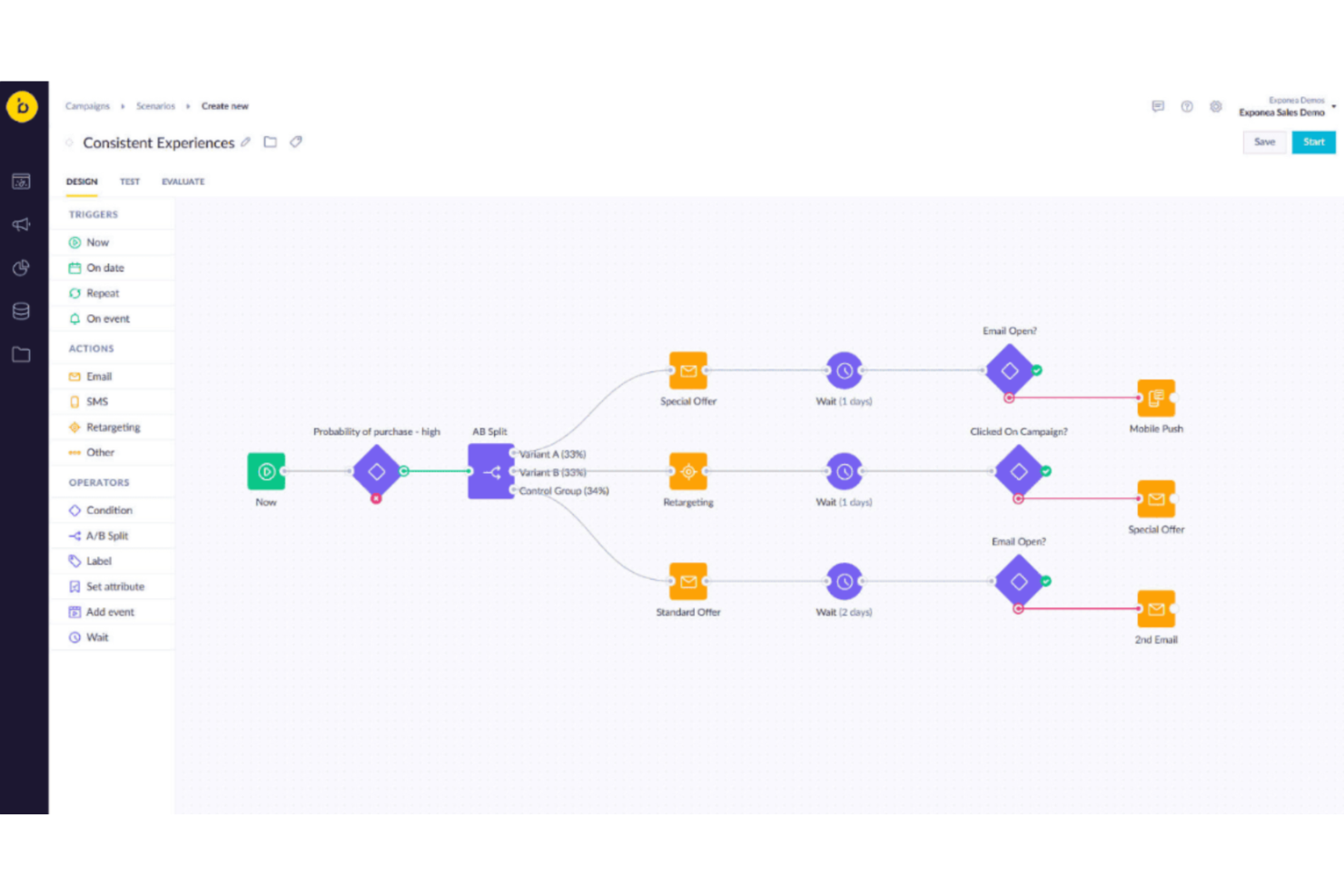
Bloomreach is an email marketing software designed for businesses that want to manage customer communication through automated email campaigns. It helps teams use customer data to send more relevant messages and organize campaigns across multiple channels. With Bloomreach, marketing teams can create targeted emails and track how customers interact with them.
Why I Picked Bloomreach
I picked Bloomreach for its AI personalization tools, which help tailor email campaigns based on customer behavior and preferences. The platform uses Loomi AI to analyze customer data and adjust messages across channels, including email. This helps businesses send more relevant content based on how customers interact with a brand. Bloomreach also includes automation tools that help teams create and manage campaigns more efficiently, reducing manual work when running email marketing programs.
Bloomreach Key Features
In addition to its AI-driven personalization, Bloomreach offers:
- Connected Orchestration: Allows your team to manage and synchronize marketing efforts across different channels, ensuring a cohesive customer journey.
- Shopping Agents: Engage customers with personalized shopping experiences, driving conversions directly from email interactions.
- Channel Integration: Supports seamless communication through email, SMS, and web personalization, enhancing the reach and effectiveness of your campaigns.
- Customer Experience Optimization: Provides tools to continuously refine and improve customer interactions, helping your business build lasting relationships.
Bloomreach Integrations
Integrations include Shopify, Magento, Salesforce Commerce Cloud, BigCommerce, Snowflake, Google BigQuery, Databricks, and other marketing and data platforms.
Pros and Cons
Pros:
- Supports omnichannel campaigns across email, SMS, and web
- Real time campaign optimization
- Autonomous campaign management agents
Cons:
- Some advanced features feel limited for highly customized marketing workflows
- Certain features require manual adjustments for deeper campaign optimization
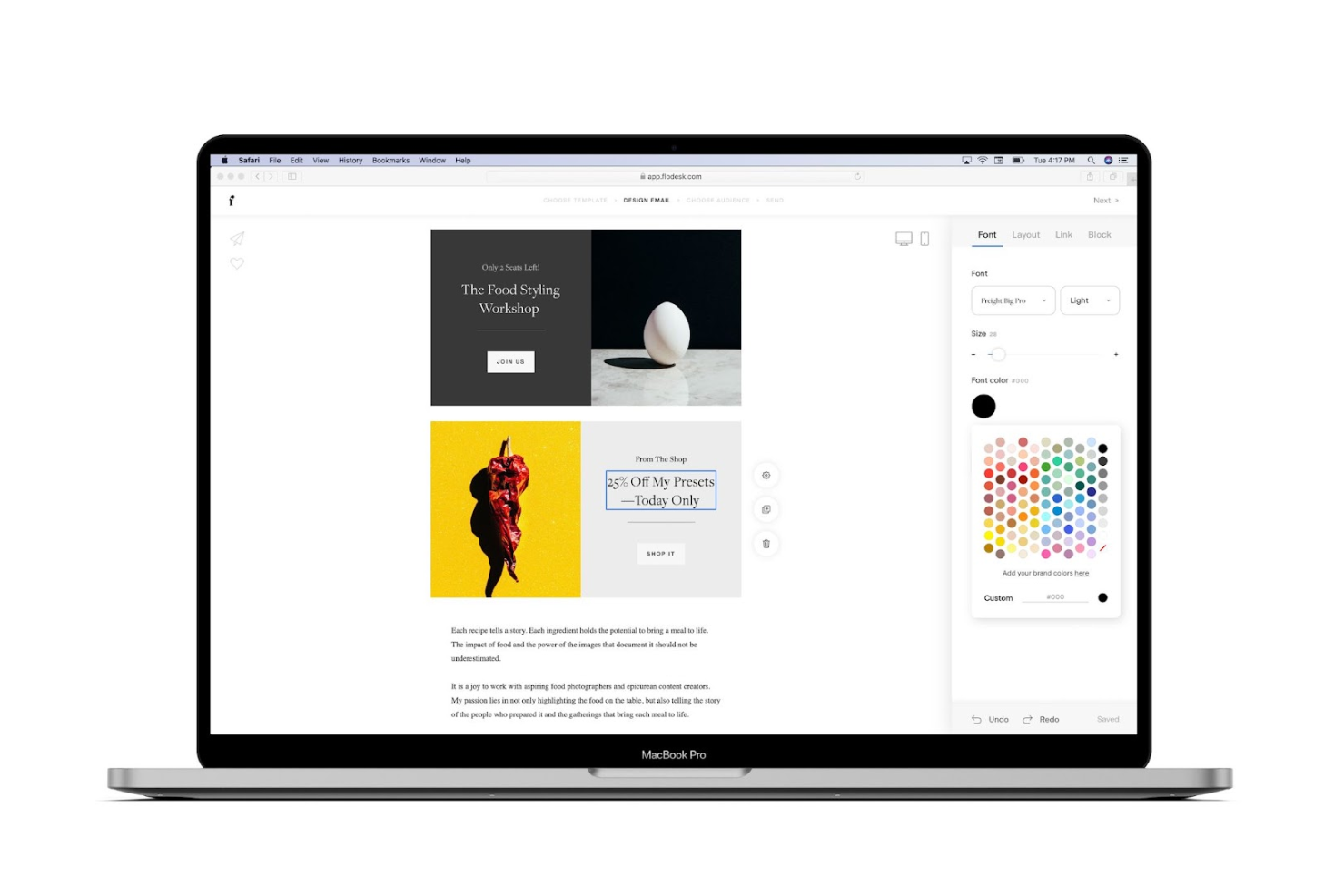
For businesses and marketers looking to capture their audience's attention with beautifully designed emails, Flodesk offers a refreshing approach to email marketing. With its focus on aesthetics and ease of use, Flodesk appeals to creative professionals and small businesses who value design and need a platform that simplifies the creation of visually stunning campaigns. By addressing the challenge of standing out in crowded inboxes, Flodesk provides tools that make it easier to create impactful emails that are both engaging and effective.
Why I Picked Flodesk
I picked Flodesk because of its emphasis on design and deliverability, which are crucial in effective email marketing. Flodesk allows you to create visually appealing emails with custom fonts and brand colors, ensuring your messages align with your brand identity. Additionally, its automation capabilities, like abandoned cart recovery, help you engage your audience without constant manual effort. These features make Flodesk an attractive choice for those looking to enhance their email marketing strategies.
Flodesk Key Features
In addition to its standout design features, Flodesk offers additional tools to enhance your email marketing efforts:
- Countdown Timers: Create urgency and encourage immediate action with customizable countdown timers in your emails.
- Embedded Polls: Gather valuable feedback from your audience directly within your emails using embedded polls.
- Link-Triggered Actions: Automate follow-up actions based on user interactions with links in your emails.
- Analytics: Access detailed analytics to measure the performance of your campaigns and make informed decisions.
Flodesk Integrations
Integrations include Shopify, Zapier, Canva, and Instagram.
Pros and Cons
Pros:
- Visually polished email templates
- Built-in automation workflows
- Custom font and brand control
Cons:
- Limited advanced API access
- No built-in SMS marketing

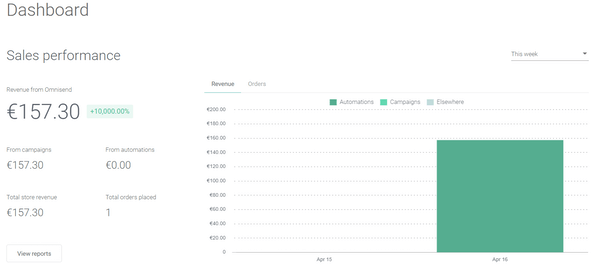
Are you looking to enhance your eCommerce business's marketing efforts? Omnisend might be the perfect fit for your email marketing needs. Designed specifically for online retailers, Omnisend offers a suite of features like email and SMS marketing, web push notifications, and seamless integrations with popular platforms. Whether you're aiming to boost sales or improve customer engagement, this tool provides customizable templates and automation capabilities that can address your unique marketing challenges, making it a valuable asset for growing your eCommerce business.
Why I Picked Omnisend
I picked Omnisend for its outstanding audience segmentation tools, which are crucial for any email marketing strategy. With Omnisend, you can create dynamic segments that update in real-time based on customer data like behavior and purchase history. This feature ensures that your marketing campaigns are always targeting the right audience with personalized messages. Additionally, Omnisend offers pre-built segment templates and a visual customer lifecycle map, making it easier to understand and engage your customers at every stage of their journey.
Omnisend Key Features
In addition to its segmentation capabilities, Omnisend offers a variety of other features that can enhance your marketing efforts:
- AI Integration: Leverage artificial intelligence to generate email content and personalize product recommendations.
- Multi-Channel Automation: Combine email, SMS, and push notifications for cohesive marketing efforts.
- Pre-Made Templates: Quickly set up campaigns with mobile-ready templates and smart personalization features.
- Performance Reports: Track revenue sources, campaign performance, and deliverability metrics.
Omnisend Integrations
Omnisend offers over 160 integrations to boost your eCommerce sales, including popular platforms like Shopify, WooCommerce, BigCommerce, Magento, Wix, Squarespace, Salesforce, HubSpot, Facebook Ads, and Google Ads. These integrations allow for seamless data synchronization and enhanced marketing capabilities across multiple channels.
Pros and Cons
Pros:
- Comprehensive resources section
- Easy to create campaign-specific landing pages
- Deep Shopify integration
Cons:
- Has a bit of a learning curve
- Embedding multiple images into an email can be time-consuming
New Product Updates from Omnisend

Omnisend Enhances Cross-Store Segment Management
Omnisend introduces Copy Segments Across Stores that lets you duplicate and transfer audience segments between stores, helping teams manage multiple stores more efficiently and maintain consistent targeting. For more information, visit Omnisend's official site.
 .
.

ActiveCampaign is a customer experience automation platform and email marketing powerhouse that is about as feature-rich as they come.
Why I picked ActiveCampaign: As a customer experience platform, ActiveCampaign has invested a lot of time and effort into creating solutions that target the full customer lifecycle, as well as different types of users, like B2B, B2C and ecommerce clients.
They also offer customized solutions for key industries such as Agencies, Bloggers & Influencers, Education, Enterprise, Entertainments & Events, Fitness & Nutrition, Healthcare, Non-Profit, Small Businesses, Real Estate, Technology, or Travel & Hospitality.
ActiveCampaign standout features & integrations
Standout features include unlimited email sending with advanced templates for various use cases, from transactional messages to highly personalized campaigns. The platform’s predictive sending feature optimizes delivery times based on user behavior, increasing engagement rates. Additionally, marketing attribution tools help businesses track and measure the impact of their campaigns, ensuring data-driven decision-making.
Integrations include adTorch, Bonjoro, BurstSMS, Calendly, ERJA, Facebook, FuseDesk, Google Analytics, JustCall, Magento, NativeForms, Pipedrive, Shopify, Slack, Spiffy, and Xoxoday Plum.
Pros and Cons
Pros:
- Out-of-the-box automation templates
- Simple to create branded email templates
- Easy to set up powerful automations
Cons:
- Customizing an email’s design can sometimes be difficult
- Has a bit of a learning curve for beginners


SendGrid is a Twilio product, meaning you get access to email marketing, as well as WhatsApp, SMS, and video solutions. They are currently used by large companies like Airbnb, Glassdoor, Instacart, Spotify, Uber, and Yelp.
Why I picked SendGrid: As a multichannel service, SendGrid is great for those who view email marketing as just one of many conversational platforms through which they want to communicate with their customers. Because of this, it can be more complex than others on this list but it’s worth it if you want touch points across every device and app type.
SendGrid standout features & integrations
Standout features include advanced email design tools that support both drag-and-drop editing and pure HTML customization, giving users full creative control. The platform also offers powerful automation options, including recurring emails and time-based drip series, helping businesses maintain consistent engagement. Additionally, dedicated IPs and custom domains enhance deliverability, ensuring emails land in inboxes rather than spam folders.
Integrations include Airtable, Bluecore, eData Source, FullContact, Google Cloud, Microsoft Azure, Softlayer, Twilio, WordPress, Yieldr, and Zapier.
Pros and Cons
Pros:
- Detailed email tracking and analytics
- Robust APIs and SDKs, making it a favorite among devs
- Exceptional email deliverability rates
Cons:
- Some advanced automations not possible
- Complexity for beginners


Drip is an email marketing software built specifically for e-commerce businesses. It was designed to help online retailers link their email drip campaigns directly to the customer buying cycle.
Why I picked Drip: Drip’s email platform offers advanced email segmentation, so you can be confident you’re tailoring your communications according to your customer’s preferences and recent actions. The software's customer segmentation data will tell you whether a consumer is first learning about your product, dangerously close to making that purchase, or is a loyal repeat customer. Also, thanks to their many pre-built templates and automations, you can spend less time crafting emails and more time developing your email marketing strategy.
Drip standout features & integrations
Standout features include advanced customer segmentation tools that allow businesses to tailor communications based on shopping behavior, purchase history, and engagement levels. The platform’s email builder offers both a point-and-click visual editor and custom HTML options, providing flexibility for different design needs. Additionally, Drip includes a playbook of automated best-practice emails, such as welcome emails, abandoned cart reminders, and post-purchase follow-ups, streamlining customer engagement.
Integrations include BigCommerce, Facebook Custom Audiences, Gravity Forms, Insightly, Magento, PayPal, Pipedrive, Shopify, Sleeknote, ViralSweep, WooCommerce, and Zapier.
Pros and Cons
Pros:
- Excellent list segmentation options
- Campaign duplication feature helps you save time
- Great reporting features
Cons:
- UI takes some getting used to
- Has a learning curve, especially for beginners


BigCommerce provides seamless integration with leading email marketing platforms, enabling users to leverage customer data effectively for targeted campaigns. By addressing challenges such as customer retention and cart abandonment, BigCommerce helps to maintain and grow your customer base with strategic email communications.
Why I Picked BigCommerce
I picked BigCommerce for its ability to integrate seamlessly with prominent email marketing platforms, allowing you to leverage automated campaigns that engage customers effectively. BigCommerce’s built-in customer groups enable precise segmentation based on purchase history and other key metrics, which is crucial for targeted email marketing. Additionally, its abandoned cart saver feature is a standout, helping you recover lost sales by automatically reaching out to customers who didn’t complete their purchases.
BigCommerce Key Features
Aside from its seamless integration capabilities, BigCommerce offers several other features that can elevate your email marketing strategy:
- Order Confirmation Emails: These emails reassure customers of their purchase decisions and help reduce returns by providing essential order details.
- Product Recommendation Emails: Encourage repeat purchases by offering personalized product suggestions based on a customer’s buying history.
- Re-engagement Emails: Target customers who haven't interacted in a while with incentives or updates to rekindle their interest.
- Seasonal Campaign Emails: Use seasonal themes to create urgency and promote relevant products, increasing engagement during peak times.
BigCommerce Integrations
Integrations include Mailchimp, ActiveCampaign, Constant Contact, Klaviyo, dotdigital, Omnisend, Privy, HubSpot, Bronto, and Mailigen.
Pros and Cons
Pros:
- automated email features
- comprehensive analytics
- email marketing platform integrations
Cons:
- limited features in lesser plans
- lacking integrated POS
Other Ecommerce Marketing Software
If the software options above still don’t meet your needs, here are a few other options you may want to look at:
- GetResponse
For engaging email campaigns
- AWeber
For email automation and sequences
- Campaign Monitor
For usability and ease of use
- iContact
For drag-and-drop design
- Constant Contact
For automatic subject line testing
- Campaigner
For email and SMS marketing
- Klaviyo
For advanced integrations
- Convertkit
For personalized email journeys
- WooCommerce
For upsells and cross-sells
- Creatio CRM
For no-code editing


Our Selection Criteria for Ecommerce Email Marketing Software
Selecting the right email marketing software for your ecommerce business is critical for driving sales and customer engagement. Here’s how we evaluate the top platforms, using key criteria to ensure they meet your business needs:
Core email marketing functionality (25% of total weighting score)
To be considered the best, an email marketing platform must provide essential tools to support ecommerce businesses, including:
- Automated email sequences. The ability to set up workflows for abandoned cart reminders, welcome series, and product recommendations.
- Advanced segmentation. Sophisticated audience segmentation based on behavior, demographics, and purchase history.
- Personalization. Dynamic content and tailored emails that adjust based on individual customer data.
- Integration with ecommerce platforms. Seamless connection to Shopify, WooCommerce, Magento, and others to sync data for real-time updates.
- Analytics and reporting. Built-in reporting to track open rates, click-through rates, conversions, and overall ROI.
Additional standout features (25% of total weighting score)
We also look for platforms that offer additional features that go beyond the basics:
- Multichannel marketing. The ability to manage campaigns across email, SMS, and push notifications to keep your brand top-of-mind.
- AI-powered personalization. Advanced AI tools that automatically adjust content and send times to maximize engagement.
- Pre-built templates. Ready-to-use, customizable templates that make it easy to design professional campaigns quickly.
- A/B testing. Robust tools for testing different email versions to find the most effective approach.
- Scalability. Software that can handle growing lists and increasingly complex campaigns as your business scales.
Usability (10% of total weighting score)
Ease of use is critical, especially for small teams or those without dedicated marketing resources:
- User-friendly interface. A clean, intuitive interface that makes creating and managing campaigns simple.
- Mobile accessibility. Responsive design that allows users to manage campaigns on the go via mobile or tablet.
- Easy-to-navigate workflows. Clear and logical workflows that support campaign creation and management without a steep learning curve.
Onboarding (10% of total weighting score)
How easy is it to get up and running with the platform?
- Training and resources. Comprehensive resource libraries with tutorials, webinars, and FAQs to help users get started.
- Interactive onboarding tools. Product tours, setup wizards, and pre-built workflows to streamline setup.
- Support during setup. Access to responsive support, such as live chat or dedicated account managers, to help new users during the onboarding phase.
Customer support (10% of total weighting score)
Reliable support is essential for troubleshooting and getting the most out of the platform:
- Availability. 24/7 support through multiple channels (live chat, phone, email) for immediate assistance.
- Proactive support. Some platforms offer dedicated account managers or priority support for higher-tier plans.
- Community forums. A vibrant, active user community for sharing insights, solutions, and best practices.
Value for money (10% of total weighting score)
Is the software worth the investment for your business?
- Transparent pricing. Clear, predictable pricing models that align with the features offered and avoid surprise fees.
- Flexible plans. Scalable pricing options that cater to businesses of all sizes, from startups to large enterprises.
- Feature inclusions. Essential features should be available in base plans without requiring expensive add-ons.
Customer reviews (10% of total weighting score)
What are other businesses saying about the software?
- User satisfaction. High ratings and positive feedback from businesses of all sizes regarding ease of use and effectiveness.
- Specific praise. Look for consistent user praise for key features, such as segmentation, support, and automation.
- Impact on growth. Reviews that highlight the platform’s ability to drive engagement, increase sales, and enhance customer retention.
By evaluating platforms with these criteria, we help you find the ecommerce email marketing software that will best support your business goals.
What is Ecommerce Email Marketing Software?
Ecommerce email marketing software is a platform that automatically sends targeted, personalized emails to your shoppers—turning browsers into buyers (and buyers into repeat customers).
It goes way beyond basic newsletters.
This software handles the heavy lifting: abandoned cart nudges, custom product recommendations, and those “just checking in” follow-ups you never have time for.
The real power is in its automation—it tracks what people click, buy, and ignore, then fires off exactly the right message at the perfect moment (no human micromanagement required).
Plug it into your Shopify or WooCommerce store, and you’ll have a tireless marketing machine working behind the scenes.
In short: it keeps your brand in your customers’ inboxes and revenue flowing—while you worry about literally anything else.
How to Choose Ecommerce Email Software
Choosing the right ecommerce email marketing software isn’t about picking the flashiest dashboard—it’s about finding a tool that actually helps you sell more (without giving you a headache). Here’s how to choose one you’ll still love six months from now:
| Step | What to look for | Why it matters |
|---|---|---|
| Automate everything | Flows triggered by real customer actions—cart abandonment, post-purchase, etc. | Keeps you top-of-mind and selling, even when you’re off the clock |
| Segment like a pro | Filters for behavior, purchase history, and demographics | Your emails stop feeling spammy and start actually converting |
| Make it stupid simple | Drag-and-drop editors, prebuilt templates, no “coding experience required” | Spend time writing, not wrestling with a clunky builder |
| Plug in everywhere | Integrations with Shopify, WooCommerce, Magento, and whatever else you use | All your data syncs up—goodbye, manual updates and weird gaps |
| Track what matters | Open/click rates, conversions, revenue per email | You see what’s working, kill what isn’t, and double down on winners |
| Plan for your glow-up | Flexible plans and features that won’t cap you as you scale | You won’t need to migrate software the second you hit your stride |
Focus on these, and you'll actually enjoy email marketing. Or at least, you'll enjoy the sales. And when customers have questions about their orders or need assistance, having quality customer service tools in place keeps the experience smooth.
Ecommerce Email Marketing Trends
Here are some key trends shaping the world of ecommerce email marketing in 2025:
- AI-powered personalization. AI tools are now creating highly personalized experiences by analyzing customer data to send targeted emails based on behavior, past purchases, and future predictions. This trend is helping brands deliver more relevant content to customers.
- Omnichannel marketing integration. Email marketing is evolving into part of a larger omnichannel strategy, with seamless integration of SMS, push notifications, and social media. This approach creates consistent customer journeys across different platforms.
- Interactive emails. Expect more emails featuring interactive content like image carousels, videos, and even embedded quizzes, all designed to increase user engagement and click-through rates.
- Sustainability in email marketing. As consumers become more eco-conscious, businesses are adjusting email frequency and content to minimize environmental impact while emphasizing sustainability in their campaigns.
- AI content generation. AI is taking over content creation by crafting subject lines, product recommendations, and even full email copy, making it easier to send personalized, engaging messages without requiring hours of manual work.
- Zero-party data collection. With the decline of third-party cookies, businesses are turning to zero-party data—information that customers willingly provide through surveys or preference settings—to fuel their email personalization efforts.
- Advanced analytics and real-time reporting. Marketers now have access to real-time data and advanced analytics, allowing them to monitor campaign performance on the fly and make adjustments to maximize engagement and ROI.
Key Features of Ecommerce Email Marketing Platforms
When it comes to ecommerce email marketing software, there are a ton of features designed to help you automate, personalize, and optimize your communication with customers.
Here are the key features you should look for:
- Automated workflows. Set up email sequences that run on autopilot, triggered by customer actions like abandoned carts, post-purchase thank-yous, or even personalized product recommendations based on browsing history. These workflows save you time and keep customers engaged without manual effort.
- Segmentation and personalization. No more one-size-fits-all emails. Use data like purchase history, demographics, or engagement levels to segment your audience and send hyper-targeted, personalized messages that hit the mark.
- Abandoned cart recovery. Nothing says, "we want you back" like a well-timed email reminding customers about the items they left behind. Throw in a discount or free shipping offer, and you’ve got a winning formula to reclaim those lost sales.
- Product recommendations. Using customer behavior data, these platforms can recommend products that fit the shopper’s taste. Whether it’s a cross-sell, upsell, or just a nudge toward items they browsed but didn’t buy, personalized suggestions increase the chances of a sale.
- Dynamic content. Forget static emails—dynamic content customizes itself to each recipient’s data. Think product suggestions, content blocks, or even special offers that change depending on who’s reading the email. It’s like each customer gets their own tailor-made message.
- A/B testing. Curious which subject line gets more clicks? A/B testing allows you to experiment with different email elements—subject lines, copy, layouts, or CTAs—and figure out which version delivers the best results. Data-backed decisions for the win!
- Analytics and reporting. Real-time reporting gives you a bird’s-eye view of your campaign performance. Track open rates, click-throughs, conversions, and even revenue generated, so you know exactly what’s working and what needs tweaking.
- Integration with ecommerce platforms. The best email marketing tools integrate seamlessly with Shopify, WooCommerce, Magento, and more, pulling in customer data to make emails more relevant and timely. Integration is the key to keeping everything—from product inventory to purchase history—aligned.
- Responsive design. With more people reading emails on their phones, having responsive email templates is a must. The software should ensure that your emails look flawless, whether opened on a desktop, tablet, or smartphone.
- Social media integration. Why stop at email? Some platforms let you sync up with social media, so you can promote your email campaigns across multiple channels and engage your audience wherever they hang out online.
- List growth tools. Growing your email list is crucial. Look for features like pop-up forms, exit-intent pop-ups, and lead magnets that help convert visitors into subscribers and increase your audience.
- Transactional emails. Beyond marketing, your software should handle transactional emails like order confirmations and shipping notifications. These must be on-brand and reliable to maintain a smooth customer experience from purchase to delivery.
With these features in your toolkit, you can build a robust email marketing strategy that drives sales, retains customers, and grows your business without a ton of manual effort.
Top Benefits of Ecommerce Email Marketing Software
Ecommerce email marketing software offers significant advantages that help you engage customers, increase sales, and streamline operations.
Here’s how it can boost your business:
- Automates customer engagement. Automated workflows keep customers engaged by sending triggered emails like abandoned cart reminders and post-purchase follow-ups—without requiring manual input.
- Boosts personalization. Segmenting your audience and sending personalized emails based on customer behavior improves engagement, as emails feel more relevant and targeted.
- Recovers lost sales. Abandoned cart recovery emails automatically remind customers about the items they left behind, often leading to completed purchases and salvaged revenue.
- Increases average order value. Personalized product recommendations based on browsing or purchase history encourage customers to add more to their carts, driving cross-sells and upsells.
- Saves time and resources. Automation handles repetitive tasks, allowing your team to focus on strategy and scale your email marketing efforts efficiently.
- Provides data-driven insights. Analytics track performance metrics like open rates and conversions, helping you refine campaigns for maximum effectiveness.
- Strengthens customer relationships. Regular, personalized emails build trust and loyalty, encouraging repeat purchases and keeping customers engaged.
- Enhances mobile engagement. Responsive email templates ensure your messages display correctly on any device, increasing accessibility and reach.
- Streamlines marketing efforts. Integration with ecommerce platforms and marketing tools ensures that your email strategy is aligned with your overall marketing, creating a cohesive customer experience.
Cost & Pricing of Ecommerce Email Marketing Software
Ecommerce email marketing software comes in various pricing tiers to accommodate businesses of all sizes, from startups to large enterprises. The cost typically depends on factors like the number of subscribers, features, and scalability.
Here’s a breakdown of common pricing structures you can expect:
| Plan Type | Average Price | Common Features | Best For |
|---|---|---|---|
| Free | $0 | Basic email campaigns, limited automations, up to 500 subscribers, limited templates, standard support. | Startups, hobbyists, or businesses with very small lists. |
| Basic | $9 – $20/month | Automated workflows, basic segmentation, limited reporting, up to 1,000 subscribers, simple templates. | Small businesses just starting with email marketing. |
| Professional | $50 – $100/month | Advanced segmentation, A/B testing, multichannel marketing (email, SMS), integrations, up to 5,000 subscribers. | Growing businesses needing more advanced features. |
| Advanced | $150 – $300/month | Full marketing automation, dynamic content, personalized product recommendations, advanced reporting, custom branding. | Medium to large businesses with complex needs and larger subscriber bases. |
| Enterprise | $350+/month | Full customizations, dedicated support, enterprise-level automations, priority customer service, up to 100,000+ subscribers. | Large enterprises or businesses handling very high-volume email campaigns. |
Key pricing factors to consider
- Subscriber limits. Most pricing tiers are based on the number of subscribers you manage. Higher tiers generally allow for more subscribers.
- Automation complexity. As you move up the pricing ladder, you’ll gain access to more advanced automation features, such as multichannel workflows, dynamic content, and behavior-based triggers.
- Integrations. Higher-tier plans often include better integrations with popular ecommerce platforms (like Shopify, WooCommerce), CRMs, and other marketing tools.
- Support and resources. Higher pricing tiers often come with dedicated support or priority customer service, which can be essential for troubleshooting or managing complex email campaigns.
- Customization and branding. Professional and enterprise plans typically allow for more robust customization options, ensuring that your email templates match your brand’s identity.
Additional costs to consider
- SMS and multichannel marketing. Some platforms offer SMS and other channels as add-ons, so if you need a multichannel approach, factor this into your budget.
- Overage charges. Exceeding your subscriber limit could result in additional fees, depending on the platform.
- Setup fees. Enterprise-level services may include initial setup or consultation fees.
Understanding these tiers can help you select the right plan based on your current business needs and budget, while also providing scalability as your business grows.
Ecommerce Email Marketing Platforms FAQs
We’ve come a long way, but you probably still have some questions. You’re curious, and I’m going to reward you for it. Let’s see what we’ve got.
How do I measure the success of my email marketing campaigns?
Tracking the right metrics is key to understanding your campaign’s performance. Look at KPIs such as open rates, click-through rates, conversion rates, and unsubscribe rates. Additionally, measuring ROI (revenue generated per campaign) and tracking customer engagement over time can help refine your strategies.
Advanced platforms offer real-time analytics and heatmaps to visualize where users are interacting most with your emails.
Can I switch email marketing platforms easily without losing my data?
Yes, most email marketing platforms offer data migration tools to help you transfer subscriber lists, email templates, and automation workflows from one platform to another. Some platforms provide direct integrations, while others may require using third-party tools (e.g., Zapier).
It’s always a good idea to verify what data can be migrated before making a switch to avoid disruptions.
How important is email deliverability, and how can I improve it?
Email deliverability is crucial because it determines whether your emails land in the recipient’s inbox or their spam folder. Improving deliverability involves:
- Maintaining clean email lists (removing inactive or incorrect addresses).
- Using a reputable email provider with high deliverability rates.
- Personalizing emails to avoid spam filters.
- Ensuring compliance with GDPR or CAN-SPAM regulations to build trust with ISPs (Internet Service Providers).
How much time does it take to set up an effective email marketing campaign?
The time required depends on the complexity of your campaign. For simple newsletters or promotions, using pre-built templates and basic automations can have you up and running in a couple of hours.
More complex campaigns involving segmentation, A/B testing, and multichannel workflows may take a few days to configure properly. Most platforms provide drag-and-drop builders and automation tools to speed up the process.
What’s the difference between email marketing and marketing automation?
Email marketing focuses on sending email campaigns, while marketing automation refers to creating automated workflows that deliver emails (and potentially other types of messages like SMS or push notifications) based on user behavior.
Automation helps you set up triggered emails like abandoned cart reminders or re-engagement campaigns, ensuring customers get the right messages at the right time without manual intervention.
Can email marketing platforms help with customer retention?
Yes, email marketing is one of the most effective tools for customer retention. By sending personalized product recommendations, post-purchase follow-ups, loyalty rewards, and exclusive offers, you can keep customers engaged long after their first purchase.
Automated campaigns, like win-back emails or birthday discounts, help maintain relationships with customers and encourage repeat business.
Other Ecommerce Marketing Software Reviews
Here are a few other lists of key ecommerce marketing software that you can consider for your overall marketing strategy.
- Ecommerce Marketing Tools
- Marketing Resource Management Software
- Ecommerce Content Marketing Platforms
- Marketing CRM Software
- Marketing Automation Software
- Marketing Attribution Software
- Abandoned Cart Software
What's Next?
If you're in the process of researching ecommerce email marketing software, connect with a SoftwareSelect advisor for free recommendations.
You fill out a form and have a quick chat where they get into the specifics of your needs. Then you'll get a shortlist of software to review. They'll even support you through the entire buying process, including price negotiations.