

Perché fidarsi dei nostri consigli sui software
6,700+
Reviews
20
Industry experts
16+
Evaluation factors
14
Years
Il nostro team testa e recensisce software dal 2012. In quanto leader del retail noi stessi, sappiamo quanto sia difficile — e importante — scegliere il software giusto.
Per questa guida, abbiamo valutato gli strumenti attraverso test pratici e ricerche indipendenti, assegnando un punteggio agli strumenti in base ai nostri criteri di selezione.
Le nostre recensioni riflettono il nostro giudizio indipendente, non un discorso di vendita.
Il software POS online è un sistema di punto vendita basato sul cloud che consente al tuo team di elaborare le vendite, gestire l'inventario e monitorare i dati dei clienti da qualsiasi dispositivo con accesso a Internet. Se stai cercando il miglior software POS online, probabilmente vuoi velocizzare il pagamento alla cassa, mantenere accurati i dati dell'inventario e collegare le vendite tra i tuoi canali fisici e digitali. Questa guida ti aiuterà a confrontare le migliori opzioni per il 2026, così potrai trovare una soluzione adatta al tuo modello aziendale, in grado di sostenere la tua crescita e di mantenere le tue operazioni efficienti.
Tabella di confronto dei software POS online
Questa tabella di confronto riassume i dettagli sui prezzi delle mie migliori selezioni di software POS online:
| Tool | Best For | Trial Info | Price | ||
|---|---|---|---|---|---|
| 1 | Ideale per la gestione degli ordini dei ristoranti | Demo gratuita disponibile | A partire da $69/mese | Website | |
| 2 | Ideale per analisi avanzate della vendita al dettaglio | Prova gratuita di 14 giorni | Da $89/mese (fatturato annualmente) | Website | |
| 3 | Ideale per la disponibilità di un piano iniziale gratuito | Piano gratuito + demo gratuita disponibile | Da $10/mese (fatturato annualmente) | Website | |
| 4 | Ideale per strumenti di formazione rapida del personale | Demo gratuita disponibile | A partire da £299/mese | Website | |
| 5 | Ideale per le funzionalità di ordinazione al tavolo | Demo gratuita disponibile | A partire da $69/mese | Website | |
| 6 | Ideale per una configurazione e un avvio semplici | Prova gratuita di 30 giorni | A partire da $45/mese | Website | |
| 7 | Ideale per il monitoraggio dell'inventario in più sedi | Prova gratuita di 30 giorni | A partire da $4/utente/mese | Website | |
| 8 | Ideale per il monitoraggio delle vendite in tempo reale | Non disponibile | A partire da $668 (una tantum, include licenza di 3 anni) | Website | |
| 9 | Ideale per negozi di prossimità indipendenti | Prova gratuita di 30 giorni | A partire da $19.95/mese | Website | |
| 10 | Ideale per l'integrazione con i negozi online | Prova gratuita di 3 giorni | A partire da $19/mese (con fatturazione annuale) | Website |


Recensioni dei migliori software POS online
Di seguito trovi le mie descrizioni dettagliate dei migliori software POS online inclusi nel mio elenco. Le mie recensioni offrono un’analisi approfondita delle funzionalità, dei migliori casi d’uso e delle integrazioni di ciascuna piattaforma, per aiutarti a trovare quella più adatta a te.
 Ideale per la gestione degli ordini dei ristoranti
- Demo gratuita disponibile
- A partire da $69/mese
Visit WebsiteCustomer Rating:4.2/5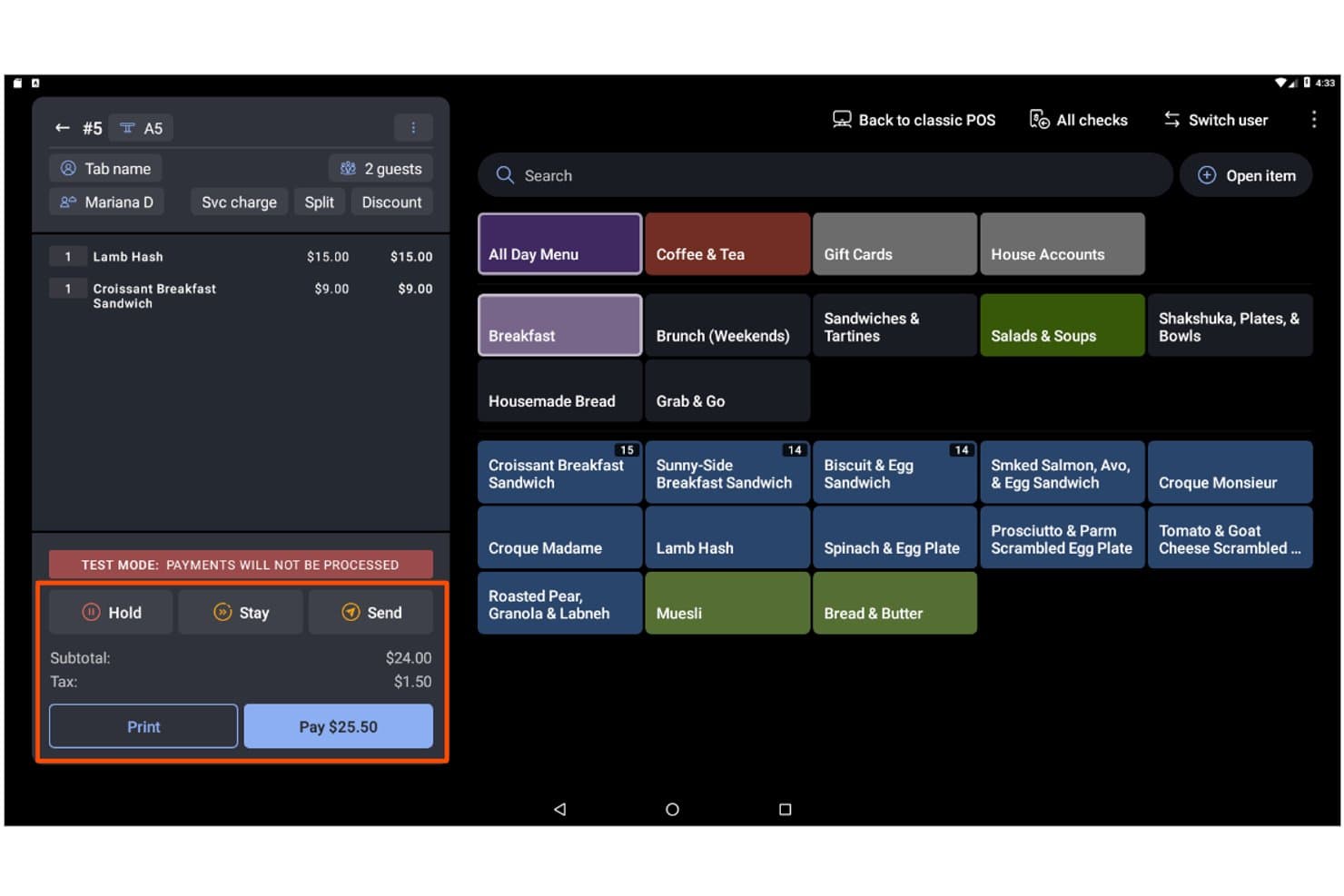
Toast consente agli utenti di gestire ordini, articoli e pagamenti da un'unica schermata. Toast è una piattaforma POS basata sul cloud progettata per ristoranti e attività correlate al settore alimentare, che combina la gestione degli ordini in sede e online, l'elaborazione dei pagamenti, il monitoraggio dell'inventario, i programmi fedeltà e la reportistica per più sedi in un unico sistema.
Per chi è più adatto Toast?
Toast è la scelta ideale per i gestori di ristoranti e le attività del settore della ristorazione che hanno bisogno di un POS progettato in base alle esigenze specifiche dei flussi di lavoro legati a cibi e bevande.
Perché ho scelto Toast
Toast si è guadagnato un posto nella mia lista ristretta perché nessun'altra piattaforma POS centralizza la gestione degli ordini dei ristoranti in modo altrettanto efficace. Mi piace molto il fatto che gli ordini di DoorDash, Uber Eats e Grubhub confluiscano direttamente nel POS e nel sistema di visualizzazione della cucina senza bisogno di un tablet separato o di un reinserimento manuale. Toast IQ, l'assistente basato sull'intelligenza artificiale integrato, evidenzia proattivamente le tendenze e segnala le anomalie su tutti i canali degli ordini, consentendoti di intervenire rapidamente.
Funzionalità principali di Toast
- Modalità offline: Toast continua a elaborare gli ordini anche quando la connessione Internet si interrompe, quindi sincronizza automaticamente i dati una volta ripristinata la connessione.
- Dispositivo portatile Toast Go® 3: Un terminale mobile progettato appositamente che consente al personale di raccogliere gli ordini e accettare i pagamenti direttamente al tavolo.
- Gestione dell'inventario xtraCHEF: Tiene traccia in tempo reale dell'inventario a livello di ingrediente, automatizza gli ordini di acquisto e genera report sui costi delle ricette e sul costo del venduto.
- Toast Loyalty: Un programma fedeltà digitale integrato con premi personalizzabili, campagne segmentate e attivatori automatici come offerte di compleanno e campagne di riconquista degli ospiti inattivi.
Integrazioni di Toast
Toast offre oltre 300 integrazioni del marketplace, tra cui DoorDash, Uber Eats, Grubhub, Shopify, QuickBooks Online e prenotazioni Google. La sua API aperta supporta integrazioni personalizzate.
Pros and Cons
Pros:
- Menu, prezzi e report vengono aggiornati istantaneamente
- La modalità offline consente di elaborare gli ordini senza interruzioni
- L'IA segnala automaticamente anomalie e tendenze
Cons:
- È necessario utilizzare esclusivamente l'elaborazione dei pagamenti di Toast
- Nessuna sincronizzazione bidirezionale con le piattaforme di commercio elettronico
Learn more about Toast: Ideale per analisi avanzate della vendita al dettaglio
- Prova gratuita di 14 giorni
- Da $89/mese (fatturato annualmente)
Visit WebsiteCustomer Rating:4.1/5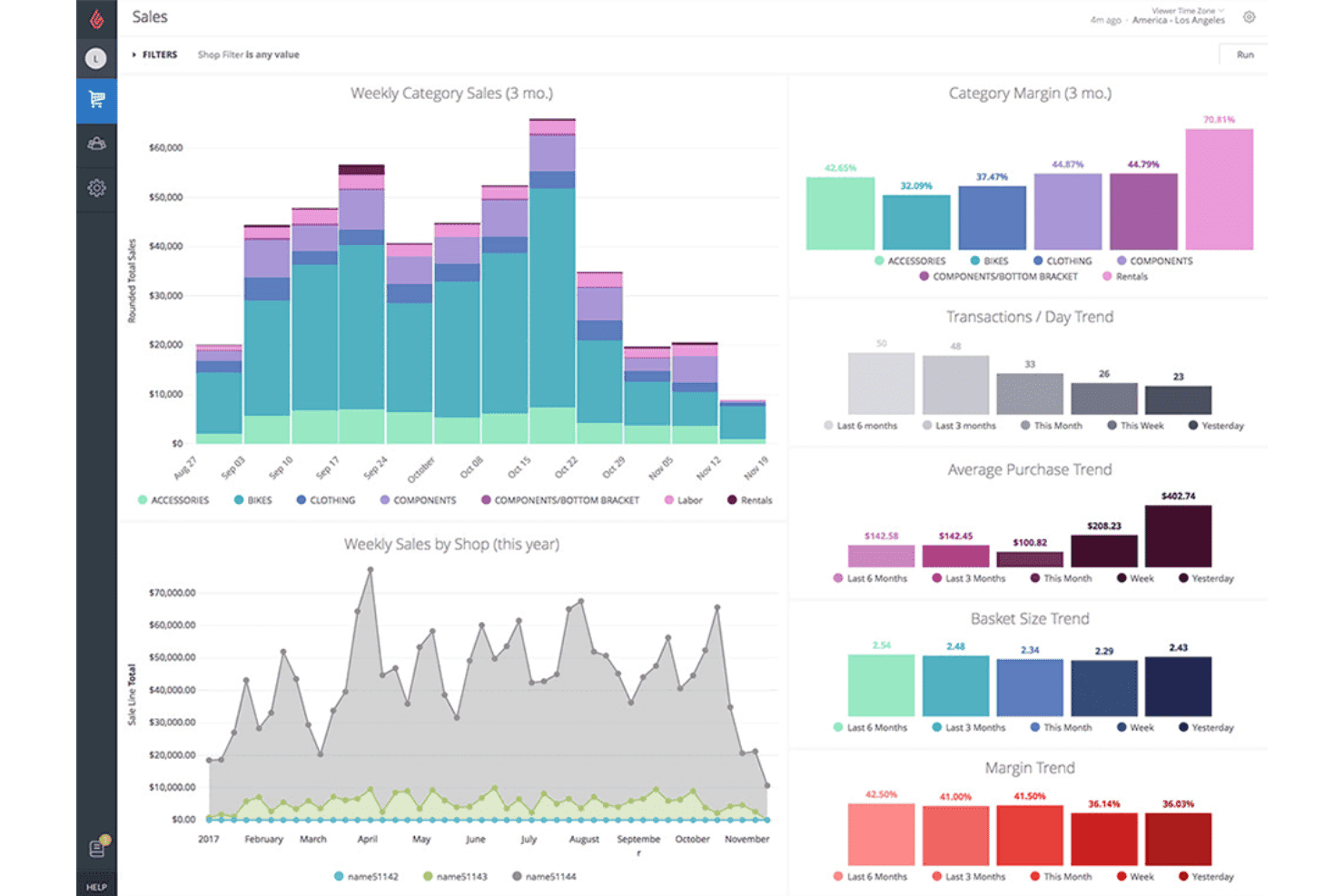
Lightspeed monitora le tendenze delle vendite, i margini e il valore medio del carrello tra le categorie. Lightspeed è una piattaforma POS per la vendita al dettaglio basata sul cloud che combina l'elaborazione delle transazioni in negozio e online, la gestione dell'inventario su più sedi, la vendita omnicanale e report analitici avanzati.
Per chi è più adatto Lightspeed?
Lightspeed è particolarmente adatto ai rivenditori con più sedi che necessitano di una visibilità approfondita sull'inventario e di analisi dettagliate per ogni negozio e canale di vendita.
Perché ho scelto Lightspeed
Ho scelto Lightspeed come una delle soluzioni migliori perché il suo modulo Insights va ben oltre i report POS standard. Offre previsioni della domanda, confronti dei KPI tra le sedi e distribuzione programmata dei report, evidenziando ciò che sta effettivamente favorendo o penalizzando le prestazioni di ogni negozio. Mi piace il fatto che possa creare automaticamente bozze di ordini di acquisto basate sui modelli di vendita reali, così non è necessario controllare manualmente i punti di riordino quando le scorte si riducono in più sedi.
Caratteristiche principali di Lightspeed
- Sincronizzazione omnicanale dell'inventario: La sincronizzazione bidirezionale in tempo reale mantiene allineati dati dei prodotti, prezzi e livelli delle scorte tra il POS, Lightspeed eCom e piattaforme di terze parti come Shopify e WooCommerce contemporaneamente.
- Programma fedeltà integrato: Il programma fedeltà a livelli consente ai clienti di accumulare e riscattare punti sugli acquisti in negozio e online tramite account cliente omnicanale unificati.
- Lightspeed Payments: Un processore di pagamenti integrato che accetta transazioni senza contatto, Apple Pay, Google Pay, pagamenti suddivisi e transazioni con carta non presente, applicando una tariffa fissa dell'1,5% sulle transazioni con carta presente.
- App POS con scanner mobile: Trasforma i dispositivi iOS e Android in registratori portatili per il conteggio delle scorte, l'evasione degli ordini e l'elaborazione dei pagamenti in negozio o durante eventi temporanei.
Integrazioni di Lightspeed
Lightspeed supporta integrazioni con Shopify, WooCommerce, BigCommerce, QuickBooks, Xero, Klaviyo, Mailchimp, NuORDER, Amazon ed eBay. Un'API REST aperta disponibile nel piano Plus supporta integrazioni e flussi di lavoro personalizzati.
Pros and Cons
Pros:
- Previsioni avanzate della domanda e analisi delle vendite
- Gestione dell'inventario e dei report su più sedi
- Vendita omnicanale e programmi fedeltà unificati
Cons:
- Funzionalità native limitate per le transazioni offline
- Costi aggiuntivi per l'utilizzo di processori di pagamento esterni
Learn more about Lightspeed: Ideale per la disponibilità di un piano iniziale gratuito
- Piano gratuito + demo gratuita disponibile
- Da $10/mese (fatturato annualmente)
Visit WebsiteCustomer Rating:4.3/5
eHopper consente agli utenti di gestire gli ordini e sfogliare le voci del menu per categoria. eHopper è una piattaforma POS basata sul cloud che combina l'elaborazione delle transazioni in negozio, un negozio eCommerce proprietario ospitato, la gestione dell'inventario, il CRM e strumenti di marketing integrati, il tutto in un unico sistema progettato per piccoli rivenditori e attività indipendenti.
Per chi è più adatto eHopper?
eHopper è adatto a rivenditori indipendenti e proprietari di piccole attività che desiderano un POS tutto-in-uno e un negozio online senza pagare un canone mensile per iniziare.
Perché ho scelto eHopper
eHopper si è guadagnato un posto nella mia lista perché è una delle poche piattaforme POS online con un piano gratuito permanente, il che lo rende realmente accessibile ai rivenditori indipendenti che non sono ancora pronti a impegnarsi con canoni mensili. Sono particolarmente colpito dal negozio ospitato integrato nel piano OmniChannel, che sincronizza i cataloghi dei prodotti e l'inventario con il POS in negozio in tempo reale, evitando di dover riconciliare manualmente le scorte tra i diversi canali. Anche il programma di sconti sui pagamenti in contanti si distingue: gli esercenti idonei possono utilizzare l'intera piattaforma a $0/mese trasferendo ai clienti i costi delle transazioni con carta.
Caratteristiche principali di eHopper
- Supporto per più elaboratori di pagamento: eHopper consente di collegare l'elaboratore di pagamento di terze parti preferito, tra cui Stripe, PayPal e Authorize.Net, invece di vincolarti a un unico fornitore.
- CRM integrato con profili cliente: il sistema memorizza la cronologia degli acquisti dei singoli clienti e consente la segmentazione per campagne di marketing mirate via e-mail e SMS.
- Rilevazione delle ore e autorizzazioni dei dipendenti: il personale può registrare entrata e uscita direttamente dal terminale POS, mentre i controlli degli accessi basati sui ruoli limitano ciò che ogni dipendente può visualizzare o modificare.
- Gestione degli ordini di acquisto: puoi creare e monitorare gli ordini di acquisto dei fornitori collegati ai livelli di inventario in tempo reale, semplificando il processo di rifornimento direttamente dalla piattaforma.
Integrazioni di eHopper
eHopper offre integrazioni native con QuickBooks Online, Authorize.Net, PayPal, Stripe, Poynt e i terminali PAX, oltre a supportare diversi elaboratori di pagamento. Fornisce inoltre l'accesso API per integrazioni personalizzate.
Pros and Cons
Pros:
- Piano iniziale gratuito senza limiti di tempo
- Il sito eCommerce integrato sincronizza l'inventario
- Accetta diversi elaboratori e metodi di pagamento
Cons:
- Nessuna sincronizzazione nativa con Shopify o WooCommerce
- I dispositivi iOS e gli iPad non sono supportati
Learn more about eHopper: Ideale per strumenti di formazione rapida del personale
- Demo gratuita disponibile
- A partire da £299/mese
Visit WebsiteCustomer Rating:3.8/5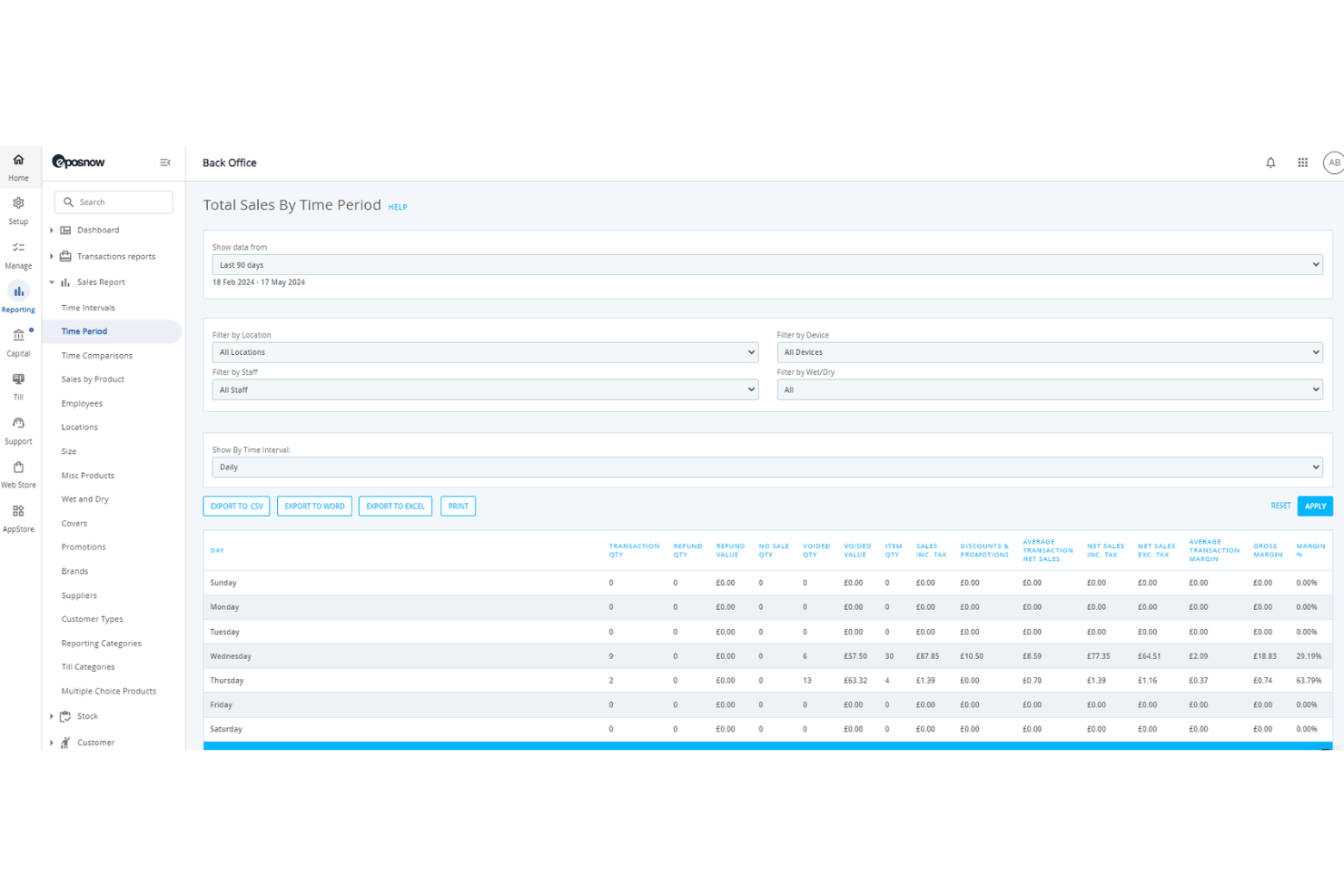
Epos Now suddivide i risultati delle vendite per giorno della settimana. Epos Now è una piattaforma POS basata sul cloud che combina l'elaborazione delle transazioni in negozio, la gestione dell'inventario in tempo reale, la sincronizzazione dell'e-commerce omnicanale e strumenti integrati di CRM e gestione del personale.
Per chi è più adatto Epos Now?
Epos Now è una scelta ideale per i rivenditori e gli operatori con più sedi che hanno bisogno di rendere rapidamente operativi i nuovi dipendenti alla cassa, senza lunghi processi di formazione iniziale.
Perché ho scelto Epos Now
Epos Now è entrato nella mia rosa di candidati soprattutto perché considera seriamente la formazione iniziale del personale come una funzionalità, non come un ripensamento. La piattaforma è progettata in modo che i nuovi assunti possano essere formati alla cassa in circa 15 minuti, configurando altrettanto rapidamente le autorizzazioni basate sui ruoli e i metodi di accesso personali. Apprezzo anche il fatto che la rilevazione delle presenze e il monitoraggio dei turni siano integrati direttamente nello stesso sistema, eliminando la necessità di gestire uno strumento separato.
Funzionalità principali di Epos Now
- Sincronizzazione dell'inventario in tempo reale: La sincronizzazione bidirezionale tra Shopify, WooCommerce e BigCommerce mantiene automaticamente accurati i livelli delle scorte su tutti i canali.
- CRM integrato: I profili dei clienti memorizzano lo storico completo degli acquisti, consentendo di gestire promozioni mirate e il monitoraggio dei punti fedeltà direttamente dal POS.
- Gestore multi-sede: Un unico pannello di controllo consente di controllare prezzi, regole fiscali e assegnazione dell'inventario in più sedi.
- Analisi delle vendite basate sull'IA: L'assistente Sidekick analizza i margini dei prodotti e segnala opportunità di prezzo utilizzando i dati delle vendite in tempo reale.
Integrazioni di Epos Now
Epos Now offre oltre 100 integrazioni con mercati online, tra cui Shopify, WooCommerce, BigCommerce, QuickBooks Online, Xero, Salesforce, Mailchimp, Deputy e Zapier. La sua API aperta supporta integrazioni personalizzate per i flussi di lavoro aziendali.
Pros and Cons
Pros:
- Formazione del personale completata in circa 15 minuti
- Sincronizzazione dell'inventario tra più sedi con aggiornamenti in tempo reale
- I pagamenti con carta offline continuano durante le interruzioni del servizio
Cons:
- La cancellazione del contratto è complessa e restrittiva
- L'assistenza premium ha un costo mensile aggiuntivo
Learn more about Epos Now: Ideale per le funzionalità di ordinazione al tavolo
- Demo gratuita disponibile
- A partire da $69/mese
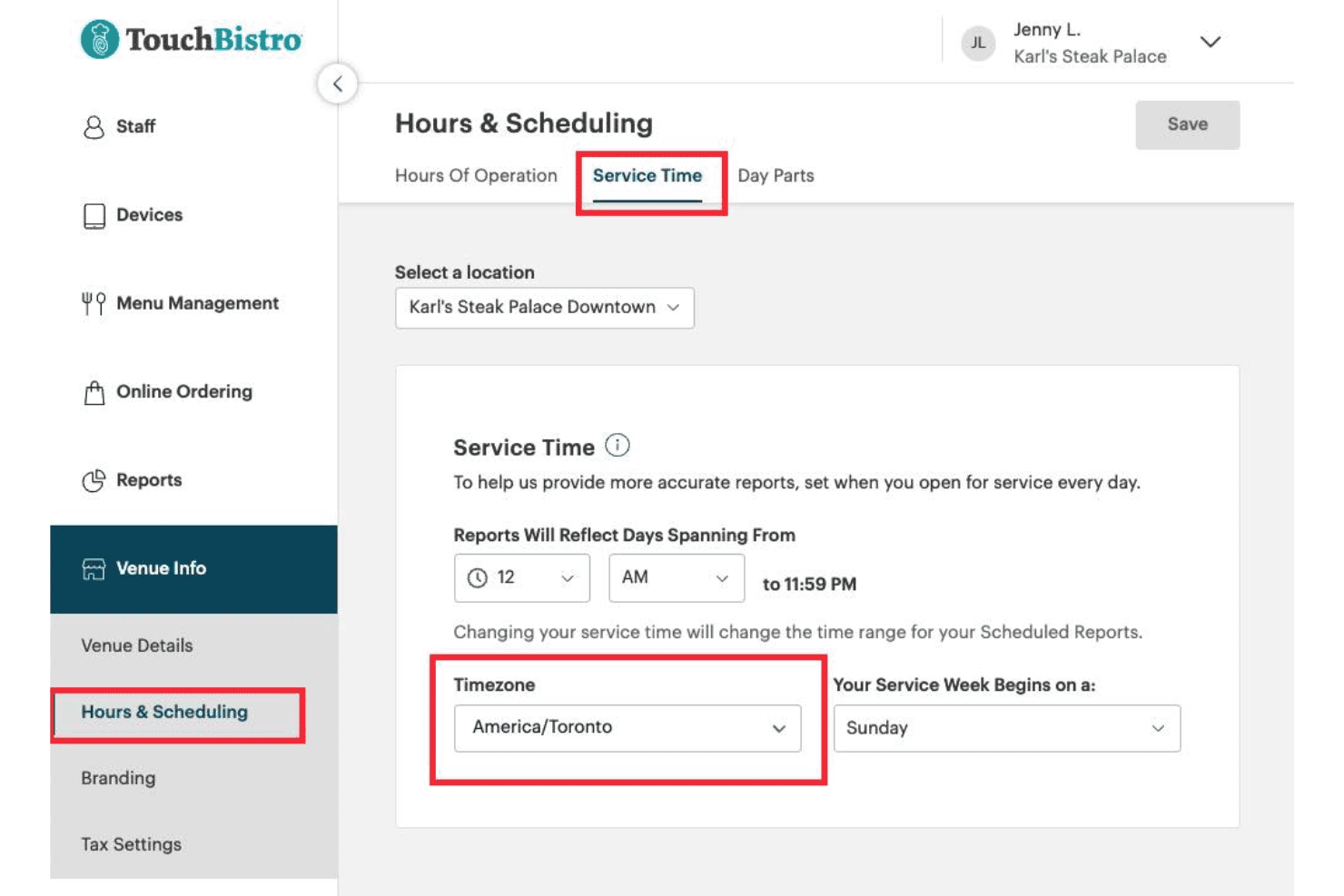
TouchBistro consente agli utenti di impostare l'orario di servizio e il fuso orario per ogni sede. TouchBistro è un sistema POS per ristoranti che combina ordinazioni al tavolo, gestione della planimetria, ordinazioni online, programmi fedeltà e strumenti per la gestione interna, come la gestione dell'inventario e del personale, in un'unica piattaforma.
Per chi è più adatto TouchBistro?
TouchBistro è una soluzione ideale per ristoranti con servizio completo e servizio rapido che desiderano ordinazioni al tavolo, programmi fedeltà e strumenti per la gestione interna in un unico sistema nativo per iPad.
Perché ho scelto TouchBistro
TouchBistro si è guadagnato un posto nella mia lista perché la sua configurazione per le ordinazioni al tavolo è davvero una delle migliori che abbia visto in un POS per ristoranti. Il personale può prendere gli ordini, inviare le comande in cucina ed elaborare i pagamenti direttamente da un iPad al tavolo utilizzando TouchBistro One, riducendo gli errori dovuti al reinserimento degli ordini presso un terminale. La gestione della planimetria è direttamente integrata nel flusso delle ordinazioni, così i camerieri conoscono sempre lo stato dei tavoli in tempo reale.
Funzionalità principali di TouchBistro
- Ordinazioni online senza commissioni: I clienti possono effettuare ordinazioni da ritirare e con consegna tramite il tuo sito web, la tua scheda Google e i tuoi canali social senza che le commissioni su ogni ordine riducano i tuoi margini.
- Oltre 50 report basati sul cloud: I report sulle vendite, sul personale, sull'inventario e sulla fidelizzazione sono accessibili da qualsiasi dispositivo connesso a Internet, non solo dai terminali presenti nel tuo locale.
- CRM per la fidelizzazione integrato: TouchBistro Loyalty registra la frequenza delle visite, lo storico della spesa e i dati degli ordini di ogni cliente, consentendoti di segmentare e rivolgerti ai clienti tramite campagne e-mail e nell'app.
- Continuità delle transazioni offline: Durante le interruzioni della connessione Internet, il sistema elabora localmente ordini e pagamenti tra i dispositivi, così una connessione interrotta non blocca il servizio.
Integrazioni di TouchBistro
TouchBistro documenta integrazioni con Restaurant365, MarginEdge, Deliverect, UrbanPiper, Worldpay, Chase Payment Solutions e Moneris. Non offre connettori nativi per Shopify, WooCommerce, BigCommerce o Magento, il che ne limita l'adeguatezza per la vendita al dettaglio omnicanale.
Pros and Cons
Pros:
- Ordinazioni al tavolo su iPad o dispositivo portatile
- Ordinazioni online senza commissioni per i ristoranti
- Fidelizzazione e marketing integrati nel POS
Cons:
- Non adatto alla vendita al dettaglio o all'e-commerce
- Molte funzionalità essenziali hanno un costo aggiuntivo
Learn more about TouchBistro: Ideale per una configurazione e un avvio semplici
- Prova gratuita di 30 giorni
- A partire da $45/mese
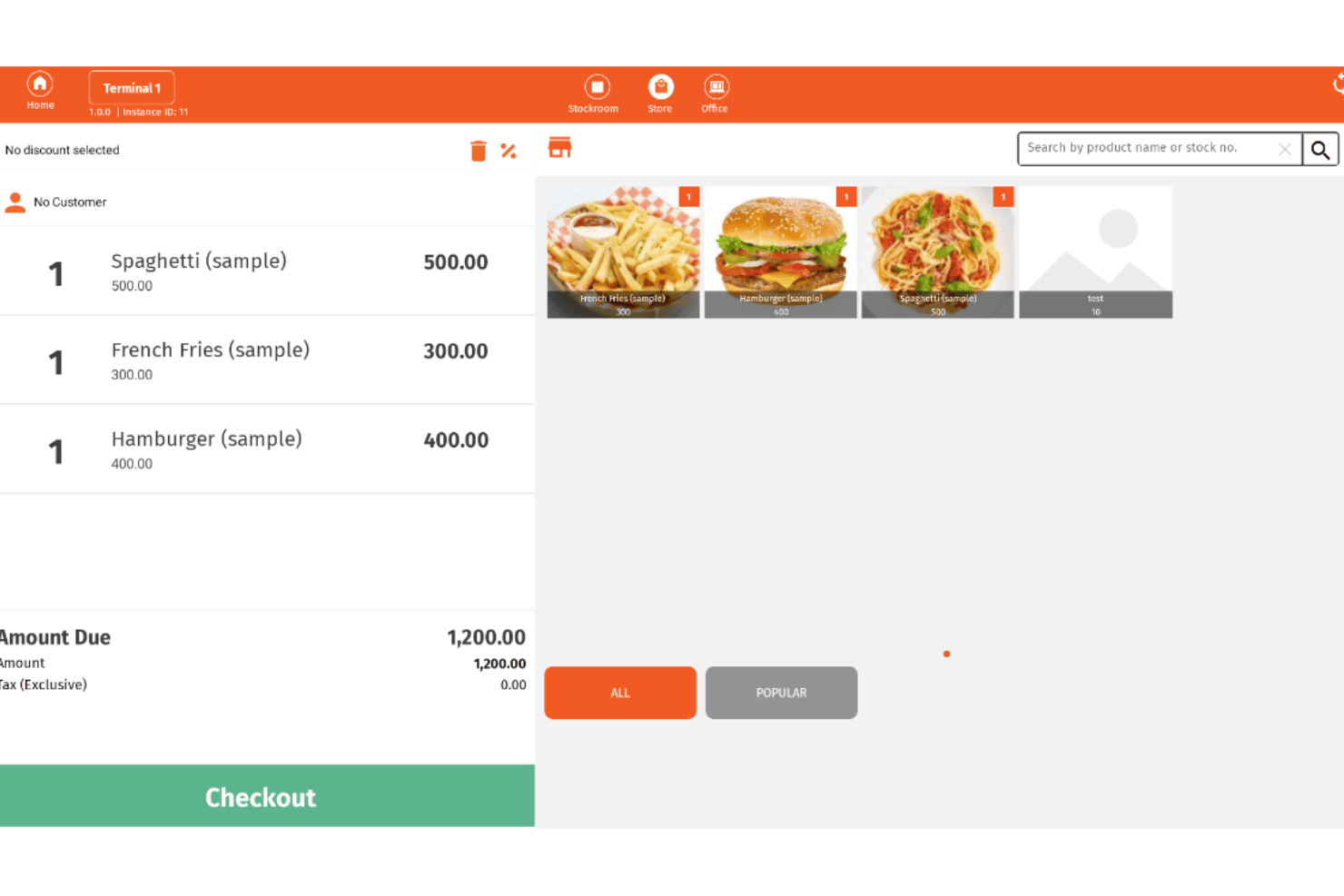
Imonggo consente agli utenti di gestire gli ordini e il pagamento da un'interfaccia POS. Imonggo è un sistema POS basato su browser che gestisce transazioni di vendita, monitoraggio dell'inventario, gestione dei clienti e reportistica di base per attività di vendita al dettaglio con una o più filiali.
Per chi è più adatto Imonggo?
Imonggo è una soluzione ideale per rivenditori indipendenti e proprietari di piccoli negozi che vogliono iniziare a vendere rapidamente senza configurazioni tecniche o costi iniziali.
Perché ho scelto Imonggo
Imonggo si è guadagnato un posto nella mia selezione perché è l'unico POS basato su browser qui presente che consente di iniziare a vendere senza alcuna installazione. Mi piace molto il fatto che si possa aprire un browser, creare un account e completare una transazione reale in pochi minuti. La modalità offline elabora le vendite localmente e sincronizza automaticamente i dati quando la connessione torna disponibile, quindi un segnale instabile non interromperà il flusso di cassa.
Funzionalità principali di Imonggo
- Programma fedeltà e punti premio: I clienti accumulano punti sugli acquisti, che possono essere riscattati come sconti immediati al momento del pagamento.
- Prezzi specifici per filiale: Ogni punto vendita può avere prezzi propri per i prodotti, indipendentemente dalle altre filiali dello stesso account.
- Importazione ed esportazione dei dati in CSV: Carica in blocco il catalogo prodotti tramite CSV ed esporta i dati delle fatture di vendita per utilizzarli in strumenti contabili esterni.
- Impostazioni fiscali configurabili: Imposta aliquote fiscali incluse o escluse a livello di articolo, filiale o globale per supportare diversi requisiti fiscali regionali.
Integrazioni di Imonggo
Imonggo dispone di integrazioni documentate con Shopify, Xero, Authorize.net, Stripe, Dymo Label e Cyclr. Offre inoltre un'API REST per integrazioni personalizzate.
Pros and Cons
Pros:
- La configurazione richiede solo un browser e un account
- I punti fedeltà vengono riscattati immediatamente al momento del pagamento
- Il prezzo dei prodotti specifico per filiale è completamente supportato
Cons:
- Nessun supporto per pagamenti senza contatto o portafogli digitali mobili
- Shopify è l'unica sincronizzazione nativa con l'e-commerce
Learn more about Imonggo: Ideale per il monitoraggio dell'inventario in più sedi
- Prova gratuita di 30 giorni
- A partire da $4/utente/mese
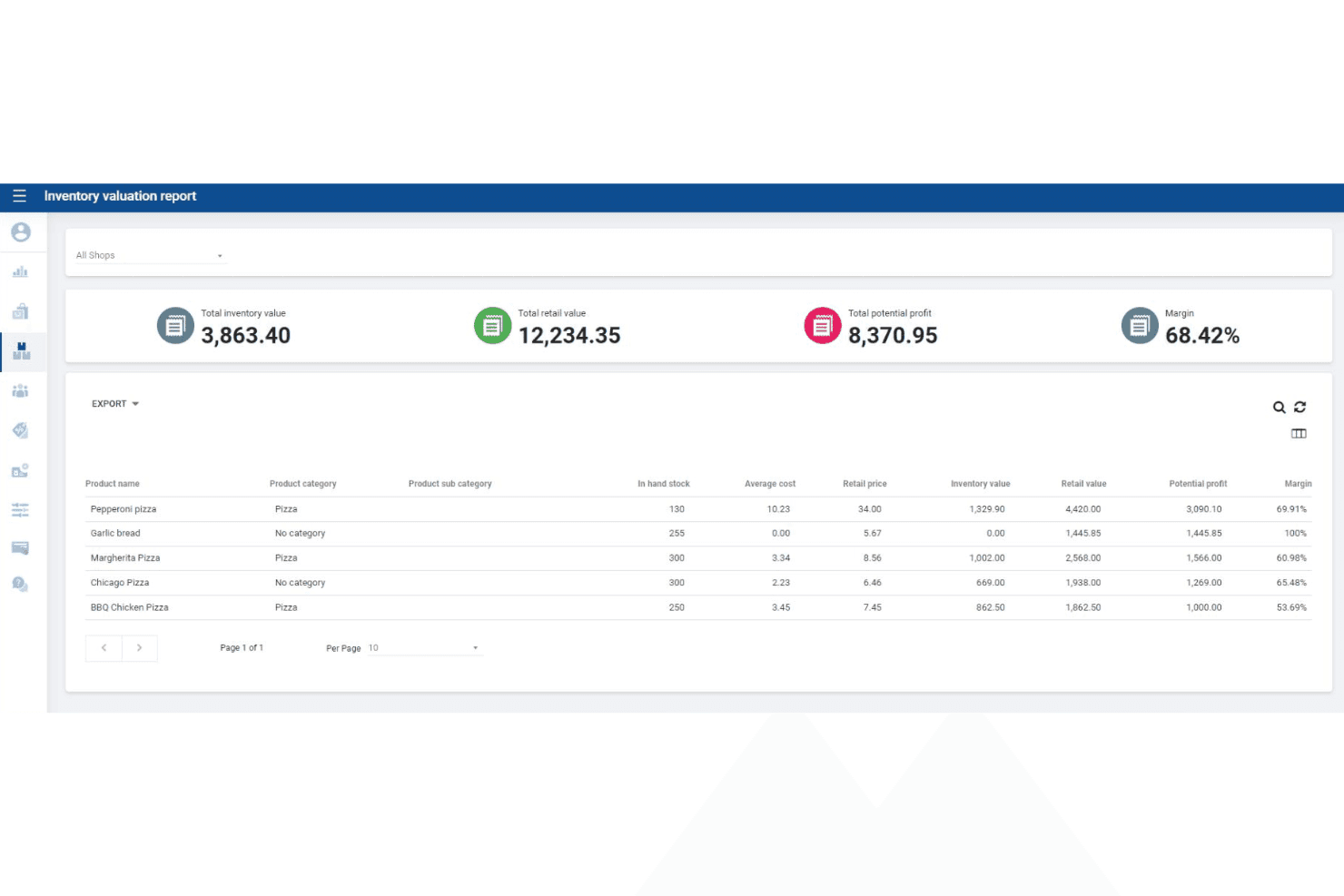
SalesPlay POS tiene traccia del valore dell'inventario, del valore al dettaglio e dei margini di profitto. SalesPlay POS è un sistema cloud per punti vendita che gestisce la fatturazione in negozio, il monitoraggio dell'inventario in più sedi, il CRM, i programmi fedeltà e i report sulle vendite su dispositivi Android e tramite un'interfaccia per browser web.
Per chi è più adatto SalesPlay POS?
SalesPlay POS è particolarmente indicato per i rivenditori piccoli e in crescita che gestiscono le scorte di più sedi da un unico sistema centralizzato.
Perché ho scelto SalesPlay POS
SalesPlay POS si è guadagnato un posto nella mia lista ristretta perché il monitoraggio delle scorte in tempo reale tra più sedi è disponibile anche nel piano gratuito. Sono particolarmente colpito dall'area amministrativa centralizzata, che consente di visualizzare i livelli di inventario, trasferire le scorte tra i negozi e generare report per punto vendita da un unico pannello di controllo. Il componente aggiuntivo Inventario avanzato amplia ulteriormente le funzionalità con flussi di lavoro completi per gli ordini di acquisto e le note di ricezione della merce, permettendo di gestire l'intero ciclo di vita delle scorte in un unico luogo.
Funzionalità principali di SalesPlay POS
- Modalità offline: Registra le transazioni senza connessione a Internet e sincronizza automaticamente i dati quando la connessione viene ripristinata.
- Programma fedeltà basato sui punti: Assegna e tiene traccia dei punti premio per ogni cliente in tutte le sedi, con possibilità di modifica manuale dall'area amministrativa.
- Integrazione con Xero e QuickBooks: Si collega direttamente a entrambe le piattaforme contabili tramite le impostazioni dell'area amministrativa per sincronizzare i dati delle vendite ai fini della contabilità.
- App chiosco per ordini autonomi: Offre un'interfaccia dedicata per gli ordini rivolta ai clienti, sincronizzata in tempo reale con il POS.
Integrazioni di SalesPlay POS
SalesPlay POS offre integrazioni documentate con Shopify, WooCommerce, Xero e QuickBooks. Fornisce inoltre un'API aperta per integrazioni personalizzate relative a ordini, inventario, pagamenti e contabilità.
Pros and Cons
Pros:
- Monitoraggio delle scorte in più sedi nel piano gratuito
- L'area amministrativa centralizzata gestisce tutti i negozi
- CRM integrato con programmi fedeltà e profili cliente
Cons:
- Nessun supporto nativo per app iOS
- La sincronizzazione completa dell'inventario con l'e-commerce non è confermata
Learn more about SalesPlay POS: Ideale per il monitoraggio delle vendite in tempo reale
- Non disponibile
- A partire da $668 (una tantum, include licenza di 3 anni)

Cloud POS offre una visione in tempo reale delle vendite, degli ordini e dei dati sui pagamenti. Cloud POS è un marketplace di hardware e software per punti vendita che abbina terminali hardware PAX a una licenza software per cassa installata localmente, insieme a piattaforme basate sul cloud rivendute come ePOS Now e Shopify POS.
Per chi è più adatto Cloud POS?
Cloud POS è adatto ai piccoli rivenditori indipendenti che desiderano un pacchetto hardware e software senza canone mensile e preferiscono collaborare con un partner per un'implementazione completa anziché gestire autonomamente una configurazione POS basata sul cloud.
Perché ho scelto Cloud POS
Ho scelto Cloud POS come una delle soluzioni migliori grazie al modo in cui rende disponibili i dati di vendita in tempo reale tramite il pannello di reportistica in tempo reale di ePOS Now, permettendoti di individuare le tendenze dei ricavi mentre si verificano, anziché a posteriori. Apprezzo il fatto che la reportistica di fine giornata calcoli automaticamente i totali di chiusura cassa e registri i dati storici, così non devi ricostruire manualmente i numeri alla chiusura. La configurazione indipendente dal processore significa inoltre che puoi collegare il tuo processore di pagamento esistente senza cambiare hardware.
Caratteristiche principali di Cloud POS
- Supporto ai pagamenti indipendente dal processore: Cloud POS si collega ai principali processori, tra cui First Data, TSYS, Heartland e Worldpay, senza vincolarti a un singolo fornitore.
- Compatibilità con i terminali PAX: I pacchetti includono terminali PAX basati su Android che accettano carte con chip EMV, pagamenti NFC/contactless, carte a banda magnetica e inserimento manuale dei dati della carta.
- Integrazione con l'app fedeltà di ePOS Now: Un'app fedeltà aggiuntiva ti consente di gestire programmi di ricompensa per i clienti direttamente tramite la piattaforma ePOS Now.
- Integrazione con il sito web di commercio elettronico: Cloud POS può aggiungere al tuo sito web esistente un catalogo prodotti con funzionalità di pagamento, con accesso dal sistema di gestione ai dati sulle vendite e sui clienti.
Integrazioni di Cloud POS
Cloud POS supporta integrazioni con Shopify POS, ePOS Now e oltre 100 sistemi POS tramite l'API di pagamento eConduit (Payroc), tra cui Lightspeed, Vend e Heartland Retail. Supporta inoltre i collegamenti per i pagamenti con processori come First Data, TSYS, Heartland e Worldpay.
Pros and Cons
Pros:
- Opzione di pacchetto hardware e software senza canone mensile
- Funziona con molti dei principali processori di pagamento
- Implementazione e formazione POS complete
Cons:
- Non offre un software POS cloud nativo
- Le funzionalità avanzate richiedono componenti aggiuntivi di terze parti
Learn more about Cloud POS:

NRS consente ai cassieri di elaborare le vendite tra diversi reparti con molteplici opzioni di pagamento. NRS è un sistema POS progettato appositamente per negozi di prossimità indipendenti, bodegas e negozi di liquori, che offre vendite in negozio, accettazione dei pagamenti EBT/eWIC, monitoraggio dell'inventario in tempo reale e un proprio negozio online con integrazione per le consegne locali.
Per chi è più indicato NRS?
NRS è particolarmente adatto ai proprietari di negozi di prossimità indipendenti, bodegas e negozi di liquori che necessitano del supporto integrato per EBT/eWIC, di un database di prodotti precaricato e dell'integrazione per le consegne locali già inclusa.
Perché ho scelto NRS
NRS si è guadagnato un posto nella mia selezione perché nessun altro sistema POS che ho recensito offre un livello di supporto paragonabile per gli operatori di negozi di prossimità indipendenti. Apprezzo il fatto che l'accettazione di EBT ed eWIC sia integrata direttamente in NRS Pay, così i proprietari di bodegas e negozi di prossimità possono servire i clienti SNAP senza aggiungere una soluzione separata. Inoltre, il listino prezzi UPC con oltre 100.000 prodotti precaricati significa che i nuovi proprietari di negozi non devono inserire manualmente migliaia di prodotti il primo giorno.
Funzionalità principali di NRS
- Accettazione dei pagamenti con NRS Pay: NRS Pay supporta pagamenti con carte di credito, carte di debito, EBT, eWIC, Apple Pay, Google Pay e pagamenti contactless direttamente tramite il sistema POS.
- Integrazioni con le piattaforme di consegna di cibo: gli ordini di DoorDash, Grubhub e Uber Eats possono essere gestiti all'interno del sistema POS NRS con un costo mensile aggiuntivo per ogni piattaforma.
- Programma di premi con buoni BOSS Club: ogni piano include gratuitamente un programma integrato di premi per i clienti, che possono iscriversi tramite il numero di telefono alla cassa.
- Avvisi antifurto: le notifiche push in tempo reale segnalano le attività sospette del sistema POS all'app mobile dell'esercente; la funzione è disponibile come componente aggiuntivo o inclusa nei piani Advanced ed Elite.
Integrazioni di NRS
NRS dispone di integrazioni documentate con DoorDash, Grubhub, Uber Eats, Stripe, QuickBooks Online e BOSS Local Shopping App. Offre un insieme più limitato di connessioni, senza integrazioni documentate con Shopify, WooCommerce, BigCommerce o API aperte.
Pros and Cons
Pros:
- Pagamenti EBT ed eWIC accettati nativamente
- Programma fedeltà incluso in tutti i piani
- Sincronizzazione dell'inventario in tempo reale tra i canali
Cons:
- Nessuna modalità offline in caso di interruzioni della connessione Internet
- Integrazioni e-commerce limitate al di fuori del sistema proprietario
Learn more about NRS: Ideale per l'integrazione con i negozi online
- Prova gratuita di 3 giorni
- A partire da $19/mese (con fatturazione annuale)
Visit WebsiteCustomer Rating:4.4/5
Shopify POS collega più canali di vendita da un'unica dashboard. Shopify POS è un sistema di punti vendita nativo del cloud che unifica le transazioni in negozio, l'inventario multi-sede, la gestione degli ordini omnicanale e l'elaborazione dei pagamenti attraverso i canali di vendita al dettaglio fisici e digitali.
Per chi è più adatto Shopify POS?
Shopify POS è la scelta naturale per i rivenditori che gestiscono già, o intendono gestire, un negozio online e vogliono amministrare le operazioni in negozio e digitali da un unico back office.
Perché ho scelto Shopify POS
Shopify POS è entrato nella mia rosa dei preferiti perché nessun altro sistema POS colma il divario tra vendita al dettaglio fisica e digitale allo stesso modo. Se vendi già su Shopify, l'inventario, gli ordini e i profili dei clienti del tuo negozio fisico e online condividono un unico back office senza alcun middleware. Apprezzo particolarmente le funzionalità BOPIS e di spedizione dal negozio, che consentono al personale di evadere gli ordini online direttamente dall'inventario disponibile in negozio senza passare da un sistema all'altro.
Funzionalità principali di Shopify POS
- Tocca per pagare su iPhone e Android: Accetta pagamenti contactless utilizzando il tuo dispositivo iPhone o Android esistente, senza bisogno di un lettore di carte.
- Ruoli e autorizzazioni del personale: Assegna livelli di accesso POS personalizzati e codici PIN di accesso univoci a ogni membro del personale, richiedendo l'approvazione di un responsabile per sconti o rimborsi.
- Trasferimenti dell'inventario tra sedi: Sposta le scorte tra le sedi dei negozi direttamente dall'app POS, con l'aggiornamento in tempo reale delle quantità dell'inventario in tutte le sedi.
- Oltre 200 report in tempo reale: Accedi da qualsiasi dispositivo ai report specifici per la vendita al dettaglio su vendite, flusso di cassa e prestazioni dei prodotti con il piano Grow e i piani superiori.
Integrazioni di Shopify POS
Shopify POS si integra nativamente con la piattaforma di commercio elettronico Shopify. Il suo marketplace offre oltre 100 app specifiche per i POS, tra cui QuickBooks, Xero, Klaviyo, Smile.io e Better Reports, mentre la sua API aperta supporta integrazioni personalizzate.
Pros and Cons
Pros:
- Sincronizzazione in tempo reale delle vendite online e in negozio
- Tocca per pagare su iPhone e Android
- Acquista online, restituisci o ritira in negozio
Cons:
- Nessun programma fedeltà integrato
- Gli strumenti avanzati per l'inventario richiedono l'add-on Pro
Learn more about Shopify POS:
Altri software POS online
Ecco alcune opzioni aggiuntive di software POS online che non sono entrate nel mio elenco, ma che vale comunque la pena prendere in considerazione:
- 11CloverIdeale per opzioni hardware personalizzabili
- 12SquareIdeale per la flessibilità dei pagamenti mobili
- 13PayPal POSIdeale per accettare pagamenti PayPal in negozio
- 14Hike POSIdeale per la pianificazione integrata degli appuntamenti
- 15LoyverseIdeale per gestire i programmi di fidelizzazione dei clienti
- 16Stripe TerminalIdeale per pagamenti online e di persona unificati
- 17Toshiba CommerceIdeale per la compatibilità hardware di livello aziendale
- 18QuickBooks POSIdeale per la sincronizzazione con il software di contabilità
- 19Salesforce Retail Cloud POSIdeale per informazioni sulle vendite basate sul CRM
Come valuto i software POS online
Valuto gli strumenti POS online su due livelli: gli elementi essenziali, ovvero cassa basata sul cloud, inventario in tempo reale e sincronizzazione omnicanale, e i fattori distintivi che determinano la soluzione più adatta ai tuoi negozi.
Funzionalità principali (requisiti essenziali per questo elenco)
Quando seleziono gli strumenti per il mio elenco, assegno a ciascuno un punteggio su una scala da 0 (non offre la funzionalità) a 5 (eccelle in quest'area) per ogni funzionalità principale elencata di seguito. Dopodiché, converto il punteggio totale dello strumento in una percentuale. Ogni strumento deve raggiungere un punteggio totale minimo del 65% per essere preso in considerazione.
- Elaborazione delle transazioni basata sul cloud: verifico se il POS funziona completamente in un browser o in un'app ospitata sul cloud, così puoi registrare le vendite da un tablet in negozio o da un laptop in un negozio temporaneo.
- Elaborazione dei pagamenti: ogni strumento dovrebbe supportare carte, pagamenti senza contatto e portafogli mobili, oltre a integrarsi con gestori come Square, Stripe o sistemi di pagamento proprietari.
- Monitoraggio dell'inventario in tempo reale: cerco aggiornamenti automatici delle scorte nel momento in cui avviene una vendita, su ogni cassa e in ogni sede, con avvisi sulle scorte ridotte per evitare vendite eccessive.
- Sincronizzazione delle vendite omnicanale: i cataloghi dei prodotti, i prezzi e i livelli delle scorte dovrebbero rimanere allineati tra le casse in negozio e i punti vendita online, che si tratti di Shopify, WooCommerce o di un negozio online integrato.
- Report e analisi delle vendite: in questo caso sono importanti pannelli di controllo utili, come le tendenze delle vendite orarie, gli SKU più venduti e le suddivisioni dei margini, che ti aiutano a prendere decisioni sul rifornimento delle scorte e sulla gestione del personale.
- Gestione dei clienti: valuto se la piattaforma acquisisce i profili degli acquirenti, tiene traccia della cronologia degli acquisti e supporta programmi fedeltà o di premi per incentivare gli acquisti ripetuti.
Una volta ottenuto un elenco di strumenti che soddisfano questi criteri, considero ciò che distingue ciascuna piattaforma.
Fattori distintivi (ciò che differenzia i fornitori)
Ecco come confronto i diversi fornitori:
Funzionalità di rilievo
La modalità offline è fondamentale: se la connessione Internet si interrompe durante una transazione, il sistema dovrebbe continuare a elaborare le vendite e sincronizzare tutto non appena torni online. Valuto anche le funzionalità di gestione dei dipendenti, come le autorizzazioni basate sui ruoli e il monitoraggio dei turni, che sono importanti quando gestisci una squadra su più casse. Vale la pena valutare anche il supporto per i dispositivi POS mobili, soprattutto se organizzi eventi temporanei o hai bisogno che il personale concluda le vendite con i clienti ovunque si trovino nel negozio utilizzando un dispositivo portatile.
Oltre le funzionalità
Le integrazioni sono molto importanti in questo caso. Verifico se una piattaforma si connette nativamente al tuo software di contabilità, al punto vendita di commercio elettronico e agli strumenti promozionali, così non devi esportare manualmente file CSV ogni settimana. Anche la trasparenza dei prezzi è un fattore che valuto attentamente, soprattutto il modo in cui le tariffe per cassa e per sede aumentano con la crescita dell'attività. La scalabilità è collegata a questo aspetto: un sistema che funziona per un solo negozio dovrebbe anche permetterti di gestire cinque sedi da un unico pannello di controllo senza dover cambiare completamente piattaforma.
Come scegliere un software POS online
È facile perdersi in lunghi elenchi di funzionalità e strutture tariffarie complesse. Per aiutarti a rimanere concentrato mentre affronti il tuo specifico processo di selezione del software, ecco una checklist dei fattori da tenere presenti:
| Fattore | Cosa considerare |
| Scalabilità | Il sistema supporterà la tua crescita, ad esempio consentendoti di aggiungere nuove sedi, casse o utenti senza importanti aggiornamenti o costi aggiuntivi? |
| Integrazioni | Il POS si collega nativamente agli strumenti di contabilità, commercio elettronico o gestione dell'inventario, oppure dovrai ricorrere a soluzioni alternative o API personalizzate? |
| Personalizzazione | Puoi adattare i flussi di lavoro, le ricevute e le autorizzazioni degli utenti per allinearli ai processi aziendali e ai requisiti del tuo marchio? |
| Facilità d'uso | Il tuo personale riuscirà a imparare a usare rapidamente il sistema, anche in presenza di un elevato ricambio o di assunzioni stagionali? |
| Implementazione e avviamento | Quanto tempo sarà necessario per rendere operativo il sistema e quali risorse (formazione, migrazione, configurazione dell'hardware) dovrai destinare? |
| Costo | Tutte le tariffe sono chiare, inclusi hardware, elaborazione dei pagamenti e assistenza, oppure ci sono costi nascosti che potrebbero incidere sui tuoi margini? |
| Misure di sicurezza | Il POS offre la crittografia end-to-end, la conformità PCI e i controlli di accesso degli utenti per proteggere i dati dei clienti e dell'azienda? |
| Disponibilità dell'assistenza | Puoi contattare l'assistenza durante il tuo orario lavorativo e sono disponibili più canali (chat, telefono, e-mail) per i problemi urgenti? |
Che cos'è un software POS online?
Il software POS online è un sistema basato sul cloud che consente alle aziende di elaborare le transazioni di vendita, gestire l'inventario e monitorare l'attività dei clienti utilizzando dispositivi connessi a Internet. Molte piattaforme funzionano tramite un'app POS che può essere eseguita su dispositivi mobili come tablet e iPhone, oppure su casse tradizionali collegate all'hardware POS.
Questi sistemi consentono a rivenditori, ristoranti e altre tipologie di aziende di monitorare l'attività delle vendite attraverso i canali fisici e digitali da un'unica piattaforma centrale. Poiché il software funziona nel cloud, i team possono visualizzare dati in tempo reale, gestire le operazioni da remoto e automatizzare le principali attività amministrative.
Funzionalità
Ecco le funzionalità principali che qualsiasi ottimo software POS online dovrebbe offrire:
- Elaborazione delle transazioni di vendita: Gestisce le vendite di persona e online, calcola i totali, applica gli sconti ed elabora diversi tipi di pagamento al momento del check-out.
- Gestione dell'inventario: Tiene traccia dei livelli delle scorte in tempo reale, aggiorna le quantità dopo ogni vendita e avvisa quando gli articoli stanno per esaurirsi o sono esauriti.
- Supporto per più sedi: Consente di gestire vendite, inventario e personale in diversi negozi o casse da un'unica dashboard.
- Gestione dei clienti: Memorizza i profili dei clienti, la cronologia degli acquisti e i dati di contatto per supportare i programmi fedeltà e un servizio personalizzato.
- Report e analisi: Genera report dettagliati sulle vendite, sull'inventario e sulle prestazioni del personale per aiutarti a prendere decisioni aziendali informate.
- Controlli degli accessi basati sui ruoli: Consentono di assegnare autorizzazioni e limitare l'accesso ai dati sensibili in base ai ruoli e alle responsabilità del personale.
- Personalizzazione delle ricevute: Consente di progettare e stampare ricevute personalizzate con messaggi, loghi e informazioni legali obbligatorie.
- Possibilità di effettuare transazioni offline: Consente di continuare a elaborare le vendite anche in caso di interruzione della connessione Internet, sincronizzando i dati una volta tornati online.
- Elaborazione integrata dei pagamenti: Supporta diversi metodi di pagamento, tra cui carte di credito, portafogli mobili e pagamenti contactless, tutto all'interno dello stesso sistema.
Vantaggi
L'implementazione di un software POS online offre diversi vantaggi al tuo team e alla tua azienda. Eccone alcuni:
- Gestione centralizzata delle vendite: Accedi e gestisci tutte le attività di vendita tra sedi e canali da un'unica dashboard basata sul cloud.
- Visibilità dell'inventario in tempo reale: Monitora istantaneamente i livelli delle scorte e riduci il rischio di vendite eccessive o di esaurimento delle scorte grazie al monitoraggio automatico dell'inventario.
- Accettazione flessibile dei pagamenti: Offri ai clienti diverse opzioni di pagamento, tra cui carte e portafogli mobili, tramite l'elaborazione integrata dei pagamenti.
- Maggiore sicurezza dei dati: Proteggi le informazioni sensibili dell'azienda e dei clienti con la crittografia integrata, la conformità allo standard PCI e i controlli degli accessi basati sui ruoli.
- Inserimento e formazione più rapidi: Porta rapidamente il nuovo personale a regime grazie a interfacce intuitive, tour guidati dei prodotti e risorse formative facilmente accessibili.
- Informazioni aziendali utili: Utilizza gli strumenti integrati di report e analisi per identificare le tendenze, monitorare le prestazioni e prendere decisioni informate.
- Continuità aziendale: Continua a elaborare le vendite anche durante le interruzioni della connessione Internet grazie alle funzionalità per le transazioni offline, che sincronizzano i dati una volta ristabilita la connessione.
Costi e prezzi
La scelta di un software POS online richiede la comprensione dei diversi modelli e piani tariffari disponibili. I costi variano in base alle funzionalità, alle dimensioni del team, ai componenti aggiuntivi e ad altri fattori. La tabella seguente riassume i piani più comuni, i relativi prezzi medi e le funzionalità tipicamente incluse nelle soluzioni software POS online:
Tabella di confronto dei piani per software POS online
| Tipo di piano | Prezzo medio | Funzionalità comuni |
| Piano gratuito | $0 | Elaborazione di base delle vendite, monitoraggio limitato dell'inventario, accesso per un singolo utente e report standard. |
| Piano personale | $10-$30/utente/mese | Supporto per più utenti, gestione ampliata dell'inventario, profili cliente di base e assistenza via e-mail. |
| Piano aziendale | $40-$80/utente/mese | Gestione di più sedi, report avanzati, elaborazione integrata dei pagamenti e accesso basato sui ruoli. |
| Piano per grandi aziende | $100-$200+/ utente/mese | Integrazioni personalizzate, gestione dedicata dell'account, assistenza prioritaria, sicurezza avanzata e accesso API. |
Domande frequenti
Ecco alcune risposte alle domande comuni sui software POS online:
I software POS online possono funzionare senza una connessione Internet?
Sì, molte soluzioni software POS online offrono funzionalità per effettuare transazioni offline. Ciò significa che puoi continuare a elaborare le vendite durante le interruzioni della connessione Internet e il sistema sincronizzerà automaticamente i dati una volta ripristinata la connessione.
Quanto è sicuro il software POS online per la gestione dei pagamenti e dei dati dei clienti?
In genere, i software POS online utilizzano la crittografia, la conformità PCI e i controlli degli accessi basati sui ruoli per proteggere le informazioni sensibili. Verifica sempre che il fornitore scelto soddisfi gli standard di sicurezza del settore e offra aggiornamenti regolari per affrontare le nuove minacce.
Quale hardware è necessario per utilizzare un software POS online?
La maggior parte dei software POS online funziona su computer, tablet o smartphone standard. Potrebbero essere necessarie anche stampanti per ricevute, lettori di codici a barre e terminali di pagamento compatibili, a seconda della configurazione della tua attività e dei dispositivi supportati dal software.
Posso integrare il software POS online con gli strumenti di ecommerce o contabilità che già utilizzo?
Sì, molte piattaforme software POS online offrono integrazioni con i più diffusi sistemi di ecommerce, contabilità e gestione dell’inventario. Verifica la disponibilità di integrazioni native o API per garantire un flusso di dati fluido tra i tuoi strumenti.
Quanto tempo occorre per configurare un software POS online?
Il tempo di configurazione varia in base al fornitore e alla complessità dell’attività. Molte soluzioni offrono onboarding guidato, risorse formative e tour del prodotto per aiutarti a iniziare rapidamente: spesso bastano da poche ore a pochi giorni per la maggior parte delle piccole e medie imprese.