

Un terminale POS è la spina dorsale della vendita al dettaglio in presenza: è il sistema con cui elabori i pagamenti, monitori le vendite, gestisci l'inventario e fai funzionare la tua attività senza intoppi.
Se il tuo sistema attuale si blocca nelle ore di punta, non gestisce i pagamenti senza contatto o ti lascia indovinare quali prodotti stanno per esaurirsi, è il momento di un aggiornamento.
Avendo lavorato per oltre un decennio nelle attività operative della vendita al dettaglio, ho visto come il sistema POS sbagliato possa rallentare la cassa, confondere il personale e creare problemi contabili a fine mese.
Questa guida fa chiarezza tra il rumore della comunicazione promozionale per mostrarti esattamente quali terminali POS offrono transazioni rapide e affidabili, supportano ogni metodo di pagamento che i tuoi clienti si aspettano (dalle carte con chip ai portafogli digitali) e rendono possibile la gestione dell'inventario in tempo reale, senza una curva di apprendimento ripida né costi nascosti.
Ogni raccomandazione qui riportata si basa su una reale esperienza operativa, quindi puoi fidarti di ricevere consigli fondati su anni di esperienza nella vendita al dettaglio, non solo su affermazioni promozionali.
Perché fidarsi dei nostri consigli sui software
6,700+
Reviews
20
Industry experts
16+
Evaluation factors
14
Years
Il nostro team testa e recensisce software dal 2012. In quanto leader del retail noi stessi, sappiamo quanto sia difficile — e importante — scegliere il software giusto.
Per questa guida, abbiamo valutato gli strumenti attraverso test pratici e ricerche indipendenti, assegnando un punteggio agli strumenti in base ai nostri criteri di selezione.
Le nostre recensioni riflettono il nostro giudizio indipendente, non un discorso di vendita.
Tabella comparativa: terminali POS
Ora confrontiamo rapidamente questi terminali principali in base ai prezzi, alle informazioni sulla prova e all’ambito in cui eccellono.
| Tool | Best For | Trial Info | Price | ||
|---|---|---|---|---|---|
| 1 | Ideale per IA integrata nei negozi indipendenti | Demo gratuita disponibile | Prezzo su richiesta | Website | |
| 2 | Miglior terminale POS tuttofare | Demo gratuita del prodotto disponibile | Da $399 o $34/mese con finanziamento | Website | |
| 3 | Ideale per i venditori B2B | Preventivo gratuito disponibile | Prezzo su richiesta | Website | |
| 4 | Ideale per aziende ad alto volume in diversi settori | Prova gratuita di 3 mesi | A partire da $79/mese | Website | |
| 5 | Ideale per la gestione dell'inventario in tempo reale | Prova gratuita + demo gratuita disponibili | Da $59/mese | Website | |
| 6 | Ideale per integrazione omnicanale retail | Prova gratuita di 3 giorni | Da $29/mese (fatturato annualmente) | Website | |
| 7 | Ideale per i sistemi POS su iPad | Demo gratuita disponibile | Prezzo su richiesta | Website | |
| 8 | Ideale per la scalabilità | Prezzo su richiesta | Website | ||
| 9 | Ideale per soluzioni di pagamento trasparenti | Demo gratuita disponibile | Da Interchange + 0,40% + 8¢ (varia in base al volume) | Website | |
| 10 | Ideale per facilità d'uso | Demo gratuita del prodotto disponibile | Da $599 al mese | Website |


I migliori terminali POS per processi di pagamento più efficienti: la nostra recensione
Ecco le nostre recensioni dettagliate di questi terminali POS principali, inclusi vantaggi, svantaggi, caratteristiche principali e motivi per cui li abbiamo scelti.
 Ideale per IA integrata nei negozi indipendenti
- Demo gratuita disponibile
- Prezzo su richiesta
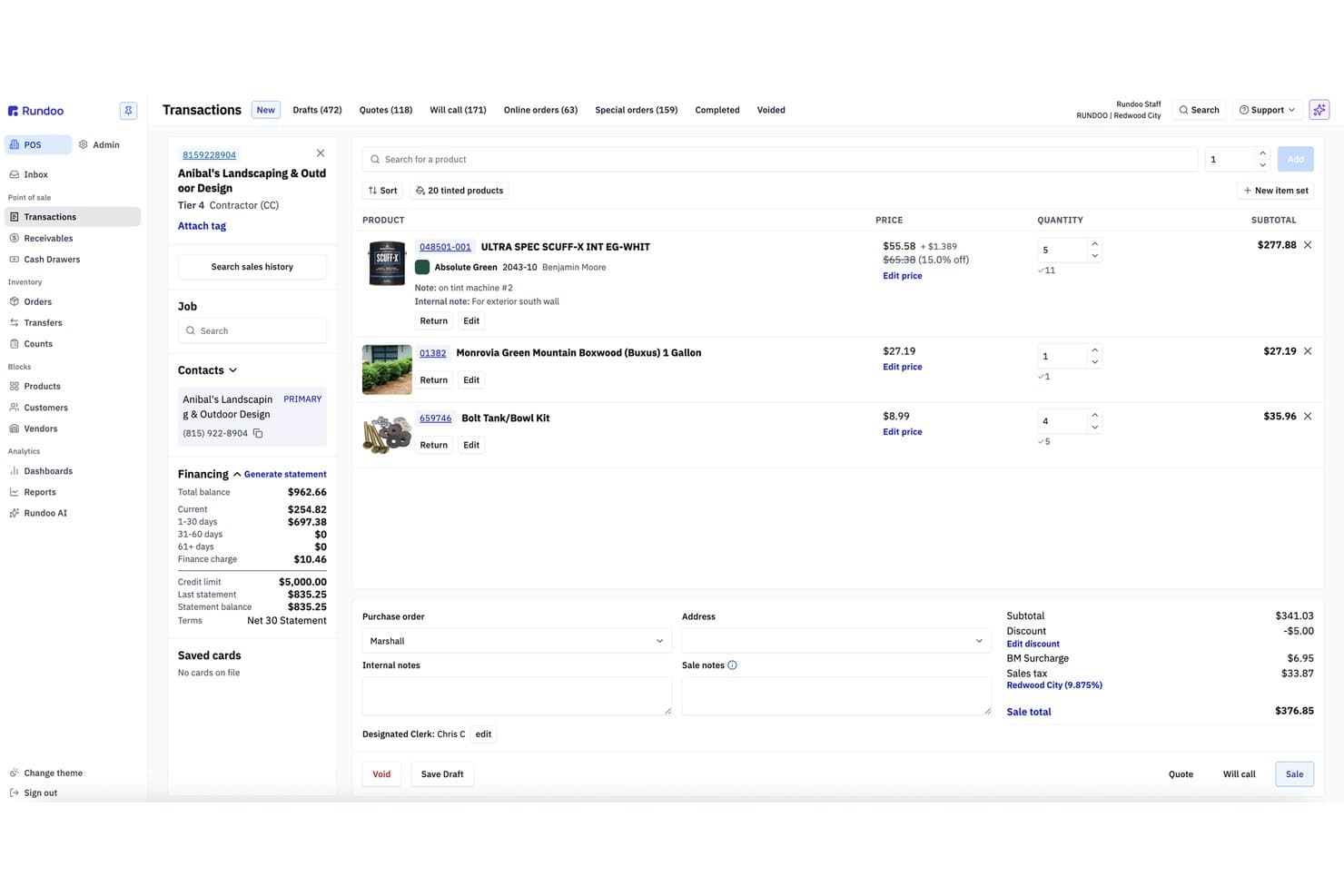
Rundoo offre una schermata POS di transazione completa con dettaglio delle linee prodotto, informazioni sul finanziamento del cliente, prezzi, sconti e totale della vendita per account appaltatori. Rundoo è una piattaforma POS basata su browser progettata per negozi di forniture indipendenti—ferramenta, vernici, agricoltura & mangimi, giardinaggio e legname—che combina punto vendita, gestione dell'inventario, gestione dei conti a credito e reportistica potenziata dall'IA in un unico sistema.
Per chi è ideale Rundoo?
Rundoo è stato creato per proprietari di negozi di forniture indipendenti che gestiscono uno o più punti vendita nei settori ferramenta, vernici, agricoltura & mangimi, giardinaggio o legname.
Perché ho scelto Rundoo
Rundoo merita il suo posto nella mia lista grazie a Dooey, la sua IA integrata che analizza i dati di vendita, inventario e conti a credito del tuo negozio per fornire risposte su richiesta. Mi piace che invece di creare report manualmente, puoi chiedere qualcosa come 'quali prodotti hanno perso margine il mese scorso?' e ricevere una risposta diretta. Utilizza inoltre gli stessi dati per generare ordini di acquisto basati sulla velocità delle vendite e sulle tendenze stagionali, cosa davvero utile per chi gestisce centinaia di SKU.
Funzionalità principali di Rundoo
- Sincronizzazione inventario in tempo reale: Tutte le vendite, resi e ordini aggiornano le quantità in stock istantaneamente su ogni cassa e punto vendita.
- Gestione integrata dei conti a credito: Gestisci account cliente e appaltatore, estratti conto e limiti di credito direttamente dal POS.
- Accesso a cataloghi multi-fornitore: Cerca nei cataloghi di fornitori come Orgill, AllPro ed Emery Jensen direttamente dall’interfaccia del POS.
- Interfaccia di cassa via browser: Gestisci le vendite da qualsiasi PC di banco, tablet o dispositivo mobile usando solamente un browser web.
Integrazioni di Rundoo
Rundoo offre integrazioni native con Stripe, QuickBooks, Benjamin Moore COLORx, Orgill, Do It Best, True Value, Sherwin-Williams, PPG e altri. È disponibile un’API per integrazioni personalizzate.
Pros and Cons
Pros:
- L'IA genera automaticamente ordini di acquisto dai dati di vendita
- Gestione dei conti a credito integrata direttamente nel POS
- Funziona su qualsiasi browser senza hardware proprietario
Cons:
- Obbligo di utilizzare Stripe per tutti i pagamenti
- Nessun programma fedeltà nativo o strumenti per credito in negozio
Learn more about Rundoo: Miglior terminale POS tuttofare
- Demo gratuita del prodotto disponibile
- Da $399 o $34/mese con finanziamento
Visit WebsiteCustomer Rating:4.7/5
Square Stand è una delle diverse opzioni di terminale POS tra cui puoi scegliere. Square ti offre un terminale POS flessibile, sia che tu gestisca un negozio al dettaglio molto frequentato, un coffee bar o un’attività di servizi mobili che lavora con pop-up ed eventi.
Hai a disposizione hardware per pagamenti con carta che comunica direttamente con il tuo software POS, così puoi mantenere i pagamenti rapidi, l’inventario accurato e le commissioni prevedibili in tutte le sedi.
Perché ho scelto Square
Ho scelto Square perché puoi abbinare l’hardware al tuo tipo di vendita—Square Stand su iPad per postazioni al banco, Square Register per corsie a servizio completo, Square Terminal o Handheld per ordini al tavolo o all’esterno—tutti con lo stesso software POS e catalogo.
Gestisci i pagamenti grazie a tariffe fisse e pubblicate per ogni terminale, in modo da conoscere sempre il costo per ogni transazione in presenza.
Il tuo staff dispone di strumenti integrati come mance, modificatori di articolo e profili clienti direttamente sui terminali, riducendo così gli errori negli ordini e raccogliendo i dati di cui hai realmente bisogno.
Mi piace che tu possa iniziare con un solo Stand o Terminal, poi aggiungere dispositivi e sedi successivamente senza cambiare piattaforma o fornitore di servizi di pagamento.
Caratteristiche principali di Square
Oltre alla varietà di hardware, Square include alcune funzionalità utili per i terminali che i commercianti useranno davvero ogni giorno.
- Accettazione carte offline: Continua ad accettare pagamenti con chip e contactless anche durante interruzioni di connessione; l’invio avviene automaticamente una volta online.
- Strumenti di gestione del team: Traccia presenze, permessi e vendite per ogni membro dello staff direttamente dai terminali POS.
- Profili clienti e ricevute: Raccogli email e numeri di telefono in fase di pagamento per inviare ricevute digitali e creare liste per il marketing.
- Inventario e modificatori articolo: Consenti allo staff di personalizzare gli ordini (taglie, aggiunte, modificatori) mantenendo quantità e ricette corrette in background.
Integrazioni Square
Le integrazioni includono Square Online, WooCommerce, Wix, BigCommerce, Ecwid, GoDaddy Websites + Marketing, QuickBooks Online, Xero, Magento e Zen Cart.
Pros and Cons
Pros:
- Tariffe trasparenti e fisse per i pagamenti in presenza semplificano la previsione dei costi.
- Diverse opzioni hardware si adattano a banconi, food truck e servizi itineranti.
- Supporto integrato per mance, modificatori e profili cliente: ideale per retail e food & beverage.
Cons:
- Configurazioni ampie con più registratori di cassa e accessori possono risultare ingombranti.
- Vincolato all’ecosistema Square; non puoi usare i terminali su Windows.
 3Ideale per i venditori B2B
Stax
- Preventivo gratuito disponibile
- Prezzo su richiesta
Visit WebsiteCustomer Rating:4.2/5
Stax Pay offre una gamma di funzionalità e integrazioni per semplificare l'elaborazione dei pagamenti e migliorare le operazioni aziendali. Stax Pay aiuta i venditori B2B e quelli ad alto volume a uscire dal gioco della 'roulette delle commissioni' grazie a un modello di prezzo in abbonamento e strumenti pensati davvero per gestire fatture complesse e importi elevati.
Hai flessibilità nell'hardware POS oltre a fatturazione, ACH e pagamenti online in un'unica piattaforma, così il tuo team finanziario non deve più gestire manualmente cinque sistemi diversi.
Perché ho scelto Stax Pay
Ho scelto Stax Pay perché il prezzo basato su abbonamento ti permette di controllare i costi con una tariffa mensile fissa, un aspetto fondamentale se il tuo scontrino medio è superiore alla maggior parte degli esercizi al dettaglio.
Hai a disposizione terminali per carte, un terminale virtuale, il supporto ACH e pagamenti online: il tuo team può quindi accettare pagamenti sia che il cliente sia al banco, sia che stia pagando una fattura importante a distanza.
Gli strumenti di fatturazione e di fatturazione ricorrente riducono anche le riscossioni manuali permettendoti di inviare fatture con link di pagamento integrati e automatizzare i pagamenti ricorrenti.
Le viste dei report offrono visibilità sulle commissioni per canale, aiutandoti a decidere quali metodi di pagamento incentivare senza dover fare riconciliazioni manuali.
Caratteristiche principali di Stax Pay
Ecco alcune funzionalità aggiuntive particolarmente utili se consideri i terminali POS come parte di un ecosistema B2B più ampio.
- Accettazione Omnicanale: Utilizza terminali, terminale virtuale e pagine di pagamento ospitate insieme, così pagamenti di persona, telefonici e online passano tutti attraverso la stessa piattaforma.
- Text-To-Pay e Link di Pagamento: Permetti al tuo team di inviare link di pagamento sicuri o richieste via SMS, così i clienti possono pagare fatture di importo elevato direttamente dal telefono o dalla casella email.
- Strumenti di Fatturazione Ricorrente: Imposta abbonamenti o pagamenti a rate direttamente dalla piattaforma, così ordini B2B ricorrenti e acconti vengono addebitati automaticamente.
- Programmi di Sovrapprezzo e Commissioni: Configura sovrapprezzi o commissioni di servizio dove consentito, così puoi proteggere i margini dei segmenti di clientela che utilizzano principalmente le carte.
Integrazioni di Stax Pay
Le integrazioni includono QuickBooks Online, NetSuite, Salesforce, HubSpot e Avalara.
Pros and Cons
Pros:
- Il modello a membership può abbassare i costi per i commercianti B2B con importi elevati e alto volume.
- Supporta carte, ACH e fatturazione, ideale per flussi di pagamento B2B complessi.
- L'approccio hardware-agnostico ti permette di abbinare Stax a una vasta gamma di terminali POS.
Cons:
- Le quote mensili di abbonamento possono essere difficili da giustificare per i venditori a basso volume.
- Pensato principalmente per aziende con sede negli Stati Uniti, con supporto internazionale più limitato.
Learn more about Stax: Ideale per aziende ad alto volume in diversi settori
- Prova gratuita di 3 mesi
- A partire da $79/mese
Visit WebsiteCustomer Rating:4.7/5
L’esclusivo modello tariffario interchange+ di Payment Depot aiuta le aziende ad alto volume a risparmiare sulle commissioni di elaborazione pagamenti. La struttura tariffaria in stile abbonamento di Payment Depot è progettata per i rivenditori e i ristoranti che elaborano elevati volumi di transazioni tramite terminali fisici e non vogliono brutte sorprese in fattura mensile.
Ottieni prezzi interchange-plus legati a un abbonamento prevedibile, oltre all’accesso a terminali e soluzioni POS moderni senza essere vincolato a un unico ecosistema hardware.
Perché ho scelto Payment Depot
Ho scelto Payment Depot perché il modello ad abbonamento ti permette di controllare i costi dei terminali man mano che i volumi crescono: il risparmio deriva dai tassi di interscambio all’ingrosso più una quota mensile fissa, invece di ricarichi gonfiati.
Per il checkout in negozio, puoi abbinare questa tariffazione con i terminali POS Clover o Vital Select, così il tuo team utilizza hardware familiare e ben supportato mentre la finanza beneficia di strutture tariffarie più trasparenti.
Puoi anche utilizzare terminali e lettori mobili basati su SwipeSimple, permettendo al personale sul campo o alle location temporanee di accettare pagamenti contactless, con chip o manuali senza processori separati.
Apprezzo il fatto che molti terminali già in possesso possano essere spesso riprogrammati invece di acquistare una nuova flotta, un aspetto importante se vuoi migliorare le condizioni di processing senza sforare il budget hardware quest’anno.
Funzionalità principali di Payment Depot
Una volta fissato il modello tariffario, queste funzioni incentrate sui terminali svolgono la maggior parte delle attività quotidiane.
- Catalogo terminali e riprogrammazione: Accedi a una vasta gamma di terminali da banco, smart e mobili, oppure riprogramma molti dispositivi esistenti per poter cambiare processore senza sostituire tutta la dotazione hardware.
- Back end multi-processore: Utilizza terminali su Fiserv (Clover) o TSYS (Vital) così puoi abbinare circuiti di elaborazione e hardware al tuo profilo di rischio, entità delle transazioni e rapporti bancari già attivi.
- Terminale virtuale e link di pagamento: Consenti allo staff di inserire ordini telefonici o inviare link di pagamento da un terminale virtuale via browser così il reparto finanziario può gestire i flussi di carta presente e non presente sotto un unico fornitore.
- Opzioni app mobile e terminali: Utilizza l’app mobile di SwipeSimple e i terminali compatibili affinché gli addetti in negozio, personale sul campo o postazioni temporanee possano accettare pagamenti con chip, strisciata o contactless con lo stesso piano tariffario.
Integrazioni di Payment Depot
Le integrazioni includono Clover POS, SwipeSimple, Vital Select, Authorize.Net, Shopify, WooCommerce, BigCommerce, PrestaShop, OpenCart e Revel Systems.
Pros and Cons
Pros:
- Il prezzo membership è interessante per attività con elevato traffico su terminali e in negozio.
- Supporta terminali Clover e Vital Select per hardware POS moderno e pronto vendita.
- Molti terminali già esistenti possono essere riprogrammati, riducendo la spesa iniziale per l’hardware.
Cons:
- Meno conveniente per commercianti a basso volume con uso modesto dei terminali.
- Limitato a commercianti negli USA non ad alto rischio per il processing in negozio.
Learn more about Payment Depot: Ideale per la gestione dell'inventario in tempo reale
- Prova gratuita + demo gratuita disponibili
- Da $59/mese
Visit WebsiteCustomer Rating:4.8/5
KORONA POS include strumenti CRM per gestire le informazioni dei clienti, tracciare la cronologia degli acquisti e personalizzare le interazioni. KORONA POS offre a rivenditori con elevati volumi di vendita, luoghi di biglietteria ed insegne in franchising uno strumento per mantenere allineati terminali, inventario e sedi senza continui interventi manuali.
È progettato per gestori che vogliono un'accuratezza in tempo reale dello stock su più terminali.
Perché ho scelto KORONA POS
Ho scelto KORONA POS perché ogni terminale sincronizza l'inventario in tempo reale, così le quantità di magazzino restano corrette a ogni vendita, reso o trasferimento.
Mi piace che si possano gestire prodotti e prezzi centralmente, offrendo ai rivenditori con più sedi un'unica fonte di verità sul funzionamento dei terminali.
Inoltre offre flessibilità con hardware e processori di pagamento, così puoi negoziare tariffe migliori e continuare a utilizzare i terminali già in tuo possesso.
Funzionalità chiave di KORONA POS
Ecco alcune funzioni focalizzate sul terminale che sono fondamentali nella gestione quotidiana.
- Controllo Multi-Sede: Modifica prezzi, stock e prodotti per ogni sede da un'unica dashboard.
- Biglietteria e Controllo Accessi: Vendi biglietti e gestisci gli accessi direttamente da ogni terminale.
- Strumenti di Gestione Cassa: Traccia fondi in cassa, differenze e attività di versamento/prelievo su ogni dispositivo.
- Reportistica Avanzata: Crea report di vendita e inventario personalizzati, raggruppati per terminale o punto vendita.
Integrazioni di KORONA POS
Le integrazioni includono QuickBooks, WooCommerce, Shopify, Magento, BigCommerce, Mailchimp, PayPal, Stripe, Worldpay, Authorize.Net, e CardConnect.
Pros and Cons
Pros:
- Aggiornamenti istantanei di stock per terminale riducono gli errori in inventario.
- Supporta combinazioni hardware diverse senza vincoli del fornitore.
- Solido controllo multi-sede per franchising e rivenditori con più negozi.
Cons:
- Ogni terminale necessita di una licenza a parte.
- La personalizzazione dei report può richiedere tempo.
Learn more about KORONA POS: Ideale per integrazione omnicanale retail
- Prova gratuita di 3 giorni
- Da $29/mese (fatturato annualmente)
Visit WebsiteCustomer Rating:4.4/5
Shopify POS consente di accedere rapidamente a funzioni e prodotti tramite la sua smart grid. Shopify POS ti offre un terminale da banco dedicato che comunica effettivamente con il resto del tuo sistema retail—l'inventario online, i profili dei clienti e le sedi dei negozi sono tutti riuniti in un unico posto.
È ideale per i rivenditori omnicanale già su Shopify che desiderano un terminale rivolto al cliente capace di ridurre le code senza creare un secondo silo di dati.
Perché ho scelto Shopify POS
Ho scelto Shopify POS perché puoi gestire il terminale in negozio e lo shop online dallo stesso catalogo prodotti e motore inventariale, così non devi mai riconciliare due giacenze diverse dopo ogni weekend.
I tuoi clienti ottengono un display dedicato sul terminale POS, che mostra carrelli dettagliati e flussi di pagamento, in modo che possano controllare le voci, aggiungere una mancia e scegliere le opzioni di ricevuta senza ingombrare lo schermo dello staff.
Il tuo team può utilizzare la smart grid POS per fissare sconti, app e prodotti popolari nella schermata principale, velocizzando il checkout nelle ore di punta.
Ottieni anche il supporto nativo per pagamenti contactless, chip e swipe tramite Shopify Payments, così puoi accettare metodi di pagamento moderni mantenendo commissioni e pagamenti in un unico posto.
Funzionalità chiave di Shopify POS
Oltre all'hardware del terminale stesso, Shopify POS offre ai rivenditori strumenti che il tuo team utilizzerà davvero sia al banco che nel back office.
- Catalogo prodotto unificato: Gestisci prodotti, prezzi e varianti una sola volta, quindi vendili su canali online e in negozio.
- Inventario omnicanale: Monitora l'inventario per sede e consenti ritiro in negozio, spedizione dal punto vendita e trasferimenti senza fogli di calcolo.
- Profili cliente: Conserva cronologia degli acquisti e preferenze per promozioni mirate e programmi di fidelizzazione.
- Permessi per lo staff: Assegna ruoli e livelli di accesso così gli addetti possono vendere con sicurezza senza toccare impostazioni sensibili.
Integrazioni Shopify POS
Le integrazioni includono QuickBooks, Xero, Mailchimp, Klaviyo, LoyaltyLion, Yotpo, ShipStation, DHL Express, UPS e Canada Post.
Pros and Cons
Pros:
- Display terminale dedicato rivolto al cliente migliora trasparenza e gestione delle mance al checkout.
- Layout smart grid permette allo staff di fissare app chiave, sconti e prodotti.
- Catalogo e inventario condivisi consentono di vendere online e in negozio da un unico sistema.
Cons:
- I flussi di lavoro avanzati per il retail possono richiedere app aggiuntive a pagamento dallo Shopify App Store.
- Il Terminale POS e l'accettazione di carte in presenza richiedono Shopify Payments nei paesi supportati.
Learn more about Shopify POS: 7Ideale per i sistemi POS su iPad
Lavu
- Demo gratuita disponibile
- Prezzo su richiesta
Visit WebsiteCustomer Rating:5/5
Lavu offre un terminale POS su iPad facile da usare per ristoranti e altre attività nel settore food & beverage. Lavu offre ai team dei ristoranti un terminale basato su iPad che riesce davvero a stare al passo durante i momenti di punta: ordini al tavolo, conti del bar e comande per la consegna vengono tutti gestiti da un unico schermo invece che da una pila di dispositivi.
È ideale per ristoranti, bar e caffè che desiderano hardware mobile e compatibile con Wi-Fi abbinato a strumenti avanzati di gestione dell'inventario e di reportistica, piuttosto che un semplice registratore di cassa.
Perché ho scelto Lavu
Ho scelto Lavu per quegli operatori che cercano un terminale iPad progettato per il vero caos della ristorazione e non solo per le ore tranquille: il suo supporto per carte offline ti permette di continuare ad accettare pagamenti anche se la connessione internet vacilla.
Ottieni un unico schermo iPad che riunisce ordini, pagamenti e vendite online utilizzando il sistema di ordinazione online integrato e la piattaforma MenuDrive, così il tuo team non dovrà più reinserire a mano le comande per la consegna.
Mi piace che il personale possa inviare le comande direttamente a un sistema di visualizzazione in cucina mentre l'inventario si aggiorna in tempo reale in background, mantenendo la disponibilità del menu accurata anche durante le ore di punta.
È perfetto se gestisci un ristorante, un bar o un caffè e vuoi terminali iPad leggeri che i camerieri possono portare al tavolo invece di essere vincolati a un ingombrante POS da banco.
Funzionalità principali di Lavu
Oltre agli strumenti principali per ordinazioni e pagamenti, ecco alcune funzioni pensate per i terminali che fanno la differenza per i team impegnati nella ristorazione.
- Doppio prezzo e sconto per pagamento in contanti: Offri sconti per chi paga in contanti e prezzi doppi per compensare le commissioni sulle carte, mantenendo comunque chiarezza sui totali per gli ospiti.
- Programmi fedeltà e gift card: Gestisci programmi fedeltà integrati e gift card digitali o fisiche direttamente dal terminale.
- App mobile per manager: Controlla vendite in tempo reale, gestione del personale e report chiave tramite un'app per manager anche quando sei fuori sede.
- Strumenti per menu e disposizione sala: Crea menu, modificatori e layout della sala dall'area amministrativa, così ogni terminale mostra sezioni e prezzi ben visibili.
Integrazioni Lavu
Le integrazioni includono Marketman, Bar-i Liquid Accounting, Digital Pour, Restaurant365, OpenTable, Otter, Chowly, Up'n Go, QuickBooks e Xero.
Pros and Cons
Pros:
- I terminali iPad supportano ordini veloci al tavolo e pagamenti direttamente dal posto.
- Gli ordini online tramite MenuDrive arrivano direttamente su POS e in cucina.
- L’inventario in tempo reale e i report aiutano a prevenire le rotture di stock durante il servizio.
Cons:
- Il design esclusivo per iPad limita il riutilizzo di hardware POS non Apple già esistente.
- Il costo totale aumenta con l’aggiunta dell’ordinazione online e delle funzionalità avanzate.
Learn more about Lavu:

Epos Now offre una soluzione POS all-in-one con funzionalità su misura per le industrie retail e dell'ospitalità. Per le aziende retail e dell'ospitalità in crescita, Epos Now offre un setup di terminali POS che può espandersi da un singolo punto vendita a più sedi senza la necessità di un reset completo dell’hardware.
È ideale se desideri un controllo cloud su casse, tablet e dispositivi portatili mantenendo per lo più invariati i flussi di lavoro esistenti.
Perché ho scelto Epos Now
Ho scelto Epos Now perché ti permette di scalare da un terminale a molti utilizzando lo stesso back office cloud su configurazioni hardware differenti, così puoi aggiungere corsie o sedi senza dover ricostruire il sistema da zero.
Puoi anche scegliere tra il servizio di pagamento di Epos Now o processori terzi supportati, il che ti consente di negoziare tariffe migliori invece di essere vincolato ad un’unica opzione.
Mi piace che il tuo team possa accedere da qualsiasi luogo per monitorare in tempo reale le performance e l’attività dei dispositivi, permettendoti di rimanere sempre aggiornato su cosa succede a ogni cassa.
Per i retailer che aggiungono nuovi canali o sedi, questa combinazione di terminali flessibili, scelta del processore e visibilità remota rende più facile crescere senza dover sostituire tutto ciò che già funziona.
Funzionalità Principali di Epos Now
Ecco alcune funzionalità pratiche che fanno la differenza nella scelta di un sistema POS per un’attività retail o dell’ospitalità in espansione.
- Inventario in tempo reale su più sedi: Sincronizza i livelli di stock tra negozi e canali affinché i terminali riflettano sempre le reali disponibilità.
- Back office centralizzato: Gestisci prodotti, prezzi, promozioni e permessi utenti da una sola dashboard, senza dover configurare ogni dispositivo separatamente.
- Reportistica e dashboard integrati: Tieni traccia delle vendite, della performance degli articoli e delle ore di punta da qualsiasi dispositivo per guidare le decisioni su personale e acquisti.
- Gestione personale e permessi: Imposta accessi basati sui ruoli per ogni terminale, in modo che cassieri, supervisori e manager vedano solo gli strumenti di cui hanno bisogno.
Integrazioni di Epos Now
Le integrazioni includono QuickBooks, Xero, Sage, Mailchimp, Shopify, WooCommerce, BigCommerce, PayPal, Stripe e Zapier.
Pros and Cons
Pros:
- Compatibile con un’ampia gamma di hardware e terminali POS.
- Supporta oltre 100 app di terze parti per setup retail personalizzati.
- Ti permette di scegliere tra processori di pagamento interni o di terze parti.
Cons:
- I dettagli sui prezzi sono limitati online; molti piani richiedono un preventivo.
- Contratti a lungo termine e piani di assistenza a pagamento possono ridurre la flessibilità.
Learn more about ePOS : Ideale per soluzioni di pagamento trasparenti
- Demo gratuita disponibile
- Da Interchange + 0,40% + 8¢ (varia in base al volume)
Visit WebsiteCustomer Rating:4.4/5
I terminal di Helcim possono elaborare carte chip e PIN, carte a banda magnetica e pagamenti contactless. I terminal smart di Helcim sono progettati per i rivenditori che danno importanza sia alla trasparenza dei prezzi che alla rapidità del checkout—ricevi tariffe interchange-plus, nessun contratto a lungo termine e dispositivi che funzionano sia al banco sia in negozio.
È una soluzione adatta per piccole e medie imprese negli Stati Uniti e in Canada che desiderano pagamenti con carta in presenza, inventario e dati dei clienti gestiti in un unico sistema invece che in cinque diversi.
Perché ho scelto Helcim
Ho scelto Helcim perché offre prezzi interchange-plus con sconti automatici sui volumi, così la tua tariffa effettiva diminuisce man mano che cresce il volume delle transazioni in negozio.
Questo controllo dei costi è legato a strumenti reali: un terminal smart con software POS integrato, stampante e lettore di carte che mantiene sincronizzati vendite in presenza e online, inventario e profili clienti.
Apprezzo anche la possibilità di usare Tap to Pay su iPhone tramite l'app Helcim POS, che consente al tuo team di accettare pagamenti contactless ovunque in negozio senza hardware aggiuntivo. Per i rivenditori attenti ai margini, la funzione Fee Saver e le opzioni di surcharge conformi aiutano a compensare le spese sulle carte tramite impostazioni integrate direttamente nel terminal e nel POS.
Se vuoi mantenere il POS attuale o una configurazione personalizzata, il terminal smart è compatibile con API, così puoi integrare l'hardware e la tariffazione di Helcim nella tua infrastruttura esistente senza dover ricostruire tutto da zero.
Funzionalità principali di Helcim
Oltre al modello di prezzo principale e al terminal smart, ecco alcune funzioni importanti per i team di vendita al dettaglio.
- Terminal smart tutto-in-uno: Combina software POS, lettore di carte EMV e stampante per ricevute in un unico dispositivo che funziona tramite Wi-Fi o 4G.
- Catalogo prodotti centralizzato: Gestisci articoli, prezzi e tasse su Helcim affinché i terminal, l'app POS e il checkout online condividano gli stessi dati prodotto.
- Profili clienti: Archivia carte in archivio, traccia lo storico degli acquisti e gestisci i dettagli dei clienti dallo stesso sistema che usi al terminal.
- Depositi al giorno lavorativo successivo: Raccogli le transazioni con carta presente per ricevere i fondi sul conto bancario già il giorno lavorativo successivo.
Integrazioni Helcim
Le integrazioni includono QuickBooks Online, Xero, WooCommerce, Foxy.io, Great Exposure e Magento.
Pros and Cons
Pros:
- Tariffazione interchange-plus trasparente con sconti automatici per volumi di carta più elevati.
- Il terminal smart sincronizza pagamenti, inventario e dati clienti tra negozio fisico e online.
- Tap to Pay su iPhone consente di ridurre le code e offrire checkout temporanei senza hardware aggiuntivo.
Cons:
- Gli strumenti per inventario e personale sono più leggeri rispetto ai pacchetti completi di gestione retail.
- Disponibile solo per commercianti negli Stati Uniti e in Canada.
Learn more about Helcim: 10Ideale per facilità d'uso
Clover
- Demo gratuita del prodotto disponibile
- Da $599 al mese
Visit WebsiteCustomer Rating:3.9/5
Il Clover Flex ha un design semplice e moderno. Clover Flex offre un terminale POS completo in un unico dispositivo portatile: accetta pagamenti con chip, strisciata e contactless mentre ti muovi nel negozio, lavori al marciapiede o gestisci eventi.
È ideale per i rivenditori impegnati che desiderano una configurazione rapida, formazione del personale semplificata e hardware che possa davvero resistere a un intero turno senza dover tornare al banco.
Perché ho scelto Clover
Ho scelto Clover perché offre un vero terminale portatile all-in-one: pagamenti, ricevute, ricerca inventario e dati base dei clienti convivono tutti in un unico dispositivo invece che su una moltitudine di oggetti.
Il tuo team può accettare pagamenti con chip, strisciata e contactless (inclusi Apple Pay, Google Pay e Samsung Pay) sullo stesso terminale, così non perdi clienti che usano il wallet e non rallenti la fila con soluzioni di fortuna.
Mi piace anche il fatto che Flex possa essere abbinato ad altri dispositivi Clover, così puoi iniziare con un solo palmare e aggiungere poi una postazione al banco senza dover rifare completamente la configurazione.
La configurazione è semplice e, una volta impostato, il personale lavora principalmente sulla schermata iniziale e sulle icone delle app invece di perdersi nei menu.
Funzionalità principali di Clover
Oltre al formato portatile, Clover offre alcuni strumenti pratici essenziali quando si sceglie un terminale POS.
- Batteria e connettività per tutta la giornata: Fino a 8 ore di autonomia più opzioni WiFi e LTE permettono al personale di accettare pagamenti ovunque senza dover continuamente collegare il dispositivo alla base di ricarica.
- Stampa e scansione integrate: Stampante per ricevute, fotocamera e lettore di codici a barre integrati permettono di stampare ricevute e scansionare articoli o biglietti senza hardware aggiuntivo.
- Profili dipendenti e permessi: Accessi basati sul ruolo regolano chi può emettere rimborsi, applicare sconti o accedere ai report, aiutandoti a prevenire ammanchi e annullamenti non autorizzati.
- App e componenti aggiuntivi: L’accesso al Market delle app di Clover permette di aggiungere funzioni come fidelizzazione, gestione inventario o rilevamento delle ore direttamente dal terminale, man mano che le tue esigenze crescono.
Integrazioni di Clover
Le integrazioni includono Apple Pay, Google Pay, Samsung Pay, QuickBooks (tramite Commerce Sync), Xero, Shopify, WooCommerce, Adobe Commerce e plugin di pagamento per WordPress/WooCommerce.
Pros and Cons
Pros:
- Dispositivo portatile con stampante e scanner che sostituisce molti pezzi hardware.
- Lunga durata della batteria più LTE/WiFi supportano veri pagamenti veloci e al tavolo.
- L’App Market offre componenti per contabilità, fidelizzazione e inventario man mano che cresci.
Cons:
- Hardware ed elaborazione dei pagamenti sono di solito inclusi in contratti pluriennali.
- Molte funzioni avanzate di reportistica e settoriali richiedono app extra a pagamento.
Learn more about Clover:
Altre opzioni
Sebbene i seguenti terminali POS non siano entrati nella mia classifica principale, queste opzioni alternative che ho incontrato durante la ricerca meritano comunque di essere prese in considerazione se nessuna delle opzioni precedenti ti è sembrata la scelta giusta.
- 11Merchant OneIdeale per tariffe e commissioni basse
- 12ShopifyIdeale per ecommerce e retail
- 13HeartlandIl migliore per rivenditori di abbigliamento e moda
- 14PayPal ZettleMigliore opzione senza canone mensile
- 15ToastIdeale per hardware resistente
- 16Revel SystemsIdeale per grandi catene di ristoranti
- 17CardPointeIdeale per l'ampia varietà di metodi di pagamento
- 18ProMerchantIdeale per una tariffazione trasparente
- 19TouchBistroIdeale per ristoranti
- 20GoDaddy PoyntIdeale per funzionalità avanzate di analisi
- 21Payline DataIdeale per opzioni POS versatili
Come valuto i terminali POS
Divido la mia valutazione in due livelli: i requisiti fondamentali come l'accettazione EMV, la sincronizzazione dell'inventario e il supporto alle periferiche, e i fattori differenzianti che rivelano quale terminale si adatta meglio alla tua attività.
Funzionalità principali (Requisiti fondamentali per questa lista)
Quando seleziono gli strumenti per la mia lista, valuto ciascuno su una scala da 0 (non offre la funzionalità) a 5 (eccelle in quest'area) per ogni funzione principale elencata di seguito. Poi, calcolo il punteggio totale dello strumento in percentuale. Ogni strumento deve raggiungere un punteggio totale minimo del 65% per essere considerato per l'inclusione.
- Elaborazione dei pagamenti: Controllo se un terminale accetta chip EMV, contactless/NFC, banda magnetica e portafogli digitali—e se vincola a un unico processore o offre più opzioni.
- Gestione dell'inventario: Il monitoraggio in tempo reale delle scorte è importante, soprattutto quando una vendita su una cassa dovrebbe aggiornare immediatamente le quantità in ogni sede e canale.
- Gestione delle transazioni di vendita: Esamino l'intero flusso della transazione—registrazione, sconti, calcoli delle tasse, resi, cambi e opzioni per lo scontrino—per vedere come gestisce una coda affollata alla cassa.
- Compatibilità hardware: Ogni terminale dovrebbe supportare periferiche standard come lettori di codici a barre, stampanti per ricevute, cassetti per il denaro e lettori di carte senza richiedere solo apparecchiature proprietarie.
- Reportistica e analisi: Valuto se un sistema genera report utili su vendite, tasse e inventario a livello di negozio e multi-sede, non solo totali giornalieri di base.
- Gestione clienti: La possibilità di collegare la cronologia degli acquisti ai singoli profili e supportare programmi fedeltà trasforma un terminale in qualcosa di più di una semplice cassa.
Una volta ottenuta una lista di strumenti che soddisfano questi criteri, considero cosa distingue ciascuna piattaforma.
Fattori distintivi (Cosa differenzia i fornitori)
Ecco come confronto e metto a contrasto i diversi fornitori:
Funzionalità distintive
La modalità offline è fondamentale—se la connessione internet cade durante una transazione, un terminale che mette in coda le vendite localmente e sincronizza una volta ripristinata la connessione mantiene viva l'operazione di cassa. Valuto anche l'integrazione con l'ecommerce, poiché i rivenditori che vendono tramite Shopify o BigCommerce hanno bisogno che inventario e ordini restino sincronizzati tra i diversi canali. La funzionalità POS mobile è importante per i negozi che gestiscono pop-up o che hanno bisogno di snellire le code nelle ore di punta tramite tablet o dispositivi portatili.
Oltre alle funzionalità
Il costo totale di proprietà è uno dei primi aspetti che valuto: alcuni fornitori includono hardware e costi di elaborazione, altri li fanno pagare separatamente, quindi considero l'insieme prima di confrontare. La conformità PCI e il supporto P2PE pesano molto, perché una violazione alla cassa può essere devastante per qualsiasi rivenditore. La flessibilità hardware completa la mia valutazione: verifico se un sistema consente di utilizzare dispositivi propri o obbliga ad apparecchiature proprietarie che sono costose da sostituire o espandere.
Cos'è un terminale POS?
I terminali POS sono dispositivi elettronici che consentono di accettare pagamenti, monitorare le vendite e gestire l'inventario direttamente alla cassa.
Collegano i componenti fisici, come i lettori di carte, gli scanner di codici a barre e le stampanti per ricevute, al tuo gestore dei pagamenti e al sistema di gestione dell'inventario.
Gli addetti alla vendita e i titolari di piccole imprese li utilizzano per registrare rapidamente gli acquisti dei clienti, accettare carte e portafogli digitali e tenere sotto controllo ciò che vende in tempo reale.
Ti evitano il fastidio di dover gestire più strumenti o di avere a che fare con un inventario disorganizzato, mettendo tutto ciò di cui hai bisogno in un unico posto.
Come scegliere il tuo terminale POS
Scegliere il terminale POS giusto non significa optare per quello più di moda o con lo schermo più appariscente. Significa abbinare le esigenze della tua attività, i metodi di pagamento e la realtà quotidiana a un dispositivo che funzioni davvero per il tuo team e per i tuoi clienti.
Ecco come prendere una decisione intelligente e pratica, senza grattacapi.
| Cosa fare | Perché è importante |
|---|---|
| Cosa fareElenca le funzionalità indispensabili (ad es., pagamenti contactless, lettore di codici a barre, supporto per più punti vendita) | Perché è importanteEvita di sprecare denaro per funzionalità che non utilizzerai mai o di non avere quelle di cui hai bisogno ogni giorno. |
| Cosa fareVerifica il processo di pagamento attuale e i relativi punti critici | Perché è importanteIndividua i punti in cui il sistema POS attuale ti rallenta o crea errori, così saprai cosa correggere. |
| Cosa fareVerifica la compatibilità dell'hardware e le integrazioni | Perché è importanteAssicura che il terminale POS funzioni con il tuo gestore dei pagamenti, il software di gestione dell'inventario e tutti i dispositivi mobili che già utilizzi. |
| Cosa fareConfronta i prezzi: considera i costi iniziali, le commissioni mensili e le tariffe sulle transazioni | Perché è importanteTi aiuta a pianificare accuratamente il budget e a individuare i costi nascosti che possono ridurre i tuoi margini. |
| Cosa fareRichiedi una demo reale (non solo un video) ed esegui test con transazioni reali | Perché è importanteConferma che il sistema sia facile da imparare per il personale, funzioni nei momenti di maggiore affluenza e gestisca senza problemi i tuoi metodi di pagamento. |
| Cosa fareInformati sull'assistenza e sulle possibilità di aggiornamento | Perché è importanteTi garantisce di poter ricevere rapidamente aiuto e di non rimanere con hardware obsoleto mentre la tua attività cresce. |
Funzionalità dei migliori terminali POS
Il tuo terminale POS deve offrire alcune caratteristiche per garantire la soddisfazione dei clienti e continuare a incassare. Ecco le funzionalità da cercare:
- Accetta tutti i principali metodi di pagamento. Chip, strisciata, pagamenti contactless, portafogli digitali e pagamenti mobili: nessun cliente verrà respinto.
- Monitoraggio dell'inventario in tempo reale. Aggiorna istantaneamente i livelli delle scorte man mano che avvengono le vendite, così sai sempre cosa hai a disposizione.
- Lettore di codici a barre e stampante per ricevute integrati. Velocizzano il pagamento e riducono gli errori di inserimento manuale.
- Opzioni POS basate sul cloud e mobili. Accedi alle vendite e ai report ovunque ti trovi: in negozio, in magazzino o in movimento.
- Sicurezza integrata e conformità PCI. Protegge i dati sensibili dei pagamenti e mantiene la tua attività al riparo da problemi.
- Permessi utente personalizzabili. Controlla chi può elaborare rimborsi, accedere ai report o gestire l'inventario.
- Integrazioni fluide. Si collega agli strumenti di contabilità, commercio elettronico e gestione dei programmi fedeltà.
Principali vantaggi dei terminali POS
Ecco cosa ottieni dai terminali POS più affidabili:
- Pagamenti più rapidi e accurati. Code più brevi, clienti più soddisfatti e meno errori alla cassa.
- Migliore controllo dell'inventario. Riduci le scorte esaurite e gli ordini eccessivi grazie a dati sempre aggiornati.
- Opzioni di pagamento flessibili. Accetta pagamenti in negozio, durante eventi temporanei o sul marciapiede: nel modo che preferiscono i tuoi clienti.
- Informazioni utili per l'attività. Ottieni report chiari su vendite, inventario e rendimento dei dipendenti senza dover consultare fogli di calcolo.
- Formazione del personale più semplice. Le interfacce intuitive consentono ai nuovi assunti di diventare rapidamente operativi.
- Esperienza cliente migliorata. Offri programmi fedeltà, buoni regalo e ricevute rapide per invogliare i clienti a tornare.
- Scalabilità durante la crescita. Aggiungi nuove sedi, dispositivi o canali di vendita senza cambiare sistema.
Costi e prezzi dei terminali POS
I prezzi dei terminali POS variano enormemente, quindi conviene leggere attentamente le clausole prima di sottoscrivere un contratto. Ecco una panoramica chiara per aiutarti a pianificare il budget:
| Tipo di piano | Prezzo medio | Funzionalità comuni | Ideale per |
|---|---|---|---|
| Tipo di pianoBase | Prezzo medio$100–$500 una tantum o $15–$30/mese | Funzionalità comuniElaborazione dei pagamenti di base, inventario semplice, stampa delle ricevute | Ideale perPiccole attività, eventi temporanei |
| Tipo di pianoIntermedio | Prezzo medio$500–$1,500 una tantum o $30–$80/mese | Funzionalità comuniGestione avanzata dell'inventario, scansione dei codici a barre, POS mobile, report | Ideale perRivenditori in crescita, negozi con più sedi |
| Tipo di pianoTutto-in-uno/cloud | Prezzo medio$1,000–$3,000+ per la configurazione o $80–$200/mese | Funzionalità comuniVendite omnicanale, programmi fedeltà, integrazioni, analisi | Ideale perRivenditori affermati, commercio elettronico, attività ad alto volume |
| Tipo di pianoPersonalizzato/aziendale | Prezzo medioPrezzo personalizzato | Funzionalità comuniSupporto per più punti vendita, account manager dedicato, integrazioni personalizzate | Ideale perGrandi catene, franchising |
- Le commissioni sulle transazioni variano in genere dall'1,5% al 3% per vendita, in base al gestore dei pagamenti e al tipo di carta.
- Fai attenzione alle commissioni aggiuntive: il noleggio dell'hardware, gli aggiornamenti del software, la conformità PCI e l'assistenza possono incidere notevolmente.
- Alcuni fornitori applicano un costo per terminale o per sede: verifica attentamente se prevedi di espanderti.
- La maggior parte dei fornitori offre una demo o una prova gratuita, ma l'hardware potrebbe richiedere un deposito o un acquisto anticipato.
Se non sei sicuro di quale soluzione sia adatta alla tua attività, inizia con un piano mensile e passa a un piano superiore man mano che cresci. Non vincolarti a un contratto a lungo termine a meno che tu non sia certo che il sistema offra i risultati promessi.
Domande frequenti sui terminali POS
Ecco le risposte ad alcune domande frequenti sui terminali POS:
Un terminale POS può funzionare offline se la connessione Wi-Fi si interrompe?
Sì, molti terminali POS moderni possono funzionare offline. Potrai comunque elaborare le vendite, ma alcune funzionalità, come gli aggiornamenti dell’inventario in tempo reale, potrebbero essere sospese finché non tornerai online. Verifica sempre le funzionalità offline con il tuo fornitore.
Quanto sono sicuri i terminali POS contro le frodi e gli attacchi informatici?
I terminali POS ora utilizzano solide misure di sicurezza, come crittografia, tokenizzazione e conformità allo standard PCI DSS. Per una protezione ottimale, mantieni aggiornati hardware e software e forma il tuo team sulle pratiche di sicurezza.
Quali integrazioni software dovrei cercare in un terminale POS?
Cerca terminali POS che si colleghino ai tuoi sistemi di gestione dell’inventario, contabilità, commercio elettronico e fidelizzazione. L’integrazione riduce l’inserimento manuale dei dati e rende la tua attività più efficiente.
Ci sono commissioni o costi nascosti associati ai terminali POS a cui dovrei prestare attenzione?
Alcuni fornitori applicano costi aggiuntivi per la configurazione, gli abbonamenti software, l’elaborazione dei pagamenti o determinate integrazioni. Richiedi in anticipo un listino prezzi completo per evitare addebiti imprevisti.
Quanto è difficile formare i nuovi dipendenti sull'utilizzo di un terminale POS?
La maggior parte dei sistemi POS moderni è intuitiva e progettata per una formazione rapida, talvolta in meno di un’ora. Le interfacce touchscreen e il supporto del fornitore possono velocizzare ulteriormente l’inserimento dei nuovi dipendenti.
Ho bisogno di terminali POS diversi per più punti vendita?
Di solito no. Molte piattaforme POS supportano più sedi all’interno di un unico sistema, ma verifica i requisiti hardware e chiedi ai fornitori informazioni sul supporto per più sedi prima di acquistare.
Quali tipi di report dovrei aspettarmi da un terminale POS moderno?
Aspettati report sulle vendite, sull’inventario, sulle prestazioni dei dipendenti e sulle informazioni relative ai clienti. Report efficaci aiutano a individuare le tendenze, gestire le scorte e prendere decisioni aziendali più ponderate.