

La gestione dell'inventario sembra semplice, finché non ti ritrovi sommerso da discrepanze nelle scorte, ordini in ritardo e un foglio di calcolo aggiornato l'ultima volta nel 2019.
Aggiungi le attività mobili al mix e, all'improvviso, ti ritrovi a gestire la logistica dal telefono, evitando errori come se fosse una partita a Whac-A-Mole in magazzino.
È qui che entra in gioco il software mobile per la gestione dell'inventario.
Questi strumenti offrono monitoraggio in tempo reale, scansione dei codici a barre e controllo degli ordini, senza bisogno di una scrivania. Che tu gestisca un singolo negozio o un impero della vendita al dettaglio multicanale, il sistema giusto può ridurre il caos e portare una chiarezza concreta nel tuo magazzino.
In qualità di operatori di lunga esperienza nel settore della vendita al dettaglio e recensori di software, abbiamo testato il mercato e selezionato con cura i migliori strumenti disponibili.
In questa guida troverai una panoramica chiara di ciò che offre ciascuno strumento, degli aspetti che lo distinguono e di come trovare quello più adatto al tuo flusso di lavoro, anziché il contrario.
Perché fidarsi dei nostri consigli sui software
6,700+
Reviews
20
Industry experts
16+
Evaluation factors
14
Years
Il nostro team testa e recensisce software dal 2012. In quanto leader del retail noi stessi, sappiamo quanto sia difficile — e importante — scegliere il software giusto.
Per questa guida, abbiamo valutato gli strumenti attraverso test pratici e ricerche indipendenti, assegnando un punteggio agli strumenti in base ai nostri criteri di selezione.
Le nostre recensioni riflettono il nostro giudizio indipendente, non un discorso di vendita.
Tabella comparativa dei software mobili per la gestione dell'inventario
Questa tabella comparativa riassume i dettagli sui prezzi delle mie migliori selezioni di software mobili per la gestione dell’inventario:
| Tool | Best For | Trial Info | Price | ||
|---|---|---|---|---|---|
| 1 | Ideale per le piccole imprese | Prova gratuita di 14 giorni + demo gratuita disponibile | Da $129/mese (fatturato annualmente) | Website | |
| 2 | Ideale per la gestione delle spedizioni | Prova gratuita di 15 giorni + piano gratuito + demo gratuita disponibile | Da $349/mese | Website | |
| 3 | Ideale per l'integrazione con la suite Zoho | Prova gratuita di 14 giorni + piano gratuito + demo gratuita disponibile | Da $29/mese (fatturato annualmente) | Website | |
| 4 | Ideale per venditori multicanale | Demo gratuita disponibile | Da $499/mese | Website | |
| 5 | Ideale per la gestione della produzione | Prova gratuita di 15 giorni | Da $135/mese | Website | |
| 6 | Ideale per utenti Shopify | 49 ordini gratuiti al mese | A partire da $0.25/mese | Website | |
| 7 | Ideale per chi cerca flessibilità open-source | Demo gratuita disponibile | $9.10/mese | Website | |
| 8 | Ideale per l'integrazione con QuickBooks | Demo gratuita disponibile | Da $229/mese (fatturato annualmente) | Website | |
| 9 | Ideale per il monitoraggio dell'inventario in tempo reale | Demo gratuita disponibile | Prezzo su richiesta | Website | |
| 10 | Ideale per fatturazione mobile e prova di consegna | Prova gratuita di 14 giorni | Da $200/mese | Website |


I 10 migliori software mobili per la gestione dell'inventario, recensiti
Ed eccoci alle recensioni. Di seguito esaminerò in dettaglio le funzionalità principali, i vantaggi & gli svantaggi, le integrazioni e i casi d’uso ideali di ciascuno strumento mobile per la gestione dell’inventario, per aiutarti a trovare quello più adatto a te.
 Ideale per le piccole imprese
- Prova gratuita di 14 giorni + demo gratuita disponibile
- Da $129/mese (fatturato annualmente)
Visit WebsiteCustomer Rating:4.6/5
Monitora inventario, ordini e supporta attività di vendita e spedizione. inFlow Inventory è uno strumento di gestione dell'inventario progettato per piccole e medie imprese. Aiuta gli utenti a monitorare l'inventario, gestire gli ordini e supporta varie funzioni aziendali come vendite e spedizioni.
Perché ho scelto inFlow Inventory: inFlow Inventory si rivolge alle piccole imprese grazie alla sua interfaccia facile da usare e alle ampie risorse di supporto. Si integra con oltre 90 servizi, risultando versatile per diverse esigenze aziendali. Il software offre scanner intelligenti e stampanti di etichette, aumentando così la sua utilità per le piccole attività. La sua conformità a GDPR e SOC 2 garantisce la sicurezza dei dati, aggiungendo un ulteriore valore per i proprietari di piccole aziende.
Funzionalità e integrazioni principali:
Le funzionalità includono monitoraggio dell'inventario, gestione degli ordini e supporto per hardware come scanner intelligenti e stampanti di etichette. È possibile gestire vendite e spedizioni direttamente dalla piattaforma, rendendola uno strumento completo per le piccole imprese. Il software offre anche un'interfaccia intuitiva che semplifica questi processi.
Le integrazioni includono QuickBooks, Shopify, Xero, WooCommerce, Amazon, eBay, Square, PayPal, Mailchimp e Salesforce.
Pros and Cons
Pros:
- Interfaccia facile da usare
- Ampie risorse di supporto
- Si integra con oltre 90 servizi
- Conforme a GDPR e SOC 2
Cons:
- Funzionalità avanzate limitate
- Può non essere adatto a grandi aziende
- Necessaria qualche apparecchiatura
Learn more about inFlow Inventory: Ideale per la gestione delle spedizioni
- Prova gratuita di 15 giorni + piano gratuito + demo gratuita disponibile
- Da $349/mese
Visit WebsiteCustomer Rating:4.7/5
Aiuta le aziende ecommerce a gestire l'inventario e ottimizzare le spedizioni. Ordoro è una soluzione di gestione dell'inventario pensata per le aziende di ecommerce. Aiuta gli utenti a gestire le scorte e a ottimizzare i processi di spedizione, rendendolo essenziale per i rivenditori online.
Perché ho scelto Ordoro: Ordoro si distingue nella gestione delle spedizioni, offrendo funzionalità che semplificano l'evasione degli ordini. Puoi gestire le etichette di spedizione e tracciare i pacchi direttamente dalla piattaforma. Le sue capacità di gestione dell'inventario garantiscono che i livelli di stock siano sempre accurati. Questo lo rende uno strumento prezioso per le aziende che puntano su spedizioni e gestione ordini efficienti.
Funzionalità e integrazioni principali:
Funzionalità includono dropshipping automatizzato, che consente di snellire la coordinazione con i fornitori. Puoi anche usufruire della funzione di kit, che permette di raggruppare prodotti in bundle per la vendita. Il software offre la scansione dei codici a barre per velocizzare le attività di inventario e migliorare la precisione.
Integrazioni comprendono Shopify, Amazon, eBay, WooCommerce, BigCommerce, Squarespace, Etsy, Walmart, QuickBooks e Xero.
Pros and Cons
Pros:
- Solide funzionalità di gestione delle spedizioni
- Supporta il dropshipping automatizzato
- Offre funzionalità di kit
- Scansione dei codici a barre disponibile
Cons:
- Richiede tempo per la configurazione iniziale
- Funzionalità offline limitate
- Curva di apprendimento per i nuovi utenti
Learn more about Ordoro: Ideale per l'integrazione con la suite Zoho
- Prova gratuita di 14 giorni + piano gratuito + demo gratuita disponibile
- Da $29/mese (fatturato annualmente)
Visit WebsiteCustomer Rating:4.3/5
Strumento cloud per la gestione di inventario, ordini e canali di vendita. Zoho Inventory è una soluzione di gestione dell'inventario basata su cloud pensata per piccole e medie imprese. Aiuta gli utenti a gestire l'inventario, gli ordini e le vendite su diversi canali.
Perché ho scelto Zoho Inventory: L'integrazione di Zoho Inventory con la suite Zoho ne potenzia la funzionalità, rendendolo ideale per le aziende che già utilizzano prodotti Zoho. Puoi gestire inventario e ordini beneficiando al contempo di un flusso dati fluido tra le applicazioni Zoho. Le sue funzioni, come la vendita multicanale e la gestione degli ordini, semplificano le operazioni. Questa capacità di integrazione lo rende una scelta solida per gli utenti Zoho esistenti.
Funzionalità e integrazioni principali:
Le funzionalità includono il monitoraggio in tempo reale dell'inventario, che aiuta a mantenere livelli di scorte accurati. Puoi anche sfruttare i flussi di lavoro automatizzati che semplificano l'elaborazione degli ordini. Il software offre strumenti di reportistica che forniscono approfondimenti basati sui dati sulle prestazioni dell'inventario e delle vendite.
Le integrazioni includono Shopify, Amazon, eBay, Etsy, WooCommerce, QuickBooks, Xero, Stripe, PayPal e Slack.
Pros and Cons
Pros:
- Si integra perfettamente con la suite Zoho
- Supporta la vendita multicanale
- Monitoraggio dell'inventario in tempo reale
- Capacità di flussi di lavoro automatizzati
Cons:
- Richiede una configurazione iniziale
- Curva di apprendimento per i nuovi utenti
- Funzionalità offline limitate
Learn more about Zoho Inventory: Ideale per venditori multicanale
- Demo gratuita disponibile
- Da $499/mese
Visit WebsiteCustomer Rating:4.7/5
Strumento cloud per la gestione multicanale dello stock e dell'evasione ordini. Finale Inventory è una soluzione di gestione dell'inventario basata su cloud progettata per i venditori multicanale. Aiuta le aziende a gestire lo stock su varie piattaforme di vendita e a ottimizzare i processi di evasione degli ordini.
Perché ho scelto Finale Inventory: Finale Inventory si distingue nel supporto alla vendita multicanale, rendendolo ideale per le aziende che operano su diverse piattaforme. Offre funzionalità come il monitoraggio centralizzato dell'inventario, permettendo una gestione efficiente dei livelli di stock. Le sue capacità di gestione degli ordini si rivelano utili per semplificare l'evasione. L'attenzione al supporto multicanale aiuta il tuo team a mantenere un inventario accurato tra vari canali di vendita.
Funzionalità principali & integrazioni:
Le funzionalità includono strumenti avanzati di reportistica che offrono approfondimenti su vendite e tendenze di inventario. Puoi anche beneficiare di punti di riordino automatizzati, che aiutano a mantenere livelli di stock ottimali. Il software offre la scansione dei codici a barre, velocizzando le attività di gestione dell'inventario.
Le integrazioni comprendono Shopify, Amazon, eBay, WooCommerce, QuickBooks, Etsy, ShipStation, BigCommerce, Magento e Xero.
Pros and Cons
Pros:
- Supporta la vendita multicanale
- Monitoraggio centralizzato dell'inventario
- Gestione efficiente degli ordini
- Strumenti avanzati di reportistica
Cons:
- Richiede configurazione e personalizzazione
- Curva di apprendimento per i nuovi utenti
- Funzionalità offline limitate
Learn more about Finale Inventory: Ideale per la gestione della produzione
- Prova gratuita di 15 giorni
- Da $135/mese
Visit WebsiteCustomer Rating:4.5/5
Soluzione cloud per gestire inventario, vendite e ordini di lavoro. Megaventory è una soluzione di gestione dell'inventario basata su cloud pensata per produttori e distributori. Aiuta le aziende a gestire in modo efficiente inventario, vendite e ordini di lavoro.
Perché ho scelto Megaventory: Megaventory è progettato su misura per la gestione della produzione, offrendo funzionalità come la distinta base e la gestione degli ordini di lavoro. Questi strumenti sono fondamentali per i produttori che necessitano di un controllo preciso sui processi produttivi. Offre inoltre il monitoraggio dell'inventario su più sedi, garantendo una gestione efficiente delle scorte. Grazie a report dettagliati, il tuo team può ottenere informazioni sull'andamento della produzione e sulle tendenze dell'inventario.
Caratteristiche e integrazioni principali:
Funzionalità includono capacità di evadere gli ordini, che semplificano la gestione degli ordini dei clienti. Puoi monitorare e gestire i livelli delle scorte su varie sedi, garantendo la precisione delle registrazioni. Il software offre inoltre strumenti di reportistica per approfondimenti su inventario e performance di vendita.
Integrazioni includono QuickBooks Online, Magento, Shopify, WooCommerce, Zapier, Salesforce, Xero, Google Drive, Dropbox e Slack.
Pros and Cons
Pros:
- Ideale per la gestione della produzione
- Supporta più sedi
- Strumenti di reportistica dettagliati
- Gestisce gli ordini di lavoro in modo efficiente
Cons:
- Opzioni di personalizzazione limitate
- Può essere necessario del tempo per la configurazione iniziale
- Curva di apprendimento per i nuovi utenti
Learn more about Megaventory: Ideale per utenti Shopify
- 49 ordini gratuiti al mese
- A partire da $0.25/mese
Visit WebsiteCustomer Rating:4.8/5
Aiuta i commercianti Shopify a gestire scorte, ordini e attività di magazzino. SKUSavvy è uno strumento di gestione dell'inventario progettato specificamente per i commercianti Shopify. Aiuta le aziende a gestire le scorte, evadere gli ordini e ottimizzare le operazioni di magazzino.
Perché ho scelto SKUSavvy: SKUSavvy è pensato per gli utenti Shopify, offrendo un'integrazione senza soluzione di continuità che migliora l'efficienza del tuo negozio. Propone funzionalità come il monitoraggio in tempo reale dell'inventario e la gestione degli ordini, fondamentali per i rivenditori online. Con strumenti di ottimizzazione del magazzino, puoi migliorare il processo di evasione. L'attenzione verso Shopify lo rende perfetto per i commercianti che desiderano semplificare le proprie operazioni.
Funzionalità e integrazioni principali:
Le funzionalità includono capacità di gestione del magazzino che aiutano a organizzare e ottimizzare lo spazio di stoccaggio. Puoi inoltre usufruire di aggiornamenti in tempo reale dell'inventario, garantendo livelli di stock accurati. Inoltre, SKUSavvy offre il tracciamento degli ordini, così puoi monitorare le spedizioni ed evadere gli ordini in modo efficiente.
Le integrazioni includono Shopify, Amazon, WooCommerce, Etsy, eBay, Squarespace, BigCommerce, Walmart, QuickBooks e ShipStation.
Pros and Cons
Pros:
- Pensato per utenti Shopify
- Monitoraggio dell'inventario in tempo reale
- Strumenti di ottimizzazione del magazzino
- Gestione ordini efficiente
Cons:
- Costo elevato per piccole imprese
- Richiede configurazione e formazione
- Funzionalità offline limitate
Learn more about SKUSavvy: 7Ideale per chi cerca flessibilità open-source
Odoo
- Demo gratuita disponibile
- $9.10/mese
Visit WebsiteCustomer Rating:4.2/5
Strumento open-source per gestire inventario, vendite e operazioni. Odoo è una soluzione open-source per la gestione dell'inventario che si rivolge a imprese di tutte le dimensioni. Offre una vasta gamma di applicazioni aziendali, rendendolo versatile per la gestione di inventario, vendite e operazioni.
Perché ho scelto Odoo: La natura open-source di Odoo consente di personalizzare il software in base alle esigenze della propria azienda. Offre un approccio modulare, permettendo di aggiungere o rimuovere funzionalità secondo necessità. Questa flessibilità lo rende adatto ad aziende che desiderano soluzioni su misura. Grazie all'ampia funzionalità, potrai gestire non solo l'inventario ma anche altre operazioni aziendali senza soluzione di continuità.
Funzionalità principali e integrazioni:
Le funzionalità includono il monitoraggio dell'inventario in tempo reale, il riordino automatico e report dettagliati. Queste funzioni ti aiutano a mantenere livelli di stock ottimali e ottenere informazioni sulle prestazioni dell'inventario. Il software supporta inoltre magazzini multipli, migliorando la capacità di gestire le scorte in diverse sedi.
Le integrazioni includono Shopify, WooCommerce, eBay, Amazon, QuickBooks, PayPal, Stripe, Google Drive, Dropbox e Slack.
Pros and Cons
Pros:
- Altamente personalizzabile
- Supporta magazzini multipli
- Approccio modulare
- Flessibilità open-source
Cons:
- Curva di apprendimento ripida
- Richiede competenze tecniche
- Può essere complesso per i nuovi utenti
 Ideale per l'integrazione con QuickBooks
- Demo gratuita disponibile
- Da $229/mese (fatturato annualmente)
Visit WebsiteCustomer Rating:4/5
Gestisce inventario e produzione per piccole e medie imprese. Fishbowl Inventory è una soluzione completa per la gestione dell'inventario, pensata per le piccole e medie imprese. Gestisce i processi di inventario e produzione, risultando ideale per le aziende che necessitano di un sistema robusto.
Perché ho scelto Fishbowl Inventory: Fishbowl Inventory è noto per la sua integrazione senza soluzione di continuità con QuickBooks, rendendo più semplice la gestione finanziaria per le aziende. Offre funzionalità avanzate di gestione dell'inventario come la scansione dei codici a barre e il monitoraggio multilocale. Questo permette al tuo team di gestire in modo efficiente le scorte in diverse sedi. Le sue capacità di produzione sono inoltre utili per gestire ordini di lavoro e distinte base.
Funzionalità e integrazioni principali:
Le funzionalità includono aggiornamenti dell'inventario in tempo reale, punti di riordino automatici e gestione degli ordini di lavoro. È possibile monitorare i livelli di inventario in più sedi, assicurando conteggi accurati delle scorte. Il software supporta anche la scansione dei codici a barre, velocizzando il processo di inventario.
Le integrazioni includono QuickBooks, Xero, Salesforce, Shopify, Magento, WooCommerce, Amazon, eBay, UPS e FedEx.
Pros and Cons
Pros:
- Si integra bene con QuickBooks
- Supporta il monitoraggio multilocale
- Offre funzionalità di produzione
- Fornisce aggiornamenti dell'inventario in tempo reale
Cons:
- Curva di apprendimento ripida
- Costo iniziale elevato
- Richiede conoscenze tecniche
Learn more about Fishbowl Inventory: Ideale per il monitoraggio dell'inventario in tempo reale
- Demo gratuita disponibile
- Prezzo su richiesta
Visit WebsiteCustomer Rating:4.1/5
La dashboard ottimizzata per dispositivi mobili di Fulfil offre visibilità in tempo reale su magazzini e canali. Fulfil è un ERP nativo per l'IA progettato per operazioni di e-commerce e vendita all'ingrosso. Combina automazione avanzata con un controllo dell'inventario pensato per dispositivi mobili, offrendo ai team visibilità su scorte, ordini ed evasione da qualsiasi luogo.
Perché ho scelto Fulfil: Ho scelto Fulfil perché unisce il monitoraggio dell'inventario in tempo reale all'efficienza del magazzino, elementi fondamentali per i team retail più dinamici. È possibile monitorare i livelli di stock su diversi canali di vendita e centri di evasione direttamente da un dispositivo mobile, aiutando a prevenire overselling ed esaurimento scorte. Inoltre, mi piace che automatizzi i flussi di lavoro come instradamento degli ordini e spedizioni, riducendo errori e risparmiando tempo nelle operazioni quotidiane.
Funzionalità e integrazioni di spicco di Fulfil:
Funzionalità includono visibilità in tempo reale su tutti i magazzini, flussi di lavoro automatizzati per ordini e spedizioni, e strumenti di picking e packing ottimizzati per dispositivi mobili. Puoi anche accedere ad analisi su trend di vendita e performance per guidare le decisioni di acquisto.
Integrazioni includono Amazon, Shopify, eBay, FedEx, UPS, DHL, United States Postal Service, Amazon Shipping, PayPal, Stripe, Klarna e TikTok Shop.
Pros and Cons
Pros:
- Operazioni di magazzino ottimizzate per il mobile
- Supporto per l'evasione multicanale
- Visibilità delle scorte in tempo reale
Cons:
- Non dispone di funzionalità offline
- Dettagli sui prezzi su richiesta
Learn more about Fulfil: Ideale per fatturazione mobile e prova di consegna
- Prova gratuita di 14 giorni
- Da $200/mese
Visit WebsiteCustomer Rating:4.4/5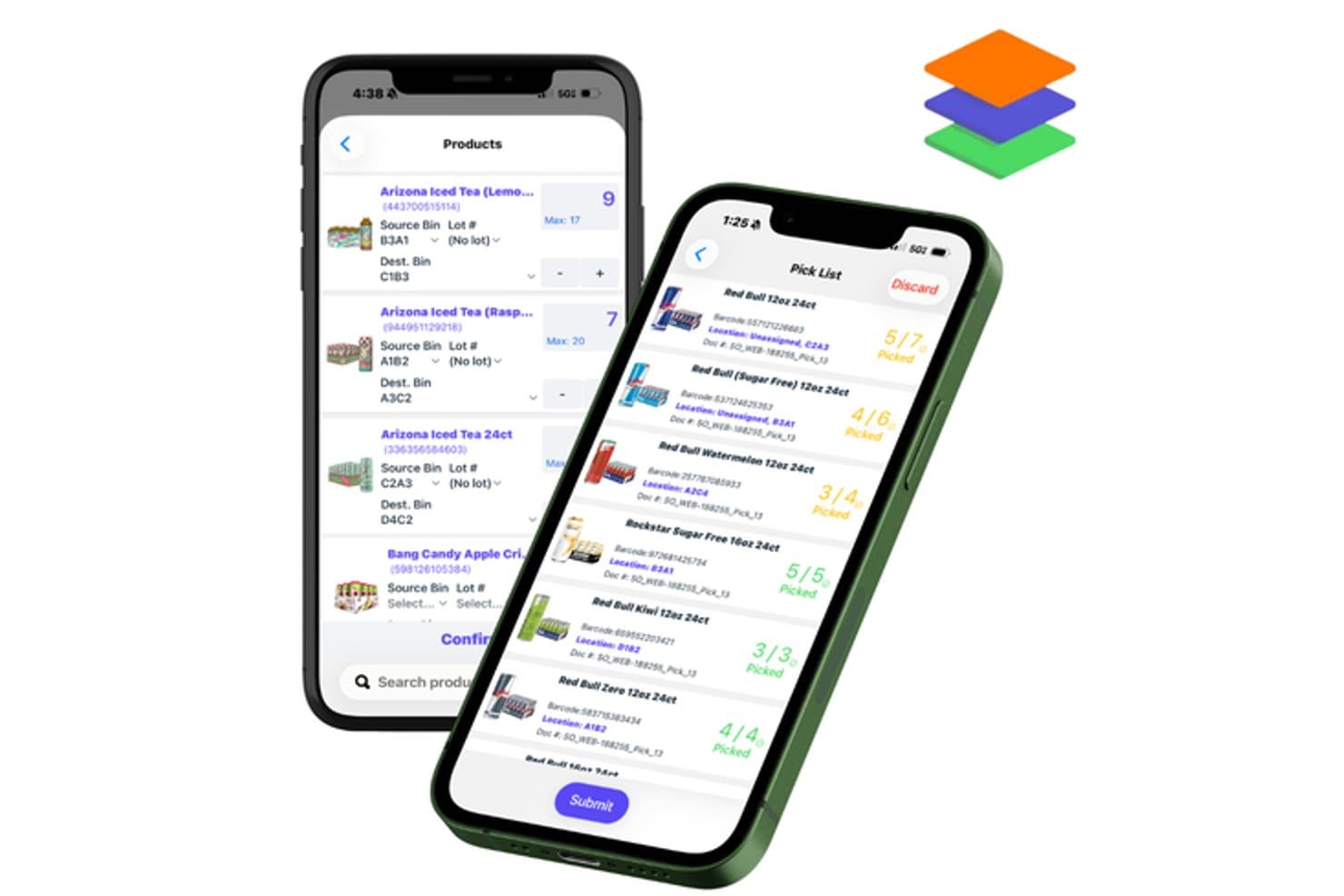
InSitu Sales offre un'app mobile di gestione inventario con tracciamento delle liste di prelievo e gestione della localizzazione dei prodotti nei contenitori su dispositivi iOS. InSitu Sales è una piattaforma mobile di gestione della distribuzione che combina ordini di vendita sul campo, monitoraggio in tempo reale dell'inventario dei furgoni, prelievo in magazzino, fatturazione mobile e acquisizione della prova di consegna per operazioni all'ingrosso e DSD.
Per chi è indicato InSitu Sales?
Piccoli e medi distributori all'ingrosso e aziende alimentari e di bevande che effettuano consegne dirette ai negozi con rappresentanti di vendita sul campo.
Perché ho scelto InSitu Sales
InSitu Sales si guadagna un posto nella mia shortlist per come gestisce l'ultimo miglio della consegna. Apprezzo che i rappresentanti possano generare fatture direttamente dal proprio dispositivo mobile e stamparle in loco tramite stampanti Bluetooth come Zebra o Bixolon. Il flusso di lavoro per la prova di consegna acquisisce sia foto che firme elettroniche al momento del recapito, creando un chiaro registro con data e ora collegato a ciascuna transazione.
Funzionalità principali di InSitu Sales
- App mobile per il picking: Il personale di magazzino può evadere, prelevare e trasferire inventario utilizzando un'app mobile dedicata per iOS e Android.
- Scansione codice a barre: I rappresentanti e i picker possono scansionare i codici a barre dei prodotti con la fotocamera del dispositivo per una rapida ricerca prodotti e precisione negli ordini.
- Portale clienti B2B: Gli acquirenti all'ingrosso hanno accesso a un portale online self-service per effettuare e monitorare ordini.
- Integrazione QuickBooks: Ordini, fatture e variazioni di inventario si sincronizzano direttamente sia con QuickBooks Online che Desktop.
Integrazioni di InSitu Sales
InSitu Sales offre integrazioni native con QuickBooks Online, QuickBooks Desktop, SAP Business One, NetSuite, Odoo, Fishbowl, Zoho, Epicor, Xero e Oracle. È disponibile un'API per integrazioni personalizzate.
Pros and Cons
Pros:
- Supporta inserimento ordini e gestione inventario da mobile
- Offre prova di consegna con acquisizione fotografica
- App dedicata per i picker alle attività di magazzino
Cons:
- Non progettato per inventari in punto vendita retail
- Manca di notifiche push integrate per scorte basse
Learn more about InSitu Sales:
Altri software mobili per la gestione dell'inventario
Ecco alcune opzioni aggiuntive di software mobili per la gestione dell’inventario che non sono entrate nella mia selezione, ma che vale comunque la pena prendere in considerazione:
- 11Unleashed SoftwareIdeale per il controllo delle scorte in tempo reale
- 12ExtensivIdeale per integrazioni 3PL
- 13HandiFoxIdeale per le vendite mobili
- 14VeeqoIdeale per rivenditori ecommerce
- 15SimplyDepoIdeale per l'accesso in tempo reale all'inventario
Software correlati per la gestione dell'inventario
Esiste un software per la gestione dell'inventario per ogni tipo di esigenza. Per questo abbiamo raccolto guide che li coprono tutti.
- Software per la gestione dell'inventario all'ingrosso
- Software per la gestione dell'inventario per la vendita al dettaglio
- Software per la gestione dell'inventario per l'e-commerce
- Software per la gestione dell'inventario tramite codici a barre
- Software basato sul cloud per la gestione dell'inventario
- Software per la gestione dell'inventario del POS
Come valuto i software di gestione dell'inventario mobile
Divido la mia valutazione in due livelli: i requisiti minimi che uno strumento deve soddisfare—pensa a scansione base e sincronizzazione multi-sede in tempo reale—e i fattori differenzianti che rendono un'opzione più adatta di un'altra.
Funzionalità di base (Requisiti minimi per questa lista)
Quando seleziono gli strumenti per la mia lista, assegno a ciascuno un punteggio su una scala da 0 (non offre la funzionalità) a 5 (eccelle in quest'area) per ogni funzionalità di base elencata sotto. Poi calcolo il punteggio totale in percentuale. Ogni strumento deve raggiungere un punteggio totale minimo del 65% per essere preso in considerazione.
- Accesso tramite app mobile: Verifico se la piattaforma offre un'app dedicata per iOS e/o Android dove il personale può svolgere reali attività di inventario—non solo visualizzare dashboard.
- Scansione barcode e QR: Cerco la scansione tramite fotocamera e il supporto a scanner hardware accoppiati, dal momento che i team di magazzino spesso necessitano di una velocità superiore a quella di una fotocamera del telefono.
- Monitoraggio delle scorte in tempo reale: Ogni scansione o modifica dovrebbe sincronizzarsi tra le sedi immediatamente—valuto con quale rapidità gli aggiornamenti sono visibili agli altri utenti e canali.
- Gestione multi-sede: I rivenditori con più negozi hanno bisogno di visualizzazioni sulle scorte specifiche per sede e workflow di trasferimento, quindi verifico come ogni strumento gestisca la visibilità tra sedi differenti.
- Conteggi e regolazioni delle scorte: Cerco workflow strutturati per conteggi ciclici e inventario fisico su mobile, compreso il tracciamento delle variazioni e la possibilità di assegnare i conteggi al personale.
- Integrazioni con sistemi retail: Valuto le connessioni native con i principali POS, piattaforme ecommerce ed ERP, oltre a verificare se lo strumento offre un'API aperta per flussi di lavoro personalizzati.
Una volta che ho una lista di strumenti che soddisfano questi requisiti, considero cosa differenzia ogni piattaforma.
Fattori differenzianti (Cosa distingue i fornitori)
Ecco come confronto i diversi fornitori:
Funzionalità distintive
La modalità offline è molto importante—i magazzini e le banchine di carico hanno raramente un Wi-Fi affidabile, quindi cerco strumenti che permettano al personale di scansionare e conteggiare senza connettività e sincronizzare quando tornano online. La gestione degli ordini di acquisto da mobile è un altro elemento differenziante, soprattutto per i team di ricezione che devono confermare le spedizioni direttamente al dock senza tornare davanti a un computer. Valuto anche i permessi basati sui ruoli, dato che i negozi con personale e manager misti hanno bisogno di controlli rigidi su chi può approvare trasferimenti o modificare i conteggi.
Oltre alle funzionalità
La compatibilità dei dispositivi è cruciale—verifico se uno strumento funziona su telefoni e tablet di consumo così come su palmari rinforzati come Zebra o Honeywell, dato che molti rivenditori usano hardware misto tra negozi e magazzini. Anche prezzi e scalabilità sono aspetti a cui presto molta attenzione. Una piattaforma che addebita per utente che esegue la scansione può diventare costosa rapidamente se vuoi dotare ogni dipendente di un dispositivo, perciò ricerco modelli di licenza che non penalizzino la crescita. Le risorse per l'onboarding sono anch'esse importanti, soprattutto per il personale in prima linea che ha bisogno di una formazione visuale e rapida per iniziare a scansionare fin dal primo giorno.
Che cos'è il software mobile per la gestione dell'inventario?
Il software mobile per la gestione dell'inventario consente di monitorare, gestire e controllare le scorte direttamente dal telefono o dal tablet.
Che tu stia scansionando codici a barre nel retrobottega, aggiornando gli ordini sul campo o controllando i livelli di inventario da una corsia del magazzino, questi strumenti mantengono le tue attività operative senza intoppi, senza bisogno di restare incollato a una scrivania.
È pensato per rivenditori, team di magazzino e professionisti della logistica che hanno bisogno di visibilità in tempo reale e di prendere decisioni rapide mentre sono in movimento.
Con funzionalità come la scansione dei codici a barre, la sincronizzazione in tempo reale e il monitoraggio di più sedi, gli strumenti mobili per la gestione dell'inventario aiutano a ridurre gli errori, velocizzare i processi e mantenere le scorte proprio dove devono essere: disponibili e contabilizzate.
Come scegliere un software mobile per la gestione dell'inventario
Esistono moltissime funzionalità interessanti, ma scegliere lo strumento giusto non significa puntare su effetti speciali: significa trovare un sistema adatto al tuo team, ai tuoi flussi di lavoro e al tuo budget.
Ecco come fare chiarezza e rimanere concentrati durante il processo di selezione:
| Fattore | Cosa cercare |
|---|---|
| FattoreScalabilità | Cosa cercarePuò crescere insieme alla tua attività? Cerca piattaforme che supportino un numero crescente di utenti, prodotti e sedi senza diventare un collo di bottiglia. |
| FattoreIntegrazioni | Cosa cercareFunziona bene con gli altri strumenti? Assicurati che si colleghi alle piattaforme di commercio elettronico, agli ERP, agli strumenti per le spedizioni e ai software di contabilità. |
| FattorePersonalizzazione | Cosa cercarePuoi adattarlo al tuo flusso di lavoro? Cerca strumenti con dashboard, flussi di lavoro e avvisi personalizzabili. |
| FattoreFacilità d'uso | Cosa cercareIl tuo team lo utilizzerà davvero? Interfacce chiare e una navigazione semplice significano meno tempo per la formazione e meno errori. |
| FattoreBudget | Cosa cercareIl prezzo è in linea con la tua fase di crescita? Assicurati di capire cosa è incluso in ogni livello e fai attenzione ai costi nascosti. |
| FattoreMisure di sicurezza | Cosa cercareI tuoi dati sono al sicuro? Dai priorità agli strumenti con crittografia, autorizzazioni utente e conformità a standard come il GDPR o SOC 2. |
| FattoreAssistenza | Cosa cercareQualcuno ti aiuterà se le cose dovessero andare storte? Verifica la disponibilità di chat dal vivo, tempi di risposta rapidi e documentazione utile. |
| FattoreAccesso da dispositivi mobili | Cosa cercareL'esperienza mobile è davvero soddisfacente? Dovrebbe sembrare uno strumento completamente funzionale, non una versione per computer ridotta all'essenziale. |
Tendenze nei software mobili per la gestione dell'inventario
Il software per l'inventario non riguarda più soltanto il conteggio delle scorte: si sta evolvendo rapidamente per soddisfare le esigenze di operazioni basate sui dispositivi mobili e sui dati. Ecco le principali tendenze che stanno plasmando il futuro della gestione mobile dell'inventario:
- IA e apprendimento automatico per un controllo più intelligente delle scorte. Sempre più strumenti utilizzano l'IA per prevedere la domanda, segnalare le scorte ridotte e suggerire i punti di riordino, riducendo le indisponibilità e le scorte invendute.
- Realtà aumentata nei magazzini. Le funzionalità di realtà aumentata consentono al personale di sovrapporre i dati dell'inventario agli articoli del mondo reale utilizzando dispositivi mobili, rendendo il prelievo e lo stoccaggio più rapidi e intuitivi.
- Blockchain per la tracciabilità completa. La tecnologia blockchain sta entrando nella gestione dell'inventario per creare registri a prova di manomissione, ideali per i settori in cui la trasparenza della catena di approvvigionamento è imprescindibile.
- Strumenti per il monitoraggio della sostenibilità. Alcune piattaforme ora monitorano le impronte di carbonio, ottimizzano i percorsi di spedizione o aiutano a ridurre gli sprechi, perché anche l'efficienza dell'inventario dovrebbe rispettare il pianeta.
- Comandi attivati dalla voce. Hai le mani occupate? Gli strumenti con comandi vocali consentono agli utenti di controllare i livelli delle scorte o aggiornare l'inventario al volo, riducendo gli ostacoli negli ambienti frenetici.
Funzionalità dei software mobili per la gestione dell'inventario
Il software mobile per la gestione dell'inventario fa molto più che trasferire i tuoi fogli di calcolo su uno schermo più piccolo: trasforma il modo in cui monitori le scorte, evadi gli ordini e mantieni il tuo team connesso. Ecco le funzionalità più importanti quando gestisci l'inventario in mobilità:
- Monitoraggio dell'inventario in tempo reale. Conosci i livelli esatti del tuo inventario: cosa è disponibile, cosa viene venduto e cosa deve essere riordinato, con aggiornamenti in tempo reale su tutti i dispositivi.
- Scansione dei codici a barre e supporto dei codici QR. Usa il tuo smartphone o gli scanner di codici a barre per scansionare i codici e ridurre gli errori manuali durante gli audit, la ricezione e l'evasione degli ordini.
- Gestione degli ordini e degli ordini di acquisto. Tieni traccia di ogni ordine dall'acquisto alla consegna, semplificando l'evasione degli ordini e ottenendo un maggiore controllo sull'inventario.
- Gestione di più sedi e magazzini. Gestisci facilmente l'inventario tra magazzini, punti vendita o persino camion, direttamente da un'app mobile per l'inventario.
- Accesso mobile su Android e iOS. Che tu sia del team Android o del team Apple, la tua app per l'inventario dovrebbe funzionare senza problemi su qualsiasi dispositivo mobile.
- Pannelli di controllo e campi personalizzabili. Adatta il tuo sistema di gestione dell'inventario alle esigenze della tua attività con campi personalizzati, avvisi e visualizzazioni personalizzate.
- Flussi di lavoro automatizzati e avvisi di scorte basse. Configura notifiche e punti di riordino automatico per evitare l'esaurimento o l'eccesso di scorte e mantenere le operazioni efficienti.
- Funzionalità offline. Continua a operare anche quando perdi la connessione, una funzione fondamentale per la gestione dei magazzini nelle aree senza segnale.
- Sincronizzazione basata sul cloud e integrazioni. Sincronizza i dati del tuo inventario mobile con altre piattaforme come i sistemi POS, gli strumenti di commercio elettronico o le esportazioni di Excel.
- Strumenti avanzati di reportistica e previsione. Usa i dati per prevedere la domanda, individuare le tendenze della redditività e migliorare il processo decisionale, senza più andare a intuito.
Vantaggi del software per la gestione mobile dell'inventario
Investire in un'app mobile per l'inventario non significa solo comodità: significa ottenere un controllo, una visibilità e un'efficienza migliori in tutta la tua attività.
Che tu gestisca un magazzino, una piccola attività o un'attività di commercio elettronico in crescita, ecco come la soluzione giusta per la gestione dell'inventario può aiutarti:
- Maggiore precisione grazie alla scansione dei codici a barre e dei codici QR. Dì addio all'inserimento manuale e agli errori nei fogli Excel. Scansiona i codici a barre con il tuo smartphone o con uno scanner per mantenere i dati dell'inventario privi di errori e pronti per gli audit.
- Visibilità dell'inventario in tempo reale. Ricevi aggiornamenti in tempo reale sui livelli dell'inventario in tutte le tue sedi, evitando così di accumulare scorte eccessive o di rimanere senza prodotti nei momenti più importanti.
- Evasione degli ordini più rapida e automazione dei flussi di lavoro. Automatizza attività come gli avvisi di scorte basse, gli ordini di acquisto e gli attivatori di riordino, semplificando le operazioni e risparmiando molto tempo.
- Accesso in qualsiasi momento e da qualsiasi luogo. Usa il tuo dispositivo mobile, Android o iOS, per gestire l'inventario, controllare i livelli delle scorte o scansionare i codici a barre dal magazzino, da un negozio o dal retro di un camion per le consegne.
- Scalabile in base alle esigenze della tua attività. Che tu sia il titolare di una piccola attività individuale o gestisca un intero team di magazzino, il software mobile per la gestione dell'inventario cresce insieme a te, dalla piccola impresa alle aziende più grandi.
- Decisioni migliori grazie a report più intelligenti. Usa gli strumenti integrati di analisi e previsione per monitorare la redditività, individuare le tendenze e perfezionare le strategie di controllo dell'inventario.
- Maggiore produttività e mobilità del team. Un'app mobile intuitiva mantiene il tuo team connesso e reattivo senza dover dipendere da sistemi desktop macchinosi o fogli di calcolo obsoleti.
Costi e prezzi del software per la gestione mobile dell'inventario
Il software per la gestione mobile dell'inventario è disponibile in diverse forme, dimensioni e fasce di prezzo. Che tu gestisca una piccola attività che sta abbandonando i fogli di calcolo o un'attività di vendita al dettaglio con più sedi e livelli di scorte considerevoli, è importante capire per cosa stai pagando e cosa manca a ogni livello.
Ecco una panoramica delle fasce di prezzo più comuni e di ciò che generalmente ottieni a ogni livello:
| Tipo di piano | Prezzo medio | Funzionalità comuni | Ideale per |
|---|---|---|---|
| Tipo di pianoPiano gratuito | Prezzo medio$0 | Funzionalità comuniMonitoraggio di base dell'inventario, scansione limitata dei codici a barre, accesso mobile per 1-2 utenti | Ideale perNuove attività, esigenze di base per l'inventario |
| Tipo di pianoPiano personale | Prezzo medio$5–$25/utente/mese | Funzionalità comuniScansione dei codici a barre, aggiornamenti dell'inventario in tempo reale, gestione degli ordini, integrazioni di base | Ideale perFreelance, piccoli esercizi commerciali |
| Tipo di pianoPiano aziendale | Prezzo medio$30–$75/utente/mese | Funzionalità comuniMonitoraggio dell'inventario su più sedi, flussi di lavoro personalizzabili, reportistica, avvisi di scorte basse | Ideale perTeam in crescita, attività di vendita al dettaglio con più sedi |
| Tipo di pianoPiano per grandi aziende | Prezzo medio$80–$150+/utente/mese | Funzionalità comuniGestione dei magazzini, funzionalità offline, previsioni, sicurezza avanzata, integrazioni complete | Ideale perAttività con volumi elevati, team numerosi |
Ulteriori considerazioni sui prezzi
- Alcune piattaforme applicano costi aggiuntivi per l'hardware, come i lettori RFID o le stampanti per codici a barre, quindi tienine conto nel tuo budget.
- Funzionalità come l'analisi avanzata, le funzioni senza connessione o i campi personalizzati potrebbero essere disponibili solo nei piani premium.
- Presta attenzione alle strutture tariffarie legate al volume dell'inventario o ai limiti degli ordini, soprattutto se la tua attività sta crescendo rapidamente.
- I sistemi di gestione dell'inventario basati sul cloud offrono in genere una fatturazione mensile o annuale: quella annuale è spesso più conveniente nel lungo periodo.
Domande frequenti sui software mobili per la gestione dell'inventario
Ecco alcune risposte alle domande comuni sui software mobili per la gestione dell’inventario:
Posso utilizzare senza connessione un software mobile per la gestione dell'inventario?
Sì: molte delle migliori app mobili per l’inventario ti consentono di continuare a lavorare anche quando il segnale è assente. Puoi scansionare i codici a barre, modificare i livelli dell’inventario e registrare le variazioni delle scorte senza connessione, per poi sincronizzare tutto quando torni online. È una vera salvezza nelle aree con Wi-Fi instabile, come i magazzini o i furgoni per le consegne.
Quanto è sicuro un software mobile per la gestione dell'inventario?
La sicurezza è imprescindibile. Cerca strumenti con funzionalità come la crittografia, le autorizzazioni basate sui ruoli e aggiornamenti di sicurezza regolari. I migliori software sono inoltre conformi a standard come il GDPR o il SOC 2, così i dati del tuo inventario non sono soltanto al sicuro, ma anche pronti per essere sottoposti a un audit.
Quali tipi di attività traggono maggior beneficio dagli strumenti mobili per l'inventario?
Se gestisci prodotti fisici e hai un team sempre in movimento, questa soluzione fa al caso tuo. Rivenditori, venditori di commercio elettronico, magazzini e attività che operano sul campo traggono tutti vantaggio dal monitoraggio dell’inventario in tempo reale sui dispositivi mobili. Hai una piccola impresa? Ancora meglio: con lo strumento giusto potrai ottenere risultati ben superiori alle tue dimensioni.
Ho bisogno di hardware speciale per utilizzare questi strumenti?
Non sempre. Molte app mobili per l’inventario trasformano il tuo smartphone in uno scanner utilizzando la fotocamera integrata. Tuttavia, se vuoi una scansione più rapida o lavori in ambienti ad alto volume, investire in lettori di codici a barre Bluetooth o stampanti mobili per etichette può semplificare notevolmente il tuo flusso di lavoro.
In che modo i sistemi mobili per l'inventario aiutano con gli audit e la conformità?
Dimentica di dover correre a preparare fogli di calcolo durante gli audit. Il software mobile per la gestione dell’inventario mantiene i tuoi dati accurati e registrati in tempo reale, con tanto di indicazioni temporali e cronologia degli utenti. In questo modo, le verifiche interne e gli audit esterni diventano molto più semplici.
Posso integrare un sistema mobile per l'inventario con il mio POS o la mia piattaforma di commercio elettronico?
Certamente. La maggior parte delle soluzioni per la gestione dell’inventario è compatibile con strumenti come Shopify, WooCommerce, Amazon e diversi sistemi POS. Ciò significa che i livelli dell’inventario, lo stato degli ordini e persino i dati dei clienti rimangono sincronizzati senza che tu debba fare nulla.