

El software de integración de comercio electrónico conecta tu sitio de comercio electrónico con otros sistemas empresariales, lo que te permite sincronizar datos de comercio electrónico, automatizar flujos de trabajo y gestionar las operaciones desde un solo lugar. Si buscas formas de reducir el trabajo manual que consume mucho tiempo, evitar errores costosos y mantener sincronizados tus canales de venta, la plataforma adecuada puede ayudarte a optimizar las operaciones y mejorar la experiencia general del cliente de tu negocio en línea. Muchas soluciones de comercio electrónico funcionan como plataformas todo en uno que conectan la gestión de relaciones con los clientes, el marketing por correo electrónico, el procesamiento de pedidos y las herramientas de redes sociales dentro de un ecosistema unificado. Esto ayuda a las empresas a gestionar las ventas omnicanal mientras mantienen la coherencia de los datos en toda su pila de software de comercio electrónico.
Esta lista te ayudará a comparar los principales programas de integración de comercio electrónico para 2026, para que puedas encontrar una solución fácil de usar que se adapte a la pila tecnológica de tu equipo, tus canales de venta y tus planes de crecimiento.
Por qué confiar en nuestras recomendaciones de software
6,700+
Reviews
20
Industry experts
16+
Evaluation factors
14
Years
Nuestro equipo lleva probando y evaluando software desde 2012. Como líderes del sector retail, sabemos lo difícil —y lo importante— que es elegir el software adecuado.
Para esta guía, evaluamos las herramientas mediante pruebas prácticas e investigación independiente, puntuando las herramientas según nuestros criterios de selección.
Nuestras reseñas reflejan nuestro criterio independiente, no un discurso de ventas.
Tabla comparativa de software de integración de comercio electrónico
Esta tabla comparativa resume los detalles de precios de mis principales selecciones de software de integración de comercio electrónico:
| Tool | Best For | Trial Info | Price | ||
|---|---|---|---|---|---|
| 1 | La mejor opción para plantillas de automatización prediseñadas | Prueba gratuita de 30 días | Precios bajo solicitud | Website | |
| 2 | Ideal para la automatización de flujos de trabajo personalizados | Demo gratuita disponible | Desde $1,495/mes | Website | |
| 3 | La mejor opción para integraciones de nivel empresarial | Hay un plan gratuito disponible | Desde 100 $/mes | Website | |
| 4 | Ideal para conectar tiendas multicanal | Prueba gratuita de 14 días | Desde $95/mes | Website | |
| 5 | Ideal para implementaciones rápidas en la nube | Prueba gratuita de 30 días | Desde 99 $/mes | Website | |
| 6 | La mejor opción para la compatibilidad con integraciones de mercados | Prueba gratuita de 14 días | Desde $300/mes (facturado anualmente) | Website | |
| 7 | La mejor opción para la asignación de datos impulsada por IA | Demostración gratuita disponible | Desde 9.995 $/año (facturado anualmente) | Website | |
| 8 | Mejor para la conectividad de sistemas ERP | Prueba gratuita de 30 días | Desde $99/mes | Website | |
| 9 | La mejor opción para acceder a una API unificada | Prueba gratuita de 30 días | Desde $599/mes | Website | |
| 10 | Ideal para sincronizar plataformas de contabilidad | Prueba gratuita de 15 días | Desde $69/mes | Website |


Reseñas de software de integración de comercio electrónico
A continuación se incluyen mis resúmenes detallados del software de integración de comercio electrónico que llegó a mi lista. Mis reseñas ofrecen un análisis detallado de las funciones, las integraciones y los mejores casos de uso de cada plataforma para ayudarte a encontrar la mejor opción para tu empresa.
 La mejor opción para plantillas de automatización prediseñadas
- Prueba gratuita de 30 días
- Precios bajo solicitud
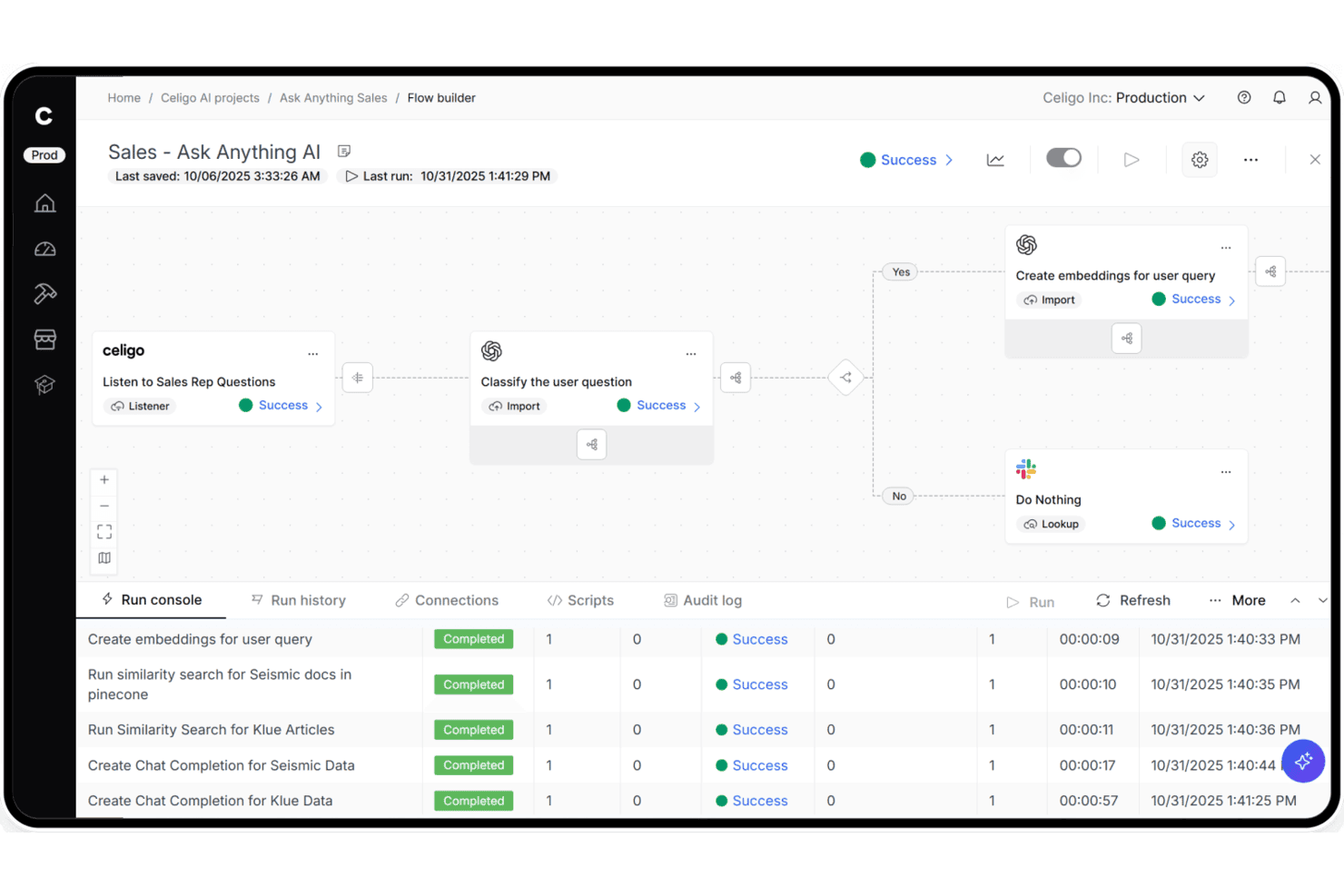
Celigo permite a los usuarios crear flujos de ventas impulsados por IA con una automatización paso a paso. Celigo es una plataforma iPaaS que conecta escaparates de comercio electrónico, marketplaces, sistemas ERP y sistemas de gestión logística mediante una biblioteca de más de 1.000 conectores prediseñados, un constructor visual de flujos, compatibilidad nativa con EDI y gestión de errores impulsada por IA.
¿Para quién es más adecuado Celigo?
Celigo es una opción excelente para minoristas del mercado medio y empresas minoristas que necesitan conectar múltiples canales de venta, sistemas ERP y sistemas de gestión logística sin depender demasiado del equipo de ingeniería.
Por qué elegí Celigo
Elegí Celigo como una de las mejores opciones porque su biblioteca de más de 1.000 conectores prediseñados permite implementar una integración de Shopify con NetSuite o de Amazon con QuickBooks en menos de tres días, no semanas. Me gusta especialmente la Gestión de excepciones con IA, que resuelve automáticamente entre el 95 y el 96 % de los errores de sincronización sin que nadie tenga que intervenir. El Administrador B2B nativo para EDI también está integrado directamente en la plataforma, por lo que puedes incorporar socios comerciales minoristas como Walmart o Target en tan solo dos semanas.
Características principales de Celigo
- EDI nativo mediante el Administrador B2B: Una solución EDI integrada que admite tipos de documentos minoristas como 850, 810 y 856, con conectores prediseñados para socios comerciales, incluidos Walmart, Target y Costco.
- Constructor visual de flujos: Una interfaz de arrastrar y soltar para crear y configurar flujos de integración sin escribir código, disponible tanto para usuarios técnicos como no técnicos.
- Planos de agentes de IA para comercio: Agentes de IA prediseñados para tareas como la conciliación de liquidaciones de Amazon, la detección de ventas superiores al inventario y la planificación de la demanda, que se ejecutan de forma autónoma dentro de tus flujos de trabajo.
- Conectores de canalización de datos: Integraciones incorporadas con Snowflake, Google BigQuery, Tableau y Looker que dirigen los datos comerciales y operativos directamente a tu conjunto de herramientas de análisis.
Integraciones de Celigo
Celigo ofrece más de 1.000 conectores prediseñados y más de 300 integraciones de marketplaces, incluidos Shopify, Amazon, NetSuite, Walmart Marketplace, BigCommerce, QuickBooks, ShipBob, Stripe, Snowflake y Google BigQuery. Los conectores universales admiten HTTP, FTP, JDBC, AS2, GraphQL y webhooks.
Pros and Cons
Pros:
- Resuelve automáticamente la mayoría de los errores de sincronización mediante IA
- Las plantillas de integración prediseñadas se implementan en cuestión de días
- El EDI integrado es compatible con los principales socios minoristas
Cons:
- La interfaz de asignación de campos puede resultar frustrante para los usuarios no técnicos
- Los mensajes de error pueden carecer de descripciones claras
Learn more about Celigo: Ideal para la automatización de flujos de trabajo personalizados
- Demo gratuita disponible
- Desde $1,495/mes
Visit WebsiteCustomer Rating:4.8/5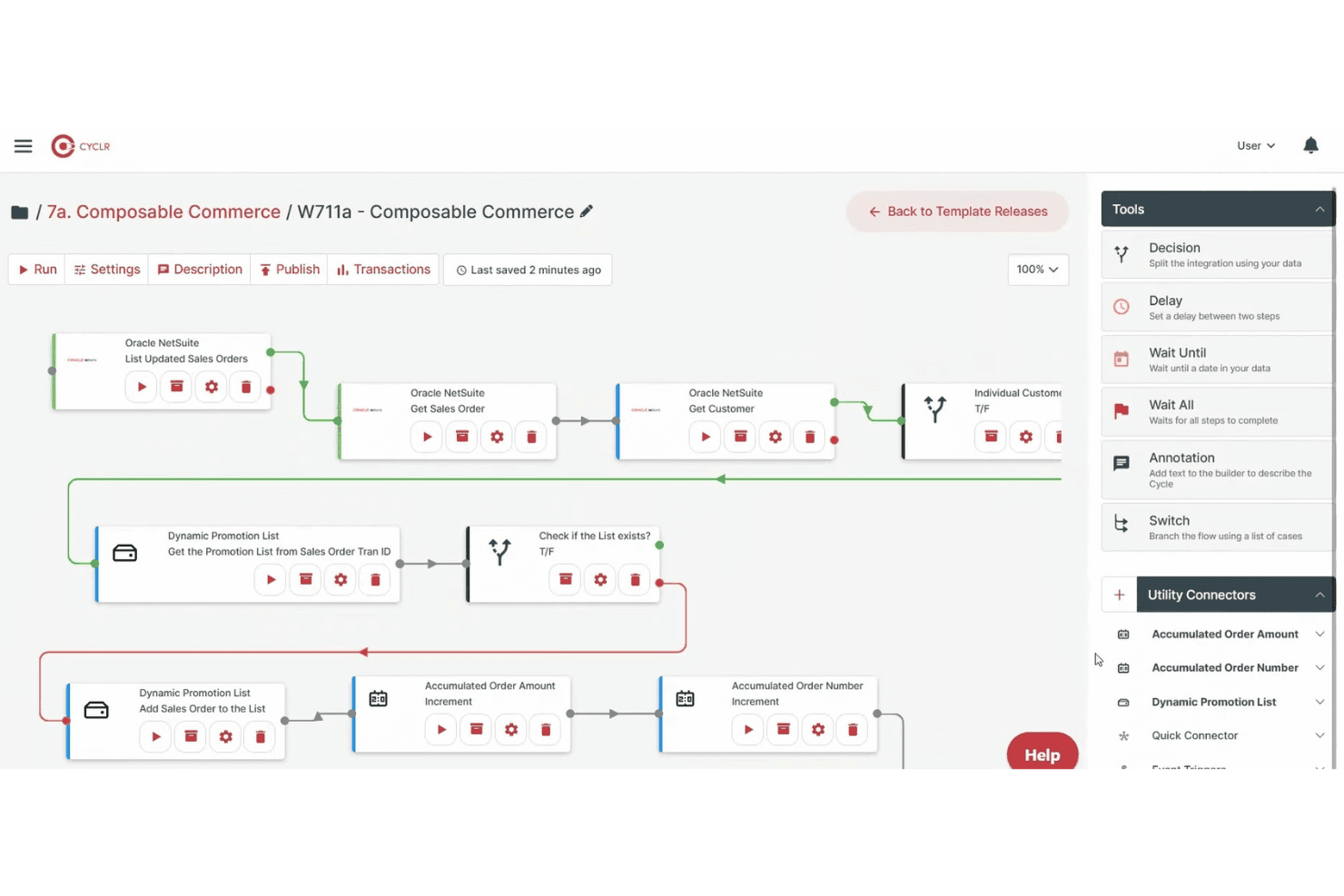
Cyclr permite a los usuarios crear flujos de trabajo automatizados con herramientas de lógica de arrastrar y soltar. Cyclr es una plataforma iPaaS integrada con una biblioteca de más de 600 conectores de API, incluidos 55 específicos para el comercio electrónico, que permite crear, implementar y gestionar flujos de trabajo de integración automatizados entre tiendas en línea, sistemas ERP, herramientas de contabilidad y sistemas logísticos.
¿Para quién es más adecuado Cyclr?
Cyclr es una excelente opción para empresas SaaS que quieren integrar flujos de trabajo personalizados de comercio electrónico en sus propios productos para los usuarios finales.
Por qué elegí Cyclr
Cyclr ocupa un lugar en mi lista de favoritos por la gran flexibilidad que ofrece para ampliar la lógica de los flujos de trabajo personalizados sin tener que escribir todo el código de integración desde cero. Me encanta que su generador visual admita secuencias de comandos de JavaScript y ramificaciones condicionales a nivel de campo, de modo que puedes gestionar situaciones complejas, como dividir un pedido de Shopify entre varios destinos 3PL o enriquecer los datos de los pedidos de WooCommerce antes de que lleguen a NetSuite. La arquitectura basada en plantillas permite implementar esos flujos de trabajo personalizados en varios inquilinos al instante.
Características principales de Cyclr
- Mercado de integraciones integrado: Un mercado de marca blanca que puedes integrar directamente en tu producto SaaS para que los usuarios finales puedan configurar sus integraciones por sí mismos sin necesidad de desarrollar una interfaz personalizada.
- Kit de herramientas para conectores personalizados: Un kit de herramientas integrado para crear conectores para API propietarias mediante un conversor automático de OpenAPI/Swagger o una asignación manual de API paso a paso.
- Compatibilidad con servidores MCP: Expone métodos de conectores de comercio electrónico, como el estado de los pedidos, el inventario y el cumplimiento, como herramientas MCP sujetas a control que los agentes de IA pueden invocar directamente.
- Implementación de flujos de trabajo para varios inquilinos: Las plantillas de integración se pueden implementar y gestionar de forma centralizada en varias instancias de clientes desde un único punto de control.
Integraciones de Cyclr
Cyclr ofrece 55 integraciones nativas de comercio electrónico, incluidas Shopify, WooCommerce, Magento 2, BigCommerce, eBay, Amazon Selling Partner, Ecwid, Wix, Squarespace y Lightspeed eCommerce. Su kit de herramientas para conectores personalizados admite API propietarias mediante OpenAPI/Swagger o la asignación manual de API.
Pros and Cons
Pros:
- Gestiona la automatización de flujos de trabajo complejos para minoristas
- Proporciona un mercado integrado para usuarios de SaaS
- Permite la asignación de datos y la creación de secuencias de comandos a nivel de campo
Cons:
- Está más orientado a proveedores de SaaS que a minoristas directamente
- No ofrece compatibilidad nativa con integraciones EDI
Learn more about Cyclr: La mejor opción para integraciones de nivel empresarial
- Hay un plan gratuito disponible
- Desde 100 $/mes
Visit WebsiteCustomer Rating:4.7/5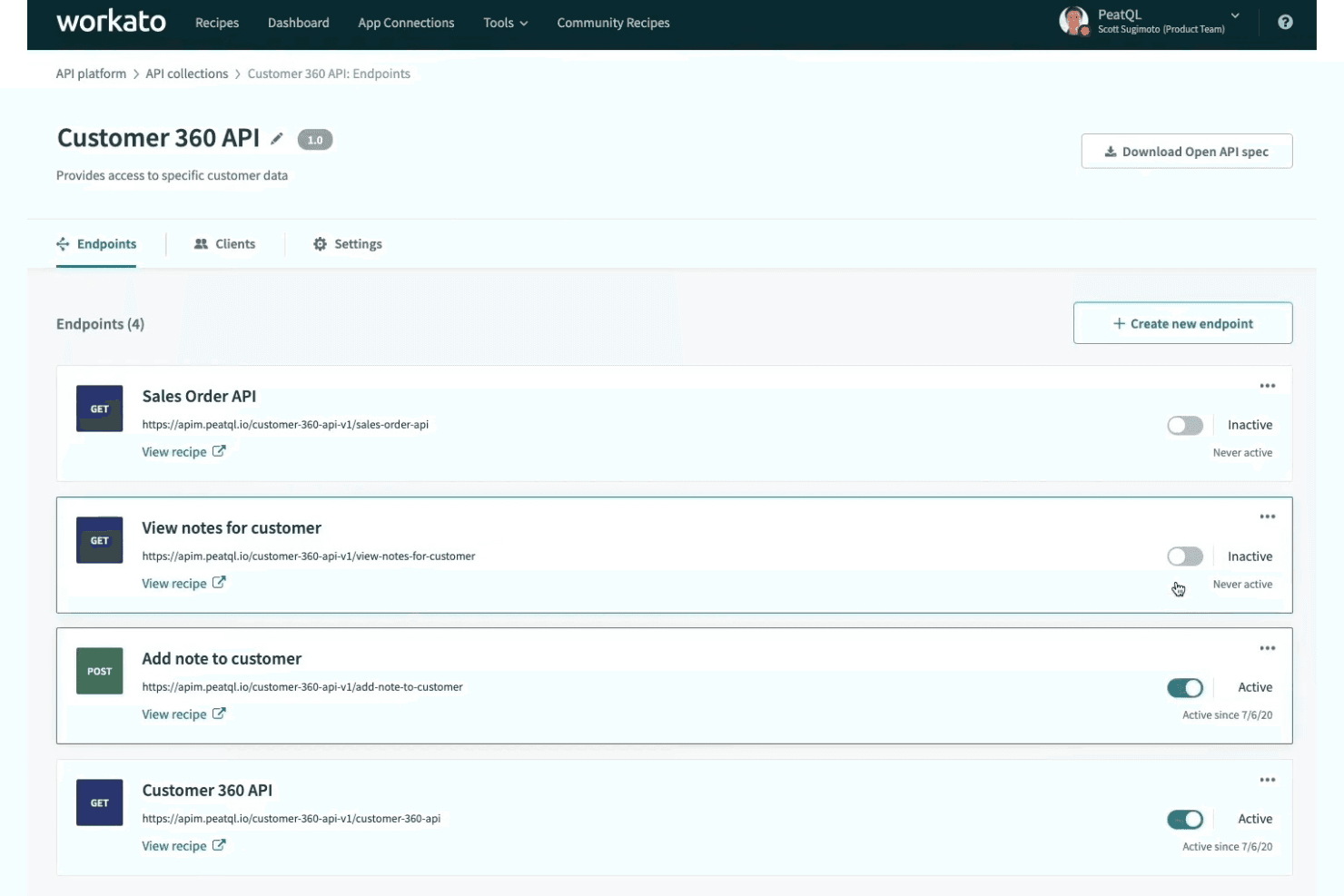
Workato permite a los usuarios gestionar y activar puntos de conexión API desde un único panel. Workato es una plataforma de integración de bajo código que conecta escaparates de comercio electrónico, mercados y sistemas administrativos mediante conectores prediseñados, automatización de flujos de trabajo, sincronización de datos en tiempo real y compatibilidad nativa con EDI.
¿Para quién es más adecuado Workato?
Workato es una opción excelente para equipos minoristas y de comercio electrónico de empresas medianas y grandes que gestionan integraciones complejas entre múltiples plataformas, ERP y socios comerciales.
Por qué elegí Workato
Workato ocupa un lugar en mi lista de opciones principales porque su compatibilidad nativa con EDI, impulsada por Orderful, gestiona transacciones 850/856/810 en tiempo real y permite incorporar nuevos socios comerciales en tan solo nueve días. Lo elegí específicamente para equipos empresariales que gestionan operaciones complejas multicanal, donde sus modelos de decisión permiten administrar la lógica de cumplimiento de pedidos y las reglas de precios en tablas de decisión independientes, en lugar de ocultar esa lógica dentro de flujos de trabajo individuales. Su sincronización omnicanal del inventario conecta simultáneamente los sistemas POS, los escaparates, los almacenes y los ERP como NetSuite y SAP en cientos de ubicaciones.
Funciones principales de Workato
- Asignación con Copiloto de AI: Un asistente de AI que redacta recetas, sugiere asignaciones de campos y ayuda a resolver errores directamente dentro del creador de recetas.
- Agente local: Un agente ligero que conecta sistemas locales, como ERP y bases de datos heredados, con la nube de Workato sin abrir puertos de entrada en el firewall.
- Procesamiento inteligente de documentos: Extrae automáticamente datos de facturas, recibos y órdenes de compra, y los dirige a flujos de trabajo conectados.
- Más de 700.000 recetas de la comunidad: Una biblioteca con función de búsqueda de plantillas de flujos de trabajo prediseñadas que puedes clonar y adaptar a escenarios habituales de integración de comercio electrónico y comercio minorista.
Integraciones de Workato
Workato ofrece más de 1.200 conectores prediseñados, incluidas integraciones nativas con Shopify, BigCommerce, WooCommerce, Magento 2, Amazon Seller Central, Walmart Seller Center, NetSuite, SAP, Dynamics 365 y QuickBooks. Su conector HTTP admite integraciones personalizadas y sistemas locales.
Pros and Cons
Pros:
- Sincronización omnicanal del inventario y los pedidos en tiempo real
- Compatibilidad nativa con EDI e incorporación rápida de socios
- El Copiloto de AI acelera la resolución de errores y la asignación de campos
Cons:
- El análisis de CSV y las tablas de búsqueda tienen límites
- La depuración y el seguimiento de los flujos de trabajo pueden ser complicados
Learn more about Workato: Ideal para conectar tiendas multicanal
- Prueba gratuita de 14 días
- Desde $95/mes
Visit WebsiteCustomer Rating:4.7/5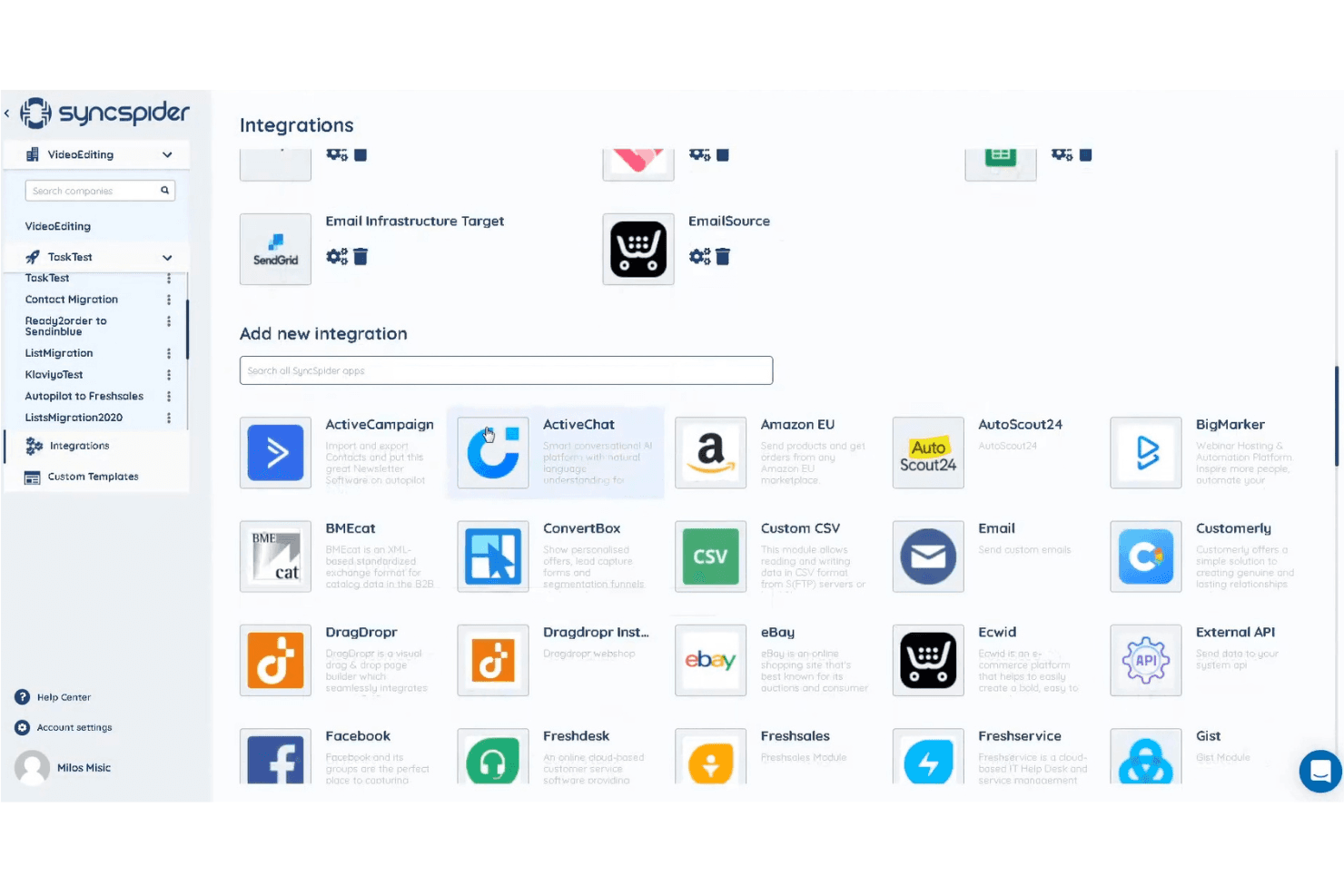
SyncSpider permite a los usuarios conectar aplicaciones mediante una biblioteca de integraciones con función de búsqueda. SyncSpider es una plataforma de integración centrada en el comercio electrónico que conecta tiendas en línea, mercados digitales, sistemas ERP y sistemas administrativos mediante más de 400 conectores prediseñados, un creador visual de flujos de trabajo y un DataHub centralizado para gestionar y enriquecer datos de productos, pedidos e inventario en todos los canales.
¿Para quién es más adecuado SyncSpider?
SyncSpider es una opción ideal para equipos de comercio electrónico multicanal que necesitan conectar varias tiendas, mercados digitales y sistemas administrativos sin crear integraciones personalizadas desde cero.
Por qué elegí SyncSpider
SyncSpider está en mi lista de opciones destacadas porque está diseñado específicamente para el comercio electrónico multicanal, no adaptado a partir de una herramienta de automatización genérica. Me encanta cómo su DataHub centraliza los datos de productos, pedidos e inventario de cada tienda y mercado digital conectado, para que no tengas que conciliar manualmente el inventario entre Shopify, Amazon y Zalando. Su Conector de base de datos de Windows también me parece especialmente destacable: conecta sistemas ERP locales que carecen de API estándar, una carencia real que la mayoría de las plataformas exclusivamente en la nube simplemente no pueden resolver.
Características principales de SyncSpider
- Asignación automática de campos mediante IA: Sugiere automáticamente asignaciones de campos entre los sistemas de origen y destino para reducir la configuración manual al conectar plataformas.
- Automatización de mercados digitales con múltiples vendedores: Automatiza el registro de vendedores, las publicaciones de productos y la sincronización de pedidos para operadores que gestionan entornos de mercados digitales con múltiples vendedores.
- Activadores de tareas configurables: Admite sincronizaciones programadas (cada hora, diariamente, semanalmente) y activadores basados en eventos mediante webhooks, activadores de URL o eventos de finalización de tareas.
- Lógica de reintento de repetición automática: Reintenta automáticamente las tareas fallidas hasta tres veces cuando los tiempos de espera o errores de la plataforma de destino interrumpen una sincronización.
Integraciones de SyncSpider
SyncSpider ofrece más de 400 integraciones prediseñadas, incluidas Shopify, WooCommerce, Magento 2, BigCommerce, Amazon Seller Central, eBay, Zalando, SAP, Microsoft Dynamics 365 y Odoo. Su Creador de integraciones personalizadas admite conexiones mediante API, mientras que el Conector de base de datos de Windows enlaza bases de datos locales.
Pros and Cons
Pros:
- Diseñado específicamente para flujos de trabajo de comercio electrónico
- El DataHub central gestiona la información de los productos
- Gestiona las necesidades de integración con sistemas ERP locales
Cons:
- No cuenta con un conector nativo para el mercado digital Walmart
- Algunos flujos de trabajo avanzados requieren la ayuda de un desarrollador
Learn more about SyncSpider: Ideal para implementaciones rápidas en la nube
- Prueba gratuita de 30 días
- Desde 99 $/mes
Visit WebsiteCustomer Rating:4.4/5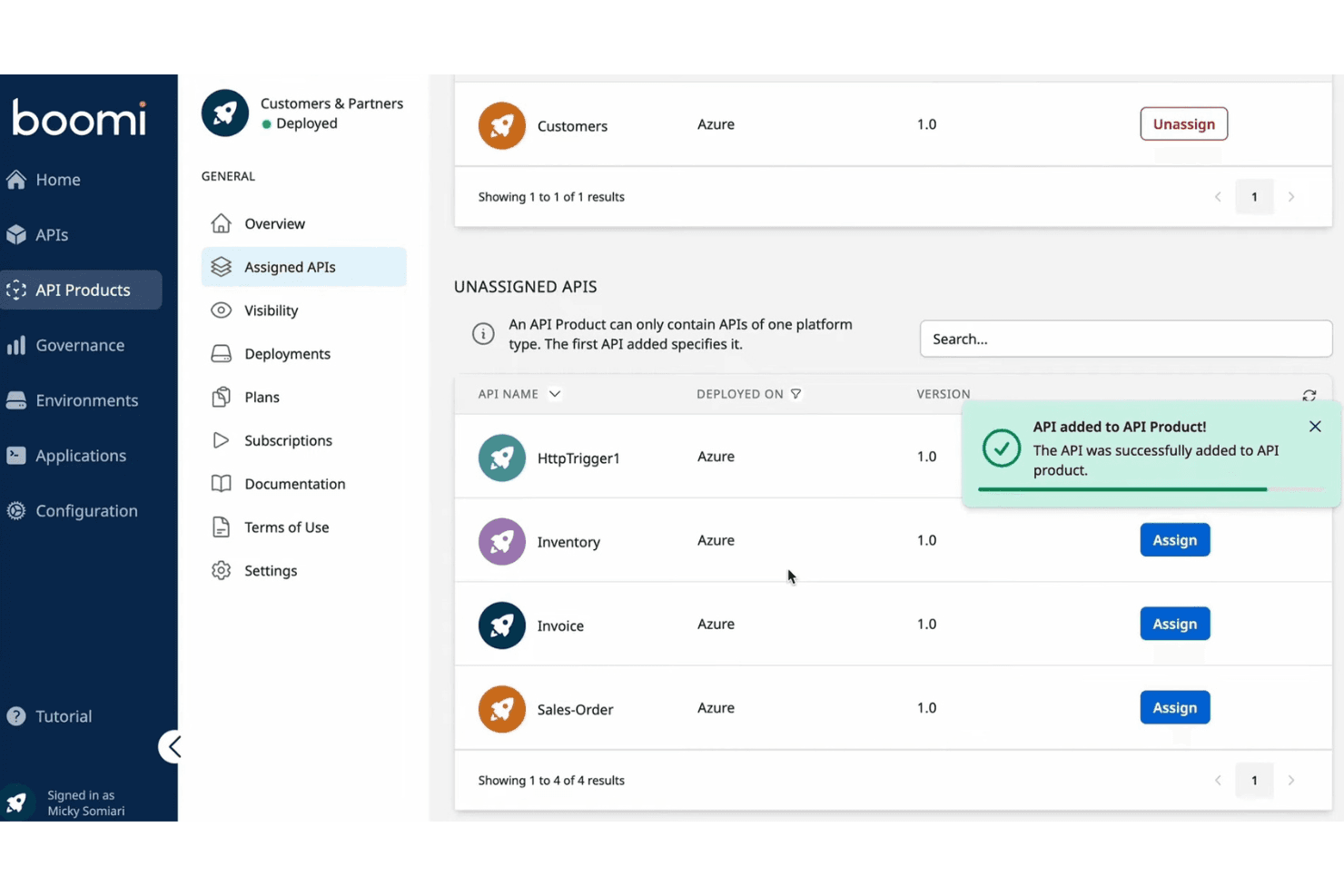
Boomi permite a los usuarios asignar y gestionar API dentro de un producto de API. Boomi es una iPaaS empresarial que conecta escaparates de comercio electrónico, ERP, mercados en línea y sistemas administrativos mediante más de 1.000 conectores prediseñados, mapeo de datos de bajo código, sincronización bidireccional y gestión nativa de B2B/EDI.
¿Para quién es más adecuado Boomi?
Boomi es una opción excelente para minoristas del mercado medio y empresas minoristas que cuentan con equipos de TI o de integración dedicados y necesitan conectar sistemas ERP como NetSuite o SAP con sus escaparates de comercio electrónico a gran escala.
Por qué elegí Boomi
Elegí Boomi como una de las mejores opciones porque sus aceleradores prediseñados realmente reducen el tiempo de implementación de una manera que no observo en la mayoría de las herramientas iPaaS. Por ejemplo, el acelerador de integración de NetSuite + Shopify gestiona de forma predeterminada la sincronización en tiempo real de pedidos, inventario, productos y pagos, por lo que no tienes que crear esos flujos desde cero. Boomi Suggest también utiliza IA para recomendar automáticamente mapeos de campos, lo que agiliza el trabajo de configuración que normalmente ralentiza las implementaciones en la nube.
Características principales de Boomi
- Gestión nativa de B2B/EDI: Boomi incluye compatibilidad integrada con EDI para socios comerciales, proveedores 3PL y distribuidores mayoristas sin necesidad de utilizar middleware independiente.
- Flujos de eventos: Este módulo permite un flujo de datos en tiempo real y basado en eventos entre los sistemas conectados, manteniendo actualizados los datos de inventario y pedidos durante los periodos de gran volumen.
- Panel de Boomi Insights: Una capa de análisis SaaS que supervisa las excepciones de ejecución, los errores de las escuchas, el estado del entorno de ejecución y el vencimiento de certificados en todas tus integraciones.
- SDK de conectores: Los equipos pueden crear conectores personalizados para plataformas que no están cubiertas de forma nativa, ampliando Boomi más allá de su biblioteca prediseñada.
Integraciones de Boomi
Boomi ofrece más de 1.000 conectores prediseñados, incluidas integraciones nativas con Shopify, NetSuite, SAP, Salesforce, Microsoft Dynamics, Workday y QuickBooks, además de integraciones de mercados en línea para Magento, BigCommerce, WooCommerce y Amazon Selling Partner API. Su SDK de conectores y la compatibilidad con OpenAPI permiten crear integraciones personalizadas.
Pros and Cons
Pros:
- Los aceleradores prediseñados reducen drásticamente el tiempo de implementación
- Sincronización de datos en tiempo real entre varios canales
- Gestión nativa de B2B y EDI incluida
Cons:
- No está especializada en integraciones con mercados en línea
- Las transformaciones de datos complejas requieren conocimientos de scripting
Learn more about Boomi: La mejor opción para la compatibilidad con integraciones de mercados
- Prueba gratuita de 14 días
- Desde $300/mes (facturado anualmente)
Visit WebsiteCustomer Rating:4.7/5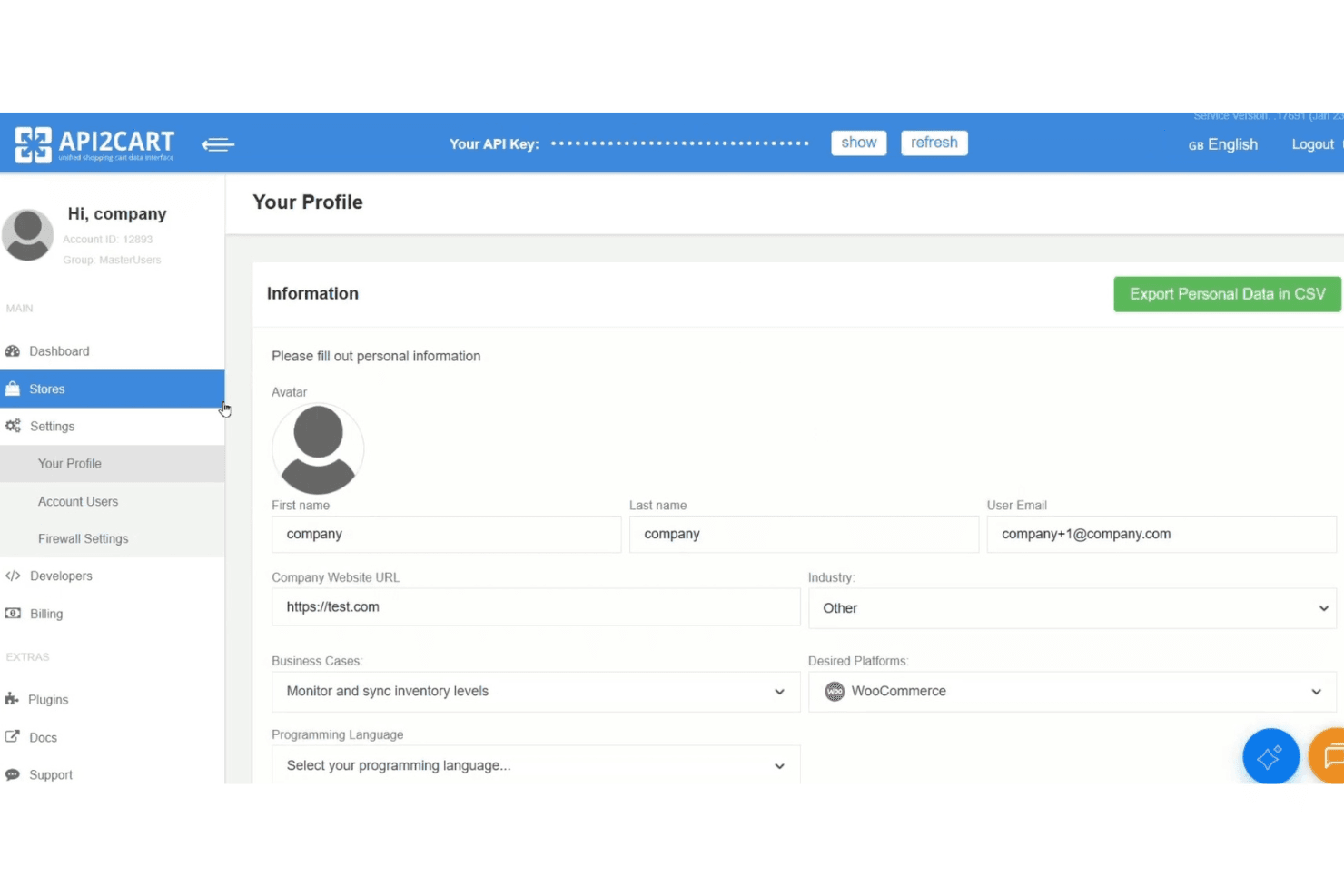
API2Cart permite a los usuarios gestionar la configuración del perfil y el acceso a las claves de API. API2Cart es una plataforma de API unificada que se conecta a más de 80 plataformas y mercados de comercio electrónico, incluidos Shopify, Amazon, eBay, Walmart y TikTok Shop, mediante un único punto de integración para gestionar pedidos, productos, inventario y datos de clientes.
¿Para quién es más adecuado API2Cart?
API2Cart es una opción excelente para desarrolladores de software y equipos de proveedores de software independientes que crean productos que necesitan conectarse a docenas de plataformas y mercados de comercio electrónico mediante una única API.
Por qué elegí API2Cart
Elegí API2Cart como una de las mejores opciones porque ninguna otra herramienta de mi lista conecta con tantos mercados mediante una única API, incluidos Amazon, eBay, Walmart, TikTok Shop, Mercado Libre, Lazada y Temu, además de más de 80 plataformas de comercio electrónico. Me gusta especialmente el sistema de filtrado de webhooks, que activa eventos de sincronización solo cuando se cumplen condiciones específicas, por lo que los equipos que crean flujos de pedidos para múltiples mercados no reciben llamadas innecesarias. El modelo de datos normalizado también significa que una sola llamada a la API gestiona productos, pedidos y clientes en todas las tiendas conectadas sin necesidad de realizar tareas de mapeo específicas para cada plataforma.
Características principales de API2Cart
- Modelo de datos unificado: Un único esquema normalizado gestiona productos, pedidos, clientes e inventario en las más de 80 plataformas conectadas sin necesidad de asignar campos para cada plataforma.
- Implementación empresarial en infraestructura propia: Aloja API2Cart en tu propia infraestructura de AWS, Azure, Google Cloud o Hetzner para obtener un control total de los datos y una marca blanca.
- Constructor de complementos: Un complemento que genera complementos con marca y listos para implementar en las principales plataformas de comercio electrónico sin escribir código de complemento personalizado desde cero.
- Filtrado de
response_fields: Permite especificar exactamente qué campos se deben devolver en cualquier respuesta de la API, reduciendo el tamaño de la carga útil y el consumo mensual de solicitudes a la API.
Integraciones de API2Cart
API2Cart se integra con más de 80 plataformas y mercados de comercio electrónico, incluidos Shopify, WooCommerce, BigCommerce, Magento, Amazon, eBay, Walmart, TikTok Shop, Mercado Libre y Temu. Su API unificada admite integraciones personalizadas con software ERP, POS, WMS, PIM y de contabilidad.
Pros and Cons
Pros:
- Admite más de 80 plataformas y mercados de comercio electrónico
- La API unificada reduce el trabajo de desarrollo para múltiples plataformas
- Webhooks avanzados con filtrado para la sincronización en tiempo real
Cons:
- No incluye un creador visual de flujos de trabajo para personas que no son desarrolladoras
- La documentación de las funciones avanzadas de monitorización es limitada
Learn more about API2Cart: La mejor opción para la asignación de datos impulsada por IA
- Demostración gratuita disponible
- Desde 9.995 $/año (facturado anualmente)
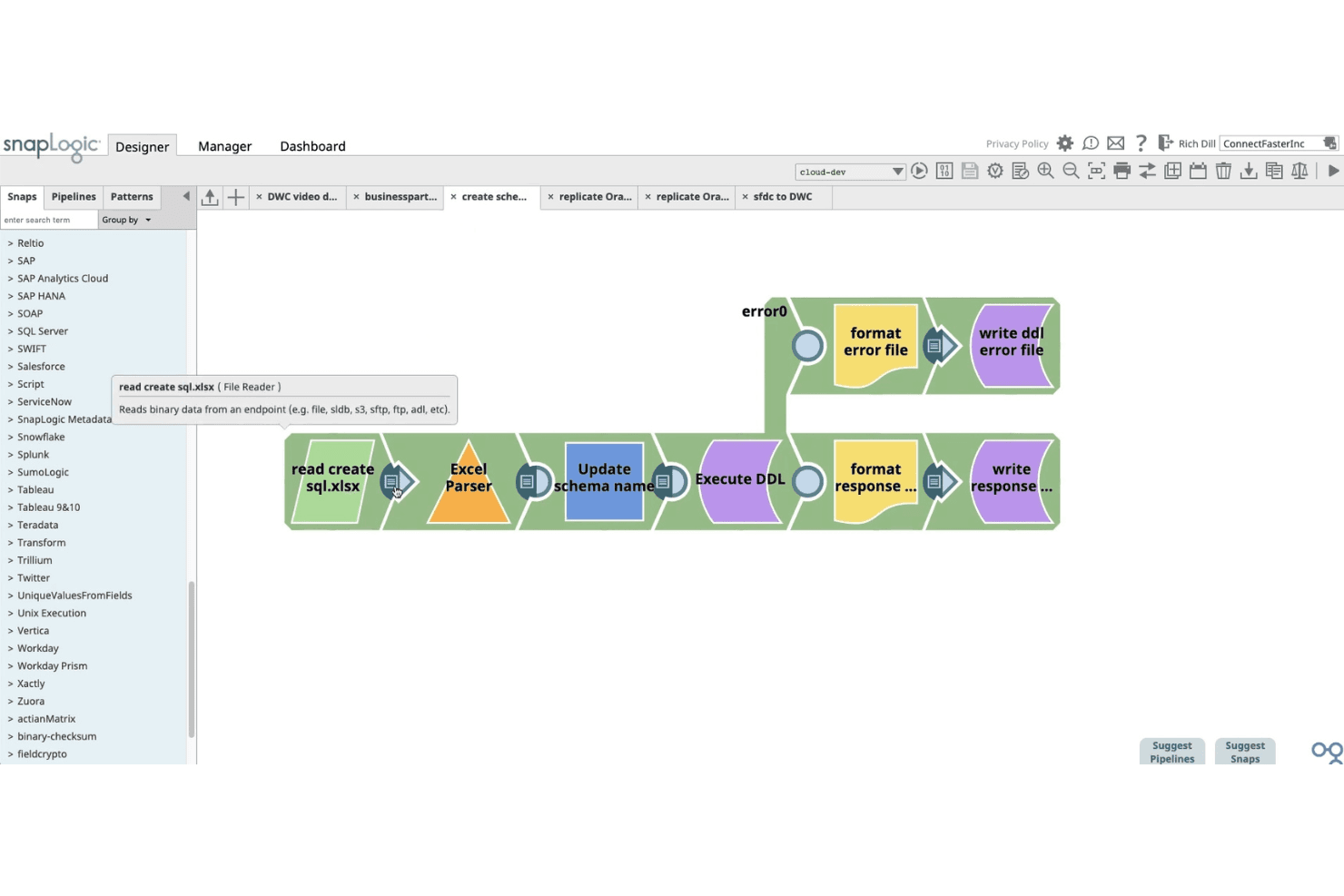
SnapLogic permite a los usuarios crear canalizaciones de datos visualmente mediante Snaps de Excel, DDL y escritura de archivos. SnapLogic es una plataforma de integración impulsada por IA que conecta tiendas de comercio electrónico, sistemas ERP, bases de datos y sistemas administrativos mediante una biblioteca de más de 1.000 conectores prediseñados, un generador visual de canalizaciones de bajo código y herramientas de IA generativa para la asignación y transformación de datos.
¿Para quién es más adecuado SnapLogic?
SnapLogic es una opción excelente para minoristas empresariales y responsables de integración que necesitan conectar tiendas Shopify con sistemas administrativos complejos como SAP, NetSuite o Dynamics 365.
Por qué elegí SnapLogic
Elegí SnapLogic como una de las mejores opciones porque sus capacidades de asignación de datos impulsadas por IA destacan realmente en la categoría. SnapGPT permite describir una integración en lenguaje sencillo y genera la canalización automáticamente, mientras que AutoSuggest aprende de patrones de asignación anteriores para recomendar coincidencias entre campos de forma automática. Considero esto especialmente valioso al conectar Shopify con un ERP complejo como SAP S/4HANA o Dynamics 365, donde las discrepancias entre los modelos de datos son el mayor cuello de botella.
Características principales de SnapLogic
- Snap Pack de Shopify: Un conector específico con compatibilidad completa con las operaciones CRUD para pedidos, clientes, catálogos de productos, pedidos de suministro, reembolsos y actualizaciones de inventario en toda la tienda Shopify.
- Canalizaciones reanudables: Canalizaciones que se recuperan automáticamente de los fallos en el punto de interrupción, por lo que no es necesario reiniciar todo un flujo de trabajo cuando algo falla durante la ejecución.
- Ultra Tasks: Ejecución de canalizaciones casi en tiempo real que mantiene sincronizados los niveles de inventario, los estados de los pedidos y los registros de clientes en los sistemas conectados, sin demoras por procesamiento por lotes.
- Snap Pack de EDI: Compatibilidad integrada con los estándares de documentos X12 y EDIFACT, incluidos los pedidos de compra minoristas (850) y las facturas (810), con conectividad con socios comerciales como Walmart y Tesco.
Integraciones de SnapLogic
SnapLogic ofrece más de 1.000 conectores prediseñados, incluidos Shopify, NetSuite, SAP, Microsoft Dynamics 365, Oracle, Workday y sistemas de bases de datos. Los Snaps de REST y OpenAPI admiten integraciones personalizadas con plataformas como Amazon Seller Central, eBay, Walmart Marketplace, WooCommerce, Magento y BigCommerce.
Pros and Cons
Pros:
- Asignación de datos impulsada por IA con SnapGPT
- Generador visual de bajo código para transformaciones complejas
- Sincronización bidireccional en tiempo real entre sistemas
Cons:
- No cuenta con conectores específicos para los principales mercados en línea
- La depuración de canalizaciones complejas puede ser difícil
Learn more about SnapLogic: Mejor para la conectividad de sistemas ERP
- Prueba gratuita de 30 días
- Desde $99/mes
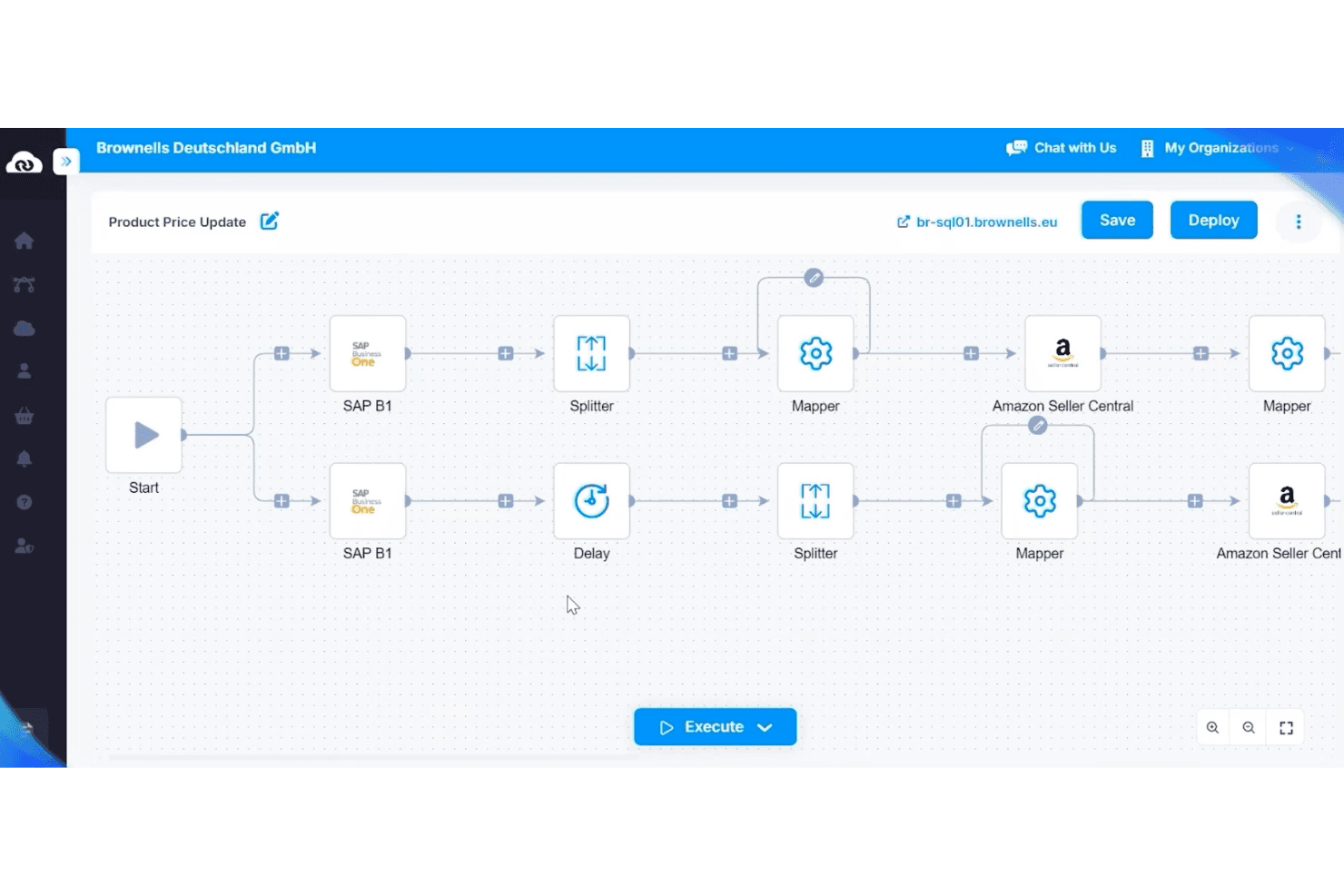
APPSeCONNECT automatiza las actualizaciones de precios de productos entre SAP B1 y Amazon. APPSeCONNECT es una plataforma de integración centrada en el ERP que conecta tiendas de comercio electrónico, mercados en línea, CRM y sistemas WMS con plataformas ERP como SAP, Microsoft Dynamics y NetSuite mediante un creador visual de flujos de trabajo de bajo código.
¿Para quién es más adecuado APPSeCONNECT?
APPSeCONNECT es una opción muy adecuada para empresas del mercado intermedio que utilizan SAP, Microsoft Dynamics o NetSuite y necesitan conectar su ERP con tiendas de comercio electrónico y mercados en línea sin un desarrollo personalizado complejo.
Por qué elegí APPSeCONNECT
APPSeCONNECT ocupa un lugar en mi lista de finalistas porque toda su arquitectura está diseñada en torno al ERP como sistema de registro, que es exactamente lo que necesitan las empresas del mercado intermedio que utilizan SAP, Microsoft Dynamics o NetSuite. Me impresiona especialmente su ProcessFlow Designer, que permite asignar visualmente transformaciones de datos a nivel de campo entre, por ejemplo, SAP Business One y Shopify sin escribir código personalizado. La capa EDI integrada es otro aspecto destacado, ya que gestiona tipos de transacciones exigidos por los minoristas, como POs (850) y ASNs (856), dentro de la misma plataforma en lugar de requerir un software intermedio independiente.
Funciones principales de APPSeCONNECT
- Mercado integrado: Explora e implementa conectores prediseñados desde la interfaz de la plataforma sin alternar entre herramientas externas.
- Agente local: Ejecuta flujos de trabajo de integración localmente para conectar plataformas en la nube directamente con sistemas ERP locales.
- appse ai: Una capa de IA integrada en la plataforma que sugiere asignaciones de campos y señala flujos defectuosos antes de que provoquen fallos de sincronización.
- Compatibilidad con transacciones EDI: Gestiona tipos de documentos EDI como POs (850), facturas (810) y ASNs (856) dentro de la misma plataforma que el resto de tus integraciones.
Integraciones de APPSeCONNECT
APPSeCONNECT ofrece más de 200 conectores prediseñados, incluidos Shopify, Magento, WooCommerce, BigCommerce, Amazon Seller Central, eBay, Walmart, SAP Business One, Dynamics 365 Business Central y NetSuite, además de compatibilidad con REST, SOAP, FTP/SFTP, GraphQL y webhooks para integraciones personalizadas.
Pros and Cons
Pros:
- Sincronización bidireccional en tiempo real entre ERP y comercio electrónico
- Plantillas de flujos de trabajo prediseñadas para una implementación rápida
- Compatibilidad integrada con EDI para transacciones minoristas
Cons:
- El proceso de resincronización manual puede resultar confuso
- La prueba empresarial no está disponible para SAP o Dynamics
Learn more about APPSeCONNECT: La mejor opción para acceder a una API unificada
- Prueba gratuita de 30 días
- Desde $599/mes
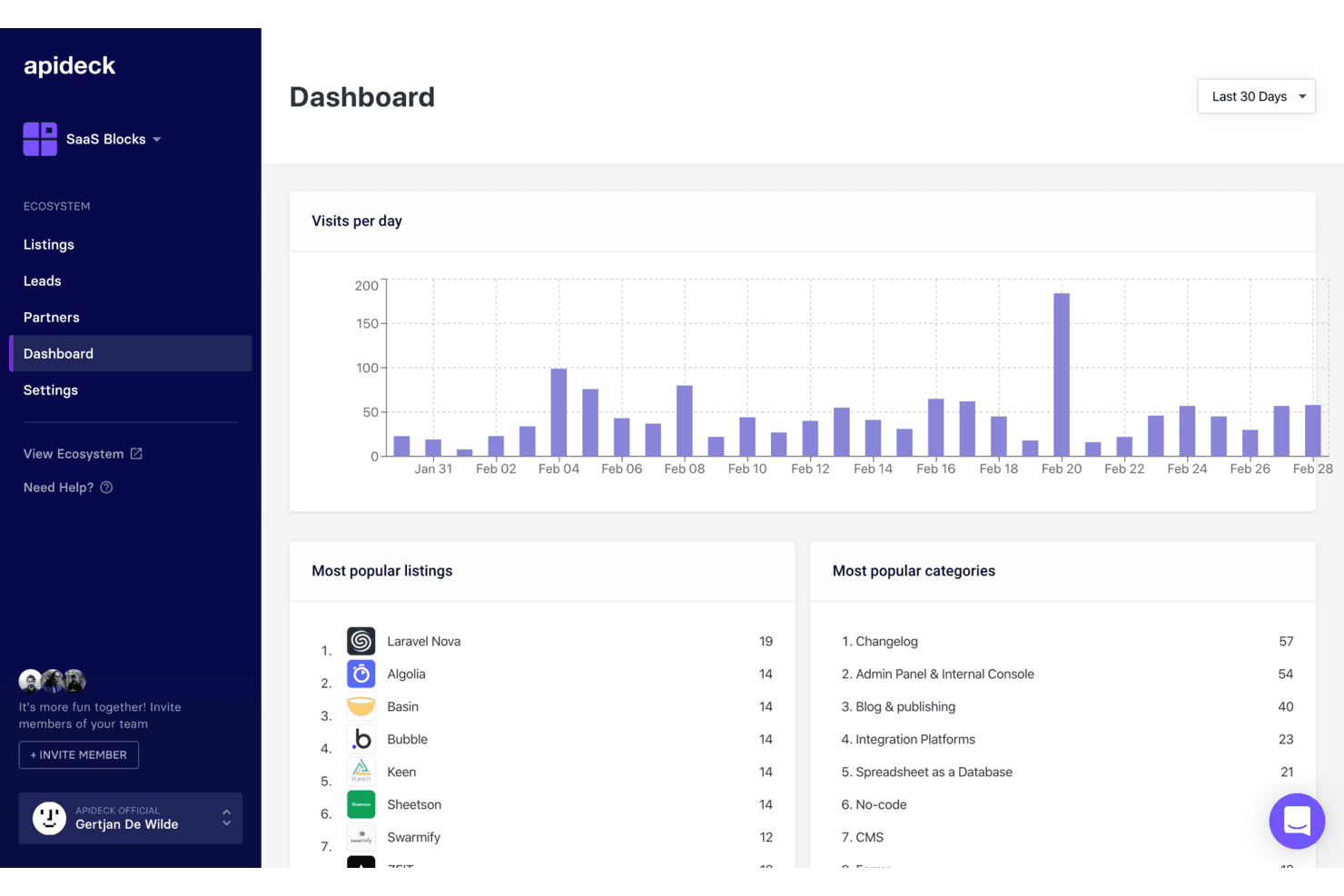
Apideck registra las visitas diarias, los listados principales y las categorías en un único panel. Apideck es una plataforma de API unificada orientada a desarrolladores que conecta tiendas de comercio electrónico, marketplaces, sistemas ERP y herramientas de punto de venta mediante una única capa de API normalizada.
¿Para quién es más adecuado Apideck?
Apideck es una opción excelente para equipos de desarrollo de empresas SaaS o minoristas que necesitan conectar tiendas de comercio electrónico, marketplaces y sistemas ERP mediante una única API normalizada.
Por qué elegí Apideck
Apideck ocupa un lugar en mi lista de favoritos porque es la única herramienta que he encontrado que ofrece a los equipos de desarrollo una única capa de API normalizada que abarca simultáneamente 17 conectores de comercio electrónico (Shopify, Amazon Seller Central, TikTok Shop, Walmart) y más de 56 sistemas ERP y de contabilidad (NetSuite, SAP S/4HANA, Dynamics 365). Me gusta especialmente el modelo de conectores mantenidos por el proveedor: cuando Shopify introduce un cambio incompatible en su API, Apideck lo absorbe para que tu equipo no tenga que hacerlo. Es una ventaja real cuando se mantienen canalizaciones entre la tienda y el sistema administrativo a gran escala.
Características principales de Apideck
- Endpoint de API unificada para comercio electrónico: Una única API normalizada proporciona a tus desarrolladores acceso a más de 17 plataformas de comercio electrónico, incluidas Shopify, WooCommerce, Magento y Amazon Seller Central, sin tener que crear integraciones independientes para cada una.
- Motor de webhooks virtuales: Para las plataformas sin compatibilidad nativa con webhooks, Apideck comprueba periódicamente los cambios mediante una detección basada en fechas y sumas de comprobación para simular notificaciones de eventos en tiempo real.
- API proxy de paso directo: Disponible en todos los planes, permite a tu equipo consultar endpoints específicos de cada plataforma que quedan fuera del esquema normalizado sin perder la capa de conexión unificada.
- Servidor MCP para agentes de IA: Un servidor alojado del Protocolo de Contexto de Modelos permite que los agentes de IA interactúen con más de 200 aplicaciones conectadas y es compatible con herramientas como Claude, LangChain y OpenAI Agents SDK.
Integraciones de Apideck
Apideck conecta más de 17 plataformas de comercio electrónico, incluidas Shopify, WooCommerce, BigCommerce, Magento, Amazon Seller Central, eBay, Walmart, Etsy, TikTok Shop y bol.com, además de más de 56 sistemas ERP y de contabilidad, como NetSuite, SAP S/4HANA, QuickBooks y Xero. Sus API y su proxy de paso directo permiten admitir integraciones personalizadas.
Pros and Cons
Pros:
- Mantiene todos los conectores, minimizando el mantenimiento interno
- Los registros centralizados simplifican la resolución de problemas para los ingenieros
- Conecta comercio electrónico, ERP y punto de venta en una sola API
Cons:
- No incluye automatización visual de flujos de trabajo
- Los webhooks basados en sondeos pueden retrasar la sincronización de datos
Learn more about Apideck: Ideal para sincronizar plataformas de contabilidad
- Prueba gratuita de 15 días
- Desde $69/mes
Visit WebsiteCustomer Rating:4.3/5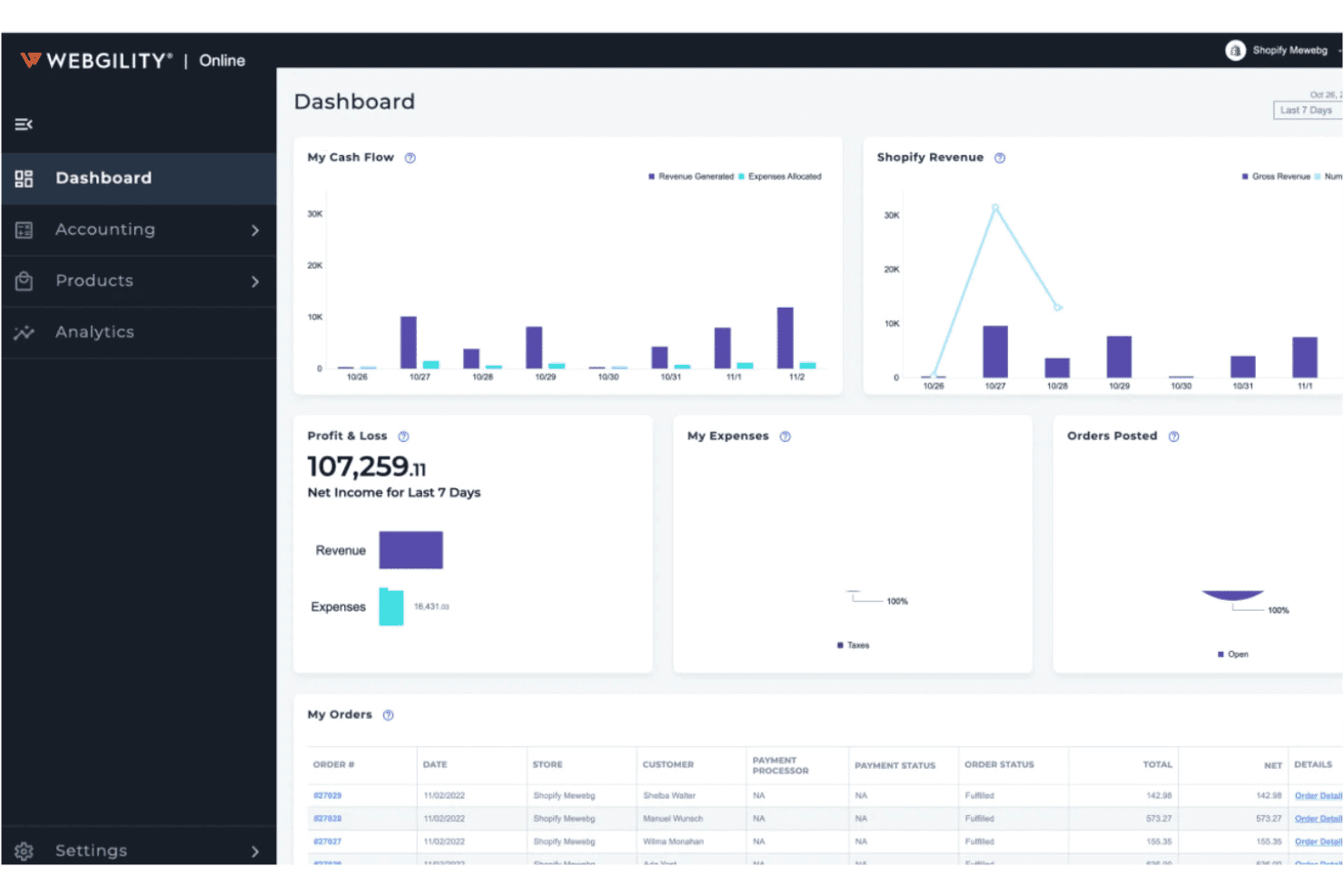
Webgility centraliza el flujo de caja, las pérdidas y ganancias y los pedidos en un solo panel. Webgility es una plataforma de integración para comercio electrónico que sincroniza pedidos, inventario, precios y datos de pagos de más de 60 canales de venta, marketplaces y sistemas POS con QuickBooks, Xero y otras plataformas de contabilidad.
¿Para quién es más adecuada Webgility?
Webgility es una excelente opción para vendedores multicanal pequeños y medianos que gestionan las finanzas de su negocio mediante QuickBooks o Xero y necesitan mantener sincronizados sus canales de venta, inventario y pagos sin introducir datos manualmente.
Por qué elegí Webgility
Webgility ocupa un lugar en mi lista de opciones principales por la profundidad de su integración con QuickBooks, ya que registra cada pedido, tarifa, reembolso y pago individualmente en lugar de hacerlo mediante asientos contables resumidos. Me encanta que la conciliación de pagos esté diseñada para gestionar simultáneamente calendarios complejos y asociar las liquidaciones de Amazon o los depósitos de Shopify con los pedidos exactos que los componen. Además, su asignación de SKU basada en IA detecta las discrepancias antes de que lleguen a tus libros contables.
Características principales de Webgility
- Automatización de órdenes de compra: Webgility supervisa los niveles de inventario y crea automáticamente órdenes de compra en QuickBooks cuando las existencias caen por debajo de los umbrales definidos, utilizando datos de velocidad de ventas para recomendar las cantidades de reposición.
- Cola de excepciones: Los pedidos con errores de dirección, SKU no reconocidos o pagos retenidos se mantienen para revisión manual en lugar de registrarse con entradas parciales o cuentas predeterminadas.
- Seguimiento del inventario en varias ubicaciones: Realiza un seguimiento de las existencias en varios almacenes y sitios de inventario de QuickBooks, con reglas de reposición y asignaciones de proveedores específicas para cada ubicación.
- Previsión de ingresos: Genera datos predictivos de ingresos con hasta 14 meses de antelación, con vistas detalladas por canal, tienda o método de gestión logística.
Integraciones de Webgility
Webgility admite más de 60 integraciones, entre ellas Shopify, BigCommerce, WooCommerce, Amazon, eBay, Walmart, Etsy, TikTok Shop, QuickBooks, Xero, NetSuite, Shopify POS, Square y ShipStation. Su conectividad más sólida es la sincronización entre comercio electrónico y contabilidad, especialmente con QuickBooks.
Pros and Cons
Pros:
- Registra cada pedido y pago individualmente
- La cola de excepciones evita registros contables incorrectos
- La asignación de SKU basada en IA detecta discrepancias entre productos
Cons:
- No ofrece integración nativa con SAP ni Dynamics
- La configuración y la incorporación pueden ser complejas
Learn more about Webgility:
Otro software de integración de comercio electrónico
Estas son algunas opciones adicionales de software de integración de comercio electrónico que no llegaron a mi lista, pero que aun así merece la pena consultar:
Cómo evalúo el software de integración de comercio electrónico
Divido mi evaluación en dos capas: el estándar que una herramienta debe cumplir—como la sincronización bidireccional entre Shopify y NetSuite—y los diferenciadores que distinguen a un proveedor de otro.
Funcionalidad principal (Imprescindibles para esta lista)
Cuando selecciono las herramientas para mi lista, califico cada una en una escala del 0 (no ofrece la funcionalidad) al 5 (destaca en esta área) para cada funcionalidad principal indicada abajo. Luego, calculo la puntuación total de la herramienta como un porcentaje. Cada herramienta debe alcanzar una puntuación total mínima del 65% para ser considerada para la inclusión.
- Conectores multi-plataforma: Reviso qué plataformas y marketplaces de comercio electrónico soporta cada herramienta de forma nativa, incluyendo canales principales como Shopify, BigCommerce, Amazon y Walmart.
- Integración con sistemas de back office: Cada herramienta debería conectar tus tiendas online con sistemas ERP, POS, WMS y de contabilidad como NetSuite, SAP o QuickBooks sin middleware personalizado.
- Sincronización de datos bidireccional: Evalúo si los datos de pedidos, inventario, productos y clientes fluyen en ambos sentidos en tiempo real o según una programación, y no solo como una importación unidireccional.
- Automatización de pedidos e inventarios: Las herramientas robustas permiten establecer reglas para el enrutamiento de pedidos, división de envíos y asignación de inventario entre almacenes y canales de forma automática.
- Mapeo y transformación de datos: Analizo cómo cada herramienta gestiona la correspondencia de campos entre sistemas con modelos de datos diferentes, como traducir las variantes de producto de Shopify en estructuras de SKU de un ERP.
- Gestión de errores y monitoreo: Las fallas de sincronización ocurren, por lo que evalúo si una herramienta ofrece tableros, alertas, lógica de reintento y registros de auditoría para detectar y resolver problemas rápidamente.
Una vez que tengo una lista de herramientas que cumplen estos criterios, considero qué distingue a cada plataforma.
Factores diferenciadores (lo que distingue a los proveedores)
Así es como comparo y contrasto diferentes proveedores:
Características destacadas
Las plantillas de integración preconstruidas son un gran diferenciador. Herramientas como Celigo y Jitterbit ofrecen flujos listos para escenarios comunes, como la sincronización de pedidos de Shopify a NetSuite, lo que puede reducir los tiempos de configuración de semanas a días. También busco un generador de flujos de trabajo de bajo código que facilite a los equipos operativos ajustar integraciones sin esperar a los desarrolladores. El soporte EDI es relevante si vendes a grandes minoristas: el EDI nativo permite intercambiar órdenes de compra y facturas sin agregar middleware separado.
Más allá de las características
La escalabilidad es uno de los primeros aspectos que evalúo. Una plataforma que gestiona el volumen de pedidos diario pero falla en Black Friday o en ventas flash es una desventaja. Reviso cómo cada proveedor maneja los límites de las API y el rendimiento en temporadas pico. La transparencia de precios es igual de importante: algunas herramientas cobran por conector, mientras que otras facturan por volumen de transacción, y las tarifas por exceso pueden sorprenderte rápidamente. También considero los tiempos de implementación, incluyendo si los proveedores ofrecen entornos de prueba para que tu equipo pueda testear las integraciones antes de lanzarlas en producción.
Cómo elegir un software de integración de comercio electrónico
Es fácil perderse entre largas listas de funciones y complejas estructuras de precios. Para ayudarte a mantener la concentración mientras avanzas en tu proceso único de selección de software, aquí tienes una lista de factores que debes tener en cuenta:
| Factor | Qué tener en cuenta |
|---|---|
| FactorEscalabilidad | Qué tener en cuenta¿El software gestionará el volumen de transacciones a medida que crezca tu empresa? Comprueba si existen límites de usuarios, pedidos o canales y pregunta por las opciones de actualización. |
| FactorIntegraciones | Qué tener en cuenta¿La herramienta se conecta de forma nativa con tus plataformas de comercio electrónico, software de contabilidad y mercados en línea? Confirma la compatibilidad con tu pila tecnológica actual. |
| FactorPersonalización | Qué tener en cuenta¿Puedes adaptar los flujos de trabajo, las asignaciones de datos o las programaciones de sincronización para ajustarlos a tus procesos empresariales? Ten cuidado con los sistemas rígidos que te obligan a adaptar tu flujo de trabajo. |
| FactorFacilidad de uso | Qué tener en cuenta¿La interfaz es intuitiva para tu equipo? Ten en cuenta quién la utilizará a diario y si será necesaria formación para el personal no técnico. |
| FactorImplementación e incorporación | Qué tener en cuenta¿Cuánto tardará la configuración y qué recursos se necesitan? Pregunta por la asistencia para la migración, los servicios de incorporación y el tiempo habitual hasta obtener resultados. |
| FactorCoste | Qué tener en cuenta¿Cuál es el coste total de propiedad, incluidos la configuración, las cuotas mensuales y los complementos? Presta atención a los cargos ocultos relacionados con el volumen de pedidos o las integraciones prémium. |
| FactorMedidas de seguridad | Qué tener en cuenta¿Cómo protege el proveedor tus datos? Busca cifrado, controles de acceso y cumplimiento de normas como PCI DSS o el RGPD. |
| FactorDisponibilidad del soporte | Qué tener en cuenta¿Qué canales de soporte se ofrecen y en qué horario? Valora si necesitas asistencia las 24 horas, los 7 días de la semana, o una gestión de cuenta específica para resolver problemas urgentes. |
¿Qué es el software de integración del comercio electrónico?
El software de integración del comercio electrónico conecta tus canales de venta en línea, mercados en línea y sistemas administrativos para automatizar el flujo de datos entre ellos. Este tipo de software sincroniza los pedidos, el inventario, los datos de los clientes y la información financiera entre plataformas, reduciendo la introducción manual de datos y los errores. Al centralizar y automatizar estas conexiones, el software de integración del comercio electrónico ayuda a los minoristas a mantener registros precisos, simplificar las operaciones y favorecer el crecimiento en múltiples canales.
Características
Al seleccionar un software de integración del comercio electrónico, presta atención a las siguientes características clave:
- Sincronización de pedidos: Transfiere automáticamente los datos de los pedidos entre tus tiendas en línea, mercados en línea y sistemas administrativos para mantener los registros actualizados.
- Gestión del inventario: Actualiza los niveles de existencias en tiempo real en todos los canales conectados para evitar la venta excesiva y las roturas de stock.
- Integración multicanal: Conecta varios canales de venta, como tiendas en línea, mercados en línea y sistemas de punto de venta, dentro de una única plataforma.
- Integración con plataformas de contabilidad: Sincroniza las ventas, los reembolsos y las comisiones directamente con el software de contabilidad para simplificar la gestión contable y la conciliación.
- Cálculo automatizado de impuestos sobre las ventas: Calcula y aplica los tipos correctos de impuestos sobre las ventas a cada transacción según la ubicación del cliente y el tipo de producto.
- Integración con envíos y gestión logística: Se conecta con transportistas y servicios de gestión logística para automatizar la creación de etiquetas, el seguimiento y las actualizaciones de estado.
- Sincronización de datos de clientes: Consolida la información de los clientes procedente de todos los canales, lo que facilita la gestión de perfiles, preferencias y comunicaciones.
- Conciliación de pagos: Relaciona los pagos, reembolsos y comisiones de varios canales con tus registros financieros, reduciendo los errores manuales.
- Informes y análisis: Proporciona paneles e informes sobre ventas, inventario y rendimiento de los canales para respaldar decisiones basadas en datos.
Las soluciones de software de integración del comercio electrónico normalmente no incluyen inteligencia artificial como parte de su oferta de características. Por lo tanto, no continuaré con esta sección.
Ventajas
La implementación de un software de integración del comercio electrónico ofrece varias ventajas para tu equipo y tu empresa. Estas son algunas de las que puedes esperar:
- Sincronización precisa de datos: La sincronización automatizada de los datos de pedidos, inventario y clientes reduce la introducción manual de datos y minimiza los errores entre plataformas.
- Operaciones centralizadas: Gestionar varios canales de venta y sistemas administrativos desde una sola plataforma simplifica los flujos de trabajo y la supervisión.
- Procesamiento más rápido de los pedidos: Las actualizaciones en tiempo real y los flujos de trabajo automatizados ayudan a tu equipo a preparar los pedidos y gestionar el inventario con mayor rapidez.
- Mayor precisión financiera: La integración directa con las plataformas de contabilidad garantiza que las ventas, los reembolsos y las comisiones se registren y concilien correctamente.
- Mejores informes: Las herramientas consolidadas de análisis e informes ofrecen una visión clara de las ventas, el inventario y el rendimiento de los canales.
- Menor riesgo de incumplimiento: El cálculo automatizado de los impuestos sobre las ventas y la conciliación de pagos ayudan a tu empresa a cumplir las normativas fiscales y financieras.
- Crecimiento escalable: Las integraciones flexibles y la compatibilidad con varios canales facilitan la incorporación de nuevos canales de venta o la expansión a nuevos mercados a medida que crece tu empresa.
Costes y precios
La selección de un software de integración para comercio electrónico requiere comprender los distintos modelos de precios y planes disponibles. Los costes varían en función de las características, el tamaño del equipo, los complementos y otros factores. La tabla siguiente resume los planes habituales, sus precios medios y las características típicas incluidas en las soluciones de software de integración para comercio electrónico:
Tabla comparativa de planes del software de integración para comercio electrónico
| Tipo de plan | Precio medio | Características habituales |
|---|---|---|
| Tipo de planPlan gratuito | Precio medio$0 | Características habitualesSincronización básica de pedidos, conexiones limitadas a canales, límite de pedidos mensuales y asistencia por correo electrónico. |
| Tipo de planPlan personal | Precio medio$20-$50/mes | Características habitualesIntegración multicanal, sincronización del inventario, informes básicos y asistencia estándar al cliente. |
| Tipo de planPlan empresarial | Precio medio$100-$300/mes | Características habitualesAutomatización avanzada, integración con plataformas de contabilidad, cálculo de impuestos sobre las ventas y asistencia prioritaria. |
| Tipo de planPlan corporativo | Precio medio$500-$2,000/mes | Características habitualesIntegraciones personalizadas, gestión específica de cuentas, medidas de seguridad avanzadas y asistencia para la incorporación. |
Preguntas frecuentes sobre el software de integración para comercio electrónico
Estas son algunas respuestas a preguntas frecuentes sobre el software de integración para comercio electrónico:
¿Cómo puedo saber si mi plataforma de comercio electrónico es compatible con el software de integración?
Consulta la lista de plataformas y conectores compatibles del software de integración. La mayoría de los proveedores publican listas de compatibilidad en sus sitios web. Si tu plataforma no aparece en la lista, pregunta por conectores personalizados o compatibilidad con API antes de comprometerte.
¿Puede el software de integración para comercio electrónico gestionar varios canales de venta a la vez?
Sí, la mayoría del software de integración para comercio electrónico está diseñado para conectar y sincronizar datos entre varias tiendas en línea, mercados digitales e incluso sistemas de punto de venta físicos. Esto te ayuda a gestionar el inventario, los pedidos y los datos de los clientes desde un único panel.
¿Qué ocurre si falla una integración o los datos no se sincronizan correctamente?
La mayoría de las soluciones incluyen registros de errores, alertas y mecanismos de reintento para detectar y resolver problemas de sincronización. Busca herramientas que ofrezcan pasos claros para solucionar problemas y asistencia eficaz para minimizar las interrupciones en tus operaciones.
¿Es difícil pasar de procesos manuales a una integración automatizada?
El cambio puede requerir cierta planificación, pero la mayoría de las plataformas ofrecen asistencia para la incorporación, asistentes de configuración y herramientas de migración que te ayudan en la transición. Empieza con una integración piloto y amplíala gradualmente a medida que tu equipo se familiarice con ella.
¿Hasta qué punto están seguros mis datos al utilizar un software de integración para comercio electrónico?
Los proveedores de confianza utilizan cifrado, controles de acceso y estándares de cumplimiento como PCI DSS o RGPD para proteger tus datos. Revisa siempre la documentación de seguridad del proveedor y pregunta por sus prácticas de gestión de datos antes de registrarte.