
18 Best Retail Ops Software Platforms For 2026

The Top 10 Retail Operations Software for Your Scaling Brand
Let’s start with the simple best of list, quickly showing you our favorite retail ops platforms and what they are best for.


Retail is detail, and details get lost fast if you’re running the show on spreadsheets and crossed fingers.
You need tools that actually keep up—ones that flag issues before they turn into fire drills and show you what’s working without the sugarcoating.
Retail ops software isn’t a silver bullet, but it’s the backbone for leaders who want fewer surprises and more control.
I’ve pulled together the retail ops platforms that deliver real results—ones I’d trust to keep the doors open and the team sane. Just the essentials you need to make decisions that matter. Let’s get into it.
Table of Contents
Why Trust Our Software Reviews
We’ve been testing and reviewing retail and ecommerce software and services since 2021.
As retail experts ourselves, we know how critical and difficult it is to make the right decision when selecting software. We invest in deep research to help our audience make better software purchasing decisions.
We’ve tested more than 2,000 tools for different finance and accounting use cases and written over 1,000 comprehensive software reviews. Learn how we stay transparent and our review methodology.
Comparing the Top Retail Operations Platforms, Feature by Feature
First, let’s take a gander at this handy pricing comparison chart. Then, click Compare Software to dig into other feature comparisons for these top retail operations platforms.
| Tool | Best For | Trial Info | Price | ||
|---|---|---|---|---|---|
| 1 | Best RetailOps software for AI-powered forecasting capabilities | Free demo available | Pricing upon request | Website | |
| 2 | Best for real-time inventory access | Free 60-day trial available | Pricing upon request | Website | |
| 3 | Best for AI-powered price optimization | Free demo available | Pricing upon request | Website | |
| 4 | Best for POS integration services | Free demo available | From $135/month | Website | |
| 5 | Operations software for retail and/or restaurants with features for POS, loyalty, and CRM | 14-day free trial + free demo available | Pricing upon request | Website | |
| 6 | Free retail and inventory workflows with stocktaking and count, invoicing, and business dashboard apps. | Free demo available | From $49/month (billed annually) | Website | |
| 7 | Best for CPG businesses | Free plan available | From $199/month | Website | |
| 8 | Single cloud platform for agile omnichannel execution of retail POS, OMG, and CRM | Not available | Website | ||
| 9 | Syncs with apps that you already use like QuickBook, Square, and Woocommerce | 14 days free trial | From $28.25/month | Website | |
| 10 | Retail ops software with cloud-based point-of-sale tools | Not available | Website |
The 10 Best Retail Operations Software Scale Smarter, Reviewed
Now for the good stuff—the reviews. For each retail ops platform, we tell you what it’s about, why we picked it, plus the top features and integrations that make it go.

Best RetailOps software for AI-powered forecasting capabilities

Oracle Retail is a comprehensive and cutting-edge RetailOps software solution designed to empower retailers with the tools they need to efficiently manage their operations and enhance customer experiences. This robust platform offers a wide range of capabilities, including inventory management, demand forecasting, merchandise planning, pricing optimization, and point-of-sale (POS) solutions, all integrated into a unified system.
Oracle Retail stands out with its integrated AI-powered forecasting capabilities, which leverage machine learning to provide highly accurate demand forecasts. This unique feature helps retailers optimize inventory levels, reduce carrying costs, and minimize stockouts, giving them a competitive edge in managing supply chains efficiently.
Oracle Retail offers comprehensive support for omnichannel retail operations, allowing retailers to seamlessly integrate both physical and digital channels. This includes order orchestration, inventory visibility, and flexible fulfillment options, ensuring a consistent and convenient shopping experience for customers across all touchpoints.
Oracle Retail doesn't list its exact integrations but it does promise connections with foundation data cloud services, retail pricing cloud service, stock count export, notification services, ticket printing, and other 3rd parties.
Oracle Retail offers pricing upon request and a free demo.
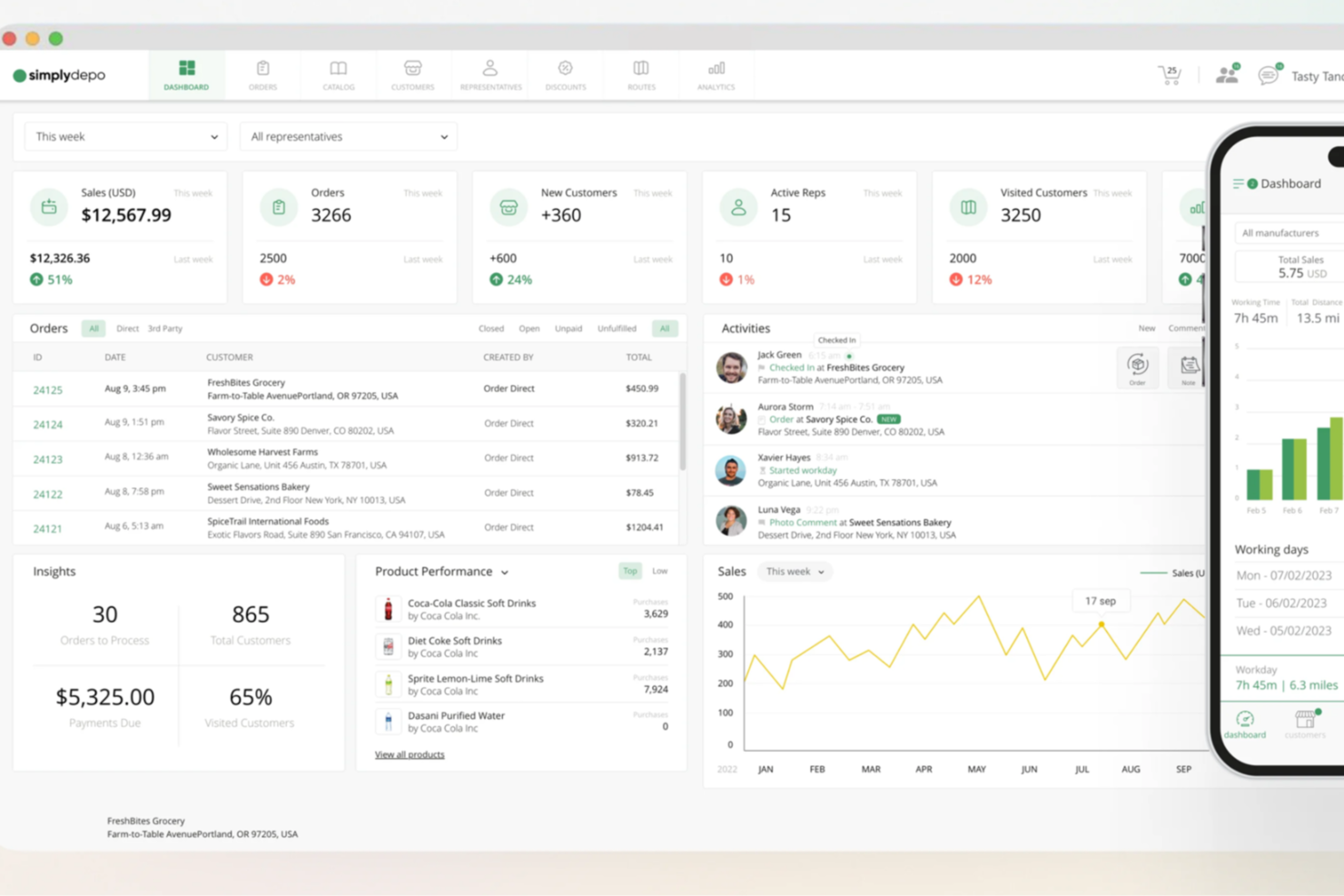
SimplyDepo is tailored for startups and growing businesses in the consumer packaged goods industry, offering tools to improve operational efficiency and simplify order processes. Focusing on retail execution and order management, it helps your team enhance customer relationships while boosting sales performance.
Why I Picked SimplyDepo
I picked SimplyDepo because it excels in addressing the critical needs of retail operations through its retail execution and field sales empowerment features. These functionalities allow your team to manage store visits and track sales activities in real-time, ensuring your operations are always on track. Additionally, its B2B order management system simplifies the ordering process, reducing the time spent on manual tasks and allowing your team to focus on growing your business.
SimplyDepo Key Features
In addition to its retail execution and field sales empowerment, I also found several other valuable features:
- Route Planning Optimization: This feature helps your team create efficient travel routes for sales representatives, saving time and reducing travel costs.
- CRM for Distributors: SimplyDepo offers CRM capabilities tailored for distributors, which aid in maintaining and nurturing customer relationships.
- Real-Time Inventory Access: Your team can access inventory data in real-time, ensuring accurate order fulfillment and reducing stock discrepancies.
- Flexible Integrations: The platform integrates with various tools, allowing for seamless order processing and reduced management time.
SimplyDepo Integrations
Integrations include Quickbooks, Shopify, and Salesforce.
Pros and Cons
Pros:
- Route planning improves sales travel
- B2B order and distribution management
- Retail execution for field teams
Cons:
- Onboarding requires additional team training
- Limited forecasting and analytics features


7Learnings is a retail operations software that uses AI to optimize key aspects of retail businesses, including pricing, performance marketing, and order management. By leveraging advanced algorithms, it helps retailers enhance their profitability and respond swiftly to market changes.
I picked 7Learnings because of its unique AI-powered price optimization feature. This functionality allows you to set optimal prices daily by predicting customer behavior and market changes, which can significantly boost your profits. The platform's ability to align pricing with marketing campaigns in real-time also ensures that your return on ad spend is maximized, making it a great choice for retail operations.
Another reason for choosing 7Learnings is its order optimization capability. The software provides AI-driven reorder suggestions that help improve product availability and reduce markdowns. This means you can maintain optimal inventory levels without the constant manual oversight, freeing up your time to focus on other important areas of your business.
Features include a profit uplift calculator that helps you understand potential profit increases with optimized pricing strategies. The software also offers community engagement opportunities, allowing you to connect with other users and share insights. Moreover, it provides case studies that give you real-world examples of how the platform can improve profitability and reduce workload.
Integrations include Tradebyte, Google Cloud, Shopify, KPS, and commercetools.


Clover is a point-of-sale (POS) system that provides businesses with a combination of hardware and software to facilitate sales transactions and manage day-to-day operations. The system is designed to serve the needs of various business types, including retail stores, restaurants, and service providers, by providing a centralized solution for processing payments, tracking sales, and managing business activities.
Clover's point-of-sale system offers features that support retail operations, such as inventory management, which allows retailers to track stock levels, manage orders, and receive notifications for low inventory. The system also includes employee management tools that enable scheduling, time tracking, and permission settings for staff. Additionally, the platform's customer engagement tools help retailers create loyalty programs and promotions to encourage repeat business.
Clover's reporting and analytics tools also provide insights into sales trends, product performance, and customer preferences, aiding in decision-making for retail management.
Clover integrates with a variety of third-party applications, including Adobe Commerce, Xero, Shopify, DocuSign, Mailchimp, Booker, and Homebase, Findmyshift, and WooCommerce.
Clover's pricing starts at 2.3% + $0.1 per transaction and they provide a free demo upon request.

Operations software for retail and/or restaurants with features for POS, loyalty, and CRM
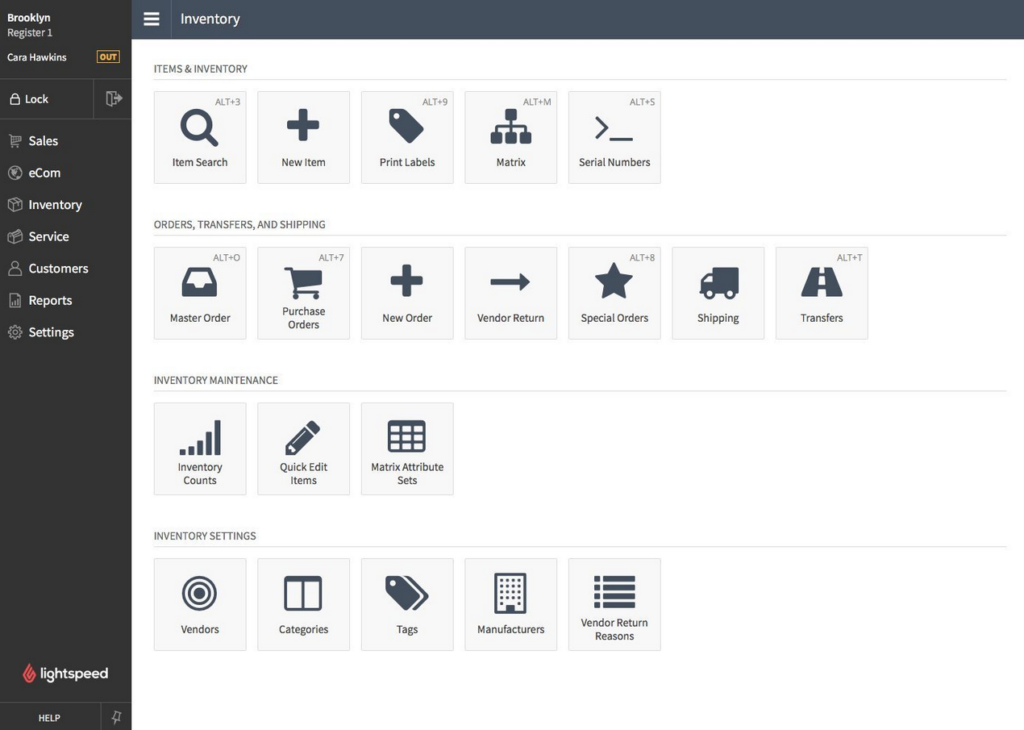
Lightspeed POS is a retail software with a suite of retail tools like inventory management, analytics, reporting, and payment processing. It has built-in features like gift cards and discounts to help keep customers happy and increase sales. Lightspeed POS is an open API that allows you to develop custom solutions to your unique business needs.
Lightspeed POS is the best retail POS system with a retail analytics feature to help you gain insights on how to improve your business. This retail software lets you generate staff performance reports for rewarding top performers and identifying coaching opportunities for non-performing employees.
You can use Lightspeed POS to inspire customer loyalty by identifying top spenders to craft a rewards system or offer special deals. This retail analytics feature can also help you study product movement to decide which products to put on sale and which ones you need to increase stocks of.
Lightspeed POS integrates with other retail operation software, including EzShop, Kangaroo Rewards, and Retail Toolkit.
Lightspeed POS’ pricing starts at $89/month/register, and they provide a free trial upon request.

Erply
Free retail and inventory workflows with stocktaking and count, invoicing, and business dashboard apps.
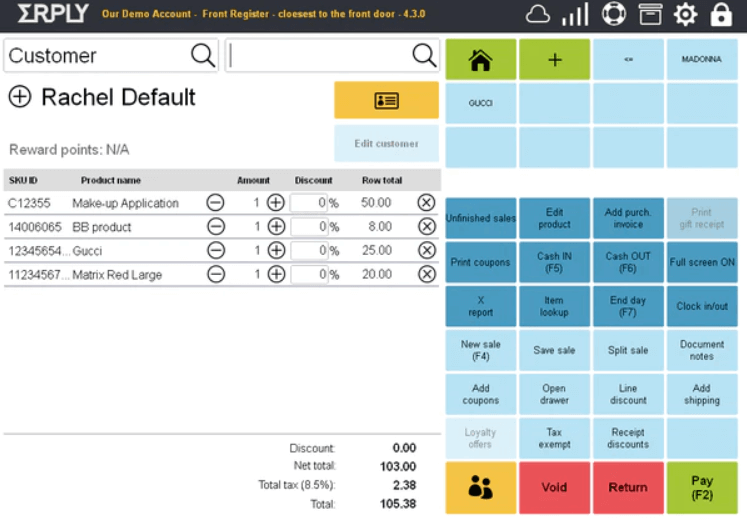
Erply is a retail software solution for managing your store operations and employees. It has a cash in/out feature to log expenses, monitor petty cash, and track cash handling. Erply has a product management feature for managing products and prices. It has an order management system for processing orders and managing customer deliveries.
Erply is the best POS system if you want one with an integrated employee time clock to manage your employees’ payrolls. Its time clock application can help you accurately keep track of employee hours to prevent payroll disputes. Employees can access the time clock application in the POS machine and mobile devices to clock in while on store duty or while manning field events like bazaars, exhibits, or fairs.
Erply integrates with customer relationship management and payment processing software like Avalara, Google Drive, PayPal, ShoreSuite, and Ento.
Erply has a free version with limited features for one user account, while the pricing for the paid versions starts at $39/month/up to two accounts.
They offer a 60-day free trial for their paid versions.


Settle is a unified platform that helps consumer packaged goods (CPG) brands manage their back-office operations by automating inventory, procurement, and payments.
One thing I like is that Settle provides end-to-end supply chain visibility. This feature allows your team to track inventory from purchase to sale across various channels and fulfillment centers, ensuring you always know where your products are and reducing the risk of stockouts or overstocking.
The platform also offers real-time landed cost calculations. By linking bills to purchase orders, work orders, or transfers, Settle calculates accurate SKU-level landed costs, giving you a clear understanding of your profit margins. This insight enables you to set appropriate prices, optimize your supply chain, and make informed financial decisions.
Other key features include AI-powered inventory forecasts that adapt to your business's evolving needs, notifying you of low SKU counts and suggesting optimal reorder times based on lead times and bill of materials coordination. Additionally, Settle offers automated three-way matching between purchase orders, goods received notes, and bills, helping you avoid overpayments and maintain accurate financial records.
Integrations include QuickBooks Online, NetSuite, Shopify, Amazon, Cin7, Google, and Xero.
Single cloud platform for agile omnichannel execution of retail POS, OMG, and CRM

Openbravo is a retail store operation software for managing your online and physical store. You can use this software to move products from one store to another for stock replenishment. It lets you access financial information like a detailed history of openings and closings.
Openbravo lets you create and add new products and promotions to your catalog. Openbravo is the best retail ops software if you want one with an inventory management feature. This retail software solution can manage multiple warehouses, distribution centers, and storage areas. The system automatically refreshes so you can access accurate and real-time inventory data to avoid out-of-stock items.
Openbravo lets you record attributes like lot numbers, serial numbers, and expiration dates to track products and prioritize movements easily.
Openbravo provides pricing details upon request.
PHP POS
Syncs with apps that you already use like QuickBook, Square, and Woocommerce
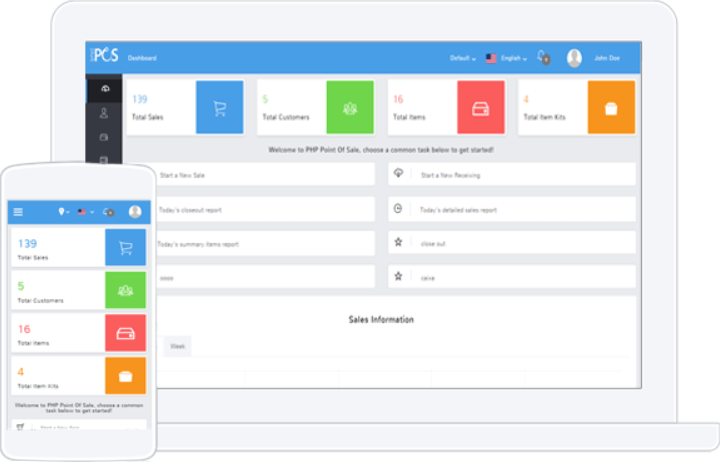
PHP POS is a retail software solution with an inventory management feature to help you make sure that you have enough products for customers. It integrates with your ecommerce store to sync items, categories, prices, and tags with those in your physical store.
You can use PHP POS to create coupons and promotions to entice more customers and increase revenues. It has an integrated employee time clock feature for accurate payrolls.
PHP POS is the best retail management software with a delivery management feature to keep customers happy with on-time deliveries. You can use this feature to keep track of the products going out to customers and their estimated delivery date to keep customers informed. This feature also lets you know the name of the delivery person, so you know who is responsible in cases of delays.
PHP POS integrates with other retail operations tools, including Shopify, WooCommerce, and QuickBooks. You can connect PHP POS to a paid Zapier account if you want access to more premium applications.
PHP POS’s pricing starts at $28.25/month/POS and offers a 14-day free trial.

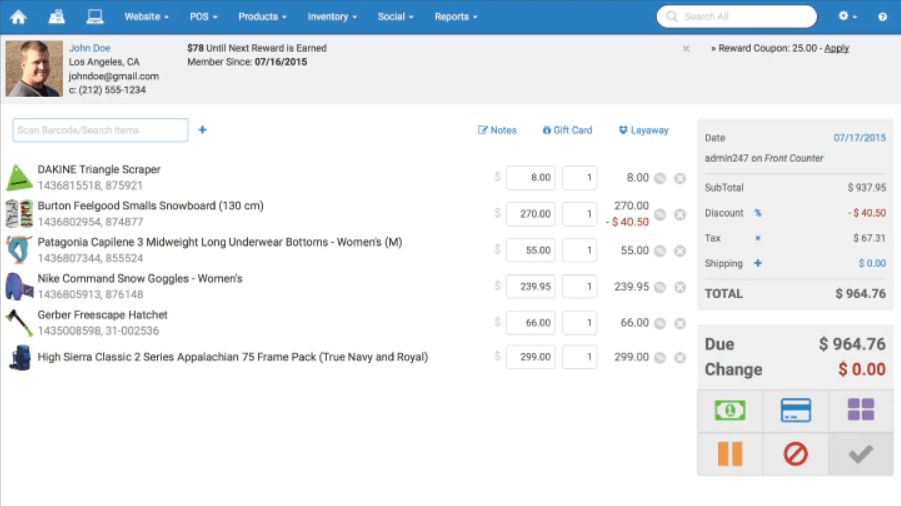
Rain POS is an all-in-one retail POS system for managing your online and in-store retail operations. It has an inventory management feature to help you manage your store’s inventory level and identify items you need to order from suppliers. You can use Rain POS to create an eCommerce website with optimized web pages to help you reach more customers.
Rain POS is the best POS system with integrated marketing features to help you attract new customers and increase customer loyalty. You can use Rain POS to automatically launch text and email marketing campaigns so you can concentrate on managing your store operation.
This retail software allows you to send Facebook and Google review invites to boost your online reputation and attract more customers.
Ran POS also has a marketing dashboard for assessing the effectiveness of your marketing activities.
Rain POS provides information about their pricing and demo upon request.
Other Retail Automation Options
Here are a few more that didn’t make the top list. If you need additional suggestions for a handy retailing information system, check these out. If you need further details on retail inventory management specifically, you should check out my warehouse management system software suggestions.
- Springboard Retail
Retail management software with order management feature
- RetailOps
System able to track orders, KPIs, sales channels, product details, and warehousing
- Square
Retail ops app with real-time sales data and intuitive inventory tools that only charges per transaction
- SPS Commerce Fulfillment
Retail automation with everything from EDI to full-scale retail change management.
- TrueCommerce
Tools for EDI, inventory management, fulfillment, digital storefronts, and digital marketplaces.
- HCL Commerce
Designed to enable agile commerce at scale for enterprise companies.
- Retail Zipline
A one-stop-shop for communications that HQ and field teams understand, used by LUSH and LEGO.
- DataTrans
An online payment solution with a flexible platform and the freedom to choose any financial partner.


Our Selection Criteria for Retail Ops Software
Selecting the best retail operations software is no small task, and we’re not here to settle for mediocrity.
After testing tools, diving into demos, and scouring user reviews, we’ve honed in on the key factors that separate the winners from the duds. Here’s how we break it down:
Core functionality (25% of total weighting score)
Retail ops software needs to nail the basics—period. The best tools are rock-solid in areas like:
- Inventory management. Real-time stock tracking and alerts so you’re never caught off guard.
- POS integration. Seamless syncing with your sales data for instant, accurate reporting.
- Workforce scheduling. Easy-to-use tools for managing shifts without a migraine.
- Supply chain management. Keeping goods flowing smoothly from suppliers to shelves.
- Sales tracking. Clear insights into what’s selling, what’s not, and where to double down.
Additional standout features (25% of total weighting score)
The crème de la crème offer more than just the basics. We look for tools that bring extra value with features like:
- Omnichannel platform support. One platform to rule your brick-and-mortar and online sales.
- AI-driven insights. Predict trends, optimize inventory, and make data-backed decisions like a pro.
- Mobile functionality. Keep an eye on your business while you’re on the move.
- Customizable dashboards. Prioritize the metrics that matter most to you.
- Automation. Reduce the busywork with smart workflows for reorders, staffing, and more.
Usability (10% of total weighting score)
No matter how powerful the software is, if it’s a pain to use, it’s a dealbreaker. We rate tools on:
- Intuitive design. Simple, clean interfaces that anyone on your team can master.
- Cross-device compatibility. Whether on desktop, tablet, or mobile, it just works.
- Customizable workflows. Adjust it to fit your business without needing a tech wizard.
Onboarding (10% of total weighting score)
Adopting new software can feel like a mountain to climb. We look for tools that make it easy:
- Training resources. Tutorials, videos, and guides to get your team up to speed fast.
- Step-by-step setup. Clear, guided processes that keep you from getting lost.
- Responsive support. Dedicated help during those critical early days of setup.
Customer support (10% of total weighting score)
When something breaks—and it will—you want a vendor who’s got your back. We prioritize:
- 24/7 availability. Support that’s there when you need it, not just 9-to-5 in one time zone.
- Multiple support channels. Live chat, email, and phone options for flexibility.
- Community forums. A space for users to share tips, tricks, and solutions.
Value for money (10% of total weighting score)
Retail margins are tight, so the software better deliver on ROI. We look for:
- Transparent pricing. No hidden fees or unpleasant surprises.
- Scalable plans. Options that grow with you as your business expands.
- Trial periods. Free demos or trials so you can test the waters without risk.
Customer reviews (10% of total weighting score)
Real-world feedback reveals what a sales pitch doesn’t. We dig into:
- Overall satisfaction. Positive reviews about usability, performance, and features.
- Problem resolution. How quickly and effectively issues are addressed.
- Retention rates. Happy users stick around, and that’s a sign the software delivers.
By sticking to this framework, we ensure every tool on our list isn’t just a buzzword factory but a game-changer for retail operations. Let’s get to work finding your perfect match.
What is Retail Operations Software?
Retail operations software is the all-in-one platform that keeps your store running smoothly—from inventory and staffing to sales and supply chain, all in one place.
If you’ve ever fixed a broken POS while fielding calls from suppliers, you know why this matters. The best systems now come with real AI muscle—not just hype.
We’re talking about algorithms that spot sales trends before you do, flag inventory gaps before they become disasters, and automate the grunt work like reorder alerts and customer follow-ups. Think of it as a night manager who never sleeps and never calls in sick.
This means fewer stockouts, better assortment planning, and a team that can finally focus on the customer instead of messing with spreadsheets.
Whether you’re running one shop or a national chain, retail operations software gives you the control and visibility to move fast, cut errors, and keep your business—and your customers—happy.
How to Choose Retail Ops Software
Picking retail ops software shouldn’t feel like drawing straws. You’re making a call that will shape how smooth—or chaotic—your daily grind runs.
The trick is to line up the choice with the realities of your business today and the growth you’re gunning for tomorrow. Think of it as recruiting a new member of your ops team: they need to fit in fast, carry their weight, and be ready for bigger challenges down the road.
| Step | What to do | Why it matters |
|---|---|---|
| Pinpoint your pain points | List the issues eating into your margins or your time—inventory errors, messy schedules, clunky reporting. Start here. | Software that doesn’t fix your biggest headaches is just another expense. |
| Audit your current stack | Map your POS, ecommerce platform, payroll, and scheduling tools. Make “must-have integrations” non-negotiable. | Smooth connections prevent duplicate work and tech chaos. |
| Test for usability | Demo the software with your actual workflows. Hand it to your floor manager or shift lead—do they get it in minutes? | If it’s too complex, it won’t get used, and you’ll be back to spreadsheets. |
| Stress test scalability | Ask vendors how the system handles multi-location, multichannel, or seasonal spikes. Don’t accept vague answers. | Growth is only fun if your tools can keep up. |
| Run the cost reality check | Break down license fees, user limits, add-ons, and support tiers. Use trials to calculate value against actual outcomes. | The cheapest option can get expensive fast if the fine print stings. |
| Validate with peers | Read reviews, grill vendors for customer stories, or ask your retail network what’s working for them. | Insider experience saves you from learning painful lessons the hard way. |
Retail Ops Software Trends for 2025
As retail continues its rapid evolution, businesses that embrace these trends will streamline operations, delight customers, and outpace competitors. Here’s what’s is shaping retail ops in 2025:
- AI-driven decision making. Artificial intelligence is finally walking the walk, helping retailers predict demand, optimize inventory, and schedule staff without guesswork. It’s like having a crystal ball—but one powered by cold, hard data.
- Seamless omnichannel experiences. Customers don’t think in “channels,” and neither should you. Integrated software will unify your brick-and-mortar stores, ecommerce platforms, and marketplaces into one smooth, consistent shopping experience.
- Sustainability as a business priority. Shoppers are watching—and demanding better. Retail tools will include features to monitor emissions, track eco-friendly initiatives, and reduce operational waste, all while keeping your supply chain transparent.
- Hyper-personalized customer engagement. Blanket promotions are out; tailored experiences are in. Tools powered by AI will analyze customer data to deliver spot-on product recommendations and personalized offers that keep shoppers coming back.
- Enhanced supply chain resilience. Global disruptions aren’t going away, so supply chains need to toughen up. Retail ops software will offer predictive analytics and real-time visibility to help you adapt quickly and avoid stockouts.
- Mobile-first operations management. Retailers are managing their businesses on the move, and software will meet them there. From tracking inventory to managing schedules, the ability to run operations from a smartphone will become non-negotiable.
- Frictionless payment solutions. Customers want fast, easy, and secure transactions. Expect retailers to adopt tools that support contactless payments, digital wallets, and “buy now, pay later” options to match evolving preferences.
- In-store experiential retail. Stores are becoming more than just places to buy stuff—they’re experiences. From interactive displays to personalized services, operations software will make it easier to transform physical stores into memorable destinations.
Features of Great Retail Operations Platforms
The best retail operations software isn’t just a glorified spreadsheet—it’s a powerhouse of features that make managing your business smoother, smarter, and far less stressful. Here’s what to look for:
- Inventory management. Stop guessing what’s in stock and what’s missing. Real-time tracking helps manage inventory, prevent overstocking, and avoid dreaded stockouts.
- POS integration. A seamless point-of-sale system syncs your sales data, inventory, and customer info, keeping everything accurate and updated.
- Integration and hardware connectivity. Your software should play nicely with hardware like barcode scanners, receipt printers, and payment terminals. Smooth integration means faster checkouts, accurate inventory updates, and fewer headaches because your systems actually talk to each other.
- Workforce scheduling. No more shift-swapping chaos. Automate scheduling, track labor costs, and keep everyone in the right place at the right time.
- Supply chain management. Keep products moving without delays. Supplier tracking, purchase orders, and real-time logistics visibility streamline your supply chain.
- Sales reporting and analytics. Make decisions backed by data, not hunches. Advanced reporting tools analyze trends, sales performance, and revenue to clarify what’s working—and what’s not.
- Unified engagement platforms. Whether customers shop online, in-store, or via mobile, your software should unify these channels into one seamless view—creating smoother experiences and deeper customer loyalty.
- Mobile accessibility. Run retail operations on the go with mobile-friendly tools. Manage inventory, monitor sales, and approve schedules anywhere, anytime.
- Automation tools. Let the software handle busywork. Automate tasks like reordering inventory, sending alerts, and generating reports to free your schedule.
- User experience design. Choose software with intuitive, user-friendly interfaces. Employees will learn faster, tasks get done quicker, and customers receive better service—all thanks to smarter design.
- Customer relationship management (CRM). Keep customers coming back. Track purchase history, preferences, and loyalty data to personalize their experiences.
Benefits of Retail Ops Software
The right retail operations software doesn’t just tidy up your processes—it transforms the way you run your business. Let's see how:
- Saves time and reduces busywork. Automate manual tasks like inventory tracking, scheduling, and reporting so you can focus on big-picture strategies instead of daily headaches.
- Improves accuracy and eliminates errors. From stock counts to sales data, real-time updates and automation mean no more costly mistakes caused by human error.
- Boosts operational efficiency. Get all your operations—inventory, sales, staff, and supply chain—under one roof, so nothing falls through the cracks.
- Empowers employees digitally. Great retail ops software puts powerful tools into employees’ hands, helping them serve customers better, faster, and smarter. Think mobile POS systems for sales on-the-go, or collaboration apps that keep everyone synced. When your team isn’t bogged down by clunky tech, they can fully focus on customers.
- Enhances decision-making. Access data-driven insights to make smarter calls on staffing, stock levels, and store performance. Goodbye, guesswork.
- Reduces costs. Optimize inventory to avoid overstocking, cut labor inefficiencies, and prevent revenue losses from stockouts or scheduling mishaps.
- Scales with your business. Whether opening new stores, expanding online, or entering new markets, the right software keeps pace with your growth.
- Improves customer satisfaction. Keep products stocked, schedules sharp, and customer experiences smooth—happy customers keep coming back.
- Enables better visibility. From sales reports to inventory analytics, get a real-time, 360-degree view of your operations.
- Supports omnichannel operations. Manage online and offline channels together, ensuring your customers have a seamless experience everywhere they shop.
- Smooth technology transitions. Good software evolves with tech changes, ensuring easy upgrades and compatibility—so your operations stay efficient without downtime or headaches.
Cost & Pricing of Retail Ops Software
Investing in retail operations software is a strategic move that can streamline your business and boost profitability.
Understanding the cost structures is crucial to ensure you get the best value for your investment.
Plan comparison table for retail ops software
Here's a breakdown of typical pricing tiers and what they offer:
| Plan type | Average price | Common features | Best for |
|---|---|---|---|
| Free | $0 | Limited features, basic inventory management, often with usage restrictions | Small retailers testing software or with minimal needs |
| Starter | $50 - $150/month | Basic POS integration, inventory tracking, sales reporting | Small to medium-sized retailers |
| Professional | $150 - $500/month | Advanced analytics, employee scheduling, CRM capabilities, multi-store management | Growing businesses needing deeper functionality |
| Enterprise | $500+/month | Customizable dashboards, AI-driven insights, dedicated support, full omnichannel integration | Large enterprises with complex, scalable needs |
Choosing the right plan depends on your business size, operational complexity, and growth projections. Free plans are ideal for testing the waters, while enterprise plans offer comprehensive solutions for large-scale operations.
Other costs to consider
- Implementation fees. Some providers charge for initial setup and integration, which can range from a one-time fee of $500 to $5,000, depending on complexity.
- Training and onboarding. To get your team up to speed, you might incur additional costs for training sessions or onboarding support, typically ranging from $100 to $1,000.
- Customization. Tailoring the software to your specific needs may involve extra charges, especially for enterprise solutions, with costs varying based on requirements.
- Support and maintenance. While basic support is often included, premium support services or ongoing maintenance can add $50 to $200 per month.
- Hardware expenses. Depending on your setup, costs for POS terminals, barcode scanners, and other hardware can range from $300 to $1,500 per device.
- Payment processing fees. If the software includes payment processing, expect transaction fees averaging around 2.5% per sale, though rates can vary.
Understanding these potential expenses will help you budget effectively and choose a retail operations solution that aligns with your operational needs and financial considerations.
Retail Operations Software FAQs
We’re back with the Q&A you so love! Well, even if you don’t love it, we’re still doing it. If these are your questions, find the answers nested neatly below each.
How do I know if my retail business needs retail operations software?
If you’re constantly putting out fires—stockouts, scheduling conflicts, inventory discrepancies, or wasted hours on manual updates—it’s a big red flag.
Retail ops software streamlines all these tasks and helps you avoid costly mistakes. If your business is growing (or you want it to grow), managing operations manually isn’t sustainable. Bottom line: If inefficiencies are eating into your time, profits, or sanity, it’s time to level up.
Will retail operations software help me manage both online and physical stores?
Absolutely. The best tools are built for omnichannel operations, syncing inventory, sales, and customer data across in-store, online, and even third-party marketplaces.
So when someone buys your last red hoodie online, the system updates immediately, saving you from angry customers showing up at your physical store looking for the “in-stock” item that isn’t there.
What are the biggest challenges when implementing retail operations software, and how can I avoid them?
The top challenges are resistance to change, poor training, and underestimating the setup process. To avoid this, pick software with intuitive design and solid onboarding resources.
Make training part of the rollout—get your team comfortable early. Communicate the benefits clearly so they see how the software makes their lives easier, not harder. Lastly, don’t rush implementation—taking a little extra time upfront saves headaches later.
Can retail operations software scale with my business as it grows?
It should. The right software will grow with you, whether you’re adding new store locations, expanding online, or increasing product lines. Look for tools with flexible pricing plans, advanced features like supply chain optimization, and integrations with other platforms you might adopt down the road. Future-proofing is key—don’t pick a tool that caps out just when things start getting good.
How do I get buy-in from my team to adopt new retail operations software?
People resist change when they don’t see the “why.” Show your team how the software benefits them—less time on manual tasks, fewer errors, and a smoother workday.
Involve them early: Ask for input during the evaluation process so they feel invested. Provide proper training and support during rollout so no one feels left behind. When they see how much easier their jobs become, the buy-in will follow.
What's Next?
If you're in the process of researching retail ops software, connect with a SoftwareSelect advisor for free recommendations.
You fill out a form and have a quick chat where they get into the specifics of your needs. Then you'll get a shortlist of software to review. They'll even support you through the entire buying process, including price negotiations.