
19 Best MRM Software For Ecommerce Marketing in 2026

The 10 Best Marketing Resource Management Software Tools
OK, let’s start with the top 10 list, because who doesn’t love a top 10 list? Here are the top picks with what they are best for.


Marketing resource management (MRM) software is your solution for keeping all your ecommerce campaigns, assets, budgets, and approvals organized in one place so your team isn’t scrambling for files or losing track of key deadlines.
MRM tools let you centralize workflows, streamline approvals, and keep everything on-brand—no more hunting through endless Slack threads or mystery Drive folders.
In this article, I’ll break down what MRM software does and highlight the best options to help your marketing team stay efficient and focused.
Why Trust Our Software Reviews
Comparing the Best MRM Software, Feature by Feature
Here, right before all the detail of the reviews, is your helpful comparison chart. First, let’s compare pricing on these marketing resource management tools. Then, click Compare Software to see other feature comparisons.
| Tool | Best For | Trial Info | Price | ||
|---|---|---|---|---|---|
| 1 | Best for AI-powered resourcing and forecasting | Free demo available | Pricing upon request | Website | |
| 2 | Best for cloud-based style guide templates | Free demo available | Pricing upon request | Website | |
| 3 | Best for advanced search & filtering of media | Free demo available | Pricing upon request | Website | |
| 4 | Best open source MRM software | Free demo available | From $9,900/year | Website | |
| 5 | Best user-friendly MRM software | Free demo available | Pricing upon request | Website | |
| 6 | Best for multi-retailer brand control | Not available | Pricing upon request | Website | |
| 7 | Best MRM software for enterprises | 14-day free trial available | Pricing upon request | Website | |
| 8 | Best free marketing resource management | Free plan available (up to 10 users) | From $403/month | Website | |
| 9 | Best for architecture & construction MRM | Not available | Pricing upon request | Website | |
| 10 | Best for museum & archive asset collection management | Not available | Website |

The Best MRM Software to Manage Your Marketing, Reviewed
Now on to the reviews, which you, of course, you were waiting for. In these reviews, we’ll talk a bit about each MRM tool, why we picked it, standout features and integrations, plus pros and cons.


Screendragon is a work management software with marketing resource management capabilities as well as other tools for enterprise marketing teams.
Why I picked Screendragon: It handles complex resource management processes, giving marketing leaders the ability to balance workloads, optimize team capacity, and keep projects on schedule without overloading staff. The platform unifies project management, planning and briefing, budget tracking, workflow automation, and KPI monitoring in one place—making it easier to manage people, projects, and processes at scale. Users can create project plans, assign tasks, and monitor progress through to the deadline, while also managing budgets and setting up automated workflows to streamline execution.
As for marketing resource management, the software has capacity planning tools to ensure no team member is overloaded. The real-time calendar shows what projects are in progress and who's assigned to which tasks. Drag-and-drop scheduling makes assigning work simple.
Standout Features & Integrations
Features include real-time calendar, drag-and-drop scheduling, heatmap capacity planning, project pipeline builder, asset collaboration, document management, advanced permission levels, Kanban boards, Gantt charts, and audit trails.
Integrations include Adobe, Box, Egnyte, Google Drive, Jira, Microsoft Dynamics, Microsoft Teams, Office365, PeopleSoft, PowerBI, SAP, Slack, and Trello. The software can be connected to other tools using a paid Zapier account.
Pros and Cons
Pros:
- Advanced reporting and analytics tools
- Highly customizable interface
- Combines resource and project management
Cons:
- All-in-one solution, can't be broken up
- May not be suitable for SMBs


Frontify is a cloud-based platform that helps businesses improve brand consistency with style guide templates.
Why I picked Frontify: The platform enables users to create unique style guidelines that specify how teams should design brand assets and the components and elements they should have. You can use Frontify to edit your style guides by uploading images, logos, icons, fonts, color palettes, videos, and notes. You can keep all assets in a central location so all team members can find what they need immediately.
Frontify helps any sized business promote cross-team collaboration by keeping everyone involved in a project updated about ongoing tasks using workflows and project overviews. It organizes all aspects of your brand’s creative process to enhance your teams’ productivity for quicker project rollouts, unified digital environments, and reusable patterns. Frontify can also help you track asset usage and ensure your investments pay off throughout all campaign and promotion channels.
Frontify Standout Features and Integrations
Features include a brand portal, design system, style guide templates, brand asset management, creative collaboration, digital and print templates, document comparison, file sharing, and brand asset creation.
Integrations include Highspot, SharePoint, Jira, Gelato, Wrike, Contentful, Celum, Zapier, Tray.io, HubSpot, Figma Plugin, Sketch, Okta, and Slack.
Frontify offers custom pricing upon request. Frontify offers a 14-day free trial for new users. The vendor also provides a free platform demo.
Pros and Cons
Pros:
- Very user-friendly.
- Responsive customer support.
- Keep your brand consistent.
Cons:
- Some functionalities have bugs.
- Set-up process is somewhat unintuitive.


IntelligenceBank helps users search an enormous number of files in seconds by using AI.
Why I picked IntelligenceBank: Your teams can use the platform’s search capabilities to quickly find everything they need for a new marketing campaign. The filtering system and AI can help with the search functionality by categorizing all marketing resources. IntelligenceBank enables you to set permission-based access to ensure only the right people can use and change specific assets.
IntelligenceBank is a good fit for medium and large businesses that require a straightforward content creation and approval workflow. The platform enables you and your team leaders to ensure team members stay on-brand before starting a new task by using IntelligenceBank’s pre-approved creative template functionality. You can use the Smart Highlights feature to compare multiple versions of your assets to make better decisions regarding updates.
IntelligenceBank Standout Features and Integrations
Features include multi-channel asset tracking, digital asset management, content sharing, content lifecycle management, asset library, media conversion, asset tracking, asset usage auditing, impression ROI, and metadata management.
Integrations include Salesforce, Microsoft 365, WordPress, Adobe Illustrator, Microsoft SharePoint, Adobe Photoshop, Outreach, Drupal, Outfit, Sitecore, and Templafy.
IntelligenceBank offers custom pricing upon request.
Pros and Cons
Pros:
- Simple onboarding process.
- Customizable user experiences.
- Excellent collaboration capabilities.
Cons:
- Difficult navigation.
- Can be slow.


Pimcore helps your business centralize and harmonize your company’s marketing information for free.
Why I picked Pimcore: It offers a comprehensive marketing resource management solution to help you simplify and manage your digital assets effectively. It’s an open source solution, so your teams can easily locate, use, and share files for free. There’s also an endless amount of customization you can implement when using the platform to fit your digital asset management needs.
Pimcore helps small, medium, and large businesses manage their marketing assets with a unique interface. It’s contextually driven, which makes it easy to control and enhance your digital assets. This can help optimize your teams’ performance, leading to a straightforward experience.
Pimcore Standout Features and Integrations
Features include file management, metadata management, image and video conversion, workflow management, digital asset delivery, asset experience portal, brand hub, asset sharing, direct asset editing, and print publishing.
Integrations include Oracle NetSuite, Salesforce Marketing Cloud, JetRails, Alumio, Celum, Hostripples, Sitecore, and Interserver. Pimcore also provides an API that allows you to make custom integrations with your systems.
Pimcore is free to use. Pimcore offers a demo to interested users.
Pros and Cons
Pros:
- Excellent role-based access control.
- Free for all users.
- Flexible and scalable platform.
Cons:
- Needs better document search functionality.
- Complex for new users.


Canto provides your marketing teams with a user-friendly marketing resource management platform to easily secure and share brand assets.
Why I picked Canto: The vendor has over 25 years of experience in marketing resource management solutions. Canto is simple for your teams to use when organizing digital assets and ensuring everything is readily available and on-brand. It provides your business with a centralized library that ensures everything you need is right at your fingertips - no more digging through an endless number of folders.
Canto works for marketing teams across all industries, enabling them to easily manage digital assets. You can use the platform to automate manual workflows by simplifying content creation, asset handling, and establishing steps for different processes. The version control tools enable you to manage your assets’ version histories and track all changes.
Canto Standout Features and Integrations
Features include folders and albums, smart albums, intelligent tags, personal collections, easy search, file filters, facial recognition, expiring share links, digital asset portals, visual file previews, document presentations, and detailed reports.
Integrations include Box, Canva, Drupal, Dropbox, Adobe After Effects, Figma, Hootsuite, Egnyte, Google Drive, Mailchimp, monday, Slack, Wrike, WordPress, and Zapier.
Canto offers custom pricing upon request. Canto does offer a free trial but doesn’t specify its length.
Pros and Cons
Pros:
- Straightforward interface.
- Excellent customer support team.
- Highly customizable.
Cons:
- Can be overwhelming for users.
- Uploading files can take time.
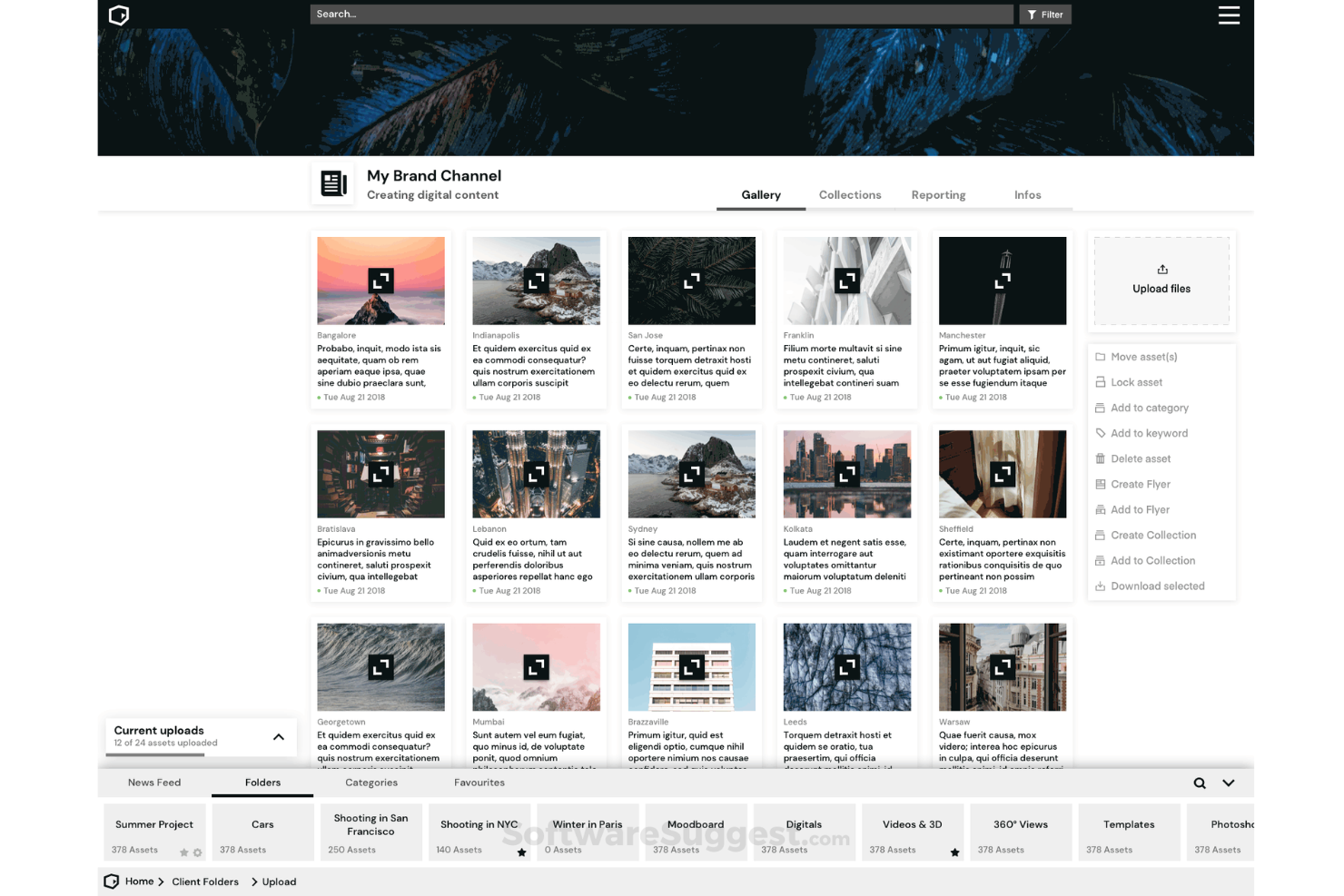
DemoUp Cliplister is a digital asset management platform that provides businesses with the ability to manage and distribute product content across more than 350 retailers. It supports content creation services, enterprise digital asset management (DAM), and image content delivery network (CDN), which are crucial for companies aiming to maintain a consistent brand presence and improve product presentation across various retail channels.
Why I picked DemoUp Cliplister: DemoUp Cliplister offers a comprehensive suite of services that cater to digital asset management, content creation, and retailer syndication. What makes it distinct is its capability to not only organize and distribute product content but also to analyze it, ensuring that brands maintain a consistent presence across multiple retail platforms. I believe DemoUp Cliplister is best for multi-retailer brand control because it empowers brands to automate the distribution of their product content to over 350 retailers, thereby maintaining brand consistency and control across various sales channels.
DemoUp Cliplister Standout Features & Integrations
Features include video content management, automated product video matching, customizable video players, analytics and insights, interactive video elements, SEO optimization for videos, multi-language support, and content delivery network (CDN) utilization.
Integrations are not listed publicly. Presumable, popular ecommerce platforms are supported.
Pros and Cons
Pros:
- Offers user-generated review videos
- 300,000 videos, 3D models and augmented reality experiences from over 3,000 brands
- Content creation and retailer syndication in one
Cons:
- Small, niche brands may not be included in their asset catalog
- May be costly for small businesses or startups


Percolate enables enterprise organizations to control all aspects of their marketing lifecycles.
Why I picked Percolate: The platform offers solutions to help your enterprise introduce visibility to your marketing processes, improve work effectiveness, and develop marketing content and campaigns. Percolate offers your organization a central dashboard where you can store all marketing tasks, information, assets, and work in progress. Your teams can use the software to simplify content and asset production while ensuring everything meets your branding standards and adapt the collateral to various scenarios.
Percolate helps enterprises accelerate growth by breaking down silos, automating processes, and unifying your organization. It gives your team an overview of all campaigns and activities through its calendaring system. You can use the platform to coordinate a unified customer experience, reduce production expenses, and understand your marketing’s impact.
Percolate Standout Features and Integrations
Features include content management, compliance maintenance, content delivery, in-app search, content library, content customization and distribution, and performance insights.
Integrations include Salesforce, Clari, Allego, Drupal, Dropbox, Aprimo, Bynder, Box, BambooHR, Zendesk, SalesLoft, Microsoft Office, Okta, Outreach, and Netsuite CRM.
Percolate offers custom pricing upon request. Percolate provides a demo to interested users.
Pros and Cons
Pros:
- Makes campaign planning easier.
- Simplifies content development and reviews.
- Notifies users regarding collateral’s impact.
Cons:
- Complex learning curve.
- Some processes aren’t automated.


ResourceSpace is a free marketing resource management platform that stores digital assets on the cloud or on-premise.
Why I picked ResourceSpace: It’s an open source marketing resource management that enables businesses to organize, manage, share, and download brand assets. The asset search functionality allows your teams to locate assets based on resource numbers, descriptions, and keywords. You can configure the platform’s interface to suit your company’s needs and create unique links to ensure authorized stakeholders have access to your collateral.
ResourceSpace is an excellent choice for commercial, academic, and not-for-profit organizations looking for a simple solution for collecting and sharing files. It enables your teams to improve efficiency and collaboration by freeing up resources. Open source licensing means there aren’t any fees, but there are paid plans if you require more functionality.
ResourceSpace Features and Integrations
Features include customizable user experience, AI tagging, metadata tools, asset management and sharing, permission control, multiple user privacy, global search, workflow actions, and actionable analytics.
Integrations include Microsoft Active Directory, OAuth, OpenID, Adobe Photoshop, Adobe InDesign, Vimeo, YouTube, Falcon.io, WordPress, RightMarket, BrandStencil, and VisionAI.
ResourceSpace costs from $351/month when billed monthly or $4,215/year. ResourceSpace offers a free forever subscription tier.
Pros and Cons
Pros:
- Highly configurable, simple interface.
- Allows public and private album creation.
- Provides quick asset recall.
Cons:
- Some features require technical knowledge.
- Uploading files can be complex.

OpenAsset helps architecture and construction firms manage digital assets and create better proposals.
Why I picked OpenAsset: It’s a cloud-based platform that enables architecture, construction, engineering, and real estate businesses to store, organize, use, and share crucial assets. The software uses AI and a project-based structure to help your company improve asset tagging, search capabilities, and batch asset edits. OpenAsset’s primary focus is eliminating the hassle of locating assets and placing them in a straightforward central system - saving your team’s time and energy so they can focus on operating your business.
OpenAsset helps construction and real estate organizations design marketing collaterals, bid proposals, and other crucial documentation by using brand templates, image specifications, and a drag-and-drop tool. The platform enhances workflows and helps you create documents and collateral quickly and efficiently. You can also use OpenAsset to store employee data and align them with the projects they worked on - develop employee summaries fast to use when creating bids and proposals on the platform.
OpenAsset Standout Features and Integrations
Features include asset storing and organizing, project search, marketing asset creation, and collateral sharing.
Integrations include monday, Wrike, Basecamp, WordPress, Slack, HubSpot CRM, Zoho CRM, Asana, Dropbox, Trello, Box, Google Drive, Zapier, and Okta.
OpenAsset offers custom pricing upon request.
Pros and Cons
Pros:
- Customer account managers.
- Access assets from anywhere.
- Provides excellent product consistency.
Cons:
- Needs more automation features.
- No user access options.


Lucidea provides a flexible collections management system called Argus to ensure accessible, visible, and relevant archive asset gathering.
Why I picked Lucidea: The Argus platform from Lucidea helps museums and galleries enhance asset curation and offer public access to exhibits and objects. It also provides mobile access to your team members and visitors. The system’s portal and collection management elements can enhance operational efficiency and strong partnerships between your institution’s departments.
Lucidea is a good fit for any museum and archive institution to increase access to its asset collection. It can help your teams catalog and manage your photos, artifacts, and objects. The platform offers powerful search capabilities to make your collection discoverable on search engines.
Lucidea Standout Features and Integrations
Features include collection management, web and mobile portals, asset search, workflow management, and request management.
Integrations include an API to enable connections to various third-party systems.
Lucidea offers custom pricing upon request.
Pros and Cons
Pros:
- Customizable reporting.
- Vendor provides user training.
- Easy to implement.
Cons:
- UI is slightly outdated.
- Complex admin portal.
Other Options
Here are a few more options that didn’t make the best MRM software list:
- Bright
MRM for startups and agencies
- OnTrack Workflow
For localizing & personalizing content
- Filecamp
All-in-one marketing resource management
- Stockpress
For AI-powered asset organization
- 4ALLPORTAL
MRM software for managing & editing image-based digital assets
- MediaValet
For accessing assets anywhere in the world.
- Bynder
For implementing integrated ecosystems.
- Marvia
For customizing and publishing marketing assets.
- Beam
For brand governance.


Our Selection Criteria for MRM Software
Choosing the right marketing resource management (MRM) software isn’t just about ticking boxes. It’s about finding a tool that eliminates chaos, makes your life easier, and helps your team hit those marketing goals.
Here’s how we evaluate MRM tools to ensure they deliver the goods:
Core functionality (25% of total weighting score)
The basics matter. To even make the shortlist, an MRM tool needs to excel at:
- Campaign planning and budgeting. Make sure you can plan campaigns, allocate budgets, and track spending without breaking a sweat.
- Digital asset management (DAM). This is essential for organizing product photos, promo videos, and seasonal marketing assets. Easy tagging and search are non-negotiable.
- Workflow automation. Look for customizable workflows that keep approvals, tasks, and deadlines on track.
- Performance tracking. Robust analytics to measure what’s working, what’s not, and where your resources are going.
- Integration with martech stack. Plays nicely with your CRM, analytics platform, and email marketing tools? That’s a win.
Additional standout features (25% of total weighting score)
Great MRM software goes beyond the basics and wows you with:
- End-to-end campaign visibility. Real-time dashboards so you know what’s happening, where it’s happening, and who’s responsible.
- Support for remote teams. Cloud-based access and collaboration tools for those “work from anywhere” vibes.
- Customizable interfaces. Flexibility to tailor workflows and dashboards for your team’s unique style.
- Personalized content creation. Tools to deliver tailored marketing content that resonates with customers.
- AI and automation. Predictive analytics and automated workflows to save time and boost efficiency.
- Scalability. A tool that grows with you as your campaigns get bigger and your team tackles more ambitious goals.
Usability (10% of total weighting score)
If your team can’t figure it out, they won’t use it. Usability is key:
- User interface (UI). A clean, intuitive design that makes navigating the software a breeze.
- Ease of use. No over-complicated setups or endless tutorials—just straightforward functionality.
- Mobile accessibility. Manage campaigns from anywhere with a mobile-friendly design.
Onboarding (10% of total weighting score)
The faster your team gets comfortable, the faster you start seeing results:
- Training and resources. Guides, tutorials, and live webinars to help your team learn the ropes.
- Implementation support. Pre-configured templates and workflows to speed up the onboarding process.
Customer support (10% of total weighting score)
When things go sideways, you need a support team that’s got your back:
- Availability. Responsive support via chat, phone, or email whenever you need it.
- Community and updates. An active user forum and regular product updates keep your tool (and your team) running smoothly.
Value for money (10% of total weighting score)
MRM software is an investment, so make sure you’re getting your money’s worth:
- Pricing models. Transparent pricing that scales with your needs—no hidden fees.
- Cost vs. benefits. Evaluate the features you’re getting at each tier and how they’ll support your team’s success.
Customer reviews (10% of total weighting score)
Real feedback from other users can help cut through the marketing fluff:
- Feature-specific praise. What are other teams raving about? Look for consistent love for DAM, workflow automation, and collaboration tools.
- User satisfaction. High ratings for reliability, usability, and ROI? Yes, please.
By evaluating MRM tools with this framework, you can pick a solution that fits your team like a glove. Ready to see our top picks? Let’s dive in.
What is Marketing Resource Management (MRM) Software?
Marketing resource management (MRM) software is the all-in-one platform that helps you plan, organize, and track every aspect of your marketing operations—keeping campaigns, budgets, and brand assets easily accessible and running smoothly.
For ecommerce and retail teams, you’ll find it especially helpful for managing large libraries of photos, assets, and seasonal promotions, coordinating approvals, and integrating with your favorite marketing tools—so your marketing stays consistent, efficient, and on track.
How to Choose MRM Software
Choosing MRM software isn’t about finding the tool with the longest feature list—it’s about finding the one that actually helps your team get work done.
The right platform should plug into your existing workflows, make collaboration painless, and grow with your business. Use this framework to evaluate options and avoid shiny-object distractions.
| Step | What to consider | Why it matters |
|---|---|---|
| Evaluate integration needs | Does the software connect seamlessly with your CRM, analytics tools, or email platform? | Integrations prevent data silos and keep campaigns running smoothly. |
| Check for digital asset management (DAM) | Can you easily tag, categorize, and search images, videos, and other assets? | Built-in DAM is a time-saver for ecommerce teams managing large catalogs. |
| Look for flexibility in workflows | Does it support Agile, Waterfall, or customized approval processes? | Flexible workflows let the tool adapt to your team, not the other way around. |
| Assess reporting and analytics | Does it provide clear insights into performance, budgets, and resource use? | Strong reporting helps optimize campaigns and justify spend. |
| Prioritize ease of use | Is the interface intuitive with robust onboarding and support? | A confusing tool won’t get used—usability drives adoption. |
| Support for remote and distributed teams | Does it enable real-time collaboration and cloud access? | Remote-friendly features keep teams aligned across locations and time zones. |
| Consider scalability and customization | Can the tool grow with your business and adapt to future needs? | A scalable platform ensures you won’t outgrow your software in a year. |
MRM Software Trends
Marketing resource management (MRM) software is evolving faster than a viral TikTok dance. Here’s what’s on the horizon:
- AI-powered personalization. Artificial intelligence is set to revolutionize MRM tools, enabling hyper-personalized marketing strategies that anticipate customer needs before they even know them. Imagine your MRM suggesting the perfect campaign tweaks at 2 AM while you’re catching some well-deserved Z’s.
- Omnichannel integration. The future is all about seamless customer experiences across every platform imaginable. MRM software will need to integrate effortlessly with various channels, ensuring your brand’s message is as consistent as your morning coffee routine.
- Enhanced data privacy measures. With data regulations tightening, MRM tools will prioritize robust data privacy features, helping you stay compliant without breaking a sweat—or the law.
- Increased focus on ROI tracking. Marketing budgets aren’t getting any looser. Expect MRM solutions to offer more sophisticated ROI tracking, so you can justify every dollar spent to the powers that be.
- User-friendly interfaces. Gone are the days of clunky software that requires a PhD to navigate. The next generation of MRM tools will boast intuitive, user-friendly interfaces that make managing campaigns as straightforward as ordering your favorite pizza online.
- Scalability for growing businesses. As companies expand, MRM software will need to scale accordingly, offering flexible solutions that grow with your business—no awkward growth spurts included.
- Integration of emerging technologies. Keep an eye out for MRM platforms incorporating the latest tech trends, from augmented reality campaign planning to blockchain-based asset management. The future is now, and it’s pretty darn exciting.
Staying ahead of these trends will ensure your marketing team is not just keeping up with the times but setting the pace for others to follow.
Features of MRM Software
MRM software isn’t just a tool—it’s the secret weapon that keeps marketing teams from drowning in chaos. Here’s what makes these tools indispensable for today’s fast-moving ecommerce and retail brands:
- Campaign planning and budgeting. Keep your campaigns on track and your budgets aligned with tools that let you plan, schedule, and adjust in real time—no more “Wait, how much did we spend on this?” moments.
- Digital asset management (DAM). Say goodbye to searching through endless folders for that one product image. A good MRM tool lets you organize, tag, and retrieve all your assets in seconds.
- Workflow automation. Simplify the slog of approvals, task assignments, and routine updates. Customizable workflows mean your team can spend less time clicking and more time creating.
- Integration with your martech stack. Whether it’s your marketing CRM, analytics tools, or email marketing platform, your MRM software should play nice with everything else in your tech toolbox.
- Reporting and analytics. Track what’s working and what’s not with detailed performance insights. From ROI to resource allocation, you’ll have the data you need to make smarter decisions.
- Real-time collaboration tools. Whether your team is in the same room or spread across time zones, shared dashboards and live updates keep everyone moving in sync.
- Customizable interfaces and workflows. No two teams are the same. Look for a tool that adapts to the way you work, not the other way around.
- Scalability. Your campaigns are going to grow—your software should too. Choose an MRM tool that scales without missing a beat.
With these features, MRM software helps you cut through the clutter, keep your team aligned, and deliver campaigns that get results. It’s the tool you didn’t know you needed—until now.
Benefits of MRM Software
MRM software doesn’t just make life easier for marketing teams—it transforms how they work, collaborate, and deliver results.
Here’s why investing in MRM software is a game-changer for ecommerce brands:
- Streamlined workflows. Eliminate bottlenecks and simplify approval processes, so your team can spend less time chasing tasks and more time driving results.
- Improved collaboration. Centralized tools and real-time updates ensure everyone—from designers to marketing managers—is always on the same page, no matter where they’re working.
- Enhanced brand consistency. Keep your visuals, messaging, and campaigns aligned with your brand guidelines, ensuring a unified customer experience across every touchpoint.
- Time and resource savings. Automate repetitive tasks, optimize resource allocation, and focus your team’s energy where it matters most.
- Better budget management. Track every dollar in real time, so you can avoid overspending and prove the ROI of your campaigns with confidence.
- Clear campaign visibility. Gain a 360-degree view of all your projects and assets, helping you spot potential issues and opportunities before they become problems.
- Scalability for growth. As your campaigns and teams expand, MRM software grows with you, supporting increased complexity without adding chaos.
- Data-driven decisions. Leverage powerful reporting tools to understand what’s working, refine strategies, and make smarter marketing decisions.
By unlocking these benefits, MRM software empowers your team to be more efficient, strategic, and impactful—delivering campaigns that don’t just hit the mark but set new standards.
Cost & Pricing of MRM Software
Investing in marketing resource management (MRM) software is a strategic move to streamline your marketing operations, but understanding the cost implications is crucial.
Pricing varies based on factors like features, user count, and the complexity of your marketing needs. Here's a breakdown to help you navigate the options.
Factors influencing pricing:
- Number of users. Many MRM tools operate on a per-user, per-month pricing model, so costs scale with your team size.
- Feature set. Advanced functionalities such as AI-driven analytics, comprehensive digital asset management, and workflow automation can increase the price.
- Integration capabilities. Seamless integration with your existing martech stack may come at a premium.
- Customization and scalability. Tailored solutions that grow with your business can affect overall costs.
Common pricing tiers:
| Plan Type | Average Price | Common Features Included | Best For |
|---|---|---|---|
| Free | $0 | Basic asset management, limited users, essential collaboration tools, community support | Solopreneurs, hobbyists |
| Basic | $7 - $50/user/month | Project management, workflow automation, digital asset management | Small businesses, startups |
| Professional | $50 - $150/user/month | Advanced segmentation, multi-channel marketing, A/B testing, enhanced analytics | Growing businesses, mid-sized ecommerce |
| Advanced | $150 - $500/user/month | AI-driven automation, customer journey mapping, predictive analytics, priority support | Medium to large businesses |
| Enterprise | $500+/user/month | Unlimited users, custom integrations, dedicated account manager, advanced security features | Large enterprises with complex needs |
Additional considerations:
- Implementation fees. Some providers charge for initial setup, training, or data migration.
- Support levels. Premium support options may come with additional costs.
- Scalability. Ensure the plan you choose can accommodate your business growth without incurring prohibitive costs.
Tips for selecting the right plan:
- Assess your current needs. Start with a plan that meets your immediate requirements and offers the flexibility to upgrade as your business grows.
- Take advantage of free trials. Many MRM providers offer trial periods—use them to evaluate the software's fit for your team.
- Consider total cost of ownership. Look beyond the subscription fee; factor in implementation, training, and potential downtime during the transition.
By carefully evaluating these factors, you can select an MRM solution that aligns with your budget and supports your marketing objectives.
MRM Software FAQs
OK, let’s end on some questions which helpfully have answers attached to them.
How do I know if my team needs MRM software?
If your marketing team is spending more time searching for files, juggling approval emails, or wondering where the budget went than actually executing campaigns, it’s time to consider MRM software.
Teams managing multiple campaigns, digital assets, or remote collaborators will see immediate benefits from the streamlined workflows and centralized tools MRM offers. If you’re scaling quickly or feeling the chaos, MRM might just be your solution.
Can MRM software integrate with my existing ecommerce tools?
Yes, most modern MRM platforms are built to play nicely with the rest of your martech stack. Look for tools that integrate with your CRM, analytics platforms, email marketing tools, and ecommerce systems like Shopify or WooCommerce. This ensures your data flows seamlessly between systems, saving your team from manual work and keeping everything connected.
How long does it take to implement MRM software?
Implementation timelines can vary based on the complexity of your operations and the tool you choose. For smaller teams with straightforward needs, setup might take just a few days or weeks.
Larger organizations with custom workflows and integrations may need several months. Many vendors offer onboarding support, templates, and training to help you hit the ground running faster.
What’s the typical ROI for businesses using MRM tools?
The ROI of MRM software can be impressive. Businesses often see significant time savings, improved campaign performance, and reduced errors, all of which translate to cost savings and revenue growth.
While specific results depend on your operations, most companies find that MRM software pays for itself within months by improving efficiency and boosting team output.
How do I ensure the MRM software I choose can scale with my business?
Scalability is all about future-proofing. Look for MRM tools with flexible pricing tiers, robust reporting, and customization options that allow you to handle increasing complexity as you grow.
Check for features like unlimited users, advanced integrations, and the ability to manage larger digital asset libraries or more intricate campaigns. If the software supports enterprise-level needs, you’re likely covered for the long haul.
What's Next?
If you're in the process of researching MRM software, connect with a SoftwareSelect advisor for free recommendations.
You fill out a form and have a quick chat where they get into the specifics of your needs. Then you'll get a shortlist of software to review. They'll even support you through the entire buying process, including price negotiations.