
26 Best Order Fulfillment Software Ranked for 2026

The Top Order Fulfillment Software to Consider
Let’s take a look at the top picks for order fulfillment software and what they are best at:


Order fulfillment software automates inventory allocation, order processing, picking, packing, shipping label generation and real-time tracking to stop mis-picks that spike returns, oversells that trigger backorders, and spreadsheet workflows that stall growth.
I’ve spent over a decade on warehouse floors and in shipping departments, managing operations for ecommerce and wholesale brands.
The right solution syncs stock across Shopify, Amazon and ERP systems, routes orders to the closest fulfillment center, and generates order entry software labels without manual setup.
This guide shows you the top order management and WMS tools to streamline workflows, cut shipping costs, and boost customer satisfaction for teams handling hundreds to thousands of daily orders.
Table of Contents
- Side-by-Side Comparison
- The Best Order Fulfillment Software, Reviewed
- Our Selection Criteria For Order Fulfillment Software
- What is Order Fulfillment Software?
- How to Choose Order Fulfillment Software
- Top Features of Great Order Fulfillment Software
- Key Benefits of Order Fulfillment Software
- Cost and Pricing for Order Fulfillment Software
- FAQs
Why Trust Our Software Reviews
Comparing the Best Order Fulfillment Software Side-by-Side
OK, let’s take a quick look at how these order fulfillment tools stack up on pricing and ideal use cases.
| Tool | Best For | Trial Info | Price | ||
|---|---|---|---|---|---|
| 1 | Best for automating shipping workflows | Free demo available | From $449/month (volume-based pricing) | Website | |
| 2 | Best for centralized order management | Free demo available | Pricing upon request | Website | |
| 3 | Best for small businesses | Free 14-day trial + free plan + free demo available | From $29 per organization/month (billed annually) | Website | |
| 4 | Best for US/Canada-based businesses | Free demo | Pricing upon request | Website | |
| 5 | Best all-in-one order fulfillment software | Free demo available | Pricing upon request | Website | |
| 6 | Best for businesses who sell on Amazon | Free demo | From $39.99/month | Website | |
| 7 | Best enterprise order fulfillment software | Free demo available | From $999/month + $99/month/user | Website | |
| 8 | Best for high order accuracy | 30-day risk-free trial—no long-term contract | Pricing upon request | Website | |
| 9 | Best for managing multiple warehouses | Free demo available | From $1,850/month | Website | |
| 10 | Best for sustainability options | Free demo | Pricing upon request | Website | |
| 11 | Best for diverse fulfillment solutions | Free demo available | From $500/mo | Website | |
| 12 | Best for omnichannel fulfillment | Free demo available upon request | Pricing available upon request | Website | |
| 13 | Best for seamless sales channel integration | Free demo available | Pricing upon request | Website | |
| 14 | Best for flexible workspace solutions | 30-day free trial | From $349/month | Website | |
| 15 | Best for product personalization | Not available | Pricing upon request | Website | |
| 16 | Best for precise order processing | Not available | Pricing upon request | Website | |
| 17 | Best for streamlining ecommerce shipping | 30-day free trial | From $0/month | Website | |
| 18 | Best for manufacturing companies | Free demo available | From $199/2-users/month | Website | |
| 19 | Best for a modular ecommerce solution | Free demo available | Pricing upon request | Website | |
| 20 | Best APIs for multi-carrier shipment and order management | Free plan available | From $75/month | Website |
The Best Order Fulfillment Software, Reviewed
Here’s a brief description of each order fulfillment tool to showcase each platform’s best use case, some noteworthy features, and screenshots to give a snapshot of the user interface.


Linnworks is built for retailers selling across multiple channels who are tired of juggling spreadsheets, separate shipping tools, and surprise stockouts.
You get a single system to capture orders, sync inventory, and route shipments so your warehouse, 3PLs, and marketplaces are always working off the same source of truth.
Why I Picked Linnworks
I picked Linnworks because it gives you one control center for orders across Amazon, eBay, Shopify, Walmart, and more, so your team stops reconciling channels by hand and starts working from a single queue.
You can use its rules engine to route orders by channel, region, shipping method, or SLA, so priority orders automatically go to the right warehouse or 3PL without manual intervention.
Inventory updates flow back to every channel in near real time, which helps you prevent overselling and protect your marketplace ratings. I also like that you can tie returns, exchanges, and refunds back into the same order record, so your support team isn’t hopping between systems.
For growing brands handling serious volume, this combination of central order control and configurable automation is what actually moves the needle on fulfillment performance.
Linnworks Key Features
In addition to its multichannel order hub and automation rules, Linnworks offers a few operational tools that matter once your fulfillment volume starts to climb.
- Returns Management Workflows: Configure RMA statuses, restocking behavior, and refund actions from a single interface.
- Stock Forecasting Tools: Use sales history and lead times to calculate reorder points and avoid stockouts.
- Warehouse Transfer Management: Manage internal transfers, locations, and bins so pick faces stay stocked while bulk inventory sits in storage.
- Saved Views And Dashboards: Build custom order views and performance dashboards filtered by channel, SLA, or fulfillment location.
Linnworks Integrations
Integrations include Amazon, eBay, Walmart, Shopify, Magento, BigCommerce, UPS, FedEx, DHL, and USPS.
Pros and Cons
Pros:
- Centralized order hub unifies marketplace, webstore, and wholesale orders.
- Rules-based routing automates carrier, warehouse, and service selection per order.
- Real-time stock sync reduces overselling across channels, warehouses, and 3PLs.
Cons:
- Pricing best fits established brands rather than very small sellers.
- Complex initial setup for automations, locations, and channel mappings.
New Product Updates from Linnworks
Linnworks Launches the Order Item Adder App
Linnworks adds the Order Item Adder App, introducing tools to add one or more items to existing orders. This update simplifies order adjustments for promotions, samples, and corrections while improving pricing and tax accuracy. For more information, visit Linnworks’ official site.
 .
.

For high-growth Shopify and DTC brands juggling Shopify, marketplaces, and 3PLs, Fulfil gives you a single place to run orders, inventory, and fulfillment without duct-taping tools together.
It’s built for operations teams that need real-time visibility into every order and warehouse, plus finance teams that care about accurate revenue recognition across channels.
Why I Picked Fulfil
I picked Fulfil because it gives you one ERP for the entire order lifecycle—orders, inventory, fulfillment, and accounting—so your team isn’t reconciling half-truths across multiple systems.
You can route each order based on inventory and customer location, using smart warehouse logic to cut shipping times and reduce freight costs. Native 3PL integrations with providers like ShipBob and ShipMonk let you outsource fulfillment while keeping Fulfil as your source of truth for stock levels and tracking.
I also like that revenue recognition and settlement reconciliation are baked in by channel, so finance isn’t rebuilding the story in spreadsheets at month-end.
Since it’s purpose-built for Shopify Plus and multi-channel DTC brands, it handles high volumes, complex bundles, and multi-location inventory in ways generic ERPs usually can’t without custom projects.
Fulfil Key Features
Beyond the central order hub, there are a few features that matter most for ecommerce fulfillment teams.
- Multi-Warehouse Inventory Management: Track inventory across internal warehouses and 3PL locations with bin-level detail and location-specific availability.
- Warehouse Operations Tools: Use barcode-based picking, batch waves, and packing rules to move orders through the warehouse faster with fewer mis-picks.
- Subscription And Pre-Order Support: Automate deferred revenue and fulfillment for recurring orders, pre-orders, and backorders without manual tracking.
- Built-In Data Warehouse: Sync operational data to BigQuery so you can analyze order cycle times, fulfillment SLAs, and margin by channel.
Fulfil Integrations
Integrations include Shopify, Amazon, TikTok Shop, ShipBob, ShipMonk, FedEx, UPS, USPS, and DHL.
Pros and Cons
Pros:
- Real-time inventory and revenue updates reduce oversells and stockout surprises.
- Native 3PL and carrier integrations automate pick, pack, and label creation.
- Unifies DTC, marketplace, and wholesale orders into one fulfillment workflow.
Cons:
- Optimized for Shopify Plus brands, so it can be overkill for smaller sellers.
- Implementation projects can be intensive for teams without dedicated operations staff.

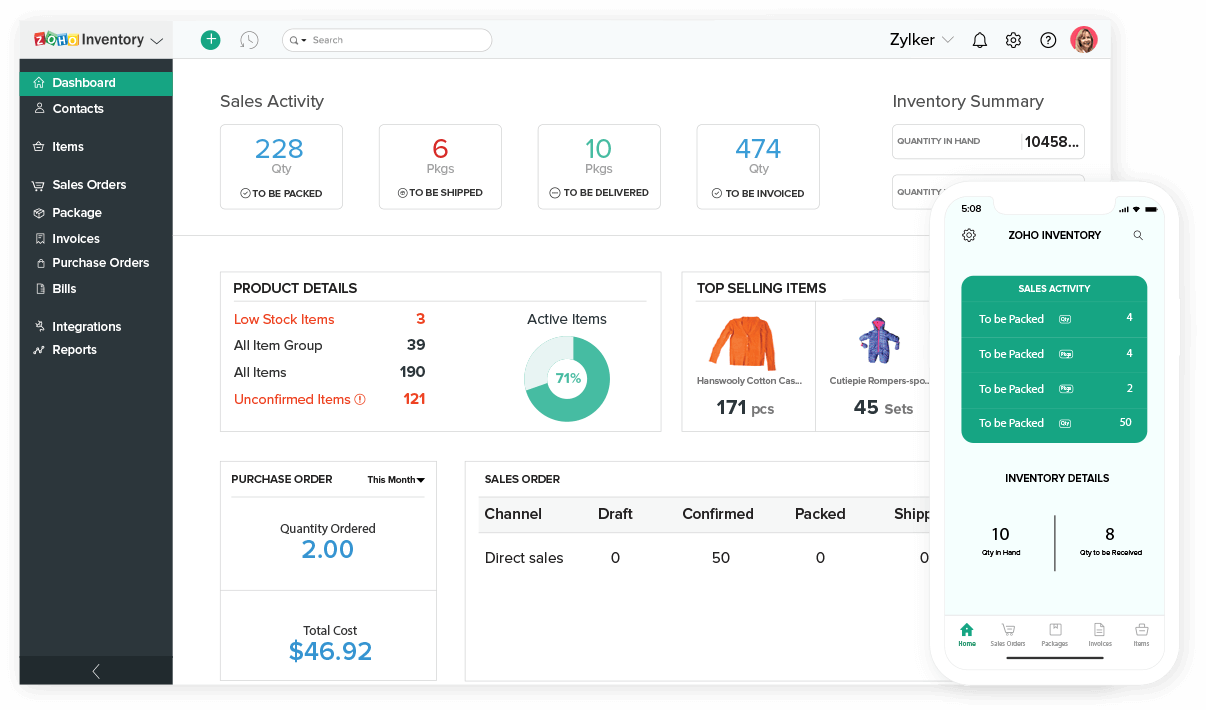
Zoho Inventory helps ecommerce teams keep orders moving from click to doorstep without losing track of what’s in stock, what’s packed, and what’s late.
It’s especially useful if you’re selling across multiple channels and need one place to manage carriers, labels, and tracking for small-to-midsize operations.
Why I Picked Zoho Inventory
I picked Zoho Inventory because you get a clear, operational view of your entire order pipeline—from pending to packed to delivered—through a shared dashboard your team can actually work from.
You can centralize online orders from your store and marketplaces so you’re not hopping between tabs to check what needs to ship next. Integrated carrier tools help you generate shipping labels and compare real-time rates, so you can keep costs down while still hitting delivery promises.
AfterShip tracking data flows back into Zoho Inventory, which means your team and your customers see the same shipment status without manual updates.
You can also lean on built-in drop shipping, sending orders straight to vendors when stock runs low instead of holding everything in your own warehouse.
Zoho Inventory Key Features
Here are a few other order-fulfillment features retailers will actually use.
- Multi-Warehouse Fulfillment: Route orders from multiple warehouses, allocate stock, and avoid overselling when you keep locations in one system.
- Batch Shipping Automation: Group orders, print packing slips, and bulk-create labels so your team isn’t clicking into each order one by one.
- Reorder Alerts: Use automatic low-stock alerts to replenish inventory before fulfillment grinds to a halt.
- Mobile Apps: Pick, pack, and update order status from iOS and Android apps while you’re on the floor.
Zoho Inventory Integrations
Integrations include Shopify, Zoho Commerce, Amazon, eBay, Etsy, Google Shopping, AfterShip, USPS, UPS, and Zoho Books.
Pros and Cons
Pros:
- Central dashboard tracks pending, packed, and delivered orders in real time.
- Integrated shipping labels and live rates reduce manual carrier entry.
- Dropshipping workflows let vendors fulfill backorders without extra steps.
Cons:
- Advanced fulfillment analytics and custom reports feel limited for enterprises.
- Initial setup for multichannel, multi-warehouse routing can be time-consuming.

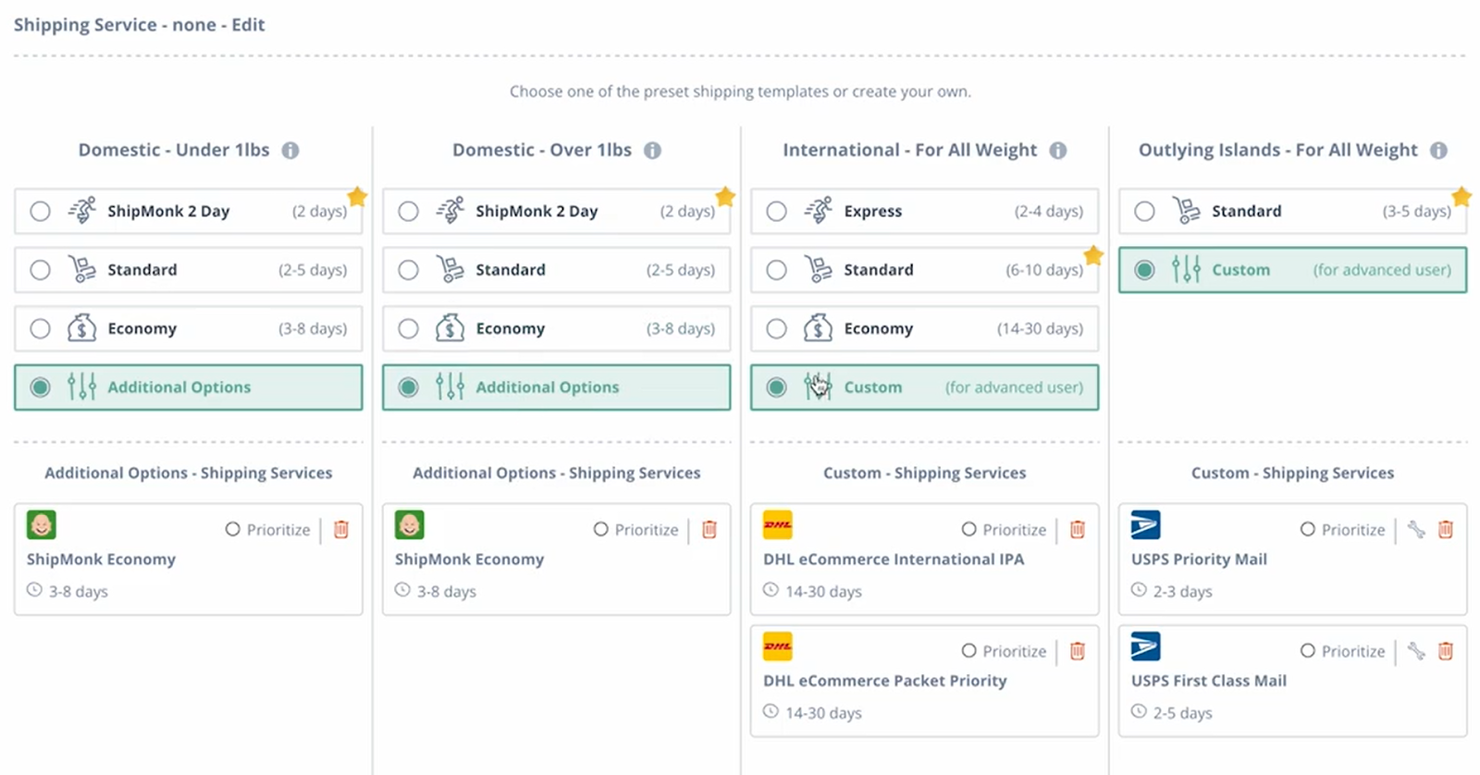
ShipMonk is built for fast-growing ecommerce brands that have outgrown DIY fulfillment and need serious coverage in North America and Europe.
You’ll get an owned-network 3PL with tech you actually log into every day—real-time inventory, order status by warehouse, and tools to keep SLAs tight when volume spikes.
Why I Picked ShipMonk
I picked ShipMonk because it gives you an order fulfillment “command center” that ties together inventory, orders, and warehouses so you always know what’s in stock and where it’s sitting.
You get an owned network of fulfillment centers across the US, Canada, Mexico, the UK, and mainland Europe, so you can promise faster shipping to your core markets without piecing together regional 3PLs.
Their Virtual Carrier Network automatically shops rates and services across multiple carriers, which helps you keep delivery times competitive while protecting margin. I also like that you can run DTC, marketplace, and basic B2B/retail fulfillment in the same platform—pick locations, carton and pallet orders, and EDI workflows are all supported.
This mix makes ShipMonk a strong fit for high-growth brands shipping hundreds or thousands of orders per month that sell on their own site plus channels like Amazon and Walmart.
ShipMonk Key Features
Beyond the core fulfillment platform, here are a few capabilities that matter when you’re choosing order fulfillment software.
- Returns Management And Protection: Handle RMAs, restocking, and delivery-protection workflows so returns and damaged shipments don’t become a manual spreadsheet project.
- B2B And Retail Compliance: Support carton and pallet-level shipping, routing guides, EDI, and retailer prep so you can serve wholesale accounts alongside DTC.
- Custom Packaging And Kitting: Configure kitting, subscription boxes, and branded unboxing experiences without standing up your own packing operation.
- Billing And Analytics Tools: Use detailed billing reports and performance analytics to understand landed costs, carrier mix, and fulfillment SLAs by warehouse and channel.
ShipMonk Integrations
Integrations include Shopify, WooCommerce, BigCommerce, Magento, Amazon, Walmart, eBay, Etsy, and PayPal.
Pros and Cons
Pros:
- Supports DTC, wholesale, and marketplace orders from a single dashboard.
- Real-time inventory portal shows stock, orders, and SLAs per warehouse.
- Owned warehouses across US, Canada, Mexico, UK, and Europe enable faster shipping.
Cons:
- Best suited to brands shipping 500-plus orders per month.
- No fulfillment centers in Asia-Pacific for truly local delivery.

ShipBob is built for ecommerce brands that have outgrown in-house fulfillment and need reliable 2-day shipping without spinning up their own warehouse network.
You get software plus operations in one place, so you can keep visibility into inventory and SLAs while ShipBob’s team handles storage, picking, packing, and shipping across multiple regions.
Why I Picked ShipBob
I picked ShipBob because it gives growing brands a way to offer fast, Amazon-style delivery using ShipBob’s distributed fulfillment centers across the US, Canada, Europe, and Australia.
You can place inventory in multiple warehouses and use ShipBob’s software to route orders to the closest location, which cuts shipping zones and helps you hit 2-day delivery targets more consistently.
The same dashboard lets you track inventory levels, monitor order accuracy, and see carrier performance, so you’re not flying blind once you outsource. I also like that you can expand beyond DTC into B2B and retail distribution, using tools for EDI, pallet shipping, and retail-compliant routing guides.
That combination of global sites, shipping speed, and multi-channel support makes it a strong fit for brands that want to scale without building a logistics team in-house.
ShipBob Key Features
Here are a few practical ways ShipBob helps retailers keep fulfillment under control as order volume grows.
- Distributed Fulfillment Network: Store products in 60+ global locations and automatically ship from the closest facility to reduce transit times and shipping costs.
- Inventory Analytics And Reporting: Monitor stock levels, storage costs, and fulfillment SLAs from a single dashboard so you can adjust inventory placement before issues hit customers.
- Returns Management Tools: Use ShipBob’s returns workflows to receive, inspect, and restock returned items, keeping your inventory accurate while preserving margin.
- Custom Packaging Options: Configure branded boxes, inserts, and kitting rules so your unboxing experience stays on-brand even when ShipBob handles the packing.
ShipBob Integrations
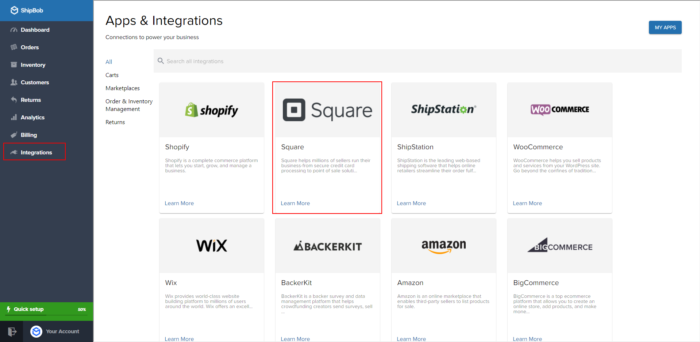
Integrations include Shopify, Shopify Plus, BigCommerce, WooCommerce, Amazon, Walmart, eBay, Squarespace, Wix, and Square.
Pros and Cons
Pros:
- Supports both DTC and B2B/retail fulfillment, including pallets and routing.
- Inventory and performance dashboards show SLAs, storage costs, and stock levels.
- Distributed warehouse network supports 2-day delivery across much of the US.
Cons:
- Best pricing favors higher order volumes, so very small brands may pay more.
- No free trial; you’ll need a tailored quote and onboarding first.
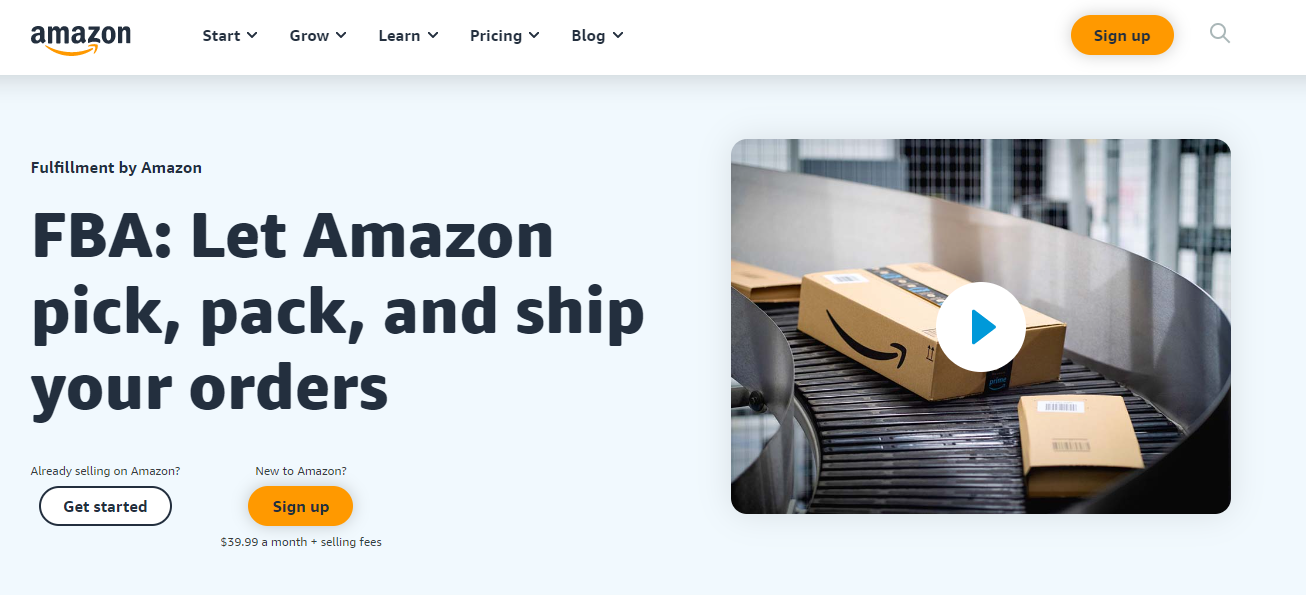
For brands selling heavily on Amazon, Fulfillment by Amazon (FBA) takes warehousing, picking, and shipping off your plate while keeping eligible orders Prime-ready.
You send inventory into Amazon’s network, and they fulfill marketplace and off-Amazon orders—including from your own site and other marketplaces—so your team can stay focused on merchandising, marketing, and product.
Why I Picked Fulfillment by Amazon
I picked Fulfillment by Amazon because it plugs you directly into Amazon’s logistics network, so you can offer fast 1–2 day delivery without building your own warehouses.
When your products qualify for Prime badging, you get a visibility and conversion lift from shoppers who already trust Amazon’s delivery reliability. The same inventory can fulfill orders from Shopify, BigCommerce, WooCommerce, and other channels through Multi-Channel Fulfillment, which helps you avoid fragmented stock across different warehouses.
Amazon also handles returns and first-line delivery support, taking repetitive operational work off your plate and reducing the need for extra headcount in customer service.
For brands that care about channel control, you can use unbranded packaging on non-Amazon orders so customers experience your brand, not just Amazon’s.
Fulfillment by Amazon Key Features
In addition to using Amazon’s network for both marketplace and external orders, there are a few operational features that matter day to day.
- Inventory Distribution Algorithms: Amazon automatically positions your stock across fulfillment centers to cut transit times and keep popular regions well supplied.
- Multiple Delivery Speed Options: Offer standard, two-day, or next-day delivery tiers so you can match shipping speed to product margin and customer expectations.
- Centralized Inventory Visibility: Track on-hand units, inbound shipments, and backorders for every SKU in Seller Central instead of chasing spreadsheets or per-channel reports.
- Automated Order Ingestion: Use prebuilt connectors and apps to send external channel orders into FBA automatically, reducing manual order entry and the risk of fulfillment errors.
Fulfillment by Amazon Integrations
Integrations include Shopify, WooCommerce, BigCommerce, Adobe Commerce, Walmart Marketplace, eBay, Etsy, and TikTok Shop.
Pros and Cons
Pros:
- Amazon handles picking, packing, shipping, and returns for your team.
- Multichannel fulfillment lets one inventory pool cover all sales channels.
- Prime eligibility lifts conversion for products targeting Amazon-first shoppers.
Cons:
- Less control over packaging and delivery experience than in-house 3PLs.
- Storage and fulfillment fees climb quickly on bulky, slow-moving inventory.


NetSuite SuiteCommerce connects your ecommerce site, stores, and warehouse operations in one place, so you’re not stitching together orders, inventory, and finance by hand.
It’s best for enterprise and upper-midsize retailers that need advanced fulfillment options—like ship-from-store and BOPIS—tied directly into their ERP and order management workflows.
Why I Picked NetSuite SuiteCommerce
I picked NetSuite SuiteCommerce because it lets your ecommerce front end run directly on the same platform as your ERP and order management, so your team works from one real-time view of orders, payments, and inventory.
You can give store associates ship-from-store and pickup-in-store workflows through SuiteCommerce InStore, so they can pick, pack, and hand off online orders without leaving their POS.
Warehouse teams get guided pick-pack-ship flows through NetSuite WMS and Ship Central, so they can follow optimized pick paths instead of guessing their way through racks. Your operations leaders can define fulfillment rules—for example, which locations handle which orders and when—to control costs while still hitting delivery promises.
Finance gets accurate, immediate updates as orders move from sales to fulfillment to invoicing, so reconciliation doesn’t turn into a monthly archaeology project.
NetSuite SuiteCommerce Key Features
Beyond the tight ERP connection, there are a few fulfillment-specific features retailers actually lean on day to day.
- Wave Release Management: Group and prioritize orders into waves so pickers can handle like items together and cut travel time in the warehouse.
- Fulfillment Requests: Route online orders to specific stores or warehouses with work queues where staff can accept or reject based on capacity and stock.
- Cross-Subsidiary Fulfillment Rules: Define which locations can fulfill for others so you can ship from the best node without losing control of margins.
- Returns And Exchanges Workflows: Process omnichannel returns and exchanges while automatically updating inventory and financials in the same system.
NetSuite SuiteCommerce Integrations
Integrations include NetSuite ERP, NetSuite Order Management, NetSuite WMS, SuiteCommerce InStore, NetSuite CRM, NetSuite Ship Central, SuitePayments, and NetSuite Inventory Management.
Pros and Cons
Pros:
- Centralized inventory and orders reduce overselling and avoid manual reconciliation.
- Mobile WMS and pick-pack-ship flows help teams handle peak seasons.
- Omnichannel fulfillment options support ship-from-store, pickup in-store, and delivery.
Cons:
- Advanced fulfillment capabilities often require extra NetSuite modules and services.
- Configuration and rollout are complex, especially for smaller or lean teams.


Red Stag Fulfillment is built for ecommerce brands that can’t afford mis-picks, broken gear, or “mystery” inventory losses—especially those shipping heavy, bulky, or high-value products.
Its fulfillment network, strict guarantees, and real-time visibility tools are best suited to growing US-based retailers who want predictable accuracy and fast delivery without babysitting their 3PL.
Why I Picked Red Stag Fulfillment
I picked Red Stag Fulfillment because its zero-shrinkage guarantee directly protects your margins—if inventory is lost or damaged in the warehouse, you’re reimbursed at cost instead of eating the loss.
You also get service-level guarantees on receiving and shipping, including two-business-day dock-to-stock and credits when they miss on-time or accuracy targets, so your team has real consequences backing those promises.
For brands with heavy, oversized, or fragile SKUs, their facilities and processes are purpose-built for larger parcels, which means fewer damages and returns. Your team gets real-time inventory and order status data from their platform, so you can monitor stock levels, track performance, and adjust reorder plans without waiting on manual reports.
Taken together, those guarantees and tools make Red Stag a strong fit if your biggest risk is getting high-value orders picked, packed, and delivered correctly every time.
Red Stag Fulfillment Key Features
Beyond the guarantees, Red Stag gives you practical fulfillment capabilities your operations team will actually use day to day.
- Omnichannel Fulfillment: Routes orders from your ecommerce store, marketplaces, and other sales channels through a single fulfillment workflow.
- Inventory Management Services: Offers real-time stock visibility, basic forecasting signals, and support for cycle counts to reduce out-of-stocks and overstock.
- Tracking And Traceability: Captures scan events and shipment data for each order so your team can quickly investigate delays, damages, or mis-routed parcels.
- Kitting And Assembly: Handles bundles, multi-packs, and light assembly in the warehouse, so complex product configurations still ship quickly and accurately.
Red Stag Fulfillment Integrations
Integrations include Shopify, WooCommerce, BigCommerce, Magento, TikTok Shop, Ecwid, Order Desk, and Sellercloud.
Pros and Cons
Pros:
- National two-day ground coverage helps keep shipping fast without air rates.
- On-time and accuracy guarantees include credits for late or incorrect orders.
- Zero-shrinkage guarantee reimburses lost inventory, reducing write-offs and disputes.
Cons:
- Premium, service-heavy model may cost more than budget 3PLs.
- Primarily US-focused fulfillment; limited options for international distribution.
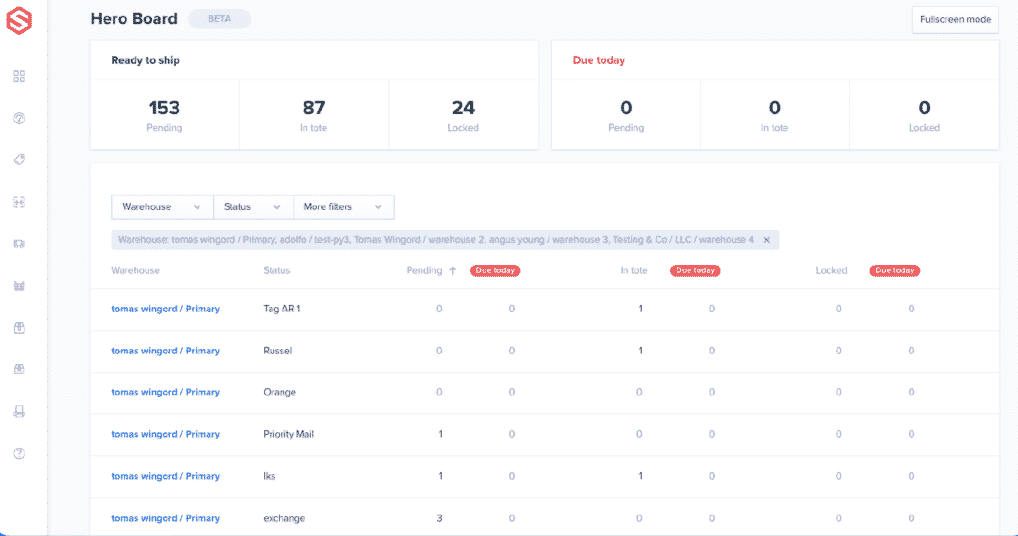
ShipHero helps ecommerce brands and 3PLs keep multi-warehouse fulfillment under control—no more guessing which warehouse should ship what.
You get real-time visibility into stock, labor, and shipping costs across locations, so you can ship quickly while keeping errors and oversells in check.
It’s best for high-volume merchants and 3PL operators managing multiple warehouses or clients.
Why I Picked ShipHero
I picked ShipHero because it gives you multi-warehouse allocation rules that actually reflect how your network works—orders can route from the closest or cheapest warehouse based on inventory, carrier, and service level.
You can keep your inventory accurate with real-time sync across sales channels, so you avoid overselling and last-minute order edits. Your team gets guided pick, pack, and ship workflows with barcode scanning, which reduces mis-picks and speeds up fulfillment on the floor.
As a 3PL, you can separate client accounts while still managing their inventory, billing, and SLAs from a single system, which keeps operations organized as you add more clients.
I also like that you can track storage usage and fulfillment activity at a detailed level, so you can bill customers based on actual cubic storage, picks, and packs instead of rough estimates.
ShipHero Key Features
Here are a few other ShipHero features that matter when you’re scaling fulfillment operations.
- Mobile Picking App: Equip warehouse staff with iOS devices for guided picking, scanning, and packing on the floor.
- Cycle Counting And Lot Tracking: Run ongoing cycle counts and manage lots/expiration dates to keep inventory accurate for regulated or perishable products.
- Automation Rules: Configure logic-based rules for orders, returns, and allocations so repetitive fulfillment decisions happen automatically.
- 3PL Client Management: Segment client warehouses, inventory, and billing so you can manage multiple brands without data bleeding between them.
ShipHero Integrations
Integrations include Shopify, Shopify Plus, BigCommerce, WooCommerce, Magento 2, Amazon, Walmart, Etsy, TikTok Shop, and Google Shopping.
Pros and Cons
Pros:
- Strong 3PL tooling for client billing, storage tracking, and account separation.
- Real-time inventory sync across channels reduces oversells and stockout surprises.
- Multi-warehouse allocation rules route orders from the best fulfillment location.
Cons:
- Advanced customization often requires deeper configuration or developer-level support.
- Interface and setup can feel complex for smaller or newer teams.

Bolt (now branded as GoBolt) is built for growing ecommerce brands that care about fast delivery and a lighter footprint, not just cheap boxes on shelves.
You plug your store into its North American warehouse and delivery network, then let it handle storage, picking, shipping, and returns with a strong emphasis on sustainability.
It’s a better fit for merchants doing serious order volume who want a tech-led 3PL partner rather than piecing together separate fulfillment and last mile providers.
Why I Picked Bolt
I picked Bolt for this list because it gives you true end-to-end coverage—warehousing, pick and pack, last mile delivery, and returns—so you aren’t stitching together multiple vendors and hoping orders don’t fall through the cracks.
You connect your Shopify or WooCommerce store through native integrations and, if you’re on Shopify, can tap into the Shopify Fulfillment Network, which lets you turn on Bolt in just a few clicks from your existing admin.
Your team gets a merchant portal with real-time views into inventory, order status, and shipments, so you can see exactly what’s sitting where and what’s out for delivery. Bolt also leans hard into sustainability, using carbon-neutral delivery programs and an intentionally designed network of warehouses across the U.S. and Canada to cut transit distance and emissions.
It’s best for brands processing thousands of orders per month that want operational control and greener logistics without building their own network.
Bolt Key Features
Beyond the core fulfillment workflow, there are a few features that make Bolt especially helpful for ecommerce teams managing scale and returns.
- Reverse Logistics Workflows: Configure whether items are restocked, donated, disposed of, or sent back to you so returns don’t pile up and erode margin.
- Multi-Node Network Optimization: Route orders through multiple warehouses across the U.S. and Canada to hit faster delivery promises without paying for constant air shipments.
- Merchant Portal Reporting: Use portal analytics on orders, shipments, and returns to spot bottlenecks, track SLAs, and adjust inventory placement.
- Delivery Experience Tools: Give customers accurate tracking and delivery updates tied to Bolt’s last mile network, reducing “where is my order?” tickets.
Bolt Integrations
Integrations include Shopify, Shopify Fulfillment Network, WooCommerce, ShipStation, Loop, Redo, Skubana, and Order Desk.
Pros and Cons
Pros:
- Handles fulfillment, last mile delivery, and returns in one platform.
- Uses carbon-reduction programs and network design to shrink shipping emissions.
- Native SFN and app integrations let Shopify brands connect in minutes.
Cons:
- Typically works best with merchants processing 3,000+ orders per month.
- Primarily serves brands shipping within the US and Canada.

Shipwire gives ecommerce and B2B brands one place to manage orders, inventory, and returns across a global fulfillment network.
It’s a match for teams shipping into multiple regions and channels who want one platform to orchestrate D2C, marketplace, and wholesale volume, plus options for more advanced packaging and returns workflows as they grow.
Why I Picked Shipwire
I picked Shipwire because it combines a large, geographically distributed fulfillment network with software that actually helps you decide where to put stock and how to ship it.
You can connect your carts and marketplaces so orders, inventory, and tracking flow through a single dashboard, which helps your team avoid channel-specific spreadsheets and one-off hacks.
The platform’s routing and rate logic weighs carrier options, warehouse locations, and your rules to choose cost- and time-efficient shipping methods for each order. Analytics go beyond basic reports, letting you monitor SKU-level performance and channel profitability so you can tune where you allocate inventory.
That said, public reviews frequently mention issues like lost inventory and billing disputes, so I’d treat this as a fit for operators who want the network and feature depth but are ready to keep a close eye on reconciliation.
Shipwire Key Features
Alongside its fulfillment network, Shipwire includes several features that matter for brands coordinating diverse fulfillment needs.
- Nesting And Packaging Optimization: Uses carton data and AI-guided logic to combine items into fewer boxes, which can cut DIM weight charges and packaging costs.
- Multi-Node Fulfillment Logic: Lets you configure rules so orders route from the best warehouse based on inventory availability, destination, and service level.
- Reverse Logistics And Returns Management: Supports configurable returns flows so your team can restock, rework, or dispose of items according to clear business rules.
- B2B And Retail Compliance Tools: Helps you meet retailer requirements with support for routing guides, labeling, and ASNs for wholesale and drop-ship orders.
Shipwire Integrations
Integrations include Shopify, Amazon, Magento, WooCommerce, ChannelAdvisor, ChannelEngine, SPS Commerce, NetSuite, Celigo, Oracle, and Salesforce.
Pros and Cons
Pros:
- Automation rules select carriers and warehouses to control shipping spend.
- Multichannel order hub syncs D2C, marketplace, and B2B inventory in one place.
- Global fulfillment network helps reduce transit times across North America and Europe.
Cons:
- Storage fees and billing practices often described as confusing or opaque.
- Merchant reviews report lost inventory and damaged shipments at some sites.


Kibo Commerce is built for high-volume retailers that need their stores, warehouses, and dropship partners to behave like one fulfillment network.
It helps you break down inventory silos, keep delivery promises, and turn store locations into true mini-DCs without ripping out your existing ecommerce stack.
Why I Picked Kibo Commerce
I picked Kibo Commerce for retailers who want store networks to actually carry their weight in fulfillment through prebuilt flows for buy online, pick up in-store, curbside, ship-from-store, and ship-to-store.
You can layer its order management system on top of your current ecommerce platform, so you add omnichannel fulfillment without a painful replatform. Your customer service and store teams get dedicated consoles to edit orders, handle substitutions, and resolve exceptions, which helps save sales instead of defaulting to refunds and apologies.
Because the OMS is modular, you can roll out omnichannel fulfillment by brand, region, or channel, rather than flipping the entire business in one go.
That mix of flexible deployment, retail-specific workflows, and store-centric fulfillment is why I like it for omnichannel retailers with real footprint complexity.
Kibo Commerce Key Features
Beyond the omnichannel flows, Kibo’s order management tools focus on giving you tighter control over where every order is sourced and how inventory moves through your network.
- Real-Time Inventory Visibility: Unify store, warehouse, and dropship stock into a single view so you can prevent overselling and give customers accurate availability and delivery promises.
- Advanced Order Routing Rules: Route orders by margin, SLA, fulfillment node, or geography so you can hit service levels while controlling shipping and handling costs.
- Returns And Reverse Logistics: Configure return locations, disposition rules, and secondary fulfillment paths to recover inventory quickly and reduce the cost of taking items back.
- Fulfillment Analytics And Alerts: Track fulfillment KPIs and trigger alerts when locations miss cutoffs, stock falls below thresholds, or routing rules need to change.
Kibo Commerce Integrations
Integrations include Shopify, BigCommerce, Adobe Commerce (Magento), Salesforce Commerce Cloud, Lightspeed Retail, PayPal Express, Apple Pay, Google Pay, Mailchimp, and Adyen.
Pros and Cons
Pros:
- Store and call center consoles help staff resolve order issues in real time.
- Composable OMS layer plugs into existing ecommerce platforms without replatforming.
- Flexible fulfillment workflows support BOPIS, curbside, ship-from-store, and ship-to-store.
Cons:
- Implementations usually require partners and strong internal technical ownership.
- Enterprise focus means pricing and scope can exceed midmarket needs.
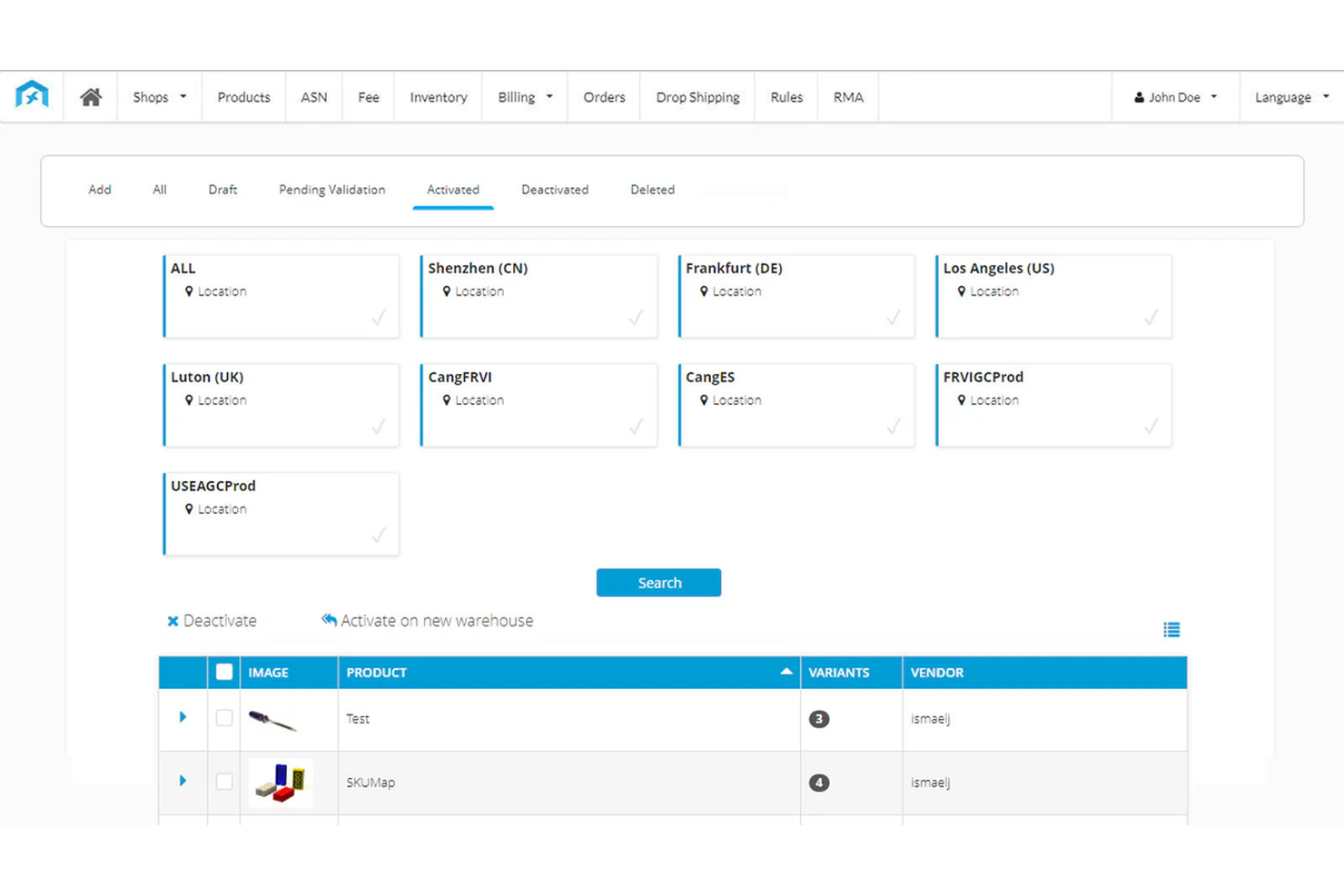
Fulfillment Bridge helps ecommerce brands tame cross-border complexity—especially when you’re selling across marketplaces and shipping into the EU, US, and MENA.
You get one platform to coordinate storage, picking, packing, and shipping through a global warehouse network, so your team spends less time firefighting and more time growing profitable markets.
Why I Picked Fulfillment Bridge
I picked Fulfillment Bridge for retailers who need global reach without stitching together multiple 3PLs and tools. You can store inventory in regional warehouses across several continents, so orders ship from locations closer to your customers and you cut transit times and duties.
Your team manages that network through a single dashboard that covers freight forwarding, customs clearance, and last-mile handoff, which reduces the number of vendors you coordinate just to move a single order.
Returns centers in regions like the US, EU, and APAC give you a practical way to handle cross-border returns without routing everything back to your origin warehouse.
For brands expanding into markets such as KSA and the wider Middle East, the localized offers and routes are especially useful for testing and scaling new regions.
Fulfillment Bridge Key Features
Beyond the network itself, Fulfillment Bridge adds a few software-layer features that help operations teams stay in control.
- Automated Product Import: Syncs SKUs and product data from connected sales channels into one catalog.
- Inventory Mapping And Bundling: Maps SKUs across channels and supports product combinations so stock updates stay accurate.
- Configurable Shipping Options: Lets you choose from multiple carriers and service levels per destination to balance speed and cost.
- Return Management Tools: Routes returns to regional centers and updates inventory status so your team can resell or dispose efficiently.
Fulfillment Bridge Integrations
Integrations include Shopify, WooCommerce, PrestaShop, Amazon, eBay, and TikTok Shop.
Pros and Cons
Pros:
- Inventory tools support multi-channel stock mapping and product bundling.
- Multi-region returns centers reduce cross-border return costs and delays.
- Global warehouse footprint shortens delivery distances across US, EU, and APAC.
Cons:
- Sparse public documentation may challenge teams needing detailed technical guidance.
- Pricing calculator and quote-based model limit upfront cost transparency.


Saltbox gives ecommerce brands a physical home for fulfillment—warehouse suites, in-suite pick and pack, and on-site help—without locking you into a long-term lease.
It’s a strong fit if you want your team, inventory, and shipping ops under one roof while still using software-driven workflows for labels, rates, and carrier selection through Parsel.
Why I Picked Saltbox
I picked Saltbox because you get true hands-on control of fulfillment, with inventory, packing, and shipping all happening in your own dedicated suite instead of a distant 3PL.
Your team can pick and pack orders right in your space, while Saltbox staff handle daily carrier pickups and receiving so you’re not babysitting the loading dock.
Month-to-month memberships and a range of suite sizes mean you can resize your warehouse footprint as order volume spikes, then dial it back down when things cool off. The Parsel shipping app gives you discounted multi-carrier rates and doorstep pickups, so you can cut label costs while keeping fast delivery promises.
If you prefer to keep fulfillment close, but still want tech-driven shipping and a support team you can actually see in person, this model hits that middle ground.
Saltbox Key Features
Beyond the in-suite fulfillment support, Saltbox adds several practical tools that make it easier to run operations day to day.
- Flexible Membership Plans: Month-to-month options and different suite sizes let you adjust space as your business scales, instead of committing to a long industrial lease.
- Flex Storage Program: Overflow inventory can move into shared storage, freeing up your main suite for fast-moving SKUs and packing stations.
- On-Site Services By eForce: A trained operations team is available for special projects like FBA prep, rework, or one-off kitting when you’re short on labor.
- Shared Amenities And Studios: Access meeting rooms, coworking areas, and content studios so you can shoot product photos or host buyers without leaving the warehouse environment.
Saltbox Integrations
Integrations include Shopify.
Pros and Cons
Pros:
- Parsel app offers discounted multi-carrier rates with scheduled doorstep pickups.
- In-suite pick and pack keeps fulfillment close to your team and inventory.
- Flexible warehouse memberships let you scale physical space with seasonal demand.
Cons:
- Not ideal if you only want a cloud OMS/WMS with no physical footprint.
- US-only locations limit coverage for brands needing international warehouses.


Ecommerce brands that care about branded, personalized unboxing experiences but don’t want to build their own logistics team will get a lot out of OWD.
You get a 3PL that combines US-based fulfillment centers, personalization services, and an in-house call center, so you can hand off both boxes and buyer questions without losing control of your brand.
Why I Picked OWD
I picked OWD because it treats fulfillment as an extension of your brand, not just a box-moving exercise. You can add engraving, embroidery, custom greeting cards, and branded packaging so your customers receive tailored experiences without your team packing a single box.
Their three US fulfillment centers are positioned to reach 99% of the country with two-day ground shipping, which helps you offer fast delivery without paying express rates.
You also get a client portal with customizable reporting, so you can track inventory, orders, and shipping costs in one place instead of juggling spreadsheets.
On top of that, the integrated call center handles phone, email, and chat support, giving you a single partner for both post-purchase service and logistics.
OWD Key Features
In addition to the personalization focus, here are a few practical features that matter for fulfillment-heavy brands.
- Global Fulfillment Network: US warehouses plus international capabilities support cross-border shipping and growth.
- Returns Management: Pre-addressed return labels and structured inspection flows simplify reverse logistics.
- Temperature-Controlled Storage: Facilities suitable for beauty, supplements, and other products needing stable conditions.
- Dedicated Fulfillment Specialists: Named contacts help you adjust SLAs, packaging, and routing as your volumes change.
OWD Integrations
Integrations include Shopify, BigCommerce, Magento, WooCommerce, Squarespace, Amazon, Walmart, eBay, Etsy, and Wayfair.
Pros and Cons
Pros:
- Integrated call center lets you outsource post-purchase support to one provider.
- Personalized fulfillment options like engraving and kitting enhance unboxing experience.
- Two-day ground coverage to most US addresses improves delivery speed expectations.
Cons:
- Pricing structure can be complex and may feel higher than basic 3PLs.
- Smaller warehouse network than some global providers limits ultra-distributed inventory.


Falcon Fulfillment is built for high-volume DTC brands—especially health, wellness, and beauty—who care more about accuracy and speed than rock-bottom costs.
You get precise pick/pack, custom packaging, and US-wide two-day coverage, but you’ll need meaningful volume and primarily US customers to really benefit.
Why I Picked Falcon Fulfillment
I picked Falcon Fulfillment for teams that want precise, high-volume order processing backed by real SLAs—96.4% two-day coverage across the US comes from multiple domestic facilities and tightly managed carrier relationships.
If your business ships supplements, skincare, or other sensitive SKUs, you benefit from their experience handling regulated, fragile, or lot-tracked products with appropriate storage and packing standards. You also get a named account manager who helps your team plan inventory, review performance, and fix issues instead of just opening tickets into a generic queue.
Onboarding is designed to protect your in-flight orders, using a structured transition plan so you can move from your current 3PL or in-house setup without pausing shipments.
Falcon is best if your brand already has steady volume and wants a more tailored fulfillment partner rather than a plug-and-play, self-serve warehouse app.
Falcon Fulfillment Key Features
Beyond the core fulfillment operations, there are a few features your ops team will actually lean on day to day.
- Subscription Box Kitting: Build recurring kits, bundles, and curated sets with consistent assembly rules for subscription and replenishment programs.
- Returns Management Services: Route, inspect, and restock returns with rules-based disposition so you recover value instead of letting stock quietly die.
- Inventory Visibility Tools: Track stock levels, inbound receipts, and available-to-sell quantities in near real time to avoid overselling.
- Eco-Friendly Packaging Options: Use right-sized cartons and sustainable materials that protect products while supporting your brand’s sustainability story.
Falcon Fulfillment Integrations
Integrations include Shopify, WooCommerce, Amazon, ShipStation, and Order Desk.
Pros and Cons
Pros:
- Dedicated account managers give you consistent operational oversight and escalation.
- Specializes in health, wellness, beauty SKUs needing careful handling.
- High two-day coverage across US keeps delivery promises tight.
Cons:
- US-only fulfillment network limits shipping options for global expansion.
- 4,000-order monthly minimum shuts out smaller or earlier-stage brands.

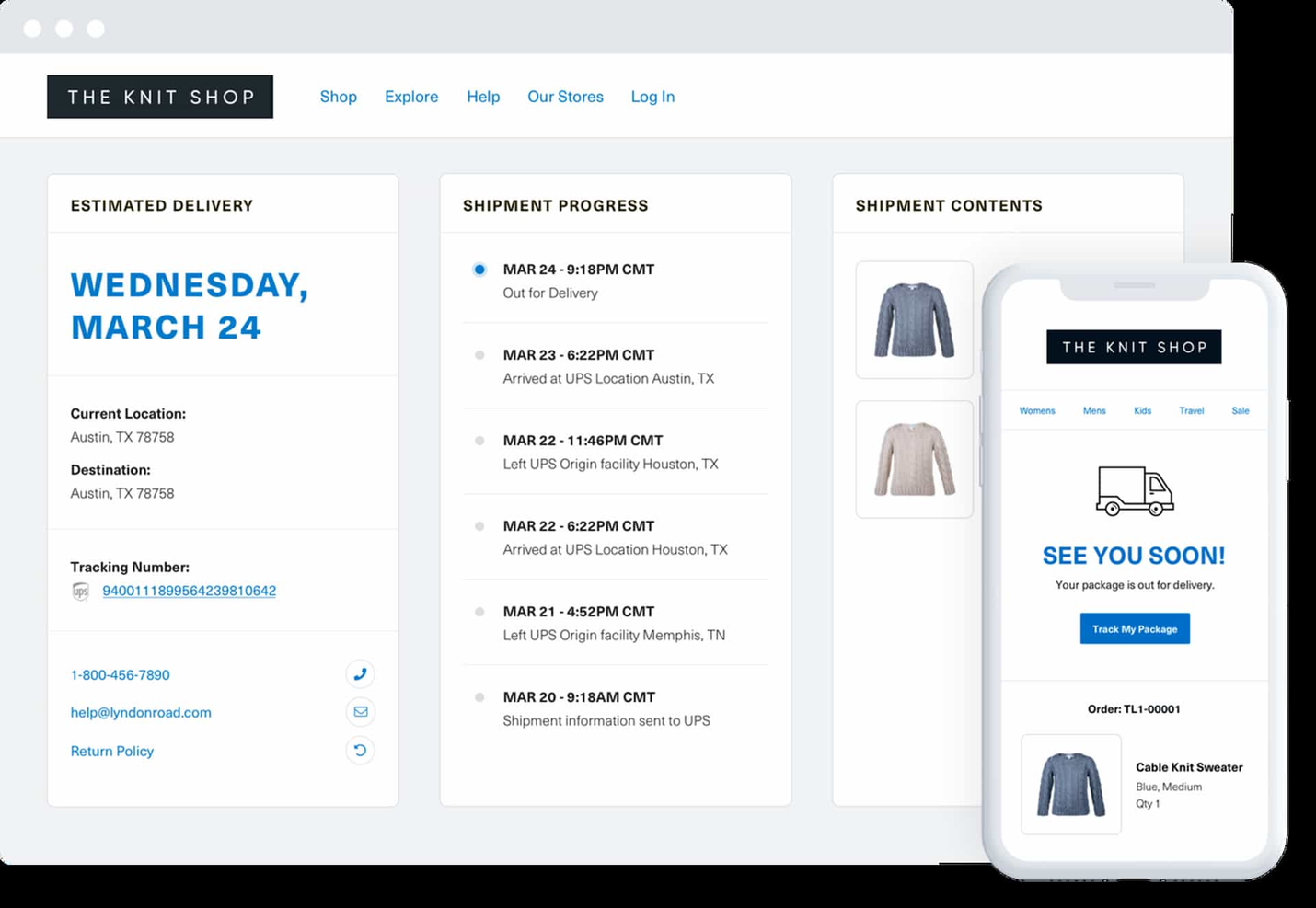
ShipStation helps you turn messy, multi-channel order volume into something your warehouse team can actually keep up with.
It pulls orders from all your sales channels into one dashboard, applies your rules in the background, and pushes out labels, tracking, and notifications so you can ship faster without babysitting every step.
Why I Picked ShipStation
I picked ShipStation because it gives you a single control center for fulfillment—your team can import orders from marketplaces and carts, then apply automation rules based on tags, weight, service level, or destination to cut out repetitive decisions.
You can create batches and print hundreds of labels at once, which speeds up pick-pack-ship and reduces time wasted at the printer. I also like that you can manage stock levels and allocation inside ShipStation, so you’re not guessing which warehouse should fulfill which order.
Branded tracking pages, emails, and returns portals give your customers a consistent experience from checkout through delivery, backed by configurable templates you can actually tweak.
On top of that, multi-carrier rate shopping inside the app helps you compare options and choose the cheapest viable service without hopping across carrier sites.
ShipStation Key Features
Beyond the automation rules and branded tracking, here are a few fulfillment-focused tools you’ll actually use day to day.
- Multi-Warehouse Inventory Management: Track inventory across locations, set alerts, and assign orders to the right warehouse based on stock and rules.
- Order Splitting and Combining: Split a single order into multiple shipments or combine orders going to the same customer to reduce shipping costs.
- Batch Processing: Group orders into batches for picking and label creation so your team can process high volumes more efficiently.
- Carrier Rate Comparison: Compare live rates and delivery options from connected carriers in one screen to pick the best option per shipment.
ShipStation Integrations
Integrations include Shopify, WooCommerce, BigCommerce, Amazon, eBay, Walmart, Etsy, Squarespace, Wix, and QuickBooks.
Pros and Cons
Pros:
- Centralized dashboard reduces missed orders across marketplaces and ecommerce platforms.
- Multi-carrier support with discounted rates helps lower outbound shipping costs.
- Automation rules reduce manual decisions across channels and shipping scenarios.
Cons:
- Mobile app is limited for advanced configuration and high-volume workflows.
- Sync delays can occur with certain store or marketplace integrations.


Fishbowl helps manufacturers who also sell online keep orders, inventory, and production in sync so you’re not guessing what’s available to ship.
You get mobile warehouse tools, manufacturing workflows, and multi-location tracking in one place, which is handy if you’re juggling work orders, ecommerce orders, and wholesale commitments at the same time.
It’s best for small to midsize manufacturers that need order fulfillment tightly connected to the shop floor.
Why I Picked Fishbowl
I picked Fishbowl because it connects your sales orders, work orders, and inventory in a single system, so your team isn’t updating spreadsheets just to figure out what can actually ship.
You can use the Fishbowl Advanced Mobile app to turn phones or tablets into barcode scanners, giving pickers batch-picking workflows and real-time stock checks while they walk the aisles.
Multi-location management lets you track inventory across plants, warehouses, and 3PLs, which helps you decide where to fulfill each order based on available stock. Manufacturing features like bills of materials (BOMs), work orders, and material requirements planning (MRP) ensure you only commit to ship dates once the right components are available.
I like that it plugs into accounting tools like QuickBooks and Xero, so finance gets accurate cost and inventory data without manual re-entry.
Fishbowl Key Features
Beyond those core benefits, Fishbowl gives your fulfillment team a few extras worth calling out.
- Auto Purchasing & Reorder Points: Automatically generate purchase orders when stock hits preset levels to protect against stockouts.
- Kitting & Bundling: Build kits and product bundles so you can sell sets while still tracking each component’s inventory.
- Returns & RMAs: Manage credit returns and RMAs in the same system as shipping, keeping inventory and customer history aligned.
- Role-Based Permissions: Assign user roles and permissions so warehouse, production, and finance teams see the tools they actually need.
Fishbowl Integrations
Integrations include QuickBooks Online, QuickBooks Desktop, Xero, Shopify, WooCommerce, Zoho CRM, Salesforce, UPS Ready, eZCom, and Dropbox.
Pros and Cons
Pros:
- Multi-location tracking helps route orders intelligently across warehouses and 3PLs.
- Manufacturing workflows link work orders to sales orders for realistic ship dates.
- Mobile barcode app supports batch picking for higher-volume order fulfillment.
Cons:
- Interface and workflows can be heavy for simple, pick-pack-ship-only operations.
- Upfront licensing and add-ons can feel expensive for very small teams.


Extensiv Order Manager gives you a single place to run high-volume, multichannel fulfillment—from order capture to pick, pack, and ship.
It’s best for brands selling across marketplaces, DTC, and retail who need automation to keep orders flowing, inventory accurate, and warehouses (or 3PLs) working off the same truth.
Why I Picked Extensiv Order Manager
I picked Extensiv Order Manager because it lets you replace one-off hacks with reusable automation rules—orderbots that actually do the work of routing, splitting, and prioritizing orders based on your own logic.
You can protect fulfillment performance with demand planning tools that set inventory limits and automatic replenishment triggers, so your bestsellers stay in stock instead of stalling in backorder limbo.
The platform acts as mission control for your ops team, giving you one place to see orders, inventory, and fulfillment status across in-house warehouses and 3PL partners.
I also like that you get profit-minded analytics, so you’re not just shipping faster—you’re tracking how inventory age, storage, and fees impact margin on each SKU.
For mid-market brands trying to get serious about distributed fulfillment, it’s a strong modular piece in your tech stack.
Extensiv Order Manager Key Features
Building on that automation and mission-control approach, here are a few features that matter most for order fulfillment.
- Order Routing Rules: Configure logic to send each order to the ideal warehouse or 3PL based on inventory, geography, and service level.
- Sales Channel Integrations: Pull orders from marketplaces and ecommerce platforms into one queue so your warehouse isn’t chasing five different dashboards.
- Inventory Allocation Controls: Allocate stock by channel and location to prevent overselling and keep safety stock where you actually need it.
- Bundle And Kit Management: Convert kit SKUs into individual components for accurate picking and packing in your WMS.
Extensiv Order Manager Integrations
Integrations include Shopify, Amazon, Walmart, WooCommerce, BigCommerce, Magento, PayPal, and eBay.
Pros and Cons
Pros:
- Demand planning module sets inventory limits and automatic replenishment triggers.
- Multichannel order sync centralizes Amazon, marketplace, and DTC store demand.
- Orderbots automate routine routing, splitting, and shipping decisions at scale.
Cons:
- Relies heavily on prebuilt connectors if you need custom APIs.
- Configuration can feel heavy for very small or low-volume brands.

ShipEngine helps developers and ops teams plug multi-carrier shipping, tracking, and address validation directly into their existing ecommerce, WMS, and ERP stacks.
It’s best for high-volume merchants, 3PLs, and platforms that want tight control over their order fulfillment workflows through code, not yet another dashboard.
Why I Picked ShipEngine
I picked ShipEngine for this list because it gives you multi-carrier order fulfillment through a single API, so your team can connect to 200+ carriers without building and maintaining individual integrations.
You can pull in orders from marketplaces like Amazon, eBay, Etsy, and Shopify, then generate labels, compare rates, and book pickups using the same toolkit, which keeps your shipping logic consistent across channels.
Your developers get real-time tracking and webhooks, so they can update customers and internal teams automatically instead of polling carrier sites. Address validation is built into the workflow, helping you cut down on failed deliveries and reships by checking and cleaning addresses before you print labels.
There’s also a full sandbox and SDKs, so your team can test new rules, carriers, and flows safely before pushing them into your live fulfillment environment.
ShipEngine Key Features
Beyond the core label, rating, and tracking APIs, here are a few fulfillment-focused features that matter in day-to-day operations.
- Warehouse Management Endpoints: Define warehouses, ship-from locations, and manifests so your custom WMS or OMS can route orders to the right node automatically.
- Batch Label Processing: Create and process label batches for large order drops, helping your team handle peak days without scripting each shipment individually.
- Multi-Package Shipments: Group multiple boxes under one shipment with a master tracking number, which is handy for bulky or split orders.
- Carrier Pickup Scheduling: Request carrier pickups via API from your warehouses, so ops teams aren’t manually arranging daily collections.
ShipEngine Integrations
Integrations include Amazon, Etsy, eBay, Shopify, Walmart, Magento, UPS, USPS, FedEx, DHL, Canada Post, and Purolator.
Pros and Cons
Pros:
- Sandbox, SDKs, and docs support faster, safer shipping workflow changes.
- Global address validation reduces failed deliveries and costly reshipments.
- Multi-carrier API connects 200+ carrier accounts through a single integration.
Cons:
- No native pick/pack interface for warehouse teams, only API-level control.
- Requires developer resources; not ideal if you want a plug-and-play UI.
Other Order Fulfillment Options
Here are a few more that didn’t make the top list.
- eShipper
For crowdfunded product logistics
- Shipfusion
For FDA compliant supply chain processes
- Fulfillment.com
For non-technical users
- Simpl Fulfillment
User-friendly software
- Whiplash
For scalability
- Deliverr
For Shopify stores


Our Selection Criteria For Order Fulfillment Software
Below are the criteria I used to score each order fulfillment solution—grounded in real-world warehouse and shipping operations.
Core functionality (25% of total score)
To handle the full order lifecycle without workarounds:
- End-to-end order processing. Captures orders, verifies payments, allocates inventory, and generates carrier-ready labels.
- Real-time inventory management. Syncs stock levels instantly across Shopify, marketplaces, and ERP systems.
- Automated picking and packing workflows. Supports barcode scanning, batch picking, and customizable packing slips.
- Multi-warehouse routing. Sends orders to the optimal fulfillment center based on location and inventory availability.
Additional standout features (25% of total score)
The extras that turn good software into a game-changer:
- Advanced reporting and analytics. Built-in dashboards for order velocity, stock turnover, and shipping performance.
- Customizable automation rules. Lets you set triggers for reorder points, shipping rules, and exception handling.
- Integration ecosystem. Native connectors for major carriers (USPS, FedEx, DHL), marketplaces, and accounting software.
- Returns management. Streamlines RMAs with automated label generation and inventory restocking.
Usability (10% of total score)
Because clunky interfaces lead to mistakes and delays:
- Intuitive dashboard. Clear order queues, status indicators, and search filters.
- Minimal clicks to key actions. Picking, packing, and shipping tasks in two taps or fewer.
- Accessible training materials. Contextual help, video guides, and in-app tooltips.
Onboarding (10% of total score)
Fast ramp-up prevents bottlenecks in busy seasons:
- Guided setup wizards. Step-by-step connection to Shopify, Amazon, and ERP.
- Data migration support. Imports SKUs, orders, and historical stock levels without painful CSV loops.
- Dedicated onboarding team. Access to an implementation specialist or project manager.
Customer support (10% of total score)
You’ll hit snags—support needs to answer in minutes, not days:
- 24/7 live support options. Chat, phone, or email with guaranteed SLAs.
- Proactive notifications. Alerts for system issues, shipping delays, or integration failures.
- Community forums and knowledge base. Active user groups and up-to-date documentation.
Value for money (10% of total score)
Budget matters—especially for small businesses scaling up:
- Transparent pricing. Clear per-order, per-user, or per-warehouse fees—no hidden surcharges.
- Scalable plans. Entry-level options for under 500 orders/month and enterprise tiers for 5,000+.
- Free trials or demos. Hands-on access to core features before committing.
Customer reviews (10% of total score)
Real feedback from real operations teams:
- User satisfaction scores. Ratings on ease of use, reliability, and support.
- Case studies. Stories of retailers who cut costs or improved delivery times.
- Feature request responsiveness. Track record for rolling out enhancements based on user input.
What is Order Fulfillment Software?
Order fulfillment software is an automated system that manages customer orders from placement to delivery.
It handles inventory allocation, picking, packing, shipping label generation, and real-time tracking across ecommerce platforms, marketplaces, and ERP systems. Warehouse and shipping teams use it to eliminate mis-picks that drive returns, avoid stockouts that halt sales, and remove manual data entry that clogs operations.
By centralizing order management and automating workflows through best order processing services, it streamlines your fulfillment process, optimizes inventory management, and cuts shipping costs—all without custom scripts.
How to Choose Order Fulfillment Software
To land on the right order management and WMS solution, break the decision into clear evaluation phases. Score vendors against your real workflows, test with live orders, and verify integrations—so you avoid surprises when you scale.
| Step | What to evaluate | Action items |
|---|---|---|
| Define your requirements | Order volume, sales channels, warehouse locations | Map current order flows. Identify mis-picks, stockouts, and label errors. Prioritize must-have features over nice-to-have ones. |
| Run a live pilot | Picking speed, packing accuracy, error rates | Import a batch of sample SKUs. Process 50–100 real orders. Record time per order and error rates. |
| Verify integrations | Platform and carrier connections, inventory sync | Connect Shopify and Amazon. Push test orders. Confirm real-time stock updates and correct label generation. |
| Evaluate usability | Interface clarity, training resources, ramp-up time | Score demos on ease of navigation. Review guides and videos. Estimate how long new staff need to onboard. |
| Compare support and pricing | SLA response times, fee transparency, scalability | Request SLA documentation. List all fees, including per-order and carrier surcharges. Model costs at 500, 1,000, and 5,000 orders/month. |
| Gather peer feedback | Real-world reliability, feature roadmap, community support | Read recent user reviews. Join vendor forums or Slack groups. Ask for case studies from retailers your size. |
Top Features of Great Order Fulfillment Software
These aren’t your run-of-the-mill checklists—they’re the heavy hitters that keep fulfillment moving and costs down.
- Real-time inventory forecasting. Uses sales velocity and seasonality to predict stock needs and trigger automated reorder points.
- Smart wave and batch picking. Groups orders by location or shipping speed to cut travel time on the warehouse floor.
- Dynamic slotting. Automatically adjusts product locations based on picking frequency and seasonality.
- Multi-carrier rate shopping. Compares FedEx, UPS, USPS, and regional carriers in real time to pick the best rate and delivery time.
- Carrier-ready label printing. Generates compliant labels for any carrier, with batch print or on-demand via mobile scanners.
- Customizable automation rules. Triggers for exceptions—low-stock alerts, split shipments, or rush orders—so you don’t babysit every order.
- Returns portal and RMA workflows. Customer-facing return interface that pre-fills order details and automates restocking once inspected.
- API-driven integrations. Deep hooks into Shopify, BigCommerce, Amazon, ERP, WMS, and accounting software to eliminate manual data entry.
- Exceptions dashboard. Unified view of orders needing manual review—address corrections, payment holds, oversells—so nothing falls through the cracks.
- Mobile scanning and voice picking. Hands-free or handheld device workflows that speed up operations and reduce training time.
Key Benefits of Order Fulfillment Software
This is where the rubber meets the concrete: how these features translate into real savings, happier customers, and less firefighting.
- Slash mis-pick rates. Barcode and wave-picking accuracy drives error rates below 0.5%, cutting returns and credit holds.
- Reduce shipping costs. Multi-carrier rate shopping and automated carrier selection save 5–15% on labels.
- Eliminate stockouts and overstocks. Forecasting and automated reorder points keep stock levels balanced, freeing up capital and avoiding lost sales.
- Cut labor hours. Smart batching, dynamic slotting, and mobile workflows can reduce picking and packing time by up to 30%.
- Improve on-time delivery. Real-time tracking and carrier integrations boost customer satisfaction and Net Promoter Scores.
- Scale without spreadsheets. Centralized dashboards and automation rules let you handle 10x order volume with minimal headcount increases.
- Streamline returns. Customer self-service portals and automated RMA processing return sellable stock to inventory fast.
- Data-driven decisions. Built-in analytics on order cycle times, carrier performance, and SKU profitability inform continuous improvement.
- Enhanced visibility. Real-time alerts for delays, exceptions, or integration failures keep ops managers proactive, not reactive.
- Future-proof your workflows. API flexibility and modular architecture let you add new sales channels, carriers, or fulfillment centers without ripping and replacing.
Cost & Pricing for Order Fulfillment Software
Order fulfillment software pricing ranges from free tiers for basic inventory syncing to enterprise plans that start in the high hundreds per month.
Below is a snapshot of plan types for leading platforms—so you can budget accurately and avoid nasty billing surprises.
| Tier | Price range | Typical features | Best for |
|---|---|---|---|
| Basic | $0 – $100/month | Core order processing, simple inventory sync, single warehouse | Small ecommerce stores |
| Growing | $100 – $500/month | Multichannel sync, automated picking/packing rules, basic reporting | Mid-size retailers scaling operations |
| Advanced | $500 – $1,500/month | Multi-warehouse routing, advanced analytics, returns management | High-volume multichannel businesses |
| Enterprise | $1,500+/month (custom quotes) | Full WMS modules, API-driven custom integrations, dedicated support | Large retailers and 3PL providers |
Additional pricing considerations
- Volume tiers and overages. Check order-volume thresholds and per-order overage fees before you scale above the included limits.
- Carrier surcharges. Some carriers impose fuel, residential, or remote-area surcharges that your software may pass through.
- Storage fees. For 3PL-style platforms (ShipBob, ShipMonk), watch for per-pallet or per-cubic-foot monthly charges—and long-term storage premiums.
- Implementation and add-ons. Data migration, barcode hardware, API access, EDI connectors, and premium support often cost extra.
- Contract length. Monthly plans offer flexibility but may carry higher per-order costs; annual commitments usually lock in lower rates.
Order Fulfillment Software FAQs
Let’s see the top questions about order fulfillment software that readers like you might be thinking.
Can software handle seasonal order spikes, or does it melt under pressure?
Yes, but only if you pick a tough-as-nails platform. The best fulfillment software scales on demand—cloud horsepower, fast auto-scaling, and temp logins for seasonal staff, so Black Friday doesn’t break you. Vendor not offering specifics on peak volume? That’s your cue to walk away.
Which integrations actually matter for retail ops?
Stick with tools built to play nice with Shopify, WooCommerce, Amazon, plus your go-to carriers. If it won’t sync with the systems that feed your orders or get stuff out the door, skip it. And if you can automate accounting and ERP work in the mix, that’s even better.
How secure is my data—am I handing the keys to the whole store?
Your data should be locked up tighter than a Black Friday doorbuster. Expect AES-256 encryption, regular SOC 2 audits, and access controls that mean business. Get documentation up front; if a vendor plays coy, don’t waste your time.
What types of order errors can fulfillment software help prevent?
A sharp fulfillment system spots the stuff you and your crew might miss—duplicate orders, bad addresses, overselling, mispicks, and sending Aunt Sally’s vase to Uncle Bob by accident. Automation, scanning, and syncing cut down your “Where’s my order?” headaches.
How does order fulfillment software handle returns?
Returns aren’t glamorous, but you can’t hide from them. The right software builds in returns workflows—think instant label creation, tracking, and auto-restocking—so you don’t have piles of half-opened boxes sitting in the back.
Your team gets clarity, your customer gets an easy path, and your inventory count stays honest.
What support should I expect if I run into trouble?
Hope for the best; demand for the worst. You want live 24/7 help with real, human answers—especially when the rush hits or your label printer quits.
If the company offers onboarding coaches, solid help docs, or a user community that isn’t a ghost town, that’s worth its weight in gold.
What’s the difference between order fulfillment software and a 3PL (third-party logistics provider)?
Order fulfillment software gives you the tech and tools to run your own show—pick, pack, ship, repeat—from your warehouse or back room. A 3PL is a company you pay to do all that for you, offsite.
Think of software as the power loader you use; a 3PL is hiring someone to drive it while you focus elsewhere. Sometimes you need both, but mixing them up leads to expensive mistakes.
Other Fulfillment Tool Reviews
With order fulfillment software comes myriad other tools, services, and software to build out your ecommerce "bigger picture." Here are some additional review lists that you might be interested in:
- Sustainable Packaging Manufacturers
- Fulfillment Services (outsourcing)
- Ecommerce Shipping Software
- Shipping Solutions (outsourcing)
- Warehouse Management Software
- Pick and Pack Software
- Order Management Software
- Open Source OMS
- Canada Fulfillment Services
Fulfill your potential
You’ve battled mis-picks, dreaded stockouts, and the endless drudgery of spreadsheet order juggling.
These top order fulfillment platforms tackle those headaches head-on—automating picking, syncing inventory in real time, and spitting out carrier-ready labels without a hitch.
Think of it as giving your warehouse a shot of espresso: faster, sharper, and ready to scale without breaking a sweat.
Retail never stands still—and neither should you. Subscribe to our newsletter for the latest insights, strategies, and career resources from top retail leaders shaping the industry.