
14 Best Free Warehouse Management Software for 2026

The 10 Best Free Warehouse Management Software to Consider
Time to get right into our leaderboard here. These are the top free WMS and their ideal use cases.


If you’re tired of stock surprises and endless manual updates, you’re not alone. Running a warehouse without the right system means lost sales, miscounted inventory, and order-fulfillment bottlenecks you don’t even see coming.
Free warehouse management software fixes that without draining your budget. Real-time tracking, forecasting, supplier management, and mobile access let you keep stock levels in line and orders moving out the door fast.
I put this guide together to help you skip the guesswork. You’ll find my ranked picks for the best free warehouse management software, with details on features, integrations, and pricing so you can choose the right fit for your business.
Why Trust Our Software Reviews
We’ve been testing and reviewing retail and ecommerce software and services since 2021.
As retail experts ourselves, we know how critical and difficult it is to make the right decision when selecting software. We invest in deep research to help our audience make better software purchasing decisions.
We’ve tested more than 2,000 tools for different finance and accounting use cases and written over 1,000 comprehensive software reviews. Learn how we stay transparent and our review methodology.
Comparing the Best Free Warehouse Management Software, Side-by-Side
See how the top free warehouse management software options stack up side by side. This comparison highlights key features, free plan details, and pricing tiers so you can quickly narrow your shortlist.
| Tool | Best For | Trial Info | Price | ||
|---|---|---|---|---|---|
| 1 | Best for beginners | Free plan available (only pay when you take a payment) + 30-day free trial | From $49/per location/month | Website | |
| 2 | Best for non-technical users | Free 14-day trial + free plan + free demo available | From $29 per organization/month (billed annually) | Website | |
| 3 | Best user experience | Free 14-day trial + free plan available | From $24/month (billed annually) | Website | |
| 4 | Best open-source warehouse management software | Not available | Website | ||
| 5 | Best for a range of features | 15-day free trial | From $31/user/month | Website | |
| 6 | Best for small business | Not available | Free to use | Website | |
| 7 | Best reporting & analytics suite | Not available | Website | ||
| 8 | Best for larger companies | Free demo available | Pricing upon request | Website | |
| 9 | Best for ease of use | Not available | Free to use | Website | |
| 10 | Best for growing teams | Not available | Website |
The 10 Best Free Warehouse Management Software, Reviewed
Dive into my detailed reviews of the best free warehouse management software. I cover each option’s best use case, standout features, integrations, and pricing so you can choose the right fit with confidence.


Square gives small retailers and ecommerce businesses a simple way to track inventory, manage stock levels, and sync products across sales channels without extra cost or complexity.
Who Is Square Best For?
Square is a great fit for small businesses and first-time sellers who need a straightforward way to manage inventory without a steep learning curve.
Why I Picked Square
Square earns its spot on my shortlist because it's genuinely one of the easiest inventory tools to get up and running with zero prior experience. I like that you can build your product catalog by scanning barcodes directly from your iPhone or iPad camera, which means you're not manually keying in every SKU from scratch. Square also updates stock levels in real time across your sales channels the moment a transaction goes through, so you're not reconciling numbers at the end of the day. For a first-time seller who just needs to know what's in stock and what's selling, that's exactly the right level of visibility.
Square Key Features
- Low stock alerts: Set custom stock thresholds and Square notifies you automatically when inventory drops below your defined levels.
- Purchase order management: Create and send purchase orders to suppliers directly from the Square dashboard to restock inventory.
- Inventory reporting: Access built-in reports that show sales trends, best-selling items, and stock movement over time.
- Multi-location inventory tracking: Manage and view stock levels across multiple store locations or storage spaces from one account.
Square Integrations
Integrations include QuickBooks Online, Xero, Wix, WooCommerce, BigCommerce, Mailchimp, Jotform, Homebase, 7shifts, and Zoho Books.
What's Free?
Square offers a free-forever plan that includes basic inventory management, sales tracking, and reporting features. Some advanced features and integrations require a paid upgrade.
New Product Updates from Square
Square Introduces Neighborhoods on Cash App
Square launches Neighborhoods on Cash App, offering businesses access to over 57 million active accounts, direct marketing, neighborhood rewards, and a 1% processing fee. For more information, visit Square's official site.
 .
.
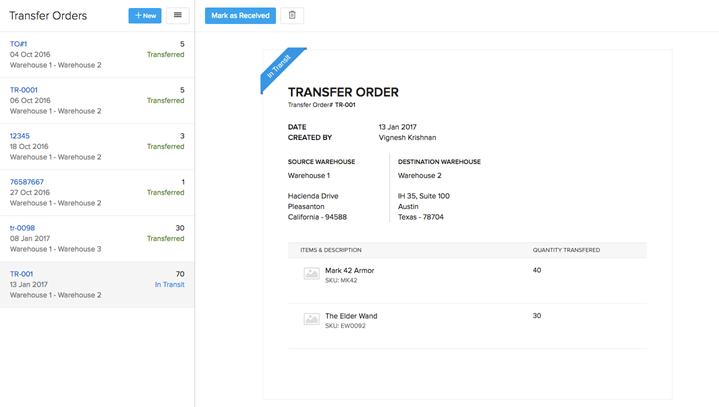
Zoho Inventory is a cloud-based warehouse management platform for small businesses and ecommerce teams who need to track stock, manage orders, and sync inventory across multiple sales channels without a steep learning curve.
Who Is Zoho Inventory Best For?
Zoho Inventory is a strong fit for small to mid-sized retail and ecommerce businesses that need straightforward inventory and warehouse management without dedicated IT support.
Why I Picked Zoho Inventory
I picked Zoho Inventory because it's one of the few free warehouse management tools that requires no technical setup or IT support to get running. I like how the SKU generator automatically creates item codes for your entire catalog, so you're not manually building out a product database from scratch. The barcode scanning feature lets my team auto-fill item details by pointing a scanner at a product, which reduces data-entry errors and requires no custom configuration. Reorder point alerts are configurable per item, so stock is replenished before it runs low.
Zoho Inventory Key Features
- Multi-warehouse management: Track stock levels, transfers, and adjustments across multiple warehouse locations from a single dashboard.
- Serial and batch tracking: Assign serial numbers or batch IDs to items and trace them through the entire fulfillment process.
- Composite items: Bundle multiple SKUs into a single product listing to manage kits and assembled goods.
- Shipment tracking: Generate shipping labels and monitor delivery status directly within the platform.
Zoho Inventory Integrations
Integrations include Shopify, Amazon, eBay, Etsy, UPS, USPS, FedEx, DHL, Aramex, and Canada Post.
What's Free?
Zoho Inventory offers a free-forever plan that includes up to 50 orders per month, one warehouse, and two users. Some advanced features and integrations are only available on paid plans.


Sortly is a visual warehouse management platform for small businesses and teams that need simple, mobile-friendly inventory tracking to keep stock organized and accessible without the complexity of traditional systems.
Who Is Sortly Best For?
Sortly is a great fit for small business owners and lean operations teams that need a straightforward inventory system they can set up with minimal technical expertise.
Why I Picked Sortly
Sortly earns its spot on my shortlist because the user experience is genuinely one of the cleanest I've seen in inventory management software. I love how you can attach photos directly to inventory items, so you can visually identify stock at a glance instead of hunting through text-heavy lists. My team can also generate and print custom QR code and barcode labels right from the app, which cuts down on manual lookup time on the warehouse floor. The mobile app mirrors the desktop experience closely, so scanning and updating stock levels on the go feels natural rather than clunky.
Sortly Key Features
- Custom fields: Add tailored data fields to inventory items, such as SKU, serial number, location, or supplier details.
- Low stock alerts: Set minimum quantity thresholds and receive automatic notifications when stock levels drop below them.
- Activity history: Track a full log of inventory changes, including who updated an item, what changed, and when.
- Folder-based organization: Group inventory items into nested folders to mirror your physical warehouse layout or storage structure.
Sortly Integrations
Integrations include Slack, Microsoft Teams, QuickBooks Online, and more.
What's Free?
Sortly offers a free-forever plan that allows one user and up to 100 inventory entries. The free plan does not include integrations or advanced features like custom user permissions.

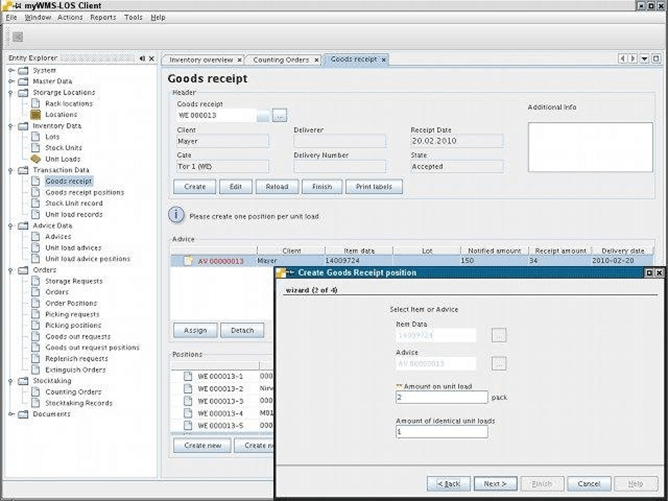
myWMS is an open-source warehouse management system designed for businesses that want full control over inventory, order processing, and warehouse workflows without licensing costs.
Who Is myWMS Best For?
myWMS is a strong fit for technical teams and developers at small to mid-sized businesses who need a customizable, self-hosted WMS they can adapt to their own warehouse operations.
Why I Picked myWMS
myWMS earns its spot on my shortlist because it's one of the few genuinely open-source WMS options built for real industrial environments. I like that it's designed for manual-driven warehouses and supports barcode and RFID identification alongside mobile terminals, so my team can run paperless picking and receiving without paying for a commercial license. The modular, service-oriented architecture also means I can extend or customize the system at the source code level to fit specific warehouse workflows. That kind of flexibility is rare in free WMS tools, where most options lock you into a fixed feature set.
myWMS Key Features
- Multi-location storage management: Configure and manage multiple storage locations and areas within a warehouse, including replenishment of storage zones.
- Stocktaking orders: Run inventory counts and reconcile stock levels directly within the system using structured stocktaking workflows.
- Picking order management: Create and process picking orders tied to customer or delivery orders, supporting structured goods-out operations.
- JasperReports integration: Generate warehouse reports using built-in JasperReports support for stock, goods-in, and goods-out data.
myWMS Integrations
Native integrations are not currently listed.
What's Free?
myWMS is available as a free, open-source warehouse management system with no user or feature restrictions. You can download, use, and modify the software without time limits or licensing fees.

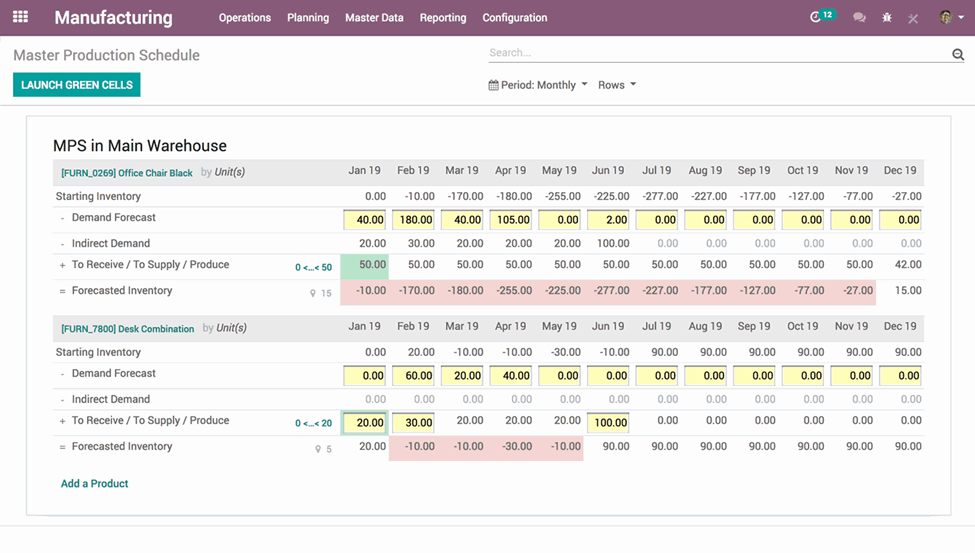
Odoo Inventory gives retailers and ecommerce teams a flexible warehouse management system that helps you track stock, manage orders, and coordinate inventory across multiple locations—all without upfront software costs.
Who Is Odoo Inventory Best For?
Odoo Inventory is a strong fit for small to mid-sized businesses that need a scalable warehouse management solution they can expand as their operations grow.
Why I Picked Odoo Inventory
I shortlisted Odoo Inventory because it offers broader warehouse-management features than most free tools. I like that it includes double-entry inventory tracking, which logs every stock movement with a source and destination—so I can trace exactly where a product came from and where it went. My team also uses the putaway rules feature to automatically direct incoming stock to specific locations based on product category, which cuts down on manual sorting. The replenishment rules also let me set reorder points and minimum stock levels so purchase orders trigger automatically when inventory dips.
Odoo Inventory Key Features
- Barcode scanning: Use a barcode scanner or mobile device to process receipts, transfers, and picks without manual data entry.
- Lot and serial number tracking: Assign lot or serial numbers to products and trace them across every stage of the warehouse.
- Multi-warehouse management: Configure and manage multiple warehouses and storage locations from a single dashboard.
- Inventory adjustments: Run physical inventory counts and apply adjustments directly to stock levels in real time.
Odoo Inventory Integrations
Integrations include Odoo Accounting, Odoo E-commerce, Odoo POS, Odoo HR, Odoo Project, WhatsApp, and Flutter App.
What's Free?
Odoo Inventory does not advertise a free-forever plan or a limited-time free trial on this site, but you can book a free demo to see the platform in action.


RightControl is a warehouse management software designed for small businesses that need simple inventory tracking, barcode scanning, and order management without the complexity or cost of enterprise solutions.
Who Is RightControl Best For?
RightControl is a good fit for small business owners who need straightforward warehouse and inventory management without a steep learning curve or high upfront cost.
Why I Picked RightControl
I picked RightControl as one of the best because it keeps warehouse management accessible for small businesses without stripping out the features that matter. I like how the stock control tools let you set reorder levels and track inventory movements in real time, so you're not caught off guard by stockouts. The barcode scanning support is also a practical touch—my team can process goods in and out with fewer manual data entry errors.
RightControl Key Features
- Order management: Create and manage sales and purchase orders from a single interface, tracking each order through to dispatch.
- Multi-location stock tracking: Monitor inventory levels across multiple warehouse locations or storage areas from one account.
- Supplier management: Store supplier details and link them directly to purchase orders and stock replenishment workflows.
- Reporting and stock valuation: Generate stock reports and view inventory valuations to support purchasing and financial decisions.
RightControl Integrations
Native integrations are not currently listed.
What's Free?
RightControl offers a free-forever version that lets you manage basic inventory and warehouse tasks. Some advanced features and multi-user support may require a paid upgrade.

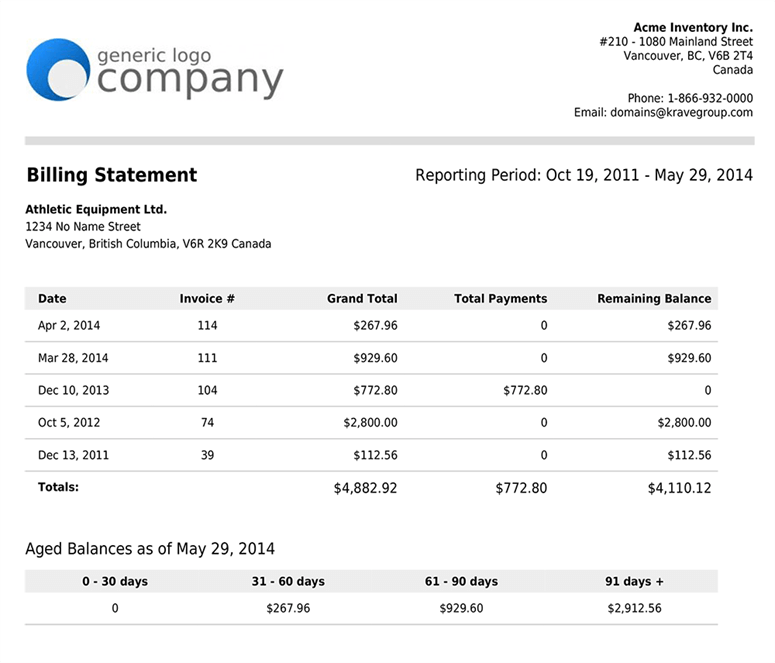
Salebinder is a cloud-based warehouse management platform designed for small businesses and retailers who need to track inventory, manage orders, and organize warehouse operations without upfront costs.
Who Is Salebinder Best For?
SalesBinder is a good fit for small business owners and independent retailers who need a straightforward, affordable way to manage inventory and warehouse operations.
Why I Picked SalesBinder
SalesBinder earns its spot as one of the best on my shortlist because of how much reporting depth it packs into a free warehouse management tool. I particularly like the sold inventory report, which lets me filter by date range, customer, category, or individual user—and then group results by item, customer, or variation. That level of granularity is genuinely useful when I need to identify which SKUs are moving and which are sitting. The Quantity Ledger report is another standout, giving me a full audit trail of every inventory quantity change across all items in one exportable view.
SalesBinder Key Features
- Warehouse location management: Assign and track inventory across multiple warehouse locations and bin slots within a single account.
- Purchase order management: Create and manage purchase orders directly within the platform, linking them to inventory updates upon receipt.
- Customer and vendor CRM: Store and manage contact records for both customers and suppliers alongside your inventory data.
- Barcode scanning support: Generate and scan barcodes to update inventory counts and process orders without manual data entry.
SalesBinder Integrations
Integrations include QuickBooks Online, Xero, and WooCommerce.
What's Free?
SalesBinder offers a free-forever plan for up to 100 records and 1 user. Integrations and advanced features are only available on paid plans.
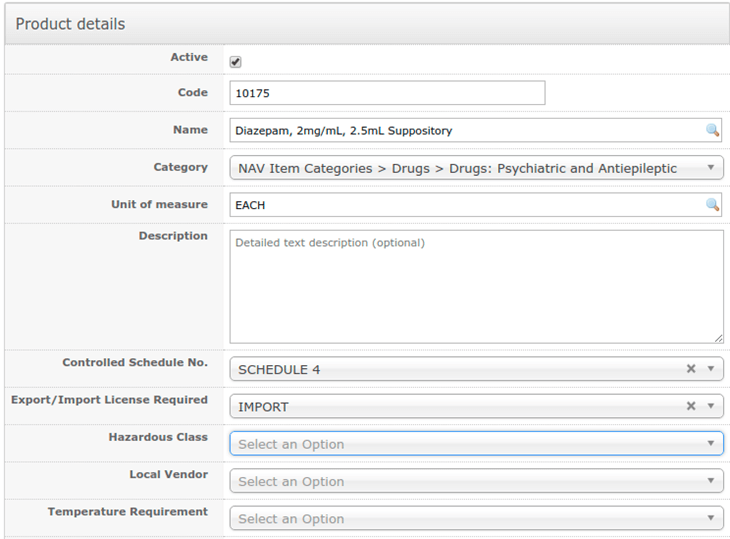
Openboxes is an open-source warehouse management system designed for organizations that need to track inventory, manage orders, and streamline supply chain operations without the cost of commercial software.
Who Is Openboxes Best For?
Openboxes is a strong fit for larger companies that need a scalable, open-source WMS with multi-location inventory tracking and supply chain visibility.
Why I Picked Openboxes
Openboxes earns its spot on my shortlist because it's one of the few free, open-source WMS options that genuinely scales to meet the demands of larger operations. I like that there are no user limits and no location caps—so as your team and facility count grow, you're not suddenly hit with per-seat fees or tier upgrades. The multi-facility location hierarchy lets my team manage stock across regions, facilities, and thousands of individual bin locations from a single system. The cycle counting feature lets us schedule and reconcile counts by zone or bin without shutting down operations, which helps sustain throughput in high-volume warehouses.
Openboxes Key Features
- Barcode scanning: Scan barcodes during receiving, putaway, and picking to track inventory movements in real time.
- Shipment tracking: Create and monitor inbound and outbound shipments with status updates at each stage of the fulfillment process.
- Demand forecasting: Review historical consumption data to anticipate restocking needs and avoid stockouts across locations.
- Reporting and analytics: Generate built-in reports on inventory levels, order history, and stock movements to support operational decisions.
Openboxes Integrations
Integrations include DHIS2, ERP systems via REST API, and custom tools through the Openboxes API.
What's Free?
Openboxes offers a free-forever open-source plan with no user or location limits. You can self-host the software and access all core features without restrictions.

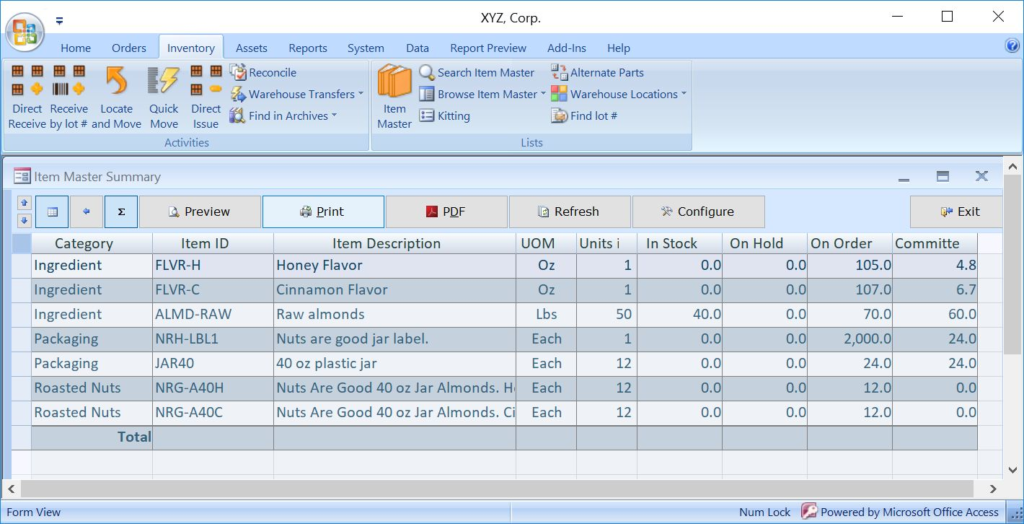
ABC Inventory is a free warehouse management software designed for small businesses and inventory managers who need detailed tracking, order management, and warehouse control without the cost or complexity of enterprise systems.
Who Is ABC Inventory Best For?
ABC Inventory is a strong fit for small to mid-sized businesses that need a no-cost warehouse management solution without a steep learning curve.
Why I Picked ABC Inventory
I picked ABC Inventory as one of the best because its modular layout makes it genuinely approachable for teams that don't have a dedicated IT person setting things up. I like how the inventory control module handles multi-location warehouse tracking with barcode scanning at both receiving and shipping—so my team can log stock movements without manual data entry. The automatic purchase order generation based on historical demand data is another feature I rely on, since it removes the guesswork from replenishment. The multi-level bill of materials (up to 20 levels) also makes it a surprisingly capable tool for businesses that assemble or manufacture products.
ABC Inventory Key Features
- Fixed asset management: Track tangible and intangible assets with barcoded asset tags, depreciation comparison reports, and usage counters.
- LIFO, FIFO, and average cost evaluation: Apply different inventory costing methods to accurately reflect the value of stock on hand.
- Sales and shipping order management: Create and fulfill sales orders with pick lists, packing slips, shipping manifests, and automated invoice generation.
- Work order management: Generate work orders with automatic parts consumption, serial number assignments, and parts and labor quotations.
ABC Inventory Integrations
Native integrations are not currently listed.
What's Free?
ABC Inventory offers a free-forever plan with no user or time restrictions. The free version includes the full feature set, but support is limited to online documentation and community forums.
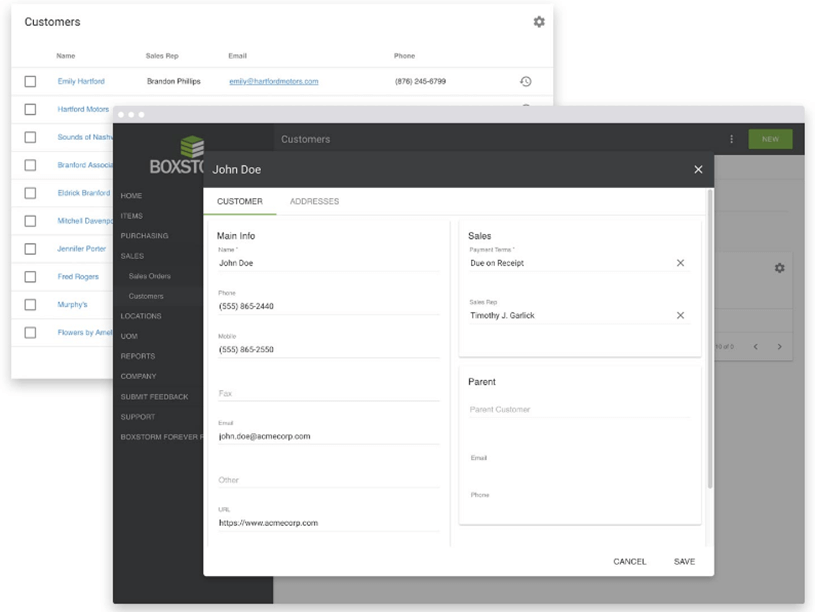
Boxstorm is free inventory management software for monitoring inventory in multiple locations. It has an inventory management app version that works on iOS and Android mobile devices. You can use this inventory management app to include up to five pictures per item in your files so employees know what each item looks like. It has a custom tracking feature to locate items using lot numbers, serial numbers, expiration dates, or other pieces of identifiers.
Boxstorm is free inventory management software with a customer management feature to help you manage your relationship with customers. This free inventory software can create customer profiles with critical information like shipping address, contact information, and billing information. This free inventory software lets you create company profiles and group customers from the same company for better organization.
Boxstorm integrates with other shipping and supply chain management tools like Shopify, Stripe, Shippo, and Quickbooks Online.
Boxstorm is free inventory management software for 1 user, 25 items, 1 location, and 100 transactions.
Other Options
Here are some more free warehouse management tools. I didn’t have room for a full review for each of these but they are still worthy of consideration:
- ShipStation
For ecommerce
- SKUSavvy
Unified mobile WMS solution
- GOFRUGAL
All-in-one retail management system
- SKULabs
Simple inventory management


Our Selection Criteria for Free Warehouse Management Software
Choosing the right free warehouse management software isn’t about grabbing the first “free” label you see. I score each option carefully across these criteria to make sure you’re not stuck with a half-baked system that causes more headaches than it solves.
Core functionality (25% of total score)
This is non-negotiable. It needs to actually manage your warehouse—not just track items on a spreadsheet.
- Inventory tracking. Real-time visibility of stock across locations.
- Order fulfillment. Smooth pick-pack-ship processes with clear workflows.
- Stock movements. Track transfers between warehouses with audit-ready records.
Integration capabilities (25% of total score)
Your WMS shouldn’t live in a silo. It needs to play nice with your existing systems.
- ERP and accounting integrations. Sync orders and financial data without double entry.
- Ecommerce and POS connections. Keep stock levels updated wherever you sell.
- API access. Options for custom integrations as your business grows.
Usability (10% of total score)
Free doesn’t mean clunky. The system should make your job easier, not harder.
- Clear UI. Easy to navigate even for non-technical users.
- Mobile-friendly. Accessible on phones or tablets for warehouse teams on the move.
- Learning curve. Solid docs or tutorials for onboarding without hiring a consultant.
Onboarding (10% of total score)
Getting up and running fast is crucial—especially with limited time and resources.
- Setup guides. Step-by-step instructions to avoid trial-and-error delays.
- Sample data and templates. Make testing easier before full rollout.
- Support availability. Even free tiers need a way to get help.
Customer support (10% of total score)
When stuff breaks (and it will), you want someone on the other end.
- Responsiveness. Clear expectations even for free plans.
- Community forums. A sign of active users and shared solutions.
- Documentation quality. Not buried in jargon or outdated PDFs.
Value for money (10% of total score)
Free shouldn’t mean worthless. It should still do the job well enough to run a real business.
- Plan limits. Reasonable caps on users, warehouses, or orders.
- Upgrade paths. Transparent pricing if you outgrow the free tier.
- No surprise fees. Clarity on what’s truly free vs. paid.
Customer reviews (10% of total score)
Real users know where the software shines—and where it breaks.
- Pain points. Watch for dealbreakers like slow support or buggy updates.
- User feedback. Look for consistent praise or complaints.
- Satisfaction ratings. Gauge overall reliability and trust.
What is Free Warehouse Management Software?
Free warehouse management software is a system that helps businesses track inventory, manage orders, and streamline operations without upfront costs.
Usually offered as limited free plans or open-source options, it delivers essentials like real-time stock updates, mobile access, and forecasting on a budget.
Many providers design these free tiers to get you started and let you scale into paid plans as your warehouse grows or demands more advanced features. It’s a practical choice for small and medium businesses that need solid control without a heavy investment.
How to Choose Free Warehouse Management Software
Picking the right warehouse management software isn’t about downloading the first freebie you see. You want something that won’t collapse the minute your business scales.
Here’s how to choose smart—without getting locked into a system that can’t grow with you.
| Steps | What to do | Why it matters |
|---|---|---|
| Define your real needs | Get honest about what’s broken—inventory tracking, supplier management, forecasting, mobile access. | Avoid shiny “features” you’ll never use and focus on solving actual pain points. |
| Check integration options | Review how well it connects with your ecommerce, POS, accounting, or shipping tools. | No one wants data silos or double entry hell. Integrations keep your business moving smoothly. |
| Test mobile and real-time capabilities | Make sure your team can update stock levels and manage orders from anywhere. | Warehouses aren’t desk jobs. Real-time, mobile-ready systems keep everything synced. |
| Evaluate the free plan’s limits | Understand user caps, order limits, or feature restrictions before you commit. | Free often means limited. Know if it’s enough for now—and what upgrades will cost. |
| Review onboarding and support | Look at setup guides, docs, and how you’ll get help when it breaks. | Even free software needs to be usable. Poor onboarding kills adoption. |
Features To Look For In Warehouse Management Software
Choosing warehouse management software means knowing exactly what you get for free and what you’ll pay for when you need to scale. Here’s what to expect.
Features typically included in free plans
- Basic inventory tracking. Keep tabs on stock levels and item locations across one or two warehouses.
- Order management. Create simple pick, pack, and ship workflows.
- Mobile access. Use basic apps or responsive design to update stock on the floor.
- Barcode or QR scanning. Speed up check-in and check-out of goods.
- Alerts for low stock. Get notified when items hit reorder points.
- Simple reporting. Download or view stock levels and movement history.
Features typically unlocked in paid plans
- Advanced forecasting. Predict demand trends to prevent stockouts or overstock.
- Multi-warehouse management. Coordinate stock across many locations with transfer workflows.
- Supplier and purchasing management. Create POs, manage supplier databases, and track COGS.
- Deep integrations. Connect to ERPs, ecommerce stores, accounting software, and shipping carriers.
- Custom user roles and permissions. Control what each team member can access or change.
- Priority support and onboarding. Access faster help, training, and implementation assistance.
Benefits of Using Warehouse Management Software
Running a warehouse without the right system is asking for trouble—lost stock, late orders, and endless manual fixes. The right software gives you the control, visibility, and flexibility you need to keep customers happy and your team sane.
Here’s what you really get when you use it well.
- Better inventory control. See real-time stock levels and locations to reduce lost sales or overstock.
- Faster order fulfillment. Streamline pick, pack, and ship workflows to speed up delivery times.
- Improved accuracy. Reduce human error with barcode scanning, alerts, and automated updates.
- Mobile access for teams. Let staff update stock, check orders, and manage tasks on the go.
- Easier supplier management. Track POs, monitor costs, and maintain solid vendor relationships.
- Integrated systems. Sync with ecommerce, POS, and accounting tools to eliminate double entry.
- Scalable growth. Start with free plans and upgrade as your needs and volume increase.
Pricing & Costs for Warehouse Management Software
Even free warehouse management software isn’t truly “free” forever. Most providers use free tiers to get you in the door, then offer paid plans with advanced features as your needs grow.
Here’s a breakdown of typical pricing levels so you know what to expect before you commit.
| Plan | Average price | Features | Best for |
|---|---|---|---|
| Free | $0/month | Basic inventory tracking, order management, limited users/locations, simple reporting | Small teams just getting started who need to organize stock without spending |
| Entry-Level Paid | $20–$50/month | Multi-warehouse management, advanced reporting, supplier PO management, basic integrations | Small to medium businesses ready to grow beyond basic limits |
| Mid-Tier Paid | $50–$150/month | Advanced forecasting, deeper integrations (ecommerce, accounting, shipping), custom user roles | Growing operations needing serious automation and better insights |
| Enterprise | $150+/month | Full ERP integrations, dedicated onboarding, priority support, unlimited users and locations | Larger businesses or those with complex supply chains who want full control |
Additional cost considerations
- Per-user fees. Many paid plans scale pricing based on the number of users, so budget accordingly as your team grows.
- Transaction or order volume limits. Some plans charge extra once you pass monthly order caps.
- Integration fees. Certain integrations (like ecommerce or accounting) might require premium plans or add-ons.
- Implementation and training. While free tiers are self-serve, paid tiers often charge for setup or onboarding services.
Free Warehouse Management Software FAQs
You likely have some questions still banging about, so I’ll help you out with some Q&A I imagine you want to read.
Can free warehouse management software handle multiple locations?
Some free plans let you manage one or two warehouses, but most limit locations to keep costs down. If you’re running multiple sites, look for paid tiers with multi-warehouse support and transfer workflows to avoid stock miscounts and fulfillment delays.
What integrations should I prioritize?
Focus on ecommerce platforms, accounting software, POS systems, and shipping carriers. Solid integrations reduce double entry, prevent inventory mistakes, and keep orders flowing smoothly. Even free tiers often offer basic integrations, but deeper connections usually unlock in paid plans.
How hard is it to switch to a paid plan later?
Most providers make upgrading easy—you just pay and unlock more features. Your data stays put. The real work is making sure your team is ready for new workflows, like supplier POs or advanced forecasting, so you actually use what you pay for. They want you to switch, so no worries there.
Do these tools support mobile inventory management?
Yes, many free warehouse management systems include basic mobile apps or responsive dashboards. This is essential for real-time stock updates on the floor. For more advanced mobile features like scanning or offline modes, check if they’re in higher-tier plans.
How reliable is cloud-based free software?
Most free warehouse systems are cloud-based, giving you real-time updates and anywhere access without maintaining your own servers. Reliability depends on the vendor. Look for uptime guarantees, data backups, and a track record of updates—even if you’re not paying yet.
What’s the biggest hidden cost to watch for?
“Free” often means limited users, orders, or integrations. As you grow, expect to pay for added users, higher transaction limits, premium integrations, and better support. Always read the fine print so you’re not blindsided when your needs scale.
Other Warehouse Management Software Reviews
Here are some more software reviews that might be of interest to you if you're looking for warehouse management software.
- Warehouse Management Software
- Cloud-Based Warehouse Management Systems
- Open Source Warehouse Management Systems
- Order Fulfillment Software
What’s Next:
If you're in the process of researching free warehouse management software, connect with a SoftwareSelect advisor for free recommendations.
You fill out a form and have a quick chat where they get into the specifics of your needs. Then you'll get a shortlist of software to review. They'll even support you through the entire buying process, including price negotiations.