

El software de gestión de inventario de Amazon ayuda a tu empresa a supervisar, organizar y reponer los productos vendidos a través de Amazon y otros canales. Un sistema fiable de gestión de inventario garantiza niveles de existencias precisos, una reposición simplificada y una mejor visibilidad en almacenes y mercados digitales.
Si buscas las mejores herramientas para mantener la precisión del inventario, evitar la falta de existencias y gestionar las ventas multicanal, sabes lo rápido que los procesos manuales o las hojas de cálculo pueden provocar pérdidas de ventas o un exceso de existencias.
Esta lista te ayudará a comparar las principales soluciones de gestión de inventario de Amazon, para que puedas elegir la opción adecuada para los flujos de trabajo de tu equipo, el volumen de ventas, las necesidades de integración y las métricas clave de inventario. Obtén una visión clara de tus opciones y toma una decisión con confianza para 2026.
Por qué confiar en nuestras recomendaciones de software
6,700+
Reviews
20
Industry experts
16+
Evaluation factors
14
Years
Nuestro equipo lleva probando y evaluando software desde 2012. Como líderes del sector retail, sabemos lo difícil —y lo importante— que es elegir el software adecuado.
Para esta guía, evaluamos las herramientas mediante pruebas prácticas e investigación independiente, puntuando las herramientas según nuestros criterios de selección.
Nuestras reseñas reflejan nuestro criterio independiente, no un discurso de ventas.
Resumen de los mejores programas de gestión de inventario de Amazon
Esta tabla comparativa resume los detalles de precios de mis principales selecciones de programas de gestión de inventario de Amazon para ayudarte a encontrar la mejor opción para tu presupuesto y las necesidades de tu empresa.
| Tool | Best For | Trial Info | Price | ||
|---|---|---|---|---|---|
| 1 | Mejor para la sincronización de inventario omnicanal | Demostración gratuita disponible | Precios bajo solicitud | Website | |
| 2 | Ideal para gestionar fácilmente publicaciones en varios mercados | Plan gratuito + demostración gratuita disponible | Desde $24/mes(facturado anualmente) | Website | |
| 3 | La mejor opción para una sincronización de Amazon en tiempo real y basada en eventos | Demo gratuita disponible | Precio bajo solicitud | Website | |
| 4 | La mejor opción para la integración directa con eBay y Walmart | Prueba gratuita de 30 días | Desde $49/mes | Website | |
| 5 | Ideal para procesos avanzados de almacén y cumplimiento | No disponible | Precio bajo consulta | Website | |
| 6 | Ideal para análisis de rentabilidad con seguimiento de inventario | Prueba gratuita de 30 días + demostración gratuita disponible | Desde 15 $/mes (facturado anualmente) | Website | |
| 7 | La mejor opción para gestionar varias tiendas desde un único panel | Prueba gratuita de 14 días + demostración gratuita disponible | Desde £1,150/mes | Website | |
| 8 | Ideal para el control centralizado de pedidos e inventario | Demostración gratuita disponible | Precio bajo solicitud | Website | |
| 9 | La mejor opción para las sugerencias integradas de reposición de FBA | Demo gratuita disponible | Desde $129/mes | Website | |
| 10 | Ideal para flujos de trabajo de previsión personalizables | Prueba gratuita + demostración gratuita disponibles | Desde $175/mes | Website |


Reseñas de programas de gestión de inventario de Amazon
A continuación encontrarás mis resúmenes detallados de los programas de gestión de inventario de Amazon que llegaron a mi lista de selección. Mis reseñas ofrecen un análisis detallado de las funciones, los mejores casos de uso y las integraciones de cada programa para ayudarte a encontrar la mejor opción para tu empresa.
 Mejor para la sincronización de inventario omnicanal
- Demostración gratuita disponible
- Precios bajo solicitud
Visit WebsiteCustomer Rating:4.3/5
Unicommerce permite a los usuarios supervisar el inventario del canal Amazon FBA por SKU. Unicommerce es una plataforma de gestión de inventario multicanal que centraliza el stock, los pedidos, el almacenamiento y las devoluciones en más de 290 integraciones de marketplaces, carritos de compra y comercio rápido, incluido Amazon en más de 12 regiones globales.
¿Para quién es más adecuado Unicommerce?
Unicommerce es una excelente opción para minoristas multicanal y equipos de operaciones de comercio electrónico que venden en Amazon junto con Shopify, eBay y marketplaces regionales, y que necesitan un control centralizado del inventario a gran escala.
Por qué elegí Unicommerce
He incluido Unicommerce entre mis principales opciones porque su sincronización delta en tiempo real, impulsada por Kafka, en más de 290 integraciones de marketplaces, carritos de compra y comercio rápido es realmente líder del sector para vendedores que gestionan stock simultáneamente en Amazon junto con Shopify, Flipkart, Myntra y canales de comercio rápido. Me gusta especialmente que los grupos de inventario virtuales permitan asignar el stock por separado entre los canales B2B y D2C sin riesgo de vender más unidades de las disponibles. Unicommerce también cubre Amazon en más de 12 marketplaces globales desde un único panel, lo que facilita mucho la venta transfronteriza.
Características principales de Unicommerce
- Alertas automatizadas de stock bajo: Envía notificaciones por correo electrónico, SMS y dentro de la aplicación cuando el stock cae por debajo de los umbrales definidos en cualquier canal conectado.
- Generación de órdenes de compra: Crea órdenes de compra vinculadas a señales de demanda y puntos de reposición, con seguimiento de los envíos entrantes mediante el módulo de gestión de proveedores.
- Gestión de paquetes y kits: Deduce automáticamente el stock de los SKU que componen un producto agrupado o combinado cuando este se vende en cualquier marketplace conectado.
- Embalaje verificado mediante vídeo con UniCapture: Graba pruebas en vídeo del embalaje de cada pedido enviado, facilitando la resolución de disputas y la liquidación de reembolsos.
Integraciones de Unicommerce
Unicommerce documenta más de 290 integraciones, incluidas Amazon, Shopify, WooCommerce, eBay, Flipkart, Magento, Shiprocket, Delhivery, SAP y Tally. Las integraciones personalizadas o mediante API están disponibles en el plan empresarial.
Pros and Cons
Pros:
- Sincronización del inventario en tiempo real en más de 290 canales
- Admite ventas de Amazon multialmacén y transfronterizas
- Deducción automatizada del stock de paquetes y kits
Cons:
- Los datos del inventario de FBA se actualizan solo una vez al día
- No ofrece informes de rentabilidad a nivel de ASIN de Amazon
Learn more about Unicommerce: Ideal para gestionar fácilmente publicaciones en varios mercados
- Plan gratuito + demostración gratuita disponible
- Desde $24/mes(facturado anualmente)
Visit WebsiteCustomer Rating:4.8/5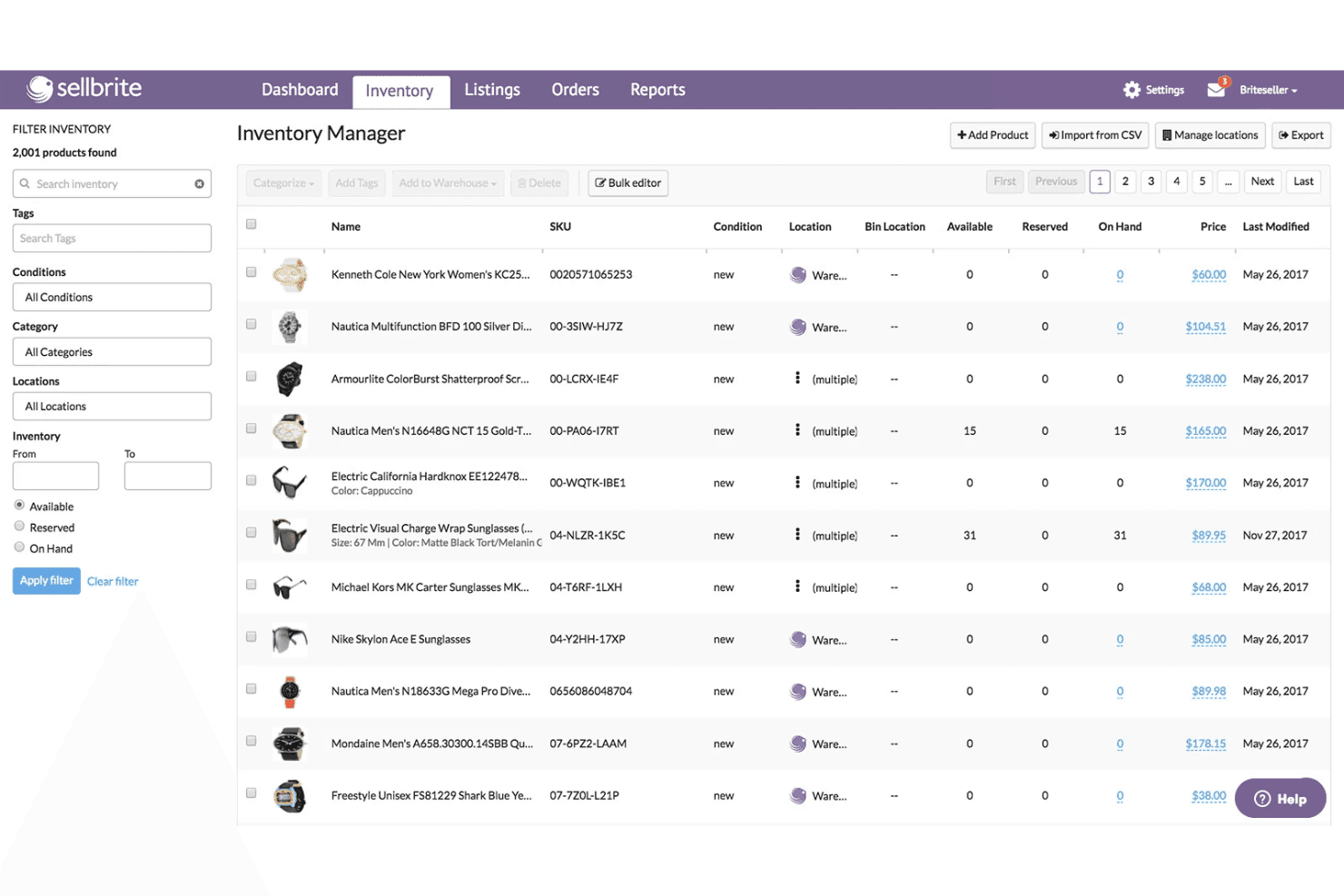
Sellbrite coordina el inventario en varias ubicaciones y las publicaciones de productos. Sellbrite es una herramienta multicanal de publicación y sincronización de inventario que conecta Amazon, eBay, Walmart, Etsy y las principales plataformas de comercio electrónico en un único panel para gestionar pedidos de forma centralizada, hacer seguimiento de SKU y actualizar el inventario entre canales.
¿Para quién es más adecuado Sellbrite?
Sellbrite es una excelente opción para vendedores pequeños y medianos que necesitan gestionar publicaciones e inventario en Amazon, eBay, Etsy y Walmart desde un único panel fácil de navegar.
Por qué elegí Sellbrite
He incluido Sellbrite entre mis opciones principales porque es la alternativa más accesible para los vendedores que necesitan gestionar publicaciones de Amazon junto con eBay, Etsy, Walmart y una tienda de Shopify o WooCommerce desde un mismo lugar. Su sincronización de inventario cada 15 minutos en todos los canales conectados significa que una venta en Etsy ajusta inmediatamente tus existencias en Amazon, lo que ayuda a evitar la sobreventa sin necesidad de conciliaciones manuales. También me gusta que puedas asignar el inventario de forma selectiva por canal, para no mostrar todas tus existencias disponibles en todas partes al mismo tiempo.
Características principales de Sellbrite
- Asignación de inventario entre varios almacenes: Asigna y controla las existencias en varias ubicaciones físicas de almacén, con control sobre la cantidad de inventario que se envía a cada canal de ventas conectado.
- Gestión logística multicanal de Amazon FBA: Envía los pedidos de eBay, Etsy o Shopify a tu almacén de FBA para su gestión logística mediante un complemento de $19/mes.
- Gestión masiva de publicaciones mediante CSV: Importa, actualiza y exporta publicaciones de productos y datos de inventario de forma masiva mediante archivos CSV en todos los canales conectados.
- Informes de ventas por canal: Consulta los ingresos y el rendimiento de los productos más vendidos desglosados por cada mercado para comparar las ventas entre canales.
Integraciones de Sellbrite
Sellbrite ofrece integraciones nativas con Amazon Seller Central, eBay, Walmart, Etsy, Shopify, BigCommerce, WooCommerce, Logística de Amazon y ShipStation.
Pros and Cons
Pros:
- La sincronización del inventario multicanal se actualiza cada 15 minutos
- SKU y usuarios ilimitados en todos los planes
- Amplia cobertura de Amazon, eBay, Etsy y Walmart
Cons:
- No permite publicar nuevos ASIN en Amazon
- No ofrece previsión de la demanda ni reabastecimiento automatizado
Learn more about Sellbrite: La mejor opción para una sincronización de Amazon en tiempo real y basada en eventos
- Demo gratuita disponible
- Precio bajo solicitud
Visit WebsiteCustomer Rating:4.1/5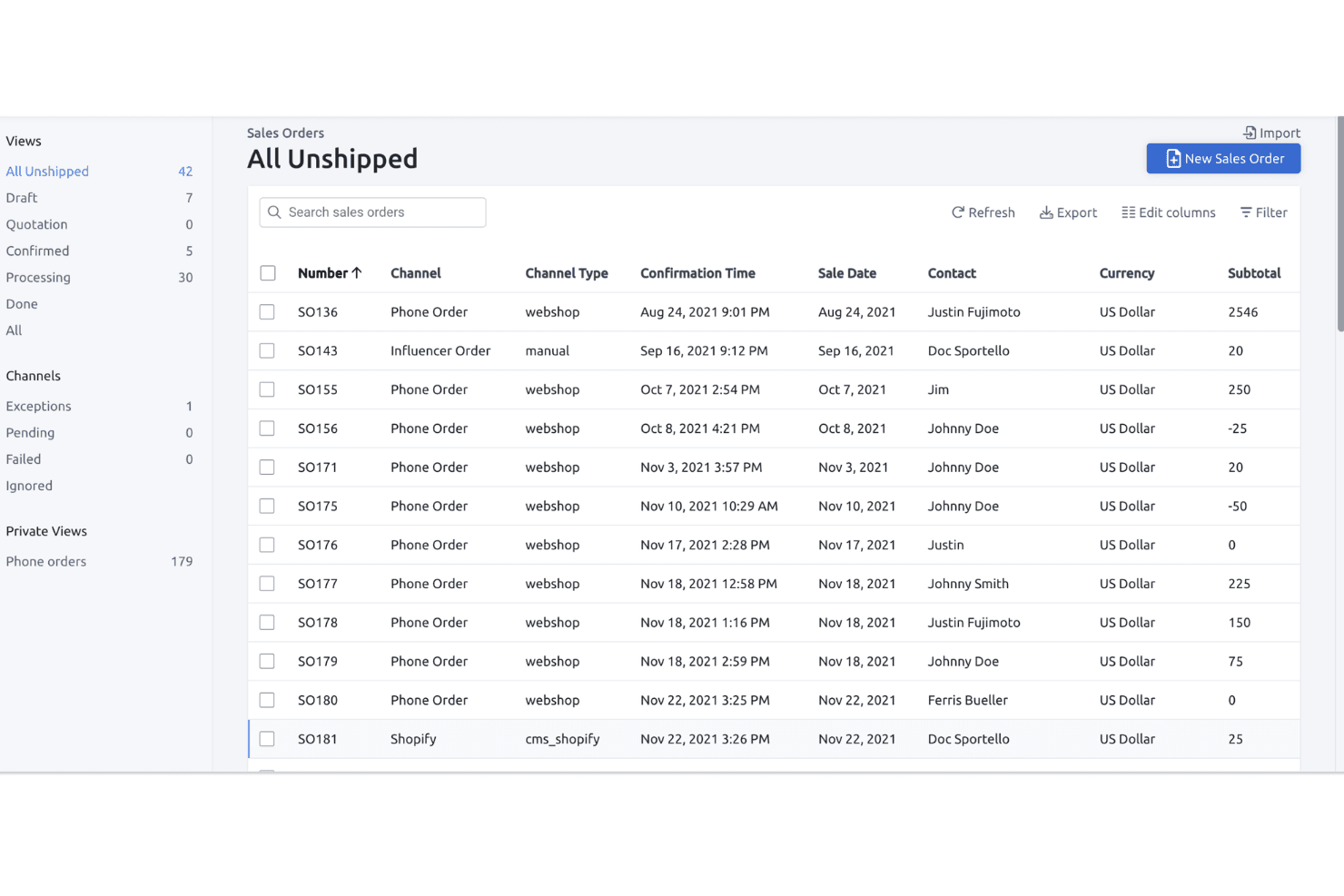
Fulfil permite a los usuarios realizar el seguimiento y gestionar todos los pedidos de venta no enviados en una sola vista. Fulfil es un ERP multicanal que unifica la gestión de inventario de Amazon, la gestión de pedidos, las operaciones de almacén, las compras y las finanzas para FBA, FBM y Vendor Central en una sola plataforma.
¿Para quién es mejor Fulfil?
Fulfil está diseñado para marcas DTC multicanal con ingresos anuales de 15 millones de dólares o más que necesitan un único ERP para gestionar Amazon junto con Shopify, las operaciones de almacén y las finanzas.
Por qué elegí Fulfil
Fulfil se ganó un lugar en mi lista de opciones principales porque su sincronización con Amazon funciona realmente basada en eventos, no mediante tareas programadas por lotes. Esta distinción es importante en la práctica: cuando se completa una venta o un almacén recibe existencias, Fulfil actualiza el inventario disponible de Amazon en tiempo real, en lugar de hacerlo durante la noche. También me encantan sus controles de visibilidad del inventario, que permiten definir exactamente lo que Amazon 've', incluidos los márgenes de seguridad y el inventario entrante, para que nunca corras el riesgo de vender más existencias de las disponibles en los 23 mercados globales.
Características principales de Fulfil
- Conciliación automática de liquidaciones de Amazon: Fulfil importa automáticamente los informes de liquidación quincenales de Amazon y registra las tarifas, los reembolsos y los pagos directamente en el libro mayor nativo.
- Reglas de asignación para varios almacenes: Puedes asignar existencias de almacenes específicos a canales específicos, con márgenes de seguridad por canal y la inclusión de órdenes de compra entrantes en las cantidades disponibles para la venta.
- Enrutamiento del servicio de gestión multicanal de Amazon (MCF): Los pedidos de Shopify y otros canales se pueden dirigir al inventario de FBA para su gestión, con opciones de velocidad de entrega y sincronización automática del seguimiento con cada canal.
- Generación de órdenes de compra mediante IA: Fulfil genera automáticamente borradores de órdenes de compra basándose en las previsiones de demanda e incorporando las restricciones de cantidad mínima de pedido, los tamaños de embalaje y los plazos de entrega de los proveedores.
Integraciones de Fulfil
Fulfil es compatible con más de 25 canales de venta nativos, incluidos los 23 mercados de Amazon, Shopify, Walmart, eBay y TikTok Shop. También se conecta con Amazon MCF, más de 400 ubicaciones de proveedores de logística externos (3PL), más de 500 socios minoristas EDI y Google BigQuery para la generación de informes.
Pros and Cons
Pros:
- Sincronización del inventario de Amazon en tiempo real y basada en eventos
- Gestión unificada de FBA, FBM y Vendor
- Conciliación automática de liquidaciones y tarifas de Amazon
Cons:
- No incluye una función de actualización dinámica de precios de Amazon
- La configuración requiere mucho tiempo y recursos
Learn more about Fulfil: La mejor opción para la integración directa con eBay y Walmart
- Prueba gratuita de 30 días
- Desde $49/mes
Visit WebsiteCustomer Rating:4.8/5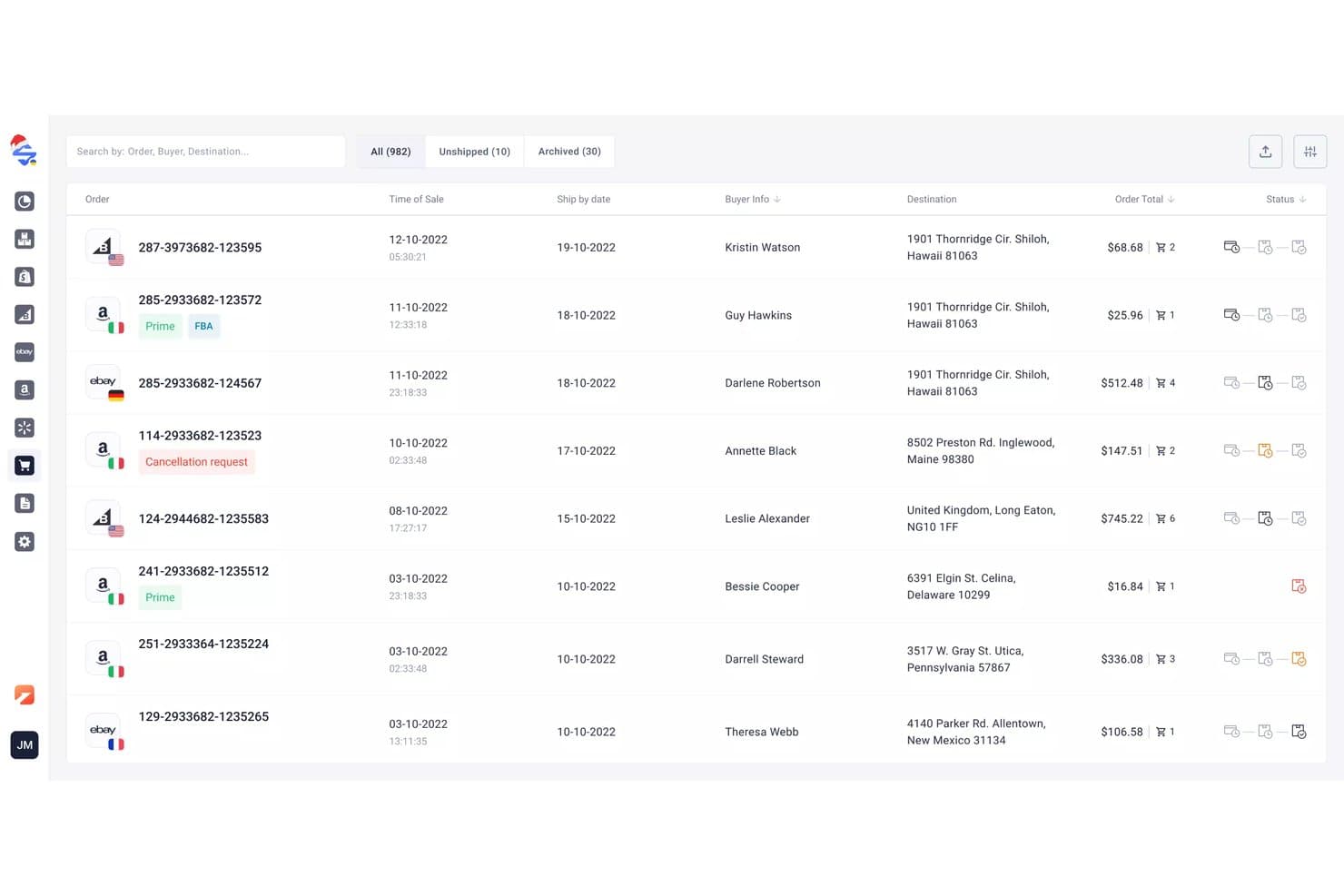
M2E Cloud sincroniza los pedidos multicanal en los mercados conectados. M2E Cloud es una plataforma multicanal de publicación y sincronización de inventario que conecta Amazon Seller Central en más de 19 mercados internacionales con eBay, Walmart, TikTok Shop y más de 600 canales adicionales, junto con un reajustador de precios integrado y un panel de análisis de ventas.
¿Para quién es más adecuado M2E Cloud?
M2E Cloud es una opción excelente para vendedores multicanal que necesitan mantener el inventario sincronizado simultáneamente en eBay, Walmart y Amazon.
Por qué elegí M2E Cloud
He incluido M2E Cloud entre mis principales opciones porque sus integraciones nativas con eBay y Walmart están realmente bien conectadas, no son añadidos superficiales. Cuando se completa una venta en Walmart, los niveles de inventario se actualizan en Amazon y eBay en tiempo real, precisamente el tipo de sincronización bidireccional que evita costosas ventas excesivas en varios canales a la vez. También me gusta que el reajustador de precios integrado de Amazon, que supervisa los precios de la competencia y busca la casilla de compra las 24 horas del día, los 7 días de la semana, esté incluido sin coste adicional.
Funciones principales de M2E Cloud
- Integración con la gestión logística multicanal de Amazon (MCF): Dirige automáticamente los pedidos de eBay, Shopify, Walmart y otros canales conectados a través de tu inventario de Amazon FBA para su gestión logística.
- Políticas de M2E: Permite establecer reglas específicas por canal para precios, reservas de cantidad y plantillas de envío para cada mercado desde una única interfaz.
- Panel de análisis de M2E: Registra los volúmenes de ventas, las tarifas de los pedidos, las tasas de cancelación, los productos más vendidos y los datos geográficos de los clientes en todos los canales conectados sin coste adicional.
- Reajustador de precios de Amazon: Supervisa los precios de la competencia las 24 horas del día, los 7 días de la semana, y ajusta tus precios de Amazon dentro de los límites mínimos y máximos establecidos para buscar automáticamente la casilla de compra.
Integraciones de M2E Cloud
M2E Cloud se conecta con Amazon Seller Central, Amazon FBA y MCF, eBay, Walmart, TikTok Shop, Temu, Shopify, BigCommerce, WooCommerce y Magento. También admite más de 600 integraciones con mercados en total y proporciona una API para integraciones personalizadas.
Pros and Cons
Pros:
- Sincronización del inventario en tiempo real en todos los canales
- Reajustador de precios de Amazon integrado incluido de forma gratuita
- Admite la gestión de pedidos de FBA y MCF
Cons:
- No incluye herramientas automatizadas de reposición ni de previsión
- Carece de análisis de rentabilidad a nivel de ASIN
Learn more about M2E Cloud: Ideal para procesos avanzados de almacén y cumplimiento
- No disponible
- Precio bajo consulta
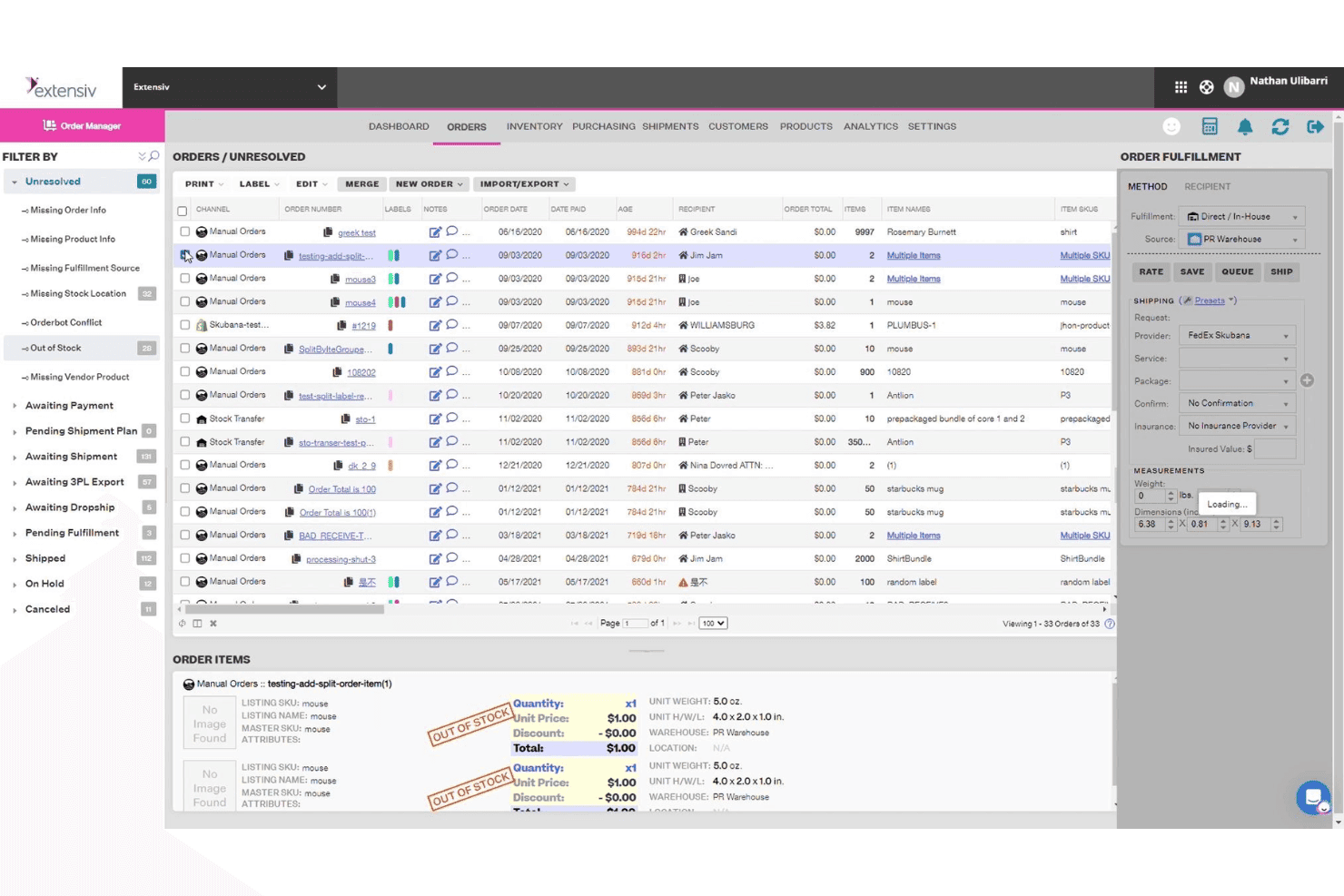
Extensiv agrupa los pedidos sin resolver con los detalles clave de cumplimiento en una sola vista. Extensiv es una plataforma de gestión de pedidos y almacenes que gestiona FBA, FBM y el cumplimiento multicanal, además de la sincronización de inventario multicanal, las órdenes de compra automatizadas, la previsión de la demanda y la gestión de paquetes en más de 110 integraciones de comercio electrónico.
¿Para quién es más adecuado Extensiv?
Extensiv es una excelente opción para equipos de operaciones que gestionan procesos de cumplimiento complejos en varios almacenes, proveedores logísticos externos y canales de venta simultáneamente.
Por qué elegí Extensiv
Extensiv ocupa un lugar en mi lista de opciones principales por lo bien que gestiona una complejidad de cumplimiento que las herramientas más sencillas no pueden abordar. Lo elegí específicamente para operaciones que ejecutan FBA, FBM y cumplimiento multicanal en paralelo, ya que Extensiv gestiona los tres desde un mismo lugar sin necesidad de soluciones alternativas. También me gusta su asignación de inventario a nivel de canal, que permite asignar un porcentaje del stock disponible a cada canal de venta para evitar la sobreventa simultánea en Amazon, Walmart y Shopify. La generación automática de órdenes de compra vinculada a los plazos de entrega de los proveedores y a la velocidad de ventas hace que el reabastecimiento sea realmente automático.
Características principales de Extensiv
- Mapeo de FNSKU a SKU maestro: Vincula varios FNSKU a un único SKU maestro, con selección del FNSKU preferido configurable por ubicación del almacén.
- Escaneo de códigos de barras SmartScan: El complemento móvil de escaneo de códigos de barras permite gestionar los procesos de preparación de pedidos, reposición y auditoría de inventario en distintas ubicaciones del almacén.
- Seguimiento de costes FIFO: Realiza el seguimiento de los costes de inventario mediante el método de primero en entrar, primero en salir, con el historial de COGS vinculado a órdenes de compra individuales.
- Sincronización de envíos entrantes de FBA: Sincroniza automáticamente en Extensiv Order Management los envíos entrantes de FBA creados en Seller Central para ofrecer una visibilidad unificada.
Integraciones de Extensiv
Extensiv ofrece más de 110 integraciones de comercio electrónico, incluidas Amazon Seller Central, Shopify, Walmart, eBay, Etsy, Wayfair, BigCommerce, WooCommerce y Magento, además de más de 1.000 conexiones con proveedores logísticos externos. El Gestor de integraciones se conecta con más de 60 destinos de pedidos, y las conexiones personalizadas con ERP y NetSuite están disponibles mediante servicios para desarrolladores.
Pros and Cons
Pros:
- Gestión unificada de FBA, FBM y MCF
- Órdenes de compra automatizadas con datos de demanda en tiempo real
- Asignación de stock a nivel de canal para evitar la sobreventa
Cons:
- No ofrece automatización nativa de reajuste de precios para Amazon
- Carece de un panel específico de la puntuación del IPI dentro de la plataforma
Learn more about Extensiv: Ideal para análisis de rentabilidad con seguimiento de inventario
- Prueba gratuita de 30 días + demostración gratuita disponible
- Desde 15 $/mes (facturado anualmente)
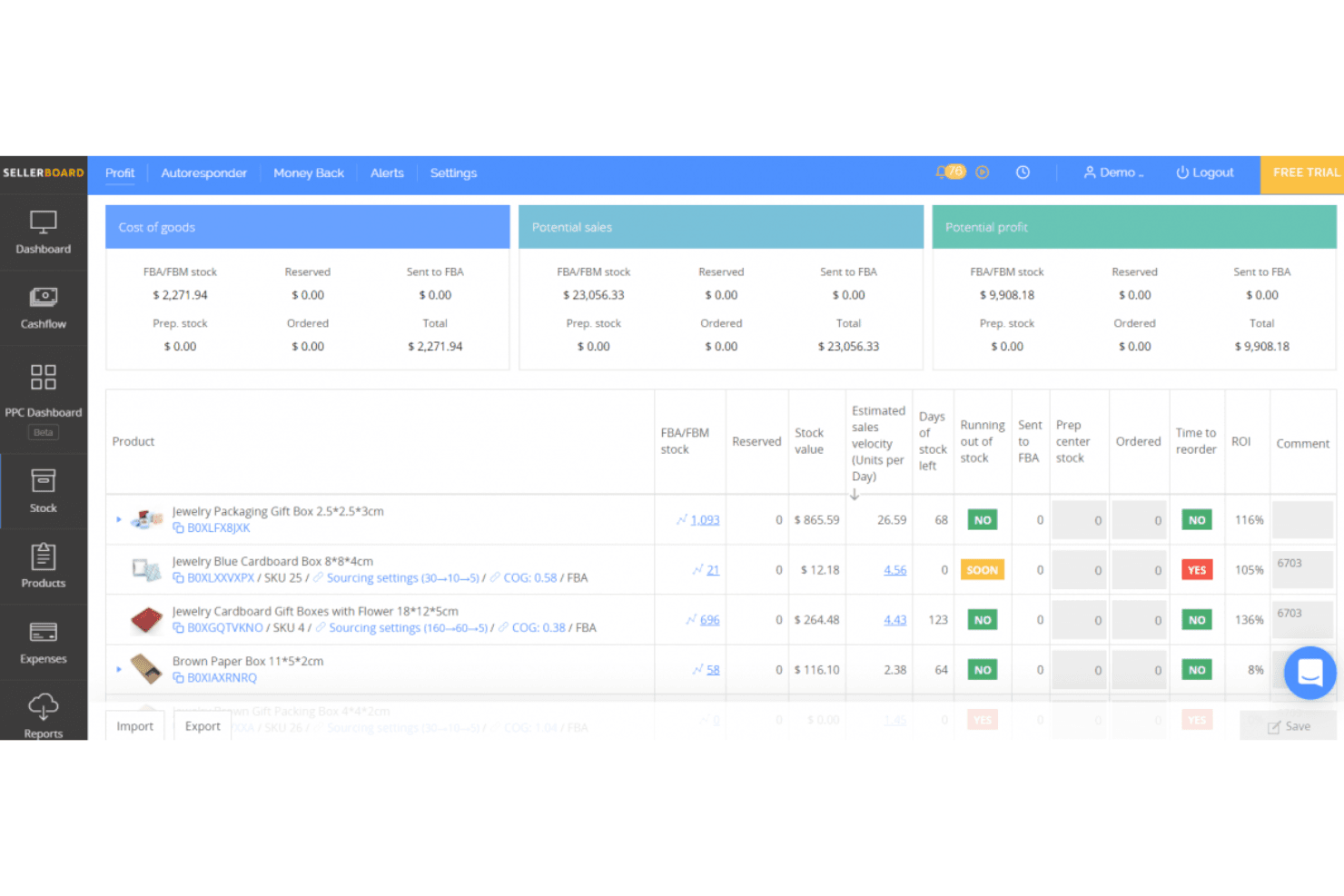
sellerboard evalúa el rendimiento de la tienda de Amazon. sellerboard es una herramienta de análisis de rentabilidad y gestión de inventario centrada en Amazon que realiza un seguimiento de la rentabilidad a nivel de ASIN, las tarifas de FBA, la previsión de la demanda, las órdenes de compra y el rendimiento de PPC en los 24 mercados globales de Amazon.
¿Para quién es más adecuado sellerboard?
sellerboard es una opción excelente para vendedores de Amazon FBA que desean obtener una visión clara de la rentabilidad por producto junto con la planificación de su inventario.
Por qué elegí sellerboard
sellerboard ocupa un lugar en mi lista de herramientas seleccionadas porque ninguna otra herramienta de este rango de precio ofrece este nivel de visibilidad de la rentabilidad por ASIN junto con la planificación del inventario. Me encanta que realice un seguimiento de más de 100 tipos de tarifas de Amazon, incluidas las tarifas de almacenamiento de AWD y de ubicación de entrada, todas atribuidas a nivel de SKU. Las alertas de tarifas por inventario bajo son especialmente útiles: sellerboard supervisa semanalmente tus existencias e indica exactamente qué ASIN serán penalizados por Amazon, junto con la cantidad y la fecha de envío recomendadas.
Características principales de sellerboard
- Métodos de seguimiento del COGS: Admite métodos de cálculo del COGS basados en FIFO, lotes, períodos y mercados específicos para mantener la precisión de los datos de rentabilidad.
- Automatización de pujas de PPC: Ofrece modos de optimización de pujas manual y automático, con recopilación automatizada de palabras clave y negación de palabras clave de bajo rendimiento.
- Gestión de envíos entrantes de FBA: Permite crear y realizar un seguimiento integral de los envíos entrantes de FBA, con recuentos de inventario actualizados dinámicamente a medida que avanzan los envíos.
- Panel de resumen multicanal: Agrupa las métricas clave de rendimiento de las cuentas de Amazon, Walmart y eBay en una única vista unificada.
Integraciones de sellerboard
sellerboard ofrece integraciones nativas con los mercados Amazon Seller Central, Walmart Seller Center y eBay, además de conectividad con la API de Amazon Advertising y el almacenamiento y la distribución de Amazon. Shopify es compatible mediante la plataforma independiente sellerboard.io.
Pros and Cons
Pros:
- Rentabilidad detallada por ASIN con seguimiento completo de tarifas
- Alertas automatizadas de cumplimiento de tarifas por inventario bajo
- Gestiona los flujos de inventario de FBA, centros de preparación y AWD
Cons:
- No ofrece sincronización de inventario en tiempo real entre canales
- Se han reportado discrepancias en los cálculos de rentabilidad
Learn more about sellerboard: La mejor opción para gestionar varias tiendas desde un único panel
- Prueba gratuita de 14 días + demostración gratuita disponible
- Desde £1,150/mes
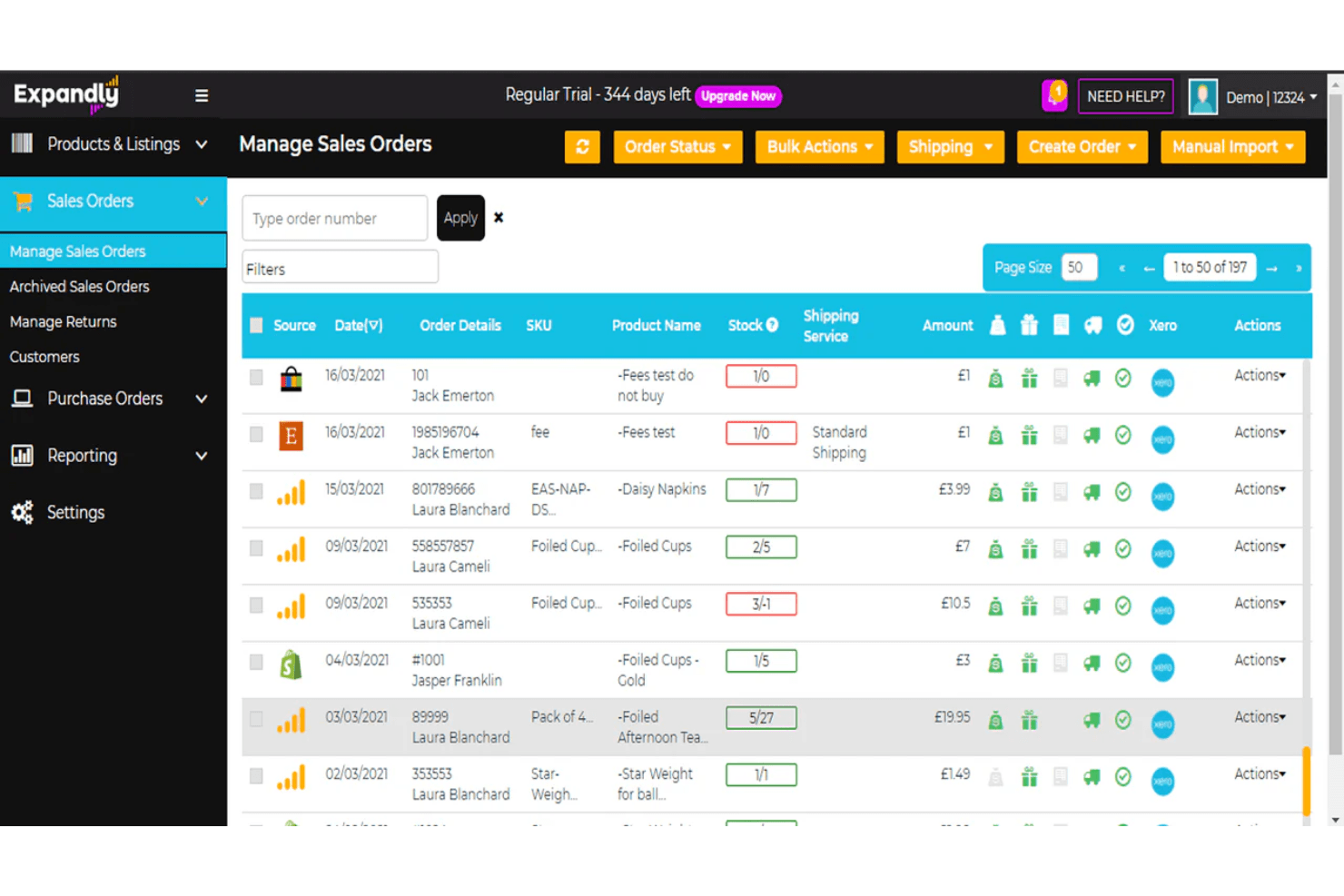
Expandly permite a los usuarios gestionar y supervisar todos los pedidos de venta de varios canales desde un único lugar. Expandly es una plataforma multicanal de gestión de inventario y pedidos que sincroniza el stock, los listados y los pedidos de Amazon, eBay, Etsy y más de 25 carritos de compra desde un único panel.
¿Para quién es más adecuado Expandly?
Expandly es una opción excelente para vendedores multicanal que gestionan tiendas en Amazon, eBay, Etsy y varios carritos de compra, y necesitan un único lugar donde mantener sincronizados los niveles de stock.
Por qué elegí Expandly
He incluido Expandly entre mis opciones principales porque es realmente una de las mejores herramientas para mantener precisos los niveles de stock en una gran variedad de tiendas simultáneamente. Cuando una venta se completa en eBay, Amazon y Etsy casi al mismo tiempo, la sincronización automática de Expandly envía las cantidades actualizadas a los más de 25 canales conectados antes de que pueda producirse una venta superior al stock disponible. También me gusta su gestión de kits y paquetes, ya que la venta de un producto agrupado activa automáticamente las deducciones de stock de sus componentes en todos los canales.
Características principales de Expandly
- Gestión de órdenes de compra: Crea órdenes de compra, registra las mercancías recibidas y sincroniza directamente los datos de las órdenes de compra con Xero desde la plataforma.
- Alertas de nivel de reposición: Establece umbrales personalizados de stock bajo que activan notificaciones para solicitar reposición antes de que se agoten las existencias.
- Enrutamiento del cumplimiento multicanal mediante FBA: Envía directamente a Amazon FBA los pedidos de tiendas que no pertenecen a Amazon para su gestión logística a través de la plataforma.
- Carga masiva de listados: Crea y publica listados de productos en varios canales de venta simultáneamente mediante herramientas de carga por lotes.
Integraciones de Expandly
Expandly ofrece integraciones con Amazon Seller Central, eBay, Etsy, Wish, Shopify, WooCommerce, Magento, BigCommerce, Xero, DHL y FedEx, además de más de 25 carritos de compra y varios transportistas. El acceso a la API está disponible en los planes de nivel superior para integraciones personalizadas.
Pros and Cons
Pros:
- Sincroniza el stock en más de 25 canales de venta
- Gestiona kits y paquetes de forma nativa
- Incluye asistencia experta en cumplimiento normativo del Reino Unido y la UE
Cons:
- No ofrece gestión de envíos entrantes de FBA
- No ofrece previsión de la demanda ni reposición automática
Learn more about Expandly: Ideal para el control centralizado de pedidos e inventario
- Demostración gratuita disponible
- Precio bajo solicitud
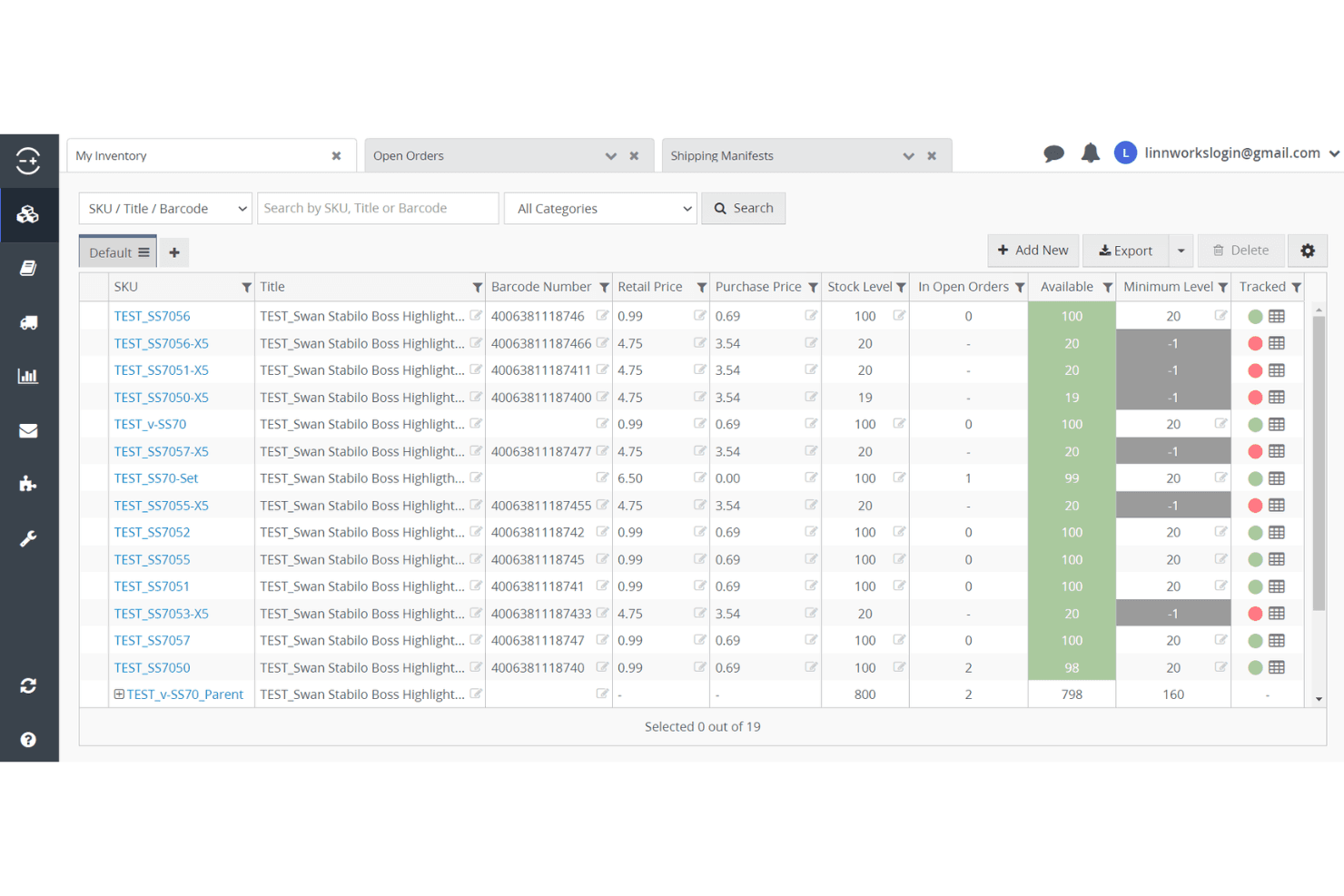
Linnworks permite a los usuarios realizar un seguimiento de los niveles de existencias y los pedidos de todos los artículos del inventario. Linnworks es una plataforma multicanal de gestión de inventario y pedidos que centraliza el control de existencias, los flujos de trabajo de FBA, la gestión de envíos entrantes y el enrutamiento de pedidos en más de 100 canales de venta, incluidos todos los mercados globales de Amazon.
¿Para quién es más adecuado Linnworks?
Linnworks es una opción sólida para minoristas multicanal y vendedores de Amazon que necesitan gestionar pedidos, inventario y cumplimiento en numerosos canales de venta desde un solo lugar.
Por qué elegí Linnworks
Linnworks se ha ganado un lugar en mi lista de favoritos porque ninguna otra plataforma que haya probado iguala su profundidad para el control centralizado de pedidos e inventario en tantos canales. Me impresiona especialmente su cobertura dual de Seller Central y Vendor Central mediante SP-API, lo que significa que los vendedores que operan en ambos modos pueden gestionar envíos entrantes de FBA, el enrutamiento híbrido de FBA/FBM y los pedidos de compra de Vendor Central desde un único panel. El motor de reglas por sí solo ahorra mucho tiempo al automatizar el enrutamiento del cumplimiento entre almacenes, proveedores logísticos externos y centros logísticos de Amazon sin intervención manual.
Características principales de Linnworks
- Integración del cumplimiento multicanal de Amazon (MCF): Envía automáticamente los pedidos que no son de Amazon a los centros logísticos de Amazon y sincroniza las cantidades de inventario y la información de seguimiento con todos los canales de venta conectados.
- Motor de reglas: Automatiza el enrutamiento de pedidos entre FBA, FBM, proveedores logísticos externos y ubicaciones de almacén mediante reglas configurables ilimitadas, sin intervención manual.
- Gestión de kits y paquetes: Realiza un seguimiento nativo de las deducciones de inventario a nivel de componentes cuando se vende un producto agrupado o un kit en cualquier canal conectado.
- SkuVault Core WMS: Añade escaneo de códigos de barras, listas de preparación digitales, recuento cíclico y flujos de trabajo de control de calidad para las operaciones de almacén que alimentan el reabastecimiento de FBA.
Integraciones de Linnworks
Linnworks anuncia más de 200 integraciones, incluidas Amazon, eBay, Walmart, Shopify, BigCommerce, TikTok Shop, Amazon MCF, QuickBooks Online, Conjura e Inventory Planner. Una API abierta permite realizar integraciones personalizadas.
Pros and Cons
Pros:
- Compatibilidad dual con Amazon Seller y Vendor Central
- Sincronización en tiempo real en más de 100 canales de venta
- Panel central para todos los flujos de trabajo de FBA
Cons:
- Los informes de rentabilidad de ASIN requieren complementos
- La asignación de SKU entre canales puede resultar complicada
Learn more about Linnworks: La mejor opción para las sugerencias integradas de reposición de FBA
- Demo gratuita disponible
- Desde $129/mes
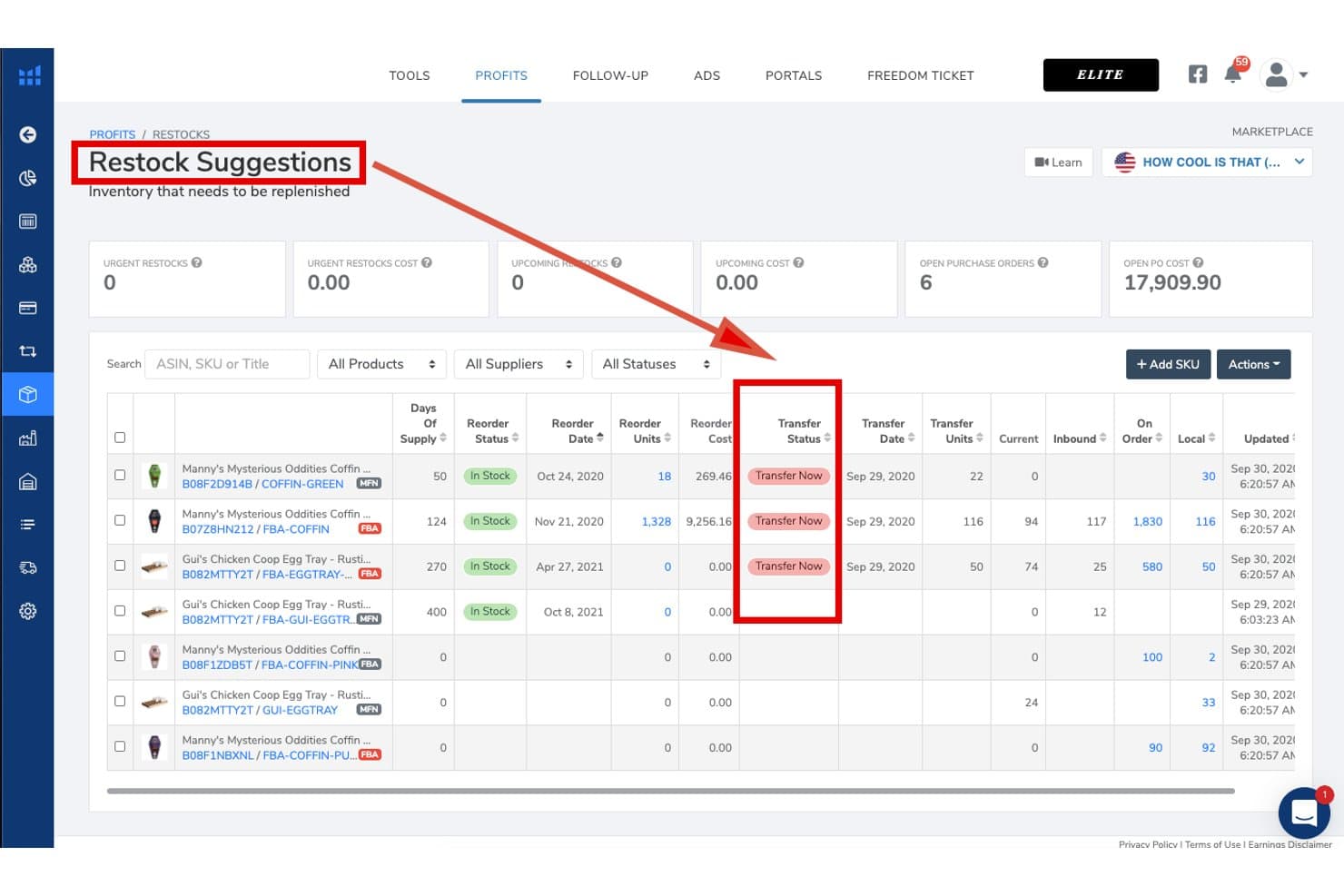
Helium 10 realiza un seguimiento de las necesidades de reposición y del estado de las transferencias del inventario de Amazon. Helium 10 es una plataforma para vendedores de Amazon que combina la gestión de inventario, la previsión de la demanda, las sugerencias de reposición de FBA, el seguimiento de proveedores y órdenes de compra, la optimización de listados, la investigación de palabras clave y el análisis de ganancias a nivel de ASIN en un solo conjunto de herramientas.
¿Para quién es mejor Helium 10?
Helium 10 es una opción excelente para vendedores de Amazon FBA que desean sugerencias de reposición, previsión de la demanda y gestión de proveedores en la misma plataforma que utilizan para la investigación de productos y la optimización de listados.
Por qué elegí Helium 10
Elegí Helium 10 como una de las mejores opciones porque su panel de Sugerencias de reposición hace algo que considero realmente poco común: reúne la velocidad de ventas de Amazon, los plazos de entrega, la estacionalidad y las curvas de crecimiento en una sola vista, y después permite generar una orden de compra con un solo clic. La previsión de la demanda incluso gestiona los periodos de falta de existencias y los ASIN con pocos datos, por lo que los lanzamientos de nuevos productos no quedan desatendidos. También me gusta que los datos de los proveedores, el seguimiento de los envíos entrantes y las señales de reposición de FBA estén en la misma plataforma que ya utilizas para la optimización de listados y la investigación de palabras clave.
Características principales de Helium 10
- Herramienta Profits: Realiza un seguimiento de los ingresos en tiempo real, las tarifas de FBA, las tarifas por referencia, el gasto publicitario, el coste de los productos vendidos y las devoluciones a nivel de ASIN para mostrar la rentabilidad por producto.
- Servicio de reembolsos gestionados: Audita 18 meses de transacciones de FBA para identificar y recuperar reembolsos por inventario perdido, dañado o acreditado incorrectamente.
- Pestaña Almacén local: Realiza un seguimiento del inventario almacenado fuera de Amazon en tus propias instalaciones y señala cuándo transferir el inventario existente a FBA es más barato que realizar un nuevo pedido a un proveedor.
- Sincronización del inventario de TikTok Shop: Asigna los productos de TikTok a los SKU de Amazon y utiliza un umbral configurable de inventario de seguridad para evitar que los pedidos de TikTok agoten tu inventario de FBA.
Integraciones de Helium 10
Helium 10 cuenta con una integración nativa con Amazon Seller Central y una conexión indirecta con TikTok Shop mediante el Servicio de logística multicanal de Amazon (MCF). Walmart es compatible con la investigación y los anuncios, pero no hay integraciones nativas documentadas con Shopify, eBay, WooCommerce, sistemas contables, ERP ni proveedores 3PL.
Pros and Cons
Pros:
- Panel avanzado de sugerencias de reposición de Amazon FBA
- Análisis de ganancias a nivel de ASIN con desglose de tarifas
- Tiene en cuenta la estacionalidad y el impacto de la falta de existencias en las previsiones
Cons:
- La gestión de inventario es limitada en los planes inferiores
- No incluye una herramienta integrada de repricing dinámico de Amazon
Learn more about Helium 10: Ideal para flujos de trabajo de previsión personalizables
- Prueba gratuita + demostración gratuita disponibles
- Desde $175/mes
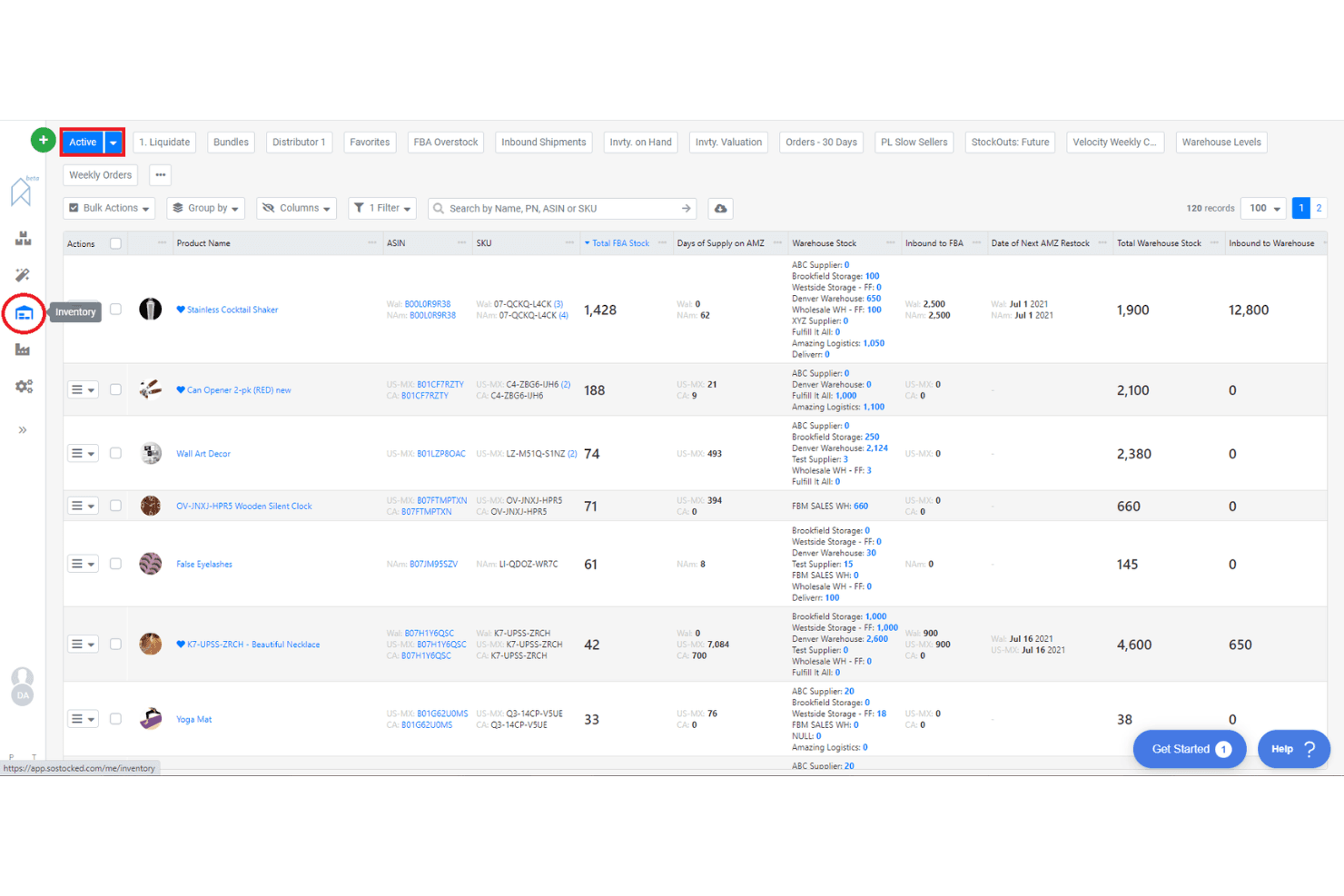
SoStocked permite a los usuarios supervisar los niveles de inventario en varios almacenes. SoStocked es una plataforma de gestión y previsión de inventario nativa de Amazon que combina la previsión de la demanda, el seguimiento de órdenes de compra, las alertas de reposición, la supervisión del inventario de FBA y el análisis de beneficios a nivel de ASIN.
¿Para quién es más adecuado SoStocked?
SoStocked es una opción excelente para vendedores de marca privada de Amazon FBA y marcas mayoristas que necesitan una lógica de previsión transparente y editable en varios mercados globales.
Por qué elegí SoStocked
SoStocked ocupa un lugar en mi lista de favoritos porque ninguna otra herramienta de inventario de Amazon te ofrece este nivel de control sobre los cálculos de previsión. Me encanta que puedas editar línea por línea los cálculos de velocidad subyacentes, algo importante cuando tu historial de ventas incluye períodos de falta de existencias que, de otro modo, distorsionarían tus puntos de pedido. La función de Previsión combinada te permite superponer picos de demanda de Prime Day o BFCM sobre una base estacional y reutilizar esos modelos año tras año.
Características principales de SoStocked
- Cálculo de velocidad ajustado: Elimina de tu historial de ventas los días afectados por la falta de existencias para que tus datos de demanda reflejen la velocidad real, no descensos distorsionados.
- Integración de los límites de reposición del IPI: Obtiene diariamente de Amazon los límites de reposición del Índice de rendimiento del inventario y los incorpora directamente a tus calendarios de reposición y transferencia.
- Análisis de beneficios a nivel de ASIN con ProfitFlow: Prevé las ventas, las tarifas de FBA y los costes a nivel de cada ASIN para detectar fugas de margen y listados con bajo rendimiento.
- Optimizador del nivel de tamaño de FBA: Analiza las dimensiones y el embalaje de tus productos para detectar oportunidades de redimensionamiento que reduzcan las tarifas de gestión logística de FBA.
Integraciones de SoStocked
SoStocked se integra con Amazon Seller Central mediante SP-API en los mercados globales, además de Amazon AWD y MCF. No cuenta con integraciones nativas con Shopify, Walmart, eBay, WooCommerce ni proveedores logísticos externos (3PL), pero admite flujos de trabajo de datos personalizados mediante su Herramienta de conversión de ventas del mercado.
Pros and Cons
Pros:
- Fórmulas de previsión editables para un control preciso
- Previsión combinada para la estacionalidad y los eventos
- Los límites de reposición del IPI se incorporan automáticamente
Cons:
- No incluye un flujo de trabajo integrado para crear envíos
- Se requiere un seguimiento manual del inventario de proveedores logísticos externos (3PL)
Learn more about SoStocked:
Otros programas de gestión de inventario de Amazon
Estas son algunas opciones adicionales de programas de gestión de inventario de Amazon que no llegaron a mi lista de selección, pero que aún vale la pena consultar:
- 11RestockProIdeal para la reposición en FBA y la automatización de órdenes de compra
- 12Jungle ScoutIdeal para la planificación del inventario basada en las ventas
- 13VeeqoIdeal para vendedores multicanal con grandes volúmenes
- 14BrightpearlLa mejor opción para flujos de trabajo contables integrados
- 15Zoho InventoryLa mejor opción para gestionar automáticamente los puntos de reposición
- 16OrdoroLa mejor opción para funciones de creación de kits de productos agrupados
- 17Cin7 CoreLa mejor opción para la integración de un portal B2B nativo
- 18Finale InventoryIdeal para el control de existencias basado en códigos de barras
- 19LitCommerceIdeal para configurar y migrar canales rápidamente
Cómo evalúo el software de gestión de inventario de Amazon
Divido mi evaluación en dos niveles: las capacidades básicas de FBA y Seller Central que una herramienta debe tener para calificar, y los diferenciadores que determinan el ajuste correcto para tu operación.
Funcionalidad central (imprescindibles para esta lista)
Al seleccionar herramientas para mi lista, califico cada una en una escala del 0 (no ofrece la funcionalidad) al 5 (sobresale en esta área) para cada funcionalidad central que se describe a continuación. Luego, calculo el puntaje total de la herramienta en un porcentaje. Cada herramienta debe alcanzar un puntaje mínimo total del 65% para ser considerada para inclusión.
- Integración con Amazon Seller Central: Reviso si una herramienta se conecta a Seller Central a través de una API nativa o depende de un puente de terceros, y si sincroniza pedidos, inventario y listados entre varios mercados de Amazon.
- Seguimiento de inventario FBA: Una herramienta debe mostrar más que solo la cantidad disponible. Busco visibilidad sobre unidades entrantes, reservadas, no aptas para la venta y unidades varadas, para que los vendedores puedan detectar problemas antes de que se acumulen cargos de almacenamiento.
- Pronóstico de demanda y alertas de reabastecimiento: Evalúo si las sugerencias de reabastecimiento toman en cuenta la verdadera velocidad de ventas en Amazon, los tiempos de entrega de los proveedores y las tendencias estacionales, en lugar de depender solo de umbrales fijos que debes configurar manualmente.
- Sincronización de inventario multicanal: Para los vendedores que listan en Shopify, Walmart o eBay además de Amazon, analizo cuántos canales se sincronizan en tiempo real y si la herramienta admite stock de reserva o reglas de asignación específicas por canal.
- Seguimiento de rentabilidad y costos a nivel SKU: Las mejores herramientas de este sector desglosan el margen por ASIN después de comisiones, tarifas FBA, COGS y devoluciones. Evalúo el nivel de detalle de los costos y si se admiten los costos puestos en destino.
- Gestión de órdenes de compra y proveedores: Busco la creación de órdenes de compra ligadas a los datos de demanda, una base de datos de proveedores y el seguimiento de envíos entrantes a almacenes FBA o 3PL, en vez de registros tipo hoja de cálculo independientes.
Una vez tengo una lista de herramientas que cumplen con estos criterios, considero qué distingue a cada plataforma.
Factores diferenciales (qué distingue a los proveedores)
Así es como comparo y contrasto distintos proveedores:
Características destacadas
El monitoreo de IPI y el seguimiento de los límites de reabastecimiento son importantes porque un solo envío rechazado puede frenar las ventas durante semanas. Busco herramientas que avisen cuando te estés acercando a los límites de capacidad, para que puedas ajustar tus planes de entrada. La gestión de paquetes y kits es otra área clave: los vendedores que ofrecen multipacks necesitan deducciones de componentes a nivel detallado que se apliquen automáticamente en el punto de venta. La integración con PPC agrega valor real aquí, ya que conecta el gasto publicitario con los niveles de stock para que puedas pausar campañas en ASINs con bajo inventario en lugar de desperdiciar presupuesto.
Más allá de las funciones
La transparencia de precios es muy relevante en este sector. Compruebo si los planes escalan según el volumen de pedidos o el número de SKUs, y si funciones como el pronóstico o los análisis PPC están restringidas a planes premium. Las integraciones con el ecosistema también pesan mucho: tu herramienta de inventario debe sincronizarse con QuickBooks o Xero para la contabilización del COGS y conectarse con tus 3PL para flujos de trabajo entrantes. También evalúo el ajuste de la herramienta según el tipo de vendedor, ya que un vendedor FBA solitario con unos cientos de SKUs tiene necesidades muy distintas que un agregador que gestiona docenas de marcas a través de varios modelos de cumplimiento.
Cómo elegir un programa de gestión de inventario de Amazon
Es fácil perderse entre largas listas de funciones y estructuras de precios complejas. Para ayudarte a mantener la concentración mientras avanzas en tu proceso particular de selección de software, aquí tienes una lista de factores que debes tener en cuenta:
| Factor | Qué debes tener en cuenta |
|---|---|
| FactorEscalabilidad | Qué debes tener en cuenta¿El programa gestionará tu volumen de pedidos actual y previsto, tus SKU y los nuevos canales de Amazon? |
| FactorIntegraciones | Qué debes tener en cuenta¿Se conecta de forma nativa con tus plataformas de comercio electrónico, transportistas y herramientas de contabilidad? |
| FactorPersonalización | Qué debes tener en cuenta¿Puedes adaptar los flujos de trabajo, los permisos de usuario y los informes para que coincidan con los procesos de tu empresa? |
| FactorFacilidad de uso | Qué debes tener en cuenta¿Podrá tu equipo aprender a utilizar el sistema rápidamente sin necesidad de una formación exhaustiva? |
| FactorImplementación e incorporación | Qué debes tener en cuenta¿Cuánto tiempo llevará la configuración y qué recursos o asistencia necesitarás para empezar a trabajar? |
| FactorCoste | Qué debes tener en cuenta¿Son claros los niveles de precios y se ajustan al tamaño de tu empresa, al volumen de pedidos y a tus necesidades de funciones? |
| FactorMedidas de seguridad | Qué debes tener en cuenta¿El proveedor ofrece cifrado de datos, controles de acceso de usuarios y actualizaciones de seguridad periódicas? |
| FactorDisponibilidad del soporte | Qué debes tener en cuenta¿Puedes contactar con el soporte durante tu horario comercial y existen acuerdos de nivel de servicio para problemas urgentes? |
¿Qué es un programa de gestión de inventario de Amazon?
El software de gestión de inventario de Amazon es una herramienta digital que ayuda a las empresas a realizar un seguimiento, organizar y controlar sus existencias de productos en una o varias tiendas de Amazon. Estos sistemas automatizan las actualizaciones del inventario, gestionan los pedidos y sincronizan los datos de los productos para evitar la sobreventa o el agotamiento de existencias. Son esenciales para mantener niveles de inventario precisos, respaldar las ventas multicanal y agilizar los procesos de gestión logística para los vendedores de Amazon.
Características
Al seleccionar un software de gestión de inventario de Amazon, presta atención a las siguientes características clave:
- Sincronización del inventario: Actualiza automáticamente los niveles de existencias en todos los canales de Amazon para evitar la sobreventa y el agotamiento de existencias.
- Gestión de pedidos: Centraliza el procesamiento, el seguimiento y la gestión logística de todos los pedidos de Amazon en un solo panel.
- Publicación masiva de productos: Permite cargar, editar y gestionar varias publicaciones de productos a la vez, ahorrando tiempo en las actualizaciones del catálogo.
- Gestión de órdenes de compra: Realiza un seguimiento de los pedidos a proveedores, las entregas y las reposiciones para mantener niveles óptimos de inventario.
- Compatibilidad multicanal: Gestiona el inventario y los pedidos de Amazon y otros canales de venta desde una sola plataforma.
- Alertas de existencias: Te notifica cuando el inventario cae por debajo de los umbrales establecidos para que puedas volver a realizar pedidos antes de quedarte sin existencias.
- Generación de etiquetas de envío: Crea etiquetas de envío para varios transportistas directamente en el software con el fin de agilizar la gestión logística.
- Informes y análisis: Proporciona informes detallados sobre el inventario, las ventas y las tendencias de los pedidos para respaldar decisiones basadas en datos.
- Permisos de usuario: Te permiten controlar los niveles de acceso de los distintos miembros del equipo, garantizando operaciones seguras y organizadas.
- Registros de auditoría: Mantienen registros de todos los cambios en el inventario y las acciones de los usuarios para garantizar la transparencia y el cumplimiento normativo.
Beneficios
Implementar un software de gestión de inventario de Amazon ofrece varios beneficios para tu equipo y tu empresa. Estos son algunos de los que puedes esperar:
- Seguimiento preciso de las existencias: La sincronización del inventario en tiempo real entre los canales de Amazon ayuda a evitar la sobreventa y el agotamiento de existencias.
- Procesamiento centralizado de pedidos: Gestionar todos los pedidos de Amazon en un solo panel reduce el trabajo manual y los errores.
- Gestión logística más rápida: La generación integrada de etiquetas de envío y la asignación de pedidos agilizan el proceso de envío.
- Informes mejorados: Los análisis detallados y los registros de auditoría respaldan mejores previsiones y el cumplimiento normativo.
- Eficiencia multicanal: Gestionar el inventario de Amazon y otros canales de venta desde una sola plataforma ahorra tiempo y reduce la complejidad.
- Control proactivo del inventario: Las alertas automatizadas de existencias y la gestión de órdenes de compra te ayudan a volver a realizar pedidos antes de quedarte sin existencias.
- Colaboración mejorada del equipo: Los permisos de usuario y los registros de actividad mantienen las operaciones organizadas y seguras para equipos de cualquier tamaño.
Costes y precios
Seleccionar un software de gestión de inventario de Amazon requiere comprender los distintos modelos y planes de precios disponibles. Los costes varían según las características, el tamaño del equipo, los complementos y otros factores. La siguiente tabla resume los planes habituales, sus precios medios y las características que suelen incluir las soluciones de software de gestión de inventario de Amazon:
Tabla comparativa de planes de software de gestión de inventario de Amazon
| Tipo de plan | Precio medio | Características habituales |
|---|---|---|
| Tipo de planPlan gratuito | Precio medio$0 | Características habitualesSeguimiento básico del inventario, gestión limitada de pedidos, compatibilidad con un solo canal e informes básicos. |
| Tipo de planPlan personal | Precio medio$30-$60/mes | Características habitualesSincronización del inventario multicanal, gestión de pedidos, alertas de existencias bajas y herramientas básicas de envío. |
| Tipo de planPlan empresarial | Precio medio$100-$300/mes | Características habitualesPublicación masiva de productos, gestión de órdenes de compra, informes avanzados, permisos de usuario e integraciones. |
| Tipo de planPlan corporativo | Precio medio$500-$2000/mes | Características habitualesFlujos de trabajo personalizados, acceso a API, asistencia especializada, análisis avanzados y gestión de varias ubicaciones. |
Preguntas frecuentes sobre el software de gestión de inventario de Amazon
Aquí encontrarás respuestas a preguntas frecuentes sobre el software de gestión de inventario de Amazon:
¿Puede el software de gestión de inventario de Amazon gestionar pedidos tanto de FBA como de FBM?
Sí, la mayoría del software de gestión de inventario de Amazon puede gestionar pedidos tanto de Fulfillment by Amazon (FBA) como de Fulfillment by Merchant (FBM). Esto te permite realizar un seguimiento del inventario, procesar pedidos y sincronizar los niveles de existencias de ambos métodos de gestión desde un único panel de control.
¿Cómo funciona la sincronización del inventario con varios mercados de Amazon?
La sincronización del inventario actualiza automáticamente los niveles de existencias en todos los mercados de Amazon conectados cuando se produce una venta. Esto evita la sobreventa y garantiza recuentos de inventario precisos, incluso si vendes en Amazon de EE. UU., Reino Unido u otros sitios regionales al mismo tiempo.
¿Qué integraciones debería buscar en un software de gestión de inventario de Amazon?
Busca integraciones con tus plataformas de comercio electrónico, transportistas, herramientas de contabilidad y proveedores logísticos externos. Estas conexiones ayudan a automatizar los flujos de trabajo, reducir la introducción manual de datos y mantener sincronizados los sistemas de tu empresa.
¿Es difícil migrar a un nuevo software de gestión de inventario de Amazon?
La migración puede ser sencilla si el software ofrece herramientas de importación, asistentes de configuración y asistencia durante la incorporación. Comprueba los recursos de formación disponibles, las opciones de importación de datos y la atención al cliente para ayudar a tu equipo a realizar la transición sin problemas.
¿Cómo funcionan las alertas de existencias en el software de gestión de inventario de Amazon?
Las alertas de existencias te notifican cuando los niveles de inventario caen por debajo de un umbral establecido. Puedes configurar puntos de alerta personalizados para cada producto, de modo que sepas cuándo es el momento de volver a hacer un pedido y evites quedarte sin existencias.
Qué hacer a continuación:
Si estás investigando software de gestión de inventario de Amazon, conecta gratuitamente con un asesor de SoftwareSelect para recibir recomendaciones.
Rellenas un formulario y mantienes una breve conversación en la que se profundiza en los detalles de tus necesidades. Después recibirás una lista de preselección de software para revisar. Además, te ayudarán durante todo el proceso de compra, incluidas las negociaciones de precios.