
12 Leadpages Alternatives for 2026

Leadpages Alternatives Shortlist
Here’s my shortlist of Leadpages alternatives:


A strong Leadpages alternative gives your team flexible landing page design, easy integration with your marketing stack, and reliable performance at scale. If you’re searching for options beyond Leadpages, you’re likely looking for a user-friendly website builder that supports your workflow and growth goals. Many tools prioritize ease of use and a low learning curve, making them ideal for beginners, startups, and growing online businesses. They also help teams streamline campaigns across channels like PPC and social media, while ensuring pages perform well on mobile devices.
This list will help you quickly compare the top alternatives so you can find the right landing page builder and keep your marketing moving forward.
What is Leadpages?
Leadpages is a landing page builder that lets you create, publish, and optimize web pages for lead generation and marketing campaigns. It offers drag-and-drop editing, customizable templates, and integrations with popular marketing tools.
Marketing teams, ecommerce businesses, and agencies use Leadpages to quickly launch landing pages, capture leads, and track performance without needing advanced technical skills.
Best Leadpages Alternatives Summary
This comparison chart summarizes pricing details for my top Leadpages alternative selections to help you find the best one for your budget and business needs.
| Tool | Best For | Trial Info | Price | ||
|---|---|---|---|---|---|
| 1 | Best for multi-step sales funnels | 14-day free trial available | From $81/month (billed annually) | Website | |
| 2 | Best for single-page site creation | 7-day free trial available | From $9/year (billed annually) | Website | |
| 3 | Best for all-in-one business tools | Free plan available | From $17/month | Website | |
| 4 | Best for AI-powered copy generation | Free trial + free demo available | From $22/month (billed annually) | Website | |
| 5 | Best for advanced personalization options | 14-day free trial + free demo available | From $79/month (billed annually) | Website | |
| 6 | Best for template variety and customization | 14-day free trial + free demo available | From $24/month (billed annually) | Website | |
| 7 | Best for built-in email marketing automation | 14-day free trial + free demo available | From $15.58/month (billed annually) | Website | |
| 8 | Best for integration with the Zoho ecosystem | 14-day free trial + free demo available | From $16/month (billed annually) | Website | |
| 9 | Best for drag-and-drop simplicity on WordPress | Not available | From $39.50/year | Website | |
| 10 | Best for WordPress site integration | 14-day free trial available | From $129/year (billed annually) | Website |
Why Trust Our Software Reviews

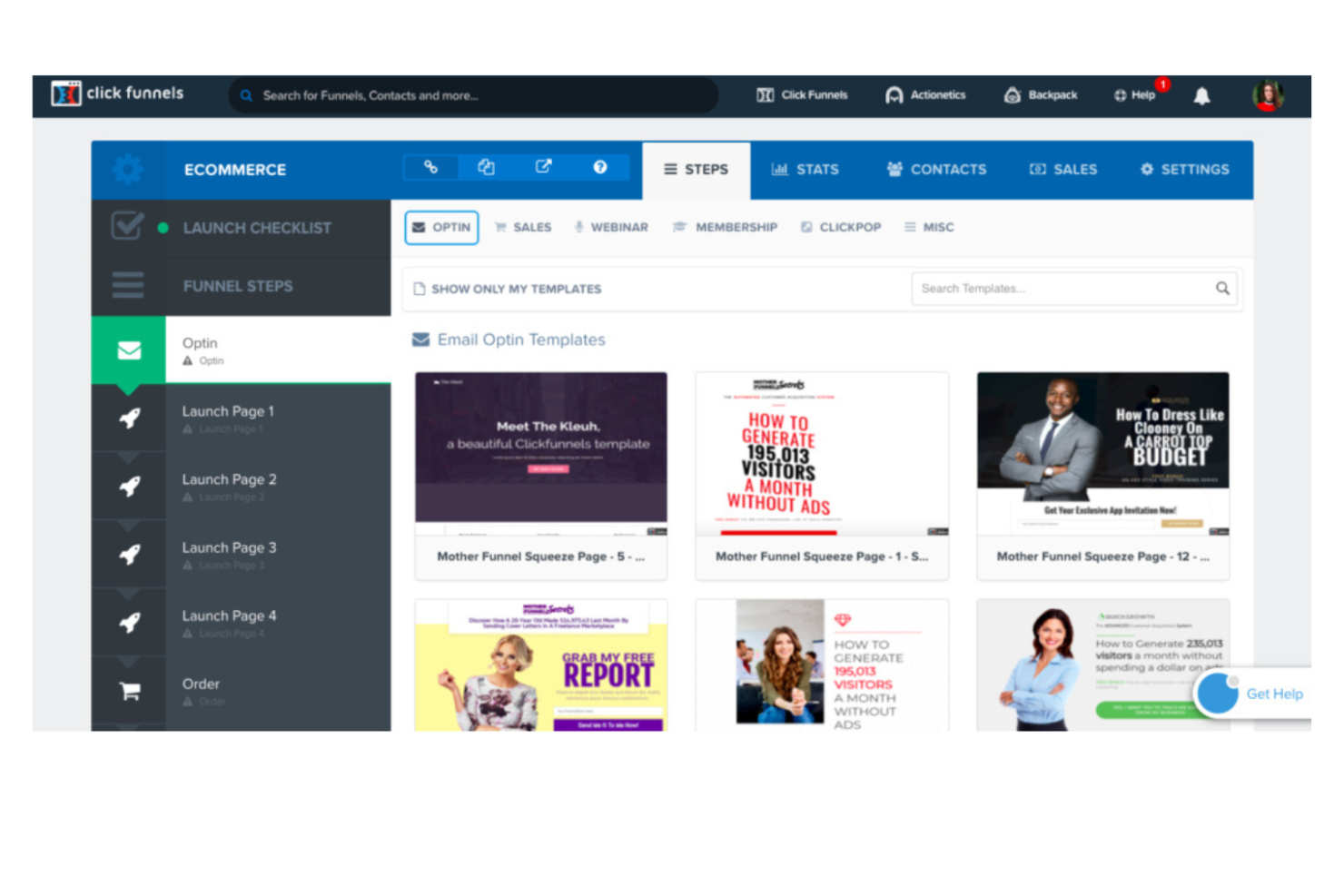
ClickFunnels is built for businesses that need more than just a landing page—it’s designed for creating full, multi-step sales funnels. This platform appeals to ecommerce teams, digital marketers, and entrepreneurs who want to guide customers through complex buying journeys with upsells, downsells, and follow-up sequences.
Why It’s a Good Leadpages Alternative
If you need to build more than just a single landing page, ClickFunnels is purpose-built for creating multi-step sales funnels that guide visitors through a complete buying journey. I picked ClickFunnels because it lets you connect landing pages, upsell and downsell offers, and checkout forms into a single, automated funnel.
The platform also includes funnel-specific analytics and split testing, so you can optimize each step for conversions. This makes ClickFunnels a strong choice for businesses that want to manage the entire sales process, not just the first touchpoint.
ClickFunnels Key Features
Some other features in ClickFunnels can help you build and manage your funnels more efficiently:
- Drag-and-Drop Page Editor: Customize landing pages and funnel steps without coding.
- Email Automation Tools: Set up automated follow-up emails and sequences within your funnels.
- Membership Site Builder: Create gated content and manage member access directly inside the platform.
- Affiliate Management System: Track, manage, and pay affiliates using the built-in Backpack tool.
ClickFunnels Integrations
Integrations include ActiveCampaign, AWeber, Blastable, Constant Contact, ConvertKit, GetResponse, GoTo Webinar, HubSpot, Keap, and more.
Pros and Cons
Pros:
- Membership site creation without extra plugins
- Built-in checkout and order bump features
- Multi-step funnel builder for complex journeys
Cons:
- Requires a separate payment gateway setup
- No native SMS marketing integration

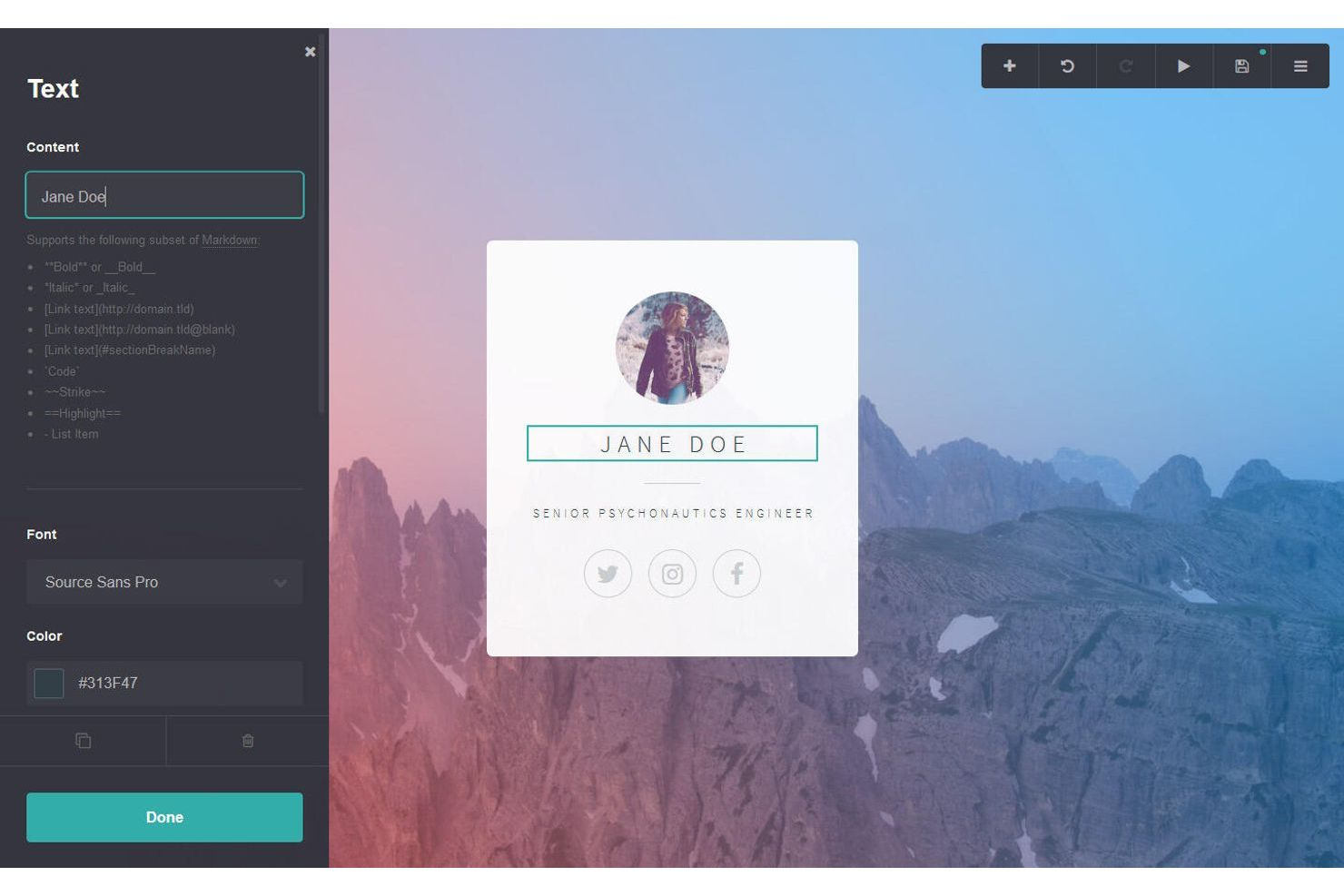
Carrd is built for that purpose if you need a simple way to launch a single-page site. The tool is ideal for creators, freelancers, and small teams that want a focused landing page without extra complexity. Carrd stands out from other landing page builders by making it easy to publish clean, responsive one-page sites in minutes.
Why It’s a Good Leadpages Alternative
When you want to create a focused, single-page site, Carrd offers a simplified approach that’s hard to match. I picked Carrd because it specializes in one-page layouts, letting you quickly build landing pages, portfolios, or simple lead capture sites without distractions.
The platform includes a variety of responsive templates designed specifically for single-page use cases. If your goal is to launch a clean, effective landing page with minimal setup, Carrd delivers exactly what you need.
Carrd Key Features
Some other features in Carrd can help you customize and manage your landing pages:
- Custom Domains: Connect your own domain name to any site you publish.
- Form Integrations: Add contact, signup, or custom forms to collect information from visitors.
- Image and Video Embeds: Place images, GIFs, or videos directly onto your page.
- Element Animations: Apply simple animations to page elements for added visual interest.
Carrd Integrations
Integrations include Zapier, Airtable, n8n, Make, and more.
Pros and Cons
Pros:
- Mobile-responsive templates for all site types
- Supports custom domains on all paid plans
- One-page site focus for fast publishing
Cons:
- Cannot schedule content for future publishing
- Lacks multi-page site creation capability

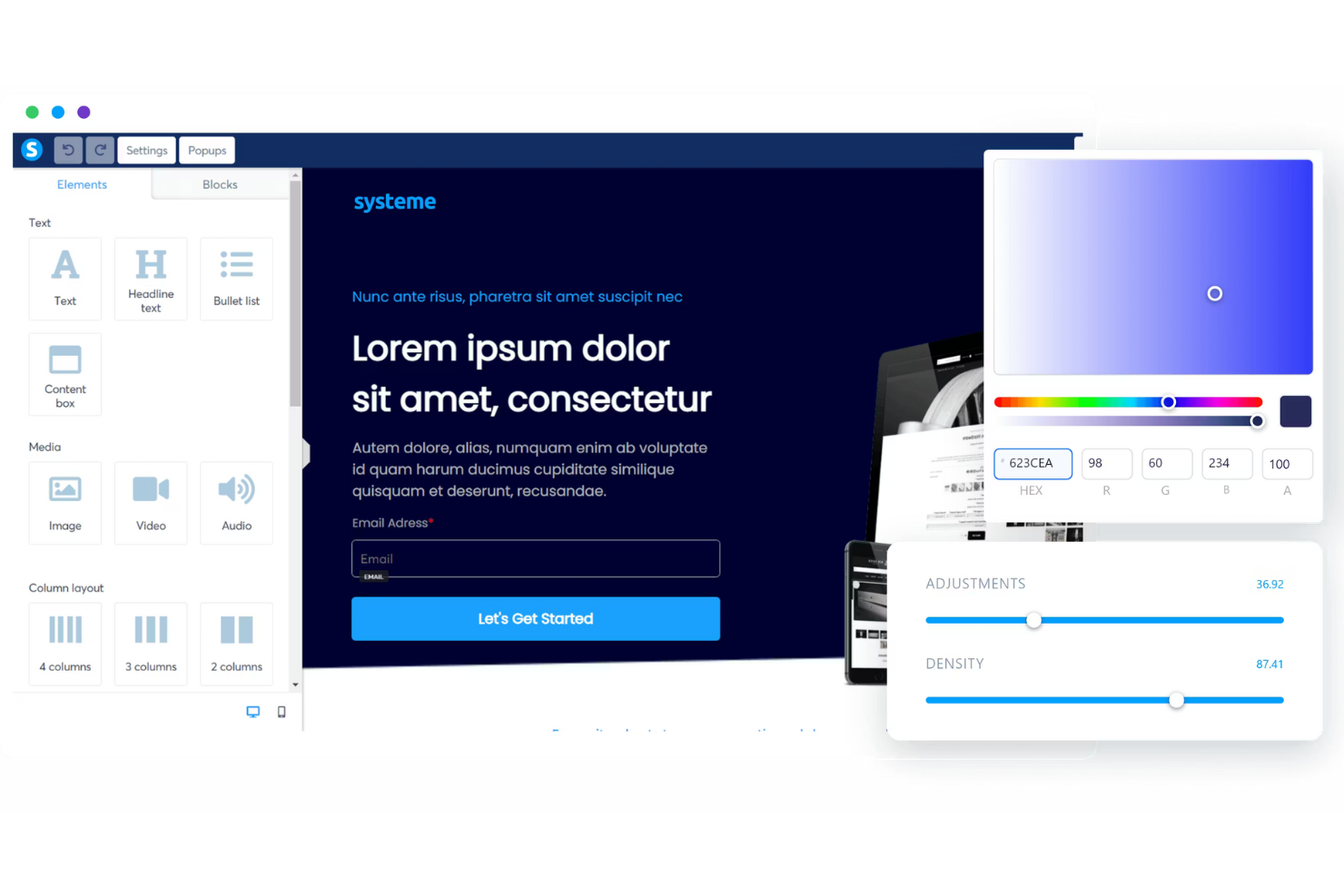
Systeme.io brings everything together in one platform if you want a landing page builder that also handles email marketing, sales funnels, and online courses. This all-in-one approach is especially useful for solopreneurs, small businesses, and creators who want to manage their marketing and sales tools from a single dashboard, including running and managing an affiliate program to expand reach and revenue.
Why It’s a Good Leadpages Alternative
For teams that want more than just landing pages, Systeme.io offers a full suite of business tools in one place. I picked Systeme.io because it combines landing page creation with built-in email marketing, sales funnel automation, and online course hosting.
You can design pages, set up automated email sequences, and manage digital product sales without switching platforms. This all-in-one setup is especially helpful if you want to centralize your marketing and sales workflows.
Systeme.io Key Features
Some other features in Systeme.io can help you manage your marketing and sales efforts more efficiently:
- Affiliate Management System: Track, manage, and pay affiliates directly from your dashboard.
- Drag-and-Drop Page Editor: Customize landing pages with a visual editor and pre-built blocks.
- Webinar Hosting: Run live or evergreen webinars to engage leads and customers.
- Custom Domain Support: Connect your own branded domain to your landing pages and funnels.
Systeme.io Integrations
Native integrations are not currently listed. However, custom integrations are available through a public API.
Pros and Cons
Pros:
- Email marketing automation included
- Built-in affiliate management dashboard
- Unlimited landing pages on all plans
Cons:
- Page editor can lag with complex layouts
- No built-in A/B testing for landing pages

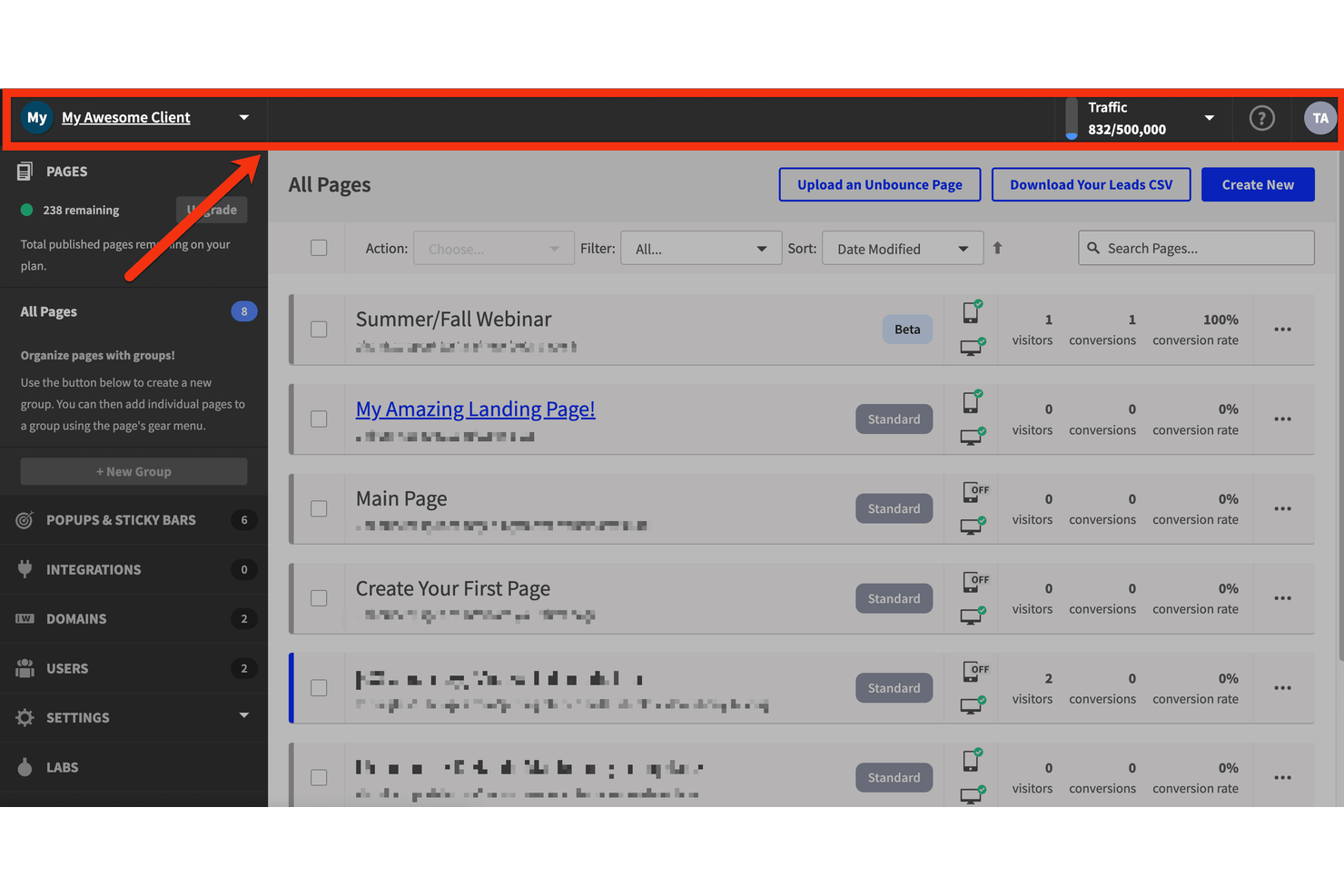
Unbounce brings AI-powered copy generation to landing page creation, making it a strong fit for marketers and ecommerce teams who want to launch campaigns quickly. The platform’s AI tools help you write and optimize landing page content without relying on external copywriters. If you’re looking for a landing page builder that speeds up content creation and testing, Unbounce offers unique capabilities that go beyond what Leadpages provides.
Why It’s a Good Leadpages Alternative
If you want to speed up landing page content creation, Unbounce’s AI-powered copy generation tools set it apart from Leadpages. I picked Unbounce because its Smart Copy feature can instantly generate headlines, calls to action, and body text tailored to your campaign goals.
The platform also offers AI-driven recommendations for optimizing your copy based on real-time performance data. These capabilities make Unbounce a strong choice for teams that want to test and iterate on messaging without waiting on external resources.
Unbounce Key Features
Some other features in Unbounce can help your team build and optimize landing pages more efficiently:
- Drag-and-Drop Builder: Design landing pages visually without needing to write code.
- Popups and Sticky Bars: Add targeted popups and sticky bars to capture leads or promote offers.
- Mobile-Responsive Templates: Choose from a library of templates that automatically adjust to different screen sizes.
- A/B Testing: Run experiments on different page elements to identify what drives the best results.
Unbounce Integrations
Integrations include Google Analytics, Twilio, HubSpot, Chili Pepper, Insightly, Mailchimp, Zapier, Salesforce, and more.
Pros and Cons
Pros:
- Built-in A/B testing for conversion optimization
- Popups and sticky bars for lead capture
- AI copywriting generates headlines and page text
Cons:
- Traffic limits on lower-tier plans
- No built-in payment processing tools

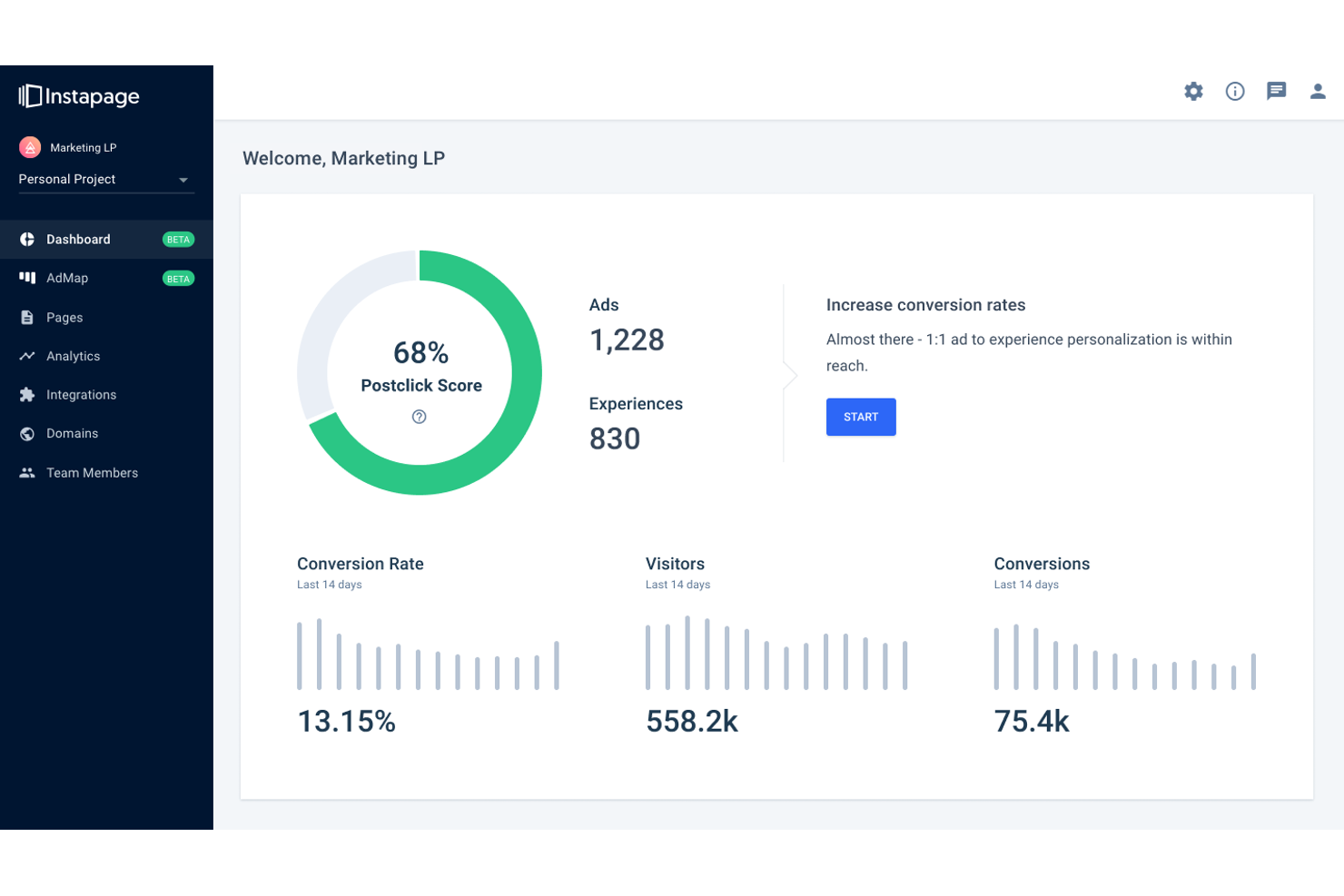
Instapage is worth a close look if your team needs advanced personalization for landing pages. The platform is designed for marketers and ecommerce teams that want to tailor experiences for different audiences at scale. Instapage stands out with its dynamic content features and A/B testing tools, helping you refine campaigns beyond what most landing page builders offer.
Why It’s a Good Leadpages Alternative
What sets Instapage apart as a Leadpages alternative is its focus on advanced personalization options. I picked Instapage for teams that want to deliver unique landing page experiences to different audience segments using dynamic text replacement and personalized content blocks.
The platform also offers A/B testing tools, so you can experiment with variations and optimize for higher conversions. These features make Instapage a strong choice if you need more targeted and data-driven landing pages than Leadpages typically provides.
Instapage Key Features
Some other features in Instapage can help your team manage and optimize landing pages more efficiently:
- Collaboration Workspace: Invite team members to review, comment, and approve landing pages directly within the platform.
- Heatmaps: Visualize where visitors click and scroll on your landing pages to identify engagement patterns.
- AMP Support: Build and publish Accelerated Mobile Pages (AMP) for faster mobile experiences.
- Form Builder: Create custom forms with multiple field types and conditional logic to capture detailed lead information.
Instapage Integrations
Integrations include ActiveCampaign, AdRoll, Autopilot, AWeber, Salesforce, HubSpot, Mailchimp, Marketo, Google Analytics, and more.
Pros and Cons
Pros:
- AMP support for fast mobile landing pages
- Collaboration tools for team-based workflows
- Built-in heatmaps for visual analytics
Cons:
- No built-in ecommerce checkout functionality
- Limited template selection compared to others

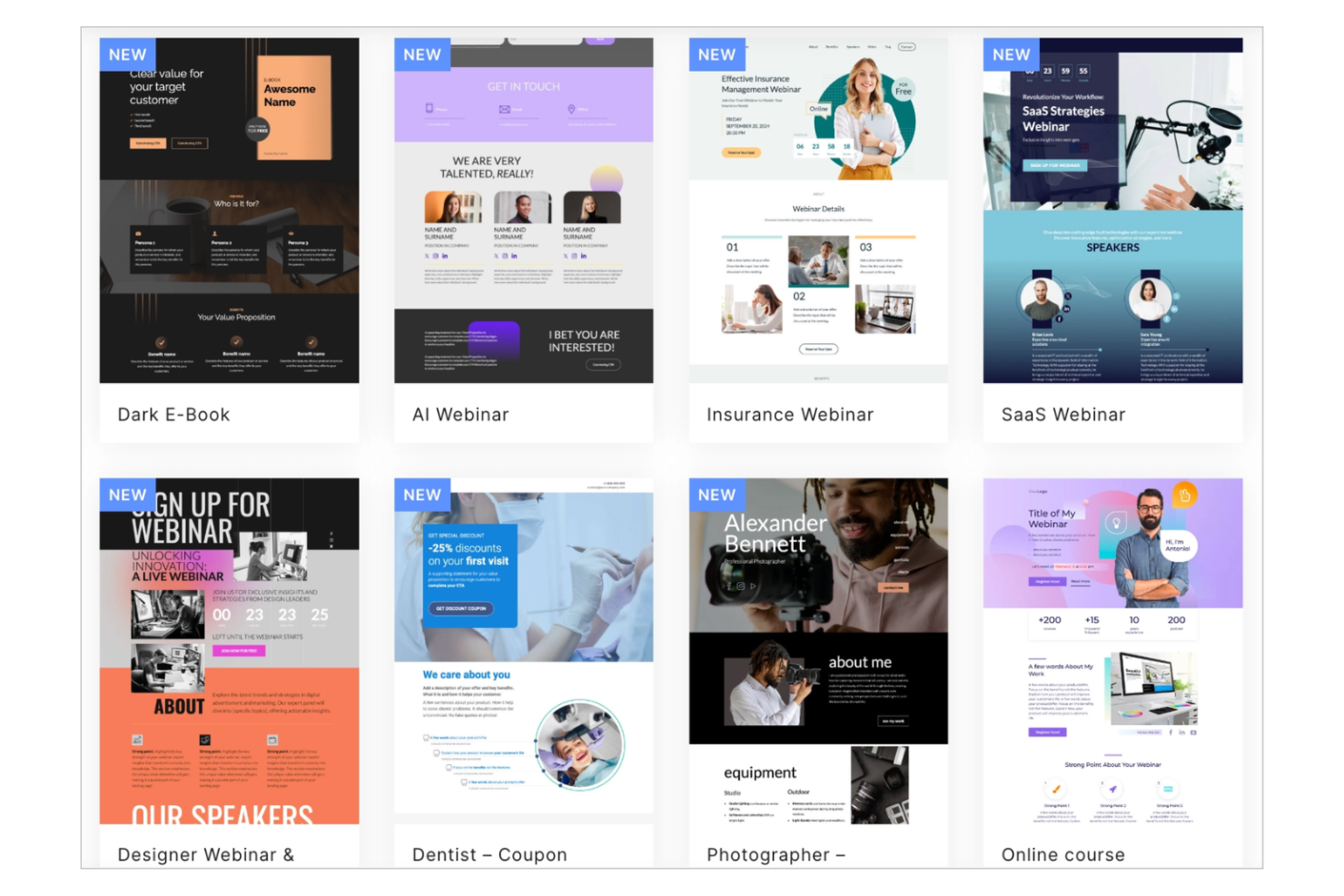
Landingi stands out for its extensive template library and customization tools if you’re looking for a landing page builder with a wide range of design options. The platform is a strong fit for marketing teams, agencies, and ecommerce brands that want to quickly launch unique, branded pages without relying on developers. With affordable pricing, built-in SSL security, and ready-to-use funnel templates, Landingi makes it easier to create and optimize high-converting campaigns.
Why It’s a Good Leadpages Alternative
Landingi is a strong choice if you want more design flexibility than most landing page builders offer. I picked Landingi because it provides hundreds of professionally designed templates that you can fully customize for different campaigns and industries.
The drag-and-drop editor lets you adjust every element, from fonts and colors to layout and interactive widgets. This level of control makes Landingi especially appealing for teams that need to create on-brand, visually distinct landing pages without developer support.
Landingi Key Features
Some other features in Landingi can help you manage and optimize your landing pages more easily:
- A/B Testing Module: Run experiments on different page versions to compare performance.
- Pop-Up Builder: Design and deploy pop-ups to capture leads or promote offers.
- Built-In Analytics Dashboard: Track visitor behavior and conversion rates directly within the platform.
- WordPress Plugin: Publish landing pages to your WordPress site with a dedicated integration.
Landingi Integrations
Integrations include HubSpot, Salesforce, Mailchimp, ActiveCampaign, GetResponse, Klaviyo, Google Analytics 4, Facebook Messenger, Stripe, and more.
Pros and Cons
Pros:
- Built-in analytics for conversion tracking
- Pop-up and lightbox builder included
- Large template library for diverse industries
Cons:
- Limited ecommerce features for product sales
- No built-in appointment scheduling tool

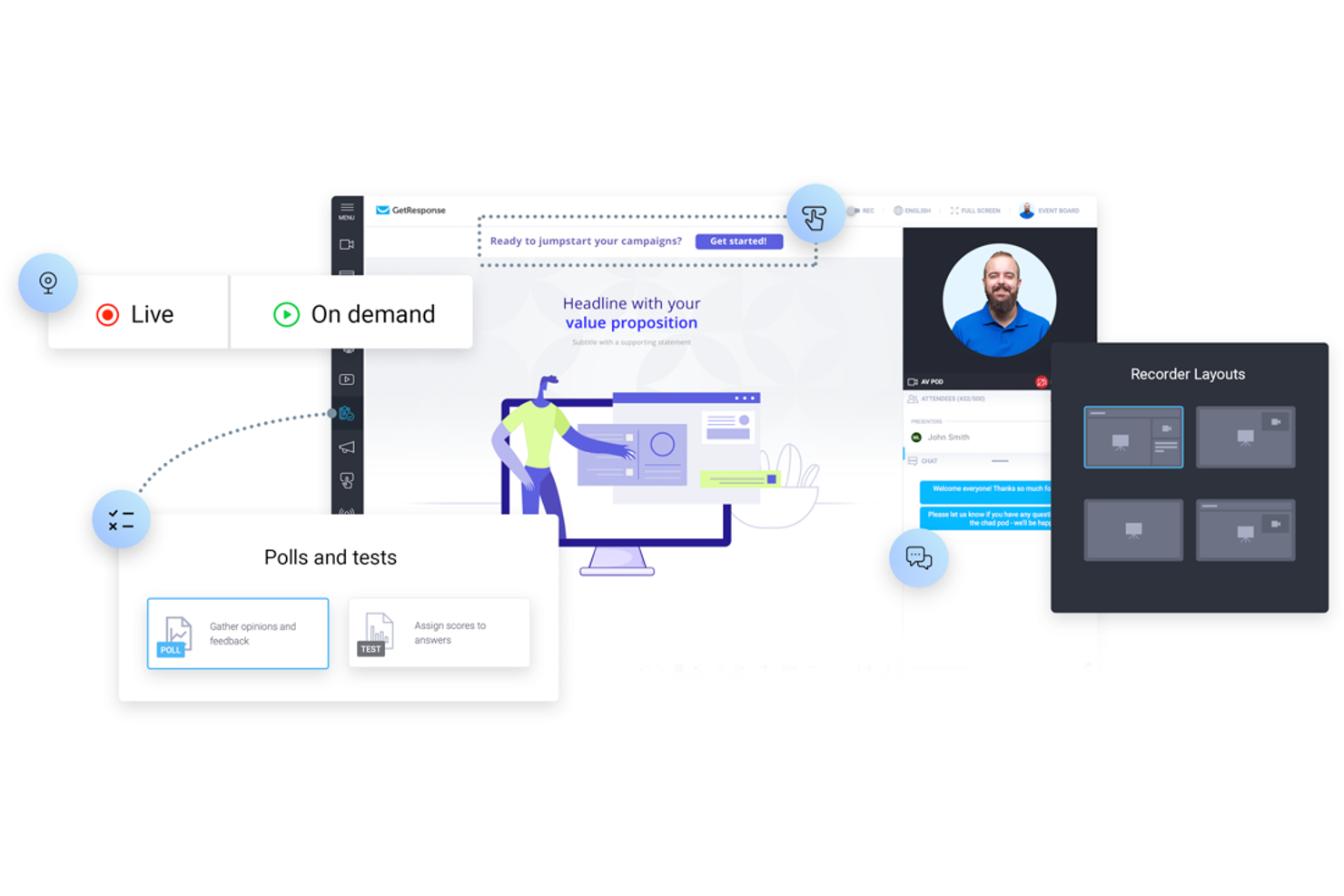
GetResponse is worth a look if you want a landing page builder with advanced email marketing built in. The platform is designed for ecommerce teams, marketers, and small businesses that want to automate campaigns and manage leads from one place. You can create landing pages, set up automated email workflows, and track conversions without switching between multiple tools.
Why It’s a Good Leadpages Alternative
For teams that want more than just landing pages, GetResponse stands out with its built-in email marketing automation. I picked GetResponse because you can design landing pages and then trigger automated email sequences based on visitor actions, all within the same platform. The tool also lets you segment contacts and personalize follow-up messages, which helps you nurture leads more effectively.
If you want to connect your landing pages directly to automated campaigns, GetResponse offers a level of integration that Leadpages doesn’t match.
GetResponse Key Features
Some other features in GetResponse can help you build and optimize your landing pages:
- A/B Testing: Run split tests on landing pages to compare layouts, headlines, or calls to action.
- Webinar Hosting: Host live or on-demand webinars directly from the platform.
- Built-In Popups: Add customizable popups to capture leads or promote offers on your landing pages.
- Conversion Funnels: Set up complete sales funnels that connect landing pages, emails, and checkout flows.
GetResponse Integrations
Integrations include Shopify, Apresly, IdoSell, Responsly, Albato, WebinarJam, Onvocado, FuseWP, and more.
Pros and Cons
Pros:
- Conversion funnel builder for multi-step campaigns
- Webinar hosting included in all paid plans
- Built-in email automation with landing pages
Cons:
- No built-in appointment scheduling feature
- Page speed can lag with image-heavy designs

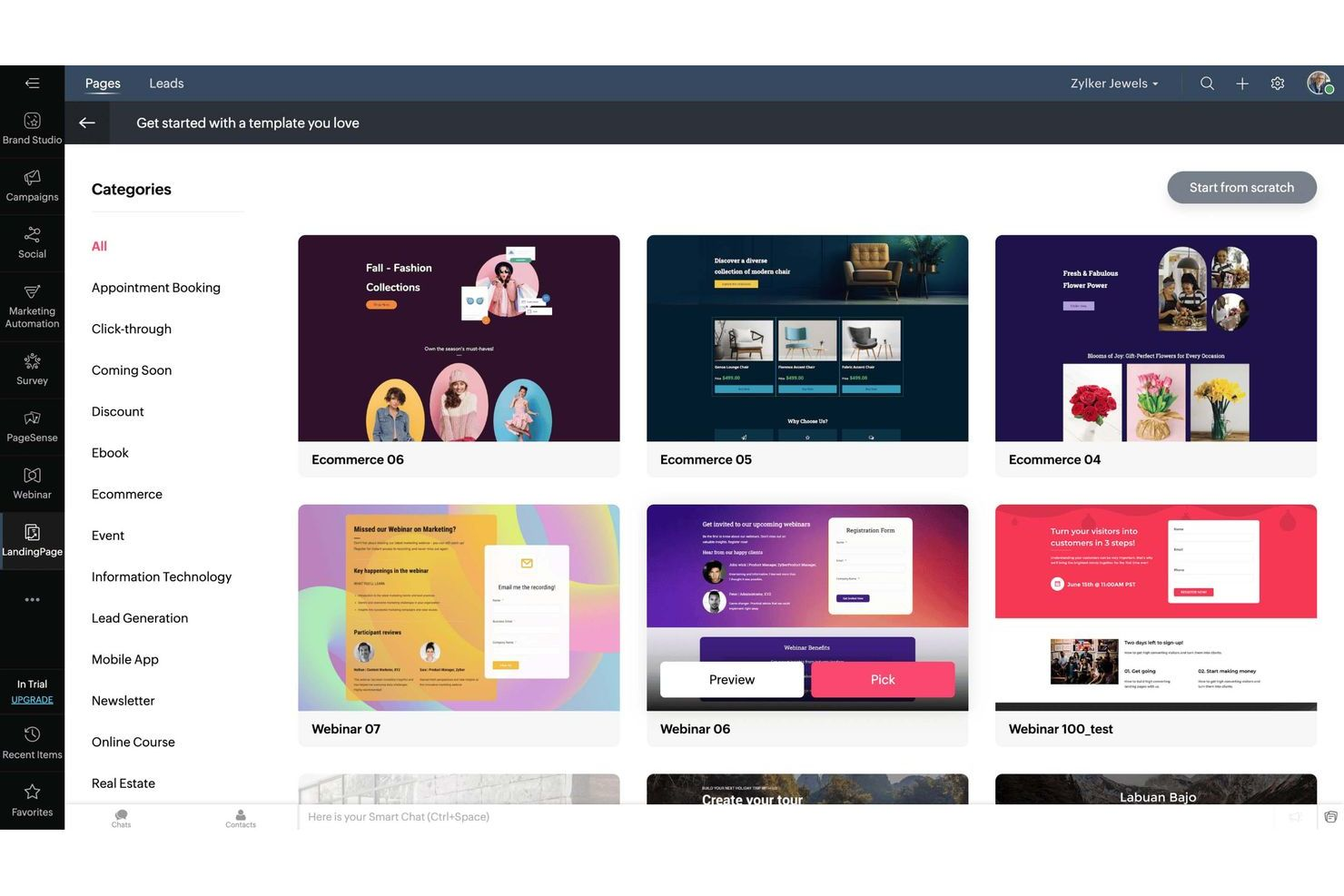
Zoho LandingPage gives you a builder that fits right into your existing workflows if your business already relies on Zoho apps. The tool is designed for teams and marketers who want to connect landing pages directly with Zoho CRM, Zoho Campaigns, and other Zoho products. You can capture leads, automate follow-ups, and sync data across your Zoho ecosystem without manual exports or third-party connectors.
Why It’s a Good Leadpages Alternative
What sets Zoho LandingPage apart is how deeply it connects with the broader Zoho ecosystem. I picked this tool because you can instantly sync landing page leads with Zoho CRM, trigger campaigns in Zoho Campaigns, and use Zoho Analytics for detailed reporting.
These native connections let you automate lead capture, follow-up, and analysis without leaving the Zoho environment. If your team already uses Zoho apps, this level of integration can help you keep all your marketing data and workflows in one place.
Zoho LandingPage Key Features
Some other features in Zoho LandingPage can help you build and optimize your campaigns:
- A/B Testing: Run split tests on landing pages to compare performance and optimize conversions.
- Drag-and-Drop Editor: Design pages visually with customizable blocks and elements.
- Mobile-Responsive Templates: Choose from a library of templates that automatically adjust to different screen sizes.
- SEO Settings Panel: Edit meta tags, titles, and descriptions directly within the page builder.
Zoho LandingPage Integrations
Integrations include Zoho CRM, Zoho Campaigns, TrainerCentral, Zoho Meeting, Zoho Backstage, Bigin by Zoho CRM, Zoho Marketing Automation, and more.
Pros and Cons
Pros:
- Drag-and-drop editor with reusable blocks
- SEO controls for each landing page
- Built-in A/B testing for landing pages
Cons:
- Analytics features require Zoho Analytics subscription
- No built-in pop-up or alert bar tools

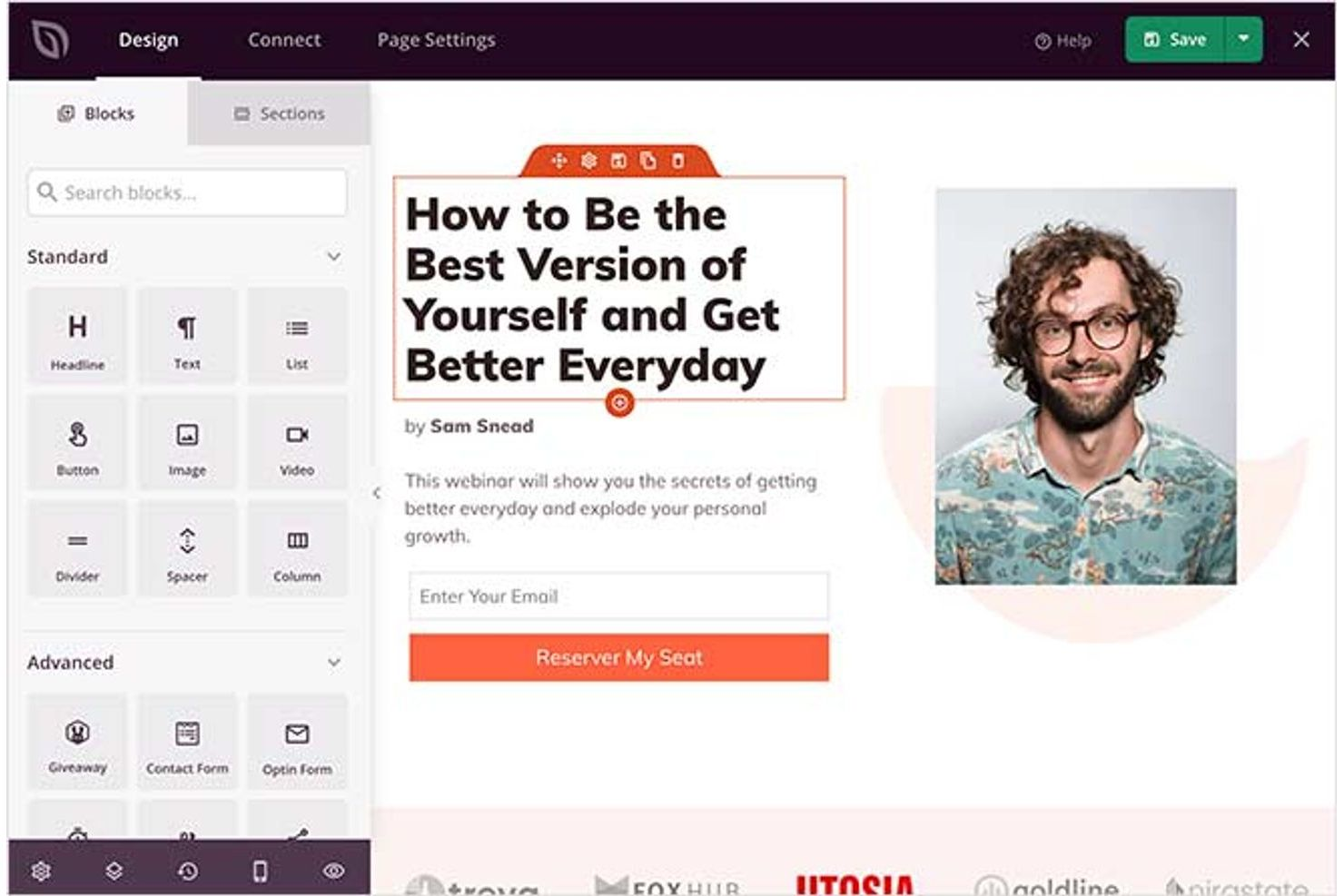
SeedProd offers a drag-and-drop solution built specifically for the platform for WordPress users who want a landing page builder that works natively within their site. This tool is a strong fit for ecommerce shops, bloggers, and marketers who want to quickly launch landing pages without touching code or relying on external platforms. You can create, customize, and publish pages directly from your WordPress dashboard, making it easy to keep everything in one place.
Why It’s a Good Leadpages Alternative
Unlike many landing page builders that require you to work outside your website, SeedProd lets you build and launch pages directly inside WordPress. I picked SeedProd because its drag-and-drop editor is designed specifically for WordPress users, so you can add, move, and customize elements without any coding.
The tool also offers pre-built blocks for opt-in forms, countdown timers, and product grids, making it easy to create high-converting pages. If you want a landing page builder that feels like a natural extension of your WordPress site, SeedProd is a strong alternative to Leadpages.
SeedProd Key Features
Some other features in SeedProd can help you get more out of your landing pages:
- Revision History: Restore previous versions of your landing pages with a single click.
- Access Controls: Set user roles and permissions for editing and publishing pages.
- Spam Protection: Use built-in reCAPTCHA and other anti-spam tools for form submissions.
- Custom Domain Mapping: Publish landing pages to unique domains without extra plugins.
SeedProd Integrations
Integrations include Mailchimp, ActiveCampaign, ConvertKit, AWeber, Constant Contact, GetResponse, Drip, Sendy, MailerLite, Zapier, and more.
Pros and Cons
Pros:
- Custom domain mapping for individual landing pages
- Built-in spam protection for form submissions
- Revision history for restoring previous page versions
Cons:
- No built-in pop-up or alert bar features
- No built-in ecommerce checkout or payment tools

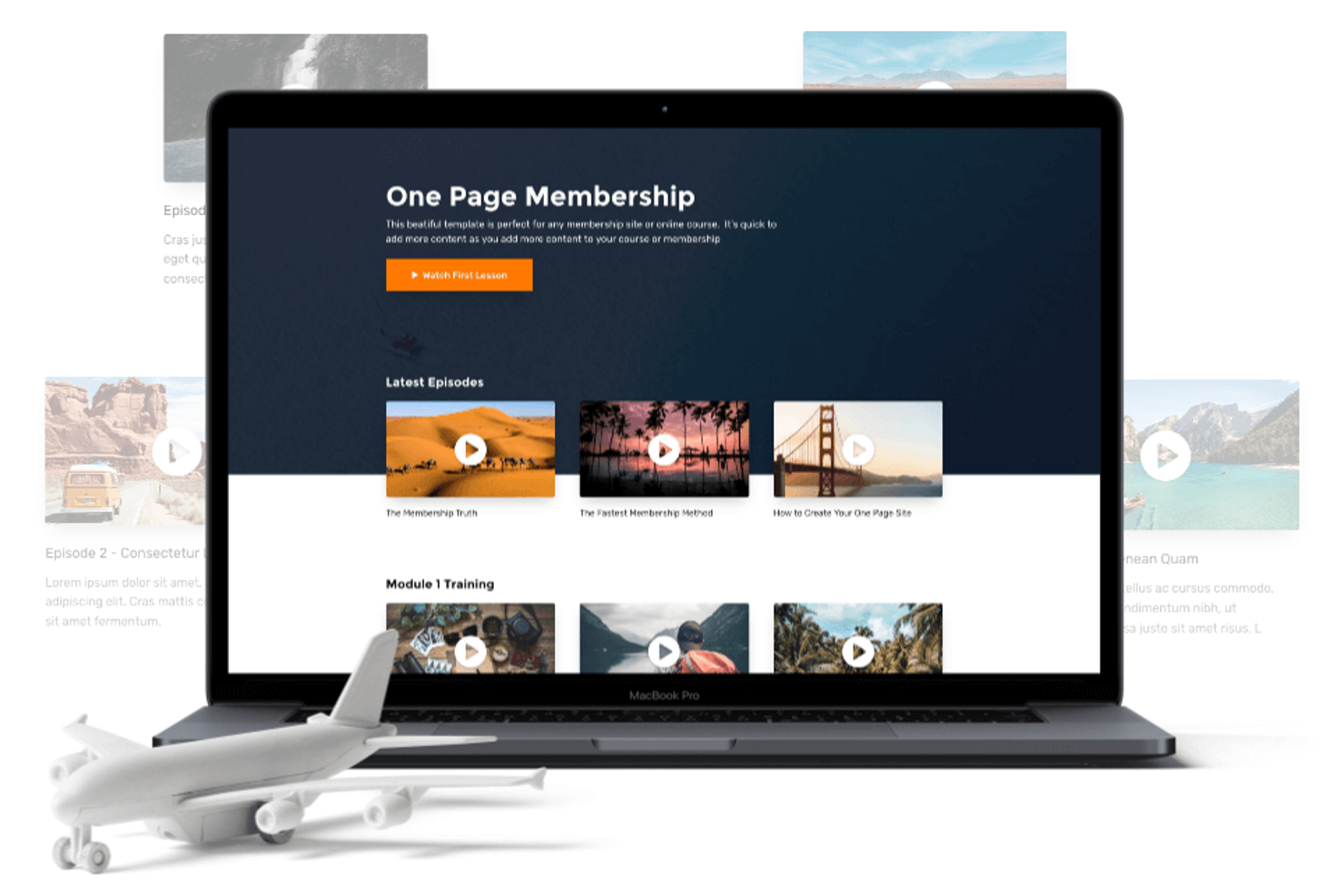
OptimizePress offers a landing page builder designed specifically for smooth WordPress integration if you’re running your site on WordPress. The tool is a strong fit for ecommerce businesses, marketers, and creators who want to build high-converting pages directly within their WordPress dashboard.
Why It’s a Good Leadpages Alternative
For teams committed to WordPress, OptimizePress stands out by offering native integration that Leadpages doesn’t provide. I picked OptimizePress because it lets you build, publish, and manage landing pages directly inside your WordPress dashboard, eliminating the need for external platforms.
The tool also includes a visual editor tailored for WordPress and supports advanced features like membership site creation and sales funnels. This makes OptimizePress a strong choice if you want to keep all your landing page and funnel management within your existing WordPress workflow.
OptimizePress Key Features
Some other features in OptimizePress can help you get more from your WordPress landing pages:
- Template Cloud Library: Access hundreds of pre-built landing pages, sales pages, and opt-in form templates.
- Element Browser: Add countdown timers, testimonials, video embeds, and other conversion-focused elements to your pages.
- Checkout and Payment Forms: Build checkout pages and accept payments directly through Stripe integration.
- Built-In GDPR Tools: Use consent checkboxes and privacy policy links to help meet data compliance requirements.
OptimizePress Integrations
Integrations include ActiveCampaign, AWeber, Campaign Monitor, ConvertKit, Drip, GetResponse, Infusionsoft, Mailchimp, MailerLite, and more.
Pros and Cons
Pros:
- Offers a membership site and course features
- Includes checkout and payment form builder
- Directly installs as a WordPress plugin
Cons:
- Lacks built-in analytics or reporting tools
- No drag-and-drop builder for popups


Leadpages Alternatives Selection Criteria
When selecting the best Leadpages alternatives to include in this list, I considered common buyer needs and pain points related to landing page builder products, like quickly publishing high-converting landing pages and integrating with marketing tools. I also used the following framework to keep my evaluation structured and fair:
Core Functionality (25% of total score)
To be considered for inclusion in this list, each solution had to fulfill these common use cases:
- Build and publish landing pages
- Customize page layouts and content
- Collect leads through forms
- Connect to email marketing tools
- Track basic page analytics
Additional Standout Features (25% of total score)
To help further narrow down the competition, I also looked for unique features, such as:
- Built-in A/B testing tools
- Dynamic content personalization
- Multi-language support
- Direct payment processing
- Advanced animation or interactive elements
Usability (10% of total score)
To get a sense of the usability of each system, I considered the following:
- Simple drag-and-drop editor
- Clean and intuitive interface
- Fast page load times
- Mobile editing capabilities
- Minimal technical setup required
Onboarding (10% of total score)
To evaluate the onboarding experience for each platform, I considered the following:
- Availability of step-by-step tutorials
- Access to pre-built templates
- Interactive product tours or walkthroughs
- In-app chatbots for guidance
- Webinars or live training sessions
Customer Support (10% of total score)
To assess each software provider’s customer support services, I considered the following:
- Live chat or real-time support options
- Email and ticketing system responsiveness
- Access to a searchable help center
- Community forums or user groups
- Availability of onboarding specialists
Value For Money (10% of total score)
To evaluate the value for money of each platform, I considered the following:
- Transparent and flexible pricing plans
- Features included at each price tier
- Free plan or trial availability
- No hidden fees or surprise charges
- Discounts for annual billing
Customer Reviews (10% of total score)
To get a sense of overall customer satisfaction, I considered the following when reading customer reviews:
- Consistency of positive feedback
- Frequency of complaints about bugs
- Praise for customer support quality
- Reports of ease or difficulty in setup
- User comments on feature usefulness
Why Look For A Leadpages Alternative?
While Leadpages is a good choice of landing page builder, there are a number of reasons why some users seek out alternative solutions. You might be looking for a Leadpages alternative because…
- You need more advanced design flexibility
- You want built-in A/B testing without upgrading
- You require deeper integrations with your CRM
- You prefer a free or lower-cost plan
- You need support for multi-language campaigns
- You want to build single-page sites only
If any of these sound like you, you’ve come to the right place. My list contains several landing page builder options that are better suited for teams facing these challenges with Leadpages and looking for alternative solutions.
Leadpages Key Features
Here are some of the key features of Leadpages, to help you contrast and compare what alternative solutions offer:
- Drag-and-drop landing page editor
- Built-in A/B split testing
- Mobile-responsive templates
- Lead capture forms with customizable fields
- Integration with major email marketing platforms
- Real-time analytics and conversion tracking
- Pop-ups and alert bars for lead generation
- Built-in payment and checkout functionality
- SEO settings for each landing page
- Unlimited page publishing on all plans