

10 Best Apparel Management Software in 2026

Best Apparel Management Software Shortlist


Apparel management software is a digital platform that helps fashion businesses organize inventory, orders, production, and collaboration from one place. If you're comparing apparel management software, you’re looking for tools that can handle today’s tight margins, unpredictable demand, and multi-channel complexity. In this guide, you'll get an insider look at the best options for 2026—including where each excels, what real apparel teams get from using them, and how they tackle the challenges you see every day across design, sourcing, sales, and fulfillment.
Why Trust Our Software Recommendations
Our team has been testing and reviewing software since 2012. As retail leaders ourselves, we know how difficult—and important—it is to choose the right software.
For this guide, we evaluated tools using hands-on testing and independent research, scoring tools using our selection criteria.
Our reviews reflect our independent judgment—not a sales pitch.
Best Apparel Management Software Summary
This comparison chart summarizes pricing details for my top apparel management software selections to help you find the best fit for your budget and business needs.
| Tool | Best For | Trial Info | Price | ||
|---|---|---|---|---|---|
| 1 | Best tailored solution for small brands | Free demo available | Pricing upon request | Website | |
| 2 | Best for multi-channel business management | Free demo available | Pricing upon request | Website | |
| 3 | Best for inventory and order management | Free demo available | From $337/month | Website | |
| 4 | Best for compliance management in sourcing | Free demo available | Pricing upon request | Website | |
| 5 | Best with built-in cloud platform | Free demo available | From $59/user/month | Website | |
| 6 | Best for supply chain visibility | Free demo available | Pricing upon request | Website | |
| 7 | Best for rapid product development cycles | Free demo available | Pricing upon request | Website | |
| 8 | Best for remote team collaboration | Free demo available | Pricing upon request | Website | |
| 9 | Best for end-to-end process automation | Free demo available | Pricing upon request | Website | |
| 10 | Best demand planning and forecasting | Free demo available | Pricing upon request | Website |
Best Apparel Management Software Reviews
Below are my detailed summaries of the best apparel management software that made it onto my shortlist. My reviews offer a detailed look at the features, integrations, and best use cases of each platform to help you find the best one for you.

Uphance
Best tailored solution for small brands
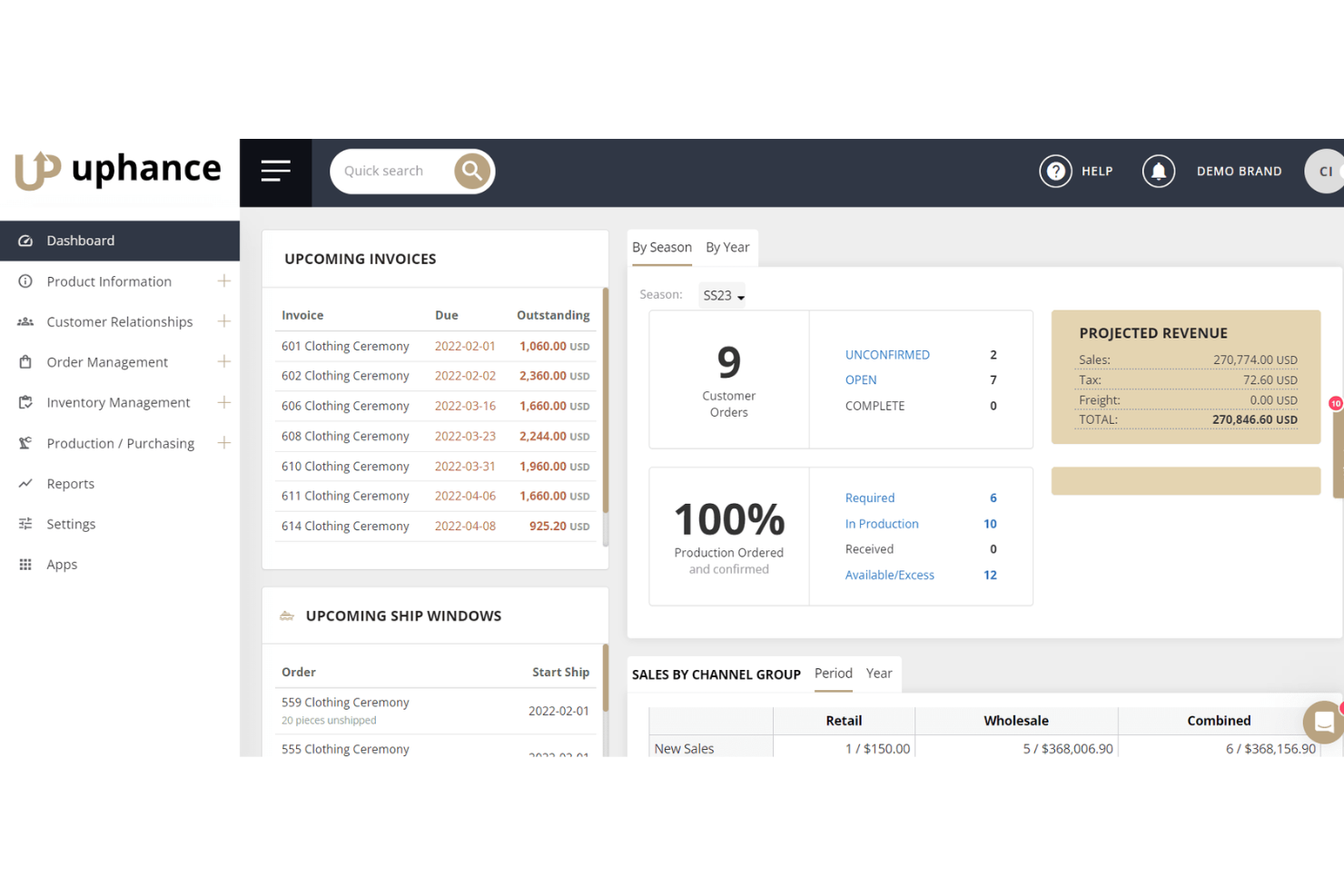
Uphance is an apparel management platform built natively around the fashion data model, covering PLM, production, inventory, wholesale B2B ordering, demand planning, and multichannel order management in one system.
Who Is Uphance Best For?
Uphance is a strong fit for growing apparel brands in the $5M–$100M revenue range that run wholesale and DTC channels side by side.
Why I Picked Uphance
I've included Uphance in my top picks because it's one of the few platforms built natively around the apparel data model from day one. I love how its size-curve forecasting works at the style, color, and size level, separating wholesale pre-book commitments from DTC actuals so small brands aren't overbuying into a single blended number. The B2B wholesale portal, with customer-specific pricing and live inventory visibility, handles real showroom and trade show complexity without bolt-ons.
Uphance Key Features
- Adobe Illustrator plugin: A bidirectional plugin syncs flats, artwork, colorways, and specs directly into tech packs within the PLM module.
- EDI compliance: Supports 850, 855, 856, and 810 EDI documents for retailer compliance, with GS1-128 compliant labeling built in.
- Multi-location stock transfers: Move inventory between warehouses or retail locations, with min/max thresholds triggering automatic replenishment orders.
- Landed cost calculation: Applies duty, freight, and tax costs per unit or shipment, reflecting true inventory valuation across purchase orders.
Uphance Integrations
Uphance offers native integrations with Shopify, WooCommerce, Amazon, ChannelEngine, JOOR, QuickBooks Online, Xero, ShipBob, and Shopify POS. An API supports custom integrations, while Adobe Illustrator connects to PLM through a bidirectional plugin.
Pros and Cons
Pros:
- Branded wholesale portal with real-time inventory
- Advanced demand planning with size curve forecasting
- Built natively for apparel variants and SKUs
Cons:
- Pricing not transparent on public website
- No native POS, only external integrations

Best for multi-channel business management
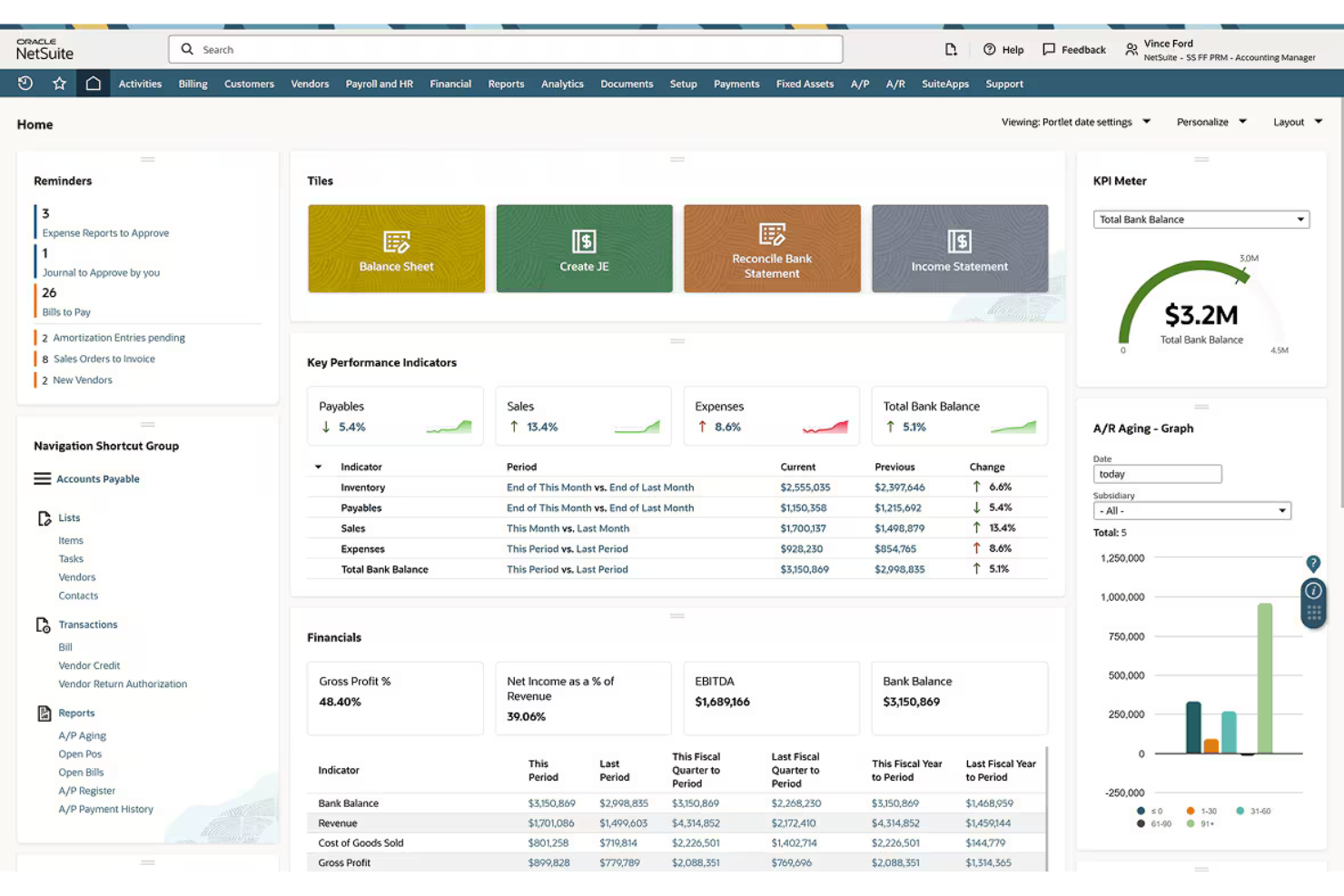
Oracle NetSuite is a cloud ERP platform that covers inventory management, order management, procurement, demand planning, and multi-channel commerce, with native support for style, size, and color matrix SKU structures built for apparel and footwear operations.
Who Is Oracle NetSuite Best For?
Oracle NetSuite fits mid-market and enterprise apparel brands managing DTC, wholesale, and international operations from a single platform.
Why I Picked Oracle NetSuite
Oracle NetSuite earns its spot on my shortlist because it's one of the few platforms that genuinely consolidates DTC, wholesale, and international operations without stitching together separate systems. I'm particularly impressed by its native Matrix Items framework, which tracks every style, size, and color combination as an independent child SKU across all channels in real time. Its procure-to-pay depth, including blanket POs, landed cost allocation, and multi-currency purchasing, handles the sourcing complexity that mid-market and enterprise apparel brands deal with daily.
Oracle NetSuite Key Features
- Demand planning module: Generates supply plans using linear regression and seasonal sales averages to trigger purchase orders and transfer orders automatically.
- NetSuite OneWorld: Manages multi-subsidiary, multi-currency operations across global entities from a single platform instance.
- SuiteCommerce B2B portal: Gives wholesale buyers a dedicated ordering experience with tailored catalogs, quote requests, and online invoice payments.
- Merchandise hierarchy: Organizes inventory by Department, Classification, and Sub-class to support category-level sales reporting and purchasing decisions.
Oracle NetSuite Integrations
Marketplace and partner integrations include Shopify through Celigo, Toolio, Envoy B2B, Lightspeed Retail, RF-SMART, CYBRA, ShipStation, and ShipBob. These connections cover ecommerce, merchandise planning, wholesale, POS, warehouse, RFID, and fulfillment workflows.
Pros and Cons
Pros:
- Strong demand planning and procurement workflows
- Handles matrix SKUs for style, size, color
- Supports multi-channel and international operations
Cons:
- Native POS ends support after January 2029
- No native open-to-buy planning tools

Best for inventory and order management
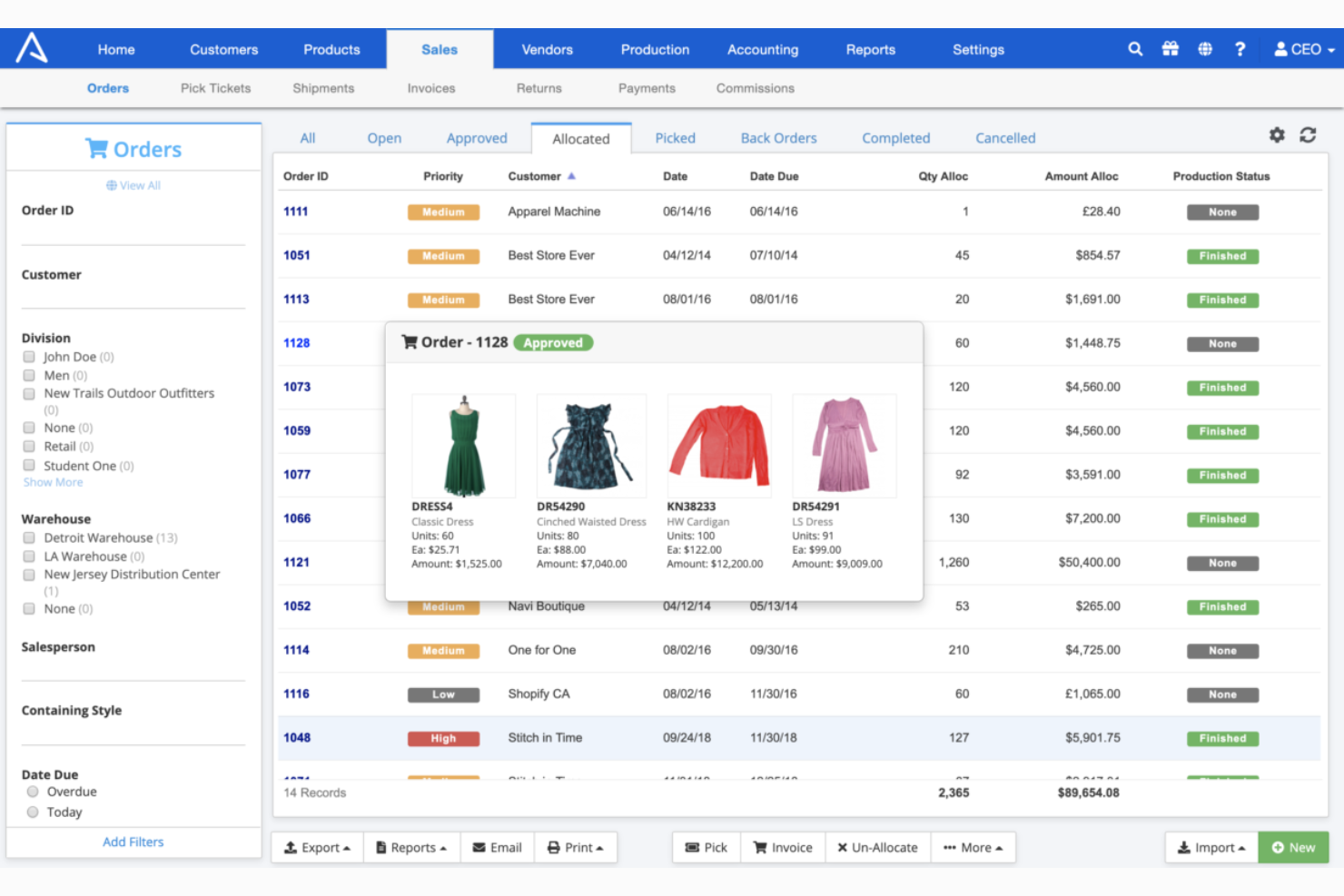
ApparelMagic is an apparel-native ERP that combines style/size/color matrix inventory, order management, PLM, B2B wholesale, and built-in demand forecasting in one platform.
Who Is ApparelMagic Best For?
ApparelMagic is a strong fit for apparel brands and manufacturers that need a single platform to manage complex SKU hierarchies, wholesale orders, and production workflows end to end.
Why I Picked ApparelMagic
ApparelMagic earns its spot on my shortlist because its entire architecture is built around the way apparel actually works: style, size, and color matrix inventory at the core, not bolted on as an afterthought. I picked it specifically for inventory and order management because the ML-powered demand forecasting goes well beyond basic reorder alerts, giving you sell-out predictions sorted by sales velocity so you can act before you're sitting on dead stock. The full PO lifecycle, including multi-stage WIP tracking and BOM-driven landed cost calculation, means production orders and purchase orders stay connected to your inventory numbers in real time.
ApparelMagic Key Features
- Built-in B2B wholesale portal: A native drag-and-drop wholesale storefront with password-protected pages, real-time inventory display, and pre-season ordering—no third-party integration needed.
- PLM with Adobe Illustrator extension: Tech packs, BOM management, and smart costing connect directly to Adobe Illustrator for design-to-production workflows within a single platform.
- Multi-channel inventory sync: Real-time inventory updates across Shopify, Amazon, BigCommerce, Etsy, eBay, JOOR, NuORDER, and multiple warehouses simultaneously.
- AI Copilot: An on-demand AI assistant that handles custom report generation and real-time operational queries using natural language commands inside the ERP.
ApparelMagic Integrations
ApparelMagic lists approximately 24 integrations, including Shopify, Amazon, BigCommerce, JOOR, NuORDER, QuickBooks Online, ShipStation, Square POS, Adobe Commerce, and EasyPost. Enterprise plans include API access for custom integrations; EDI requires third-party middleware.
Pros and Cons
Pros:
- Machine learning demand forecasting dashboards
- Built-in B2B wholesale portal included
- Manages style, size, and color matrix
Cons:
- Barcodes and reporting features have limitations
- EDI requires external middleware setup

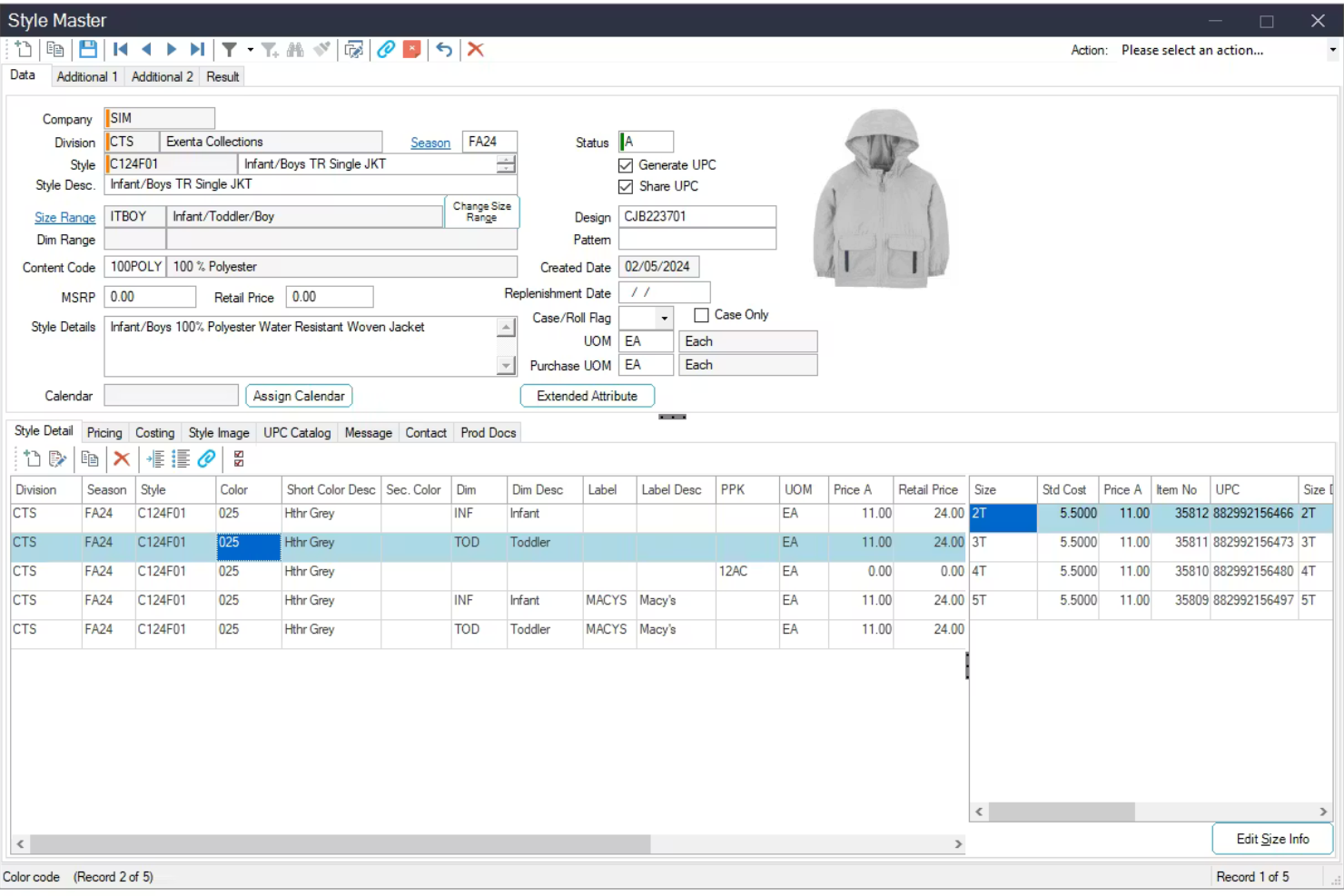
Aptean Apparel ERP is an industry-specific ERP platform built for apparel, footwear, and accessories brands, covering style/size/color matrix inventory, purchase order management, EDI compliance, PLM, warehouse management, and omnichannel order fulfillment.
Who Is Aptean Apparel ERP Best For?
Aptean Apparel ERP is a strong fit for mid-market and enterprise apparel brands managing complex supplier networks and major retail compliance requirements.
Why I Picked Aptean Apparel ERP
Aptean Apparel ERP earns its spot on my shortlist because its built-in EDI and compliance tooling is the most tightly integrated I've seen in an apparel ERP. I particularly like how the vendor portal centralizes tech packs, purchase orders, and ASN/UCC128 compliance in one place, so supplier communication doesn't fall apart across email chains. The integrated EDI module has a documented track record too: MindsInSync cut chargebacks by 90% after switching to it.
Aptean Apparel ERP Key Features
- Style/size/color matrix: Automatically generates individual SKUs for every color and size combination within a style, with season and division hierarchies for structured collection reporting.
- AI-powered order monitoring: AppCentral AI agents flag at-risk orders in real time, identify supply chain disruptions like container delays, and suggest substitute styles to keep fulfillment on track.
- Omnichannel inventory pool: Maintains a single shared inventory across wholesale, DTC ecommerce, marketplaces, retail POS, and 3PL partners simultaneously.
- Native PLM integration: Centralizes design libraries, tech pack creation, version control, and supplier collaboration within the same platform as the ERP.
Aptean Apparel ERP Integrations
Aptean Apparel ERP offers documented integrations with Shopify, Shopify POS, NuORDER, Joor, Salsify, Descartes Sellercloud, FedEx Ship Manager, and ShipStation, plus 3PL connectivity. This supports ecommerce, wholesale, product content, marketplace, shipping, and fulfillment workflows.
Pros and Cons
Pros:
- Native PLM integration with version control
- Single inventory pool across all sales channels
- Built-in EDI module slashes chargebacks
Cons:
- Multiple product editions can confuse buyers
- Reporting often requires third-party BI tools
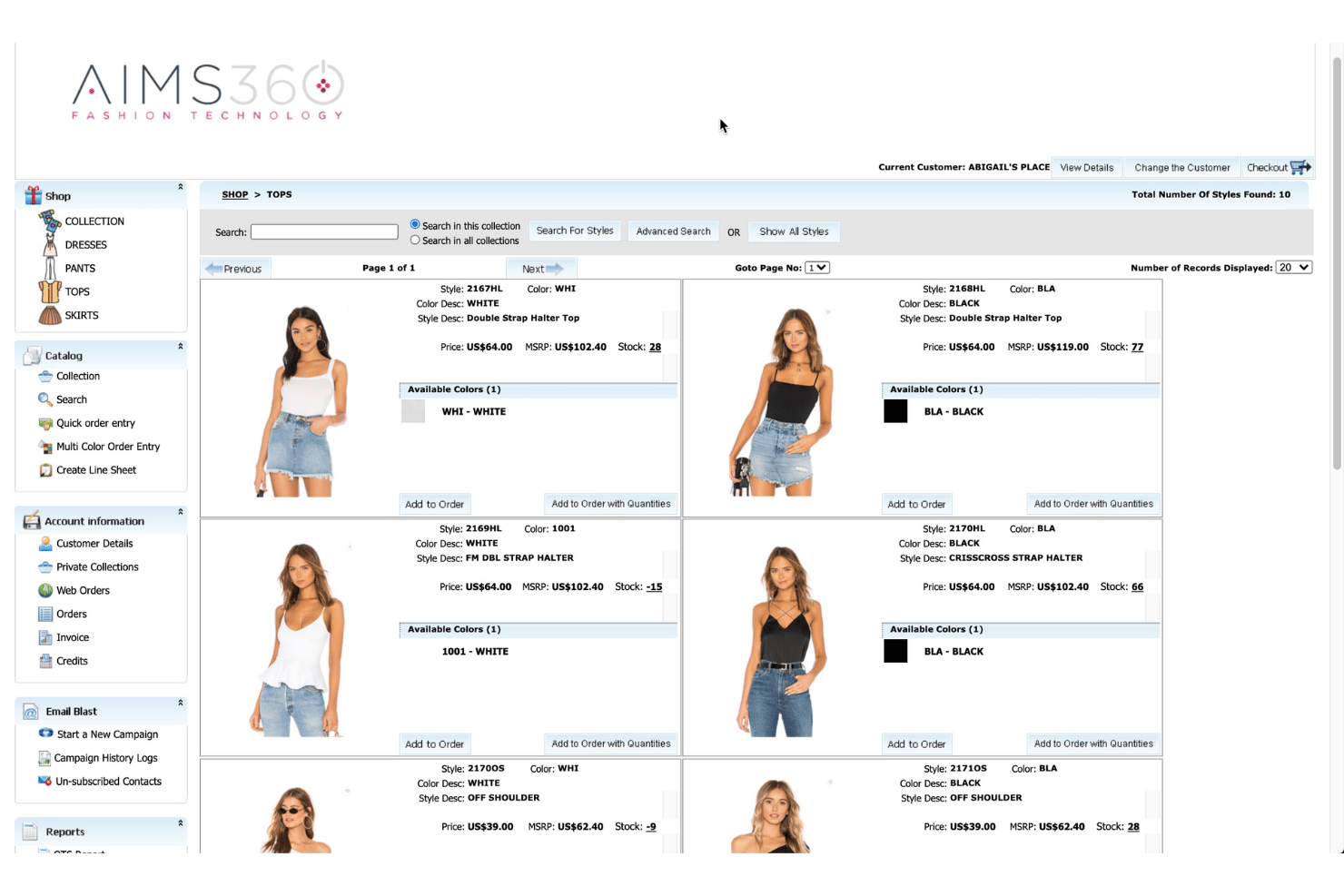
AIMS360 is an apparel ERP platform built around a native style-color-size matrix, with integrated inventory management, order management, warehouse operations, production tracking, and built-in EDI for wholesale retail fulfillment.
Who Is AIMS360 Best For?
AIMS360 is a strong fit for wholesale apparel brands managing multi-retailer EDI compliance alongside omnichannel inventory across production, warehousing, and direct-to-consumer channels.
Why I Picked AIMS360
AIMS360 earns its spot on my shortlist because it's one of the few apparel management platforms where the cloud infrastructure isn't bolted on—it's built in from the ground up on Microsoft Azure, with a 99.9% uptime SLA and no on-premise installation required. I particularly like its native style-color-size matrix, which treats one style across six colors and seven sizes as a single managed record rather than 42 disconnected SKUs. Its in-house EDI engine covering 350+ retail trading partners, with no third-party VAN or per-transaction fees, makes it a strong fit for wholesale brands managing compliance at scale.
AIMS360 Key Features
- Multi-channel order consolidation: A single order pool pulls in wholesale EDI, Shopify, marketplace, B2B portal, and retail POS orders with rules-based warehouse allocation.
- AI-powered demand forecasting: Automated replenishment and allocation use style-, color-, and size-level sales data, sell-through rates, and historical trends.
- Built-in PLM and production tracking: Tech packs, BOMs, WIP tracking, and contractor management are native to the platform across cut, sew, dye, and finishing stages.
- Pivot-grid reporting with apparel dimensions: Role-based dashboards and reports filter by style, color, size, season, division, and channel, with sell-through and margin tracking included.
AIMS360 Integrations
AIMS360 has native integrations with Shopify, Shopify POS, WooCommerce, BigCommerce, Amazon, TikTok Shop, JOOR, NuOrder, Faire, and QuickBooks, plus EDI connections to 350+ retailers. A REST API supports custom integrations.
Pros and Cons
Pros:
- Native production and PLM capabilities
- In-house EDI for 350+ retailers
- Built-in style-color-size apparel matrix
Cons:
- No automated markdown or promotion engine
- Dated and clunky user interface

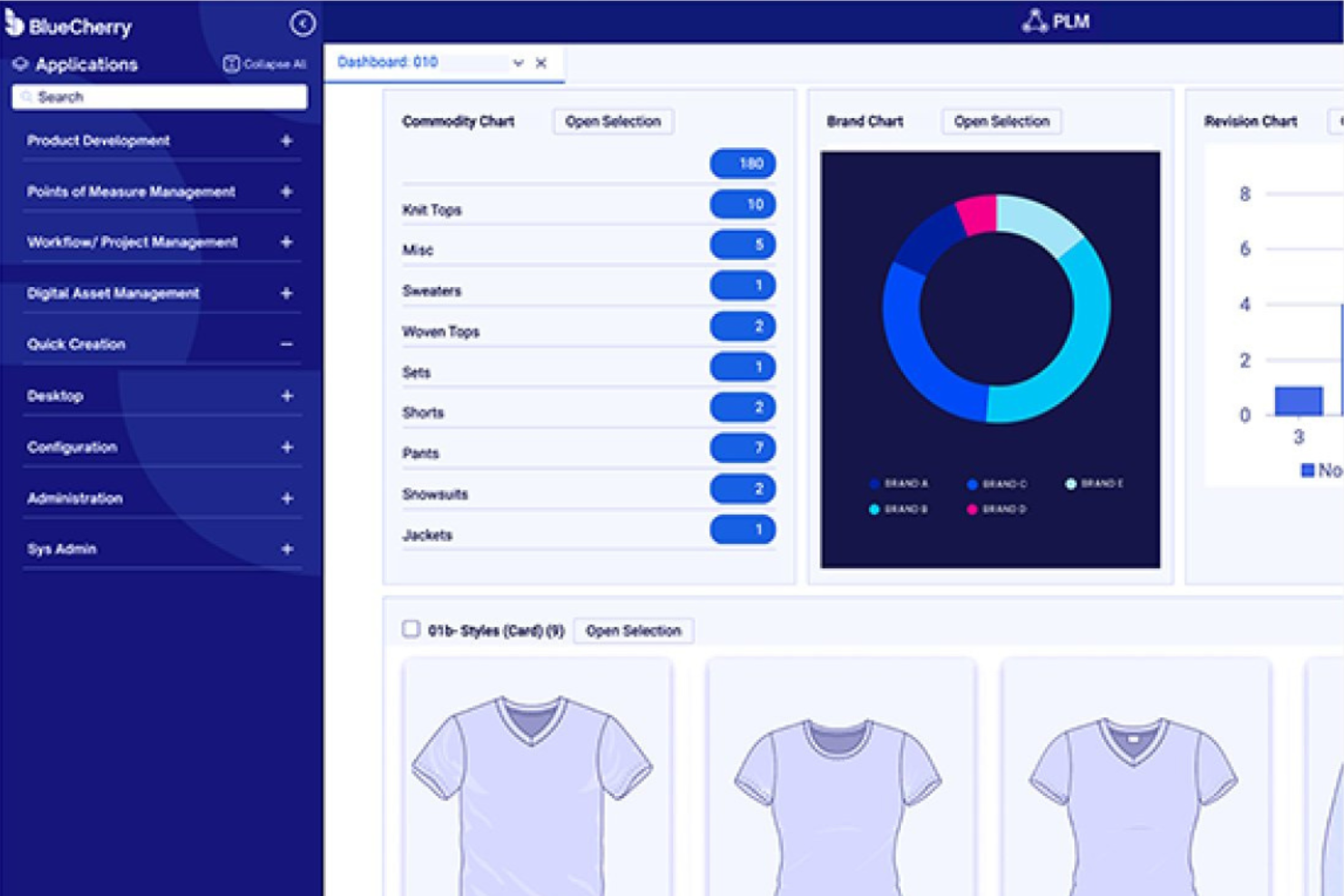
BlueCherry is a modular, cloud-native apparel management platform by CGS that covers the full product lifecycle—from PLM and ERP to AI-driven demand forecasting, B2B wholesale, warehouse management, and omnichannel inventory across ecommerce and marketplace channels.
Who Is BlueCherry Best For?
BlueCherry is a strong fit for mid-to-large apparel and fashion brands that manage complex supply chains across wholesale, ecommerce, and manufacturing.
Why I Picked BlueCherry
BlueCherry earns its spot on my shortlist because its supply chain visibility goes deeper than most platforms I've reviewed. I love how the AI Planning module ingests real retailer POS data, weather signals, and market trends to generate fashion-specific demand forecasts, then automatically triggers replenishment orders. The real-time "available-to-sell" vs. "obligated-to-sell" inventory logic across wholesale, ecommerce, and marketplace channels means you always know exactly what stock you can commit to.
BlueCherry Key Features
- B2B wholesale portal: A branded digital marketplace where buyers can browse customizable catalogs, place bulk orders with tiered pricing, and access real-time inventory data around the clock.
- PLM integration: Tech pack management, BOM tracking, costing, and sample management connect directly with ERP to unify design and operations in one platform.
- EDI module: Native EDI maps and consulting services connect BlueCherry with 1,000+ trading partners, automating data exchange and reducing manual entry errors.
- Quality audit management: Standardized inspection templates, mobile-enabled offline inspections, and real-time alerts keep quality control visible across your entire supply chain.
BlueCherry Integrations
BlueCherry offers documented integrations with Shopify, Magento, BigCommerce, Amazon, Walmart, NuOrder, Joor, Salsify, Adobe Illustrator, and 3D rendering platforms. Its EDI module connects with 1,000+ trading partners, while an open API supports custom integrations.
Pros and Cons
Pros:
- Powerful B2B wholesale sales portal
- AI forecasting tailored for fashion merchandising
- Deep apparel-industry feature specialization
Cons:
- High implementation and customization costs
- No proprietary POS system available

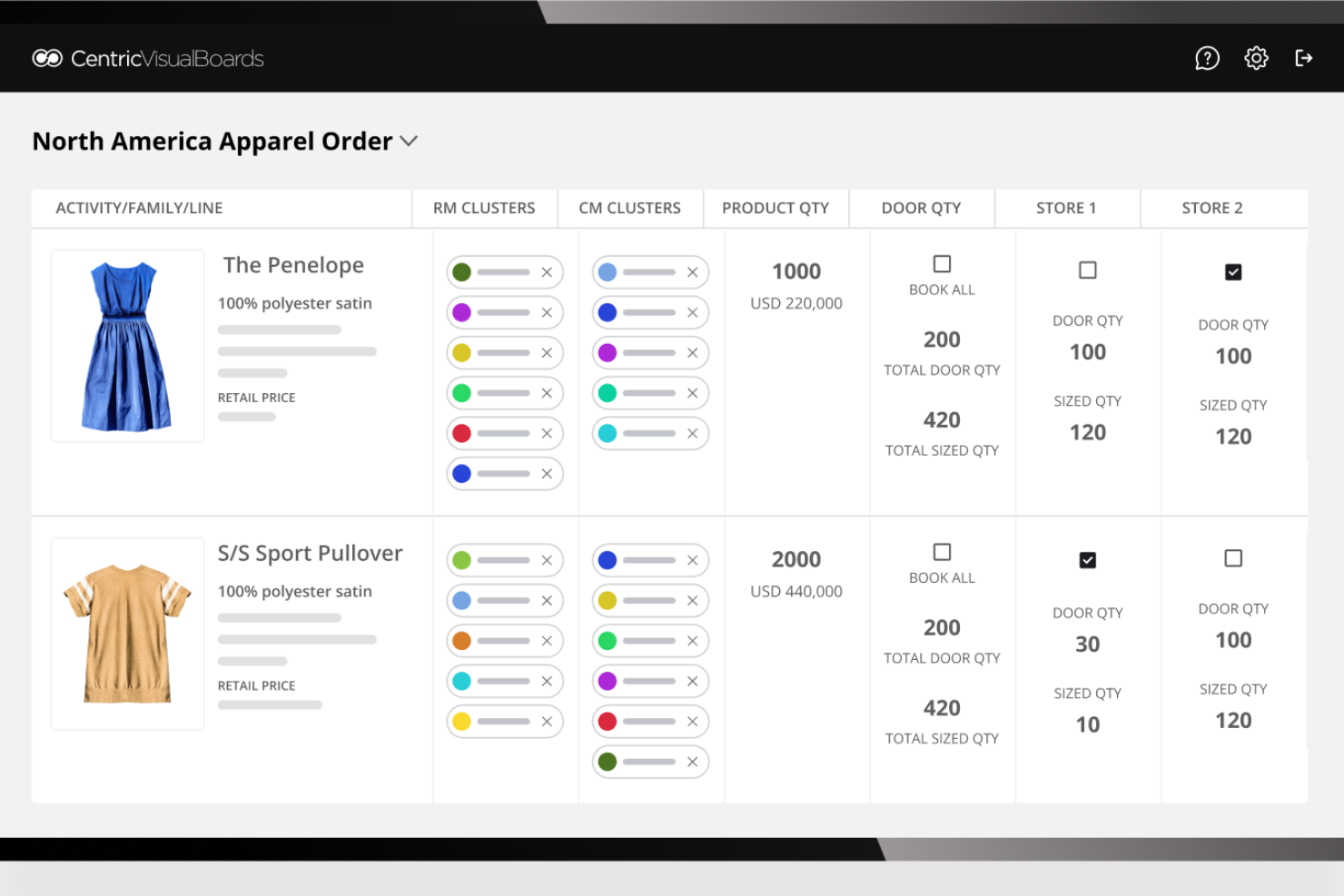
Centric PLM is a product lifecycle management platform built for fashion and apparel brands that covers product development, assortment and merchandise planning, demand forecasting, supplier collaboration, and multichannel product syndication.
Who Is Centric PLM Best For?
Centric PLM is a strong fit for apparel brand owners and fashion planners who manage their own product development, sourcing, and assortment planning from concept through sell-through.
Why I Picked Centric PLM
Centric PLM earns its spot on my shortlist because no other platform compresses the concept-to-market timeline quite like it does for apparel brands. I'm particularly impressed by its AI Fashion Inspiration tool, which accelerates collection ideation, and its Visual Boards feature, which keeps design, merchandising, and planning teams aligned without endless back-and-forth. Brands like Wildfang scaled SKU management by 50–70% without adding headcount, which tells me the platform genuinely delivers where rapid development cycles are concerned.
Centric PLM Key Features
- Assortment and merchandise financial planning: Connects top-level financial planning to in-season execution with OTB budgeting, line planning, and AI-powered demand forecasting across pre-season and in-season periods.
- Centric Market Intelligence: Tracks competitor assortment, pricing, and promotions across 760,000+ brands in 100+ countries, with 12 years of historical data updated every 24 hours.
- Supplier collaboration and vendor scorecards: Lets you issue design briefs to multiple suppliers simultaneously and track vendor performance, factory audits, and compliance in one place.
- Multichannel product syndication via Centric PXM: Distributes product data and syncs real-time pricing and inventory across 1,000+ channels, including Shopify, WooCommerce, TikTok Shop, and in-store kiosks.
Centric PLM Integrations
Centric PLM integrates with AIMS360, Shopify, SAP, Salesforce, Adobe Illustrator, CLO 3D, Browzwear, and Bynder. Open REST APIs and Connector Hub support custom connections with ERP, ecommerce, design, and PIM systems.
Pros and Cons
Pros:
- AI-driven demand forecasting and replenishment
- Enables real-time competitor pricing intelligence
- Optimizes assortment planning and OTB budgeting
Cons:
- Total cost is high for some brands
- No native retail inventory or POS

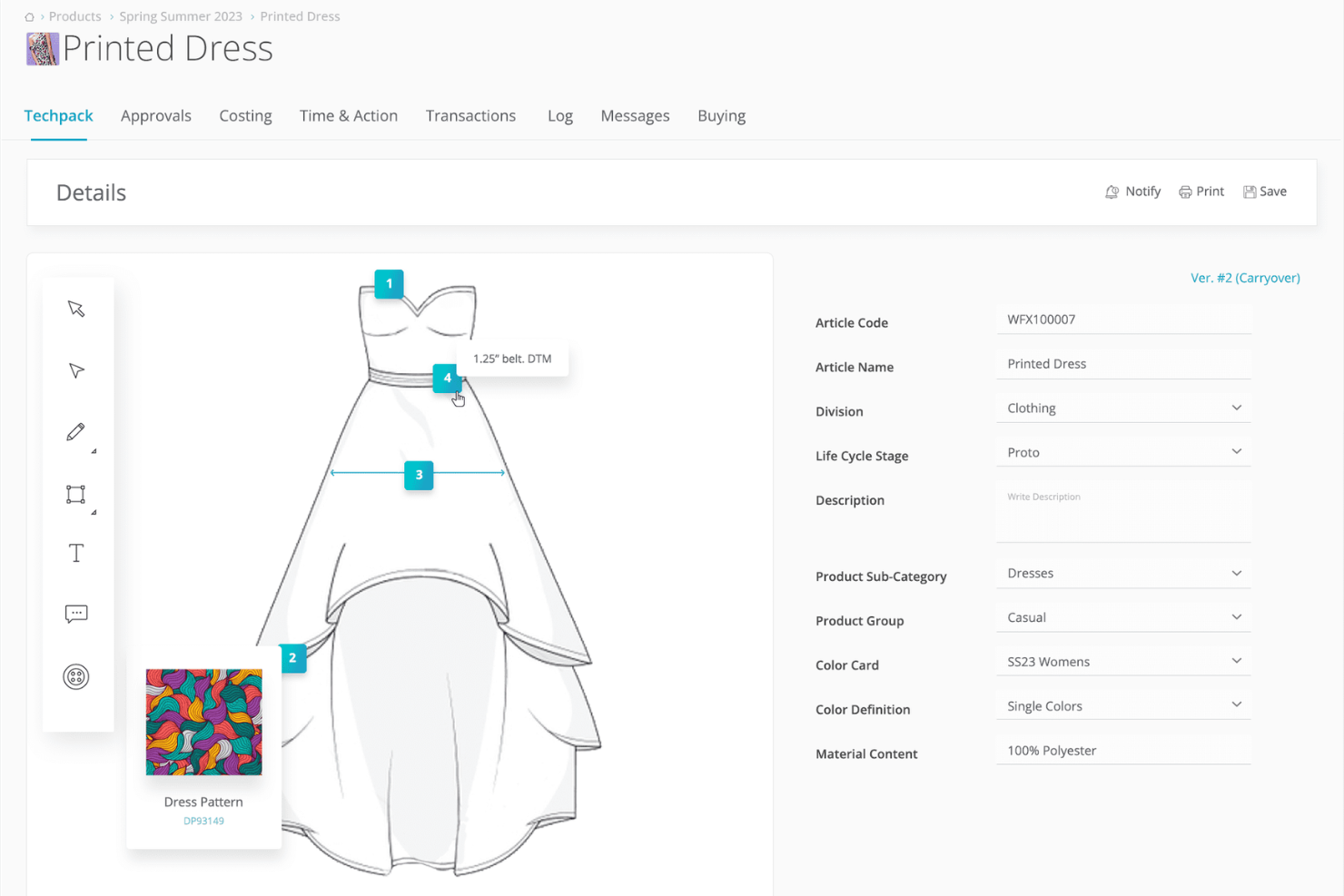
WFX (World Fashion Exchange) is a cloud-native fashion PLM and apparel ERP platform that covers product development, tech packs, costing, vendor collaboration, merchandise planning, and purchase order management in one system.
Who Is WFX (World Fashion Exchange) Best For?
WFX is a strong fit for fashion brands and apparel manufacturers managing product development, sourcing, and vendor relationships across distributed global teams.
Why I Picked WFX (World Fashion Exchange)
I've included WFX in my top picks because it's purpose-built for fashion teams spread across time zones, sourcing markets, and supplier networks. Its centralized vendor portal lets design, buying, and production teams share tech packs, sample feedback, and PO revisions in one place, replacing the email chains that slow cross-border collaboration to a crawl. I especially like the buying plan module, which auto-syncs quantity changes directly to purchase orders and breaks buys down by size curve, colorway, and sales channel simultaneously.
WFX (World Fashion Exchange) Key Features
- Tech pack management: Create, store, and share detailed tech packs with trim sheets, BOM, points of measure, and artwork in a centralized product library.
- Vendor compliance workflows: Track supplier approvals, sample feedback, and quality inspections with milestone alerts and automated escalation reminders.
- Virtual Showroom: Share password-protected digital catalogs with B2B buyers, including 2D/3D product views, in-platform messaging, and promotion analytics.
- NetSuite certified connector: Sync product data, styles, materials, and purchase orders bi-directionally between WFX and Oracle NetSuite via a "Built for NetSuite" certified integration.
WFX (World Fashion Exchange) Integrations
Documented integrations include Oracle NetSuite, Adobe Illustrator, AIMS360, GT Nexus, Fast React, SAP, and Microsoft Dynamics. WFX offers a REST API for custom connections, while Shopify is listed as an integration by Capterra.
Pros and Cons
Pros:
- B2B virtual showroom for wholesale buyers
- Fashion-native style, size, and color matrix
- Built for remote design and sourcing teams
Cons:
- Inventory tools focused on manufacturing, not stores
- No built-in retail POS features

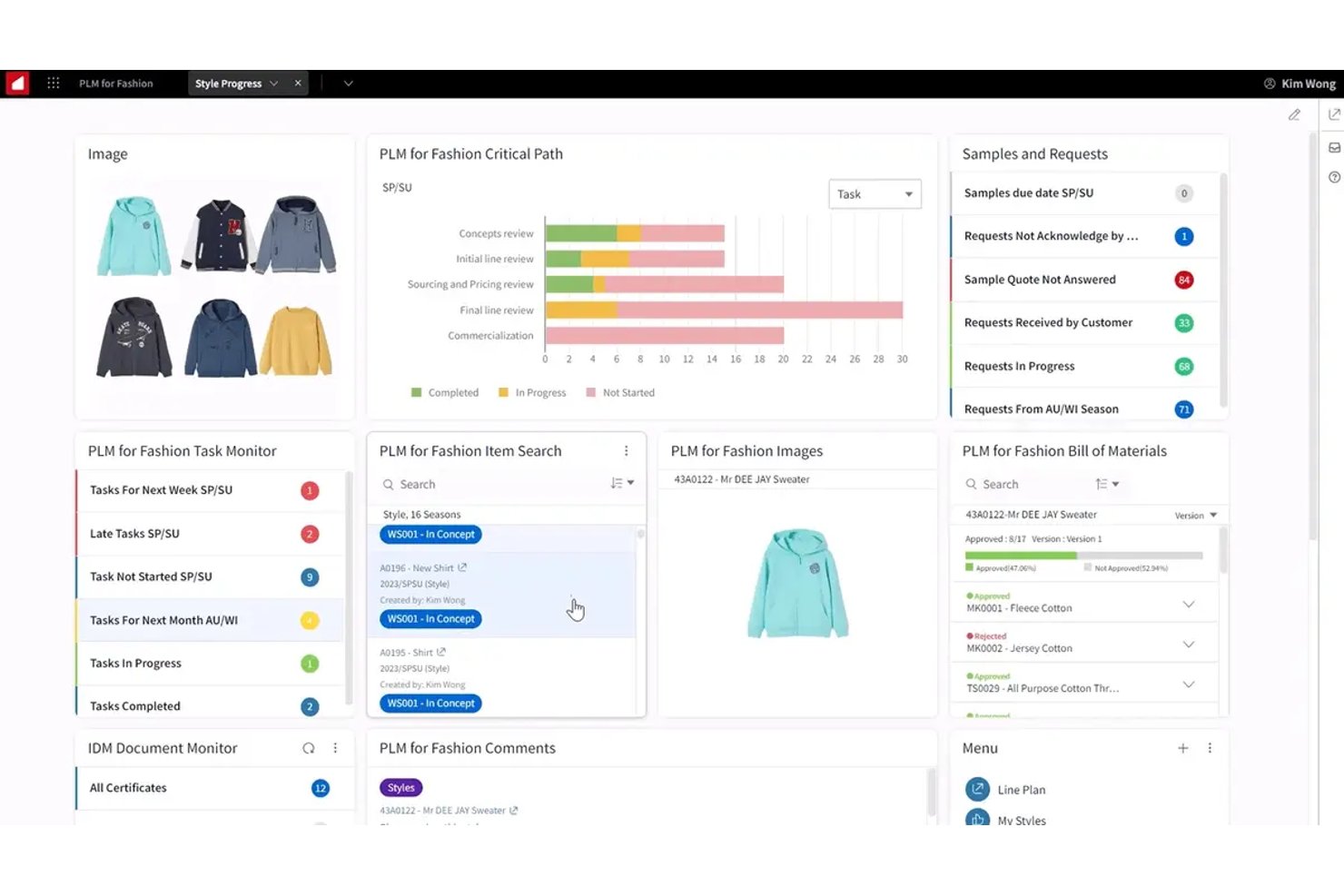
Infor CloudSuite Fashion is an enterprise ERP built specifically for apparel, footwear, and accessories brands, with native style/color/size matrix management, seasonal planning, supply chain visibility, and omnichannel inventory built into a single SaaS platform.
Who Is Infor CloudSuite Fashion Best For?
Infor CloudSuite Fashion is built for mid-market to enterprise apparel, footwear, and accessories brands that need a single platform to manage everything from product design and sourcing through warehousing, wholesale, and omnichannel sales.
Why I Picked Infor CloudSuite Fashion
Infor CloudSuite Fashion earns its spot on my shortlist because it's one of the few ERPs where the style/color/size matrix is a native data structure, not a bolt-on. I picked it specifically for end-to-end process automation because it connects every stage of the fashion value chain, from PLM and sourcing through demand forecasting, warehouse execution, and omnichannel fulfillment, in a single SaaS environment. The Demand Planning add-on uses ML-driven size curves and seasonality signals to automate replenishment, while Infor Nexus gives visibility across 94,000+ supply chain partners from PO issuance through delivery.
Infor CloudSuite Fashion Key Features
- Infor Nexus supply chain network: Connects your team to 94,000+ suppliers, manufacturers, and logistics providers for real-time PO visibility from issuance through delivery.
- Infor PLM for Fashion: Manages tech packs, sample tracking, quality control, and supplier collaboration from initial design through final production.
- Coleman AI analytics: Delivers predictive, prescriptive, and generative analytics embedded across forecasting, exception management, and replenishment workflows.
- Textile compliance and ESG tracking: Provides audit trails and configurable workflows for textile labeling regulations, REACH compliance, and CO₂/water/waste measurement by product.
Infor CloudSuite Fashion Integrations
Marketplace integrations include Shopify, while native connections support Infor Nexus, Infor WMS, Infor PLM for Fashion, and Rhythm for Commerce. Infor OS, ION, and APIs support custom connections to third-party applications.
Pros and Cons
Pros:
- Integrated PLM, merchandising, and supply chain tools
- AI-driven demand forecasting with size curves
- Native fashion matrix for style and size
Cons:
- Long rollout time for large deployments
- Not designed for small apparel companies
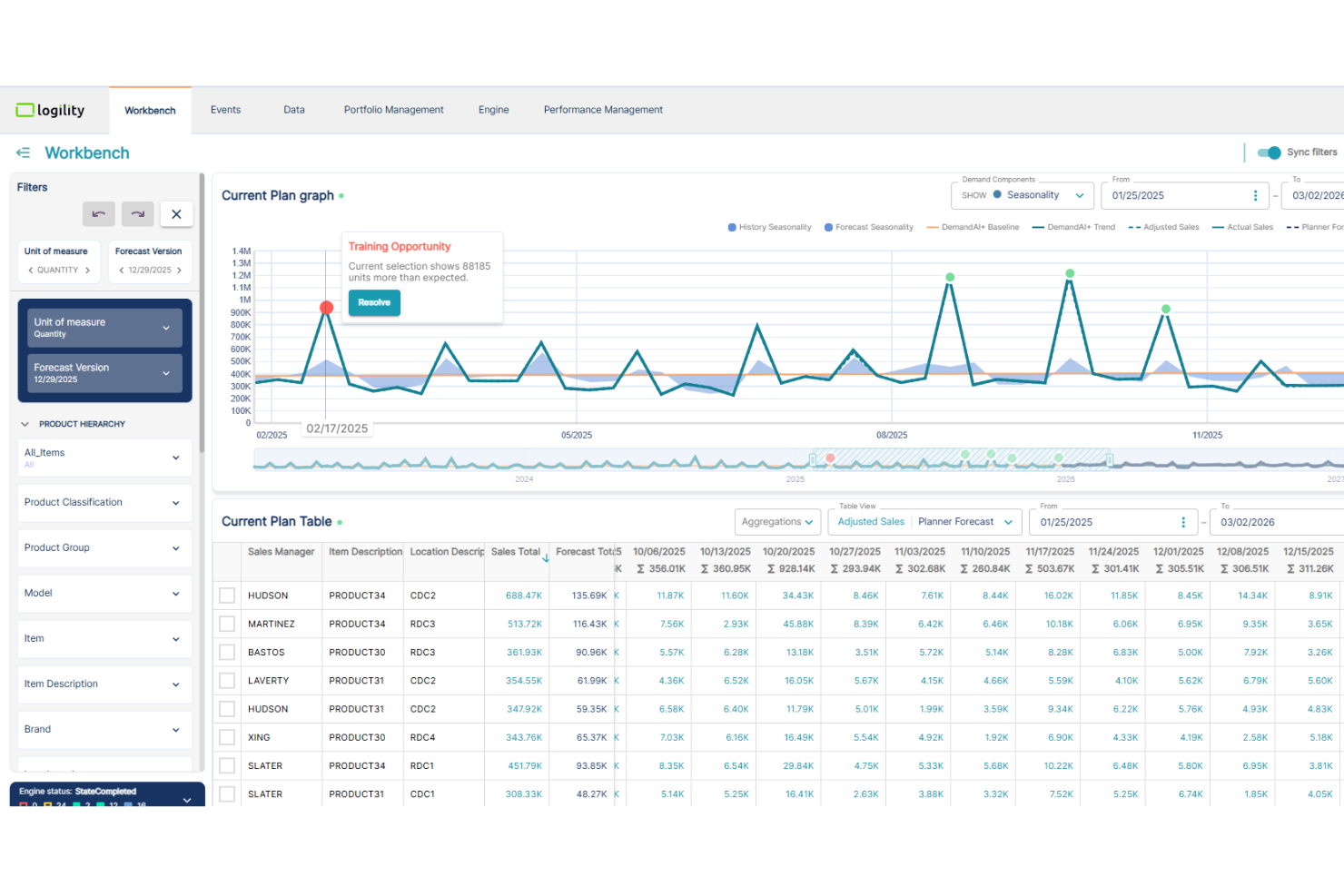
Logility (NGC Andromeda) is an AI-first supply chain planning platform built for apparel, fashion, and footwear brands, combining demand forecasting, merchandise planning, PLM, sourcing, vendor compliance, and inventory management in a single system.
Who Is Logility (NGC Andromeda) Best For?
Logility is built for mid-market to enterprise apparel and fashion brands that need AI-driven demand forecasting and end-to-end supply chain planning across complex, multi-channel operations.
Why I Picked Logility (NGC Andromeda)
I picked Logility as one of the best because its DemandAI+ module handles the kind of forecasting complexity that apparel genuinely demands: style-level forecasts automatically exploded down to size-level projections using size curves, with ML-based anomaly detection cleaning messy historical sell data before it skews your plan. Groupe Dynamite used it to build accurate replenishment plans for 6-to-8-week fashion seasons across its Dynamite and Garage brands. Haggar cut excess inventory by 70% managing omnichannel complexity across outsourced global production.
Logility (NGC Andromeda) Key Features
- Vendor compliance dashboard: Tracks supplier sustainability performance, certificate management, at-risk PO identification, and legal violations across your global supply base.
- Product lifecycle management (PLM): Manages the full concept-to-customer workflow, including tech pack creation, material development, costing, sampling, and critical path management.
- Supply chain traceability: Generates compliance certificates that document every material and product exchange from fiber origin to finished good.
- Sales and operations planning (S&OP): Aligns financial, item-level, and distribution-point plans across brands and functions in a single cross-functional workflow.
Logility (NGC Andromeda) Integrations
Documented integrations include SAP, Oracle Fusion Cloud, Microsoft Dynamics 365, Infor, NuOrder, Shopify, Adobe Illustrator, Browzwear, and CLO3D. API access supports custom integrations, including connections to POS and other commerce systems.
Pros and Cons
Pros:
- End-to-end apparel supply chain coverage
- AI demand forecasting reduces forecast errors
- Native size-curve and style matrix planning
Cons:
- Configuration and setup require vendor involvement
- No built-in point-of-sale module
Other Apparel Management Software
Here are some additional apparel management software options that didn’t make it onto my shortlist, but are still worth checking out:
- Microsoft Dynamics 365
For integration with Microsoft 365 tools
- Blue Link ERP
For grid-based wholesale order entry
- PolyPM
For unified ERP and PLM
- Tukatech
For digital pattern making for startups
- Onbrand PLM
For rapid tech pack creation
- DeSL
For digital supply chain transformation
- Lectra
For advanced 2D/3D pattern making
- Forbytes
For custom analytics and dashboards
- PTC FlexPLM
For enterprise-scale visual merchandising
- Lifecycle PLM
For AI-powered sample collaboration


How I Evaluate Apparel Management Software
I split my evaluation into baseline criteria—like size/color matrix inventory and seasonal PO management—and differentiators that separate the right tool for your operation from the rest.
Core Functionality (Table Stakes For This List)
When I'm selecting tools for my list, I rank each one on a scale from 0 (does not offer the functionality) to 5 (excels in this area) for each core functionality listed below. Then, I calculate the tool's total score into a percentage. Each tool needs to achieve a minimum total score of 65% to be considered for inclusion.
- Style/Size/Color Matrix: I check whether a tool lets you build and manage SKUs across a full style-size-color grid, including bulk entry for large seasonal drops with dozens of colorways.
- Multi-Channel Inventory Sync: Real-time stock accuracy across POS, ecommerce, and marketplaces matters here—I look at how each tool handles oversell prevention during flash sales.
- Assortment & Merchandise Planning: I evaluate whether the platform supports seasonal buy planning and open-to-buy budgets, especially for teams managing multiple product lines per season.
- Purchase Order Management: Each tool should handle the full PO lifecycle—from matrix-based ordering by size run to partial receiving when a vendor ships split deliveries ahead of a launch.
- Apparel POS Integration: I look for POS workflows built around apparel retail, like variant-level returns, barcode and hang-tag printing, and the ability to look up stock at other locations.
- Demand Forecasting & Replenishment: Size-curve sell-through analysis and seasonal trend data should inform reorder recommendations, so I evaluate how each tool turns sales history into buying signals.
Once I have a list of tools that meet the criteria, I consider what sets each platform apart.
Differentiating Factors (What Sets Vendors Apart)
Here's how I compare and contrast different vendors:
Standout Features
A B2B wholesale portal is a major differentiator for brands that sell to boutiques—I look for digital linesheet creation and pre-season ordering workflows. Markdown and promotion engines also stand out when they let merchandisers automate markdowns based on sell-through targets instead of manually adjusting prices at each end-of-season clearance. I evaluate clienteling tools too, especially ones that capture size preferences and purchase history to give store associates the context they need to drive repeat visits.
Beyond Features
Ecosystem integrations matter a lot here—I check whether a platform connects to your ecommerce storefront, accounting system, and shipping tools without requiring middleware or manual CSV imports. Reporting is another area I evaluate closely, especially apparel-specific KPIs like sell-through rate, GMROI, and weeks-of-supply that buyers and planners actually use to make next-season decisions. I also consider pricing structure, since per-store or per-location models can scale very differently than per-user pricing as a retailer grows from two locations to twenty.
How to Choose Apparel Management Software
It’s easy to get bogged down in long feature lists and complex pricing structures. To help you stay focused as you work through your unique software selection process, here’s a checklist of factors to keep in mind:
| Factor | What to Consider |
|---|---|
| Scalability | Will the system grow with the number of products, SKUs, and sales channels? Check if limits or fees apply as you expand to new brands, stores, or regions. |
| Integrations | Does it connect natively with your e-commerce, ERP, or accounting platforms? Confirm integrations with key partners—avoid complex middleware workarounds if possible. |
| Customizability | Can workflows, reports, or roles be tailored to fit how your team merchandises or organizes data? Evaluate support for fields, branding, and unique process needs. |
| Ease of use | Is the interface intuitive for non-technical users? Demo core workflows and ask staff from merchandising, inventory, and fulfillment to try completing daily tasks. |
| Implementation and onboarding | What resources does the vendor provide for data migration, setup, and staff training? Look for guided onboarding, not just a documentation link—especially for large teams. |
| Cost | Beyond monthly costs, clarify onboarding fees, integration charges, and future add-ons. Make sure the total ownership cost fits the budget, and the contract length aligns with your needs. |
| Security safeguards | What encryption, access controls, and audit logs are offered? Ask about compliance with standards like GDPR, and ensure permissions match your team’s sensitive data. |
| Support availability | Is live or after-hours support offered for urgent issues? Find out response times and escalation options, especially if your supply chain runs outside local business hours. |
What Is Apparel Management Software?
Apparel management software is a digital platforms that help retail and fashion teams manage product design, inventory, production, suppliers, and sales across channels. These tools centralize workflows for launching new collections, tracking stock, coordinating manufacturing, and monitoring orders, so your teams can maintain accuracy, meet delivery deadlines, and respond quickly to market trends—all from one system.
Features
When selecting apparel management software, keep an eye out for the following key features:
- Tech pack management: Store, edit, and share product specifications, designs, and measurements in a single digital workspace, keeping design teams and suppliers on the same page.
- Inventory tracking: Monitor stock levels for raw materials and finished goods in real time across warehouses, stores, and ecommerce channels to prevent stockouts or overstock situations.
- Supplier management: Maintain detailed vendor profiles, communication history, certifications, and contract terms, making it easy to track supplier performance and compliance.
- Production workflow tracking: Visualize and manage every stage of your manufacturing process, from sampling and approvals to final delivery, so you can catch bottlenecks and delays early.
- Order management: Process wholesale, retail, and ecommerce orders from multiple channels in one system, with tools to automate fulfillment steps and monitor order statuses.
- BOM (bill of materials) management: Create and update bills of materials for each style, ensuring manufacturing partners work from the latest version and reducing material waste.
- Costing and margin analysis: Calculate unit costs, monitor target margins, and run profitability reports for every style and order, using data from purchasing, labour, and shipping.
- Seasonal line planning: Develop new collections by mapping out assortments, colorways, and delivery windows, so your merchandising and design teams stay aligned.
- Returns and quality control tracking: Log return reasons and defect rates, helping your team spot recurring issues with products, suppliers, or logistics partners.
- Document management: Organize and search critical files, artwork, certificates, contracts, and communications, so nothing goes missing during busy product cycles.
Common Apparel Management Software AI Features
Beyond the standard apparel management software features listed above, many of these solutions are incorporating AI with features like:
- Demand forecasting: Uses AI models to analyze historical sales, external trends, and real-time signals to predict future demand down to SKU, region, or channel, helping you optimize production and inventory allocation.
- Automated anomaly detection: Uses AI to flag unusual order patterns, stock discrepancies, or quality control issues, so teams spot potential disruptions faster and reduce manual oversight.
- AI-driven assortment planning: Assesses current and past assortment performance, seasonal trends, and customer behaviour to recommend optimal product mixes for upcoming collections.
- Automated replenishment suggestions: Uses predictive analytics to recommend when and how much to reorder for each SKU based on sales velocity, lead times, and supplier performance.
- Supplier risk analysis: Applies AI to supplier and logistics data to surface risks—such as delivery delays, quality lapses, or financial instability—helping sourcing teams act before issues escalate.
Benefits
Implementing apparel management software provides several benefits for your team and your business. Here are a few you can look forward to:
- Improved inventory visibility: Real-time tracking of raw materials and finished goods helps teams manage stock levels, reducing both stockouts and overstocking scenarios.
- Faster product launches: Centralized PLM (Product Lifecycle Management), tech pack management, and line planning tools shorten the time to market from concept to store shelf.
- Smoother production workflows: Use the system to automate tracking and approval workflows, ensuring delays and bottlenecks are caught early in the production process.
- Accurate demand forecasting: Data-driven forecasting helps predict future retail trends, so your production planning and buying decisions are data-informed.
- Better supplier collaboration: Built-in supply chain management features keep communications, compliance, and order statuses in a single, organized place for the entire fashion industry.
- Smarter order fulfillment: Omnichannel order management allows you to process orders faster across various sales channels and avoid costly errors.
- Greater control over costs: Costing tools, margin analysis, and returns tracking through your ERP software give you deep visibility into profitability and product performance.
Costs & Pricing
Selecting apparel management software requires an understanding of the various pricing models and plans available. Costs vary based on features, team size, add-ons, and more. The table below summarizes common plans, their average prices, and typical features included in apparel management software solutions:
Plan Comparison Table for Apparel Management Software
| Plan Type | Average Price | Common Features |
|---|---|---|
| Free Plan | $0 | Basic inventory tracking, limited tech pack storage, basic order management, and access for one or two users. |
| Personal Plan | $30-$80/user/month | Core inventory and order management, tech pack creation, single-channel support, limited supplier management, and email support. |
| Business Plan | $100-$250/user/month | Multi-channel sales, advanced inventory control, supplier and production workflow management, returns tracking, and custom fields. |
| Enterprise Plan | $400-$1,000+/month | Unlimited users, advanced automation, custom integrations, AI-powered analytics, dedicated support, and compliance tools. |
Apparel Management Software FAQs
Here are some answers to common questions about apparel management software:
What types of businesses need apparel management software?
This type of ERP solution is useful for fashion brands, manufacturers, wholesalers, and importers. It is particularly beneficial for omnichannel retailers who need an industry-specific way to coordinate inventory management, production management, and product data across teams. Whether you are a small startup or a large apparel business, these software solutions help align your operations with specific business needs.
Can apparel management software handle both raw materials and finished goods?
Yes, most apparel ERP systems let you manage raw materials, trims, and finished goods in one all-in-one platform. This helps buyers and production teams track stock levels and what’s needed for upcoming orders, which is vital for maintaining profitability and preventing overstocking within the supply chain.
How does apparel management software support production tracking?
These tools let you set milestones, monitor approvals, and log issues at each stage of the production process. For those in the textile sector, having this visibility allows your team to see where every style is in the manufacturing cycle. Improving this functionality helps shorten the time to market and allows for better decision-making when hurdles arise.
Is it possible to integrate apparel management software with accounting or e-commerce platforms?
Yes, many systems offer integrations with e-commerce platforms, EDI, and accounting tools. Connecting your sales channels to a cloud-based ERP system ensures that data flows correctly between your CRM and WMS. This connectivity helps optimize your workflows, improves the final customer experience, and reduce the need for manual data entry.
What are the first steps to implementing apparel management software?
Typical first steps include mapping out your business management and supply chain management processes, preparing data for migration, and setting up core users. Most providers provide onboarding resources, like training, product tours, and documentation, to speed up adoption and help fashion brands keep up with changing market trends.