
10 Best Ecommerce PPC Practices To Maximize ROAS

Advertising is the tax every ecommerce brand pays to grow.
With marketplaces and search engines controlling discovery, pay-per-click (PPC) is often the only way to get products in front of customers at scale.
The challenge is managing PPC in a way that doesn’t just burn through your budget. Landing pages need to convert, reporting has to be real time, and ad formats keep changing—Performance Max today, something new tomorrow.
On top of that, small details like free and fast shipping annotations can make or break click-through rates.
This guide covers how to approach ecommerce PPC management with a strategy that drives conversions and return on ad spend.
You’ll get practical best practices and insights into how brands have achieved big gains by tightening their PPC execution.
What Is PPC?
PPC (Pay Per Click) is a type of online advertising whereby a brand pays each time someone clicks on their ad. The ads are usually displayed on a search engine, such as Google or Bing. However, they can also appear on a marketplace such as Amazon, on social media, or even as a display advert on a different site.
The reason PPC is so powerful is that you are essentially buying visitors to your site. Making your website appear organically in a search engine can be quite tricky at first because search engines filter through millions of results, so the competition is high.
This is called search engine optimization, or SEO, and having good SEO is a must, but it can take a long time to start appearing organically for popular search terms.
PPC advertising allows you to get the traffic before you’re ranking organically.
As a quick example, let’s say you sell sunglasses.
If I search "sunglasses" on Google, then the first results are from Sunglasses Hut and other brands like that. It’s going to be difficult to compete with these huge brands.
However, you can pay to appear in the advertising slots at the top of the search, as Sungod did here. A customer may click on these, go to your site, and buy your sunglasses instead.

This is the power of PPC, and as long as the amount you pay in clicks is less than the amount you make in profit from a sale, then you are profitable.
What is Ecommerce PPC Management?
Managing your PPC spend is so important because, without keeping track of your spending, the costs can quickly outweigh the benefits. On top of this, you need to understand how your ecommerce PPC campaigns are performing, so you can adjust them.
Ecommerce PPC management is an important task and can even be a full-time job if you have a big enough budget. Bigger brands have teams focusing solely on PPC.
Over the last few years, the PPC market has exploded. You’ll now find ecommerce PPC management services and agencies specializing in one particular area of PPC, like Amazon PPC, or agencies that use AI solutions to manage PPC spending, such as Perpetua.
For example, demand side platforms are essentially tools that manage and optimize your ad spend with minimal human interference.
So as you can see, PPC is an important part of your overall advertising strategy and is something that big brands take very seriously.
The most common platforms for ecommerce PPC management are Google Ads, Bing Ads, Amazon, and Facebook—and each has a different approach.
For example, Google has simple ads that appear at the top of searches, and they also have Google Shopping links that take a customer directly to a particular product. Social media ads are much more interactive, and you can design videos or images to capture a customer’s attention.
Each PPC method should have its own strategy for success and different KPIs to measure the success.
Want to get insights for better paid ads straight to your inbox? Check out our roundup of the best PPC newsletters.
Why Landing Pages Are Critical to Ecommerce PPC Success
PPC campaigns don’t generate sales on their own—the landing page does the heavy lifting.
If the ad and page don’t line up, you’ll waste budget, hurt Quality Score, and drive down return on ad spend.
Landing pages decide whether a click turns into a conversion.
Search engines even grade the experience: Google factors landing page quality into its Quality Score, which influences your ad rank and cost per click. That means the better your page, the cheaper and more effective your ads become.
Here’s what matters most:
- Message match. The landing page headline should mirror the ad copy so the shopper knows they’re in the right place.
- Speed. Pages that take more than three seconds to load lose customers fast, especially on mobile.
- Focus. Strip out distractions. Each campaign deserves a page with a single clear call-to-action.
- Social proof. Reviews, testimonials, and trust badges reinforce the purchase decision.
- Testing cadence. A/B test your headlines, CTAs, and layouts regularly to keep conversion rates climbing.
For deeper dives, check out our guide to ecommerce landing page best practices and practical conversion rate optimization tips. If cart abandonment is your pain point, see our playbooks on cart abandonment best practices and how to reduce abandonment.
Pros and Cons of Ecommerce PPC Management
Ecommerce PPC management can be a growth engine—but it also demands time, budget, and expertise. Weighing both sides helps you understand where PPC fits in your broader ecommerce marketing strategy.
Pros of ecommerce PPC management
When managed well, PPC campaigns give you speed, precision, and data you can’t get elsewhere.
Targeting the right audience
Unlike shotgun-style advertising, PPC lets you hone in on your target demographic. Social platforms in particular allow highly specific targeting. For example, a sneaker brand could run ads only to men aged 18–25 in California who are interested in fashion.
Measuring your success with analytics
PPC ads generate a wealth of data. You can see which keywords drive conversions, identify terms that waste spend, and measure ROI. On Amazon, PPC reporting even shows the exact keywords that led to purchases—valuable insights you can feed into ecommerce SEO or organic listings.
Getting fast results
The speed is unmatched. As soon as a PPC campaign goes live, your products are visible to potential buyers. If your site is optimized for conversion rate optimization, that traffic can translate into sales right away.
Controlling your marketing budget
Budgets and bids are fully under your control. You can cap daily spend, experiment with bidding strategies, and prevent overspending while still testing new keywords or placements.
Cons of ecommerce PPC management
The same features that make PPC powerful also make it demanding. Without management discipline, costs can spiral quickly.
Time-consuming to manage
Campaigns require daily or weekly adjustments. Many brands eventually hire a dedicated specialist or agency to handle campaign monitoring, negative keyword updates, and reporting.
Complex to navigate
Each platform has its own ecosystem—Google Ads, Bing Ads, Amazon Sponsored Products, Facebook Ads Manager—and each comes with a steep learning curve. You’ll need fluency in keyword targeting, audience segmentation, display ads, retargeting, and landing pages to make campaigns work.
Not a long-term growth engine
Turn off your ads and the traffic stops. PPC is an essential driver, but not a compounding one. It works best as part of a balanced plan with SEO, content, and retargeting fundamentals that build lasting visibility.
10 Best Practices for Ecommerce PPC Management
Running PPC ads without a framework is a fast way to waste budget. The following eight best practices will help you structure campaigns, monitor performance, and refine results over time.
Each builds on the last, so take them step by step instead of trying to implement everything at once.
1. Choose the right PPC platforms
Amazon, Google, and social platforms all have different ad formats and audiences. Start with the one most likely to put your products in front of ready-to-buy customers.
The best way to choose which platform to concentrate on is to think about the goals for your ad. If your products are on Amazon, then using Amazon PPC is the best option. But Google and Facebook might have different target audiences.
For example, Facebook Ads also include Instagram Ads, so if you’re targeting a younger, trendier audience, this could be a great way to showcase your products. These ads can also include imagery and videos, so they are perfect for brand awareness.
Google Ads will target a more general audience, but the customers are often more ready to purchase, especially with Google shopping. If your aim is just to make sales, then this could be the best place to start.
2. Set clear KPIs
KPI stands for Key Performance Indicator, and it is essentially the benchmark by which you measure the success of an ad campaign.
The main KPIs for PPC ads are:
- Sales
- Profit
- Advertising cost of sales
Understanding your profitability is key in any business, but especially in ecommerce, as margins are often tight.
When you’re doing PPC ads, you need to know how much profit you have on each sale so you know how much you can spend on advertising and still remain profitable.
For example, if you sell a pair of jeans for $50 and the total cost of goods, including overheads, is $20, then you have a maximum of $29.99 to spend on advertising and still remain profitable.
If you spend $20 in clicks for each sale, then your advertising cost of sales is $20, and your profit is $10. If your KPI here is just to make more sales, then the goal is to keep PPC ad spend below $30.
Customer acquisition cost (CAC)
Your customer acquisition cost, or CAC, is the amount it costs you to get a customer. PPC is a part of your wider advertising and ecommerce marketing strategy, so understanding all the costs that go into acquiring a customer allows you to plan your PPC spend.
Lifetime value (LTV)
Lifetime value is how much the customer is worth to your business over their lifetime. This is an important metric to understand along with customer acquisition cost because if your customers have a high LTV, then it may be worth spending more on customer acquisition.
An example of this is a subscription box customer. Your profit margin per box might be $10, but the CAC is $15. This means it costs more to acquire the customer than the profit you make.
This sounds bad, but you need to factor in the fact that the customer is going to buy another box, and this time, you don’t need to spend any money to make that sale, so it is probably worth a higher CAC at the outset.
Some website hosting companies make huge losses upfront, right?
Cost per click (CPC)
This is the amount it costs for each click. Different keywords, geographies, and target audiences (amongst other factors) have different CPCs based on how competitive they are. A cheap item might have a CPC that is cents, but the CPC on an expensive item might be many dollars. This is because the ROI on a big purchase, such as a car, might be very high for the brand.
Different geographies might also have different costs as they have different levels of competition. The cost per click for lawyers is a great example of this. In New York City, the CPC is over $100, but the CPC for lawyers in Toronto is much cheaper. Expensive U.S. lawyers can afford big advertising budgets!
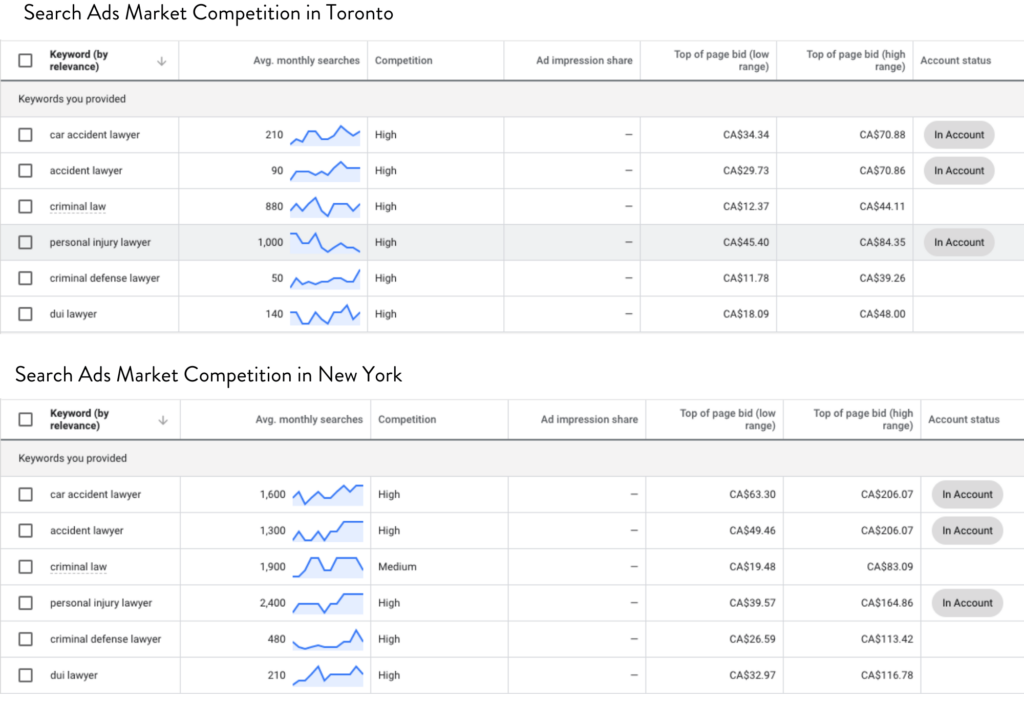
It is vital you understand the CPC before you start your campaigns, or you could be in for a nasty surprise.
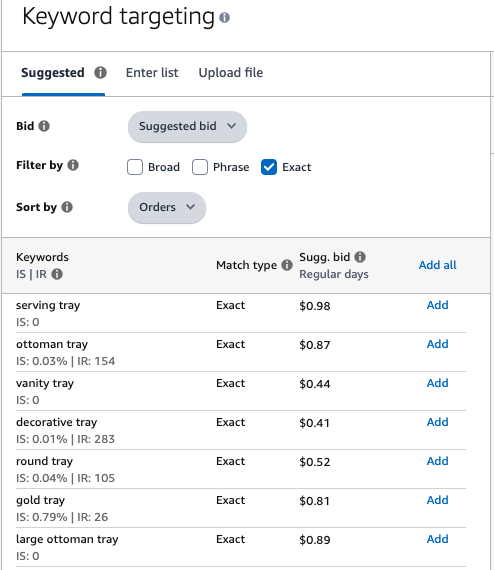
Luckily, for most ecommerce keywords, the CPC is lower, meaning you can afford more clicks for your budget. Amazon PPC Campaign Manager makes it very easy to understand your CPC, as you can see in the image below.
3. Align campaigns to business goals
For most PPC campaigns, the goal will be to make more sales, but it is worth considering using PPC for other purposes.
In the KPIs example before about lifetime value, we looked at how a business can use PPC to build a long-term customer relationship. But this isn’t the only factor.
Some questions to ask are:
- Who is the target market? If you are targeting new customers, then you might want to present your best-selling items. If you’re targeting returning customers, then you might want to show the customer your newest range.
- Are the customers ready to purchase? If you’re selling an expensive item, such as a car, then it is extremely unlikely that a customer will make a purchase based on one ad. In this scenario, you might want to collect customer information so you can send them follow-up info or use retargeting ads to improve brand awareness.
- What is your organic rank? For marketplaces such as Amazon, PPC clicks and purchases can help you with your organic rank for those keywords. In that situation, you might not care that the advertising cost of sales is higher than the profit margin, as you are aiming to get your product higher up the organic ranking.
4. Track performance with analytics
For most sites, Google Analytics will be able to tell you most of the information you need to know about your performance.
Make sure your Google Analytics account is set up correctly to track your goals and traffic.
For other platforms, such as Amazon and Facebook ads, take time to understand how to read the PPC data so you can see what your performance is for your KPIs.
5. Do rigorous keyword research
Keywords are the search terms customers use to find something on a search engine. Sometimes keywords are single words, and sometimes they’re phrases.
This is important because different keywords have different intent.
For example, if a customer is searching for "best football shirt," they might be trying to see which football shirts are the best this season, and the top rankings on the search engine results page (SERP) will be of all the Premier League football shirts.
But if a customer searches for "Manchester United shirt for boys," then you know that customer is looking to buy a Manchester United football shirt for a boy.
Understanding the intent of the customer is really important for your PPC campaigns, as the keyword needs to align with your goal.
When you’re searching for keywords, it is tempting to simply choose the highest search volume keywords because these are the ones that have the most searches per month.
However, it is a much better tactic to target long-tail keywords that have a good customer search intent, like the example above. That way, your ad will get a better click-through rate and conversion, and this will improve your quality score.
It is also important not to choose keywords that are too competitive.
The more competitive a keyword is, the higher the cost per click will be, and the faster you will run out of budget for your campaign.
I always like to target lower search volume keywords at first that have a good purchase intent. Once I’ve collected some data for these keywords, I look at moving on to targeting some of the more high search volume keywords.
Ad platforms can help you find the right keywords for your ads, and services such as Google Adwords and Facebook Ad Manager can really speed up the keyword-finding process. Another alternative is to hire a PPC agency or a PPC expert to help find the best keywords.
6. Continuously optimize campaigns
Once you understand the goals for your campaign, you can track how the campaign is performing. If you have keywords that are performing particularly well, you might want to double down on them.
If you find you have keywords that are taking all your ad spend but producing no sales, you might want to consider adding these keywords to your "negative keywords."
These are keywords that you block the campaign from targeting.
For example, if you sell corded vacuum cleaners, but you find a lot of customers are clicking on your ad for the keyword "battery vacuum cleaners," then you are wasting money because the customer doesn’t want your products.
7. Test ad types and placements
There are many different types of ad placements you can use, and each one can be used for a different purpose.
For example, Google has multiple different ad types:
Paid search ads
Paid search ads are the most common type of Google ads, and they are the ones that appear on Google searches at the top and bottom of the page.
For these ads, you "bid" for a keyword, and then Google shows the best bidder to the customer. They don’t just decide if your ad is good based on how high you bid.
Google search ads have an algorithm that judges the “quality" of your ad, as they want to show the most relevant ads to the customer.
The quality score is decided by factors such as your click-through rate, conversion, geography, size of the bid, and other factors to decide which ad the customer should see.
Display ads
Display ads are ads that appear on other websites.
Google shows these ads to the customer through their ad network and uses the same relevancy factors as paid search ads. Display ads can include images so that they can showcase your brand more than paid search ads.
Another difference with display ads is that they can also include retargeting or remarketing ads.
This means if a customer has been onto your site or shown an interest in your brand before, Google can follow that customer around the internet, showing them ads in order to get them to visit your site again.
This can be very powerful if you have a time-limited product—e.g., if you have a sale ending that week or your product is for a holiday such as Mothers’ Day.
Google shopping ads
Google shopping ads appear both in Google searches and on the Google Shopping page. Customers can be shown products here that are directly related to the search that they’re doing.
For example, if a customer searches for “air fryer,” they will be shown air fryers that they can purchase. These ads have a very high conversion rate as they often show customer reviews as well.
Gmail ads
Gmail ads are text ads that appear in Gmail inboxes.
These ads can also use retargeting, so potential customers will see ads that look like emails in their inboxes. These ads have a great click-through rate and are a great way to get customers to visit your site again.
A good tactic here is to offer a discount to customers to get them to click on the ad and come back to the store.
Other advertising platforms
The examples above are just Google Ad examples, but each ad platform has different types of ads that you can use.
Most of them follow a similar formula, so understanding the basics of Google Ads first is a good place to start.
Once you’ve mastered the core formats, scaling further often means moving into programmatic. To help you compare your options, here’s our list of the best demand-side platforms:


8. Enable Google Free and Fast Shipping annotations
Google gives merchants the ability to display “Free” and “Fast” badges directly on Shopping ads. These annotations make your offer stand out in crowded results and can lift click-through rates and conversions.
To qualify, your store needs to set up accurate shipping information in Google Merchant Center and meet requirements for delivery speed and cost.
Overpromising is a recipe for suspension, so it’s better to slightly overestimate delivery windows than to fall short.
Here’s how to get set up:
- Update shipping settings. Define your service levels in Merchant Center with handling times, delivery speed, and carrier data.
- Use the shipping_label attribute. Apply labels in your product feed to separate items that qualify for free or fast delivery.
- Keep your site consistent. Ensure that the shipping options shown in your ads match what’s available at checkout.
- Validate and monitor. Use the Merchant Center diagnostics tab to confirm eligibility and monitor any disapprovals.
For more context on shipping economics, see our guide on how to offer free shipping and our ecommerce shipping guide.
9. Target by geography
Google and Facebook ads both allow you to target different geographies. This is useful for location-based businesses as customers are usually looking for services in their locality.
Say you have a shoe repair shop. Most of your customers are going to need to visit your store in person. You might therefore want only to target customers within a specific radius of your store.
For ecommerce, this is slightly different, as you have more options for shipping. Some ecommerce stores might only want to ship within the country they are based in.
For example, if you are a shoe store in the UK, you might not want to ship to Germany because of import taxes. Targeting UK-only customers here would be a great option.
10. Build real-time PPC dashboards for transparency
PPC campaigns move fast. If you’re waiting a week to review performance, you’re already behind. Real-time or near real-time dashboards give you the visibility to cut wasted spend, spot broken product feeds, and double down on winners before budgets slip away.
A solid dashboard should bring together Google Ads, GA4, and ecommerce sales data. Start simple:
- Spend and CPC. Know exactly what you’re paying per click, broken down by campaign.
- CTR and conversion rate. See if ads are generating the right traffic and if landing pages are converting it.
- ROAS and revenue. Keep focus on return, not just clicks.
- Search terms and negatives. Track which queries are driving conversions and add wasteful ones as negatives.
- Product performance. Monitor which SKUs are driving sales and which aren’t pulling their weight.
Tools like Looker Studio make it easy to connect Google Ads and GA4 for a free starting point. From there, you can layer in other platforms or build a more advanced marketing dashboard.
If you’re not sure what “good” looks like, use our marketing ROI calculator to set benchmarks and know whether your campaigns are hitting profitability targets.
For a deeper dive, check our guides on digital marketing analytics and ecommerce analytics.
Ecommerce PPC Case Studies and Success Stories
The best way to understand the impact of PPC is to see how real brands moved the numbers.
These case studies show how specific tactics delivered measurable gains—and what you can borrow for your own campaigns.
Segmenting Shopping campaigns to unlock ROAS growth
Decathlon’s campaign overhaul restructured product feeds and layered on smart bidding. The result was a 286% increase in revenue and an 88% lift in marketing ROI.
Why it worked: Segmentation ensured budget went to the highest-converting SKUs, while automated bidding captured demand at the right price.
Using AI targeting to cut acquisition costs
Furniture brand Malouf applied AI-powered targeting across Google and Meta, producing a 104% increase in purchase ROAS, a 49% drop in cost per order, and an 18% improvement in marketing efficiency ratio (MER).
Why it worked: Cross-platform optimization reached shoppers wherever they were in the funnel, reducing wasted impressions.
Driving store visits with omnichannel PPC
An apparel retailer’s omnichannel campaign generated 260,318 unique store visits and nearly 1,900 online purchases by tying display and search ads to in-store foot traffic data.
Why it worked: Tracking both online and offline conversions made it easier to prove ROI and justify continued investment.
Making PPC Work for Your Store
PPC isn’t just about buying traffic—it’s about turning that traffic into profitable growth.
The difference comes down to execution: pairing ads with the right landing pages, surfacing fast-shipping signals, monitoring campaigns in real time, and learning from what’s worked for other brands.
When you put these elements together, ecommerce PPC management stops being an expense line and becomes a growth engine.
The key is discipline—set clear KPIs, build transparent dashboards, and constantly refine.
If you’d rather not tackle all of this in-house, an experienced ecommerce PPC agency can help—but the playbook you’ve just read gives you the foundation to stay in control of spend and results.
Pair PPC with longer-term strategies like ecommerce SEO and content marketing, and you’ll build a balanced growth model that delivers now and compounds later.
Retail never stands still—and neither should you. Subscribe to our newsletter for the latest insights, strategies, and career resources from top retail leaders shaping the industry.


