What Is Inventory Management Software? Features & Benefits

Benefits: Inventory management software helps improve efficiency, reduce errors, and support informed decision-making for increased revenue.
Core Functions: Key features to look for include centralized dashboards, multi-channel syncing, and automated alerts for inventory management.
Real-World Impact: Software tools offer substantial improvements in order processing speed, accuracy, and cost reduction.
Target Users: Various businesses such as omnichannel retailers, DTC brands, and grocery stores benefit from inventory management systems.
Investment Considerations: While implementing inventory software requires investment and poses risks, the advantages often outweigh these challenges.
Inventory management software helps you regain control over your stock, reduce waste, and keep shelves or warehouses moving while protecting your margins. From my own experience, the right platform can be the difference between frustrated teams battling inventory chaos and a business that scales with confidence.
This guide tackles how inventory management software can help reduce headaches like inaccurate stock counts, backorders, missed sales, and clunky manual processes. I’ll break down core features, use cases, and tips for choosing and rolling out new tools to give you a clear path, whether you’re buying inventory software for the first time or just want a better way to work.
What is Inventory Management Software?
Inventory management software is a digital tool that tracks, organizes, and manages product stock across all sales channels and storage locations. It helps your team avoid costly mistakes like overselling, stockouts, and excess inventory.

By giving you clear visibility into inventory levels and movement, these systems improve inventory management and support better planning, faster fulfillment, and smarter purchasing decisions to make it easier to meet customer expectations and grow your business.
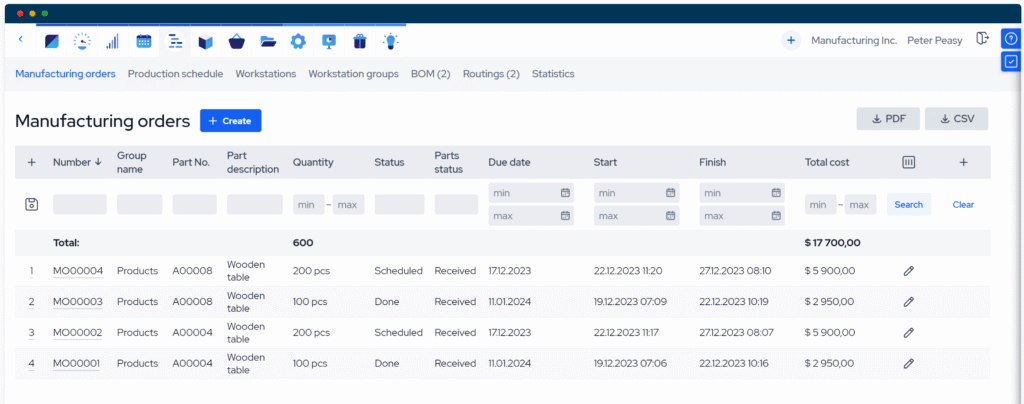
Examples of Inventory Management Software
Here are a few examples of inventory management system interfaces, so you can see what these tools look like in action:

Top Inventory Management Software to Consider
Here’s my shortlist of the best inventory management software solutions:
Clicks on the links below may earn a commission, which supports our independent testing and review of software and services. Learn more about how we stay transparent.


Who Uses Inventory Management Software?
There are many different kinds of teams, brands, and business that can use inventory management software:
- Omnichannel retailers: Track inventory across physical stores, ecommerce sites, and marketplaces (you might also use a specific retail inventory management system).
- Direct-to-consumer (DTC) brands: Track stock levels, fulfillment, and returns from their own channels.
- Warehouse and supply chain teams: Oversee inventory movement and optimize replenishment in distribution centers.
- Grocery and convenience stores: Handle rapid stock turnover, expiration dates, and complex restocking needs.
- Franchise operators: Coordinate inventory standards and reporting for multiple retail locations.
Key Inventory Management Software Benefits & Potential Business Impacts
Inventory management software helps you work efficiently, reduce costly mistakes, and support better decision-making that drives revenue growth and compliance. While these platforms can require a meaningful investment and bring data security or integration risks, the upside usually outweighs the challenges for most retailers.
Use this table to weigh the main benefits and risks of inventory management software for retail operators:
| Benefits | Risks |
|---|---|
| Fewer out-of-stocks and overstocks | Upfront pricing and ongoing inventory management software costs |
| Streamlined order fulfillment | Integration issues with existing systems |
| Lower manual error rates | Data migration problems |
| Real-time inventory visibility | Potential system downtime |
| Improved demand planning | Need for staff training |
| Better multi-location coordination | Data security vulnerabilities |
| Faster response to market changes | Technical support challenges |
Inventory Management Software Case Studies
See how real teams improved accuracy, fulfillment speed, and operations by using inventory management software. These case studies show what changed after adopting new tools, from reducing stockouts to handling higher order volumes with ease.
Case Study: Apparel Brand's Implementation of Shopify POS and NetSuite
A fast-growing apparel brand with both ecommerce and brick-and-mortar operations struggled with disconnected returns, exchange management, and in-store order systems. United Techno implemented a Shopify POS and NetSuite integration to connect their warehouse 3PL systems and automate real-time inventory syncing, order management, and returns processing.
Here are the results of the apparel brand's implementation of inventory management software:
- Manual data entry reduction: Automated returns and order workflows reduced manual data entry by 90%.
- Order processing speed: Order processing cycle time improved by 25%, with 99%+ order accuracy.
- Inventory accuracy: Real-time inventory sync contributed to a 20% reduction in stockouts and overselling.
- Returns efficiency: Return-to-restock time shortened by 60% (from days to hours).
- Customer satisfaction: Net Promoter Score improved by 15 points, and customer retention increased by 10%.
- Operational cost reduction: Automation of returns and order processing contributed to a 20% reduction in operational costs.
Core Features & Capabilities of Inventory Management Software
Look for these key functions in any inventory management software you’re considering:
- Centralized inventory dashboard: See real-time stock levels, product locations, and updates across every store and warehouse from one place.
- Multi-channel syncing: Automatically update inventory as orders come in from online stores, marketplaces, and in-store POS systems.
- Automated stock alerts: Get notified instantly when stock drops below set thresholds, so you can reorder before you run out.
- Barcode scanning and tracking: Speed up receiving, stocking, and order picking to reduce manual entry errors.
- Purchase order management: Create, track, and reconcile purchase orders with suppliers right inside the system.
- Returns and replenishment tools: Manage returns, restocking, and automatic replenishment to keep inventory accurate and avoid overstocking.
- Reporting and forecasting: Access sales, inventory turnover rates, and customer demand forecasts to guide smarter replenishment and seasonal planning.
- Integration with accounting and ERP systems: Sync sales, costs, and inventory data with your broader ecommerce business systems for better reporting and compliance.
Inventory Management Software Use Cases: Typical Processes & Workflows
Inventory systems help you automate, monitor, and improve tasks like stock tracking, order fulfillment, cycle counting, purchasing, and returns. By centralizing these workflows, you can cut back on manual entry, spot human error faster, and keep products available across channels. This makes it easier to meet customer expectations and adapt to demand without constant firefighting or guesswork.
Use this table to see how inventory management software supports key retail processes:
| Process | Description | How Software Helps |
|---|---|---|
| Stock Level Tracking | Monitor product quantities across warehouses, stores, and channels in real time. | Central dashboards and automated syncing update stock counts instantly to minimize errors and stockouts. |
| Order Fulfillment | Pick, pack, and ship customer orders accurately and quickly from the right location. | Integrated tools route orders, generate pick lists, and update inventory as orders are processed. |
| Purchasing & Replenishment | Restock fast-moving items before they run out and manage supplier relationships and purchase orders. | Automated alerts trigger reorder points; purchase order workflows streamline approvals and vendor communication. |
| Returns Processing | Accept, inspect, and restock returned merchandise across channels for accurate inventory. | Automated returns flows update inventory and issue refunds to reduce manual work and improve accuracy. |
| Inventory Auditing | Regularly check actual stock against records to prevent shrinkage and spot discrepancies early. | Built-in cycle counting, barcode scanning, and reporting tools simplify audits and flag issues instantly. |
Types of Inventory Management Software & Similar Tools
Inventory management software comes in several forms, and a few adjacent tools are worth knowing so you can make sure you're investing in the right solution:
| Type | Differentiator |
|---|---|
| Warehouse management system (WMS) | Designed for large-scale warehouse operations, including bin locations, labor management, and advanced fulfillment workflows |
| Order management system (OMS) | Centered on order routing, fulfillment orchestration, and customer-facing order tracking across channels |
| Point-of-sale (POS) system with inventory features | Primarily a sales and payment tool that includes basic stock tracking tied directly to in-store transactions |
| Enterprise resource planning (ERP) system | A broad business management platform that includes inventory as one module among many, including finance, HR, and procurement |
| Supply chain management (SCM) software | Focuses on the end-to-end supplier and logistics network rather than day-to-day stock and fulfillment operations |
Ready to Choose the Right Tool for Your Business?
Once you've got a clear picture of what inventory management software does and how it works, the next step is understanding what it delivers. Explore the benefits of inventory management software to see what you should expect from the right solution before you commit.