

Ecco la verità: il miglior sistema POS per la tua piccola impresa è quello che non ti ostacola e ti permette di vendere rapidamente, in modo affidabile e senza prosciugare il conto corrente.
Dopo più di un decennio nel settore delle operazioni al dettaglio — a riparare terminali POS durante la pausa pranzo, formare al volo i nuovi assunti e, sì, anche a contrattare con i proprietari degli immobili — ho visto cosa funziona e cosa è soltanto una confezione appariscente.
Questo elenco non riguarda il clamore pubblicitario; riguarda le soluzioni POS che fanno davvero la differenza per le piccole imprese, oggi. Facciamo in modo che tu possa configurare strumenti capaci di ripagarsi.
Perché fidarsi dei nostri consigli sui software
6,700+
Reviews
20
Industry experts
16+
Evaluation factors
14
Years
Il nostro team testa e recensisce software dal 2012. In quanto leader del retail noi stessi, sappiamo quanto sia difficile — e importante — scegliere il software giusto.
Per questa guida, abbiamo valutato gli strumenti attraverso test pratici e ricerche indipendenti, assegnando un punteggio agli strumenti in base ai nostri criteri di selezione.
Le nostre recensioni riflettono il nostro giudizio indipendente, non un discorso di vendita.
Tabella comparativa dei software POS per piccole imprese
Questa tabella comparativa riassume i dettagli sui prezzi dei miei migliori software POS per piccole imprese:
| Tool | Best For | Trial Info | Price | ||
|---|---|---|---|---|---|
| 1 | Ideale per flussi di lavoro alimentati da AI per negozi di forniture | Demo gratuita disponibile | Da $499/mese (fatturato annualmente) | Website | |
| 2 | Ideale per integrare la gestione dei pagamenti con l'analisi dei dati | Preventivo gratuito disponibile | Prezzo su richiesta | Website | |
| 3 | Ideale per il monitoraggio avanzato dell'inventario | Prova gratuita + demo gratuita disponibili | A partire da $59/mese | Website | |
| 4 | Ideale per e-commerce, dispositivi mobili e terminali di pagamento fisici | Prova gratuita di 3 mesi | A partire da $79/mese | Website | |
| 5 | Miglior sistema POS omnicanale | Primi tre mesi a $1/mese | Da $39/mese, più il 2,7% per transazione | Website | |
| 6 | La scelta migliore per sistemi POS per ristoranti basati su iPad | Demo gratuita disponibile | Prezzo su richiesta | Website | |
| 7 | Ideale per la scalabilità | Prezzo su richiesta | Website | ||
| 8 | Ideale per piccole imprese che vogliono risparmiare sulle commissioni | Dimostrazione gratuita disponibile | Da Interchange + 0,40% + 8¢ (varia in base al volume) | Website | |
| 9 | Ideale per le opzioni hardware | Prova gratuita di 30 giorni sul piano senza hardware | A partire da $14,95/mese più 2,6% + $0,10 per transazione | Website | |
| 10 | Ideale per elaborazioni dirette a basso costo | Preventivo gratuito disponibile | Prezzo su richiesta | Website |


I 10 migliori software POS per piccole imprese, recensiti
Di seguito troverai una panoramica dei migliori sistemi POS per piccole imprese. Ogni panoramica include un riepilogo delle funzionalità più interessanti, delle integrazioni, dei dettagli sui prezzi disponibili e di alcuni importanti vantaggi e svantaggi.
 Ideale per flussi di lavoro alimentati da AI per negozi di forniture
- Demo gratuita disponibile
- Da $499/mese (fatturato annualmente)
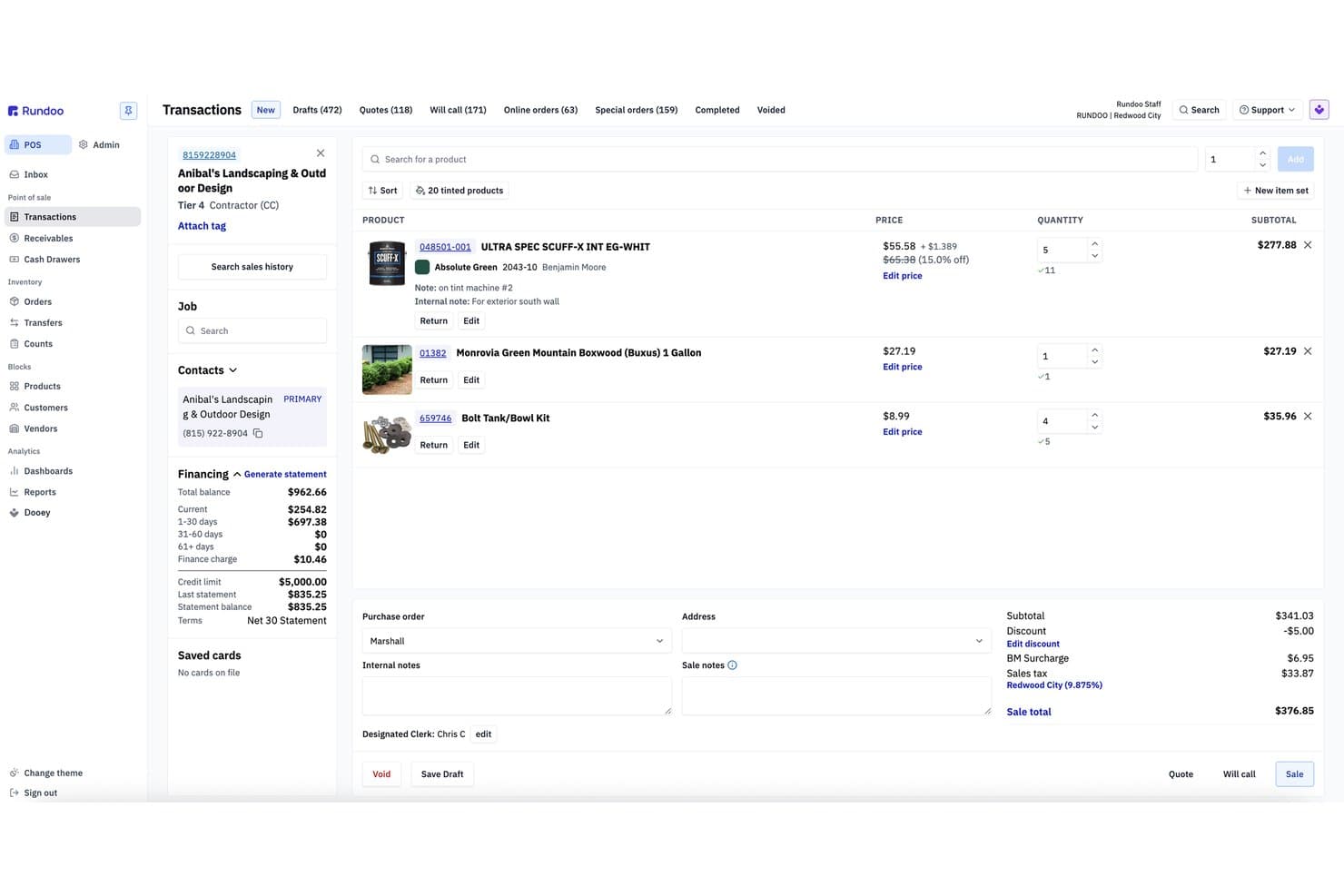
Rundoo offre una schermata dettagliata delle transazioni POS con elenco prodotti, informazioni sul finanziamento clienti, prezzi e totale di vendita per l'uso nelle piccole imprese. Rundoo è una piattaforma POS ed ERP progettata per negozi di forniture indipendenti—ferramenta, vernici, agricoltura & mangimi, giardinaggio e legname—che combina punto vendita, inventario in tempo reale, acquisti, conti clienti e un assistente AI in un unico sistema.
Per chi è più indicato Rundoo?
Rundoo è particolarmente adatto ai proprietari indipendenti di negozi di forniture nei settori ferramenta, vernici, agricoltura & mangimi, giardinaggio e legname.
Perché ho scelto Rundoo
Rundoo si guadagna il suo posto nella mia selezione grazie a Dooey, il suo assistente AI integrato che offre funzionalità che non ho visto in altri strumenti POS per piccole imprese. Posso chiedergli di generare un ordine d'acquisto basato sulle tendenze di vendita recenti e sui livelli di magazzino attuali, oppure generare un report sui prodotti che hanno perso margine lo scorso mese. Esegue anche confronti di prezzo in tempo reale con i concorrenti vicini, il che è davvero utile per un proprietario di un negozio di vernici o ferramenta che vuole restare aggiornato sui prezzi.
Funzionalità principali di Rundoo
- Cataloghi distributori integrati: Accesso in tempo reale ai dati dei prodotti dei fornitori e ordinazione automatica dai principali fornitori di ferramenta e vernici.
- Conti con addebiti per i professionisti: Gestione del credito degli artigiani, fatturazione, prezzi personalizzati cliente per cliente e invio diretto degli estratti conto dal POS.
- Sincronizzazione dell'inventario in tempo reale: Monitoraggio delle giacenze tra sedi con aggiornamenti istantanei a ogni vendita o ricevimento merce.
- Modulo eCommerce nativo: Vendita online tramite vetrina web integrata e completamente connessa all'inventario e ai prezzi in negozio.
Integrazioni Rundoo
Rundoo offre integrazioni native con QuickBooks, Orgill, Emery Jensen, House-Hasson e Do it Best. È disponibile un'API per integrazioni personalizzate.
Pros and Cons
Pros:
- Automatizza ordini d'acquisto e reportistica
- Progettato specificamente per ferramenta e negozi di forniture
- Accesso approfondito ai cataloghi dei distributori dal POS
Cons:
- Focalizzazione di nicchia che esclude la maggior parte dei rivenditori generici
- Comunità di utenti più ridotta rispetto ai principali strumenti POS
Learn more about Rundoo: 2Ideale per integrare la gestione dei pagamenti con l'analisi dei dati
Stax
- Preventivo gratuito disponibile
- Prezzo su richiesta
Visit WebsiteCustomer Rating:4.2/5
Stax Pay offre una soluzione POS tutto-in-uno per l'elaborazione dei pagamenti, la reportistica e l'analisi dei dati. Stax Pay è una piattaforma di elaborazione dei pagamenti che offre alle aziende soluzioni integrate, tra cui accettazione dei pagamenti, fatturazione automatizzata e sovrapprezzo conforme alle normative. Il suo software di gestione aziendale e POS tutto-in-uno permette di elaborare in sicurezza pagamenti sia di persona che online, oltre a integrare gli strumenti necessari, come i software di contabilità, all'interno di un'unica dashboard.
Perché ho scelto Stax Pay: Ho selezionato Stax Pay perché offre una piattaforma unificata di gestione aziendale che supporta l'elaborazione dei pagamenti con carta di credito sia in presenza che online. Questo approccio tutto-in-uno è ideale per le piccole imprese che desiderano consolidare funzioni come fatturazione, pianificazione della fatturazione ricorrente, monitoraggio dei pagamenti e gestione finanziaria. Apprezzo anche che la piattaforma offra solide capacità di analisi e reportistica per monitorare tendenze, rimborsi e cronologia delle transazioni.
Caratteristiche principali e integrazioni di Stax Pay
Caratteristiche principali includono pagamenti programmati e automatizzati, sincronizzazione delle informazioni sulle transazioni in presenza e online, e strumenti aziendali integrati. La piattaforma offre anche una funzione di sovrapprezzo conforme che permette alle aziende di trasferire ai clienti le commissioni per l'elaborazione delle carte di credito.
Inoltre, Stax Pay offre una gamma di funzionalità POS per vari scenari di pagamento, tra cui integrazione con piattaforme SaaS, pagamenti ACH, pagamenti online e mobili, e transazioni in presenza.
Le integrazioni includono Slack, Zapier, Microsoft Office, Google Suite e CRM. È anche possibile integrare le funzionalità di elaborazione dei pagamenti in software e app mobili tramite kit di sviluppo software mobile completi in Javascript e Python.
Pros and Cons
Pros:
- Conveniente con eventuali risparmi sulle commissioni di elaborazione
- Fatturazione ricorrente e strumenti di fatturazione
- Strumenti tutto-in-uno e soluzione punto vendita
Cons:
- Potrebbe non essere la soluzione migliore per le aziende a basso volume
- Potenziali costi aggiuntivi
Learn more about Stax: Ideale per il monitoraggio avanzato dell'inventario
- Prova gratuita + demo gratuita disponibili
- A partire da $59/mese
Visit WebsiteCustomer Rating:4.8/5
KORONA POS è una soluzione completa per diversi settori, tra cui retail, ristorazione veloce e servizi di biglietteria. KORONA POS è un sistema di punto vendita basato su cloud progettato per soddisfare una vasta gamma di tipologie di attività, compresi negozi al dettaglio, aziende vinicole, spazi per eventi e molto altro. Riconosciuto per la sua versatilità e la gamma completa di funzionalità, KORONA POS offre un'interfaccia intuitiva che semplifica il processo di vendita sia per i dipendenti che per i responsabili.
Perché ho scelto KORONA POS: Uno dei principali motivi per cui KORONA POS si distingue per le piccole imprese è la sua scalabilità e facilità d'uso. Il sistema è progettato per crescere insieme alla tua attività, offrendo un'integrazione fluida con vari strumenti hardware e software. Inoltre, KORONA POS mette a disposizione funzionalità avanzate di gestione dell'inventario che aiutano i proprietari di piccole imprese a tenere sotto controllo i livelli di stock in tempo reale, riducendo il rischio di eccedenze o esaurimento delle scorte. Gli strumenti di gestione delle relazioni con i clienti (CRM) del sistema consentono anche alle aziende di mantenere relazioni solide con la clientela.
Caratteristiche principali e integrazioni di KORONA POS
Le caratteristiche principali includono strumenti di reportistica dettagliati e personalizzabili, che permettono alle aziende di generare report completi su vendite, inventario e comportamento dei clienti. Inoltre, la gestione integrata dei pagamenti supporta una varietà di metodi, tra cui carte di credito, pagamenti mobile e transazioni contactless.
Le integrazioni includono QuickBooks, WooCommerce, Shopify, Magento, BigCommerce, Mailchimp e diversi processori di pagamento come PayPal, Stripe, Worldpay, Authorize.Net e CardConnect.
Pros and Cons
Pros:
- Supporta più sedi aziendali
- Il sistema è altamente personalizzabile
- Offre strumenti avanzati di gestione dell'inventario
Cons:
- Ogni terminale comporta un costo separato
- Non offre supporto per l'installazione in sede
Learn more about KORONA POS: Ideale per e-commerce, dispositivi mobili e terminali di pagamento fisici
- Prova gratuita di 3 mesi
- A partire da $79/mese
Visit WebsiteCustomer Rating:4.7/5
La tariffazione basata su abbonamento rende questa soluzione conveniente per aziende con alti volumi di transazioni in diversi settori. Payment Depot è un fornitore di soluzioni per esercenti che offre un sistema POS per l’e-commerce, dispositivi mobili e terminali di pagamento fisici. Concentrandosi su una tariffazione trasparente basata sull’interchange, aiuta le aziende a ridurre i costi delle commissioni sui servizi di pagamento, diventando così una soluzione conveniente per piccole e medie imprese.
Perché ho scelto Payment Depot: Ho scelto Payment Depot per la sua flessibilità, che lo rende un’opzione valida per aziende di diverse dimensioni e settori. È adatto a piccole imprese nel settore retail, servizi, ristorazione e bar, sanità e altro ancora. È previsto un gateway di pagamento gratuito, insieme a funzionalità di terminale virtuale offerte tramite partnership come SwipeSimple. Queste soluzioni permettono agli esercenti di gestire pagamenti online, tramite dispositivi mobili e telefono senza sostenere costi aggiuntivi per il gateway.
Funzionalità principali e integrazioni di Payment Depot
Le funzionalità principali includono il modello di prezzo basato su abbonamento per l’elaborazione delle carte di credito, che offre tariffe personalizzate con pricing interchange+. L'azienda è inoltre riconosciuta per l’attenzione al cliente e ha ricevuto feedback positivi da clienti che hanno riscontrato un risparmio nei costi.
Le integrazioni comprendono Shopify, WooCommerce, BigCommerce, PrestaShop e OpenCart. Si integra inoltre con sistemi di pagamento come authorize.net e sistemi di gestione aziendale come Revel Systems.
Pros and Cons
Pros:
- Offerta completa di attrezzature
- Interfaccia utente semplice e intuitiva
- Conveniente per aziende con un elevato volume di transazioni
Cons:
- Non ideale per aziende con basso volume di transazioni
- Limitato a esercenti statunitensi non ad alto rischio
Learn more about Payment Depot: Miglior sistema POS omnicanale
- Primi tre mesi a $1/mese
- Da $39/mese, più il 2,7% per transazione
Visit WebsiteCustomer Rating:4.4/5
Shopify POS offre un'esperienza unificata e coerente (sia per i clienti che per i dipendenti) su piattaforme e canali di vendita. Shopify POS è un software che aiuta a semplificare le operazioni aziendali unificando i canali di vendita. Concentrandosi su soluzioni omnicanale, Shopify contribuisce a offrire un'esperienza cliente più coerente.
Perché ho scelto Shopify POS: Ho selezionato Shopify POS perché è stato appositamente progettato per i rivenditori omnicanale. Clienti e dipendenti avranno un'esperienza e un flusso di lavoro prevedibili, indipendentemente dal fatto che l'ordine sia online, in negozio o spedito a domicilio.
Funzionalità principali includono il monitoraggio dell'inventario in tempo reale affinché le aziende con più canali di vendita possano assicurarsi che i dati di magazzino più aggiornati siano sincronizzati tra i canali, aiutando a evitare transazioni annullate e avvisi inaspettati di esaurimento scorte.
Apprezzo inoltre che la sincronizzazione in tempo reale di Shopify si applichi anche ai dati dei clienti. In passato era difficile analizzare il comportamento dei clienti quando si gestivano diversi canali di vendita, ma Shopify lo rende più semplice unificando le schede cliente tra i canali e assegnando automaticamente le transazioni a un account cliente specifico in base a fattori come la carta di credito utilizzata.
Integrazioni includono PayPal, Stripe, Authorize.Net, Square, QuickBooks, Xero, FreshBooks, Mailchimp, Klaviyo, Zendesk, Google Analytics, Metrilo, ShipStation ed Easyship.
Pros and Cons
Pros:
- Gestione e monitoraggio dell'inventario precisi (con sincronizzazione omnicanale)
- Gestione delle relazioni con i clienti e funzionalità di tracciamento dati
- Tariffe competitive per l'elaborazione dei pagamenti per aziende con alti volumi
Cons:
- Nessun piano gratuito ($39/mese + commissioni di transazione è l'opzione più economica)
- Molte funzionalità richiedono due abbonamenti a pagamento: Shopify + POS Pro, che parte da $89/mese
Learn more about Shopify POS: 6La scelta migliore per sistemi POS per ristoranti basati su iPad
Lavu
- Demo gratuita disponibile
- Prezzo su richiesta
Visit WebsiteCustomer Rating:5/5
Il sistema POS su iPad di Lavu centralizza le attività del ristorante, come ordinazioni, personalizzazione dei menu e gestione dell'inventario, in un unico luogo. Lavu è un sistema POS progettato specificamente per ristoranti, bar e altre attività del settore alimentare e delle bevande. Essendo una soluzione basata su cloud, Lavu offre una suite completa di strumenti che centralizzano diversi aspetti della gestione del ristorante, dall'elaborazione degli ordini e la gestione dell'inventario alla pianificazione dei turni del personale e al CRM.
Perché ho scelto Lavu: Apprezzo particolarmente il sistema POS su iPad di Lavu, che offre un'esperienza fluida e intuitiva, permettendo al personale di prendere ordini, elaborare pagamenti e gestire i tavoli con facilità. Questa mobilità e flessibilità sono fondamentali per le piccole imprese che hanno bisogno di ottimizzare spazio ed efficienza. Inoltre, il sistema POS su iPad supporta molteplici metodi di pagamento, garantisce transazioni rapide e si integra perfettamente con le altre funzionalità di Lavu, rendendolo uno strumento potente per qualsiasi piccolo ristorante o bar.
Funzionalità e integrazioni distintive di Lavu
Funzionalità distintive includono il sistema di gestione degli ordini, che consente alle aziende di personalizzare menu e processi di ordinazione. La funzione di gestione dell'inventario aiuta a monitorare le scorte in tempo reale, mentre gli strumenti di gestione del personale, come la pianificazione dei turni e il monitoraggio delle ore lavorate, aiutano a ottimizzare la produttività dello staff e a monitorarne le prestazioni.
Integrazioni comprendono Digital Pour, Marketman, CheddarSuite, Up'n Go, CheckPlease, OpenTable, Pepper, LoyaltyMatch, Restaurant365, Shogo, Quickbooks, Xero, ADP, DoorDash, Uber Eats, Grubhub e altri.
Pros and Cons
Pros:
- POS progettato su misura per i ristoranti
- Funzionalità di reporting e analisi
- Strumenti per la gestione dell'inventario
Cons:
- Funzionalità offline limitate
- Non adatto ad attività al di fuori del settore alimentare e delle bevande
Learn more about Lavu:

Epos Now offre software e hardware POS per una varietà di aziende, comprese quelle nel settore retail e dell’ospitalità. Epos Now è un fornitore di software POS progettato per soddisfare le esigenze di aziende di varie dimensioni, comprese le piccole imprese. Offrendo una gamma di soluzioni sia hardware che software, Epos Now mira a centralizzare le operazioni per le organizzazioni nei settori del retail e dell’ospitalità. Il sistema è noto per la sua interfaccia intuitiva, le funzionalità estese e la natura basata su cloud.
Perché ho scelto Epos Now: Come software POS per piccole imprese, Epos Now si distingue per la sua scalabilità, la piattaforma basata su cloud e la ricchezza di funzionalità. Il sistema cloud consente ai proprietari di accedere ai dati in tempo reale da qualsiasi luogo. Questa flessibilità garantisce che il software possa crescere insieme all’azienda, adattandosi a richieste crescenti. Altre funzionalità di supporto per le piccole imprese includono la gestione di più sedi, report dettagliati su vendite e inventario e permessi utente personalizzabili.
Funzionalità e integrazioni principali di Epos Now
Funzionalità principali includono strumenti di gestione delle relazioni con i clienti (CRM) per monitorare la cronologia degli acquisti e le preferenze dei clienti, e un sistema di gestione dell’inventario che permette agli utenti di controllare i livelli delle scorte, impostare avvisi di riordino automatico e gestire i fornitori in modo efficiente. Inoltre, Epos Now offre analisi dettagliate, fornendo approfondimenti su tendenze di vendita, pianificazione del personale e salute generale dell’attività.
Le integrazioni includono WooCommerce, BigCommerce, Magento, PayPal, Stripe, Sage, Zapier, Google Analytics, Workforce.com, APO, Deputy, Deliveroo, Mr Yum, Hopt, QuickBooks, Xero, Mailchimp, Shopify, Appointedd, simpleERB, Worldpay, e altro ancora.
Pros and Cons
Pros:
- Interfaccia intuitiva
- Ottime funzionalità di reportistica
- Software flessibile e personalizzabile
Cons:
- Prestazioni del sistema a volte lente
- La configurazione iniziale può richiedere tempo
Learn more about ePOS : Ideale per piccole imprese che vogliono risparmiare sulle commissioni
- Dimostrazione gratuita disponibile
- Da Interchange + 0,40% + 8¢ (varia in base al volume)
Visit WebsiteCustomer Rating:4.4/5
I terminali POS di Helcim sono attrezzati per gestire diversi metodi di pagamento, inclusi carte di debito e di credito. Il software POS di Helcim per piccole imprese è progettato per facilitare l'accettazione dei pagamenti attraverso diversi canali, inclusi transazioni in negozio, online e mobile.
Perché ho scelto Helcim: Ho selezionato Helcim perché mette in evidenza una politica di prezzi trasparente, senza contratti a lungo termine o costi nascosti. Offre inoltre un ambiente sicuro per l'elaborazione dei pagamenti, rispettando i protocolli di sicurezza standard del settore.
Caratteristiche distintive e integrazioni di Helcim
Caratteristiche distintive includono un sistema integrato che consente alle aziende di gestire le vendite, monitorare l'inventario ed elaborare i pagamenti utilizzando un'unica piattaforma. Include strumenti per la fatturazione, la gestione dei clienti e per la reportistica, che aiutano i titolari a tenere traccia delle vendite e delle interazioni con i clienti.
Apprezzo anche come Helcim offra una gamma di servizi come conti commerciante, sistemi POS, lettori di carte e una piattaforma per pagamenti online, progettati per supportare le necessità di transazione delle attività in diversi settori.
Integrazioni includono Xero Payments, QuickBooks, Great Exposure, Foxy.io e WooCommerce.
Pros and Cons
Pros:
- Processi di richiesta e approvazione rapidi e semplici
- Ottimo rapporto qualità-prezzo
- Terminali e stampanti possono essere collegati via USB o Bluetooth
Cons:
- Il terminale per carte può risultare ingombrante per i clienti
- Manca un manuale o delle istruzioni
Learn more about Helcim: Ideale per le opzioni hardware
- Prova gratuita di 30 giorni sul piano senza hardware
- A partire da $14,95/mese più 2,6% + $0,10 per transazione
Visit WebsiteCustomer Rating:3.9/5
Clover offre diverse opzioni hardware per il suo sistema POS. Clover offre sistemi POS e di gestione per piccole imprese adatti a tutti i tipi di attività, sia che tu abbia bisogno di un POS da banco sia di un dispositivo portatile.
Perché ho scelto Clover: Ho selezionato Clover per le sue opzioni hardware di alta qualità. Clover dispone di dispositivi POS portatili, mobili e da banco, oltre a molteplici terminali e dispositivi che puoi collegare facilmente tra loro per personalizzare il tuo sistema.
Caratteristiche distintive e integrazioni di Clover:
Le caratteristiche distintive includono la possibilità di accettare molteplici opzioni di pagamento (tutte le principali carte di credito, pagamenti mobili, contanti e persino scansione di assegni). Questo semplifica la vita ai clienti e ti assicura di non perdere nessuna vendita.
Mi piace anche il fatto che Clover abbia funzionalità di gestione del team e pianificazione integrate nel software POS.
Le integrazioni includono QuickBooks by Commerce Sync, Thrive Inventory, Digital Loyalty, Time Clock e Skipcart Delivery.
Pros and Cons
Pros:
- Dispositivi POS da banco, portatili e mobili
- Funzionalità offline
- Assistenza telefonica 24/7
Cons:
- Nessun hardware gratuito
- Costoso
Learn more about Clover: Ideale per elaborazioni dirette a basso costo
- Preventivo gratuito disponibile
- Prezzo su richiesta
Visit WebsiteCustomer Rating:5/5
Merchant One offre una gamma di opzioni per terminali, tra cui terminali da banco, lettori di carte mobili e terminali virtuali. Merchant One è un servizio di elaborazione dei pagamenti che offre alle aziende la possibilità di accettare e gestire transazioni con carte di credito.
Perché ho scelto Merchant One: Ho scelto Merchant One perché offre diversi strumenti progettati per aiutare i piccoli imprenditori a gestire le attività di vendita quotidiane, monitorare i livelli di inventario e comprendere i modelli di acquisto dei clienti. Il software POS di Merchant One fa anche parte di una suite più ampia di servizi che include conti commerciali e l'elaborazione dei pagamenti, con l'obiettivo di fornire un sistema completo per le piccole imprese che devono gestire le proprie transazioni finanziarie.
Caratteristiche distintive e integrazioni di Merchant One
Caratteristiche distintive includono strutture di prezzo competitive, compreso il prezzo interchange-plus, che può offrire trasparenza alle aziende e costi di elaborazione potenzialmente inferiori. Questo modello di prezzo separa le commissioni di interscambio addebitate dai circuiti di carte dal margine applicato dall'elaboratore dei pagamenti, permettendo alle aziende di vedere i costi esatti coinvolti.
Apprezzo anche il fatto che Merchant One supporti un'ampia gamma di metodi di pagamento, incluse carte di credito e di debito, assegni elettronici e pagamenti tramite dispositivi mobili.
Le integrazioni includono First Data Corporation, Fifth Third Bank N.A., Maitre'D, Micros, Paytrace Gateway, Payeezy Gateway, Payflow Pro, Authorize.net, Aloha e USAePay.
Pros and Cons
Pros:
- Fornisce un'app mobile per pagamenti in mobilità
- Interfaccia intuitiva
- Offre una varietà di opzioni hardware
Cons:
- Trasparenza limitata nei termini contrattuali
- Potrebbe non essere adatto ad aziende con basso volume di transazioni
Learn more about Merchant One:
Altre opzioni di software POS
Durante la mia ricerca ho selezionato anche altri strumenti. Non sono entrati nell’elenco principale, ma potrebbe comunque valere la pena approfondirli.
- 11PayPal POSIdeale per chi non vuole vincoli
- 12ToastMiglior software POS per ristoranti con più sedi
- 13eHopperIdeale per il rapporto qualità-prezzo
- 14Revel SystemsIdeale per servizi di consegna e ristoranti take-away
- 15ProMerchantIdeale per prezzi trasparenti e supporto personalizzato
- 16NCR SilverIdeale per team da remoto
- 17TouchBistroIdeale per la gestione dei ristoranti
- 18Payline DataIdeale per rafforzare la fidelizzazione dei clienti
- 19STAXIdeale per alti volumi di transazioni
- 20SquareIl software POS più versatile
Come valuto i software POS per le piccole imprese
Esamino ogni POS su due livelli: le funzionalità di base di cui un proprietario di boutique o un venditore temporaneo ha bisogno per gestire una cassa, e gli elementi distintivi che rendono una piattaforma la soluzione più adatta a lungo termine.
Funzionalità principali (indispensabili per questo elenco)
Quando seleziono gli strumenti per il mio elenco, assegno a ciascuno un punteggio su una scala da 0 (non offre la funzionalità) a 5 (eccelle in quest'area) per ogni funzionalità principale elencata di seguito. Successivamente, converto il punteggio totale dello strumento in una percentuale. Ogni strumento deve raggiungere un punteggio totale minimo del 65% per essere preso in considerazione.
- Elaborazione dei pagamenti: verifico se il sistema gestisce carte, pagamenti contactless e portafogli mobili alla cassa, oltre al numero di opzioni di elaborazione dei pagamenti effettivamente disponibili.
- Gestione dell'inventario: il monitoraggio delle scorte in tempo reale tra SKU e varianti è importante, soprattutto per le boutique che gestiscono taglie e colori in un catalogo ridotto.
- Interfaccia per il checkout al dettaglio: valuto la schermata della cassa in termini di velocità e preparazione per la vendita al dettaglio: scansione dei codici a barre, resi, sconti e opzioni per le ricevute contribuiscono tutti alla valutazione.
- Report e analisi delle vendite: il proprietario di un negozio deve poter ottenere dati sulle vendite per prodotto, riepiloghi giornalieri delle imposte e dati sulle tendenze senza esportare tutto in un foglio di calcolo.
- Gestione dei clienti e fidelizzazione: valuto come ogni strumento memorizza la cronologia degli acquisti e se supporta, già integrati, programmi a punti o premi per gli acquirenti abituali.
- Compatibilità hardware: che si utilizzi una cassa su iPad in un mercato del fine settimana o una configurazione completa da banco, il POS dovrebbe supportare le proprie scelte hardware.
Dopo aver ottenuto un elenco di strumenti che soddisfano questi criteri, considero ciò che distingue ogni piattaforma.
Fattori distintivi (ciò che distingue i fornitori)
Ecco come confronto i diversi fornitori:
Funzionalità di spicco
La modalità offline è fondamentale per i venditori temporanei e gli operatori nei mercati che non possono garantire una connessione stabile: verifico se il POS mette in coda le transazioni e le sincronizza automaticamente una volta tornati online. La sincronizzazione con il commercio elettronico è altrettanto importante per i negozi che vendono sia in sede sia online, poiché una connessione nativa mantiene aggiornato l'inventario tra i diversi canali senza aggiornamenti manuali. Valuto anche gli strumenti di marketing integrati, come le campagne e-mail o SMS collegate ai dati di acquisto, che aiutano i piccoli rivenditori a stimolare visite ripetute senza una piattaforma separata.
Oltre le funzionalità
La trasparenza dei prezzi è uno dei primi aspetti che valuto: costi di elaborazione nascosti o addebiti imprevisti per ogni cassa possono ridurre rapidamente i margini di un piccolo rivenditore. Esamino anche il modo in cui ogni fornitore gestisce l'hardware, verificando se offre kit completi o consente di utilizzare il proprio iPad o tablet per mantenere bassi i costi iniziali. Anche le integrazioni con strumenti di contabilità come QuickBooks o Xero sono importanti, poiché la maggior parte dei proprietari di piccoli negozi ha bisogno che i dati sulle vendite confluiscano nella contabilità senza inserimenti manuali. Infine, verifico la disponibilità dell'assistenza 24 ore su 24, 7 giorni su 7, perché i problemi alla cassa durante il frenetico sabato non possono aspettare fino a lunedì.
Che cos'è il software POS per piccole imprese?
Il software POS per piccole imprese è uno strumento che elabora le vendite, monitora l'inventario e collega i pagamenti alla gestione interna.
Sostituisce il vecchio registratore di cassa con un sistema che gestisce carte, portafogli digitali e contanti, aggiornando automaticamente le quantità disponibili.
Per le piccole attività, un buon POS riduce gli errori, velocizza il pagamento e produce report di vendita chiari senza ricorrere a fogli di calcolo notturni.
Molti includono anche funzionalità aggiuntive come la pianificazione dei turni dei dipendenti, i programmi fedeltà per i clienti e le integrazioni con piattaforme di commercio elettronico o software di contabilità.
Il risultato: meno tempo dedicato alla gestione delle transazioni e più tempo per mandare avanti l'attività.
Come scegliere il software POS per piccole imprese
Scegliere tra i migliori sistemi POS per il commercio al dettaglio non significa inseguire il maggior numero di funzionalità, ma abbinare il software al modello della tua attività, al personale e ai clienti.
La scelta giusta dovrebbe velocizzare le transazioni, mantenere sotto controllo l'inventario e fornire report che utilizzerai davvero, senza ridurre eccessivamente i tuoi margini.
| Passaggio | Cosa fare | Consiglio utile |
|---|---|---|
| Passaggio1. Definisci gli elementi indispensabili | Cosa fareElenca gli aspetti irrinunciabili: metodi di pagamento, monitoraggio dell'inventario, modalità offline. | Consiglio utileClassificali in base all'impatto: cosa mantiene operativo il negozio se nient'altro funziona? |
| Passaggio2. Verifica la compatibilità delle integrazioni | Cosa fareAssicurati che il POS si colleghi alla contabilità, all'e-commerce, alle paghe o al CRM che già utilizzi. | Consiglio utileCambiare piattaforma in seguito è costoso: scegline una che funzioni bene con il tuo sistema. |
| Passaggio3. Confronta i costi effettivi | Cosa fareConsidera i costi del software, dell'hardware e le commissioni di elaborazione, non solo il prezzo mensile. | Consiglio utileChiedi ai fornitori esempi di fatture per scoprire i costi nascosti. |
| Passaggio4. Testa la facilità d'uso | Cosa fareAvvia una prova gratuita e chiedi al personale a contatto con i clienti di elaborare transazioni reali. | Consiglio utileSe un nuovo assunto non riesce a registrare una vendita in 10 minuti, passa oltre. |
| Passaggio5. Valuta la scalabilità | Cosa fareAssicurati che il POS possa crescere insieme a ulteriori sedi, utenti o canali di vendita. | Consiglio utileScegli un software che possa espandersi senza raddoppiare i costi. |
| Passaggio6. Verifica l'assistenza | Cosa fareConferma gli orari dell'assistenza e i tempi di risposta prima di firmare. | Consiglio utileChiama il loro numero al di fuori degli orari di punta: verifica quanto tempo serve per parlare con una persona. |
Le principali funzionalità dei software POS per le piccole imprese
Il POS giusto per una piccola impresa riunisce funzionalità pratiche, senza nulla di ornamentale. Ecco le caratteristiche che contano al banco e negli uffici amministrativi.
- Accrediti e contestazioni. Visibilità sul calendario degli accrediti, strumenti di base per gli storni ed estratti conto che associano le commissioni alle transazioni.
- Pagamenti integrati. Supporto per pagamenti senza contatto, con chip, con banda magnetica, carte regalo, portafogli digitali, pagamenti suddivisi e sovrapprezzi conformi alle normative.
- Motore fiscale. Applica aliquote statali, locali e speciali con regole a livello di articolo, esenzioni e aggiornamenti automatici.
- Inventario e catalogo. Gestisce varianti, pacchetti/compositi, codici a barre, ordini di acquisto, avvisi di scorte ridotte e aggiornamenti in blocco.
- Sincronizzazione omnicanale. Mantiene allineati gli ordini in negozio, e-commerce e da dispositivi mobili: un unico inventario, un unico catalogo prodotti, un'unica scheda cliente.
- Flussi di pagamento. Pulsanti personalizzati, sconti, sospensioni/vendite a rate, preventivi, mance/conto aperto e ricevute digitali o stampate.
- Profili cliente e programmi fedeltà. Memorizza la cronologia degli acquisti, raggruppa i clienti per segmenti, assegna punti o credito e supporta promozioni o carte regalo.
- Gestione del personale e autorizzazioni. Accesso basato sui ruoli, rilevazione delle ore, report sui turni e approvazioni dei responsabili per le azioni sensibili.
- Report ed esportazioni. Vendite per articolo, canale, cassiere o fascia oraria con filtri personalizzati, esportazioni CSV e connettori BI.
- Hardware e periferiche. iPad, Android o terminali proprietari, oltre a lettori certificati, stampanti, scanner, cassetti portadenaro e bilance.
- Modalità offline. Consente di continuare le vendite con carta durante le interruzioni e sincronizza le transazioni e l'inventario al ripristino della connessione.
- Integrazioni e API. Collegamenti nativi per e-commerce, contabilità, CRM e paghe, oltre ad API REST e webhook per flussi personalizzati.
- Sicurezza e conformità. PCI-DSS, cifratura punto-punto, tokenizzazione, registri di controllo degli utenti e gestione dei dispositivi.
- Gestione del contante. Assegnazione dei cassetti, versamenti non dichiarati, versamenti in cassaforte e chiusura di cassa con monitoraggio delle differenze.
I principali vantaggi dei software POS per le piccole imprese
Le funzionalità sono i meccanismi; i vantaggi sono i risultati che contano quando devi gestire personale, scorte e clienti. Ecco cosa ottengono le piccole imprese dal POS giusto:
- Pagamenti più rapidi, meno errori. I pagamenti integrati e i flussi intuitivi velocizzano le code, riducono gli errori e mantengono soddisfatti i clienti.
- Controllo più rigoroso dell'inventario. Il monitoraggio delle scorte in tempo reale evita esaurimenti imprevisti e situazioni imbarazzanti in cui devi dire “siamo esauriti”: protegge le vendite e la fiducia.
- Visibilità finanziaria più chiara. I report integrati trasformano le vendite quotidiane in informazioni utili, aiutando i titolari a prendere decisioni più accurate sugli acquisti e sul personale.
- Maggiore fidelizzazione dei clienti. Gli strumenti di fidelizzazione e i profili cliente semplificano la ricompensa degli acquirenti abituali e la costruzione di relazioni durature.
- Meno attriti nella gestione del lavoro. La pianificazione dei turni, le autorizzazioni e la rilevazione delle ore riducono il carico amministrativo e mantengono chiara la responsabilità.
- Crescita fluida tra i canali. Un unico sistema per gestire le vendite online, da dispositivi mobili e in negozio consente di espandersi senza caos.
- Continuità operativa. La modalità offline mantiene attive le transazioni anche quando Internet non funziona, proteggendo i ricavi e la reputazione.
- Conformità affidabile. La sicurezza PCI e i pagamenti crittografati riducono il rischio di violazioni e sanzioni, offrendo maggiore tranquillità.
In sintesi: un sistema POS moderno libera tempo, riduce i costi nascosti e aiuta le piccole imprese a competere con operatori più grandi senza aggiungere costi di gestione.
Prezzi e analisi dei costi del software POS per piccole imprese
I prezzi dei POS non consistono solo nel costo indicato per il software: comprendono una combinazione di commissioni mensili, hardware e costi di elaborazione dei pagamenti. Ecco una panoramica rapida di ciò che puoi aspettarti:
| Piano | Prezzo medio | Funzionalità comuni | Ideale per |
|---|---|---|---|
| PianoBase | Prezzo medio$0–$30/mese + 2.5–3.5% per transazione | Funzionalità comuniProcedura di pagamento di base, supporto per lettori di carte, reportistica limitata | Ideale perProfessionisti individuali, negozi temporanei, negozi molto piccoli |
| PianoStandard | Prezzo medio$30–$100/mese + 2.0–3.0% per transazione | Funzionalità comuniProcedure di pagamento complete, sincronizzazione dell'inventario, accessi per il personale, report sulle vendite | Ideale perPiccoli rivenditori, caffè, ristoranti con servizio rapido |
| PianoAvanzato | Prezzo medio$100–$300/mese + 1.8–2.9% per transazione | Funzionalità comuniProgrammi fedeltà, gestione dei dipendenti, integrazioni con l'e-commerce | Ideale perAttività in crescita, aziende con più sedi |
| PianoAziendale | Prezzo medio$300+/mese + tariffe di elaborazione personalizzate | Funzionalità comuniProcedure personalizzate, assistenza dedicata, pacchetti hardware | Ideale perRivenditori ad alto volume, franchising, ristoranti con più sedi |
La maggior parte dei fornitori pubblicizza commissioni mensili ridotte, ma guadagna sull'elaborazione dei pagamenti. L'hardware, come terminali, stampanti per ricevute o iPad, può aggiungere centinaia di dollari ai costi iniziali oppure essere incluso in contratti di leasing. Se vuoi confrontare diversi fornitori, esplorare le alternative a Square può aiutarti a trovare strutture tariffarie più convenienti.
Aspetti da considerare:
- Alcuni piani “gratuiti” prevedono commissioni di elaborazione più elevate.
- Gli sconti possono essere applicati alle attività con volumi elevati, ma richiedono una negoziazione.
- L'hardware proprietario può vincolarti a un unico ecosistema.
- I costi nascosti (commissioni per storni, commissioni sugli estratti conto, livelli di assistenza) si sommano: chiedi sempre un esempio di fattura.
Domande frequenti sul software POS per piccole imprese
Rispondiamo alle domande principali che potresti avere ancora al termine di questo post informativo.
Qual è il maggiore costo nascosto nei sistemi POS?
Le commissioni di elaborazione. I fornitori attirano i clienti con tariffe mensili basse, ma ogni transazione con carta comporta un costo. Alcuni includono hardware o software “gratuitamente”, applicando però oltre il 3% su ogni transazione. Nel tempo, questo costo supera di gran lunga quello dell’abbonamento.
Fai attenzione anche alle commissioni per i chargeback, alle spese di rendicontazione e ai costi aggiuntivi per funzionalità che pensavi fossero incluse. Chiedi sempre una fattura di esempio e fai i calcoli in base al volume delle tue vendite: è il modo più rapido per capire il costo reale.
Ho bisogno di hardware proprietario o posso usare il mio?
Dipende dal fornitore. Alcuni sistemi sono compatibili con qualsiasi hardware e consentono di funzionare su un iPad con un lettore di carte. Altri richiedono terminali e stampanti di marca, aumentando i costi ma offrendo potenzialmente una maggiore affidabilità.
Per le piccole imprese, la flessibilità è importante: poter iniziare con i dispositivi esistenti e passare in seguito a hardware più specializzato aiuta a mantenere i costi sotto controllo. Se acquisti apparecchiature proprietarie, verifica se vengono fornite in leasing, con finanziamento o acquistate interamente.
Quanto sono sicuri i sistemi POS nella gestione dei pagamenti dei clienti?
I sistemi affidabili rispettano gli standard PCI-DSS, crittografano ogni transazione e tokenizzano i dati delle carte, in modo che le informazioni sensibili non entrino mai nei tuoi server. Questo ti mantiene conforme e riduce la tua responsabilità in caso di violazione.
Avrai inoltre bisogno di autorizzazioni basate sui ruoli, affinché i dipendenti vedano solo ciò che serve loro, e di aggiornamenti automatici che correggano le vulnerabilità di sicurezza. Le piccole imprese sono obiettivi frequenti delle frodi, quindi scegliere un sistema con una solida conformità integrata non è negoziabile.
Un sistema POS può davvero aiutarmi ad aumentare le vendite o serve solo a monitorarle?
Un POS moderno può diventare un motore di crescita. I programmi fedeltà, le promozioni mirate e i profili dei clienti favoriscono il ritorno dei clienti. Le analisi mostrano quali prodotti vendono più rapidamente e in quali momenti, aiutandoti a gestire meglio le scorte.
Le integrazioni con l’e-commerce ampliano la tua portata oltre il traffico del punto vendita. Anche funzionalità semplici, come le ricevute digitali, contribuiscono a costruire relazioni durature con i clienti. I sistemi migliori non si limitano a registrare le vendite: ti forniscono strumenti per aumentarle.
Quanto tempo occorre per configurare un sistema POS?
I tempi di configurazione variano, ma la maggior parte dei sistemi POS basati sul cloud può essere operativa in un giorno se importi un catalogo di piccole dimensioni e utilizzi dispositivi esistenti. La migrazione da un vecchio sistema, le configurazioni con più sedi o l’integrazione con l’e-commerce possono richiedere una settimana o più.
La preparazione dei dati è fondamentale: pulisci gli elenchi dei prodotti e le informazioni sui clienti prima di iniziare. Chiedi ai fornitori quali risorse mettono a disposizione per l’avvio: quelli migliori offrono guide dettagliate, strumenti di migrazione e assistenza in tempo reale.
Cosa succede se la connessione Internet si interrompe durante l’orario di lavoro?
È qui che entra in gioco la modalità offline. Un POS adeguato ti consente di continuare ad accettare pagamenti con carta e a registrare le vendite in contanti mentre Internet non è disponibile, sincronizzando poi le transazioni una volta tornato online.
Alcuni fornitori limitano le operazioni disponibili offline, quindi provala prima di prendere una decisione. Per le piccole imprese non è una funzionalità opzionale: può fare la differenza tra tenere aperta la cassa e perdere gli incassi di un’intera giornata.