Ordoro Review 2026: Pros, Cons, Features & Pricing


Ordoro is an order management system designed for ecommerce operators who need substance—not software buzzwords.
If you’ve ever spent your Monday mornings reconciling orders from Shopify, Amazon, and a handful of other sales channels, you know exactly how quickly “organized chaos” can become just plain chaos.
Most small teams don’t have the luxury of endless headcount or time to waste on platforms that can’t handle real inventory complexity.
In this review, I’ll skip the vendor fluff and get into the details that matter: how Ordoro manages multichannel inventory, what it actually automates, and where it falls short for serious operators.
You’ll get the plain truth on features, pricing, and where Ordoro fits (or doesn’t) in a modern ecommerce workflow. If you want the perspective of someone who’s actually been in the operational trenches, keep reading.
Ordoro Evaluation Summary

- From $349/month
- Free 15-day trial + free plan + free demo available
Why Trust Our Software Reviews
We’ve been testing and reviewing retail and ecommerce software and services since 2021.
As retail experts ourselves, we know how critical and difficult it is to make the right decision when selecting software. We invest in deep research to help our audience make better software purchasing decisions.
We’ve tested more than 2,000 tools for different finance and accounting use cases and written over 1,000 comprehensive software reviews. Learn how we stay transparent and our review methodology.
Ordoro Overview
pros
-
Streamlines multichannel order management. Keeps all your sales channels organized without manual gymnastics.
-
Efficient shipping label generation. Cuts down on busywork and reduces shipping mistakes.
-
Real-time inventory tracking. Helps avoid costly stockouts and double-selling headaches.
cons
-
User interface feels dated. Not exactly a visual treat—and it shows.
-
Onboarding can be rough. New users may need extra patience (and maybe a drink).
-
Support isn’t always quick. Help arrives, but rarely at lightning speed.
Our Review Methodology
How We Test & Score Tools
We’ve spent years building, refining, and improving our software testing and scoring system. The rubric is designed to capture the nuances of software selection and what makes a tool effective, focusing on critical aspects of the decision-making process.
Below, you can see exactly how our testing and scoring works across seven criteria. It allows us to provide an unbiased evaluation of the software based on core functionality, standout features, ease of use, onboarding, customer support, integrations, customer reviews, and value for money.
Core Functionality (25% of final scoring)
The starting point of our evaluation is always the core functionality of the tool. Does it have the basic features and functions that a user would expect to see? Are any of those core features locked to higher-tiered pricing plans? At its core, we expect a tool to stand up against the baseline capabilities of its competitors.
Standout Features (25% of final scoring)
Next, we evaluate uncommon standout features that go above and beyond the core functionality typically found in tools of its kind. A high score reflects specialized or unique features that make the product faster, more efficient, or offer additional value to the user.
We also evaluate how easy it is to integrate with other tools typically found in the tech stack to expand the functionality and utility of the software. Tools offering plentiful native integrations, 3rd party connections, and API access to build custom integrations score best.
Ease of Use (10% of final scoring)
We consider how quick and easy it is to execute the tasks defined in the core functionality using the tool. High scoring software is well designed, intuitive to use, offers mobile apps, provides templates, and makes relatively complex tasks seem simple.
Onboarding (10% of final scoring)
We know how important rapid team adoption is for a new platform, so we evaluate how easy it is to learn and use a tool with minimal training. We evaluate how quickly a team member can get set up and start using the tool with no experience. High scoring solutions indicate little or no support is required.
Customer Support (10% of final scoring)
We review how quick and easy it is to get unstuck and find help by phone, live chat, or knowledge base. Tools and companies that provide real-time support score best, while chatbots score worst.
Customer Reviews (10% of final scoring)
Beyond our own testing and evaluation, we consider the net promoter score from current and past customers. We review their likelihood, given the option, to choose the tool again for the core functionality. A high scoring software reflects a high net promoter score from current or past customers.
Value for Money (10% of final scoring)
Lastly, in consideration of all the other criteria, we review the average price of entry level plans against the core features and consider the value of the other evaluation criteria. Software that delivers more, for less, will score higher.
Core Features
Order management
Centralizes orders from all your sales channels—Shopify, Amazon, WooCommerce, eBay, and more—into a single dashboard for efficient order processing.
Inventory management
Provides real-time inventory tracking and automatically updates inventory levels across your connected ecommerce platforms, reducing overselling.
Shipping label generation
Quickly creates shipping labels for USPS, FedEx, and UPS, streamlining your shipping workflow and saving time.
Returns management
Simplifies returns and inventory adjustments with built-in tools, helping your team manage product returns without disrupting operations.
Reporting and analytics
Offers essential reports on sales channels, shipping, and inventory management—enough to keep an eye on performance.
Supplier management
Keeps supplier information and purchase orders organized, making it easier to manage restocking and dropshipping workflows.
Ease of Use
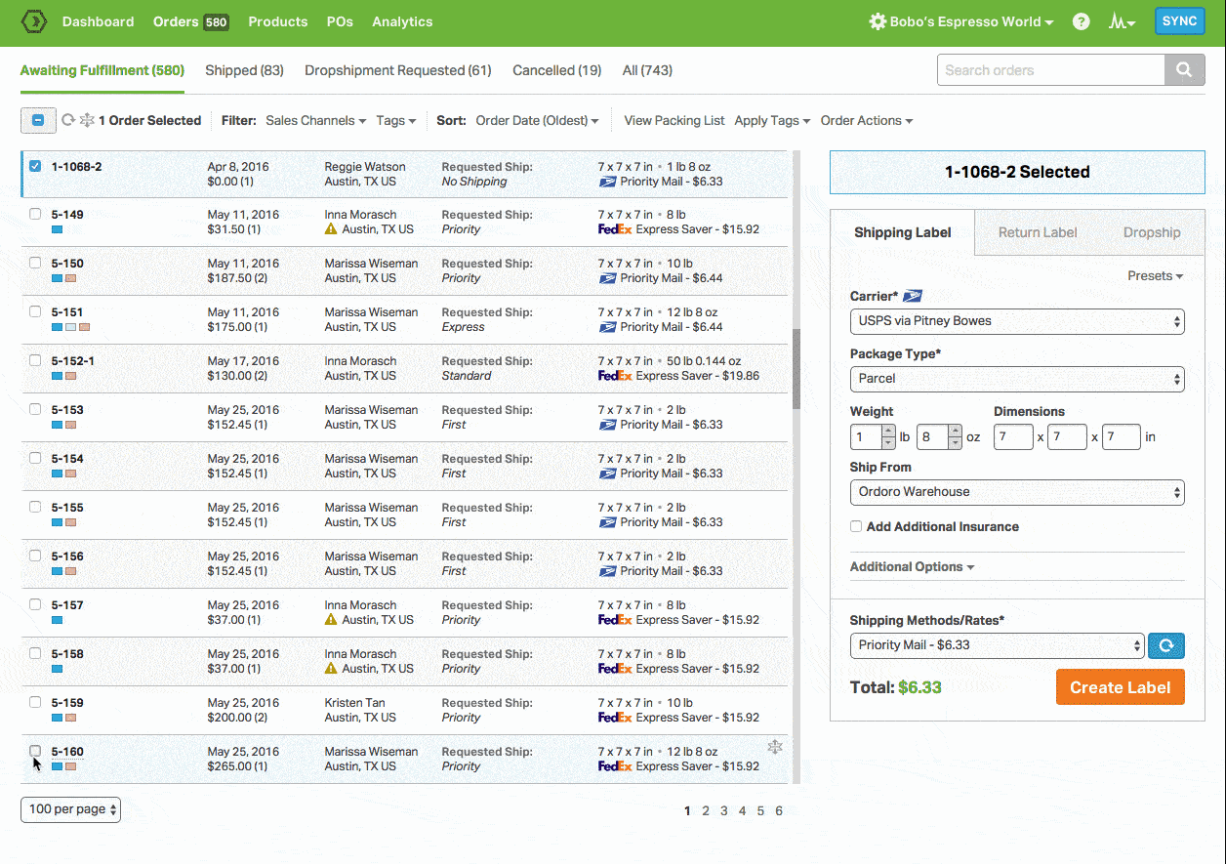
Ordoro is user-friendly once you get past the initial learning curve, but don’t expect a modern or particularly intuitive interface. The dashboard covers all the basics—order management, inventory tracking, and shipping labels—without getting in your way.
Real-time updates and streamlined workflows make it practical for small business teams, but anyone hoping for cutting-edge UX design will be underwhelmed.
If you want something that just works and doesn’t bury you in menus, you’ll be fine. If you expect sleek, you’ll be disappointed.

Ordoro Specs
- 2-Factor Authentication
- A/B Testing
- Analytics
- API
- BitCoin
- Conversion Tracking
- Dashboard
- Data Export
- Data Import
- Data Visualization
- Design Templates
- External Integrations
- Inventory Tracking
- Keyword Tracking
- Marketing Automation
- Multi-User
- Notifications
- Order Management
- Payment Gateway Integration
- Payment Processor
- PayPal
- Product Catalog
- Review Monitoring
- SAP Integration
- Scheduling
- Stripe
- Third-Party Plugins/Add-Ons