

monday.com Review: Pros, Cons, Features and Pricing


monday.com is a versatile retail inventory management software that helps teams manage tasks, projects, and processes. It best serves small to medium businesses, retail teams, and project managers needing customizable automations and integrations—think marketing departments, retail operations, and inventory managers. monday.com offers customizable workflows, making it a valuable tool for efficient inventory management.
monday.com addresses pain points like task tracking and real-time collaboration for retail teams and project managers. In this article, I'll cover monday.com's features, pros and cons, use cases, pricing, etc., so you can decide if this software aligns with your inventory management needs and goals.
monday.com Evaluation Summary

- From $12/seat/month (billed annually)
- Free plan available
Why Trust Our Software Reviews
monday.com Overview
In my opinion, monday.com stands out as a flexible option for retail inventory management, especially for teams that value integrations and automations. Its standout features, like customizable automations and a wide range of integrations, make it a good choice for retail teams looking to reduce app-switching. However, its onboarding can be a bit challenging due to outdated training resources. I think it’s best suited for small to medium businesses that need a tool to manage inventory alongside other project tasks. While it might not be the easiest for beginners, its value for money and extensive features make it worth considering.
pros
-
The interface is visually appealing and easy to navigate.
-
Automations save your team time on repetitive tasks.
-
You can customize workflows to fit your team's specific needs.
cons
-
Advanced features may require a learning curve for new users.
-
Customer support can sometimes be slow to respond.
-
Your team might find the onboarding process a bit challenging.
Is monday.com Right For Your Needs?
Who Would be a Good Fit for monday.com?
monday.com is a good fit for small to medium-sized businesses and retail teams needing customizable workflows and automations. If your team values visual project tracking and task management, monday.com’s interface will keep you organized. Marketing departments and project managers will appreciate the ability to tailor boards to their specific tasks, making it easier to track inventory alongside other project goals. Teams looking for a tool that offers flexibility and a wide range of functionality will find it beneficial.
-
Product Development
Product development teams can track progress and manage tasks across different stages from conception to launch.
-
Event Planners
Event planners can organize tasks and timelines visually, ensuring nothing falls through the cracks before the big day.
-
Inventory Managers
Inventory managers will appreciate the ability to create specific workflows for tracking stock levels and supplier orders.
-
Project Managers
Project managers can use its automations to streamline task assignments and monitor project timelines with ease.
-
Marketing Teams
Marketing teams will find the visual layout ideal for tracking campaigns and coordinating tasks across multiple channels.
-
Small Retailers
Your small retail business can benefit from monday.com's customizable boards to manage inventory and sales tasks efficiently.
Who Would be a Bad Fit for monday.com?
monday.com might not be the best fit for large enterprises or highly specialized industries requiring complex, industry-specific features. If your business relies heavily on intricate inventory systems or requires extensive customization beyond what's offered, monday.com may fall short. Teams that need detailed supply chain management or advanced analytics might find the platform lacking, as it’s more focused on task management and collaboration rather than deep data analysis.
-
Legal Departments
Legal departments needing document tracking and compliance features might find monday.com insufficient for their specific requirements.
-
Healthcare Providers
Healthcare providers needing compliance and detailed patient data management might not find the necessary features in monday.com.
-
Finance Departments
Finance teams that require advanced financial reporting and analytics might find monday.com lacking in these specific functionalities.
-
Manufacturing Departments
Manufacturing departments needing intricate production tracking might find monday.com’s capabilities insufficient for their detailed processes.
-
Supply Chain Teams
Supply chain teams that need detailed tracking and analytics may require more specialized software than what monday.com offers.
-
Large Enterprises
Large enterprises might find monday.com's features too simplistic for their complex inventory and data needs.
Our Review Methodology
How We Test & Score Tools
We’ve spent years building, refining, and improving our software testing and scoring system. The rubric is designed to capture the nuances of software selection and what makes a tool effective, focusing on critical aspects of the decision-making process.
Below, you can see exactly how our testing and scoring works across seven criteria. It allows us to provide an unbiased evaluation of the software based on core functionality, standout features, ease of use, onboarding, customer support, integrations, customer reviews, and value for money.
Core Functionality (25% of final scoring)
The starting point of our evaluation is always the core functionality of the tool. Does it have the basic features and functions that a user would expect to see? Are any of those core features locked to higher-tiered pricing plans? At its core, we expect a tool to stand up against the baseline capabilities of its competitors.
Standout Features (25% of final scoring)
Next, we evaluate uncommon standout features that go above and beyond the core functionality typically found in tools of its kind. A high score reflects specialized or unique features that make the product faster, more efficient, or offer additional value to the user.
We also evaluate how easy it is to integrate with other tools typically found in the tech stack to expand the functionality and utility of the software. Tools offering plentiful native integrations, 3rd party connections, and API access to build custom integrations score best.
Ease of Use (10% of final scoring)
We consider how quick and easy it is to execute the tasks defined in the core functionality using the tool. High scoring software is well designed, intuitive to use, offers mobile apps, provides templates, and makes relatively complex tasks seem simple.
Onboarding (10% of final scoring)
We know how important rapid team adoption is for a new platform, so we evaluate how easy it is to learn and use a tool with minimal training. We evaluate how quickly a team member can get set up and start using the tool with no experience. High scoring solutions indicate little or no support is required.
Customer Support (10% of final scoring)
We review how quick and easy it is to get unstuck and find help by phone, live chat, or knowledge base. Tools and companies that provide real-time support score best, while chatbots score worst.
Customer Reviews (10% of final scoring)
Beyond our own testing and evaluation, we consider the net promoter score from current and past customers. We review their likelihood, given the option, to choose the tool again for the core functionality. A high scoring software reflects a high net promoter score from current or past customers.
Value for Money (10% of final scoring)
Lastly, in consideration of all the other criteria, we review the average price of entry level plans against the core features and consider the value of the other evaluation criteria. Software that delivers more, for less, will score higher.
Core Features
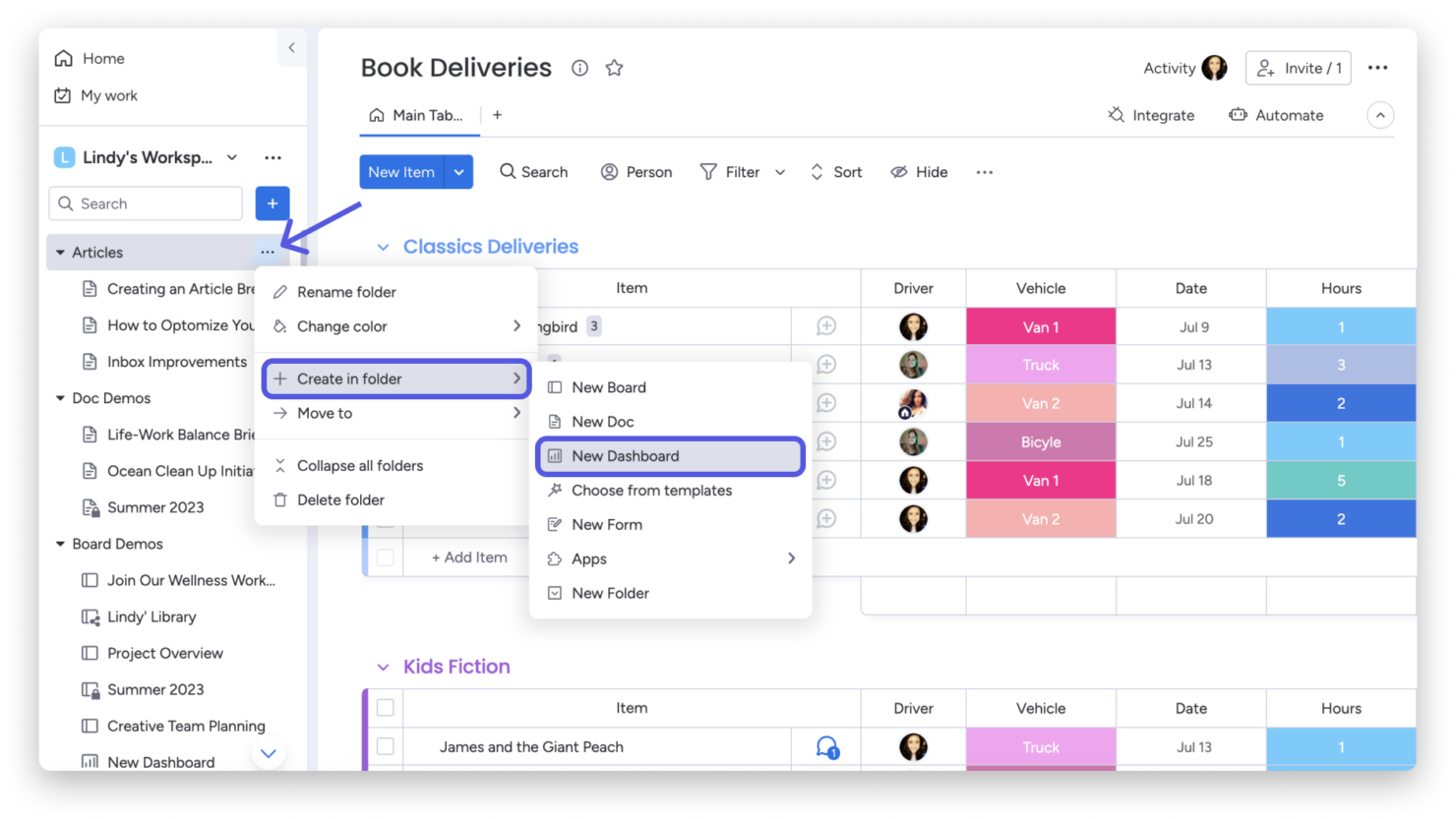
Customizable Dashboards: You can create custom dashboards to fit your team's workflow, making it easy to track inventory status at a glance. This flexibility lets you visualize data in a way that meets your specific needs.
Task Management: monday.com helps you assign and track tasks with real-time notifications, ensuring your team stays on top of inventory management tasks. It keeps everyone aligned with clear responsibilities and deadlines.
Automations: Automate repetitive tasks like inventory updates to save time and reduce manual errors. This feature helps your team stay efficient and focused on more strategic work.
Inventory Tracking: Monitor stock levels in real-time with easy-to-use tracking tools. It ensures you’re always informed about what’s in stock and what needs replenishing.
Reporting Tools: Generate reports to analyze inventory trends and make informed decisions. This feature gives you insights into your inventory performance and helps plan future needs.
Collaboration Tools: Facilitate communication and collaboration among your team members and key stakeholders with integrated chat and file sharing. It ensures everyone is on the same page without switching between apps.
Standout Features
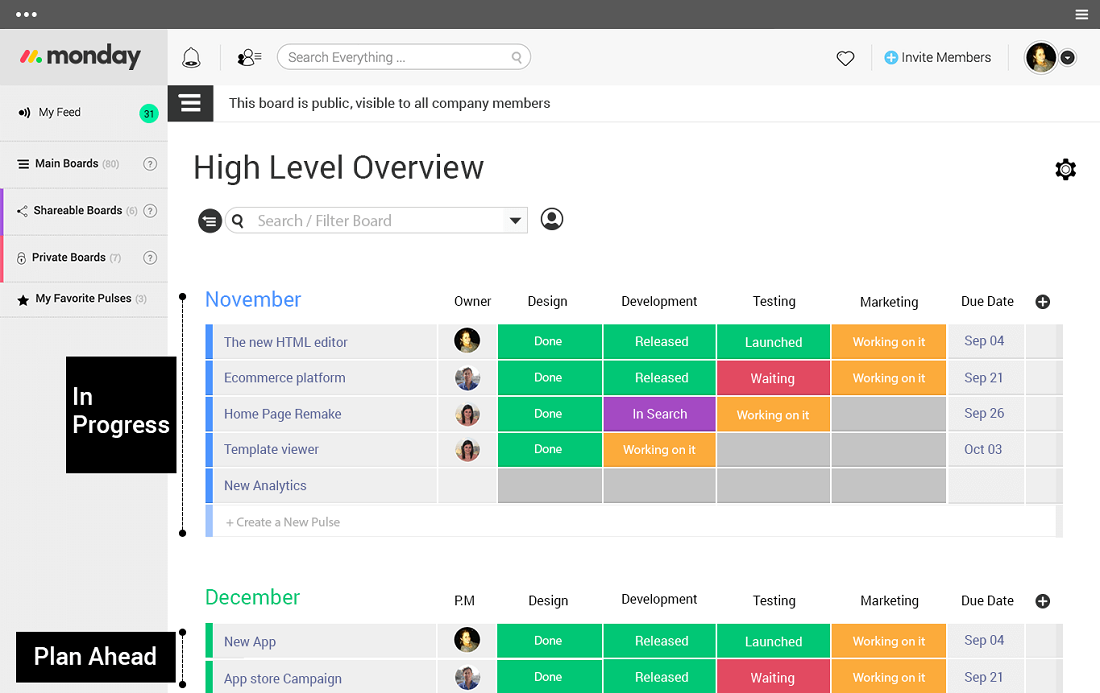
Visual Project Tracking: monday.com offers a visually appealing interface that makes it easy to track project progress, due dates, and task dependencies at a glance. This feature stands out for its ease of use, helping your team stay organized.
Custom Automations: Create tailored automations that fit your specific processes, reducing manual work and increasing efficiency. This unique feature allows you to automate tasks that are specific to your business needs.

Ease of Use
I think monday.com is user-friendly with its intuitive interface and visual project tracking, making it easy for your team to manage tasks and inventory. While there’s a learning curve for advanced features, the drag-and-drop functionality and customizable dashboards simplify daily operations. Compared to other options, the ease of customization stands out, letting you tailor the platform to suit your specific needs. This flexibility makes it accessible for teams who want a straightforward tool without sacrificing functionality.
Onboarding
monday.com's onboarding experience can be a bit challenging due to its complex features and sometimes outdated training resources. While there are tutorials and guides available, new users might need some time to fully grasp the platform's capabilities. Your team might benefit from the available support channels, but response times can vary. Despite these hurdles, once you’re familiar with the interface, the time to value is significant, as the platform's flexibility and functionality become clear.
Customer Support
monday.com's customer support can be hit or miss, with some users noting slow response times. While they offer various support channels like email and chat, the assistance quality can vary. Your team might need patience when seeking help, but once connected, the support staff is generally helpful. They also provide a knowledge base and community forums, which can be useful for troubleshooting and learning from other users' experiences.

Integrations
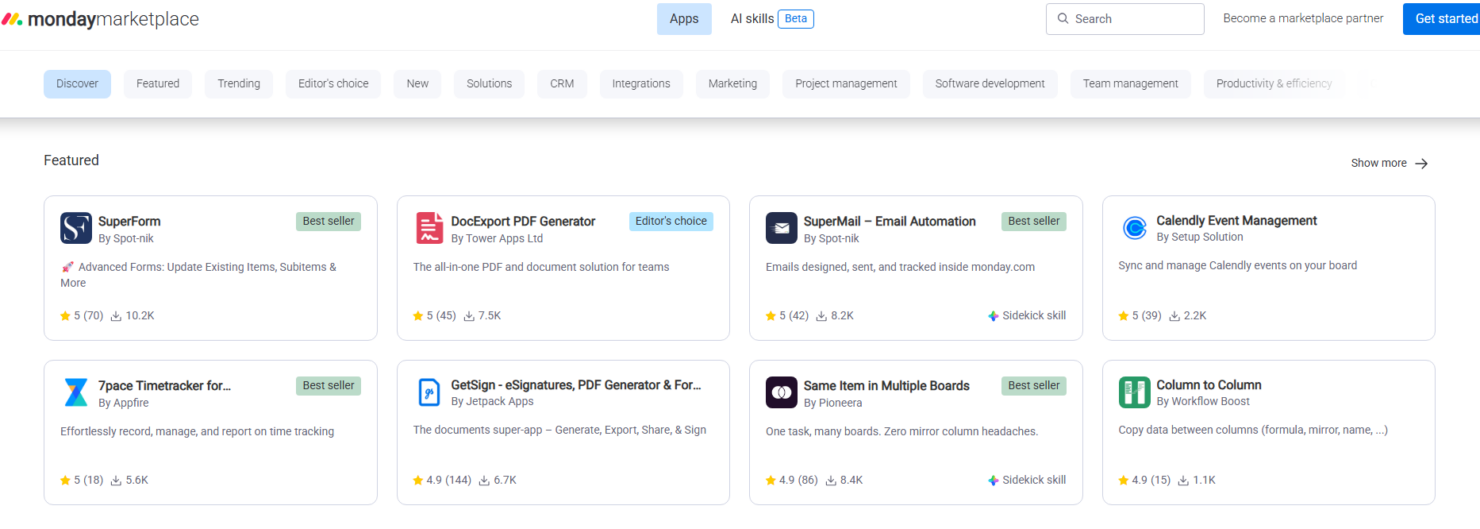
monday.com integrates with Slack, , Microsoft Teams, Google Workspace, Gmail, Google Drive GitLab, Mailchimp, Excel, Outlook, Trello, Jira, DocuSign, HubSpot, and LinkedIn.
monday.com also offers an open API and connects with third-party integration tools.
Value for Money
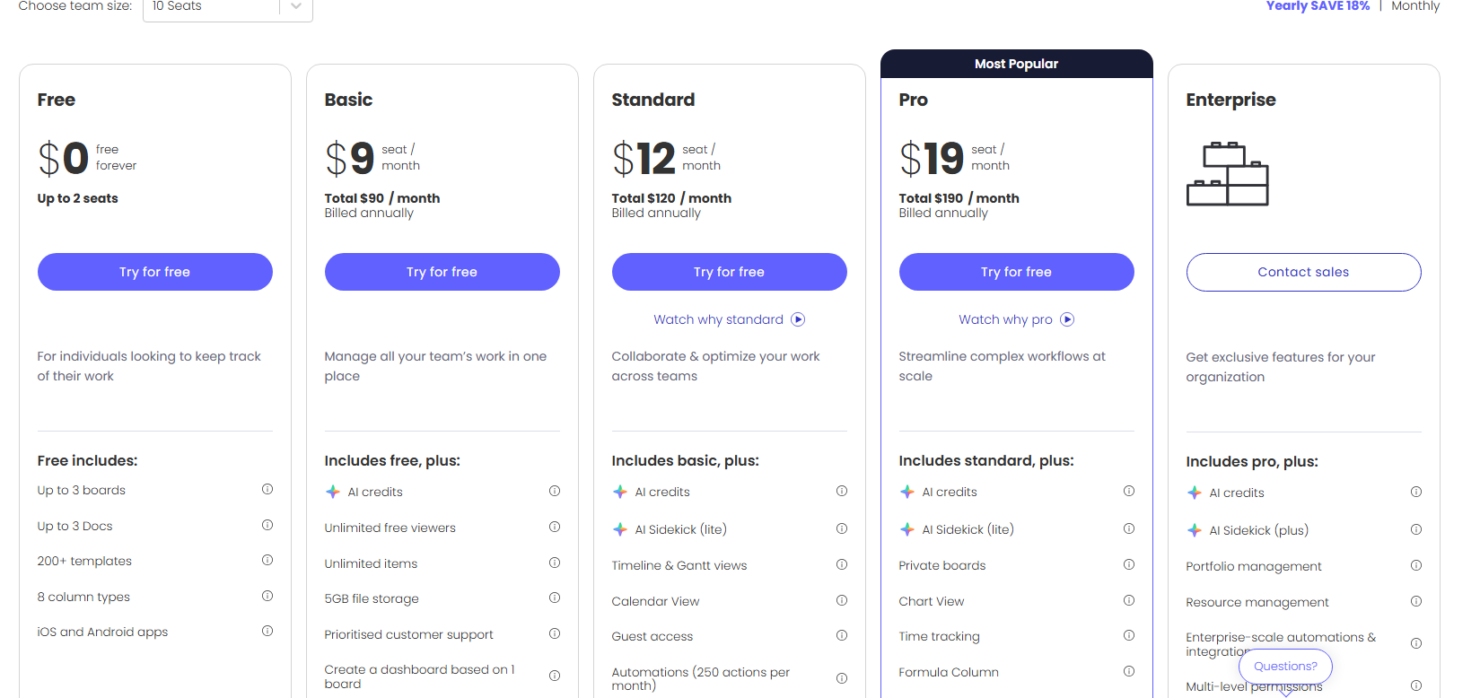
monday.com pricing offers good value with its flexible pricing tiers, catering to different team sizes and needs. You get a range of features that justify the cost, with options to scale as your team grows. A free trial is available, letting you evaluate the software before committing to a paid plan.
- Free Plan: $0 forever includes up to 2 seats with boards, docs, templates, and basic task tracking.
- Basic: $9 per seat/month. Adds unlimited boards and 5GB file storage.
- Standard: $12 per seat/month (billed annually) adds unlimited boards and items with timeline and Gantt chart views for team collaboration.
- Pro: $19 per seat/month (billed annually) includes automations, integrations, private boards, chart views, and time tracking.
- Enterprise: Contact sales for pricing, provides advanced reporting, portfolio management, resource management, and enterprise-grade permission controls.
New Product Updates from monday.com
monday.com Launches MCP Framework for AI Agents
monday.com launches its MCP server, agent toolkit, and Dynamic API tools to support AI-powered workflow automation. These updates allow agents to query data, create items, and execute actions securely within monday.com. Highlights include:
- MCP Server: Connect AI agents directly to monday.com’s API.
- Hosted MCP: Secure OAuth-based access with workspace controls.
- Dynamic API Tools: Enable advanced GraphQL queries and automation.
Visit monday.com’s official site for more details.
 for more details.
monday.com Introduces AI Blocks for Workflow Automation
monday.com has released an exciting new feature that opens up AI Blocks to all its users. This update allows users to integrate artificial intelligence into their workflows seamlessly, resulting in greater efficiency and smarter work processes. Here are the details of the update:
- AI Blocks Accessibility: Now available for every user, ensuring everyone can benefit from AI enhancements.
- Ready-Made AI Actions: Pre-designed AI actions are integrated easily, speeding up workflow and decision-making processes.
- Enhanced Workflow Productivity: Users can expect more efficient task management and improved productivity outcomes.
Visit monday.com's official site for more details.

monday.coms Project Setup with Batch Dependencies
monday.com has introduced an update that significantly enhances project setup through batch dependencies, streamlining the process of dependency mapping to save valuable time.
This improvement allows users to create complex sequential workflows across multiple tasks with just a single click, adding tremendous efficiency to project management. Some important aspects that were part of this update include:
- Batch Dependencies: Instantly apply dependencies to multiple tasks, transforming hours of work into a one-click solution.
- Complex Workflow Building: Facilitate the construction of complicated task workflows, simplifying delegation and execution.
Visit monday.com's official site for more details.
monday.com Integrates AI Agents and Apps
monday.com adds MCP support to allow AI agents and apps to read and act on monday.com data within supported AI tools. These updates improve automation, simplify task handling, and unlock new ways to generate insights without manual board management. Here are details of the update:
- Connection of AI Agents and Apps: This feature lets you easily connect your AI agents and apps to your monday.com account.
- Management of Boards and Tasks: Connected AI agents can dynamically manage and assign tasks across boards, increasing operational efficiency.
- Insights Generation: By integrating AI, users can generate deeper insights from their data, supporting strategic decision-making.
Visit monday.com's official site for more details.

monday.com Launches Autopilot Hub
monday.com has introduced the Autopilot Hub, a new feature designed to enhance user control over automations and workflows across entire accounts. Users can now gain complete visibility into all automation processes within their organization, ensuring seamless coordination and management. Here are the important tabs included:
- Health Tab: Displays automation performance, highlights failed workflows, and provides AI-powered error insights for faster resolution.
- Usage Tab: Tracks automation activity, top workflows, and creators, with options to export reports.
- Workflows Tab: Lists and manages workflows across workspaces, showing their status and importance.
- Connections Tab: Monitors app and integration connections, usage data, and recent updates.
Visit monday.com's official site for more details.

Visualize Board Data with WorkCanvas in monday.com
monday.com has launched an exciting update to its WorkCanvas feature, allowing users to enhance their workflow by visualizing data directly on their canvas. With this update, users can style elements based on item values, customize visuals, and gain clearer insights at a glance. Here's a look at the details:
- Display Board Data: Users can now see their board data directly on the canvas without needing additional navigation, making it easier to manage information.
- Styling with Rules: Elements can be styled automatically based on specific item values, allowing for immediate visual feedback and streamlined data processing.
- Highlight Key Insights: The update supports the highlighting of key insights, making important information more accessible and avoiding oversight.
- Customization Options: Users have options to tailor visuals to meet specific needs, which enhances understanding and productivity.
Visit monday.com's official site for more details.
monday.com Specs
- API
- Batch Permissions & Access
- Budgeting
- Calendar Management
- Collaboration Support
- Contact Management
- Contact Sharing
- Customer Management
- Dashboard
- Dashboards
- Data Export
- Data Import
- Data Visualization
- Dependency Tracking
- Document Sharing
- Expense Tracking
- External Integrations
- File Sharing
- Gantt Charts
- Kanban Boards
- Multi-User
- Notifications
- Project Management
- Resource Management
- Scheduling
- Task Scheduling/Tracking
- Third-Party Plugins/Add-Ons
- Time Management
- Travel Management
- Workflow Management
monday.com FAQs
How does monday.com handle data security and compliance?
Can I customize monday.com to fit my business processes?
Is there a limit to the number of users on monday.com?
What kind of customer support does monday.com offer?
Can I use monday.com on mobile devices?
How easy is it to switch from another software to monday.com?
Does monday.com support remote team collaboration?
Can I track project progress in real time with monday.com?
monday.com Company Overview & History
monday.com, headquartered in Tel Aviv, Israel, was founded in 2012 by Roy Mann, Eran Kampf, and Eran Zinman. Originally named Dapulse, it began as an internal tool at Wix.com before becoming a standalone product. Known for its innovative work management platform, monday.com emphasizes transparency and collaboration. It's a publicly traded company on Nasdaq and boasts a diverse client base, including notable companies across various industries.
monday.com Major Milestones
- 2012: Founded as Dapulse by Roy Mann, Eran Kampf, and Eran Zinman.
- 2017: Rebranded to monday.com.
- 2021: Became a publicly traded company on Nasdaq.
- 2020: Featured on Forbes' Cloud 100 list.