
30 Best Order Processing Software for 2026

The Top Order Processing Software to Consider
Now let’s see the top picks for the best order processing software and what each is great at:


Let’s automate your order processing so you can stop drowning in spreadsheets and start shipping smarter.
You need an order processing system that delivers real-time inventory updates, automates workflows, and keeps every sales channel—online, in-store, or wholesale—in sync.
I’ve managed warehouse floors, overseen international shipping, and balanced inventory control across multiple platforms—so I know exactly what it takes to prevent stockouts and speed up order fulfillment.
In this guide, you’ll get side-by-side comparisons of solutions that integrate with your ERP, CRM, and POS, streamline invoicing, and track SKUs across Shopify, Amazon, and your brick-and-mortar.
You’ll get clear insights on functionality, pricing, and the dashboards and notifications you need to optimize your order lifecycle.
Why Trust Our Software Reviews
Comparing the Best Order Processing Software, Side-by-Side
This chart lines up pricing, trial details, and what each is best at so you can see at a glance which order processing solution fits your budget and your workflows.
| Tool | Best For | Trial Info | Price | ||
|---|---|---|---|---|---|
| 1 | Best for rule-based order routing | Free demo available | Pricing upon request | Website | |
| 2 | Best for implementing complex pricing | Free demo available | Pricing upon request | Website | |
| 3 | Best for automation capabilities | Free demo available | Pricing upon request | Website | |
| 4 | Best for inventory tracking | 14-day free trial + free demo available | From $129/month (billed annually) | Website | |
| 5 | Best for multichannel sellers | Free plan + free demo available | From $19/month | Website | |
| 6 | Best for warehouse management | Free demo available | Pricing upon request | Website | |
| 7 | Best for shipping discounts | Free plan available | From $19/month | Website | |
| 8 | Best for QuickBooks integration | Free demo available | From $229/month (billed annually) | Website | |
| 9 | Best for extensive platform integrations | Free trial & free demo | Pricing upon request | Website | |
| 10 | Best for subscription boxes | Free demo | Pricing upon request | Website | |
| 11 | Best for managing multiple sales channels | Free 14-day trial + free plan + free demo available | From $359/month (billed annually) | Website | |
| 12 | Best for personalized customer interactions | Free demo available | Pricing upon request | Website | |
| 13 | Best for ecommerce fulfillment | Free demo available | From $1,850/month | Website | |
| 14 | Best for omnichannel retailers | Consultation available upon request | Pricing available upon request | Website | |
| 15 | Best for small retailers | Not available | Website | ||
| 16 | Best for dropshipping | Free 15-day trial + free plan + free demo available | From $349/month | Website | |
| 17 | Best for B2B orders | Not available | Website | ||
| 18 | Best for scalability | Free demo available upon request | Pricing available upon request | Website | |
| 19 | Best for workflow automation | 30-day free trial | From $0/month | Website | |
| 20 | Best for precise production planning | Free trial available | From $44.92/user/month (billed annually) | Website |
The Best Order Processing Software, Reviewed
Now, we’ll cover what each system excels at, who it’s built for, and any caveats to watch out for. Think of this as your rapid-fire guide to features, integrations, and real-world performance so you can pick the perfect fit for your order lifecycle.


Fulfil is a cloud-based ERP and order management platform built to centralize your order, inventory, and financial operations in one system. It supports retail, wholesale, dropship, and B2B orders all within the same tool.
Why I Picked Fulfil: I picked Fulfil as a solid order processing solution because it offers native, rule-based order routing and automated order processing that reduce manual overhead and errors. Its real-time sync across channels lets your team see order and inventory updates instantly, which helps avoid overselling and mis-fulfillment. Fulfil also gives you built-in returns and repair (RMA) workflows, so your order processing doesn’t break down when returns or repairs happen.
Standout Features & Integrations
Features include warehouse and 3PL coordination so pick, pack, and ship tasks are tied directly to order records. It also has AI-assisted address validation to catch bad addresses before they hold up orders. In its order flows, you can even leverage bundle and kit handling so orders with component items are processed as a consolidated shipment.
Integrations include Amazon, Shopify, Etsy, eBay, FedEx, UPS, DHL, PayPal, Stripe, Avalara, Klarna, and Amazon Shipping.
Pros and Cons
Pros:
- Routing logic reduces fulfillment errors
- Built-in returns and repair workflows
- Good multi-entity and multi-currency support
Cons:
- Customization complexity for edge cases
- Occasional permission/API setup hurdles

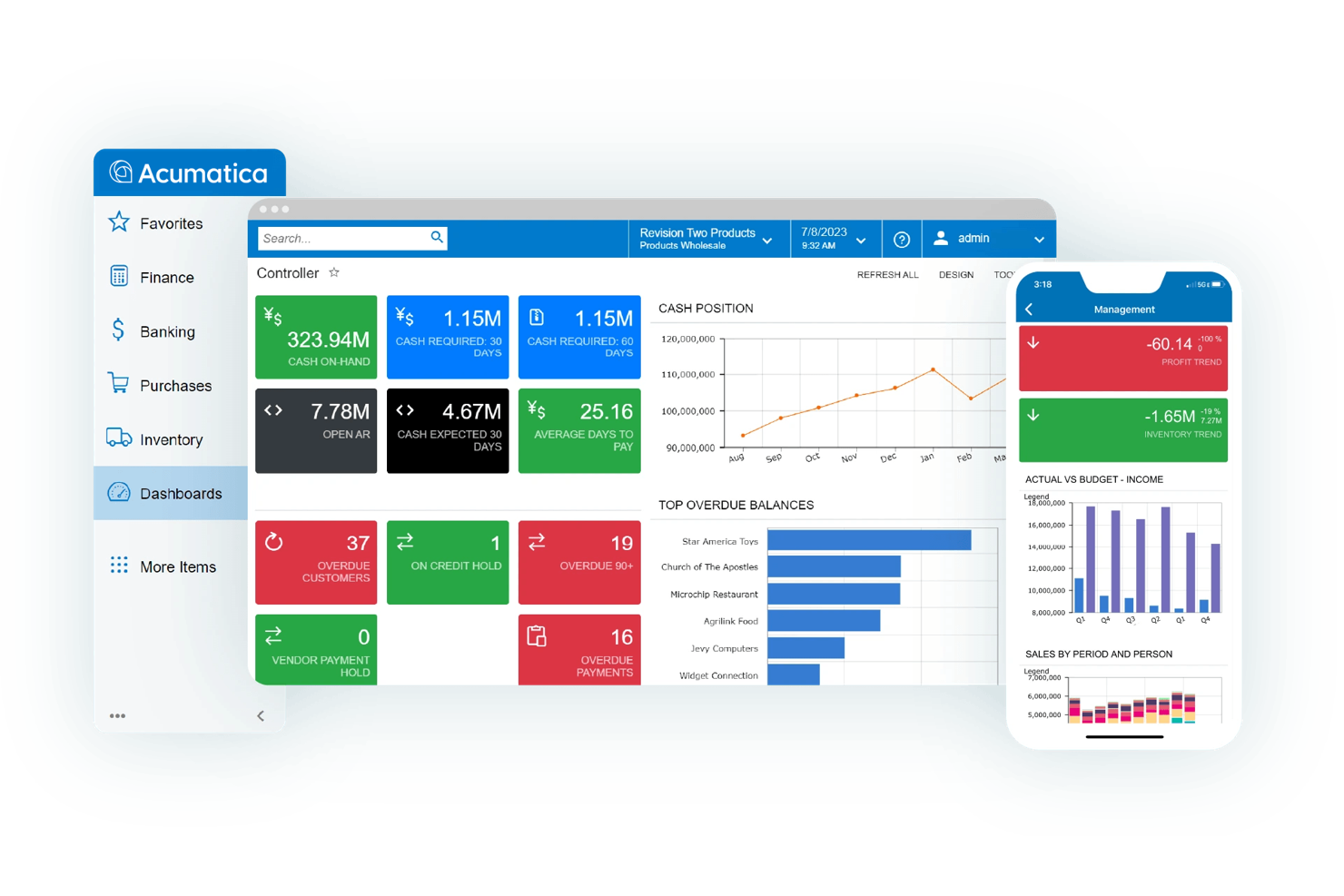
Acumatica Cloud ERP is a cloud-based order processing and operations platform that centralizes order capture, fulfillment, and financials for omnichannel businesses.
It automates workflows across sales, inventory, CRM, and finance, helping teams shorten order-to-cash cycles, reduce errors, and get real-time visibility into cash, AR, and fulfillment status.
Why I picked Acumatica:
This is a strong fit for retailers, distributors, and manufacturers that need real-time inventory visibility, complex pricing, and cross-company transactions without bolting together multiple systems. The platform’s role-based dashboards and automated approvals cut manual touches, while native CRM keeps customer context tied to every order.
You also get flexible licensing—pay for what you use—and an ecosystem of vetted marketplace apps, so you can extend without heavy custom code. Implementation can be involved, but the payoff is unified data and fewer reconciliation headaches.
Standout features and integrations:
Features include order management from capture to fulfillment, real-time inventory tracking, pricing and discount rules, returns management, cross-company transactions, automated workflows, and role-based dashboards.
Integrations include Salesforce, Shopify, BigCommerce, Celigo/Integrator.io, Velixo Reports, Netstock IBP, Workforce Go! HCM, DataSelf, Inventory Optimization Solution, Quality Management Suite (QMS), SPS Commerce, AcuRental, Pacejet, CADLink, Traild, Procore, AvidXchange, Avalara, Power BI, Adobe Sign, DocuSign, Smartsheet, Amazon Marketplace, Magento, and WooCommerce.
Pros and Cons
Pros:
- Real-time data visibility for faster, better decisions.
- Highly customizable to match unique order workflows.
- User-friendly interface that is easy to navigate.
Cons:
- Total cost can rise as features and users are added.
- Implementation can be complex and time-consuming.


Brightpearl is a retail operating system that centralizes order processing, inventory, fulfillment, CRM, and accounting for multichannel retailers and brands.
It automates routine workflows—purchase-to-ship, invoicing, and returns—so teams move orders faster with fewer errors and clearer, real-time stock visibility across channels.
Why I picked Brightpearl:
This platform is built for retailers scaling across marketplaces and webstores who need dependable automation and unified back-office control. It cuts manual touches in order routing, allocates inventory in real time, and keeps finance in lockstep with operations, which shortens fulfillment cycles and tightens cash reconciliation.
Reporting and forecasting give managers day-to-day answers—what to buy, where to stock, and what’s at risk of delay—while expert-led implementation helps larger teams get live without duct tape.
Standout features and integrations:
Features include multichannel order management, automation rules for allocation and fulfillment, backorder and returns workflows, warehouse management, shipping label creation, CRM, retail analytics, and real-time accounting.
Integrations include Shopify, Magento, BigCommerce, Amazon, eBay, Lightspeed, Dotdigital, Klaviyo, Stripe, Square, Xero, QuickBooks, Sage Intacct, Royal Mail, USPS, DPD, FedEx, and ShipStation.
Pros and Cons
Pros:
- Technical support is frequently praised for prompt, helpful assistance.
- Automation meaningfully reduces manual tasks and errors across order workflows.
- Efficient at managing inventory and sales operations to streamline processes.
Cons:
- The system can feel complex, with onboarding and training posing challenges.
- Pricing is viewed as expensive for smaller businesses.


inFlow Inventory is an inventory management solution tailored for small to medium-sized businesses that need precise inventory tracking and order management. It supports companies by offering tools to manage stock levels, sales, and purchasing.
Why I picked inFlow Inventory: It's designed for businesses that require detailed inventory tracking. The software provides real-time stock updates and allows you to manage orders from a centralized platform. You can automate reorder points to ensure you never run out of stock. Its reporting features help you analyze sales trends and make informed decisions.
Standout features & integrations:
Features include barcode generation, which simplifies the process of cataloging and managing inventory. You can use the mobile app to access inventory data on the go. The software also offers customizable invoices to match your brand's identity.
Integrations include QuickBooks, Shopify, WooCommerce, Amazon, Squarespace, Xero, Zapier, Salesforce, eBay, and Etsy.
Pros and Cons
Pros:
- Automates reorder points
- Centralized order management
- Real-time stock updates
Cons:
- Occasional sync issues
- Limited customization options


Veeqo is an order processing software designed for multichannel sellers who need to manage inventory and orders across various platforms. It supports online retailers by handling inventory management, order tracking, and shipping from one central system.
Why I picked Veeqo: It's tailored for businesses that sell on multiple channels and need to streamline their operations. Features like centralized inventory management and bulk shipping options are perfect for multichannel sellers. You can sync inventory across all sales channels to prevent overselling. The software also allows you to automate shipping rules, which can save your team time and reduce errors.
Standout features & integrations:
Features include customizable reporting, which helps you gain insights into sales performance. You can automate purchase orders to replenish stock automatically. Veeqo also offers a mobile app, allowing you to manage orders on the go.
Integrations include Shopify, Amazon, eBay, WooCommerce, Etsy, Magento, BigCommerce, Walmart, Xero, and QuickBooks.
Pros and Cons
Pros:
- Automates shipping rules
- Supports multiple sales channels
- Centralized inventory management
Cons:
- Complex setup process
- Limited customization options


Infoplus is a warehouse management software designed for businesses that need detailed control over their inventory and order processes. It serves companies seeking to optimize their warehouse operations and improve efficiency.
Why I picked Infoplus: It's tailored for businesses that require strong warehouse management capabilities. Features like real-time inventory tracking and advanced reporting help you keep a close eye on your stock levels. Your team can automate routine tasks, reducing manual work and errors. The software's customization options allow you to tailor it to your specific warehouse needs.
Standout features & integrations:
Features include customizable dashboards that give you a clear view of your operations. You can use automated alerts to stay informed about key inventory changes. The software also supports barcode scanning for fast, accurate inventory management.
Integrations include Shopify, Magento, BigCommerce, WooCommerce, Amazon, eBay, QuickBooks, Xero, ShipStation, and Salesforce.
Pros and Cons
Pros:
- Advanced reporting capabilities
- Real-time inventory tracking
- Strong warehouse management features
Cons:
- Requires technical setup
- Steep learning curve


Shippo is a shipping solution designed for businesses looking to save on shipping costs and improve their logistics. It serves small to medium-sized businesses that need access to discounted shipping rates and efficient shipping processes
Why I picked Shippo: It's ideal for businesses that prioritize cost savings on shipping. With features like access to discounted USPS and UPS rates, you can reduce shipping expenses. Your team can also benefit from automated label creation, which simplifies the shipping process. The ability to track shipments in real-time helps improve customer satisfaction.
Standout features & integrations:
Features include batch label creation, which allows you to process multiple shipments at once. You can customize shipping labels to match your brand. The software also offers return label creation, making it easier for your customers to return items.
Integrations include Shopify, WooCommerce, BigCommerce, Magento, Amazon, eBay, Etsy, Squarespace, Weebly, and Wix.
Pros and Cons
Pros:
- Real-time shipment tracking
- Automated label creation
- Access to discounted shipping rates
Cons:
- Occasional tracking discrepancies
- Limited advanced features


Fishbowl is an inventory management software aimed at small to medium-sized businesses that need efficient inventory tracking and order management. It helps companies manage inventory, automate ordering processes, and streamline manufacturing.
Why I picked Fishbowl: It's ideal for businesses that rely on QuickBooks for accounting and need seamless integration. The software offers advanced inventory tracking and order management features that complement QuickBooks. You can automate your reordering process, ensuring you never run out of stock. Fishbowl also provides manufacturing tools to help you manage production and assembly.
Standout features & integrations:
Features include barcode scanning, which speeds up inventory management tasks. You can set up multi-currency tracking to handle international transactions. The software also offers customizable reporting to give you insights into your business operations.
Integrations include QuickBooks, Shopify, WooCommerce, Magento, Xero, Salesforce, Amazon, eBay, BigCommerce, and ShipStation.
Pros and Cons
Pros:
- Automates reordering process
- Advanced inventory tracking
- Strong QuickBooks integration
Cons:
- Steep learning curve
- High upfront cost


Cin7 Omni is an inventory and order management platform that centralizes stock, purchasing, and fulfillment for omnichannel retailers, wholesalers, and light manufacturers.
It covers POS, ecommerce, B2B, and 3PL workflows—helping teams reduce stockouts, accelerate order processing, and reconcile sales and costs faster.
Why I picked Cin7 Omni:
This platform fits operators juggling multiple channels, EDI partners, and basic assembly/BOM needs who want one system of record for orders and inventory. Real-time stock visibility, robust order routing, and solid reporting support cleaner allocations and fewer manual adjustments.
It also offers strong integration coverage to keep accounting, marketplaces, and shipping in sync. Tradeoffs include a meaningful learning curve and higher pricing versus lighter SMB tools, but the operational control often offsets that for growing teams.
Standout features and integrations:
Features include order and returns management, POS, intelligent document recognition, assembly/BOM for light manufacturing, EDI, 3PL connections, forecasting and purchasing, and configurable reporting.
Integrations include QuickBooks, Xero, Shopify, Amazon, Walmart, eBay, BigCommerce, WooCommerce, ShipStation, Fulfillment by Amazon, SPS Commerce, Pipe17, and Avalara.
Pros and Cons
Pros:
- Advanced integrations connect major ecommerce, accounting, and shipping platforms.
- Centralized product management streamlines inventory control across multiple channels.
- Real-time tracking updates stock levels instantly, minimizing overselling risks.
Cons:
- Higher pricing than lighter-weight alternatives.
- Steep learning curve due to the software’s extensive feature set.


ShipMonk is a fulfillment and order processing software designed for businesses that offer subscription boxes and need efficient logistics management. It serves online retailers who require inventory management, order processing, and shipping solutions.
Why I picked ShipMonk: It's perfect for subscription box businesses that need a reliable fulfillment partner. The software provides real-time inventory tracking and allows you to manage orders efficiently. You can customize packing and shipping options to fit your brand's needs. ShipMonk's ability to handle high-volume orders is a plus for growing subscription services.
Standout features & integrations:
Features include order management, which simplifies the process of tracking and fulfilling customer orders. You can also take advantage of customizable packing options to enhance your brand's presentation. The software offers detailed analytics to help you understand your business performance and make informed decisions.
Integrations include Shopify, WooCommerce, BigCommerce, Magento, Amazon, Etsy, eBay, Squarespace, Walmart, and ShipStation.
Pros and Cons
Pros:
- Reliable fulfillment partner
- Real-time inventory tracking
- Efficient for high-volume orders
Cons:
- High starting price
- Complex setup process


Katana MRP is a manufacturing-aware order processing and inventory platform that centralizes sales, production, and purchasing for small and midsize makers.
It connects webstores, marketplaces, and accounting tools, helping teams cut stockouts, keep work-in-progress visible, and ship on time.
Why I picked Katana:
For manufacturers selling across multiple channels, Katana keeps sales orders, production, and raw-material needs in one real-time view. It manages assemblies and ingredients with bills of materials, supports batch/lot tracking, and surfaces capacity and availability, so planners can schedule confidently.
The workflow—from sales order to purchase/production to fulfillment—feels purpose-built for make-to-stock and make-to-order shops. Tradeoffs to note: some advanced features (batch tracking, shop-floor operators) sit on higher tiers, and seat limits can be restrictive for larger teams.
Standout features and integrations:
Features include real-time inventory across locations, multichannel sales order syncing, BOM-level material planning, batch/lot and barcode support, returns handling, kits/bundles, partial fulfillment, and mobile tasking.
Integrations include Shopify, BigCommerce, WooCommerce, Amazon, eBay, QuickBooks Online, Xero, HubSpot, Salesforce, Pipedrive, Prospect CRM, ShipStation, Shippo, 2Ship, and Zapier.
Pros and Cons
Pros:
- Accurate stock control for assemblies and ingredients.
- User-friendly interface that’s easy to learn.
- Real-time inventory tracking across multiple locations.
Cons:
- Full-access user limits can be restrictive.
- Lower-tier plans lack batch tracking and shop-floor operator features.


Manhattan Active Order Management is a cloud-native order processing platform that orchestrates the end-to-end order lifecycle for enterprise retailers across ecommerce and stores, helping teams accelerate fulfillment, reduce errors, and control costs.
Why I picked Manhattan Active:
It’s built for scale—high order volumes, multi-brand portfolios, and complex fulfillment promises—while maintaining real-time inventory visibility across locations. Store and call-center teams get customer-aware servicing tools, and ops leaders get analytics to tune sourcing, shipping, and returns.
The tradeoff: it’s an enterprise program with heavier onboarding and integration work, so it fits best when you need sophisticated orchestration rather than a lightweight OMS.
Standout features and integrations:
Features include real-time inventory visibility, omnichannel order orchestration, mixed-cart checkout, assisted selling and clienteling, frictionless in-store returns, remote selling, and analytics for fulfillment and post-purchase performance.
Integrations include Uber Freight, Adyen, Agillitics, Avalara, Bringg, CyberSource, MarkMagic by CYBRA, Metapack, nShift, Sendflex Technology, SMC³, SOTI, TDI, Trimble, and Vertex, Inc.
Pros and Cons
Pros:
- Efficiently manages complex order processes from capture through returns.
- Scales effectively for high-volume, multi-channel retail operations.
- Real-time inventory visibility across locations improves promise accuracy.
Cons:
- Pricing and complexity reflect an enterprise focus that may not suit smaller teams.
- Onboarding and integrations can be lengthy and resource-intensive.

ShipHero is an ecommerce fulfillment solution tailored for businesses looking to optimize their order processing and shipping. It caters to online retailers who need efficient warehouse management and shipping processes.
Why I picked ShipHero: It's perfect for ecommerce businesses that need efficient fulfillment operations. Features like warehouse management, order tracking, and inventory control are tailored for online retailers. Your team can manage multiple warehouses and track shipments in real-time. The software's flexibility in handling high-volume orders is ideal for growing ecommerce operations.
Standout features & integrations:
Features include inventory management, real-time order tracking, and warehouse management. You can manage returns efficiently and gain insights with detailed analytics. The software supports barcode scanning to speed up your order processing.
Integrations include Shopify, Amazon, WooCommerce, BigCommerce, Magento, eBay, Etsy, Walmart, Squarespace, and ShipStation.
Pros and Cons
Pros:
- Handles high-volume orders
- Real-time order tracking
- Efficient warehouse management
Cons:
- Complex for small businesses
- High starting price


Radial is an order management system designed for omnichannel retailers who need to efficiently manage orders across various sales channels. It provides solutions to unify your inventory, orders, and fulfillment processes.
Why I picked Radial: It's ideal for businesses that operate on multiple channels and need a cohesive management system. The software offers real-time inventory visibility, ensuring accurate stock levels across all platforms. You can manage orders from multiple channels in one place, reducing the risk of overselling. Its flexible fulfillment options allow you to deliver products to customers efficiently.
Standout features & integrations:
Features include advanced order routing, which optimizes the selection of fulfillment locations. You can use real-time inventory tracking to ensure accuracy across channels. The software also provides detailed analytics to help you make informed decisions about your business operations.
Integrations include Shopify, Magento, BigCommerce, WooCommerce, Amazon, eBay, Salesforce, Oracle, SAP, and Microsoft Dynamics.
Pros and Cons
Pros:
- Efficient for multiple sales channels
- Advanced order routing
- Real-time inventory visibility
Cons:
- High learning curve
- Complex implementation process

ShippingEasy is an order processing software designed for small retailers. It helps manage shipping, automate workflows, and enhance customer marketing.
Why I picked ShippingEasy: It's ideal for small retailers who need discounted shipping rates and automation. It offers features like USPS and UPS rate discounts and branded tracking. Users benefit from seamless integration with platforms like Shopify. The software's customer marketing tool helps boost sales by automating promotional emails.
Standout features & integrations:
Features include discounted shipping rates, shipping automation, and advanced reporting. The customer marketing tool enables automated emails to boost sales. You also get access to unlimited support through live chat and phone assistance.
Integrations include Shopify, Amazon, eBay, WooCommerce, Etsy, BigCommerce, Magento, Squarespace, Walmart, and Ecwid.
Pros and Cons
Pros:
- Customer marketing tools
- Easy workflow automation
- Discounted USPS and UPS rates
Cons:
- Occasional integration issues
- Can be complex for beginners


Ordoro is an order processing software tailored for businesses that focus on dropshipping and inventory management. It helps retailers streamline their shipping processes and manage inventory from a single platform.
Why I picked Ordoro: It's perfect for businesses that rely heavily on dropshipping and need efficient inventory management. Features like automatic inventory syncing and multichannel order management are ideal for dropshipping. Your team can also benefit from automated shipping label generation. The software simplifies the process of managing suppliers and tracking shipments.
Standout features & integrations:
Features include kitting, which allows you to bundle products for sale. You can use barcode scanning to speed up order processing. The software also offers advanced analytics to help you make data-driven decisions.
Integrations include Shopify, Amazon, eBay, WooCommerce, BigCommerce, Magento, Etsy, Squarespace, Xero, and QuickBooks.
Pros and Cons
Pros:
- Multichannel order management
- Automatic inventory syncing
- Efficient dropshipping management
Cons:
- Can be complex for beginners
- Limited customization options

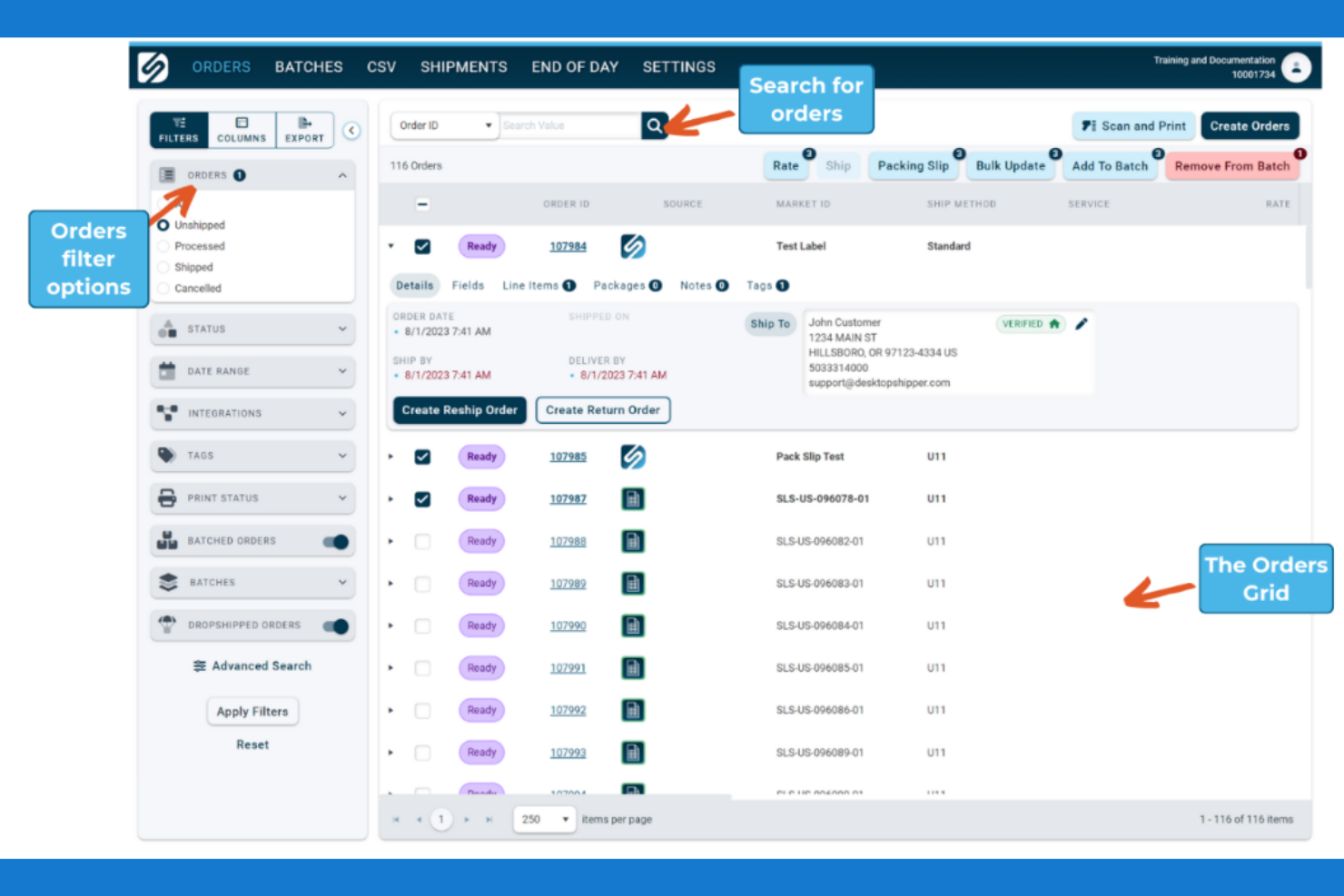
ShipWise is an order management software designed for businesses focused on B2B orders, providing solutions to streamline the order fulfillment process. It caters to businesses that need centralized order management, shipping automation, and real-time tracking.
Why I picked ShipWise: It's tailored for B2B businesses that require efficient order processing. The software offers rate shopping for cost savings and cartonization for efficient packing. Your team can benefit from automated workflows that reduce manual tasks. The platform's scalability supports varying order volumes, making it suitable for growing businesses.
Standout features & integrations:
Features include centralized order management, which simplifies the tracking and fulfillment of orders. You can use real-time tracking to provide customers with updates on their orders. The software also includes cartonization to optimize packing and reduce shipping costs.
Integrations include Shopify, WooCommerce, BigCommerce, Magento, Amazon, eBay, Salesforce, Oracle, SAP, and Microsoft Dynamics.
Pros and Cons
Pros:
- Automated workflows
- Centralized order management
- Efficient B2B order processing
Cons:
- Requires technical knowledge
- Complex setup process


Kibo Commerce is an order management solution aimed at businesses looking for scalable solutions to manage their sales and fulfillment across multiple channels. It supports large retailers by providing tools to optimize order routing, inventory management, and customer experience.
Why I picked Kibo Commerce: It's designed for businesses that anticipate growth and need a system capable of scaling with them. The software offers dynamic order routing to ensure efficient fulfillment. You can manage complex inventory needs across multiple locations with ease. Its focus on enhancing customer experience sets it apart for retailers looking to build strong customer relationships.
Standout features & integrations:
Features include personalized customer experiences, which allow you to tailor interactions based on customer data. The software supports advanced order routing to optimize delivery times. You can also use its flexible inventory management system to handle stock across various locations.
Integrations include Salesforce, SAP, Oracle, Magento, Shopify, BigCommerce, WooCommerce, Amazon, eBay, and Microsoft Dynamics.
Pros and Cons
Pros:
- Enhances customer experience
- Dynamic order routing
- Supports business growth
Cons:
- Requires technical setup
- High learning curve


ShipStation is a multi-carrier shipping and order processing platform that automates label creation and fulfillment for ecommerce teams. It centralizes rates, labels, returns, and tracking across channels—Shopify to Amazon to eBay—so operations move faster with fewer errors and lower shipping costs.
Why I picked ShipStation:
It’s built for teams juggling multiple stores and carriers, with automation rules that shave minutes off every order—batch labels, auto-service mapping, and hands-off rate shopping add up at scale. The warehouse workflows help pick, pack, and verify orders cleanly, while branded tracking pages and return portals tighten the post-purchase loop.
You also get global shipping tools for duties, taxes, and customs, plus a clear analytics layer to spot carrier spend and SLA drift. Note that reviews cite inconsistent support and surprise fees, so budget for that risk or confirm terms up front; if you need deep WMS or 3PL orchestration, pair ShipStation with a warehouse system.
Standout features and integrations:
Features include automation for labels and service selection, multi-store centralization under one login, inventory sync to prevent overselling, warehouse pick-pack workflows, branded tracking and returns, international duties/taxes handling, rate shopping, and a consolidated analytics dashboard.
Integrations include UPS, FedEx, DHL, USPS, Amazon, Shopify, WooCommerce, eBay, Etsy, Squarespace, BigCommerce, and Wix.
Pros and Cons
Pros:
- Automation and shipment management features streamline shipping tasks and reduce errors.
- Integrates smoothly with multiple sales channels and systems to save time.
- User-friendly interface makes printing shipping and return labels straightforward.
Cons:
- Users report unexpected fees and billing transparency issues.
- Customer service is often slow and unhelpful, with long hold times.


MRPeasy is a lightweight manufacturing ERP that streamlines order processing for small manufacturers.
It unifies sales orders, production planning, purchasing, inventory, and shop-floor reporting—helping teams cut shortages, schedule realistically, and keep promises to customers.
Why I picked MRPeasy:
For make-to-stock and make-to-order shops that outgrew spreadsheets, MRPeasy brings real-time visibility without the overhead of a heavyweight ERP. Sales orders push directly to production, materials availability is color-coded, and rescheduling through calendar or Gantt views keeps plans honest as priorities change.
The tradeoffs are clear: CRM is basic, and many firms will keep accounting in QuickBooks or Xero—yet the integrations are mature and the workflow from quote to invoice is notably clean.
Standout features and integrations:
Features include real-time MO status tracking (new/scheduled/in progress/done), parts-availability indicators, automated quotes and invoicing with tiered pricing, Gantt and calendar rescheduling, lot/serial/barcode tracking, and KPI dashboards for order performance and throughput.
Integrations include Amazon, BigCommerce, EDI, HubSpot, Magento, Microsoft Power BI, Pipedrive, QuickBooks Online, Salesforce, ShipStation, Shopify, Ware2Go, WooCommerce, Xero, and Zapier.
Pros and Cons
Pros:
- Strong production planning and MO management features.
- Effective real-time inventory and parts tracking.
- Affordable pricing for small manufacturers.
Cons:
- Often requires a separate accounting system integration.
- CRM capabilities are basic.
Other Order Processing Software
Here are some additional order processing software options that didn’t make it onto my shortlist, but are still worth checking out:
- Zoho Inventory
For small businesses
- Linnworks
For multichannel selling
- Finale Inventory
For inventory forecasting
- Odoo
For open-source ERP
- Extensiv
For 3PL management
- Blue Yonder
For real-time inventory visibility
- NetSuite
For advanced shipping options
- Oracle Fusion Cloud
For enterprise solutions
- IBM Sterling Order Management
For complex orders
- Sage 100
For small business ERP


Our Selection Criteria For Order Processing Software
To zero in on tools that actually move the needle, we scored each solution across seven key areas. Here’s what mattered most:
Core functionality (25% of total score)
Every platform had to nail the basics before we even looked at bells and whistles.
- Manage order lifecycle. From order entry through invoicing and fulfillment without manual workarounds.
- Real-time inventory updates. No more surprise stockouts or overselling across channels.
- Shipping documentation. Automatic label creation and carrier integration to speed up the packing station.
- Multichannel integration. Connect to ecommerce platforms, POS, ERP, and CRM for a unified order management process.
Additional standout features (25% of total score)
We rewarded the tools that went beyond order entry and shipping.
- Customizable reporting. Dashboards and exports that shine a light on sales orders, SKUs, and profitability.
- Automated order routing. Smart rules to push orders to the optimal warehouse or shipping lane.
- Advanced warehouse controls. Kitting, barcode scanning, and batch processing to streamline your workflows.
- Accounting and CRM integrations. From QuickBooks invoices to full ERP syncs, because finance and customer details matter.
Usability (10% of total score)
If your team can’t figure it out in five clicks or less, it’s a nonstarter.
- Intuitive interface. Clear layouts, logical menus, and minimal clicks to complete common tasks.
- Custom dashboards. Tailor what you see—whether you’re tracking order status, backorders, or purchase orders.
- Mobile access. Real-time updates on stock levels and order details, even when you’re on the warehouse floor.
Onboarding (10% of total score)
New software shouldn’t feel like moving to a new country.
- Guided setup. Product tours, templates, and quick-start wizards to get you live fast.
- Training resources. On-demand videos, knowledge base, and playbooks that actually explain retail workflows.
- Data migration support. From legacy spreadsheets or ERP systems, a clear path to clean order history.
Customer support (10% of total score)
When orders are piling up, you want help—fast.
- Multiple support channels. Live chat, phone, and email options to suit your urgency.
- Response times. Under one business day for routine issues and same-day for critical outages.
- Expertise in retail. Support staff who speak SKU counts, backorders, and shipping labels fluently.
Value for money (10% of total score)
Price alone doesn’t win deals—ROI does.
- Transparent pricing. No surprise per-order fees or hidden transaction charges.
- Flexible plans. Month-to-month or annual contracts, with clear upgrade paths as you scale.
- Free trials and demos. Enough runway to test critical workflows, from order entry to carrier rates.
Customer reviews (10% of total score)
Real-world feedback keeps the hype in check.
- Positive feedback on core features. Consistent praise for order management, real-time inventory, and reporting.
- Ease of use commentary. Rankings based on how quickly teams onboard and adopt the system.
- Support satisfaction. Reports of fast, knowledgeable responses when things go sideways.
What is Order Processing Software?
Order processing software is a cloud-based system that automates the entire order lifecycle—from order entry through invoicing and fulfillment.
Retailers, warehouse managers, and ecommerce teams use it to track SKUs, manage inventory levels in real time, and streamline workflows across all sales channels.
It eliminates manual order entry and stock level headaches, reduces errors and backorders, and speeds up your order fulfillment process so you deliver the right products on time.
How to Choose Order Processing Software
Picking the wrong order management solution can cost you time, money, and headaches.
Start by mapping out your current order lifecycle pain points, then use this checklist to zero in on a system that fits your workflows, scales with your volume, and won’t leave you high and dry when orders spike.
| Step | What to do | Why it matters |
|---|---|---|
| Assess your workflows | Document each stage: order entry, inventory updates, invoicing, shipping, and returns. | Highlights manual bottlenecks and sets your automation targets. |
| Define must-have features | Prioritize real-time inventory, multi-channel integrations, automated routing, and reporting needs. | Ensures any tool you shortlist covers your core order lifecycle. |
| Run a pilot | Test critical workflows—create an order in your ecommerce platform, sync inventory, print a label. | Verifies the system works in your environment and uncovers gaps. |
| Compare total cost | Tally subscription fees, per-order or per-user charges, setup and migration costs, and support fees. | Prevents surprise expenses and lets you budget for growth. |
| Check support & training | Confirm availability of retail-savvy support, onboarding resources, and response SLA guarantees. | Keeps your team moving when orders—and questions—start pouring in. |
Features of Order Processing Software
When selecting order processing software, keep an eye out for the following key features:
- Real-time inventory tracking. Monitor stock levels across ecommerce platforms, POS, and warehouses instantly to prevent stockouts and overselling.
- Automated workflows. Automate order entry, shipping label creation, and invoicing so your team spends less time on manual processes and more on growth.
- Multichannel integration. Sync orders and inventory across Shopify, Amazon, in-store POS, and your ERP or CRM for a unified order management process.
- Smart order routing. Automatically route sales orders to the optimal fulfillment center or carrier based on location, cost, and inventory availability.
- Customizable dashboards. Build real-time dashboards that show order status, purchase orders, backorders, and profitability metrics in one place.
- Barcode scanning and batch processing. Speed up warehouse management with barcode-driven picking, packing, and cycle counts.
- Reporting and forecasting. Generate custom reports on SKUs, sales channels, and supply chain performance—and forecast reorder points to optimize inventory control.
Benefits of Order Processing Software
Implementing order processing software provides several benefits for your team and your business. Here are a few you can look forward to:
- Streamlined order fulfillment. Automate repetitive tasks and eliminate manual handoffs, so orders ship faster and with fewer errors.
- Improved customer satisfaction. Provide accurate order status updates and reduce backorders for a smoother customer experience.
- Enhanced profitability. Use rate shopping and cost analytics to find the most cost-effective shipping options and boost margins.
- Scalable workflows. Grow sales channels and order volume without adding headcount—your cloud-based system scales with you.
- Greater visibility. Get end-to-end insight into the order lifecycle, from purchase order creation through delivery and returns.
- Reduced manual errors. Cut down on data entry mistakes with automated order entry, barcode scanning, and real-time inventory updates.
- Data-driven decision-making. Leverage integrated reporting and forecasting to optimize reorder timing, minimize stock levels, and boost turnover.
Costs and Pricing of Order Processing Software
Pricing for order management software varies widely based on features, number of users, and order volume.
In the table below, you’ll see the common plan tiers—from free trials for small businesses to enterprise packages with full API access—so you can quickly gauge which order management solution aligns with your budget and workflows.
| Plan type | Average price | Common features | Best for |
|---|---|---|---|
| Free plan | $0/user/month | Basic order tracking, limited integrations, essential dashboards | Small businesses testing workflows |
| Personal plan | $10–$30/user/month | Real-time inventory updates, email support, single-channel integration | Solo operators and startups |
| Business plan | $50–$100/user/month | Multichannel integrations, automated workflows, customizable reports | Growing ecommerce and omnichannel retailers |
| Enterprise plan | $200–$500/user/month | Full API access, advanced order routing, dedicated support and SLAs | High-volume operations and large enterprises |
Additional cost considerations
Beyond the base subscription, real-world order management often incurs extra fees—think per-order transaction charges, multilocation surcharges, and implementation services.
This checklist will help you spot hidden costs before they surprise your P&L.
- Per-order or per-transaction fees. Some providers tack on fees for each shipment label or order processed—factor this into your budget.
- Usage tiers and overage charges. Watch for tiered pricing on order volume, API calls, or storage—exceeding limits can trigger hefty overages.
- Multi-location fees. If you run several warehouses or stores, check whether each location incurs extra costs.
- Implementation and migration costs. Budget for setup services, data cleanup, and any custom integrations you need.
- Support and training add-ons. Premium support packages or dedicated account management often carry an extra price tag.
Contract terms and discounts. Annual commitments usually offer lower rates, but read the fine print on cancellation penalties.
Order Processing Software FAQs
Here are some answers to common questions about order processing software:
How long does order processing software implementation take?
Expect implementation timelines between four and 12 weeks, depending on complexity. A cloud-based solution with built-in Shopify or QuickBooks connectors can be up and running in about a month.
If you’re syncing multiple warehouses, migrating decades of legacy ERP data, or building custom API integrations, plan closer to three months—and build in training time, so your team isn’t learning on the fly during peak season.
Which features deliver the biggest efficiency gains?
Real-time inventory tracking and automated workflows are the real workhorses. Live stock-level sync across channels kills overselling, while auto-routing rules eliminate manual handoffs. Add barcode-driven picking and packing, and you’ll cut warehouse labor by hours each week.
Bonus points if your system auto-generates shipping labels, invoices, and return docs without a single extra click—those little time savers add up fast.
Can order processing software integrate with ERP, CRM, and POS systems?
Yes—top platforms offer prebuilt connectors for Shopify, Amazon, QuickBooks, Salesforce, Microsoft Dynamics, and major POS systems.
But “integrated” doesn’t always mean “real time.” Always confirm whether updates push instantly or batch hourly. If you need bespoke ERP or CRM hooks, look for open APIs and check for any extra charges on custom integrations.
Does order processing software support BOPIS and ship-from-store?
Absolutely. The best order management systems let you route orders to the nearest fulfillment point—whether that’s a store shelf or regional warehouse—based on inventory levels and customer preference.
True omnichannel tools will even sync your in-store POS in real time, so sales staff know exactly what’s available for pickup and avoid awkward “sorry, we’re out” conversations.
What hidden costs come with order processing software?
Beyond your base subscription, watch for per-order or per-label fees, multi-location surcharges, and overage charges on API calls or order volume.
Implementation services—data migration, custom connectors, and training—usually hit your P&L as separate one-time invoices. Premium support tiers and dedicated account management often carry extra fees, so factor those into your total cost of ownership.
How can I measure ROI after implementing order processing software?
Track key metrics in the first 90 days: reduction in manual labor hours, drop in order errors, and fewer stockouts. Compare average order processing time and shipping cost per order before and after launch. Monitor customer satisfaction related to order accuracy and on-time delivery.
If you’re cutting processing time by 20–30% and slashing shipping spend via rate shopping, you’ll likely recoup your investment within six months.
Restore Order to Your Processes
You’ve seen how the right order management software can transform your workflows: real-time inventory updates that kill stockouts, automated routing that slashes manual handoffs, and multichannel integration that keeps ecommerce, POS, and ERP in lockstep.
Now it’s on you to pick the system that fits your budget, scales with your growth, and keeps customers smiling with accurate, on-time deliveries.
If you're in the process of researching order processing software, connect with a SoftwareSelect advisor for free recommendations.
You fill out a form and have a quick chat where they get into the specifics of your needs. Then you'll get a shortlist of software to review. They'll even support you through the entire buying process, including price negotiations.
Retail never stands still—and neither should you. Subscribe to our newsletter for the latest insights, strategies, and career resources from top retail leaders shaping the industry.