
13 Best Online Ordering Systems Picked for 2026

Online Ordering Systems Shortlist
Here’s my shortlist of the best online ordering systems:


Online ordering systems are digital platforms that let your customers place orders and pay for food or products directly from your website, app, or third-party channel. If you’re searching for the best online ordering systems, you’re likely looking to boost sales, reduce manual errors, and keep up with rising customer expectations for convenience and speed. With so many options—each offering different integrations, pricing models, and customization features—it’s tough to know which platform will actually fit your restaurant or retail operation. This list will help you quickly compare top solutions for 2026, so you can make a confident, informed decision for your business.
Why Trust Our Software Reviews
We’ve been testing and reviewing retail and ecommerce software and services since 2021.
As retail experts ourselves, we know how critical and difficult it is to make the right decision when selecting software. We invest in deep research to help our audience make better software purchasing decisions.
We’ve tested more than 2,000 tools for different finance and accounting use cases and written over 1,000 comprehensive software reviews. Learn how we stay transparent and our review methodology.
Best Online Ordering Systems Summary
This comparison chart summarizes pricing details for my top online ordering systems selections to help you find the best one for your budget and business needs.
| Tool | Best For | Trial Info | Price | ||
|---|---|---|---|---|---|
| 1 | Best for quick menu setup | Free plan available | Pricing upon request | Website | |
| 2 | Best for multi-location management | 30-day free trial available | From $49/location/month | Website | |
| 3 | Best for commission-free restaurant orders | Not available | Pricing upon request | Website | |
| 4 | Best with integrated POS features | Free demo available | From $69/month | Website | |
| 5 | Best for branded website customization | Free demo available | Pricing upon request | Website | |
| 6 | Best for UK and EU-based restaurant operations | Free demo available | From €99/month | Website | |
| 7 | Best for loyalty program integration | 90-day free trial available | From $149 (one time setup fee) + $149/month | Website | |
| 8 | Best for mobile app ordering | Free demo available | Pricing upon request | Website | |
| 9 | Best for custom workflow automation | Free demo available | Pricing upon request | Website | |
| 10 | Best for independent pizzerias | Not available | Pricing upon request | Website |
Online Ordering Systems Reviews
Below are my detailed summaries of the best online ordering systems that made it onto my shortlist. My reviews offer a detailed look at the features, integrations, and pricing of each platform to help you find the best one for you.
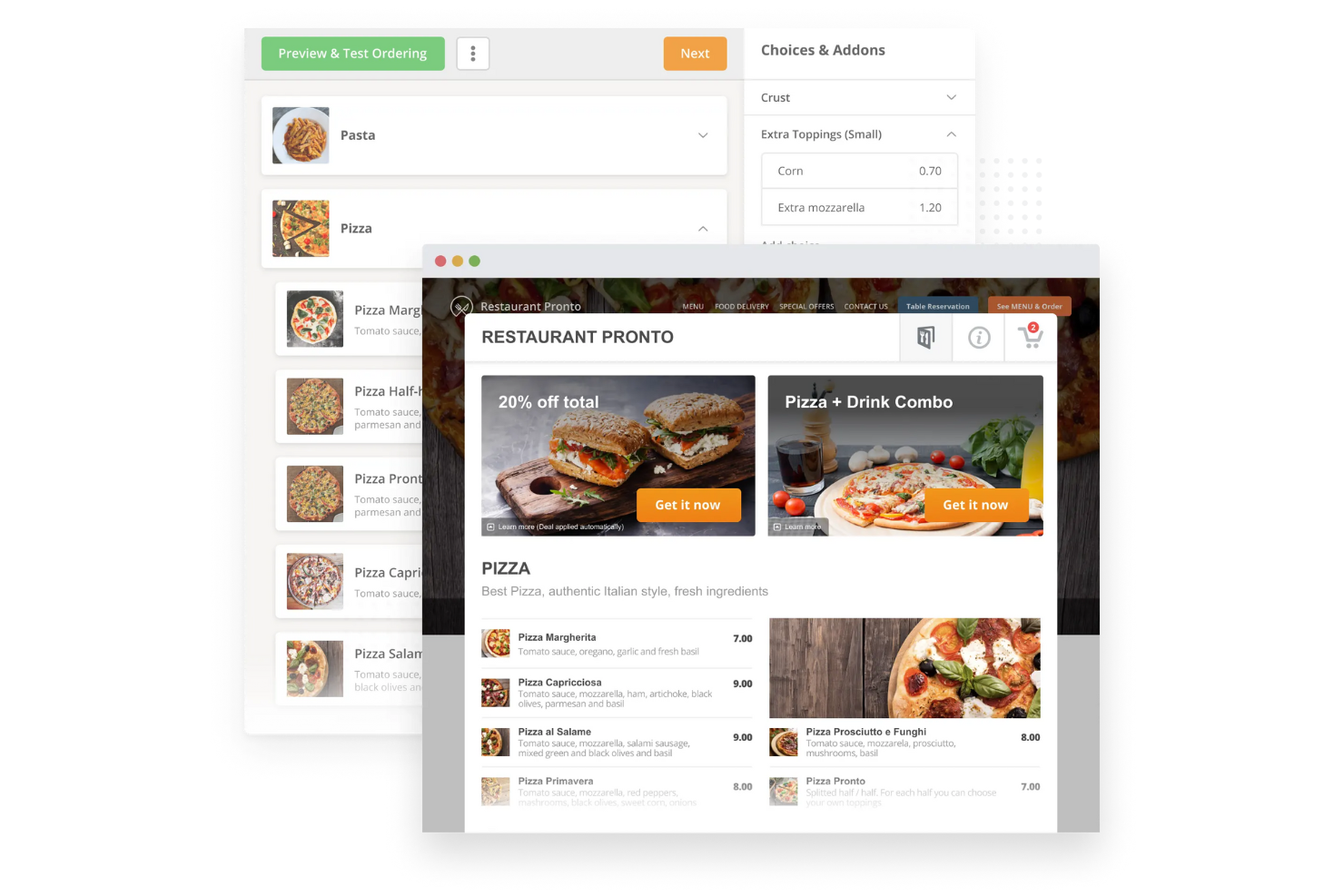
If you need to get your restaurant’s menu online fast, GloriaFood is built for speed and simplicity. It’s a strong fit for small restaurants, cafes, and takeout spots that want to launch online ordering without a long setup process. GloriaFood helps you create and publish a digital menu in minutes, so you can start accepting orders right away.
Why I Picked GloriaFood
Getting a menu online quickly can be a real challenge for many restaurants, and that’s exactly where GloriaFood shines. I picked it because its menu builder is designed for rapid setup, letting you add dishes, categories, and modifiers in just a few clicks. The platform also offers instant menu publishing, so your updates go live right away without any delays. For restaurants that need to start taking online orders as soon as possible, GloriaFood’s focus on quick menu setup makes it a practical choice.
GloriaFood Key Features
Some other features that make GloriaFood appealing for online ordering include:
- Table Reservation System: Allow customers to book tables directly through your website or app.
- Order Notifications: Receive instant alerts for new orders via email, SMS, or the mobile app.
- Multi-Language Support: Offer your menu and ordering process in several different languages.
- Promo Code Management: Create and manage discount codes for special offers and promotions.
GloriaFood Integrations
Integrations include Facebook, WordPress, Wix, Weebly, Squarespace, Drupal, Joomla, Google Business Profile, Yelp, TripAdvisor, and Instagram.
Pros and Cons
Pros:
- Built-in table reservation system for dine-in management
- Unlimited orders accepted with no commission fees on sales
- Menu setup process is fast with intuitive drag-and-drop tools
Cons:
- No built-in driver network for managing local deliveries
- Reporting and analytics features are basic and not customizable

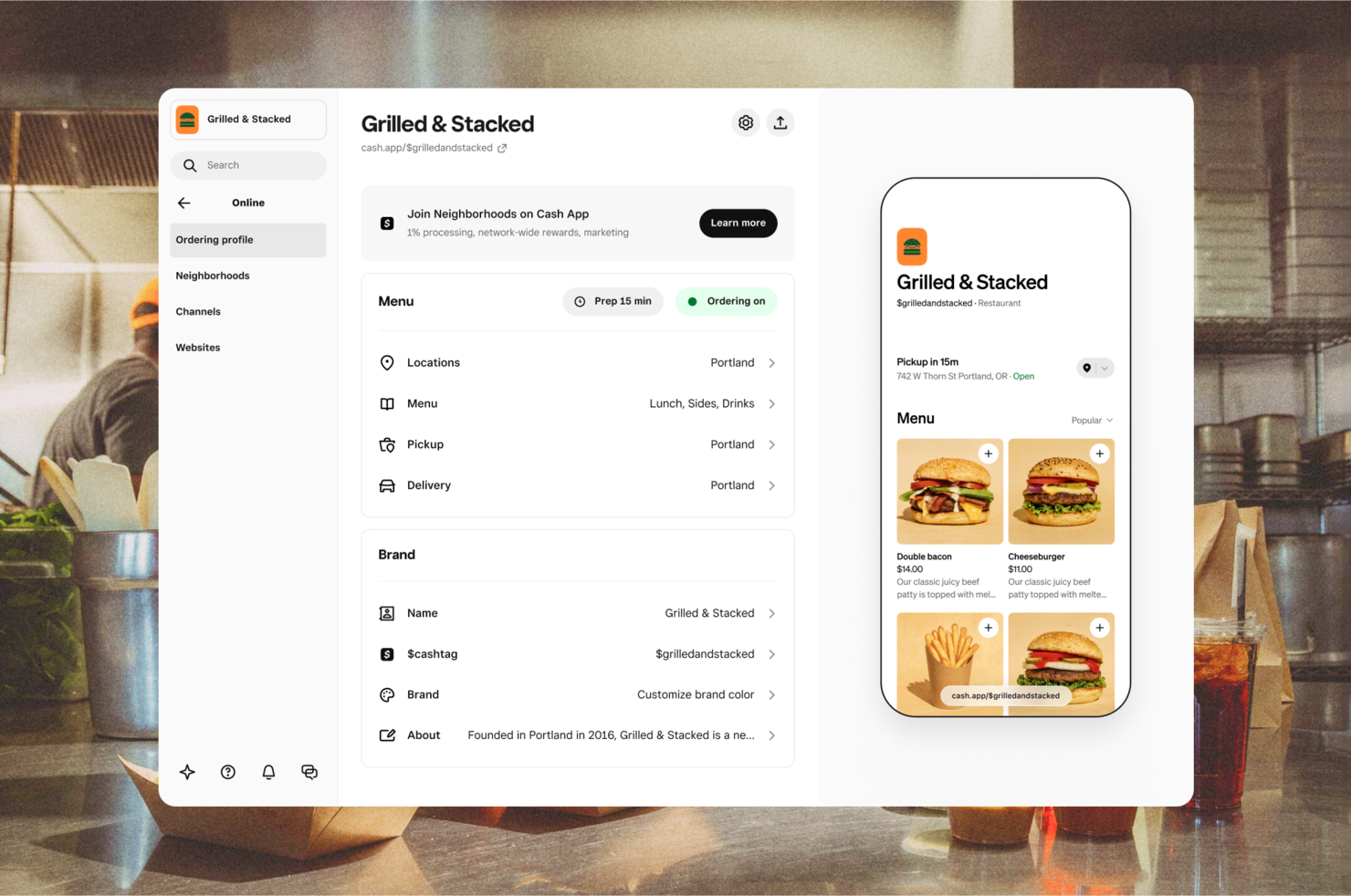
Square Online is a general-purpose ecommerce website builder that includes built-in tools for online ordering, making it a flexible option for restaurants that want a simple way to sell food alongside other products or services. Rather than being designed specifically for restaurant workflows, it focuses on helping businesses quickly launch branded websites with integrated checkout and payment processing.
Why I Picked Square Online
Managing online orders for several locations can get complicated fast, which is why I picked Square Online for its multi-location management strengths. The platform lets you control menus, pricing, and inventory for each site from a single dashboard, so you don’t have to juggle separate systems. You can also route orders to the right location automatically based on customer address or pickup selection.
Restaurants can use Square Online to create customizable ordering pages, offer pickup and delivery options, and manage menus within the broader context of a full ecommerce storefront. It also supports features like item modifiers, basic inventory tracking, and order notifications, which make it functional for food service use cases.
Square Online Key Features
In addition to its multi-location management tools, Square Online offers several other features worth noting:
- Order Scheduling: Let customers place orders for future pickup or delivery times.
- Curbside Pickup Support: Enable customers to request curbside pickup directly from their online order.
- Built-In Marketing Tools: Access email and SMS marketing features to promote your online store.
- Customizable Website Templates: Choose from a variety of templates to design your branded online ordering site.
Square Online Integrations
Integrations include DoorDash, Postmates, Deliverect, Uber Eats, Facebook, Instagram, Google, Cash App, QuickBooks, Wix, and WooCommerce.
Pros and Cons
Pros:
- Real-time inventory syncs between online and in-person sales
- Built-in curbside pickup and local delivery options available
- Centralized dashboard manages menus and orders for all locations
Cons:
- Occasional payment delays and account freezes
- Customer support is not available 24/7 for all users
- Advanced reporting features require upgrading to higher plans
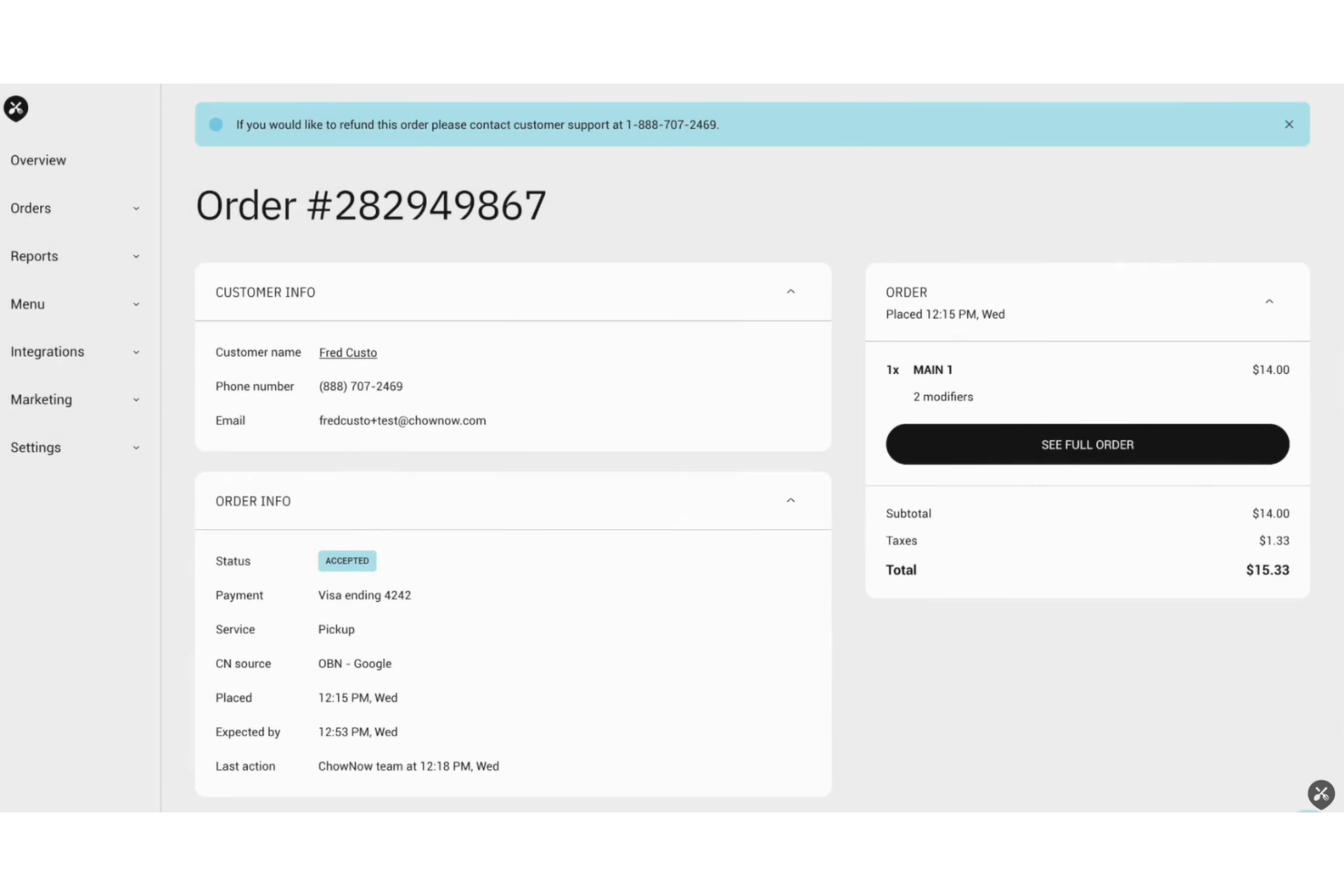
ChowNow is designed for restaurants that want to accept online orders without paying commission fees on every sale. It’s a strong fit for independent restaurants and local chains looking to keep more of their profits and maintain control over their customer relationships. ChowNow helps you set up branded ordering on your website, app, and social channels, so you can reach customers wherever they are.
Why I Picked ChowNow
ChowNow stands out for restaurants that want to avoid commission fees on every online order. I picked it because it gives you full control over your ordering channels, letting you keep all your revenue from direct orders. The platform offers branded web and mobile ordering, so your customers always interact with your restaurant’s identity—not a third-party marketplace. ChowNow also supports direct integration with your website and social media, making it easy to capture orders from multiple digital touchpoints without extra costs.
ChowNow Key Features
Some other features that make ChowNow a strong choice for online ordering include:
- Order Scheduling: Let customers place orders in advance for pickup or delivery at a specific time.
- Menu Management: Update menu items, prices, and availability in real time across all ordering channels.
- Customer Insights Dashboard: Access detailed analytics on order trends, customer behavior, and sales performance.
- Marketing Tools: Use built-in email marketing and promotional tools to reach and retain your customers.
ChowNow Integrations
Integrations include Toast, Square, Revel, Clover, Lightspeed, Oracle MICROS, DoorDash, Uber Eats, Grubhub, and Yelp.
Pros and Cons
Pros:
- Supports order scheduling for both pickup and delivery
- Built-in marketing tools for email campaigns and promotions
- Branded ordering experience across website, app, and social channels
Cons:
- Customer support response times can be inconsistent during peak hours
- Reporting features may lack depth for advanced analytics needs

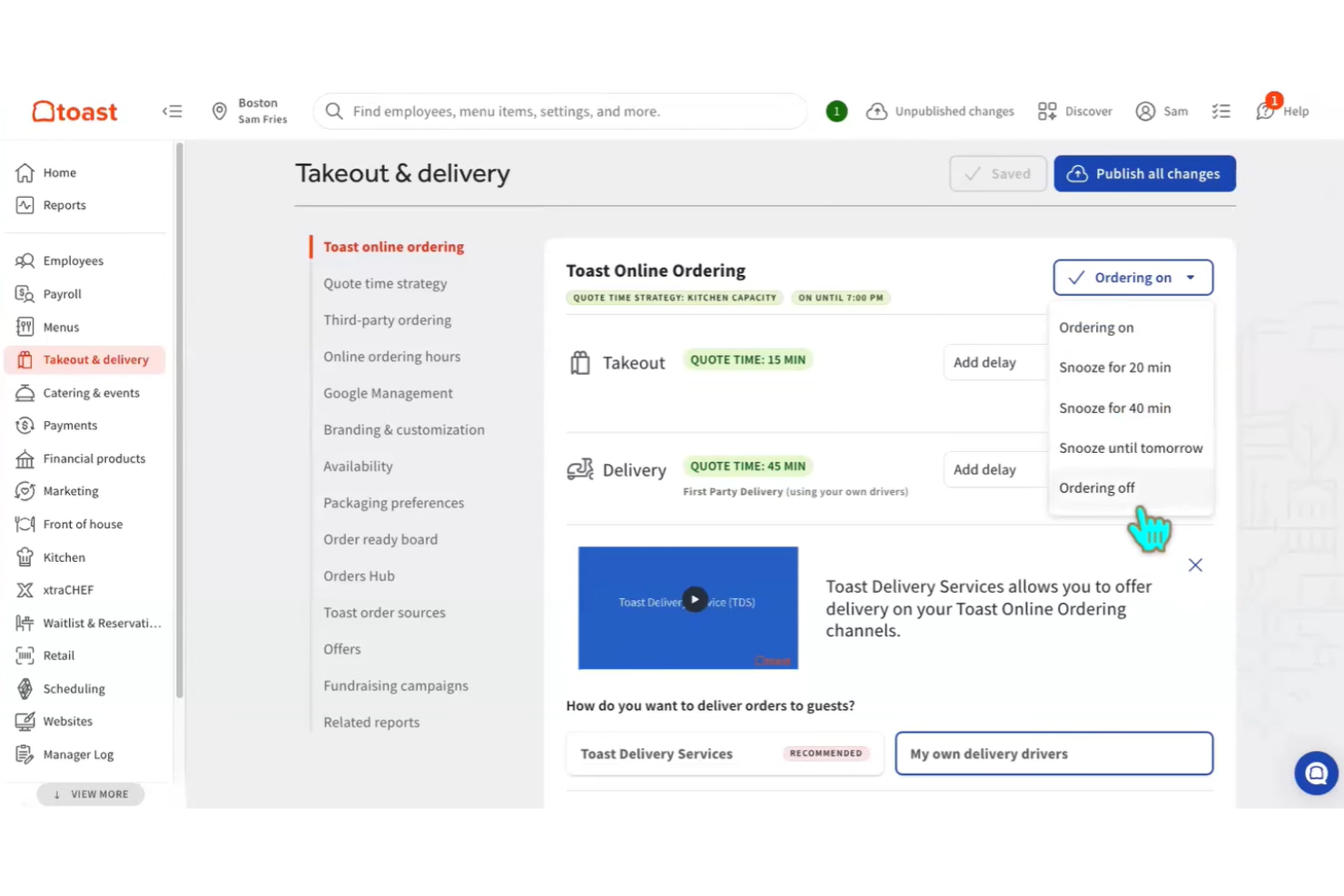
Restaurants looking for a tightly connected online ordering and in-person sales experience often turn to Toast Online Ordering. This platform is designed for food service businesses that want their online orders to flow directly into their POS system without manual entry. Toast helps unify order management, menu updates, and reporting across both digital and on-premise channels.
Why I Picked Toast Online Ordering
For restaurants that want their online and in-person operations to work together without friction, Toast Online Ordering stands out for its integrated POS features. Orders placed online are sent directly to the kitchen and synced with in-house sales, so there’s no need for manual entry or separate systems. I picked Toast because it lets you manage menus, inventory, and reporting from a single dashboard, which helps keep everything consistent across channels. This level of integration is especially valuable for busy restaurants that need to keep service running smoothly both online and on-site.
Toast Online Ordering Key Features
Some other features that make Toast Online Ordering appealing for restaurants include:
- Contactless Payment Options: Let customers pay online or in-person using contactless methods.
- Loyalty Program Integration: Build and manage customer loyalty programs directly within the platform.
- Customizable Order Notifications: Set up alerts for staff and customers about order status changes.
- Third-Party Delivery Integration: Connect with popular delivery services to expand your reach.
Toast Online Ordering Integrations
Integrations include 7shifts, Adentro, Apicbase, Appfront, Atlas, Axial Shift, Backbar, BarTrack, BeerBoard, and xtraCHEF.
Pros and Cons
Pros:
- Built-in loyalty and gift card programs support customer retention
- Menu updates apply across online and in-person channels simultaneously
- Online orders sync instantly with in-house POS and kitchen systems
Cons:
- Reporting features are less flexible than some competitors
- Hardware requirements can be costly for smaller restaurants
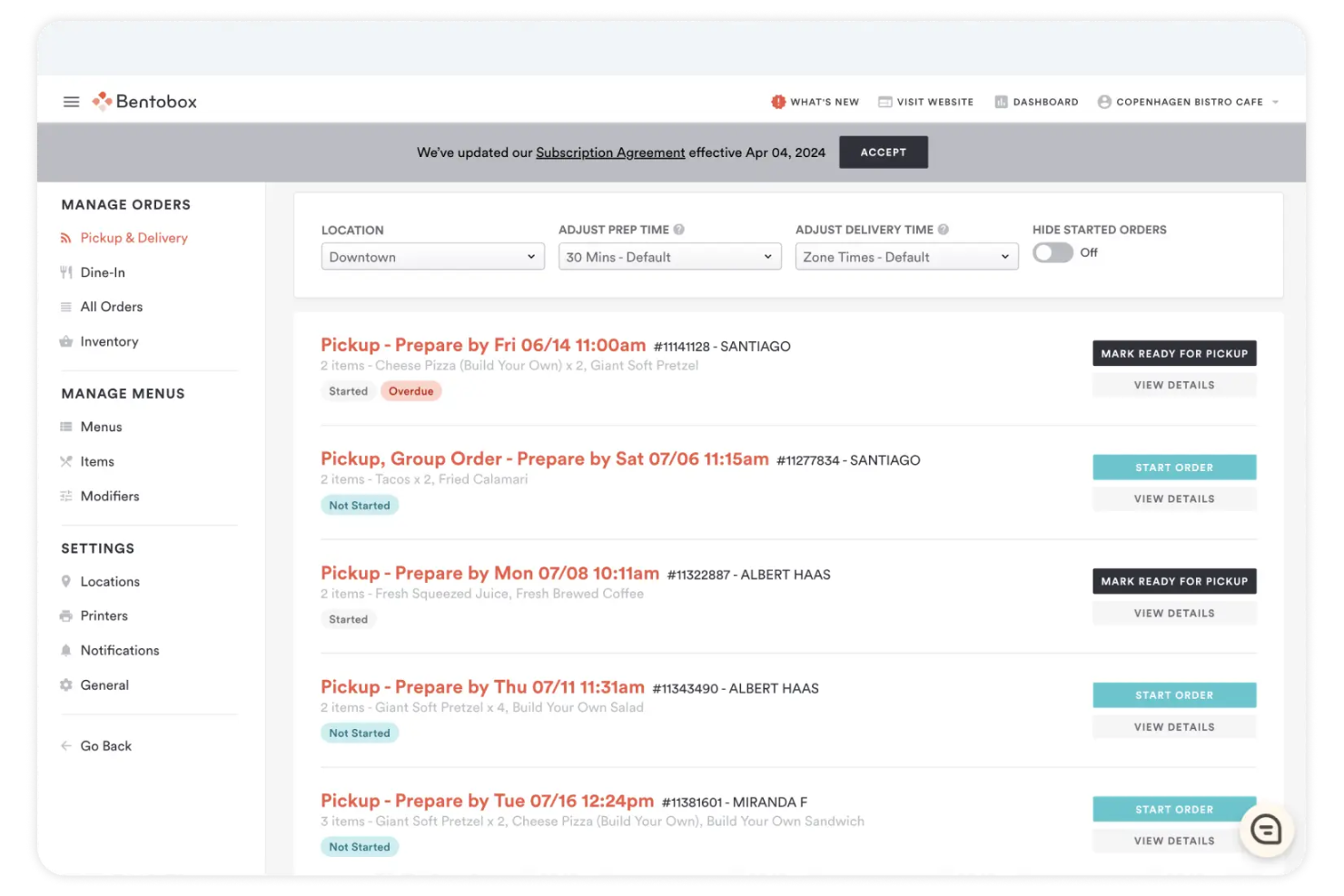
Restaurants looking to create a highly customized, branded online ordering experience often turn to BentoBox. This platform is designed for hospitality businesses that want full control over their website’s look, feel, and customer journey. With BentoBox, you can build a site that matches your brand while managing orders, menus, and promotions in one place.
Why I Picked BentoBox
For restaurants that want their online ordering system to reflect their unique brand, BentoBox stands out for its website customization options. You can design a site with custom layouts, fonts, and imagery that match your restaurant’s identity, rather than relying on generic templates. I appreciate how BentoBox lets you control the customer journey, from menu browsing to checkout, so every touchpoint feels on-brand. This level of customization is especially valuable for businesses that see their website as an extension of their in-person experience.
BentoBox Key Features
Some other features that make BentoBox appealing for online ordering include:
- Automated Order Notifications: Send real-time order updates to both staff and customers.
- Integrated Gift Card Sales: Sell and redeem digital gift cards directly through your website.
- Marketing and SEO Tools: Access built-in tools for email marketing and search engine optimization.
- Multi-Location Management: Manage menus, orders, and settings for multiple restaurant locations from one dashboard.
BentoBox Integrations
Integrations include Clover POS, Google, Facebook, Foursquare, Google Maps, Google Search, Google Local Pack, and QR Code Order & Pay.
Pros and Cons
Pros:
- Menu management allows for quick updates and daily specials
- Built-in marketing features include email campaigns and SEO tools
- Custom website design tools support unique restaurant branding needs
Cons:
- Mobile ordering experience can be inconsistent across devices
- Not a purpose-built online ordering system, with ordering as a secondary feature

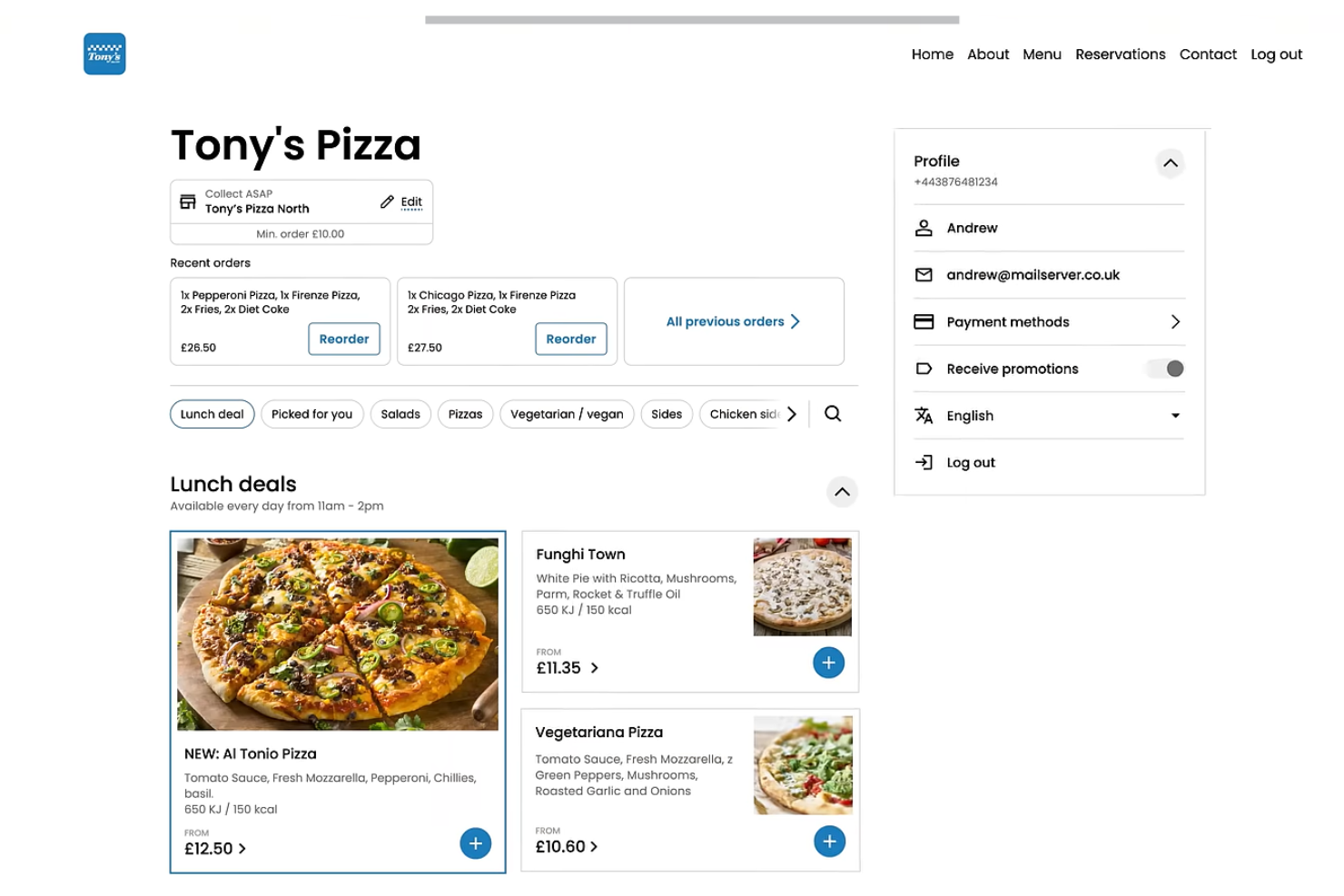
If you’re looking for an online ordering system with built-in marketing automation, Flipdish is worth considering. This platform is designed for restaurants, cafes, and food businesses that want to drive repeat orders and customer engagement through targeted campaigns. Flipdish helps you automate SMS, email, and push notifications so you can reach customers with personalized offers and updates.
Why I Picked Flipdish
What sets Flipdish apart for online ordering is its focus on marketing automation tools that help restaurants build customer loyalty. The platform lets you set up automated SMS, email, and push notification campaigns, so you can send targeted promotions and reminders without extra manual work. I like that Flipdish includes built-in customer segmentation, making it easy to tailor messages based on order history or behavior. These features make Flipdish a strong choice if you want your online ordering system to actively support your marketing efforts.
Flipdish Key Features
Some other features that make Flipdish useful for online ordering include:
- Customizable Online Menus: Update menu items, pricing, and images in real time.
- White-Label Mobile Apps: Offer branded iOS and Android apps for direct customer ordering.
- Order Management Dashboard: Track, manage, and fulfill orders from a centralized interface.
- Loyalty Program Tools: Set up and manage digital loyalty programs to encourage repeat business.
Flipdish Integrations
Integrations include Uber Direct, Stuart, Google Business, POS systems, kitchen display systems, in-store kiosks, and an API for custom integrations.
Pros and Cons
Pros:
- Real-time menu updates allow for quick changes and specials
- Branded mobile apps support direct ordering and customer loyalty
- Automated marketing campaigns help drive repeat customer orders
Cons:
- May not align with region-specific needs outside its core markets
- Limited relevance for businesses outside the UK and Europe

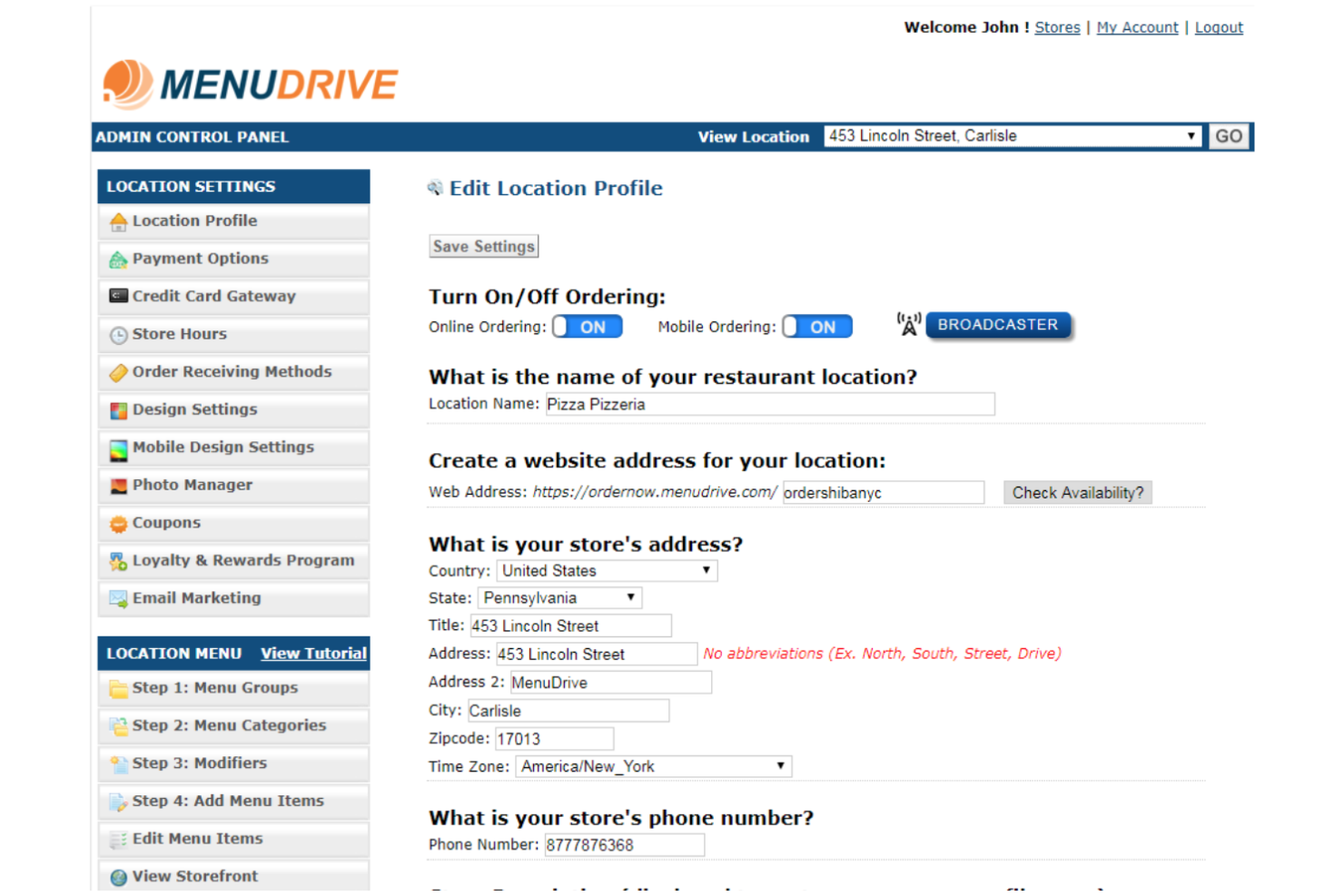
MenuDrive stands out for restaurants and food businesses that want to connect their online ordering with loyalty program features. This platform is built for teams looking to reward repeat customers and encourage higher order frequency through integrated loyalty tools. MenuDrive helps you create branded experiences that tie together digital ordering and customer rewards in one place.
Why I Picked MenuDrive
Loyalty program integration is where MenuDrive really shines for online ordering. The platform lets you set up custom rewards programs that automatically track customer purchases and apply points or discounts at checkout. I appreciate how MenuDrive connects loyalty features directly to the ordering process, so customers see their rewards in real time. This approach helps businesses encourage repeat visits and build stronger relationships with their online customers.
MenuDrive Key Features
Some other features that make MenuDrive useful for online ordering include:
- Customizable Online Storefronts: Design and brand your digital menu to match your business.
- Order Scheduling: Let customers place orders for future pickup or delivery times.
- Built-In Marketing Tools: Send email campaigns and promotions directly from the platform.
- Multi-Location Management: Manage menus, orders, and reporting across several locations from one dashboard.
MenuDrive Integrations
Integrations include Lavu POS, Square, PayPal, Stripe, Google My Business, DoorDash Drive, Uber Direct, Apple Pay, Google Pay, and an API for custom integrations.
Pros and Cons
Pros:
- Order scheduling lets customers select future pickup or delivery times
- Menu design tools support branded, mobile-friendly storefronts
- Loyalty program features are built directly into the ordering process
Cons:
- Menu updates can require manual changes for each location
- Reporting features lack advanced analytics and custom dashboards
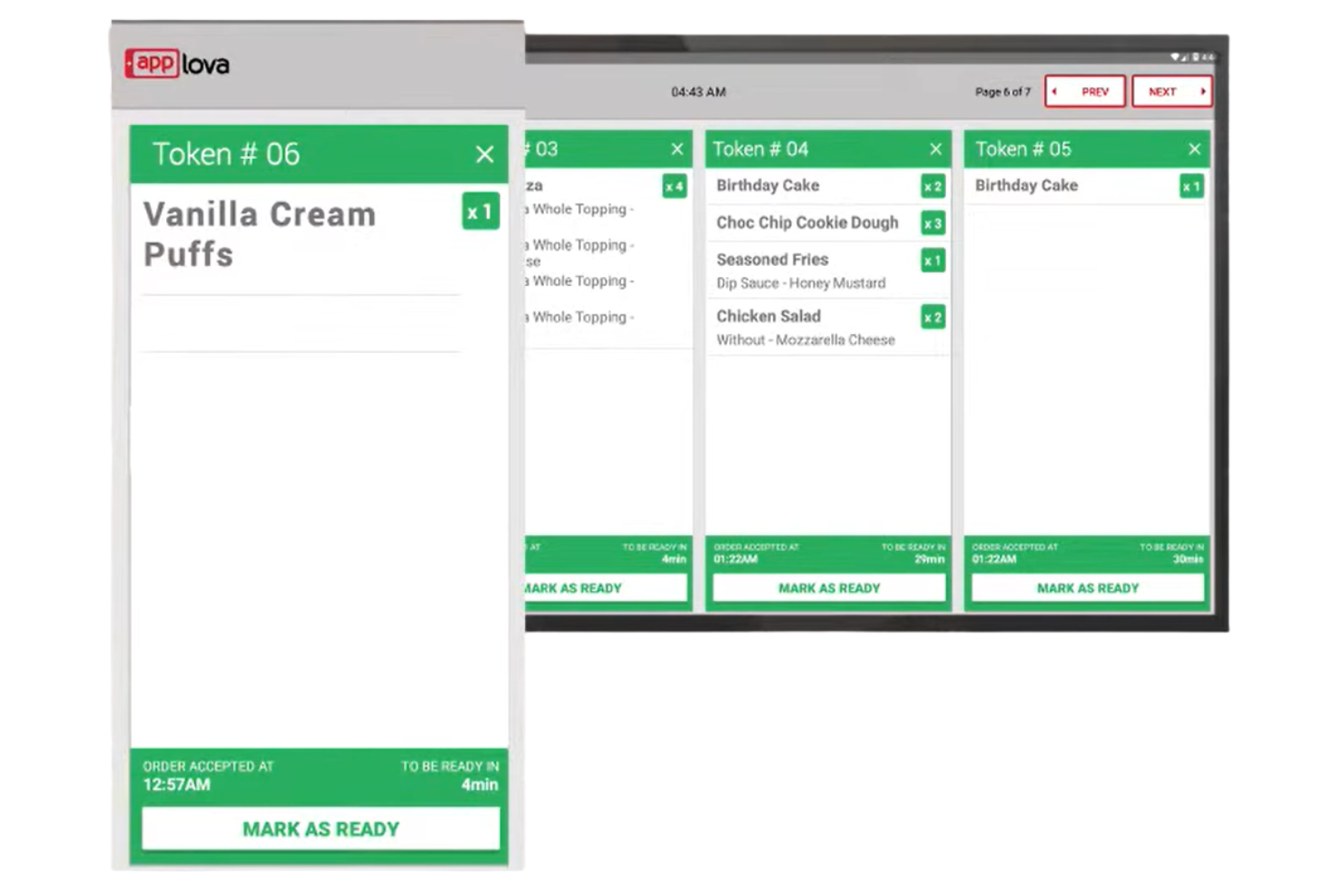
For restaurants and cafes looking to launch their own branded mobile ordering app, Applova offers a tailored solution. The platform is designed for businesses that want to give customers a fast, app-based way to order and pay from their phones. Applova stands out by making it easy to create a custom mobile app that matches your brand and connects directly to your operations.
Why I Picked Applova
Mobile app ordering is where Applova really shines, making it a strong choice for businesses that want to offer a branded app experience. The platform lets you quickly launch a custom mobile app with your own logo, menu, and design, so customers can order directly from their phones. I appreciate that Applova supports features like push notifications and loyalty programs, which help keep customers engaged and coming back. For restaurants and cafes focused on mobile-first ordering, Applova delivers the tools needed to stand out.
Applova Key Features
Some other features that make Applova useful for mobile ordering include:
- Order Ahead Functionality: Customers can schedule orders for pickup at a specific time.
- QR Code Ordering: Diners can scan a QR code at the table to access the menu and place orders.
- Multi-Location Management: Manage menus, pricing, and orders across several locations from one dashboard.
- Real-Time Order Tracking: Staff and customers can view order status updates as they happen.
Applova Integrations
Native integrations are not currently listed by Applova.
Pros and Cons
Pros:
- Offers order-ahead and scheduled pickup features for customer convenience
- Supports QR code ordering for contactless in-store experiences
- Branded mobile app ordering helps businesses build direct customer relationships
Cons:
- Fewer third-party delivery service integrations compared to larger platforms
- Limited visibility into customer data ownership and export options

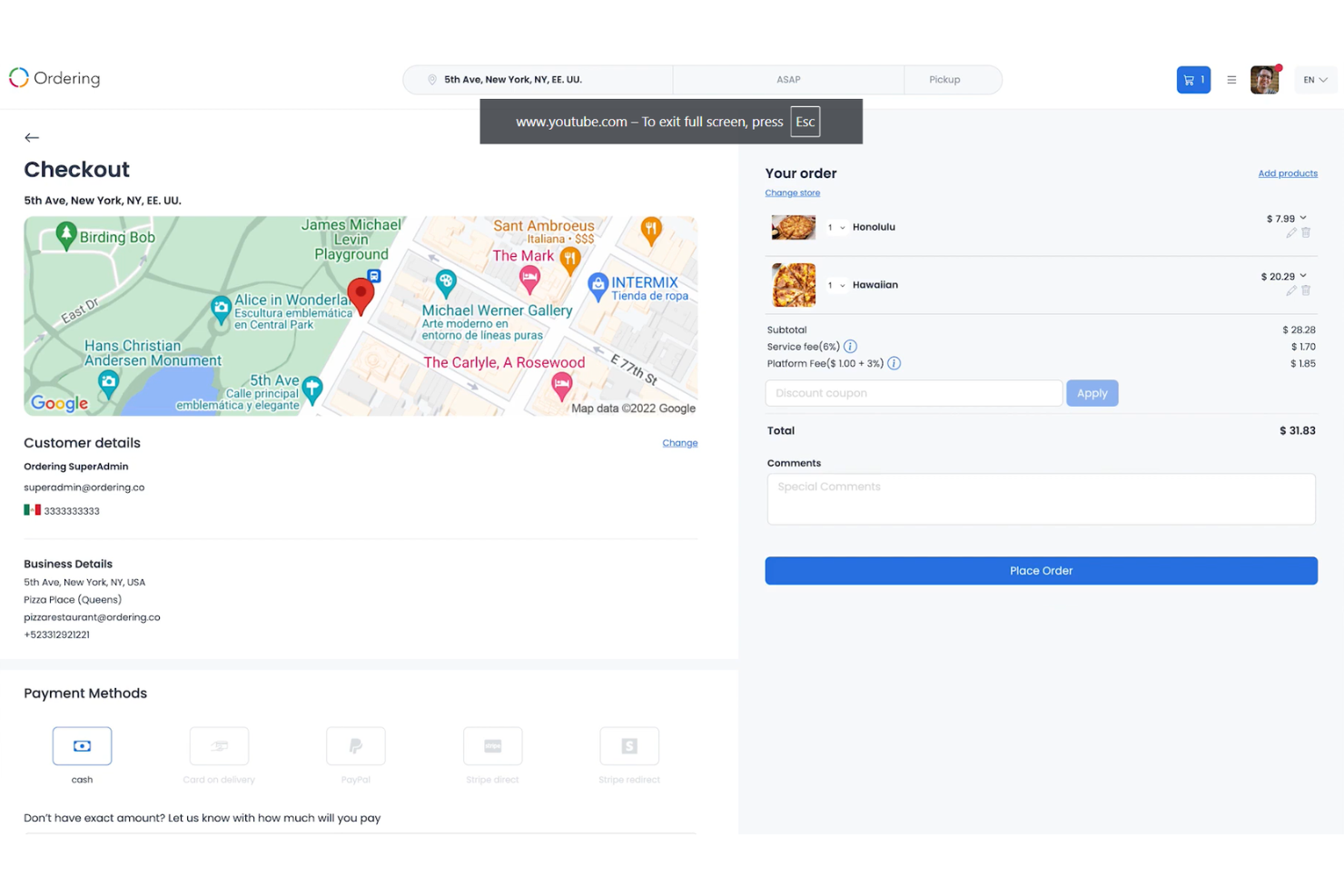
If your business needs an online ordering system that adapts to unique workflows, Ordering.co is built for flexibility. The platform is especially useful for restaurants, grocers, and retailers who want to automate and customize every step of the ordering and fulfillment process. With its focus on custom workflow automation, Ordering.co helps you design processes that match your exact operational needs.
Why I Picked Ordering.co
What sets Ordering.co apart is its focus on custom workflow automation, which is especially valuable for businesses with complex or non-standard processes. The platform lets you build and automate order flows, notifications, and fulfillment steps to match your exact requirements. I like that you can set up conditional logic and triggers, so orders move through your system in a way that fits your operations. For teams that need more than a one-size-fits-all solution, Ordering.co offers the flexibility to design workflows that truly fit.
Ordering.co Key Features
Some other features that make Ordering.co appealing for online ordering include:
- White-Label Website Builder: Create a fully branded online ordering website with your own domain and design.
- Multi-Vendor Marketplace Support: Allow multiple vendors or stores to operate within a single platform.
- Integrated Delivery Management: Assign, track, and manage deliveries directly from the dashboard.
- Customer Loyalty Programs: Set up points, rewards, and promotions to encourage repeat business.
Ordering.co Integrations
Native integrations are not currently listed by Ordering.co.
Pros and Cons
Pros:
- Customer loyalty and rewards features are included in the platform
- Built-in delivery management tools for dispatch and driver tracking
- White-label website and app options for full brand control
Cons:
- Some users report slow response times from customer support
- Menu and design changes may require technical support or assistance

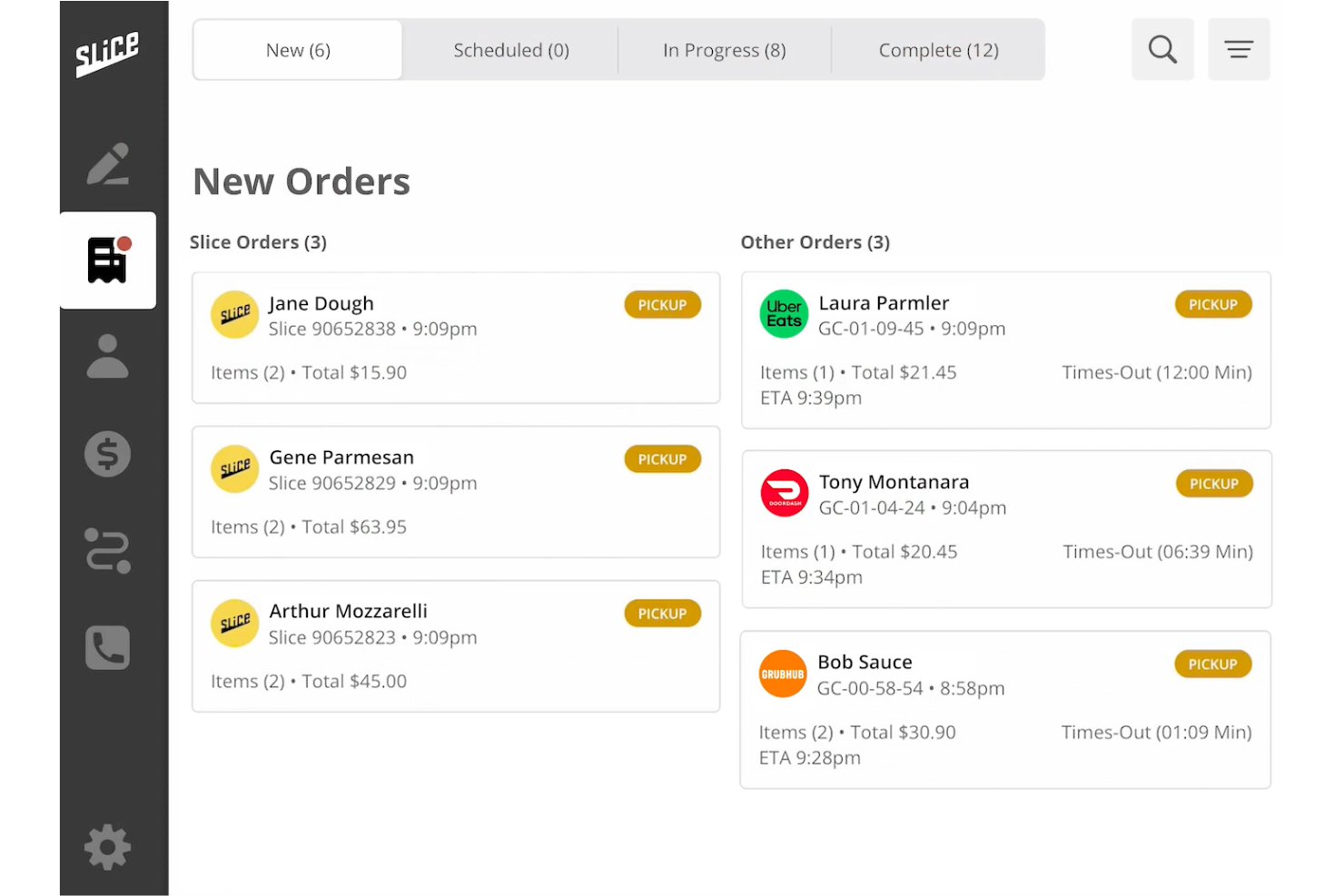
If you run an independent pizzeria and want to compete with national chains, Slice is designed for you. This platform connects local pizza shops with online ordering, delivery coordination, and marketing tools tailored to the pizza business. Slice helps pizzerias manage digital orders and reach new customers without giving up control to third-party delivery apps.
Why I Picked Slice
Supporting independent pizzerias is at the core of what Slice offers, making it a strong fit for local pizza shops looking for an online ordering system. The platform provides a pizza-specific ordering interface that highlights menu customization, toppings, and specialty pies, which is essential for pizzerias. I like that Slice also handles delivery coordination and marketing outreach, helping small businesses attract and retain customers without relying on generic third-party apps. This focus on the unique needs of independent pizzerias sets Slice apart from broader restaurant ordering solutions.
Slice Key Features
Some other features that make Slice useful for pizzerias include:
- Automated Order Printing: Orders are sent directly to in-store printers for kitchen staff.
- Customer Insights Dashboard: Access data on repeat customers, order frequency, and top-selling items.
- Mobile App Ordering: Customers can place orders through a dedicated Slice mobile app.
- Integrated Payment Processing: Accept credit card payments online without needing a separate payment provider.
Slice Integrations
Native integrations are not currently listed by Slice.
Pros and Cons
Pros:
- Offers a branded mobile app for direct customer ordering
- Handles delivery coordination without requiring third-party delivery apps
- Focuses on independent pizzerias with pizza-specific ordering features
Cons:
- Menu updates and changes must be submitted through Slice support
- Native integrations with POS and accounting systems are not listed
Other Online Ordering Systems
Here are some additional online ordering systems options that didn’t make it onto my shortlist, but are still worth checking out:
- Craver
For native mobile ordering experiences
- Incentivio
For AI-driven guest engagement
- Per Diem
For subscription-based ordering models


Online Ordering Systems Selection Criteria
When selecting the best online ordering systems to include in this list, I considered common buyer needs and pain points like managing high order volumes and ensuring accurate, real-time menu updates. I also used the following framework to keep my evaluation structured and fair:
Core Functionality (25% of total score)
To be considered for inclusion in this list, each solution had to fulfill these common use cases:
- Accept online orders from web and mobile
- Manage menus and product catalogs
- Process payments securely
- Track order status and fulfillment
- Send order notifications to customers
Additional Standout Features (25% of total score)
To help further narrow down the competition, I also looked for unique features, such as:
- Custom workflow automation tools
- Multi-vendor marketplace support
- Integrated delivery management
- White-label website and app options
- Customer loyalty and rewards programs
Usability (10% of total score)
To get a sense of the usability of each system, I considered the following:
- Simple and intuitive user interface
- Fast and responsive navigation
- Clear order management dashboard
- Easy menu editing and updates
- Mobile-friendly design for staff and customers
Onboarding (10% of total score)
To evaluate the onboarding experience for each platform, I considered the following:
- Availability of training videos and tutorials
- Access to setup guides and documentation
- Interactive product tours or walkthroughs
- Pre-built templates for menus and workflows
- Live chat or onboarding webinars
Customer Support (10% of total score)
To assess each software provider’s customer support services, I considered the following:
- 24/7 support availability
- Multiple support channels like chat, email, and phone
- Fast response times to inquiries
- Access to a knowledge base or help center
- Dedicated account management for larger clients
Value For Money (10% of total score)
To evaluate the value for money of each platform, I considered the following:
- Transparent and competitive pricing
- Flexible plans for different business sizes
- No hidden fees or transaction charges
- Features included at each pricing tier
- Free trial or demo availability
Customer Reviews (10% of total score)
To get a sense of overall customer satisfaction, I considered the following when reading customer reviews:
- Consistent positive feedback on reliability
- Reports of responsive customer support
- Comments on ease of setup and daily use
- Feedback on feature updates and improvements
- Critiques about limitations or missing features
How to Choose Online Ordering Systems
It’s easy to get bogged down in long feature lists and complex pricing structures. To help you stay focused as you work through your unique software selection process, here’s a checklist of factors to keep in mind:
| Factor | What to Consider |
|---|---|
| Scalability | Will the system handle your busiest periods and future growth? Ask about order volume limits and multi-location support. |
| Integrations | Does it connect natively to your POS, payment gateways, delivery partners, and marketing tools? Check for required integrations before shortlisting. |
| Customizability | Can you adapt workflows, branding, and menu logic to your business? Consider if you need custom order flows or unique customer experiences. |
| Ease of use | Will staff and customers find the interface intuitive? Test the ordering process and admin dashboard for clarity and speed. |
| Implementation and onboarding | How long will setup take, and what resources are required? Look for migration support, training, and clear documentation. |
| Cost | Are pricing tiers, transaction fees, and add-on costs transparent? Compare the total cost of ownership, not just monthly rates. |
| Security safeguards | Does the system offer PCI compliance, data encryption, and user access controls? Ask vendors how they protect customer and payment data. |
| Support availability | What support channels are offered, and during what hours? Consider if you need 24/7 help or dedicated account management. |
What Are Online Ordering Systems?
Online ordering systems are digital platforms that let customers place orders for products or services through a website or mobile app. These systems manage the entire order process, from menu or catalog browsing to payment and fulfillment tracking. They help businesses automate order intake, reduce manual errors, and provide real-time updates to both staff and customers across multiple sales channels.
Features of Online Ordering Systems
When selecting online ordering systems, keep an eye out for the following key features:
- Menu management: Lets you create, update, and organize product listings, prices, and descriptions in real time for customers to browse and order from.
- Order tracking: Provides real-time status updates for both staff and customers, from order placement through preparation and delivery or pickup.
- Payment processing: Supports secure online payments, including credit cards, digital wallets, and sometimes cash-on-delivery, with built-in fraud prevention.
- Customer notifications: Sends automated alerts via email, SMS, or app notifications to keep customers informed about order status and estimated timing.
- Delivery management: Assigns, tracks, and manages delivery drivers or integrates with third-party delivery services to coordinate order fulfillment.
- Custom branding: Allows you to tailor the look and feel of your ordering site or app to match your business’s brand identity.
- Reporting and analytics: Offers dashboards and reports on sales, order trends, and customer behavior to help you make informed business decisions.
- Multi-location support: Enables centralized management of menus, orders, and reporting across several locations or franchises from a single platform.
- Loyalty and promotions: Lets you set up customer rewards, discounts, and promotional campaigns to encourage repeat business and higher order values.
Benefits of Online Ordering Systems
Implementing online ordering systems provides several benefits for your team and your business. Here are a few you can look forward to:
- Increased order accuracy: Automated order intake reduces manual entry errors and ensures customers get exactly what they request.
- Faster order processing: Real-time order tracking and notifications help staff fulfill orders quickly and keep customers informed.
- Expanded sales channels: Online platforms let you reach customers across web and mobile, supporting both delivery and pickup options.
- Centralized management: Multi-location and menu management features allow you to oversee all orders and updates from a single dashboard.
- Improved customer engagement: Loyalty programs, promotions, and branded experiences encourage repeat business and higher order values.
- Actionable business insights: Reporting and analytics tools provide data on sales trends and customer behavior to guide decision-making.
- Enhanced operational efficiency: Integrated delivery management and payment processing streamline workflows and reduce administrative overhead.
Costs and Pricing of Online Ordering Systems
Selecting online ordering systems requires an understanding of the various pricing models and plans available. Costs vary based on features, team size, add-ons, and more. The table below summarizes common plans, their average prices, and typical features included in online ordering systems solutions:
Plan Comparison Table for Online Ordering Systems
| Plan Type | Average Price | Common Features |
|---|---|---|
| Free Plan | $0 | Basic menu management, limited order volume, simple reporting, and standard support. |
| Personal Plan | $20-$50/month | Online ordering, payment processing, menu customization, basic analytics, and email notifications. |
| Business Plan | $100-$300/month | Multi-location support, branded website or app, delivery management, advanced reporting, and promotions. |
| Enterprise Plan | $500-$2000/month | Custom workflows, API access, priority support, dedicated account management, and advanced integrations. |
Online Ordering Systems FAQs
Here are some answers to common questions about online ordering systems:
How do online ordering systems integrate with existing POS systems?
Most online ordering systems offer direct integrations or APIs to sync orders, inventory, and payments with your POS. Before choosing a solution, confirm compatibility with your current POS and ask about setup requirements or potential extra costs for integration.
Can online ordering systems handle multiple locations or franchises?
Yes, many online ordering systems support multi-location management. This lets you control menus, pricing, and reporting for each site from a single dashboard. Make sure the system can scale with your business and offers location-specific customization if needed.
What security measures should I look for in an online ordering system?
Look for PCI compliance, data encryption, and user access controls. These safeguards help protect customer payment data and prevent unauthorized access to your business information. Ask vendors how they handle data storage and security updates.
How long does it take to implement an online ordering system?
Implementation time varies by provider and business complexity. Simple setups can go live in a few days, while custom workflows or multi-location rollouts may take several weeks. Ask about onboarding resources, migration support, and training to speed up the process.
What ongoing support is available after setup?
Most vendors offer support through chat, email, or phone, with some providing 24/7 help or dedicated account managers for larger clients. Check support hours, response times, and access to knowledge bases or training materials before committing.