
How to Auto-Apply Discounts & Protect Your Margins


Automatic discounts streamline checkout and boost conversion by removing shopper coupon entry errors.
Retailers use auto-discounts to move aging stock and protect margins during peak events.
The article provides step-by-step instructions on setting up discounts across various platforms like Shopify.
Key strategies include setting usage limits and excluding specific products to maintain promotional integrity.
Examples of retailers successfully using auto-discounts show increased sales, reduced cart abandonment, and stronger loyalty.
Discounts that apply themselves at checkout are one of the easiest ways to cut friction and close more sales.
No promo codes to mistype, no shoppers second-guessing whether the deal is real—just a smoother checkout process that drives conversion.
For retail leaders, automatic discounts aren’t just about giving customers a break. They’re a lever for moving aging stock, protecting margins during peak events like Black Friday, and keeping cart abandonment in check.
In this guide, I’ll show you how to set up a discount automatically applied at checkout across platforms like Shopify and WooCommerce, protect yourself against fraud, and use these promos to lift both customer loyalty and average order value.
What Are Automatic Discounts?
Automatic discounts are promotions that trigger at checkout without a shopper having to enter a code. Instead, the system applies the deal when set conditions are met—like hitting a minimum spend, buying specific products, or being a first-time customer.
Think of it as “set it and forget it” pricing logic. Instead of training cashiers or relying on customers to copy-paste promo codes, the checkout page itself enforces the rule.
Example:
At Harbor & Pine, our fictional lifestyle retailer, any online order over $200 ships free.
The discount kicks in automatically once the cart subtotal clears that threshold, shaving off delivery costs without a single keystroke from the customer.
For operators, the appeal is obvious.
Automatic discounts cut down on checkout errors, speed up the process, and reduce cart abandonment caused by clunky coupon entry. They also give you a controlled way to run targeted campaigns without leaving margin on the table.
Benefits of Automatic Discounts
Automatic discounts cost you margin upfront, but the payoff comes in stronger conversion, cleaner operations, and healthier customer lifetime value.
Clear out aging or excess inventory
Automatic discounts are a fast lever for moving slow sellers, seasonal items, or stock edging toward obsolescence.
Instead of deep-discounting at the register or tying up staff with markdown management, you set a rule once and let the system do the work.
That creates room for fresher assortment and avoids costly write-offs.
Increase average order value (AOV)
“Spend $100, get 20% off” or “Buy two, get the third free” are classic AOV plays. Auto-applied discounts raise basket size because shoppers see the reward kick in at checkout in real time.
It’s a nudge that feels effortless to the customer and translates into higher revenue per transaction for you.
Reduce cart abandonment
One of the biggest friction points in ecommerce checkout is manual coupon entry. Shoppers mistype, codes expire, or they leave to hunt for one on Google—and never come back.
Auto-applied discounts remove that layer of risk.
The deal shows up instantly in the cart, reassuring the customer and keeping them moving through checkout.
Real-world example: Petoi
When Petoi, a robotic pet brand, switched from manual coupon codes to automatic discounts, they saw both sales lift and happier customers.
CEO Rongzhong Li explained it this way:
Ensure the discount clearly applies in the cart, so customers feel the benefit instantly. This improves their overall satisfaction and encourages repeat purchases.
That visibility at checkout turned what used to be a friction point into a retention driver.
How to Implement Automatic Discounts
Automatic discounts are only as strong as the platform behind them.
The good news is most modern POS and ecommerce systems make setup straightforward. The challenge is knowing which method fits your operation—whether you’re running a Shopify store, a WordPress site, or a subscription program.
The goal isn’t just to “get a discount live.” It’s to configure it in a way that supports your pricing strategy, avoids margin leaks, and gives customers a seamless checkout.
As Irresistible Me hair specialist Kate Ross puts it:
Using the right POS system makes applying automatic discounts really easy so customers get the deal without any hassle.
That’s the standard to aim for—clean execution in the cart with minimal operator lift.
1. Platform-specific instructions
Each major ecommerce platform has its own way of handling automatic discounts. Some, like Shopify, offer built-in options. Others, like WordPress, rely on plugins.
Choosing the right method comes down to your stack and how tightly you want discounts tied into your broader retail systems.
Shopify
Shopify supports three kinds of automatic discounts: percentage, fixed amount, and “Buy X, Get Y.” Each can be applied to products, collections, or cart totals.
The setup is point-and-click inside Shopify Admin.
You select the type of discount, define conditions (like minimum purchase amount or product eligibility), and set start and end dates. Once active, the discount applies automatically at checkout when criteria are met.
Here’s a step-by-step guide to implementing automatic discounts on Shopify:
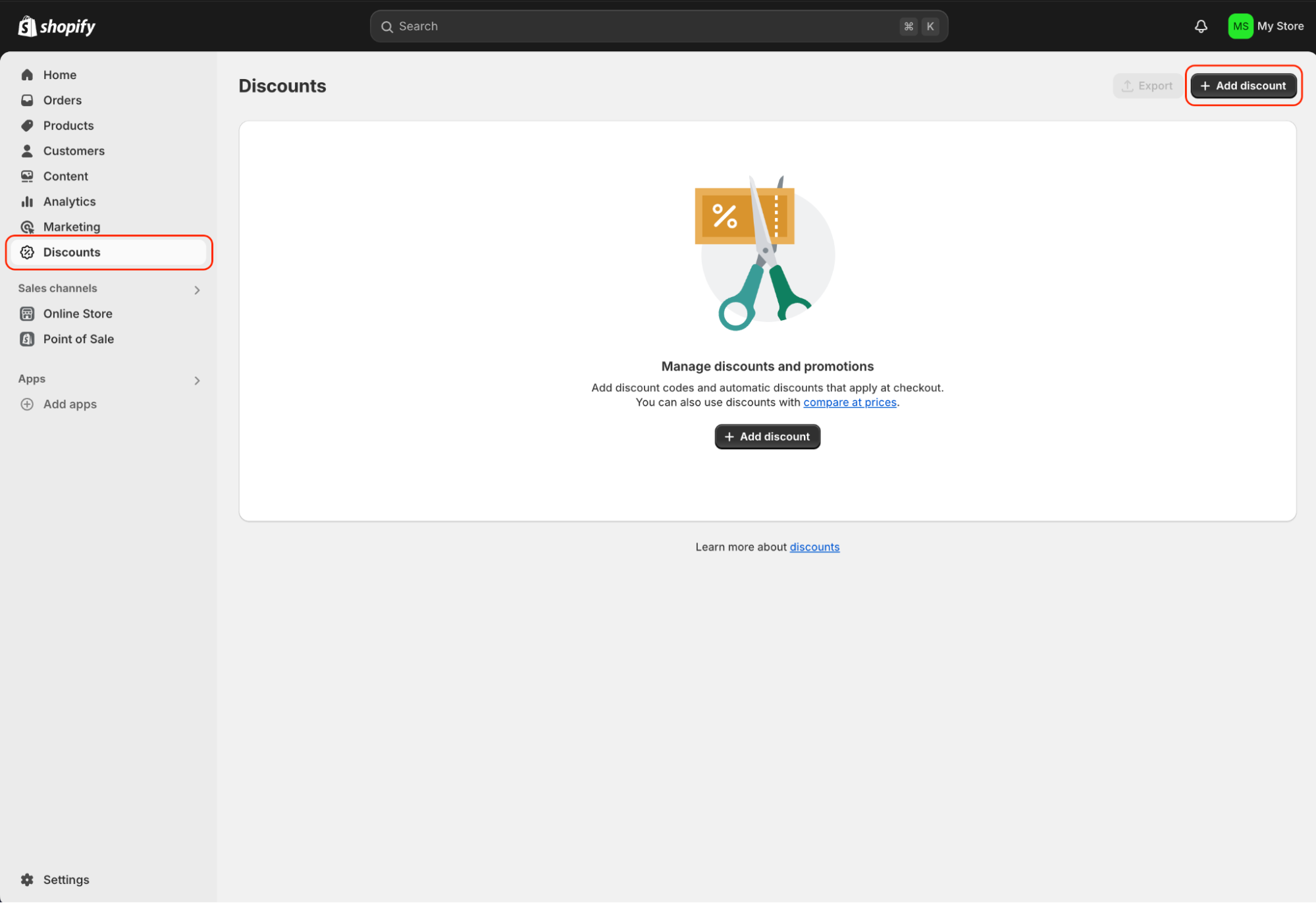
1. Log into your Shopify Admin account and click on the Discount tab.
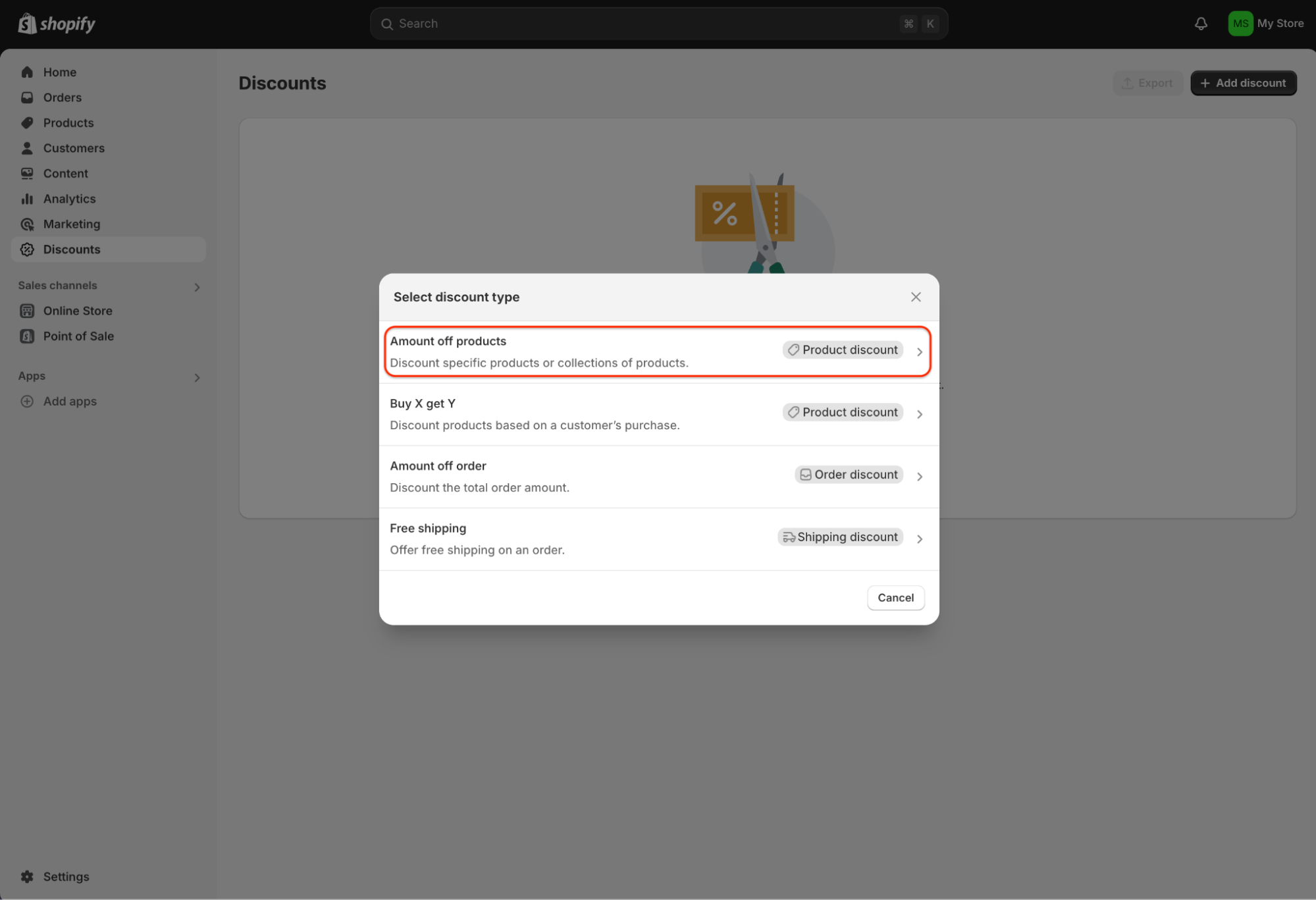
2. Select your discount type from the dropdown list, e.g. “Amount off products”.
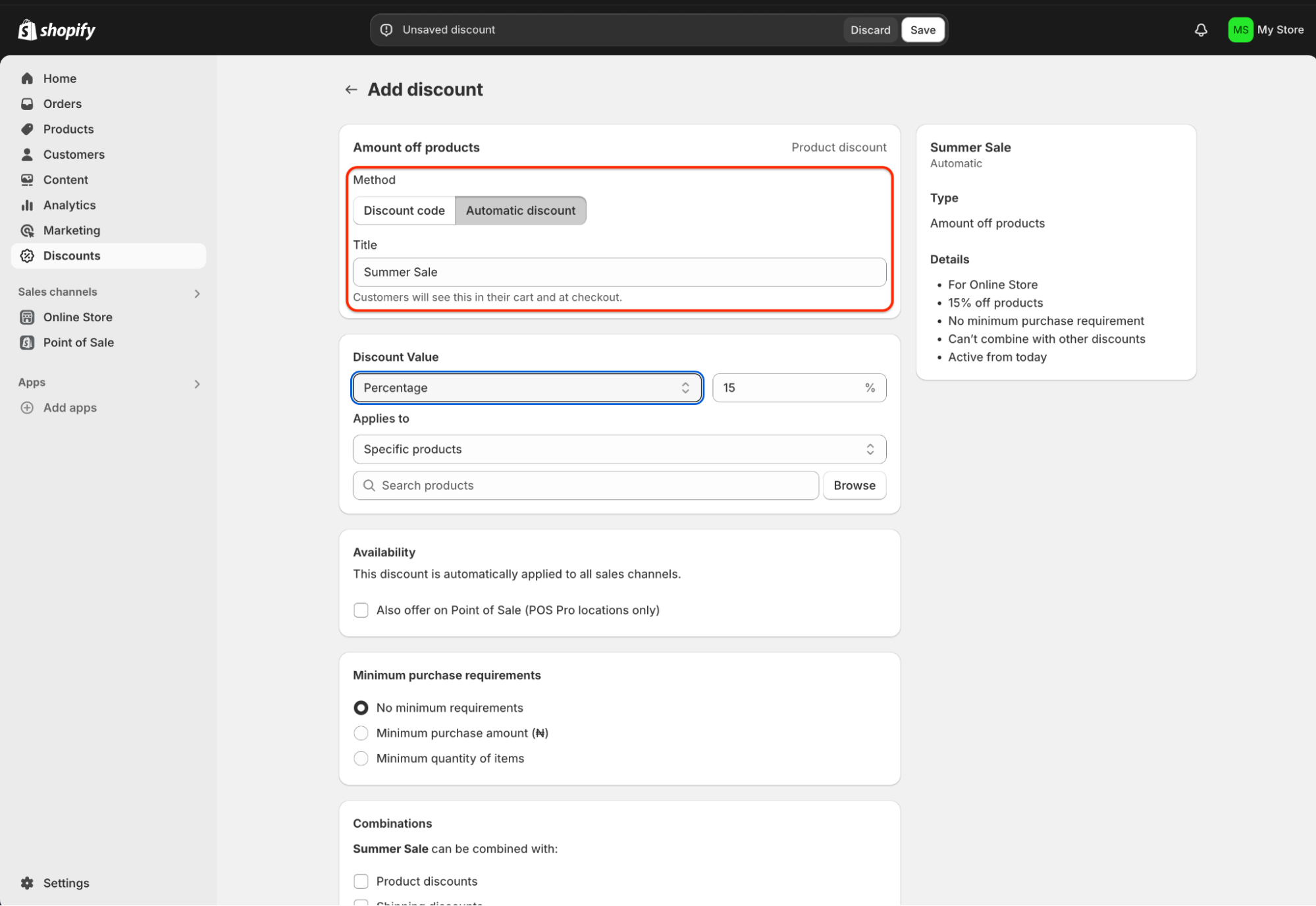
3. Click the “Automatic discount” button from the methods menu and input the discount title (e.g. Summer Sale).
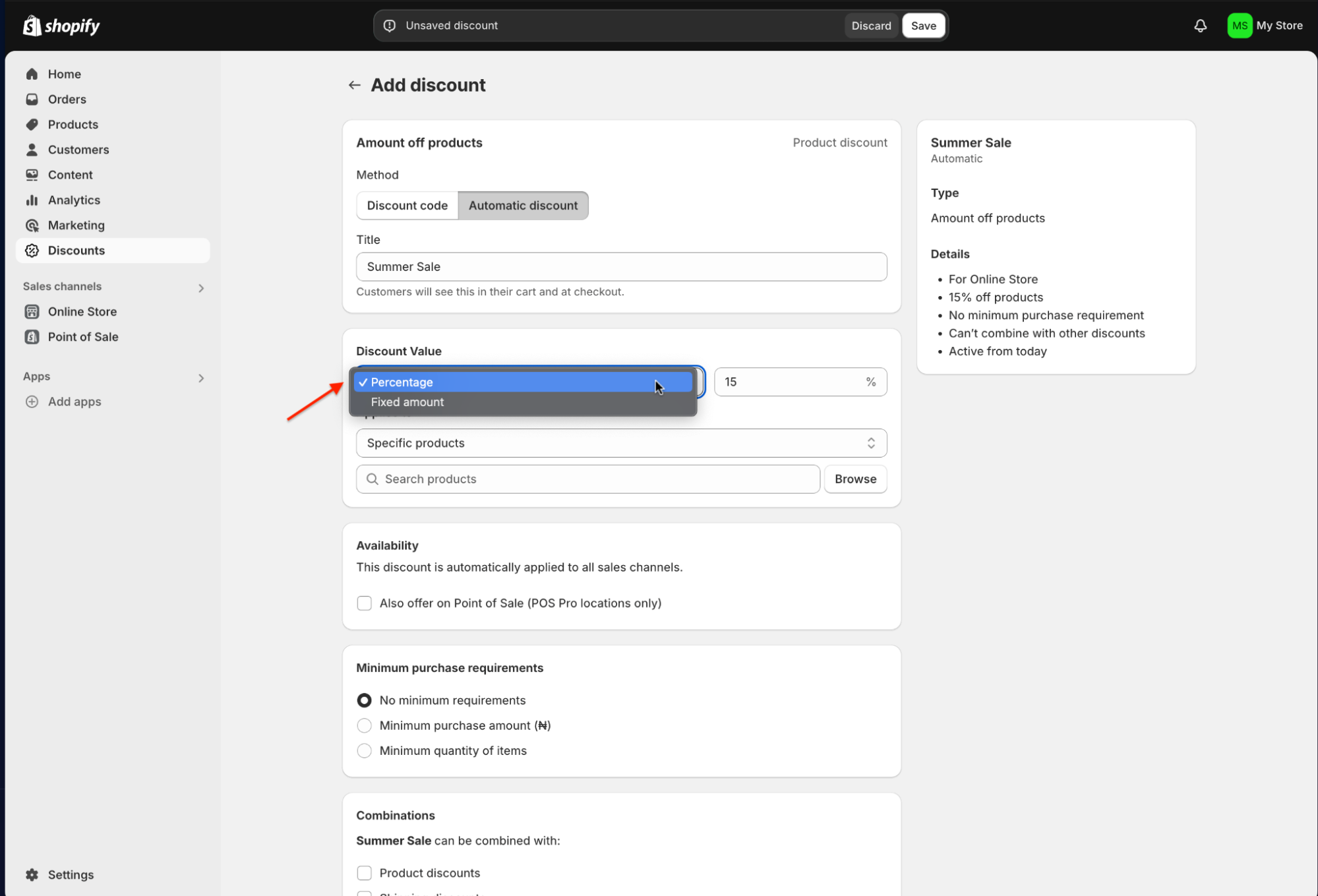
4. Specify the discount value (e.g. 15% off) and if the discount applies to specific products or collections.
5. Check the “Availability” box if you’d also like to offer the automatic discount on your POS Pro locations. And, set the discount conditions (whether minimum purchase amount, minimum item quantity, or none).
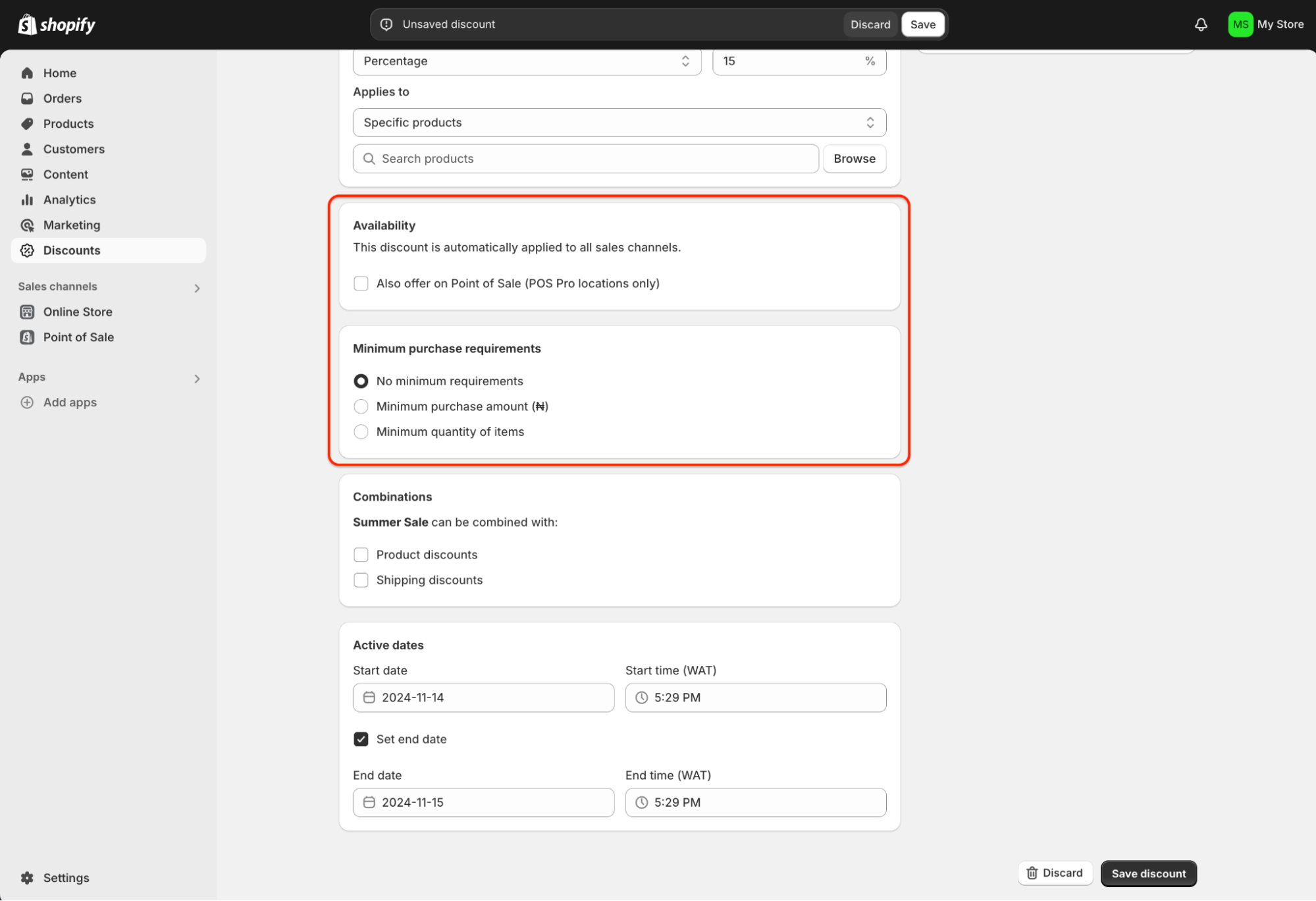
6. You can combine the new campaign with other product or shipping discounts. Or, skip that option and move to inputting the promo’s active dates.
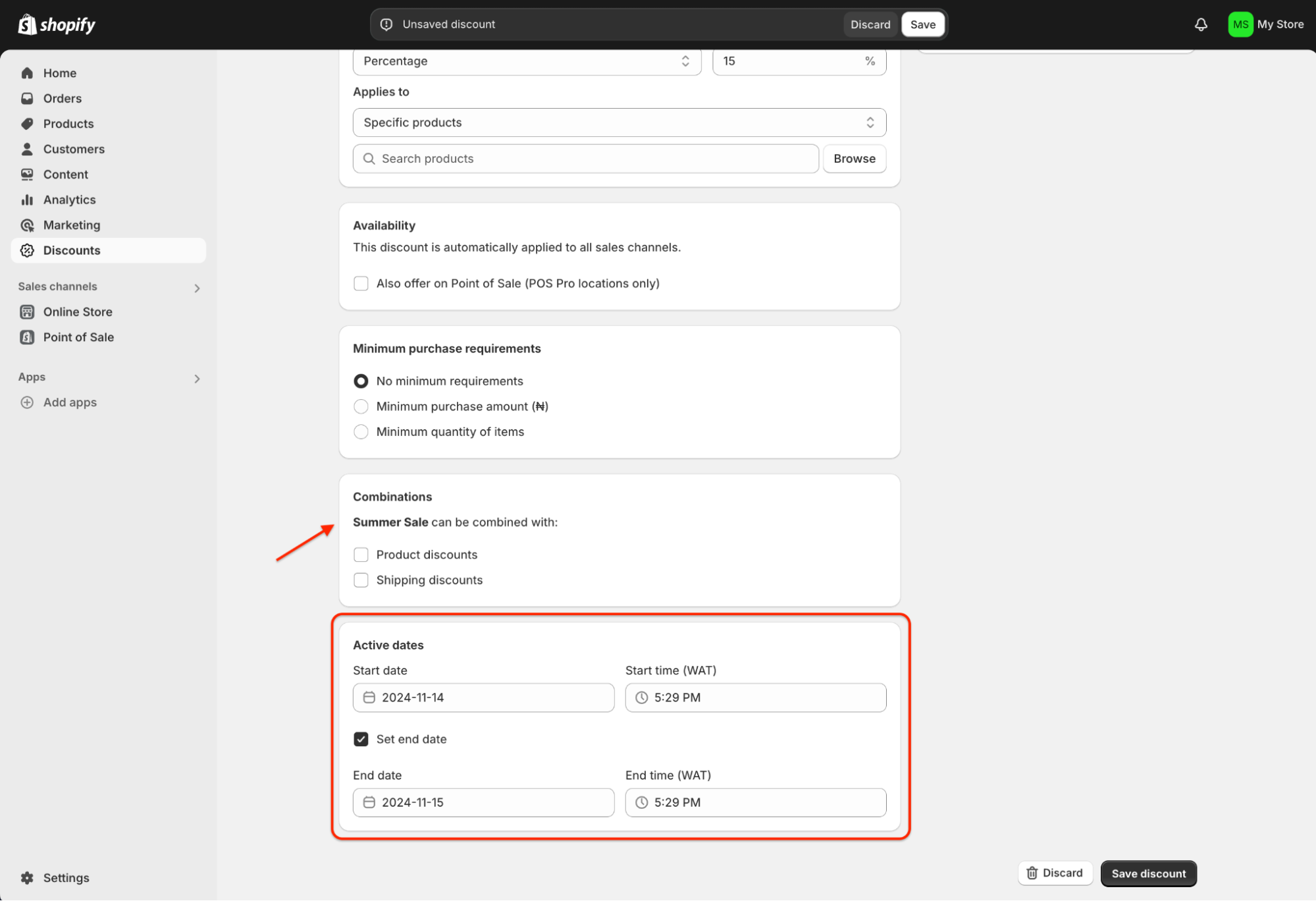
7. Review the details and save the discount to activate it. Once the automatic discount is live and customers meet the eligibility criteria, it will apply to their orders at checkout by default.
One limitation: Shopify only allows one active automatic discount at a time, so operators need to prioritize which campaign drives the most impact.

Paid Memberships Pro
WordPress operators don’t get native discount tools, so plugins fill the gap.
Paid Memberships Pro (PMPro) is one of the most common, letting you apply automatic discounts directly to your checkout URL.
That means you don’t need custom code to run promotions—your customers see the adjusted price as soon as they land on the checkout page. It’s a clean way to simplify the process for subscription models, gated memberships, or community-based offers.
Do the following to apply an automatic discount to your checkout page with Paid Memberships Pro:
1. Navigate to Memberships > Settings on the admin page and click on “Add New Discount Code”.
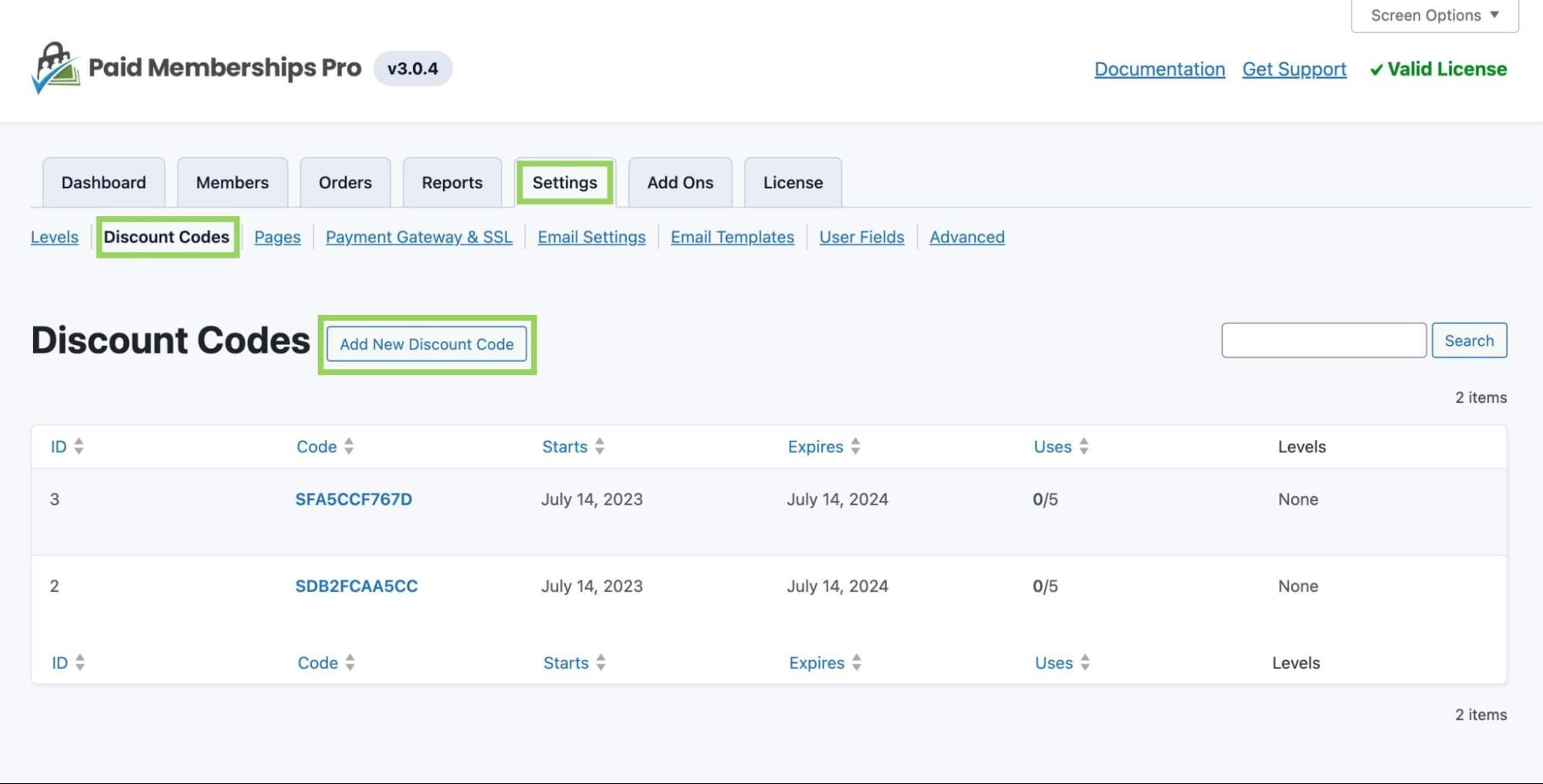
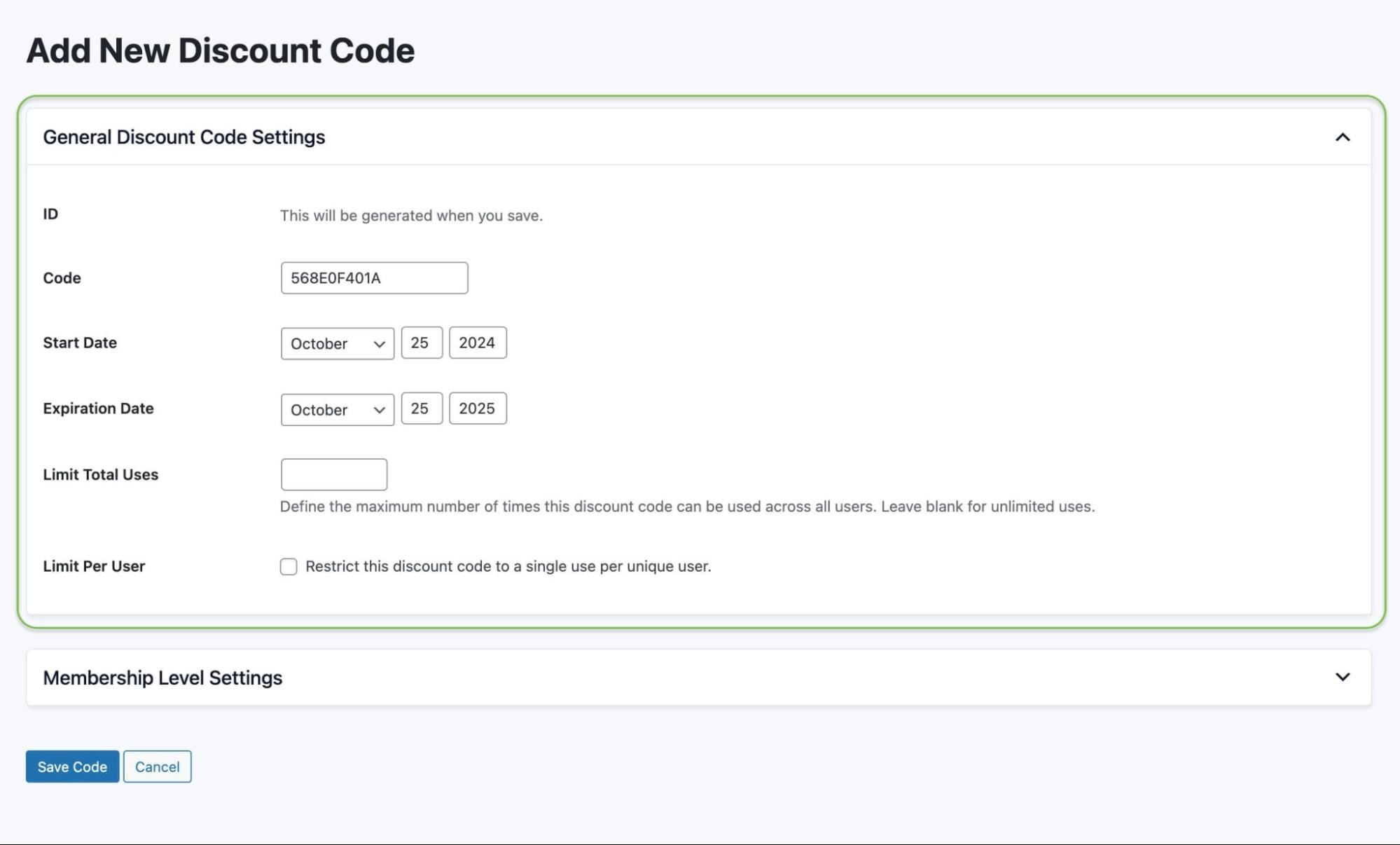
2. Input the discount code name and enter the start and end dates. Also, add the maximum limit for the discount code and check if you’d like to restrict the discount to a single use per user.
3. Select which membership level you want the discount code to apply. Then, enter the initial payment amount and check the recurring subscription option if needed. Also, enter the future billing amount and billing cycle limit. Check the custom trial and membership expiration option and save.
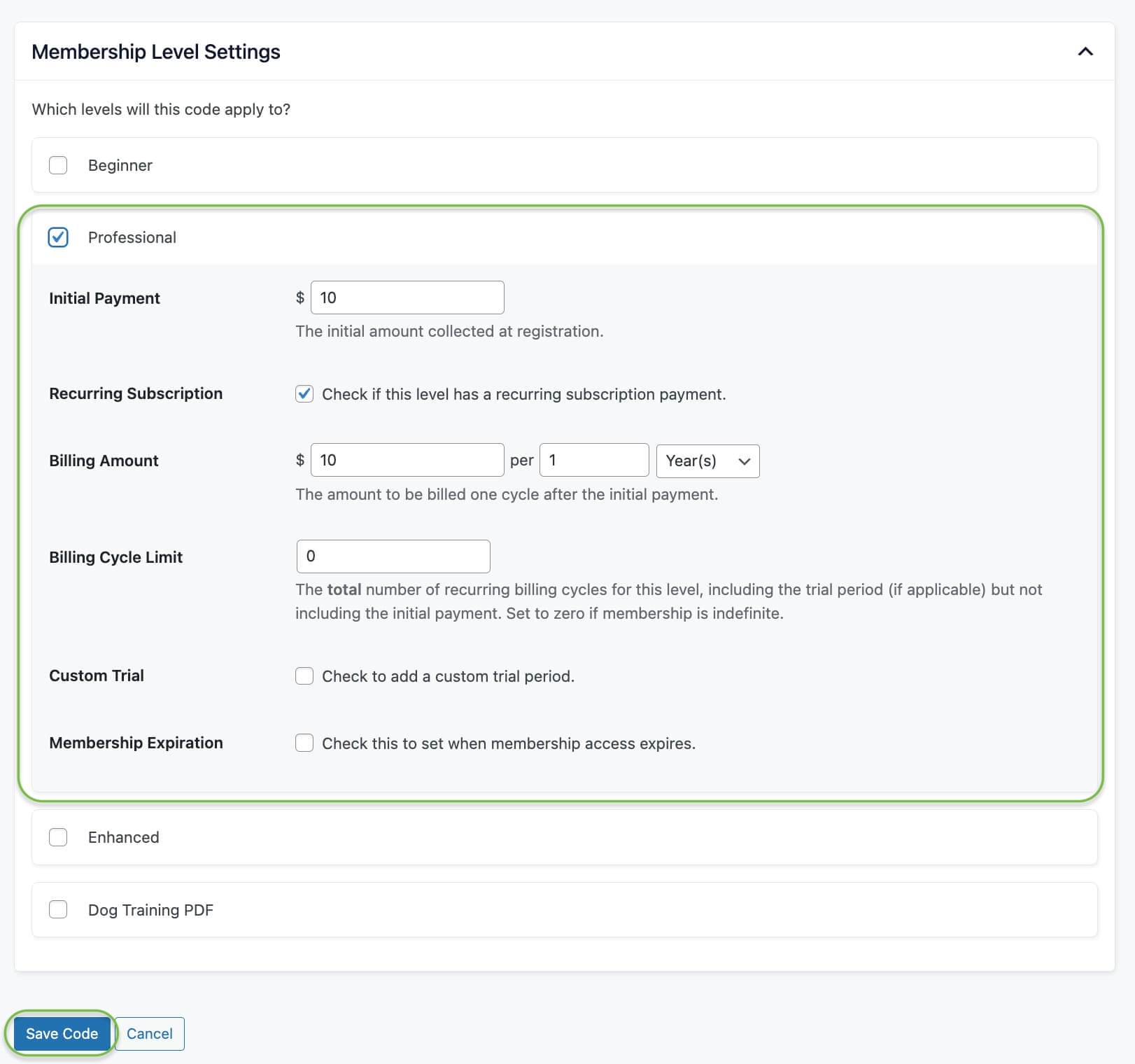
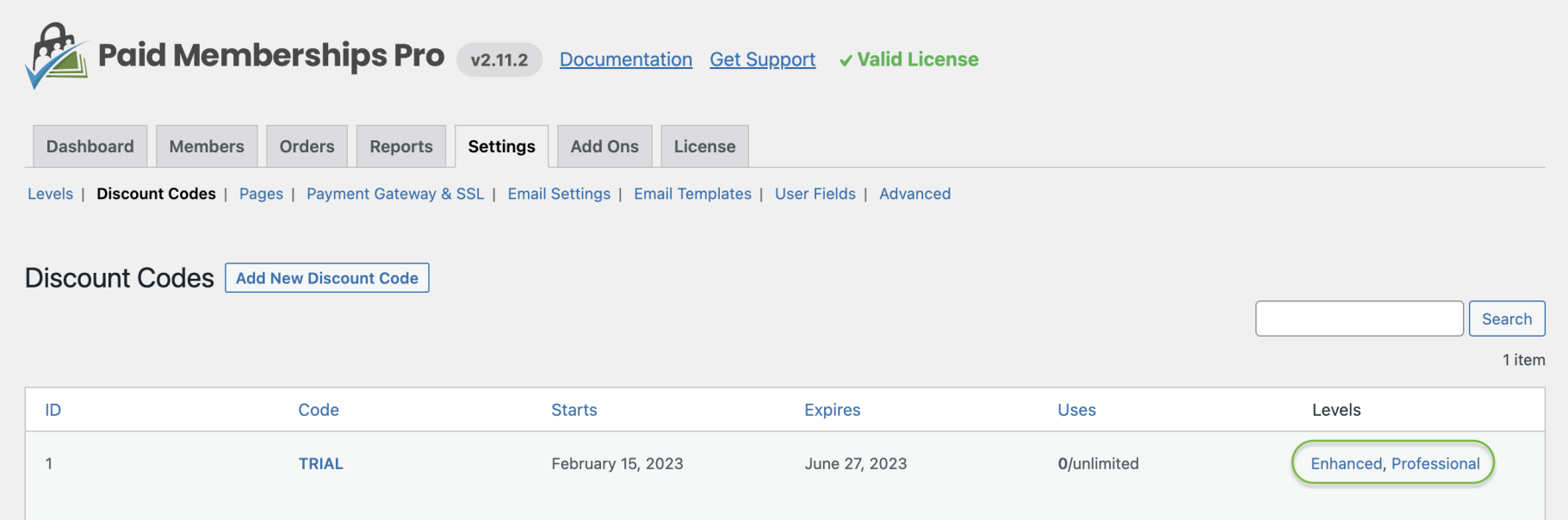
4. Once done, the app will redirect you to the discount codes overview page. Click on the membership level of your new discount code to see the exact checkout page URL that features your automatic discount code.
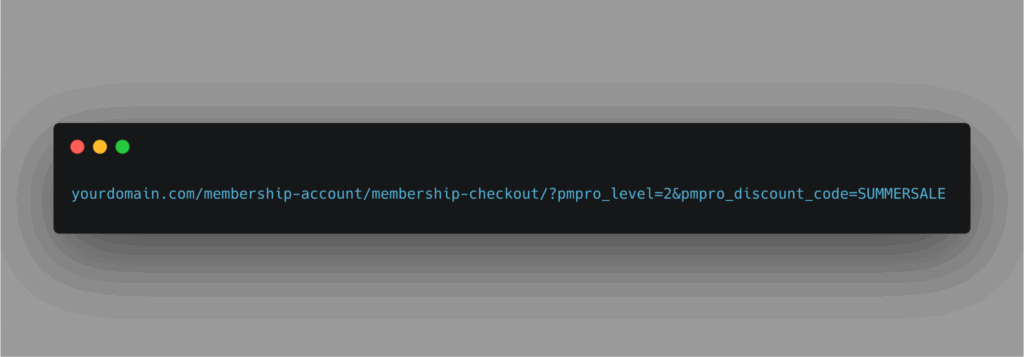
Here’s an example URL that includes the automatically applied discount code:
yourdomain.com/membership-account/membership-checkout/?pmpro_level=2&pmpro_discount_code=SUMMERSALE

Recharge Checkout
Shopify’s built-in discount engine covers one-off purchases well, but it doesn’t natively handle automatic discounts on recurring orders.
That’s where Recharge Checkout comes in.
Recharge is built for subscription commerce, making it possible to auto-apply discounts when eligible subscribers renew or add items. For retailers leaning on replenishment products, memberships, or loyalty perks, this closes a key gap in the Shopify ecosystem.
Recharge integrates with Shopify, BigCommerce, and even custom storefronts, giving operators flexibility if their stack evolves.
Just note that setup and functionality can vary depending on your platform. For Shopify-specific instructions, check the Recharge Checkout support documentation.
If your discounts extend beyond subscriptions—covering in-store campaigns, for example—you’ll want to compare how your subscription platform ties back into your broader POS system to keep pricing rules consistent across channels.
Here’s a simple guide to using Recharge Checkout for automatic subscription renewal discounts on Shopify:
1. Log in to the Recharge merchant portal and click on Discounts. Select “Create discount code” and enter the discount code name.

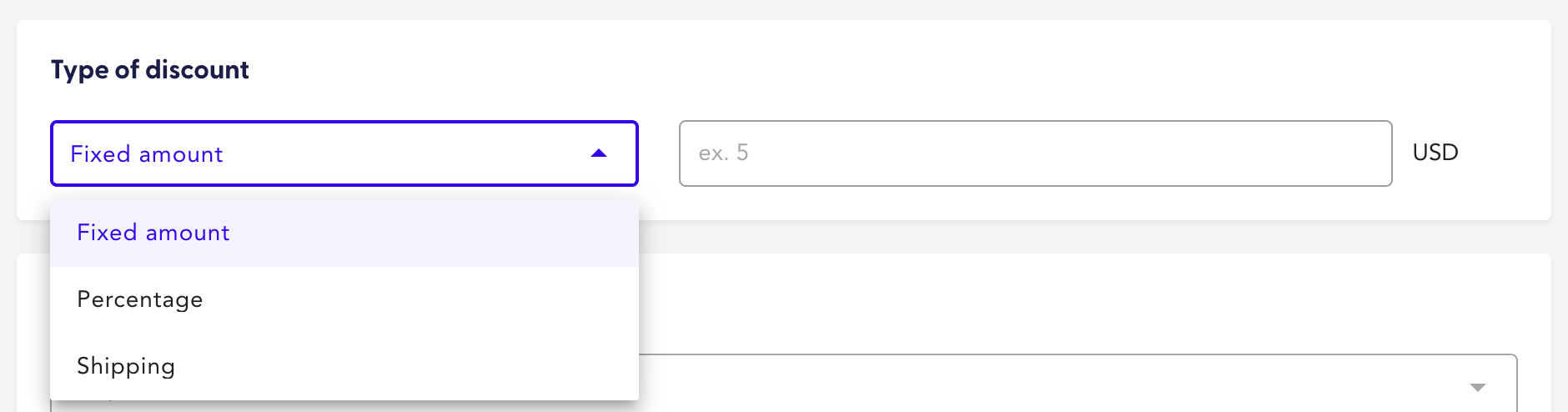
2. Choose the type of discount you prefer.
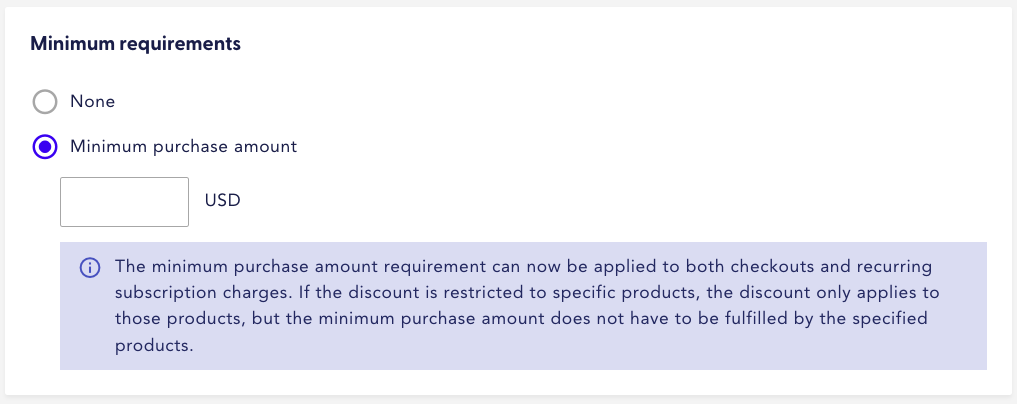
3. Select the option to add minimum requirements if required.
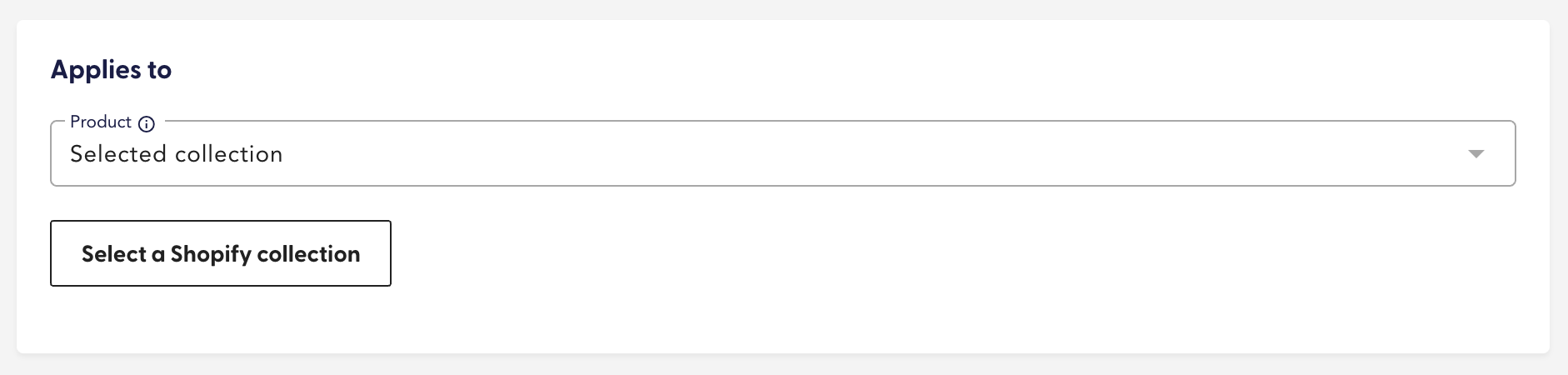
4. Next, select the discount to apply to specific products or collections.
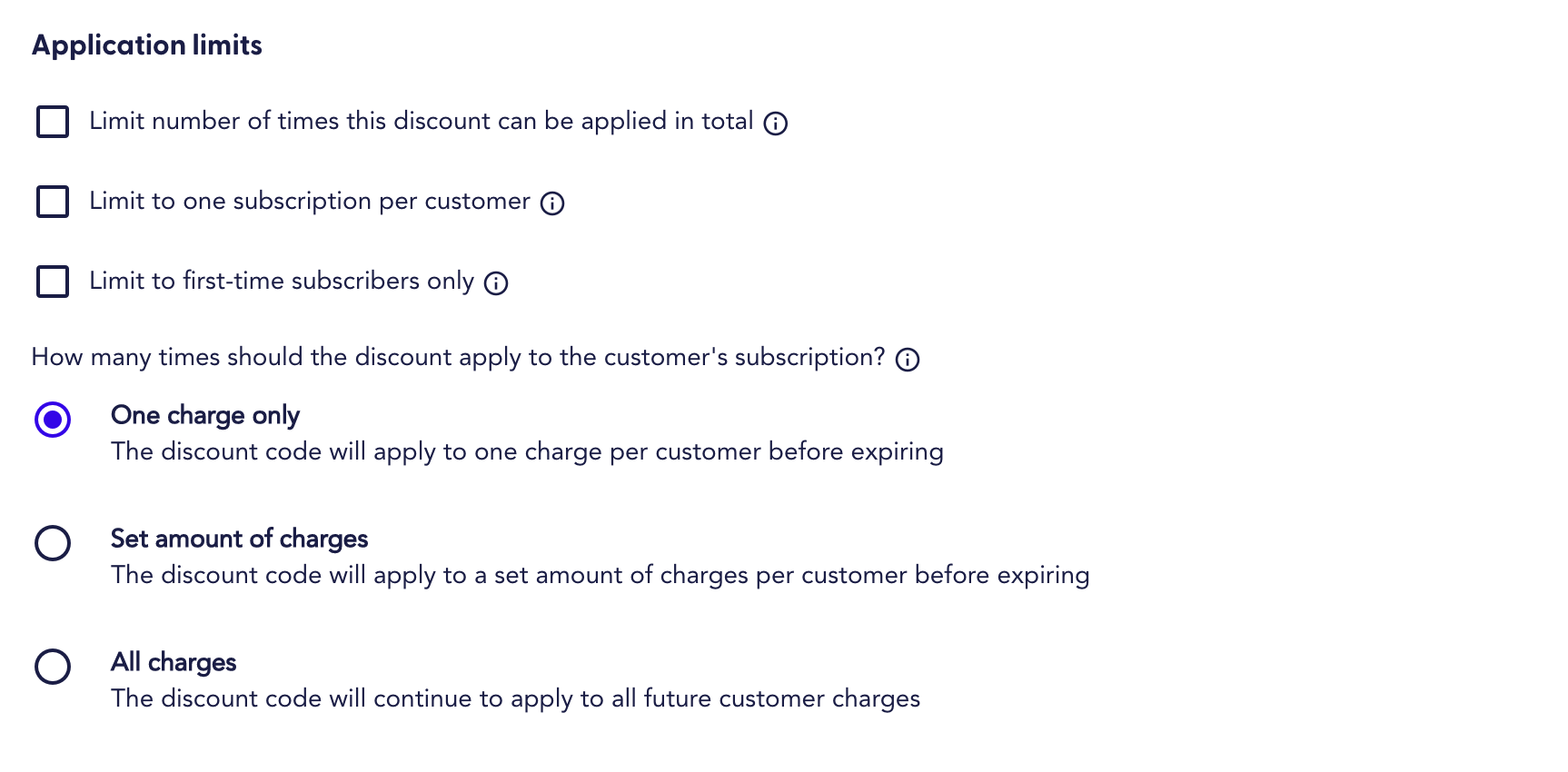
5. Set your preferred limits for how the discount should be applied.
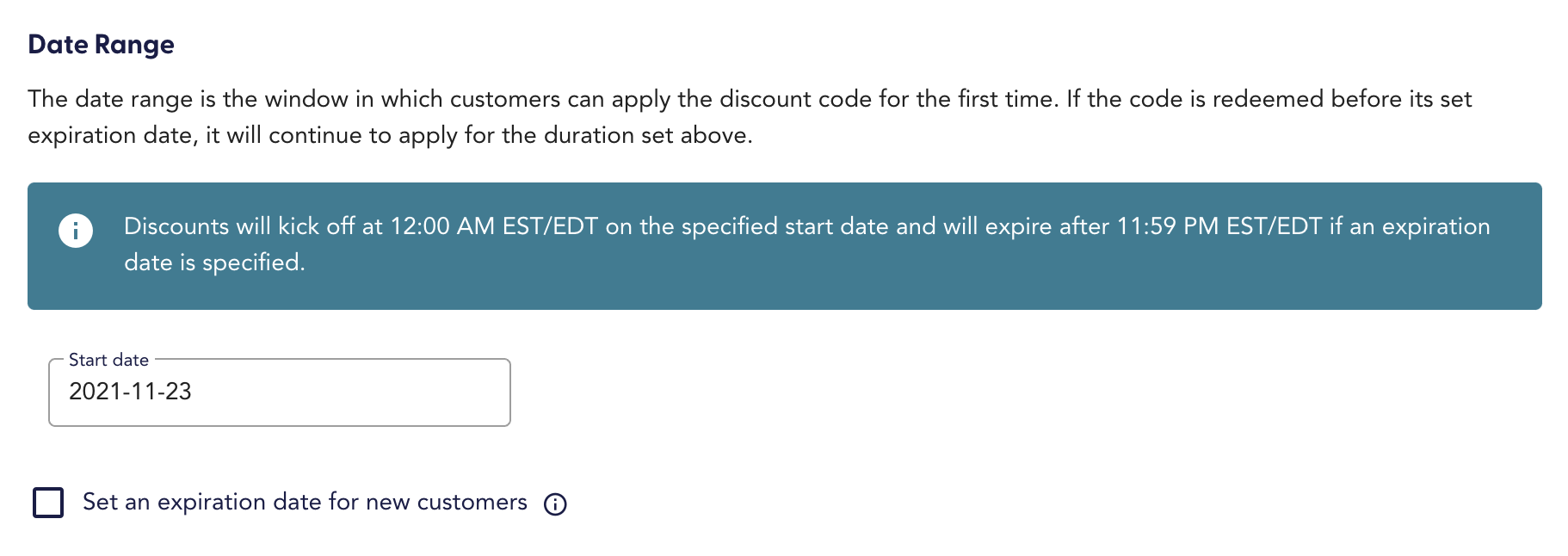
6. Add the start and end dates.
7. Review the details and save.
2. Using custom code
Sometimes the out-of-the-box tools don’t cover every scenario.
If you’re running complex promotions—like tiered discounts across categories, or subscription bundles that Shopify and plugins can’t handle—you’ll need custom code.
On Shopify Plus, for example, the Scripts API lets developers program rules directly into the checkout flow. That could mean auto-applying a discount when a shopper adds a certain product, or embedding a discount into a custom landing page URL.
If your team is considering this path, Shopify has a clear walkthrough on how to use Scripts for discounting.


The trade-off: custom code takes engineering resources.
Your team (or partner) will need to know Shopify Liquid, HTML, and JavaScript to configure these rules. And every change needs to be tested thoroughly to avoid discount errors that either frustrate customers or cost you margin.
The same applies to WordPress. Paid Memberships Pro, for instance, offers code recipes that developers can use to auto-apply discounts across checkout scenarios.
It’s powerful, but not plug-and-play.
For operators with strong internal dev teams or agency support, custom code offers unmatched flexibility. For everyone else, it’s often overkill compared to using platform tools or plugins.
3. Tools and plugins
If you don’t want to rely on developers, plugins and third-party tools are the most practical path.
They let you automate rules—like “free gift with purchase” or “buy one, get one” (BOGO)—without writing a line of code.
As Sam Speller, founder of Kenko Tea, puts it:
Plugins let you easily control and automate discount applications according to specified parameters. For example, a ‘free gift with purchase’ discount that activates when a customer hits a certain number of orders.
He also points out that plugins give operators campaign tracking capabilities, helping you measure which discounts move the needle and where margins need protecting.
One option is Paid Memberships Pro (PMPro), which offers three ways to configure automatic discounts: discount links, the Sitewide Sales plugin, and code recipes.
You can see the breakdown in their automatic discount code guide.
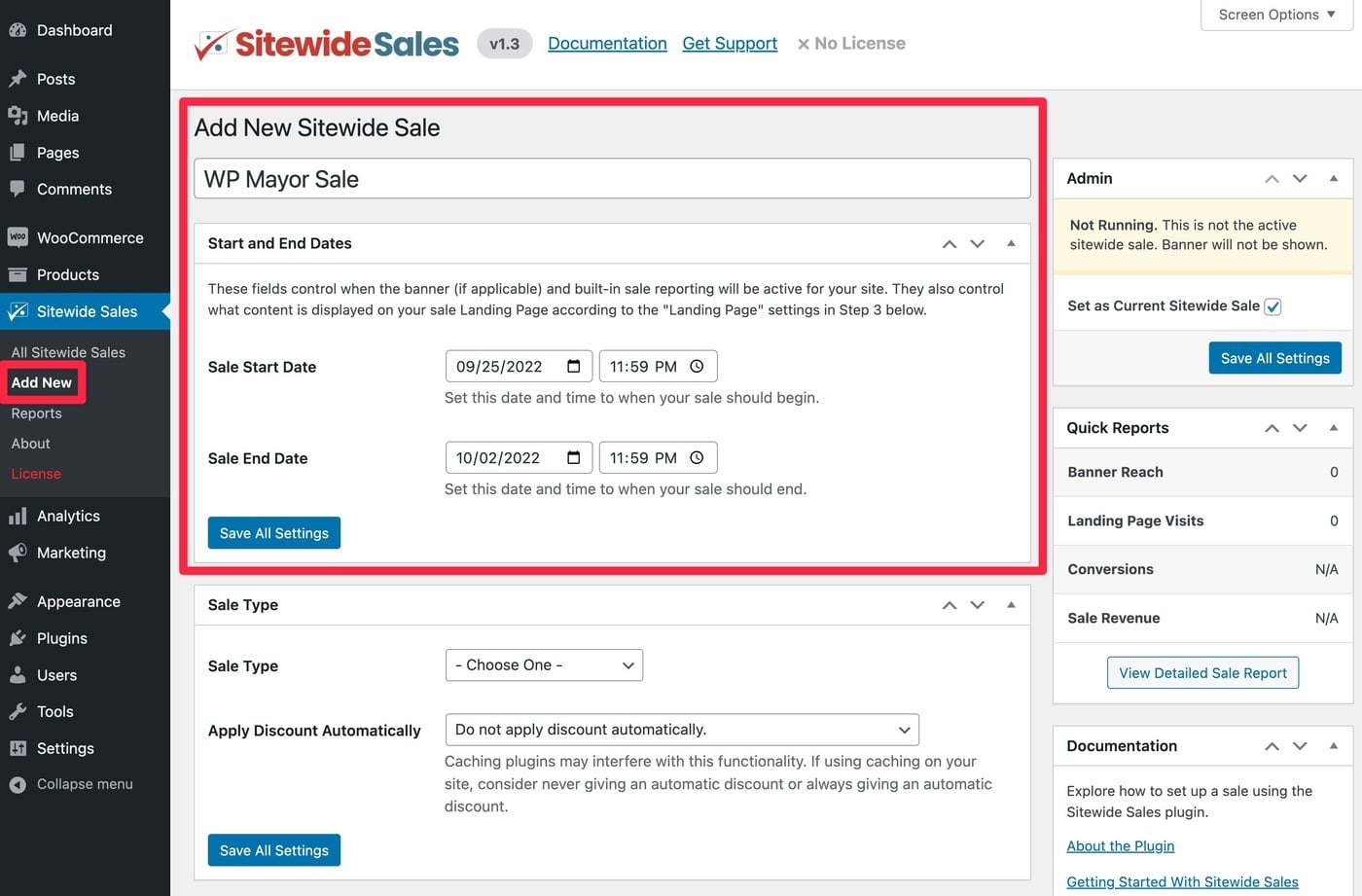
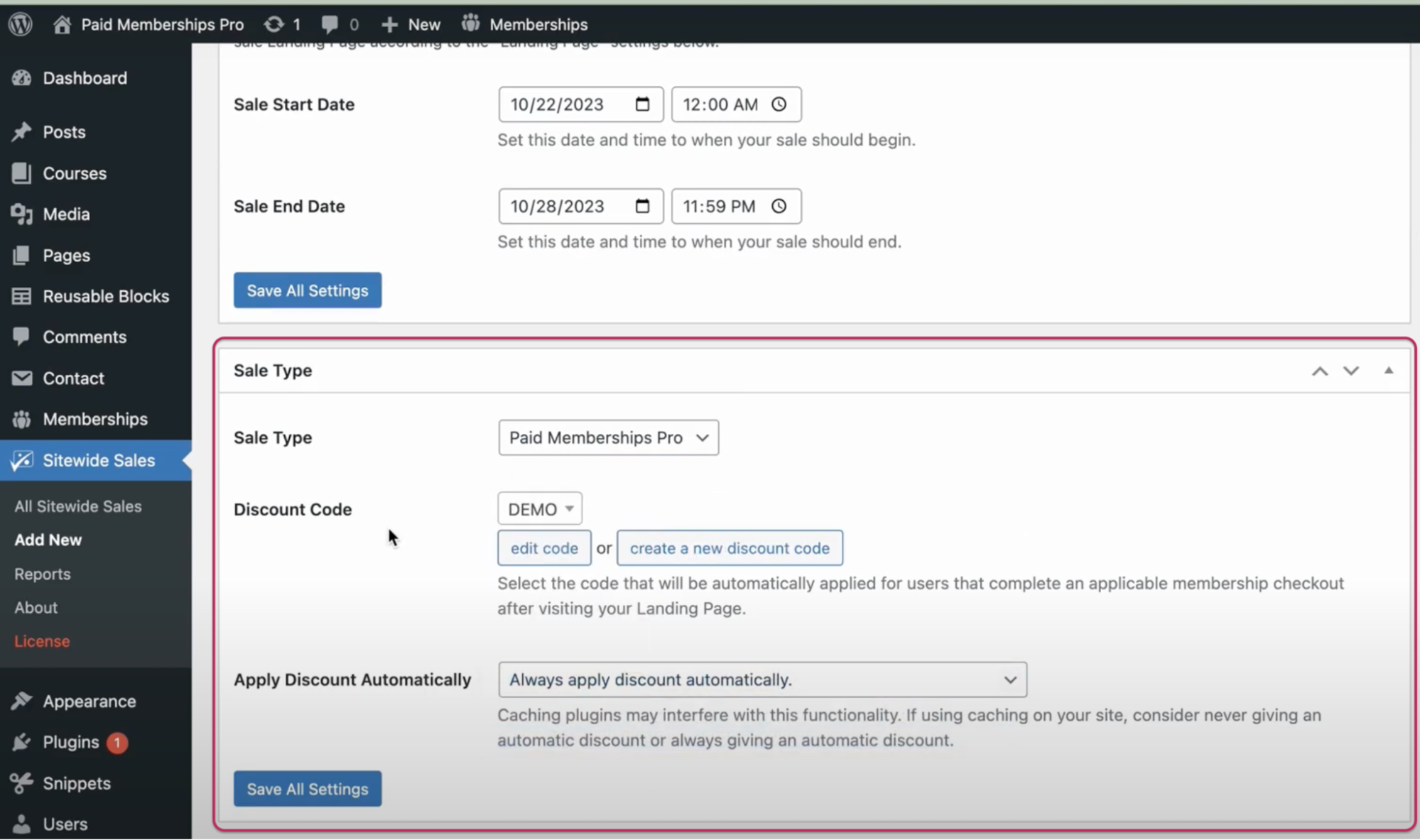
Here’s a step-by-step look at setting up the Sitewide Sales plugin to run an automatic discount campaign on your WordPress store:
- Install and activate the plugin on the Paid Membership Pro dashboard.
- Navigate to Sitewide Sales and click on “Add New”.
- Enter the discount name and its start and end dates.
4. Select the sale type “discount code,” and opt to apply the discount automatically.
How to Prevent Abuse of Automatic Discounts
Automatic discounts can backfire if shoppers learn to game the system. Without the right controls, you risk eroding margins and undermining the very campaigns meant to drive growth.
The fix isn’t to abandon discounts—it’s to build guardrails into your POS and ecommerce setup.
Set usage limits and restrictions
The simplest way to protect your promotions is to cap how often they can be redeemed. That might mean limiting redemptions per customer, setting maximum total uses, or enforcing “one per order” rules.
Deepak Shukla, CEO of Pearl Lemon Group, uses this approach to protect client campaigns:
We protect discounts against fraud via strict usage limits and clear restrictions. These controls help maintain promotional integrity and stop bad actors from abusing the system.
These measures keep deals attractive to genuine customers while ensuring your promos don’t spiral into uncontrolled losses.
Exclude specific products and low-order values
Another smart guardrail is to control where discounts apply. Not every product should be discount-eligible, and not every order size should qualify.
Luxury items, high-demand products, or SKUs with razor-thin margins are prime candidates to exclude. The same goes for small orders that barely cover fulfillment costs—discounting them only accelerates losses.
Chris Bajda, managing partner at Groomsday, explained how his team keeps discounts from cutting too deep:
Some popular products are kept out of discounts to protect our margins. We also track order values closely to catch any unusual trends.
By tightening eligibility, you make sure discounts reward genuine customers while protecting profitability.
Case Studies and Examples of Automatic Discounts
The best way to understand automatic discounts is to see them in action.
These examples show how different retailers used them to boost sales, reduce friction at checkout, and build customer loyalty.
Pearl Lemon Cafe: Driving event sales with Square POS
Pearl Lemon Cafe, a division of the Pearl Lemon Group, specializes in beverages, catering, and barista training. They implemented personalized automatic discounts through Square POS.
Within the first three months, they saw a 30% increase in sales of discounted items. During Black Friday, their auto-applied discounts eliminated checkout delays tied to manual code entry—helping them double online revenue during the event.
Groomsday: Lifting peak-season revenue with Shopify POS
Groomsday, a retailer focused on personalized wedding gifts, uses Shopify POS to keep its showroom and online store in sync.
With automatic discounts, they could centralize sales data and promotions across both channels.
Within two months of rolling out their discount strategy, sales of discounted products rose 25%. In the final quarter—peak wedding season—revenue climbed 40% thanks to targeted discount campaigns. Many first-time buyers converted into repeat customers.
Whole Food Earth: Building loyalty through holiday promotions
Whole Food Earth, an organic food retailer, tested automatic discounts during a holiday campaign. The result was a 20% sales boost compared to past promotions.
Even more importantly, they saw repeat purchase rates increase and cart abandonments decrease, proving that automatic discounts not only drive conversions but also strengthen long-term customer relationships.
Advanced Techniques to Maximize Automatic Discounts
Once you’ve mastered the basics of automatic discounts, the next step is to make them smarter. Instead of blanket offers, advanced tactics let you tailor discounts to customer segments, sync them with campaigns, and use them as levers for upsell and retention.
Personalize discounts by segment
Personalization ensures the right shoppers see the right offer.
That might mean auto-applying discounts only for first-time customers, tailoring promotions to specific geographies, or rewarding loyalty program members.
Sam Speller of Kenko Tea emphasizes the importance of this:
Personalization is key to effective discounting. For example, you can take customers’ previous purchases and favorite products and use them to configure targeted auto discounts.
By aligning discounts with customer data—like purchase history or browsing behavior—you maximize conversion while protecting margin.
Integrate discounts into marketing campaigns
Automatic discounts don’t have to live in isolation. When tied into broader campaigns, they become a powerful driver across multiple channels.
You can push shoppers directly to auto-discounted carts from email promotions, SMS campaigns, or social media ads.
This creates a seamless path to purchase, where the incentive is already applied when they land on the checkout page.
Deepak Shukla, CEO of Pearl Lemon Group, highlights how this works in practice:
Using data from a customer’s past interactions with a brand, you can create coordinated campaigns across email and social media, effectively driving repeat purchases.
This coordination reduces friction, extends campaign reach, and makes discounts part of a larger retention and growth strategy.
How to Troubleshoot Common Issues With Automatic Discounts
Automatic discounts can fail in ways that frustrate customers and eat into margins. The key is knowing the most common failure points and building safeguards into your setup.
Prevent duplicate discounts from stacking
When multiple discounts apply to the same order, your profit vanishes fast.
To avoid this, configure your system to enforce “one discount per order” or set strict application rules before launching campaigns.
For example, Groomsday uses Shopify’s one-discount-per-order rule to block stacking. Their support team also monitors for conflicts, ensuring promos don’t spiral into margin drains.
Test for customer experience hiccups
If discounts don’t fire correctly—or if eligibility rules are confusing—customers abandon carts. Always test campaigns internally or in a staging environment before going live.
Saj Munir, founder of Chorlton Fireworks, stresses the payoff:
Automatic checkout discounts limit wait times, reduce checkout friction, and enhance user experiences. But only if you regularly audit settings to keep the process intuitive.
Frequent testing ensures promos help rather than hurt the checkout experience.
Double-check order value thresholds
Misconfigured order minimums can cause costly mistakes.
For instance, if your system includes shipping in the threshold, a customer might hit $300 with $280 in products and $20 shipping—triggering a discount they shouldn’t qualify for.
Matt Aird, CTO and co-owner of Custom Neon, warns operators to stay vigilant:
Monitoring your discount campaigns for unusual activity—even after setup—is critical. It helps catch issues with order value thresholds before they damage profitability.
Clear communication in promos (e.g., “$300 minimum, products only”) combined with ongoing monitoring keeps campaigns tight and customer expectations aligned.
Small Tweaks, Big Checkout Wins
Automatic discounts aren’t just a marketing gimmick—they’re an operational lever. Done right, they clear dead stock, lift AOV, and reduce cart abandonment without piling extra work on staff.
The keys are simple: choose the right platform or plugin, set guardrails to protect your margins, and test relentlessly.
From there, you can layer in personalization and campaign integration to turn discounts into a long-term growth driver.
For retail leaders, the question isn’t whether to use automatic discounts. It’s how to configure them so they boost profitability while keeping checkout effortless for shoppers.
Retail never stands still—and neither should you. Subscribe to our newsletter for the latest insights, strategies, and career resources from top retail leaders shaping the industry.