
PCI Compliance for Small Business Retailers: Expert Guide


Compliance Importance: PCI DSS is vital for small retailers; non-compliance can lead to huge fines and breaches.
Merchant Levels: Small retailers often qualify as Level 4, requiring self-assessment instead of third-party audits.
Correct SAQ Choice: Choosing the right SAQ is crucial to avoid unnecessary tasks or missing critical requirements.
Technical Controls: Implement key controls like network security, password policies to manage 80% of compliance risk.
Validation Schedule: Staying compliant involves annual validation and constant system updates and environment monitoring.
If you’re taking credit cards, PCI compliance is waiting for you—like a tax bill, only with more acronyms and fewer loopholes.
Most small retailers either ignore it, hope their processor is handling it, or figure they’re too small to attract attention. All three are wishful thinking.
Here’s the reality check: one misstep and you’re looking at fines that could fund a new store (or shut down the one you’ve got). Data breaches aren’t just headline fodder for big chains; they’re business-ending for independents.
And yes, the rules apply even if you process a handful of transactions a month.
So, let’s skip the hand-wringing and get to the part that actually matters: how to figure out which PCI requirements hit your business, what you need to do (and what you can ignore), and how to get compliant without burning a week on paperwork or paying a consultant to read you the manual.
This guide is built for operators who want the facts, the shortcuts, and the stuff nobody tells you until it’s too late.
What PCI DSS Means for Small Retailers
PCI DSS isn't optional—accept cards, follow the rules, or face fines and breach costs that can shut down a small business.
The Payment Card Industry Data Security Standard (PCI DSS) is enforced by the major card brands—Visa, Mastercard, American Express, Discover, and JCB.
These companies require every merchant that processes, stores, or transmits cardholder data to meet specific payment processing security standards, regardless of business size.
Many small retailers assume they're too small to matter, or that their payment processor handles compliance for them.
Wrong on both counts.
Process just one credit card transaction and you're responsible for PCI compliance requirements. Your payment processor may be compliant, but that doesn't cover your responsibilities for protecting cardholder data in your environment.
The stakes are real.
Non-compliant merchants face fines from $5,000 to $100,000 monthly. Data breaches cost small businesses an average of $2.98 million according to IBM's 2024 Cost of a Data Breach Report—enough to close most retailers permanently. Beyond financial damage, you risk losing your merchant account entirely.
To understand the broader context of payment processor regulations and how they protect both merchants and customers, compliance extends far beyond PCI DSS.
Understanding these requirements starts with knowing which compliance level applies—and most small retailers fall into a category that's more manageable than they think.
Which Compliance Level Are You?
Most small retailers are Level 4, requiring annual self-assessment questionnaires instead of expensive third-party audits.
PCI compliance has four merchant levels based on annual transaction volume over a 12-month period:
| Level | Transaction volume | Most small retailers | Validation required |
|---|---|---|---|
| Level 4 | <20K ecommerce OR <1M total | ✓ MOST COMMON | Annual SAQ + Quarterly Scans |
| Level 3 | 20K-1M ecommerce transactions | Some multi-location | Annual SAQ + Quarterly Scans |
| Level 2 | 1M-6M transactions | Large retailers | Annual SAQ + Quarterly Scans |
| Level 1 | 6M+ transactions OR any breach | Enterprise only | Full QSA Audit + Report |
Harbor & Pine, our fictional 20-store lifestyle retailer processing 800,000 annual transactions across all channels, qualifies as Level 3 because they exceed 20,000 ecommerce transactions annually.
When they started with five stores, they were Level 4—a much simpler compliance path.
The key difference: Level 4 merchants complete self-assessment questionnaires (SAQs) rather than hiring Qualified Security Assessors (QSAs) for formal audits.
This saves thousands in audit fees but requires you to honestly assess and document your own compliance.
Your acquiring bank or payment processor will tell you which level applies and what validation they require. Some processors exceed PCI requirements, so check with your provider.
Once you know your level, choose the right SAQ type—get this wrong and you'll waste time on irrelevant requirements.
Choosing Your SAQ: The Decision Framework
Pick the wrong SAQ, and you'll waste time on irrelevant requirements or miss critical ones—here's how to choose correctly.
Self-Assessment Questionnaires (SAQs) vary by payment processing method and environment complexity.
The questionnaire length tells the compliance story:
- SAQ A (22 questions): The simplest path for card-not-present merchants who outsource all payment processing. You never see card data—customers enter payment info directly on your payment provider's secure page.
- SAQ A-EP (178 questions): For ecommerce merchants with payment pages on their websites but no card data storage. Payment data flows through your site but gets processed elsewhere.
- SAQ B (41 questions): Covers merchants using standalone dial-up or IP terminals that aren't connected to other systems. Think basic card swipe terminals with no integration.
- SAQ C (160 questions): The most common for small retailers with integrated point of sale (POS) systems. Includes merchants with payment applications connected to the internet but no stored cardholder data.
- SAQ D (329 questions): The comprehensive questionnaire for all other merchants, including those storing customer data or with complex payment environments.
Harbor & Pine initially thought their integrated POS system qualified for SAQ A because their processor was "handling everything."
They actually needed SAQ C because their POS connected to their network and inventory system. The wrong SAQ meant missing critical network security requirements.
Let’s start with a simple decision tree:
- Third-party processing only. Customers enter card data directly on your payment provider's site with no data flowing through your systems → SAQ A
- Website integration without storage. Card data flows through your website but gets processed elsewhere with no storage → SAQ A-EP
- Standalone terminals. You use dial-up or IP terminals with no network connections → SAQ B
- Network-connected systems. You have POS or payment applications connected to your network → SAQ C or D
Heads up:
You may see SAQ variants like C-VT (virtual terminal) or B-IP/P2PE-HW (specific terminal scenarios).
They map to the same core obligations as B or C but narrow the questions. Use the quiz below for the precise SAQ and first steps.
Not sure which variant you are? Use the quiz below—it’ll tell you whether you’re, say, SAQ C or the C-VT variant.
When in doubt, your payment processor or acquiring bank can help determine which SAQ applies. Once you've identified the right SAQ, the real work begins—implementing technical controls that form compliance's foundation.
Essential Technical Controls Every Retailer Needs
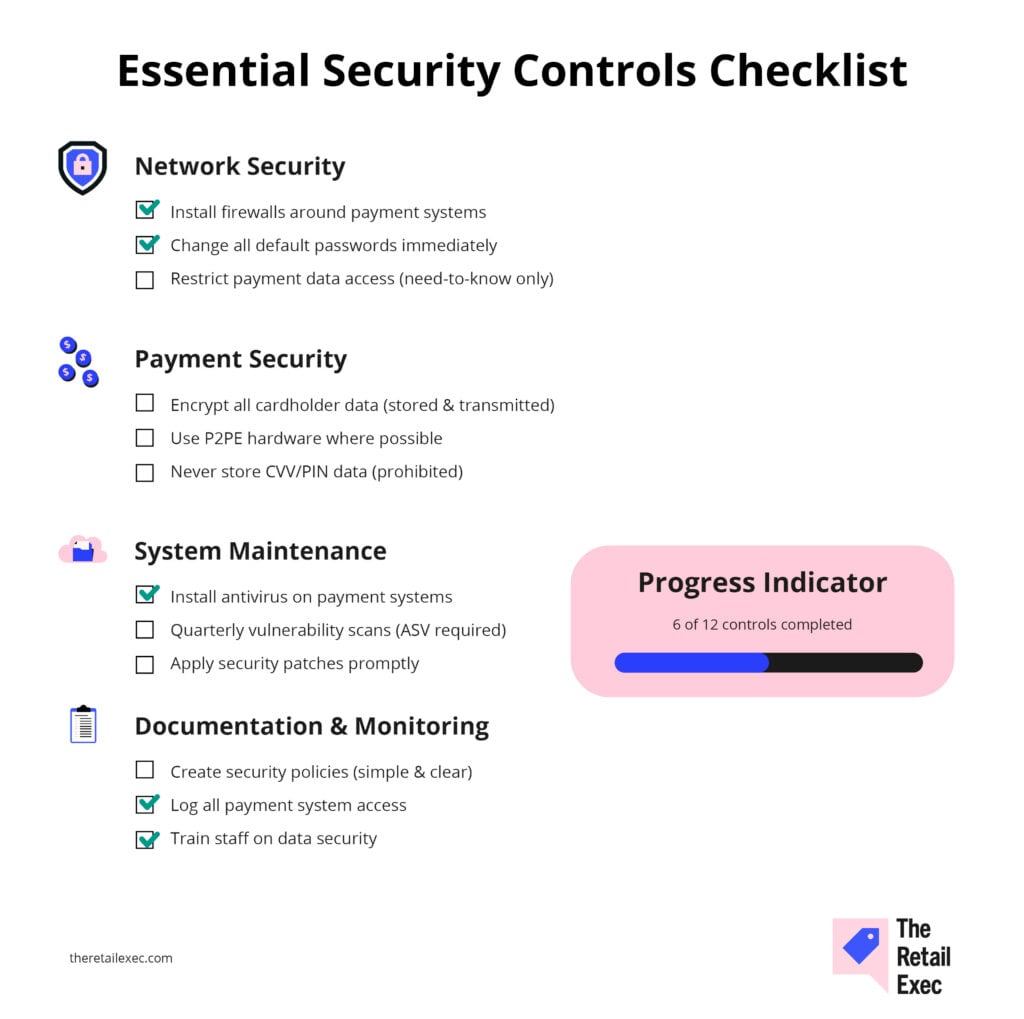
These six controls handle 80% of your compliance risk—get them right first, then worry about documentation.
Network security and access controls
Three foundational controls protect your network perimeter:
- Firewall protection. Install and maintain firewalls around systems that handle cardholder data. This includes POS networks, office computers, and Wi-Fi networks. Many small retailers fail by connecting POS systems to the same network as office computers without proper segmentation.
- Default password elimination. Change all vendor-supplied default passwords immediately. Default passwords are published online and used in automated attacks. This applies to routers, POS systems, payment terminals, security cameras, and any connected devices.
- Access restriction. Limit cardholder data access on a need-to-know basis. Not every employee needs payment system access. Create unique user IDs for each person and require strong passwords with regular changes.
Payment processing security
- Encrypt cardholder data whether stored or transmitted. One main benefit of modern POS systems is that they can usually handle this automatically, but verify with your vendor.
- Never store sensitive authentication data like CVV codes or PIN verification values—it's prohibited.
- Use secure payment processing hardware. Modern POS systems with point-to-point encryption (P2PE) encrypt card data from the moment of swipe, reducing compliance scope significantly.
These systems cost more upfront but simplify ongoing compliance requirements.
For a deeper dive into secure payment processing implementation, encryption and tokenization work together to protect data at every stage.
System maintenance and monitoring
- Install antivirus software on all systems that handle payment data and keep it updated. Retail POS systems are common targets for memory-scraping malware designed to steal payment data. One of the benefits of retail POS systems is that they come with many built-in security features.
- Perform regular vulnerability scans using an Approved Scanning Vendor (ASV). External scans are required quarterly, and you must remediate any high-risk vulnerabilities before your compliance attestation.
Harbor & Pine learned this during expansion when they nearly suffered a breach through a default password on their wireless router at a new location.
Quick IT action prevented data exposure, but highlighted how easily technical oversights create massive risk.
Documentation requirements
- Maintain security policies covering data handling, access controls, and incident response. These don't need complexity—simple, clear procedures your staff can actually follow.
- Log and monitor access to cardholder data and secure systems.
- Keep detailed records of who accessed what and when. Many breaches are discovered months later through log analysis.
These technical controls work hand-in-hand with the human element of compliance—your policies, staff training, and physical security measures.
Policies, Staff Training & Physical Security
Technology alone won't pass compliance—you need documented processes that your staff actually follows.
Access management
Create written policies for password requirements, user access provisioning, and data handling procedures. Require unique user IDs for each employee and prohibit shared accounts.
When employees leave, immediately disable their access to all payment systems.
Minimum password requirements:
Eight characters with uppercase, lowercase, numbers, and special characters. Require changes every 90 days for privileged accounts. Consider password managers to help staff maintain strong, unique passwords.
Staff training
Train all employees who handle payment cards on PCI data security procedures.
Cover proper card handling, what data they can and cannot store (never write down card numbers), and how to recognize and report suspicious activity.
Document training dates and topics. Many SAQs require evidence that staff understand their data security responsibilities.
Physical security
Secure physical access to payment processing systems, cardholder data, and media storage.
This means locking server rooms, restricting access to POS terminals, and properly disposing of payment-related documents.
Protect stored media containing cardholder data.
If you must store payment information (avoid if possible), use locked file cabinets with access logs. Destroy old payment records securely—shredding or incineration for paper, secure data wiping for electronic media.
Many small retailers overlook physical security, assuming cybersecurity is the only concern.
But payment data written on sticky notes, unlocked server rooms, and improperly disposed payment records create compliance violations and security risks.
Harbor & Pine discovered this when expanding to their sixth location.
They had excellent digital security but found staff at the new store writing customer card numbers on order forms "for convenience." A quick policy reminder and training session fixed the issue before their compliance review.
With solid technical controls and policies in place, maintaining compliance becomes an ongoing process rather than an annual scramble.
Validation & Staying Compliant
Compliance is annual validation plus ongoing maintenance—here's your schedule to stay current.
Annual requirements
Your annual compliance checklist:
✓ Complete SAQ and submit to your acquiring bank or payment processor with Attestation of Compliance (AoC)
✓ Submit by processor's deadline to avoid non-compliance fees
✓ Pass four quarterly external vulnerability scans by an ASV ($100-500 per quarter)
✓ Remediate any high-risk vulnerabilities before attestation
Ongoing maintenance
Ongoing compliance requires constant vigilance:
- System updates. Keep POS software and payment applications current with security patches. Subscribe to vendor security bulletins and apply critical updates promptly.
- Environment monitoring. Adding new POS terminals, upgrading software, or changing payment processors may require a different SAQ type or additional security controls.
- Access reviews. Quarterly access list audits remove terminated employees and verify current access levels match job requirements.
The PCI DSS standard itself updates periodically. Version 4.0 became effective in March 2024, with full enforcement beginning March 2025. Stay informed through your payment processor or PCI Security Standards Council communications.
Even with the best intentions, small retailers commonly make mistakes that can derail their compliance efforts and create unnecessary risk.
Harbor & Pine faced this when a departing store manager took home a laptop potentially containing customer payment information. The potential exposure triggered breach notification requirements and regulatory scrutiny, even without an actual breach.
The incident prompted stricter device management policies across all locations.
Understanding these pitfalls helps inform your compliance budget and planning decisions.
Budget for Compliance: Realistic Costs
Plug in a few quick details about your store and we’ll estimate your first-year PCI costs, annual run-rate, and what’s actually driving the number.
Plan $2,000-8,000 annually for Level 4 compliance, depending on your current security posture and system complexity.
Typical cost breakdown
| Expense category | Cost range | Frequency | What it covers |
|---|---|---|---|
| SAQ completion | $500-2,000 | Annual | DIY vs. consultant help |
| Vulnerability scans | $400-2,000 | Quarterly | ASV external scans |
| POS/system upgrades | $0-5,000 | One-time* | Security-compliant hardware |
| Network security | $500-3,000 | One-time* | Firewalls, segmentation |
| Training & policies | $200-800 | Annual | Staff training, documentation |
| Ongoing maintenance | $300-1,200 | Annual | Updates, monitoring, access mgmt |
ROI calculation
Compare compliance costs against breach consequences: The average small business data breach costs $2.98 million, while comprehensive PCI compliance runs $3,000-6,000 annually.
Basic compliance measures dramatically reduce breach risk and costs.
When to hire help
Consider a QSA or consultant if:
- Complex questionnaire. Your SAQ exceeds 100 questions
- Data storage. You store cardholder data in any form
- Network complexity. You have multiple integrated systems or complex network environments
- Previous failures. You've failed previous compliance validations
DIY works if:
- Simple processing. You use basic payment processing (SAQ A or B)
- Technical comfort. You have basic IT knowledge and time to learn
- Processor support. Your payment processor offers dedicated compliance assistance
Most Level 4 merchants can achieve compliance without expensive consultants, but professional help ensures you don't miss critical requirements that could trigger fines or audits.
Harbor & Pine started with DIY compliance when they were five stores but hired a consultant when they expanded to 15 locations and moved to Level 3.
The investment paid for itself by avoiding a potential $25,000 fine for incomplete documentation during their first formal assessment.
Key tools that can help: POS systems with built-in compliance features, payment processors that simplify PCI requirements, and secure payment gateways reduce your compliance burden by handling encryption and tokenization automatically.


Stay Compliant, Reap The Benefits
PCI compliance doesn't have to overwhelm small retailers. Focus on essential controls first, choose the right SAQ for your environment, and maintain consistent security practices.
The investment in compliance is minimal compared to breach costs or losing your ability to accept credit cards.
For specific compliance guidance tailored to your payment environment, consult with your acquiring bank or payment processor. They can help determine your exact requirements and validation procedures.
For broader payment processing insights, explore our complete guide to payment processing.
Retail never stands still—and neither should you. Subscribe to our newsletter for the latest insights, strategies, and career resources from top retail leaders shaping the industry.
PCI Compliance FAQs
Some final Qs to A before we depart.
What exactly counts as "cardholder data" that I need to protect?
Primary Account Number (PAN), expiration date, cardholder name, and service code. Never store CVV codes, PIN verification values, or full magnetic stripe data—it’s prohibited.
Can I outsource all payment processing to avoid PCI compliance?
No. While outsourcing reduces compliance scope, you’re still responsible for protecting cardholder data in your environment and ensuring service providers are compliant.
How often do I need vulnerability scans?
External scans quarterly by an ASV. Internal scans also quarterly if you have internal networks with cardholder data. Failed scans must be remediated and re-scanned.
What happens if I don't comply?
Card brands can impose fines from $5,000-100,000 monthly. You may lose your merchant account entirely. Data breaches add forensic costs, legal fees, and potential lawsuits.
Do I need compliance if I only take a few credit cards per month?
Yes. PCI DSS applies to all merchants that store, process, or transmit cardholder data, regardless of transaction volume. Even one transaction requires compliance.