

Zendesk Review: Pros, Cons, Features and Pricing
Zendesk stands out in ecommerce customer service software with its intuitive interface and robust integration capabilities.

We review tools independently, and commissions help fund our testing. See our transparency policy, our methodology, or suggest a tool.
Zendesk is a live shopping platform built for retail and ecommerce teams that need to manage real-time customer engagement during live sale events. I'd consider it over something like Bambuser if your team needs deeper support ticketing and conversation management woven into the live commerce experience—Zendesk brings more structure to customer interactions and post-sale follow-up than most dedicated live shopping tools can offer.
Zendesk Evaluation Summary
4.3/5
- From $19/user/month (billed annually)
- 14-day free trial
Why Trust Our Software Recommendations
6,700+
Reviews
20
Industry experts
16+
Evaluation factors
14
Years
Our team has been testing and reviewing software since 2012. As retail leaders ourselves, we know how difficult—and important—it is to choose the right software.
For this guide, we evaluated tools using hands-on testing and independent research, scoring tools using our selection criteria.
Our reviews reflect our independent judgment—not a sales pitch.
Zendesk Overview
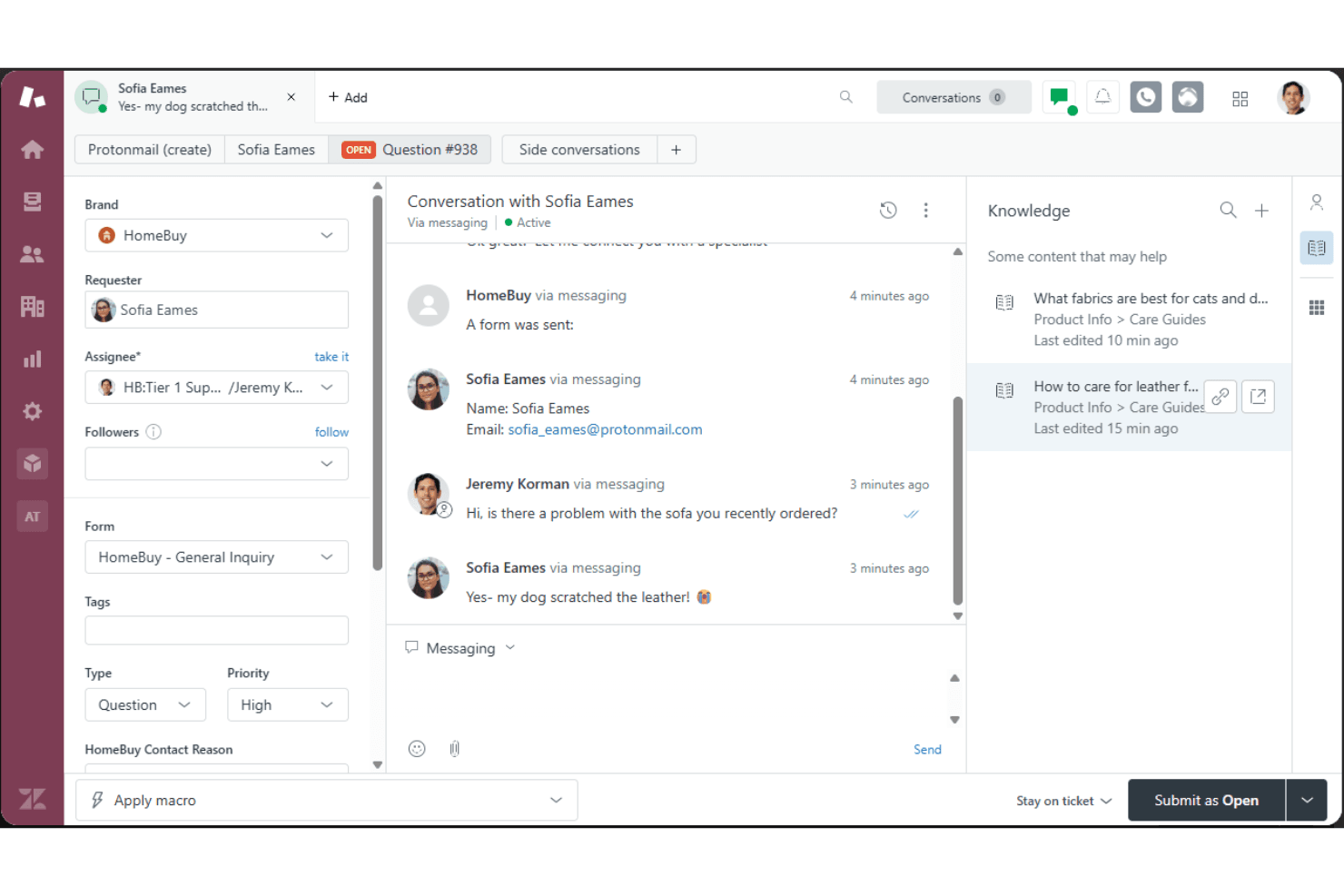
In my opinion, Zendesk is a solid choice for ecommerce customer service and help desk software, offering a user-friendly interface and extensive integration options. It excels in providing a comprehensive set of features that cater to online retailers and support teams. However, its pricing can be a bit steep for smaller businesses, and the onboarding process might require some improvement. Compared to other software, Zendesk stands out with its strong customer support and reliable performance, but it might not be the best fit for those who need a more budget-friendly solution. If your team values robust features and integration capabilities, Zendesk could be a great fit.
Pros
- You get a user-friendly interface that's easy for your team to navigate.
- The ticketing system efficiently manages customer interactions using automation.
- It offers strong customer support to help your team resolve issues quickly.
Cons
- Your team might find the onboarding process a bit complex.
- It can feel overwhelming with too many features for small teams.
- Some users report occasional performance slowdowns during high traffic.
Is Zendesk Right For Your Needs?
Who Would be a Good Fit for Zendesk?
Zendesk is a great fit for online retailers and large support teams who need to handle a high volume of customer queries efficiently. If your team values a user-friendly interface and a powerful ticketing system to manage interactions, Zendesk's capabilities can help streamline your operations. It’s especially useful for industries like fashion and electronics, where quick response times and organized support are crucial for maintaining customer satisfaction.
- Large RetailersYour large customer base benefits from Zendesk's efficient ticketing and customer interaction management.
- Support TeamsYour team finds its user-friendly interface and strong support helpful in managing customer issues.
- Fashion IndustryYou can quickly handle high volumes of customer queries with Zendesk's powerful ticketing system.
- Electronics CompaniesYour company benefits from Zendesk's organized support, helping you maintain customer satisfaction.
- Ecommerce PlatformsYou can enhance customer service efficiency with Zendesk's extensive feature set and capabilities.
- Customer Service DepartmentsYour department can manage diverse customer interactions effectively using Zendesk's robust support features.
Who Would be a Bad Fit for Zendesk?
Zendesk might not be the best fit for small startups or solo entrepreneurs who have limited budgets and simpler customer service needs. If your team doesn't handle a high volume of customer interactions daily, Zendesk's extensive features could feel overwhelming and unnecessary. Additionally, if you're looking for a quick and straightforward onboarding process, Zendesk might not meet your expectations due to its complexity.
- Small StartupsYour limited budget and simpler needs make Zendesk's extensive features overwhelming and unnecessary.
- Solo EntrepreneursYou might find Zendesk's complexity unnecessary without a high volume of customer interactions.
- Budget-Conscious TeamsYour team could find Zendesk's cost prohibitive for basic customer service needs.
- Simple Service NeedsYou might not need Zendesk's extensive features if you handle a few customer interactions.
- Non-Tech-Savvy UsersYour team may struggle with Zendesk's complexity without strong technical skills.
- Quick Onboarding SeekersYou might find Zendesk's onboarding process too complex if you need a fast setup.
Our Review Methodology
How We Test & Score Tools
We’ve spent years building, refining, and improving our software testing and scoring system. The rubric is designed to capture the nuances of software selection and what makes a tool effective, focusing on critical aspects of the decision-making process.
Below, you can see exactly how our testing and scoring works across seven criteria. It allows us to provide an unbiased evaluation of the software based on core functionality, standout features, ease of use, onboarding, customer support, integrations, customer reviews, and value for money.
Core Functionality (25% of final scoring)
The starting point of our evaluation is always the core functionality of the tool. Does it have the basic features and functions that a user would expect to see? Are any of those core features locked to higher-tiered pricing plans? At its core, we expect a tool to stand up against the baseline capabilities of its competitors.
Standout Features (25% of final scoring)
Next, we evaluate uncommon standout features that go above and beyond the core functionality typically found in tools of its kind. A high score reflects specialized or unique features that make the product faster, more efficient, or offer additional value to the user.
We also evaluate how easy it is to integrate with other tools typically found in the tech stack to expand the functionality and utility of the software. Tools offering plentiful native integrations, 3rd party connections, and API access to build custom integrations score best.
Ease of Use (10% of final scoring)
We consider how quick and easy it is to execute the tasks defined in the core functionality using the tool. High scoring software is well designed, intuitive to use, offers mobile apps, provides templates, and makes relatively complex tasks seem simple.
Onboarding (10% of final scoring)
We know how important rapid team adoption is for a new platform, so we evaluate how easy it is to learn and use a tool with minimal training. We evaluate how quickly a team member can get set up and start using the tool with no experience. High scoring solutions indicate little or no support is required.
Customer Support (10% of final scoring)
We review how quick and easy it is to get unstuck and find help by phone, live chat, or knowledge base. Tools and companies that provide real-time support score best, while chatbots score worst.
Customer Reviews (10% of final scoring)
Beyond our own testing and evaluation, we consider the net promoter score from current and past customers. We review their likelihood, given the option, to choose the tool again for the core functionality. A high scoring software reflects a high net promoter score from current or past customers.
Value for Money (10% of final scoring)
Lastly, in consideration of all the other criteria, we review the average price of entry level plans against the core features and consider the value of the other evaluation criteria. Software that delivers more, for less, will score higher.
New Product Updates from Zendesk
Zendesk Adds Email AI Replies and Predictive Routing
Zendesk adds configurable Knowledge and Welcome replies to email AI agents with agentic AI, plus predictive routing for email tickets in omnichannel routing. These updates help teams shape email response flows and route eligible tickets to the agent predicted to resolve them fastest. Highlights include:
- Knowledge Reply: Customize how email AI agents answer questions using connected knowledge sources.
- Welcome Reply: Add pre-conversation logic for routing, actions, integrations, or escalation before the AI agent responds.
- Predictive Email Routing: Route eligible email tickets using agent availability, workload, and performance signals.
- Expanded Email Coverage: Apply predictive routing to email, web form, side conversation, and API-created tickets.
Visit Zendesk’s official site for more details.
Zendesk Adds Email AI Replies and Predictive Routing
Zendesk adds configurable Knowledge and Welcome replies to email AI agents with agentic AI, plus predictive routing for email tickets in omnichannel routing. These updates help teams shape email response flows and route eligible tickets to the agent predicted to resolve them fastest. Highlights include:
- Knowledge Reply: Customize how email AI agents answer questions using connected knowledge sources.
- Welcome Reply: Add pre-conversation logic for routing, actions, integrations, or escalation before the AI agent responds.
- Predictive Email Routing: Route eligible email tickets using agent availability, workload, and performance signals.
- Expanded Email Coverage: Apply predictive routing to email, web form, side conversation, and API-created tickets.
Visit Zendesk’s official site for more details.
Zendesk Makes Employee Service AI Agents Generally Available
Zendesk has made employee service AI agents generally available for eligible customers, helping teams deliver faster employee support across key channels with richer knowledge coverage and automation. The update improves self-service resolution while providing clearer controls for how many issues AI can resolve each month. Highlights include:
- Multi-Channel Support: Deliver AI-powered employee help through the help center, Slack, and Microsoft Teams.
- Knowledge Connectors: Connect more than 20 sources, including Google Drive, SharePoint, Confluence, Notion, Slack, Teams, and Box.
- Permission-Aware Access: Respect resource-level permissions across connected knowledge sources.
- Advanced Action Flows: Let AI agents run multi-system workflows and resolve requests end to end.
- Human Escalation: Create tickets automatically when a request needs human support.
Visit Zendesk’s official site for more details.
Zendesk Updates AutoQA Tone Scoring
Zendesk has updated the way AutoQA calculates tone scores for QA users, making the evaluation more specific to observable, professional conduct. This helps teams rely on clearer, more consistent tone assessments without needing to change their current setup. Highlights include:
- Professional Conduct: Focuses tone scoring on observable behaviors in agent responses.
- Emotion Exclusion: Removes assessments of emotions such as frustration.
- Automatic Rollout: Applies to all Zendesk QA accounts without manual setup.
- Updated Scoring: Uses a revised calculation method that may change average tone scores.
- Compliance Focus: Aligns AutoQA tone evaluation with stricter privacy and regulatory expectations.
Visit Zendesk’s official site for more details.
Zendesk Adds Smartsheet Connector for Action Flows
Zendesk Action Flows can now connect with Smartsheet to manage sheet and row data without duplicating work across systems. Workflows can create rows, retrieve details, and update records as support tasks progress. Highlights include:
- Smartsheet Connector: Connects Zendesk Action Flows with Smartsheet.
- Add Rows: Creates new rows from support workflows.
- Read and Search: Finds and retrieves existing Smartsheet data.
- Update Rows: Updates Smartsheet records as work progresses.
- Workflow Integration: Links customer support activity with project and process tracking.
Visit Zendesk’s official site for more details.
Zendesk Contact Center Adds Outbound User Search
Zendesk Contact Center now includes outbound user search, helping agents initiate calls faster without switching tools. This streamlines outreach workflows and reduces time spent manually finding contact details. Highlights include:
- User Search: Finds Zendesk users by name or phone number.
- Saved Phone Numbers: Shows available numbers when a user has more than one.
- Direct Outbound Calling: Lets agents place calls from the dialer after selecting a user.
- Permission-Based Results: Only shows users the agent is allowed to access.
- Manual Dialing: Keeps keypad dialing available alongside user search.
Visit Zendesk’s official site for more details.
Zendesk Connects Salesforce as an External Knowledge Source
Zendesk connects Salesforce content to AI agents, Copilot, search, and generative search as an external knowledge source. This makes existing Salesforce knowledge easier to reuse across support workflows. Highlights include:
- Salesforce Knowledge Source: Lets teams connect Salesforce content directly to Zendesk.
- AI Agent Access: Makes Salesforce knowledge available to Zendesk AI agents.
- Copilot Support: Gives Copilot access to connected Salesforce content.
- Search Integration: Extends Salesforce content to standard and generative search experiences.
Visit Zendesk’s official site for more details.
Zendesk Updates Ticket Merging and Multi-Recipient Email Handling
Zendesk introduces a redesigned ticket merge sidebar and multi-recipient email tickets that create linked tickets for each support address. These updates make it easier to review merged tickets and coordinate requests across teams. Highlights include:
- Ticket Merge Sidebar: Replaces the popup modal with a sidebar that improves ticket visibility and merge context.
- Rich Text Support: Preserves HTML and formatting when tickets are merged.
- Merge Visibility: Adds status indicators, hover details, and clearer warnings during bulk merges.
- Multi-Recipient Email Tickets: Creates a separate ticket for each support address included on an inbound email.
- Linked Ticket IDs: Connects related tickets with a multi-recipient email ID for easier tracking.
Visit Zendesk’s official site for more details.
 Opens new window
Zendesk Voice AI Agents Reach General Availability
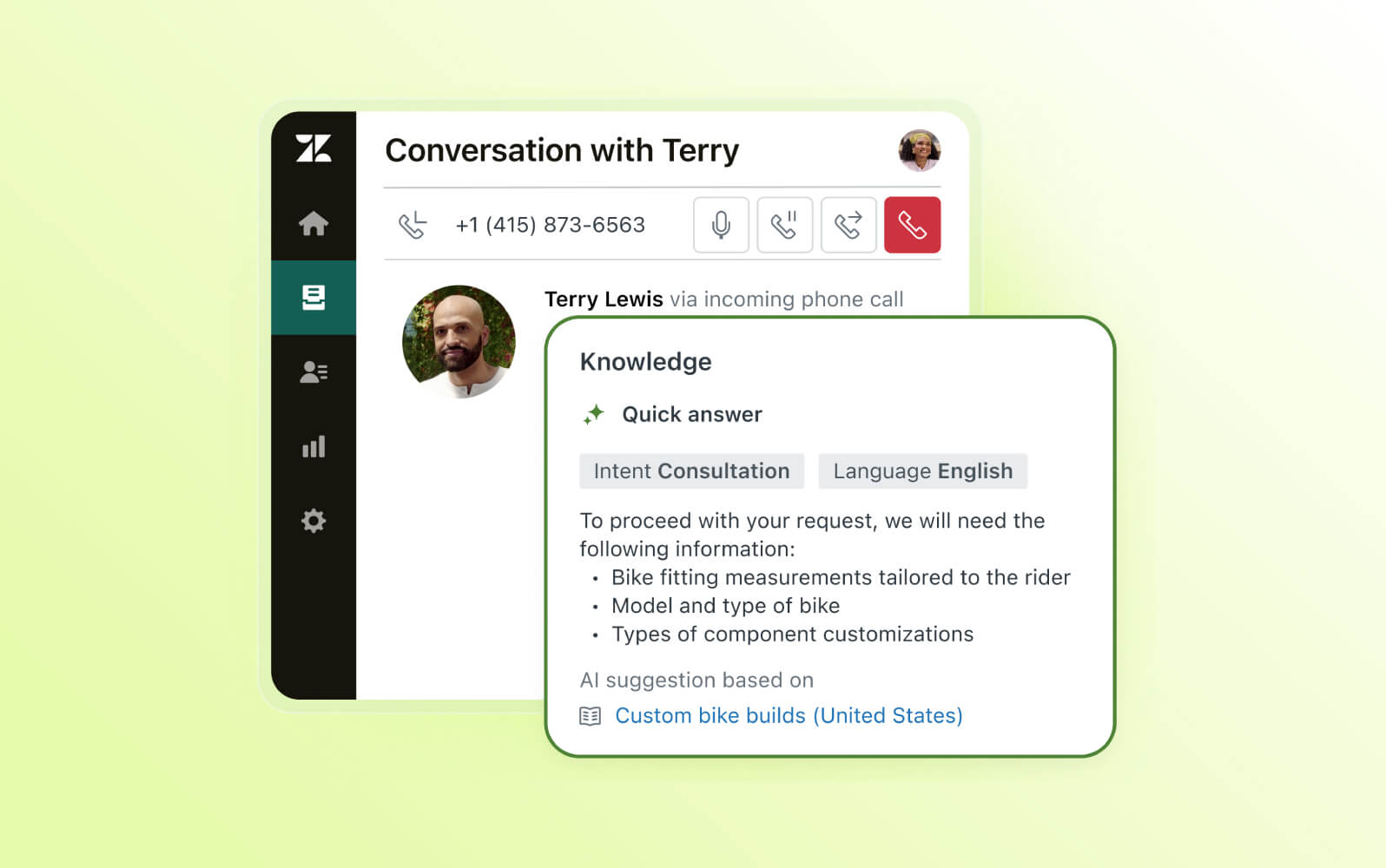
Zendesk makes Voice AI Agents generally available with generative procedures, native voice routing, contextual handoffs, testing tools, and multilingual support. These capabilities help automate more phone conversations while giving agents the context needed to continue escalated calls. Highlights include:
- End-to-End Voice Automation: Handles calls from greeting and intent capture through resolution and wrap-up.
- Contextual Handoffs: Transfers calls with transcripts, summaries, and detected intent for human agents.
- Generative Actions: Supports API calls, database lookups, ticket updates, SMS messages, and email replies.
- Testing Widget: Lets teams test Voice AI Agents in the browser before assigning them to live phone lines.
- Multilingual Support: Supports conversations in 53 languages with language-specific voices and locales.
Visit Zendesk’s official site for more details.
 Opens new window
Zendesk Adds HubSpot Knowledge and Admin Copilot Controls
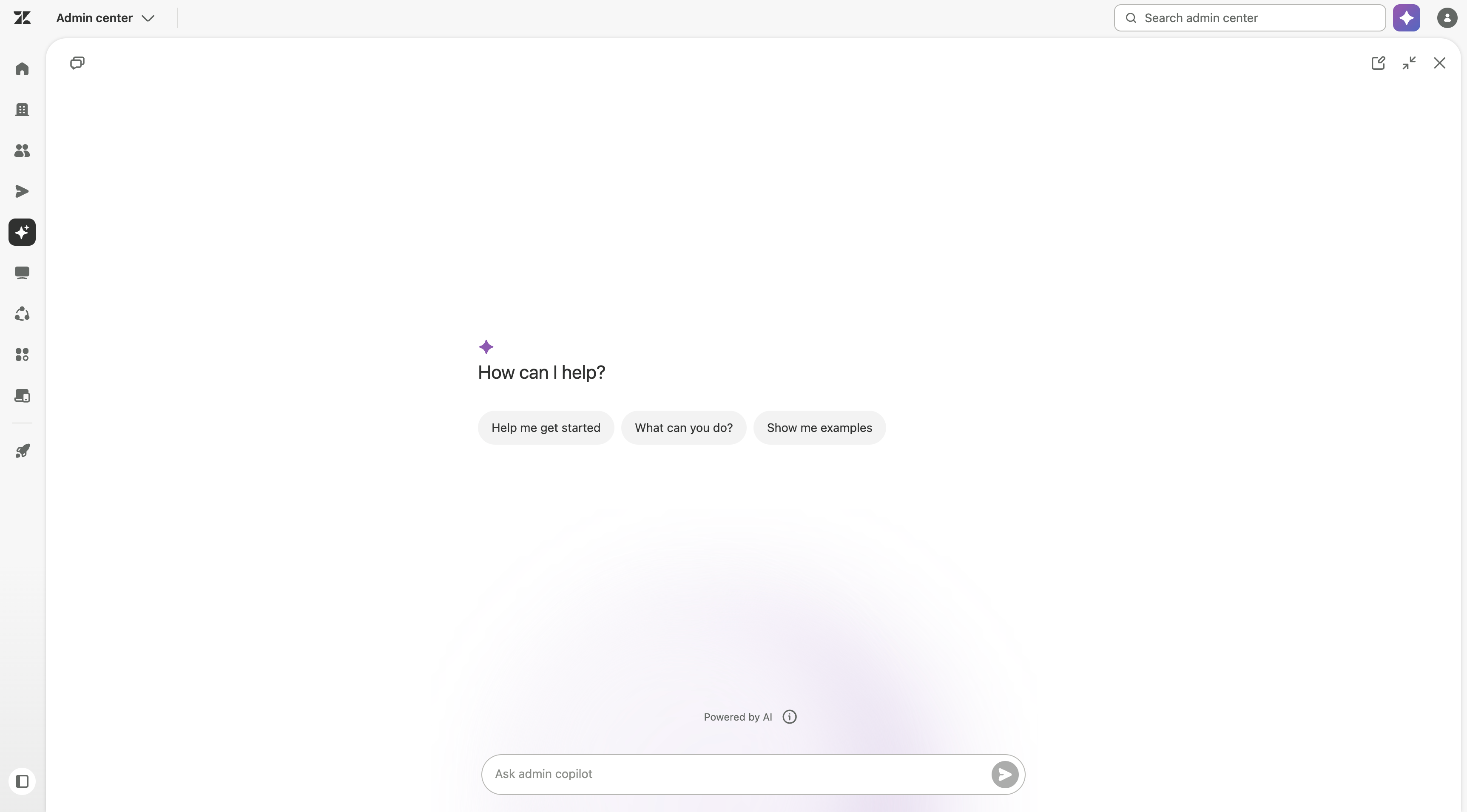
Zendesk adds HubSpot content across AI agents, Copilot, search, and generative search, plus role-based Admin Copilot access, expanded view, and QA recommendations. These updates improve knowledge access and admin control. Highlights include:
- HubSpot Knowledge Source: Makes HubSpot content available across AI agents, Copilot, search, and generative search.
- Role-Based Access: Lets admins control which custom roles can use Admin Copilot.
- Expanded View: Gives admins more space to review detailed Copilot responses.
- QA Recommendations: Adds Zendesk QA guidance to the recommendations feed.
Visit Zendesk’s official site for more details.
Zendesk Specs
- Analytics: Yes
- API: Yes
- Batch Permissions & Access: No
- Call Integration: Yes
- Chat: Yes
- Contact Management: Yes
- Contact Sharing: Yes
- CRM Integration: Yes
- Customer Management: Yes
- Customer Service: Yes
- Dashboard: Yes
- Data Export: Yes
- Data Import: Yes
- Data Visualization: Yes
- Email Integration: Yes
- Escalation Management: Yes
- External Integrations: Yes
- Instant Chat Integration: Yes
- Knowledge Base: Yes
- Lead Management: No
- Lead Scoring: No
- Multi-User: Yes
- Notifications: Yes
- Real-time Alerts: Yes
- Scheduling: Yes
- Self-service Portal: Yes
- Social Media Integration: Yes
- Support Forum: Yes
- Third-Party Plugins/Add-Ons: Yes
- Ticket Management: Yes
- Workflow Management: Yes
Zendesk FAQs
Zendesk Company Overview & History
Zendesk, Inc. is headquartered in San Francisco, California, and employs over 5,000 people globally. Founded in Copenhagen, Denmark, in 2007, Zendesk provides SaaS products focused on customer support and communications. The company is known for its flexible work culture and has notable clients, including Shopify and Slack. Zendesk supports over 150,000 customers worldwide, making it a leader in the customer service software industry.
Zendesk Major Milestones
- 2007: Founded in Copenhagen, Denmark by Mikkel Svane, Alexander Aghassipour, and Morten Primdahl.
- 2008: Released its first product focusing on customer support solutions.
- 2014: Went public with an IPO on the New York Stock Exchange.
- 2019: Reached over $800 million in annual revenue.
- 2021: Acquired Momentive, the parent company of SurveyMonkey.
- 2022: Featured in the news for its significant growth and expansion in product offerings.