


Stripe vs. PayPal: Comparison and Expert Reviews for 2026

We review tools independently, and commissions help fund our testing. See our transparency policy, our methodology, or suggest a tool.
Choosing between Stripe and PayPal can feel overwhelming when you just want to get paid quickly and securely. You need payment processing software that keeps checkout smooth, supports your business model, and doesn’t eat into your margins. Both Stripe and PayPal promise easy payments, but their features, fees, and flexibility can make a big difference for your bottom line.
In this article, you’ll get a clear comparison of Stripe and PayPal—including pros and cons, use cases, pricing, security, and usability. I’ll help you decide which solution fits your needs, so you can focus on growing your business with confidence.
Stripe
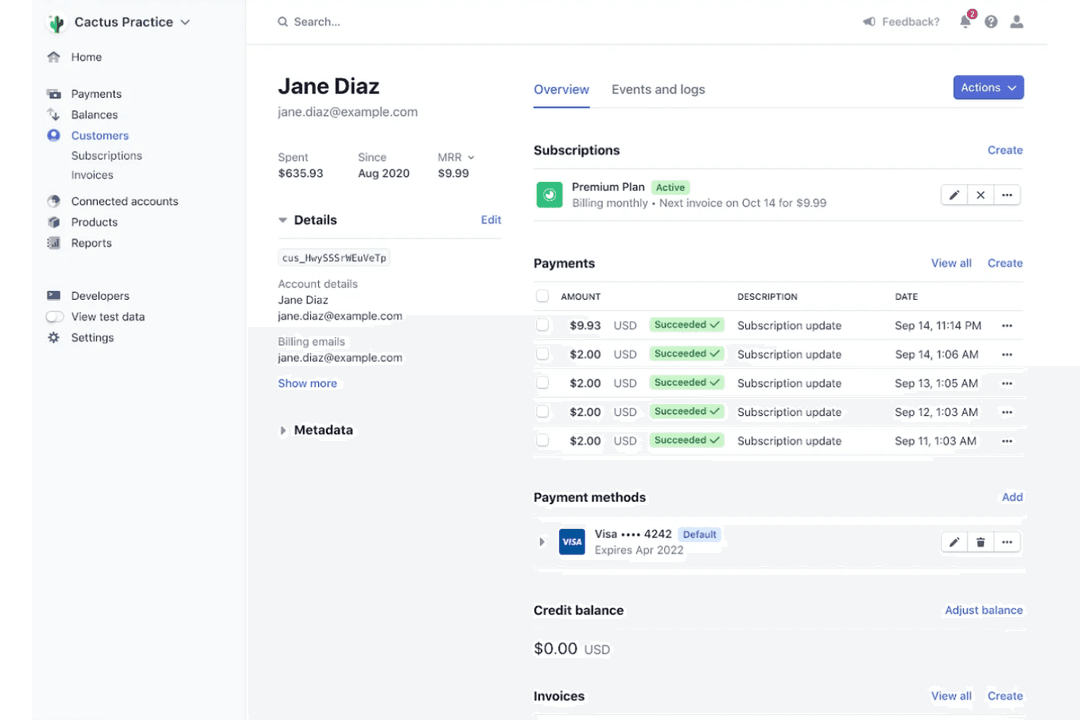
4.6/5
- Not available
- From $620/month
PayPal

4.6/5
- Free plan + free demo available
- From $0.30/transaction
Why Trust Our Software Recommendations
6,700+
Reviews
20
Industry experts
16+
Evaluation factors
14
Years
Our team has been testing and reviewing software since 2012. As retail leaders ourselves, we know how difficult—and important—it is to choose the right software.
For this guide, we evaluated tools using hands-on testing and independent research, scoring tools using our selection criteria.
Our reviews reflect our independent judgment—not a sales pitch.
| Stripe | PayPal | |
|---|---|---|
| Free Trial | Not available | Free plan + free demo available |
| Pricing | From $620/month | From $0.30/transaction |
Stripe vs. PayPal Pricing & Hidden Costs
Stripe and PayPal both charge transaction fees for each payment processed. Stripe’s model is straightforward, with clear fees for online and in-person payments, but you might see extra charges for things like currency conversion or advanced features. PayPal’s pricing can be more complex, with different rates for various transaction types, plus potential fees for chargebacks, currency conversion, and withdrawing funds to your bank.
To choose the right vendor, look beyond the headline rates and consider your typical transaction types, sales volume, and where your customers are located. Review each provider’s fee schedule for extras like refunds, international payments, or recurring billing. Run a few real-world scenarios using your own sales data to see which platform will actually cost you less over time.
Stripe and PayPal share a strong foundation as full-service payment processors, allowing businesses to accept online payments, process credit cards and debit cards, and support digital wallets across websites and apps. Both platforms emphasize security (including encryption and fraud protection), offer global payment capabilities, and integrate with popular ecommerce tools to streamline checkout, invoicing, and transaction management.
Where they diverge is in their core strengths. Stripe stands out for its developer-first infrastructure, offering powerful APIs and deep customization for building tailored checkout flows, subscriptions, and complex payment systems. PayPal, on the other hand, differentiates itself with its massive consumer network and brand recognition, enabling faster, trust-driven checkout experiences (like one-click PayPal payments and built-in buyer protection) that can boost conversion rates.
| Stripe | PayPal | |
|---|---|---|
| API | Yes | Yes |
| Calendar Management | No | No |
| Dashboard | Yes | Yes |
| Data Export | Yes | Yes |
| Data Import | Yes | No |
| Data Visualization | Yes | No |
| External Integrations | Yes | Yes |
| Multi-User | Yes | Yes |
| Notifications | Yes | Yes |
| Scheduling | No | No |
| Integration | Stripe | PayPal |
| Shopify | ✅ | ✅ |
| WooCommerce | ✅ | ✅ |
| BigCommerce | ✅ | ✅ |
| Wix | ✅ | ✅ |
| Salesforce | ✅ | ✅ |
| QuickBooks | ✅ | ✅ |
| Xero | ✅ | ❌ |
| NetSuite | ✅ | ❌ |
| Venmo | ❌ | ✅ |
| GoFundMe | ❌ | ✅ |
| API | ✅ | ✅ |
| Zapier | ✅ | ✅ |
Stripe and PayPal both cover the most popular ecommerce and accounting integrations, but Stripe offers more options for advanced business tools like Xero and NetSuite, while PayPal stands out with Venmo and GoFundMe. Both platforms support API and Zapier, so you can connect to thousands of other apps, making either a strong fit for most integration needs.
| Factor | Stripe | PayPal |
| PCI Compliance | Automatically PCI DSS Level 1 certified for all merchants. | PCI DSS Level 1 certified and handles compliance for merchants. |
| Data Encryption | End-to-end encryption for all payment data in transit and at rest. | Uses advanced encryption and tokenization for all transactions. |
| Fraud Protection | Machine learning fraud detection with customizable rules via Radar. | Built-in fraud monitoring and Seller Protection for eligible payments. |
| Uptime & Reliability | 99.9% uptime SLA and real-time status monitoring. | High uptime with real-time monitoring and incident reporting. |
| Regulatory Coverage | Supports global compliance, including GDPR and PSD2. | Complies with global regulations and offers buyer/seller protections. |
Both Stripe and PayPal deliver strong security and compliance, but Stripe’s customizable fraud tools and transparent uptime reporting give it an edge for businesses with complex needs. PayPal’s built-in buyer and seller protections are a standout for those prioritizing trust and dispute resolution.
| Factor | Stripe | PayPal |
| User Interface | Clean, modern dashboard with advanced reporting and customization. | Simple, familiar interface that’s easy for anyone to navigate. |
| Onboarding | Developer-focused setup with detailed guides and API documentation. | Quick, non-technical onboarding with step-by-step instructions. |
| Checkout Experience | Highly customizable checkout flows for branded experiences. | One-click checkout trusted by millions of buyers worldwide. |
| Customer Support | 24/7 support via chat, email, and phone, plus a robust help center. | Extensive help center, community forums, and responsive live support. |
| Mobile Access | Full-featured mobile app for managing payments and analytics. | Mobile app for sending, receiving, and tracking payments easily. |
PayPal is easier for non-technical users and offers instant familiarity for buyers, while Stripe’s flexibility and customization shine for businesses with developer resources. Stripe stands out for its advanced controls and reporting, while PayPal wins for its quick setup and universally recognized checkout.
Stripe
- Supports 135+ currencies and global payment methods.
- Clear and detailed billing statements for easy expense tracking.
- Flexible APIs for custom checkout and billing flows.
- Customer support can be slow or unhelpful.
- Requires technical expertise for advanced setup.
- Higher transaction fees for some international payments.
PayPal
- You can easily send and receive money worldwide.
- Paypal offers strong security features for your transactions.
- Your team will appreciate its user-friendly interface.
- Your team might find customer support response times slow.
- Some users experience account limitations without clear communication.
- You might face occasional transaction holds and delays.
Stripe
- SaaS StartupsStripe’s subscription billing and API tools support rapid product iteration.
- Global EcommerceMulti-currency support and local payment methods help reach international customers.
- Marketplaces StripeConnect enables split payments and onboarding for multiple sellers.
- Digital AgenciesCustomizable payment flows and invoicing fit client-specific needs.
- NonprofitsDonation tools and recurring giving options are built in.
- Mobile App DevelopersStripe’s SDKs make in-app payments and subscriptions easy to implement.
PayPal
- Small BusinessesYour team will appreciate Paypal's straightforward setup and global payment capabilities.
- FreelancersYou can easily invoice clients and receive payments from around the world.
- E-commerce StoresPaypal integrates smoothly with platforms like Shopify, helping your online sales run smoothly.
- NonprofitsYour organization can accept donations easily with Paypal's secure payment processing.
- Remote TeamsYour team can handle international payments efficiently without currency conversion issues.
- Digital ServicesYou can offer clients a trusted payment method, enhancing their trust in your services.
Who Should Use Stripe, and Who Should Use PayPal?
Stripe is best suited for businesses that want flexibility and control over their payment infrastructure. It’s especially strong for SaaS companies, startups, and developers who need customizable checkout experiences, subscription billing, or the ability to build payments directly into their product. If you have technical resources or plan to scale globally with complex requirements, Stripe’s API-first approach makes it a powerful long-term solution.
PayPal is a better fit for small businesses, solopreneurs, and international ecommerce sellers who want a quick, easy way to start accepting payments with minimal setup. Its widespread consumer trust and familiar checkout experience can improve conversion rates, particularly for online stores and marketplaces. If you prioritize simplicity, fast onboarding, and access to a large existing user base, PayPal is often the more practical choice.
| Stripe | PayPal | |
|---|---|---|
| Buyer Network | Stripe No built-in buyer network, relies on your marketing. | PayPal Massive global buyer network and trusted brand recognition. |
| Customization | Stripe Highly customizable checkout and workflows via APIs. | PayPal Limited customization, focused on standard checkout flows. |
| Developer Focus | Stripe Built for developers with an extensive API and documentation. | PayPal Designed for non-technical users with easy setup. |
| Payout Flexibility | Stripe Flexible payout schedules and multi-currency support. | PayPal Standard payout options, with some restrictions by country. |
| Recurring Payments | Stripe Advanced subscription management and billing tools. | PayPal Basic recurring payment options for simple subscriptions. |
| Fraud Protection | Both provide built-in fraud detection and monitoring to help reduce chargebacks and unauthorized activity. |
|---|---|
| Global Reach | Both enable international payments and support multiple currencies for cross-border sales. |
| Integration Options | Both integrate with major ecommerce platforms, accounting tools, and offer API and Zapier connections. |
| Payment Methods | Both support credit cards, debit cards, and digital wallets, making it easy for customers to pay online. |
| Security Standards | Both are PCI DSS Level 1 certified and use advanced encryption to protect payment data. |