
17 Best Price Optimization Software in 2026

Price Optimization Software Shortlist
Here’s my shortlist of price optimization software:


Price optimization software helps your business set and adjust prices using data, algorithms, and market trends to maximize revenue and margins. If you’re searching for the best price optimization software, you’re likely facing pressure to stay competitive, protect profits, and respond quickly to shifting demand—whether you manage pricing for thousands of SKUs or need to coordinate strategies across channels.
This list will help you compare top solutions, understand which features matter for your business model, and make a confident, informed decision about the right tool for your team.
Why Trust Our Software Reviews
We’ve been testing and reviewing retail and ecommerce software and services since 2021.
As retail experts ourselves, we know how critical and difficult it is to make the right decision when selecting software. We invest in deep research to help our audience make better software purchasing decisions.
We’ve tested more than 2,000 tools for different finance and accounting use cases and written over 1,000 comprehensive software reviews. Learn how we stay transparent and our review methodology.
Best Price Optimization Software Summary
This comparison chart summarizes pricing details for my top price optimization software selections to help you find the best one for your budget and business needs.
| Tool | Best For | Trial Info | Price | ||
|---|---|---|---|---|---|
| 1 | Best for competitor price benchmarking | Free demo available | Pricing upon request | Website | |
| 2 | Best for ecommerce automation features | Free demo available | Pricing upon request | Website | |
| 3 | Best for AI-driven dynamic pricing | Free demo available | Pricing upon request | Website | |
| 4 | Best for real-time price recommendations | Free demo available | Pricing upon request | Website | |
| 5 | Best for B2B margin management | Free demo + 14-day free trial available | Pricing upon request | Website | |
| 6 | Best for rapid cloud-based deployment | Free demo available | Pricing upon request | Website | |
| 7 | Best for enterprise-level assortment pricing | Free demo available | Pricing upon request | Website | |
| 8 | Best for configurable pricing workflows | Free demo available | Pricing upon request | Website | |
| 9 | Best for small hotel revenue teams | Free demo + 14-day free trial available | From $148.50/property/month (billed annually) | Website | |
| 10 | Best for machine learning price forecasting | Free demo available | Pricing upon request | Website |
Price Optimization Software Reviews
Below are my detailed summaries of price optimization software that made it onto my shortlist. My reviews offer a detailed look at the features, best use cases, and integrations of each platform to help you find the best one for you.

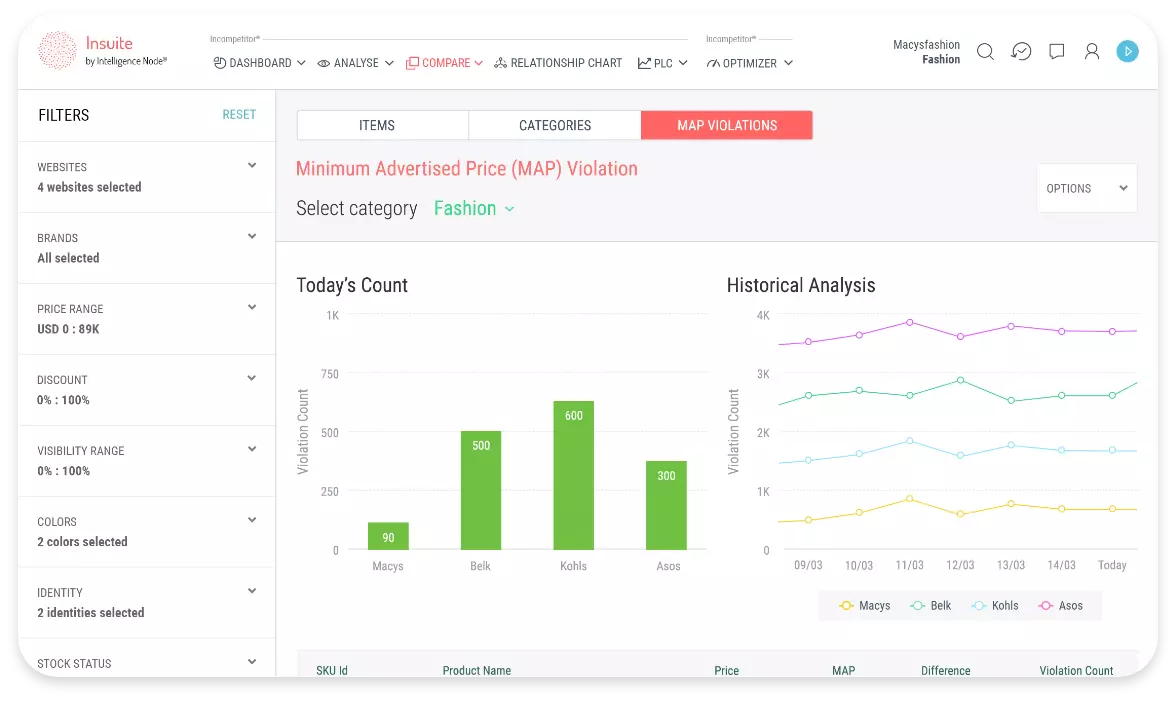
Intelligence Node is built for teams that need to track and respond to competitor pricing in real time. The platform gives ecommerce and retail teams granular visibility into market pricing, promotions, and assortment changes across global competitors. Its benchmarking tools help you identify pricing gaps and opportunities so you can make faster, data-driven pricing decisions.
Why I Picked Intelligence Node
For teams focused on competitor price benchmarking, Intelligence Node stands out with its real-time market monitoring and granular pricing intelligence. The platform tracks millions of SKUs across global retailers, giving you up-to-date insights into competitor pricing, promotions, and assortment changes.
I like that Intelligence Node uses AI-driven matching to ensure high product match accuracy, even in complex or fast-changing categories. This level of detail helps pricing and merchandising teams quickly spot pricing gaps and adjust strategies to stay competitive.
Intelligence Node Key Features
In addition to its benchmarking strengths, Intelligence Node offers several other features that support pricing teams:
- Automated Price Alerts: Notifies you when competitors change prices or launch new promotions.
- MAP Monitoring: Tracks minimum advertised price violations across online channels.
- Category-Level Analytics: Provides detailed analytics for specific product categories and segments.
- Customizable Reporting: Lets you build and export reports tailored to your team’s needs.
Intelligence Node Integrations
Integrations include Amazon, Alibaba, Unimart, JCPenney, Family Dollar, The Home Depot, Henry Schein, Kroger, IQVIA, and ASDA. An API is also available for custom integrations.
Pros and Cons
Pros:
- Automated alerts notify teams when competitor prices change
- AI-driven product matching improves accuracy across large catalogs
- Real-time competitor price tracking across global ecommerce markets
Cons:
- Product matching may occasionally require manual validation
- Advanced analytics features can require onboarding support

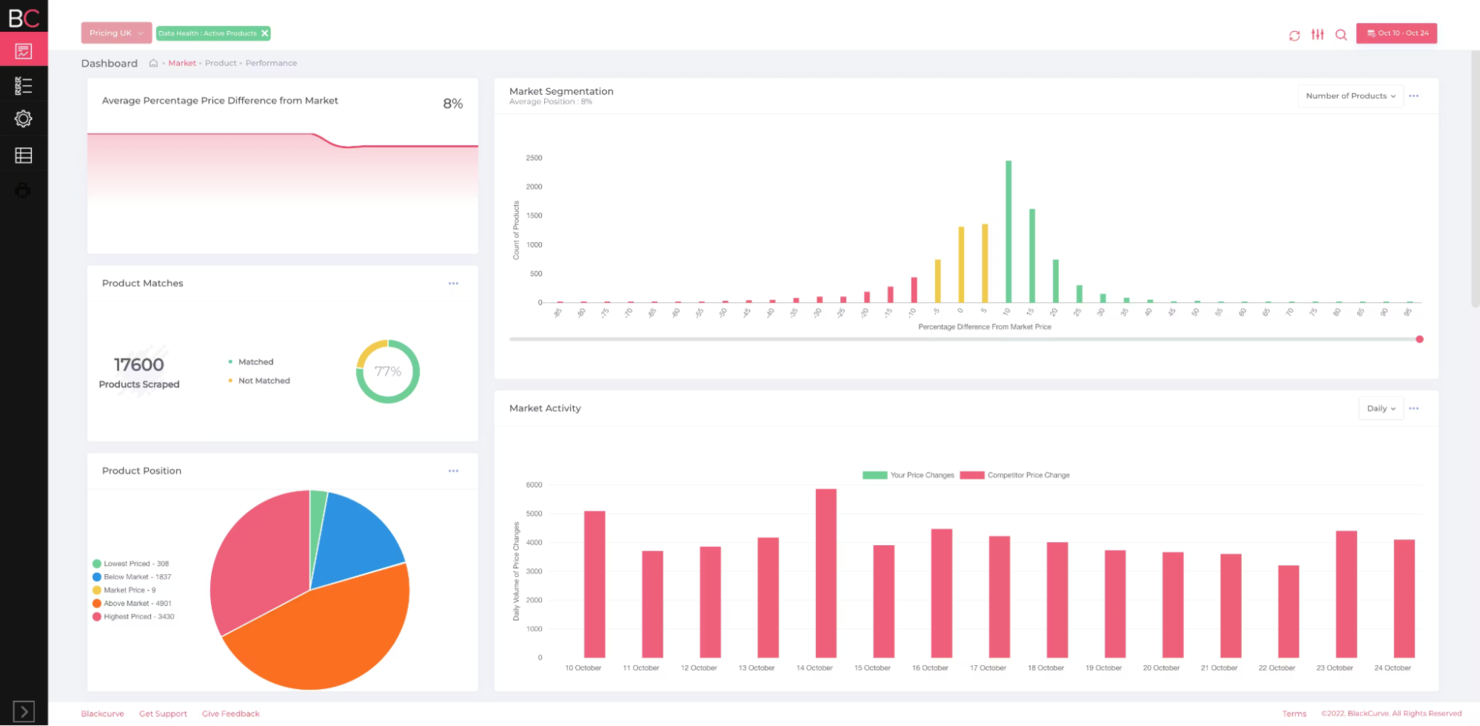
BlackCurve is designed for ecommerce businesses that want to automate and optimize their pricing strategies at scale. The platform appeals to online retailers and digital teams looking to manage large product catalogs and dynamic pricing rules with minimal manual effort. BlackCurve’s automation features help you react quickly to market changes and keep pricing competitive across multiple channels.
Why I Picked BlackCurve
What sets BlackCurve apart for me is its focus on ecommerce automation features that help retailers manage pricing at scale. The platform lets you set up dynamic pricing rules that automatically adjust prices based on inventory levels, competitor data, and demand signals.
I appreciate how BlackCurve’s rule engine supports complex pricing strategies without requiring constant manual updates. This makes it a strong fit for online retailers who need to keep thousands of SKUs competitive in fast-moving markets.
BlackCurve Key Features
Some other features that make BlackCurve useful for ecommerce pricing teams include:
- Competitor Price Tracking: Monitors competitor prices and updates your dashboard with the latest market data.
- Price Experimentation Tools: Lets you run A/B tests on pricing strategies to measure impact.
- Bulk Price Updates: Allows you to update prices across large product catalogs in a single action.
- Performance Analytics Dashboard: Visualizes pricing performance and key metrics in real time.
BlackCurve Integrations
Integrations include Shopify, Adobe Commerce, BigCommerce, Google Shopping, Google Drive, Google Spreadsheets, Google Content API, Google Ads API, and an API for custom integrations.
Pros and Cons
Pros:
- Performance dashboards visualize pricing impact and trends
- Price experimentation tools enable A/B testing of pricing strategies
- Automated pricing rules support large ecommerce product catalogs
Cons:
- Smaller SMB-focues, less suitable for enterprises
- Advanced configuration may require onboarding support
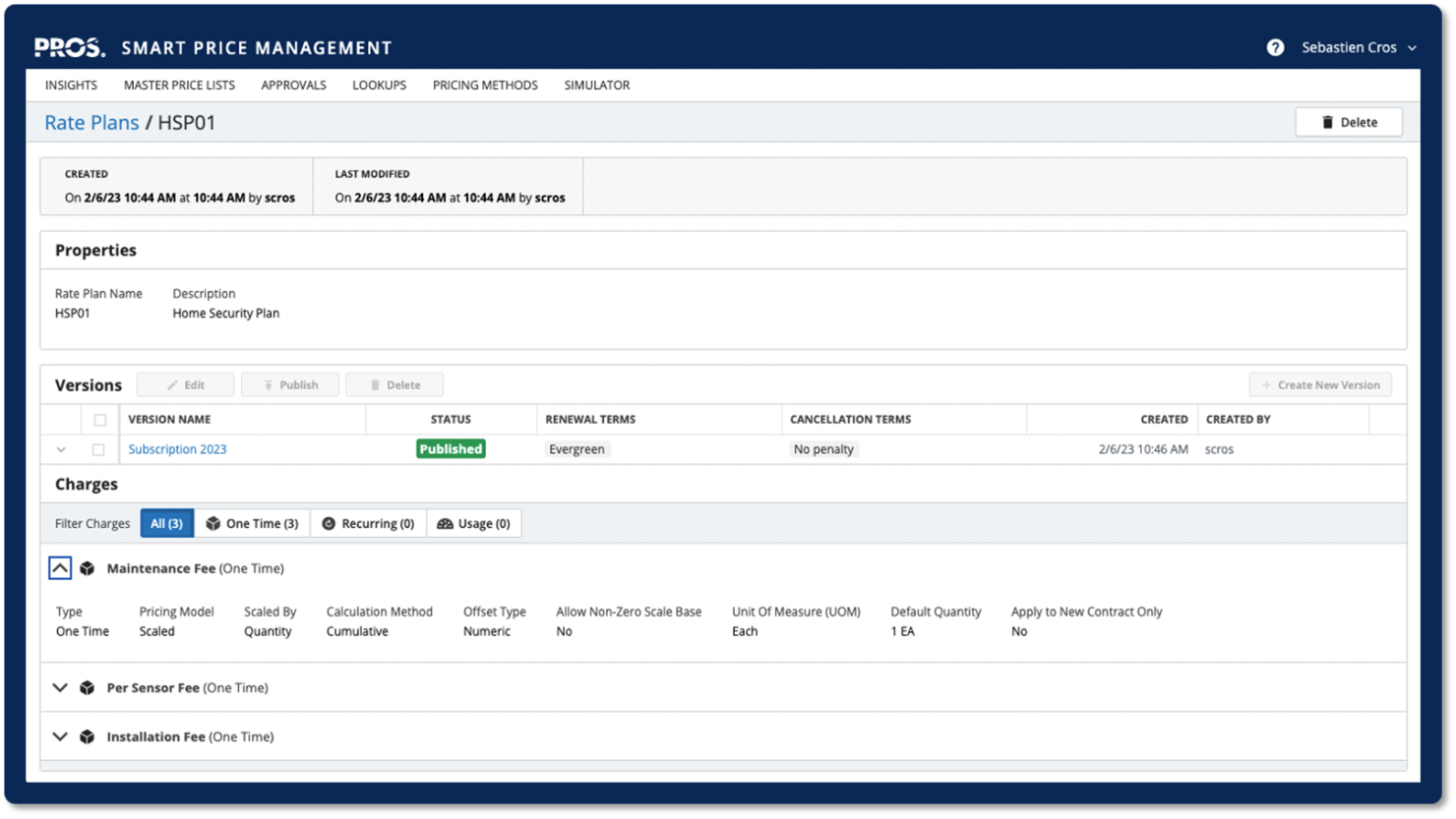
PROS offers a platform designed for businesses that need to respond quickly to market changes. This software appeals to teams in industries like retail, travel, and manufacturing that manage complex pricing across channels. PROS helps you automate price adjustments and optimize revenue by analyzing real-time data and demand signals.
Why I Picked PROS
I chose PROS for this list because its AI-driven dynamic pricing capabilities set it apart in the price optimization space. The platform uses machine learning to analyze real-time market data and automatically adjust prices based on demand, competition, and inventory levels.
I like that PROS offers scenario modeling, which lets you test pricing strategies before rolling them out. Its ability to deliver personalized pricing recommendations at scale makes it a strong fit for businesses that need to stay agile in fast-moving markets.
PROS Key Features
Some other features in PROS that stand out for price optimization teams include:
- Price List Management: Create, update, and manage multiple price lists for different customer segments or regions.
- Guided Selling Tools: Equip sales teams with real-time pricing guidance and recommendations during the quoting process.
- Approval Workflows: Set up automated approval processes for pricing exceptions and special deals.
- Performance Analytics: Access dashboards and reports that track pricing effectiveness and identify trends across products and channels.
PROS Integrations
Integrations include Salesforce, SAP, Oracle, Microsoft Dynamics, Conga CPQ, Conga CLM, Conga Document Automation, and high-performance APIs for custom integrations.
Pros and Cons
Pros:
- Handles complex pricing structures across large product catalogs
- Scenario modeling for testing multiple pricing strategies before rollout
- AI-driven pricing engine adapts to real-time demand signals
Cons:
- Advanced functionality may require training for full adoption
- Implementation can require significant planning and configuration

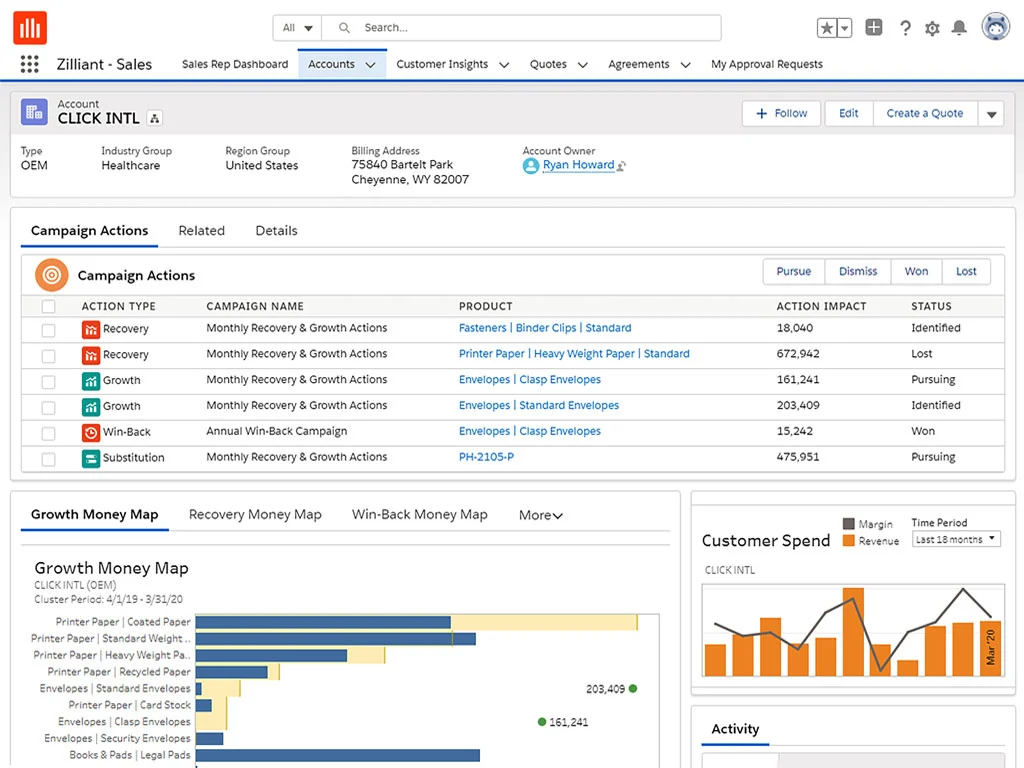
Zilliant is built for businesses that need real-time, data-driven price recommendations across large product catalogs and customer segments. It’s especially useful for B2B and distribution teams that want to automate pricing decisions and respond instantly to market changes. Zilliant helps you deliver consistent, market-aligned prices at scale, even in highly dynamic or competitive environments.
Why I Picked Zilliant
Zilliant caught my attention for its ability to deliver real-time price recommendations, which is essential for businesses operating in fast-moving markets. The platform uses advanced AI and machine learning models to analyze market data and customer behavior, so you can adjust prices instantly as conditions change.
I like that Zilliant supports dynamic pricing across complex product hierarchies and customer segments, making it a strong fit for B2B and distribution teams. Its real-time pricing engine helps your business stay competitive and responsive without manual intervention.
Zilliant Key Features
Some other features in Zilliant that are valuable for pricing teams include:
- Price List Management: Lets you create, update, and manage multiple price lists for different channels or regions.
- Customer-Specific Pricing: Supports tailored pricing for individual customers or accounts.
- Scenario Modeling: Allows you to simulate pricing changes and forecast their impact before going live.
- Guided Selling Tools: Provides sales teams with pricing recommendations and deal guidance within their workflow.
Zilliant Integrations
Integrations include Salesforce Sales Cloud, Salesforce CPQ, Salesforce B2B Commerce, SAP ERP, SAP Commerce, Oracle ERP, Oracle CPQ, Microsoft Dynamics, and an API for custom integrations.
Pros and Cons
Pros:
- Scenario modeling helps forecast the impact of pricing adjustments
- AI-driven models analyze customer behavior and demand signals
- Real-time price recommendations based on large datasets and segmentation
Cons:
- Approval workflow customization may be limited in some use cases
- Implementation can require significant internal data preparation

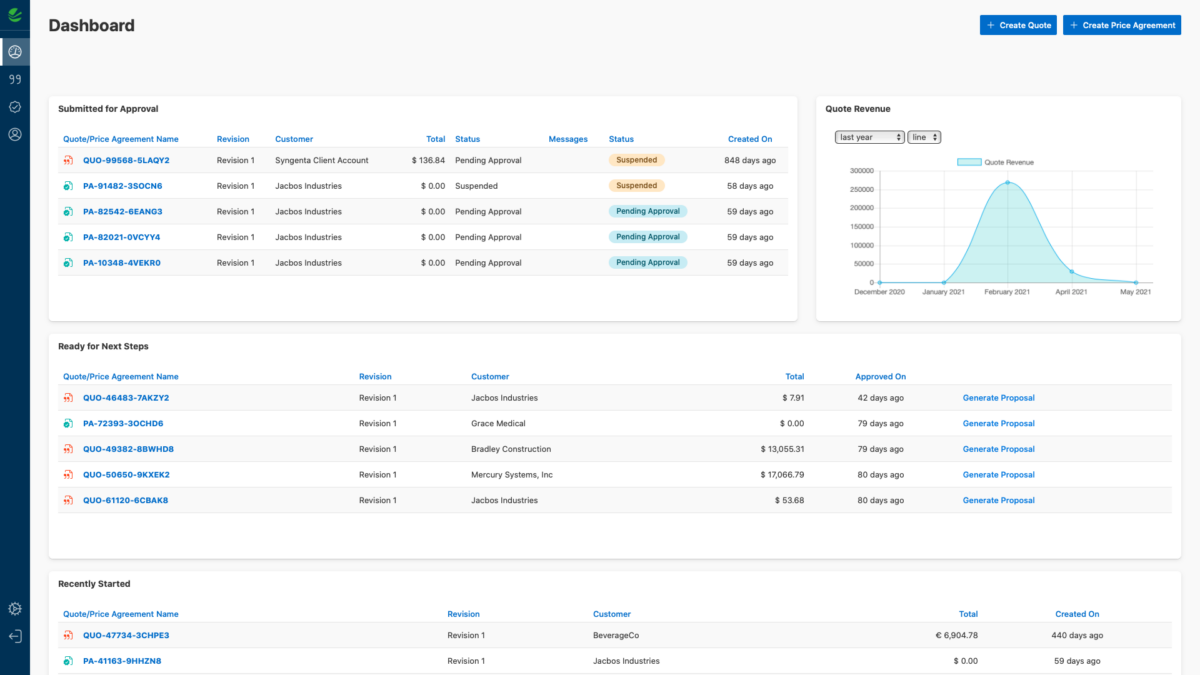
Vendavo is designed for businesses managing complex B2B pricing while protecting margins. The platform is built for manufacturers, distributors, and service providers that need granular control over pricing structures, contracts, and negotiations. It helps you analyze profitability, enforce pricing discipline, and adapt to changing market conditions in real time.
Why I Picked Vendavo
What stands out about Vendavo is its focus on B2B margin management, which is a challenge for many manufacturers and distributors. The platform offers advanced margin analytics and segmentation tools, so you can identify profit leaks and optimize pricing at a granular level.
I appreciate how Vendavo supports complex contract pricing and customer-specific agreements, which are common in B2B environments. Its real-time price guidance helps your team respond quickly to market changes while protecting your bottom line.
Vendavo Key Features
Some other features in Vendavo that are valuable for B2B pricing teams include:
- Price Optimization Engine: Uses data-driven algorithms to recommend optimal prices for each segment.
- Deal Desk Workflow: Centralizes price approvals and exception management for sales teams.
- Rebate and Incentive Management: Tracks and manages complex rebate programs and customer incentives.
- Guided Selling Tools: Provides sales teams with real-time pricing guidance during negotiations.
Vendavo Integrations
Integrations include SAP, Oracle, Salesforce, Microsoft Dynamics, Magento, Shopify, WooCommerce, NetSuite, Infor, and Epicor.
Pros and Cons
Pros:
- Real-time pricing guidance for sales teams during negotiations
- Supports complex contract pricing and negotiated deals
- Strong margin analysis for identifying profit leaks across customer segments
Cons:
- Reporting customization may not meet every advanced analytics need
- Configuration can be complex for organizations with large pricing structures

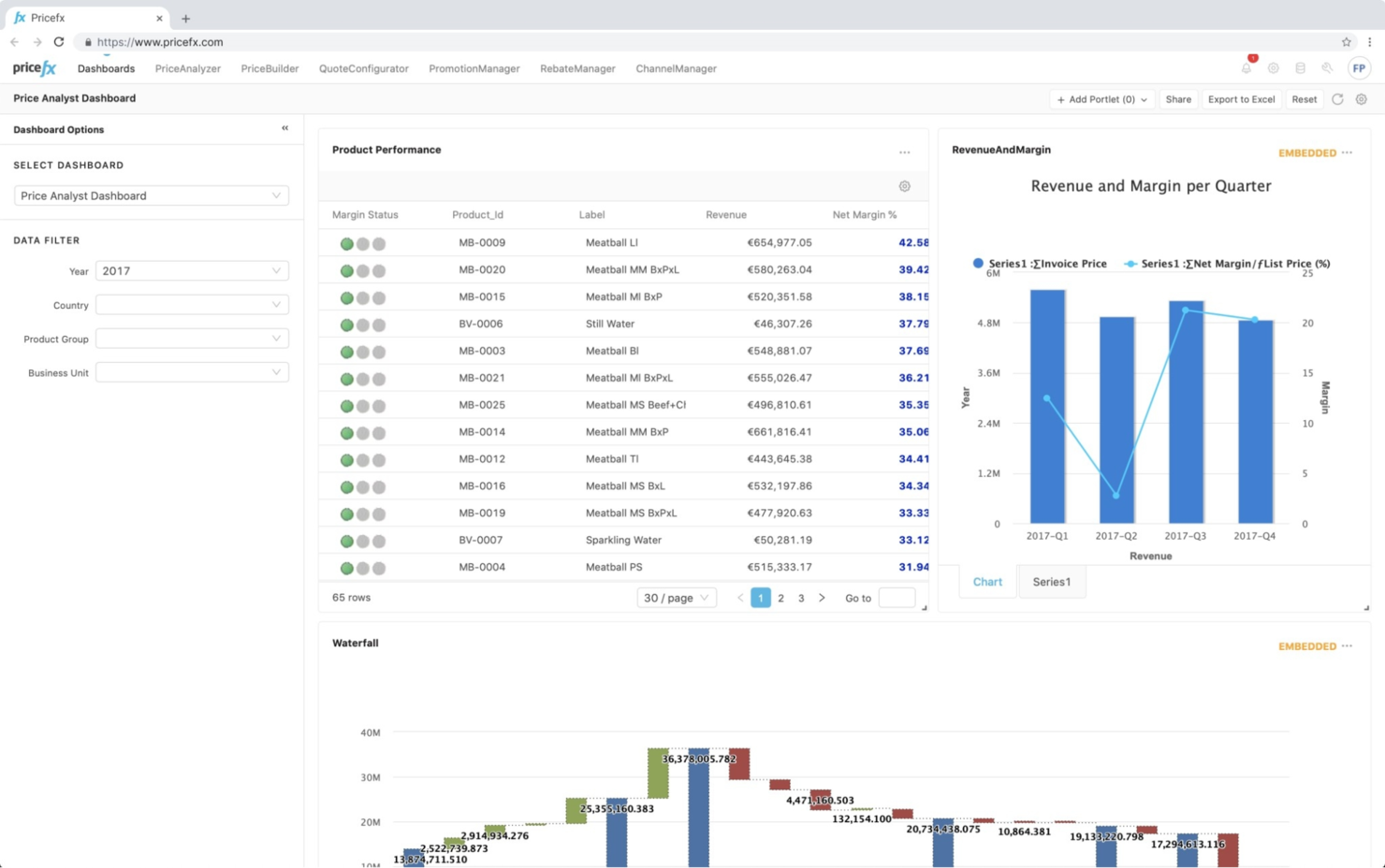
Pricefx is worth a close look if you need a price optimization platform that’s quick to deploy and fully cloud-based. It’s designed for retailers, manufacturers, and distributors that want to launch pricing projects without lengthy IT rollouts. The platform helps your team move fast with modular tools for price setting, analytics, and management, all delivered through the cloud.
Why I Picked Pricefx
What stands out about Pricefx is how quickly you can get up and running with its cloud-based deployment. For teams that need to launch pricing initiatives without waiting months for IT, Pricefx offers modular pricing, analytics, and rebate management tools that are ready to use right away.
I appreciate that you can configure and scale these modules as your business grows, so you’re not locked into a rigid system. This flexibility makes Pricefx a strong choice for companies that want to move fast and adapt their pricing strategies on the fly.
Pricefx Key Features
Some other features in Pricefx that are useful for pricing teams include:
- Promotion Management: Lets you create, track, and analyze promotional pricing campaigns across products and channels.
- Quote Configuration: Supports fast, rules-based quote generation for complex deals and pricing scenarios.
- Price Simulation: Allows you to test and compare pricing strategies before making changes live.
- Data Integration Tools: Connects with external data sources to import and synchronize pricing, product, and customer data.
Pricefx Integrations
Integrations include SAP, Salesforce, Microsoft Dynamics, SugarCRM, Boomi, SAP Integration Suite, and an API for custom integrations.
Pros and Cons
Pros:
- Price simulation tools support testing strategies before rollout
- Modular architecture allows teams to expand pricing capabilities over time
- Cloud-based platform enables faster deployment of pricing initiatives
Cons:
- Interface updates may lag behind newer SaaS competitors
- Performance can slow when processing very large datasets

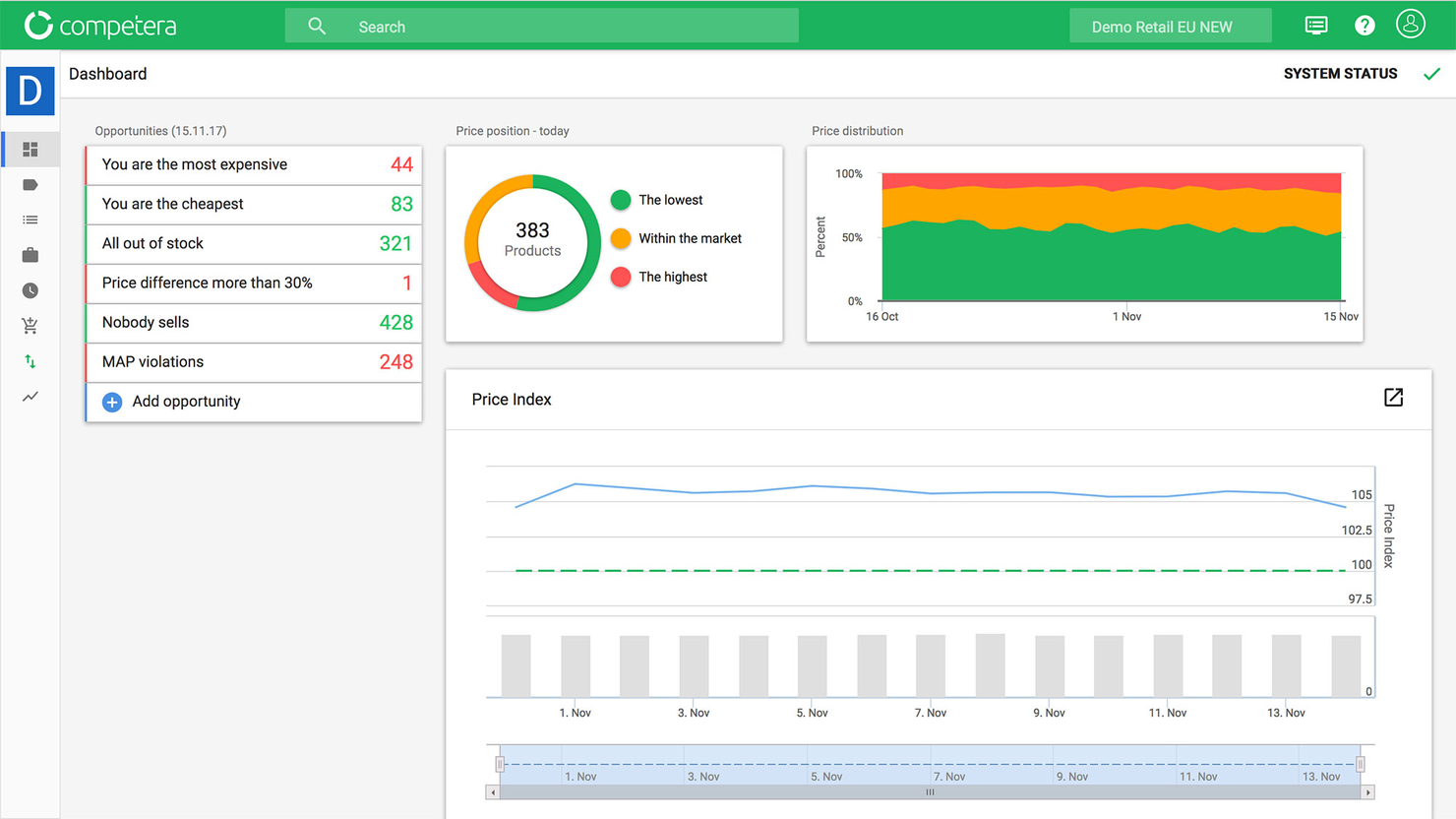
Competera offers a price optimization platform built for enterprise needs, especially for retailers and brands managing large, complex assortments. It’s designed to help pricing, merchandising, and ecommerce teams set optimal prices across thousands of SKUs and categories. The platform uses AI-driven demand modeling to support margin protection and revenue growth at scale.
Why I Picked Competera
What makes Competera a strong choice is its focus on enterprise-level assortment pricing, which is essential for retailers managing thousands of SKUs. The platform uses AI-driven algorithms to analyze demand elasticity and competitive data across entire product portfolios, helping teams set optimal prices for every item.
I appreciate that Competera supports rule-based and dynamic pricing strategies, so you can tailor your approach to different categories or markets. This level of control and automation is especially valuable for large organizations that need to balance margin protection with competitive pricing.
Competera Key Features
In addition to its assortment pricing capabilities, Competera offers several other features that support pricing teams:
- Automated Price Recommendations: Generates pricing suggestions based on real-time market and internal data.
- Scenario Planning: Lets you model and compare the impact of different pricing strategies before implementation.
- Competitor Price Monitoring: Tracks competitor prices and promotions across multiple channels.
- Customizable Reporting Dashboards: Provides configurable dashboards for tracking pricing performance and KPIs.
Competera Integrations
Integrations include SAP, Google Cloud, AWS, and an API for custom integrations.
Pros and Cons
Pros:
- Detailed dashboards track pricing performance and category trends
- Automated price recommendations based on market and internal data
- AI-driven demand modeling for pricing across large product assortments
Cons:
- Advanced features may require training for pricing teams
- Onboarding may take longer for complex enterprise environments

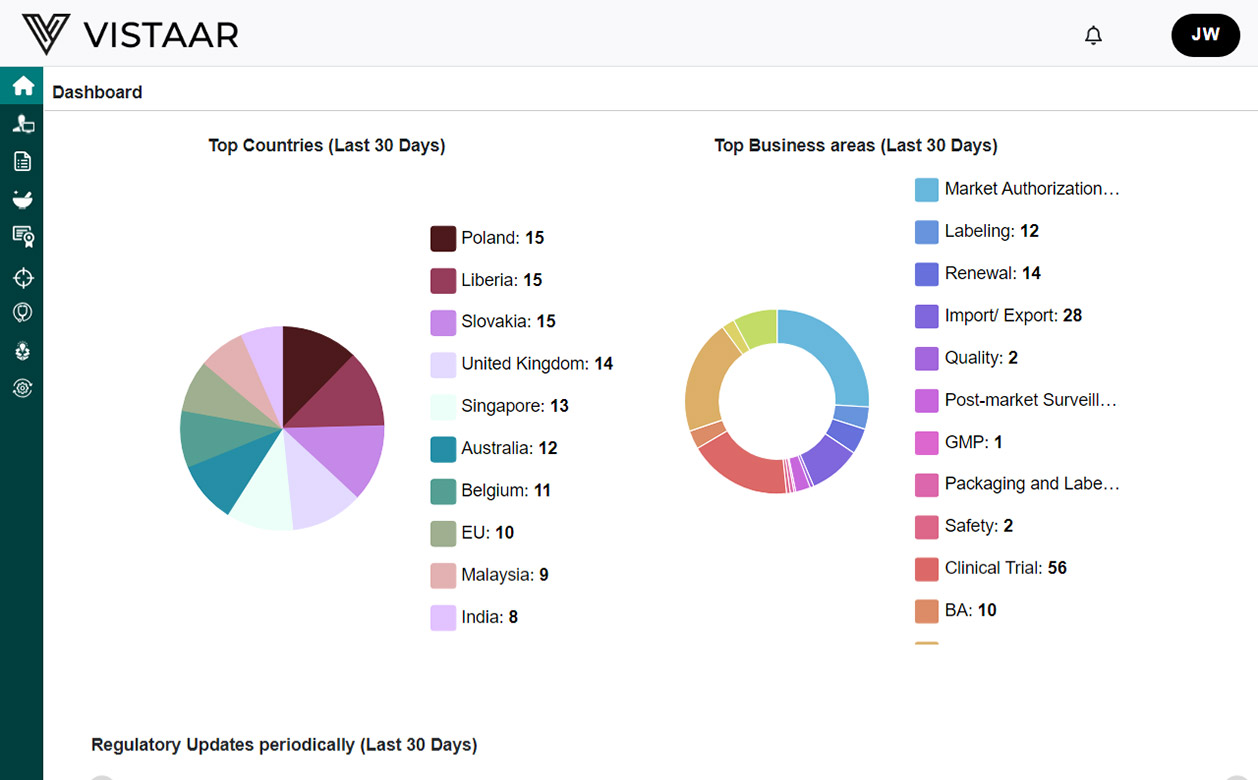
Vistaar stands out for businesses that need highly configurable pricing workflows tailored to complex requirements. The platform is designed for manufacturers, distributors, and large retailers who want to manage pricing rules, approvals, and exceptions at scale. Its flexible workflow engine helps teams handle multi-level pricing processes and adapt quickly to changing market conditions.
Why I Picked Vistaar
Vistaar caught my attention because it offers a high degree of configurability for pricing workflows, which is essential for organizations with complex approval chains and pricing rules. The platform lets you design custom workflows for pricing proposals, approvals, and exception handling, so you can match your internal processes exactly.
I appreciate that Vistaar supports multi-level pricing structures and role-based controls, making it easier to manage pricing across different teams and regions. This level of flexibility is especially useful for manufacturers and distributors who need to adapt pricing processes to unique business requirements.
Vistaar Key Features
In addition to its configurable workflow engine, I also found these features worth noting:
- Dynamic Pricing Engine: Supports real-time price calculation based on multiple variables and business rules.
- Deal Management Tools: Lets you create, track, and analyze negotiated deals and special pricing agreements.
- Analytics and Reporting Suite: Offers dashboards and reports for monitoring pricing performance and trends.
- Guided Selling Tools: Provides sales teams with pricing recommendations and guardrails during the quoting process.
Vistaar Integrations
Native integrations are not currently listed by Vistaar.
Pros and Cons
Pros:
- Deal management tools track negotiated agreements and pricing exceptions
- Dynamic pricing engine handles multi-variable rule-based pricing
- Highly configurable workflows support complex pricing approval processes
Cons:
- Platform visibility is lower than larger pricing vendors
- Implementation may require significant setup and planning

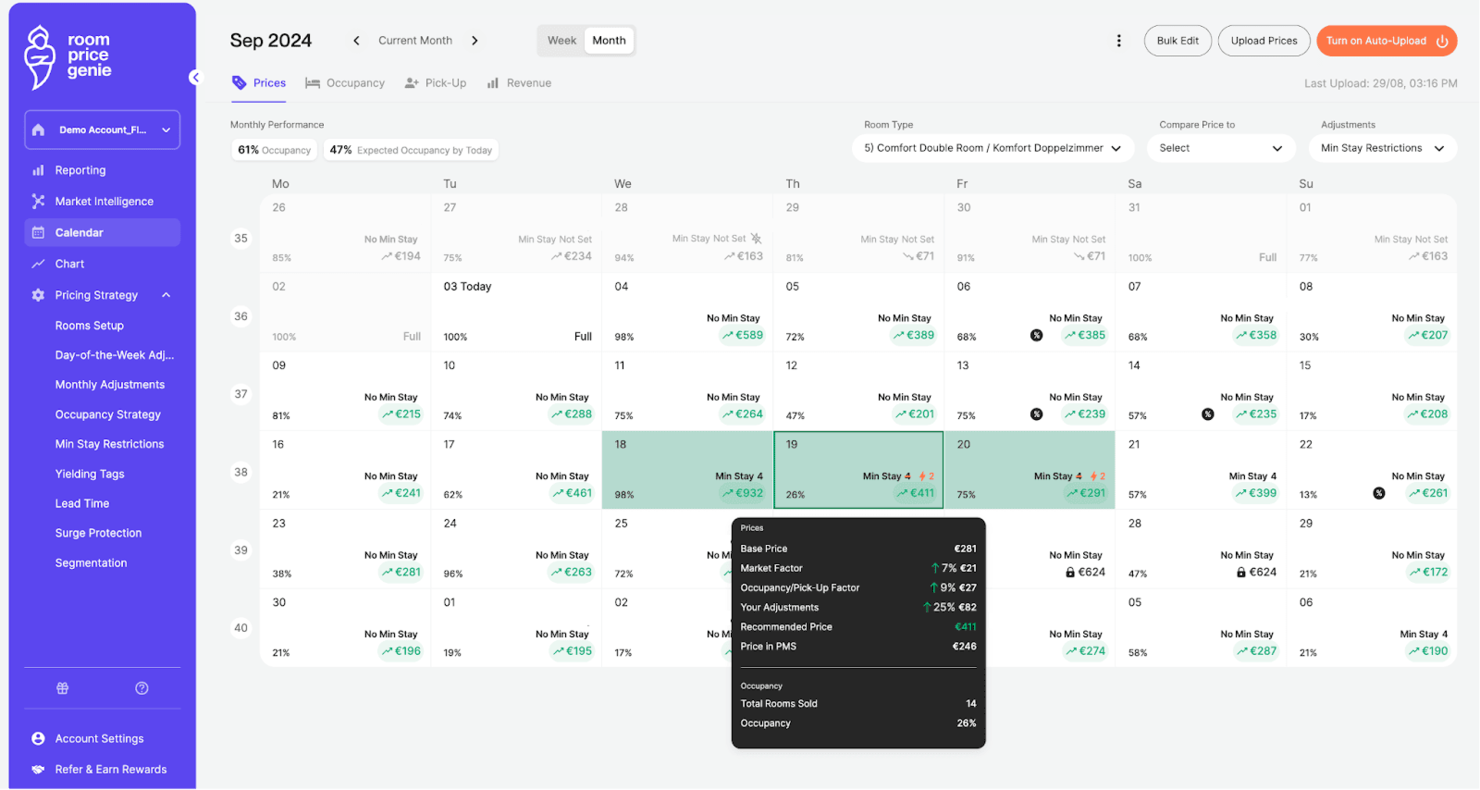
Room Price Genie is designed specifically for small hotel revenue teams that want to automate and optimize their room pricing. The platform appeals to independent hotels and guesthouses looking for real-time pricing recommendations without the complexity of enterprise systems. Its focus on simplicity and automation helps smaller properties stay competitive in dynamic markets.
Why I Picked Room Price Genie
What stands out about Room Price Genie is its focus on small hotel revenue teams that need straightforward, automated pricing support. The tool delivers real-time price recommendations based on local demand, competitor rates, and market trends, which is especially valuable for properties without dedicated revenue management staff.
I like that Room Price Genie automates daily price updates, so smaller hotels can react quickly to changing conditions without manual intervention. Its targeted approach helps independent hotels and guesthouses compete with larger chains by making data-driven pricing decisions accessible.
Room Price Genie Key Features
Some other features that caught my attention include:
- Multi-Property Management: Lets you manage pricing for several properties from a single dashboard.
- Customizable Pricing Rules: Allows you to set your own pricing parameters and restrictions.
- Automated Data Import: Pulls booking and occupancy data directly from your property management system.
- Performance Reporting: Provides visual reports to track pricing impact and revenue trends.
Room Price Genie Integrations
Integrations include Cloudbeds, Mews, SiteMinder, Little Hotelier, Guestline, Apaleo, Protel, RMS Cloud, Booking Factory, and Cubilis.
Pros and Cons
Pros:
- Visual reporting tracks revenue and pricing performance
- Daily price updates help small hotels react quickly to market shifts
- Automated pricing recommendations based on demand and occupancy trends
Cons:
- Unique pricing scenarios may still require manual adjustments
- Limited functionality for large hotel chains or complex portfolios

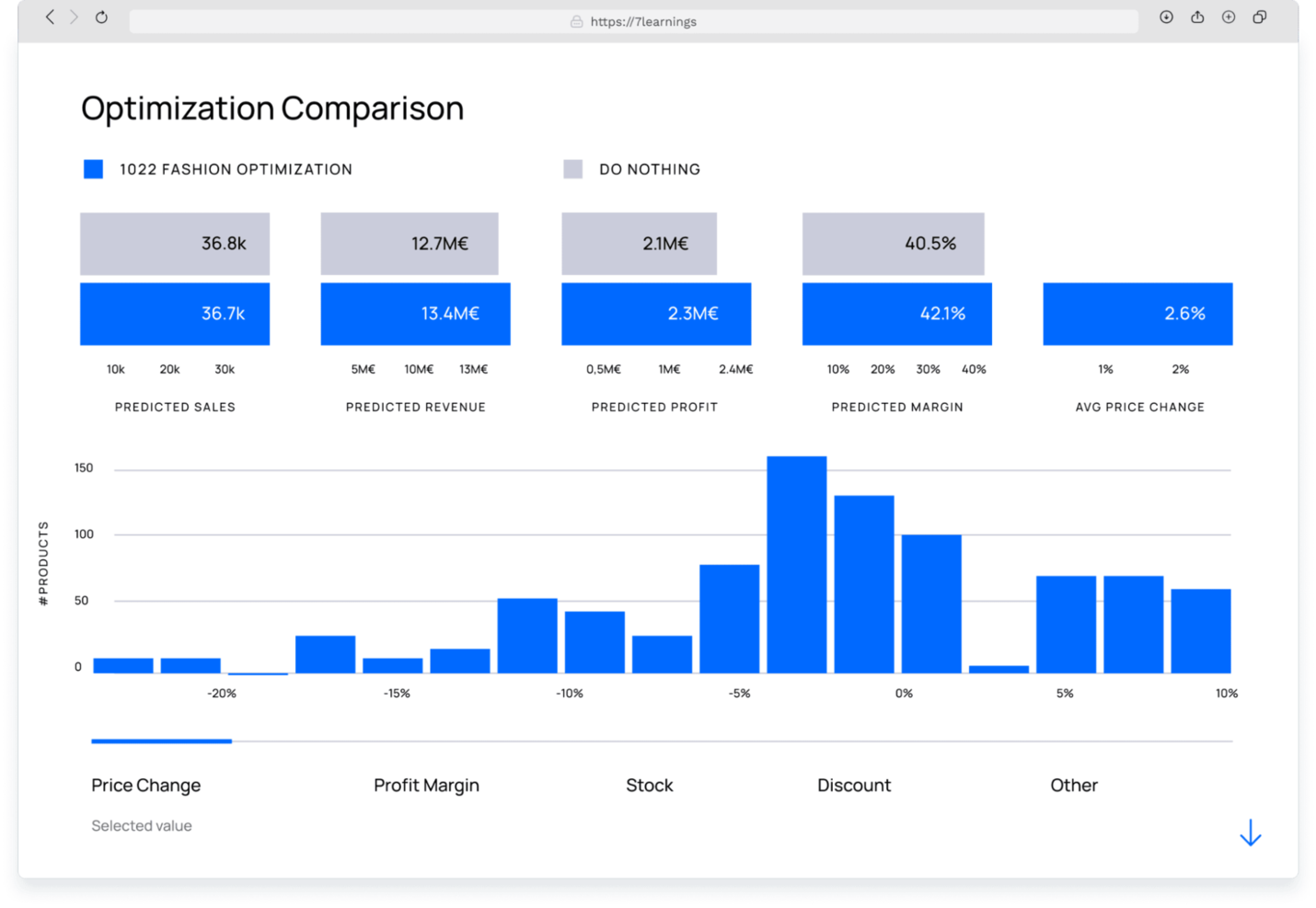
7Learnings uses machine learning to help retailers and ecommerce teams forecast the impact of pricing changes with precision. This tool is especially useful for businesses that want to automate price adjustments based on real-time data and demand signals. Its focus on predictive analytics and scenario testing makes it a strong choice for teams looking to move beyond rule-based pricing.
Why I Picked 7Learnings
What stands out about 7Learnings is its focus on machine learning price forecasting, which is especially valuable for retailers who want to predict the impact of pricing changes before they go live. The platform uses advanced algorithms to analyze historical sales data, seasonality, and demand patterns, helping you set optimal prices for every product.
I like that you can run scenario simulations to see how different pricing strategies might affect revenue and profit. This makes 7Learnings a strong fit for teams that want to move beyond static pricing rules and embrace data-driven decision-making.
7Learnings Key Features
Some other features that make 7Learnings appealing for pricing teams include:
- Automated Price Updates: Lets you schedule and automate price changes across your product catalog.
- Promotion Optimization: Helps you test and optimize promotional pricing strategies for different campaigns.
- Multi-Channel Support: Enables you to manage and synchronize pricing across multiple sales channels.
- API Access: Provides integration capabilities for connecting with your existing ecommerce and ERP systems.
7Learnings Integrations
Integrations include Shopify, Amazon, Tradebyte, and an API for custom integrations.
Pros and Cons
Pros:
- Automated price updates reduce manual pricing tasks
- Scenario simulations visualize revenue impact before price changes
- Machine learning models predict demand and price elasticity
Cons:
- Brand recognition is lower than some established vendors
- Requires strong historical data for optimal forecasting accuracy
Other Price Optimization Software
Here are some additional price optimization software options that didn’t make it onto my shortlist, but are still worth checking out:
- Prisync
For multichannel ecommerce brands
- PriceLabs
For flexible rule-based adjustments
- Beyond
For short-term rental hosts
- IMA360
For CPG and manufacturing sectors
- Wheelhouse
For vacation rental managers
- Periscope by McKinsey
For integrated analytics consulting
- Quicklizard
For omnichannel retail integration


Price Optimization Software Selection Criteria
When selecting the best price optimization software to include in this list, I considered common buyer needs and pain points like automating dynamic pricing and integrating with existing sales channels. I also used the following framework to keep my evaluation structured and fair:
Core Functionality (25% of total score) To be considered for inclusion in this list, each solution had to fulfill these common use cases:
- Generate automated pricing recommendations
- Analyze competitor pricing data
- Track and report on pricing performance
- Integrate with ecommerce or POS systems
- Support rule-based pricing adjustments
Additional Standout Features (25% of total score) To help further narrow down the competition, I also looked for unique features, such as:
- AI-driven demand forecasting
- Real-time market trend analysis
- Multi-currency and localization support
- Customizable pricing algorithms
- Bulk price update capabilities
Usability (10% of total score) To get a sense of the usability of each system, I considered the following:
- Simple and intuitive dashboard navigation
- Clear data visualization and reporting tools
- Minimal manual data entry required
- Responsive interface on desktop and mobile
- Logical workflow for price management tasks
Onboarding (10% of total score) To evaluate the onboarding experience for each platform, I considered the following:
- Step-by-step product tours or walkthroughs
- Access to training videos and documentation
- Availability of onboarding webinars or live sessions
- Pre-built templates for quick setup
- In-app chat or chatbot support during setup
Customer Support (10% of total score) To assess each software provider’s customer support services, I considered the following:
- Availability of live chat or phone support
- Fast response times to support requests
- Access to a searchable help center or knowledge base
- Proactive account management or check-ins
- Community forums or user groups for peer support
Value For Money (10% of total score) To evaluate the value for money of each platform, I considered the following:
- Transparent and flexible pricing plans
- Features included at each pricing tier
- No hidden fees or surprise charges
- Free trial or demo availability
- Discounts for annual or volume commitments
Customer Reviews (10% of total score) To get a sense of overall customer satisfaction, I considered the following when reading customer reviews:
- Consistent positive feedback on pricing accuracy
- Reports of reliable system uptime and performance
- Praise for customer support responsiveness
- User comments on integration success
- Feedback on ease of adoption and ongoing use
How to Choose Price Optimization Software
It’s easy to get bogged down in long feature lists and complex pricing structures. To help you stay focused as you work through your unique software selection process, here’s a checklist of factors to keep in mind:
| Factor | What to Consider |
|---|---|
| Scalability | Will the software handle your current and future product volume, channels, and locations as you grow? |
| Integrations | Does it connect natively with your ecommerce, POS, ERP, or inventory systems without custom workarounds? |
| Customizability | Can you tailor pricing rules, workflows, and reporting to your business model and market dynamics? |
| Ease of use | Will your team be able to manage pricing tasks daily without extensive training or IT support? |
| Implementation and onboarding | How long will it take to get up and running, and what resources or support will you need during rollout? |
| Cost | Are the pricing tiers, contract terms, and any extra fees clear and aligned with your budget? |
| Security safeguards | Does the vendor offer data encryption, access controls, and compliance with relevant standards (like GDPR)? |
| Support availability | Can you access timely help via chat, phone, or email, especially during critical pricing periods? |
What Is Price Optimization Software?
Price optimization software is a pricing solution that analyzes business and market data to recommend or automate the right price for products and services. These platforms use artificial intelligence and advanced algorithms to evaluate factors such as demand patterns, competitor pricing, inventory levels, and supply chain conditions.
Many price optimization solutions rely on an AI model to process historical sales data and current market signals, helping businesses reduce pricing guesswork and make more accurate decisions. By using these insights, teams can adjust prices dynamically to improve profit margin, maintain competitiveness, and keep pricing strategies aligned with business goals.
Organizations often adopt price optimization tools as part of their broader management software stack to manage pricing across multiple channels, product lines, and customer segments while protecting revenue and market share.
Features
When selecting price optimization solutions, keep an eye out for the following key features:
- Dynamic pricing engine: Uses an AI-driven price engine to automatically adjust product prices based on demand signals, inventory levels, and changing market conditions.
- Competitor price monitoring: Tracks competitor pricing data so your pricing solution can recommend adjustments that help maintain competitiveness and protect market share.
- Rule-based pricing controls: Allow teams to set minimum margins, price floors, or guardrails so the AI model operates within defined business rules.
- Multi-channel pricing management: Helps businesses keep pricing consistent across ecommerce sites, marketplaces, and physical locations using a single management software platform.
- Bulk price updates: Enables teams to adjust prices across large product catalogs quickly, reducing manual work and eliminating pricing guesswork.
- Performance analytics dashboard: Provides reporting tools that measure pricing impact on sales, profit margin, and overall pricing performance.
- Integration with sales systems: Connects price optimization tools with ecommerce platforms, inventory systems, and other management software to use accurate operational and supply chain data.
- User access controls: Allows administrators to assign roles and permissions so only authorized users can make pricing changes.
Common Price Optimization Software AI Features
Beyond the standard price optimization software features listed above, many of these solutions are incorporating AI with features like:
- Demand forecasting: Uses AI algorithms to predict future sales trends based on historical data, seasonality, and external factors, helping you anticipate shifts in demand and adjust prices proactively.
- Automated price elasticity analysis: Applies machine learning to analyze how changes in price affect sales volume, allowing you to identify optimal price points for different products and segments.
- Real-time anomaly detection: Continuously monitors pricing and sales data to flag unusual patterns or outliers, such as sudden drops in conversion rates or unexpected competitor moves.
- Personalized pricing recommendations: Leverages AI to suggest individualized prices or discounts for specific customer segments or even single users, based on their behavior and purchase history.
- Market trend analysis: Processes large volumes of external data—like news, social signals, and economic indicators—to identify emerging trends that could impact pricing strategies.
- Automated scenario simulation: Uses AI to model the impact of different pricing strategies under various market conditions, helping you test and refine your approach before making changes live.
Benefits
Implementing price optimization software provides several benefits for your team and your business. Here are a few you can look forward to:
- Increased revenue and margins: Automated pricing recommendations and real-time adjustments help you capture more sales at optimal price points.
- Faster response to market changes: Dynamic pricing engines and competitor monitoring let you react quickly to shifts in demand or competitor moves.
- Improved pricing consistency: Multi-channel management and rule-based controls ensure your pricing strategy is applied uniformly across all sales channels.
- Data-driven decision making: Performance analytics dashboards and AI-powered insights give you a clear view of what’s working and where to adjust.
- Reduced manual workload: Bulk price updates and integration with sales systems minimize repetitive tasks and free up your team’s time.
- Better customer segmentation: Personalized pricing and elasticity analysis help you target the right offers to the right customer groups.
- Lower risk of pricing errors: User access controls and automated anomaly detection reduce the chance of costly mistakes or unauthorized changes.
Costs and Pricing
Selecting price optimization software requires an understanding of the various pricing models and plans available. Costs vary based on features, team size, add-ons, and more. The table below summarizes common plans, their average prices, and typical features included in price optimization software solutions:
Plan Comparison Table for Price Optimization Software
| Plan Type | Average Price | Common Features |
|---|---|---|
| Free Plan | $0 | Basic dynamic pricing, limited competitor monitoring, single channel support, and basic analytics. |
| Personal Plan | $20-$50/user/month | Automated pricing recommendations, rule-based controls, multi-channel support, and standard reports. |
| Business Plan | $100-$300/month | Bulk price updates, advanced analytics, integrations with ecommerce and POS systems, and user roles. |
| Enterprise Plan | $500-$2,000/month | Custom workflows, API access, dedicated support, advanced security, and onboarding assistance. |
Price Optimization Software FAQs
Here are some answers to common questions about price optimization software:
How does price optimization software handle frequent price changes?
Price optimization software automates price updates based on real-time data and pre-set rules. This means you can adjust prices as often as needed without manual intervention, helping you stay competitive and responsive to market shifts.
Can price optimization software integrate with my existing ecommerce or POS systems?
Yes, most price optimization software offers integrations with popular ecommerce platforms, POS systems, and ERPs. Before choosing a solution, check for native integrations or available APIs to ensure smooth data flow and minimal manual work.
What data does price optimization software use to make pricing recommendations?
Price optimization software typically uses sales history, competitor pricing, inventory levels, and market trends. Some solutions also incorporate customer behavior and external factors like seasonality to generate more accurate pricing recommendations.
Is price optimization software suitable for both online and brick-and-mortar retailers?
Yes, many solutions support both online and in-store channels. Look for multi-channel management features that let you synchronize pricing strategies across ecommerce sites, marketplaces, and physical locations.
How long does it take to implement price optimization software?
Implementation time varies by platform and business complexity. Some tools offer quick onboarding with templates and product tours, while others may require several weeks for integration and training. Ask vendors about their typical onboarding timelines and available support.
What’s Next:
If you're in the process of researching price optimization software, connect with a SoftwareSelect advisor for free recommendations.
You fill out a form and have a quick chat where they get into the specifics of your needs. Then you'll get a shortlist of software to review. They'll even support you through the entire buying process, including price negotiations.