
18 Best Planogram Software Picks for 2026

Planogram Software Shortlist
Here's my pick of the 10 best software from the 18 tools reviewed.


Planogram software helps you design, visualize, and manage product placements on retail shelves to maximize sales and maintain inventory accuracy. If you’re searching for the best planogram software, you’re likely focused on improving store layouts, reducing out-of-stocks, and making smarter merchandising decisions.
Whether you manage a single location or a global retail network, this guide will help you compare top planogram tools for 2026, so you can find the right fit for your team’s workflows, data needs, and growth goals.
Why Trust Our Software Reviews
Best Planogram Software Summary
This comparison chart summarizes pricing details for my top planogram software selections to help you find the best one for your budget and business needs.
| Tool | Best For | Trial Info | Price | ||
|---|---|---|---|---|---|
| 1 | Best for AI-driven shelf recommendations | Free demo available | Pricing upon request | Website | |
| 2 | Best for integrated assortment planning | 14-day free trial + free plan + free demo available | From $800/year | Website | |
| 3 | Best for customizable reporting tools | Free trial + free demo available | From $995/copy | Website | |
| 4 | Best for multi-language interface support | Free plan available | From $99/month | Website | |
| 5 | Best for global brand collaboration | Free demo available | Pricing upon request | Website | |
| 6 | Best for 3D visual merchandising features | Free demo available | Pricing upon request | Website | |
| 7 | Best for large-scale retail automation | Free demo available | Pricing upon request | Website | |
| 8 | Best for browser-based design access | 30-day free trial available | From $524/year | Website | |
| 9 | Best for small business usability | Free demo available | From $900/user/year | Website | |
| 10 | Best for in-store compliance tracking | Free demo available | From $40/user/month | Website |
Planogram Software Reviews
Below are my detailed summaries of the planogram software that made it onto my shortlist. My reviews offer a detailed look at the features, best use cases, and integrations of each software to help you find the best one for you.

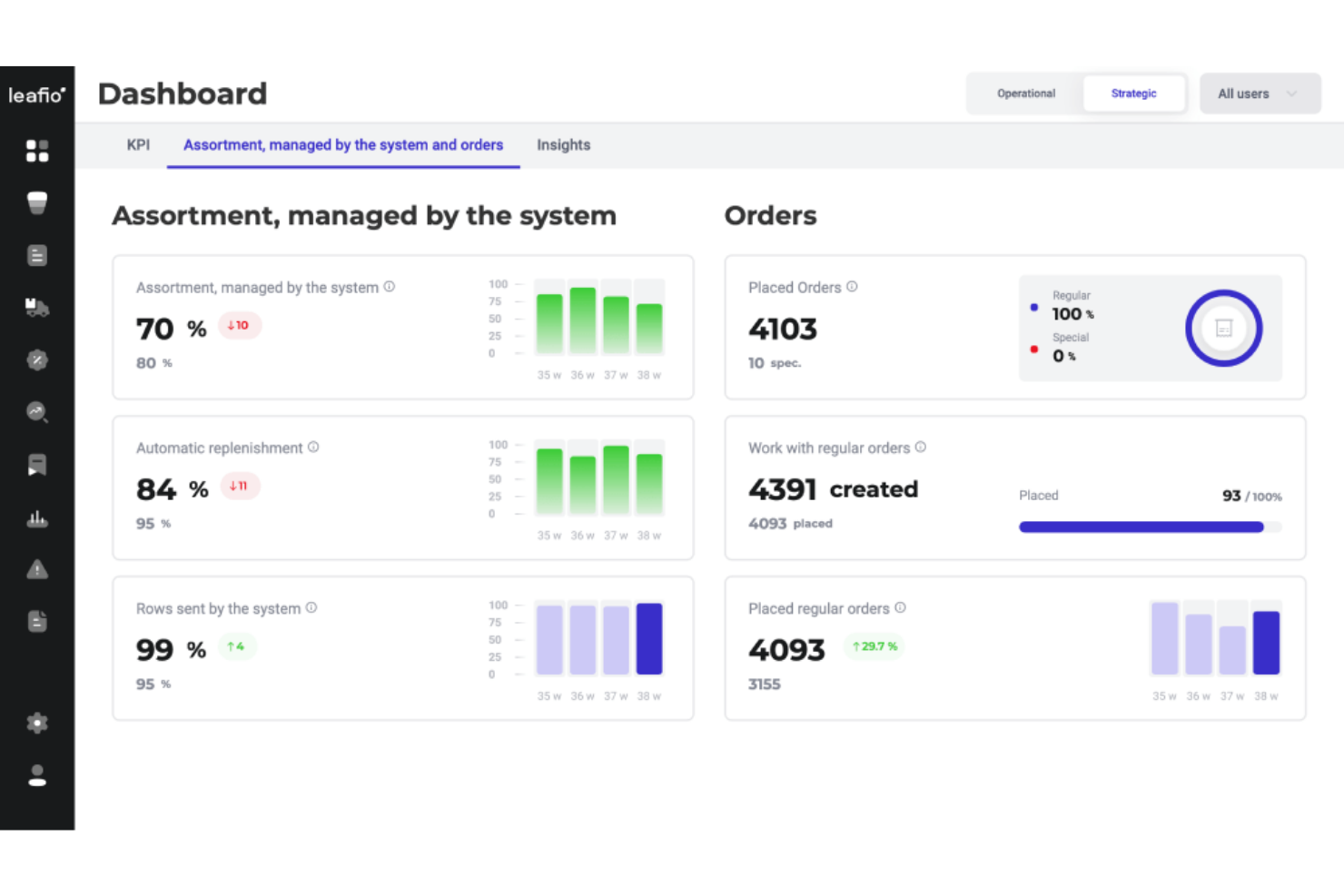
LEAFIO takes a data-driven approach to planogramming by using AI to generate shelf recommendations tailored to your store’s sales patterns. This tool is a strong match for retailers and category managers who want to automate shelf planning and respond quickly to changing demand. Its AI-powered features help teams optimize product placement and keep assortments aligned with real-time performance data.
Why I Picked LEAFIO
What stands out about LEAFIO is its use of AI to drive shelf recommendations, which is especially valuable for retailers who want to keep up with fast-changing sales trends. The platform analyzes sales data and inventory movement to suggest optimal product placements, helping you make data-backed decisions for every shelf. I appreciate that LEAFIO can automatically update planograms based on real-time performance, so your layouts stay relevant without constant manual intervention. For teams looking to move beyond static planograms and embrace dynamic, data-driven merchandising, LEAFIO’s AI capabilities are a strong fit.
LEAFIO Key Features
Some other features that make LEAFIO useful for retail teams include:
- Cloud-Based Platform: Access planograms and manage shelf layouts from any location with an internet connection.
- Product Image Library: Store and organize product images and details for accurate shelf visualization.
- Planogram Version History: Track and review changes to planograms over time for better control and auditing.
- Task Management Tools: Assign planogram-related tasks to team members and monitor their completion within the platform.
LEAFIO Integrations
Integrations are not publicly listed.
Pros and Cons
Pros:
- Allows mass update for efficiency
- Built-in product and fixture library
- Provides AI-powered demand forecasting
Cons:
- High enterprise cost
- Slow Performance with Large Datasets

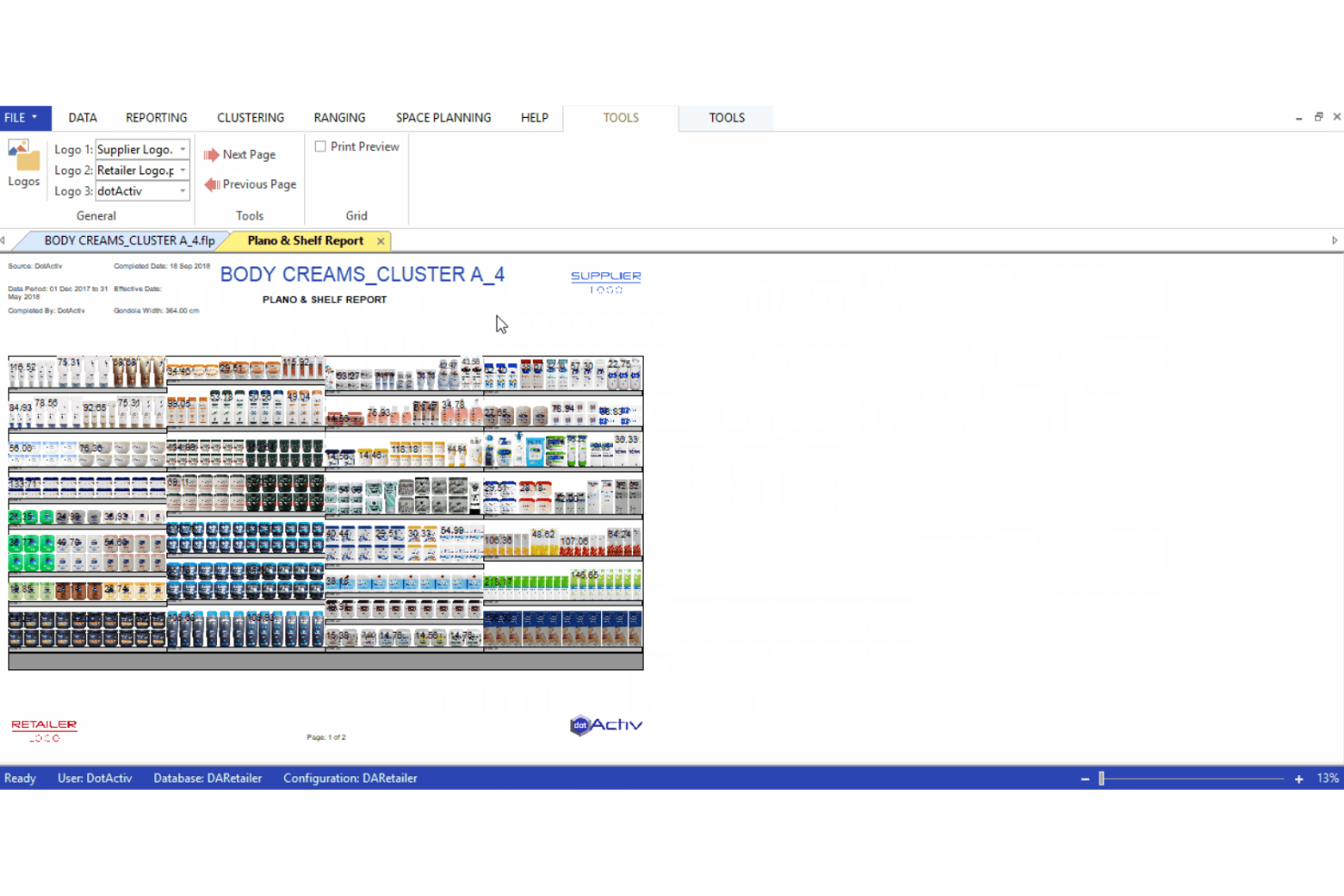
DotActiv brings together planogramming, assortment planning, and retail analytics in one platform. It’s a strong fit for retailers and category managers who want to connect space planning with data-driven assortment decisions. If you’re looking to automate planogram updates while aligning them with sales and inventory data, DotActiv is built for that level of integration.
Why I Picked DotActiv
DotActiv stands out for its ability to connect assortment planning directly with planogram design. I picked this tool because it lets you link sales and inventory data to your planograms, so you can optimize shelf space based on real performance. The platform’s assortment optimization tools help you analyze product mix and adjust layouts to match demand. If you want to make sure your planograms reflect both your merchandising strategy and your actual sales data, DotActiv is built for that level of integration.
DotActiv Key Features
Some other features in DotActiv that may be valuable for retail teams include:
- Automated Planogram Generation: Quickly create planograms using built-in automation tools.
- Custom Reporting Suite: Generate detailed reports on space allocation, product performance, and compliance.
- Floor Planning Module: Design and manage store layouts alongside planograms within the same platform.
- Bulk Product Data Import: Upload and update large product catalogs directly into the system.
DotActiv Integrations
Integrations include Activ8 and Import Utility.
Pros and Cons
Pros:
- Supports with DotActiv Academy
- Built-in analytics and heat maps
- Accessible pricing tiers
Cons:
- Limited native integrations
- Primarily built for Microsoft Windows
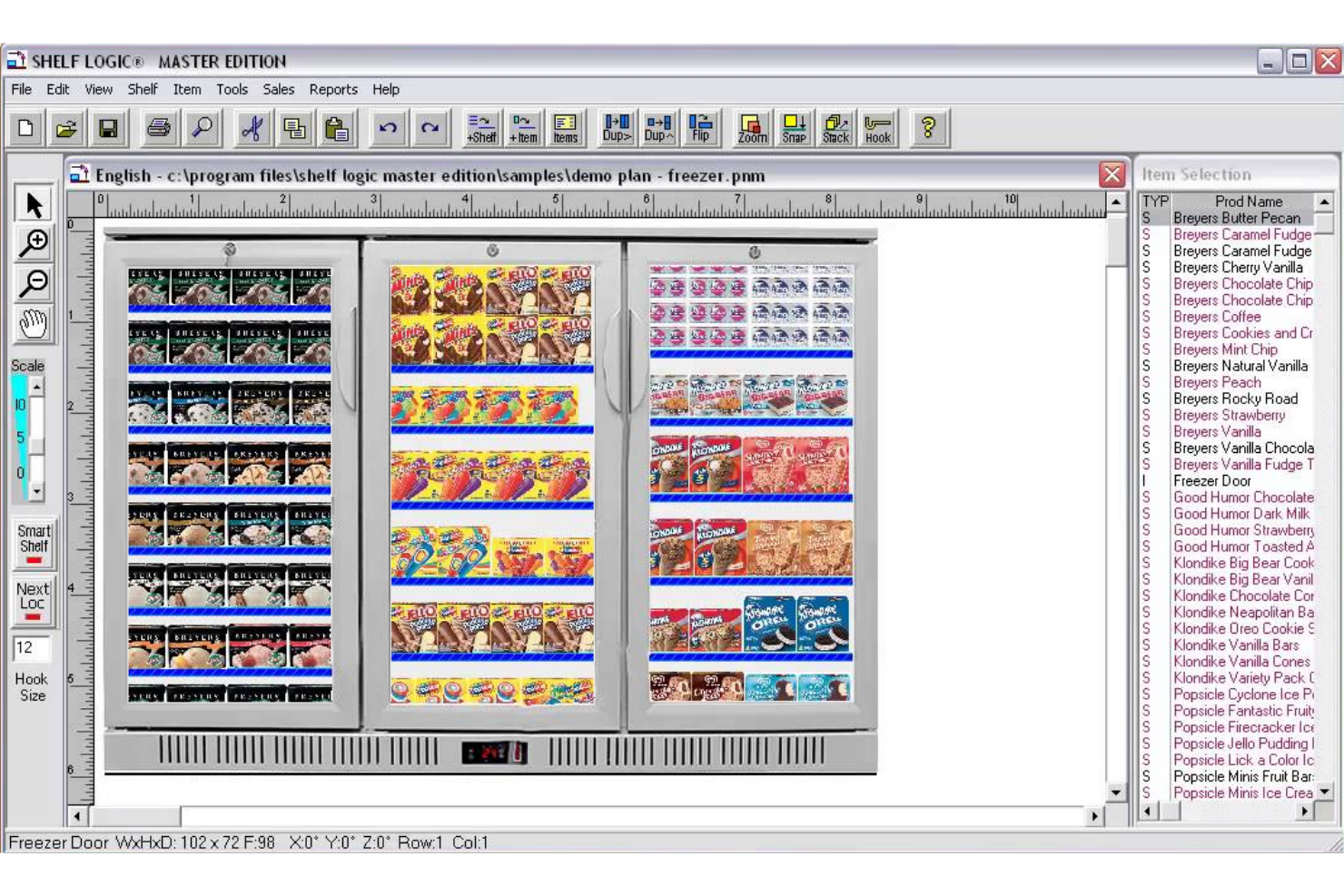
Shelf Logic offers detailed planogram design and reporting features for retailers who need granular control over shelf layouts and analytics. This software is a strong fit for merchandising teams and store managers who want to customize reports to match unique business needs. If you’re looking to turn shelf data into actionable insights, Shelf Logic’s reporting tools can help you dig deep into product performance and space utilization.
Why I Picked Shelf Logic
I chose Shelf Logic because its customizable reporting tools set it apart for teams that need detailed, tailored analytics from their planogram data. The software lets you build and modify reports to focus on specific categories, brands, or time periods, so you can track exactly what matters to your business. I like that you can export these reports in multiple formats, making it easier to share insights with different stakeholders. Shelf Logic also supports advanced filtering and sorting, which helps merchandising teams drill down into shelf performance and identify actionable trends.
Shelf Logic Key Features
Some other features in Shelf Logic that may interest retail and merchandising teams include:
- Planogram Version Control: Track changes and maintain multiple versions of your planograms for easy comparison and auditing.
- Fixture Library: Access a built-in library of shelving, racks, and fixtures to quickly build accurate store layouts.
- Product Image Import: Upload and assign product images to SKUs for more realistic and visually clear planogram designs.
- Automatic Space Calculation: Let the software calculate optimal product facings and shelf space allocation based on your input data.
Shelf Logic Integrations
Native integrations are not currently listed by Shelf Logic.
Pros and Cons
Pros:
- Highly customizable reporting for shelf analytics
- Includes pre-built shelf and fixture templates
- Drag-and-drop planogram editor
Cons:
- Dated user interface compared to newer tools
- No listed integrations with POS or ERP systems
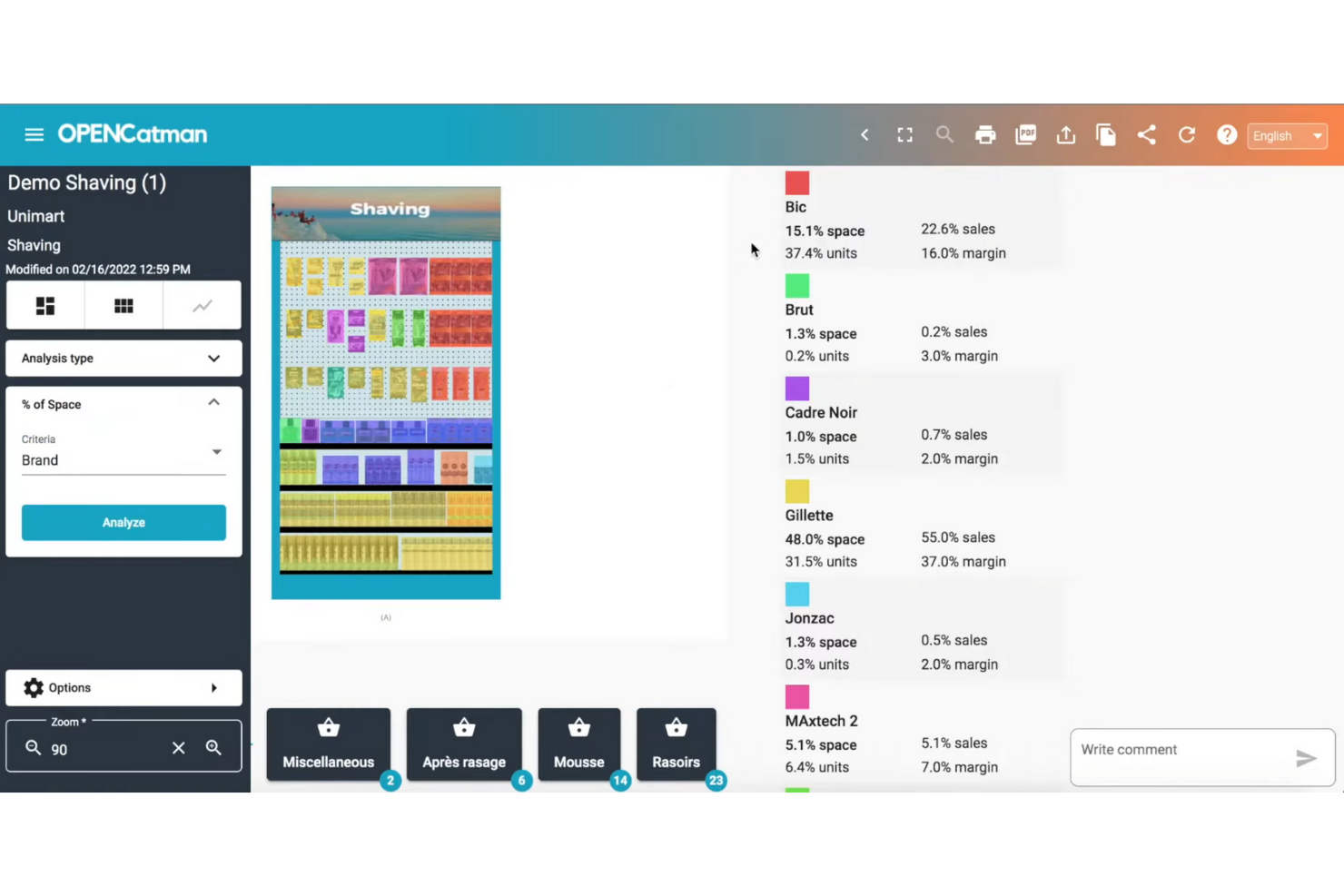
OPENCatman stands out for retailers and suppliers who need planogram software with strong multi-language support. This platform is especially useful for teams operating across different countries or regions, making it easier to collaborate and standardize merchandising strategies. If your business manages product layouts in multiple languages, OPENCatman helps ensure everyone stays aligned and productive.
Why I Picked OPENCatman
What drew me to OPENCatman is its focus on supporting teams that work in multiple languages, which is a rare find in planogram software. The platform offers a fully multi-language interface, so users can switch between languages without losing context or accuracy in their merchandising work. I appreciate that this feature helps global retailers and suppliers maintain consistency across regions, especially when collaborating on planogram projects. OPENCatman also allows you to manage product data and planograms in several languages at once, making it easier to coordinate international rollouts.
OPENCatman Key Features
Some other features in OPENCatman that may be useful for merchandising and retail teams include:
- 3D Planogram Visualization: View and edit planograms in a 3D environment for more accurate shelf planning.
- Product Database Management: Store, organize, and update product information directly within the platform.
- Fixture and Equipment Library: Access a library of shelving units and fixtures to build store layouts.
- Planogram Sharing and Export: Share planograms with team members or export them in various formats for presentations or implementation.
OPENCatman Integrations
Native integrations are not currently listed.
Pros and Cons
Pros:
- Cloud-based access for remote collaboration
- Printable and exportable planogram layouts
- Product and fixture libraries for quick setup
Cons:
- No mobile app for planogram editing
- Limited automation for compliance checks

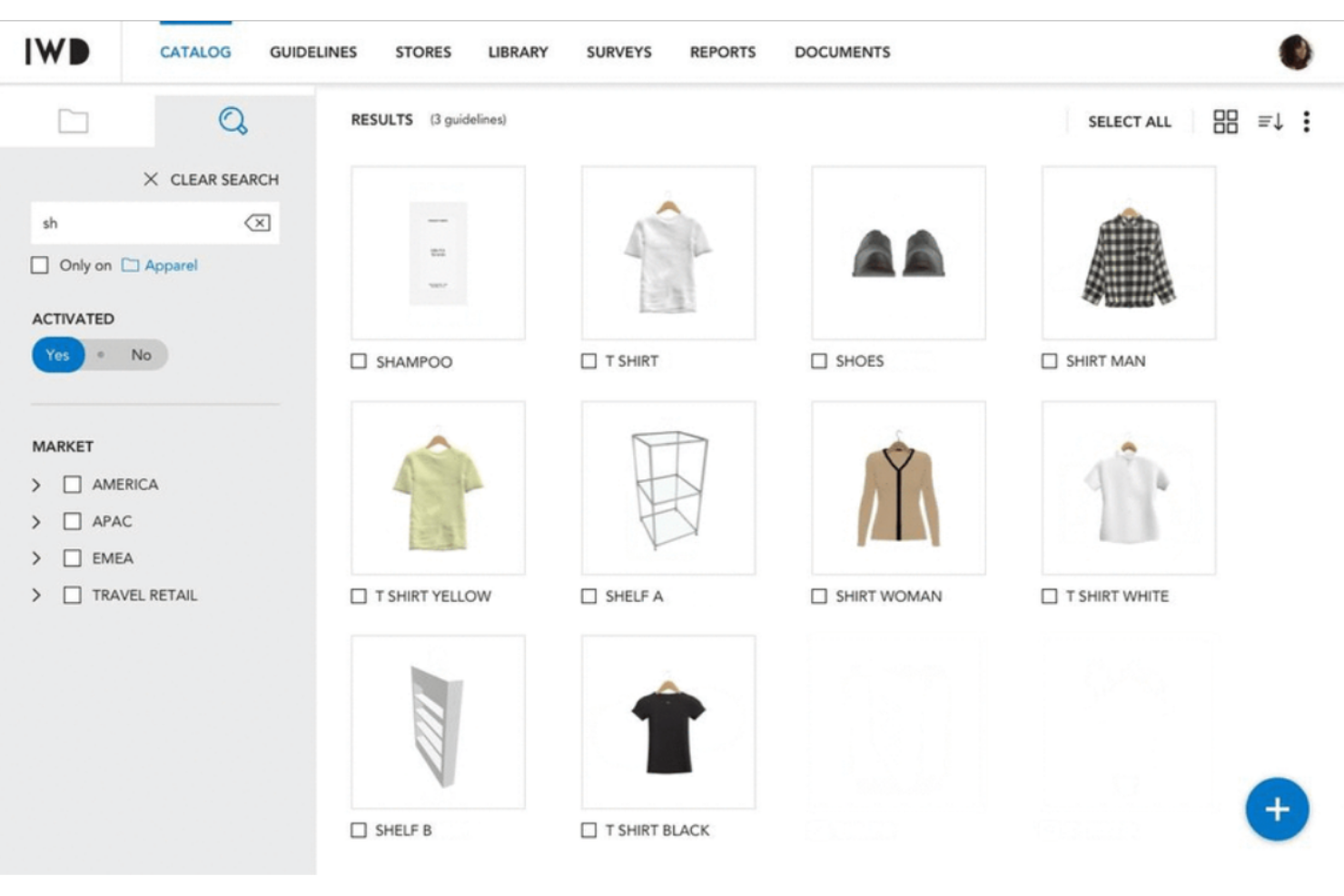
If your brand manages retail execution across multiple countries or teams, IWD offers a planogram solution designed for global collaboration. The platform is built for brands and retailers that need to coordinate merchandising, visual guidelines, and store layouts at scale. IWD helps unify workflows and communication, making it easier to maintain consistency and visibility across all locations.
Why I Picked IWD
What makes IWD stand out for me is its focus on helping global brands collaborate on merchandising and store planning. The platform offers centralized planogram management, so teams in different regions can access, update, and align on visual guidelines in real time. IWD also includes tools for sharing visual merchandising directives and collecting store feedback, which helps maintain brand consistency across markets. If you need to coordinate planograms and retail execution across multiple countries or business units, IWD is built to support that level of collaboration.
IWD Key Features
Some other features in IWD that may be valuable for retail and merchandising teams include:
- 3D Store Layout Editor: Design and visualize store layouts in a 3D environment for more precise merchandising.
- Photo Reporting Tool: Capture and upload in-store photos to document compliance and execution.
- Asset Library Management: Organize and access brand assets, fixtures, and guidelines in a centralized library.
- Task Assignment and Tracking: Assign merchandising tasks to team members and monitor progress within the platform.
IWD Integrations
Native integrations are not currently listed.
Pros and Cons
Pros:
- Version control for tracking planogram changes
- Photo reporting for in-store compliance checks
- Real-time feedback and annotation tools
Cons:
- Overkill for simple merchandising
- Requires high computing power

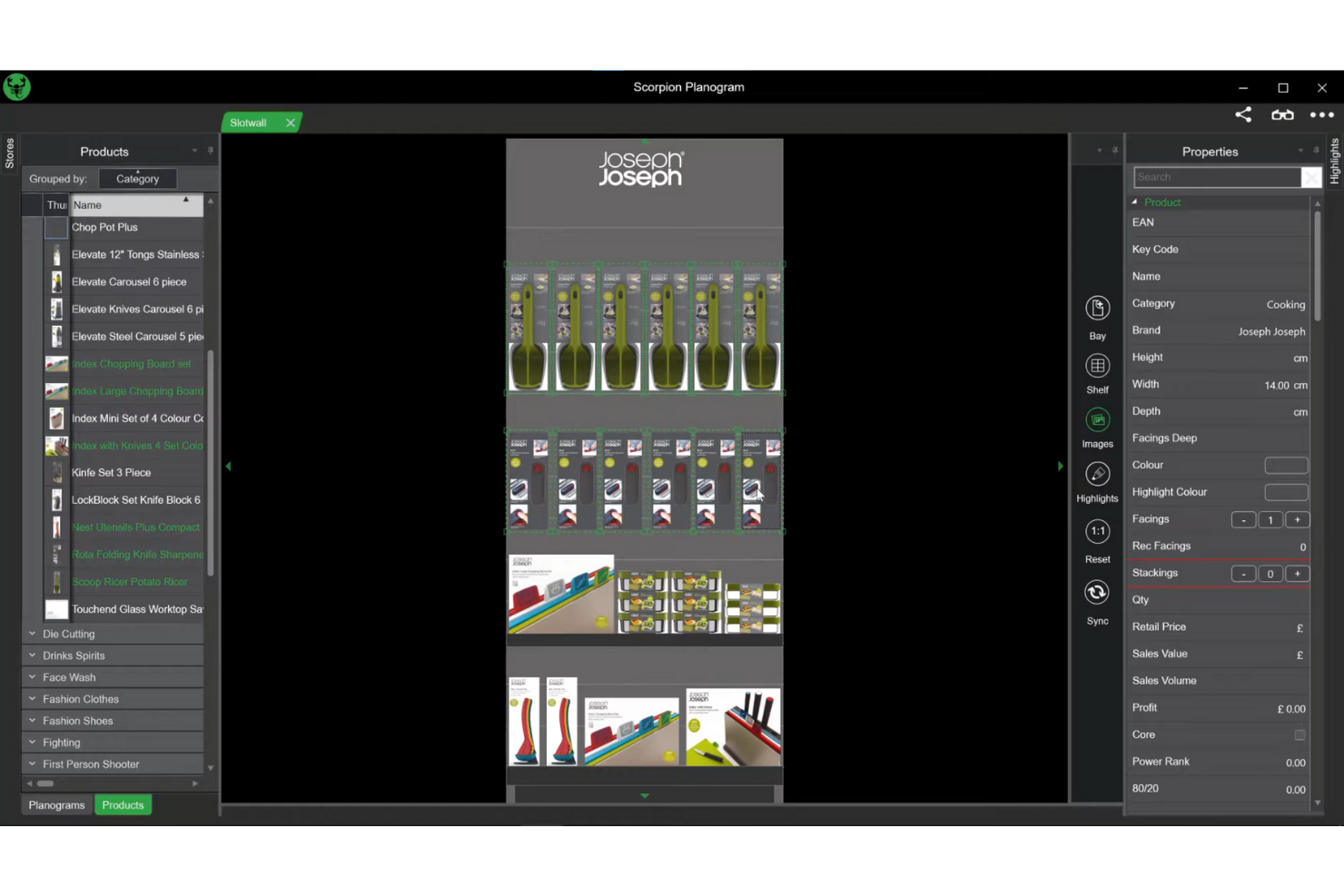
Scorpion is designed for retailers and brands that want to create immersive, realistic 3D planograms for their stores. This tool is especially useful for visual merchandisers and store planners who need to see how fixtures, products, and layouts will look and function in a true-to-life environment. Scorpion helps teams experiment with visual merchandising concepts and optimize store layouts before making changes on the sales floor.
Why I Picked Scorpion
What drew me to Scorpion is its advanced 3D visual merchandising capabilities, which set it apart from many other planogram tools. Scorpion lets you build and manipulate detailed 3D store environments, so you can see exactly how fixtures, products, and signage will look from any angle. I appreciate that you can experiment with different layouts and instantly visualize the impact of changes in a realistic setting. For teams focused on creating visually compelling and accurate merchandising plans, Scorpion’s 3D features make it a strong choice.
Scorpion Key Features
Some other features in Scorpion that may interest retail and merchandising teams include:
- Automated Product Placement: Automatically populate shelves and fixtures with products based on defined rules.
- Reporting and Analytics Tools: Generate reports on shelf space, product facings, and merchandising compliance.
- Multi-Format Store Support: Create and manage planograms for different store formats and layouts.
- Fixture and Asset Library: Access a library of pre-built fixtures, shelving, and merchandising assets for quick planogram creation.
Scorpion Integrations
Native integrations are not currently listed.
Pros and Cons
Pros:
- Real-time sales data analysis
- Easy to use
- Integrated "Scorpion One" platform
Cons:
- Basic rendering quality
- Limited scalability for mega-chains
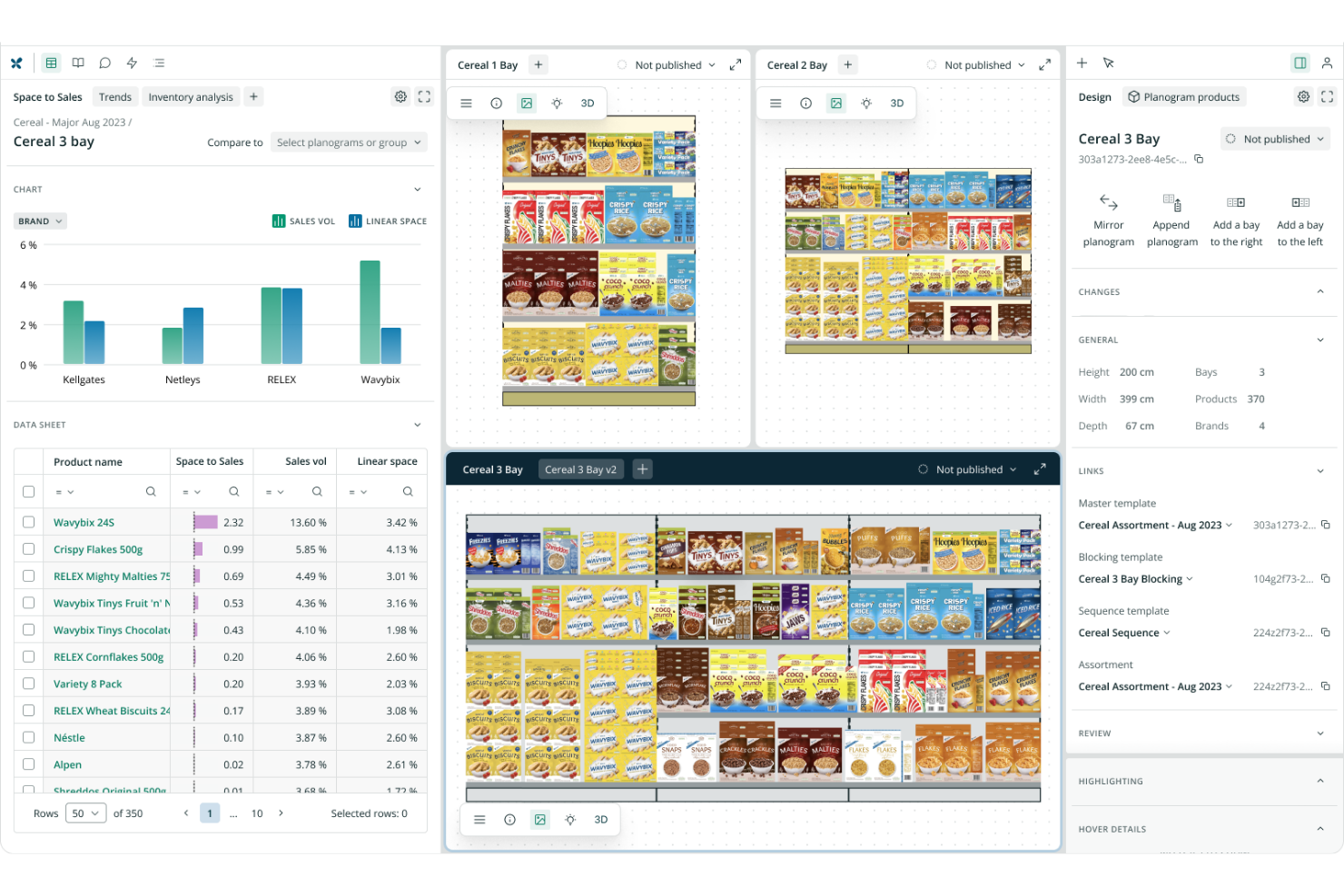
RELEX is built for large retailers and grocers that need to automate planogramming at scale across thousands of stores. The platform appeals to merchandising, supply chain, and operations teams looking to connect planogram design with real-time inventory and sales data. RELEX helps you automate, optimize, and localize planograms to support high-volume, multi-location retail environments.
Why I Picked RELEX
For retailers managing thousands of stores and SKUs, RELEX stands out for its automation capabilities at scale. The platform uses AI-driven automation to generate and update planograms based on real-time sales, inventory, and local demand data. I appreciate how RELEX connects planogramming with supply chain and merchandising workflows, so you can keep shelves optimized without manual intervention. If your business needs to automate complex planogram processes across a large retail network, RELEX is built for that challenge.
RELEX Key Features
Some other features in RELEX that may be valuable for large retail teams include:
- Drag-and-Drop Planogram Editor: Build and adjust planograms visually with a user-friendly interface.
- Store-Specific Planogram Customization: Tailor planograms to individual store layouts and local shopper preferences.
- Automated Compliance Monitoring: Track planogram execution and compliance across all locations.
- Centralized Asset Library: Access a shared library of fixtures, products, and merchandising elements for consistent planogram creation.
RELEX Integrations
Native integrations are not currently listed.
Pros and Cons
Pros:
- Built-in compliance monitoring and reporting tools
- Supports multi-format and multi-store planning
- Real-time data integration for shelf optimization
Cons:
- Extreme implementation time
- Complex to use as a standalone planogram
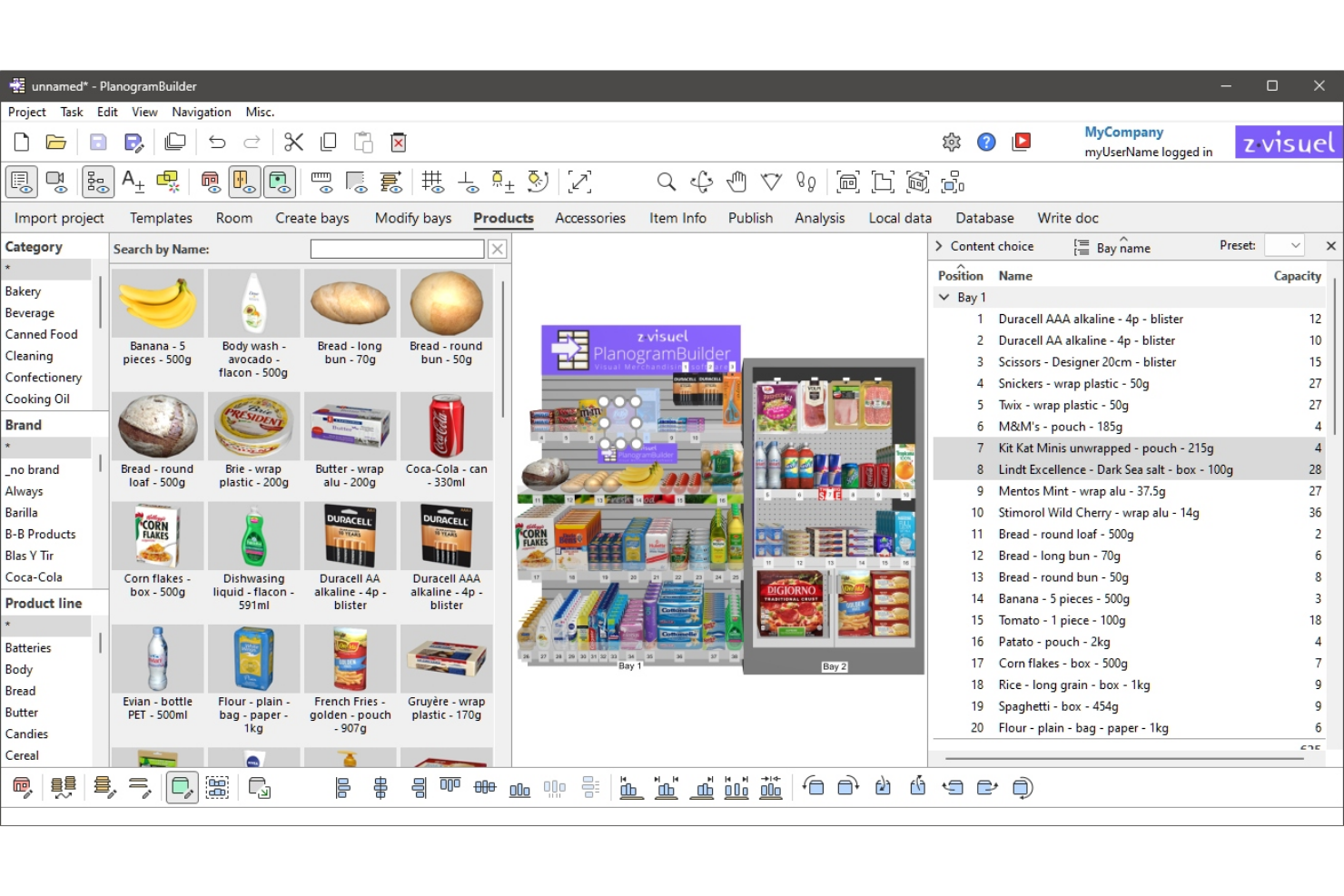
If you want to design planograms without installing software, PlanogramBuilder runs entirely in your browser. This tool is a fit for retail teams, merchandisers, and suppliers who need quick, collaborative access to planogram projects from anywhere. Its web-based approach helps you create, edit, and share planograms without IT involvement or device restrictions.
Why I Picked PlanogramBuilder
What sets PlanogramBuilder apart is its fully browser-based design, which means you can access your planogram projects from any device with an internet connection. I picked this tool because it lets teams collaborate in real time without the need for local installations or IT support. The platform supports 2D and 3D planogram creation directly in the browser, so you can visualize shelf layouts and product placements instantly. For retail teams that need flexible, on-the-go access to planogram software, PlanogramBuilder’s web-based approach is a strong fit.
PlanogramBuilder Key Features
Some other features that make PlanogramBuilder useful for retail and merchandising teams include:
- Product Database Management: Store, organize, and update product information for use in planograms.
- Fixture Library: Access a range of shelving, racks, and display fixtures to build accurate layouts.
- Image Import Tool: Add custom product images and branding elements to your planograms.
- Planogram Export Options: Export planograms in multiple formats, including PDF and image files, for sharing and documentation.
PlanogramBuilder Integrations
Native integrations are not currently listed.
Pros and Cons
Pros:
- Transparent and flexible pricing
- Offers 3D visualization of shelf layouts
- Zero-learning-curve interface
Cons:
- Limited AI and image recognition
- No mobile app for planogram editing
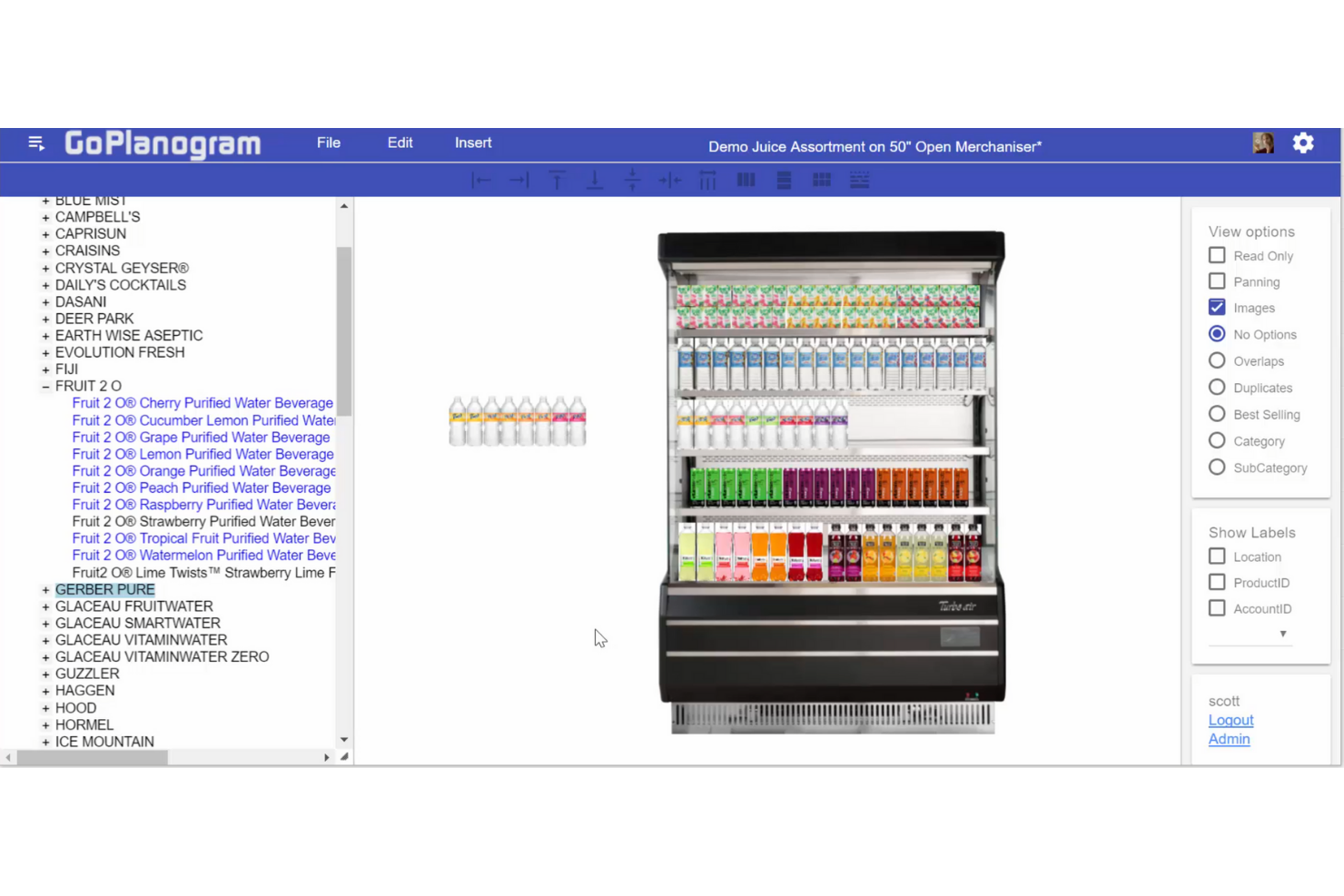
GoPlanogram is designed with small businesses in mind, offering a straightforward way to create and manage planograms. It’s a practical choice for independent retailers, specialty shops, and small merchandising teams who want to visualize product layouts without complex software. The tool focuses on making planogram design accessible and manageable for users with limited time or technical resources.
Why I Picked GoPlanogram
GoPlanogram stands out for small business usability, which is why I picked it for this list. The tool offers a simple drag-and-drop interface that helps smaller retailers quickly build and adjust shelf layouts without specialized training. I also appreciate that it includes basic product and fixture libraries, so you can start designing right away without needing to upload your own assets. For small teams or shop owners who want to visualize merchandising ideas without extra complexity, GoPlanogram’s focused feature set is a practical match.
GoPlanogram Key Features
Some other features that make GoPlanogram useful for small retailers include:
- Planogram Sharing: Share completed planograms with team members or store staff for easy communication.
- Multi-Shelf Layouts: Design and manage multiple shelf levels within a single project.
- Printable Planograms: Generate printable versions of your planograms for in-store reference.
- Basic Reporting Tools: Access simple reports to review product placement and shelf usage.
GoPlanogram Integrations
Native integrations are not currently listed by GoPlanogram.
Pros and Cons
Pros:
- Interoperabile system
- Browser-based planogram editing and sharing
- Universal device access
Cons:
- Limited reporting depth
- No integrated compliance auditing
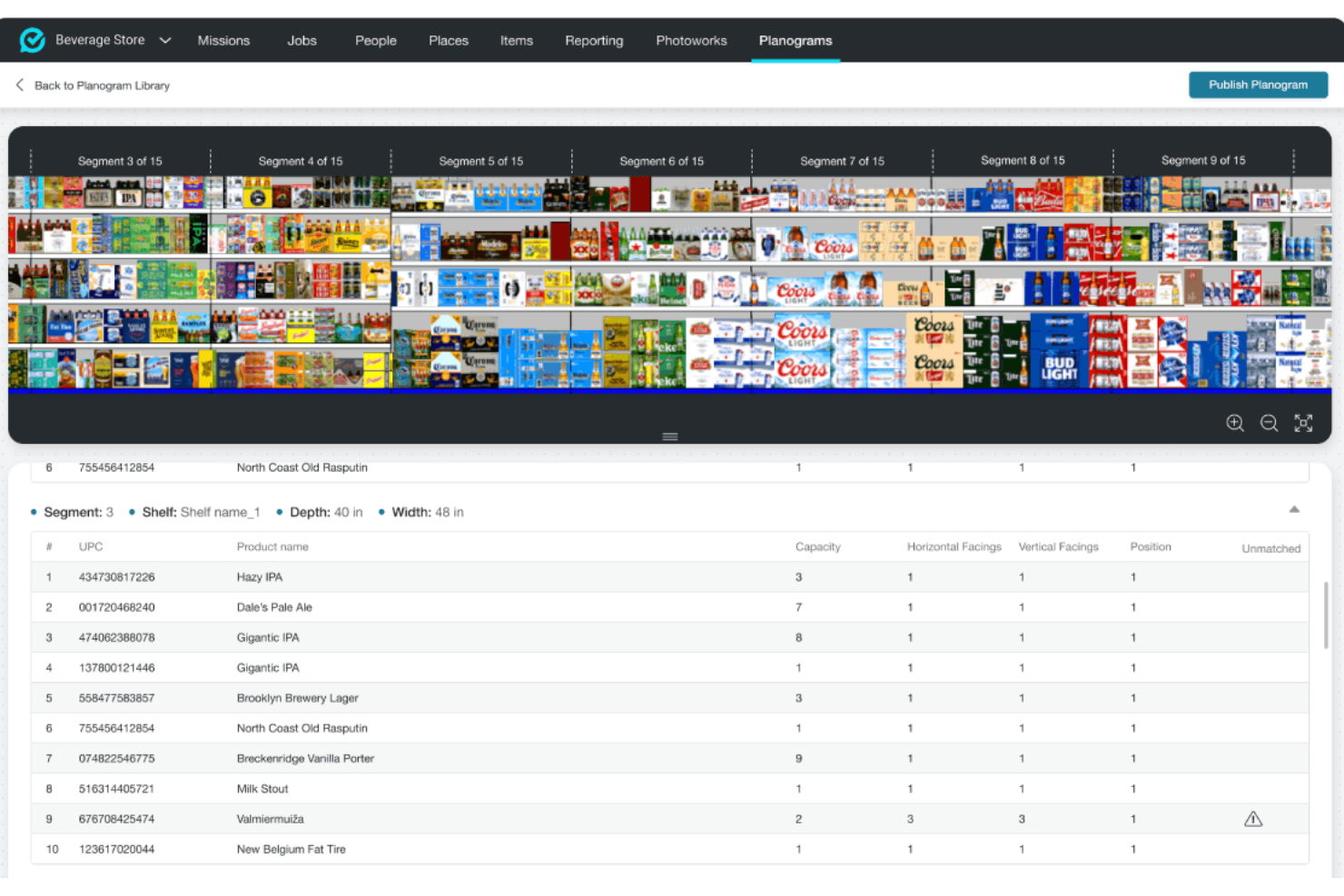
FORM is designed for retail teams that need to monitor and enforce planogram compliance across multiple store locations. The platform combines mobile data collection, photo capture, and real-time reporting to help field teams verify in-store execution. It’s especially useful for operations leaders and merchandisers who want to close the gap between planogram design and actual shelf conditions.
Why I Picked FORM
I chose FORM because it’s built specifically to help retail teams track in-store planogram compliance, which is a challenge for many multi-location businesses. The platform lets field teams capture photos and complete mobile checklists during store visits, making it easy to document and verify shelf conditions. I appreciate how FORM’s real-time dashboards and reporting tools give managers instant visibility into compliance issues as they happen. For anyone focused on closing the gap between planogram design and execution, FORM’s compliance tracking features are a strong match.
FORM Key Features
Some other features that make FORM valuable for retail operations include:
- Customizable Form Builder: Create tailored checklists and surveys to match your specific planogram requirements.
- Automated Task Assignment: Automatically assign follow-up tasks to team members based on compliance results.
- Offline Data Collection: Capture data and photos even when working in locations without internet access.
- Role-Based Access Controls: Set permissions and access levels for different users within your organization.
FORM Integrations
Integrations include Salesforce, Workday, Google Cloud, AWS, Snowflake, Tableau, and more.
Pros and Cons
Pros:
- Advanced image recognition
- Offline-first capability
- Converts photos into digital planograms
Cons:
- Not fit for smaller retail stores
- Needs up-to-date data
Other Planogram Software
Here are some additional planogram software options that didn’t make it onto my shortlist, but are still worth checking out:


Planogram Software Selection Criteria
When selecting the best planogram software to include in this list, I considered common buyer needs and pain points like ensuring accurate in-store execution and simplifying planogram updates across locations. I also used the following framework to keep my evaluation structured and fair:
Core Functionality (25% of total score)
To be considered for inclusion in this list, each solution had to fulfill these common use cases:
- Create and edit planograms
- Assign planograms to specific stores or locations
- Track planogram compliance
- Generate compliance and performance reports
- Support photo or visual verification
Additional Standout Features (25% of total score)
To help further narrow down the competition, I also looked for unique features, such as:
- AI-driven shelf recognition
- Virtual reality walkthroughs
- Real-time mobile data collection
- Automated task assignment based on compliance
- Integration with inventory management systems
Usability (10% of total score)
To get a sense of the usability of each system, I considered the following:
- Intuitive drag-and-drop interface
- Clear navigation and menu structure
- Responsive design for mobile and desktop
- Minimal clicks to complete common tasks
- Customizable dashboards and views
Onboarding (10% of total score)
To evaluate the onboarding experience for each platform, I considered the following:
- Availability of training videos and documentation
- Access to pre-built planogram templates
- Interactive product tours or guided setup
- Live chat or chatbot support during onboarding
- Webinars or onboarding sessions for new users
Customer Support (10% of total score)
To assess each software provider’s customer support services, I considered the following:
- 24/7 support availability
- Multiple support channels like chat, email, and phone
- Fast response times to inquiries
- Access to a knowledge base or help center
- Dedicated account managers for enterprise clients
Value For Money (10% of total score)
To evaluate the value for money of each platform, I considered the following:
- Transparent pricing information
- Flexible plans for different business sizes
- Features included at each pricing tier
- No hidden fees or surprise charges
- Free trial or demo availability
Customer Reviews (10% of total score)
To get a sense of overall customer satisfaction, I considered the following when reading customer reviews:
- Positive feedback on planogram accuracy and compliance
- Reports of reliable customer support
- Comments on ease of use and onboarding
- Feedback on integration with other retail systems
- Overall satisfaction with value for price
How to Choose Planogram Software
It’s easy to get bogged down in long feature lists and complex pricing structures. To help you stay focused as you work through your unique software selection process, here’s a checklist of factors to keep in mind:
| Factor | What to Consider |
|---|---|
| Scalability | Will the software handle your current and future store count, SKU volume, and user base? |
| Integrations | Does it connect natively to your POS, inventory, or analytics systems, or will you need workarounds? |
| Customizability | Can you tailor workflows, templates, and reporting to match your merchandising and compliance needs? |
| Ease of use | Will your field teams and store staff adopt it quickly, or will training and support be a barrier? |
| Implementation and onboarding | How long will it take to get up and running, and what resources or support will you need from IT or vendors? |
| Cost | Are pricing tiers clear, and do they align with your usage patterns and budget constraints? |
| Security safeguards | Does the vendor offer data encryption, user permissions, and compliance with your company’s policies? |
| Support availability | Will you have access to timely help during critical retail periods, and through your preferred channels? |
What Is Planogram Software?
Planogram software is a digital tool that helps retailers design, manage, and enforce visual merchandising layouts for shelves, displays, and store sections. These platforms let you create planograms, assign them to specific locations, and track compliance across your retail network. By using planogram software, you can standardize product placement, improve inventory visibility, and ensure consistent execution of merchandising strategies in every store.
Features
When selecting planogram software, keep an eye out for the following key features:
- Planogram editor: Lets you design and modify shelf layouts using drag-and-drop tools, so you can visually arrange products and fixtures to match your merchandising strategy.
- Template library: Provides pre-built planogram templates for common store formats and categories, helping you quickly create layouts without starting from scratch.
- Store assignment: Allows you to assign specific planograms to individual stores or groups, ensuring each location receives the correct merchandising instructions.
- Compliance tracking: Monitors whether stores are following assigned planograms by collecting data, photos, or survey responses from field teams.
- Photo capture: Enables users to upload images of in-store displays for visual verification and documentation of planogram execution.
- Reporting and analytics: Generates reports on compliance rates, execution gaps, and merchandising performance, giving you actionable insights for improvement.
- User permissions: Lets you control access levels for different team members, so only authorized users can edit, approve, or view planograms.
- Version control: Tracks changes to planograms over time, allowing you to review previous layouts and manage updates efficiently.
- Mobile access: Supports use on smartphones and tablets, making it easier for field teams to review planograms and submit compliance data on the go.
Common Planogram Software AI Features
Beyond the standard planogram software features listed above, many of these solutions are incorporating AI with features like:
- Image recognition for compliance: Uses AI to automatically analyze in-store photos and detect whether products are placed according to the assigned planogram, reducing manual review time.
- Automated shelf auditing: Applies AI algorithms to scan shelf images and identify out-of-stock items, misplaced products, or incorrect facings, helping teams address issues faster.
- Predictive merchandising recommendations: Leverages AI to analyze sales, traffic, and historical planogram data, then suggests optimal product placements to maximize sales and space efficiency.
- Anomaly detection: Uses AI to flag unusual patterns or deviations in planogram execution, such as unexpected product substitutions or display changes, so you can investigate and resolve issues quickly.
- Natural language processing for feedback: Employs AI to interpret and categorize open-ended feedback from field teams or store staff, making it easier to identify recurring compliance challenges.
Benefits
Implementing planogram software provides several benefits for your team and your business. Here are a few you can look forward to:
- Consistent merchandising execution: Assigning and tracking planograms across locations helps ensure every store follows your intended product placement and display standards.
- Faster planogram updates: Digital editing tools and template libraries make it easier to roll out new layouts or seasonal changes without manual paperwork.
- Improved compliance visibility: Real-time dashboards, photo capture, and automated compliance tracking give you instant insight into which stores are following planograms and where gaps exist.
- Data-driven decision making: Reporting and analytics features help you identify trends, measure performance, and optimize merchandising strategies based on actual results.
- Reduced manual workload: Automated task assignment, mobile access, and AI-powered auditing minimize the need for manual checks and repetitive administrative work.
- Enhanced collaboration: User permissions, version control, and mobile tools support better coordination between headquarters, field teams, and store staff.
- Better inventory management: Integration with inventory systems and visual shelf verification help you spot out-of-stocks and misplaced items more quickly.
Costs & Pricing
Selecting planogram software requires an understanding of the various pricing models and plans available. Costs vary based on features, team size, add-ons, and more. The table below summarizes common plans, their average prices, and typical features included in planogram software solutions:
Plan Comparison Table for Planogram Software
| Plan Type | Average Price | Common Features |
|---|---|---|
| Personal Plan | $480 - $1,609 /year | Planogram creation, template library, store assignment, compliance tracking, and email support. |
| Business Plan | $1,049 - $4,995 /year | Multi-user access, advanced reporting, photo capture, user permissions, integrations, and priority support. |
| Enterprise Plan | $4,500 - $11,000+ /year | Custom workflows, API access, advanced analytics, dedicated account management, and enhanced security options. |
Planogram Software FAQs
Here are some answers to common questions about planogram software:
How does planogram software help with compliance?
Planogram software helps with compliance by assigning specific layouts to stores and tracking execution through photo capture, checklists, and automated reporting. This makes it easier to identify which locations are following merchandising standards and where corrective action is needed.
Can planogram software integrate with inventory management systems?
Yes, many planogram software solutions integrate with inventory management systems. This allows you to sync product data, automate out-of-stock alerts, and ensure planograms reflect real-time inventory levels for more accurate merchandising.
What types of businesses benefit most from planogram software?
Retailers with multiple locations, high SKU counts, or complex merchandising requirements benefit most from planogram software. Grocery, convenience, specialty, and big-box stores often use these tools to maintain consistency and optimize shelf space.
How long does it take to implement planogram software?
Implementation time varies, but most teams can get started within a few days to a few weeks. Factors include the complexity of your store layouts, the number of users, and the level of integration with other systems.
Is training required to use planogram software?
Yes, some training is usually required, especially for advanced features or large teams. Most vendors offer onboarding resources like tutorials, webinars, and support to help users get up to speed quickly.
What’s Next:
If you're in the process of researching planogram software, connect with a SoftwareSelect advisor for free recommendations.
You fill out a form and have a quick chat where they get into the specifics of your needs. Then you'll get a shortlist of software to review. They'll even support you through the entire buying process, including price negotiations.