
21 Best Intercom Alternatives Picked for 2026 for Better Team and Customer Communication

Intercom Alternatives Shortlist
Here’s my shortlist of the best Intercom alternatives:


A strong Intercom alternative gives your team flexible conversation management, multichannel support, and reliable integrations without locking you into a single vendor’s ecosystem. If you’re searching for Intercom alternatives, you’re likely weighing costs, scalability, or the need for features Intercom doesn’t offer—like advanced analytics, open-source options, or deeper workflow automation. This list will help you quickly compare the top Intercom alternatives for 2026, so you can find a solution that fits your team’s communication style, customer engagement goals, and tech stack.
What Is Intercom?
Intercom is a conversation management platform that helps businesses connect with customers through live chat, messaging, and automation across web and mobile channels. Teams use Intercom to manage support requests, onboard users, and automate routine communications. Its features include chatbots, shared inboxes, and integration with popular CRM and help desk tools. Intercom is widely used by customer support, sales, and product teams to centralize and streamline customer conversations.
Best Intercom Alternatives Summary
This comparison chart summarizes pricing details for my top Intercom alternative selections to help you find the best one for your budget and business needs.
| Tool | Best For | Trial Info | Price | ||
|---|---|---|---|---|---|
| 1 | Best for live website chat support | 15-day free trial + free plan + free demo available | From $39.99/user/month (billed annually) | Website | |
| 2 | Best for call tracking and attribution | 14-day free trial + free demo available | From $45/month | Website | |
| 3 | Best for sales team workflow automation | Free demo available | Pricing upon request | Website | |
| 4 | Best for real-time customer engagement | 15-day free trial + free demo available | From $40/user/month | Website | |
| 5 | Best for conversation analytics in sales | Free demo available | Pricing upon request | Website | |
| 6 | Best for open-source messaging management | 15-day free trial + free plan + free demo available | From $19/user/month | Website | |
| 7 | Best for AI-powered meeting insights | Free trial + demo available | From $19/user/month (billed annually) | Website | |
| 8 | Best for higher education communication needs | Free demo available | Pricing upon request | Website | |
| 9 | Best with Google Workspace integration | 14-day free trial | From $7/user/month (billed annually) | Website | |
| 10 | Best for multichannel feedback collection | 15-day free trial | Pricing upon request | Website | |
| 11 | Best for analyzing customer feedback at scale | Free demo available | From $1,060/month | Website | |
| 12 | Best for team channel-based messaging | Free plan available | From $8.75/user/month | Website |
Why Trust Our Software Reviews
Intercom Alternatives Reviews
Below are my detailed summaries of the best Intercom alternatives that made it onto my shortlist. My reviews offer a detailed look at the features, best use cases, and integrations of each platform to help you find the best one for you.

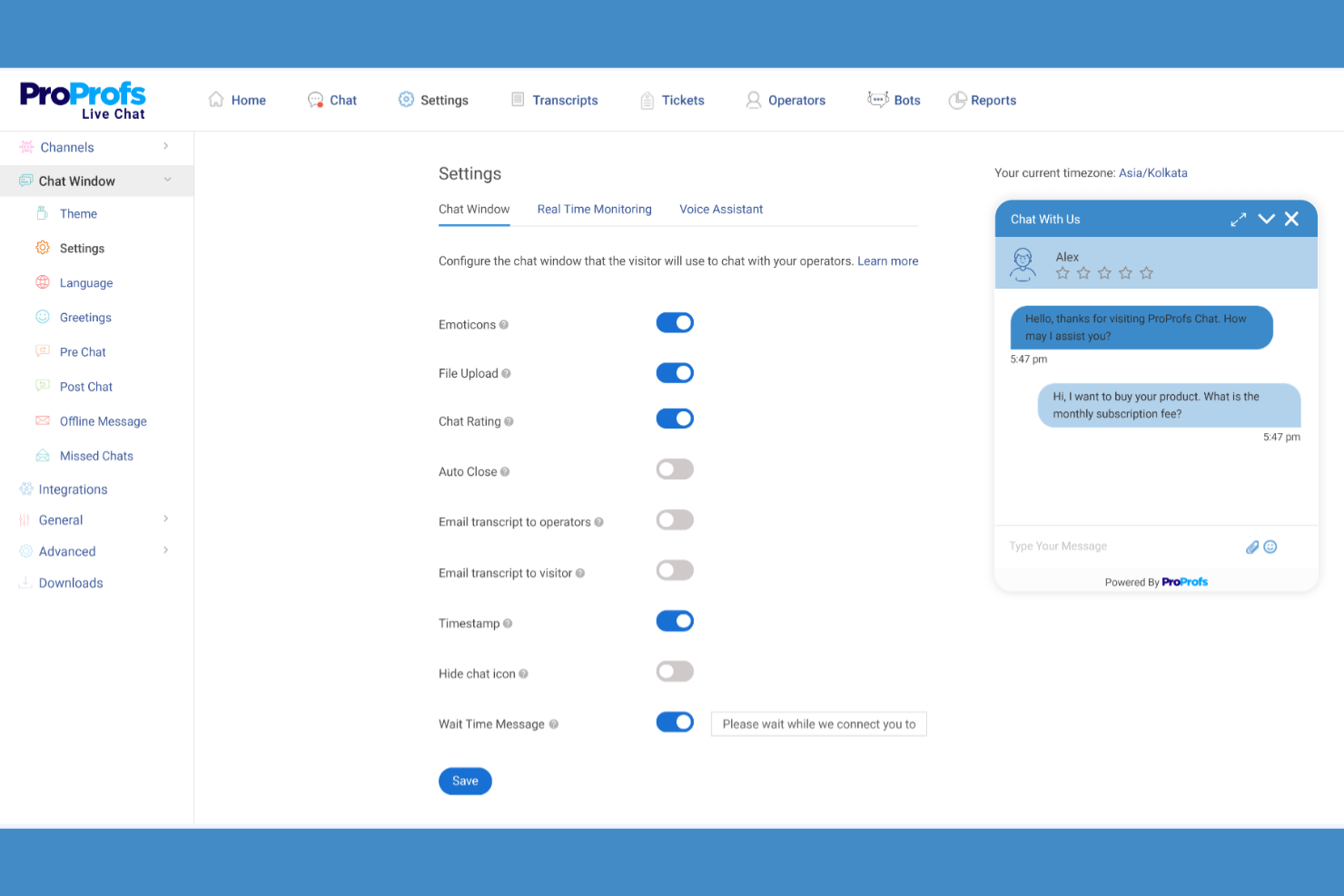
For teams focused on real-time customer engagement, ProProfs Chat offers live website chat support that’s easy to deploy and manage. It’s a strong fit for ecommerce, retail, and service businesses that want to connect instantly with site visitors and resolve questions before they leave. Unlike Intercom, ProProfs Chat emphasizes fast, direct conversations with features like proactive chat invitations and operator monitoring.
Why ProProfs Chat Is a Good Intercom Alternative
If your team’s top priority is providing live website chat support, ProProfs Chat is built specifically for that need. I picked ProProfs Chat because it lets you engage visitors instantly with proactive chat invitations and real-time operator monitoring.
The tool also supports canned responses, so your team can answer common questions quickly and consistently. For businesses that want to focus on immediate, human-driven conversations rather than automated messaging, ProProfs Chat offers a direct approach that sets it apart from Intercom.
ProProfs Chat Key Features
Some other features that make ProProfs Chat useful for conversation management include:
- Chat Transcripts: Automatically saves and stores chat conversations for future reference and quality checks.
- Visitor Tracking: Monitors website visitor activity in real time to help agents identify engagement opportunities.
- Chat Routing: Assigns incoming chats to the right team member based on rules you set.
- Customizable Chat Widgets: Lets you adjust the look and feel of chat windows to match your brand.
ProProfs Chat Integrations
Integrations include Salesforce, HubSpot, Zoho CRM, Mailchimp, Slack, Shopify, WordPress, Google Analytics, Freshdesk, and Zendesk.
Pros and Cons
Pros:
- Proactive messaging improves support experiences for small businesses
- Simple interface designed for ease of use by support agents
- Live chat feature for engaging website visitors in real time
Cons:
- Reporting features are less advanced than full helpdesk software
- Limited automation compared to AI chatbots and advanced support tools

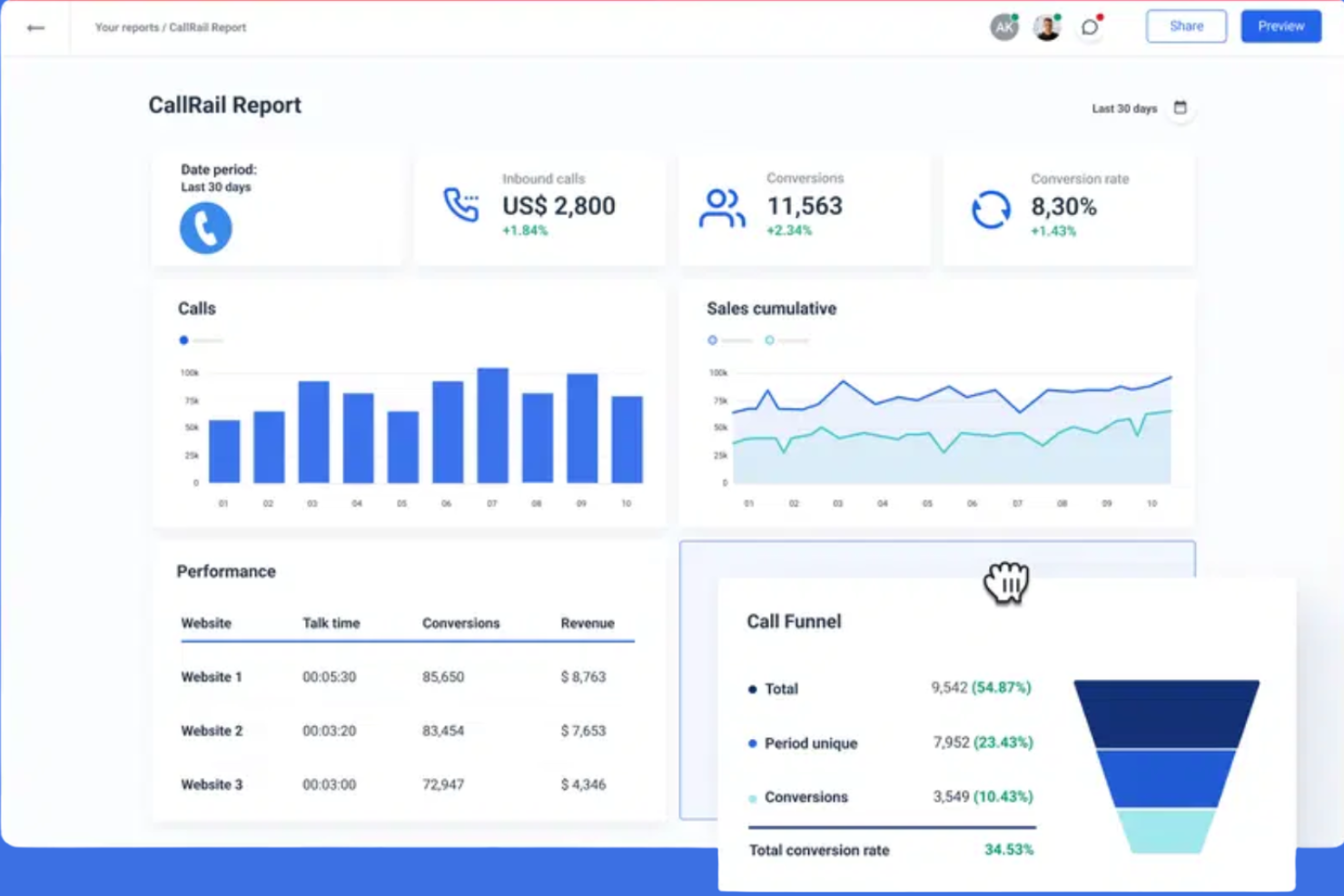
If your business relies on phone calls to drive sales or support, CallRail gives you detailed call tracking and attribution tools that go beyond what Intercom offers. It’s especially useful for marketing and sales teams in retail, ecommerce, and service industries that need to connect inbound calls to specific campaigns or channels.
With features like dynamic number insertion and multi-touch attribution, CallRail helps you understand exactly which marketing efforts are generating phone conversations and conversions.
Why CallRail Is a Good Intercom Alternative
Unlike Intercom, CallRail is purpose-built for tracking and attributing phone conversations, making it a strong choice for teams that rely on calls to connect with customers. I picked CallRail because it offers dynamic number insertion, which lets you track exactly which marketing sources drive inbound calls.
The platform also provides multi-touch attribution, so you can see the full customer journey from first click to phone conversation. For businesses where phone calls are a key part of the sales or support process, CallRail fills a gap that most chat-focused tools don’t address.
CallRail Key Features
Some other features that make CallRail valuable for conversation management include:
- Call Recording: Lets you capture and review phone conversations for quality assurance and training.
- Keyword-Level Tracking: Tracks which search keywords lead to phone calls from your campaigns.
- Call Routing: Directs incoming calls to the right team or agent based on customizable rules.
- Voicemail Transcription: Automatically transcribes voicemails so you can quickly review and respond.
CallRail Integrations
Integrations include Google Analytics, Google Ads, Salesforce, HubSpot, Facebook Ads, Slack, Zapier, Microsoft Dynamics, Shopify, and Marketo.
Pros and Cons
Pros:
- Marketing analytics connect inbound calls to campaigns and conversions
- Call recording and transcription improve customer service quality monitoring
- Call tracking platform designed for marketing attribution and call center insights
Cons:
- Limited functionality as a full customer service platform
- No website chat feature for real-time support interactions

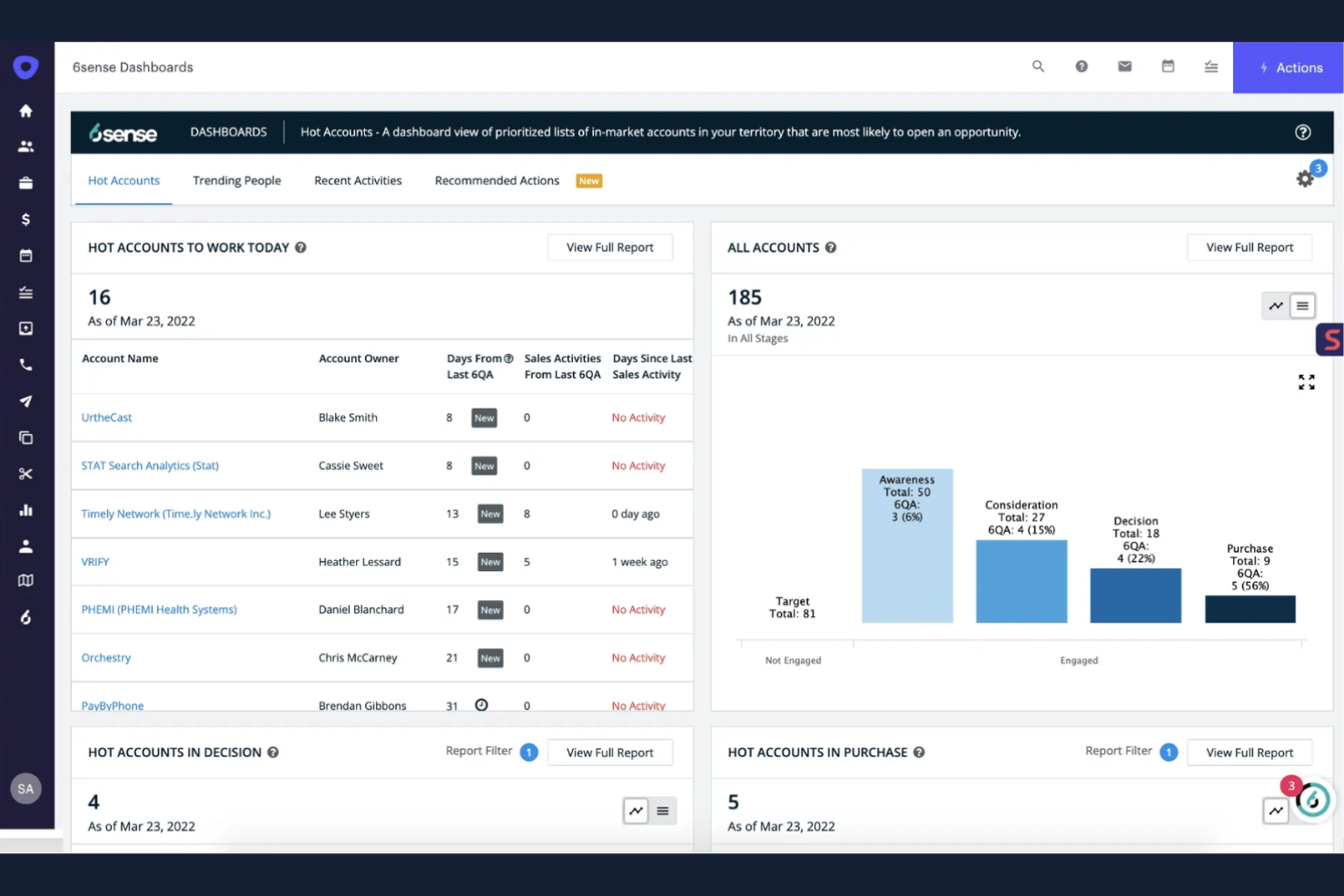
Outreach is a conversation management platform designed for sales teams that need advanced workflow automation and streamlined communication. If your business relies on coordinated outreach, follow-ups, and sales pipeline management, Outreach offers specialized tools that go beyond basic chat or ticketing. Its automation features help sales professionals manage complex sequences and keep every customer interaction on track.
Why Outreach Is a Good Intercom Alternative
Outreach stands out for sales teams that need more than just basic messaging or support chat. I picked Outreach because its workflow automation tools let you build, schedule, and track complex sales sequences directly within the platform. You can automate follow-ups, assign tasks, and monitor every step of the sales conversation, which is something Intercom doesn’t focus on. For teams managing high-volume outreach and multi-step sales processes, these features make Outreach a strong alternative.
Outreach Key Features
Some other features in Outreach help sales teams manage conversations and customer data more efficiently:
- Conversation Intelligence: Automatically records, transcribes, and analyzes sales calls to surface actionable insights for your team.
- Shared Team Inbox: Lets multiple team members view, assign, and respond to customer messages from a single, organized inbox.
- Email and Call Tracking: Tracks all email and call activity within the platform, so you can see every touchpoint in the customer journey.
- Template Library: Provides a central place to store, organize, and use pre-built email and message templates for consistent communication.
Outreach Integrations
Integrations include Salesforce, Microsoft Dynamics 365, HubSpot, Gmail, Outlook, LinkedIn Sales Navigator, Zoom, Slack, and Gong. Outreach also offers an open API for custom integrations.
Pros and Cons
Pros:
- Centralized communication hub connecting email marketing, calls, and sales activities
- Conversation intelligence with call recording and analytics for customer relationships
- Sales workflow automation for SaaS startups managing high-volume outreach
Cons:
- Pricing requires sales contact and may include additional add-ons
- No website chat feature for real-time customer support conversations
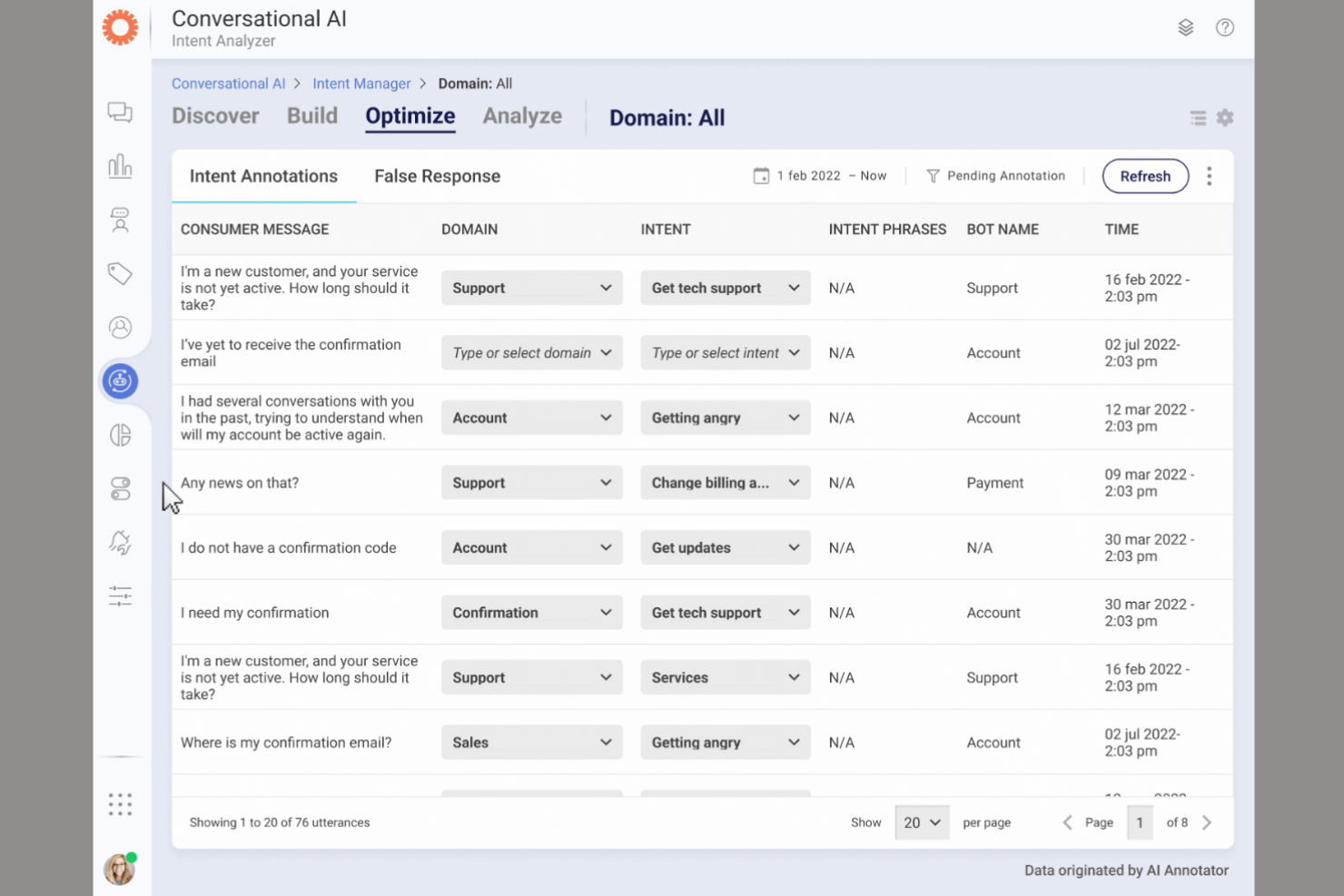
When your business needs to connect with customers instantly across digital channels, LivePerson offers real-time engagement tools built for high-volume interactions. This platform is especially useful for ecommerce, retail, and customer service teams that want to automate and personalize conversations at scale.
LivePerson stands out from Intercom by focusing on AI-powered messaging and live chat that help brands respond quickly and keep customers engaged throughout their journey.
Why LivePerson Is a Good Intercom Alternative
For businesses that need to engage customers in real time, LivePerson delivers advanced messaging and automation tools that go beyond what Intercom offers. I picked LivePerson because its AI-powered chatbots and live agent handoff let you handle high volumes of customer inquiries without sacrificing speed or personalization.
The platform supports messaging across web, SMS, and popular social channels, so you can meet customers wherever they are. If your team’s priority is fast, scalable customer engagement, LivePerson’s real-time capabilities make it a strong alternative to Intercom.
LivePerson Key Features
Some other features in LivePerson help teams manage conversations and customer data more effectively:
- Conversation Analytics: Tracks and analyzes chat interactions to surface trends and insights.
- Intent Manager: Identifies customer intent in real time to route conversations or trigger automations.
- Secure Messaging: Provides encrypted messaging options for sensitive customer communications.
- Agent Workspace: Centralizes all customer conversations and tools in a single interface for agents.
LivePerson Integrations
Integrations include Salesforce, Zendesk, Microsoft Dynamics 365, ServiceNow, Shopify, Oracle CX, SAP, Google Analytics, Slack, and Adobe Experience Cloud.
Pros and Cons
Pros:
- Advanced routing helps support agents respond to inquiries faster
- Omnichannel messaging for websites, SMS, and e-commerce platforms
- AI chatbots automate high-volume customer service conversations
Cons:
- Pricing transparency limited and often requires enterprise contracts
- Implementation complexity may reduce ease of use for small businesses


Sales and revenue teams looking to analyze and improve their customer conversations often turn to Gong for its advanced conversation analytics. This platform is built for sales leaders, enablement teams, and account managers who want to capture, transcribe, and analyze calls, meetings, and emails at scale. Unlike Intercom, Gong focuses on surfacing deal insights, coaching opportunities, and pipeline risks directly from real sales interactions.
Why Gong Is a Good Intercom Alternative
If your team needs deep analytics on sales conversations, Gong is purpose-built for this use case. I picked Gong because it automatically records, transcribes, and analyzes calls, meetings, and emails to surface actionable insights for sales teams.
The platform highlights deal risks, coaching opportunities, and key topics discussed, giving you a clear view of what’s happening in your pipeline. For sales-focused organizations, Gong offers a level of conversation intelligence that goes far beyond what Intercom provides.
Gong Key Features
Some other features in Gong help sales and revenue teams manage conversations more strategically:
- Deal Boards: Visualizes all active deals and their current status in one place.
- Call Snippet Sharing: Lets users share specific moments from calls with team members for feedback or training.
- Integration with CRM Systems: Syncs conversation data directly with platforms like Salesforce and HubSpot.
- Customizable Alerts: Notifies users about key events or changes in deal progress based on set criteria.
Gong Integrations
Integrations include Salesforce, HubSpot, Microsoft Dynamics 365, Slack, Zoom, Outreach, LinkedIn Sales Navigator, Google Calendar, Microsoft Outlook, and Gong’s open API for custom integrations.
Pros and Cons
Pros:
- Revenue intelligence insights built for SaaS sales organizations
- Automated transcription for calls, demos, and pipeline discussions
- Conversation analytics for sales teams managing customer relationships
Cons:
- Lacks customer chat feature or website messaging capabilities
- No ticket management or helpdesk solutions for support teams
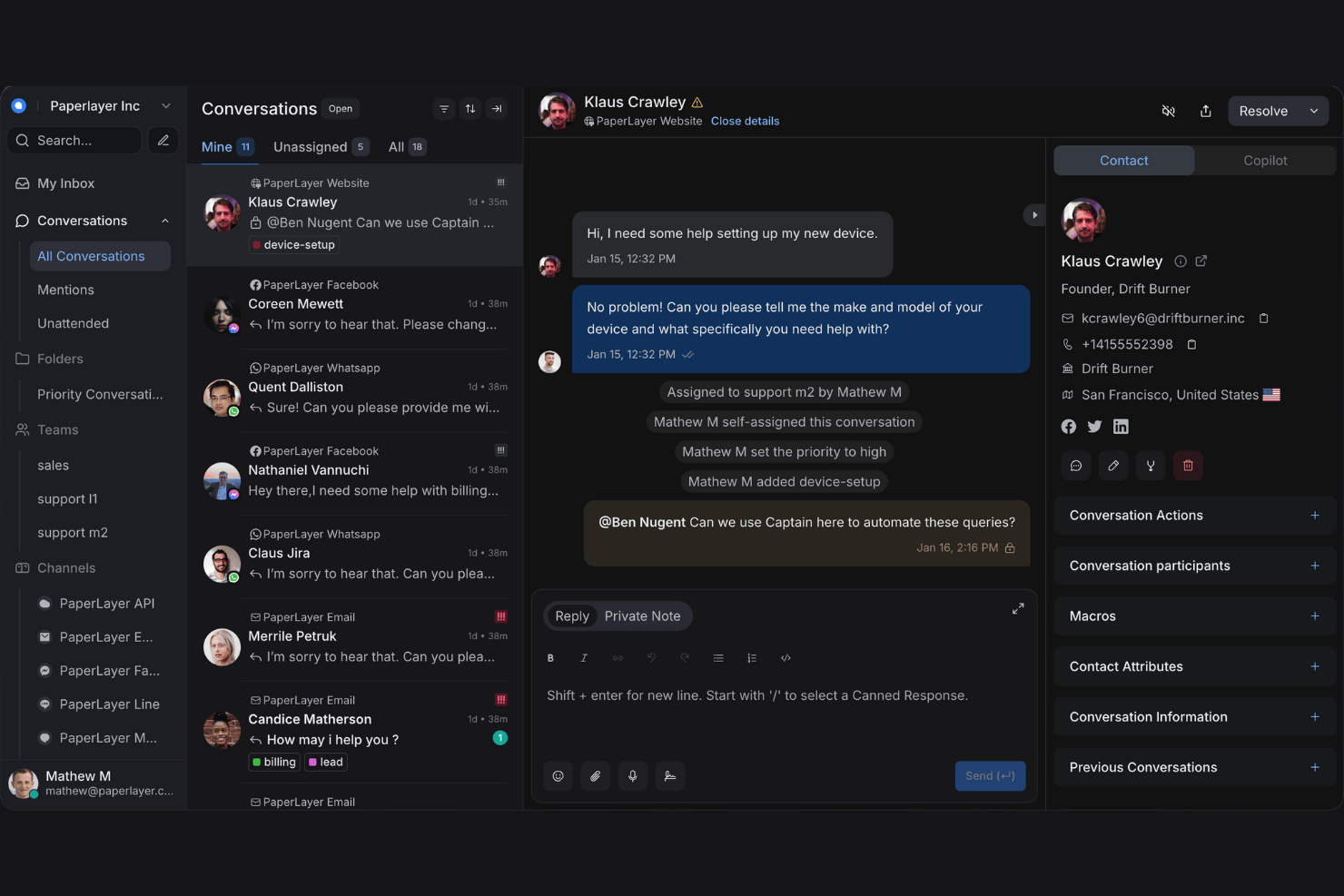
If you’re looking for a conversation management platform you can fully control and customize, Chatwoot stands out as an open-source solution. It’s a strong choice for IT teams, developers, and privacy-focused businesses that want to host messaging tools on their own infrastructure. Unlike Intercom, Chatwoot gives you direct access to the codebase and flexible deployment options for total data ownership.
Why Chatwoot Is a Good Intercom Alternative
For teams that want full control over their messaging platform, Chatwoot’s open-source approach is a major advantage. I picked Chatwoot because it lets you self-host, customize the codebase, and adapt the platform to your exact workflow or compliance needs.
The tool supports multi-channel messaging, so you can manage conversations from email, website chat, and social media in one place. If your business values transparency, flexibility, and data ownership, Chatwoot offers a level of control that Intercom doesn’t provide.
Chatwoot Key Features
Some other features that make Chatwoot appealing for conversation management include:
- Team Inboxes: Lets multiple agents collaborate and respond to messages from a shared workspace.
- Canned Responses: Allows agents to quickly insert pre-written replies to common questions.
- Conversation Assignment: Enables automatic or manual routing of conversations to specific team members.
- Customizable Widgets: Lets you tailor the chat widget’s appearance and behavior to fit your brand.
Chatwoot Integrations
Integrations include Facebook Messenger, WhatsApp, Twitter, Instagram, Telegram, Twilio, Slack, Shopify, Zendesk, and HubSpot.
Pros and Cons
Pros:
- Flexible deployment for SaaS teams needing self-hosted helpdesk solutions
- Multichannel inbox supporting chat feature, email, and social messaging
- Open-source customer service platform with full customization control
Cons:
- Analytics and reporting less advanced than enterprise support tools
- Advanced setup may require technical expertise or developer support

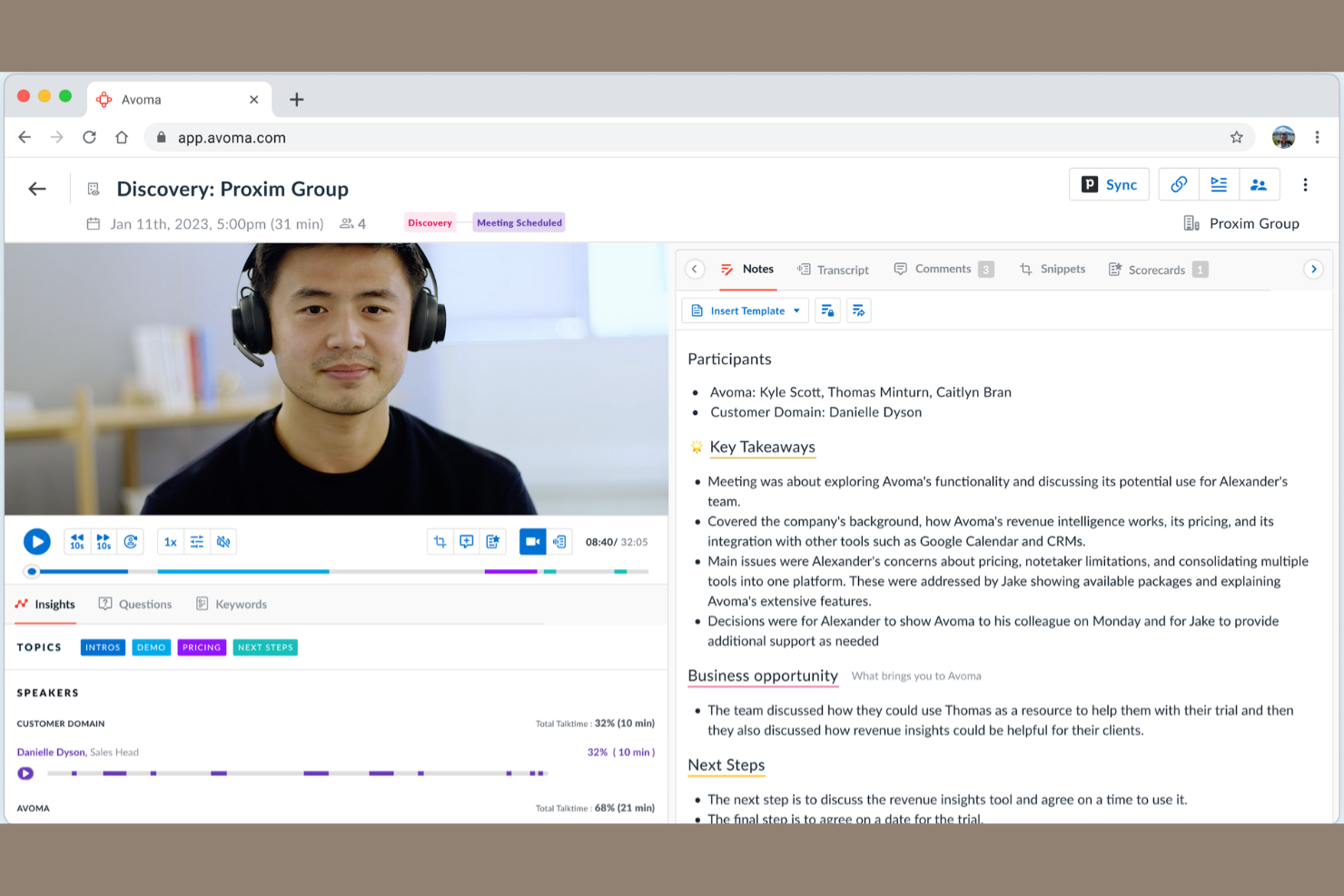
Avoma brings AI-powered meeting insights to teams that rely on virtual conversations for sales, support, or internal collaboration. If you need to capture, analyze, and act on insights from every customer or team meeting, Avoma offers automated transcription, topic tracking, and actionable summaries that go far beyond standard chat or ticketing tools. This makes it especially useful for businesses that want to turn every conversation into structured, searchable knowledge.
Why Avoma Is a Good Intercom Alternative
Unlike traditional chat-based platforms, Avoma focuses on turning every meeting into a source of actionable insights. I picked Avoma because its AI automatically transcribes meetings, identifies key topics, and generates concise summaries, which helps teams capture and organize knowledge from live conversations. This approach is especially valuable for sales, support, and customer success teams that need to reference or share detailed meeting outcomes. If you want more than just chat logs and need structured, searchable records of your conversations, Avoma offers a unique advantage over Intercom.
Avoma Key Features
Some other features in Avoma help teams manage and learn from conversations more effectively:
- Automated Agenda Templates: Let you create and reuse structured agendas for different meeting types to keep discussions focused.
- Speaker Identification: Distinguishes between different speakers in a meeting, making transcripts easier to review and search.
- Collaboration Notes: Allows team members to add comments and highlights directly to meeting transcripts for shared context.
- CRM Integration: Syncs meeting data and notes with your CRM to keep customer records up to date automatically.
Avoma Integrations
Integrations include Zoom, Microsoft Teams, Google Meet, Salesforce, HubSpot, Slack, Calendly, Gong, Outreach, and Drift.
Pros and Cons
Pros:
- CRM integrations support structured customer conversation records
- Automated transcripts and summaries improve collaboration between support agents
- AI-powered meeting analysis for sales and support teams managing customer relationships
Cons:
- Limited functionality for ticket management or customer service workflows
- No live chat feature or helpdesk software capabilities

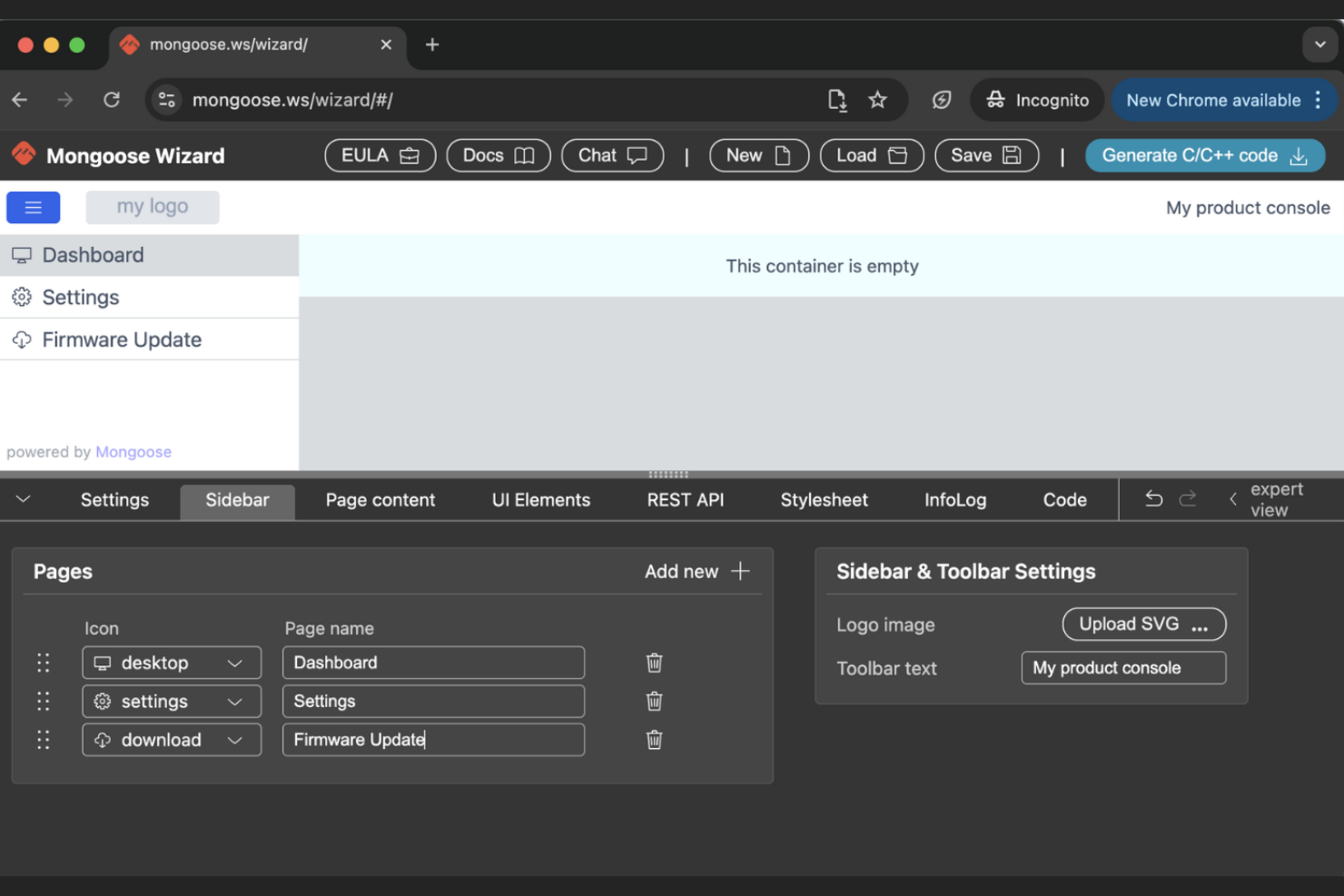
If your college or university needs to manage student conversations across multiple channels, Mongoose is built specifically for higher education communication. It’s a strong fit for admissions, student services, and alumni relations teams that want to engage students and stakeholders through text, email, and web chat. Unlike Intercom, Mongoose focuses on FERPA-compliant messaging and tailored workflows for the unique needs of academic institutions.
Why Mongoose Is a Good Intercom Alternative
For higher education teams that need to manage complex, multi-channel communication, Mongoose offers features tailored to academic environments. I picked Mongoose because it supports FERPA-compliant messaging, which is essential for protecting student privacy in colleges and universities.
The platform also provides dedicated tools for text, email, and web chat, making it easy to reach students, parents, and alumni on their preferred channels. With workflow automation designed for admissions, enrollment, and student support, Mongoose addresses needs that general-purpose tools like Intercom don’t cover.
Mongoose Key Features
Some other features that make Mongoose useful for higher education teams include:
- Conversation History Tracking: Keeps a complete record of all student and stakeholder interactions for easy reference.
- Bulk Messaging: Allows you to send announcements or reminders to large groups at once.
- Role-Based Access Controls: Lets you manage permissions for different team members based on their responsibilities.
- Analytics Dashboard: Provides insights into message delivery, response rates, and engagement trends.
Mongoose Integrations
Integrations include WhatsApp, Connect, Recruit, Salesforce, Workday, and more.
Pros and Cons
Pros:
- Conversation tracking improves engagement across student relationships
- Bulk messaging supports outreach across email and SMS channels
- Communication platform designed for managing large contact groups
Cons:
- No ticket management or helpdesk software capabilities
- Limited integrations compared to larger SaaS communication platforms

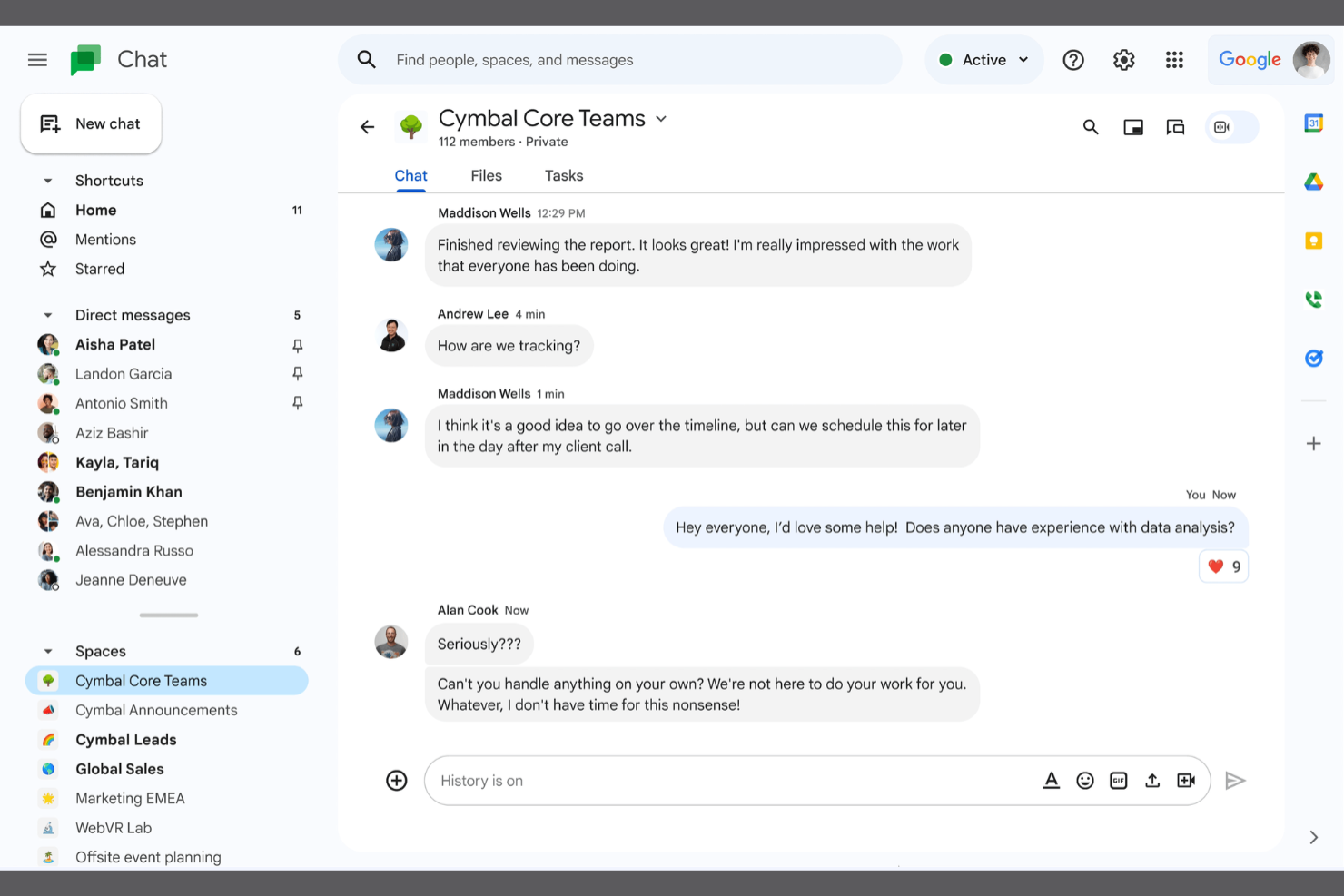
Teams already using Google Workspace will find Google Chat a natural fit for conversation management. It’s designed for organizations that want direct integration with Gmail, Google Drive, and Calendar to keep all communications and files in one ecosystem. Unlike Intercom, Google Chat focuses on internal collaboration and supports workflows for businesses that rely on Google’s productivity tools.
Why Google Chat Is a Good Intercom Alternative
If your business already relies on Google Workspace, Google Chat offers a level of integration that’s hard to match. I picked Google Chat because it lets you start conversations directly from Gmail, share files from Google Drive, and schedule meetings with Google Calendar—all without leaving the chat interface.
The platform supports threaded conversations and Spaces for organizing team discussions and projects. For organizations that want to keep all communication and collaboration within the Google ecosystem, Google Chat is a practical alternative to Intercom.
Google Chat Key Features
Some other features that make Google Chat useful for conversation management include:
- Bots and Automation: Lets you add bots to automate tasks and pull information from other Google services.
- Message Pinning: Allows you to pin important messages within a chat or Space for quick reference.
- Threaded Replies: Supports threaded conversations to keep discussions organized within group chats.
- Mobile App Support: Offers dedicated mobile apps for iOS and Android to manage conversations on the go.
Google Chat Integrations
Integrations include Google Workspace apps, Google Drive, Google Calendar, Google Meet, Google Docs, Google Sheets, Google Slides, Google Keep, Google Tasks, and Google Forms.
Pros and Cons
Pros:
- Native integrations across Gmail, Drive, and Calendar workflows
- Persistent chat spaces for organizing team discussions and projects
- User-friendly interface integrated with Google Workspace collaboration tools
Cons:
- Lacks ticketing system and helpdesk solutions for customer support
- No chat feature for external customer conversations or support agents

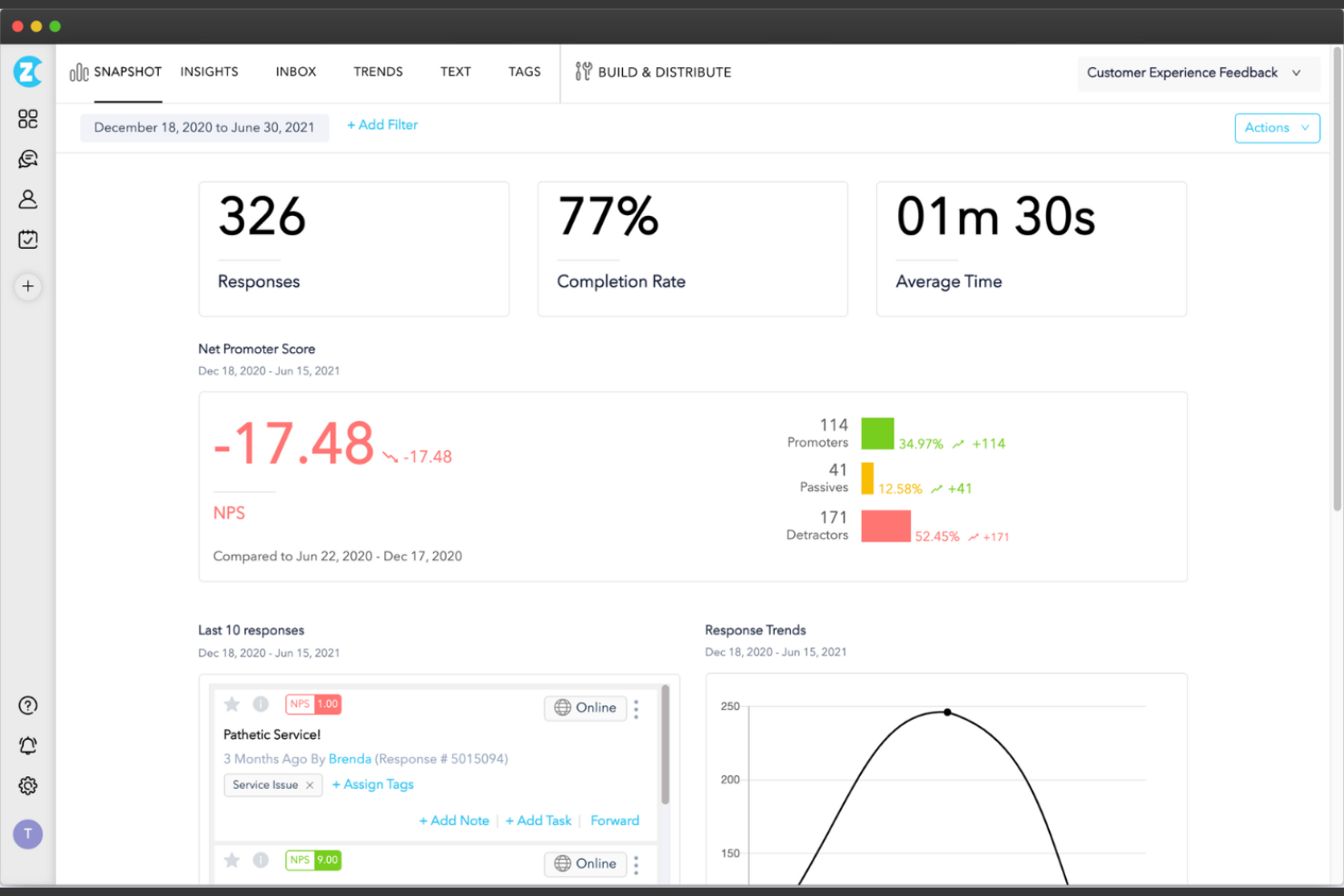
For teams that need to gather feedback across multiple channels, Zonka Feedback offers a flexible solution. It’s designed for customer experience managers, retail operations, and ecommerce businesses that want to collect, analyze, and act on feedback from web, email, SMS, and in-person touchpoints.
Unlike Intercom, Zonka Feedback specializes in multichannel survey distribution and real-time response tracking to help you close the loop with customers wherever they interact.
Why Zonka Feedback Is a Good Intercom Alternative
When you need to collect feedback from customers across several channels, Zonka Feedback stands out for its multichannel approach. I picked Zonka Feedback because it lets you deploy surveys via web, email, SMS, and even offline kiosks, so you can reach customers wherever they interact with your brand.
With real-time response tracking and automated alerts, Zonka makes it easy to act quickly on customer input. For businesses that want to go beyond chat-based feedback, Zonka Feedback provides a broader toolkit than Intercom for capturing and managing customer conversations.
Zonka Feedback Key Features
In addition to its multichannel survey distribution, I also found these features useful for managing customer conversations:
- Survey Templates Library: Offers a wide range of pre-built templates for different feedback scenarios.
- Response Inbox: Centralizes all incoming feedback for easy review and follow-up.
- Team Collaboration Tools: Allows multiple users to assign, comment on, and resolve feedback items together.
- Customizable Branding: Lets you tailor surveys and feedback forms to match your company’s visual identity.
Zonka Feedback Integrations
Integrations include Salesforce, HubSpot, Jira, Front, Freshdesk, Intercom, Help Scout, Pipedrive, Mailchimp, Airtable, Google Sheets, Zapier, Integromat, Slack, Zoom, Microsoft Teams, Zendesk, and more.
Pros and Cons
Pros:
- Centralized inbox for organizing and reviewing customer feedback
- Real-time alerts help teams resolve issues affecting customer relationships
- Multichannel surveys across email marketing, web, and SMS channels
Cons:
- Limited ticketing system functionality for managing support cases
- No live chat feature for real-time customer service interactions
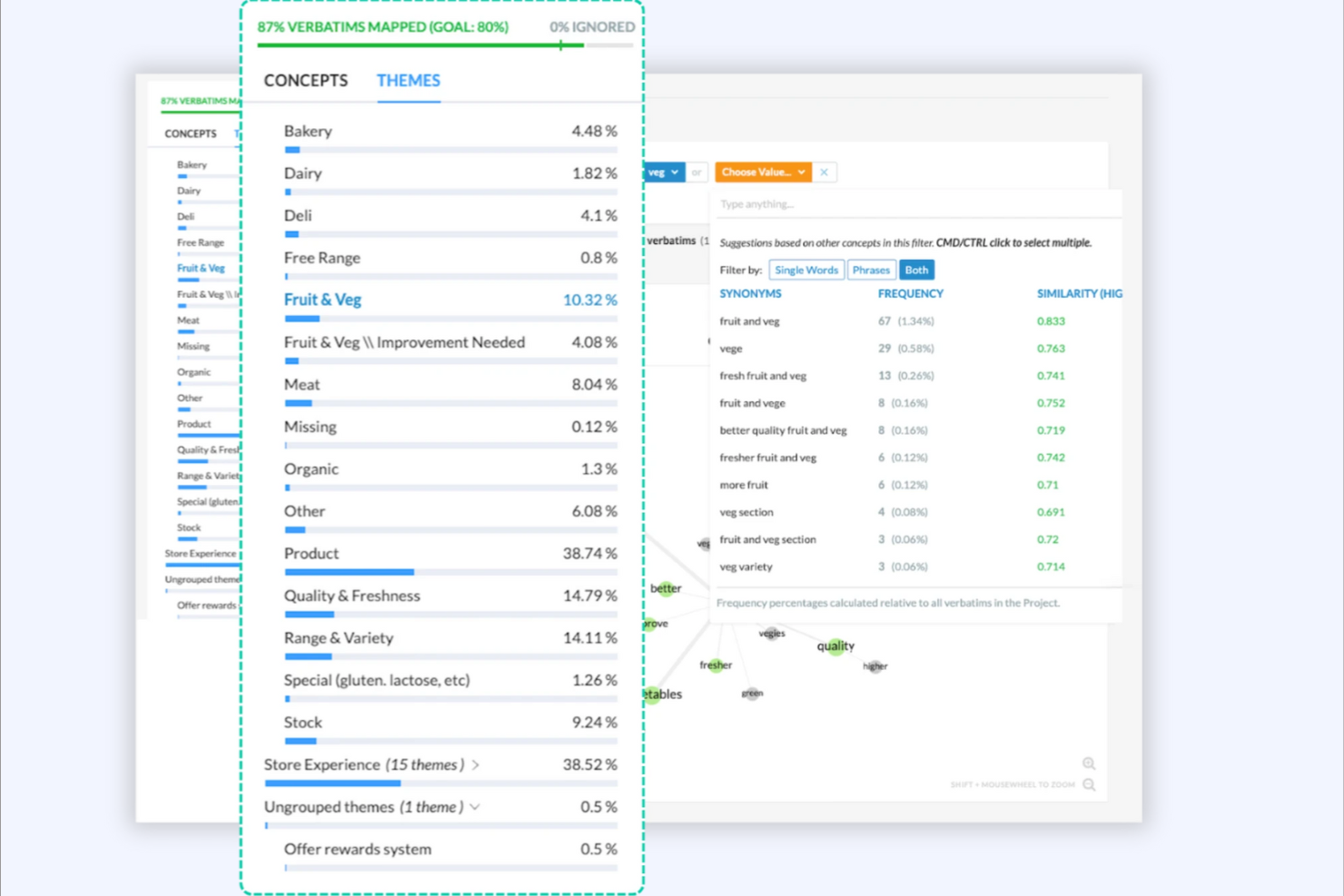
If your team needs to make sense of large volumes of customer feedback, Kapiche offers advanced analytics designed for this exact challenge. This platform is a strong fit for customer experience, insights, and operations teams in retail and ecommerce who want to uncover actionable trends from surveys, reviews, and support conversations.
Unlike Intercom, Kapiche specializes in surfacing themes and sentiment from unstructured feedback, helping you prioritize improvements based on what customers are actually saying.
Why Kapiche Is a Good Intercom Alternative
When you need to analyze customer feedback at scale, Kapiche offers capabilities that go far beyond what Intercom provides. I picked Kapiche because it uses natural language processing to automatically identify themes, sentiment, and emerging issues across thousands of open-text responses.
The platform lets you dig into feedback from surveys, support tickets, and reviews without manual coding or tagging. For teams focused on understanding the “why” behind customer conversations, Kapiche’s analytics give you a much deeper view than standard conversation management tools.
Kapiche Key Features
Some other features in Kapiche help teams get more value from their customer data:
- Custom Dashboard Builder: Lets you create tailored dashboards to visualize key feedback metrics.
- Data Source Integration: Connects with survey tools, CRM systems, and support platforms to unify feedback.
- Role-Based Access Controls: Assign permissions and access levels for different team members.
- Automated Reporting: Schedules and delivers regular insights to stakeholders without manual effort.
Kapiche Integrations
Integrations include Slack, Salesforce, Microsoft Teams, Snowflake, Google BigQuery, and more.
Pros and Cons
Pros:
- Custom dashboards surface insights from helpdesk software and surveys
- Natural language processing identifies themes affecting customer relationships
- Advanced analytics for analyzing customer feedback across support tools
Cons:
- Limited integrations with broader customer service platforms
- No chat feature or ticketing system for managing live support requests

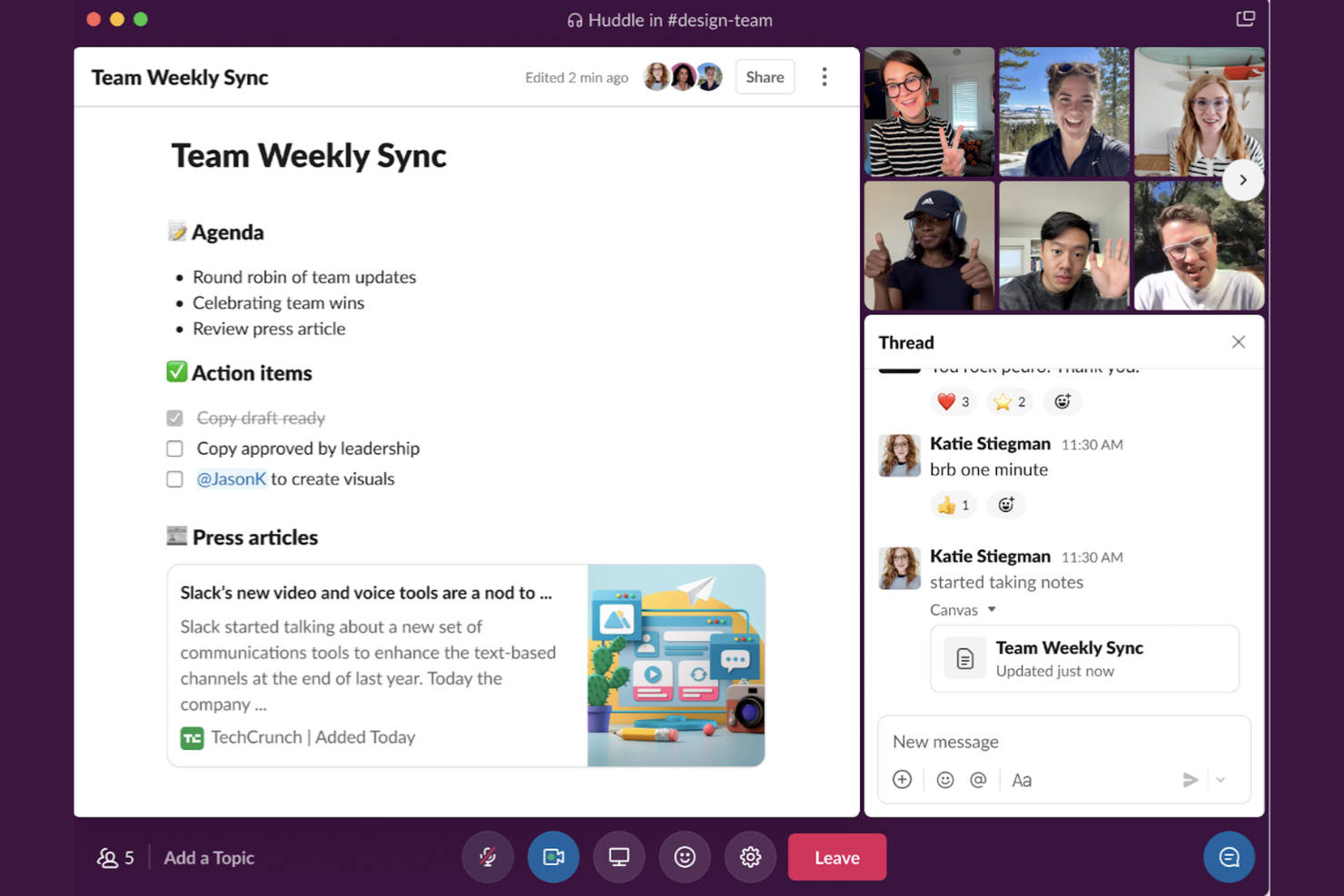
For teams that need organized, real-time messaging across projects and departments, Slack offers a channel-based approach that keeps conversations focused and accessible. Unlike Intercom, which centers on customer interactions, Slack is designed for internal collaboration, making it a strong fit for businesses that prioritize team communication and project alignment. Its flexible channels, direct messaging, and searchable history help teams manage ongoing discussions without losing context.
Why Slack Is a Good Intercom Alternative
If your business needs to manage internal conversations across multiple teams or projects, Slack’s channel-based messaging structure offers a clear advantage. I picked Slack because it lets you organize discussions by topic, department, or project, so every conversation stays focused and easy to find.
Threaded replies keep related messages together, while direct messaging supports quick, private exchanges between team members. For organizations that want to centralize team communication and reduce email clutter, Slack provides a flexible alternative to customer-focused tools like Intercom.
Slack Key Features
Some other features in Slack help teams coordinate and manage conversations more efficiently:
- Workflow Builder: Lets you automate routine tasks and processes directly within Slack channels.
- File Sharing: Supports uploading, sharing, and searching for files within conversations.
- App Integrations: Connects with a wide range of business tools to bring notifications and actions into Slack.
- Pinned Messages: Allows you to pin important messages or files in any channel for quick reference.
Slack Integrations
Integrations include Google Drive, Microsoft Office 365, Zoom, Salesforce, Trello, Asana, GitHub, Google Calendar, Dropbox, and Zendesk.
Pros and Cons
Pros:
- Workflow automation improves coordination between internal support teams
- Large ecosystem of integrations and add-ons for SaaS collaboration tools
- User-friendly interface for team messaging across departments and projects
Cons:
- Lacks ticketing system or helpdesk solutions for managing support requests
- No built-in chat feature for website customer conversations
Other Intercom Alternatives
Here are some additional Intercom alternative options that didn’t make it onto my shortlist, but are still worth checking out:
- HubSpot Service Hub
For CRM-powered customer support within a unified sales and marketing ecosystem
- Olark
For simple live website chat without a full helpdesk platform
- Tidio
For automated chatbots for ecommerce
- HelpCrunch
For combining knowledge base and email marketing features
- Gorgias
For ecommerce support teams managing storefront platforms
- Crisp
For AI-powered multichannel messaging with built-in CRM capabilities
- Zendesk
For omnichannel customer support
- Zoho Desk
For existing Zoho business software ecosystem users
- Front
For shared inbox collaboration


Intercom Alternatives Selection Criteria
When selecting the best Intercom alternatives to include in this list, I considered common buyer needs and pain points related to conversation management software products, like managing high volumes of customer conversations and integrating with existing business tools. I also used the following framework to keep my evaluation structured and fair:
Core Functionality (25% of total score)
To be considered for inclusion in this list, each solution had to fulfill these common use cases:
- Manage real-time chat conversations
- Route messages to the right team or agent
- Store and search conversation history
- Support group and private messaging
- Integrate with email and other communication channels
Additional Standout Features (25% of total score)
To help further narrow down the competition, I also looked for unique features, such as:
- AI-powered conversation routing
- Built-in knowledge base or help center
- Customizable chat widgets for websites
- Automated workflows and chatbots
- Advanced analytics and reporting dashboards
Usability (10% of total score)
To get a sense of the usability of each system, I considered the following:
- Simple and intuitive user interface
- Easy navigation between conversations and channels
- Minimal clicks to access key features
- Responsive design for mobile and desktop
- Clear labeling and organization of tools
Onboarding (10% of total score)
To evaluate the onboarding experience for each platform, I considered the following:
- Availability of step-by-step product tours
- Access to training videos and documentation
- Pre-built templates for common workflows
- In-app chatbots for onboarding support
- Live or recorded webinars for new users
Customer Support (10% of total score)
To assess each software provider’s customer support services, I considered the following:
- 24/7 live chat or email support
- Access to a searchable help center
- Availability of onboarding specialists
- Fast response times to support requests
- Community forums for peer-to-peer help
Value For Money (10% of total score)
To evaluate the value for money of each platform, I considered the following:
- Transparent and flexible pricing plans
- Features included at each pricing tier
- Free plan or trial availability
- No hidden fees or surprise charges
- Discounts for annual billing or larger teams
Customer Reviews (10% of total score)
To get a sense of overall customer satisfaction, I considered the following when reading customer reviews:
- Positive feedback on reliability and uptime
- Comments on ease of setup and daily use
- Reports of helpful and responsive support
- User opinions on feature completeness
- Feedback on integration with other tools
Why Look For an Intercom Alternative?
While Intercom is a good choice of conversation management software, there are several reasons why some teams start looking at alternative helpdesk software or customer service platforms. Depending on your team’s needs, you may want a solution with different pricing, support tools, or advanced features for managing customer conversations.
You might be looking for an Intercom alternative because…
• You need more affordable pricing for small or growing teams
• You want deeper integration with non-Intercom tools or platforms
• You require advanced features such as segmentation, analytics, or workflow automation
• You need a solution that supports omnichannel support across chat, email, and messaging
• You want a tool focused on internal team collaboration or all-in-one marketing automation
If any of these sound like you, you’ve come to the right place. My list contains several conversation management software options that are better suited for teams facing these challenges with Intercom and looking for alternative solutions.
Intercom Key Features
Here are some of the key features of Intercom, to help you contrast and compare what alternative solutions offer:
- Live chat widget for websites and apps
- Automated chatbots for handling common questions
- Shared inbox for team collaboration on customer conversations
- In-app messaging for targeted user engagement and segmentation
- Customizable conversation routing rules
- Integration with CRM systems and other customer support tools
- Customer data and conversation history tracking
- Advanced reporting and analytics dashboards
- Proactive messaging based on user behavior, including pop-ups for engagement
- Knowledge base and self-service support articles or a customer portal for customer assistance
What’s Next:
If you're in the process of researching Intercom alternatives, connect with a SoftwareSelect advisor for free recommendations.
You fill out a form and have a quick chat where they get into the specifics of your needs. Then you'll get a shortlist of software to review. They'll even support you through the entire buying process, including price negotiations.